TiDB and Amazon Aurora
Compare / Contrast / Combine
Ed Huang, CTO @ PingCAP
h@pingcap.com
TiDB Community Slack Channel
https://pingcap.com/tidbslack/
Compare
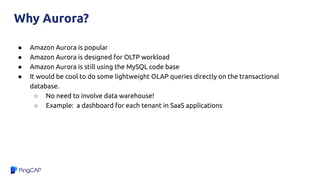
Why Aurora?
● Amazon Aurora is popular
● Amazon Aurora is designed for OLTP workload
● Amazon Aurora is still using the MySQL code base
● It would be cool to do some lightweight OLAP queries directly on the transactional
database.
○ No need to involve data warehouse!
○ Example: a dashboard for each tenant in SaaS applications
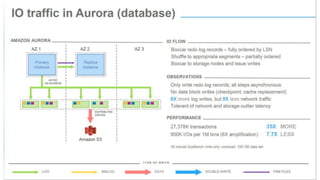
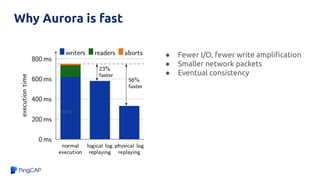
Why Aurora is fast
● Fewer I/O, fewer write amplification
● Smaller network packets
● Eventual consistency
HyPer
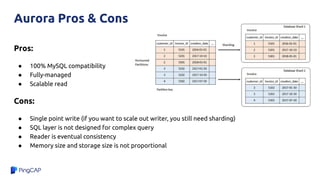
Pros:
● 100% MySQL compatibility
● Fully-managed
● Scalable read
Cons:
● Single point write (if you want to scale out writer, you still need sharding)
● SQL layer is not designed for complex query
● Reader is eventual consistency
● Memory size and storage size is not proportional
Aurora Pros & Cons
● Read >> Write, and all the writes can handle by one node
● Data size is not too large
○ Reason: Performance will have significant fluctuations, if the gap of memory and actual
storage size is too large
● Reader doesn’t require stong consistency
● Migrate from legacy MySQL applications
Aurora typical scenarios
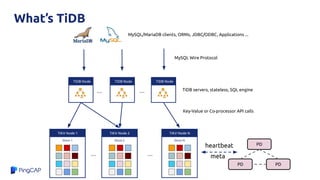
What’s TiDB
TiKV Node N
Store N
TiKV Node 1
Store 1
TiKV Node 2
Store 2
...
TiDB Node TiDB Node TiDB Node
Key-Value or Co-processor API calls
...
...
... TiDB servers, stateless, SQL engine
PD
PD PD
MySQL/MariaDB clients, ORMs, JDBC/ODBC, Applications ...
MySQL Wire Protocol
heartbeat
meta
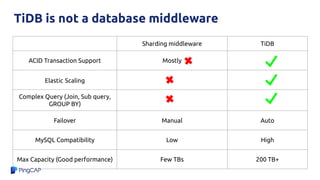
TiDB is not a database middleware
Sharding middleware TiDB
ACID Transaction Support Mostly
Elastic Scaling
Complex Query (Join, Sub query,
GROUP BY)
Failover Manual Auto
MySQL Compatibility Low High
Max Capacity (Good performance) Few TBs 200 TB+
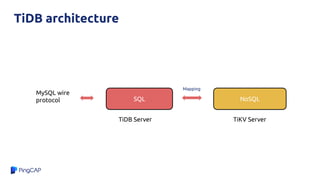
TiDB architecture
SQL NoSQL
Mapping
MySQL wire
protocol
TiDB Server TiKV Server
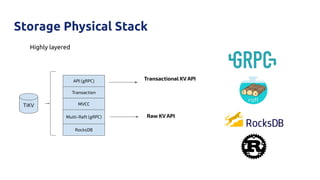
Storage Physical Stack
Highly layered
TiKV
API (gRPC)
Transaction
MVCC
Multi-Raft (gRPC)
RocksDB
Raw KV API
Transactional KV API
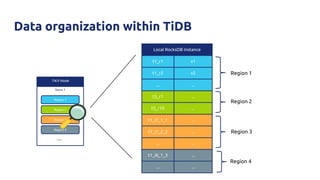
TiKV Node
Store 1
Region 1
Region 2
Region 3
Region 4
Local RocksDB instance
t1_r1 v1
t1_r2 v2
... ...
t5_r1 ...
t5_r10 ...
t1_i1_1_1 ...
t1_i1_2_2 ...
... ...
t1_i6_1_3 ...
... ...
Region 1
Region 2
Region 3
Region 4
Data organization within TiDB
...
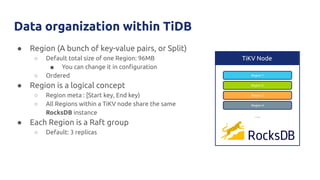
Data organization within TiDB
● Region (A bunch of key-value pairs, or Split)
○ Default total size of one Region: 96MB
■ You can change it in configuration
○ Ordered
● Region is a logical concept
○ Region meta : [Start key, End key)
○ All Regions within a TiKV node share the same
RocksDB instance
● Each Region is a Raft group
○ Default: 3 replicas
TiKV Node
…...
Region 1
Region 2
Region 3
Region 4
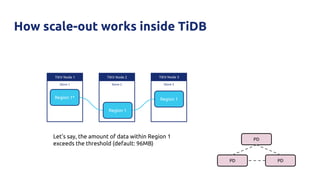
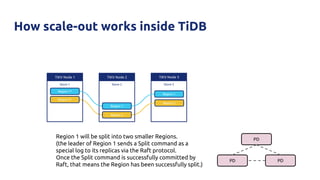
How scale-out works inside TiDB
TiKV Node 3
Store 3
TiKV Node 1
Store 1
TiKV Node 2
Store 2
Region 1*
Region 1
Region 1
Let’s say, the amount of data within Region 1
exceeds the threshold (default: 96MB)
PD
PD PD
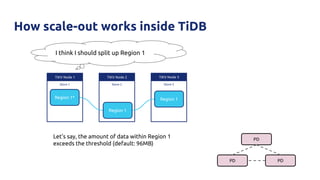
How scale-out works inside TiDB
TiKV Node 3
Store 3
TiKV Node 1
Store 1
TiKV Node 2
Store 2
Region 1*
Region 1
Region 1
Let’s say, the amount of data within Region 1
exceeds the threshold (default: 96MB)
PD
PD PD
I think I should split up Region 1
How scale-out works inside TiDB
TiKV Node 3
Store 3
TiKV Node 1
Store 1
TiKV Node 2
Store 2
Region 1*
Region 1
Region 1
Region 2*
Region 2
Region 2
Region 1 will be split into two smaller Regions.
(the leader of Region 1 sends a Split command as a
special log to its replicas via the Raft protocol.
Once the Split command is successfully committed by
Raft, that means the Region has been successfully split.)
PD
PD PD
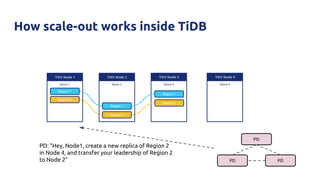
How scale-out works inside TiDB
TiKV Node 3
Store 3
TiKV Node 1
Store 1
TiKV Node 2
Store 2
Region 1*
Region 1
Region 1
Region 2*
Region 2
Region 2
TiKV Node 4
Store 4
PD
PD PD
PD: “Hey, Node1, create a new replica of Region 2
in Node 4, and transfer your leadership of Region 2
to Node 2”
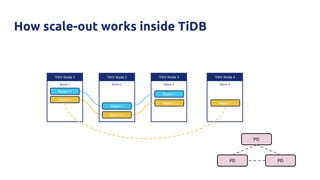
How scale-out works inside TiDB
TiKV Node 3
Store 3
TiKV Node 1
Store 1
TiKV Node 2
Store 2
Region 1*
Region 1
Region 1
Region 2
Region 2*
Region 2
TiKV Node 4
Store 4
Region 2
PD
PD PD
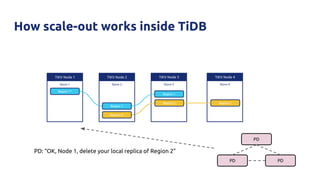
How scale-out works inside TiDB
TiKV Node 3
Store 3
TiKV Node 1
Store 1
TiKV Node 2
Store 2
Region 1*
Region 1
Region 1
Region 2*
Region 2
TiKV Node 4
Store 4
Region 2
PD
PD PD
PD: “OK, Node 1, delete your local replica of Region 2”
TiDB
TiDB
TiDB
Application
via
MySQL
Protocol
TiKV
TiKV
TiKV
TiKV
TiKV
TiKV
... ...
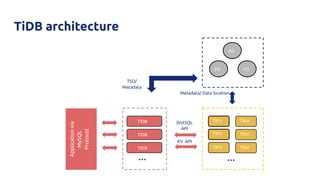
DistSQL
API
KV API
PD
PD PD
Metadata/ Data location
TSO/
Metadata
TiDB architecture
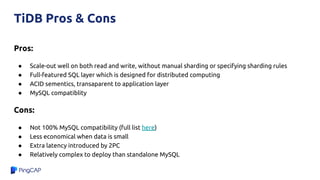
Pros:
● Scale-out well on both read and write, without manual sharding or specifying sharding rules
● Full-featured SQL layer which is designed for distributed computing
● ACID sementics, transaparent to application layer
● MySQL compatiblity
Cons:
● Not 100% MySQL compatibility (full list here)
● Less economical when data is small
● Extra latency introduced by 2PC
● Relatively complex to deploy than standalone MySQL
TiDB Pros & Cons
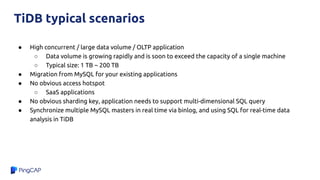
● High concurrent / large data volume / OLTP application
○ Data volume is growing rapidly and is soon to exceed the capacity of a single machine
○ Typical size: 1 TB ~ 200 TB
● Migration from MySQL for your existing applications
● No obvious access hotspot
○ SaaS applications
● No obvious sharding key, application needs to support multi-dimensional SQL query
● Synchronize multiple MySQL masters in real time via binlog, and using SQL for real-time data
analysis in TiDB
TiDB typical scenarios
Contrast
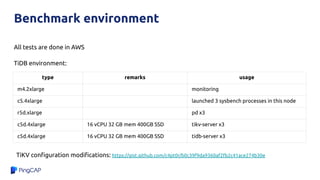
Benchmark environment
type remarks usage
m4.2xlarge monitoring
c5.4xlarge launched 3 sysbench processes in this node
r5d.xlarge pd x3
c5d.4xlarge 16 vCPU 32 GB mem 400GB SSD tikv-server x3
c5d.4xlarge 16 vCPU 32 GB mem 400GB SSD tidb-server x3
All tests are done in AWS
TiDB environment:
TiKV configuration modifications: https://gist.github.com/c4pt0r/b0c39f9da9360af2fb2c41ace274b30e
Benchmark environment
type remarks usage
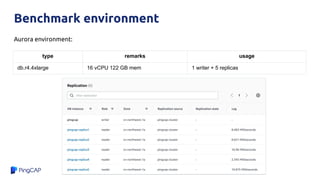
db.r4.4xlarge 16 vCPU 122 GB mem 1 writer + 5 replicas
Aurora environment:
Benchmark - Sysbench
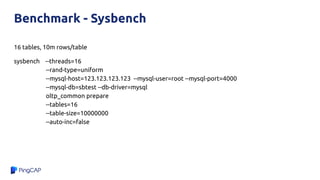
16 tables, 10m rows/table
sysbench --threads=16
--rand-type=uniform
--mysql-host=123.123.123.123 --mysql-user=root --mysql-port=4000
--mysql-db=sbtest --db-driver=mysql
oltp_common prepare
--tables=16
--table-size=10000000
--auto-inc=false
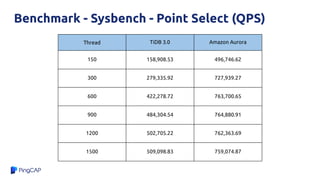
Thread TiDB 3.0 Amazon Aurora
150 158,908.53 496,746.62
300 279,335.92 727,939.27
600 422,278.72 763,700.65
900 484,304.54 764,880.91
1200 502,705.22 762,363.69
1500 509,098.83 759,074.87
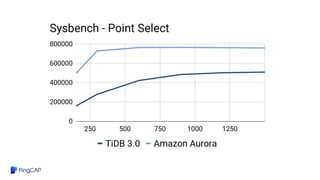
Benchmark - Sysbench - Point Select (QPS)
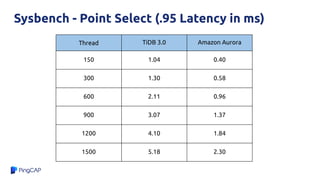
Sysbench - Point Select (.95 Latency in ms)
Thread TiDB 3.0 Amazon Aurora
150 1.04 0.40
300 1.30 0.58
600 2.11 0.96
900 3.07 1.37
1200 4.10 1.84
1500 5.18 2.30
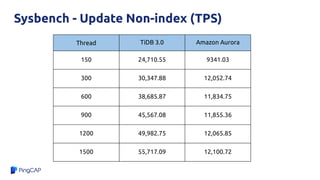
Sysbench - Update Non-index (TPS)
Thread TiDB 3.0 Amazon Aurora
150 24,710.55 9341.03
300 30,347.88 12,052.74
600 38,685.87 11,834.75
900 45,567.08 11,855.36
1200 49,982.75 12,065.85
1500 55,717.09 12,100.72
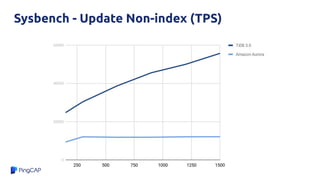
Sysbench - Update Non-index (TPS)
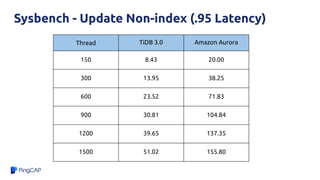
Sysbench - Update Non-index (.95 Latency)
Thread TiDB 3.0 Amazon Aurora
150 8.43 20.00
300 13.95 38.25
600 23.52 71.83
900 30.81 104.84
1200 39.65 137.35
1500 51.02 155.80
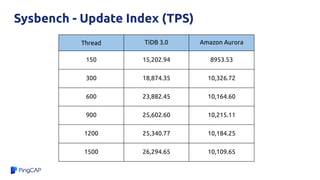
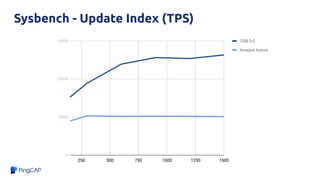
Sysbench - Update Index (TPS)
Thread TiDB 3.0 Amazon Aurora
150 15,202.94 8953.53
300 18,874.35 10,326.72
600 23,882.45 10,164.60
900 25,602.60 10,215.11
1200 25,340.77 10,184.25
1500 26,294.65 10,109.65
Sysbench - Update Index (TPS)
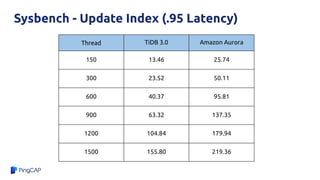
Sysbench - Update Index (.95 Latency)
Thread TiDB 3.0 Amazon Aurora
150 13.46 25.74
300 23.52 50.11
600 40.37 95.81
900 63.32 137.35
1200 104.84 179.94
1500 155.80 219.36
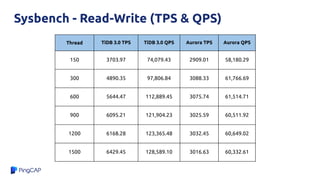
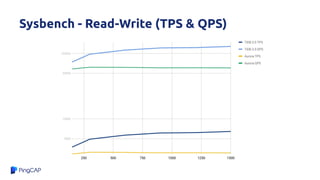
Sysbench - Read-Write (TPS & QPS)
Thread TiDB 3.0 TPS TiDB 3.0 QPS Aurora TPS Aurora QPS
150 3703.97 74,079.43 2909.01 58,180.29
300 4890.35 97,806.84 3088.33 61,766.69
600 5644.47 112,889.45 3075.74 61,514.71
900 6095.21 121,904.23 3025.59 60,511.92
1200 6168.28 123,365.48 3032.45 60,649.02
1500 6429.45 128,589.10 3016.63 60,332.61
Sysbench - Read-Write (TPS & QPS)
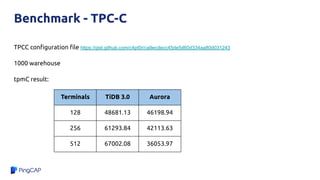
Benchmark - TPC-C
TPCC configuration file https://gist.github.com/c4pt0r/ca9ecdecc45de5d60d334aa80d031243
1000 warehouse
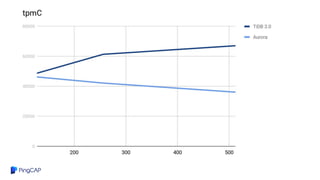
tpmC result:
Terminals TiDB 3.0 Aurora
128 48681.13 46198.94
256 61293.84 42113.63
512 67002.08 36053.97
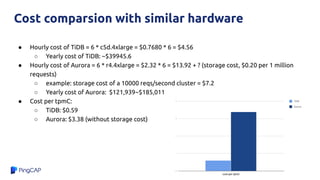
● Hourly cost of TiDB = 6 * c5d.4xlarge = $0.7680 * 6 = $4.56
○ Yearly cost of TiDB: ~$39945.6
● Hourly cost of Aurora = 6 * r4.4xlarge = $2.32 * 6 = $13.92 + ? (storage cost, $0.20 per 1 million
requests)
○ example: storage cost of a 10000 reqs/second cluster = $7.2
○ Yearly cost of Aurora: $121,939~$185,011
● Cost per tpmC:
○ TiDB: $0.59
○ Aurora: $3.38 (without storage cost)
Cost comparsion with similar hardware
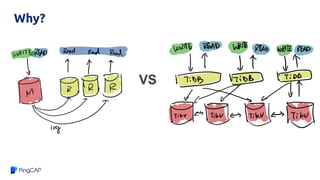
Why?
VS
Why?
A Query Execution Plan Example:
TiDB(root@127.0.0.1:test) > explain select count(*) from t1, t2 where t1.a=t2.a;
+--------------------------+----------+------+---------------------------------------------------------------------+
| id | count | task | operator info |
+--------------------------+----------+------+---------------------------------------------------------------------+
| StreamAgg_13 | 1.00 | root | funcs:count(1) |
| └─MergeJoin_33 | 12500.00 | root | inner join, left key:test.t1.a, right key:test.t2.a |
| ├─IndexReader_25 | 10000.00 | root | index:IndexScan_24 |
| │ └─IndexScan_24 | 10000.00 | cop | table:t1, index:a, range:[NULL,+inf], keep order:true, stats:pseudo |
| └─IndexReader_28 | 10000.00 | root | index:IndexScan_27 |
| └─IndexScan_27 | 10000.00 | cop | table:t2, index:a, range:[NULL,+inf], keep order:true, stats:pseudo |
+--------------------------+----------+------+---------------------------------------------------------------------+
6 rows in set (0.00 sec)
Combine
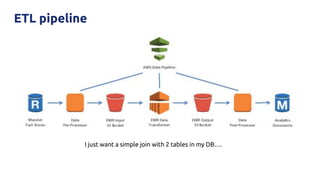
ETL pipeline
I just want a simple join with 2 tables in my DB….
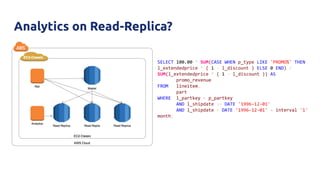
Analytics on Read-Replica?
SELECT 100.00 * SUM(CASE WHEN p_type LIKE 'PROMO%' THEN
l_extendedprice * ( 1 - l_discount ) ELSE 0 END) /
SUM(l_extendedprice * ( 1 - l_discount )) AS
promo_revenue
FROM lineitem,
part
WHERE l_partkey = p_partkey
AND l_shipdate >= DATE '1996-12-01'
AND l_shipdate < DATE '1996-12-01' + interval '1'
month;
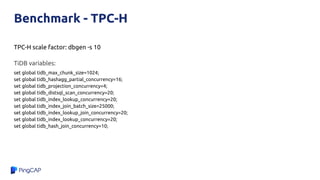
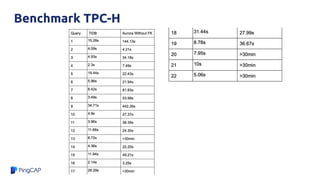
Benchmark - TPC-H
TPC-H scale factor: dbgen -s 10
TiDB variables:
set global tidb_max_chunk_size=1024;
set global tidb_hashagg_partial_concurrency=16;
set global tidb_projection_concurrency=4;
set global tidb_distsql_scan_concurrency=20;
set global tidb_index_lookup_concurrency=20;
set global tidb_index_join_batch_size=25000;
set global tidb_index_lookup_join_concurrency=20;
set global tidb_index_lookup_concurrency=20;
set global tidb_hash_join_concurrency=10;
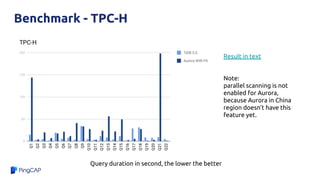
Benchmark - TPC-H
Query duration in second, the lower the better
Result in text
Note:
parallel scanning is not
enabled for Aurora,
because Aurora in China
region doesn’t have this
feature yet.
Benchmark TPC-H
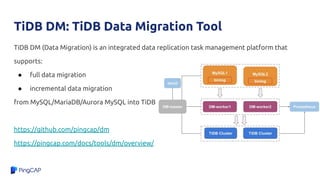
TiDB DM: TiDB Data Migration Tool
TiDB DM (Data Migration) is an integrated data replication task management platform that
supports:
● full data migration
● incremental data migration
from MySQL/MariaDB/Aurora MySQL into TiDB
https://github.com/pingcap/dm
https://pingcap.com/docs/tools/dm/overview/
PingCAP.com
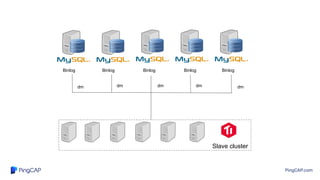
Slave cluster
Binlog Binlog Binlog
Binlog Binlog
dm dm dm dm
dm
PingCAP.com
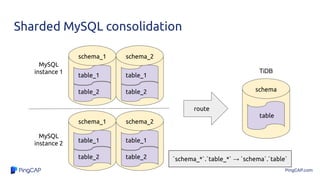
table_1
table_2
schema_1
table_1
table_2
schema_2
table_1
table_2
schema_1
table_1
table_2
schema_2
MySQL
instance 1
MySQL
instance 2
route
table
schema
TiDB
`schema_*`.`table_*` → `schema`.`table`
Sharded MySQL consolidation
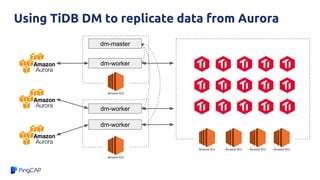
Using TiDB DM to replicate data from Aurora
dm-master
dm-worker
dm-worker
dm-worker
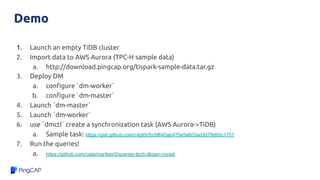
Demo
1. Launch an empty TiDB cluster
2. Import data to AWS Aurora (TPC-H sample data)
a. http://download.pingcap.org/tispark-sample-data.tar.gz
3. Deploy DM
a. configure `dm-worker`
b. configure `dm-master`
4. Launch `dm-master`
5. Launch `dm-worker`
6. use `dmctl` create a synchronization task (AWS Aurora->TiDB)
a. Sample task: https://gist.github.com/c4pt0r/bcbf645ab475e5a603ad3d79d95c1757
7. Run the queries!
a. https://github.com/catarinaribeir0/queries-tpch-dbgen-mysql
Check list
● Enable binlog for Amazon Aurora, use ‘ROW’ mode
○ https://aws.amazon.com/premiumsupport/knowledge-center/enable-binary-logging-aurora/
● Enable GTID for Amazon Aurora
○ https://docs.aws.amazon.com/AmazonRDS/latest/AuroraUserGuide/mysql-replication-gtid.html#mysql-replication-gtid.co
nfiguring-aurora
● Make sure DM can connect to Amazon Aurora master (check security group rules)
● Ignore some unsupported syntax
○ ignore-checking-items: ["dump_privilege", "replication_privilege"]
○ example task.yaml: https://gist.github.com/c4pt0r/bcbf645ab475e5a603ad3d79d95c1757
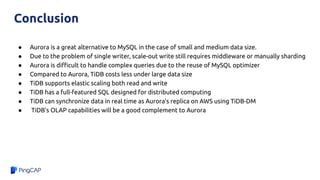
● Aurora is a great alternative to MySQL in the case of small and medium data size.
● Due to the problem of single writer, scale-out write still requires middleware or manually sharding
● Aurora is difficult to handle complex queries due to the reuse of MySQL optimizer
● Compared to Aurora, TiDB costs less under large data size
● TiDB supports elastic scaling both read and write
● TiDB has a full-featured SQL designed for distributed computing
● TiDB can synchronize data in real time as Aurora's replica on AWS using TiDB-DM
● TiDB's OLAP capabilities will be a good complement to Aurora
Conclusion
Thank You !
GitHub:github.com/pingcap/tidb
Email: info@pingcap.com
TiDB Community Slack Channel
https://pingcap.com/tidbslack/

TiDB vs Aurora.pdf

  • 1.
    TiDB and AmazonAurora Compare / Contrast / Combine Ed Huang, CTO @ PingCAP h@pingcap.com TiDB Community Slack Channel https://pingcap.com/tidbslack/
  • 2.
  • 3.
    Why Aurora? ● AmazonAurora is popular ● Amazon Aurora is designed for OLTP workload ● Amazon Aurora is still using the MySQL code base ● It would be cool to do some lightweight OLAP queries directly on the transactional database. ○ No need to involve data warehouse! ○ Example: a dashboard for each tenant in SaaS applications
  • 6.
    Why Aurora isfast ● Fewer I/O, fewer write amplification ● Smaller network packets ● Eventual consistency HyPer
  • 7.
    Pros: ● 100% MySQLcompatibility ● Fully-managed ● Scalable read Cons: ● Single point write (if you want to scale out writer, you still need sharding) ● SQL layer is not designed for complex query ● Reader is eventual consistency ● Memory size and storage size is not proportional Aurora Pros & Cons
  • 8.
    ● Read >>Write, and all the writes can handle by one node ● Data size is not too large ○ Reason: Performance will have significant fluctuations, if the gap of memory and actual storage size is too large ● Reader doesn’t require stong consistency ● Migrate from legacy MySQL applications Aurora typical scenarios
  • 9.
    What’s TiDB TiKV NodeN Store N TiKV Node 1 Store 1 TiKV Node 2 Store 2 ... TiDB Node TiDB Node TiDB Node Key-Value or Co-processor API calls ... ... ... TiDB servers, stateless, SQL engine PD PD PD MySQL/MariaDB clients, ORMs, JDBC/ODBC, Applications ... MySQL Wire Protocol heartbeat meta
  • 10.
    TiDB is nota database middleware Sharding middleware TiDB ACID Transaction Support Mostly Elastic Scaling Complex Query (Join, Sub query, GROUP BY) Failover Manual Auto MySQL Compatibility Low High Max Capacity (Good performance) Few TBs 200 TB+
  • 11.
    TiDB architecture SQL NoSQL Mapping MySQLwire protocol TiDB Server TiKV Server
  • 12.
    Storage Physical Stack Highlylayered TiKV API (gRPC) Transaction MVCC Multi-Raft (gRPC) RocksDB Raw KV API Transactional KV API
  • 13.
    TiKV Node Store 1 Region1 Region 2 Region 3 Region 4 Local RocksDB instance t1_r1 v1 t1_r2 v2 ... ... t5_r1 ... t5_r10 ... t1_i1_1_1 ... t1_i1_2_2 ... ... ... t1_i6_1_3 ... ... ... Region 1 Region 2 Region 3 Region 4 Data organization within TiDB ...
  • 14.
    Data organization withinTiDB ● Region (A bunch of key-value pairs, or Split) ○ Default total size of one Region: 96MB ■ You can change it in configuration ○ Ordered ● Region is a logical concept ○ Region meta : [Start key, End key) ○ All Regions within a TiKV node share the same RocksDB instance ● Each Region is a Raft group ○ Default: 3 replicas TiKV Node …... Region 1 Region 2 Region 3 Region 4
  • 15.
    How scale-out worksinside TiDB TiKV Node 3 Store 3 TiKV Node 1 Store 1 TiKV Node 2 Store 2 Region 1* Region 1 Region 1 Let’s say, the amount of data within Region 1 exceeds the threshold (default: 96MB) PD PD PD
  • 16.
    How scale-out worksinside TiDB TiKV Node 3 Store 3 TiKV Node 1 Store 1 TiKV Node 2 Store 2 Region 1* Region 1 Region 1 Let’s say, the amount of data within Region 1 exceeds the threshold (default: 96MB) PD PD PD I think I should split up Region 1
  • 17.
    How scale-out worksinside TiDB TiKV Node 3 Store 3 TiKV Node 1 Store 1 TiKV Node 2 Store 2 Region 1* Region 1 Region 1 Region 2* Region 2 Region 2 Region 1 will be split into two smaller Regions. (the leader of Region 1 sends a Split command as a special log to its replicas via the Raft protocol. Once the Split command is successfully committed by Raft, that means the Region has been successfully split.) PD PD PD
  • 18.
    How scale-out worksinside TiDB TiKV Node 3 Store 3 TiKV Node 1 Store 1 TiKV Node 2 Store 2 Region 1* Region 1 Region 1 Region 2* Region 2 Region 2 TiKV Node 4 Store 4 PD PD PD PD: “Hey, Node1, create a new replica of Region 2 in Node 4, and transfer your leadership of Region 2 to Node 2”
  • 19.
    How scale-out worksinside TiDB TiKV Node 3 Store 3 TiKV Node 1 Store 1 TiKV Node 2 Store 2 Region 1* Region 1 Region 1 Region 2 Region 2* Region 2 TiKV Node 4 Store 4 Region 2 PD PD PD
  • 20.
    How scale-out worksinside TiDB TiKV Node 3 Store 3 TiKV Node 1 Store 1 TiKV Node 2 Store 2 Region 1* Region 1 Region 1 Region 2* Region 2 TiKV Node 4 Store 4 Region 2 PD PD PD PD: “OK, Node 1, delete your local replica of Region 2”
  • 21.
  • 22.
    Pros: ● Scale-out wellon both read and write, without manual sharding or specifying sharding rules ● Full-featured SQL layer which is designed for distributed computing ● ACID sementics, transaparent to application layer ● MySQL compatiblity Cons: ● Not 100% MySQL compatibility (full list here) ● Less economical when data is small ● Extra latency introduced by 2PC ● Relatively complex to deploy than standalone MySQL TiDB Pros & Cons
  • 23.
    ● High concurrent/ large data volume / OLTP application ○ Data volume is growing rapidly and is soon to exceed the capacity of a single machine ○ Typical size: 1 TB ~ 200 TB ● Migration from MySQL for your existing applications ● No obvious access hotspot ○ SaaS applications ● No obvious sharding key, application needs to support multi-dimensional SQL query ● Synchronize multiple MySQL masters in real time via binlog, and using SQL for real-time data analysis in TiDB TiDB typical scenarios
  • 24.
  • 25.
    Benchmark environment type remarksusage m4.2xlarge monitoring c5.4xlarge launched 3 sysbench processes in this node r5d.xlarge pd x3 c5d.4xlarge 16 vCPU 32 GB mem 400GB SSD tikv-server x3 c5d.4xlarge 16 vCPU 32 GB mem 400GB SSD tidb-server x3 All tests are done in AWS TiDB environment: TiKV configuration modifications: https://gist.github.com/c4pt0r/b0c39f9da9360af2fb2c41ace274b30e
  • 26.
    Benchmark environment type remarksusage db.r4.4xlarge 16 vCPU 122 GB mem 1 writer + 5 replicas Aurora environment:
  • 27.
    Benchmark - Sysbench 16tables, 10m rows/table sysbench --threads=16 --rand-type=uniform --mysql-host=123.123.123.123 --mysql-user=root --mysql-port=4000 --mysql-db=sbtest --db-driver=mysql oltp_common prepare --tables=16 --table-size=10000000 --auto-inc=false
  • 28.
    Thread TiDB 3.0Amazon Aurora 150 158,908.53 496,746.62 300 279,335.92 727,939.27 600 422,278.72 763,700.65 900 484,304.54 764,880.91 1200 502,705.22 762,363.69 1500 509,098.83 759,074.87 Benchmark - Sysbench - Point Select (QPS)
  • 30.
    Sysbench - PointSelect (.95 Latency in ms) Thread TiDB 3.0 Amazon Aurora 150 1.04 0.40 300 1.30 0.58 600 2.11 0.96 900 3.07 1.37 1200 4.10 1.84 1500 5.18 2.30
  • 31.
    Sysbench - UpdateNon-index (TPS) Thread TiDB 3.0 Amazon Aurora 150 24,710.55 9341.03 300 30,347.88 12,052.74 600 38,685.87 11,834.75 900 45,567.08 11,855.36 1200 49,982.75 12,065.85 1500 55,717.09 12,100.72
  • 32.
    Sysbench - UpdateNon-index (TPS)
  • 33.
    Sysbench - UpdateNon-index (.95 Latency) Thread TiDB 3.0 Amazon Aurora 150 8.43 20.00 300 13.95 38.25 600 23.52 71.83 900 30.81 104.84 1200 39.65 137.35 1500 51.02 155.80
  • 34.
    Sysbench - UpdateIndex (TPS) Thread TiDB 3.0 Amazon Aurora 150 15,202.94 8953.53 300 18,874.35 10,326.72 600 23,882.45 10,164.60 900 25,602.60 10,215.11 1200 25,340.77 10,184.25 1500 26,294.65 10,109.65
  • 35.
    Sysbench - UpdateIndex (TPS)
  • 36.
    Sysbench - UpdateIndex (.95 Latency) Thread TiDB 3.0 Amazon Aurora 150 13.46 25.74 300 23.52 50.11 600 40.37 95.81 900 63.32 137.35 1200 104.84 179.94 1500 155.80 219.36
  • 37.
    Sysbench - Read-Write(TPS & QPS) Thread TiDB 3.0 TPS TiDB 3.0 QPS Aurora TPS Aurora QPS 150 3703.97 74,079.43 2909.01 58,180.29 300 4890.35 97,806.84 3088.33 61,766.69 600 5644.47 112,889.45 3075.74 61,514.71 900 6095.21 121,904.23 3025.59 60,511.92 1200 6168.28 123,365.48 3032.45 60,649.02 1500 6429.45 128,589.10 3016.63 60,332.61
  • 38.
  • 39.
    Benchmark - TPC-C TPCCconfiguration file https://gist.github.com/c4pt0r/ca9ecdecc45de5d60d334aa80d031243 1000 warehouse tpmC result: Terminals TiDB 3.0 Aurora 128 48681.13 46198.94 256 61293.84 42113.63 512 67002.08 36053.97
  • 41.
    ● Hourly costof TiDB = 6 * c5d.4xlarge = $0.7680 * 6 = $4.56 ○ Yearly cost of TiDB: ~$39945.6 ● Hourly cost of Aurora = 6 * r4.4xlarge = $2.32 * 6 = $13.92 + ? (storage cost, $0.20 per 1 million requests) ○ example: storage cost of a 10000 reqs/second cluster = $7.2 ○ Yearly cost of Aurora: $121,939~$185,011 ● Cost per tpmC: ○ TiDB: $0.59 ○ Aurora: $3.38 (without storage cost) Cost comparsion with similar hardware
  • 42.
  • 43.
    Why? A Query ExecutionPlan Example: TiDB(root@127.0.0.1:test) > explain select count(*) from t1, t2 where t1.a=t2.a; +--------------------------+----------+------+---------------------------------------------------------------------+ | id | count | task | operator info | +--------------------------+----------+------+---------------------------------------------------------------------+ | StreamAgg_13 | 1.00 | root | funcs:count(1) | | └─MergeJoin_33 | 12500.00 | root | inner join, left key:test.t1.a, right key:test.t2.a | | ├─IndexReader_25 | 10000.00 | root | index:IndexScan_24 | | │ └─IndexScan_24 | 10000.00 | cop | table:t1, index:a, range:[NULL,+inf], keep order:true, stats:pseudo | | └─IndexReader_28 | 10000.00 | root | index:IndexScan_27 | | └─IndexScan_27 | 10000.00 | cop | table:t2, index:a, range:[NULL,+inf], keep order:true, stats:pseudo | +--------------------------+----------+------+---------------------------------------------------------------------+ 6 rows in set (0.00 sec)
  • 44.
  • 45.
    ETL pipeline I justwant a simple join with 2 tables in my DB….
  • 46.
    Analytics on Read-Replica? SELECT100.00 * SUM(CASE WHEN p_type LIKE 'PROMO%' THEN l_extendedprice * ( 1 - l_discount ) ELSE 0 END) / SUM(l_extendedprice * ( 1 - l_discount )) AS promo_revenue FROM lineitem, part WHERE l_partkey = p_partkey AND l_shipdate >= DATE '1996-12-01' AND l_shipdate < DATE '1996-12-01' + interval '1' month;
  • 47.
    Benchmark - TPC-H TPC-Hscale factor: dbgen -s 10 TiDB variables: set global tidb_max_chunk_size=1024; set global tidb_hashagg_partial_concurrency=16; set global tidb_projection_concurrency=4; set global tidb_distsql_scan_concurrency=20; set global tidb_index_lookup_concurrency=20; set global tidb_index_join_batch_size=25000; set global tidb_index_lookup_join_concurrency=20; set global tidb_index_lookup_concurrency=20; set global tidb_hash_join_concurrency=10;
  • 48.
    Benchmark - TPC-H Queryduration in second, the lower the better Result in text Note: parallel scanning is not enabled for Aurora, because Aurora in China region doesn’t have this feature yet.
  • 49.
  • 50.
    TiDB DM: TiDBData Migration Tool TiDB DM (Data Migration) is an integrated data replication task management platform that supports: ● full data migration ● incremental data migration from MySQL/MariaDB/Aurora MySQL into TiDB https://github.com/pingcap/dm https://pingcap.com/docs/tools/dm/overview/
  • 51.
    PingCAP.com Slave cluster Binlog BinlogBinlog Binlog Binlog dm dm dm dm dm
  • 52.
  • 53.
    Using TiDB DMto replicate data from Aurora dm-master dm-worker dm-worker dm-worker
  • 54.
    Demo 1. Launch anempty TiDB cluster 2. Import data to AWS Aurora (TPC-H sample data) a. http://download.pingcap.org/tispark-sample-data.tar.gz 3. Deploy DM a. configure `dm-worker` b. configure `dm-master` 4. Launch `dm-master` 5. Launch `dm-worker` 6. use `dmctl` create a synchronization task (AWS Aurora->TiDB) a. Sample task: https://gist.github.com/c4pt0r/bcbf645ab475e5a603ad3d79d95c1757 7. Run the queries! a. https://github.com/catarinaribeir0/queries-tpch-dbgen-mysql
  • 55.
    Check list ● Enablebinlog for Amazon Aurora, use ‘ROW’ mode ○ https://aws.amazon.com/premiumsupport/knowledge-center/enable-binary-logging-aurora/ ● Enable GTID for Amazon Aurora ○ https://docs.aws.amazon.com/AmazonRDS/latest/AuroraUserGuide/mysql-replication-gtid.html#mysql-replication-gtid.co nfiguring-aurora ● Make sure DM can connect to Amazon Aurora master (check security group rules) ● Ignore some unsupported syntax ○ ignore-checking-items: ["dump_privilege", "replication_privilege"] ○ example task.yaml: https://gist.github.com/c4pt0r/bcbf645ab475e5a603ad3d79d95c1757
  • 56.
    ● Aurora isa great alternative to MySQL in the case of small and medium data size. ● Due to the problem of single writer, scale-out write still requires middleware or manually sharding ● Aurora is difficult to handle complex queries due to the reuse of MySQL optimizer ● Compared to Aurora, TiDB costs less under large data size ● TiDB supports elastic scaling both read and write ● TiDB has a full-featured SQL designed for distributed computing ● TiDB can synchronize data in real time as Aurora's replica on AWS using TiDB-DM ● TiDB's OLAP capabilities will be a good complement to Aurora Conclusion
  • 57.
    Thank You ! GitHub:github.com/pingcap/tidb Email:info@pingcap.com TiDB Community Slack Channel https://pingcap.com/tidbslack/