Data Structure
The Big Picture
1
Introduction
• A data structure is a data organization,
management, and storage format that
enables efficient access and modification.
• Data structure is a collection of data that has
specific ways of accessing, storing, and
organizing the data.
• More precisely, a data structure is a collection of:
• Data values,
• The relationships among them,
• And the functions or operations that can be
applied to the data.
2
Introduction
• Suppose we need to answer the following Questions:
• How many cities with more than 250,000 people lie within
500 miles of Dallas, Texas?
• How many people in my company make over $100,000 per
year?
• Can we connect all of our telephone customers with less
than 1,000 miles of cable?
• To answer above questions, We must organize data in
a way that allows us to find the answers in time to
satisfy our needs.
3
Introduction
• The primary purpose of most computer
programs is not only to perform calculations, but
also to store and retrieve information usually as
fast as possible.
• For this reason, the study of data structures and
the algorithms that manipulate them is at the
heart of computer science. helping you to
understand how to structure data to support
efficient processing. 4
Atomic and Composite Data
Type
• Atomic or primitive type A data type whose
elements are single, non decomposable data
items (cannot be broken into parts)
• Composite type A data type whose elements are
composed of multiple data items.
(ex: take two integers (simple elements) x, y to
form a point (x, y)
5
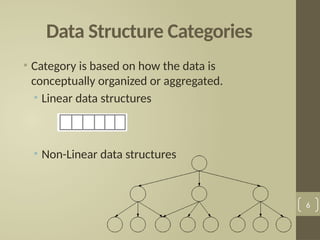
Data Structure Categories
• Category is based on how the data is
conceptually organized or aggregated.
• Linear data structures
• Non-Linear data structures
6
Linear Data Structures
• Data structure where data elements are arranged
sequentially or linearly.
• Linear data structures are easy to implement
because computer memory is arranged in a linear
way.
• Examples on Linear data structures : array, unordered
list, ordered list, stack, queue, etc.
7
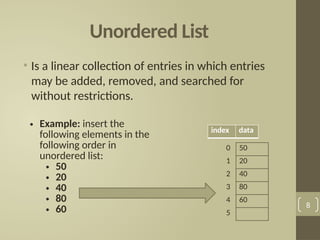
Unordered List
• Is a linear collection of entries in which entries
may be added, removed, and searched for
without restrictions.
8
• Example: insert the
following elements in the
following order in
unordered list:
• 50
• 20
• 40
• 80
• 60
0 50
1 20
2 40
3 80
4 60
5
index data
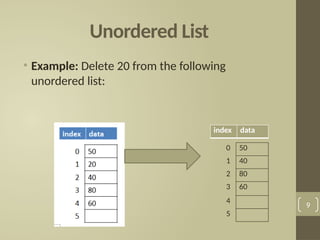
Unordered List
• Example: Delete 20 from the following
unordered list:
9
0 50
1 40
2 80
3 60
4
5
index data
Ordered List
• Is a linear collection of sorted (from smallest to
largest or from largest to smallest )in which
entries may be added, removed, and searched
for with only one restriction is that the elements
should remains sorted.
10
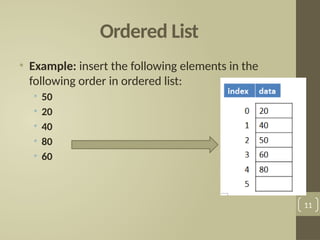
Ordered List
• Example: insert the following elements in the
following order in ordered list:
• 50
• 20
• 40
• 80
• 60
11
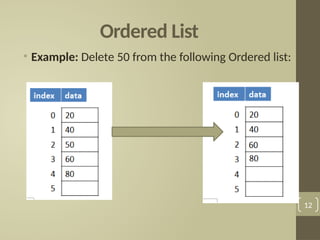
Ordered List
• Example: Delete 50 from the following Ordered list:
12
Exercise 1
A. Insert the following elements in the following
order in unordered list:
• 70
• 110
• 30
• 55
• 46
B. Delete 110 from the result unordered list in part
A.
13
Exercise 2
A. Insert the following elements in the following
order in ordered list:
• 70
• 110
• 30
• 55
• 46
B. Delete 110 from the result ordered list in part A. 14
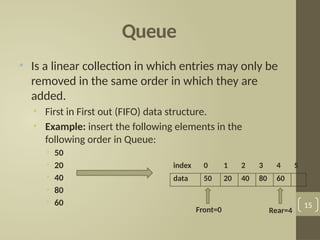
Queue
• Is a linear collection in which entries may only be
removed in the same order in which they are
added.
• First in First out (FIFO) data structure.
• Example: insert the following elements in the
following order in Queue:
• 50
• 20
• 40
• 80
• 60 15
index 0 1 2 3 4 5
data 50 20 40 80 60
Front=0 Rear=4
Queue
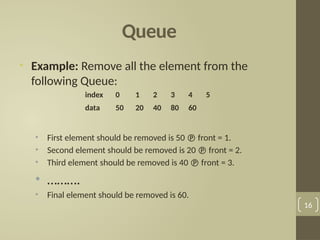
• Example: Remove all the element from the
following Queue:
• First element should be removed is 50  front = 1.
• Second element should be removed is 20  front = 2.
• Third element should be removed is 40  front = 3.
• ……….
• Final element should be removed is 60.
16
index 0 1 2 3 4 5
data 50 20 40 80 60
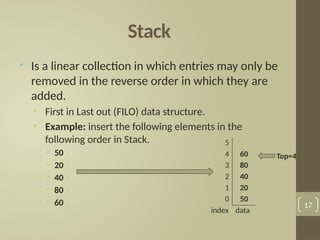
Stack
• Is a linear collection in which entries may only be
removed in the reverse order in which they are
added.
• First in Last out (FILO) data structure.
• Example: insert the following elements in the
following order in Stack.
• 50
• 20
• 40
• 80
• 60 17
5
4 60
3 80
2 40
1 20
0 50
index data
Top=4
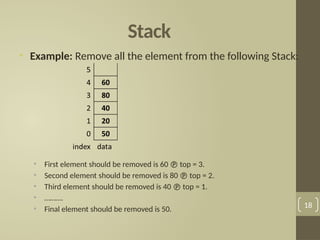
Stack
• Example: Remove all the element from the following Stack:
• First element should be removed is 60  top = 3.
• Second element should be removed is 80  top = 2.
• Third element should be removed is 40  top = 1.
• ……….
• Final element should be removed is 50. 18
Exercise 3
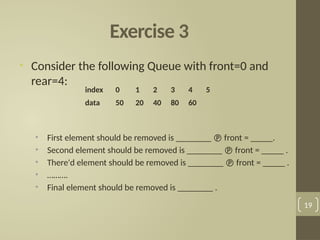
• Consider the following Queue with front=0 and
rear=4:
• First element should be removed is ________  front = _____.
• Second element should be removed is ________  front = _____ .
• There'd element should be removed is ________  front = _____ .
• ……….
• Final element should be removed is ________ .
19
index 0 1 2 3 4 5
data 50 20 40 80 60
Exercise 4
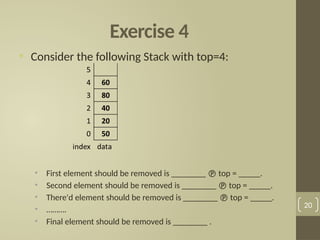
• Consider the following Stack with top=4:
• First element should be removed is ________  top = _____.
• Second element should be removed is ________  top = _____.
• There'd element should be removed is ________  top = _____.
• ……….
• Final element should be removed is ________ .
20
Non-Linear Data Structures
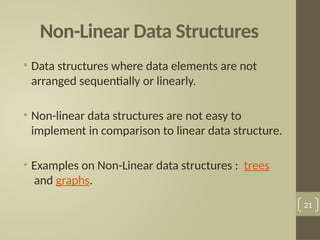
• Data structures where data elements are not
arranged sequentially or linearly.
• Non-linear data structures are not easy to
implement in comparison to linear data structure.
• Examples on Non-Linear data structures : trees
and graphs.
21
Trees
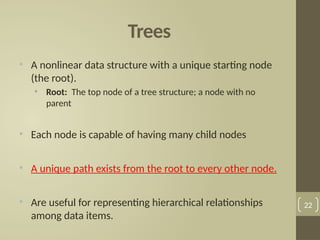
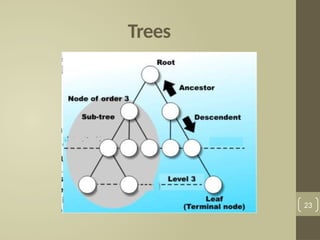
• A nonlinear data structure with a unique starting node
(the root).
• Root: The top node of a tree structure; a node with no
parent
• Each node is capable of having many child nodes
• A unique path exists from the root to every other node.
• Are useful for representing hierarchical relationships
among data items.
22
Trees
23
Not Tree, Why?
24
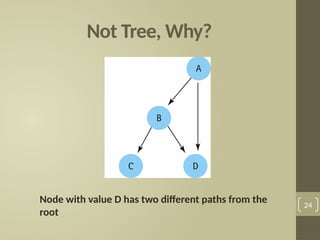
Node with value D has two different paths from the
root
Binary Tree
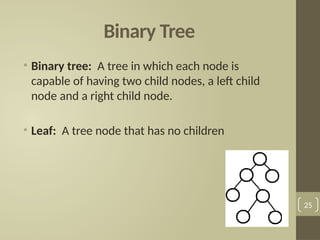
• Binary tree: A tree in which each node is
capable of having two child nodes, a left child
node and a right child node.
• Leaf: A tree node that has no children
25
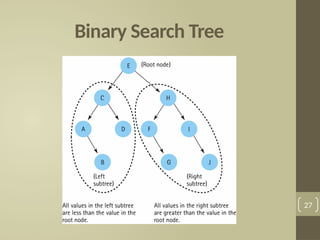
Binary Search Tree
• A binary tree in which the key value in any node
is greater than the key value in its left child and
any of its descendants (the nodes in the left
subtree) and less than the key value in its right
child and any of its descendants (the nodes in
the right subtree)
26
Binary Search Tree
27
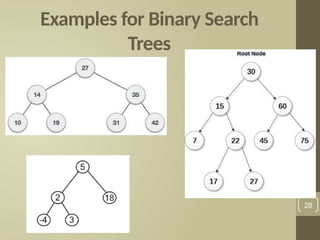
Examples for Binary Search
Trees
28
Binary Search Tree
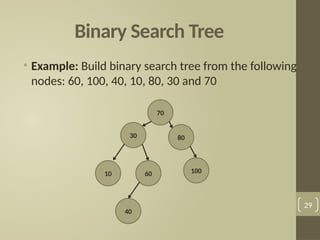
• Example: Build binary search tree from the following
nodes: 60, 100, 40, 10, 80, 30 and 70
29
70
30
10 60
40
80
100
Binary Search Tree
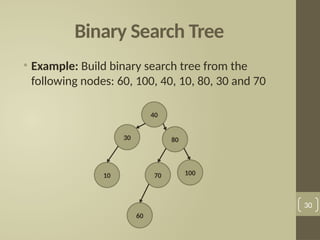
• Example: Build binary search tree from the
following nodes: 60, 100, 40, 10, 80, 30 and 70
30
40
30
10 70
60
80
100
Exercise 5
• Build binary search tree from the following
nodes: 10, 100, 50, 40, 88, 70, 60, 15 and 99
31
Priority Queue
• A priority queue is a special type of queue in
which each element is associated with a priority
and is served according to its priority.
• If elements with the same priority occur, they are
served according to their order in the queue.
32
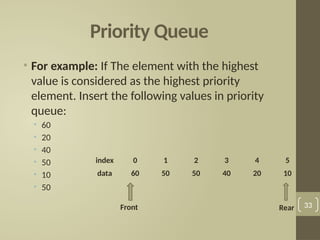
Priority Queue
• For example: If The element with the highest
value is considered as the highest priority
element. Insert the following values in priority
queue:
• 60
• 20
• 40
• 50
• 10
• 50
33
index 0 1 2 3 4 5
data 60 50 50 40 20 10
Front Rear
Exercise 6
• Insert the following values in priority queue:
• 5
• 30
• 80
• 10
• 60
• 10
34
Graphs
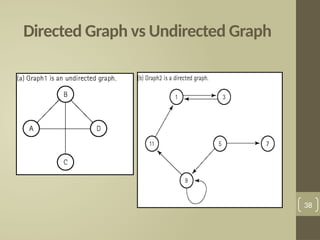
• Graph: A data structure that consists of a set of
nodes and a set of edges that relate the nodes to
each other
• Edge (arc): representing a connection between two nodes
in a graph.
• Two kinds of graphs:
• Undirected graph: A graph in which the edges have no
direction.
• Directed graph (digraph): A graph in which each edge is
directed from one vertex to another (or the same) vertex.
35
Graphs
• A general tree is a special kind of graph.
• Graphs may be used to model:
• Computer networks,
• Airline routes.
• As abstract relationships such as course pre-
requisite structures, etc..
36
Graphs
• Adjacent nodes: Two nodes in a graph that are
connected by an edge.
• Path: A sequence of nodes that connects two nodes
in a graph.
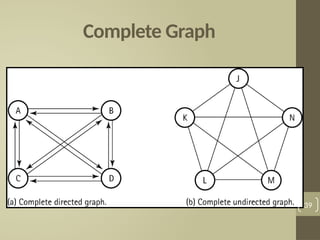
• Complete graph: A graph in which every node is
directly connected to every other node.
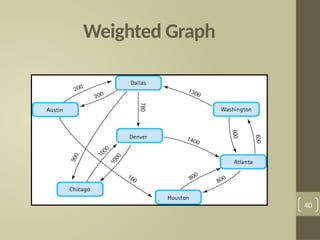
• Weighted graph: A graph in which each edge carries
a value.
37
Directed Graph vs Undirected Graph
38
Complete Graph
39
Weighted Graph
40
Data Type
• Meaningful data is organized into:
• Primitive data types such as integer, real, and Boolean.
• And into more complex data structures such as arrays
and binary trees.
• So the idea of a data type includes:
• A specification of the possible values of that type.
• The operations that can be performed on those
values.
41
Abstract Data Type (ADT)
• A data type whose properties (domain and
operations) are specified independently of
any particular implementation.
• The definition of ADT only mentions what
operations are to be performed but not how
these operations will be implemented.
42
Abstract Data Type (ADT)
• It does not specify how data will be organized in
memory and what algorithms will be used for
implementing the operations.
• It is called “abstract” because it gives an
implementation-independent view.
• The process of providing only the essentials and hiding
the details is known as abstraction.
• The primitive data types is abstract data types.
43
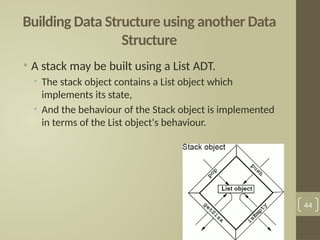
Building Data Structure using another Data
Structure
• A stack may be built using a List ADT.
• The stack object contains a List object which
implements its state,
• And the behaviour of the Stack object is implemented
in terms of the List object's behaviour.
44
Choosing the Right Data Structure for
Specific Problem
• The operations that is supported by a data structure is
one factor to consider when choosing between
several available data structures.
• Example:
• Implementing a printing job storage for a printer:
• requires a queue data structure.
• Maintains a collection of entries in no particular
order.
• requires an unordered list data structure.
45
Choosing the Right Data Structure for
Specific Problem
• The efficiency of the data structures is another
factor to consider when choosing between
several available data structures :
• How much space does the data structure occupy?
• What are the running times of the operation in its
interface?
46
Choosing the Right Data Structure for
Specific Problem
• The running time of each operation in the
interface:
• A data structure with the best interface with the
best fit may not necessarily be the best overall fit, if
the running times of its operations are not up to the
mark.
47
Choosing the Right Data Structure for
Specific Problem
• When we have more than one data structure
implementation whose interfaces satisfy our
requirements, we may have to select one based
on comparing the running times of the interface
operations.
• Time is traded off for space,
• i.e. more space is consumed to increase speed, or a
reduction in speed is traded for a reduction in the space
consumption.
48
Summary
• A data structure is a data organization, management, and
storage format.
• Data type is either atomic or composite.
• Data structure category is based on how the data is
conceptually organized or aggregated(linear or non-
linear)
• Unordered list Is a linear collection of entries in which
entries may be added, removed, and searched for
without restrictions.
49
Summary
• Ordered list Is a linear collection of sorted in which entries
may be added, removed, and searched for with only one
restriction is that the elements should remains sorted
• Queue Is a linear collection in which entries may only be
removed in the same order in which they are added.
• Stack Is a linear collection in which entries may only be
removed in the reverse order in which they are added.
• Tree is a nonlinear data structure with a unique starting node
and a unique path exists from the root to every other node.
50
Summary
• Binary tree is A tree in which each node is capable of
having two child nodes, a left child node and a right child
node.
• Binary search tree is a binary tree in which the key value
in any node is greater than the key value in its left child
and any of its descendants and less than the key value in
its right child and any of its descendants
• Priority queue is a special type of queue in which each
element is associated with a priority and is served
according to its priority.
51
Summary
• Abstract Data Type (ADT) is A data type whose properties
(domain and operations) are specified independently of
any particular implementation.
• The operations that is supported by a data structure is
one factor to consider when choosing between several
available data structures.
• When we have more than one data structure
implementation whose interfaces satisfy our
requirements, we may have to select one based on
comparing the running times of the interface operations.
52
References
• Data Structures Outside-In With Java, Sesh Venugopal,
Prentice Hall.
• https://codility.com/media/train/1-TimeComplexity.pdf
53

this is a very important presentation that may be use for studding

  • 1.
  • 2.
    Introduction • A datastructure is a data organization, management, and storage format that enables efficient access and modification. • Data structure is a collection of data that has specific ways of accessing, storing, and organizing the data. • More precisely, a data structure is a collection of: • Data values, • The relationships among them, • And the functions or operations that can be applied to the data. 2
  • 3.
    Introduction • Suppose weneed to answer the following Questions: • How many cities with more than 250,000 people lie within 500 miles of Dallas, Texas? • How many people in my company make over $100,000 per year? • Can we connect all of our telephone customers with less than 1,000 miles of cable? • To answer above questions, We must organize data in a way that allows us to find the answers in time to satisfy our needs. 3
  • 4.
    Introduction • The primarypurpose of most computer programs is not only to perform calculations, but also to store and retrieve information usually as fast as possible. • For this reason, the study of data structures and the algorithms that manipulate them is at the heart of computer science. helping you to understand how to structure data to support efficient processing. 4
  • 5.
    Atomic and CompositeData Type • Atomic or primitive type A data type whose elements are single, non decomposable data items (cannot be broken into parts) • Composite type A data type whose elements are composed of multiple data items. (ex: take two integers (simple elements) x, y to form a point (x, y) 5
  • 6.
    Data Structure Categories •Category is based on how the data is conceptually organized or aggregated. • Linear data structures • Non-Linear data structures 6
  • 7.
    Linear Data Structures •Data structure where data elements are arranged sequentially or linearly. • Linear data structures are easy to implement because computer memory is arranged in a linear way. • Examples on Linear data structures : array, unordered list, ordered list, stack, queue, etc. 7
  • 8.
    Unordered List • Isa linear collection of entries in which entries may be added, removed, and searched for without restrictions. 8 • Example: insert the following elements in the following order in unordered list: • 50 • 20 • 40 • 80 • 60 0 50 1 20 2 40 3 80 4 60 5 index data
  • 9.
    Unordered List • Example:Delete 20 from the following unordered list: 9 0 50 1 40 2 80 3 60 4 5 index data
  • 10.
    Ordered List • Isa linear collection of sorted (from smallest to largest or from largest to smallest )in which entries may be added, removed, and searched for with only one restriction is that the elements should remains sorted. 10
  • 11.
    Ordered List • Example:insert the following elements in the following order in ordered list: • 50 • 20 • 40 • 80 • 60 11
  • 12.
    Ordered List • Example:Delete 50 from the following Ordered list: 12
  • 13.
    Exercise 1 A. Insertthe following elements in the following order in unordered list: • 70 • 110 • 30 • 55 • 46 B. Delete 110 from the result unordered list in part A. 13
  • 14.
    Exercise 2 A. Insertthe following elements in the following order in ordered list: • 70 • 110 • 30 • 55 • 46 B. Delete 110 from the result ordered list in part A. 14
  • 15.
    Queue • Is alinear collection in which entries may only be removed in the same order in which they are added. • First in First out (FIFO) data structure. • Example: insert the following elements in the following order in Queue: • 50 • 20 • 40 • 80 • 60 15 index 0 1 2 3 4 5 data 50 20 40 80 60 Front=0 Rear=4
  • 16.
    Queue • Example: Removeall the element from the following Queue: • First element should be removed is 50  front = 1. • Second element should be removed is 20  front = 2. • Third element should be removed is 40  front = 3. • ………. • Final element should be removed is 60. 16 index 0 1 2 3 4 5 data 50 20 40 80 60
  • 17.
    Stack • Is alinear collection in which entries may only be removed in the reverse order in which they are added. • First in Last out (FILO) data structure. • Example: insert the following elements in the following order in Stack. • 50 • 20 • 40 • 80 • 60 17 5 4 60 3 80 2 40 1 20 0 50 index data Top=4
  • 18.
    Stack • Example: Removeall the element from the following Stack: • First element should be removed is 60  top = 3. • Second element should be removed is 80  top = 2. • Third element should be removed is 40  top = 1. • ………. • Final element should be removed is 50. 18
  • 19.
    Exercise 3 • Considerthe following Queue with front=0 and rear=4: • First element should be removed is ________  front = _____. • Second element should be removed is ________  front = _____ . • There'd element should be removed is ________  front = _____ . • ………. • Final element should be removed is ________ . 19 index 0 1 2 3 4 5 data 50 20 40 80 60
  • 20.
    Exercise 4 • Considerthe following Stack with top=4: • First element should be removed is ________  top = _____. • Second element should be removed is ________  top = _____. • There'd element should be removed is ________  top = _____. • ………. • Final element should be removed is ________ . 20
  • 21.
    Non-Linear Data Structures •Data structures where data elements are not arranged sequentially or linearly. • Non-linear data structures are not easy to implement in comparison to linear data structure. • Examples on Non-Linear data structures : trees and graphs. 21
  • 22.
    Trees • A nonlineardata structure with a unique starting node (the root). • Root: The top node of a tree structure; a node with no parent • Each node is capable of having many child nodes • A unique path exists from the root to every other node. • Are useful for representing hierarchical relationships among data items. 22
  • 23.
  • 24.
    Not Tree, Why? 24 Nodewith value D has two different paths from the root
  • 25.
    Binary Tree • Binarytree: A tree in which each node is capable of having two child nodes, a left child node and a right child node. • Leaf: A tree node that has no children 25
  • 26.
    Binary Search Tree •A binary tree in which the key value in any node is greater than the key value in its left child and any of its descendants (the nodes in the left subtree) and less than the key value in its right child and any of its descendants (the nodes in the right subtree) 26
  • 27.
  • 28.
    Examples for BinarySearch Trees 28
  • 29.
    Binary Search Tree •Example: Build binary search tree from the following nodes: 60, 100, 40, 10, 80, 30 and 70 29 70 30 10 60 40 80 100
  • 30.
    Binary Search Tree •Example: Build binary search tree from the following nodes: 60, 100, 40, 10, 80, 30 and 70 30 40 30 10 70 60 80 100
  • 31.
    Exercise 5 • Buildbinary search tree from the following nodes: 10, 100, 50, 40, 88, 70, 60, 15 and 99 31
  • 32.
    Priority Queue • Apriority queue is a special type of queue in which each element is associated with a priority and is served according to its priority. • If elements with the same priority occur, they are served according to their order in the queue. 32
  • 33.
    Priority Queue • Forexample: If The element with the highest value is considered as the highest priority element. Insert the following values in priority queue: • 60 • 20 • 40 • 50 • 10 • 50 33 index 0 1 2 3 4 5 data 60 50 50 40 20 10 Front Rear
  • 34.
    Exercise 6 • Insertthe following values in priority queue: • 5 • 30 • 80 • 10 • 60 • 10 34
  • 35.
    Graphs • Graph: Adata structure that consists of a set of nodes and a set of edges that relate the nodes to each other • Edge (arc): representing a connection between two nodes in a graph. • Two kinds of graphs: • Undirected graph: A graph in which the edges have no direction. • Directed graph (digraph): A graph in which each edge is directed from one vertex to another (or the same) vertex. 35
  • 36.
    Graphs • A generaltree is a special kind of graph. • Graphs may be used to model: • Computer networks, • Airline routes. • As abstract relationships such as course pre- requisite structures, etc.. 36
  • 37.
    Graphs • Adjacent nodes:Two nodes in a graph that are connected by an edge. • Path: A sequence of nodes that connects two nodes in a graph. • Complete graph: A graph in which every node is directly connected to every other node. • Weighted graph: A graph in which each edge carries a value. 37
  • 38.
    Directed Graph vsUndirected Graph 38
  • 39.
  • 40.
  • 41.
    Data Type • Meaningfuldata is organized into: • Primitive data types such as integer, real, and Boolean. • And into more complex data structures such as arrays and binary trees. • So the idea of a data type includes: • A specification of the possible values of that type. • The operations that can be performed on those values. 41
  • 42.
    Abstract Data Type(ADT) • A data type whose properties (domain and operations) are specified independently of any particular implementation. • The definition of ADT only mentions what operations are to be performed but not how these operations will be implemented. 42
  • 43.
    Abstract Data Type(ADT) • It does not specify how data will be organized in memory and what algorithms will be used for implementing the operations. • It is called “abstract” because it gives an implementation-independent view. • The process of providing only the essentials and hiding the details is known as abstraction. • The primitive data types is abstract data types. 43
  • 44.
    Building Data Structureusing another Data Structure • A stack may be built using a List ADT. • The stack object contains a List object which implements its state, • And the behaviour of the Stack object is implemented in terms of the List object's behaviour. 44
  • 45.
    Choosing the RightData Structure for Specific Problem • The operations that is supported by a data structure is one factor to consider when choosing between several available data structures. • Example: • Implementing a printing job storage for a printer: • requires a queue data structure. • Maintains a collection of entries in no particular order. • requires an unordered list data structure. 45
  • 46.
    Choosing the RightData Structure for Specific Problem • The efficiency of the data structures is another factor to consider when choosing between several available data structures : • How much space does the data structure occupy? • What are the running times of the operation in its interface? 46
  • 47.
    Choosing the RightData Structure for Specific Problem • The running time of each operation in the interface: • A data structure with the best interface with the best fit may not necessarily be the best overall fit, if the running times of its operations are not up to the mark. 47
  • 48.
    Choosing the RightData Structure for Specific Problem • When we have more than one data structure implementation whose interfaces satisfy our requirements, we may have to select one based on comparing the running times of the interface operations. • Time is traded off for space, • i.e. more space is consumed to increase speed, or a reduction in speed is traded for a reduction in the space consumption. 48
  • 49.
    Summary • A datastructure is a data organization, management, and storage format. • Data type is either atomic or composite. • Data structure category is based on how the data is conceptually organized or aggregated(linear or non- linear) • Unordered list Is a linear collection of entries in which entries may be added, removed, and searched for without restrictions. 49
  • 50.
    Summary • Ordered listIs a linear collection of sorted in which entries may be added, removed, and searched for with only one restriction is that the elements should remains sorted • Queue Is a linear collection in which entries may only be removed in the same order in which they are added. • Stack Is a linear collection in which entries may only be removed in the reverse order in which they are added. • Tree is a nonlinear data structure with a unique starting node and a unique path exists from the root to every other node. 50
  • 51.
    Summary • Binary treeis A tree in which each node is capable of having two child nodes, a left child node and a right child node. • Binary search tree is a binary tree in which the key value in any node is greater than the key value in its left child and any of its descendants and less than the key value in its right child and any of its descendants • Priority queue is a special type of queue in which each element is associated with a priority and is served according to its priority. 51
  • 52.
    Summary • Abstract DataType (ADT) is A data type whose properties (domain and operations) are specified independently of any particular implementation. • The operations that is supported by a data structure is one factor to consider when choosing between several available data structures. • When we have more than one data structure implementation whose interfaces satisfy our requirements, we may have to select one based on comparing the running times of the interface operations. 52
  • 53.
    References • Data StructuresOutside-In With Java, Sesh Venugopal, Prentice Hall. • https://codility.com/media/train/1-TimeComplexity.pdf 53