Sergio Gutierrez IBM SaaS Executive
Dinesh Shetty– IBM IT Executive
HAM-1014 The Power of IBM API Management
Agenda
• Introduction to API Connect and IBM Integration Bus
• How to use APIM / API Connect with IBM Integration Bus
• Expose REST APIs from IIB
• Expose IIB Integration Services
• Use Interaction APIs to combine System APIs
• Summary
2
Introduction to API Connect and
IBM Integration Bus
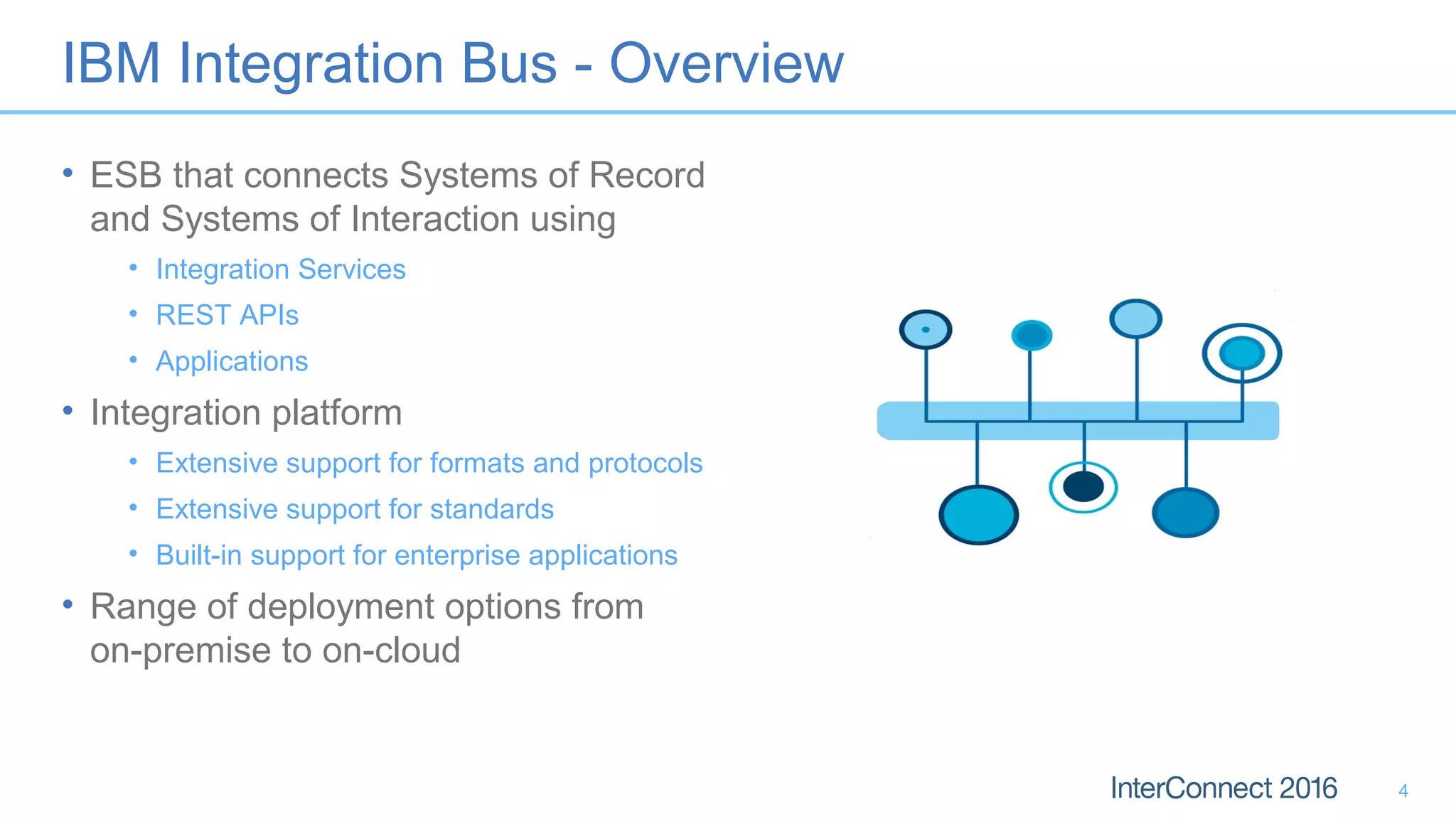
IBM Integration Bus - Overview
• ESB that connects Systems of Record
and Systems of Interaction using
• Integration Services
• REST APIs
• Applications
• Integration platform
• Extensive support for formats and protocols
• Extensive support for standards
• Built-in support for enterprise applications
• Range of deployment options from
on-premise to on-cloud
4
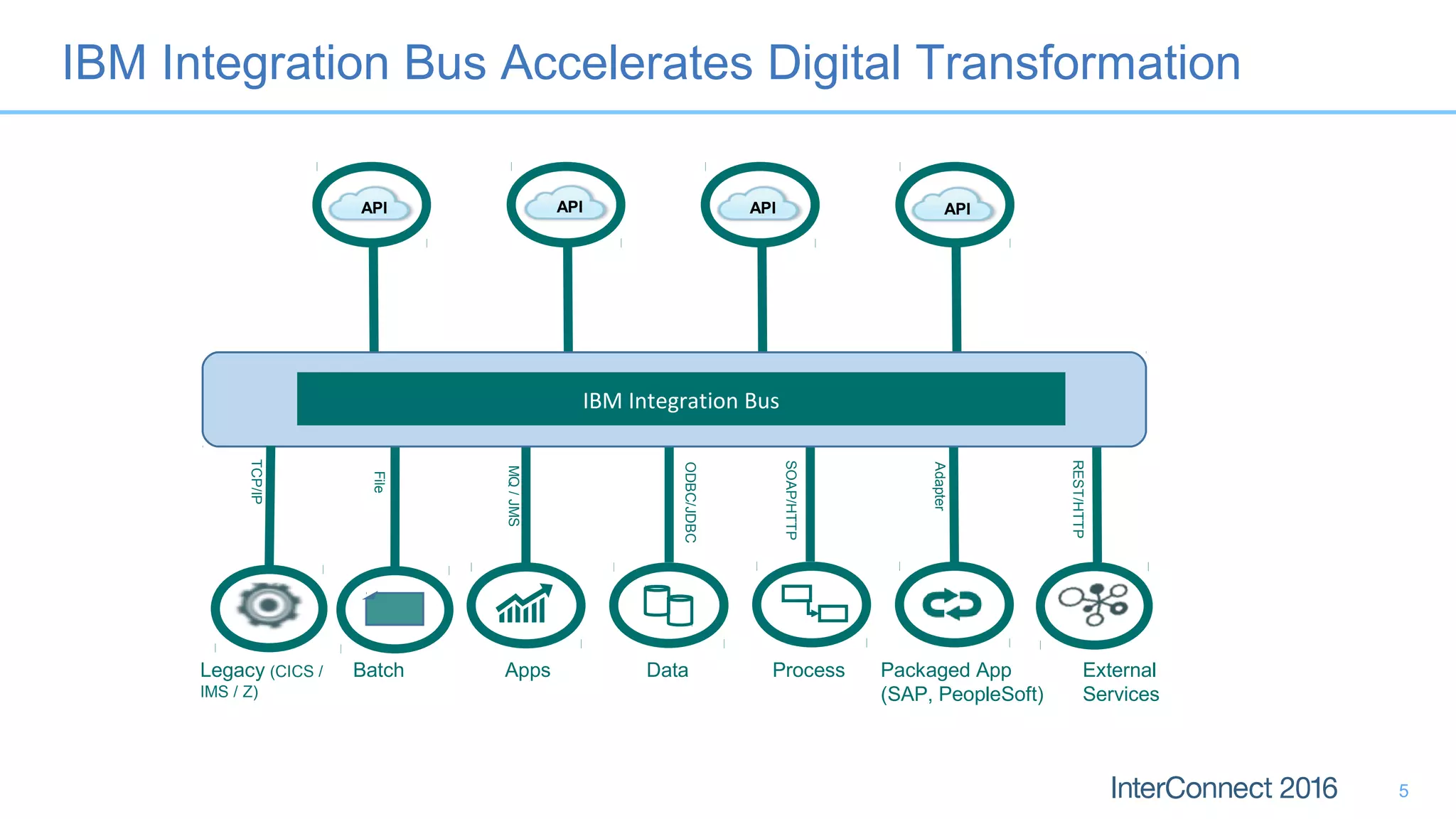
Batch Apps Data Process Packaged App
(SAP, PeopleSoft)
Adapter
SOAP/HTTP
ODBC/JDBC
MQ/JMS
Legacy (CICS /
IMS / Z)
File
External
Services
REST/HTTP
IBM Integration Bus
TCP/IP
APIAPIAPIAPI
IBM Integration Bus Accelerates Digital Transformation
5
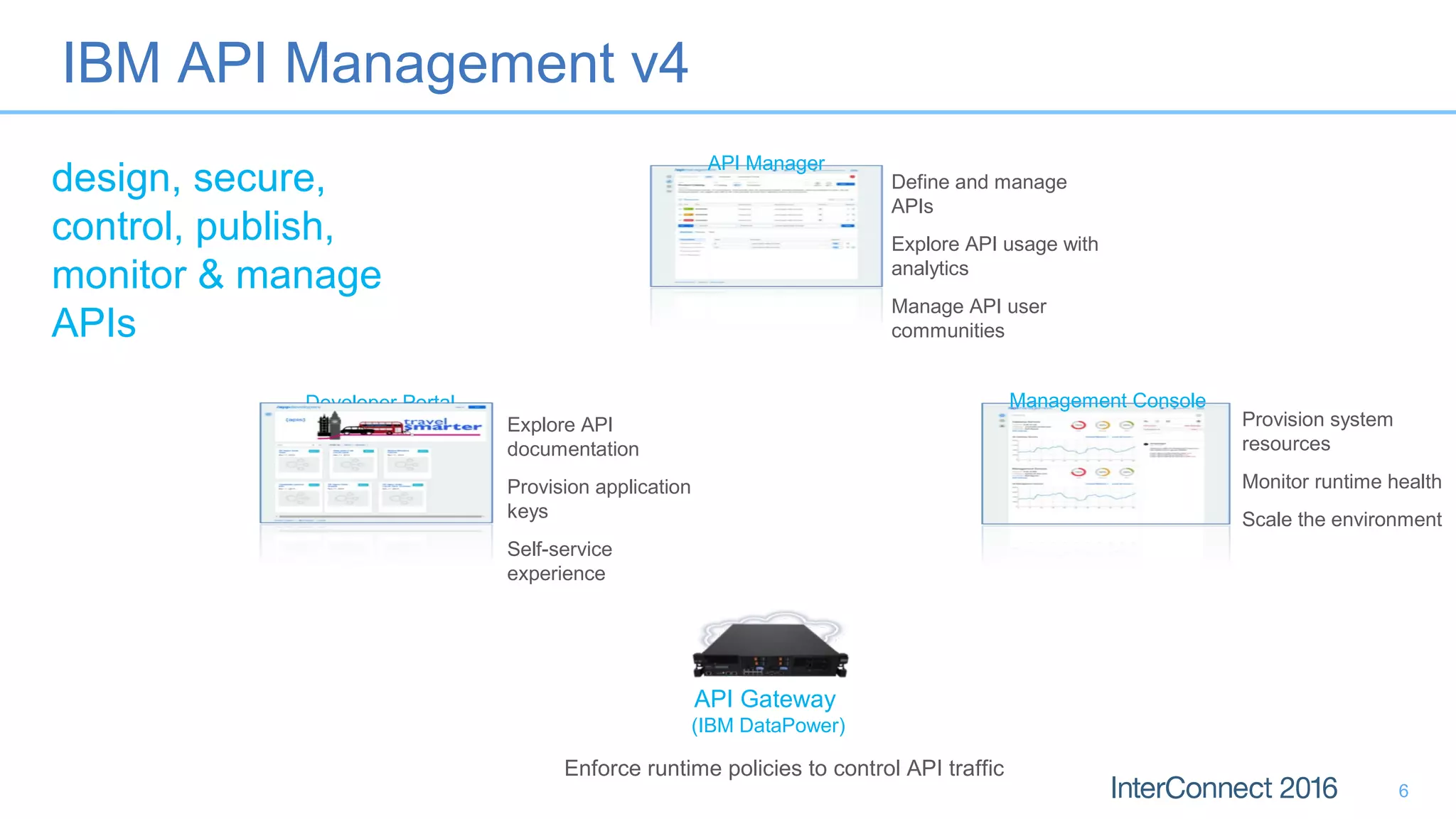
IBM API Management v4
design, secure,
control, publish,
monitor & manage
APIs
6
API Manager
Define and manage
APIs
Explore API usage with
analytics
Manage API user
communities
Management Console
Provision system
resources
Monitor runtime health
Scale the environment
Explore API
documentation
Provision application
keys
Self-service
experience
Developer Portal
API Gateway
(IBM DataPower)
Enforce runtime policies to control API traffic
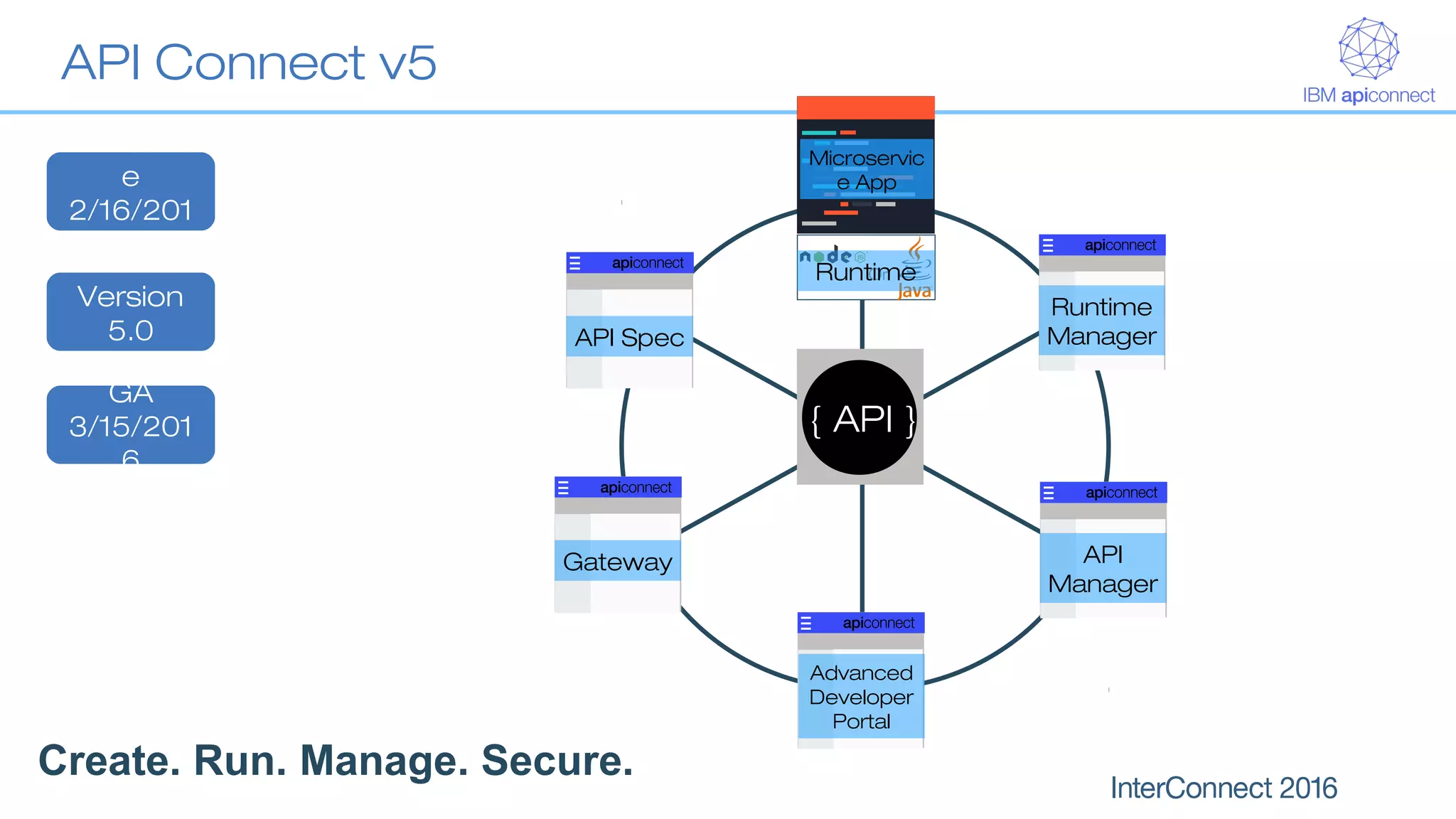
Gateway API
Manager
Advanced
Developer
Portal
Runtime
Manager
Or
Microservic
e App
Runtime
{ API }
API Spec
API Connect v5
Create. Run. Manage. Secure.
Announc
e
2/16/201
6
GA
3/15/201
6
Version
5.0
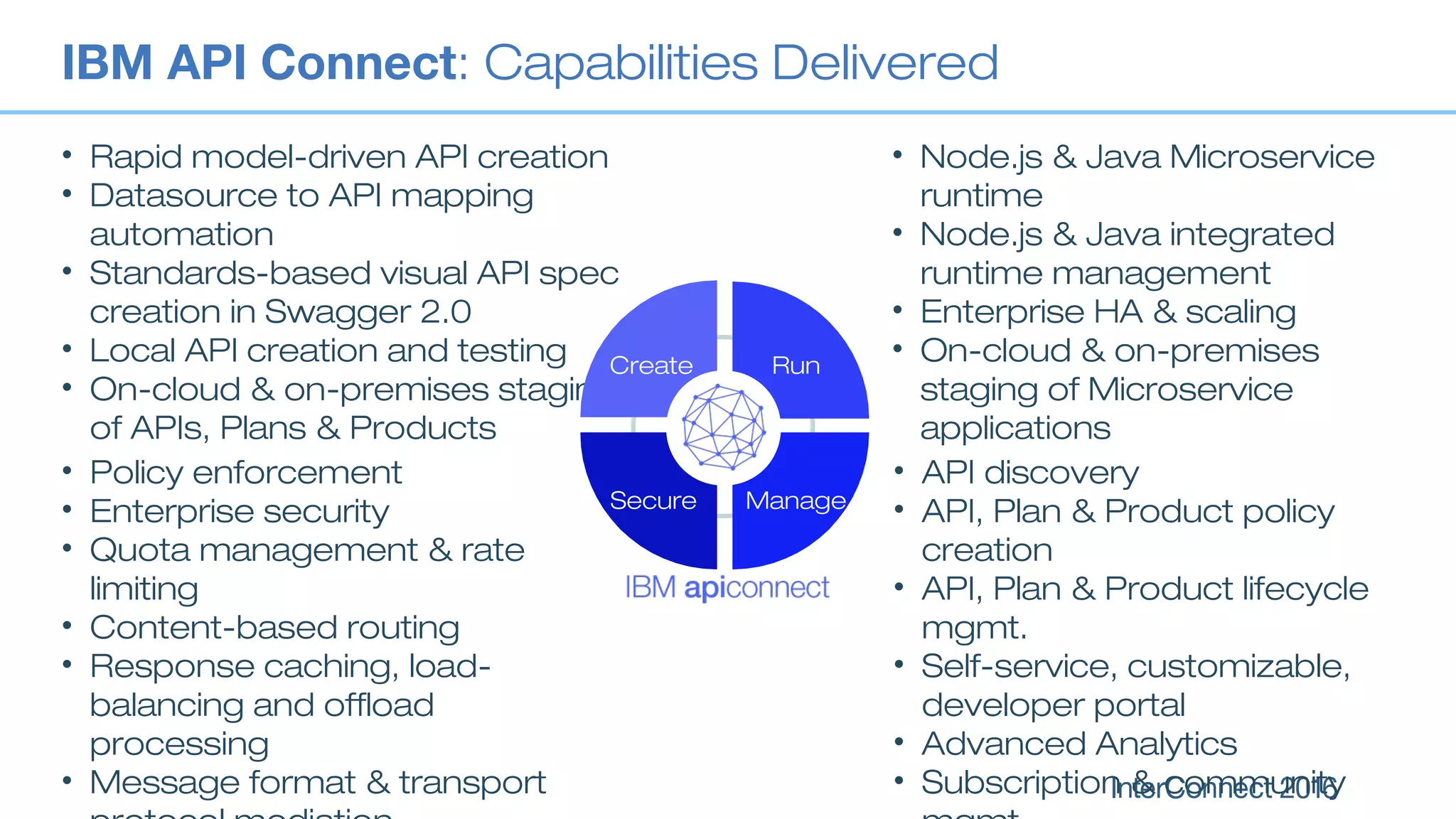
IBM API Connect: Capabilities Delivered
• API discovery
• API, Plan & Product policy
creation
• API, Plan & Product lifecycle
mgmt.
• Self-service, customizable,
developer portal
• Advanced Analytics
• Subscription & community
• Policy enforcement
• Enterprise security
• Quota management & rate
limiting
• Content-based routing
• Response caching, load-
balancing and offload
processing
• Message format & transport
• Rapid model-driven API creation
• Datasource to API mapping
automation
• Standards-based visual API spec
creation in Swagger 2.0
• Local API creation and testing
• On-cloud & on-premises staging
of APIs, Plans & Products
• Node.js & Java Microservice
runtime
• Node.js & Java integrated
runtime management
• Enterprise HA & scaling
• On-cloud & on-premises
staging of Microservice
applications
Create Run
ManageSecure
Using API Management/Connect
with IBM Integration Bus
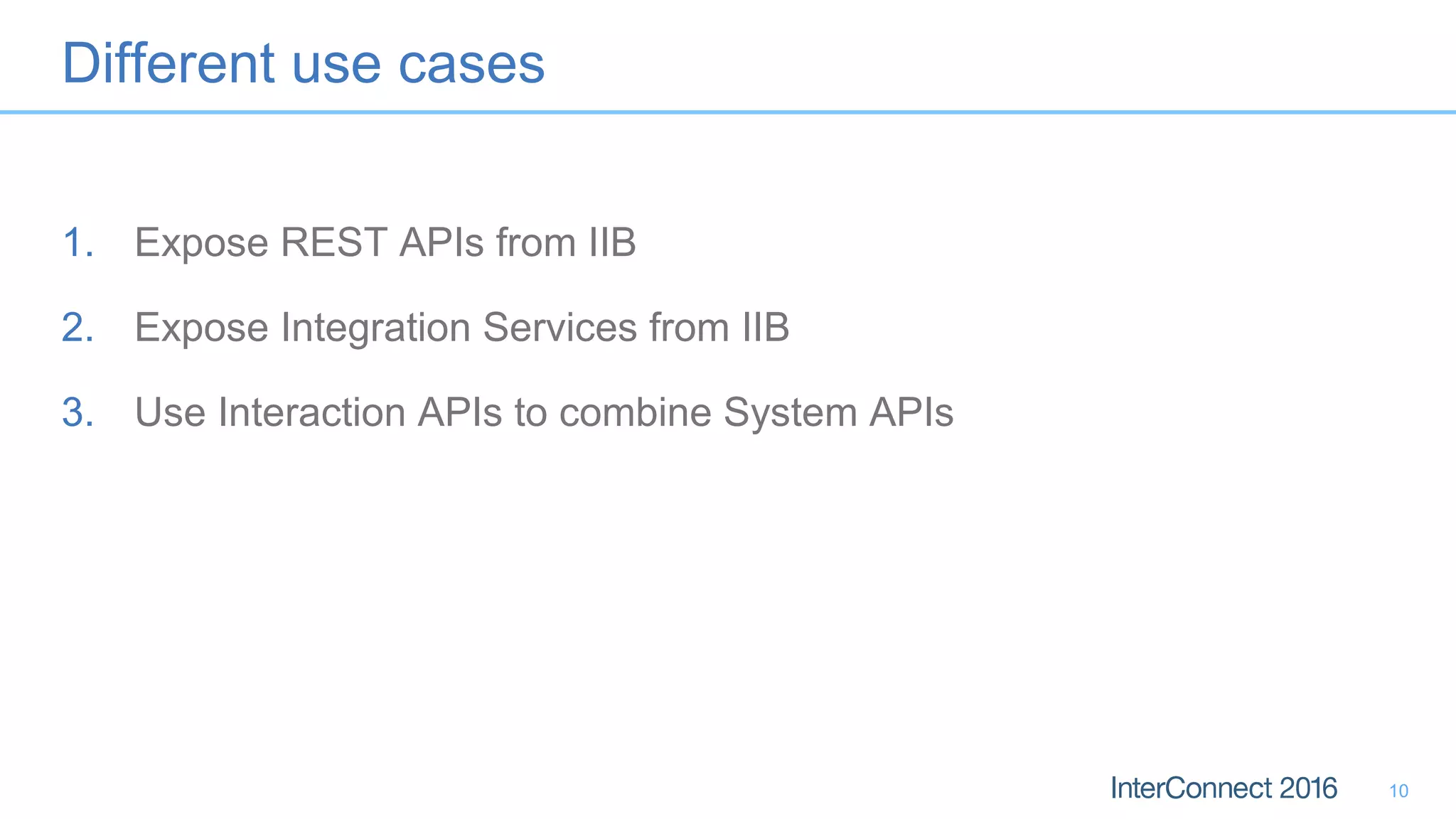
Different use cases
1. Expose REST APIs from IIB
2. Expose Integration Services from IIB
3. Use Interaction APIs to combine System APIs
10
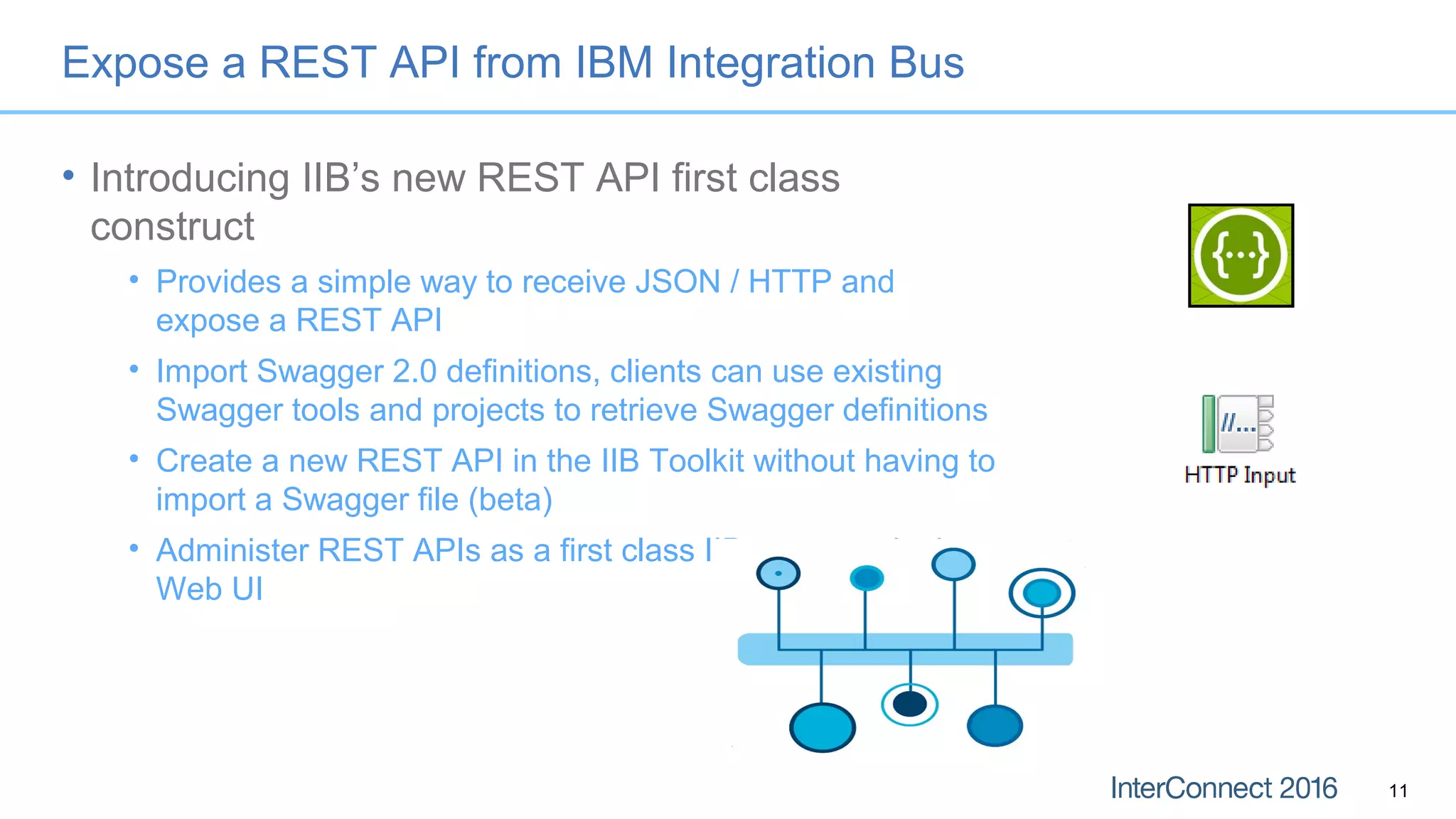
Expose a REST API from IBM Integration Bus
• Introducing IIB’s new REST API first class
construct
• Provides a simple way to receive JSON / HTTP and
expose a REST API
• Import Swagger 2.0 definitions, clients can use existing
Swagger tools and projects to retrieve Swagger definitions
• Create a new REST API in the IIB Toolkit without having to
import a Swagger file (beta)
• Administer REST APIs as a first class IIB construct in the
Web UI
11
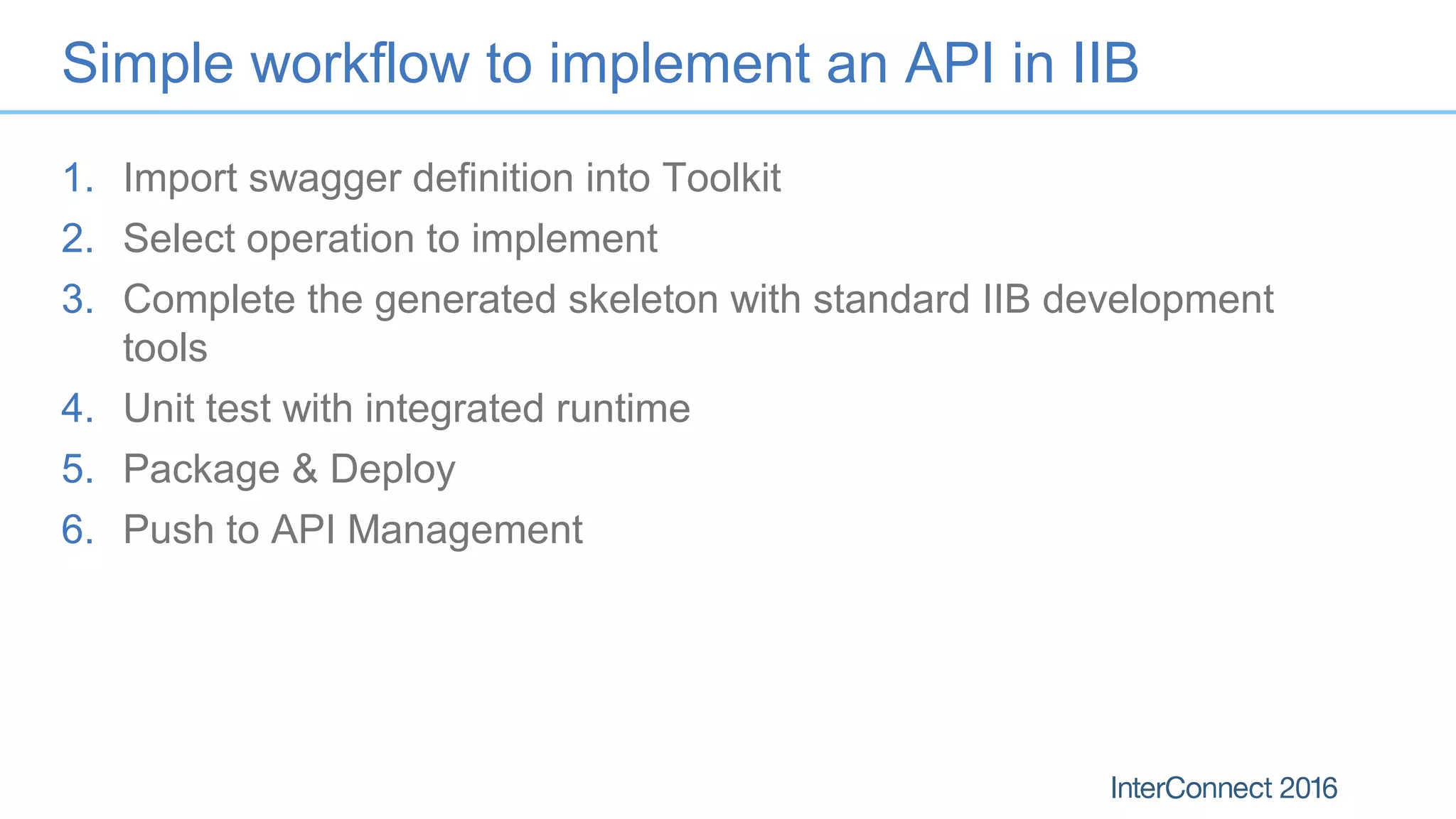
Simple workflow to implement an API in IIB
1. Import swagger definition into Toolkit
2. Select operation to implement
3. Complete the generated skeleton with standard IIB development
tools
4. Unit test with integrated runtime
5. Package & Deploy
6. Push to API Management
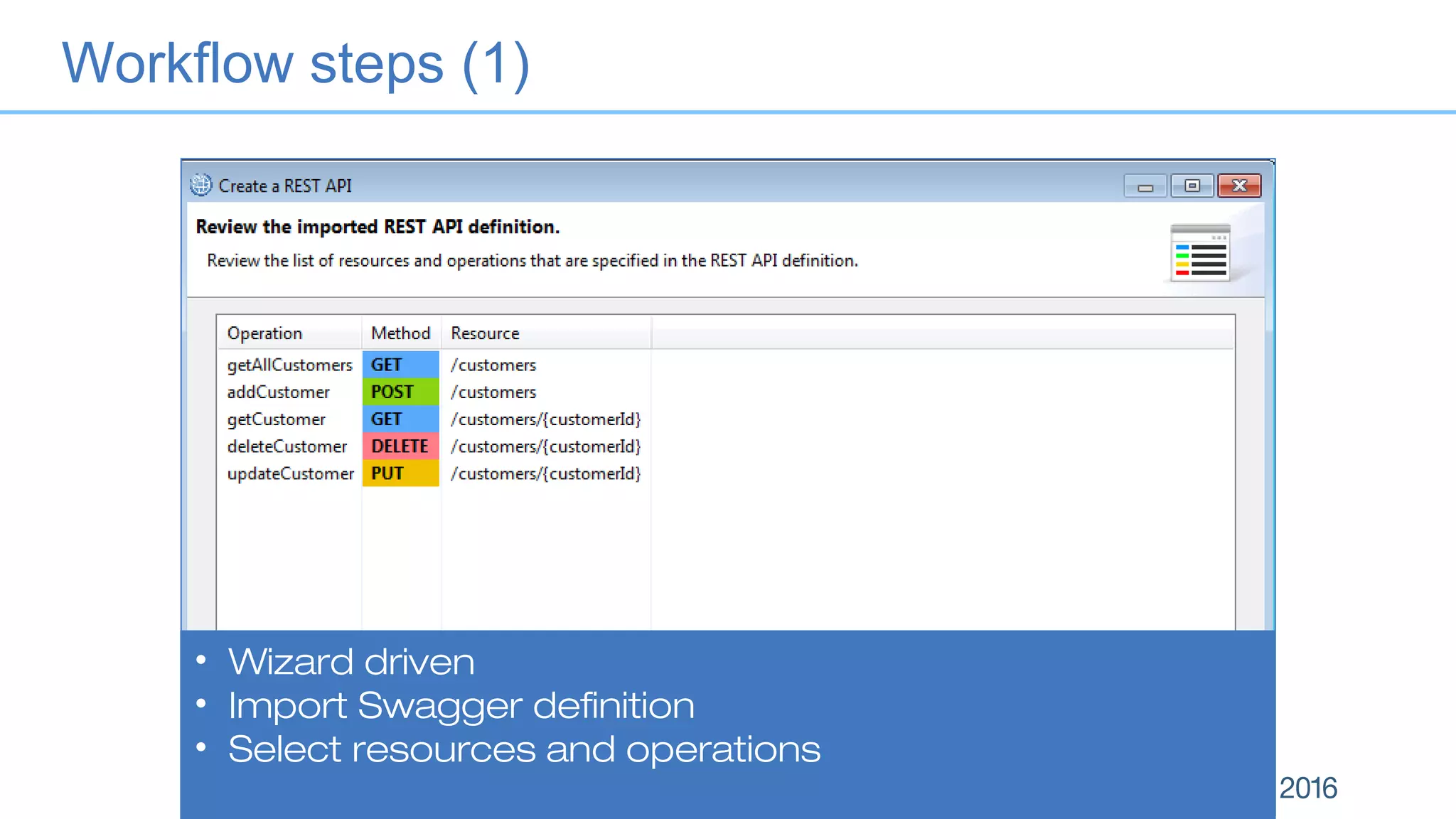
• Wizard driven
• Import Swagger definition
• Select resources and operations
Workflow steps (1)
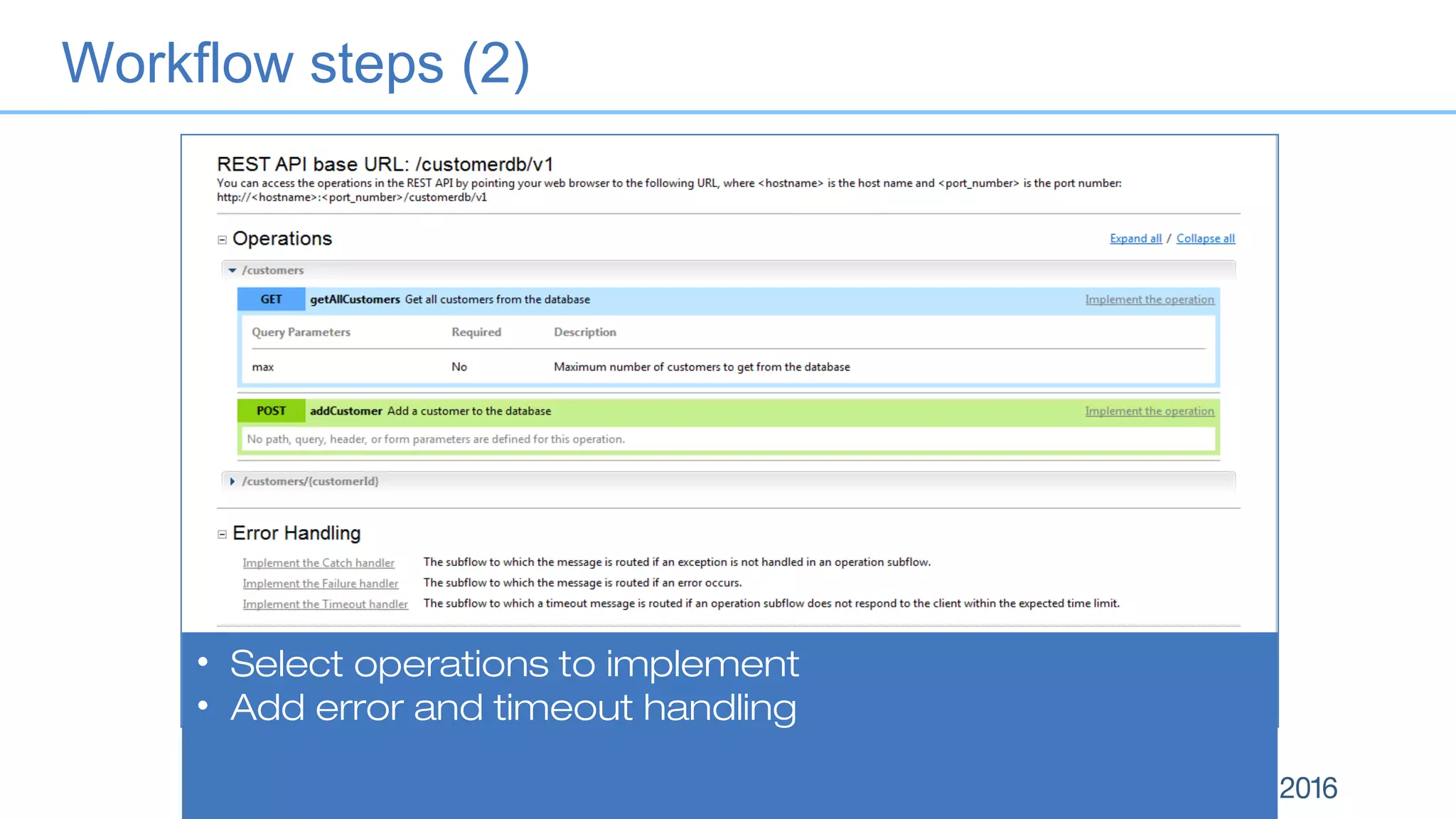
• Select operations to implement
• Add error and timeout handling
Workflow steps (2)
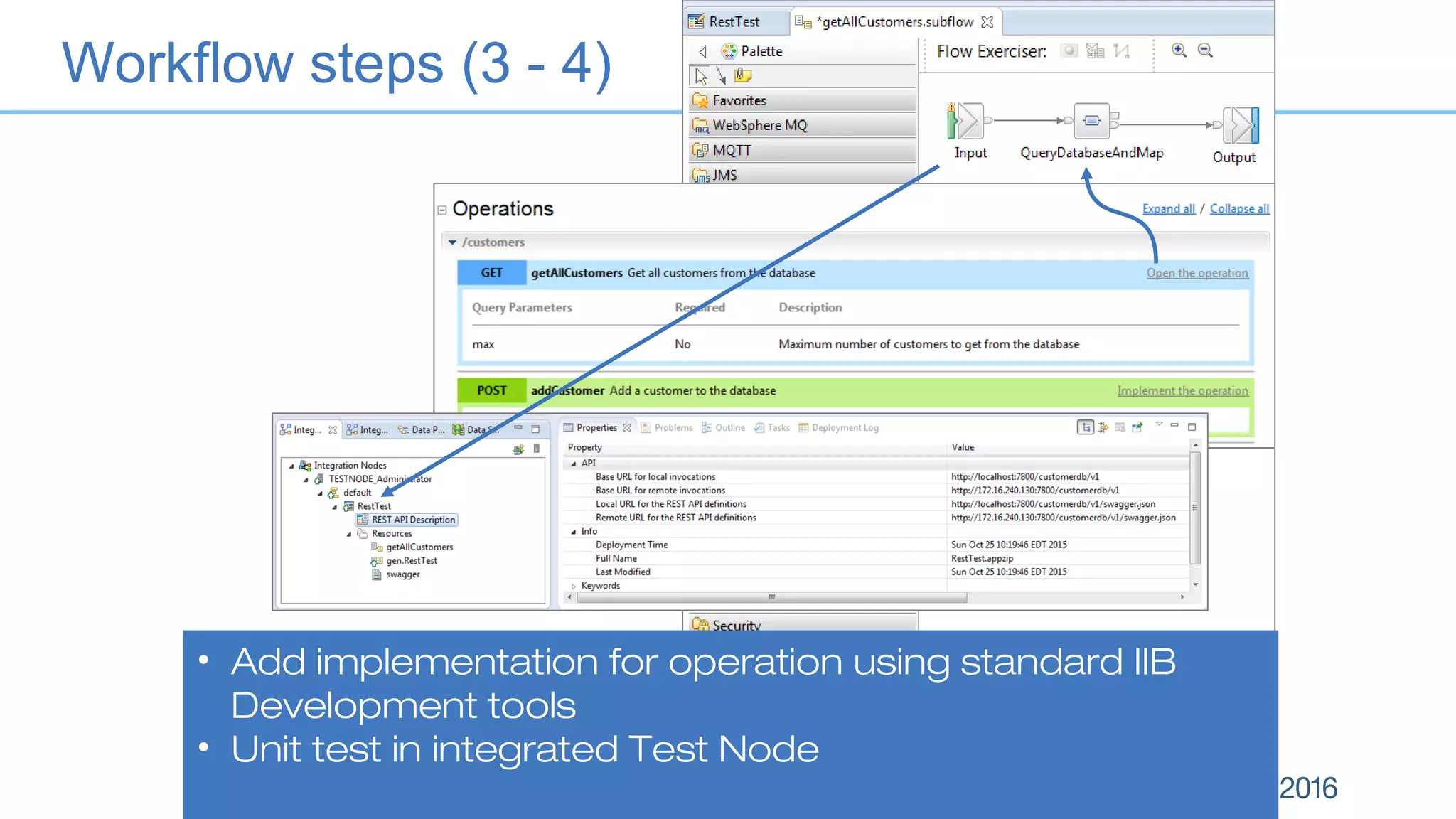
• Add implementation for operation using standard IIB
Development tools
• Unit test in integrated Test Node
Workflow steps (3 - 4)
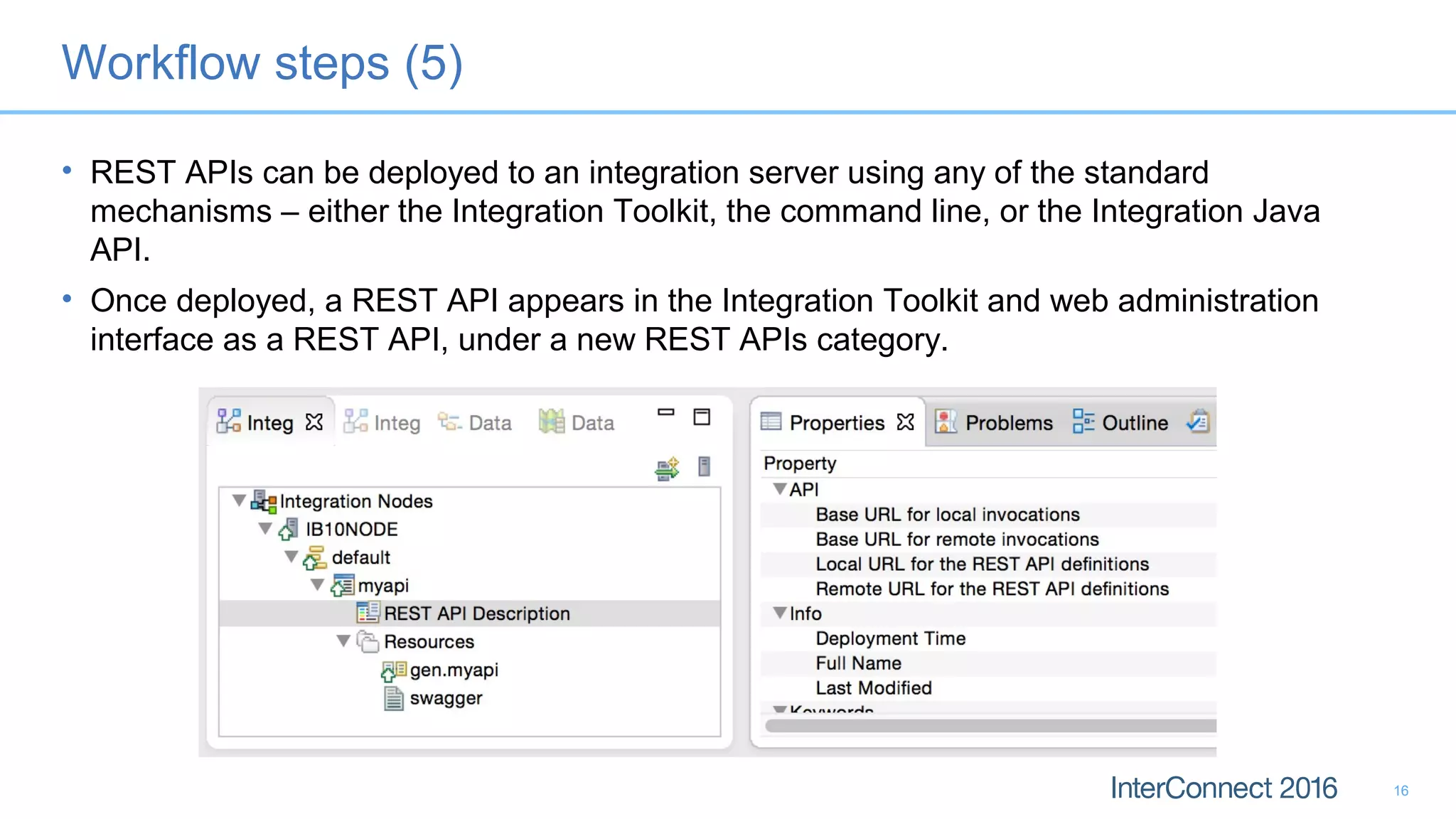
Workflow steps (5)
• REST APIs can be deployed to an integration server using any of the standard
mechanisms – either the Integration Toolkit, the command line, or the Integration Java
API.
• Once deployed, a REST API appears in the Integration Toolkit and web administration
interface as a REST API, under a new REST APIs category.
16
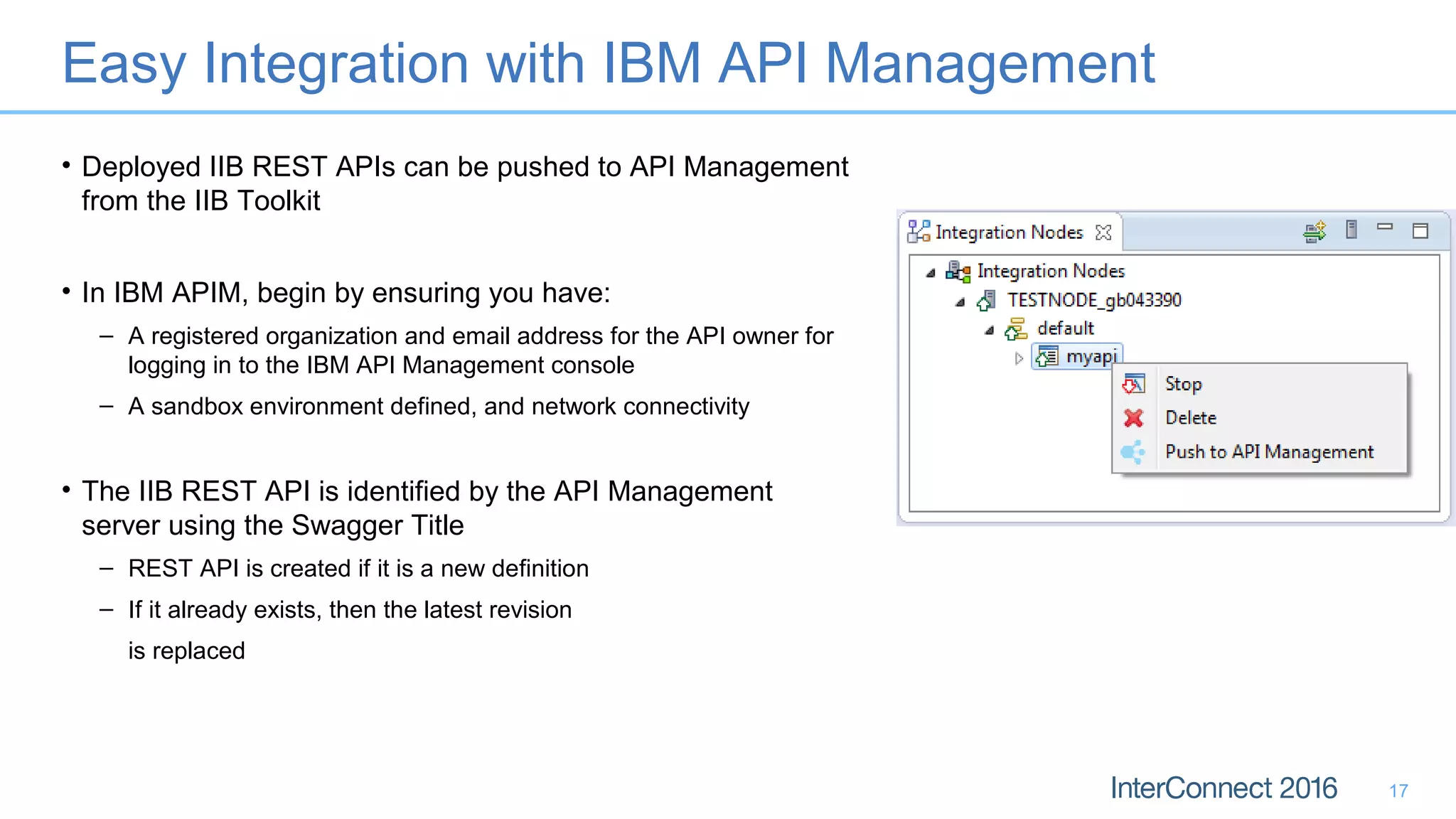
Easy Integration with IBM API Management
• Deployed IIB REST APIs can be pushed to API Management
from the IIB Toolkit
• In IBM APIM, begin by ensuring you have:
– A registered organization and email address for the API owner for
logging in to the IBM API Management console
– A sandbox environment defined, and network connectivity
• The IIB REST API is identified by the API Management
server using the Swagger Title
– REST API is created if it is a new definition
– If it already exists, then the latest revision
is replaced
17
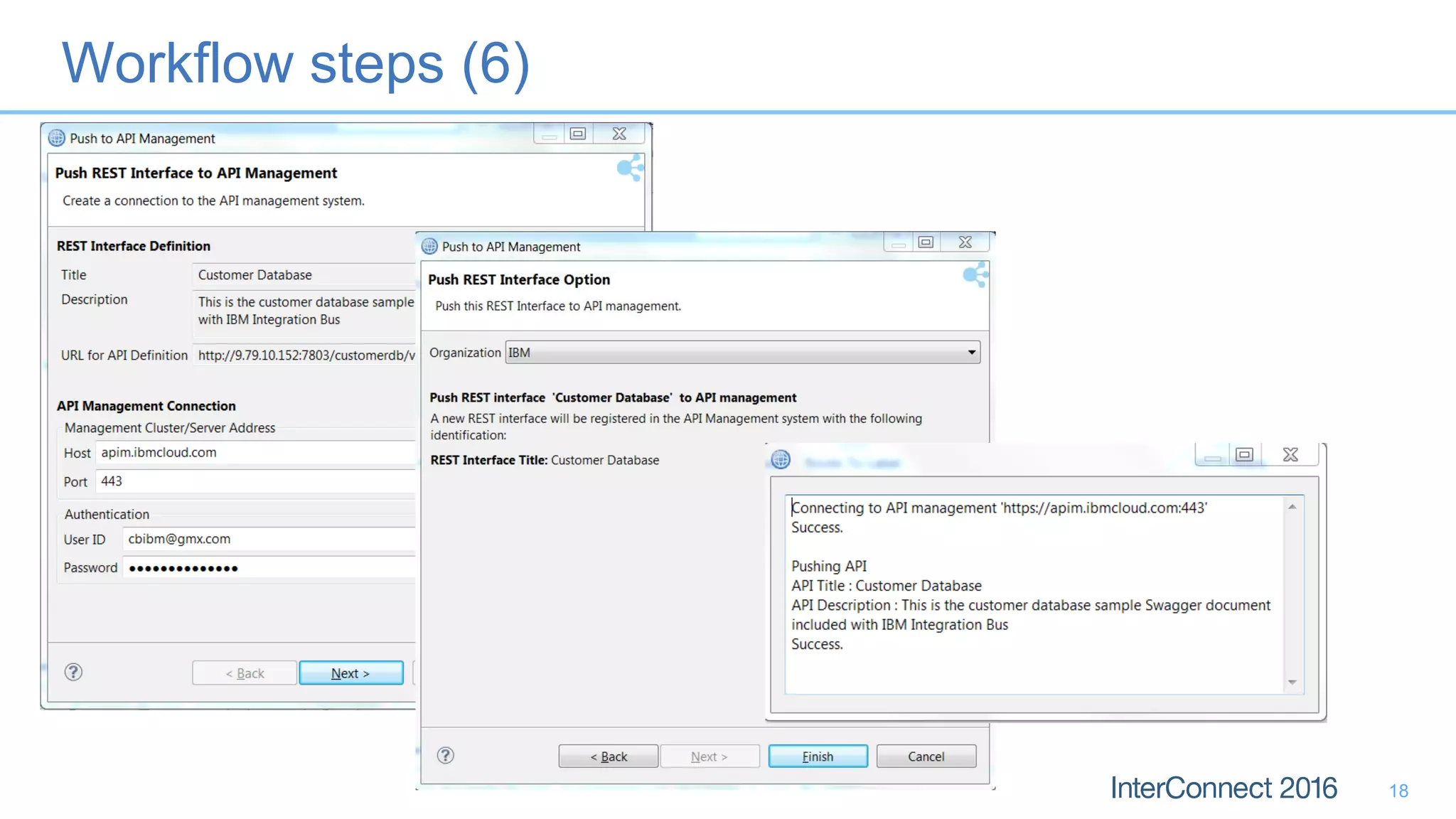
Workflow steps (6)
18
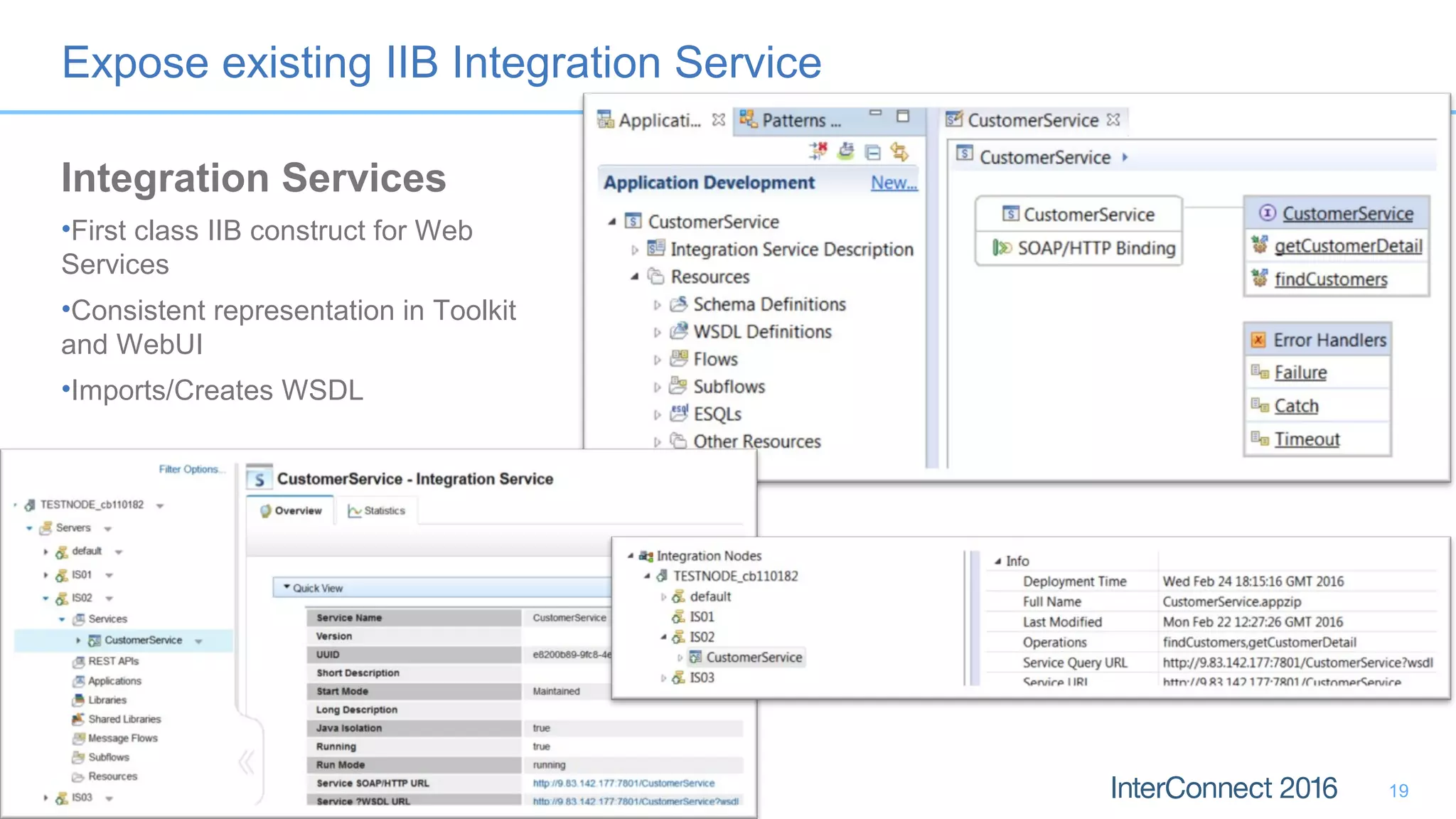
Expose existing IIB Integration Service
19
Integration Services
•First class IIB construct for Web
Services
•Consistent representation in Toolkit
and WebUI
•Imports/Creates WSDL
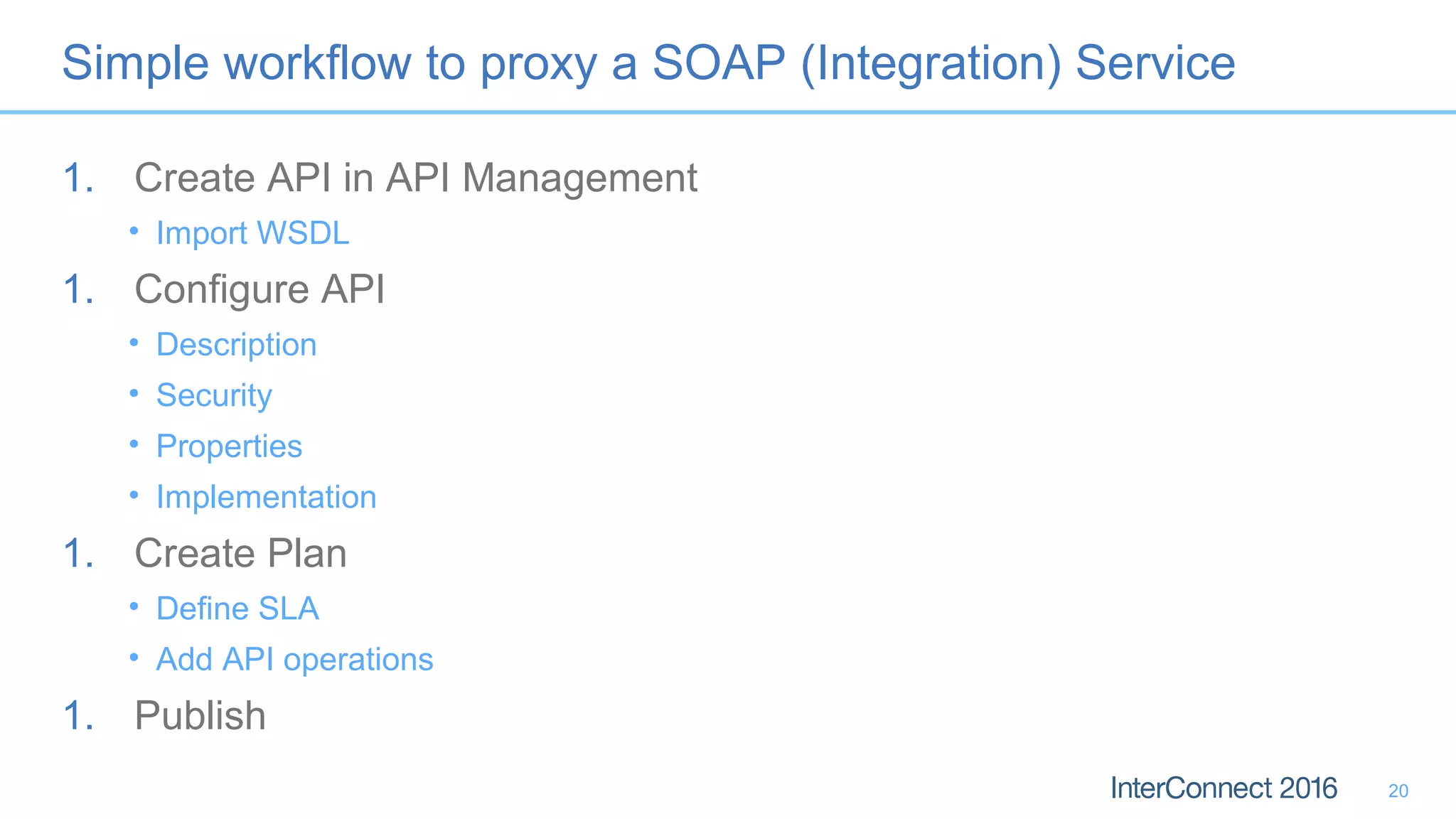
Simple workflow to proxy a SOAP (Integration) Service
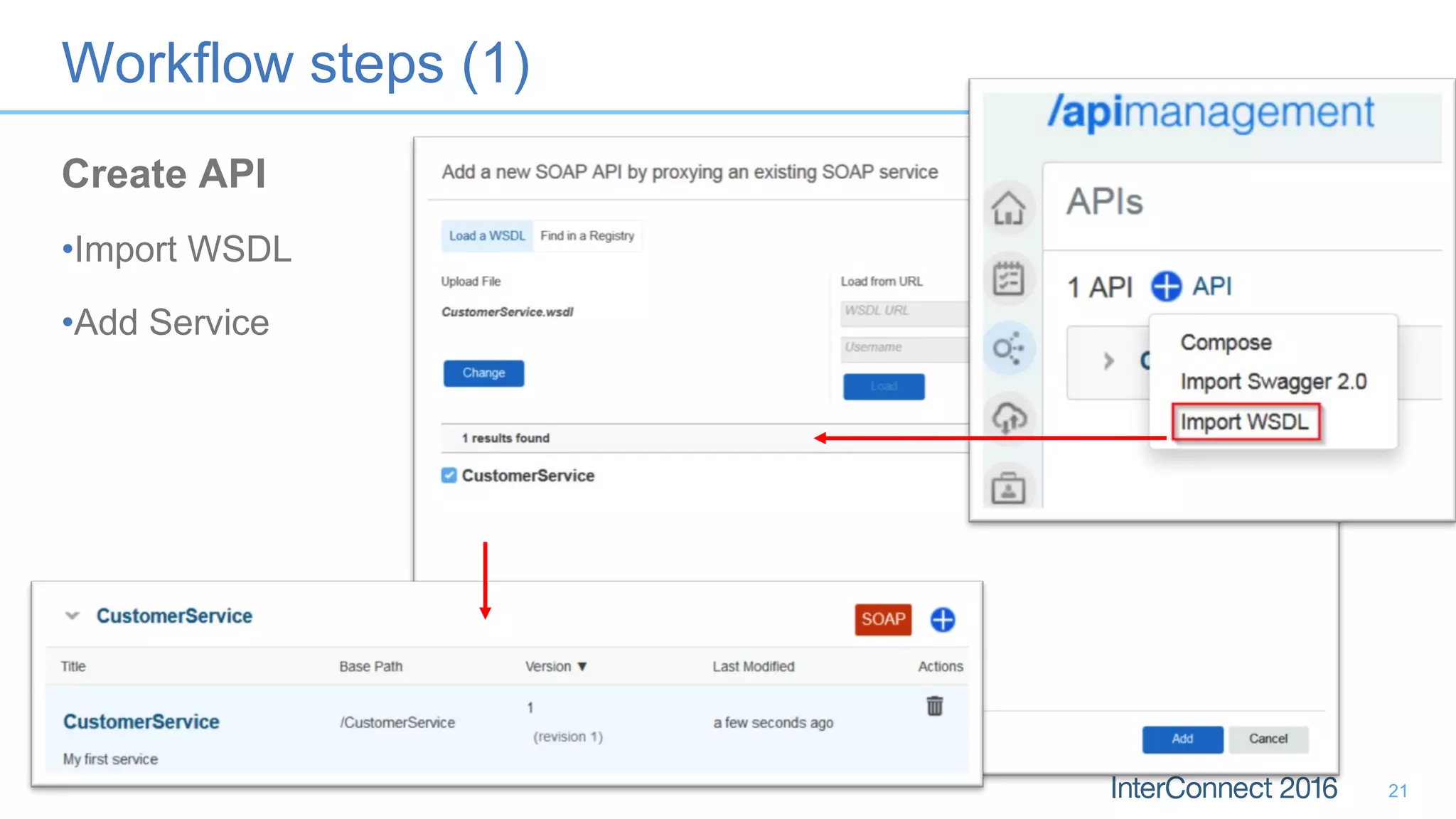
1. Create API in API Management
• Import WSDL
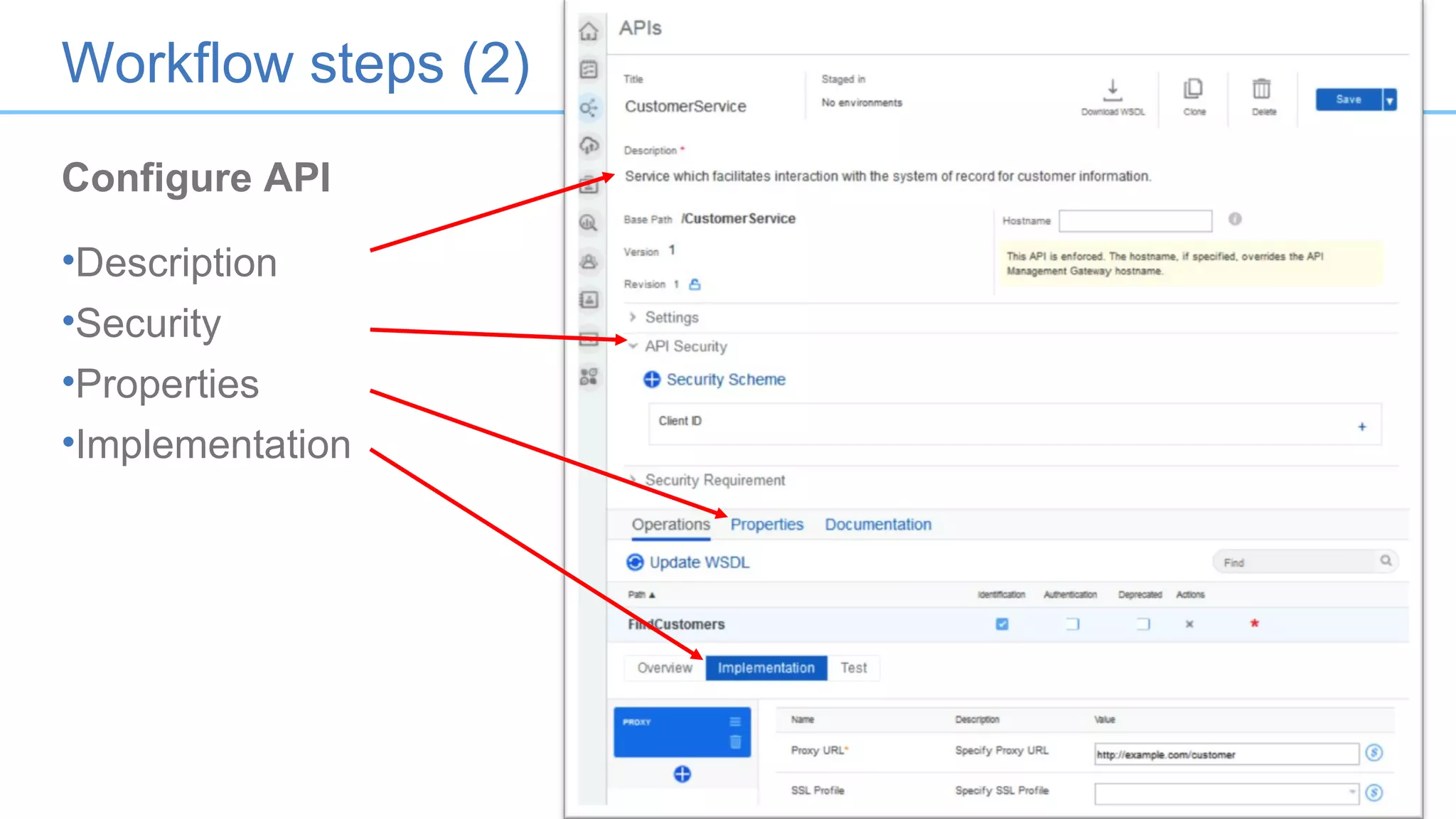
1. Configure API
• Description
• Security
• Properties
• Implementation
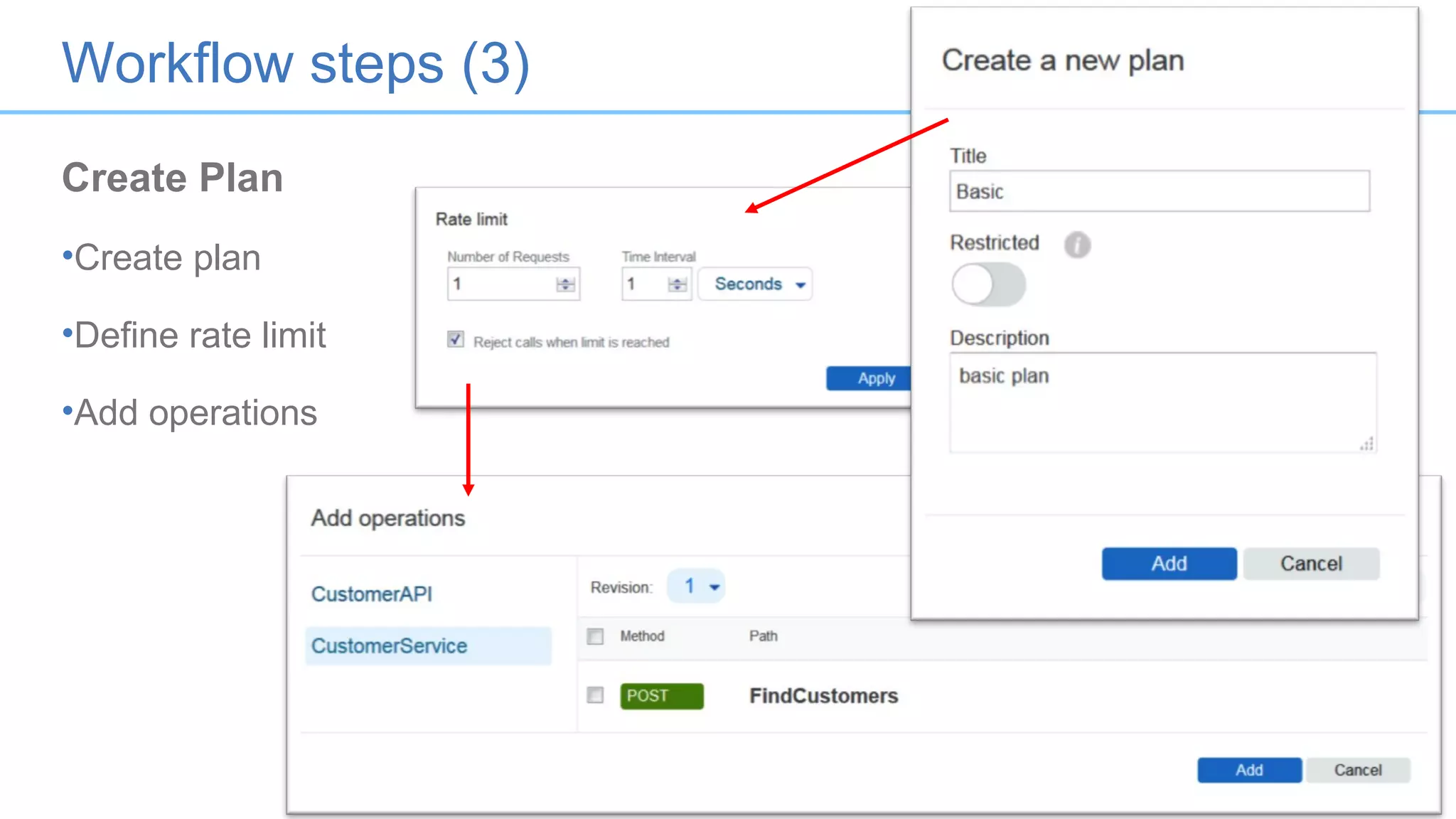
1. Create Plan
• Define SLA
• Add API operations
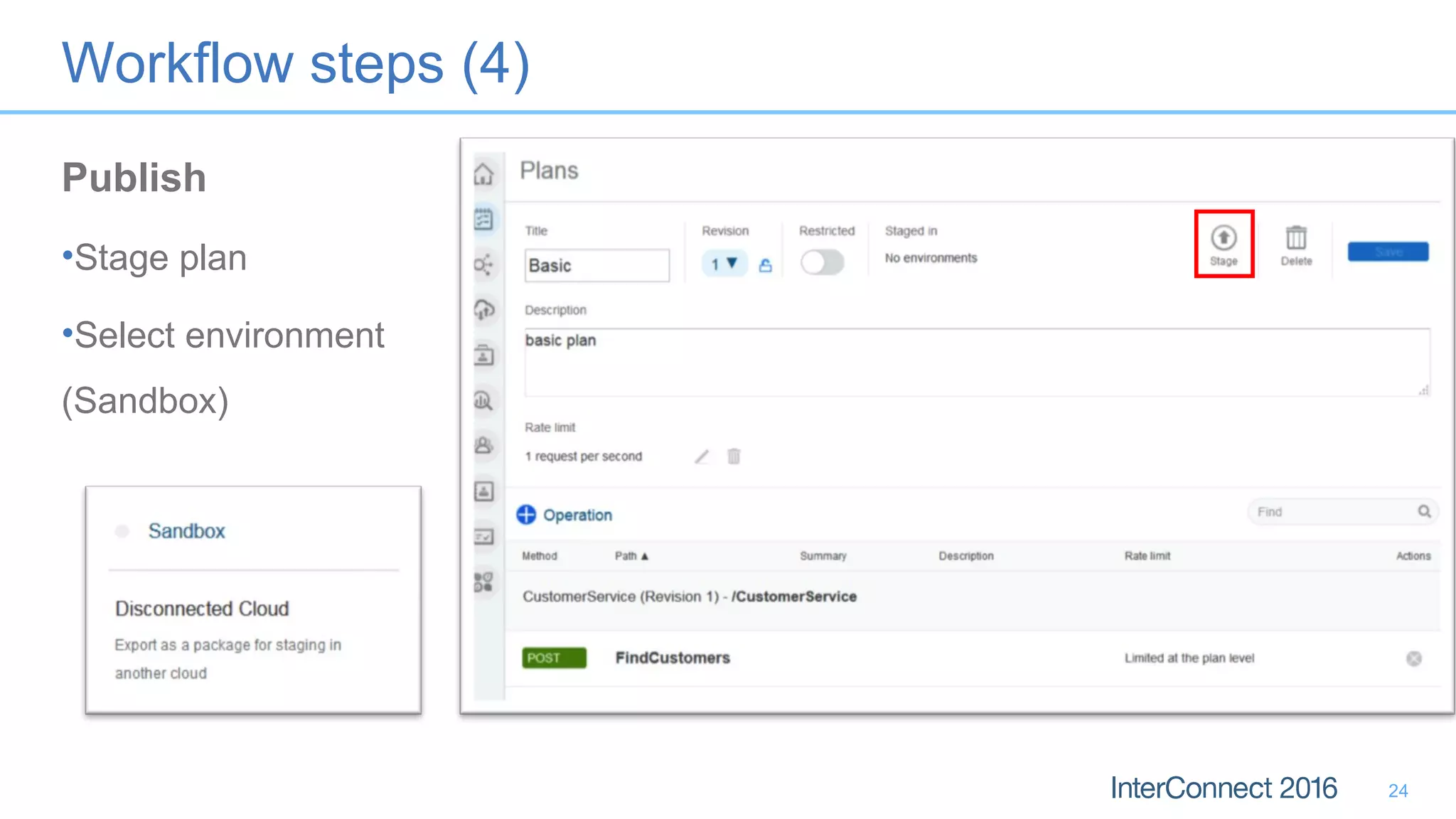
1. Publish
20
Workflow steps (1)
21
Create API
•Import WSDL
•Add Service
Workflow steps (2)
Configure API
•Description
•Security
•Properties
•Implementation
22
Workflow steps (3)
23
Create Plan
•Create plan
•Define rate limit
•Add operations
Workflow steps (4)
24
Publish
•Stage plan
•Select environment
(Sandbox)
Use Interaction APIs to combine System APIs
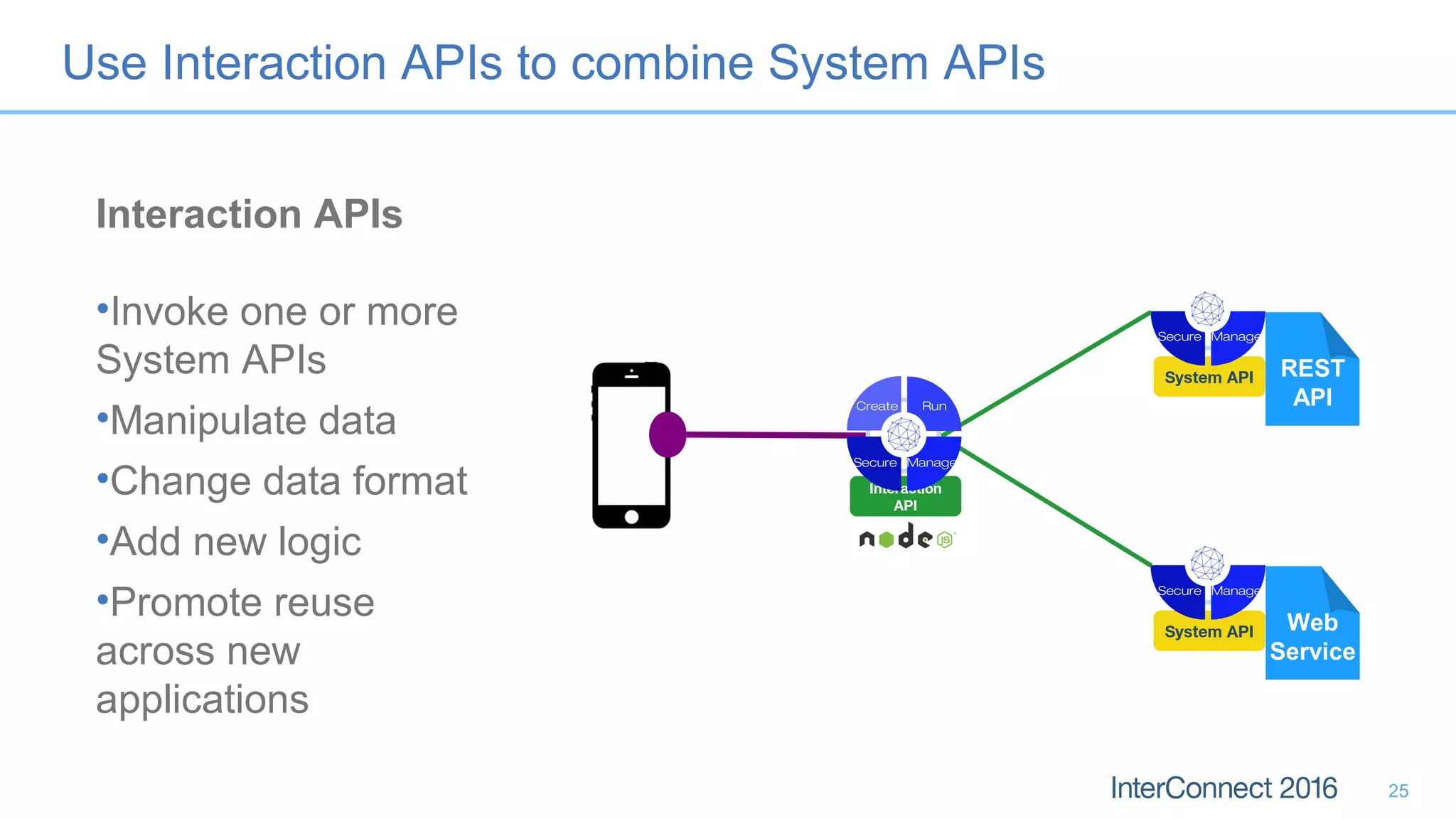
Interaction APIs
•Invoke one or more
System APIs
•Manipulate data
•Change data format
•Add new logic
•Promote reuse
across new
applications
25
Web
Service
System API
ManageSecure
REST
API
System API
ManageSecure
Interaction
API
ManageSecure
Create Run
Summary
Services or APIs? – Services with APIs
Services APIs
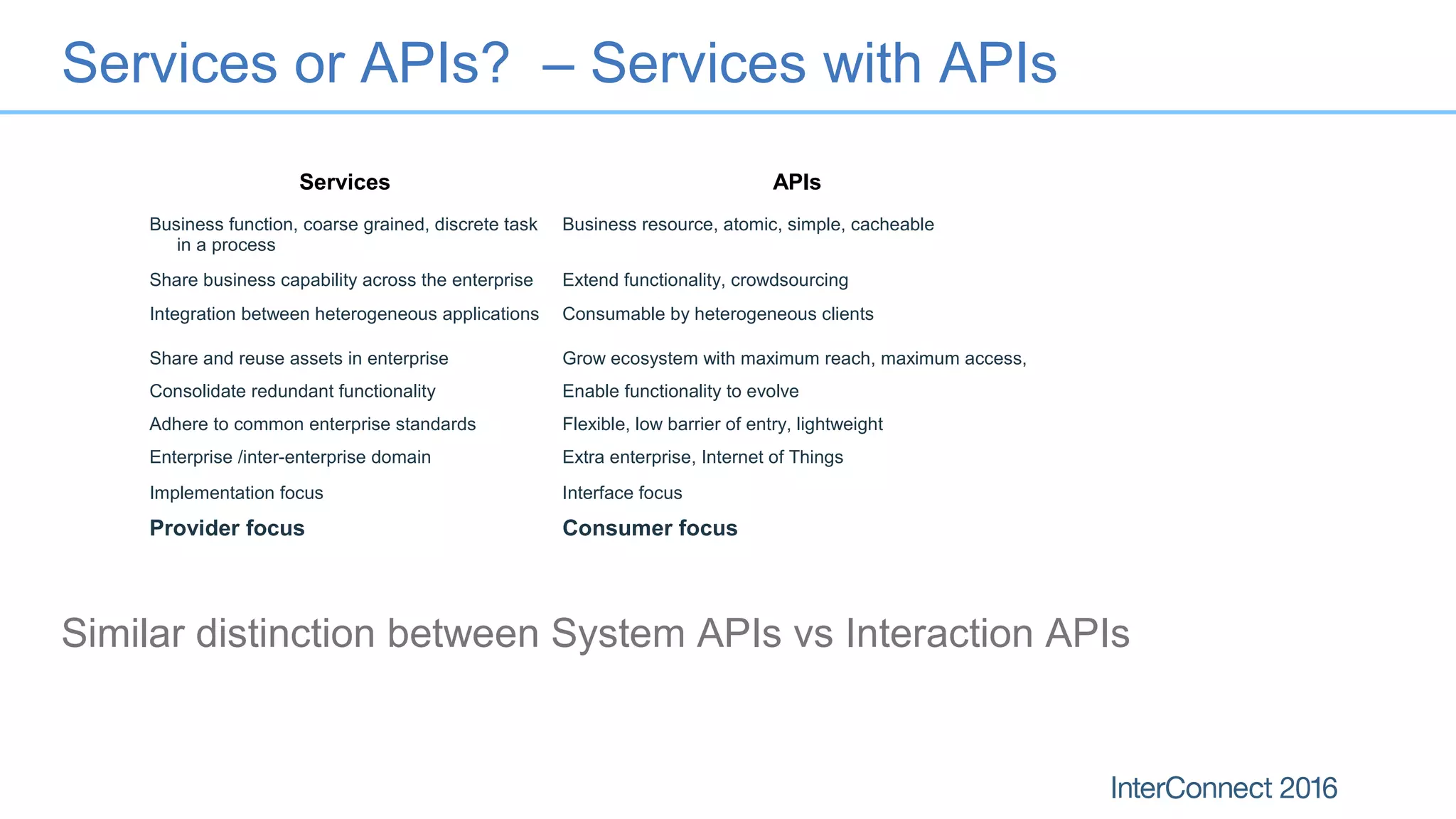
Business function, coarse grained, discrete task
in a process
Business resource, atomic, simple, cacheable
Share business capability across the enterprise Extend functionality, crowdsourcing
Integration between heterogeneous applications Consumable by heterogeneous clients
Share and reuse assets in enterprise Grow ecosystem with maximum reach, maximum access,
Consolidate redundant functionality Enable functionality to evolve
Adhere to common enterprise standards Flexible, low barrier of entry, lightweight
Enterprise /inter-enterprise domain Extra enterprise, Internet of Things
Implementation focus Interface focus
Provider focus Consumer focus
Similar distinction between System APIs vs Interaction APIs
Already Have APIs?
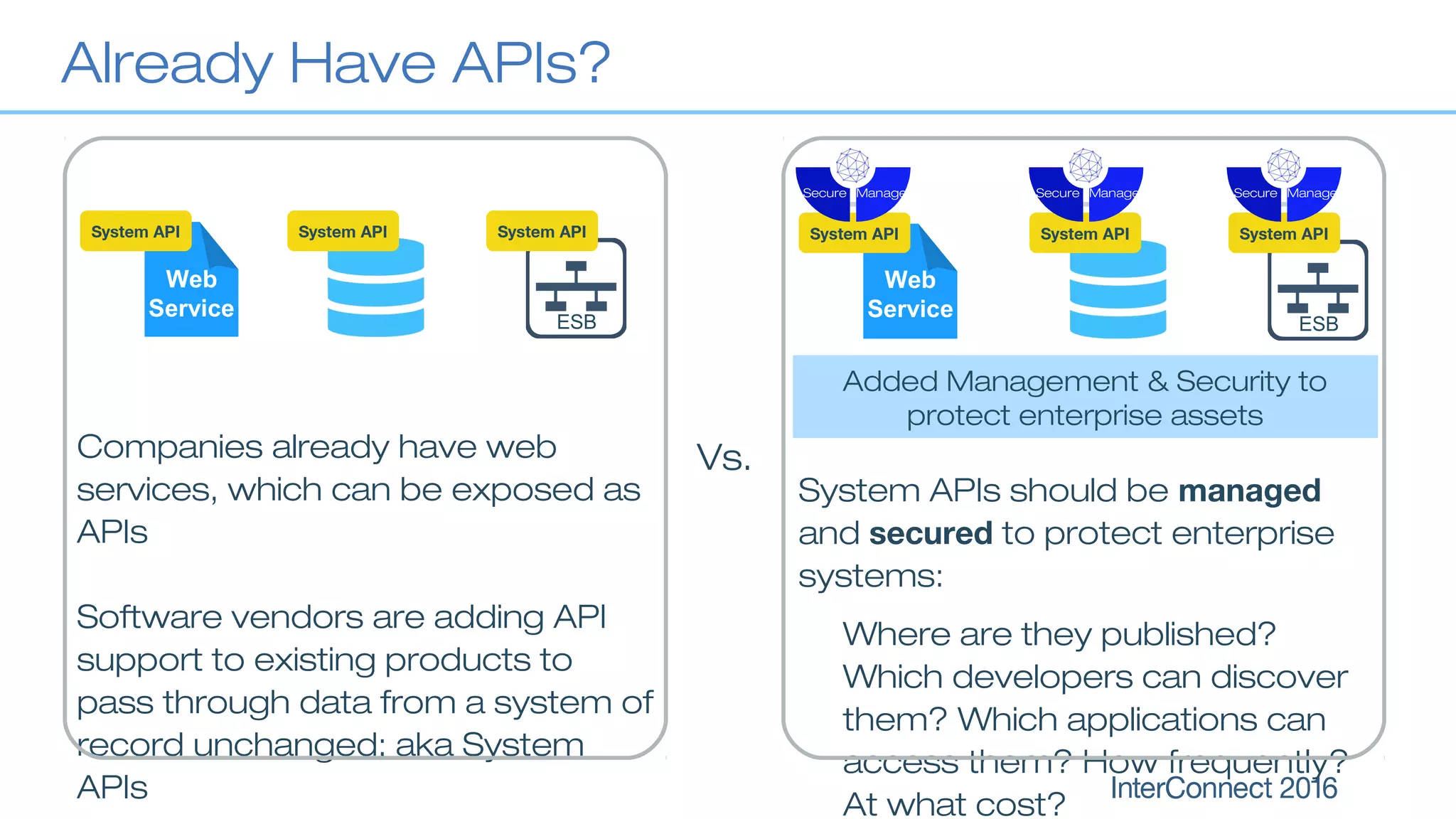
Companies already have web
services, which can be exposed as
APIs
Software vendors are adding API
support to existing products to
pass through data from a system of
record unchanged; aka System
APIs
System API System API
ESB
Web
Service
System API
Added Management & Security to
protect enterprise assets
System APIs should be managed
and secured to protect enterprise
systems:
Where are they published?
Which developers can discover
them? Which applications can
access them? How frequently?
At what cost?
Vs.
Web
Service
System API
ManageSecure
System API
ManageSecure
System API
ESB
ManageSecure
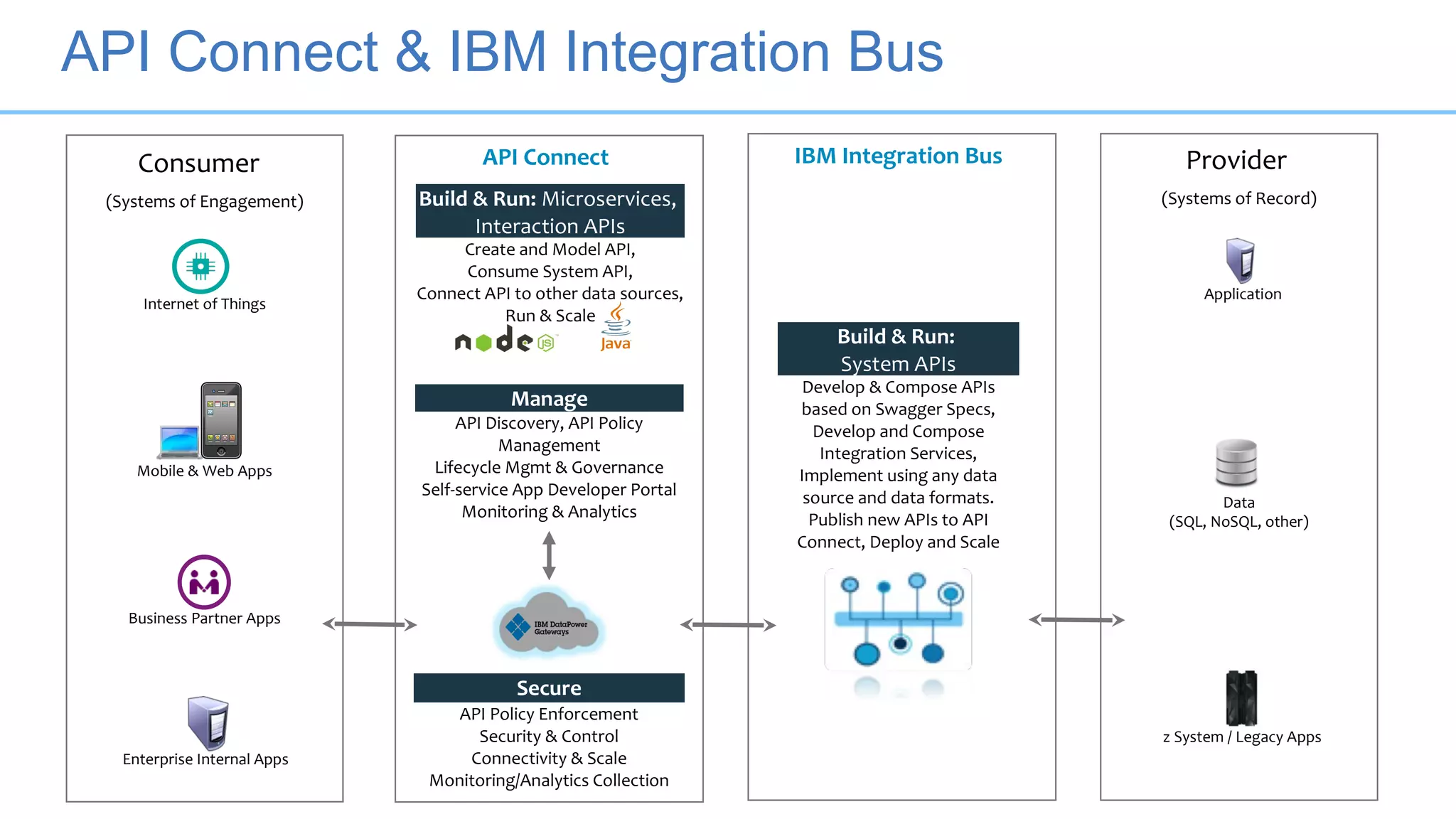
IBM Integration BusAPI ConnectConsumer
(Systems of Engagement)
Business Partner Apps
Internet of Things
Enterprise Internal Apps
Mobile & Web Apps
Secure
API Policy Enforcement
Security & Control
Connectivity & Scale
Monitoring/Analytics Collection
Manage
API Discovery, API Policy
Management
Lifecycle Mgmt & Governance
Self-service App Developer Portal
Monitoring & Analytics
Build & Run:
System APIs
Develop & Compose APIs
based on Swagger Specs,
Develop and Compose
Integration Services,
Implement using any data
source and data formats.
Publish new APIs to API
Connect, Deploy and Scale
z System / Legacy Apps
Provider
(Systems of Record)
Application
Data
(SQL, NoSQL, other)
Build & Run: Microservices,
Interaction APIs
Create and Model API,
Consume System API,
Connect API to other data sources,
Run & Scale
API Connect & IBM Integration Bus
Notices and Disclaimers
30
Copyright © 2016 by International Business Machines Corporation (IBM). No part of this document may be reproduced or transmitted in any form without written permission
from IBM.
U.S. Government Users Restricted Rights - Use, duplication or disclosure restricted by GSA ADP Schedule Contract with IBM.
Information in these presentations (including information relating to products that have not yet been announced by IBM) has been reviewed for accuracy as of the date of
initial publication and could include unintentional technical or typographical errors. IBM shall have no responsibility to update this information. THIS DOCUMENT IS
DISTRIBUTED "AS IS" WITHOUT ANY WARRANTY, EITHER EXPRESS OR IMPLIED. IN NO EVENT SHALL IBM BE LIABLE FOR ANY DAMAGE ARISING FROM THE
USE OF THIS INFORMATION, INCLUDING BUT NOT LIMITED TO, LOSS OF DATA, BUSINESS INTERRUPTION, LOSS OF PROFIT OR LOSS OF OPPORTUNITY. IBM
products and services are warranted according to the terms and conditions of the agreements under which they are provided.
Any statements regarding IBM's future direction, intent or product plans are subject to change or withdrawal without notice.
Performance data contained herein was generally obtained in a controlled, isolated environments. Customer examples are presented as illustrations of how those
customers have used IBM products and the results they may have achieved. Actual performance, cost, savings or other results in other operating environments may vary.
References in this document to IBM products, programs, or services does not imply that IBM intends to make such products, programs or services available in all countries
in which IBM operates or does business.
Workshops, sessions and associated materials may have been prepared by independent session speakers, and do not necessarily reflect the views of IBM. All materials
and discussions are provided for informational purposes only, and are neither intended to, nor shall constitute legal or other guidance or advice to any individual participant
or their specific situation.
It is the customer’s responsibility to insure its own compliance with legal requirements and to obtain advice of competent legal counsel as to the identification and
interpretation of any relevant laws and regulatory requirements that may affect the customer’s business and any actions the customer may need to take to comply with such
laws. IBM does not provide legal advice or represent or warrant that its services or products will ensure that the customer is in compliance with any law
Notices and Disclaimers Con’t.
31
Information concerning non-IBM products was obtained from the suppliers of those products, their published announcements or other publicly available sources. IBM has not
tested those products in connection with this publication and cannot confirm the accuracy of performance, compatibility or any other claims related to non-IBM products.
Questions on the capabilities of non-IBM products should be addressed to the suppliers of those products. IBM does not warrant the quality of any third-party products, or the
ability of any such third-party products to interoperate with IBM’s products. IBM EXPRESSLY DISCLAIMS ALL WARRANTIES, EXPRESSED OR IMPLIED, INCLUDING BUT
NOT LIMITED TO, THE IMPLIED WARRANTIES OF MERCHANTABILITY AND FITNESS FOR A PARTICULAR PURPOSE.
The provision of the information contained h erein is not intended to, and does not, grant any right or license under any IBM patents, copyrights, trademarks or other
intellectual property right.
IBM, the IBM logo, ibm.com, Aspera®, Bluemix, Blueworks Live, CICS, Clearcase, Cognos®, DOORS®, Emptoris®, Enterprise Document Management System™, FASP®,
FileNet®, Global Business Services ®, Global Technology Services ®, IBM ExperienceOne™, IBM SmartCloud®, IBM Social Business®, Information on Demand, ILOG,
Maximo®, MQIntegrator®, MQSeries®, Netcool®, OMEGAMON, OpenPower, PureAnalytics™, PureApplication®, pureCluster™, PureCoverage®, PureData®,
PureExperience®, PureFlex®, pureQuery®, pureScale®, PureSystems®, QRadar®, Rational®, Rhapsody®, Smarter Commerce®, SoDA, SPSS, Sterling Commerce®,
StoredIQ, Tealeaf®, Tivoli®, Trusteer®, Unica®, urban{code}®, Watson, WebSphere®, Worklight®, X-Force® and System z® Z/OS, are trademarks of International Business
Machines Corporation, registered in many jurisdictions worldwide. Other product and service names might be trademarks of IBM or other companies. A current list of IBM
trademarks is available on the Web at "Copyright and trademark information" at: www.ibm.com/legal/copytrade.shtml.
Thank You
Your Feedback is Important!
Access the InterConnect 2016 Conference Attendee
Portal to complete your session surveys from your
smartphone,
laptop or conference kiosk.

The Power of IBM API Management. API connect 2016 Vegas

  • 1.
    Sergio Gutierrez IBMSaaS Executive Dinesh Shetty– IBM IT Executive HAM-1014 The Power of IBM API Management
  • 2.
    Agenda • Introduction toAPI Connect and IBM Integration Bus • How to use APIM / API Connect with IBM Integration Bus • Expose REST APIs from IIB • Expose IIB Integration Services • Use Interaction APIs to combine System APIs • Summary 2
  • 3.
    Introduction to APIConnect and IBM Integration Bus
  • 4.
    IBM Integration Bus- Overview • ESB that connects Systems of Record and Systems of Interaction using • Integration Services • REST APIs • Applications • Integration platform • Extensive support for formats and protocols • Extensive support for standards • Built-in support for enterprise applications • Range of deployment options from on-premise to on-cloud 4
  • 5.
    Batch Apps DataProcess Packaged App (SAP, PeopleSoft) Adapter SOAP/HTTP ODBC/JDBC MQ/JMS Legacy (CICS / IMS / Z) File External Services REST/HTTP IBM Integration Bus TCP/IP APIAPIAPIAPI IBM Integration Bus Accelerates Digital Transformation 5
  • 6.
    IBM API Managementv4 design, secure, control, publish, monitor & manage APIs 6 API Manager Define and manage APIs Explore API usage with analytics Manage API user communities Management Console Provision system resources Monitor runtime health Scale the environment Explore API documentation Provision application keys Self-service experience Developer Portal API Gateway (IBM DataPower) Enforce runtime policies to control API traffic
  • 7.
    Gateway API Manager Advanced Developer Portal Runtime Manager Or Microservic e App Runtime {API } API Spec API Connect v5 Create. Run. Manage. Secure. Announc e 2/16/201 6 GA 3/15/201 6 Version 5.0
  • 8.
    IBM API Connect:Capabilities Delivered • API discovery • API, Plan & Product policy creation • API, Plan & Product lifecycle mgmt. • Self-service, customizable, developer portal • Advanced Analytics • Subscription & community • Policy enforcement • Enterprise security • Quota management & rate limiting • Content-based routing • Response caching, load- balancing and offload processing • Message format & transport • Rapid model-driven API creation • Datasource to API mapping automation • Standards-based visual API spec creation in Swagger 2.0 • Local API creation and testing • On-cloud & on-premises staging of APIs, Plans & Products • Node.js & Java Microservice runtime • Node.js & Java integrated runtime management • Enterprise HA & scaling • On-cloud & on-premises staging of Microservice applications Create Run ManageSecure
  • 9.
  • 10.
    Different use cases 1.Expose REST APIs from IIB 2. Expose Integration Services from IIB 3. Use Interaction APIs to combine System APIs 10
  • 11.
    Expose a RESTAPI from IBM Integration Bus • Introducing IIB’s new REST API first class construct • Provides a simple way to receive JSON / HTTP and expose a REST API • Import Swagger 2.0 definitions, clients can use existing Swagger tools and projects to retrieve Swagger definitions • Create a new REST API in the IIB Toolkit without having to import a Swagger file (beta) • Administer REST APIs as a first class IIB construct in the Web UI 11
  • 12.
    Simple workflow toimplement an API in IIB 1. Import swagger definition into Toolkit 2. Select operation to implement 3. Complete the generated skeleton with standard IIB development tools 4. Unit test with integrated runtime 5. Package & Deploy 6. Push to API Management
  • 13.
    • Wizard driven •Import Swagger definition • Select resources and operations Workflow steps (1)
  • 14.
    • Select operationsto implement • Add error and timeout handling Workflow steps (2)
  • 15.
    • Add implementationfor operation using standard IIB Development tools • Unit test in integrated Test Node Workflow steps (3 - 4)
  • 16.
    Workflow steps (5) •REST APIs can be deployed to an integration server using any of the standard mechanisms – either the Integration Toolkit, the command line, or the Integration Java API. • Once deployed, a REST API appears in the Integration Toolkit and web administration interface as a REST API, under a new REST APIs category. 16
  • 17.
    Easy Integration withIBM API Management • Deployed IIB REST APIs can be pushed to API Management from the IIB Toolkit • In IBM APIM, begin by ensuring you have: – A registered organization and email address for the API owner for logging in to the IBM API Management console – A sandbox environment defined, and network connectivity • The IIB REST API is identified by the API Management server using the Swagger Title – REST API is created if it is a new definition – If it already exists, then the latest revision is replaced 17
  • 18.
  • 19.
    Expose existing IIBIntegration Service 19 Integration Services •First class IIB construct for Web Services •Consistent representation in Toolkit and WebUI •Imports/Creates WSDL
  • 20.
    Simple workflow toproxy a SOAP (Integration) Service 1. Create API in API Management • Import WSDL 1. Configure API • Description • Security • Properties • Implementation 1. Create Plan • Define SLA • Add API operations 1. Publish 20
  • 21.
    Workflow steps (1) 21 CreateAPI •Import WSDL •Add Service
  • 22.
    Workflow steps (2) ConfigureAPI •Description •Security •Properties •Implementation 22
  • 23.
    Workflow steps (3) 23 CreatePlan •Create plan •Define rate limit •Add operations
  • 24.
    Workflow steps (4) 24 Publish •Stageplan •Select environment (Sandbox)
  • 25.
    Use Interaction APIsto combine System APIs Interaction APIs •Invoke one or more System APIs •Manipulate data •Change data format •Add new logic •Promote reuse across new applications 25 Web Service System API ManageSecure REST API System API ManageSecure Interaction API ManageSecure Create Run
  • 26.
  • 27.
    Services or APIs?– Services with APIs Services APIs Business function, coarse grained, discrete task in a process Business resource, atomic, simple, cacheable Share business capability across the enterprise Extend functionality, crowdsourcing Integration between heterogeneous applications Consumable by heterogeneous clients Share and reuse assets in enterprise Grow ecosystem with maximum reach, maximum access, Consolidate redundant functionality Enable functionality to evolve Adhere to common enterprise standards Flexible, low barrier of entry, lightweight Enterprise /inter-enterprise domain Extra enterprise, Internet of Things Implementation focus Interface focus Provider focus Consumer focus Similar distinction between System APIs vs Interaction APIs
  • 28.
    Already Have APIs? Companiesalready have web services, which can be exposed as APIs Software vendors are adding API support to existing products to pass through data from a system of record unchanged; aka System APIs System API System API ESB Web Service System API Added Management & Security to protect enterprise assets System APIs should be managed and secured to protect enterprise systems: Where are they published? Which developers can discover them? Which applications can access them? How frequently? At what cost? Vs. Web Service System API ManageSecure System API ManageSecure System API ESB ManageSecure
  • 29.
    IBM Integration BusAPIConnectConsumer (Systems of Engagement) Business Partner Apps Internet of Things Enterprise Internal Apps Mobile & Web Apps Secure API Policy Enforcement Security & Control Connectivity & Scale Monitoring/Analytics Collection Manage API Discovery, API Policy Management Lifecycle Mgmt & Governance Self-service App Developer Portal Monitoring & Analytics Build & Run: System APIs Develop & Compose APIs based on Swagger Specs, Develop and Compose Integration Services, Implement using any data source and data formats. Publish new APIs to API Connect, Deploy and Scale z System / Legacy Apps Provider (Systems of Record) Application Data (SQL, NoSQL, other) Build & Run: Microservices, Interaction APIs Create and Model API, Consume System API, Connect API to other data sources, Run & Scale API Connect & IBM Integration Bus
  • 30.
    Notices and Disclaimers 30 Copyright© 2016 by International Business Machines Corporation (IBM). No part of this document may be reproduced or transmitted in any form without written permission from IBM. U.S. Government Users Restricted Rights - Use, duplication or disclosure restricted by GSA ADP Schedule Contract with IBM. Information in these presentations (including information relating to products that have not yet been announced by IBM) has been reviewed for accuracy as of the date of initial publication and could include unintentional technical or typographical errors. IBM shall have no responsibility to update this information. THIS DOCUMENT IS DISTRIBUTED "AS IS" WITHOUT ANY WARRANTY, EITHER EXPRESS OR IMPLIED. IN NO EVENT SHALL IBM BE LIABLE FOR ANY DAMAGE ARISING FROM THE USE OF THIS INFORMATION, INCLUDING BUT NOT LIMITED TO, LOSS OF DATA, BUSINESS INTERRUPTION, LOSS OF PROFIT OR LOSS OF OPPORTUNITY. IBM products and services are warranted according to the terms and conditions of the agreements under which they are provided. Any statements regarding IBM's future direction, intent or product plans are subject to change or withdrawal without notice. Performance data contained herein was generally obtained in a controlled, isolated environments. Customer examples are presented as illustrations of how those customers have used IBM products and the results they may have achieved. Actual performance, cost, savings or other results in other operating environments may vary. References in this document to IBM products, programs, or services does not imply that IBM intends to make such products, programs or services available in all countries in which IBM operates or does business. Workshops, sessions and associated materials may have been prepared by independent session speakers, and do not necessarily reflect the views of IBM. All materials and discussions are provided for informational purposes only, and are neither intended to, nor shall constitute legal or other guidance or advice to any individual participant or their specific situation. It is the customer’s responsibility to insure its own compliance with legal requirements and to obtain advice of competent legal counsel as to the identification and interpretation of any relevant laws and regulatory requirements that may affect the customer’s business and any actions the customer may need to take to comply with such laws. IBM does not provide legal advice or represent or warrant that its services or products will ensure that the customer is in compliance with any law
  • 31.
    Notices and DisclaimersCon’t. 31 Information concerning non-IBM products was obtained from the suppliers of those products, their published announcements or other publicly available sources. IBM has not tested those products in connection with this publication and cannot confirm the accuracy of performance, compatibility or any other claims related to non-IBM products. Questions on the capabilities of non-IBM products should be addressed to the suppliers of those products. IBM does not warrant the quality of any third-party products, or the ability of any such third-party products to interoperate with IBM’s products. IBM EXPRESSLY DISCLAIMS ALL WARRANTIES, EXPRESSED OR IMPLIED, INCLUDING BUT NOT LIMITED TO, THE IMPLIED WARRANTIES OF MERCHANTABILITY AND FITNESS FOR A PARTICULAR PURPOSE. The provision of the information contained h erein is not intended to, and does not, grant any right or license under any IBM patents, copyrights, trademarks or other intellectual property right. IBM, the IBM logo, ibm.com, Aspera®, Bluemix, Blueworks Live, CICS, Clearcase, Cognos®, DOORS®, Emptoris®, Enterprise Document Management System™, FASP®, FileNet®, Global Business Services ®, Global Technology Services ®, IBM ExperienceOne™, IBM SmartCloud®, IBM Social Business®, Information on Demand, ILOG, Maximo®, MQIntegrator®, MQSeries®, Netcool®, OMEGAMON, OpenPower, PureAnalytics™, PureApplication®, pureCluster™, PureCoverage®, PureData®, PureExperience®, PureFlex®, pureQuery®, pureScale®, PureSystems®, QRadar®, Rational®, Rhapsody®, Smarter Commerce®, SoDA, SPSS, Sterling Commerce®, StoredIQ, Tealeaf®, Tivoli®, Trusteer®, Unica®, urban{code}®, Watson, WebSphere®, Worklight®, X-Force® and System z® Z/OS, are trademarks of International Business Machines Corporation, registered in many jurisdictions worldwide. Other product and service names might be trademarks of IBM or other companies. A current list of IBM trademarks is available on the Web at "Copyright and trademark information" at: www.ibm.com/legal/copytrade.shtml.
  • 32.
    Thank You Your Feedbackis Important! Access the InterConnect 2016 Conference Attendee Portal to complete your session surveys from your smartphone, laptop or conference kiosk.