Department Introduction
Session Objectives
Understand Why change has taken place

Understand the Difference between Moodle and SLG

Know and Understand the eLearning Vision

Know how to modify text on the Moodle Course
Know how to upload resources (incl using folders)
Know how to set visible properties
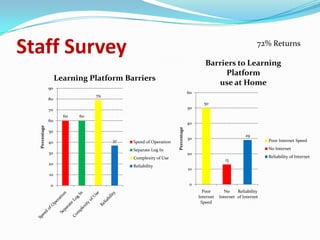
Staff Survey                                                                                                   72% Returns

                                                                                    Barriers to Learning
                                                                                         Platform
                    Learning Platform Barriers
                                                                                       use at Home
               90
                                                                            60
                                79
               80
                                                                                   50
               70                                                           50
                      60   60
               60
                                                                            40
  Percentage


                                                               Percentage
               50
                                                                                                         29
                                                                            30                                     Poor Internet Speed
               40                    37   Speed of Operation
                                          Separate Log In                                                          No Internet
               30                                                           20
                                          Complexity of Use                                                        Reliability of Internet
                                                                                               13
               20
                                          Reliability
                                                                            10
               10

               0                                                            0
                                                                                   Poor        No    Reliability
                                                                                 Internet   Internet of Internet
                                                                                  Speed
Staff Survey                                                            90
                                                                             Staff Training/CPD Model

                                                                                                      81
                                                                        80
                   Learning Platform Uses
             100                                                        70
                        91
             90
                                                                        60
             80
                                  72
                                                                                49


                                                           Percentage
                                                                        50                                      Twilight
             70
                                                                                           40
Percentage


             60                                                                                                 Flexible Learning
                                            49                          40
             50    47                  47
                             42                       44
                                                                        30                                      Set INSET to
             40                                  35
                                                                                                                Populate
             30
                                                                        20
             20
                                                                        10
              10

              0                                                         0
                                                                              Twilight   Flexible Set INSET
                                                                                         Learning to Populate
Rationale for Change
The Minster Moodle will be the platform for teaching
and learning resources:
Features
Single Sign On (in school)
Resource download              Discussion Forum
Wiki                           Differentiation
Quizzes                        Gradebooks
Surveys                        Web Pages
Embed Video                    Web Links

Moodle is free (Open Source Software)
Rationale for Change
SIMS Learning Gateway would provide our Portal needs,
more efficient to use by staff.
Features
Document Libraries/Calendar / News Items
included. Also, Single Sign On

Provides an Interface for writing electronic reports and
completing marksheets outside of school. Parents can
download pdf versions of reports.

Improved method for communicating with parents – AP
Data / Attendance / Timetables / Achievement Points
Introduction to Moodle
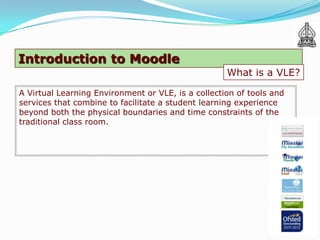
                                                    What is a VLE?

A Virtual Learning Environment or VLE, is a collection of tools and
services that combine to facilitate a student learning experience
beyond both the physical boundaries and time constraints of the
traditional class room.
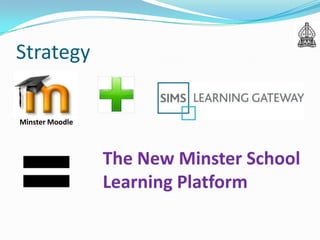
Strategy

Minster Moodle


                 The New Minster School
                 Learning Platform
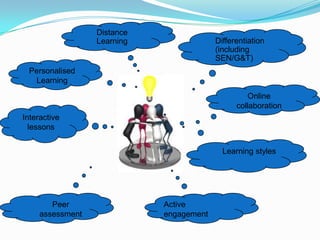
Distance
                  Learning                Differentiation
                                          (including
                                          SEN/G&T)
 Personalised
  Learning
                                                   Online
                                                collaboration
Interactive
  lessons


                                            Learning styles


        Peer                 Active
     assessment              engagement
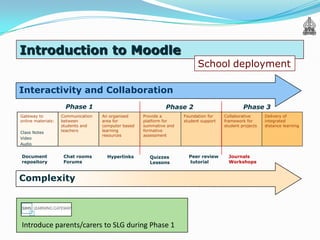
Introduction to Moodle
                                                                           School deployment

Interactivity and Collaboration
                     Phase 1                                  Phase 2                           Phase 3
Gateway to          Communication   An organised     Provide a       Foundation for    Collaborative      Delivery of
online materials:   between         area for         platform for    student support   framework for      integrated
                    students and    computer based   summative and                     student projects   distance learning
Class Notes         teachers        learning         formative
                                    resources        assessment
Video
Audio


Document             Chat rooms       Hyperlinks       Quizzes         Peer review       Journals
repository           Forums                            Lessons         tutorial          Workshops


Complexity


Introduce parents/carers to SLG during Phase 1
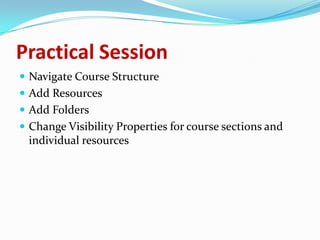
Practical Session
 Navigate Course Structure
 Add Resources
 Add Folders
 Change Visibility Properties for course sections and
 individual resources

The minster moodle department introduction

  • 1.
  • 2.
    Session Objectives Understand Whychange has taken place Understand the Difference between Moodle and SLG Know and Understand the eLearning Vision Know how to modify text on the Moodle Course Know how to upload resources (incl using folders) Know how to set visible properties
  • 3.
    Staff Survey 72% Returns Barriers to Learning Platform Learning Platform Barriers use at Home 90 60 79 80 50 70 50 60 60 60 40 Percentage Percentage 50 29 30 Poor Internet Speed 40 37 Speed of Operation Separate Log In No Internet 30 20 Complexity of Use Reliability of Internet 13 20 Reliability 10 10 0 0 Poor No Reliability Internet Internet of Internet Speed
  • 4.
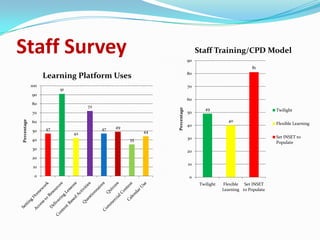
    Staff Survey 90 Staff Training/CPD Model 81 80 Learning Platform Uses 100 70 91 90 60 80 72 49 Percentage 50 Twilight 70 40 Percentage 60 Flexible Learning 49 40 50 47 47 42 44 30 Set INSET to 40 35 Populate 30 20 20 10 10 0 0 Twilight Flexible Set INSET Learning to Populate
  • 5.
    Rationale for Change TheMinster Moodle will be the platform for teaching and learning resources: Features Single Sign On (in school) Resource download Discussion Forum Wiki Differentiation Quizzes Gradebooks Surveys Web Pages Embed Video Web Links Moodle is free (Open Source Software)
  • 6.
    Rationale for Change SIMSLearning Gateway would provide our Portal needs, more efficient to use by staff. Features Document Libraries/Calendar / News Items included. Also, Single Sign On Provides an Interface for writing electronic reports and completing marksheets outside of school. Parents can download pdf versions of reports. Improved method for communicating with parents – AP Data / Attendance / Timetables / Achievement Points
  • 7.
    Introduction to Moodle What is a VLE? A Virtual Learning Environment or VLE, is a collection of tools and services that combine to facilitate a student learning experience beyond both the physical boundaries and time constraints of the traditional class room.
  • 8.
    Strategy Minster Moodle The New Minster School Learning Platform
  • 9.
    Distance Learning Differentiation (including SEN/G&T) Personalised Learning Online collaboration Interactive lessons Learning styles Peer Active assessment engagement
  • 10.
    Introduction to Moodle School deployment Interactivity and Collaboration Phase 1 Phase 2 Phase 3 Gateway to Communication An organised Provide a Foundation for Collaborative Delivery of online materials: between area for platform for student support framework for integrated students and computer based summative and student projects distance learning Class Notes teachers learning formative resources assessment Video Audio Document Chat rooms Hyperlinks Quizzes Peer review Journals repository Forums Lessons tutorial Workshops Complexity Introduce parents/carers to SLG during Phase 1
  • 11.
    Practical Session  NavigateCourse Structure  Add Resources  Add Folders  Change Visibility Properties for course sections and individual resources