Copyright © 2016, Oracle and/or its affiliates. All rights reserved. |
Oracle Trace File Analyzer (TFA)
with Database Support Tools Bundle
What’s New in 12.1.2.8.4
Copyright © 2016, Oracle and/or its affiliates. All rights reserved. |
Safe Harbor Statement
The following is intended to outline our general product direction. It is intended for
information purposes only, and may not be incorporated into any contract. It is not a
commitment to deliver any material, code, or functionality, and should not be relied upon
in making purchasing decisions. The development, release, and timing of any features or
functionality described for Oracle’s products remains at the sole discretion of Oracle.
2
Copyright © 2016, Oracle and/or its affiliates. All rights reserved. |
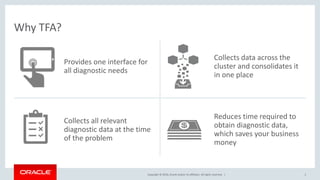
Why TFA?
Provides one interface for
all diagnostic needs
Collects data across the
cluster and consolidates it
in one place
Collects all relevant
diagnostic data at the time
of the problem
Reduces time required to
obtain diagnostic data,
which saves your business
money
3
Copyright © 2016, Oracle and/or its affiliates. All rights reserved. |
Program Agenda
Install and Run TFA without Root Privileges
SR Data Collection is 10X Easier
Bash no Longer Required
1
2
3
4
Copyright © 2016, Oracle and/or its affiliates. All rights reserved. |
Program Agenda
Install and Run TFA without Root Privileges
SR Data Collection is 10X Easier
Bash no Longer Required
1
2
3
5
Copyright © 2016, Oracle and/or its affiliates. All rights reserved. |
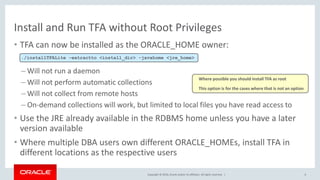
Install and Run TFA without Root Privileges
• TFA can now be installed as the ORACLE_HOME owner:
– Will not run a daemon
– Will not perform automatic collections
– Will not collect from remote hosts
– On-demand collections will work, but limited to local files you have read access to
• Use the JRE already available in the RDBMS home unless you have a later
version available
• Where multiple DBA users own different ORACLE_HOMEs, install TFA in
different locations as the respective users
6
./installTFALite -extractto <install_dir> -javahome <jre_home>
Where possible you should install TFA as root
This option is for the cases where that is not an option
Copyright © 2016, Oracle and/or its affiliates. All rights reserved. |
Program Agenda
Install and Run TFA without Root Privileges
SR Data Collection is 10X Easier
Bash no Longer Required
1
2
3
7
Copyright © 2016, Oracle and/or its affiliates. All rights reserved. |
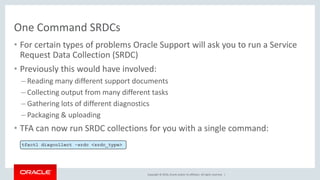
One Command SRDCs
• For certain types of problems Oracle Support will ask you to run a Service
Request Data Collection (SRDC)
• Previously this would have involved:
– Reading many different support documents
– Collecting output from many different tasks
– Gathering lots of different diagnostics
– Packaging & uploading
• TFA can now run SRDC collections for you with a single command:
tfactl diagcollect -srdc <srdc_type>
Copyright © 2016, Oracle and/or its affiliates. All rights reserved. |
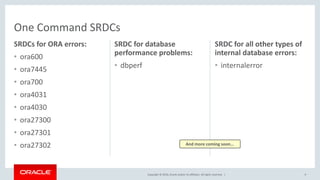
SRDCs for ORA errors:
• ora600
• ora7445
• ora700
• ora4031
• ora4030
• ora27300
• ora27301
• ora27302
SRDC for database
performance problems:
• dbperf
9
SRDC for all other types of
internal database errors:
• internalerror
One Command SRDCs
And more coming soon…
Copyright © 2016, Oracle and/or its affiliates. All rights reserved. |
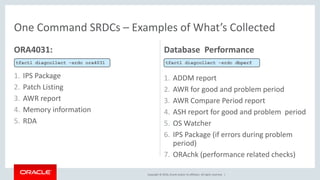
ORA4031:
1. IPS Package
2. Patch Listing
3. AWR report
4. Memory information
5. RDA
Database Performance
1. ADDM report
2. AWR for good and problem period
3. AWR Compare Period report
4. ASH report for good and problem period
5. OS Watcher
6. IPS Package (if errors during problem
period)
7. ORAchk (performance related checks)
One Command SRDCs – Examples of What’s Collected
tfactl diagcollect –srdc ora4031 tfactl diagcollect –srdc dbperf
Copyright © 2016, Oracle and/or its affiliates. All rights reserved. |
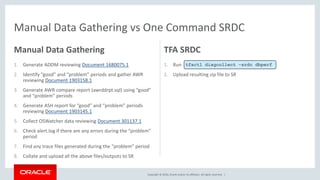
Manual Data Gathering vs One Command SRDC
Manual Data Gathering
1. Generate ADDM reviewing Document 1680075.1
2. Identify “good” and “problem” periods and gather AWR
reviewing Document 1903158.1
3. Generate AWR compare report (awrddrpt.sql) using “good”
and “problem” periods
4. Generate ASH report for “good” and “problem” periods
reviewing Document 1903145.1
5. Collect OSWatcher data reviewing Document 301137.1
6. Check alert.log if there are any errors during the “problem”
period
7. Find any trace files generated during the “problem” period
8. Collate and upload all the above files/outputs to SR
TFA SRDC
1. Run
2. Upload resulting zip file to SR
tfactl diagcollect –srdc dbperf
Copyright © 2016, Oracle and/or its affiliates. All rights reserved. |
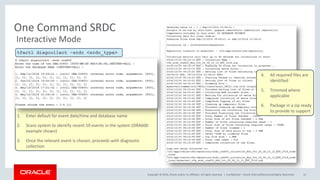
1. Enter default for event date/time and database name
2. Scans system to identify recent 10 events in the system (ORA600
example shown)
3. Once the relevant event is chosen, proceeds with diagnostic
collection
Confidential – Oracle Internal/Restricted/Highly Restricted 12
One Command SRDC
tfactl diagcollect –srdc <srdc_type>
4. All required files are
identified
5. Trimmed where
applicable
6. Package in a zip ready
to provide to support
Interactive Mode
Copyright © 2016, Oracle and/or its affiliates. All rights reserved. |
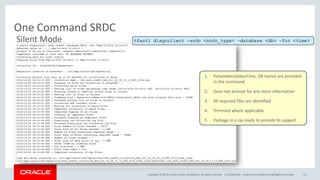
One Command SRDC
Confidential – Oracle Internal/Restricted/Highly Restricted 13
tfactl diagcollect –srdc <srdc_type> -database <db> -for <time>
1. Parameters(date/time, DB name) are provided
in the command
2. Does not prompt for any more information
3. All required files are identified
4. Trimmed where applicable
5. Package in a zip ready to provide to support
Silent Mode
Copyright © 2016, Oracle and/or its affiliates. All rights reserved. |
One Command SRDCs
• Full command syntax:
• Uses all standard diagcollect options where relevant to the SRDC
14
tfactl diagcollect -srdc <srdc_type> [-tag <description>] [-z <filename>]
[-last <n><h|d>| -from <time> -to <time> | -for <time> ] [–database <database>]
Copyright © 2016, Oracle and/or its affiliates. All rights reserved. |
Program Agenda
Install and Run TFA without Root Privileges
SR Data Collection is 10X Easier
Bash no Longer Required
1
2
3
15
Copyright © 2016, Oracle and/or its affiliates. All rights reserved. |
Bash no Longer Required
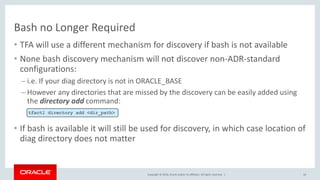
• TFA will use a different mechanism for discovery if bash is not available
• None bash discovery mechanism will not discover non-ADR-standard
configurations:
– i.e. If your diag directory is not in ORACLE_BASE
– However any directories that are missed by the discovery can be easily added using
the directory add command:
• If bash is available it will still be used for discovery, in which case location of
diag directory does not matter
16
tfactl directory add <dir_path>
Copyright © 2016, Oracle and/or its affiliates. All rights reserved. |
For more info on TFA see
Document: 1513912.1
17
Copyright © 2016, Oracle and/or its affiliates. All rights reserved. |
Safe Harbor Statement
The preceding is intended to outline our general product direction. It is intended for
information purposes only, and may not be incorporated into any contract. It is not a
commitment to deliver any material, code, or functionality, and should not be relied upon
in making purchasing decisions. The development, release, and timing of any features or
functionality described for Oracle’s products remains at the sole discretion of Oracle.
18
Copyright © 2016, Oracle and/or its affiliates. All rights reserved. | 19
TFA_Whats_New_in version 12.1.2.8.4

TFA_Whats_New_in version 12.1.2.8.4

  • 1.
    Copyright © 2016,Oracle and/or its affiliates. All rights reserved. | Oracle Trace File Analyzer (TFA) with Database Support Tools Bundle What’s New in 12.1.2.8.4
  • 2.
    Copyright © 2016,Oracle and/or its affiliates. All rights reserved. | Safe Harbor Statement The following is intended to outline our general product direction. It is intended for information purposes only, and may not be incorporated into any contract. It is not a commitment to deliver any material, code, or functionality, and should not be relied upon in making purchasing decisions. The development, release, and timing of any features or functionality described for Oracle’s products remains at the sole discretion of Oracle. 2
  • 3.
    Copyright © 2016,Oracle and/or its affiliates. All rights reserved. | Why TFA? Provides one interface for all diagnostic needs Collects data across the cluster and consolidates it in one place Collects all relevant diagnostic data at the time of the problem Reduces time required to obtain diagnostic data, which saves your business money 3
  • 4.
    Copyright © 2016,Oracle and/or its affiliates. All rights reserved. | Program Agenda Install and Run TFA without Root Privileges SR Data Collection is 10X Easier Bash no Longer Required 1 2 3 4
  • 5.
    Copyright © 2016,Oracle and/or its affiliates. All rights reserved. | Program Agenda Install and Run TFA without Root Privileges SR Data Collection is 10X Easier Bash no Longer Required 1 2 3 5
  • 6.
    Copyright © 2016,Oracle and/or its affiliates. All rights reserved. | Install and Run TFA without Root Privileges • TFA can now be installed as the ORACLE_HOME owner: – Will not run a daemon – Will not perform automatic collections – Will not collect from remote hosts – On-demand collections will work, but limited to local files you have read access to • Use the JRE already available in the RDBMS home unless you have a later version available • Where multiple DBA users own different ORACLE_HOMEs, install TFA in different locations as the respective users 6 ./installTFALite -extractto <install_dir> -javahome <jre_home> Where possible you should install TFA as root This option is for the cases where that is not an option
  • 7.
    Copyright © 2016,Oracle and/or its affiliates. All rights reserved. | Program Agenda Install and Run TFA without Root Privileges SR Data Collection is 10X Easier Bash no Longer Required 1 2 3 7
  • 8.
    Copyright © 2016,Oracle and/or its affiliates. All rights reserved. | One Command SRDCs • For certain types of problems Oracle Support will ask you to run a Service Request Data Collection (SRDC) • Previously this would have involved: – Reading many different support documents – Collecting output from many different tasks – Gathering lots of different diagnostics – Packaging & uploading • TFA can now run SRDC collections for you with a single command: tfactl diagcollect -srdc <srdc_type>
  • 9.
    Copyright © 2016,Oracle and/or its affiliates. All rights reserved. | SRDCs for ORA errors: • ora600 • ora7445 • ora700 • ora4031 • ora4030 • ora27300 • ora27301 • ora27302 SRDC for database performance problems: • dbperf 9 SRDC for all other types of internal database errors: • internalerror One Command SRDCs And more coming soon…
  • 10.
    Copyright © 2016,Oracle and/or its affiliates. All rights reserved. | ORA4031: 1. IPS Package 2. Patch Listing 3. AWR report 4. Memory information 5. RDA Database Performance 1. ADDM report 2. AWR for good and problem period 3. AWR Compare Period report 4. ASH report for good and problem period 5. OS Watcher 6. IPS Package (if errors during problem period) 7. ORAchk (performance related checks) One Command SRDCs – Examples of What’s Collected tfactl diagcollect –srdc ora4031 tfactl diagcollect –srdc dbperf
  • 11.
    Copyright © 2016,Oracle and/or its affiliates. All rights reserved. | Manual Data Gathering vs One Command SRDC Manual Data Gathering 1. Generate ADDM reviewing Document 1680075.1 2. Identify “good” and “problem” periods and gather AWR reviewing Document 1903158.1 3. Generate AWR compare report (awrddrpt.sql) using “good” and “problem” periods 4. Generate ASH report for “good” and “problem” periods reviewing Document 1903145.1 5. Collect OSWatcher data reviewing Document 301137.1 6. Check alert.log if there are any errors during the “problem” period 7. Find any trace files generated during the “problem” period 8. Collate and upload all the above files/outputs to SR TFA SRDC 1. Run 2. Upload resulting zip file to SR tfactl diagcollect –srdc dbperf
  • 12.
    Copyright © 2016,Oracle and/or its affiliates. All rights reserved. | 1. Enter default for event date/time and database name 2. Scans system to identify recent 10 events in the system (ORA600 example shown) 3. Once the relevant event is chosen, proceeds with diagnostic collection Confidential – Oracle Internal/Restricted/Highly Restricted 12 One Command SRDC tfactl diagcollect –srdc <srdc_type> 4. All required files are identified 5. Trimmed where applicable 6. Package in a zip ready to provide to support Interactive Mode
  • 13.
    Copyright © 2016,Oracle and/or its affiliates. All rights reserved. | One Command SRDC Confidential – Oracle Internal/Restricted/Highly Restricted 13 tfactl diagcollect –srdc <srdc_type> -database <db> -for <time> 1. Parameters(date/time, DB name) are provided in the command 2. Does not prompt for any more information 3. All required files are identified 4. Trimmed where applicable 5. Package in a zip ready to provide to support Silent Mode
  • 14.
    Copyright © 2016,Oracle and/or its affiliates. All rights reserved. | One Command SRDCs • Full command syntax: • Uses all standard diagcollect options where relevant to the SRDC 14 tfactl diagcollect -srdc <srdc_type> [-tag <description>] [-z <filename>] [-last <n><h|d>| -from <time> -to <time> | -for <time> ] [–database <database>]
  • 15.
    Copyright © 2016,Oracle and/or its affiliates. All rights reserved. | Program Agenda Install and Run TFA without Root Privileges SR Data Collection is 10X Easier Bash no Longer Required 1 2 3 15
  • 16.
    Copyright © 2016,Oracle and/or its affiliates. All rights reserved. | Bash no Longer Required • TFA will use a different mechanism for discovery if bash is not available • None bash discovery mechanism will not discover non-ADR-standard configurations: – i.e. If your diag directory is not in ORACLE_BASE – However any directories that are missed by the discovery can be easily added using the directory add command: • If bash is available it will still be used for discovery, in which case location of diag directory does not matter 16 tfactl directory add <dir_path>
  • 17.
    Copyright © 2016,Oracle and/or its affiliates. All rights reserved. | For more info on TFA see Document: 1513912.1 17
  • 18.
    Copyright © 2016,Oracle and/or its affiliates. All rights reserved. | Safe Harbor Statement The preceding is intended to outline our general product direction. It is intended for information purposes only, and may not be incorporated into any contract. It is not a commitment to deliver any material, code, or functionality, and should not be relied upon in making purchasing decisions. The development, release, and timing of any features or functionality described for Oracle’s products remains at the sole discretion of Oracle. 18
  • 19.
    Copyright © 2016,Oracle and/or its affiliates. All rights reserved. | 19