MAGNETIC TAPES
BY
SHREYAS LAKSHMAN SWAMY – 4VV19IS095
PURUSHOTTAM B N – 4VV20IS407
VIVEK V KAMATH – 4VV19IS123
Magnetic tapes
Magnetic tape is a device that
provides no direct
(random)accessing facility, but
can provide very rapid sequential
access to data.
Types of tape systems
● There has been a tremendous improvement in tape technology in the past years
. There are now a variety of tape formats with prices ranging from $150 to
$150,000 per tape drive.
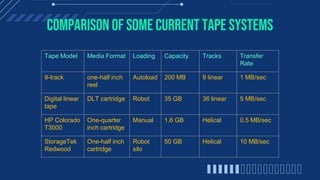
Comparison of some current tape systems
Tape Model Media Format Loading Capacity Tracks Transfer
Rate
9-track one-half inch
reel
Autoload 200 MB 9 linear 1 MB/sec
Digital linear
tape
DLT cartridge Robot 35 GB 36 linear 5 MB/sec
HP Colorado
T3000
One-quarter
inch cartridge
Manual 1.6 GB Helical 0.5 MB/sec
StorageTek
Redwood
One-half inch
cartridge
Robot
silo
50 GB Helical 10 MB/sec
ANEXAMPLEOFA HIGH-PERFORMANCETAPESYSTEM
The StorageTek Redwood SD3 is
one of the highest-performance tape
systems available in 1997. It is
usually configured in a silo that
contains storage racks, a tape robot
, and multiple tape drives. The tapes
are 4-by-4-inch cartridges with one-
half inch tape . The tapes are
formatted with helical tracks.
Organization of data
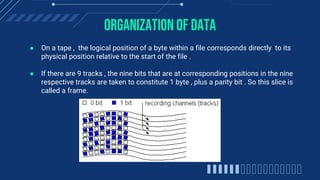
● On a tape , the logical position of a byte within a file corresponds directly to its
physical position relative to the start of the file .
● If there are 9 tracks , the nine bits that are at corresponding positions in the nine
respective tracks are taken to constitute 1 byte , plus a parity bit . So this slice is
called a frame.
● The parity bit is not part of the data but is used to check the validity of the data.
● If the odd parity is in effect , this bit is set to make the number of 1 bits in the
frame odd.
● Blocks are separated by interblock gaps , since tapes cannot start or stop
instantaneously.
● Performance differences among drives can usually be measured in terms of 3
quantities :
1. Tape density – commonly 800, 1600 or 6250 bits per inch per track
2. Tape speed – commonly 30 to 200 inches per second and;
3. Size of interblock gap – commonly between 0.3 inch and 0.75 inch
Estimating tape length requirements
● Performance of tape drives can be measured in terms of 3 quantities :
 Tape density = 6250 bpi ( bits per inch per track)
 Tape speed = 200 ips ( inches per second )
 Size of interblock gap = 0.3 inch
File characteristics:
 Number of records = 1,000,000
 Size of record = 100 bytes
How much Tape is really needed ?
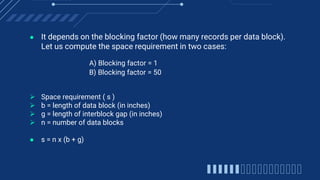
● It depends on the blocking factor (how many records per data block).
Let us compute the space requirement in two cases:
A) Blocking factor = 1
B) Blocking factor = 50
 Space requirement ( s )
 b = length of data block (in inches)
 g = length of interblock gap (in inches)
 n = number of data blocks
● s = n x (b + g)
A) Blocking factor = 1
 b = block size/tape density = 100 bytes/6250 bpi= 0.016 inch
 n = 1,000,000 (recall blocking factor is 1)
 s = 1,000,000 x (0.016 + 0.3) inch = 316,000 inches ∼ 26,333 feet
B) Blocking factor = 50
 b = 50 x 100 bytes/6,250 bpi = 0.8 inch
 n = 1,000,000 records/50 records per block = 20,000 blocks
 s = 20,000 x (0.8 + 0.3) inch = 22,000 inches ≈ 1,833 feet
Estimating Data Transmission Times
Nominal Rate = tape density (bpi) x tape speed (ips)
● In a 6,250 - bpi , 200 - ips tape :
 Nominal Rate = 6,250 bytes/inch x 200 inches/second = = 1,250,000
bytes/sec ∼ 1,250 KB/sec
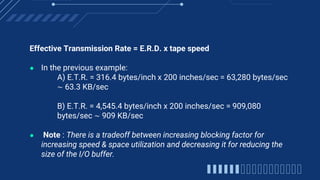
Effective Transmission Rate = E.R.D. x tape speed
● In the previous example:
A) E.T.R. = 316.4 bytes/inch x 200 inches/sec = 63,280 bytes/sec
∼ 63.3 KB/sec
B) E.T.R. = 4,545.4 bytes/inch x 200 inches/sec = 909,080
bytes/sec ∼ 909 KB/sec
● Note : There is a tradeoff between increasing blocking factor for
increasing speed & space utilization and decreasing it for reducing the
size of the I/O buffer.
THANK YOU
TIMELINE
It’s the second planet
to the Sun
2019
It’s the closest planet
to the Sun
2017
It’s a gas giant and the
biggest planet
2020
Despite being red,
Mars is a cold place
2018
AWESOME WORDS
THIS IS A TABLE
MERCURY MARS JUPITER
2018 647 984 268
2019 752 546 875
2020 455 856 340
THIS IS A MAP
It’s the closest
planet to the Sun
60%
It’s the second
planet to the Sun
78%
OUR PARTNERS
Venus is the second
planet to the Sun
VENUS
Saturn is the ringed one
and a gas giant
SATURN
It’s the farthest planet
from the Sun
NEPTUNE
OUR TEAM
You can talk about this
person here
RICHARD ROE
You can talk about this
person here
JENNA DOE
You can talk about this
person here
JOHN SMITH
MOCKUP
You can replace the image on the
screen with your own work. Just
delete this one, add yours and
center it properly
DON’T FORGET WHAT’S IMPORTANT
● Write your recommendations here
CREDITS: This presentation template was created by
Slidesgo, including icons by Flaticon, and infographics &
images by Freepik
THANKS!
ALTERNATIVE RESOURCES
RESOURCES
VECTORS
● Flat artificial intelligence background
PHOTOS
● Close-up of humans handshake with tech background
● Futuristic technology screen interface
● Group of people with laptops
For more information about editing slides, please read our FAQs or visit Slidesgo School:
https://slidesgo.com/faqs and https://slidesgo.com/slidesgo-school
Instructions for use
If you have a free account, in order to use this template, you must credit Slidesgo by keeping the Thanks slide. Please
refer to the next slide to read the instructions for premium users.
As a Free user, you are allowed to:
- Modify this template.
- Use it for both personal and commercial projects.
You are not allowed to:
- Sublicense, sell or rent any of Slidesgo Content (or a modified version of Slidesgo Content).
- Distribute Slidesgo Content unless it has been expressly authorized by Slidesgo.
- Include Slidesgo Content in an online or offline database or file.
- Offer Slidesgo templates (or modified versions of Slidesgo templates) for download.
- Acquire the copyright of Slidesgo Content.
As a Premium user, you can use this template without attributing Slidesgo or keeping the "Thanks" slide.
You are allowed to:
● Modify this template.
● Use it for both personal and commercial purposes.
● Hide or delete the “Thanks” slide and the mention to Slidesgo in the credits.
● Share this template in an editable format with people who are not part of your team.
You are not allowed to:
● Sublicense, sell or rent this Slidesgo Template (or a modified version of this Slidesgo Template).
● Distribute this Slidesgo Template (or a modified version of this Slidesgo Template) or include it in a database or in
any other product or service that offers downloadable images, icons or presentations that may be subject to
distribution or resale.
● Use any of the elements that are part of this Slidesgo Template in an isolated and separated way from this
Template.
● Register any of the elements that are part of this template as a trademark or logo, or register it as a work in an
intellectual property registry or similar.
For more information about editing slides, please read our FAQs or visit Slidesgo School:
https://slidesgo.com/faqs and https://slidesgo.com/slidesgo-school
Instructions for use (premium users)
Bebas Neue
(https://fonts.google.com/specimen/Bebas+Neue)
Roboto
(https://fonts.google.com/specimen/Roboto)
#285293 #0f3570
#00f4ad
#9fc5e8
#434343 #ffffff
This presentation has been made using the following fonts:
Fonts & colors used
Create your Story with our illustrated concepts. Choose the style you like the most, edit its colors, pick
the background and layers you want to show and bring them to life with the animator panel! It will boost
your presentation. Check out How it works.
Pana Amico Bro Rafiki Cuate
Storyset
You can easily resize these resources without losing quality. To change the color, just ungroup the resource
and click on the object you want to change. Then, click on the paint bucket and select the color you want.
Group the resource again when you’re done. You can also look for more infographics on Slidesgo.
Use our editable graphic resources...
JANUARY FEBRUARY MARCH APRIL
PHASE 1
Task 1
Task 2
JANUARY FEBRUARY MARCH APRIL MAY JUNE
PHASE 1
PHASE 2
Task 1
Task 2
Task 1
Task 2
You can resize these icons without losing quality.
You can change the stroke and fill color; just select the icon and click on the paint bucket/pen.
In Google Slides, you can also use Flaticon’s extension, allowing you to customize and add even more icons.
...and our sets of editable icons
Educational Icons Medical Icons
Business Icons Teamwork Icons
Help & Support Icons Avatar Icons
Creative Process Icons Performing Arts Icons
Nature Icons
SEO & Marketing Icons
Add the title here
Text 1 Text 2 Text 3
Text 4 Text 5 Text 6
2016 2017 2018 2019 2020
“Despite being red,
Mars is actually a
very cold place”
“Mercury is closest
planet to the Sun
and the smallest”
“Neptune is the
farthest-known
planet from the Sun”
“Saturn is a gas
giant and has
several rings”
“Venus is the
second planet from
the Sun and is
terribly hot”
Premium infographics
“Mercury is closest
planet to the Sun
and the smallest”
TITLE 1
75% “Mercury is closest
planet to the Sun
and the smallest”
“Mercury is closest
planet to the Sun
and the smallest”
“Mercury is closest
planet to the Sun
and the smallest”
75%
Premium infographics
Digital Marketing
Premium Icons
Online Learning
Premium Icons
Laboratory
Premium Icons
Goals & Results
Premium Icons
Infographic Elements
Premium Icons
TAPES.pptx

TAPES.pptx

  • 1.
    MAGNETIC TAPES BY SHREYAS LAKSHMANSWAMY – 4VV19IS095 PURUSHOTTAM B N – 4VV20IS407 VIVEK V KAMATH – 4VV19IS123
  • 2.
    Magnetic tapes Magnetic tapeis a device that provides no direct (random)accessing facility, but can provide very rapid sequential access to data.
  • 3.
    Types of tapesystems ● There has been a tremendous improvement in tape technology in the past years . There are now a variety of tape formats with prices ranging from $150 to $150,000 per tape drive.
  • 4.
    Comparison of somecurrent tape systems Tape Model Media Format Loading Capacity Tracks Transfer Rate 9-track one-half inch reel Autoload 200 MB 9 linear 1 MB/sec Digital linear tape DLT cartridge Robot 35 GB 36 linear 5 MB/sec HP Colorado T3000 One-quarter inch cartridge Manual 1.6 GB Helical 0.5 MB/sec StorageTek Redwood One-half inch cartridge Robot silo 50 GB Helical 10 MB/sec
  • 5.
    ANEXAMPLEOFA HIGH-PERFORMANCETAPESYSTEM The StorageTekRedwood SD3 is one of the highest-performance tape systems available in 1997. It is usually configured in a silo that contains storage racks, a tape robot , and multiple tape drives. The tapes are 4-by-4-inch cartridges with one- half inch tape . The tapes are formatted with helical tracks.
  • 6.
    Organization of data ●On a tape , the logical position of a byte within a file corresponds directly to its physical position relative to the start of the file . ● If there are 9 tracks , the nine bits that are at corresponding positions in the nine respective tracks are taken to constitute 1 byte , plus a parity bit . So this slice is called a frame.
  • 7.
    ● The paritybit is not part of the data but is used to check the validity of the data. ● If the odd parity is in effect , this bit is set to make the number of 1 bits in the frame odd. ● Blocks are separated by interblock gaps , since tapes cannot start or stop instantaneously. ● Performance differences among drives can usually be measured in terms of 3 quantities : 1. Tape density – commonly 800, 1600 or 6250 bits per inch per track 2. Tape speed – commonly 30 to 200 inches per second and; 3. Size of interblock gap – commonly between 0.3 inch and 0.75 inch
  • 8.
    Estimating tape lengthrequirements ● Performance of tape drives can be measured in terms of 3 quantities :  Tape density = 6250 bpi ( bits per inch per track)  Tape speed = 200 ips ( inches per second )  Size of interblock gap = 0.3 inch File characteristics:  Number of records = 1,000,000  Size of record = 100 bytes How much Tape is really needed ?
  • 9.
    ● It dependson the blocking factor (how many records per data block). Let us compute the space requirement in two cases: A) Blocking factor = 1 B) Blocking factor = 50  Space requirement ( s )  b = length of data block (in inches)  g = length of interblock gap (in inches)  n = number of data blocks ● s = n x (b + g)
  • 10.
    A) Blocking factor= 1  b = block size/tape density = 100 bytes/6250 bpi= 0.016 inch  n = 1,000,000 (recall blocking factor is 1)  s = 1,000,000 x (0.016 + 0.3) inch = 316,000 inches ∼ 26,333 feet B) Blocking factor = 50  b = 50 x 100 bytes/6,250 bpi = 0.8 inch  n = 1,000,000 records/50 records per block = 20,000 blocks  s = 20,000 x (0.8 + 0.3) inch = 22,000 inches ≈ 1,833 feet
  • 11.
    Estimating Data TransmissionTimes Nominal Rate = tape density (bpi) x tape speed (ips) ● In a 6,250 - bpi , 200 - ips tape :  Nominal Rate = 6,250 bytes/inch x 200 inches/second = = 1,250,000 bytes/sec ∼ 1,250 KB/sec
  • 12.
    Effective Transmission Rate= E.R.D. x tape speed ● In the previous example: A) E.T.R. = 316.4 bytes/inch x 200 inches/sec = 63,280 bytes/sec ∼ 63.3 KB/sec B) E.T.R. = 4,545.4 bytes/inch x 200 inches/sec = 909,080 bytes/sec ∼ 909 KB/sec ● Note : There is a tradeoff between increasing blocking factor for increasing speed & space utilization and decreasing it for reducing the size of the I/O buffer.
  • 13.
  • 14.
    TIMELINE It’s the secondplanet to the Sun 2019 It’s the closest planet to the Sun 2017 It’s a gas giant and the biggest planet 2020 Despite being red, Mars is a cold place 2018
  • 15.
  • 16.
    THIS IS ATABLE MERCURY MARS JUPITER 2018 647 984 268 2019 752 546 875 2020 455 856 340
  • 17.
    THIS IS AMAP It’s the closest planet to the Sun 60% It’s the second planet to the Sun 78%
  • 18.
    OUR PARTNERS Venus isthe second planet to the Sun VENUS Saturn is the ringed one and a gas giant SATURN It’s the farthest planet from the Sun NEPTUNE
  • 19.
    OUR TEAM You cantalk about this person here RICHARD ROE You can talk about this person here JENNA DOE You can talk about this person here JOHN SMITH
  • 20.
    MOCKUP You can replacethe image on the screen with your own work. Just delete this one, add yours and center it properly
  • 21.
    DON’T FORGET WHAT’SIMPORTANT ● Write your recommendations here ● Write your recommendations here ● Write your recommendations here ● Write your recommendations here ● Write your recommendations here ● Write your recommendations here ● Write your recommendations here
  • 22.
    CREDITS: This presentationtemplate was created by Slidesgo, including icons by Flaticon, and infographics & images by Freepik THANKS!
  • 23.
  • 24.
    RESOURCES VECTORS ● Flat artificialintelligence background ● Flat artificial intelligence background ● Flat artificial intelligence background PHOTOS ● Close-up of humans handshake with tech background ● Futuristic technology screen interface ● Group of people with laptops
  • 25.
    For more informationabout editing slides, please read our FAQs or visit Slidesgo School: https://slidesgo.com/faqs and https://slidesgo.com/slidesgo-school Instructions for use If you have a free account, in order to use this template, you must credit Slidesgo by keeping the Thanks slide. Please refer to the next slide to read the instructions for premium users. As a Free user, you are allowed to: - Modify this template. - Use it for both personal and commercial projects. You are not allowed to: - Sublicense, sell or rent any of Slidesgo Content (or a modified version of Slidesgo Content). - Distribute Slidesgo Content unless it has been expressly authorized by Slidesgo. - Include Slidesgo Content in an online or offline database or file. - Offer Slidesgo templates (or modified versions of Slidesgo templates) for download. - Acquire the copyright of Slidesgo Content.
  • 26.
    As a Premiumuser, you can use this template without attributing Slidesgo or keeping the "Thanks" slide. You are allowed to: ● Modify this template. ● Use it for both personal and commercial purposes. ● Hide or delete the “Thanks” slide and the mention to Slidesgo in the credits. ● Share this template in an editable format with people who are not part of your team. You are not allowed to: ● Sublicense, sell or rent this Slidesgo Template (or a modified version of this Slidesgo Template). ● Distribute this Slidesgo Template (or a modified version of this Slidesgo Template) or include it in a database or in any other product or service that offers downloadable images, icons or presentations that may be subject to distribution or resale. ● Use any of the elements that are part of this Slidesgo Template in an isolated and separated way from this Template. ● Register any of the elements that are part of this template as a trademark or logo, or register it as a work in an intellectual property registry or similar. For more information about editing slides, please read our FAQs or visit Slidesgo School: https://slidesgo.com/faqs and https://slidesgo.com/slidesgo-school Instructions for use (premium users)
  • 27.
  • 28.
    Create your Storywith our illustrated concepts. Choose the style you like the most, edit its colors, pick the background and layers you want to show and bring them to life with the animator panel! It will boost your presentation. Check out How it works. Pana Amico Bro Rafiki Cuate Storyset
  • 29.
    You can easilyresize these resources without losing quality. To change the color, just ungroup the resource and click on the object you want to change. Then, click on the paint bucket and select the color you want. Group the resource again when you’re done. You can also look for more infographics on Slidesgo. Use our editable graphic resources...
  • 32.
    JANUARY FEBRUARY MARCHAPRIL PHASE 1 Task 1 Task 2 JANUARY FEBRUARY MARCH APRIL MAY JUNE PHASE 1 PHASE 2 Task 1 Task 2 Task 1 Task 2
  • 35.
    You can resizethese icons without losing quality. You can change the stroke and fill color; just select the icon and click on the paint bucket/pen. In Google Slides, you can also use Flaticon’s extension, allowing you to customize and add even more icons. ...and our sets of editable icons
  • 36.
  • 37.
  • 38.
    Help & SupportIcons Avatar Icons
  • 39.
    Creative Process IconsPerforming Arts Icons
  • 40.
  • 41.
  • 42.
    Add the titlehere Text 1 Text 2 Text 3 Text 4 Text 5 Text 6 2016 2017 2018 2019 2020 “Despite being red, Mars is actually a very cold place” “Mercury is closest planet to the Sun and the smallest” “Neptune is the farthest-known planet from the Sun” “Saturn is a gas giant and has several rings” “Venus is the second planet from the Sun and is terribly hot” Premium infographics
  • 43.
    “Mercury is closest planetto the Sun and the smallest” TITLE 1 75% “Mercury is closest planet to the Sun and the smallest” “Mercury is closest planet to the Sun and the smallest” “Mercury is closest planet to the Sun and the smallest” 75% Premium infographics
  • 44.
  • 45.
  • 46.
  • 47.
  • 48.