参考:App Scriptの完成コード
✓ ④整える状態まで完了した、完成系ソースコード
✓SpreadSheetのURLは各自差し替え
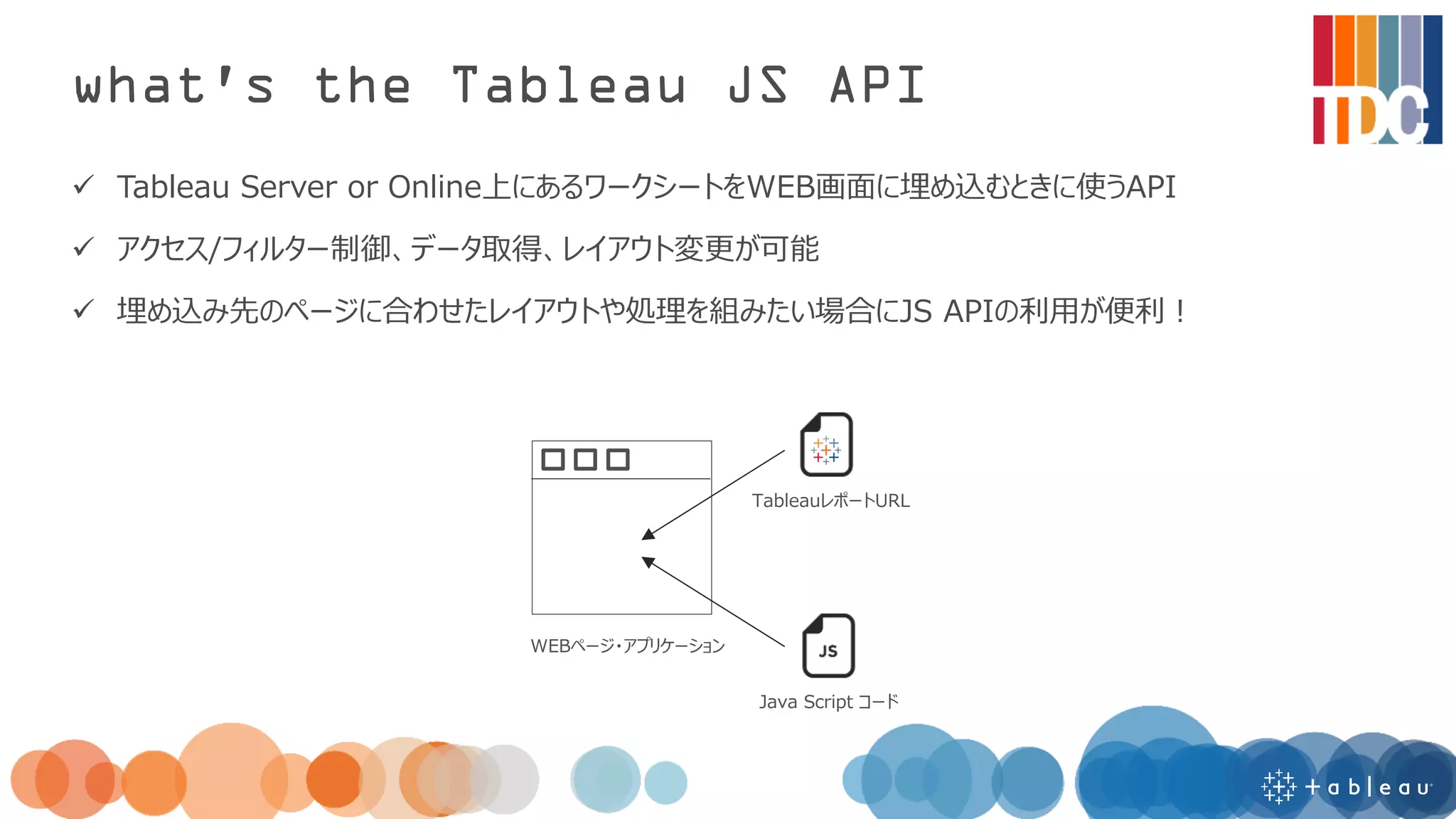
function doPost(e) {
//Slackのチャンネルに設定したOutgoing WebHooksのトークン
var token = "TZoyko96Y5cBnxeZS8HzdS8H";
if (token != e.parameter.token) {
throw new Error("invalid token.");
}
var user = e.parameter.user_name;
var value = e.parameter.text;
updateSheet(user,value);
}
function updateSheet(user,value) {
var url = "https://docs.google.com/spreadsheets/d/1Sd3UQRi4qIaGO9graFPERMbqnxQ9zkwHCPiZPzCzbdI/edit";
var spreadsheet = SpreadsheetApp.openByUrl(url);
var sheet = spreadsheet.getSheetByName('dev_ans');
var lastRow = sheet.getLastRow();
//resetと入力された場合はデータを空にする
if (value=="reset") {
sheet.deleteRows(2, lastRow-1);
}
//全角入力の数字は半角に変換
if (value.match(/^[^¥x01-¥x7E¥xA1-¥xDF]+$/)) {
value = String.fromCharCode(value.charCodeAt(0) - 65248);
}
//value値は数字(1~4)のみ転記
if (value.match(/[1234]/)) {
sheet.getRange('A'+String(lastRow+1)).setValue(value);
sheet.getRange('B'+String(lastRow+1)).setValue(user);
sheet.getRange('C'+String(lastRow+1)).setValue(lastRow);
}
}
12.
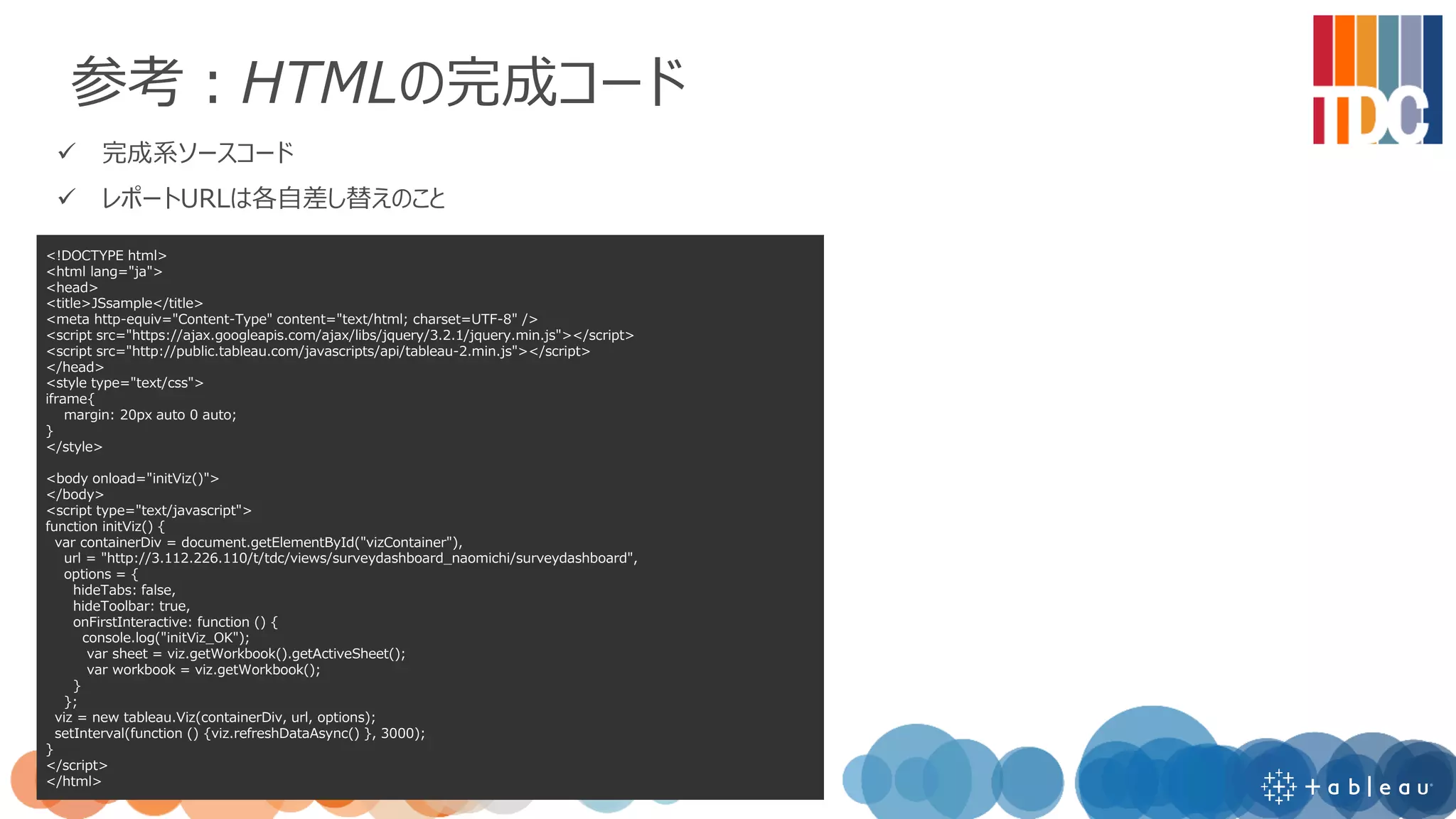
参考:HTMLの完成コード
✓ 完成系ソースコード
✓ レポートURLは各自差し替えのこと
<!DOCTYPEhtml>
<html lang="ja">
<head>
<title>JSsample</title>
<meta http-equiv="Content-Type" content="text/html; charset=UTF-8" />
<script src="https://ajax.googleapis.com/ajax/libs/jquery/3.2.1/jquery.min.js"></script>
<script src="http://public.tableau.com/javascripts/api/tableau-2.min.js"></script>
</head>
<style type="text/css">
iframe{
margin: 20px auto 0 auto;
}
</style>
<body onload="initViz()">
</body>
<script type="text/javascript">
function initViz() {
var containerDiv = document.getElementById("vizContainer"),
url = "http://3.112.226.110/t/tdc/views/surveydashboard_naomichi/surveydashboard",
options = {
hideTabs: false,
hideToolbar: true,
onFirstInteractive: function () {
console.log("initViz_OK");
var sheet = viz.getWorkbook().getActiveSheet();
var workbook = viz.getWorkbook();
}
};
viz = new tableau.Viz(containerDiv, url, options);
setInterval(function () {viz.refreshDataAsync() }, 3000);
}
</script>
</html>


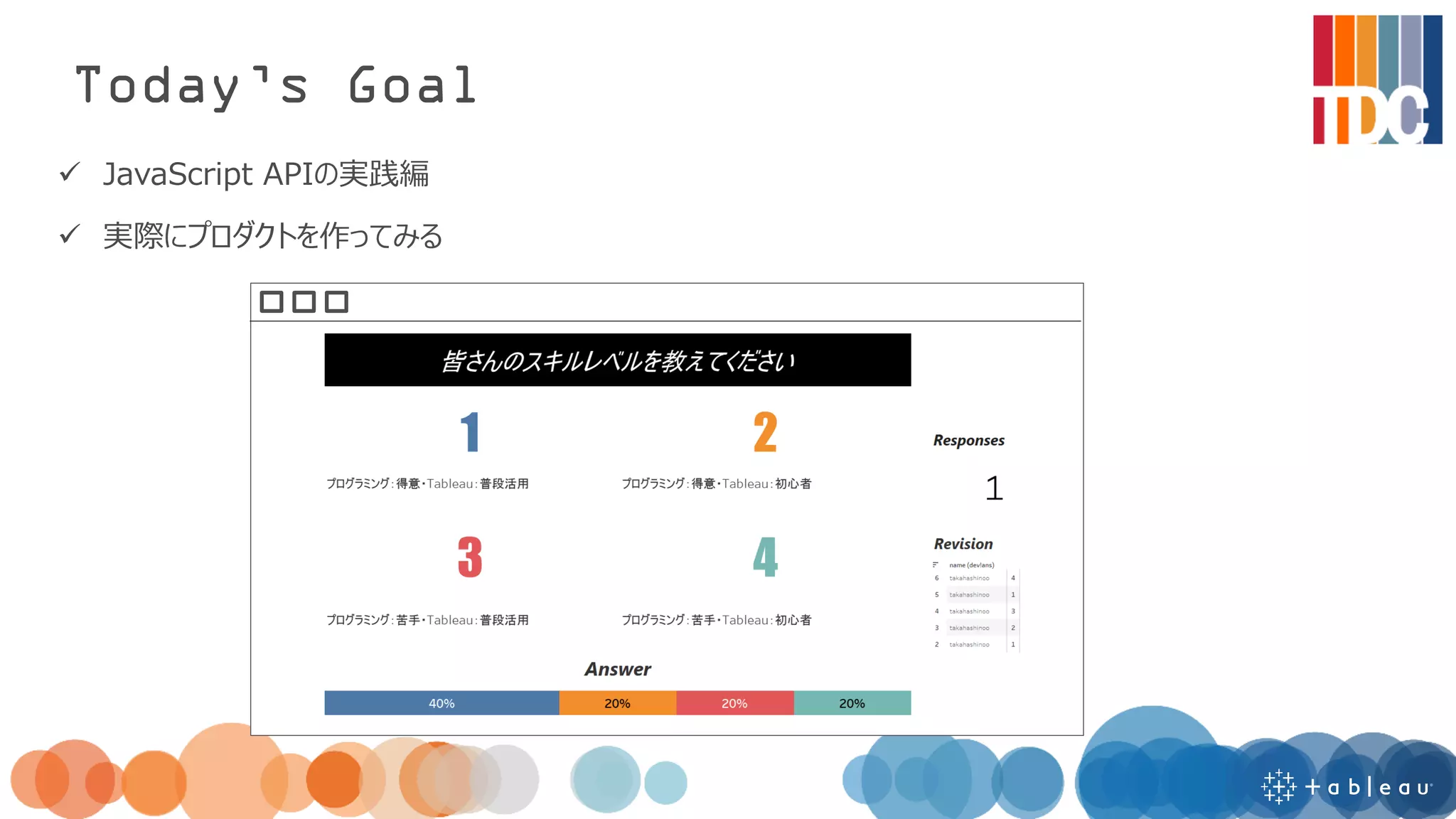
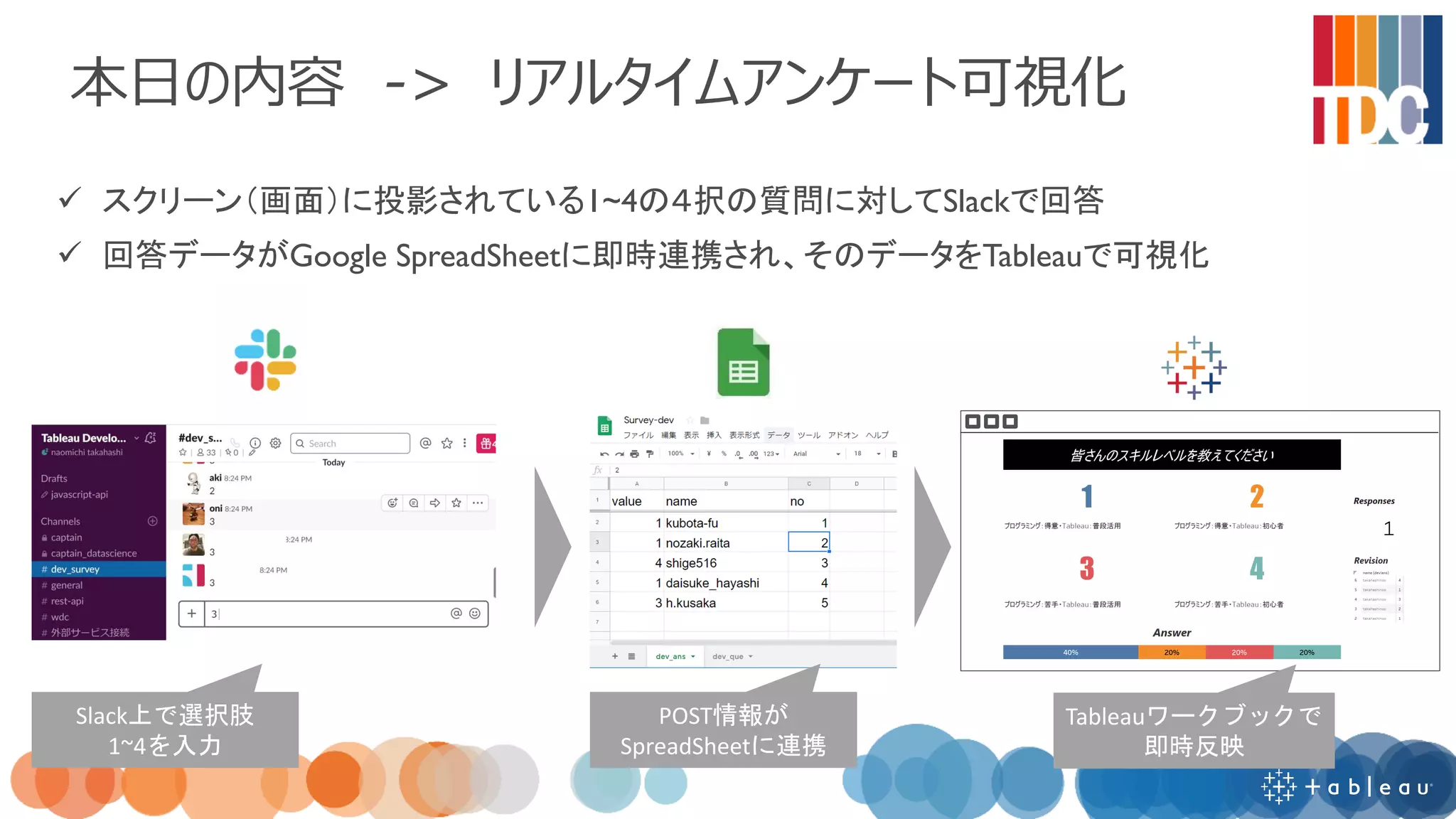
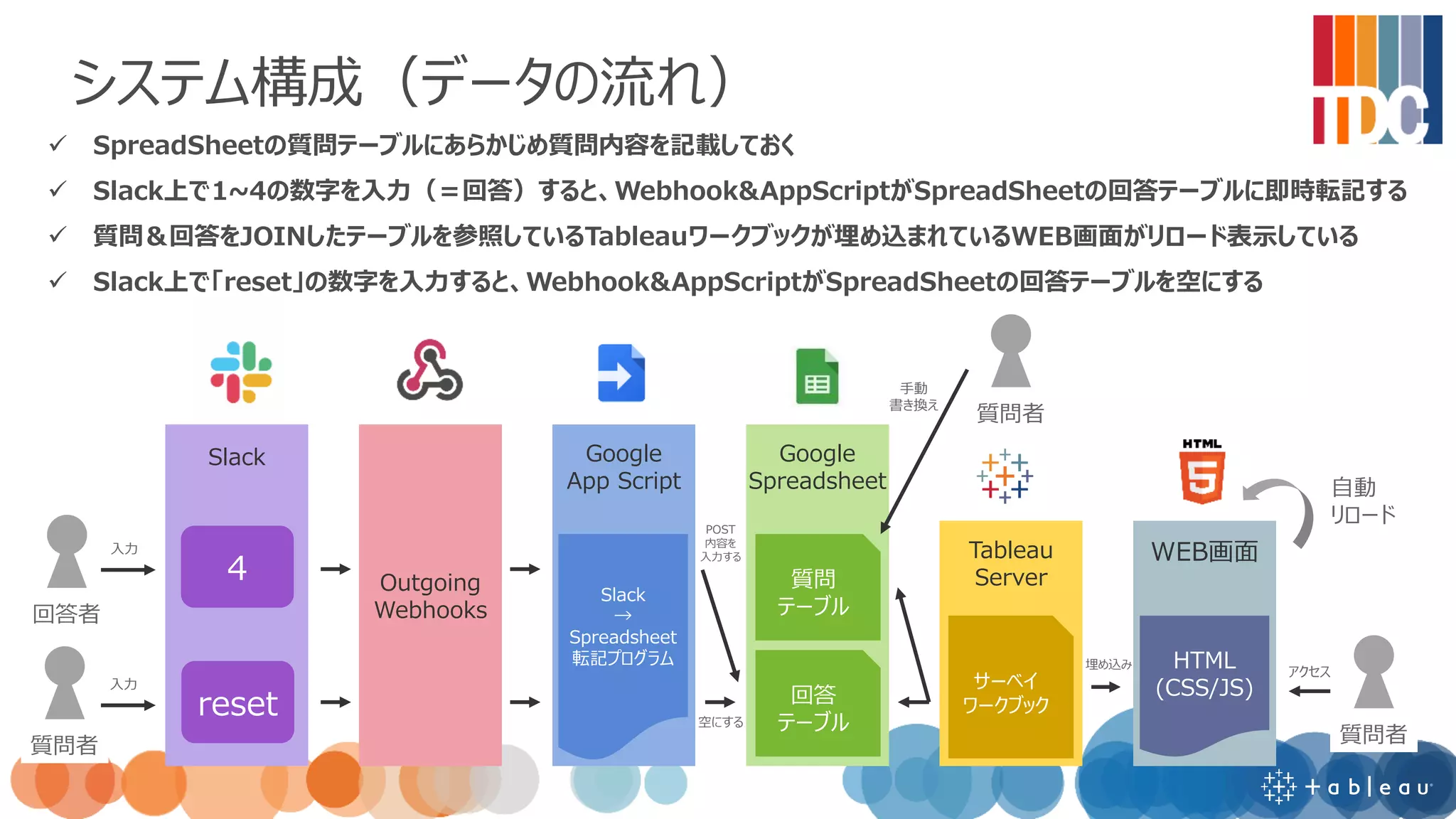
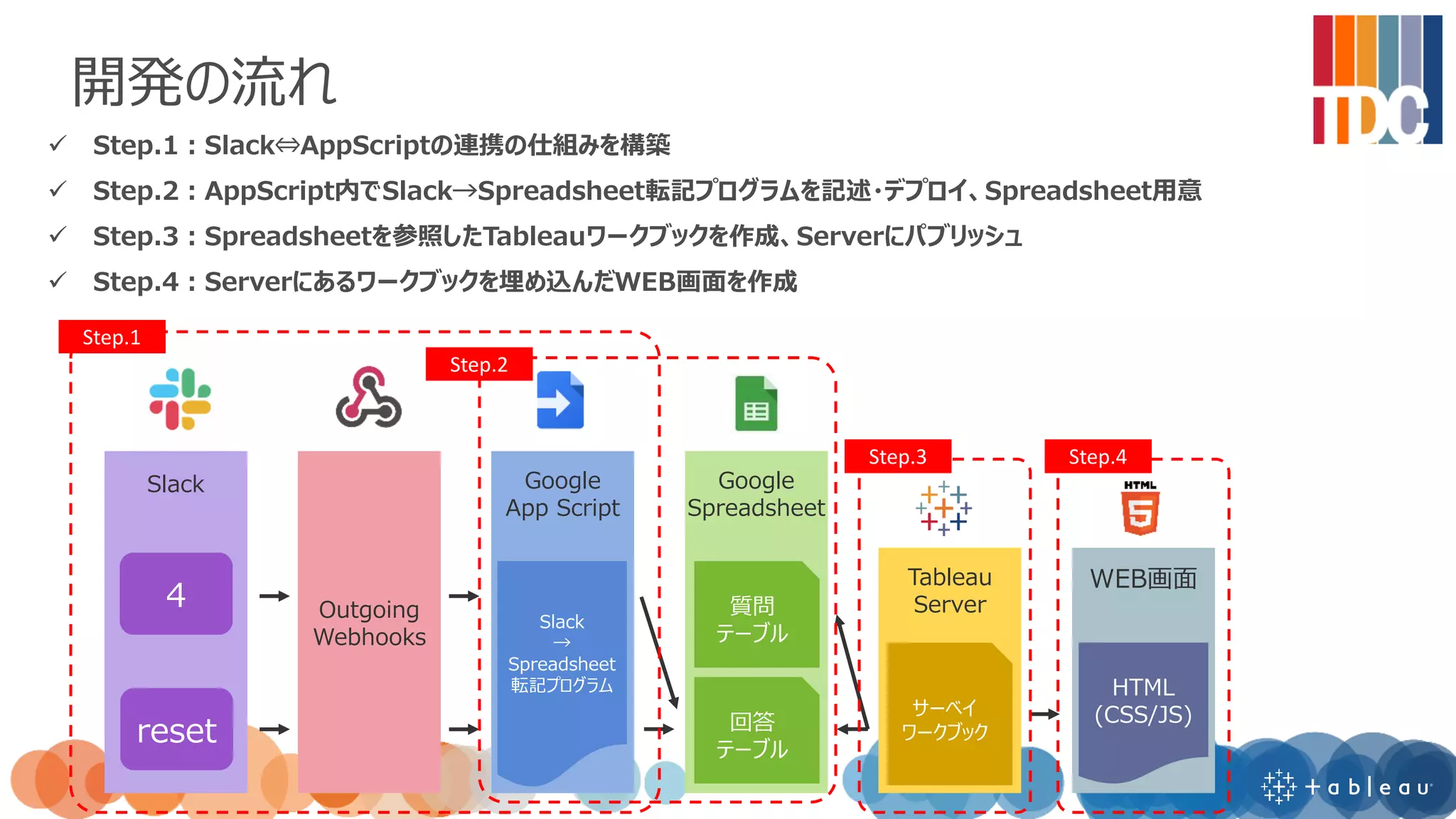
![参考:使い方(デモ流れ)
<準備>
✓ [出題者] Tableauアンケートダッシュボードが埋め込まれたWEB画面にアクセス、スクリーンに投影
✓ →ワークブックはSpreadSheetを参照している
✓ →画面は常にリロードされている
<アンケート開始>
✓ [出題者] SpreadSheetの質問テーブルに質問を記入
✓ [出題者] WEB画面上の入力BOXに質問番号を入力
✓ [回答者] Slack上のチャンネルで質問に対して1~4を入力
✓ →Slack上のデータがSpreadSheetの回答テーブルに連携
✓ →SpreadSheetの回答テーブルを見ているTableauダッシュボードのデータがスクリーン上に可視化
<アンケート切り替え>
✓ [出題者] 画面上のResetボタンをクリック
✓ → SpreadSheetの回答テーブル・質問テーブルを空にする
✓ →Tableauダッシュボードをフィルタかけてデータを空にする](https://image.slidesharecdn.com/tdcjsapi2realtimesurveybuiltwithtableau-190614030042/75/Tableau-JavaScript-API-2-Real-Time-Survey-Built-with-Tableau-8-2048.jpg)
![参考:App Scriptの完成コード
✓ ④整える状態まで完了した、完成系ソースコード
✓ SpreadSheetのURLは各自差し替え
function doPost(e) {
//Slackのチャンネルに設定したOutgoing WebHooksのトークン
var token = "TZoyko96Y5cBnxeZS8HzdS8H";
if (token != e.parameter.token) {
throw new Error("invalid token.");
}
var user = e.parameter.user_name;
var value = e.parameter.text;
updateSheet(user,value);
}
function updateSheet(user,value) {
var url = "https://docs.google.com/spreadsheets/d/1Sd3UQRi4qIaGO9graFPERMbqnxQ9zkwHCPiZPzCzbdI/edit";
var spreadsheet = SpreadsheetApp.openByUrl(url);
var sheet = spreadsheet.getSheetByName('dev_ans');
var lastRow = sheet.getLastRow();
//resetと入力された場合はデータを空にする
if (value=="reset") {
sheet.deleteRows(2, lastRow-1);
}
//全角入力の数字は半角に変換
if (value.match(/^[^¥x01-¥x7E¥xA1-¥xDF]+$/)) {
value = String.fromCharCode(value.charCodeAt(0) - 65248);
}
//value値は数字(1~4)のみ転記
if (value.match(/[1234]/)) {
sheet.getRange('A'+String(lastRow+1)).setValue(value);
sheet.getRange('B'+String(lastRow+1)).setValue(user);
sheet.getRange('C'+String(lastRow+1)).setValue(lastRow);
}
}](https://image.slidesharecdn.com/tdcjsapi2realtimesurveybuiltwithtableau-190614030042/75/Tableau-JavaScript-API-2-Real-Time-Survey-Built-with-Tableau-11-2048.jpg)