入門Geb+Betamax

               2011/11/22
    JGGUGサポートスタッフ 須江 信洋

           http://twitter.com/nobusue
        http://d.hatena.ne.jp/nobusue

    ※資料の内容は個人としての意見・見解を述べたものであり、
    所属する企業・組織が内容を保証するものではありません。
自己紹介
       須江 信洋(すえ のぶひろ)
           Twitter: @nobusue
           http://www.facebook.com/profile.php?id=732337788
       かれこれ10年位、JavaEE関連の仕事をしてます
       G*(Groovy関連技術)との関わり
           Groovyコミュニティ(JGGUG)サポートスタッフ
           「プログラミングGROOVY」執筆チーム
           「Groovy イン・アクション」翻訳チーム
           Groovyで作ったBot飼ってます(@hatena_groovy)


    2
本日のお題
 テスト自動化について
 Geb入門
 Betamax入門
 Geb+Spock+Betamaxでgrails test-app


3
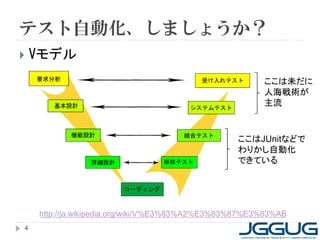
テスト自動化、しましょうか?
   Vモデル
                                                       ここは未だに
                                                       人海戦術が
                                                       主流


                                                 ここはJUnitなどで
                                                 わりかし自動化
                                                 できている


    http://ja.wikipedia.org/wiki/V%E3%83%A2%E3%83%87%E3%83%AB
4
自動化できれば・・・
   テスト実行に伴う人的コストが不要になる
       リファクタリングに取り組み易くなる
       バグフィックスや機能修正によるリリース頻度を上
        げられる
       ミドルウェアやOSのFix適用に躊躇しなくてよくなる
   テストの品質を上げられる
       手作業に完全ということはありえない
       手作業は監査できない


5
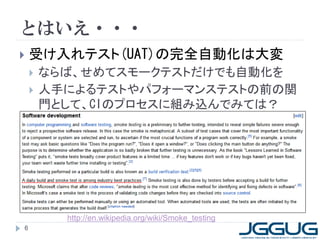
とはいえ・・・
   受け入れテスト(UAT)の完全自動化は大変
       ならば、せめてスモークテストだけでも自動化を
       人手によるテストやパフォーマンステストの前の関
        門として、CIのプロセスに組み込んでみては?


          http://en.wikipedia.org/wiki/Smoke_testing
6
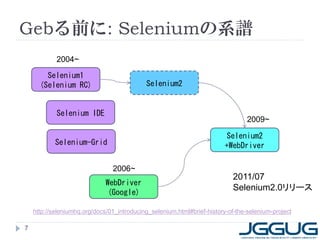
Gebる前に: Seleniumの系譜
            2004~

        Selenium1
      (Selenium RC)                         Selenium2


            Selenium IDE
                                                                                 2009~

                                                                         Selenium2
           Selenium-Grid                                                 +WebDriver

                                2006~
                                                                           2011/07
                              WebDriver
                                                                           Selenium2.0リリース
                               (Google)

    http://seleniumhq.org/docs/01_introducing_selenium.html#brief-history-of-the-selenium-project

7
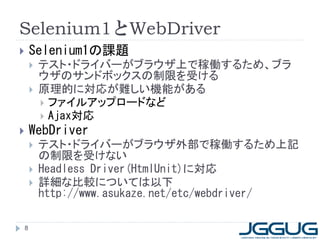
Selenium1とWebDriver
       Selenium1の課題
           テスト・ドライバーがブラウザ上で稼働するため、ブラ
            ウザのサンドボックスの制限を受ける
           原理的に対応が難しい機能がある
             ファイルアップロードなど
             Ajax対応
       WebDriver
           テスト・ドライバーがブラウザ外部で稼働するため上記
            の制限を受けない
           Headless Driver(HtmlUnit)に対応
           詳細な比較については以下
            http://www.asukaze.net/etc/webdriver/

    8
WebDriver: Java APIサンプル
public class Selenium2Example {
  public static void main(String[] args) {
    WebDriver driver = new FirefoxDriver();
    driver.get("http://www.google.com");
    WebElement element = driver.findElement(By.name("q"));
    element.sendKeys("Cheese!");
    element.submit();
    System.out.println("Page title is: " + driver.getTitle());
    (new WebDriverWait(driver, 10))
    .until(new ExpectedCondition<Boolean>() {
      public Boolean apply(WebDriver d) {
        return d.getTitle().toLowerCase().startsWith("cheese!");
      }
    });
    System.out.println("Page title is: " + driver.getTitle());
    driver.quit();
  }
}
 9
ちょっとめんどい

10
そこでGeb(じぇぶ)ですよ
                                         http://www.gebish.org/

    Groovyで構築されたWebDriverのラッパー
        jQueryライクなNavigator APIを提供
        Page Objectパターンによる構造化
            WebDriver単体でも使えるが、より使いやすく
        2011/11/22時点での最新バージョンは0.6.1
            GitHub上の最新は0.7.0-SNAPSHOT
    多様なテストフレームワークと統合可能
        Spock,EasyB
        JUnit3/4,TestNG
        Cucumber(Cuke4Duke)

    11
jQuery-like Navigator API
// CSS 3 selectors
$("div.some-class p:first[title='something']")

// Find via index and/or attribute matching
$("h1", 2, class: "heading")
$("p", name: "description")
$("ul.things li", 2)

// 'text' is special attribute for the element text content
$("h1", text: "All about Geb")

// Use builtin matchers and regular expressions
$("p", text: contains("Geb"))
$("input", value: ~/¥d{3,}-¥d{3,}-¥d{3,}/)

// Chaining
$("div").find(".b")
$("div").filter(".c").parents()
$("p.c").siblings()

 12
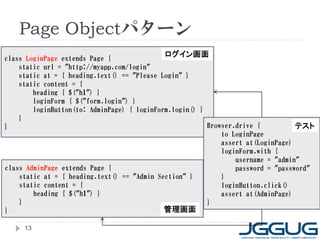
Page Objectパターン
class LoginPage extends Page {
                                            ログイン画面
    static url = "http://myapp.com/login"
    static at = { heading.text() == "Please Login" }
    static content = {
        heading { $("h1") }
        loginForm { $("form.login") }
        loginButton(to: AdminPage) { loginForm.login() }
    }
}                                                        Browser.drive {          テスト
                                                             to LoginPage
                                                             assert at(LoginPage)
                                                             loginForm.with {
                                                                 username = "admin"
class AdminPage extends Page {                                   password = "password"
    static at = { heading.text() == "Admin Section" }        }
    static content = {                                       loginButton.click()
        heading { $("h1") }                                  assert at(AdminPage)
    }                                                    }
}                                            管理画面

     13
Gebの例: はてなキーワード検索
@Grapes([
 @Grab("org.codehaus.geb:geb-core:0.6.1"),
 @Grab("org.seleniumhq.selenium:selenium-firefox-driver:2.12.0")
])
import geb.Browser

Browser.drive {
    go "http://d.hatena.ne.jp/keyword/"
    assert title == "はてなキーワード - 話題の言葉がわかる、みんなで
編集するキーワード"

         $("form.header-search").word = "Groovy"
         $("form.header-search").find("input", name:"submit").click()

         assert title == "はてな検索: Groovy"
}

    14
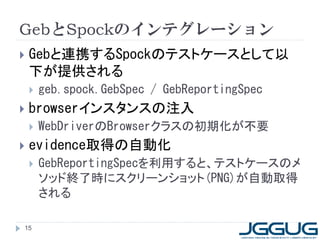
GebとSpockのインテグレーション
   Gebと連携するSpockのテストケースとして以
    下が提供される
       geb.spock.GebSpec / GebReportingSpec
   browserインスタンスの注入
       WebDriverのBrowserクラスの初期化が不要
   evidence取得の自動化
       GebReportingSpecを利用すると、テストケースのメ
        ソッド終了時にスクリーンショット(PNG)が自動取得
        される

15
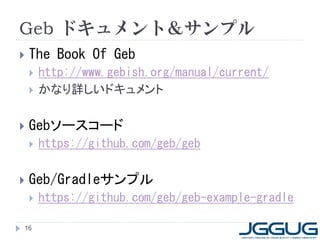
Geb ドキュメント&サンプル
   The Book Of Geb
       http://www.gebish.org/manual/current/
       かなり詳しいドキュメント

   Gebソースコード
       https://github.com/geb/geb

   Geb/Gradleサンプル
       https://github.com/geb/geb-example-gradle

16
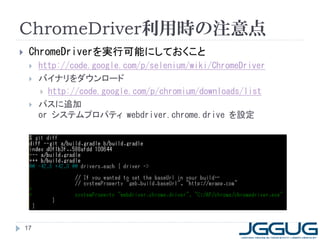
ChromeDriver利用時の注意点
    ChromeDriverを実行可能にしておくこと
        http://code.google.com/p/selenium/wiki/ChromeDriver
        バイナリをダウンロード
          http://code.google.com/p/chromium/downloads/list
        パスに追加
         or システムプロパティ webdriver.chrome.drive を設定


    17
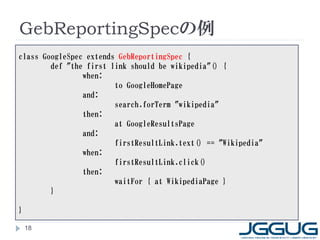
GebReportingSpecの例
class GoogleSpec extends GebReportingSpec {
        def "the first link should be wikipedia"() {
                when:
                        to GoogleHomePage
                and:
                        search.forTerm "wikipedia"
                then:
                        at GoogleResultsPage
                and:
                        firstResultLink.text() == "Wikipedia"
                when:
                        firstResultLink.click()
                then:
                        waitFor { at WikipediaPage }
        }

}

    18
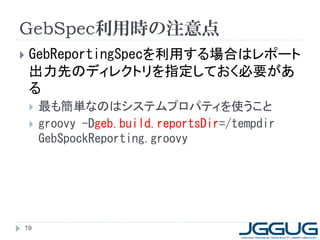
GebSpec利用時の注意点
   GebReportingSpecを利用する場合はレポート
    出力先のディレクトリを指定しておく必要があ
    る
       最も簡単なのはシステムプロパティを使うこと
       groovy -Dgeb.build.reportsDir=/tempdir
        GebSpockReporting.groovy


19
Gebについて詳しくは・・・
   G*Magazine
       http://grails.jp/g_mag_jp/
       創刊号と第3号に、@bikisuke さんがGeb/Spock
        の技術情報を執筆
   GitHub
       https://github.com/kimukou/gradlestudy/tre
        e/master/geb-geb-example
       @kimukou_26 さん作成サンプル


20
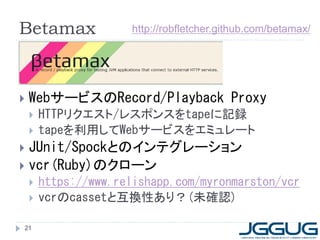
Betamax                http://robfletcher.github.com/betamax/


   WebサービスのRecord/Playback Proxy
       HTTPリクエスト/レスポンスをtapeに記録
       tapeを利用してWebサービスをエミュレート
 JUnit/Spockとのインテグレーション
 vcr(Ruby)のクローン
       https://www.relishapp.com/myronmarston/vcr
       vcrのcassetと互換性あり?(未確認)

21
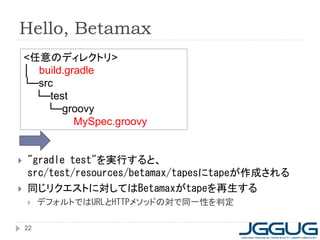
Hello, Betamax
    <任意のディレクトリ>
    │ build.gradle
    └─src
      └─test
        └─groovy
              MySpec.groovy


   "gradle test"を実行すると、
    src/test/resources/betamax/tapesにtapeが作成される
   同じリクエストに対してはBetamaxがtapeを再生する
        デフォルトではURLとHTTPメソッドの対で同一性を判定

    22
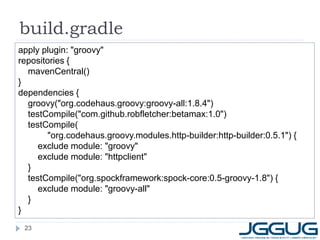
build.gradle
apply plugin: "groovy"
repositories {
  mavenCentral()
}
dependencies {
  groovy("org.codehaus.groovy:groovy-all:1.8.4")
  testCompile("com.github.robfletcher:betamax:1.0")
  testCompile(
        "org.codehaus.groovy.modules.http-builder:http-builder:0.5.1") {
     exclude module: "groovy"
     exclude module: "httpclient"
  }
  testCompile("org.spockframework:spock-core:0.5-groovy-1.8") {
     exclude module: "groovy-all"
  }
}
 23
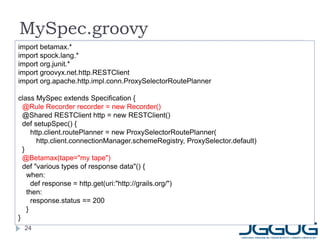
MySpec.groovy
import betamax.*
import spock.lang.*
import org.junit.*
import groovyx.net.http.RESTClient
import org.apache.http.impl.conn.ProxySelectorRoutePlanner

class MySpec extends Specification {
  @Rule Recorder recorder = new Recorder()
  @Shared RESTClient http = new RESTClient()
  def setupSpec() {
      http.client.routePlanner = new ProxySelectorRoutePlanner(
        http.client.connectionManager.schemeRegistry, ProxySelector.default)
  }
  @Betamax(tape="my tape")
  def "various types of response data"() {
    when:
      def response = http.get(uri:"http://grails.org/")
    then:
      response.status == 200
    }
}
  24
その他のサンプル
   今のところまとまったドキュメント等はないの
    で、ソースコードからビルドして試すのがおす
    すめ
       https://github.com/robfletcher/betamax
       そろそろGitには慣れておいた方がいい
   ビルド時の注意点
       SonaTypeのアカウント設定
       テストが一部通らない・・・が無視してOK


25
SonaTypeのアカウント設定
   素直にビルドすると以下のエラーが
       A problem occurred evaluating root project 'betamax'.
        Cause: No such property: sonatypeUsername for class:
        org.gradle.api.internal.artifacts.publish.maven.deploy.groo
        vy.DefaultGroovyMavenDeployer
       SonaTypeのアカウントなんて持ってないよママン!

   以下で対処してください
       gradle.propertiesを作成(値は空白で可)
        [gradle.properties]
        sonatypeUsername=
        sonatypePassword=


26
テストが一部通らない
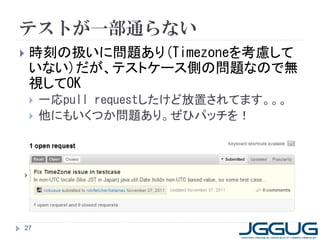
   時刻の扱いに問題あり(Timezoneを考慮して
    いない)だが、テストケース側の問題なので無
    視してOK
       一応pull requestしたけど放置されてます。。。
       他にもいくつか問題あり。ぜひパッチを!


27
Grails + Geb + Betamax
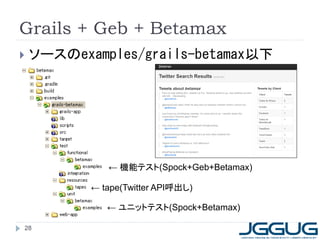
   ソースのexamples/grails-betamax以下


              ← 機能テスト(Spock+Geb+Betamax)

           ← tape(Twitter API呼出し)

              ← ユニットテスト(Spock+Betamax)

28
tape
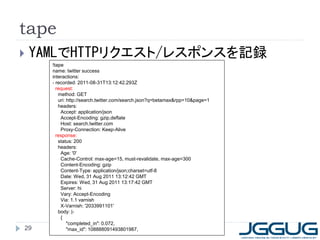
   YAMLでHTTPリクエスト/レスポンスを記録
      !tape
      name: twitter success
      interactions:
      - recorded: 2011-08-31T13:12:42.293Z
        request:
         method: GET
         uri: http://search.twitter.com/search.json?q=betamax&rpp=10&page=1
         headers:
          Accept: application/json
          Accept-Encoding: gzip,deflate
          Host: search.twitter.com
          Proxy-Connection: Keep-Alive
        response:
         status: 200
         headers:
          Age: '0'
          Cache-Control: max-age=15, must-revalidate, max-age=300
          Content-Encoding: gzip
          Content-Type: application/json;charset=utf-8
          Date: Wed, 31 Aug 2011 13:12:42 GMT
          Expires: Wed, 31 Aug 2011 13:17:42 GMT
          Server: hi
          Vary: Accept-Encoding
          Via: 1.1 varnish
          X-Varnish: '2033991101'
         body: |-
          {
              "completed_in": 0.072,
29            "max_id": 108888091493801987,
tapeの利用価値
   Web APIにアクセスできない状況でもテストが
    できる
       新幹線で移動することが多い人向け
   テストを高速化できる
       いちいちサーバーにアクセスしなくてすむ
   テスト結果を安定化できる
       サーバー側の変化からテストを分離できる
   レアケースに対するテストを容易にできる
       TwitterのAPI呼出し制限に引っ掛かった場合など
   tapeを再利用(資産化)できる
30
Betamaxはまり道
   基本的にはRecorderと@Betamaxだけで
    いけるはず!
       組合せによっていろいろ起こります。。。。
       とりあえずGroovy-1.8/HTTPBuilderの組合せが
        おすすめ
       素のURLクラスを使うと、 java.io.IOException:
        Premature EOF ???
       400 Bad Request ???
   品質向上にご協力下さい
"Please raise issues on Betamax’s GitHub issue tracker. Forks and
pull requests are more than welcome." by Rob Fletcher
31
ご静聴
ありがとう
ございました
32

G*workshop 2011/11/22 Geb+Betamax

  • 1.
    入門Geb+Betamax 2011/11/22 JGGUGサポートスタッフ 須江 信洋 http://twitter.com/nobusue http://d.hatena.ne.jp/nobusue ※資料の内容は個人としての意見・見解を述べたものであり、 所属する企業・組織が内容を保証するものではありません。
  • 2.
    自己紹介  須江 信洋(すえ のぶひろ)  Twitter: @nobusue  http://www.facebook.com/profile.php?id=732337788  かれこれ10年位、JavaEE関連の仕事をしてます  G*(Groovy関連技術)との関わり  Groovyコミュニティ(JGGUG)サポートスタッフ  「プログラミングGROOVY」執筆チーム  「Groovy イン・アクション」翻訳チーム  Groovyで作ったBot飼ってます(@hatena_groovy) 2
  • 3.
    本日のお題  テスト自動化について  Geb入門 Betamax入門  Geb+Spock+Betamaxでgrails test-app 3
  • 4.
    テスト自動化、しましょうか?  Vモデル ここは未だに 人海戦術が 主流 ここはJUnitなどで わりかし自動化 できている http://ja.wikipedia.org/wiki/V%E3%83%A2%E3%83%87%E3%83%AB 4
  • 5.
    自動化できれば・・・  テスト実行に伴う人的コストが不要になる  リファクタリングに取り組み易くなる  バグフィックスや機能修正によるリリース頻度を上 げられる  ミドルウェアやOSのFix適用に躊躇しなくてよくなる  テストの品質を上げられる  手作業に完全ということはありえない  手作業は監査できない 5
  • 6.
    とはいえ・・・  受け入れテスト(UAT)の完全自動化は大変  ならば、せめてスモークテストだけでも自動化を  人手によるテストやパフォーマンステストの前の関 門として、CIのプロセスに組み込んでみては? http://en.wikipedia.org/wiki/Smoke_testing 6
  • 7.
    Gebる前に: Seleniumの系譜 2004~ Selenium1 (Selenium RC) Selenium2 Selenium IDE 2009~ Selenium2 Selenium-Grid +WebDriver 2006~ 2011/07 WebDriver Selenium2.0リリース (Google) http://seleniumhq.org/docs/01_introducing_selenium.html#brief-history-of-the-selenium-project 7
  • 8.
    Selenium1とWebDriver  Selenium1の課題  テスト・ドライバーがブラウザ上で稼働するため、ブラ ウザのサンドボックスの制限を受ける  原理的に対応が難しい機能がある  ファイルアップロードなど  Ajax対応  WebDriver  テスト・ドライバーがブラウザ外部で稼働するため上記 の制限を受けない  Headless Driver(HtmlUnit)に対応  詳細な比較については以下 http://www.asukaze.net/etc/webdriver/ 8
  • 9.
    WebDriver: Java APIサンプル publicclass Selenium2Example { public static void main(String[] args) { WebDriver driver = new FirefoxDriver(); driver.get("http://www.google.com"); WebElement element = driver.findElement(By.name("q")); element.sendKeys("Cheese!"); element.submit(); System.out.println("Page title is: " + driver.getTitle()); (new WebDriverWait(driver, 10)) .until(new ExpectedCondition<Boolean>() { public Boolean apply(WebDriver d) { return d.getTitle().toLowerCase().startsWith("cheese!"); } }); System.out.println("Page title is: " + driver.getTitle()); driver.quit(); } } 9
  • 10.
  • 11.
    そこでGeb(じぇぶ)ですよ http://www.gebish.org/  Groovyで構築されたWebDriverのラッパー  jQueryライクなNavigator APIを提供  Page Objectパターンによる構造化  WebDriver単体でも使えるが、より使いやすく  2011/11/22時点での最新バージョンは0.6.1  GitHub上の最新は0.7.0-SNAPSHOT  多様なテストフレームワークと統合可能  Spock,EasyB  JUnit3/4,TestNG  Cucumber(Cuke4Duke) 11
  • 12.
    jQuery-like Navigator API //CSS 3 selectors $("div.some-class p:first[title='something']") // Find via index and/or attribute matching $("h1", 2, class: "heading") $("p", name: "description") $("ul.things li", 2) // 'text' is special attribute for the element text content $("h1", text: "All about Geb") // Use builtin matchers and regular expressions $("p", text: contains("Geb")) $("input", value: ~/¥d{3,}-¥d{3,}-¥d{3,}/) // Chaining $("div").find(".b") $("div").filter(".c").parents() $("p.c").siblings() 12
  • 13.
    Page Objectパターン class LoginPageextends Page { ログイン画面 static url = "http://myapp.com/login" static at = { heading.text() == "Please Login" } static content = { heading { $("h1") } loginForm { $("form.login") } loginButton(to: AdminPage) { loginForm.login() } } } Browser.drive { テスト to LoginPage assert at(LoginPage) loginForm.with { username = "admin" class AdminPage extends Page { password = "password" static at = { heading.text() == "Admin Section" } } static content = { loginButton.click() heading { $("h1") } assert at(AdminPage) } } } 管理画面 13
  • 14.
    Gebの例: はてなキーワード検索 @Grapes([ @Grab("org.codehaus.geb:geb-core:0.6.1"), @Grab("org.seleniumhq.selenium:selenium-firefox-driver:2.12.0") ]) import geb.Browser Browser.drive { go "http://d.hatena.ne.jp/keyword/" assert title == "はてなキーワード - 話題の言葉がわかる、みんなで 編集するキーワード" $("form.header-search").word = "Groovy" $("form.header-search").find("input", name:"submit").click() assert title == "はてな検索: Groovy" } 14
  • 15.
    GebとSpockのインテグレーション  Gebと連携するSpockのテストケースとして以 下が提供される  geb.spock.GebSpec / GebReportingSpec  browserインスタンスの注入  WebDriverのBrowserクラスの初期化が不要  evidence取得の自動化  GebReportingSpecを利用すると、テストケースのメ ソッド終了時にスクリーンショット(PNG)が自動取得 される 15
  • 16.
    Geb ドキュメント&サンプル  The Book Of Geb  http://www.gebish.org/manual/current/  かなり詳しいドキュメント  Gebソースコード  https://github.com/geb/geb  Geb/Gradleサンプル  https://github.com/geb/geb-example-gradle 16
  • 17.
    ChromeDriver利用時の注意点  ChromeDriverを実行可能にしておくこと  http://code.google.com/p/selenium/wiki/ChromeDriver  バイナリをダウンロード  http://code.google.com/p/chromium/downloads/list  パスに追加 or システムプロパティ webdriver.chrome.drive を設定 17
  • 18.
    GebReportingSpecの例 class GoogleSpec extendsGebReportingSpec { def "the first link should be wikipedia"() { when: to GoogleHomePage and: search.forTerm "wikipedia" then: at GoogleResultsPage and: firstResultLink.text() == "Wikipedia" when: firstResultLink.click() then: waitFor { at WikipediaPage } } } 18
  • 19.
    GebSpec利用時の注意点  GebReportingSpecを利用する場合はレポート 出力先のディレクトリを指定しておく必要があ る  最も簡単なのはシステムプロパティを使うこと  groovy -Dgeb.build.reportsDir=/tempdir GebSpockReporting.groovy 19
  • 20.
    Gebについて詳しくは・・・  G*Magazine  http://grails.jp/g_mag_jp/  創刊号と第3号に、@bikisuke さんがGeb/Spock の技術情報を執筆  GitHub  https://github.com/kimukou/gradlestudy/tre e/master/geb-geb-example  @kimukou_26 さん作成サンプル 20
  • 21.
    Betamax http://robfletcher.github.com/betamax/  WebサービスのRecord/Playback Proxy  HTTPリクエスト/レスポンスをtapeに記録  tapeを利用してWebサービスをエミュレート  JUnit/Spockとのインテグレーション  vcr(Ruby)のクローン  https://www.relishapp.com/myronmarston/vcr  vcrのcassetと互換性あり?(未確認) 21
  • 22.
    Hello, Betamax <任意のディレクトリ> │ build.gradle └─src └─test └─groovy MySpec.groovy  "gradle test"を実行すると、 src/test/resources/betamax/tapesにtapeが作成される  同じリクエストに対してはBetamaxがtapeを再生する  デフォルトではURLとHTTPメソッドの対で同一性を判定 22
  • 23.
    build.gradle apply plugin: "groovy" repositories{ mavenCentral() } dependencies { groovy("org.codehaus.groovy:groovy-all:1.8.4") testCompile("com.github.robfletcher:betamax:1.0") testCompile( "org.codehaus.groovy.modules.http-builder:http-builder:0.5.1") { exclude module: "groovy" exclude module: "httpclient" } testCompile("org.spockframework:spock-core:0.5-groovy-1.8") { exclude module: "groovy-all" } } 23
  • 24.
    MySpec.groovy import betamax.* import spock.lang.* importorg.junit.* import groovyx.net.http.RESTClient import org.apache.http.impl.conn.ProxySelectorRoutePlanner class MySpec extends Specification { @Rule Recorder recorder = new Recorder() @Shared RESTClient http = new RESTClient() def setupSpec() { http.client.routePlanner = new ProxySelectorRoutePlanner( http.client.connectionManager.schemeRegistry, ProxySelector.default) } @Betamax(tape="my tape") def "various types of response data"() { when: def response = http.get(uri:"http://grails.org/") then: response.status == 200 } } 24
  • 25.
    その他のサンプル  今のところまとまったドキュメント等はないの で、ソースコードからビルドして試すのがおす すめ  https://github.com/robfletcher/betamax  そろそろGitには慣れておいた方がいい  ビルド時の注意点  SonaTypeのアカウント設定  テストが一部通らない・・・が無視してOK 25
  • 26.
    SonaTypeのアカウント設定  素直にビルドすると以下のエラーが  A problem occurred evaluating root project 'betamax'. Cause: No such property: sonatypeUsername for class: org.gradle.api.internal.artifacts.publish.maven.deploy.groo vy.DefaultGroovyMavenDeployer  SonaTypeのアカウントなんて持ってないよママン!  以下で対処してください  gradle.propertiesを作成(値は空白で可) [gradle.properties] sonatypeUsername= sonatypePassword= 26
  • 27.
    テストが一部通らない  時刻の扱いに問題あり(Timezoneを考慮して いない)だが、テストケース側の問題なので無 視してOK  一応pull requestしたけど放置されてます。。。  他にもいくつか問題あり。ぜひパッチを! 27
  • 28.
    Grails + Geb+ Betamax  ソースのexamples/grails-betamax以下 ← 機能テスト(Spock+Geb+Betamax) ← tape(Twitter API呼出し) ← ユニットテスト(Spock+Betamax) 28
  • 29.
    tape  YAMLでHTTPリクエスト/レスポンスを記録 !tape name: twitter success interactions: - recorded: 2011-08-31T13:12:42.293Z request: method: GET uri: http://search.twitter.com/search.json?q=betamax&rpp=10&page=1 headers: Accept: application/json Accept-Encoding: gzip,deflate Host: search.twitter.com Proxy-Connection: Keep-Alive response: status: 200 headers: Age: '0' Cache-Control: max-age=15, must-revalidate, max-age=300 Content-Encoding: gzip Content-Type: application/json;charset=utf-8 Date: Wed, 31 Aug 2011 13:12:42 GMT Expires: Wed, 31 Aug 2011 13:17:42 GMT Server: hi Vary: Accept-Encoding Via: 1.1 varnish X-Varnish: '2033991101' body: |- { "completed_in": 0.072, 29 "max_id": 108888091493801987,
  • 30.
    tapeの利用価値  Web APIにアクセスできない状況でもテストが できる  新幹線で移動することが多い人向け  テストを高速化できる  いちいちサーバーにアクセスしなくてすむ  テスト結果を安定化できる  サーバー側の変化からテストを分離できる  レアケースに対するテストを容易にできる  TwitterのAPI呼出し制限に引っ掛かった場合など  tapeを再利用(資産化)できる 30
  • 31.
    Betamaxはまり道  基本的にはRecorderと@Betamaxだけで いけるはず!  組合せによっていろいろ起こります。。。。  とりあえずGroovy-1.8/HTTPBuilderの組合せが おすすめ  素のURLクラスを使うと、 java.io.IOException: Premature EOF ???  400 Bad Request ???  品質向上にご協力下さい "Please raise issues on Betamax’s GitHub issue tracker. Forks and pull requests are more than welcome." by Rob Fletcher 31
  • 32.