iOS App Development Certification Training www.edureka.co/ios-development
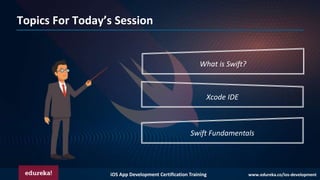
Topics For Today’s Session
What is Swift?
Xcode IDE
Swift Fundamentals
iOS App Development Certification Training www.edureka.co/ios-development
What is Swift?
❑ Swift is a programming language developed by Apple Inc for iOS and OS X
development.
❑ Swift adopts the best of C and Objective-C, without the constraints of C
compatibility.
❑ Swift uses the same runtime as the existing Objective-C system on Mac OS and
iOS, which enables programs to run on many existing iOS 6 and OS X 10.8
platforms.
iOS App Development Certification Training www.edureka.co/ios-development
Xcode IDE
❑ Xcode is an IDE for macOS , which contains a suite of
software development tools developed by Apple.
❑ This set of tools developed are used for developing
software for macOS, iOS, watchOS, and tvOS.
iOS App Development Certification Training www.edureka.co/ios-development
BASIC SYNTAX
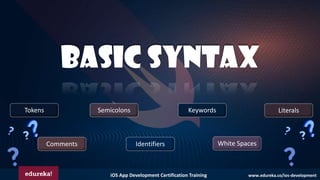
White Spaces
Semicolons Literals
Identifiers
Tokens Keywords
Comments
iOS App Development Certification Training www.edureka.co/ios-development
Swift Basic Syntax
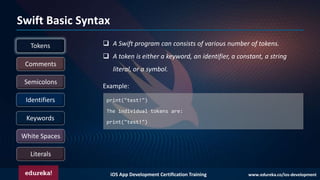
print("test!")
The individual tokens are:
print("test!")
White Spaces
Semicolons
Literals
Identifiers
Tokens
Keywords
Comments
❑ A Swift program can consists of various number of tokens.
❑ A token is either a keyword, an identifier, a constant, a string
literal, or a symbol.
Example:
iOS App Development Certification Training www.edureka.co/ios-development
Swift Basic Syntax
White Spaces
Semicolons
Literals
Identifiers
Tokens
Keywords
Comments
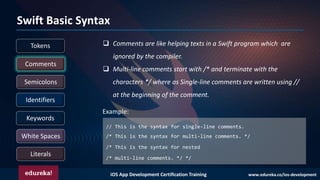
// This is the syntax for single-line comments.
/* This is the syntax for multi-line comments. */
/* This is the syntax for nested
/* multi-line comments. */ */
❑ Comments are like helping texts in a Swift program which are
ignored by the compiler.
❑ Multi-line comments start with /* and terminate with the
characters */ where as Single-line comments are written using //
at the beginning of the comment.
Example:
iOS App Development Certification Training www.edureka.co/ios-development
Swift Basic Syntax
White Spaces
Semicolons
Literals
Identifiers
Tokens
Keywords
Comments
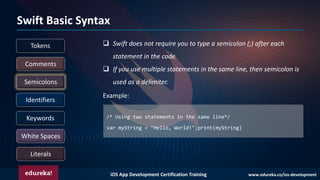
❑ Swift does not require you to type a semicolon (;) after each
statement in the code.
❑ If you use multiple statements in the same line, then semicolon is
used as a delimiter.
/* Using two statements in the same line*/
var myString = "Hello, World!";print(myString)
Example:
iOS App Development Certification Training www.edureka.co/ios-development
Swift Basic Syntax
White Spaces
Semicolons
Literals
Identifiers
Tokens
Keywords
Comments
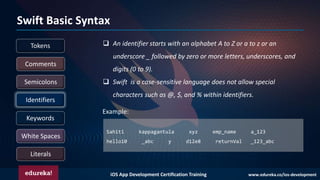
❑ An identifier starts with an alphabet A to Z or a to z or an
underscore _ followed by zero or more letters, underscores, and
digits (0 to 9).
❑ Swift is a case-sensitive language does not allow special
characters such as @, $, and % within identifiers.
Example:
Sahiti kappagantula xyz emp_name a_123
hello10 _abc y d12e8 returnVal _123_abc
iOS App Development Certification Training www.edureka.co/ios-development
Swift Basic Syntax
White Spaces
Semicolons
Literals
Identifiers
Tokens
Keywords
Comments
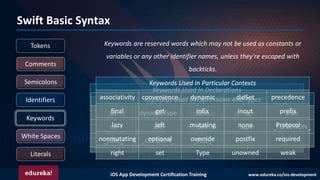
Keywords are reserved words which may not be used as constants or
variables or any other identifier names, unless they're escaped with
backticks.
Keywords Used In Declarations
Class deinit Enum extension Func
Let import Init internal public
typealias operator private protocol var
subscript static struct subscript
Keywords Used In Statements
break case continue default do
if else fallthrough for where
while in return switch
Keywords Used In Expressions And Types
as dynamicType false is true
nil self Self super _FUNCTION_
_LINE_ _COLUMN_ _FILE_
Keywords Used In Particular Contexts
associativity convenience dynamic didSet precedence
final get infix inout prefix
lazy left mutating none Protocol
nonmutating optional override postfix required
right set Type unowned weak
iOS App Development Certification Training www.edureka.co/ios-development
Swift Basic Syntax
White Spaces
Semicolons
Literals
Identifiers
Tokens
Keywords
Comments
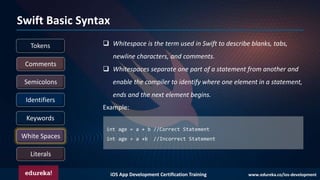
❑ Whitespace is the term used in Swift to describe blanks, tabs,
newline characters, and comments.
❑ Whitespaces separate one part of a statement from another and
enable the compiler to identify where one element in a statement,
ends and the next element begins.
int age = a + b //Correct Statement
int age = a +b //Incorrect Statement
Example:
iOS App Development Certification Training www.edureka.co/ios-development
Swift Basic Syntax
White Spaces
Semicolons
Literals
Identifiers
Tokens
Keywords
Comments
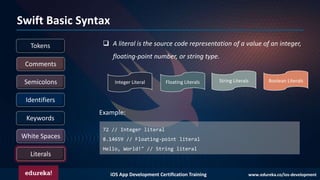
❑ A literal is the source code representation of a value of an integer,
floating-point number, or string type.
72 // Integer literal
8.14659 // Floating-point literal
Hello, World!" // String literal
Example:
Integer Literal Floating Literals String Literals Boolean Literals
iOS App Development Certification Training www.edureka.co/ios-development
VARIABLES,
DATATYPES &
TYPE CASTING
iOS App Development Certification Training www.edureka.co/ios-development
VARIABLES
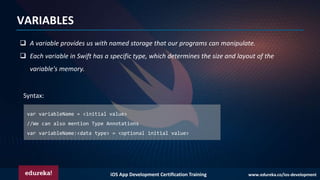
❑ A variable provides us with named storage that our programs can manipulate.
❑ Each variable in Swift has a specific type, which determines the size and layout of the
variable's memory.
var variableName = <initial value>
//We can also mention Type Annotations
var variableName:<data type> = <optional initial value>
Syntax:
iOS App Development Certification Training www.edureka.co/ios-development
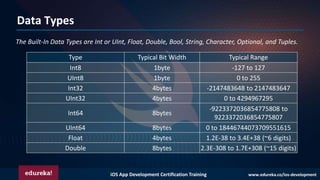
Data Types
The Built-In Data Types are Int or UInt, Float, Double, Bool, String, Character, Optional, and Tuples.
Type Typical Bit Width Typical Range
Int8 1byte -127 to 127
UInt8 1byte 0 to 255
Int32 4bytes -2147483648 to 2147483647
UInt32 4bytes 0 to 4294967295
Int64 8bytes
-9223372036854775808 to
9223372036854775807
UInt64 8bytes 0 to 18446744073709551615
Float 4bytes 1.2E-38 to 3.4E+38 (~6 digits)
Double 8bytes 2.3E-308 to 1.7E+308 (~15 digits)
iOS App Development Certification Training www.edureka.co/ios-development
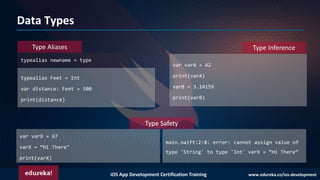
Data Types
typealias newname = type
typealias Feet = Int
var distance: Feet = 500
print(distance)
Type Inference
var varA = 42
print(varA)
varB = 3.14159
print(varB)
Type Safety
var varX = 67
varX = “Hi There"
print(varX)
Type Aliases
main.swift:2:8: error: cannot assign value of
type 'String' to type 'Int' varX = “Hi There”
iOS App Development Certification Training www.edureka.co/ios-development
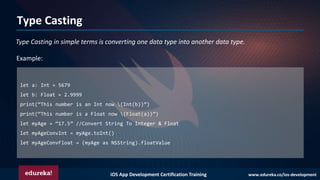
Type Casting
Type Casting in simple terms is converting one data type into another data type.
let a: Int = 5679
let b: Float = 2.9999
print(“This number is an Int now (Int(b))”)
print(“This number is a Float now (Float(a))”)
let myAge = “17.5” //Convert String To Integer & Float
let myAgeConvInt = myAge.toInt()
let myAgeConvFloat = (myAge as NSString).floatValue
Example:
iOS App Development Certification Training www.edureka.co/ios-development
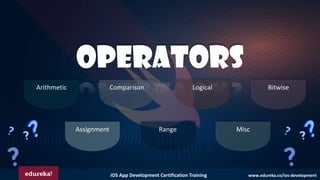
OPERATORS
Arithmetic Comparison Logical Bitwise
Assignment Range Misc
iOS App Development Certification Training www.edureka.co/ios-development
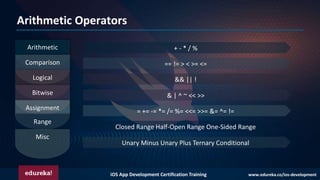
Arithmetic Operators
Arithmetic
Comparison
Logical
Bitwise
Assignment
Range
Misc
+ - * / %
== != > < >= <=
&& || !
& | ^ ~ << >>
= += -= *= /= %= <<= >>= &= ^= !=
Closed Range Half-Open Range One-Sided Range
Unary Minus Unary Plus Ternary Conditional
iOS App Development Certification Training www.edureka.co/ios-development
CONDITIONAL
STATEMENTS
If
If-Else
Switch
iOS App Development Certification Training www.edureka.co/ios-development
If
If-Else
Switch
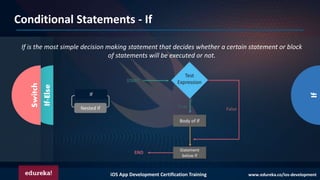
If is the most simple decision making statement that decides whether a certain statement or block
of statements will be executed or not.
If
Nested If
Conditional Statements - If
iOS App Development Certification Training www.edureka.co/ios-development
If
If-Else
Switch
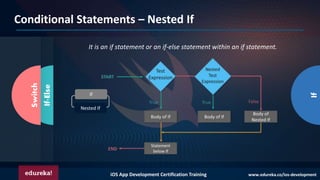
It is an if statement or an if-else statement within an if statement.
If
Nested If
Conditional Statements – Nested If
iOS App Development Certification Training www.edureka.co/ios-development
If
If-Else
Switch
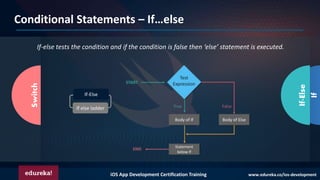
If-else tests the condition and if the condition is false then ‘else’ statement is executed.
Conditional Statements – If…else
If-Else
If else ladder
iOS App Development Certification Training www.edureka.co/ios-development
If
If-Else
Switch
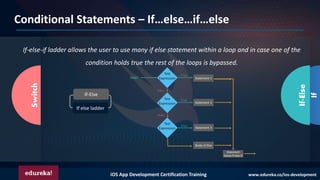
If-else-if ladder allows the user to use many if else statement within a loop and in case one of the
condition holds true the rest of the loops is bypassed.
If-Else
If else ladder
Conditional Statements – If…else…if…else
iOS App Development Certification Training www.edureka.co/ios-development
If
If-Else
Switch
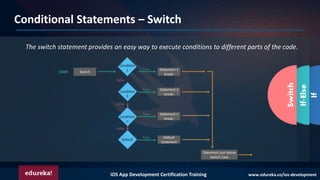
The switch statement provides an easy way to execute conditions to different parts of the code.
Conditional Statements – Switch
iOS App Development Certification Training www.edureka.co/ios-development
ITERATIVE
LOOPS
For-in
While
Do-While
iOS App Development Certification Training www.edureka.co/ios-development
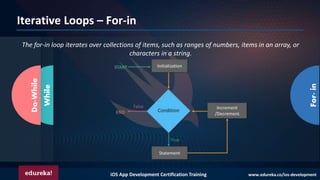
Iterative Loops – For-in
For-in
While
Do-While
The for-in loop iterates over collections of items, such as ranges of numbers, items in an array, or
characters in a string.
iOS App Development Certification Training www.edureka.co/ios-development
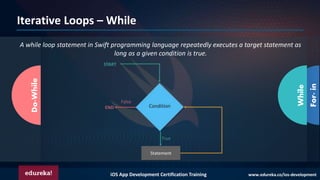
Iterative Loops – While
For-in
While
Do-While
A while loop statement in Swift programming language repeatedly executes a target statement as
long as a given condition is true.
iOS App Development Certification Training www.edureka.co/ios-development
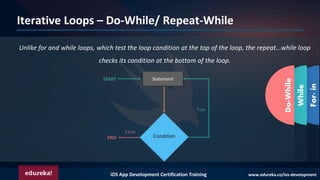
Iterative Loops – Do-While/ Repeat-While
For-in
While
Do-While
Unlike for and while loops, which test the loop condition at the top of the loop, the repeat...while loop
checks its condition at the bottom of the loop.
iOS App Development Certification Training www.edureka.co/ios-development
ARRAYS &
Tuples
iOS App Development Certification Training www.edureka.co/ios-development
Arrays
An array is a data structure that contains a list of elements. These elements are all of the same
data type, such as an integer or string.
//Creating Arrays
var someArray = [SomeType]()
//Accessing Arrays
var someVar = someArray[index]
Syntax:
iOS App Development Certification Training www.edureka.co/ios-development
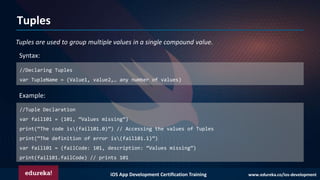
Tuples
Tuples are used to group multiple values in a single compound value.
//Declaring Tuples
var TupleName = (Value1, value2,… any number of values)
Example:
Syntax:
//Tuple Declaration
var fail101 = (101, “Values missing”)
print(“The code is(fail101.0)”) // Accessing the values of Tuples
print(“The definition of error is(fail101.1)”)
var fail101 = (failCode: 101, description: “Values missing”)
print(fail101.failCode) // prints 101
iOS App Development Certification Training www.edureka.co/ios-development
SETS &
DICTIONARIES
iOS App Development Certification Training www.edureka.co/ios-development
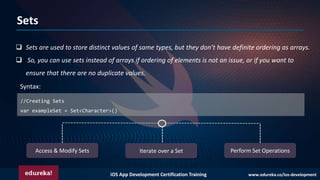
Sets
❑ Sets are used to store distinct values of same types, but they don’t have definite ordering as arrays.
❑ So, you can use sets instead of arrays if ordering of elements is not an issue, or if you want to
ensure that there are no duplicate values.
//Creating Sets
var exampleSet = Set<Character>()
Syntax:
Access & Modify Sets Iterate over a Set Perform Set Operations
iOS App Development Certification Training www.edureka.co/ios-development
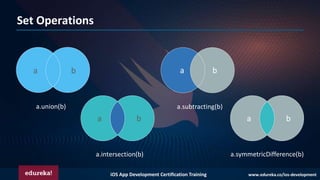
Set Operations
a b
a b
a b
a.union(b)
a.intersection(b)
a.subtracting(b)
a b
a.symmetricDifference(b)
iOS App Development Certification Training www.edureka.co/ios-development
Dictionaries
❑ Dictionaries are used to store unordered lists of values of the same type.
❑ Swift does not allow you to enter a wrong type in a dictionary even by mistake.
VALUE//Creating Sets
var someDict = [KeyType: ValueType]()
var someDict = [Int: String]()
Syntax:
Example:
var someDict:[Int:String] = [1:"One", 2:"Two", 3:"Three"]
iOS App Development Certification Training www.edureka.co/ios-development
FUNCTIONS
iOS App Development Certification Training www.edureka.co/ios-development
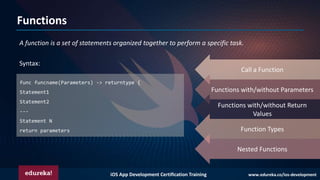
Functions
A function is a set of statements organized together to perform a specific task.
func funcname(Parameters) -> returntype {
Statement1
Statement2
---
Statement N
return parameters
Syntax:
Call a Function
Functions with/without Parameters
Functions with/without Return
Values
Function Types
Nested Functions
iOS App Development Certification Training www.edureka.co/ios-development
CLOSURES &
STRUCTURES
iOS App Development Certification Training www.edureka.co/ios-development
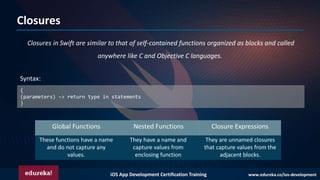
Closures
Closures in Swift are similar to that of self-contained functions organized as blocks and called
anywhere like C and Objective C languages.
{
(parameters) −> return type in statements
}
Syntax:
These functions have a name
and do not capture any
values.
They have a name and
capture values from
enclosing function
They are unnamed closures
that capture values from the
adjacent blocks.
Global Functions Nested Functions Closure Expressions
iOS App Development Certification Training www.edureka.co/ios-development
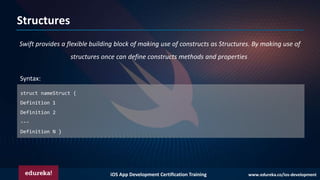
Structures
Swift provides a flexible building block of making use of constructs as Structures. By making use of
structures once can define constructs methods and properties.
struct nameStruct {
Definition 1
Definition 2
---
Definition N }
Syntax:
iOS App Development Certification Training www.edureka.co/ios-development
CLASS &
INHERITANCE
iOS App Development Certification Training www.edureka.co/ios-development
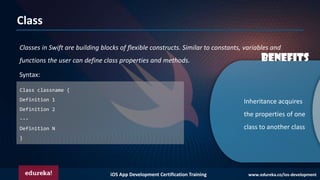
Class
Classes in Swift are building blocks of flexible constructs. Similar to constants, variables and
functions the user can define class properties and methods.
Class classname {
Definition 1
Definition 2
---
Definition N
}
Syntax:
Inheritance acquires
the properties of one
class to another class
Benefits
iOS App Development Certification Training www.edureka.co/ios-development
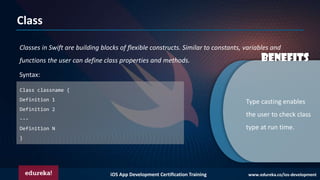
Class
Classes in Swift are building blocks of flexible constructs. Similar to constants, variables and
functions the user can define class properties and methods.
Type casting enables
the user to check class
type at run time.
Benefits
Class classname {
Definition 1
Definition 2
---
Definition N
}
Syntax:
iOS App Development Certification Training www.edureka.co/ios-development
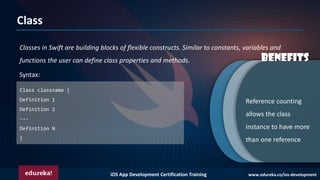
Class
Classes in Swift are building blocks of flexible constructs. Similar to constants, variables and
functions the user can define class properties and methods. Benefits
Reference counting
allows the class
instance to have more
than one reference
Class classname {
Definition 1
Definition 2
---
Definition N
}
Syntax:
iOS App Development Certification Training www.edureka.co/ios-development
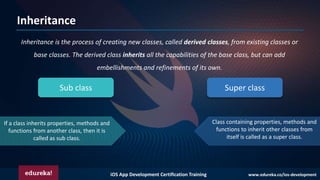
Inheritance
Inheritance is the process of creating new classes, called derived classes, from existing classes or
base classes. The derived class inherits all the capabilities of the base class, but can add
embellishments and refinements of its own.
Sub class Super class
If a class inherits properties, methods and
functions from another class, then it is
called as sub class.
Class containing properties, methods and
functions to inherit other classes from
itself is called as a super class.
iOS App Development Certification Training www.edureka.co/ios-development
PROTOCOLS
iOS App Development Certification Training www.edureka.co/ios-development
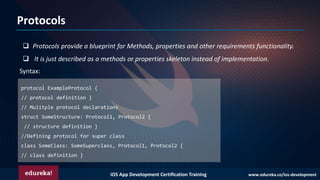
Protocols
❑ Protocols provide a blueprint for Methods, properties and other requirements functionality.
❑ It is just described as a methods or properties skeleton instead of implementation.
protocol ExampleProtocol {
// protocol definition }
// Mulitple protocol declarations
struct SomeStructure: Protocol1, Protocol2 {
// structure definition }
//Defining protocol for super class
class SomeClass: SomeSuperclass, Protocol1, Protocol2 {
// class definition }
Syntax:
iOS App Development Certification Training www.edureka.co/ios-development
EXTENSIONS
iOS App Development Certification Training www.edureka.co/ios-development
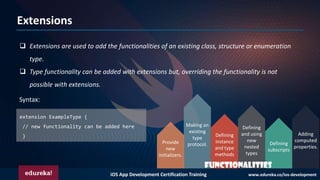
Extensions
❑ Extensions are used to add the functionalities of an existing class, structure or enumeration
type.
❑ Type functionality can be added with extensions but, overriding the functionality is not
possible with extensions.
extension ExampleType {
// new functionality can be added here
}
Syntax:
Defining
subscripts
Adding
computed
properties.
Defining
and using
new
nested
types
Making an
existing
type
protocol.
Defining
instance
and type
methods
Provide
new
initializers.
FUNCTIONALITIES
iOS App Development Certification Training www.edureka.co/ios-development
GENERICS
iOS App Development Certification Training www.edureka.co/ios-development
Generics
❑ Swift language provides 'Generic' features to write flexible and reusable functions and types.
❑ Generics are used to avoid duplication and to provide abstraction
iOS App Development Certification Training www.edureka.co/ios-development
ENUMERATIONS
iOS App Development Certification Training www.edureka.co/ios-development
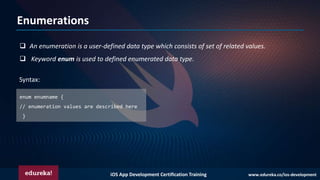
Enumerations
❑ An enumeration is a user-defined data type which consists of set of related values.
❑ Keyword enum is used to defined enumerated data type.
enum enumname {
// enumeration values are described here
}
Syntax:
Swift Tutorial For Beginners | Swift Programming Tutorial | IOS App Development Tutorial | Edureka

Swift Tutorial For Beginners | Swift Programming Tutorial | IOS App Development Tutorial | Edureka

  • 1.
    iOS App DevelopmentCertification Training www.edureka.co/ios-development
  • 2.
    iOS App DevelopmentCertification Training www.edureka.co/ios-development Topics For Today’s Session What is Swift? Xcode IDE Swift Fundamentals
  • 3.
    iOS App DevelopmentCertification Training www.edureka.co/ios-development What is Swift? ❑ Swift is a programming language developed by Apple Inc for iOS and OS X development. ❑ Swift adopts the best of C and Objective-C, without the constraints of C compatibility. ❑ Swift uses the same runtime as the existing Objective-C system on Mac OS and iOS, which enables programs to run on many existing iOS 6 and OS X 10.8 platforms.
  • 4.
    iOS App DevelopmentCertification Training www.edureka.co/ios-development Xcode IDE ❑ Xcode is an IDE for macOS , which contains a suite of software development tools developed by Apple. ❑ This set of tools developed are used for developing software for macOS, iOS, watchOS, and tvOS.
  • 5.
    iOS App DevelopmentCertification Training www.edureka.co/ios-development BASIC SYNTAX White Spaces Semicolons Literals Identifiers Tokens Keywords Comments
  • 6.
    iOS App DevelopmentCertification Training www.edureka.co/ios-development Swift Basic Syntax print("test!") The individual tokens are: print("test!") White Spaces Semicolons Literals Identifiers Tokens Keywords Comments ❑ A Swift program can consists of various number of tokens. ❑ A token is either a keyword, an identifier, a constant, a string literal, or a symbol. Example:
  • 7.
    iOS App DevelopmentCertification Training www.edureka.co/ios-development Swift Basic Syntax White Spaces Semicolons Literals Identifiers Tokens Keywords Comments // This is the syntax for single-line comments. /* This is the syntax for multi-line comments. */ /* This is the syntax for nested /* multi-line comments. */ */ ❑ Comments are like helping texts in a Swift program which are ignored by the compiler. ❑ Multi-line comments start with /* and terminate with the characters */ where as Single-line comments are written using // at the beginning of the comment. Example:
  • 8.
    iOS App DevelopmentCertification Training www.edureka.co/ios-development Swift Basic Syntax White Spaces Semicolons Literals Identifiers Tokens Keywords Comments ❑ Swift does not require you to type a semicolon (;) after each statement in the code. ❑ If you use multiple statements in the same line, then semicolon is used as a delimiter. /* Using two statements in the same line*/ var myString = "Hello, World!";print(myString) Example:
  • 9.
    iOS App DevelopmentCertification Training www.edureka.co/ios-development Swift Basic Syntax White Spaces Semicolons Literals Identifiers Tokens Keywords Comments ❑ An identifier starts with an alphabet A to Z or a to z or an underscore _ followed by zero or more letters, underscores, and digits (0 to 9). ❑ Swift is a case-sensitive language does not allow special characters such as @, $, and % within identifiers. Example: Sahiti kappagantula xyz emp_name a_123 hello10 _abc y d12e8 returnVal _123_abc
  • 10.
    iOS App DevelopmentCertification Training www.edureka.co/ios-development Swift Basic Syntax White Spaces Semicolons Literals Identifiers Tokens Keywords Comments Keywords are reserved words which may not be used as constants or variables or any other identifier names, unless they're escaped with backticks. Keywords Used In Declarations Class deinit Enum extension Func Let import Init internal public typealias operator private protocol var subscript static struct subscript Keywords Used In Statements break case continue default do if else fallthrough for where while in return switch Keywords Used In Expressions And Types as dynamicType false is true nil self Self super _FUNCTION_ _LINE_ _COLUMN_ _FILE_ Keywords Used In Particular Contexts associativity convenience dynamic didSet precedence final get infix inout prefix lazy left mutating none Protocol nonmutating optional override postfix required right set Type unowned weak
  • 11.
    iOS App DevelopmentCertification Training www.edureka.co/ios-development Swift Basic Syntax White Spaces Semicolons Literals Identifiers Tokens Keywords Comments ❑ Whitespace is the term used in Swift to describe blanks, tabs, newline characters, and comments. ❑ Whitespaces separate one part of a statement from another and enable the compiler to identify where one element in a statement, ends and the next element begins. int age = a + b //Correct Statement int age = a +b //Incorrect Statement Example:
  • 12.
    iOS App DevelopmentCertification Training www.edureka.co/ios-development Swift Basic Syntax White Spaces Semicolons Literals Identifiers Tokens Keywords Comments ❑ A literal is the source code representation of a value of an integer, floating-point number, or string type. 72 // Integer literal 8.14659 // Floating-point literal Hello, World!" // String literal Example: Integer Literal Floating Literals String Literals Boolean Literals
  • 13.
    iOS App DevelopmentCertification Training www.edureka.co/ios-development VARIABLES, DATATYPES & TYPE CASTING
  • 14.
    iOS App DevelopmentCertification Training www.edureka.co/ios-development VARIABLES ❑ A variable provides us with named storage that our programs can manipulate. ❑ Each variable in Swift has a specific type, which determines the size and layout of the variable's memory. var variableName = <initial value> //We can also mention Type Annotations var variableName:<data type> = <optional initial value> Syntax:
  • 15.
    iOS App DevelopmentCertification Training www.edureka.co/ios-development Data Types The Built-In Data Types are Int or UInt, Float, Double, Bool, String, Character, Optional, and Tuples. Type Typical Bit Width Typical Range Int8 1byte -127 to 127 UInt8 1byte 0 to 255 Int32 4bytes -2147483648 to 2147483647 UInt32 4bytes 0 to 4294967295 Int64 8bytes -9223372036854775808 to 9223372036854775807 UInt64 8bytes 0 to 18446744073709551615 Float 4bytes 1.2E-38 to 3.4E+38 (~6 digits) Double 8bytes 2.3E-308 to 1.7E+308 (~15 digits)
  • 16.
    iOS App DevelopmentCertification Training www.edureka.co/ios-development Data Types typealias newname = type typealias Feet = Int var distance: Feet = 500 print(distance) Type Inference var varA = 42 print(varA) varB = 3.14159 print(varB) Type Safety var varX = 67 varX = “Hi There" print(varX) Type Aliases main.swift:2:8: error: cannot assign value of type 'String' to type 'Int' varX = “Hi There”
  • 17.
    iOS App DevelopmentCertification Training www.edureka.co/ios-development Type Casting Type Casting in simple terms is converting one data type into another data type. let a: Int = 5679 let b: Float = 2.9999 print(“This number is an Int now (Int(b))”) print(“This number is a Float now (Float(a))”) let myAge = “17.5” //Convert String To Integer & Float let myAgeConvInt = myAge.toInt() let myAgeConvFloat = (myAge as NSString).floatValue Example:
  • 18.
    iOS App DevelopmentCertification Training www.edureka.co/ios-development OPERATORS Arithmetic Comparison Logical Bitwise Assignment Range Misc
  • 19.
    iOS App DevelopmentCertification Training www.edureka.co/ios-development Arithmetic Operators Arithmetic Comparison Logical Bitwise Assignment Range Misc + - * / % == != > < >= <= && || ! & | ^ ~ << >> = += -= *= /= %= <<= >>= &= ^= != Closed Range Half-Open Range One-Sided Range Unary Minus Unary Plus Ternary Conditional
  • 20.
    iOS App DevelopmentCertification Training www.edureka.co/ios-development CONDITIONAL STATEMENTS If If-Else Switch
  • 21.
    iOS App DevelopmentCertification Training www.edureka.co/ios-development If If-Else Switch If is the most simple decision making statement that decides whether a certain statement or block of statements will be executed or not. If Nested If Conditional Statements - If
  • 22.
    iOS App DevelopmentCertification Training www.edureka.co/ios-development If If-Else Switch It is an if statement or an if-else statement within an if statement. If Nested If Conditional Statements – Nested If
  • 23.
    iOS App DevelopmentCertification Training www.edureka.co/ios-development If If-Else Switch If-else tests the condition and if the condition is false then ‘else’ statement is executed. Conditional Statements – If…else If-Else If else ladder
  • 24.
    iOS App DevelopmentCertification Training www.edureka.co/ios-development If If-Else Switch If-else-if ladder allows the user to use many if else statement within a loop and in case one of the condition holds true the rest of the loops is bypassed. If-Else If else ladder Conditional Statements – If…else…if…else
  • 25.
    iOS App DevelopmentCertification Training www.edureka.co/ios-development If If-Else Switch The switch statement provides an easy way to execute conditions to different parts of the code. Conditional Statements – Switch
  • 26.
    iOS App DevelopmentCertification Training www.edureka.co/ios-development ITERATIVE LOOPS For-in While Do-While
  • 27.
    iOS App DevelopmentCertification Training www.edureka.co/ios-development Iterative Loops – For-in For-in While Do-While The for-in loop iterates over collections of items, such as ranges of numbers, items in an array, or characters in a string.
  • 28.
    iOS App DevelopmentCertification Training www.edureka.co/ios-development Iterative Loops – While For-in While Do-While A while loop statement in Swift programming language repeatedly executes a target statement as long as a given condition is true.
  • 29.
    iOS App DevelopmentCertification Training www.edureka.co/ios-development Iterative Loops – Do-While/ Repeat-While For-in While Do-While Unlike for and while loops, which test the loop condition at the top of the loop, the repeat...while loop checks its condition at the bottom of the loop.
  • 30.
    iOS App DevelopmentCertification Training www.edureka.co/ios-development ARRAYS & Tuples
  • 31.
    iOS App DevelopmentCertification Training www.edureka.co/ios-development Arrays An array is a data structure that contains a list of elements. These elements are all of the same data type, such as an integer or string. //Creating Arrays var someArray = [SomeType]() //Accessing Arrays var someVar = someArray[index] Syntax:
  • 32.
    iOS App DevelopmentCertification Training www.edureka.co/ios-development Tuples Tuples are used to group multiple values in a single compound value. //Declaring Tuples var TupleName = (Value1, value2,… any number of values) Example: Syntax: //Tuple Declaration var fail101 = (101, “Values missing”) print(“The code is(fail101.0)”) // Accessing the values of Tuples print(“The definition of error is(fail101.1)”) var fail101 = (failCode: 101, description: “Values missing”) print(fail101.failCode) // prints 101
  • 33.
    iOS App DevelopmentCertification Training www.edureka.co/ios-development SETS & DICTIONARIES
  • 34.
    iOS App DevelopmentCertification Training www.edureka.co/ios-development Sets ❑ Sets are used to store distinct values of same types, but they don’t have definite ordering as arrays. ❑ So, you can use sets instead of arrays if ordering of elements is not an issue, or if you want to ensure that there are no duplicate values. //Creating Sets var exampleSet = Set<Character>() Syntax: Access & Modify Sets Iterate over a Set Perform Set Operations
  • 35.
    iOS App DevelopmentCertification Training www.edureka.co/ios-development Set Operations a b a b a b a.union(b) a.intersection(b) a.subtracting(b) a b a.symmetricDifference(b)
  • 36.
    iOS App DevelopmentCertification Training www.edureka.co/ios-development Dictionaries ❑ Dictionaries are used to store unordered lists of values of the same type. ❑ Swift does not allow you to enter a wrong type in a dictionary even by mistake. VALUE//Creating Sets var someDict = [KeyType: ValueType]() var someDict = [Int: String]() Syntax: Example: var someDict:[Int:String] = [1:"One", 2:"Two", 3:"Three"]
  • 37.
    iOS App DevelopmentCertification Training www.edureka.co/ios-development FUNCTIONS
  • 38.
    iOS App DevelopmentCertification Training www.edureka.co/ios-development Functions A function is a set of statements organized together to perform a specific task. func funcname(Parameters) -> returntype { Statement1 Statement2 --- Statement N return parameters Syntax: Call a Function Functions with/without Parameters Functions with/without Return Values Function Types Nested Functions
  • 39.
    iOS App DevelopmentCertification Training www.edureka.co/ios-development CLOSURES & STRUCTURES
  • 40.
    iOS App DevelopmentCertification Training www.edureka.co/ios-development Closures Closures in Swift are similar to that of self-contained functions organized as blocks and called anywhere like C and Objective C languages. { (parameters) −> return type in statements } Syntax: These functions have a name and do not capture any values. They have a name and capture values from enclosing function They are unnamed closures that capture values from the adjacent blocks. Global Functions Nested Functions Closure Expressions
  • 41.
    iOS App DevelopmentCertification Training www.edureka.co/ios-development Structures Swift provides a flexible building block of making use of constructs as Structures. By making use of structures once can define constructs methods and properties. struct nameStruct { Definition 1 Definition 2 --- Definition N } Syntax:
  • 42.
    iOS App DevelopmentCertification Training www.edureka.co/ios-development CLASS & INHERITANCE
  • 43.
    iOS App DevelopmentCertification Training www.edureka.co/ios-development Class Classes in Swift are building blocks of flexible constructs. Similar to constants, variables and functions the user can define class properties and methods. Class classname { Definition 1 Definition 2 --- Definition N } Syntax: Inheritance acquires the properties of one class to another class Benefits
  • 44.
    iOS App DevelopmentCertification Training www.edureka.co/ios-development Class Classes in Swift are building blocks of flexible constructs. Similar to constants, variables and functions the user can define class properties and methods. Type casting enables the user to check class type at run time. Benefits Class classname { Definition 1 Definition 2 --- Definition N } Syntax:
  • 45.
    iOS App DevelopmentCertification Training www.edureka.co/ios-development Class Classes in Swift are building blocks of flexible constructs. Similar to constants, variables and functions the user can define class properties and methods. Benefits Reference counting allows the class instance to have more than one reference Class classname { Definition 1 Definition 2 --- Definition N } Syntax:
  • 46.
    iOS App DevelopmentCertification Training www.edureka.co/ios-development Inheritance Inheritance is the process of creating new classes, called derived classes, from existing classes or base classes. The derived class inherits all the capabilities of the base class, but can add embellishments and refinements of its own. Sub class Super class If a class inherits properties, methods and functions from another class, then it is called as sub class. Class containing properties, methods and functions to inherit other classes from itself is called as a super class.
  • 47.
    iOS App DevelopmentCertification Training www.edureka.co/ios-development PROTOCOLS
  • 48.
    iOS App DevelopmentCertification Training www.edureka.co/ios-development Protocols ❑ Protocols provide a blueprint for Methods, properties and other requirements functionality. ❑ It is just described as a methods or properties skeleton instead of implementation. protocol ExampleProtocol { // protocol definition } // Mulitple protocol declarations struct SomeStructure: Protocol1, Protocol2 { // structure definition } //Defining protocol for super class class SomeClass: SomeSuperclass, Protocol1, Protocol2 { // class definition } Syntax:
  • 49.
    iOS App DevelopmentCertification Training www.edureka.co/ios-development EXTENSIONS
  • 50.
    iOS App DevelopmentCertification Training www.edureka.co/ios-development Extensions ❑ Extensions are used to add the functionalities of an existing class, structure or enumeration type. ❑ Type functionality can be added with extensions but, overriding the functionality is not possible with extensions. extension ExampleType { // new functionality can be added here } Syntax: Defining subscripts Adding computed properties. Defining and using new nested types Making an existing type protocol. Defining instance and type methods Provide new initializers. FUNCTIONALITIES
  • 51.
    iOS App DevelopmentCertification Training www.edureka.co/ios-development GENERICS
  • 52.
    iOS App DevelopmentCertification Training www.edureka.co/ios-development Generics ❑ Swift language provides 'Generic' features to write flexible and reusable functions and types. ❑ Generics are used to avoid duplication and to provide abstraction
  • 53.
    iOS App DevelopmentCertification Training www.edureka.co/ios-development ENUMERATIONS
  • 54.
    iOS App DevelopmentCertification Training www.edureka.co/ios-development Enumerations ❑ An enumeration is a user-defined data type which consists of set of related values. ❑ Keyword enum is used to defined enumerated data type. enum enumname { // enumeration values are described here } Syntax: