Eugene Zharkov
Supercharge Your Monorepo
Using Nx to Share React and React Native Code
Package-Based Repo
Key Points
• Old school. Lerna-Like approach
• Independent Packages. Each app or library is treated as an independent package
with its own package.json.
• Decentralized dependency management. Dependencies are de
fi
ned and installed
per project/library.
• Nx augmentation. Nx provides tooling for better build optimization and dependency
tracking, but the structure is more akin to traditional Lerna-style monorepos.
• Publishable libraries. Libraries are often standalone and can be versioned/published
independently to registries like npm.
Package-Based Repo
Usage
• Suitable for teams where apps or libraries need to be independent or
published to npm.
• Works for legacy setups migrating from Lerna or similar tools.
• Ideal when di
ff
erent teams work on distinct packages with minimal
dependencies between them.
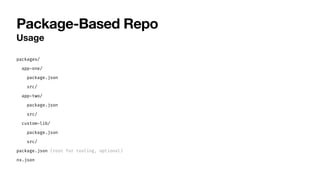
Package-Based Repo
Usage
packages/
app
-
one/
package.json
src/
app
-
two/
package.json
src/
custom
-
lib/
package.json
src/
package.json (root for tooling, optional)
nx.json
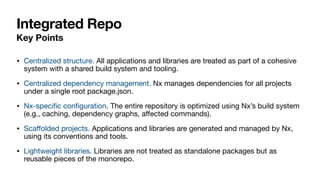
Integrated Repo
Key Points
• Centralized structure. All applications and libraries are treated as part of a cohesive
system with a shared build system and tooling.
• Centralized dependency management. Nx manages dependencies for all projects
under a single root package.json.
• Nx-speci
fi
c con
fi
guration. The entire repository is optimized using Nx’s build system
(e.g., caching, dependency graphs, a
ff
ected commands).
• Sca
ff
olded projects. Applications and libraries are generated and managed by Nx,
using its conventions and tools.
• Lightweight libraries. Libraries are not treated as standalone packages but as
reusable pieces of the monorepo.
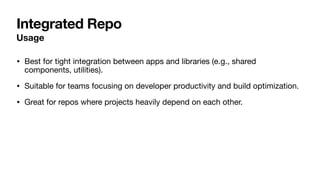
Integrated Repo
Usage
• Best for tight integration between apps and libraries (e.g., shared
components, utilities).
• Suitable for teams focusing on developer productivity and build optimization.
• Great for repos where projects heavily depend on each other.
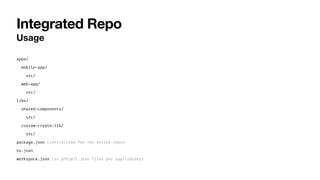
Integrated Repo
Usage
apps/
mobile
-
app/
src/
web
-
app/
src/
libs/
shared
-
components/
src/
custom
-
crypto
-
lib/
src/
package.json (centralized for the entire repo)
nx.json
workspace.json (or project.json files per app/library)
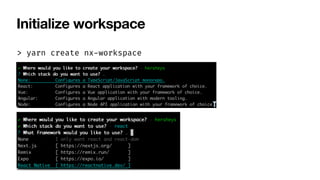
Initialize workspace
> yarn create nx
-
workspace
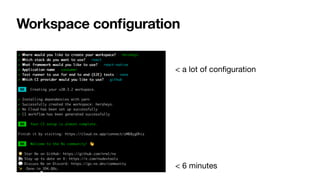
Workspace con
fi
guration
< a lot of con
fi
guration
< 6 minutes
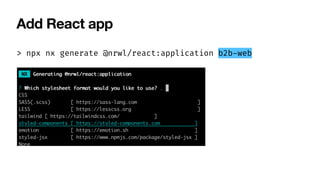
Add React app
> npx nx generate @nrwl/react:application b2b
-
web
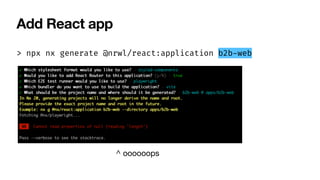
Add React app
> npx nx generate @nrwl/react:application b2b
-
web
^ oooooops
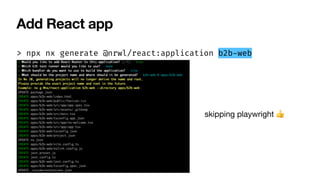
Add React app
> npx nx generate @nrwl/react:application b2b
-
web
skipping playwright 👍
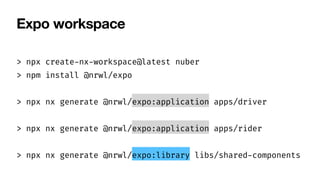
Expo workspace
> npx create
-
nx
-
workspace@latest nuber
> npm install @nrwl/expo
> npx nx generate @nrwl/expo:application apps/driver
> npx nx generate @nrwl/expo:application apps/rider
> npx nx generate @nrwl/expo:library libs/shared
-
components
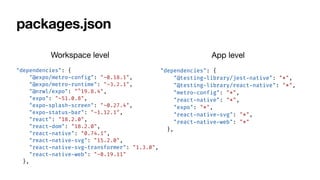
packages.json
"dependencies": {
"@expo/metro
-
config": "~0.18.1",
"@expo/metro
-
runtime": "~3.2.1",
"@nrwl/expo": "^19.8.4",
"expo": "~51.0.8",
"expo
-
splash
-
screen": "~0.27.4",
"expo
-
status
-
bar": "~1.12.1",
"react": "18.2.0",
"react
-
dom": "18.2.0",
"react
-
native": "0.74.1",
"react
-
native
-
svg": "15.2.0",
"react
-
native
-
svg
-
transformer": "1.3.0",
"react
-
native
-
web": "~0.19.11"
},
"dependencies": {
"@testing
-
library/jest
-
native": "*",
"@testing
-
library/react
-
native": "*",
"metro
-
config": "*",
"react
-
native": "*",
"expo": "*",
"react
-
native
-
svg": "*",
"react
-
native
-
web": "*"
},
Workspace level App level
tscon
fi
g
Derived from workspace
"compilerOptions": {
"allowJs": false,
"allowSyntheticDefaultImports": true,
"composite": true,
"paths": {
"@nuber/shared
-
components": ["libs/
shared
-
components/src/index.ts"]
}
}
{
"extends": "
.
.
/
.
.
/tsconfig.base.json",
"compilerOptions": {
"allowSyntheticDefaultImports": true,
"jsx": "react
-
native",
"lib": ["dom", "esnext"],
Workspace level App level
metro.con
fi
g
Extra con
fi
guration
const customConfig = {
cacheVersion: 'rider',
transformer: {
babelTransformerPath: require.resolve('react
-
native
-
svg
-
transformer'),
},
resolver: {
assetExts: assetExts.filter((ext)
=
>
ext
!
=
=
'svg'),
sourceExts: [
.
.
.
sourceExts, 'cjs', 'mjs', 'svg'],
},
};
module.exports = withNxMetro(mergeConfig(defaultConfig, customConfig), {
/
/
Change this to true to see debugging info.
/
/
Useful if you have issues resolving modules
debug: false,
/
/
all the file extensions used for imports other than 'ts', 'tsx', 'js', 'jsx', 'json'
extensions: [],
/
/
Specify folders to watch, in addition to Nx defaults (workspace libraries and node_modules)
watchFolders: [],
});
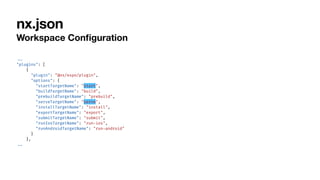
nx.json
Workspace Con
fi
guration
.
.
.
"plugins": [
{
"plugin": "@nx/expo/plugin",
"options": {
"startTargetName": "start",
"buildTargetName": "build",
"prebuildTargetName": "prebuild",
"serveTargetName": "serve",
"installTargetName": "install",
"exportTargetName": "export",
"submitTargetName": "submit",
"runIosTargetName": "run
-
ios",
"runAndroidTargetName": "run
-
android"
}
},
.
.
.
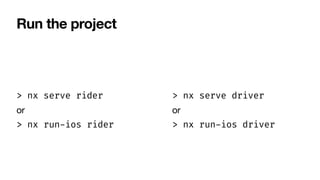
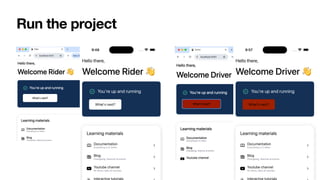
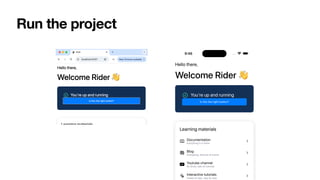
Run the project
> nx serve rider
or
> nx run
-
ios rider
> nx serve driver
or
> nx run
-
ios driver
Run the project
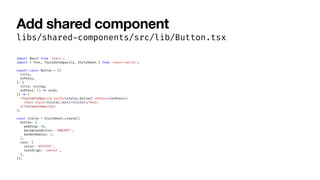
Add shared component
libs/shared
-
components/src/lib/Button.tsx
import React from 'react';
import { Text, TouchableOpacity, StyleSheet } from 'react
-
native';
export const Button = ({
title,
onPress,
}
:
{
title: string;
onPress: ()
=
>
void;
})
=
>
(
<TouchableOpacity style={styles.button} onPress={onPress}>
<Text style={styles.text}>{title}
<
/
Text>
<
/
TouchableOpacity>
);
const styles = StyleSheet.create({
button: {
padding: 10,
backgroundColor: '#007BFF',
borderRadius: 5,
},
text: {
color: '#FFFFFF',
textAlign: 'center',
},
});
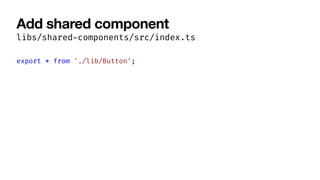
Add shared component
libs/shared
-
components/src/index.ts
export * from './lib/Button';
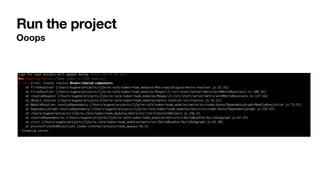
Run the project
Ooops
Just delete everything
and repeat the workspace
initialization steps :)
Eugene
Run the project
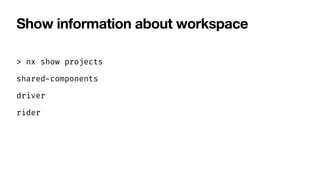
Show information about workspace
> nx show projects
shared
-
components
driver
rider
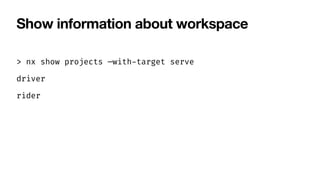
Show information about workspace
> nx show projects —with
-
target serve
driver
rider
Show information about workspace
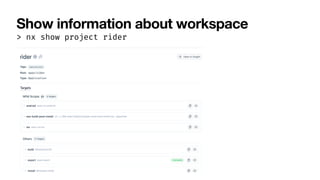
> nx show project rider
Show information about workspace
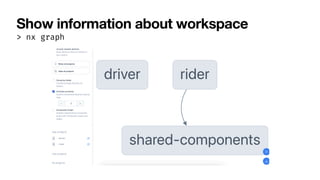
> nx graph
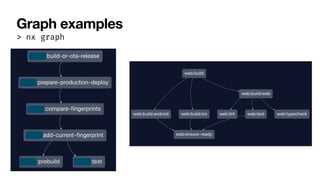
Graph examples
> nx graph
Target examples
“build
-
or
-
ota
-
release": {
"executor": "nx:run
-
commands",
"options": {
"commands": [
"if [ "$DEPLOYMENT_TYPE" = "ota" ]; then bun nx run {projectName}:maybe
-
eas
-
……………”
]
},
"dependsOn": ["prepare
-
production
-
deploy"]
},
"commit
-
fingerprint": {
"executor": "nx:run
-
commands",
"options": {
"cwd": "{projectRoot}",
"command": "
.
.
/
.
.
/tools/scripts/commit
-
fingerprint.sh"
},
"dependsOn": ["eas
-
post
-
build"]
},
Target examples
"eas
-
ota": {
"executor": "@nx/expo:update",
"options": {
"platform": "all",
"branch": "production",
"interactive": false,
"wait": true
},
"dependsOn": ["^build", "eas
-
pre
-
ota"]
},
A
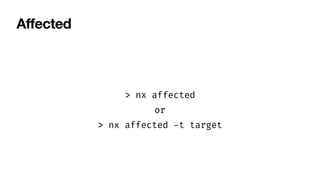
ff
ected
> nx affected
or
> nx affected
-
t target
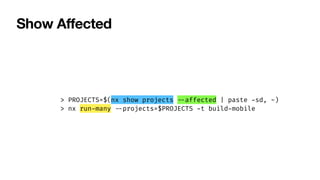
Show A
ff
ected
> PROJECTS=$(nx show projects
-
-
affected | paste
-
sd, -)
> nx run
-
many
-
-
projects=$PROJECTS
-
t build
-
mobile
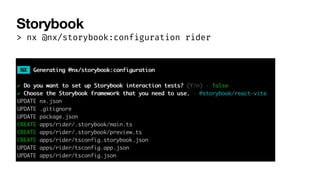
Storybook
> nx @nx/storybook:configuration rider
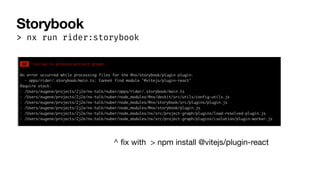
Storybook
> nx run rider:storybook
^
fi
x with > npm install @vitejs/plugin-react
Storybook
Can I have one Storybook for all?
Yes
Release
> nx release
"release": {
"version": {
"conventionalCommits": true
},
"projects": ["apps/rider", "apps/driver"],
"projectsRelationship": "independent",
"changelog": {
"projectChangelogs": true
}
},
- fix(rider)
:
fix something
- feat(driver)
:
add a new feature
- chore(shared
-
components)
:
update docs
- chore(release)
:
1.0.3
Release
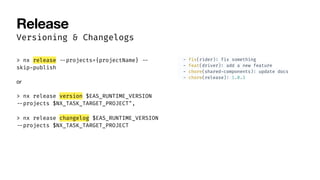
Versioning & Changelogs
> nx release
-
-
projects={projectName}
-
-
skip
-
publish
or
> nx release version $EAS_RUNTIME_VERSION
-
-
projects $NX_TASK_TARGET_PROJECT",
> nx release changelog $EAS_RUNTIME_VERSION
-
-
projects $NX_TASK_TARGET_PROJECT
- fix(rider)
:
fix something
- feat(driver)
:
add a new feature
- chore(shared
-
components)
:
update docs
- chore(release)
:
1.0.3
Pros
• Dependency Graph. Visualizes project dependencies, helping teams understand relationships between
apps and libraries.
• Smart Caching. Nx caches build outputs, tests, and linting results, reducing redundant work and speeding
up pipelines.
• Incremental Builds. Only a
ff
ected parts of the project are rebuilt or retested based on changes, which is
ideal for CI/CD pipelines.
• Distributed Task Execution. Tasks can run in parallel across multiple machines for faster builds.
• Compatible with popular frameworks like React, Angular, Node.js, NestJS, React Native, Expo, and more.
• Custom Plugins. Developers can create custom plugins to extend functionality or integrate third-party
tools.
• Nx integrates seamlessly with CI tools like GitHub Actions, GitLab CI/CD, and Jenkins.
Cons
• Learning Curve. For teams unfamiliar with monorepos or advanced build systems, Nx can
feel complex initially.
• Understanding Nx-speci
fi
c concepts like a
ff
ected, dependency graphs, or caching requires
time.
• Extremely large monorepos (e.g., with thousands of projects) might require additional
con
fi
guration or infrastructure for optimal performance.
• Nx enforces speci
fi
c tooling and workspace structure. Migrating away from Nx to a
di
ff
erent monorepo tool may be challenging.
• Migration to the new version is still a job.
• Stability is still an issue.

Supercharge Your Monorepo: Using Nx to Share React and React Native Code

  • 1.
    Eugene Zharkov Supercharge YourMonorepo Using Nx to Share React and React Native Code
  • 2.
    Package-Based Repo Key Points •Old school. Lerna-Like approach • Independent Packages. Each app or library is treated as an independent package with its own package.json. • Decentralized dependency management. Dependencies are de fi ned and installed per project/library. • Nx augmentation. Nx provides tooling for better build optimization and dependency tracking, but the structure is more akin to traditional Lerna-style monorepos. • Publishable libraries. Libraries are often standalone and can be versioned/published independently to registries like npm.
  • 3.
    Package-Based Repo Usage • Suitablefor teams where apps or libraries need to be independent or published to npm. • Works for legacy setups migrating from Lerna or similar tools. • Ideal when di ff erent teams work on distinct packages with minimal dependencies between them.
  • 4.
  • 5.
    Integrated Repo Key Points •Centralized structure. All applications and libraries are treated as part of a cohesive system with a shared build system and tooling. • Centralized dependency management. Nx manages dependencies for all projects under a single root package.json. • Nx-speci fi c con fi guration. The entire repository is optimized using Nx’s build system (e.g., caching, dependency graphs, a ff ected commands). • Sca ff olded projects. Applications and libraries are generated and managed by Nx, using its conventions and tools. • Lightweight libraries. Libraries are not treated as standalone packages but as reusable pieces of the monorepo.
  • 6.
    Integrated Repo Usage • Bestfor tight integration between apps and libraries (e.g., shared components, utilities). • Suitable for teams focusing on developer productivity and build optimization. • Great for repos where projects heavily depend on each other.
  • 7.
  • 8.
    Initialize workspace > yarncreate nx - workspace
  • 9.
    Workspace con fi guration < alot of con fi guration < 6 minutes
  • 10.
    Add React app >npx nx generate @nrwl/react:application b2b - web
  • 11.
    Add React app >npx nx generate @nrwl/react:application b2b - web ^ oooooops
  • 12.
    Add React app >npx nx generate @nrwl/react:application b2b - web skipping playwright 👍
  • 13.
    Expo workspace > npxcreate - nx - workspace@latest nuber > npm install @nrwl/expo > npx nx generate @nrwl/expo:application apps/driver > npx nx generate @nrwl/expo:application apps/rider > npx nx generate @nrwl/expo:library libs/shared - components
  • 14.
    packages.json "dependencies": { "@expo/metro - config": "~0.18.1", "@expo/metro - runtime":"~3.2.1", "@nrwl/expo": "^19.8.4", "expo": "~51.0.8", "expo - splash - screen": "~0.27.4", "expo - status - bar": "~1.12.1", "react": "18.2.0", "react - dom": "18.2.0", "react - native": "0.74.1", "react - native - svg": "15.2.0", "react - native - svg - transformer": "1.3.0", "react - native - web": "~0.19.11" }, "dependencies": { "@testing - library/jest - native": "*", "@testing - library/react - native": "*", "metro - config": "*", "react - native": "*", "expo": "*", "react - native - svg": "*", "react - native - web": "*" }, Workspace level App level
  • 15.
    tscon fi g Derived from workspace "compilerOptions":{ "allowJs": false, "allowSyntheticDefaultImports": true, "composite": true, "paths": { "@nuber/shared - components": ["libs/ shared - components/src/index.ts"] } } { "extends": " . . / . . /tsconfig.base.json", "compilerOptions": { "allowSyntheticDefaultImports": true, "jsx": "react - native", "lib": ["dom", "esnext"], Workspace level App level
  • 16.
    metro.con fi g Extra con fi guration const customConfig= { cacheVersion: 'rider', transformer: { babelTransformerPath: require.resolve('react - native - svg - transformer'), }, resolver: { assetExts: assetExts.filter((ext) = > ext ! = = 'svg'), sourceExts: [ . . . sourceExts, 'cjs', 'mjs', 'svg'], }, }; module.exports = withNxMetro(mergeConfig(defaultConfig, customConfig), { / / Change this to true to see debugging info. / / Useful if you have issues resolving modules debug: false, / / all the file extensions used for imports other than 'ts', 'tsx', 'js', 'jsx', 'json' extensions: [], / / Specify folders to watch, in addition to Nx defaults (workspace libraries and node_modules) watchFolders: [], });
  • 17.
    nx.json Workspace Con fi guration . . . "plugins": [ { "plugin":"@nx/expo/plugin", "options": { "startTargetName": "start", "buildTargetName": "build", "prebuildTargetName": "prebuild", "serveTargetName": "serve", "installTargetName": "install", "exportTargetName": "export", "submitTargetName": "submit", "runIosTargetName": "run - ios", "runAndroidTargetName": "run - android" } }, . . .
  • 18.
    Run the project >nx serve rider or > nx run - ios rider > nx serve driver or > nx run - ios driver
  • 19.
  • 20.
    Add shared component libs/shared - components/src/lib/Button.tsx importReact from 'react'; import { Text, TouchableOpacity, StyleSheet } from 'react - native'; export const Button = ({ title, onPress, } : { title: string; onPress: () = > void; }) = > ( <TouchableOpacity style={styles.button} onPress={onPress}> <Text style={styles.text}>{title} < / Text> < / TouchableOpacity> ); const styles = StyleSheet.create({ button: { padding: 10, backgroundColor: '#007BFF', borderRadius: 5, }, text: { color: '#FFFFFF', textAlign: 'center', }, });
  • 21.
  • 22.
  • 23.
    Just delete everything andrepeat the workspace initialization steps :) Eugene
  • 24.
  • 25.
    Show information aboutworkspace > nx show projects shared - components driver rider
  • 26.
    Show information aboutworkspace > nx show projects —with - target serve driver rider
  • 27.
    Show information aboutworkspace > nx show project rider
  • 28.
    Show information aboutworkspace > nx graph
  • 29.
  • 30.
    Target examples “build - or - ota - release": { "executor":"nx:run - commands", "options": { "commands": [ "if [ "$DEPLOYMENT_TYPE" = "ota" ]; then bun nx run {projectName}:maybe - eas - ……………” ] }, "dependsOn": ["prepare - production - deploy"] }, "commit - fingerprint": { "executor": "nx:run - commands", "options": { "cwd": "{projectRoot}", "command": " . . / . . /tools/scripts/commit - fingerprint.sh" }, "dependsOn": ["eas - post - build"] },
  • 31.
    Target examples "eas - ota": { "executor":"@nx/expo:update", "options": { "platform": "all", "branch": "production", "interactive": false, "wait": true }, "dependsOn": ["^build", "eas - pre - ota"] },
  • 32.
    A ff ected > nx affected or >nx affected - t target
  • 33.
    Show A ff ected > PROJECTS=$(nxshow projects - - affected | paste - sd, -) > nx run - many - - projects=$PROJECTS - t build - mobile
  • 34.
  • 35.
    Storybook > nx runrider:storybook ^ fi x with > npm install @vitejs/plugin-react
  • 36.
  • 37.
    Can I haveone Storybook for all? Yes
  • 38.
    Release > nx release "release":{ "version": { "conventionalCommits": true }, "projects": ["apps/rider", "apps/driver"], "projectsRelationship": "independent", "changelog": { "projectChangelogs": true } }, - fix(rider) : fix something - feat(driver) : add a new feature - chore(shared - components) : update docs - chore(release) : 1.0.3
  • 39.
    Release Versioning & Changelogs >nx release - - projects={projectName} - - skip - publish or > nx release version $EAS_RUNTIME_VERSION - - projects $NX_TASK_TARGET_PROJECT", > nx release changelog $EAS_RUNTIME_VERSION - - projects $NX_TASK_TARGET_PROJECT - fix(rider) : fix something - feat(driver) : add a new feature - chore(shared - components) : update docs - chore(release) : 1.0.3
  • 40.
    Pros • Dependency Graph.Visualizes project dependencies, helping teams understand relationships between apps and libraries. • Smart Caching. Nx caches build outputs, tests, and linting results, reducing redundant work and speeding up pipelines. • Incremental Builds. Only a ff ected parts of the project are rebuilt or retested based on changes, which is ideal for CI/CD pipelines. • Distributed Task Execution. Tasks can run in parallel across multiple machines for faster builds. • Compatible with popular frameworks like React, Angular, Node.js, NestJS, React Native, Expo, and more. • Custom Plugins. Developers can create custom plugins to extend functionality or integrate third-party tools. • Nx integrates seamlessly with CI tools like GitHub Actions, GitLab CI/CD, and Jenkins.
  • 41.
    Cons • Learning Curve.For teams unfamiliar with monorepos or advanced build systems, Nx can feel complex initially. • Understanding Nx-speci fi c concepts like a ff ected, dependency graphs, or caching requires time. • Extremely large monorepos (e.g., with thousands of projects) might require additional con fi guration or infrastructure for optimal performance. • Nx enforces speci fi c tooling and workspace structure. Migrating away from Nx to a di ff erent monorepo tool may be challenging. • Migration to the new version is still a job. • Stability is still an issue.