In partnership with
Supercharge Azure DevOps
with Advanced Scheduling & Robust Project Management
Reasons for Azure DevOps Use
• Integrated Toolset: Comprehensive suite of tools for the entire
software development lifecycle, including planning, coding,
building, testing, and deploying.
• Flexibility: Each service within Azure DevOps can be used
independently or integrated with existing tools, making it adaptable
to various workflows and environments.
• Collaboration and Communication: Fosters better collaboration
between development and operations teams, enhancing
communication and reducing misalignment.
• Continuous Integration and Continuous Deployment (CI/CD) :
Supports CI/CD practices, enabling teams to automate the building,
testing, and deployment of applications, which leads to faster and
more reliable releases.
• Scalability: Designed to scale with your needs, whether you're a
small team or a large enterprise.
• Security and Compliance: Azure DevOps includes robust security
features and compliance certifications, ensuring that your projects
meet industry standards and regulations.
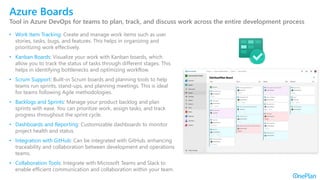
Azure Boards
Tool in Azure DevOps for teams to plan, track, and discuss work across the entire development process
• Work Item Tracking: Create and manage work items such as user
stories, tasks, bugs, and features. This helps in organizing and
prioritizing work effectively.
• Kanban Boards: Visualize your work with Kanban boards, which
allow you to track the status of tasks through different stages. This
helps in identifying bottlenecks and optimizing workflow.
• Scrum Support: Built-in Scrum boards and planning tools to help
teams run sprints, stand-ups, and planning meetings. This is ideal
for teams following Agile methodologies.
• Backlogs and Sprints: Manage your product backlog and plan
sprints with ease. You can prioritize work, assign tasks, and track
progress throughout the sprint cycle.
• Dashboards and Reporting: Customizable dashboards to monitor
project health and status.
• Integration with GitHub: Can be integrated with GitHub, enhancing
traceability and collaboration between development and operations
teams.
• Collaboration Tools: Integrate with Microsoft Teams and Slack to
enable efficient communication and collaboration within your team.
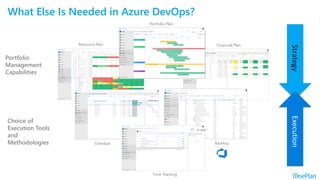
What Else Is Needed in Azure DevOps?
Portfolio
Management
Capabilities
Portfolio Plan
Time Tracking
Schedule
Resource Plan Financial Plan
Backlog
Execution
Strategy
Choice of
Execution Tools
and
Methodologies
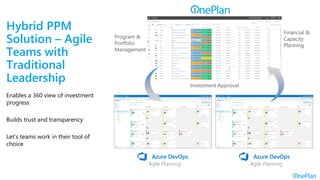
Hybrid PPM
Solution – Agile
Teams with
Traditional
Leadership
Enables a 360 view of investment
progress
Builds trust and transparency
Let’s teams work in their tool of
choice
Investment Approval
Program &
Portfolio
Management
Financial &
Capacity
Planning
Agile Planning
Agile Planning
Agile Planning
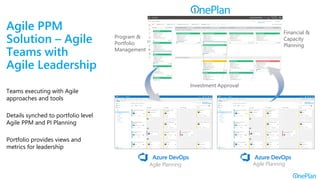
Investment Approval
Program &
Portfolio
Management
Financial &
Capacity
Planning
Agile Planning
Agile PPM
Solution – Agile
Teams with
Agile Leadership
Teams executing with Agile
approaches and tools
Details synched to portfolio level
Agile PPM and PI Planning
Portfolio provides views and
metrics for leadership
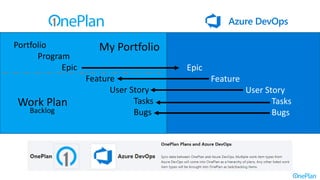
Portfolio
Program
Epic
Feature
User Story
Tasks
Bugs
Epic
Feature
User Story
Tasks
Bugs
My Portfolio
Work Plan
Backlog
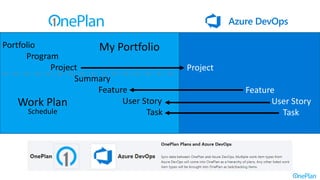
Portfolio
Program
Project
Summary
Feature
User Story
Task
Project
Feature
User Story
Task
My Portfolio
Work Plan
Schedule
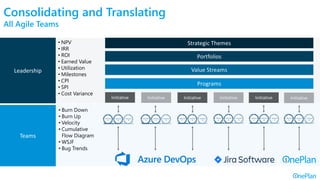
Strategic Themes
Portfolios
Value Streams
Programs
Initiative Initiative Initiative Initiative Initiative Initiative
Methodology
Tools
• Associate and align
• Aggregate and rollup
• Different methodologies
• Variety of tools
• Translate to common
metrics for leadership
Teams
Leadership
• NPV
• IRR
• ROI
• Earned Value
• Utilization
• Milestones
• CPI
• SPI
• Cost Variance
• Burn Down
• Burn Up
• Velocity
• Cumulative
Flow Diagram
• WSJF
• Bug Trends
Consolidating and Translating
All Agile Teams
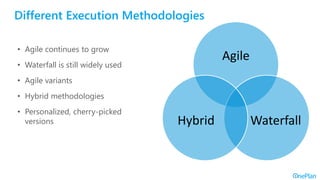
Different Execution Methodologies
Agile
Waterfall
Hybrid
• Agile continues to grow
• Waterfall is still widely used
• Agile variants
• Hybrid methodologies
• Personalized, cherry-picked
versions
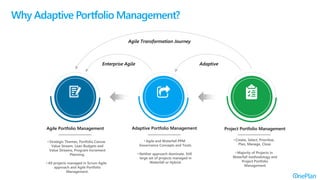
Agile Transformation Journey
Enterprise Agile Adaptive
Agile Portfolio Management Adaptive Portfolio Management Project Portfolio Management
Why Adaptive Portfolio Management?
• Strategic Themes, Portfolio Canvas
Value Stream, Lean Budgets and
Value Streams, Program Increment
Planning.
• All projects managed in Scrum Agile
approach and Agile Portfolio
Management.
• Create, Select, Prioritize,
Plan, Manage, Close.
• Majority of Projects in
Waterfall methodology and
Project Portfolio
Management
• Agile and Waterfall PPM
Governance Concepts and Tools.
• Neither approach dominate. Still
large set of projects managed in
Waterfall or Hybrid.
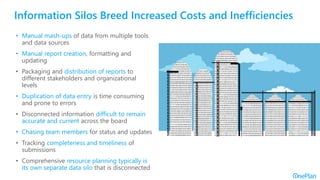
Information Silos Breed Increased Costs and Inefficiencies
• Manual mash-ups of data from multiple tools
and data sources
• Manual report creation, formatting and
updating
• Packaging and distribution of reports to
different stakeholders and organizational
levels
• Duplication of data entry is time consuming
and prone to errors
• Disconnected information difficult to remain
accurate and current across the board
• Chasing team members for status and updates
• Tracking completeness and timeliness of
submissions
• Comprehensive resource planning typically is
its own separate data silo that is disconnected
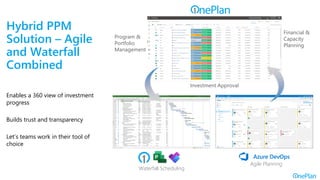
Hybrid PPM
Solution – Agile
and Waterfall
Combined
Enables a 360 view of investment
progress
Builds trust and transparency
Let’s teams work in their tool of
choice
Investment Approval
Program &
Portfolio
Management
Financial &
Capacity
Planning
Waterfall Scheduling
Agile Planning
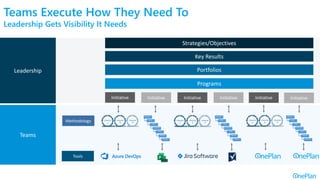
• Associate and align
• Aggregate and rollup
• Different methodologies
• Variety of tools
• Translate to common
metrics for leadership
Teams Execute How They Need To
Leadership Gets Visibility It Needs
Strategies/Objectives
Key Results
Portfolios
Programs
Initiative Initiative Initiative Initiative Initiative Initiative
Methodology
Tools
Teams
Leadership
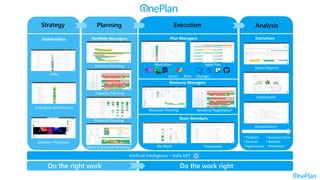
Portfolio Managers
Resource Planning
Financial Planning
Work Plan
Visualizations
Dashboards
Status Reports
Plan Managers
Agile Plan
Ideation / Requests
Artificial Intelligence – Sofia GPT
Strategy
Timesheets
My Work
Stakeholders
Team Members
Executives
Portfolio Planning
Planning
Do the right work Do the work right
Resource Negotiation
Resource Managers
Enterprise Architecture
Execution Analysis
What-if Scenario Modeling
• Products
• Services
• Applications
Capacity Planning
Issues Risks Changes
• Business Value
• Benefits
Realization
OKRs
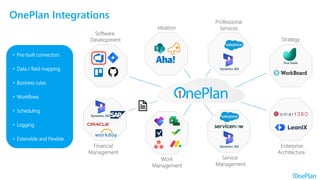
Software
Development
Ideation
Professional
Services
Financial
Management
Work
Management
Service
Management
Private Cloud Connector
OnePlan Integrations
Dynamics 365
Dynamics 365
Dynamics 365
Strategy
Enterprise
Architecture
Viva Goals
• Pre-built connectors
• Data / field mapping
• Business rules
• Workflows
• Scheduling
• Logging
• Extensible and Flexible
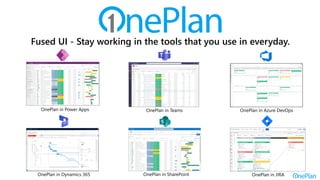
OnePlan in Azure DevOps
OnePlan in Teams
OnePlan in Power Apps
OnePlan in Dynamics 365
Built For The Microsoft Cloud
With a Fused User Experience
OnePlan in SharePoint OnePlan in JIRA
Fused UI - Stay working in the tools that you use in everyday.
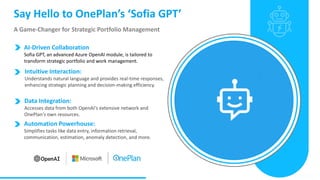
Say Hello to OnePlan’s ‘Sofia GPT’
A Game-Changer for Strategic Portfolio Management
Data Integration:
Accesses data from both OpenAI's extensive network and
OnePlan's own resources.
AI-Driven Collaboration
Sofia GPT, an advanced Azure OpenAI module, is tailored to
transform strategic portfolio and work management.
Intuitive Interaction:
Understands natural language and provides real-time responses,
enhancing strategic planning and decision-making efficiency.
Automation Powerhouse:
Simplifies tasks like data entry, information retrieval,
communication, estimation, anomaly detection, and more.
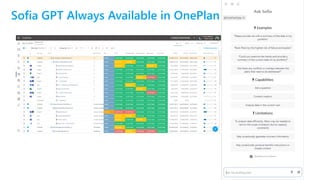
Sofia GPT Always Available in OnePlan
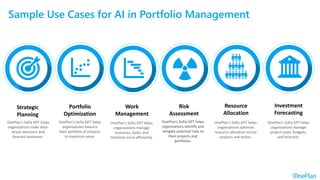
Sample Use Cases for AI in Portfolio Management
OnePlan's Sofia GPT helps
organizations make data-
driven decisions and
forecast outcomes.
Strategic
Planning
Work
Management
OnePlan's Sofia GPT helps
organizations balance
their portfolio of projects
to maximize value.
Resource
Allocation
OnePlan's Sofia GPT helps
organizations manage
resources, tasks, and
timelines more efficiently.
Investment
Forecasting
OnePlan's Sofia GPT helps
organizations identify and
mitigate potential risks to
their projects and
portfolios.
Risk
Assessment
OnePlan's Sofia GPT helps
organizations optimize
resource allocation across
projects and teams.
Portfolio
Optimization
OnePlan's Sofia GPT helps
organizations manage
project costs, budgets,
and forecasts.
Demonstration
Summary and Next Steps
Summary
• Azure DevOps provides and integrated environment for software
development, including planning, coding, building, testing, and
deploying.
• OnePlan extends Azure DevOps to enable Portfolio Management
capabilities.
• OnePlan supports both scaled Agile, and hybrid/adaptive
approaches.
• OnePlan capabilities can be accessed by users within Azure
DevOps.
• Supports Agile backlogs, Waterfall schedules, and hybrids that
combine both.
• OnePlan provides a GenAI through SofiaGPT to support Scrum
Masters, Product Owners and Portfolio Managers in their work.
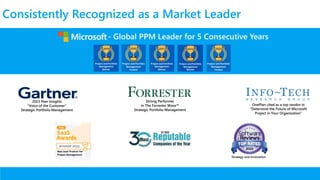
- Global PPM Leader for 5 Consecutive Years
Consistently Recognized as a Market Leader
OnePlan cited as a top vendor in
“Determine the Future of Microsoft
Project in Your Organization”
Strategy and Innovation
2023 Peer Insights
“Voice of the Customer”
Strategic Portfolio Management
Strong Performer
in The Forrester Wave
Strategic Portfolio Management
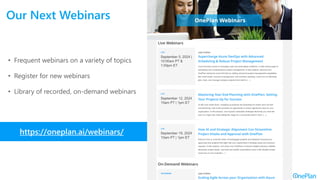
Our Next Webinars
https://oneplan.ai/webinars/
• Frequent webinars on a variety of topics
• Register for new webinars
• Library of recorded, on-demand webinars
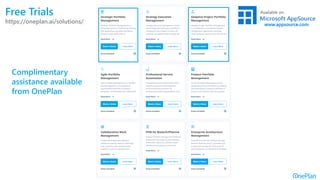
Free Trials
https://oneplan.ai/solutions/
Complimentary
assistance available
from OnePlan
For more information:
contact@oneplan.ai
Free Offers and Next Steps
• FREE - OnePlan Trial
• FREE – Roadmap Workshop
• FREE – Personalized 1:1 Demo
www.oneplan.ai
Contact Us
contact@oneplan.ai
www.oneplan.ai
Jim Patterson
jpatterson@oneplan.ai
Thank You!!
The Power of One

Supercharge Azure DevOps with Advanced Scheduling and Robust Project Management

  • 1.
    In partnership with SuperchargeAzure DevOps with Advanced Scheduling & Robust Project Management
  • 2.
    Reasons for AzureDevOps Use • Integrated Toolset: Comprehensive suite of tools for the entire software development lifecycle, including planning, coding, building, testing, and deploying. • Flexibility: Each service within Azure DevOps can be used independently or integrated with existing tools, making it adaptable to various workflows and environments. • Collaboration and Communication: Fosters better collaboration between development and operations teams, enhancing communication and reducing misalignment. • Continuous Integration and Continuous Deployment (CI/CD) : Supports CI/CD practices, enabling teams to automate the building, testing, and deployment of applications, which leads to faster and more reliable releases. • Scalability: Designed to scale with your needs, whether you're a small team or a large enterprise. • Security and Compliance: Azure DevOps includes robust security features and compliance certifications, ensuring that your projects meet industry standards and regulations.
  • 3.
    Azure Boards Tool inAzure DevOps for teams to plan, track, and discuss work across the entire development process • Work Item Tracking: Create and manage work items such as user stories, tasks, bugs, and features. This helps in organizing and prioritizing work effectively. • Kanban Boards: Visualize your work with Kanban boards, which allow you to track the status of tasks through different stages. This helps in identifying bottlenecks and optimizing workflow. • Scrum Support: Built-in Scrum boards and planning tools to help teams run sprints, stand-ups, and planning meetings. This is ideal for teams following Agile methodologies. • Backlogs and Sprints: Manage your product backlog and plan sprints with ease. You can prioritize work, assign tasks, and track progress throughout the sprint cycle. • Dashboards and Reporting: Customizable dashboards to monitor project health and status. • Integration with GitHub: Can be integrated with GitHub, enhancing traceability and collaboration between development and operations teams. • Collaboration Tools: Integrate with Microsoft Teams and Slack to enable efficient communication and collaboration within your team.
  • 4.
    What Else IsNeeded in Azure DevOps? Portfolio Management Capabilities Portfolio Plan Time Tracking Schedule Resource Plan Financial Plan Backlog Execution Strategy Choice of Execution Tools and Methodologies
  • 5.
    Hybrid PPM Solution –Agile Teams with Traditional Leadership Enables a 360 view of investment progress Builds trust and transparency Let’s teams work in their tool of choice Investment Approval Program & Portfolio Management Financial & Capacity Planning Agile Planning Agile Planning
  • 6.
    Agile Planning Investment Approval Program& Portfolio Management Financial & Capacity Planning Agile Planning Agile PPM Solution – Agile Teams with Agile Leadership Teams executing with Agile approaches and tools Details synched to portfolio level Agile PPM and PI Planning Portfolio provides views and metrics for leadership
  • 7.
  • 8.
  • 9.
    Strategic Themes Portfolios Value Streams Programs InitiativeInitiative Initiative Initiative Initiative Initiative Methodology Tools • Associate and align • Aggregate and rollup • Different methodologies • Variety of tools • Translate to common metrics for leadership Teams Leadership • NPV • IRR • ROI • Earned Value • Utilization • Milestones • CPI • SPI • Cost Variance • Burn Down • Burn Up • Velocity • Cumulative Flow Diagram • WSJF • Bug Trends Consolidating and Translating All Agile Teams
  • 10.
    Different Execution Methodologies Agile Waterfall Hybrid •Agile continues to grow • Waterfall is still widely used • Agile variants • Hybrid methodologies • Personalized, cherry-picked versions
  • 11.
    Agile Transformation Journey EnterpriseAgile Adaptive Agile Portfolio Management Adaptive Portfolio Management Project Portfolio Management Why Adaptive Portfolio Management? • Strategic Themes, Portfolio Canvas Value Stream, Lean Budgets and Value Streams, Program Increment Planning. • All projects managed in Scrum Agile approach and Agile Portfolio Management. • Create, Select, Prioritize, Plan, Manage, Close. • Majority of Projects in Waterfall methodology and Project Portfolio Management • Agile and Waterfall PPM Governance Concepts and Tools. • Neither approach dominate. Still large set of projects managed in Waterfall or Hybrid.
  • 12.
    Information Silos BreedIncreased Costs and Inefficiencies • Manual mash-ups of data from multiple tools and data sources • Manual report creation, formatting and updating • Packaging and distribution of reports to different stakeholders and organizational levels • Duplication of data entry is time consuming and prone to errors • Disconnected information difficult to remain accurate and current across the board • Chasing team members for status and updates • Tracking completeness and timeliness of submissions • Comprehensive resource planning typically is its own separate data silo that is disconnected
  • 13.
    Hybrid PPM Solution –Agile and Waterfall Combined Enables a 360 view of investment progress Builds trust and transparency Let’s teams work in their tool of choice Investment Approval Program & Portfolio Management Financial & Capacity Planning Waterfall Scheduling Agile Planning
  • 14.
    • Associate andalign • Aggregate and rollup • Different methodologies • Variety of tools • Translate to common metrics for leadership Teams Execute How They Need To Leadership Gets Visibility It Needs Strategies/Objectives Key Results Portfolios Programs Initiative Initiative Initiative Initiative Initiative Initiative Methodology Tools Teams Leadership
  • 15.
    Portfolio Managers Resource Planning FinancialPlanning Work Plan Visualizations Dashboards Status Reports Plan Managers Agile Plan Ideation / Requests Artificial Intelligence – Sofia GPT Strategy Timesheets My Work Stakeholders Team Members Executives Portfolio Planning Planning Do the right work Do the work right Resource Negotiation Resource Managers Enterprise Architecture Execution Analysis What-if Scenario Modeling • Products • Services • Applications Capacity Planning Issues Risks Changes • Business Value • Benefits Realization OKRs
  • 16.
    Software Development Ideation Professional Services Financial Management Work Management Service Management Private Cloud Connector OnePlanIntegrations Dynamics 365 Dynamics 365 Dynamics 365 Strategy Enterprise Architecture Viva Goals • Pre-built connectors • Data / field mapping • Business rules • Workflows • Scheduling • Logging • Extensible and Flexible
  • 17.
    OnePlan in AzureDevOps OnePlan in Teams OnePlan in Power Apps OnePlan in Dynamics 365 Built For The Microsoft Cloud With a Fused User Experience OnePlan in SharePoint OnePlan in JIRA Fused UI - Stay working in the tools that you use in everyday.
  • 18.
    Say Hello toOnePlan’s ‘Sofia GPT’ A Game-Changer for Strategic Portfolio Management Data Integration: Accesses data from both OpenAI's extensive network and OnePlan's own resources. AI-Driven Collaboration Sofia GPT, an advanced Azure OpenAI module, is tailored to transform strategic portfolio and work management. Intuitive Interaction: Understands natural language and provides real-time responses, enhancing strategic planning and decision-making efficiency. Automation Powerhouse: Simplifies tasks like data entry, information retrieval, communication, estimation, anomaly detection, and more.
  • 19.
    Sofia GPT AlwaysAvailable in OnePlan
  • 20.
    Sample Use Casesfor AI in Portfolio Management OnePlan's Sofia GPT helps organizations make data- driven decisions and forecast outcomes. Strategic Planning Work Management OnePlan's Sofia GPT helps organizations balance their portfolio of projects to maximize value. Resource Allocation OnePlan's Sofia GPT helps organizations manage resources, tasks, and timelines more efficiently. Investment Forecasting OnePlan's Sofia GPT helps organizations identify and mitigate potential risks to their projects and portfolios. Risk Assessment OnePlan's Sofia GPT helps organizations optimize resource allocation across projects and teams. Portfolio Optimization OnePlan's Sofia GPT helps organizations manage project costs, budgets, and forecasts.
  • 21.
  • 22.
  • 23.
    Summary • Azure DevOpsprovides and integrated environment for software development, including planning, coding, building, testing, and deploying. • OnePlan extends Azure DevOps to enable Portfolio Management capabilities. • OnePlan supports both scaled Agile, and hybrid/adaptive approaches. • OnePlan capabilities can be accessed by users within Azure DevOps. • Supports Agile backlogs, Waterfall schedules, and hybrids that combine both. • OnePlan provides a GenAI through SofiaGPT to support Scrum Masters, Product Owners and Portfolio Managers in their work.
  • 24.
    - Global PPMLeader for 5 Consecutive Years Consistently Recognized as a Market Leader OnePlan cited as a top vendor in “Determine the Future of Microsoft Project in Your Organization” Strategy and Innovation 2023 Peer Insights “Voice of the Customer” Strategic Portfolio Management Strong Performer in The Forrester Wave Strategic Portfolio Management
  • 25.
    Our Next Webinars https://oneplan.ai/webinars/ •Frequent webinars on a variety of topics • Register for new webinars • Library of recorded, on-demand webinars
  • 26.
  • 27.
    For more information: contact@oneplan.ai FreeOffers and Next Steps • FREE - OnePlan Trial • FREE – Roadmap Workshop • FREE – Personalized 1:1 Demo www.oneplan.ai
  • 28.