Bordeaux
French Riviera
Lyon
Montpellier
Nantes
Paris Dev
Paris Marketing
Paris WIT
Paris WIT
Toulouse
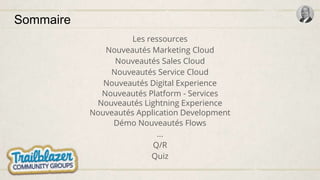
Sommaire
Les ressources
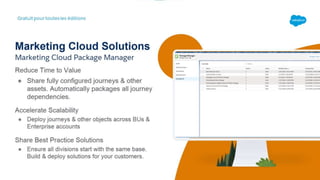
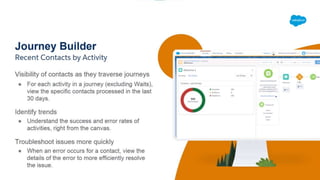
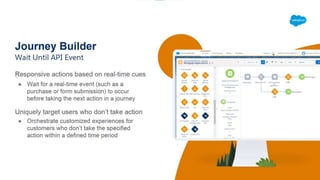
Nouveautés Marketing Cloud
Nouveautés Sales Cloud
Nouveautés Service Cloud
Nouveautés Digital Experience
Nouveautés Platform - Services
Nouveautés Lightning Experience
Nouveautés Application Development
Démo Nouveautés Flows
...
Q/R
Quiz
Les ressources
Les ressources
Release note Salesforce
Release in a box
Trailhead
Site “success”
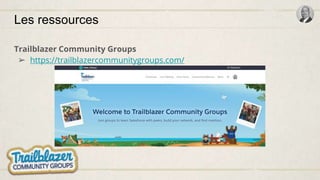
Trailblazer Community Groups
Les ressources
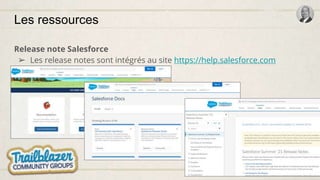
Release note Salesforce
➢ Les release notes sont intégrés au site https://help.salesforce.com
Les ressources
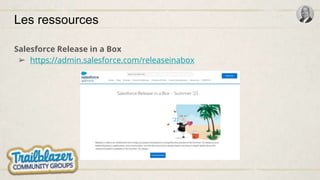
Salesforce Release in a Box
➢ https://admin.salesforce.com/releaseinabox
Les ressources
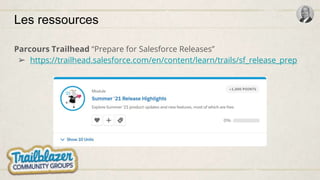
Parcours Trailhead “Prepare for Salesforce Releases”
➢ https://trailhead.salesforce.com/en/content/learn/trails/sf_release_prep
Les ressources
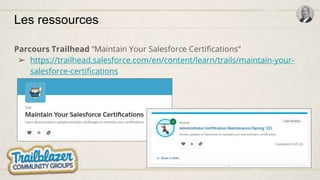
Parcours Trailhead “Maintain Your Salesforce Certifications”
➢ https://trailhead.salesforce.com/en/content/learn/trails/maintain-your-
salesforce-certifications
Les ressources
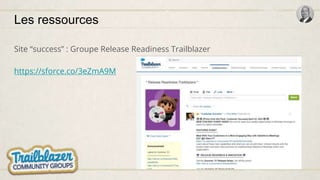
Site “success” : Groupe Release Readiness Trailblazer
https://sforce.co/3eZmA9M
Les ressources
Trailblazer Community Groups
➢ https://trailblazercommunitygroups.com/
Nouveautés Marketing Cloud
Présentées par Julien Coatelen
Leader du Club utilisateurs Marketing Cloud
18:48
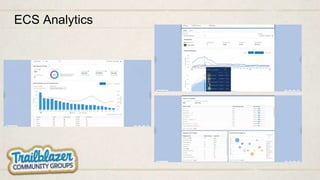
ECS Analytics
Nouveautés Sales Cloud
19:05
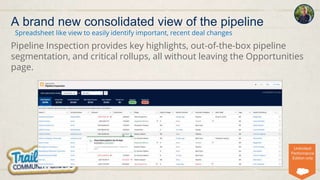
Pipeline Inspection provides key highlights, out-of-the-box pipeline
segmentation, and critical rollups, all without leaving the Opportunities
page.
Spreadsheet like view to easily identify important, recent deal changes
A brand new consolidated view of the pipeline
Unlimited/
Performance
Edition only
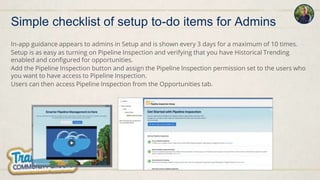
In-app guidance appears to admins in Setup and is shown every 3 days for a maximum of 10 times.
Setup is as easy as turning on Pipeline Inspection and verifying that you have Historical Trending
enabled and configured for opportunities.
Add the Pipeline Inspection button and assign the Pipeline Inspection permission set to the users who
you want to have access to Pipeline Inspection.
Users can then access Pipeline Inspection from the Opportunities tab.
Simple checklist of setup to-do items for Admins
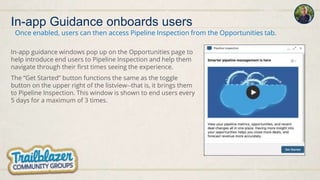
In-app Guidance onboards users
In-app guidance windows pop up on the Opportunities page to
help introduce end users to Pipeline Inspection and help them
navigate through their first times seeing the experience.
The “Get Started” button functions the same as the toggle
button on the upper right of the listview--that is, it brings them
to Pipeline Inspection. This window is shown to end users every
5 days for a maximum of 3 times.
Once enabled, users can then access Pipeline Inspection from the Opportunities tab.
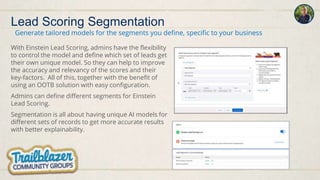
Lead Scoring Segmentation
With Einstein Lead Scoring, admins have the flexibility
to control the model and define which set of leads get
their own unique model. So they can help to improve
the accuracy and relevancy of the scores and their
key-factors. All of this, together with the benefit of
using an OOTB solution with easy configuration.
Admins can define different segments for Einstein
Lead Scoring.
Segmentation is all about having unique AI models for
different sets of records to get more accurate results
with better explainability.
Generate tailored models for the segments you define, specific to your business
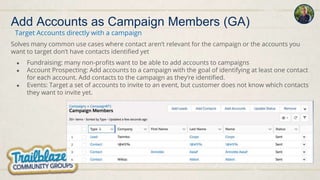
Solves many common use cases where contact aren’t relevant for the campaign or the accounts you
want to target don’t have contacts identified yet
● Fundraising: many non-profits want to be able to add accounts to campaigns
● Account Prospecting: Add accounts to a campaign with the goal of identifying at least one contact
for each account. Add contacts to the campaign as they’re identified.
● Events: Target a set of accounts to invite to an event, but customer does not know which contacts
they want to invite yet.
Add Accounts as Campaign Members (GA)
Target Accounts directly with a campaign
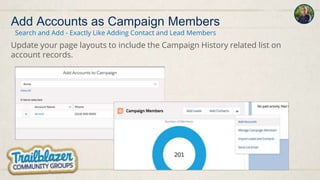
Update your page layouts to include the Campaign History related list on
account records.
Search and Add - Exactly Like Adding Contact and Lead Members
Add Accounts as Campaign Members
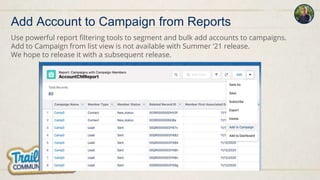
Use powerful report filtering tools to segment and bulk add accounts to campaigns.
Add to Campaign from list view is not available with Summer ‘21 release.
We hope to release it with a subsequent release.
Add Account to Campaign from Reports
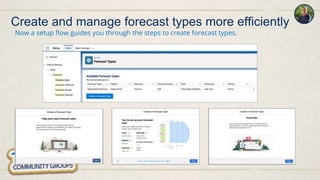
Create and manage forecast types more efficiently
Now a setup flow guides you through the steps to create forecast types.
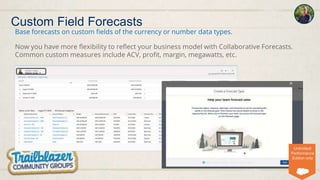
Custom Field Forecasts
Base forecasts on custom fields of the currency or number data types.
Now you have more flexibility to reflect your business model with Collaborative Forecasts.
Common custom measures include ACV, profit, margin, megawatts, etc.
Unlimited/
Performance
Edition only
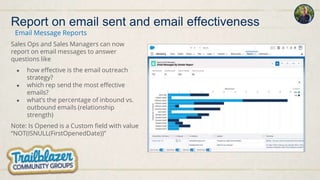
Sales Ops and Sales Managers can now
report on email messages to answer
questions like
● how effective is the email outreach
strategy?
● which rep send the most effective
emails?
● what’s the percentage of inbound vs.
outbound emails (relationship
strength)
Note: Is Opened is a Custom field with value
“NOT(ISNULL(FirstOpenedDate))”
Email Message Reports
Report on email sent and email effectiveness
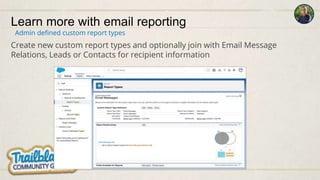
Learn more with email reporting
Create new custom report types and optionally join with Email Message
Relations, Leads or Contacts for recipient information
Admin defined custom report types
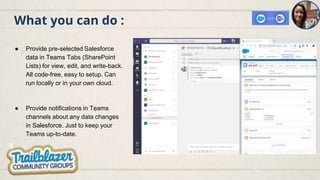
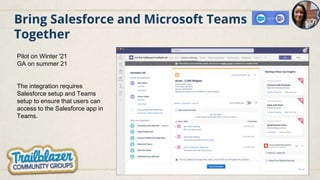
Bring Salesforce and Microsoft Teams
Together
Pilot on Winter '21
GA on summer 21
The integration requires
Salesforce setup and Teams
setup to ensure that users can
access to the Salesforce app in
Teams.
What you can do :
● Provide pre-selected Salesforce
data in Teams Tabs (SharePoint
Lists) for view, edit, and write-back.
All code-free, easy to setup. Can
run locally or in your own cloud.
● Provide notifications in Teams
channels about any data changes
in Salesforce. Just to keep your
Teams up-to-date.
Nouveautés Service Cloud
19:21
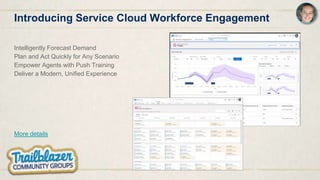
Introducing Service Cloud Workforce Engagement
Intelligently Forecast Demand
Plan and Act Quickly for Any Scenario
Empower Agents with Push Training
Deliver a Modern, Unified Experience
More details
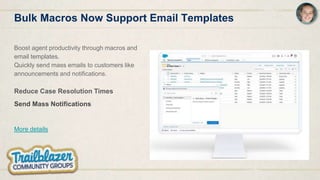
Bulk Macros Now Support Email Templates
Boost agent productivity through macros and
email templates.
Quickly send mass emails to customers like
announcements and notifications.
Reduce Case Resolution Times
Send Mass Notifications
More details
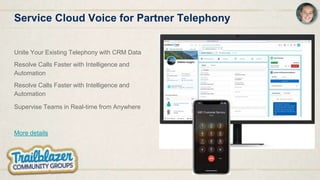
Service Cloud Voice for Partner Telephony
Unite Your Existing Telephony with CRM Data
Resolve Calls Faster with Intelligence and
Automation
Resolve Calls Faster with Intelligence and
Automation
Supervise Teams in Real-time from Anywhere
More details
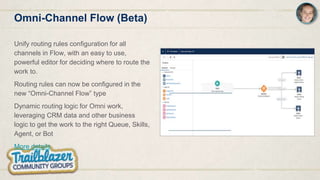
Omni-Channel Flow (Beta)
Unify routing rules configuration for all
channels in Flow, with an easy to use,
powerful editor for deciding where to route the
work to.
Routing rules can now be configured in the
new “Omni-Channel Flow” type
Dynamic routing logic for Omni work,
leveraging CRM data and other business
logic to get the work to the right Queue, Skills,
Agent, or Bot
More details
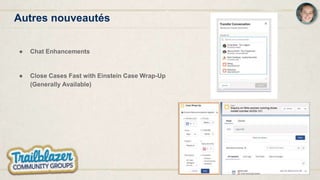
Autres nouveautés
● Chat Enhancements
● Close Cases Fast with Einstein Case Wrap-Up
(Generally Available)
Nouveautés Experience Cloud
19:27
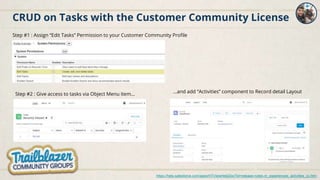
CRUD on Tasks with the Customer Community License
https://help.salesforce.com/apex/HTViewHelpDoc?id=release-notes.rn_experiences_activities_cc.htm
Step #1 : Assign “Edit Tasks” Permission to your Customer Community Profile
Step #2 : Give access to tasks via Object Menu item... ...and add “Activities” component to Record detail Layout
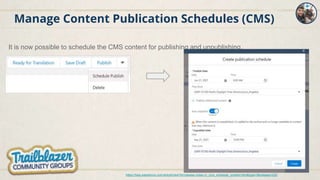
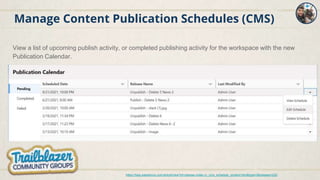
Manage Content Publication Schedules (CMS)
It is now possible to schedule the CMS content for publishing and unpublishing.
https://help.salesforce.com/articleView?id=release-notes.rn_cms_schedule_content.htm&type=5&release=232
Manage Content Publication Schedules (CMS)
View a list of upcoming publish activity, or completed publishing activity for the workspace with the new
Publication Calendar.
https://help.salesforce.com/articleView?id=release-notes.rn_cms_schedule_content.htm&type=5&release=232
Nouveautés Platform - Services
19:31
Démo Nouveautés Flows
Nouveautés Lightning Experience
19:40
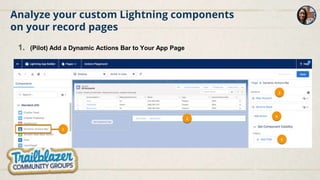
Analyze your custom Lightning components
on your record pages
1. (Pilot) Add a Dynamic Actions Bar to Your App Page
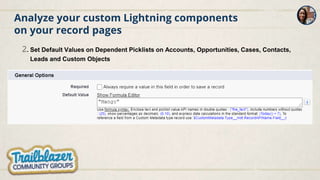
Analyze your custom Lightning components
on your record pages
2. Set Default Values on Dependent Picklists on Accounts, Opportunities, Cases, Contacts,
Leads and Custom Objects
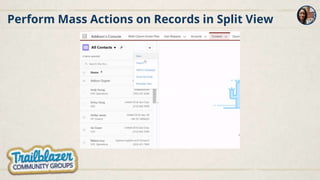
Perform Mass Actions on Records in Split View
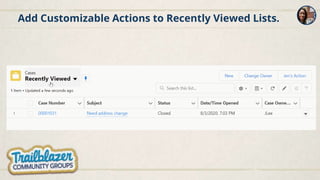
Add Customizable Actions to Recently Viewed Lists.
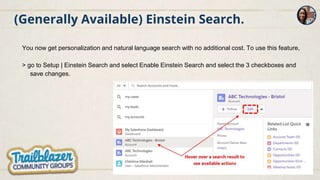
(Generally Available) Einstein Search.
You now get personalization and natural language search with no additional cost. To use this feature,
> go to Setup | Einstein Search and select Enable Einstein Search and select the 3 checkboxes and
save changes.
Nouveautés Application Development
19:46
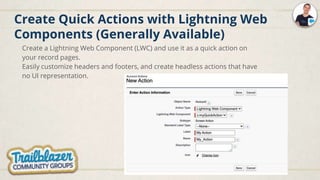
Create Quick Actions with Lightning Web
Components (Generally Available)
Create a Lightning Web Component (LWC) and use it as a quick action on
your record pages.
Easily customize headers and footers, and create headless actions that have
no UI representation.
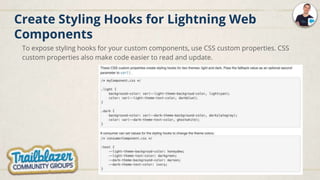
Create Styling Hooks for Lightning Web
Components
To expose styling hooks for your custom components, use CSS custom properties. CSS
custom properties also make code easier to read and update.
Salesforce Functions: Extend Salesforce with
Functions (Beta)
Write JavaScript or Java code that uses Salesforce Functions SDKs to communicate with
your org.
Deploy your Function in the Salesforce Functions compute cloud with the Salesforce CLI.
Then, invoke your Function using Apex, and the Salesforce Functions infrastructure
authenticates and runs your Function on demand.
Secure Apex Code with User Mode Database
Operations (Pilot)
By default Apex code executes in system mode and doesn’t respect running user
permissions. To enhance the security context of Apex, you can specify user-mode access
for database operations by invoking Apex in user mode.
The field-level security (FLS), sharing rules, and CRUD permissions of the running user are
respected in user mode, unlike in system mode.
The new Database methods support an AccessLevel parameter that enables you to run
database operations in user mode, instead of in the default system mode.
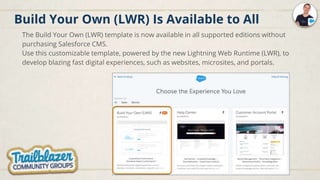
Build Your Own (LWR) Is Available to All
The Build Your Own (LWR) template is now available in all supported editions without
purchasing Salesforce CMS.
Use this customizable template, powered by the new Lightning Web Runtime (LWR), to
develop blazing fast digital experiences, such as websites, microsites, and portals.
Nouveautés autres Cloud
19:52
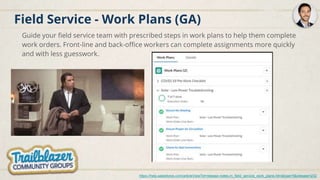
Field Service - Work Plans (GA)
Guide your field service team with prescribed steps in work plans to help them complete
work orders. Front-line and back-office workers can complete assignments more quickly
and with less guesswork.
https://help.salesforce.com/articleView?id=release-notes.rn_field_service_work_plans.htm&type=5&release=232
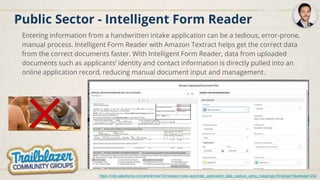
Public Sector - Intelligent Form Reader
Entering information from a handwritten intake application can be a tedious, error-prone,
manual process. Intelligent Form Reader with Amazon Textract helps get the correct data
from the correct documents faster. With Intelligent Form Reader, data from uploaded
documents such as applicants’ identity and contact information is directly pulled into an
online application record, reducing manual document input and management.
https://help.salesforce.com/articleView?id=release-notes.automate_application_data_capture_using_mappings.htm&type=5&release=232
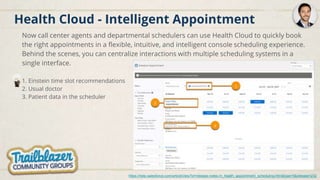
Health Cloud - Intelligent Appointment
Now call center agents and departmental schedulers can use Health Cloud to quickly book
the right appointments in a flexible, intuitive, and intelligent console scheduling experience.
Behind the scenes, you can centralize interactions with multiple scheduling systems in a
single interface.
1. Einstein time slot recommendations
2. Usual doctor
3. Patient data in the scheduler
https://help.salesforce.com/articleView?id=release-notes.rn_health_appointment_scheduling.htm&type=5&release=232
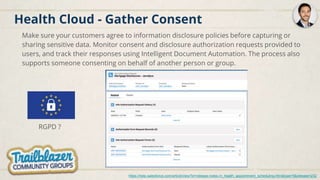
Health Cloud - Gather Consent
Make sure your customers agree to information disclosure policies before capturing or
sharing sensitive data. Monitor consent and disclosure authorization requests provided to
users, and track their responses using Intelligent Document Automation. The process also
supports someone consenting on behalf of another person or group.
https://help.salesforce.com/articleView?id=release-notes.rn_health_appointment_scheduling.htm&type=5&release=232
RGPD ?
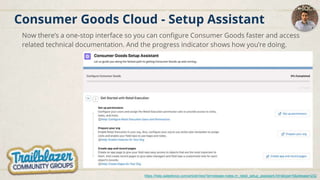
Consumer Goods Cloud - Setup Assistant
Now there’s a one-stop interface so you can configure Consumer Goods faster and access
related technical documentation. And the progress indicator shows how you’re doing.
https://help.salesforce.com/articleView?id=release-notes.rn_retail_setup_assistant.htm&type=5&release=232
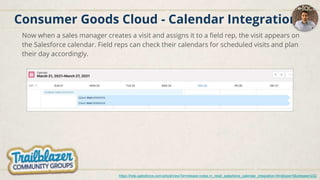
Consumer Goods Cloud - Calendar Integration
Now when a sales manager creates a visit and assigns it to a field rep, the visit appears on
the Salesforce calendar. Field reps can check their calendars for scheduled visits and plan
their day accordingly.
https://help.salesforce.com/articleView?id=release-notes.rn_retail_salesforce_calendar_integration.htm&type=5&release=232
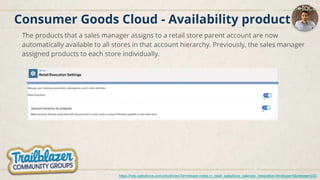
Consumer Goods Cloud - Availability product
The products that a sales manager assigns to a retail store parent account are now
automatically available to all stores in that account hierarchy. Previously, the sales manager
assigned products to each store individually.
https://help.salesforce.com/articleView?id=release-notes.rn_retail_salesforce_calendar_integration.htm&type=5&release=232
Focus Sécurité et Visibilité
20:03
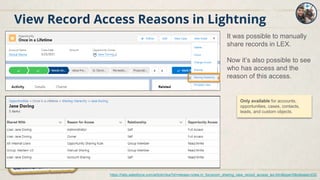
View Record Access Reasons in Lightning
It was possible to manually
share records in LEX.
Now it’s also possible to see
who has access and the
reason of this access.
Only available for accounts,
opportunities, cases, contacts,
leads, and custom objects.
https://help.salesforce.com/articleView?id=release-notes.rn_forcecom_sharing_view_record_access_lex.htm&type=5&release=232
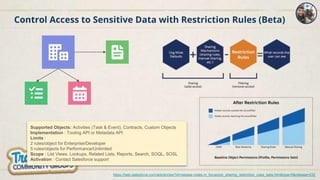
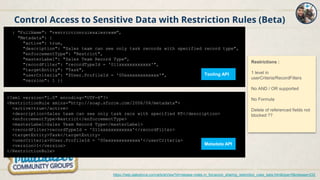
Control Access to Sensitive Data with Restriction Rules (Beta)
https://help.salesforce.com/articleView?id=release-notes.rn_forcecom_sharing_restriction_rules_beta.htm&type=5&release=232
Supported Objects: Activities (Task & Event), Contracts, Custom Objects
Implementation : Tooling API or Metadata API
Limits :
2 rules/object for Enterprise/Developer
5 rules/objects for Performance/Unlimited
Scope : List Views, Lookups, Related Lists, Reports, Search, SOQL, SOSL
Activation : Contact Salesforce support
Control Access to Sensitive Data with Restriction Rules (Beta)
https://help.salesforce.com/articleView?id=release-notes.rn_forcecom_sharing_restriction_rules_beta.htm&type=5&release=232
{ "FullName": "restrictionrulesalesteam",
"Metadata": {
"active": true,
"description": "Sales team can see only task records with specified record type",
"enforcementType": "Restrict",
"masterLabel": "Sales Team Record Type",
"recordFilter": "recordTypeId = '011xxxxxxxxxxxx'",
"targetEntity": "Task",
"userCriteria": "$User.ProfileId = '00exxxxxxxxxxxx'",
"version": 1 }}
<?xml version="1.0" encoding="UTF-8"?>
<RestrictionRule xmlns="http://soap.sforce.com/2006/04/metadata">
<active>true</active>
<description>Sales team can see only task recs with specified RT</description>
<enforcementType>Restrict</enforcementType>
<masterLabel>Sales Team Record Type</masterLabel>
<recordFilter>recordTypeId = '011xxxxxxxxxxxx'</recordFilter>
<targetEntity>Task</targetEntity>
<userCriteria>$User.ProfileId = '00exxxxxxxxxxxx'</userCriteria>
<version>1</version>
</RestrictionRule>
Tooling API
Metadata API
Restrictions :
1 level in
userCriteria/RecordFilters
No AND / OR supported
No Formula
Delete of referenced fields not
blocked ??
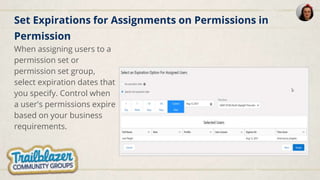
Set Expirations for Assignments on Permissions in
Permission
When assigning users to a
permission set or
permission set group,
select expiration dates that
you specify. Control when
a user's permissions expire
based on your business
requirements.
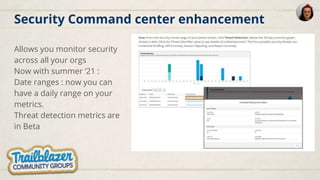
Security Command center enhancement
Allows you monitor security
across all your orgs
Now with summer ‘21 :
Date ranges : now you can
have a daily range on your
metrics.
Threat detection metrics are
in Beta
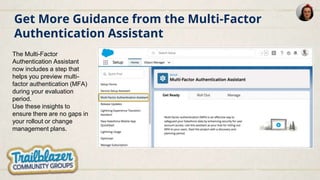
Get More Guidance from the Multi-Factor
Authentication Assistant
The Multi-Factor
Authentication Assistant
now includes a step that
helps you preview multi-
factor authentication (MFA)
during your evaluation
period.
Use these insights to
ensure there are no gaps in
your rollout or change
management plans.
Nouveautés Analytics
20:11
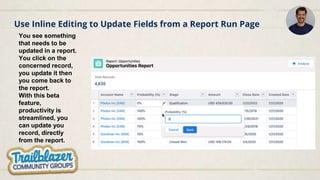
Use Inline Editing to Update Fields from a Report Run Page
You see something
that needs to be
updated in a report.
You click on the
concerned record,
you update it then
you come back to
the report.
With this beta
feature,
productivity is
streamlined, you
can update you
record, directly
from the report.
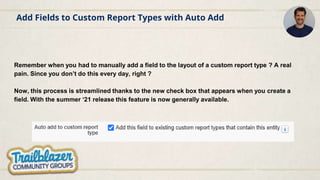
Add Fields to Custom Report Types with Auto Add
Remember when you had to manually add a field to the layout of a custom report type ? A real
pain. Since you don’t do this every day, right ?
Now, this process is streamlined thanks to the new check box that appears when you create a
field. With the summer ‘21 release this feature is now generally available.
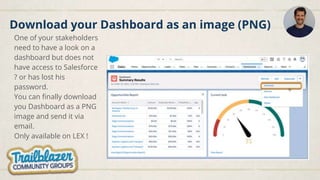
One of your stakeholders
need to have a look on a
dashboard but does not
have access to Salesforce
? or has lost his
password.
You can finally download
you Dashboard as a PNG
image and send it via
email.
Only available on LEX !
Download your Dashboard as an image (PNG)
Questions / Réponses
Quiz
Photo !
Quiz Thierry
Quiz
Thierry
Quiz
Avec votre navigateur https://kahoot.it/ ou votre mobile
Android
IOS
Thierry
summer21-fr

summer21-fr

  • 2.
  • 3.
    Sommaire Les ressources Nouveautés MarketingCloud Nouveautés Sales Cloud Nouveautés Service Cloud Nouveautés Digital Experience Nouveautés Platform - Services Nouveautés Lightning Experience Nouveautés Application Development Démo Nouveautés Flows ... Q/R Quiz
  • 4.
  • 5.
    Les ressources Release noteSalesforce Release in a box Trailhead Site “success” Trailblazer Community Groups
  • 6.
    Les ressources Release noteSalesforce ➢ Les release notes sont intégrés au site https://help.salesforce.com
  • 7.
    Les ressources Salesforce Releasein a Box ➢ https://admin.salesforce.com/releaseinabox
  • 8.
    Les ressources Parcours Trailhead“Prepare for Salesforce Releases” ➢ https://trailhead.salesforce.com/en/content/learn/trails/sf_release_prep
  • 9.
    Les ressources Parcours Trailhead“Maintain Your Salesforce Certifications” ➢ https://trailhead.salesforce.com/en/content/learn/trails/maintain-your- salesforce-certifications
  • 10.
    Les ressources Site “success”: Groupe Release Readiness Trailblazer https://sforce.co/3eZmA9M
  • 11.
    Les ressources Trailblazer CommunityGroups ➢ https://trailblazercommunitygroups.com/
  • 12.
    Nouveautés Marketing Cloud Présentéespar Julien Coatelen Leader du Club utilisateurs Marketing Cloud 18:48
  • 19.
  • 26.
  • 27.
    Pipeline Inspection provideskey highlights, out-of-the-box pipeline segmentation, and critical rollups, all without leaving the Opportunities page. Spreadsheet like view to easily identify important, recent deal changes A brand new consolidated view of the pipeline Unlimited/ Performance Edition only
  • 28.
    In-app guidance appearsto admins in Setup and is shown every 3 days for a maximum of 10 times. Setup is as easy as turning on Pipeline Inspection and verifying that you have Historical Trending enabled and configured for opportunities. Add the Pipeline Inspection button and assign the Pipeline Inspection permission set to the users who you want to have access to Pipeline Inspection. Users can then access Pipeline Inspection from the Opportunities tab. Simple checklist of setup to-do items for Admins
  • 29.
    In-app Guidance onboardsusers In-app guidance windows pop up on the Opportunities page to help introduce end users to Pipeline Inspection and help them navigate through their first times seeing the experience. The “Get Started” button functions the same as the toggle button on the upper right of the listview--that is, it brings them to Pipeline Inspection. This window is shown to end users every 5 days for a maximum of 3 times. Once enabled, users can then access Pipeline Inspection from the Opportunities tab.
  • 30.
    Lead Scoring Segmentation WithEinstein Lead Scoring, admins have the flexibility to control the model and define which set of leads get their own unique model. So they can help to improve the accuracy and relevancy of the scores and their key-factors. All of this, together with the benefit of using an OOTB solution with easy configuration. Admins can define different segments for Einstein Lead Scoring. Segmentation is all about having unique AI models for different sets of records to get more accurate results with better explainability. Generate tailored models for the segments you define, specific to your business
  • 31.
    Solves many commonuse cases where contact aren’t relevant for the campaign or the accounts you want to target don’t have contacts identified yet ● Fundraising: many non-profits want to be able to add accounts to campaigns ● Account Prospecting: Add accounts to a campaign with the goal of identifying at least one contact for each account. Add contacts to the campaign as they’re identified. ● Events: Target a set of accounts to invite to an event, but customer does not know which contacts they want to invite yet. Add Accounts as Campaign Members (GA) Target Accounts directly with a campaign
  • 32.
    Update your pagelayouts to include the Campaign History related list on account records. Search and Add - Exactly Like Adding Contact and Lead Members Add Accounts as Campaign Members
  • 33.
    Use powerful reportfiltering tools to segment and bulk add accounts to campaigns. Add to Campaign from list view is not available with Summer ‘21 release. We hope to release it with a subsequent release. Add Account to Campaign from Reports
  • 34.
    Create and manageforecast types more efficiently Now a setup flow guides you through the steps to create forecast types.
  • 35.
    Custom Field Forecasts Baseforecasts on custom fields of the currency or number data types. Now you have more flexibility to reflect your business model with Collaborative Forecasts. Common custom measures include ACV, profit, margin, megawatts, etc. Unlimited/ Performance Edition only
  • 36.
    Sales Ops andSales Managers can now report on email messages to answer questions like ● how effective is the email outreach strategy? ● which rep send the most effective emails? ● what’s the percentage of inbound vs. outbound emails (relationship strength) Note: Is Opened is a Custom field with value “NOT(ISNULL(FirstOpenedDate))” Email Message Reports Report on email sent and email effectiveness
  • 37.
    Learn more withemail reporting Create new custom report types and optionally join with Email Message Relations, Leads or Contacts for recipient information Admin defined custom report types
  • 38.
    Bring Salesforce andMicrosoft Teams Together Pilot on Winter '21 GA on summer 21 The integration requires Salesforce setup and Teams setup to ensure that users can access to the Salesforce app in Teams.
  • 39.
    What you cando : ● Provide pre-selected Salesforce data in Teams Tabs (SharePoint Lists) for view, edit, and write-back. All code-free, easy to setup. Can run locally or in your own cloud. ● Provide notifications in Teams channels about any data changes in Salesforce. Just to keep your Teams up-to-date.
  • 40.
  • 41.
    Introducing Service CloudWorkforce Engagement Intelligently Forecast Demand Plan and Act Quickly for Any Scenario Empower Agents with Push Training Deliver a Modern, Unified Experience More details
  • 42.
    Bulk Macros NowSupport Email Templates Boost agent productivity through macros and email templates. Quickly send mass emails to customers like announcements and notifications. Reduce Case Resolution Times Send Mass Notifications More details
  • 43.
    Service Cloud Voicefor Partner Telephony Unite Your Existing Telephony with CRM Data Resolve Calls Faster with Intelligence and Automation Resolve Calls Faster with Intelligence and Automation Supervise Teams in Real-time from Anywhere More details
  • 44.
    Omni-Channel Flow (Beta) Unifyrouting rules configuration for all channels in Flow, with an easy to use, powerful editor for deciding where to route the work to. Routing rules can now be configured in the new “Omni-Channel Flow” type Dynamic routing logic for Omni work, leveraging CRM data and other business logic to get the work to the right Queue, Skills, Agent, or Bot More details
  • 45.
    Autres nouveautés ● ChatEnhancements ● Close Cases Fast with Einstein Case Wrap-Up (Generally Available)
  • 46.
  • 47.
    CRUD on Taskswith the Customer Community License https://help.salesforce.com/apex/HTViewHelpDoc?id=release-notes.rn_experiences_activities_cc.htm Step #1 : Assign “Edit Tasks” Permission to your Customer Community Profile Step #2 : Give access to tasks via Object Menu item... ...and add “Activities” component to Record detail Layout
  • 48.
    Manage Content PublicationSchedules (CMS) It is now possible to schedule the CMS content for publishing and unpublishing. https://help.salesforce.com/articleView?id=release-notes.rn_cms_schedule_content.htm&type=5&release=232
  • 49.
    Manage Content PublicationSchedules (CMS) View a list of upcoming publish activity, or completed publishing activity for the workspace with the new Publication Calendar. https://help.salesforce.com/articleView?id=release-notes.rn_cms_schedule_content.htm&type=5&release=232
  • 50.
    Nouveautés Platform -Services 19:31
  • 51.
  • 52.
  • 53.
    Analyze your customLightning components on your record pages 1. (Pilot) Add a Dynamic Actions Bar to Your App Page
  • 54.
    Analyze your customLightning components on your record pages 2. Set Default Values on Dependent Picklists on Accounts, Opportunities, Cases, Contacts, Leads and Custom Objects
  • 55.
    Perform Mass Actionson Records in Split View
  • 56.
    Add Customizable Actionsto Recently Viewed Lists.
  • 57.
    (Generally Available) EinsteinSearch. You now get personalization and natural language search with no additional cost. To use this feature, > go to Setup | Einstein Search and select Enable Einstein Search and select the 3 checkboxes and save changes.
  • 58.
  • 59.
    Create Quick Actionswith Lightning Web Components (Generally Available) Create a Lightning Web Component (LWC) and use it as a quick action on your record pages. Easily customize headers and footers, and create headless actions that have no UI representation.
  • 60.
    Create Styling Hooksfor Lightning Web Components To expose styling hooks for your custom components, use CSS custom properties. CSS custom properties also make code easier to read and update.
  • 61.
    Salesforce Functions: ExtendSalesforce with Functions (Beta) Write JavaScript or Java code that uses Salesforce Functions SDKs to communicate with your org. Deploy your Function in the Salesforce Functions compute cloud with the Salesforce CLI. Then, invoke your Function using Apex, and the Salesforce Functions infrastructure authenticates and runs your Function on demand.
  • 62.
    Secure Apex Codewith User Mode Database Operations (Pilot) By default Apex code executes in system mode and doesn’t respect running user permissions. To enhance the security context of Apex, you can specify user-mode access for database operations by invoking Apex in user mode. The field-level security (FLS), sharing rules, and CRUD permissions of the running user are respected in user mode, unlike in system mode. The new Database methods support an AccessLevel parameter that enables you to run database operations in user mode, instead of in the default system mode.
  • 63.
    Build Your Own(LWR) Is Available to All The Build Your Own (LWR) template is now available in all supported editions without purchasing Salesforce CMS. Use this customizable template, powered by the new Lightning Web Runtime (LWR), to develop blazing fast digital experiences, such as websites, microsites, and portals.
  • 64.
  • 65.
    Field Service -Work Plans (GA) Guide your field service team with prescribed steps in work plans to help them complete work orders. Front-line and back-office workers can complete assignments more quickly and with less guesswork. https://help.salesforce.com/articleView?id=release-notes.rn_field_service_work_plans.htm&type=5&release=232
  • 66.
    Public Sector -Intelligent Form Reader Entering information from a handwritten intake application can be a tedious, error-prone, manual process. Intelligent Form Reader with Amazon Textract helps get the correct data from the correct documents faster. With Intelligent Form Reader, data from uploaded documents such as applicants’ identity and contact information is directly pulled into an online application record, reducing manual document input and management. https://help.salesforce.com/articleView?id=release-notes.automate_application_data_capture_using_mappings.htm&type=5&release=232
  • 67.
    Health Cloud -Intelligent Appointment Now call center agents and departmental schedulers can use Health Cloud to quickly book the right appointments in a flexible, intuitive, and intelligent console scheduling experience. Behind the scenes, you can centralize interactions with multiple scheduling systems in a single interface. 1. Einstein time slot recommendations 2. Usual doctor 3. Patient data in the scheduler https://help.salesforce.com/articleView?id=release-notes.rn_health_appointment_scheduling.htm&type=5&release=232
  • 68.
    Health Cloud -Gather Consent Make sure your customers agree to information disclosure policies before capturing or sharing sensitive data. Monitor consent and disclosure authorization requests provided to users, and track their responses using Intelligent Document Automation. The process also supports someone consenting on behalf of another person or group. https://help.salesforce.com/articleView?id=release-notes.rn_health_appointment_scheduling.htm&type=5&release=232 RGPD ?
  • 69.
    Consumer Goods Cloud- Setup Assistant Now there’s a one-stop interface so you can configure Consumer Goods faster and access related technical documentation. And the progress indicator shows how you’re doing. https://help.salesforce.com/articleView?id=release-notes.rn_retail_setup_assistant.htm&type=5&release=232
  • 70.
    Consumer Goods Cloud- Calendar Integration Now when a sales manager creates a visit and assigns it to a field rep, the visit appears on the Salesforce calendar. Field reps can check their calendars for scheduled visits and plan their day accordingly. https://help.salesforce.com/articleView?id=release-notes.rn_retail_salesforce_calendar_integration.htm&type=5&release=232
  • 71.
    Consumer Goods Cloud- Availability product The products that a sales manager assigns to a retail store parent account are now automatically available to all stores in that account hierarchy. Previously, the sales manager assigned products to each store individually. https://help.salesforce.com/articleView?id=release-notes.rn_retail_salesforce_calendar_integration.htm&type=5&release=232
  • 72.
    Focus Sécurité etVisibilité 20:03
  • 73.
    View Record AccessReasons in Lightning It was possible to manually share records in LEX. Now it’s also possible to see who has access and the reason of this access. Only available for accounts, opportunities, cases, contacts, leads, and custom objects. https://help.salesforce.com/articleView?id=release-notes.rn_forcecom_sharing_view_record_access_lex.htm&type=5&release=232
  • 74.
    Control Access toSensitive Data with Restriction Rules (Beta) https://help.salesforce.com/articleView?id=release-notes.rn_forcecom_sharing_restriction_rules_beta.htm&type=5&release=232 Supported Objects: Activities (Task & Event), Contracts, Custom Objects Implementation : Tooling API or Metadata API Limits : 2 rules/object for Enterprise/Developer 5 rules/objects for Performance/Unlimited Scope : List Views, Lookups, Related Lists, Reports, Search, SOQL, SOSL Activation : Contact Salesforce support
  • 75.
    Control Access toSensitive Data with Restriction Rules (Beta) https://help.salesforce.com/articleView?id=release-notes.rn_forcecom_sharing_restriction_rules_beta.htm&type=5&release=232 { "FullName": "restrictionrulesalesteam", "Metadata": { "active": true, "description": "Sales team can see only task records with specified record type", "enforcementType": "Restrict", "masterLabel": "Sales Team Record Type", "recordFilter": "recordTypeId = '011xxxxxxxxxxxx'", "targetEntity": "Task", "userCriteria": "$User.ProfileId = '00exxxxxxxxxxxx'", "version": 1 }} <?xml version="1.0" encoding="UTF-8"?> <RestrictionRule xmlns="http://soap.sforce.com/2006/04/metadata"> <active>true</active> <description>Sales team can see only task recs with specified RT</description> <enforcementType>Restrict</enforcementType> <masterLabel>Sales Team Record Type</masterLabel> <recordFilter>recordTypeId = '011xxxxxxxxxxxx'</recordFilter> <targetEntity>Task</targetEntity> <userCriteria>$User.ProfileId = '00exxxxxxxxxxxx'</userCriteria> <version>1</version> </RestrictionRule> Tooling API Metadata API Restrictions : 1 level in userCriteria/RecordFilters No AND / OR supported No Formula Delete of referenced fields not blocked ??
  • 76.
    Set Expirations forAssignments on Permissions in Permission When assigning users to a permission set or permission set group, select expiration dates that you specify. Control when a user's permissions expire based on your business requirements.
  • 77.
    Security Command centerenhancement Allows you monitor security across all your orgs Now with summer ‘21 : Date ranges : now you can have a daily range on your metrics. Threat detection metrics are in Beta
  • 78.
    Get More Guidancefrom the Multi-Factor Authentication Assistant The Multi-Factor Authentication Assistant now includes a step that helps you preview multi- factor authentication (MFA) during your evaluation period. Use these insights to ensure there are no gaps in your rollout or change management plans.
  • 79.
  • 80.
    Use Inline Editingto Update Fields from a Report Run Page You see something that needs to be updated in a report. You click on the concerned record, you update it then you come back to the report. With this beta feature, productivity is streamlined, you can update you record, directly from the report.
  • 81.
    Add Fields toCustom Report Types with Auto Add Remember when you had to manually add a field to the layout of a custom report type ? A real pain. Since you don’t do this every day, right ? Now, this process is streamlined thanks to the new check box that appears when you create a field. With the summer ‘21 release this feature is now generally available.
  • 82.
    One of yourstakeholders need to have a look on a dashboard but does not have access to Salesforce ? or has lost his password. You can finally download you Dashboard as a PNG image and send it via email. Only available on LEX ! Download your Dashboard as an image (PNG)
  • 83.
  • 84.
  • 85.
  • 86.
  • 87.
  • 88.
    Quiz Avec votre navigateurhttps://kahoot.it/ ou votre mobile Android IOS Thierry