Copyright ©2022 Version 1. All rights reserved.
1
Classification: Controlled
Tech Tips - Encrypt Your Stream in IBM
SPSS Modeler
Copyright ©2022 Version 1. All rights reserved.
2
Classification: Controlled
Tech Tips - Encrypt Your Stream in IBM SPSS Modeler
Copyright ©2022 Version 1. All rights reserved.
3
Classification: Controlled
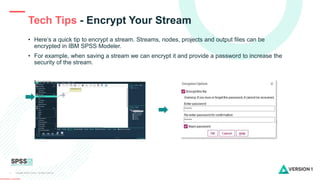
• Here’s a quick tip to encrypt a stream. Streams, nodes, projects and output files can be
encrypted in IBM SPSS Modeler.
• For example, when saving a stream we can encrypt it and provide a password to increase the
security of the stream.
Tech Tips - Encrypt Your Stream
Copyright ©2022 Version 1. All rights reserved.
4
Classification: Controlled
Tech Tips - Encrypt Your Stream
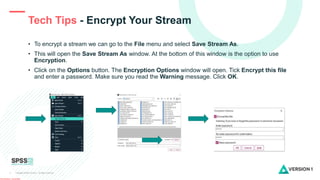
• To encrypt a stream we can go to the File menu and select Save Stream As.
• This will open the Save Stream As window. At the bottom of this window is the option to use
Encryption.
• Click on the Options button. The Encryption Options window will open. Tick Encrypt this file
and enter a password. Make sure you read the Warning message. Click OK.
Copyright ©2022 Version 1. All rights reserved.
5
Classification: Controlled
Tech Tips - Encrypt Your Stream
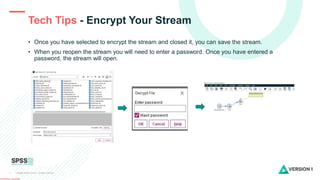
• Once you have selected to encrypt the stream and closed it, you can save the stream.
• When you reopen the stream you will need to enter a password. Once you have entered a
password, the stream will open.
Copyright ©2022 Version 1. All rights reserved.
6
Classification: Controlled
SPSS Tech Tips
Contact us
SPSSAdmin@version1.com
+ 44 (0) 203 859 4790
+ 353 (0) 1 865 7800
www.spssanalyticspartner.com
For more Tech Tips, go to the Tech Tips
section within the Learning Hub.
Copyright ©2022 Version 1. All rights reserved.
7
Classification: Controlled
Thank you.

Stream Encryption in IBM SPSS Modeler.pptx

  • 1.
    Copyright ©2022 Version1. All rights reserved. 1 Classification: Controlled Tech Tips - Encrypt Your Stream in IBM SPSS Modeler
  • 2.
    Copyright ©2022 Version1. All rights reserved. 2 Classification: Controlled Tech Tips - Encrypt Your Stream in IBM SPSS Modeler
  • 3.
    Copyright ©2022 Version1. All rights reserved. 3 Classification: Controlled • Here’s a quick tip to encrypt a stream. Streams, nodes, projects and output files can be encrypted in IBM SPSS Modeler. • For example, when saving a stream we can encrypt it and provide a password to increase the security of the stream. Tech Tips - Encrypt Your Stream
  • 4.
    Copyright ©2022 Version1. All rights reserved. 4 Classification: Controlled Tech Tips - Encrypt Your Stream • To encrypt a stream we can go to the File menu and select Save Stream As. • This will open the Save Stream As window. At the bottom of this window is the option to use Encryption. • Click on the Options button. The Encryption Options window will open. Tick Encrypt this file and enter a password. Make sure you read the Warning message. Click OK.
  • 5.
    Copyright ©2022 Version1. All rights reserved. 5 Classification: Controlled Tech Tips - Encrypt Your Stream • Once you have selected to encrypt the stream and closed it, you can save the stream. • When you reopen the stream you will need to enter a password. Once you have entered a password, the stream will open.
  • 6.
    Copyright ©2022 Version1. All rights reserved. 6 Classification: Controlled SPSS Tech Tips Contact us SPSSAdmin@version1.com + 44 (0) 203 859 4790 + 353 (0) 1 865 7800 www.spssanalyticspartner.com For more Tech Tips, go to the Tech Tips section within the Learning Hub.
  • 7.
    Copyright ©2022 Version1. All rights reserved. 7 Classification: Controlled Thank you.