Enhancing the Customer Experience
Using Dynamic Content Filters
Presented by Paula R. Stern, CEO, WritePoint Ltd.
Presentation Overview
•What are dynamic content filters?
•What are the benefits of using them?
•What do they do?
•When should we use them?
•What will our end-users see in our documentation?
• How many people are familiar with conditional tags?
• How many use them now?
Show of Hands
Conditional Tags
• DCF built on conditional tags
• Assign a tag to content intended for particular
audience
• User levels
• Versions
• What’s New
• Regional content
• Different company names used simultaneously
• Different modules
• Etc.
Conditional Tags – Applied at many levels
• TOC
• Text
• Topic
• Index
Requires Conditional Statement
• Include/exclude
• Multiple builds – developer-heavy work
• Excluded content is not included in final shipped product
• Excluded from search, index, etc.
• Never available to end-user
• Decided/Configured by tech writer/developer – never end-user
• Most tools provide Conditional text capabilities: RH, FM, Flare, AIT,
etc. (not Word – except thru SmartDocs)
US – UK - Canada
Conditional Tag Creates…
• Different output for:
• Regions
• Users
• Roles
• Versions
• Products
• Modules
• Whatever…
That’s great…has been for a long time
• Except…
• What happens when…
• You cross the border?
• When the user needs more information?
• No ability to change what the user sees…
• No files…
• No search…
• When the beginner becomes an expert?
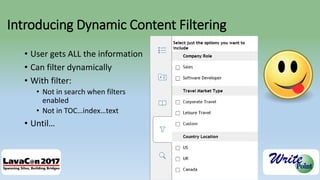
Introducing Dynamic Content Filtering
• User gets ALL the information
• Can filter dynamically
• With filter:
• Not in search when filters
enabled
• Not in TOC…index…text
• Until…
Until….
• THEY change the filter criteria
• Dynamic
• Content filter
• Available information is dynamically filtered BY USER.
What are DCF benefits? Why use DCF?
• Users have access to ALL the information available for all regions, all
versions, all products, all user roles
• Less work for developers (saves time, money)
• Applies filters across TOC / Index / Search
• Offers the benefits of conditional tags without limitations
• User CHOOSES to be exposed to new features, versions etc.
What is filtered dynamically?
• Pretty much everything:
• TOC topics
• Topics
• Index
• Search results
How Do These Differ from Conditional Tags?
• Good question!
• Filtered by conditional tags/statements:
• TW filters
• No option to see text
• Filtered dynamically
• User controls what is seen
• Can change filters dynamically to view other text
What will our end-users see in our help files?
• No filters engaged
• All text available
in all locations
Changes in Content…
Changes in TOC
Index
Help Author Tip
• View with (all available
browsers)
• Use Filter icon to open
Dynamic content filter
options
When should we use them?
• New version (older ones still active)
• Different user levels
• Different regions with different content requirements (logo, contact
information, standards, legal statements)
• Different modules/product features
• Different audiences (beginner level – expert level)
Caveat
• This is a feature to watch…
• Currently ONLY available in the Adobe Tech Comm Suite (2015 and
now 2017)
• RoboHelp
• FrameMaker
• My prediction – this innovation will be copied by other tools and
become a MUST HAVE feature
• More sophisticated users – demand more sophisticated features.
Limitations? Some…
• Works for merged projects – Yes
• Based on existing tags only (TW selected/assigned – probably a good
thing)
• Currently supported in Responsive HTML5 Output
• Only available in RoboHelp 2015/2017 and FrameMaker 2015/2017
Resources
• https://helpx.adobe.com/robohelp/tutorials/dynamic-content-filters-
video.html
• https://www.wvanweelden.eu/blog/2015/07/16/adobe-robohelp-
2015-dynamic-filters
Thank you…
Contact info: paula@writepoint.com
Twitter: @writepoint
Blog: www.writepoint.com/blog

Stern - Enhancing the Customer Experience Using Dynamic Content Filters

  • 1.
    Enhancing the CustomerExperience Using Dynamic Content Filters Presented by Paula R. Stern, CEO, WritePoint Ltd.
  • 2.
    Presentation Overview •What aredynamic content filters? •What are the benefits of using them? •What do they do? •When should we use them? •What will our end-users see in our documentation?
  • 3.
    • How manypeople are familiar with conditional tags? • How many use them now? Show of Hands
  • 4.
    Conditional Tags • DCFbuilt on conditional tags • Assign a tag to content intended for particular audience • User levels • Versions • What’s New • Regional content • Different company names used simultaneously • Different modules • Etc.
  • 5.
    Conditional Tags –Applied at many levels • TOC • Text • Topic • Index
  • 6.
    Requires Conditional Statement •Include/exclude • Multiple builds – developer-heavy work • Excluded content is not included in final shipped product • Excluded from search, index, etc. • Never available to end-user • Decided/Configured by tech writer/developer – never end-user • Most tools provide Conditional text capabilities: RH, FM, Flare, AIT, etc. (not Word – except thru SmartDocs)
  • 7.
    US – UK- Canada
  • 8.
    Conditional Tag Creates… •Different output for: • Regions • Users • Roles • Versions • Products • Modules • Whatever…
  • 9.
    That’s great…has beenfor a long time • Except… • What happens when… • You cross the border? • When the user needs more information? • No ability to change what the user sees… • No files… • No search… • When the beginner becomes an expert?
  • 10.
    Introducing Dynamic ContentFiltering • User gets ALL the information • Can filter dynamically • With filter: • Not in search when filters enabled • Not in TOC…index…text • Until…
  • 11.
    Until…. • THEY changethe filter criteria • Dynamic • Content filter • Available information is dynamically filtered BY USER.
  • 12.
    What are DCFbenefits? Why use DCF? • Users have access to ALL the information available for all regions, all versions, all products, all user roles • Less work for developers (saves time, money) • Applies filters across TOC / Index / Search • Offers the benefits of conditional tags without limitations • User CHOOSES to be exposed to new features, versions etc.
  • 13.
    What is filtereddynamically? • Pretty much everything: • TOC topics • Topics • Index • Search results
  • 14.
    How Do TheseDiffer from Conditional Tags? • Good question! • Filtered by conditional tags/statements: • TW filters • No option to see text • Filtered dynamically • User controls what is seen • Can change filters dynamically to view other text
  • 15.
    What will ourend-users see in our help files? • No filters engaged • All text available in all locations
  • 16.
  • 19.
  • 20.
  • 21.
    Help Author Tip •View with (all available browsers) • Use Filter icon to open Dynamic content filter options
  • 22.
    When should weuse them? • New version (older ones still active) • Different user levels • Different regions with different content requirements (logo, contact information, standards, legal statements) • Different modules/product features • Different audiences (beginner level – expert level)
  • 23.
    Caveat • This isa feature to watch… • Currently ONLY available in the Adobe Tech Comm Suite (2015 and now 2017) • RoboHelp • FrameMaker • My prediction – this innovation will be copied by other tools and become a MUST HAVE feature • More sophisticated users – demand more sophisticated features.
  • 24.
    Limitations? Some… • Worksfor merged projects – Yes • Based on existing tags only (TW selected/assigned – probably a good thing) • Currently supported in Responsive HTML5 Output • Only available in RoboHelp 2015/2017 and FrameMaker 2015/2017
  • 25.
  • 26.
    Thank you… Contact info:paula@writepoint.com Twitter: @writepoint Blog: www.writepoint.com/blog