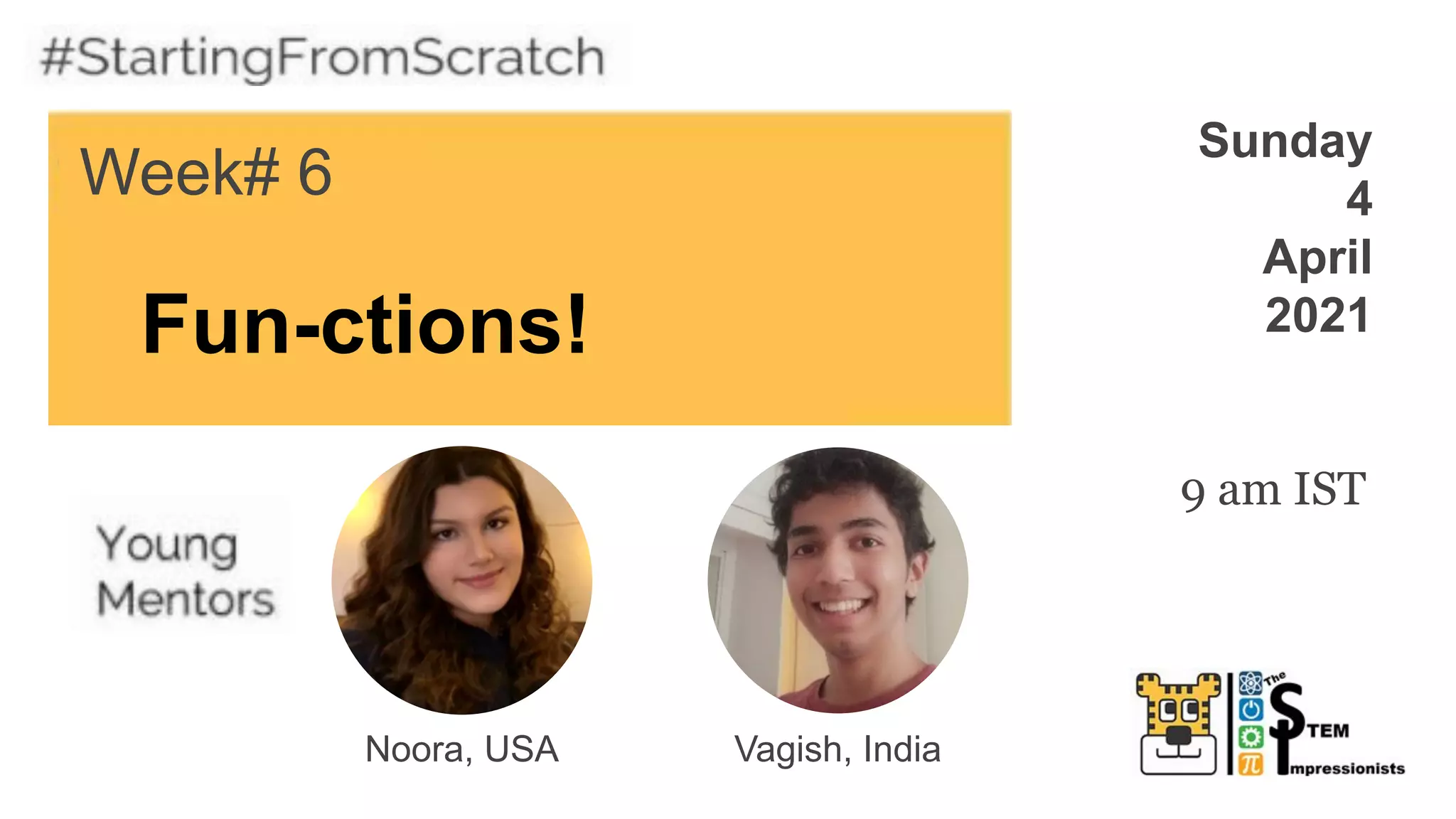
Fun-ctions!
Week# 6
Sunday
4
April
2021
Noora, USA
9 am IST
Vagish, India
Coolest Projects Competition
Registration is OPEN!
You can register to share your
creations in Raspberry Pi's
world-leading online tech showcase!
Raspberry Pi welcomes projects
from anywhere in the world,
whatever your experience level!
https://online.coolest
projects.org/
Reminder
Please be respectful and
appropriate with your
responses in the chat!
Week 6
● Never miss an
episode!
● Get Notified
of new shows!
CodeTigers
SUBSCRIBE
1. Meet today’s mentors
2. Spotlight: Week 5 studio
3. Create a block
4. Make a project
5. Game Time!
6. Next Week’s Class
What you will learn
1. Making unique blocks
2. Creating a game
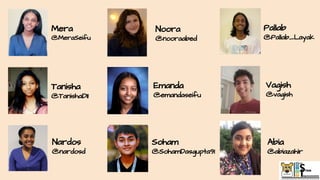
Meet the Mentors!
Starting with Scratch:
Mera
@MeraSeifu
Noora
@nooraabed
Abia
@abiazahir
Tanisha
@TanishaD11
Emanda
@emandaseifu
Vagish
@vagish
Pallab
@Pallab_Layak
Soham
@SohamDasgupta91
Nardos
@nardosd
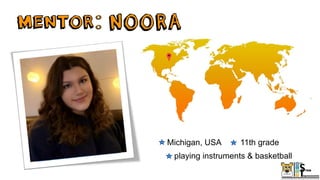
Michigan, USA 11th grade
playing instruments & basketball
Bangalore, India 11th grade
origami, poetry, & yoga
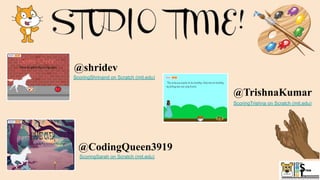
ScoringShrinand on Scratch (mit.edu)
@CodingQueen3919
ScoringSarah on Scratch (mit.edu)
@TrishnaKumar
ScoringTrishna on Scratch (mit.edu)
@shridev
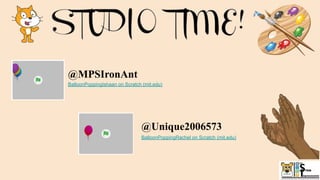
BalloonPoppingIshaan on Scratch (mit.edu)
@Unique2006573
BalloonPoppingRachel on Scratch (mit.edu)
@MPSIronAnt
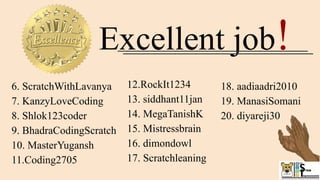
Excellent job!
6. ScratchWithLavanya
7. KanzyLoveCoding
8. Shlok123coder
9. BhadraCodingScratch
10. MasterYugansh
11.Coding2705
12.RockIt1234
13. siddhant11jan
14. MegaTanishK
15. Mistressbrain
16. dimondowl
17. Scratchleaning
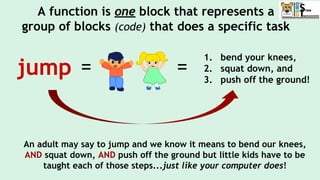
18. aadiaadri2010
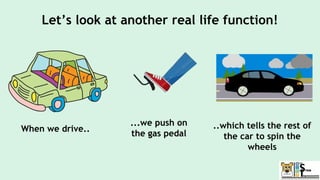
19. ManasiSomani
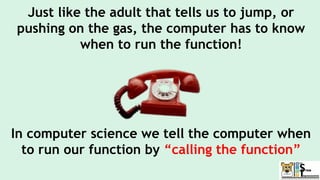
20. diyareji30
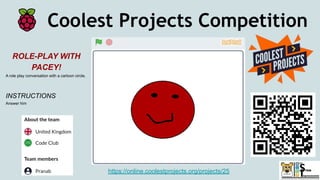
Coolest Projects Competition
https://online.coolestprojects.org/projects/25
ROLE-PLAY WITH
PACEY!
A role play conversation with a cartoon circle.
INSTRUCTIONS
Answer him
Coolest Projects Celebration!!
When will we
see which
projects are
picked as
favorites? June 8, 2021!
Scoring
Week# 5
Sunday
28
March
2021
Abia, USA
9 am IST
Nardos, USA
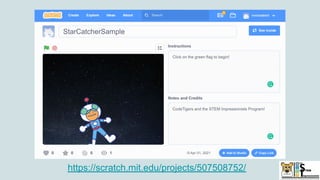
https://scratch.mit.edu/projects/507508752/
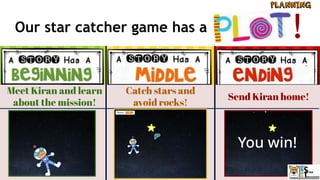
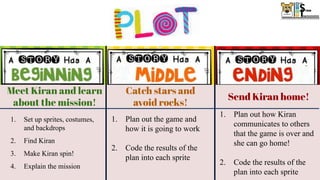
Meet Kiran and learn
about the mission!
Catch stars and
avoid rocks!
Send Kiran home!
Our star catcher game has a !
Meet Kiran and learn
about the mission!
Catch stars and
avoid rocks!
Send Kiran home!
1. Set up sprites, costumes,
and backdrops
2. Find Kiran
3. Make Kiran spin!
4. Explain the mission
1. Plan out the game and
how it is going to work
2. Code the results of the
plan into each sprite
1. Plan out how Kiran
communicates to others
that the game is over and
she can go home!
2. Code the results of the
plan into each sprite
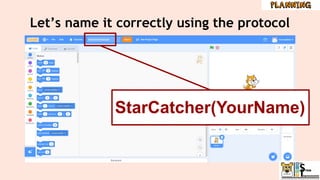
Project #1 File Naming Protocol
StarCatcher(Your first name)
● Example:
StarCatcherAya
Live
Demonstration
Time!!!
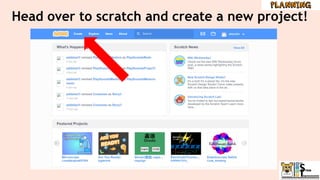
Head over to scratch and create a new project!
Project #1 File Naming Protocol
StarCatcher(Your first name)
● Example:
StarCatcherAya
Let’s name it correctly using the protocol
StarCatcher(YourName)
Meet Kiran and learn
about the mission!
Catch stars and
avoid rocks!
Send Kiran home!
1. Set up sprites, costumes,
and backdrops
2. Find Kiran
3. Make Kiran spin!
4. Explain the mission
1. Plan out the game and
how it is going to work
2. Code the results of the
plan into each sprite
1. Plan out how Kiran
communicates to others
that the game is over and
she can go home!
2. Code the results of the
plan into each sprite
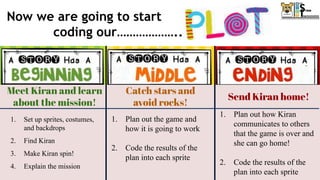
Now we are going to start
coding our………………..
Meet Kiran and learn
about the mission!
Catch stars and
avoid rocks!
Send Kiran home!
1. Switch background to say
the player won!
2. Hide the score
3. Show and move the
rocketship to send Kiran
home!
1. Show rocks and stars
2. Make the stars and rocks move
through the galaxy
3. Make Kiran jump on command
4. Add a score
5. Broadcast a message after stars
have been caught
1. Set up sprites, costumes, and
backdrops
2. Introduce Kiran
3. Make Kiran spin!
4. Explain the mission
5. Broadcast to start the game
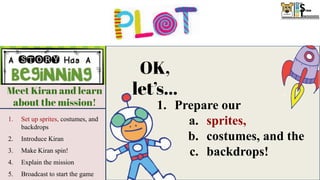
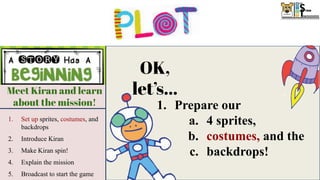
OK,
let’s...
1. Prepare our
a. sprites,
b. costumes, and the
c. backdrops!
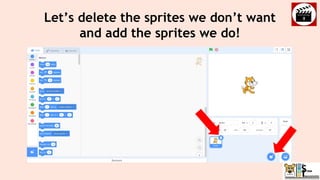
Let’s delete the sprites we don’t want
and add the sprites we do!
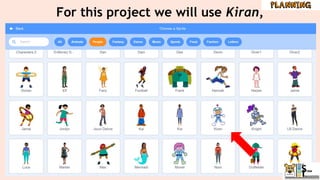
For this project we will use Kiran,
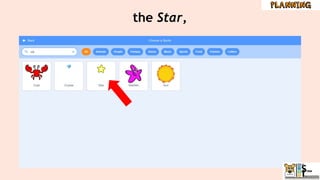
the Star,
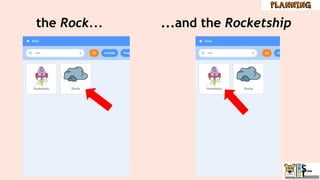
the Rock... ...and the Rocketship
Meet Kiran and learn
about the mission!
Catch stars and
avoid rocks!
Send Kiran home!
1. Switch background to say
the player won!
2. Hide the score
3. Show and move the
rocketship to send Kiran
home!
1. Show rocks and stars
2. Make the stars and rocks move
through the galaxy
3. Make Kiran jump on command
4. Add a score
5. Broadcast a message after stars
have been caught
1. Set up sprites, costumes, and
backdrops
2. Introduce Kiran
3. Make Kiran spin!
4. Explain the mission
5. Broadcast to start the game
OK,
let’s...
1. Prepare our
a. 4 sprites,
b. costumes, and the
c. backdrops!
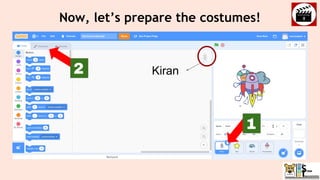
Now, let’s prepare the costumes!
2
1
Kiran
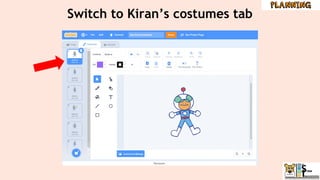
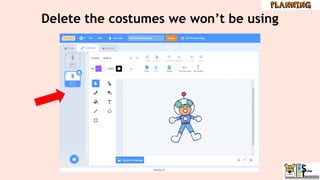
Switch to Kiran’s costumes tab
Delete the costumes we won’t be using
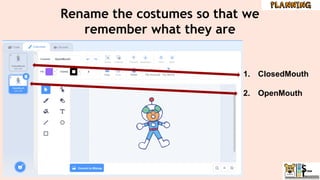
Rename the costumes so that we
remember what they are
1. ClosedMouth
2. OpenMouth
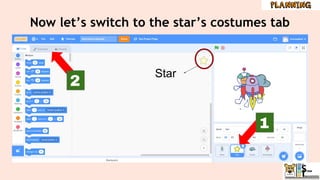
Now let’s switch to the star’s costumes tab
1
2
Star
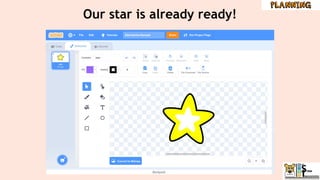
Our star is already ready!
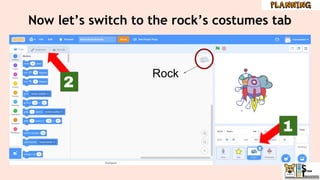
Now let’s switch to the rock’s costumes tab
1
2
Rock
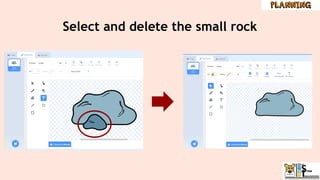
Select and delete the small rock
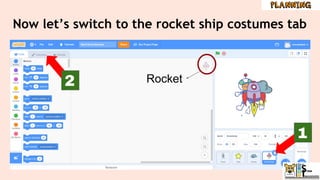
Now let’s switch to the rocket ship costumes tab
1
2 Rocket
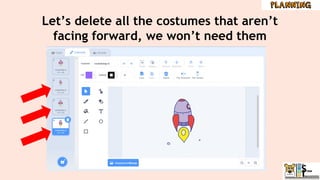
Let’s delete all the costumes that aren’t
facing forward, we won’t need them
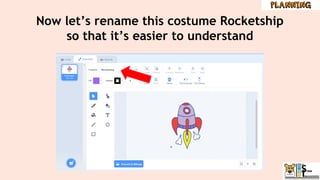
Now let’s rename this costume Rocketship
so that it’s easier to understand
Meet Kiran and learn
about the mission!
Catch stars and
avoid rocks!
Send Kiran home!
1. Switch background to say
the player won!
2. Hide the score
3. Show and move the
rocketship to send Kiran
home!
1. Show rocks and stars
2. Make the stars and rocks move
through the galaxy
3. Make Kiran jump on command
4. Add a score
5. Broadcast a message after stars
have been caught
1. Set up sprites, costumes, and
backdrops
2. Introduce Kiran
3. Make Kiran spin!
4. Explain the mission
5. Broadcast to start the game
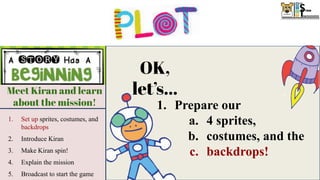
OK,
let’s...
1. Prepare our
a. 4 sprites,
b. costumes, and the
c. backdrops!
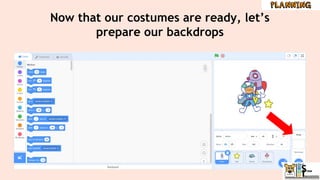
Now that our costumes are ready, let’s
prepare our backdrops
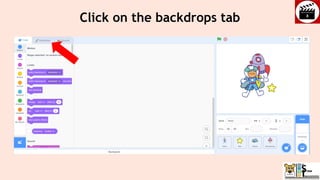
Click on the backdrops tab
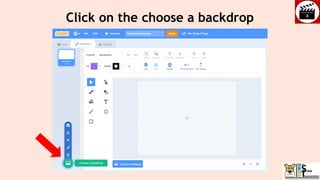
Click on the choose a backdrop
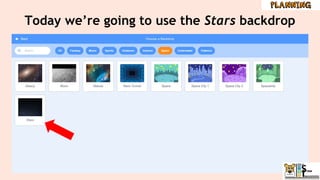
Today we’re going to use the Stars backdrop
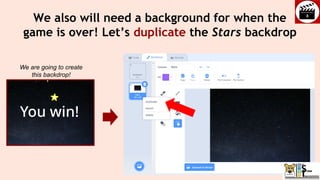
We also will need a background for when the
game is over! Let’s duplicate the Stars backdrop
We are going to create
this backdrop!
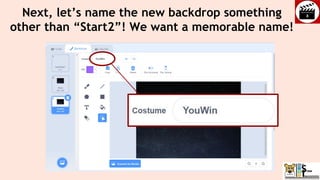
Next, let’s name the new backdrop something
other than “Start2”! We want a memorable name!
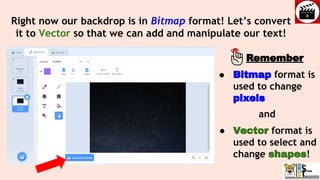
Right now our backdrop is in Bitmap format! Let’s convert
it to Vector so that we can add and manipulate our text!
● Bitmap format is
used to change
pixels
and
● Vector format is
used to select and
change shapes!
Remember
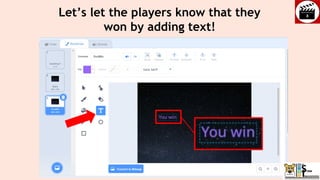
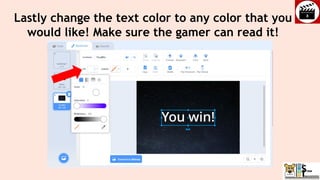
Let’s let the players know that they
won by adding text!
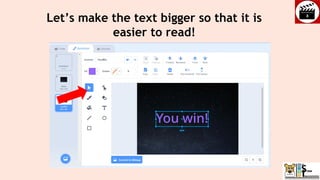
Let’s make the text bigger so that it is
easier to read!
Lastly change the text color to any color that you
would like! Make sure the gamer can read it!
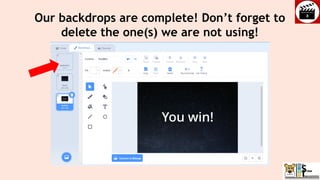
Our backdrops are complete! Don’t forget to
delete the one(s) we are not using!
Meet Kiran and learn
about the mission!
Catch stars and
avoid rocks!
Send Kiran home!
1. Switch background to say
the player won!
2. Hide the score
3. Show and move the
rocketship to send Kiran
home!
1. Show rocks and stars
2. Make the stars and rocks move
through the galaxy
3. Make Kiran jump on command
4. Add a score
5. Broadcast a message after stars
have been caught
1. Set up sprites, costumes, and
backdrops
2. Find Kiran
3. Make Kiran spin!
4. Explain the mission
5. Start the game
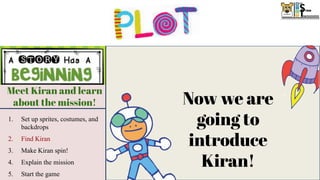
Now we are
going to
introduce
Kiran!
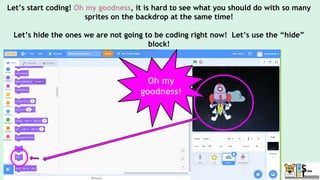
Let’s start coding! Oh my goodness, it is hard to see what you should do with so many
sprites on the backdrop at the same time!
Let’s hide the ones we are not going to be coding right now! Let’s use the “hide”
block!
Oh my
goodness!
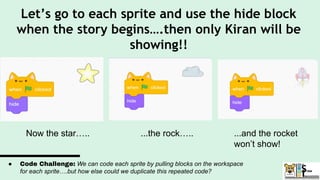
Let’s go to each sprite and use the hide block
when the story begins….then only Kiran will be
showing!!
Now the star….. ...the rock….. ...and the rocket
won’t show!
● Code Challenge: We can code each sprite by pulling blocks on the workspace
for each sprite….but how else could we duplicate this repeated code?
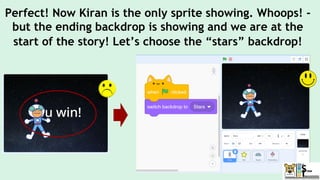
Perfect! Now Kiran is the only sprite showing. Whoops! -
but the ending backdrop is showing and we are at the
start of the story! Let’s choose the “stars” backdrop!
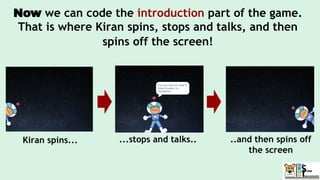
Now we can code the introduction part of the game.
That is where Kiran spins, stops and talks, and then
spins off the screen!
Kiran spins... ...stops and talks.. ..and then spins off
the screen
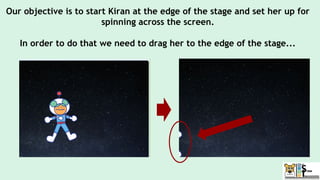
Our objective is to start Kiran at the edge of the stage and set her up for
spinning across the screen.
In order to do that we need to drag her to the edge of the stage...
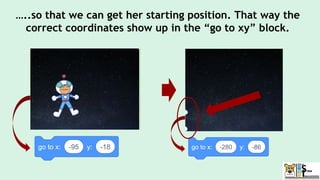
…..so that we can get her starting position. That way the
correct coordinates show up in the “go to xy” block.
Meet Kiran and learn
about the mission!
Catch stars and
avoid rocks!
Send Kiran home!
1. Switch background to say
the player won!
2. Hide the score
3. Show and move the
rocketship to send Kiran
home!
1. Show rocks and stars
2. Make the stars and rocks move
through the galaxy
3. Make Kiran jump on command
4. Add a score
5. Broadcast a message after stars
have been caught
1. Set up sprites, costumes, and
backdrops
2. Introduce Kiran
3. Make Kiran spin!
4. Explain the mission
5. Broadcast to start the game
Now we are
going to make
Kiran spin!
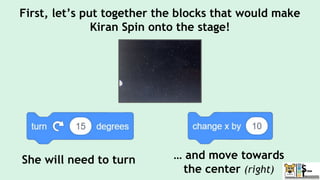
First, let’s put together the blocks that would make
Kiran Spin onto the stage!
She will need to turn … and move towards
the center (right)
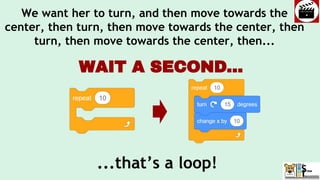
We want her to turn, and then move towards the
center, then turn, then move towards the center, then
turn, then move towards the center, then...
...that’s a loop!
WAIT A SECOND...
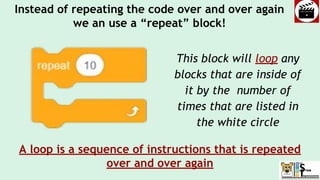
Instead of repeating the code over and over again
we an use a “repeat” block!
This block will loop any
blocks that are inside of
it by the number of
times that are listed in
the white circle
A loop is a sequence of instructions that is repeated
over and over again
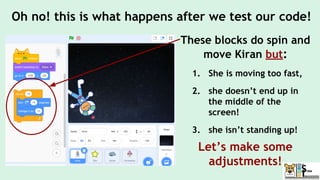
These blocks do spin and
move Kiran but:
1. She is moving too fast,
2. she doesn’t end up in
the middle of the
screen!
3. she isn’t standing up!
Let’s make some
adjustments!
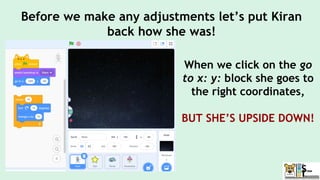
Oh no! this is what happens after we test our code!
When we click on the go
to x: y: block she goes to
the right coordinates,
BUT SHE’S UPSIDE DOWN!
Before we make any adjustments let’s put Kiran
back how she was!
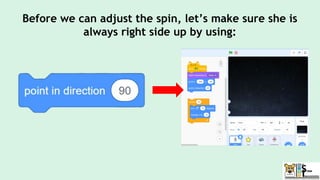
Before we can adjust the spin, let’s make sure she is
always right side up by using:
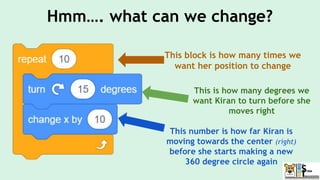
Hmm…. what can we change?
This block is how many times we
want her position to change
This is how many degrees we
want Kiran to turn before she
moves right
This number is how far Kiran is
moving towards the center (right)
before she starts making a new
360 degree circle again
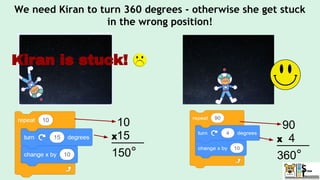
10
_____
150°
We need Kiran to turn 360 degrees - otherwise she get stuck
in the wrong position!
X15
Kiran is stuck!
90
_____
360°
X 4
We want Kiran to end up right side up which means she is
going to do a full circle!
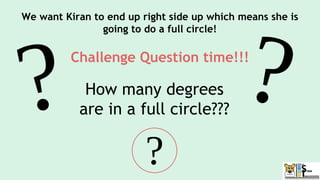
Challenge Question time!!!
How many degrees
are in a full circle???
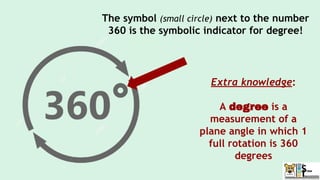
The symbol (small circle) next to the number
360 is the symbolic indicator for degree!
Extra knowledge:
A degree is a
measurement of a
plane angle in which 1
full rotation is 360
degrees
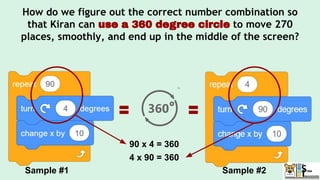
How do we figure out the correct number combination so
that Kiran can use a 360 degree circle to move 270
places, smoothly, and end up in the middle of the screen?
Sample #1 Sample #2
90 x 4 = 360
4 x 90 = 360
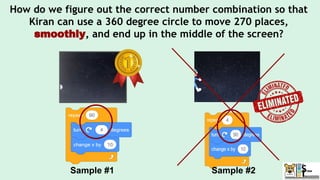
How do we figure out the correct number combination so that
Kiran can use a 360 degree circle to move 270 places,
smoothly, and end up in the middle of the screen?
Sample #1 Sample #2
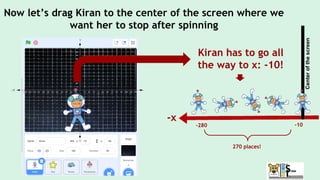
Now let’s drag Kiran to the center of the screen where we
want her to stop after spinning
Kiran has to go all
the way to x: -10!
-10
-x
-280
270 places!
Center
of
the
screen
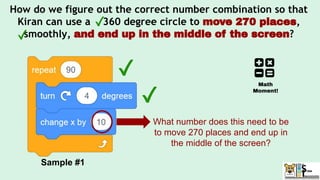
How do we figure out the correct number combination so that
Kiran can use a 360 degree circle to move 270 places,
smoothly, and end up in the middle of the screen?
Sample #1
What number does this need to be
to move 270 places and end up in
the middle of the screen?
Math
Moment!
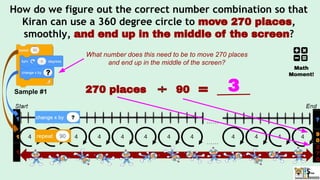
How do we figure out the correct number combination so that
Kiran can use a 360 degree circle to move 270 places,
smoothly, and end up in the middle of the screen?
Sample #1
What number does this need to be to move 270 places
and end up in the middle of the screen?
Math
Moment!
270 places 90 3
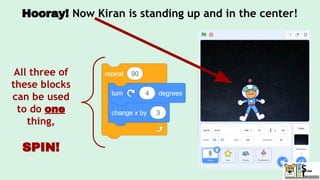
Hooray! Now Kiran is standing up and in the center!
All three of
these blocks
can be used
to do one
thing,
SPIN!
In order to make Kiran spin we are going to
learn a new skill! Yep! We are going to learn
how to
Write AND call a function!
What!?!?
A function is one block that represents a
group of blocks (code) that does a specific task
An adult may say to jump and we know it means to bend our knees,
AND squat down, AND push off the ground but little kids have to be
taught each of those steps...just like your computer does!
jump = =
1. bend your knees,
2. squat down, and
3. push off the ground!
Let’s look at another real life function!
When we drive..
...we push on
the gas pedal
..which tells the rest of
the car to spin the
wheels
Just like the adult that tells us to jump, or
pushing on the gas, the computer has to know
when to run the function!
In computer science we tell the computer when
to run our function by “calling the function”
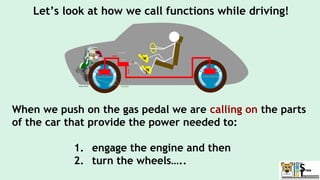
Let’s look at how we call functions while driving!
When we push on the gas pedal we are calling on the parts
of the car that provide the power needed to:
1. engage the engine and then
2. turn the wheels…..
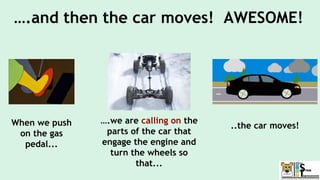
….and then the car moves! AWESOME!
When we push
on the gas
pedal...
..the car moves!
….we are calling on the
parts of the car that
engage the engine and
turn the wheels so
that...
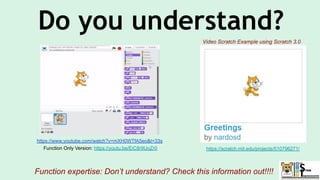
Do you understand?
https://scratch.mit.edu/projects/510796271/
Function expertise: Don’t understand? Check this information out!!!!
Video Scratch Example using Scratch 3.0
https://www.youtube.com/watch?v=mXH0WTfA5eo&t=33s
Function Only Version: https://youtu.be/EiC8r9UoZr0
Functions can be used in a variety of ways. In this
project they will be used for coding movement!
This will condense (shrink) our code and make it
easier to understand
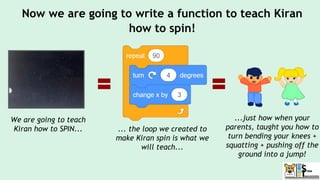
Now we are going to write a function to teach Kiran
how to spin!
We are going to teach
Kiran how to SPIN... ... the loop we created to
make Kiran spin is what we
will teach...
...just how when your
parents, taught you how to
turn bending your knees +
squatting + pushing off the
ground into a jump!
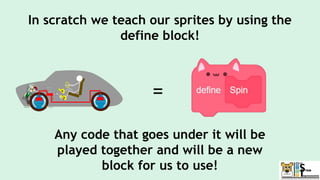
In scratch we teach our sprites by using the
define block!
=
Any code that goes under it will be
played together and will be a new
block for us to use!
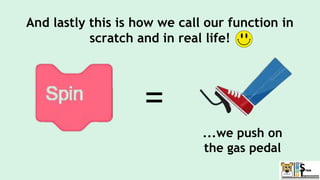
And lastly this is how we call our function in
scratch and in real life!
=
...we push on
the gas pedal
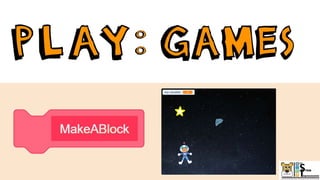
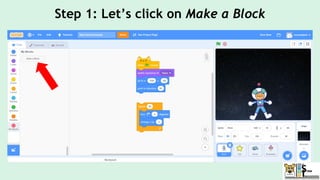
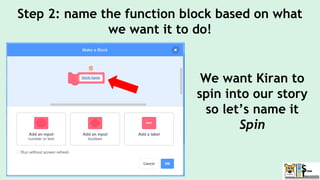
Step 1: Let’s click on Make a Block
Step 2: name the function block based on what
we want it to do!
We want Kiran to
spin into our story
so let’s name it
Spin
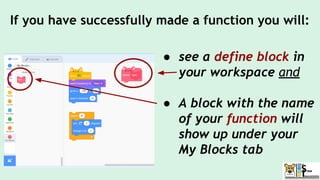
If you have successfully made a function you will:
● see a define block in
your workspace and
● A block with the name
of your function will
show up under your
My Blocks tab
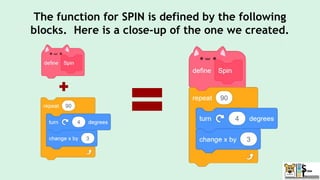
The function for SPIN is defined by the following
blocks. Here is a close-up of the one we created.
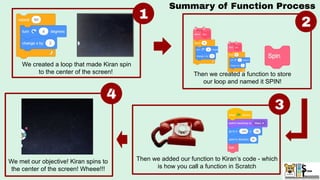
We created a loop that made Kiran spin
to the center of the screen! Then we created a function to store
our loop and named it SPIN!
Then we added our function to Kiran’s code - which
is how you call a function in Scratch
We met our objective! Kiran spins to
the center of the screen! Wheee!!!
Summary of Function Process
1
2
3
4
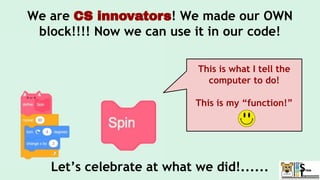
We are CS innovators! We made our OWN
block!!!! Now we can use it in our code!
Let’s celebrate at what we did!......
This is what I tell the
computer to do!
This is my “function!”
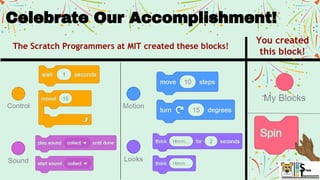
The Scratch Programmers at MIT created these blocks!
You created
this block!
Celebrate Our Accomplishment!
Meet Kiran and learn
about the mission!
Catch stars and
avoid rocks!
Send Kiran home!
1. Switch background to say
the player won!
2. Hide the score
3. Show and move the
rocketship to send Kiran
home!
1. Show rocks and stars
2. Make the stars and rocks move
through the galaxy
3. Make Kiran jump on command
4. Add a score
5. Broadcast a message after stars
have been caught
1. Set up sprites, costumes, and
backdrops
2. Find Kiran
3. Make Kiran spin!
4. Explain the mission
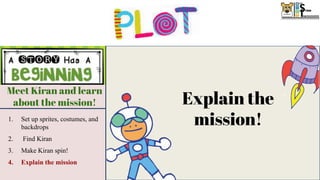
Explain the
mission!
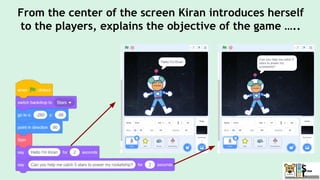
From the center of the screen Kiran introduces herself
to the players, explains the objective of the game …..
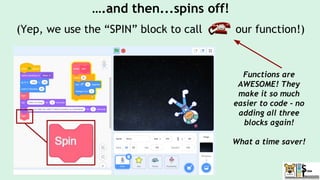
….and then...spins off!
(Yep, we use the “SPIN” block to call our function!)
Functions are
AWESOME! They
make it so much
easier to code - no
adding all three
blocks again!
What a time saver!
Hooray our beginning did everything we
wanted it to!
Catch stars and
avoid rocks!
Catch stars and
avoid rocks!
Send Kiran home!
1. Switch background to say
the player won!
2. Hide the score
3. Show and move the
rocketship to send Kiran
home!
1. Show rocks and stars
2. Make the stars and rocks move
through the galaxy
3. Make Kiran jump on command
4. Add a score
5. Broadcast a message after stars
have been caught
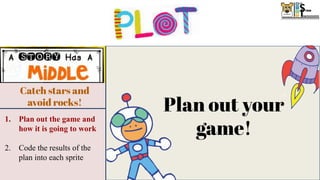
Plan out your
game!
1. Plan out the game and
how it is going to work
2. Code the results of the
plan into each sprite
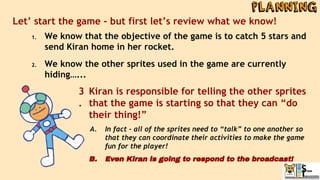
Let’ start the game - but first let’s review what we know!
1. We know that the objective of the game is to catch 5 stars and
send Kiran home in her rocket.
2. We know the other sprites used in the game are currently
hiding…...
Kiran is responsible for telling the other sprites
that the game is starting so that they can “do
their thing!”
A. In fact - all of the sprites need to “talk” to one another so
that they can coordinate their activities to make the game
fun for the player!
B. Even Kiran is going to respond to the broadcast!
3
.
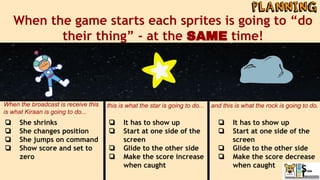
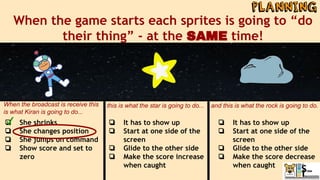
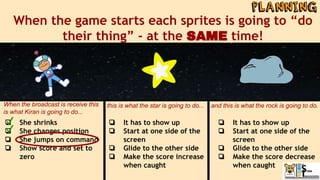
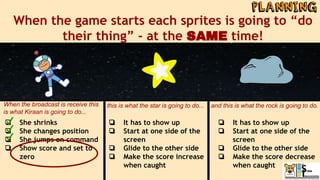
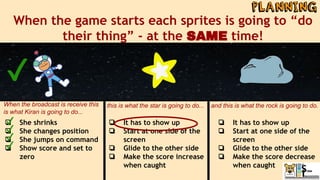
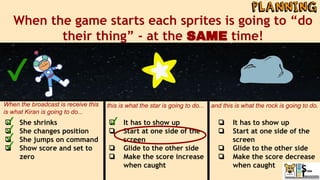
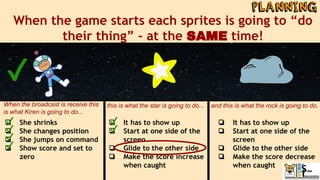
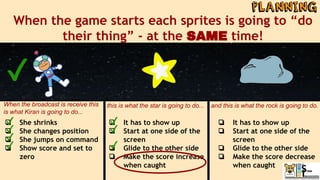
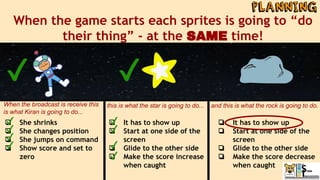
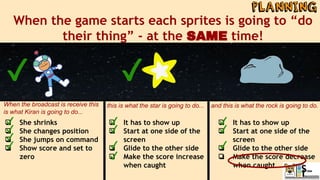
When the game starts each sprites is going to “do
their thing” - at the SAME time!
❏ She shrinks
❏ She changes position
❏ She jumps on command
❏ Show score and set to
zero
❏ It has to show up
❏ Start at one side of the
screen
❏ Glide to the other side
❏ Make the score increase
when caught
❏ It has to show up
❏ Start at one side of the
screen
❏ Glide to the other side
❏ Make the score decrease
when caught
When the broadcast is receive this
is what Kiraan is going to do...
this is what the star is going to do... and this is what the rock is going to do.
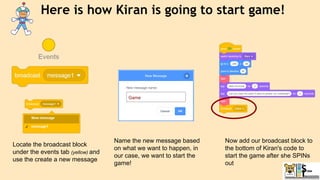
Here is how Kiran is going to start game!
Locate the broadcast block
under the events tab (yellow) and
use the create a new message
Name the new message based
on what we want to happen, in
our case, we want to start the
game!
Now add our broadcast block to
the bottom of Kiran's code to
start the game after she SPINs
out
Catch stars and
avoid rocks!
Catch stars and
avoid rocks!
Send Kiran home!
1. Switch background to say
the player won!
2. Hide the score
3. Show and move the
rocketship to send Kiran
home!
1. Show rocks and stars
2. Make the stars and rocks move
through the galaxy
3. Make Kiran jump on command
4. Add a score
5. Broadcast a message after stars
have been caught
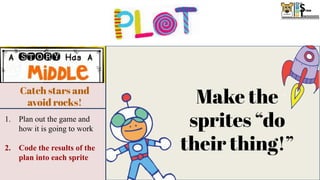
Make the
sprites “do
their thing!”
1. Plan out the game and
how it is going to work
2. Code the results of the
plan into each sprite
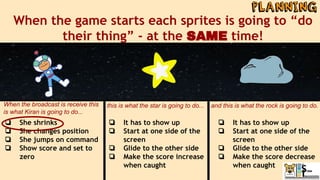
When the game starts each sprites is going to “do
their thing” - at the SAME time!
❏ She shrinks
❏ She changes position
❏ She jumps on command
❏ Show score and set to
zero
❏ It has to show up
❏ Start at one side of the
screen
❏ Glide to the other side
❏ Make the score increase
when caught
❏ It has to show up
❏ Start at one side of the
screen
❏ Glide to the other side
❏ Make the score decrease
when caught
When the broadcast is receive this
is what Kiran is going to do...
this is what the star is going to do... and this is what the rock is going to do.
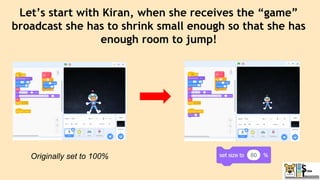
Let’s start with Kiran, when she receives the “game”
broadcast she has to shrink small enough so that she has
enough room to jump!
Originally set to 100%
When the game starts each sprites is going to “do
their thing” - at the SAME time!
❏ She shrinks
❏ She changes position
❏ She jumps on command
❏ Show score and set to
zero
❏ It has to show up
❏ Start at one side of the
screen
❏ Glide to the other side
❏ Make the score increase
when caught
❏ It has to show up
❏ Start at one side of the
screen
❏ Glide to the other side
❏ Make the score decrease
when caught
When the broadcast is receive this
is what Kiran is going to do...
this is what the star is going to do... and this is what the rock is going to do.
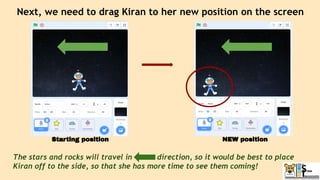
Next, we need to drag Kiran to her new position on the screen
The stars and rocks will travel in direction, so it would be best to place
Kiran off to the side, so that she has more time to see them coming!
Starting position NEW position
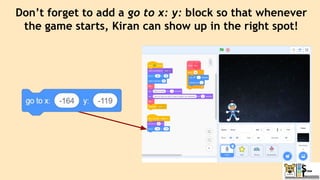
Don’t forget to add a go to x: y: block so that whenever
the game starts, Kiran can show up in the right spot!
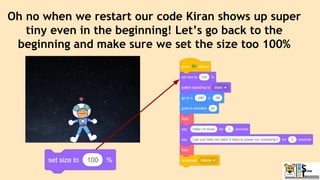
Oh no when we restart our code Kiran shows up super
tiny even in the beginning! Let’s go back to the
beginning and make sure we set the size too 100%
When the game starts each sprites is going to “do
their thing” - at the SAME time!
❏ She shrinks
❏ She changes position
❏ She jumps on command
❏ Show score and set to
zero
❏ It has to show up
❏ Start at one side of the
screen
❏ Glide to the other side
❏ Make the score increase
when caught
❏ It has to show up
❏ Start at one side of the
screen
❏ Glide to the other side
❏ Make the score decrease
when caught
When the broadcast is receive this
is what Kiran is going to do...
this is what the star is going to do... and this is what the rock is going to do.
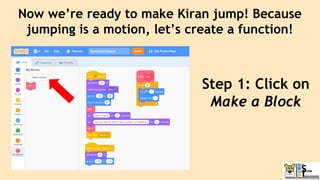
Now we’re ready to make Kiran jump! Because
jumping is a motion, let’s create a function!
Step 1: Click on
Make a Block
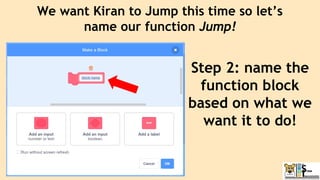
Step 2: name the
function block
based on what we
want it to do!
We want Kiran to Jump this time so let’s
name our function Jump!
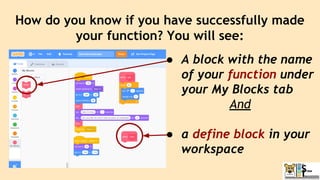
How do you know if you have successfully made
your function? You will see:
● A block with the name
of your function under
your My Blocks tab
And
● a define block in your
workspace
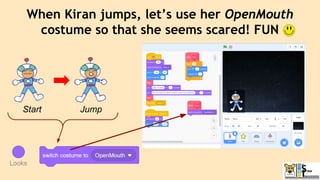
When Kiran jumps, let’s use her OpenMouth
costume so that she seems scared! FUN
Start Jump
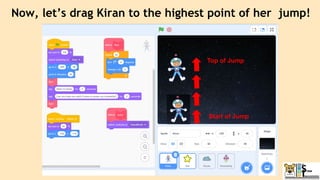
Now, let’s drag Kiran to the highest point of her jump!
Start of Jump
Top of Jump
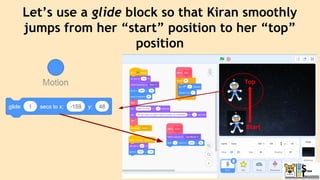
Let’s use a glide block so that Kiran smoothly
jumps from her “start” position to her “top”
position
Start
Top
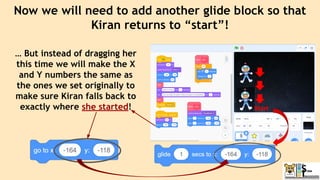
Now we will need to add another glide block so that
Kiran returns to “start”!
… But instead of dragging her
this time we will make the X
and Y numbers the same as
the ones we set originally to
make sure Kiran falls back to
exactly where she started! Start
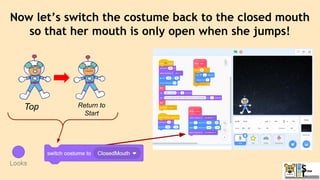
Now let’s switch the costume back to the closed mouth
so that her mouth is only open when she jumps!
Return to
Start
Top
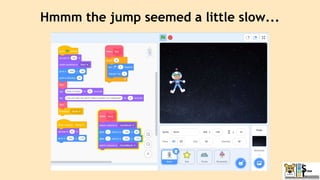
Hmmm the jump seemed a little slow...
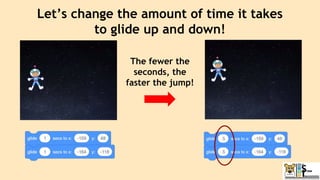
Let’s change the amount of time it takes
to glide up and down!
The fewer the
seconds, the
faster the jump!
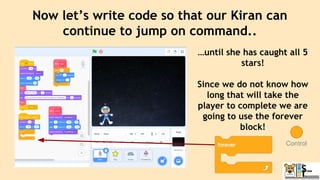
Now let’s write code so that our Kiran can
continue to jump on command..
…until she has caught all 5
stars!
Since we do not know how
long that will take the
player to complete we are
going to use the forever
block!
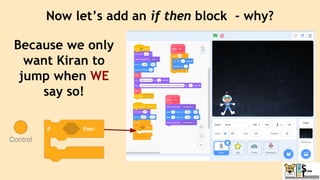
Now let’s add an if then block - why?
Because we only
want Kiran to
jump when WE
say so!
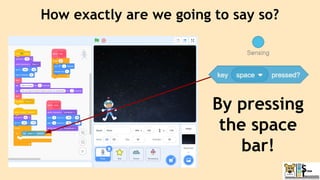
How exactly are we going to say so?
By pressing
the space
bar!
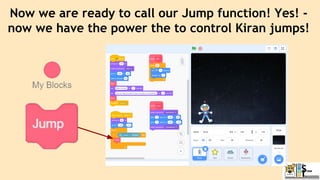
Now we are ready to call our Jump function! Yes! -
now we have the power the to control Kiran jumps!
When the game starts each sprites is going to “do
their thing” - at the SAME time!
❏ She shrinks
❏ She changes position
❏ She jumps on command
❏ Show score and set to
zero
❏ It has to show up
❏ Start at one side of the
screen
❏ Glide to the other side
❏ Make the score increase
when caught
❏ It has to show up
❏ Start at one side of the
screen
❏ Glide to the other side
❏ Make the score decrease
when caught
When the broadcast is receive this
is what Kiraan is going to do...
this is what the star is going to do... and this is what the rock is going to do.
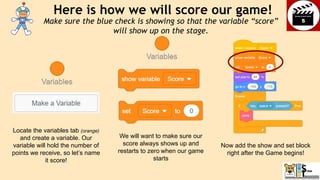
Now add the show and set block
right after the Game begins!
Here is how we will score our game!
Locate the variables tab (orange)
and create a variable. Our
variable will hold the number of
points we receive, so let’s name
it score!
We will want to make sure our
score always shows up and
restarts to zero when our game
starts
Make sure the blue check is showing so that the variable “score”
will show up on the stage.
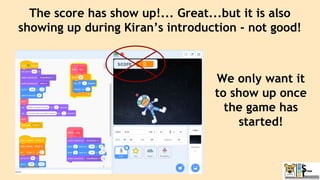
The score has show up!... Great...but it is also
showing up during Kiran’s introduction - not good!
We only want it
to show up once
the game has
started!
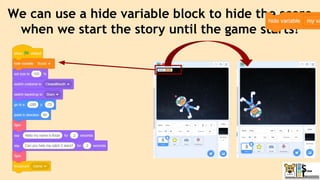
We can use a hide variable block to hide the score
when we start the story until the game starts!
When the game starts each sprites is going to “do
their thing” - at the SAME time!
❏ She shrinks
❏ She changes position
❏ She jumps on command
❏ Show score and set to
zero
❏ It has to show up
❏ Start at one side of the
screen
❏ Glide to the other side
❏ Make the score increase
when caught
❏ It has to show up
❏ Start at one side of the
screen
❏ Glide to the other side
❏ Make the score decrease
when caught
When the broadcast is receive this
is what Kiran is going to do...
this is what the star is going to do... and this is what the rock is going to do.
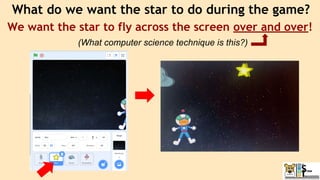
What do we want the star to do during the game?
We want the star to fly across the screen over and over!
(What computer science technique is this?)
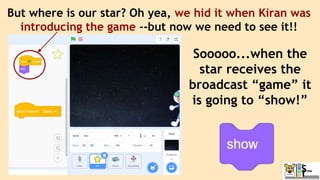
But where is our star? Oh yea, we hid it when Kiran was
introducing the game --but now we need to see it!!
Sooooo...when the
star receives the
broadcast “game” it
is going to “show!”
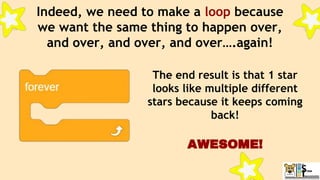
Indeed, we need to make a loop because
we want the same thing to happen over,
and over, and over, and over….again!
The end result is that 1 star
looks like multiple different
stars because it keeps coming
back!
AWESOME!
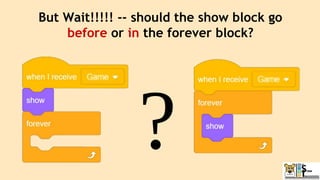
But Wait!!!!! -- should the show block go
before or in the forever block?
We will want to put it in the forever block
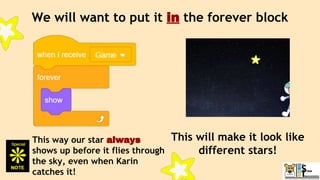
This way our star always
shows up before it flies through
the sky, even when Karin
catches it!
This will make it look like
different stars!
When the game starts each sprites is going to “do
their thing” - at the SAME time!
❏ She shrinks
❏ She changes position
❏ She jumps on command
❏ Show score and set to
zero
❏ It has to show up
❏ Start at one side of the
screen
❏ Glide to the other side
❏ Make the score increase
when caught
❏ It has to show up
❏ Start at one side of the
screen
❏ Glide to the other side
❏ Make the score decrease
when caught
When the broadcast is receive this
is what Kiran is going to do...
this is what the star is going to do... and this is what the rock is going to do.
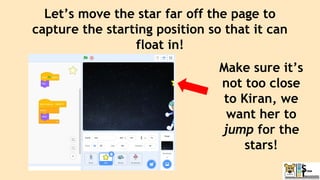
Let’s move the star far off the page to
capture the starting position so that it can
float in!
Make sure it’s
not too close
to Kiran, we
want her to
jump for the
stars!
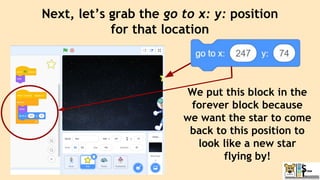
Next, let’s grab the go to x: y: position
for that location
We put this block in the
forever block because
we want the star to come
back to this position to
look like a new star
flying by!
When the game starts each sprites is going to “do
their thing” - at the SAME time!
❏ She shrinks
❏ She changes position
❏ She jumps on command
❏ Show score and set to
zero
❏ It has to show up
❏ Start at one side of the
screen
❏ Glide to the other side
❏ Make the score increase
when caught
❏ It has to show up
❏ Start at one side of the
screen
❏ Glide to the other side
❏ Make the score decrease
when caught
When the broadcast is receive this
is what Kiren is going to do...
this is what the star is going to do... and this is what the rock is going to do.
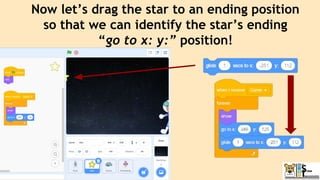
Now let’s drag the star to an ending position
so that we can identify the star’s ending
“go to x: y:” position!
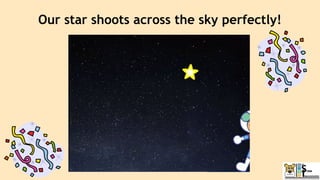
Our star shoots across the sky perfectly!
When the game starts each sprites is going to “do
their thing” - at the SAME time!
❏ She shrinks
❏ She changes position
❏ She jumps on command
❏ Show score and set to
zero
❏ It has to show up
❏ Start at one side of the
screen
❏ Glide to the other side
❏ Make the score increase
when caught
❏ It has to show up
❏ Start at one side of the
screen
❏ Glide to the other side
❏ Make the score decrease
when caught
When the broadcast is receive this
is what Kiran is going to do...
this is what the star is going to do... and this is what the rock is going to do.
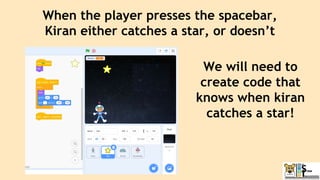
When the player presses the spacebar,
Kiran either catches a star, or doesn’t
We will need to
create code that
knows when kiran
catches a star!
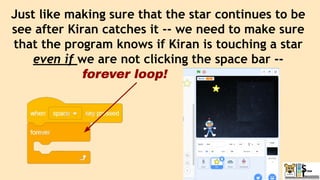
Just like making sure that the star continues to be
see after Kiran catches it -- we need to make sure
that the program knows if Kiran is touching a star
even if we are not clicking the space bar --
forever loop!
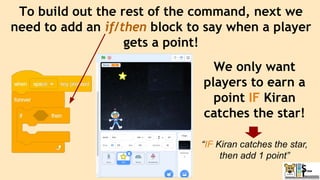
To build out the rest of the command, next we
need to add an if/then block to say when a player
gets a point!
We only want
players to earn a
point IF Kiran
catches the star!
“IF Kiran catches the star,
then add 1 point”
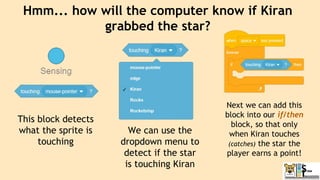
Hmm... how will the computer know if Kiran
grabbed the star?
This block detects
what the sprite is
touching
We can use the
dropdown menu to
detect if the star
is touching Kiran
Next we can add this
block into our if/then
block, so that only
when Kiran touches
(catches) the star the
player earns a point!
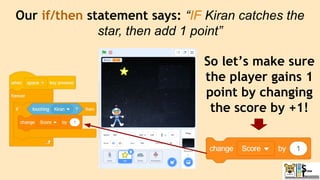
Our if/then statement says: “IF Kiran catches the
star, then add 1 point”
So let’s make sure
the player gains 1
point by changing
the score by +1!
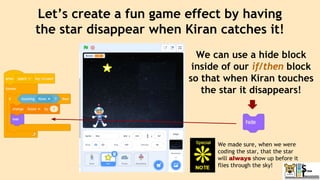
Let’s create a fun game effect by having
the star disappear when Kiran catches it!
We can use a hide block
inside of our if/then block
so that when Kiran touches
the star it disappears!
We made sure, when we were
coding the star, that the star
will always show up before it
flies through the sky!
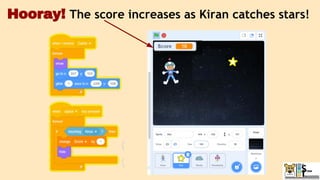
Hooray! The score increases as Kiran catches stars!
When the game starts each sprites is going to “do
their thing” - at the SAME time!
❏ She shrinks
❏ She changes position
❏ She jumps on command
❏ Show score and set to
zero
❏ It has to show up
❏ Start at one side of the
screen
❏ Glide to the other side
❏ Make the score increase
when caught
❏ It has to show up
❏ Start at one side of the
screen
❏ Glide to the other side
❏ Make the score decrease
when caught
When the broadcast is receive this
is what Kiran is going to do...
this is what the star is going to do... and this is what the rock is going to do.
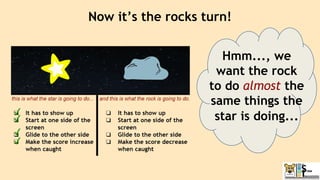
Now it’s the rocks turn!
Hmm..., we
want the rock
to do almost the
same things the
star is doing...
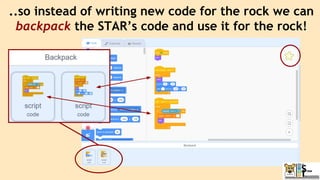
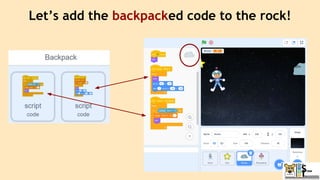
..so instead of writing new code for the rock we can
backpack the STAR’s code and use it for the rock!
Let’s add the backpacked code to the rock!
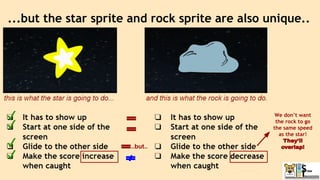
...but the star sprite and rock sprite are also unique..
We don’t want
the rock to go
the same speed
as the star!
They’ll
overlap!
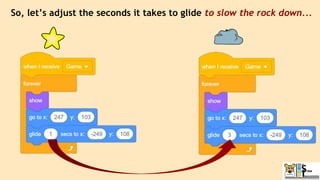
..but..
So, let’s adjust the seconds it takes to glide to slow the rock down...
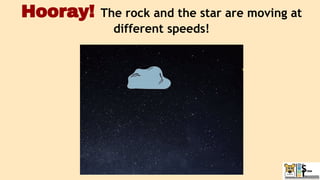
Hooray! The rock and the star are moving at
different speeds!
When the game starts each sprites is going to “do
their thing” - at the SAME time!
❏ She shrinks
❏ She changes position
❏ She jumps on command
❏ Show score and set to
zero
❏ It has to show up
❏ Start at one side of the
screen
❏ Glide to the other side
❏ Make the score increase
when caught
❏ It has to show up
❏ Start at one side of the
screen
❏ Glide to the other side
❏ Make the score decrease
when caught
When the broadcast is receive this
is what Kiran is going to do...
this is what the star is going to do... and this is what the rock is going to do.
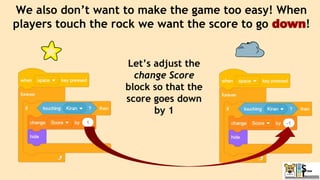
We also don’t want to make the game too easy! When
players touch the rock we want the score to go down!
Let’s adjust the
change Score
block so that the
score goes down
by 1
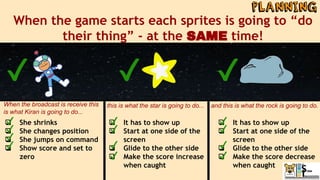
When the game starts each sprites is going to “do
their thing” - at the SAME time!
❏ She shrinks
❏ She changes position
❏ She jumps on command
❏ Show score and set to
zero
❏ It has to show up
❏ Start at one side of the
screen
❏ Glide to the other side
❏ Make the score increase
when caught
❏ It has to show up
❏ Start at one side of the
screen
❏ Glide to the other side
❏ Make the score decrease
when caught
When the broadcast is receive this
is what Kiran is going to do...
this is what the star is going to do... and this is what the rock is going to do.
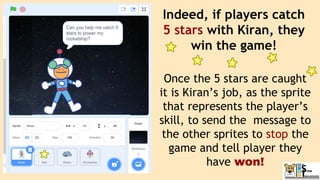
Indeed, if players catch
5 stars with Kiran, they
win the game!
Once the 5 stars are caught
it is Kiran’s job, as the sprite
that represents the player’s
skill, to send the message to
the other sprites to stop the
game and tell player they
have won!
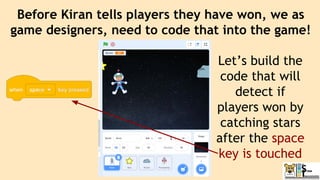
Before Kiran tells players they have won, we as
game designers, need to code that into the game!
Let’s build the
code that will
detect if
players won by
catching stars
after the space
key is touched
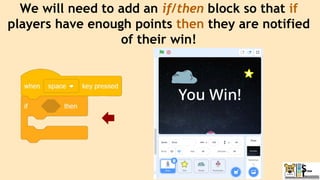
We will need to add an if/then block so that if
players have enough points then they are notified
of their win!
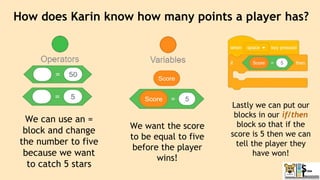
How does Karin know how many points a player has?
We can use an =
block and change
the number to five
because we want
to catch 5 stars
We want the score
to be equal to five
before the player
wins!
Lastly we can put our
blocks in our if/then
block so that if the
score is 5 then we can
tell the player they
have won!
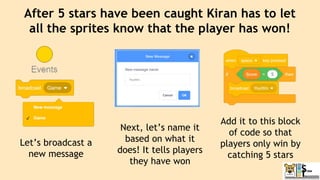
After 5 stars have been caught Kiran has to let
all the sprites know that the player has won!
Let’s broadcast a
new message
Next, let’s name it
based on what it
does! It tells players
they have won
Add it to this block
of code so that
players only win by
catching 5 stars
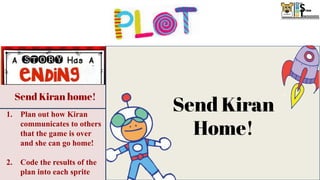
Send Kiran home!
1. Plan out how Kiran
communicates to others
that the game is over
and she can go home!
2. Code the results of the
plan into each sprite
Send Kiran
Home!
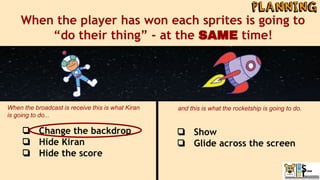
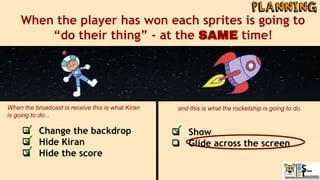
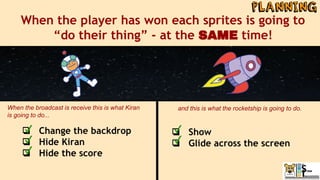
When the player has won each sprites is going to
“do their thing” - at the SAME time!
❏ Change the backdrop
❏ Hide Kiran
❏ Hide the score
When the broadcast is receive this is what Kiran
is going to do...
and this is what the rocketship is going to do.
❏ Show
❏ Glide across the screen
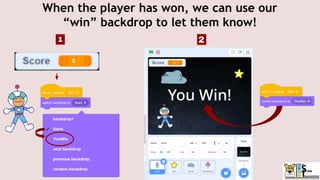
When the player has won, we can use our
“win” backdrop to let them know!
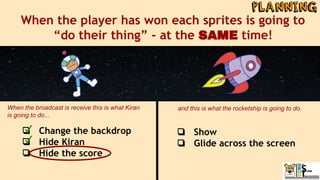
When the player has won each sprites is going to
“do their thing” - at the SAME time!
❏ Change the backdrop
❏ Hide Kiran
❏ Hide the score
When the broadcast is receive this is what Kiran
is going to do...
and this is what the rocketship is going to do.
❏ Show
❏ Glide across the screen
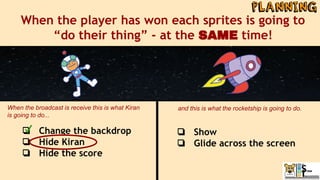
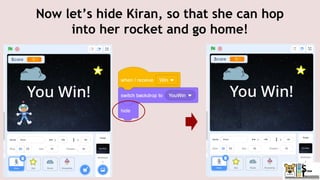
Now let’s hide Kiran, so that she can hop
into her rocket and go home!
When the player has won each sprites is going to
“do their thing” - at the SAME time!
❏ Change the backdrop
❏ Hide Kiran
❏ Hide the score
When the broadcast is receive this is what Kiran
is going to do...
and this is what the rocketship is going to do.
❏ Show
❏ Glide across the screen
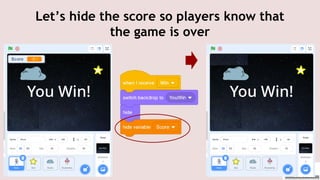
Let’s hide the score so players know that
the game is over
When the player has won each sprites is going to
“do their thing” - at the SAME time!
❏ Change the backdrop
❏ Hide Kiran
❏ Hide the score
When the broadcast is receive this is what Kiran
is going to do...
and this is what the rocketship is going to do.
❏ Show
❏ Glide across the screen
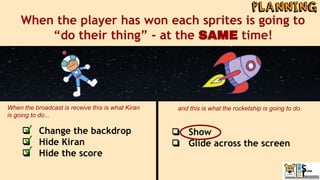
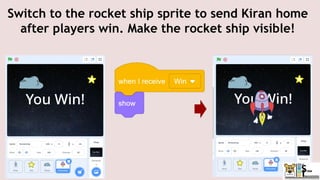
Switch to the rocket ship sprite to send Kiran home
after players win. Make the rocket ship visible!
When the player has won each sprites is going to
“do their thing” - at the SAME time!
❏ Change the backdrop
❏ Hide Kiran
❏ Hide the score
When the broadcast is receive this is what Kiran
is going to do...
and this is what the rocketship is going to do.
❏ Show
❏ Glide across the screen
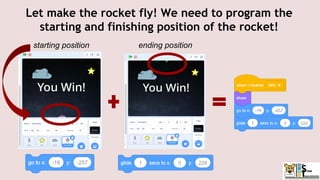
Let make the rocket fly! We need to program the
starting and finishing position of the rocket!
starting position ending position
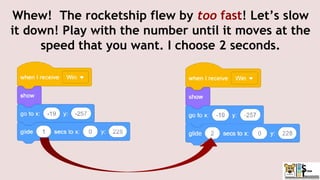
Whew! The rocketship flew by too fast! Let’s slow
it down! Play with the number until it moves at the
speed that you want. I choose 2 seconds.
❏ Show
❏ Glide across the screen
When the player has won each sprites is going to
“do their thing” - at the SAME time!
❏ Change the backdrop
❏ Hide Kiran
❏ Hide the score
When the broadcast is receive this is what Kiran
is going to do...
and this is what the rocketship is going to do.
Demo
Over
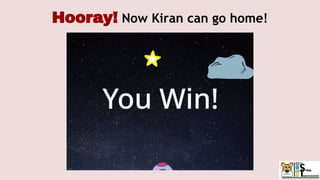
Hooray! Now Kiran can go home!
The coding of the Star Catcher game was no exception to that
experience. We want to share some notes:
1. Issue: We played the game but found that the rocket wouldn’t launch
unless we hit the spacebar!
a. We check out code to make sure everything was they way it should be
b. We asked others to play the game and listened to their experience
(without telling them what we were looking for)
c. We came to the conclusion that our code was accurate but that after
players completed the game more than once the rocket ship would “get
stuck” and needed the player to hit the spacebar before launching
i. We put a note in the instructions
ii. We suggested refreshing your computer before playing the game
more than once
Programming games is a challenge and sometimes you “run” into issues!
Debugging!
www.menti.com
Code: 9987 2873
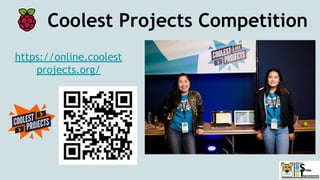
Coolest Projects Competition
https://online.coolest
projects.org/
Coolest Projects Competition
https://online.coolest
projects.org/
Registration is OPEN!
You can register to share your
creations in Raspberry Pi's
world-leading online tech showcase!
Raspberry Pi welcomes projects from
anywhere in the world, whatever your
experience level!
Check out our
class resources!
Don’t forget to…..
● Never miss an
episode!
● Get Notified
of new shows!
CodeTigers
SUBSCRIBE
Scratch Lesson 7:
Here’s the Scoop!
Join us next week for…..
Class #6: Fun-ctions

Class #6: Fun-ctions

  • 1.
  • 2.
    Coolest Projects Competition Registrationis OPEN! You can register to share your creations in Raspberry Pi's world-leading online tech showcase! Raspberry Pi welcomes projects from anywhere in the world, whatever your experience level! https://online.coolest projects.org/
  • 3.
    Reminder Please be respectfuland appropriate with your responses in the chat!
  • 5.
  • 6.
    ● Never missan episode! ● Get Notified of new shows! CodeTigers SUBSCRIBE
  • 7.
    1. Meet today’smentors 2. Spotlight: Week 5 studio 3. Create a block 4. Make a project 5. Game Time! 6. Next Week’s Class
  • 8.
    What you willlearn 1. Making unique blocks 2. Creating a game
  • 9.
  • 10.
  • 11.
    Michigan, USA 11thgrade playing instruments & basketball
  • 12.
    Bangalore, India 11thgrade origami, poetry, & yoga
  • 13.
    ScoringShrinand on Scratch(mit.edu) @CodingQueen3919 ScoringSarah on Scratch (mit.edu) @TrishnaKumar ScoringTrishna on Scratch (mit.edu) @shridev
  • 14.
    BalloonPoppingIshaan on Scratch(mit.edu) @Unique2006573 BalloonPoppingRachel on Scratch (mit.edu) @MPSIronAnt
  • 15.
    Excellent job! 6. ScratchWithLavanya 7.KanzyLoveCoding 8. Shlok123coder 9. BhadraCodingScratch 10. MasterYugansh 11.Coding2705 12.RockIt1234 13. siddhant11jan 14. MegaTanishK 15. Mistressbrain 16. dimondowl 17. Scratchleaning 18. aadiaadri2010 19. ManasiSomani 20. diyareji30
  • 16.
    Coolest Projects Competition https://online.coolestprojects.org/projects/25 ROLE-PLAYWITH PACEY! A role play conversation with a cartoon circle. INSTRUCTIONS Answer him
  • 17.
    Coolest Projects Celebration!! Whenwill we see which projects are picked as favorites? June 8, 2021!
  • 18.
  • 21.
  • 22.
    Meet Kiran andlearn about the mission! Catch stars and avoid rocks! Send Kiran home! Our star catcher game has a !
  • 23.
    Meet Kiran andlearn about the mission! Catch stars and avoid rocks! Send Kiran home! 1. Set up sprites, costumes, and backdrops 2. Find Kiran 3. Make Kiran spin! 4. Explain the mission 1. Plan out the game and how it is going to work 2. Code the results of the plan into each sprite 1. Plan out how Kiran communicates to others that the game is over and she can go home! 2. Code the results of the plan into each sprite
  • 24.
    Project #1 FileNaming Protocol StarCatcher(Your first name) ● Example: StarCatcherAya
  • 25.
  • 26.
    Head over toscratch and create a new project!
  • 27.
    Project #1 FileNaming Protocol StarCatcher(Your first name) ● Example: StarCatcherAya
  • 28.
    Let’s name itcorrectly using the protocol StarCatcher(YourName)
  • 29.
    Meet Kiran andlearn about the mission! Catch stars and avoid rocks! Send Kiran home! 1. Set up sprites, costumes, and backdrops 2. Find Kiran 3. Make Kiran spin! 4. Explain the mission 1. Plan out the game and how it is going to work 2. Code the results of the plan into each sprite 1. Plan out how Kiran communicates to others that the game is over and she can go home! 2. Code the results of the plan into each sprite Now we are going to start coding our………………..
  • 30.
    Meet Kiran andlearn about the mission! Catch stars and avoid rocks! Send Kiran home! 1. Switch background to say the player won! 2. Hide the score 3. Show and move the rocketship to send Kiran home! 1. Show rocks and stars 2. Make the stars and rocks move through the galaxy 3. Make Kiran jump on command 4. Add a score 5. Broadcast a message after stars have been caught 1. Set up sprites, costumes, and backdrops 2. Introduce Kiran 3. Make Kiran spin! 4. Explain the mission 5. Broadcast to start the game OK, let’s... 1. Prepare our a. sprites, b. costumes, and the c. backdrops!
  • 31.
    Let’s delete thesprites we don’t want and add the sprites we do!
  • 32.
    For this projectwe will use Kiran,
  • 33.
  • 34.
    the Rock... ...andthe Rocketship
  • 35.
    Meet Kiran andlearn about the mission! Catch stars and avoid rocks! Send Kiran home! 1. Switch background to say the player won! 2. Hide the score 3. Show and move the rocketship to send Kiran home! 1. Show rocks and stars 2. Make the stars and rocks move through the galaxy 3. Make Kiran jump on command 4. Add a score 5. Broadcast a message after stars have been caught 1. Set up sprites, costumes, and backdrops 2. Introduce Kiran 3. Make Kiran spin! 4. Explain the mission 5. Broadcast to start the game OK, let’s... 1. Prepare our a. 4 sprites, b. costumes, and the c. backdrops!
  • 36.
    Now, let’s preparethe costumes! 2 1 Kiran
  • 37.
    Switch to Kiran’scostumes tab
  • 38.
    Delete the costumeswe won’t be using
  • 39.
    Rename the costumesso that we remember what they are 1. ClosedMouth 2. OpenMouth
  • 40.
    Now let’s switchto the star’s costumes tab 1 2 Star
  • 41.
    Our star isalready ready!
  • 42.
    Now let’s switchto the rock’s costumes tab 1 2 Rock
  • 43.
    Select and deletethe small rock
  • 44.
    Now let’s switchto the rocket ship costumes tab 1 2 Rocket
  • 45.
    Let’s delete allthe costumes that aren’t facing forward, we won’t need them
  • 46.
    Now let’s renamethis costume Rocketship so that it’s easier to understand
  • 47.
    Meet Kiran andlearn about the mission! Catch stars and avoid rocks! Send Kiran home! 1. Switch background to say the player won! 2. Hide the score 3. Show and move the rocketship to send Kiran home! 1. Show rocks and stars 2. Make the stars and rocks move through the galaxy 3. Make Kiran jump on command 4. Add a score 5. Broadcast a message after stars have been caught 1. Set up sprites, costumes, and backdrops 2. Introduce Kiran 3. Make Kiran spin! 4. Explain the mission 5. Broadcast to start the game OK, let’s... 1. Prepare our a. 4 sprites, b. costumes, and the c. backdrops!
  • 48.
    Now that ourcostumes are ready, let’s prepare our backdrops
  • 49.
    Click on thebackdrops tab
  • 50.
    Click on thechoose a backdrop
  • 51.
    Today we’re goingto use the Stars backdrop
  • 52.
    We also willneed a background for when the game is over! Let’s duplicate the Stars backdrop We are going to create this backdrop!
  • 53.
    Next, let’s namethe new backdrop something other than “Start2”! We want a memorable name!
  • 54.
    Right now ourbackdrop is in Bitmap format! Let’s convert it to Vector so that we can add and manipulate our text! ● Bitmap format is used to change pixels and ● Vector format is used to select and change shapes! Remember
  • 55.
    Let’s let theplayers know that they won by adding text!
  • 56.
    Let’s make thetext bigger so that it is easier to read!
  • 57.
    Lastly change thetext color to any color that you would like! Make sure the gamer can read it!
  • 58.
    Our backdrops arecomplete! Don’t forget to delete the one(s) we are not using!
  • 59.
    Meet Kiran andlearn about the mission! Catch stars and avoid rocks! Send Kiran home! 1. Switch background to say the player won! 2. Hide the score 3. Show and move the rocketship to send Kiran home! 1. Show rocks and stars 2. Make the stars and rocks move through the galaxy 3. Make Kiran jump on command 4. Add a score 5. Broadcast a message after stars have been caught 1. Set up sprites, costumes, and backdrops 2. Find Kiran 3. Make Kiran spin! 4. Explain the mission 5. Start the game Now we are going to introduce Kiran!
  • 60.
    Let’s start coding!Oh my goodness, it is hard to see what you should do with so many sprites on the backdrop at the same time! Let’s hide the ones we are not going to be coding right now! Let’s use the “hide” block! Oh my goodness!
  • 61.
    Let’s go toeach sprite and use the hide block when the story begins….then only Kiran will be showing!! Now the star….. ...the rock….. ...and the rocket won’t show! ● Code Challenge: We can code each sprite by pulling blocks on the workspace for each sprite….but how else could we duplicate this repeated code?
  • 63.
    Perfect! Now Kiranis the only sprite showing. Whoops! - but the ending backdrop is showing and we are at the start of the story! Let’s choose the “stars” backdrop!
  • 64.
    Now we cancode the introduction part of the game. That is where Kiran spins, stops and talks, and then spins off the screen! Kiran spins... ...stops and talks.. ..and then spins off the screen
  • 65.
    Our objective isto start Kiran at the edge of the stage and set her up for spinning across the screen. In order to do that we need to drag her to the edge of the stage...
  • 66.
    …..so that wecan get her starting position. That way the correct coordinates show up in the “go to xy” block.
  • 67.
    Meet Kiran andlearn about the mission! Catch stars and avoid rocks! Send Kiran home! 1. Switch background to say the player won! 2. Hide the score 3. Show and move the rocketship to send Kiran home! 1. Show rocks and stars 2. Make the stars and rocks move through the galaxy 3. Make Kiran jump on command 4. Add a score 5. Broadcast a message after stars have been caught 1. Set up sprites, costumes, and backdrops 2. Introduce Kiran 3. Make Kiran spin! 4. Explain the mission 5. Broadcast to start the game Now we are going to make Kiran spin!
  • 68.
    First, let’s puttogether the blocks that would make Kiran Spin onto the stage! She will need to turn … and move towards the center (right)
  • 69.
    We want herto turn, and then move towards the center, then turn, then move towards the center, then turn, then move towards the center, then... ...that’s a loop! WAIT A SECOND...
  • 70.
    Instead of repeatingthe code over and over again we an use a “repeat” block! This block will loop any blocks that are inside of it by the number of times that are listed in the white circle A loop is a sequence of instructions that is repeated over and over again
  • 72.
    These blocks dospin and move Kiran but: 1. She is moving too fast, 2. she doesn’t end up in the middle of the screen! 3. she isn’t standing up! Let’s make some adjustments! Oh no! this is what happens after we test our code!
  • 73.
    When we clickon the go to x: y: block she goes to the right coordinates, BUT SHE’S UPSIDE DOWN! Before we make any adjustments let’s put Kiran back how she was!
  • 74.
    Before we canadjust the spin, let’s make sure she is always right side up by using:
  • 75.
    Hmm…. what canwe change? This block is how many times we want her position to change This is how many degrees we want Kiran to turn before she moves right This number is how far Kiran is moving towards the center (right) before she starts making a new 360 degree circle again
  • 76.
    10 _____ 150° We need Kiranto turn 360 degrees - otherwise she get stuck in the wrong position! X15 Kiran is stuck! 90 _____ 360° X 4
  • 77.
    We want Kiranto end up right side up which means she is going to do a full circle! Challenge Question time!!! How many degrees are in a full circle???
  • 78.
    The symbol (smallcircle) next to the number 360 is the symbolic indicator for degree! Extra knowledge: A degree is a measurement of a plane angle in which 1 full rotation is 360 degrees
  • 79.
    How do wefigure out the correct number combination so that Kiran can use a 360 degree circle to move 270 places, smoothly, and end up in the middle of the screen? Sample #1 Sample #2 90 x 4 = 360 4 x 90 = 360
  • 80.
    How do wefigure out the correct number combination so that Kiran can use a 360 degree circle to move 270 places, smoothly, and end up in the middle of the screen? Sample #1 Sample #2
  • 81.
    Now let’s dragKiran to the center of the screen where we want her to stop after spinning Kiran has to go all the way to x: -10! -10 -x -280 270 places! Center of the screen
  • 82.
    How do wefigure out the correct number combination so that Kiran can use a 360 degree circle to move 270 places, smoothly, and end up in the middle of the screen? Sample #1 What number does this need to be to move 270 places and end up in the middle of the screen? Math Moment!
  • 83.
    How do wefigure out the correct number combination so that Kiran can use a 360 degree circle to move 270 places, smoothly, and end up in the middle of the screen? Sample #1 What number does this need to be to move 270 places and end up in the middle of the screen? Math Moment! 270 places 90 3
  • 84.
    Hooray! Now Kiranis standing up and in the center! All three of these blocks can be used to do one thing, SPIN!
  • 85.
    In order tomake Kiran spin we are going to learn a new skill! Yep! We are going to learn how to Write AND call a function! What!?!?
  • 86.
    A function isone block that represents a group of blocks (code) that does a specific task An adult may say to jump and we know it means to bend our knees, AND squat down, AND push off the ground but little kids have to be taught each of those steps...just like your computer does! jump = = 1. bend your knees, 2. squat down, and 3. push off the ground!
  • 87.
    Let’s look atanother real life function! When we drive.. ...we push on the gas pedal ..which tells the rest of the car to spin the wheels
  • 88.
    Just like theadult that tells us to jump, or pushing on the gas, the computer has to know when to run the function! In computer science we tell the computer when to run our function by “calling the function”
  • 89.
    Let’s look athow we call functions while driving! When we push on the gas pedal we are calling on the parts of the car that provide the power needed to: 1. engage the engine and then 2. turn the wheels…..
  • 90.
    ….and then thecar moves! AWESOME! When we push on the gas pedal... ..the car moves! ….we are calling on the parts of the car that engage the engine and turn the wheels so that...
  • 91.
    Do you understand? https://scratch.mit.edu/projects/510796271/ Functionexpertise: Don’t understand? Check this information out!!!! Video Scratch Example using Scratch 3.0 https://www.youtube.com/watch?v=mXH0WTfA5eo&t=33s Function Only Version: https://youtu.be/EiC8r9UoZr0
  • 92.
    Functions can beused in a variety of ways. In this project they will be used for coding movement! This will condense (shrink) our code and make it easier to understand
  • 93.
    Now we aregoing to write a function to teach Kiran how to spin! We are going to teach Kiran how to SPIN... ... the loop we created to make Kiran spin is what we will teach... ...just how when your parents, taught you how to turn bending your knees + squatting + pushing off the ground into a jump!
  • 94.
    In scratch weteach our sprites by using the define block! = Any code that goes under it will be played together and will be a new block for us to use!
  • 95.
    And lastly thisis how we call our function in scratch and in real life! = ...we push on the gas pedal
  • 96.
    Step 1: Let’sclick on Make a Block
  • 97.
    Step 2: namethe function block based on what we want it to do! We want Kiran to spin into our story so let’s name it Spin
  • 98.
    If you havesuccessfully made a function you will: ● see a define block in your workspace and ● A block with the name of your function will show up under your My Blocks tab
  • 99.
    The function forSPIN is defined by the following blocks. Here is a close-up of the one we created.
  • 100.
    We created aloop that made Kiran spin to the center of the screen! Then we created a function to store our loop and named it SPIN! Then we added our function to Kiran’s code - which is how you call a function in Scratch We met our objective! Kiran spins to the center of the screen! Wheee!!! Summary of Function Process 1 2 3 4
  • 101.
    We are CSinnovators! We made our OWN block!!!! Now we can use it in our code! Let’s celebrate at what we did!...... This is what I tell the computer to do! This is my “function!”
  • 102.
    The Scratch Programmersat MIT created these blocks! You created this block! Celebrate Our Accomplishment!
  • 103.
    Meet Kiran andlearn about the mission! Catch stars and avoid rocks! Send Kiran home! 1. Switch background to say the player won! 2. Hide the score 3. Show and move the rocketship to send Kiran home! 1. Show rocks and stars 2. Make the stars and rocks move through the galaxy 3. Make Kiran jump on command 4. Add a score 5. Broadcast a message after stars have been caught 1. Set up sprites, costumes, and backdrops 2. Find Kiran 3. Make Kiran spin! 4. Explain the mission Explain the mission!
  • 104.
    From the centerof the screen Kiran introduces herself to the players, explains the objective of the game …..
  • 105.
    ….and then...spins off! (Yep,we use the “SPIN” block to call our function!) Functions are AWESOME! They make it so much easier to code - no adding all three blocks again! What a time saver!
  • 107.
    Hooray our beginningdid everything we wanted it to!
  • 108.
    Catch stars and avoidrocks! Catch stars and avoid rocks! Send Kiran home! 1. Switch background to say the player won! 2. Hide the score 3. Show and move the rocketship to send Kiran home! 1. Show rocks and stars 2. Make the stars and rocks move through the galaxy 3. Make Kiran jump on command 4. Add a score 5. Broadcast a message after stars have been caught Plan out your game! 1. Plan out the game and how it is going to work 2. Code the results of the plan into each sprite
  • 109.
    Let’ start thegame - but first let’s review what we know! 1. We know that the objective of the game is to catch 5 stars and send Kiran home in her rocket. 2. We know the other sprites used in the game are currently hiding…... Kiran is responsible for telling the other sprites that the game is starting so that they can “do their thing!” A. In fact - all of the sprites need to “talk” to one another so that they can coordinate their activities to make the game fun for the player! B. Even Kiran is going to respond to the broadcast! 3 .
  • 110.
    When the gamestarts each sprites is going to “do their thing” - at the SAME time! ❏ She shrinks ❏ She changes position ❏ She jumps on command ❏ Show score and set to zero ❏ It has to show up ❏ Start at one side of the screen ❏ Glide to the other side ❏ Make the score increase when caught ❏ It has to show up ❏ Start at one side of the screen ❏ Glide to the other side ❏ Make the score decrease when caught When the broadcast is receive this is what Kiraan is going to do... this is what the star is going to do... and this is what the rock is going to do.
  • 111.
    Here is howKiran is going to start game! Locate the broadcast block under the events tab (yellow) and use the create a new message Name the new message based on what we want to happen, in our case, we want to start the game! Now add our broadcast block to the bottom of Kiran's code to start the game after she SPINs out
  • 112.
    Catch stars and avoidrocks! Catch stars and avoid rocks! Send Kiran home! 1. Switch background to say the player won! 2. Hide the score 3. Show and move the rocketship to send Kiran home! 1. Show rocks and stars 2. Make the stars and rocks move through the galaxy 3. Make Kiran jump on command 4. Add a score 5. Broadcast a message after stars have been caught Make the sprites “do their thing!” 1. Plan out the game and how it is going to work 2. Code the results of the plan into each sprite
  • 113.
    When the gamestarts each sprites is going to “do their thing” - at the SAME time! ❏ She shrinks ❏ She changes position ❏ She jumps on command ❏ Show score and set to zero ❏ It has to show up ❏ Start at one side of the screen ❏ Glide to the other side ❏ Make the score increase when caught ❏ It has to show up ❏ Start at one side of the screen ❏ Glide to the other side ❏ Make the score decrease when caught When the broadcast is receive this is what Kiran is going to do... this is what the star is going to do... and this is what the rock is going to do.
  • 114.
    Let’s start withKiran, when she receives the “game” broadcast she has to shrink small enough so that she has enough room to jump! Originally set to 100%
  • 115.
    When the gamestarts each sprites is going to “do their thing” - at the SAME time! ❏ She shrinks ❏ She changes position ❏ She jumps on command ❏ Show score and set to zero ❏ It has to show up ❏ Start at one side of the screen ❏ Glide to the other side ❏ Make the score increase when caught ❏ It has to show up ❏ Start at one side of the screen ❏ Glide to the other side ❏ Make the score decrease when caught When the broadcast is receive this is what Kiran is going to do... this is what the star is going to do... and this is what the rock is going to do.
  • 116.
    Next, we needto drag Kiran to her new position on the screen The stars and rocks will travel in direction, so it would be best to place Kiran off to the side, so that she has more time to see them coming! Starting position NEW position
  • 117.
    Don’t forget toadd a go to x: y: block so that whenever the game starts, Kiran can show up in the right spot!
  • 119.
    Oh no whenwe restart our code Kiran shows up super tiny even in the beginning! Let’s go back to the beginning and make sure we set the size too 100%
  • 120.
    When the gamestarts each sprites is going to “do their thing” - at the SAME time! ❏ She shrinks ❏ She changes position ❏ She jumps on command ❏ Show score and set to zero ❏ It has to show up ❏ Start at one side of the screen ❏ Glide to the other side ❏ Make the score increase when caught ❏ It has to show up ❏ Start at one side of the screen ❏ Glide to the other side ❏ Make the score decrease when caught When the broadcast is receive this is what Kiran is going to do... this is what the star is going to do... and this is what the rock is going to do.
  • 121.
    Now we’re readyto make Kiran jump! Because jumping is a motion, let’s create a function! Step 1: Click on Make a Block
  • 122.
    Step 2: namethe function block based on what we want it to do! We want Kiran to Jump this time so let’s name our function Jump!
  • 123.
    How do youknow if you have successfully made your function? You will see: ● A block with the name of your function under your My Blocks tab And ● a define block in your workspace
  • 124.
    When Kiran jumps,let’s use her OpenMouth costume so that she seems scared! FUN Start Jump
  • 125.
    Now, let’s dragKiran to the highest point of her jump! Start of Jump Top of Jump
  • 126.
    Let’s use aglide block so that Kiran smoothly jumps from her “start” position to her “top” position Start Top
  • 127.
    Now we willneed to add another glide block so that Kiran returns to “start”! … But instead of dragging her this time we will make the X and Y numbers the same as the ones we set originally to make sure Kiran falls back to exactly where she started! Start
  • 128.
    Now let’s switchthe costume back to the closed mouth so that her mouth is only open when she jumps! Return to Start Top
  • 130.
    Hmmm the jumpseemed a little slow...
  • 131.
    Let’s change theamount of time it takes to glide up and down! The fewer the seconds, the faster the jump!
  • 132.
    Now let’s writecode so that our Kiran can continue to jump on command.. …until she has caught all 5 stars! Since we do not know how long that will take the player to complete we are going to use the forever block!
  • 133.
    Now let’s addan if then block - why? Because we only want Kiran to jump when WE say so!
  • 134.
    How exactly arewe going to say so? By pressing the space bar!
  • 135.
    Now we areready to call our Jump function! Yes! - now we have the power the to control Kiran jumps!
  • 136.
    When the gamestarts each sprites is going to “do their thing” - at the SAME time! ❏ She shrinks ❏ She changes position ❏ She jumps on command ❏ Show score and set to zero ❏ It has to show up ❏ Start at one side of the screen ❏ Glide to the other side ❏ Make the score increase when caught ❏ It has to show up ❏ Start at one side of the screen ❏ Glide to the other side ❏ Make the score decrease when caught When the broadcast is receive this is what Kiraan is going to do... this is what the star is going to do... and this is what the rock is going to do.
  • 137.
    Now add theshow and set block right after the Game begins! Here is how we will score our game! Locate the variables tab (orange) and create a variable. Our variable will hold the number of points we receive, so let’s name it score! We will want to make sure our score always shows up and restarts to zero when our game starts Make sure the blue check is showing so that the variable “score” will show up on the stage.
  • 139.
    The score hasshow up!... Great...but it is also showing up during Kiran’s introduction - not good! We only want it to show up once the game has started!
  • 140.
    We can usea hide variable block to hide the score when we start the story until the game starts!
  • 141.
    When the gamestarts each sprites is going to “do their thing” - at the SAME time! ❏ She shrinks ❏ She changes position ❏ She jumps on command ❏ Show score and set to zero ❏ It has to show up ❏ Start at one side of the screen ❏ Glide to the other side ❏ Make the score increase when caught ❏ It has to show up ❏ Start at one side of the screen ❏ Glide to the other side ❏ Make the score decrease when caught When the broadcast is receive this is what Kiran is going to do... this is what the star is going to do... and this is what the rock is going to do.
  • 142.
    What do wewant the star to do during the game? We want the star to fly across the screen over and over! (What computer science technique is this?)
  • 143.
    But where isour star? Oh yea, we hid it when Kiran was introducing the game --but now we need to see it!! Sooooo...when the star receives the broadcast “game” it is going to “show!”
  • 144.
    Indeed, we needto make a loop because we want the same thing to happen over, and over, and over, and over….again! The end result is that 1 star looks like multiple different stars because it keeps coming back! AWESOME!
  • 145.
    But Wait!!!!! --should the show block go before or in the forever block?
  • 146.
    We will wantto put it in the forever block This way our star always shows up before it flies through the sky, even when Karin catches it! This will make it look like different stars!
  • 147.
    When the gamestarts each sprites is going to “do their thing” - at the SAME time! ❏ She shrinks ❏ She changes position ❏ She jumps on command ❏ Show score and set to zero ❏ It has to show up ❏ Start at one side of the screen ❏ Glide to the other side ❏ Make the score increase when caught ❏ It has to show up ❏ Start at one side of the screen ❏ Glide to the other side ❏ Make the score decrease when caught When the broadcast is receive this is what Kiran is going to do... this is what the star is going to do... and this is what the rock is going to do.
  • 148.
    Let’s move thestar far off the page to capture the starting position so that it can float in! Make sure it’s not too close to Kiran, we want her to jump for the stars!
  • 149.
    Next, let’s grabthe go to x: y: position for that location We put this block in the forever block because we want the star to come back to this position to look like a new star flying by!
  • 150.
    When the gamestarts each sprites is going to “do their thing” - at the SAME time! ❏ She shrinks ❏ She changes position ❏ She jumps on command ❏ Show score and set to zero ❏ It has to show up ❏ Start at one side of the screen ❏ Glide to the other side ❏ Make the score increase when caught ❏ It has to show up ❏ Start at one side of the screen ❏ Glide to the other side ❏ Make the score decrease when caught When the broadcast is receive this is what Kiren is going to do... this is what the star is going to do... and this is what the rock is going to do.
  • 151.
    Now let’s dragthe star to an ending position so that we can identify the star’s ending “go to x: y:” position!
  • 153.
    Our star shootsacross the sky perfectly!
  • 154.
    When the gamestarts each sprites is going to “do their thing” - at the SAME time! ❏ She shrinks ❏ She changes position ❏ She jumps on command ❏ Show score and set to zero ❏ It has to show up ❏ Start at one side of the screen ❏ Glide to the other side ❏ Make the score increase when caught ❏ It has to show up ❏ Start at one side of the screen ❏ Glide to the other side ❏ Make the score decrease when caught When the broadcast is receive this is what Kiran is going to do... this is what the star is going to do... and this is what the rock is going to do.
  • 155.
    When the playerpresses the spacebar, Kiran either catches a star, or doesn’t We will need to create code that knows when kiran catches a star!
  • 156.
    Just like makingsure that the star continues to be see after Kiran catches it -- we need to make sure that the program knows if Kiran is touching a star even if we are not clicking the space bar -- forever loop!
  • 157.
    To build outthe rest of the command, next we need to add an if/then block to say when a player gets a point! We only want players to earn a point IF Kiran catches the star! “IF Kiran catches the star, then add 1 point”
  • 158.
    Hmm... how willthe computer know if Kiran grabbed the star? This block detects what the sprite is touching We can use the dropdown menu to detect if the star is touching Kiran Next we can add this block into our if/then block, so that only when Kiran touches (catches) the star the player earns a point!
  • 159.
    Our if/then statementsays: “IF Kiran catches the star, then add 1 point” So let’s make sure the player gains 1 point by changing the score by +1!
  • 160.
    Let’s create afun game effect by having the star disappear when Kiran catches it! We can use a hide block inside of our if/then block so that when Kiran touches the star it disappears! We made sure, when we were coding the star, that the star will always show up before it flies through the sky!
  • 162.
    Hooray! The scoreincreases as Kiran catches stars!
  • 163.
    When the gamestarts each sprites is going to “do their thing” - at the SAME time! ❏ She shrinks ❏ She changes position ❏ She jumps on command ❏ Show score and set to zero ❏ It has to show up ❏ Start at one side of the screen ❏ Glide to the other side ❏ Make the score increase when caught ❏ It has to show up ❏ Start at one side of the screen ❏ Glide to the other side ❏ Make the score decrease when caught When the broadcast is receive this is what Kiran is going to do... this is what the star is going to do... and this is what the rock is going to do.
  • 164.
    Now it’s therocks turn! Hmm..., we want the rock to do almost the same things the star is doing...
  • 165.
    ..so instead ofwriting new code for the rock we can backpack the STAR’s code and use it for the rock!
  • 166.
    Let’s add thebackpacked code to the rock!
  • 167.
    ...but the starsprite and rock sprite are also unique.. We don’t want the rock to go the same speed as the star! They’ll overlap! ..but..
  • 168.
    So, let’s adjustthe seconds it takes to glide to slow the rock down...
  • 169.
    Hooray! The rockand the star are moving at different speeds!
  • 170.
    When the gamestarts each sprites is going to “do their thing” - at the SAME time! ❏ She shrinks ❏ She changes position ❏ She jumps on command ❏ Show score and set to zero ❏ It has to show up ❏ Start at one side of the screen ❏ Glide to the other side ❏ Make the score increase when caught ❏ It has to show up ❏ Start at one side of the screen ❏ Glide to the other side ❏ Make the score decrease when caught When the broadcast is receive this is what Kiran is going to do... this is what the star is going to do... and this is what the rock is going to do.
  • 171.
    We also don’twant to make the game too easy! When players touch the rock we want the score to go down! Let’s adjust the change Score block so that the score goes down by 1
  • 172.
    When the gamestarts each sprites is going to “do their thing” - at the SAME time! ❏ She shrinks ❏ She changes position ❏ She jumps on command ❏ Show score and set to zero ❏ It has to show up ❏ Start at one side of the screen ❏ Glide to the other side ❏ Make the score increase when caught ❏ It has to show up ❏ Start at one side of the screen ❏ Glide to the other side ❏ Make the score decrease when caught When the broadcast is receive this is what Kiran is going to do... this is what the star is going to do... and this is what the rock is going to do.
  • 173.
    Indeed, if playerscatch 5 stars with Kiran, they win the game! Once the 5 stars are caught it is Kiran’s job, as the sprite that represents the player’s skill, to send the message to the other sprites to stop the game and tell player they have won!
  • 174.
    Before Kiran tellsplayers they have won, we as game designers, need to code that into the game! Let’s build the code that will detect if players won by catching stars after the space key is touched
  • 175.
    We will needto add an if/then block so that if players have enough points then they are notified of their win!
  • 176.
    How does Karinknow how many points a player has? We can use an = block and change the number to five because we want to catch 5 stars We want the score to be equal to five before the player wins! Lastly we can put our blocks in our if/then block so that if the score is 5 then we can tell the player they have won!
  • 177.
    After 5 starshave been caught Kiran has to let all the sprites know that the player has won! Let’s broadcast a new message Next, let’s name it based on what it does! It tells players they have won Add it to this block of code so that players only win by catching 5 stars
  • 178.
    Send Kiran home! 1.Plan out how Kiran communicates to others that the game is over and she can go home! 2. Code the results of the plan into each sprite Send Kiran Home!
  • 179.
    When the playerhas won each sprites is going to “do their thing” - at the SAME time! ❏ Change the backdrop ❏ Hide Kiran ❏ Hide the score When the broadcast is receive this is what Kiran is going to do... and this is what the rocketship is going to do. ❏ Show ❏ Glide across the screen
  • 180.
    When the playerhas won, we can use our “win” backdrop to let them know!
  • 181.
    When the playerhas won each sprites is going to “do their thing” - at the SAME time! ❏ Change the backdrop ❏ Hide Kiran ❏ Hide the score When the broadcast is receive this is what Kiran is going to do... and this is what the rocketship is going to do. ❏ Show ❏ Glide across the screen
  • 182.
    Now let’s hideKiran, so that she can hop into her rocket and go home!
  • 183.
    When the playerhas won each sprites is going to “do their thing” - at the SAME time! ❏ Change the backdrop ❏ Hide Kiran ❏ Hide the score When the broadcast is receive this is what Kiran is going to do... and this is what the rocketship is going to do. ❏ Show ❏ Glide across the screen
  • 184.
    Let’s hide thescore so players know that the game is over
  • 185.
    When the playerhas won each sprites is going to “do their thing” - at the SAME time! ❏ Change the backdrop ❏ Hide Kiran ❏ Hide the score When the broadcast is receive this is what Kiran is going to do... and this is what the rocketship is going to do. ❏ Show ❏ Glide across the screen
  • 186.
    Switch to therocket ship sprite to send Kiran home after players win. Make the rocket ship visible!
  • 187.
    When the playerhas won each sprites is going to “do their thing” - at the SAME time! ❏ Change the backdrop ❏ Hide Kiran ❏ Hide the score When the broadcast is receive this is what Kiran is going to do... and this is what the rocketship is going to do. ❏ Show ❏ Glide across the screen
  • 188.
    Let make therocket fly! We need to program the starting and finishing position of the rocket! starting position ending position
  • 190.
    Whew! The rocketshipflew by too fast! Let’s slow it down! Play with the number until it moves at the speed that you want. I choose 2 seconds.
  • 191.
    ❏ Show ❏ Glideacross the screen When the player has won each sprites is going to “do their thing” - at the SAME time! ❏ Change the backdrop ❏ Hide Kiran ❏ Hide the score When the broadcast is receive this is what Kiran is going to do... and this is what the rocketship is going to do.
  • 193.
  • 194.
    Hooray! Now Kirancan go home!
  • 195.
    The coding ofthe Star Catcher game was no exception to that experience. We want to share some notes: 1. Issue: We played the game but found that the rocket wouldn’t launch unless we hit the spacebar! a. We check out code to make sure everything was they way it should be b. We asked others to play the game and listened to their experience (without telling them what we were looking for) c. We came to the conclusion that our code was accurate but that after players completed the game more than once the rocket ship would “get stuck” and needed the player to hit the spacebar before launching i. We put a note in the instructions ii. We suggested refreshing your computer before playing the game more than once Programming games is a challenge and sometimes you “run” into issues! Debugging!
  • 196.
  • 197.
  • 198.
    Coolest Projects Competition https://online.coolest projects.org/ Registrationis OPEN! You can register to share your creations in Raspberry Pi's world-leading online tech showcase! Raspberry Pi welcomes projects from anywhere in the world, whatever your experience level!
  • 199.
    Check out our classresources! Don’t forget to…..
  • 200.
    ● Never missan episode! ● Get Notified of new shows! CodeTigers SUBSCRIBE
  • 201.
    Scratch Lesson 7: Here’sthe Scoop! Join us next week for…..