SSD Caching:
Device-Mapper- and
Hardware-based
solutions compared
Werner Fischer & Georg Schönberger
Technology Specialists Thomas-Krenn.AG

18. LinuxTag / Berlin / Germany
24th May 2011
Agenda

 • Introduction
 • Technologies compared
 • A few details
 • Performance results
 • Test strategy
 • Lessons learned


                           slide 2/45
Introduction


                 Source: xkcd.com


               Do things the right way!
                                          slide 3/45
Introduction

              who is
 Server & accessories   based in Freyung,   serving all over Europe
  "Made in Germany"         Bavaria


                                                      slide 4/45
Should I use SSD caching?


                        slide 5/45
Well, Yes and No...

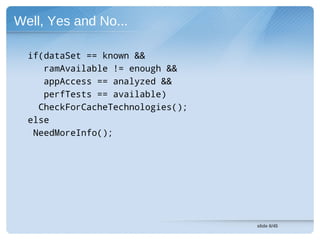
  if(dataSet == known &&
     ramAvailable != enough &&
     appAccess == analyzed &&
     perfTests == available)
    CheckForCacheTechnologies();
  else
   NeedMoreInfo();


                                   slide 6/45
Establish some wording...


                            slide 7/45
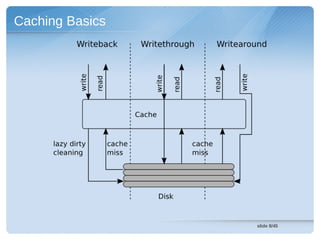
Caching Basics


                 slide 8/45
Some main features compared...


                            slide 9/45
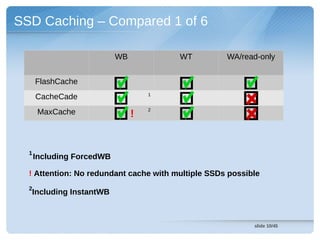
SSD Caching – Compared 1 of 6

                           WB           WT          WA/read-only


      FlashCache
      CacheCade                     1


                                    2
       MaxCache                 !


  1
      Including ForcedWB

  ! Attention: No redundant cache with multiple SSDs possible
  2
  Including InstantWB


                                                           slide 10/45
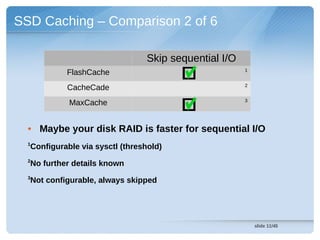
SSD Caching – Comparison 2 of 6

                                Skip sequential I/O
                                                      1
           FlashCache
                                                      2
           CacheCade
                                                      3
            MaxCache


  • Maybe your disk RAID is faster for sequential I/O
  1
  Configurable via sysctl (threshold)
  2
  No further details known
  3
  Not configurable, always skipped


                                                          slide 11/45
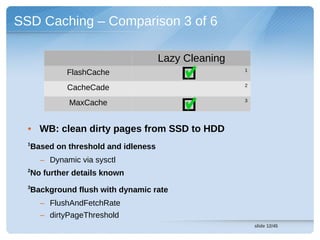
SSD Caching – Comparison 3 of 6

                                    Lazy Cleaning
                                                    1
             FlashCache
                                                    2
             CacheCade
                                                    3
             MaxCache


  • WB: clean dirty pages from SSD to HDD
  1
  Based on threshold and idleness
      – Dynamic via sysctl
  2
  No further details known
  3
  Background flush with dynamic rate
      – FlushAndFetchRate
      – dirtyPageThreshold
                                                        slide 12/45
SSD Caching – Comparison 4 of 6

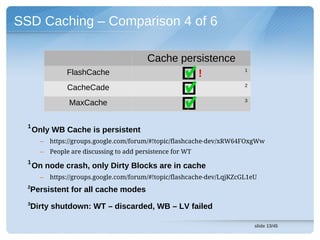
                                            Cache persistence
                 FlashCache                          !                    1


                                                                          2
                 CacheCade
                                                                          3
                  MaxCache

  1
      Only WB Cache is persistent
        –   https://groups.google.com/forum/#!topic/flashcache-dev/xRW64FOxgWw
        –   People are discussing to add persistence for WT
  1
      On node crash, only Dirty Blocks are in cache
        –   https://groups.google.com/forum/#!topic/flashcache-dev/LqjKZcGL1eU
  2
  Persistent for all cache modes
  3
  Dirty shutdown: WT – discarded, WB – LV failed

                                                                              slide 13/45
SSD Caching – Comparison 5 of 6

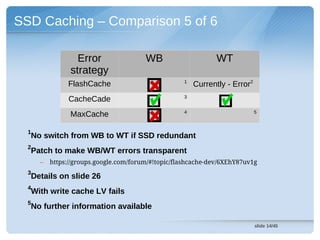
                  Error                 WB                     WT
                strategy
                                                    1
               FlashCache                               Currently - Error2
                                                    3
               CacheCade
                                                    4                        5
                MaxCache

  1
  No switch from WB to WT if SSD redundant
  2
  Patch to make WB/WT errors transparent
      –   https://groups.google.com/forum/#!topic/flashcache-dev/6XEhY87uv1g
  3
  Details on slide 26
  4
  With write cache LV fails
  5
  No further information available

                                                                             slide 14/45
SSD Caching – Comparison 6 of 6


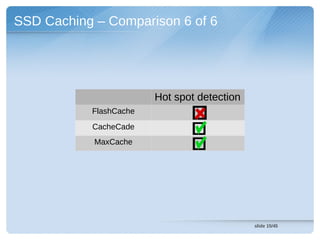
                        Hot spot detection
           FlashCache
           CacheCade
            MaxCache


                                             slide 15/45
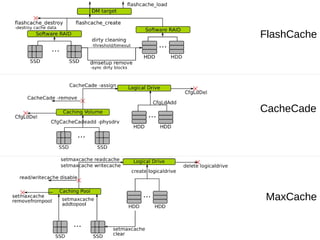
FlashCache


CacheCade


 MaxCache
Take a closer look...


                        slide 17/45
Not an official logo.
       Source: deviantart.com


            FlashCache
        Not all about Facebook is bad...
Visit https://github.com/facebook/flashcache/


                                                slide 18/45
FlashCache – Introduction

  • Open Source :D
    – Get code from Github
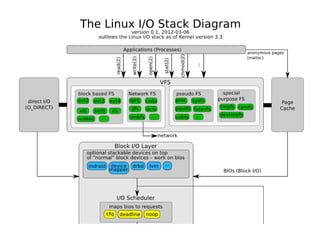
  • Using Linux Device Mapper (cf. LVM)
    – Visit our I/O stack diagram
        • http://www.thomas-krenn.com/en/oss/linux-io-stack-diagram.html

    – Based on dm-cache
  • Easy to deploy and use
    – Compile
    – Load one kernel module


                                                                      slide 19/45
FlashCache – Highlights

  • FIFO/LRU replacement policy – online changeable
  • Define process blacklist/whitelist
  • Cleaning of dirty blocks configurable
    – Threshold
    – Idleness
  • Error injection flags via sysctl
    – E.g. READCACHE_ERROR
  • Detailed Cache statistics
    – dmsetup table


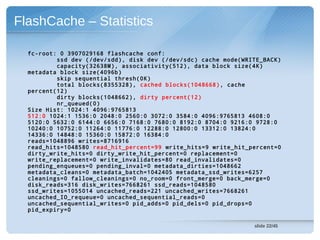
                                               slide 21/45
FlashCache – Statistics

  fc-root: 0 3907029168 flashcache conf:
          ssd dev (/dev/sdd), disk dev (/dev/sdc) cache mode(WRITE_BACK)
          capacity(32638M), associativity(512), data block size(4K)
  metadata block size(4096b)
          skip sequential thresh(0K)
          total blocks(8355328), cached blocks(1048668) , cache
  percent(12)
          dirty blocks(1048662), dirty percent(12)
          nr_queued(0)
  Size Hist: 1024:1 4096:9765813
  512:0 1024:1 1536:0 2048:0 2560:0 3072:0 3584:0 4096:9765813 4608:0
  5120:0 5632:0 6144:0 6656:0 7168:0 7680:0 8192:0 8704:0 9216:0 9728:0
  10240:0 10752:0 11264:0 11776:0 12288:0 12800:0 13312:0 13824:0
  14336:0 14848:0 15360:0 15872:0 16384:0
  reads=1048896 writes=8716916
  read_hits=1048580 read_hit_percent=99 write_hits=9 write_hit_percent=0
  dirty_write_hits=0 dirty_write_hit_percent=0 replacement=0
  write_replacement=0 write_invalidates=80 read_invalidates=0
  pending_enqueues=0 pending_inval=0 metadata_dirties=1048662
  metadata_cleans=0 metadata_batch=1042405 metadata_ssd_writes=6257
  cleanings=0 fallow_cleanings=0 no_room=0 front_merge=0 back_merge=0
  disk_reads=316 disk_writes=7668261 ssd_reads=1048580
  ssd_writes=1055014 uncached_reads=221 uncached_writes=7668261
  uncached_IO_requeue=0 uncached_sequential_reads=0
  uncached_sequential_writes=0 pid_adds=0 pid_dels=0 pid_drops=0
  pid_expiry=0

                                                                slide 22/45
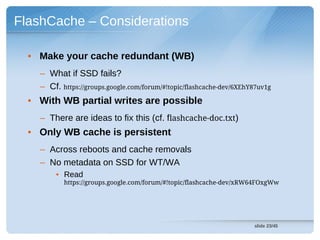
FlashCache – Considerations

  • Make your cache redundant (WB)
    – What if SSD fails?
    – Cf. https://groups.google.com/forum/#!topic/flashcache-dev/6XEhY87uv1g
  • With WB partial writes are possible
    – There are ideas to fix this (cf. flashcache-doc.txt)
  • Only WB cache is persistent
    – Across reboots and cache removals
    – No metadata on SSD for WT/WA
        • Read
           https://groups.google.com/forum/#!topic/flashcache-dev/xRW64FOxgWw


                                                                      slide 23/45
LSI MegaRAID CacheCade


                         slide 24/45
CacheCade – Introduction

  • Hardware-based solution
  • Caching algorithm in controller
  • Redundant SSD caches possible
    – Avoid data loss with WB


                                      slide 25/45
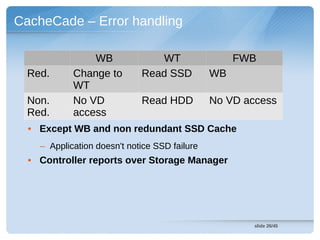
CacheCade – Error handling

                WB              WT                  FWB
  Red.      Change to        Read SSD          WB
            WT
  Non.      No VD            Read HDD          No VD access
  Red.      access
  • Except WB and non redundant SSD Cache
    – Application doesn't notice SSD failure
  • Controller reports over Storage Manager


                                                       slide 26/45
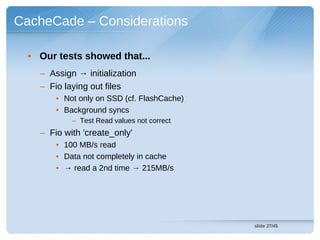
CacheCade – Considerations

  • Our tests showed that...
    – Assign → initialization
    – Fio laying out files
        • Not only on SSD (cf. FlashCache)
        • Background syncs
            – Test Read values not correct
    – Fio with 'create_only'
        • 100 MB/s read
        • Data not completely in cache
        • → read a 2nd time → 215MB/s


                                             slide 27/45
Adaptec MaxCache


                   slide 28/45
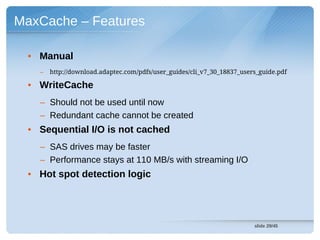
MaxCache – Features

  • Manual
    –   http://download.adaptec.com/pdfs/user_guides/cli_v7_30_18837_users_guide.pdf

  • WriteCache
    – Should not be used until now
    – Redundant cache cannot be created
  • Sequential I/O is not cached
    – SAS drives may be faster
    – Performance stays at 110 MB/s with streaming I/O
  • Hot spot detection logic


                                                                         slide 29/45
At the end its all down to performance...
Prepare to get this...
People might promise you...
Test your own specific application.
If you want with a little help from us :)


                                   slide 33/45
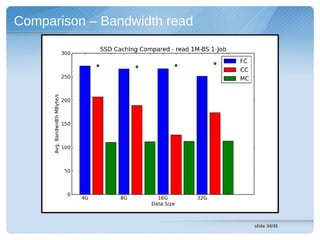
Comparison – Bandwidth read


                              slide 34/45
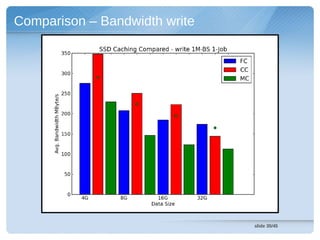
Comparison – Bandwidth write


                               slide 35/45
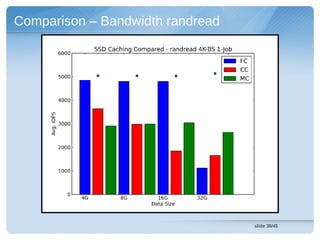
Comparison – Bandwidth randread


                                  slide 36/45
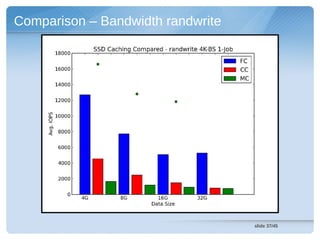
Comparison – Bandwidth randwrite


                                   slide 37/45
Still to analyze...


                      slide 38/45
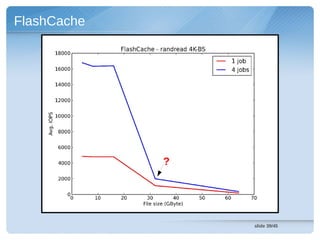
FlashCache


             ?


                 slide 39/45
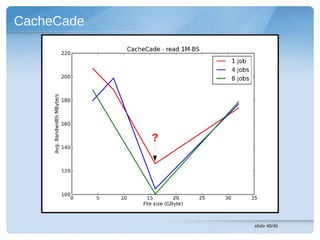
CacheCade


            ?


                slide 40/45
Summary – avoiding errors while
          testing...


                              slide 41/45
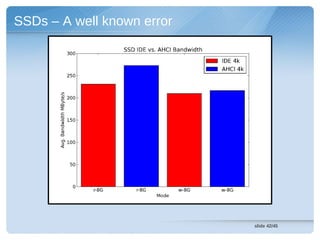
SSDs – A well known error


                            slide 42/45
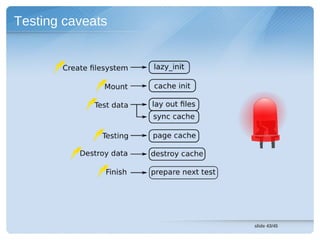
Testing caveats


                  slide 43/45
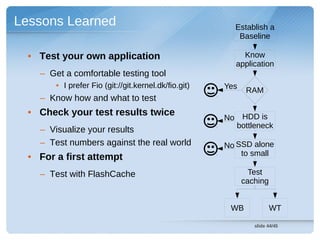
Lessons Learned                                          Establish a
                                                          Baseline

  • Test your own application                              Know
                                                         application
    – Get a comfortable testing tool
        • I prefer Fio (git://git.kernel.dk/fio.git)   Yes    RAM
    – Know how and what to test
  • Check your test results twice
                                                       No HDD is
                                                         bottleneck
    – Visualize your results
    – Test numbers against the real world              No SSD alone
                                                           to small
  • For a first attempt
    – Test with FlashCache                                     Test
                                                             caching


                                                        WB             WT

                                                                slide 44/45
Questions?
  Do not hesitate to ask us
       (you can do it per mail also)
You want some test protocols?
  You need a special chart?


                                       slide 45/45
Thanks for your time
Visit our booth -
Open Source Sponsorship
and Low Energy Server
References

•    http://greenarrow.deviantart.com/art/The-Flash-Wally-West-35885287

•    https://upload.wikimedia.org/wikipedia/commons/6/62/2006-07-26AbendhimmelRemstal19.jpg

•    http://openclipart.org/detail/15238/tortue1-by-roym

•    http://openclipart.org/detail/34657/architetto---struzzo-by-anonymous

•    http://openclipart.org/detail/11118/check-sign-and-cross-sign-by-jetxee

•    http://openclipart.org/detail/124837/led-lamp-by-eggib

•    http://b--art.deviantart.com/art/Riddler-62371451


                                                                               slide 47/45
Backup Slides


                slide 48/45
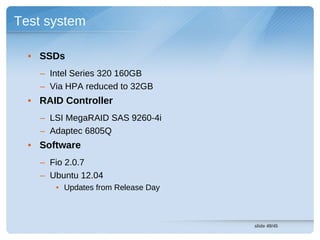
Test system

  • SSDs
    – Intel Series 320 160GB
    – Via HPA reduced to 32GB
  • RAID Controller
    – LSI MegaRAID SAS 9260-4i
    – Adaptec 6805Q
  • Software
    – Fio 2.0.7
    – Ubuntu 12.04
       • Updates from Release Day


                                    slide 49/45
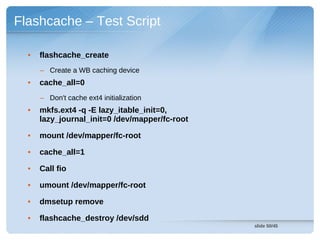
Flashcache – Test Script

  •   flashcache_create
      – Create a WB caching device
  •   cache_all=0
      – Don't cache ext4 initialization
  •   mkfs.ext4 -q -E lazy_itable_init=0,
      lazy_journal_init=0 /dev/mapper/fc-root

  •   mount /dev/mapper/fc-root

  •   cache_all=1

  •   Call fio

  •   umount /dev/mapper/fc-root

  •   dmsetup remove

  •   flashcache_destroy /dev/sdd
                                                slide 50/45
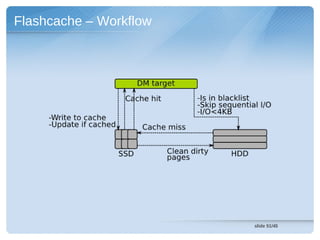
Flashcache – Workflow


                        slide 51/45
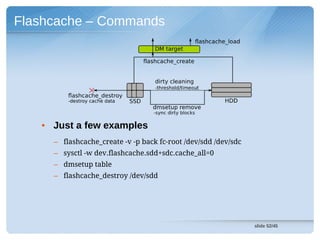
Flashcache – Commands


   • Just a few examples
     – flashcache_create -v -p back fc-root /dev/sdd /dev/sdc
     – sysctl -w dev.flashcache.sdd+sdc.cache_all=0
     – dmsetup table
     – flashcache_destroy /dev/sdd


                                                                slide 52/45

SSD Caching: Device-Mapper- and Hardware-based solutions compared

  • 1.
    SSD Caching: Device-Mapper- and Hardware-based solutionscompared Werner Fischer & Georg Schönberger Technology Specialists Thomas-Krenn.AG 18. LinuxTag / Berlin / Germany 24th May 2011
  • 2.
    Agenda • Introduction • Technologies compared • A few details • Performance results • Test strategy • Lessons learned slide 2/45
  • 3.
    Introduction Source: xkcd.com Do things the right way! slide 3/45
  • 4.
    Introduction who is Server & accessories based in Freyung, serving all over Europe "Made in Germany" Bavaria slide 4/45
  • 5.
    Should I useSSD caching? slide 5/45
  • 6.
    Well, Yes andNo... if(dataSet == known && ramAvailable != enough && appAccess == analyzed && perfTests == available) CheckForCacheTechnologies(); else NeedMoreInfo(); slide 6/45
  • 7.
  • 8.
    Caching Basics slide 8/45
  • 9.
    Some main featurescompared... slide 9/45
  • 10.
    SSD Caching –Compared 1 of 6 WB WT WA/read-only FlashCache CacheCade 1 2 MaxCache ! 1 Including ForcedWB ! Attention: No redundant cache with multiple SSDs possible 2 Including InstantWB slide 10/45
  • 11.
    SSD Caching –Comparison 2 of 6 Skip sequential I/O 1 FlashCache 2 CacheCade 3 MaxCache • Maybe your disk RAID is faster for sequential I/O 1 Configurable via sysctl (threshold) 2 No further details known 3 Not configurable, always skipped slide 11/45
  • 12.
    SSD Caching –Comparison 3 of 6 Lazy Cleaning 1 FlashCache 2 CacheCade 3 MaxCache • WB: clean dirty pages from SSD to HDD 1 Based on threshold and idleness – Dynamic via sysctl 2 No further details known 3 Background flush with dynamic rate – FlushAndFetchRate – dirtyPageThreshold slide 12/45
  • 13.
    SSD Caching –Comparison 4 of 6 Cache persistence FlashCache ! 1 2 CacheCade 3 MaxCache 1 Only WB Cache is persistent – https://groups.google.com/forum/#!topic/flashcache-dev/xRW64FOxgWw – People are discussing to add persistence for WT 1 On node crash, only Dirty Blocks are in cache – https://groups.google.com/forum/#!topic/flashcache-dev/LqjKZcGL1eU 2 Persistent for all cache modes 3 Dirty shutdown: WT – discarded, WB – LV failed slide 13/45
  • 14.
    SSD Caching –Comparison 5 of 6 Error WB WT strategy 1 FlashCache Currently - Error2 3 CacheCade 4 5 MaxCache 1 No switch from WB to WT if SSD redundant 2 Patch to make WB/WT errors transparent – https://groups.google.com/forum/#!topic/flashcache-dev/6XEhY87uv1g 3 Details on slide 26 4 With write cache LV fails 5 No further information available slide 14/45
  • 15.
    SSD Caching –Comparison 6 of 6 Hot spot detection FlashCache CacheCade MaxCache slide 15/45
  • 16.
  • 17.
    Take a closerlook... slide 17/45
  • 18.
    Not an officiallogo. Source: deviantart.com FlashCache Not all about Facebook is bad... Visit https://github.com/facebook/flashcache/ slide 18/45
  • 19.
    FlashCache – Introduction • Open Source :D – Get code from Github • Using Linux Device Mapper (cf. LVM) – Visit our I/O stack diagram • http://www.thomas-krenn.com/en/oss/linux-io-stack-diagram.html – Based on dm-cache • Easy to deploy and use – Compile – Load one kernel module slide 19/45
  • 21.
    FlashCache – Highlights • FIFO/LRU replacement policy – online changeable • Define process blacklist/whitelist • Cleaning of dirty blocks configurable – Threshold – Idleness • Error injection flags via sysctl – E.g. READCACHE_ERROR • Detailed Cache statistics – dmsetup table slide 21/45
  • 22.
    FlashCache – Statistics fc-root: 0 3907029168 flashcache conf: ssd dev (/dev/sdd), disk dev (/dev/sdc) cache mode(WRITE_BACK) capacity(32638M), associativity(512), data block size(4K) metadata block size(4096b) skip sequential thresh(0K) total blocks(8355328), cached blocks(1048668) , cache percent(12) dirty blocks(1048662), dirty percent(12) nr_queued(0) Size Hist: 1024:1 4096:9765813 512:0 1024:1 1536:0 2048:0 2560:0 3072:0 3584:0 4096:9765813 4608:0 5120:0 5632:0 6144:0 6656:0 7168:0 7680:0 8192:0 8704:0 9216:0 9728:0 10240:0 10752:0 11264:0 11776:0 12288:0 12800:0 13312:0 13824:0 14336:0 14848:0 15360:0 15872:0 16384:0 reads=1048896 writes=8716916 read_hits=1048580 read_hit_percent=99 write_hits=9 write_hit_percent=0 dirty_write_hits=0 dirty_write_hit_percent=0 replacement=0 write_replacement=0 write_invalidates=80 read_invalidates=0 pending_enqueues=0 pending_inval=0 metadata_dirties=1048662 metadata_cleans=0 metadata_batch=1042405 metadata_ssd_writes=6257 cleanings=0 fallow_cleanings=0 no_room=0 front_merge=0 back_merge=0 disk_reads=316 disk_writes=7668261 ssd_reads=1048580 ssd_writes=1055014 uncached_reads=221 uncached_writes=7668261 uncached_IO_requeue=0 uncached_sequential_reads=0 uncached_sequential_writes=0 pid_adds=0 pid_dels=0 pid_drops=0 pid_expiry=0 slide 22/45
  • 23.
    FlashCache – Considerations • Make your cache redundant (WB) – What if SSD fails? – Cf. https://groups.google.com/forum/#!topic/flashcache-dev/6XEhY87uv1g • With WB partial writes are possible – There are ideas to fix this (cf. flashcache-doc.txt) • Only WB cache is persistent – Across reboots and cache removals – No metadata on SSD for WT/WA • Read https://groups.google.com/forum/#!topic/flashcache-dev/xRW64FOxgWw slide 23/45
  • 24.
  • 25.
    CacheCade – Introduction • Hardware-based solution • Caching algorithm in controller • Redundant SSD caches possible – Avoid data loss with WB slide 25/45
  • 26.
    CacheCade – Errorhandling WB WT FWB Red. Change to Read SSD WB WT Non. No VD Read HDD No VD access Red. access • Except WB and non redundant SSD Cache – Application doesn't notice SSD failure • Controller reports over Storage Manager slide 26/45
  • 27.
    CacheCade – Considerations • Our tests showed that... – Assign → initialization – Fio laying out files • Not only on SSD (cf. FlashCache) • Background syncs – Test Read values not correct – Fio with 'create_only' • 100 MB/s read • Data not completely in cache • → read a 2nd time → 215MB/s slide 27/45
  • 28.
    Adaptec MaxCache slide 28/45
  • 29.
    MaxCache – Features • Manual – http://download.adaptec.com/pdfs/user_guides/cli_v7_30_18837_users_guide.pdf • WriteCache – Should not be used until now – Redundant cache cannot be created • Sequential I/O is not cached – SAS drives may be faster – Performance stays at 110 MB/s with streaming I/O • Hot spot detection logic slide 29/45
  • 30.
    At the endits all down to performance...
  • 31.
  • 32.
  • 33.
    Test your ownspecific application. If you want with a little help from us :) slide 33/45
  • 34.
    Comparison – Bandwidthread slide 34/45
  • 35.
    Comparison – Bandwidthwrite slide 35/45
  • 36.
    Comparison – Bandwidthrandread slide 36/45
  • 37.
    Comparison – Bandwidthrandwrite slide 37/45
  • 38.
  • 39.
    FlashCache ? slide 39/45
  • 40.
    CacheCade ? slide 40/45
  • 41.
    Summary – avoidingerrors while testing... slide 41/45
  • 42.
    SSDs – Awell known error slide 42/45
  • 43.
    Testing caveats slide 43/45
  • 44.
    Lessons Learned Establish a Baseline • Test your own application Know application – Get a comfortable testing tool • I prefer Fio (git://git.kernel.dk/fio.git) Yes RAM – Know how and what to test • Check your test results twice No HDD is bottleneck – Visualize your results – Test numbers against the real world No SSD alone to small • For a first attempt – Test with FlashCache Test caching WB WT slide 44/45
  • 45.
    Questions? Donot hesitate to ask us (you can do it per mail also) You want some test protocols? You need a special chart? slide 45/45
  • 46.
    Thanks for yourtime Visit our booth - Open Source Sponsorship and Low Energy Server
  • 47.
    References • http://greenarrow.deviantart.com/art/The-Flash-Wally-West-35885287 • https://upload.wikimedia.org/wikipedia/commons/6/62/2006-07-26AbendhimmelRemstal19.jpg • http://openclipart.org/detail/15238/tortue1-by-roym • http://openclipart.org/detail/34657/architetto---struzzo-by-anonymous • http://openclipart.org/detail/11118/check-sign-and-cross-sign-by-jetxee • http://openclipart.org/detail/124837/led-lamp-by-eggib • http://b--art.deviantart.com/art/Riddler-62371451 slide 47/45
  • 48.
    Backup Slides slide 48/45
  • 49.
    Test system • SSDs – Intel Series 320 160GB – Via HPA reduced to 32GB • RAID Controller – LSI MegaRAID SAS 9260-4i – Adaptec 6805Q • Software – Fio 2.0.7 – Ubuntu 12.04 • Updates from Release Day slide 49/45
  • 50.
    Flashcache – TestScript • flashcache_create – Create a WB caching device • cache_all=0 – Don't cache ext4 initialization • mkfs.ext4 -q -E lazy_itable_init=0, lazy_journal_init=0 /dev/mapper/fc-root • mount /dev/mapper/fc-root • cache_all=1 • Call fio • umount /dev/mapper/fc-root • dmsetup remove • flashcache_destroy /dev/sdd slide 50/45
  • 51.
  • 52.
    Flashcache – Commands • Just a few examples – flashcache_create -v -p back fc-root /dev/sdd /dev/sdc – sysctl -w dev.flashcache.sdd+sdc.cache_all=0 – dmsetup table – flashcache_destroy /dev/sdd slide 52/45