



스프링 시큐리티로 시작하는
웹 어플리케이션 보안
자바카페 임형태
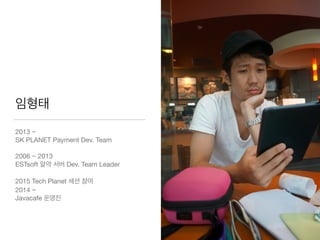
임형태
2013 ~ 

SK PLANET Payment Dev. Team

2006 ~ 2013 

ESTsoft 알약 서버 Dev. Team Leader

2015 Tech Planet 세션 참여

2014 ~

Javacafe 운영진
2014. 3. 6
홈페이지
해킹 사건
Paros를 이용하여 고객
센터 홈페이지 취약점을
분석, 이를 이용한 고객
정보 무작위 조회로 대량
의 고객정보 유출
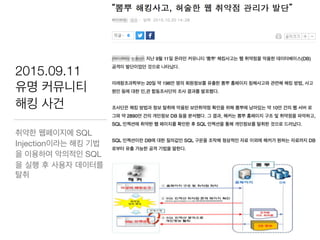
2015.09.11
유명 커뮤니티
해킹 사건
취약한 웹페이지에 SQL
Injection이라는 해킹 기법
을 이용하여 악의적인 SQL
을 실행 후 사용자 데이터를
탈취
– Wikipedia
‘정보 시스템 안에 존재하는 하드웨어와 소프트웨어
그리고 정보들을 탈취와 훼손으로부터 보호’
스프링 시큐리티 사용법
& 웹 어플리케이션 보안
우리가 가져갈 두 녀석
https://www.flickr.com/photos/11325321
앞으로 우리는…
• 스프링, 스프링 부트 그리고 스프링 시큐리티
• 샘플 프로젝트 들여다보기- ‘계’발자 창업하기
• 로그인 기능 추가하기 - 착한 놈, 이상한 놈, 나쁜 놈 구분하기
• 비밀번호 암호화 강도 높이기 - 도둑놈 대비하기
• 스프링, 스프링 그리고 스프링 스프링 부트와 스프링 시큐리티
– Spring Boot
“Just run”
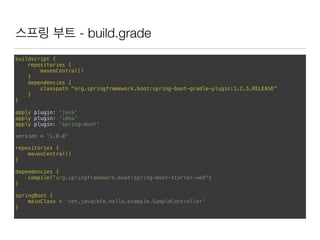
스프링 부트 - build.grade
buildscript {
repositories {
mavenCentral()

}
dependencies {
classpath "org.springframework.boot:spring-boot-gradle-plugin:1.2.5.RELEASE"
}
}
apply plugin: 'java'

apply plugin: 'idea'

apply plugin: 'spring-boot'


version = '1.0.0'


repositories {

mavenCentral()

}


dependencies {

compile("org.springframework.boot:spring-boot-starter-web")

}


springBoot {

mainClass = 'net.javacafe.hello.example.SampleController'

}
스프링 부트 - Java code
import org.springframework.boot.SpringApplication;

import org.springframework.boot.autoconfigure.EnableAutoConfiguration;

import org.springframework.stereotype.Controller;

import org.springframework.web.bind.annotation.RequestMapping;

import org.springframework.web.bind.annotation.ResponseBody;


@Controller

@EnableAutoConfiguration

public class SampleController {


@RequestMapping("/")

@ResponseBody

String home() {

return "<h1>Hello World!<br/>Hello Java Cafe!!</h1>";

}


public static void main(String[] args) throws Exception {

SpringApplication.run(SampleController.class, args);

}

}
스프링 부트 샘플 데모
javacafe-spring-security-sample/hello-spring-boot
http://projects.spring.io/spring-boot/
– Spring Security
“Comprehensive and extensible support for
both Authentication and Authorization”
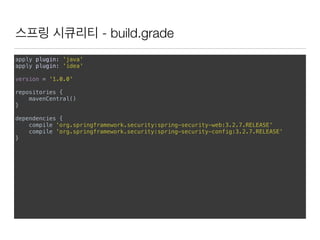
스프링 시큐리티 - build.grade
apply plugin: 'java'

apply plugin: 'idea'


version = '1.0.0'


repositories {

mavenCentral()

}


dependencies {

compile 'org.springframework.security:spring-security-web:3.2.7.RELEASE'

compile 'org.springframework.security:spring-security-config:3.2.7.RELEASE'

}
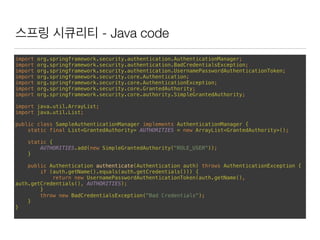
스프링 시큐리티 - Java code
import org.springframework.security.authentication.AuthenticationManager;

import org.springframework.security.authentication.BadCredentialsException;

import org.springframework.security.authentication.UsernamePasswordAuthenticationToken;

import org.springframework.security.core.Authentication;

import org.springframework.security.core.AuthenticationException;

import org.springframework.security.core.GrantedAuthority;

import org.springframework.security.core.authority.SimpleGrantedAuthority;


import java.util.ArrayList;

import java.util.List;


public class SampleAuthenticationManager implements AuthenticationManager {

static final List<GrantedAuthority> AUTHORITIES = new ArrayList<GrantedAuthority>();


static {

AUTHORITIES.add(new SimpleGrantedAuthority("ROLE_USER"));

}


public Authentication authenticate(Authentication auth) throws AuthenticationException {

if (auth.getName().equals(auth.getCredentials())) {

return new UsernamePasswordAuthenticationToken(auth.getName(),
auth.getCredentials(), AUTHORITIES);

}

throw new BadCredentialsException("Bad Credentials");

}

}
스프링 시큐리티 - Java code
import org.springframework.security.authentication.AuthenticationManager;

import org.springframework.security.authentication.UsernamePasswordAuthenticationToken;

import org.springframework.security.core.Authentication;

import org.springframework.security.core.AuthenticationException;

import org.springframework.security.core.context.SecurityContextHolder;


public class AuthenticationExample {

static AuthenticationManager authenticationManager = new SampleAuthenticationManager();


public static void main(String[] args) throws Exception {

BufferedReader in = new BufferedReader(new InputStreamReader(System.in));

while (true) {

String name = in.readLine();

String password = in.readLine();

try {

Authentication req = new UsernamePasswordAuthenticationToken(name, password);

Authentication result = authenticationManager.authenticate(req);

SecurityContextHolder.getContext().setAuthentication(result);

break;

} catch (AuthenticationException e) {

System.out.println("Authentication failed: " + e.getMessage());

}

}

System.out.println(SecurityContextHolder.getContext().getAuthentication());

}

}
스프링 시큐리티 샘플 데모
javacafe-spring-security-sample/hello-spring-security
http://projects.spring.io/spring-security/
The Acegi Security System for Spring
without Authentication Process
http://sourceforge.net/projects/acegisecurity/
개발자,
제2의 커널 샌더스를 꿈꾸다
‘계’발자 프로젝트 시작
https://www.flickr.com/photos/128927323
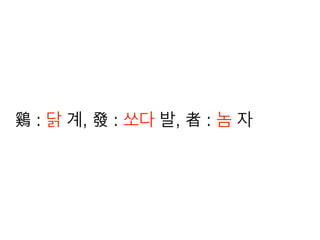
鷄發者
鷄 : 닭 계, 發 : 쏘다 발, 者 : 놈 자
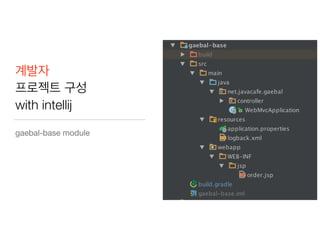
계발자
프로젝트 구성
with intellij
gaebal-base module
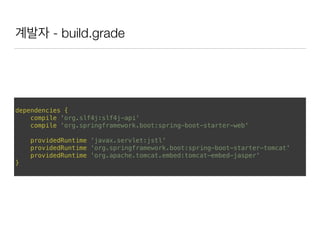
계발자 - build.grade


dependencies {

compile 'org.slf4j:slf4j-api'

compile 'org.springframework.boot:spring-boot-starter-web'


providedRuntime 'javax.servlet:jstl'

providedRuntime 'org.springframework.boot:spring-boot-starter-tomcat'

providedRuntime 'org.apache.tomcat.embed:tomcat-embed-jasper'

}
계발자 - Java code
import org.springframework.boot.autoconfigure.EnableAutoConfiguration;

import org.springframework.boot.builder.SpringApplicationBuilder;

import org.springframework.boot.context.embedded.EmbeddedServletContainerCustomizer;

import org.springframework.boot.context.web.SpringBootServletInitializer;

import org.springframework.context.annotation.Bean;

import org.springframework.context.annotation.ComponentScan;

import org.springframework.context.annotation.Configuration;


@Configuration

@ComponentScan

@EnableAutoConfiguration

public class WebMvcApplication extends SpringBootServletInitializer {

@Override

protected SpringApplicationBuilder configure(SpringApplicationBuilder application) {

return application.sources(WebMvcApplication.class);

}

public static void main(String[] args) {

SpringApplicationBuilder builder = new SpringApplicationBuilder();


WebMvcApplication application = new WebMvcApplication();

application.configure(builder);


builder.run(args);

}

@Bean

public EmbeddedServletContainerCustomizer embeddedServletContainerCustomizer() {

return factory -> factory.setDocumentRoot(new File("gaebal-base/src/main/webapp"));

}

}
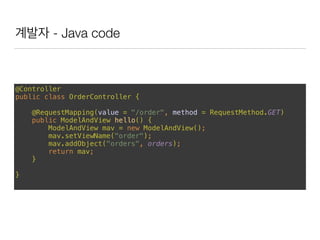
계발자 - Java code
@Controller

public class OrderController {


@RequestMapping(value = "/order", method = RequestMethod.GET)

public ModelAndView hello() {

ModelAndView mav = new ModelAndView();

mav.setViewName("order");

mav.addObject("orders", orders);

return mav;

}


}
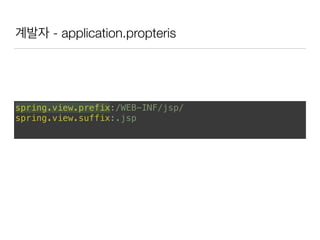
계발자 - application.propteris
spring.view.prefix:/WEB-INF/jsp/

spring.view.suffix:.jsp
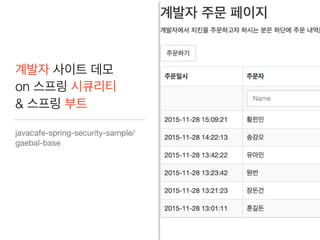
계발자 사이트 데모
on 스프링 시큐리티
& 스프링 부트
javacafe-spring-security-sample/
gaebal-base
어느 날, 낚이다. 치킨 50마리 주문에… ㅠㅠ
https://www.flickr.com/photos/atony/6943946011/
왜 낚였을까요?
실제 주문자 != 입력된 정보
누구냐 넌? 인증, Authentication
https://www.flickr.com/photos/marcobellucci/3534516458
주문자를 인증해보자. 그런데 어떻게?@@
–Wikipedia
‘진짜라고 주장하는 한 개체(entity)의 일부분을 나타내
는 데이터가 진실인지 여부를 확인하는 행위(act)’
아이디, 패스워드로 로그인 한다.
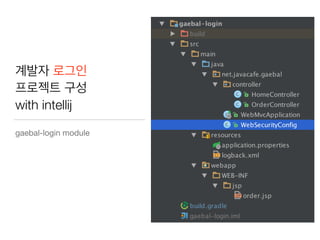
계발자 로그인
프로젝트 구성
with intellij
gaebal-login module
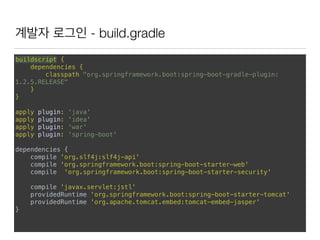
계발자 로그인 - build.gradle
buildscript {

dependencies {

classpath "org.springframework.boot:spring-boot-gradle-plugin:
1.2.5.RELEASE"

}

}


apply plugin: 'java'

apply plugin: 'idea'

apply plugin: 'war'

apply plugin: 'spring-boot'


dependencies {

compile 'org.slf4j:slf4j-api'

compile 'org.springframework.boot:spring-boot-starter-web'

compile 'org.springframework.boot:spring-boot-starter-security'


compile 'javax.servlet:jstl'

providedRuntime 'org.springframework.boot:spring-boot-starter-tomcat'

providedRuntime 'org.apache.tomcat.embed:tomcat-embed-jasper'

}
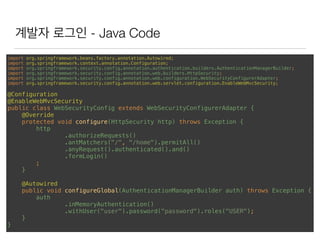
계발자 로그인 - Java Code
import org.springframework.beans.factory.annotation.Autowired;

import org.springframework.context.annotation.Configuration;

import org.springframework.security.config.annotation.authentication.builders.AuthenticationManagerBuilder;

import org.springframework.security.config.annotation.web.builders.HttpSecurity;

import org.springframework.security.config.annotation.web.configuration.WebSecurityConfigurerAdapter;

import org.springframework.security.config.annotation.web.servlet.configuration.EnableWebMvcSecurity;


@Configuration

@EnableWebMvcSecurity

public class WebSecurityConfig extends WebSecurityConfigurerAdapter {

@Override

protected void configure(HttpSecurity http) throws Exception {

http

.authorizeRequests()

.antMatchers("/", "/home").permitAll()

.anyRequest().authenticated().and()

.formLogin()

;

}


@Autowired

public void configureGlobal(AuthenticationManagerBuilder auth) throws Exception {

auth

.inMemoryAuthentication()

.withUser("user").password("password").roles("USER");

}

}
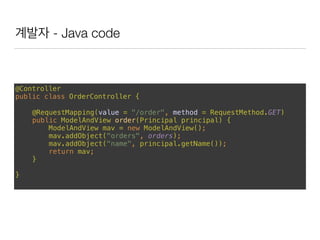
계발자 - Java code
@Controller

public class OrderController {

@RequestMapping(value = "/order", method = RequestMethod.GET)

public ModelAndView order(Principal principal) {

ModelAndView mav = new ModelAndView();

mav.addObject("orders", orders);

mav.addObject("name", principal.getName());

return mav;

}
}
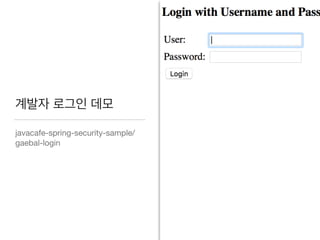
계발자 로그인 데모
javacafe-spring-security-sample/
gaebal-login
이게 끝? 네 ^^;
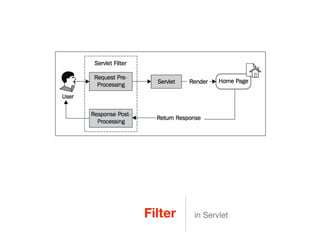
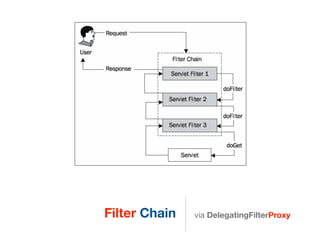
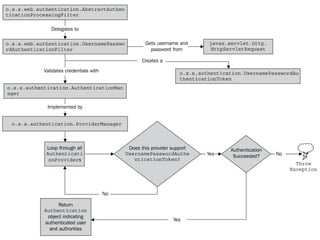
Filter in Servlet
Filter Chain via DelegatingFilterProxy
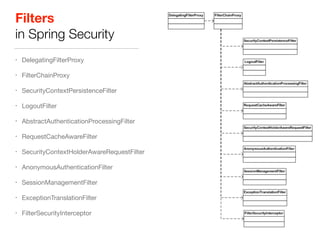
Filters
in Spring Security
• DelegatingFilterProxy

• FilterChainProxy

• SecurityContextPersistenceFilter

• LogoutFilter

• AbstractAuthenticationProcessingFilter

• RequestCacheAwareFilter

• SecurityContextHolderAwareRequestFilter

• AnonymousAuthenticationFilter

• SessionManagementFilter

• ExceptionTranslationFilter

• FilterSecurityInterceptor
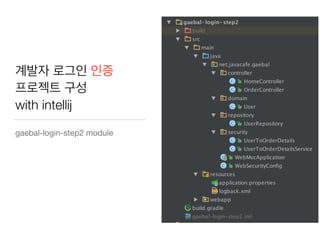
계발자 로그인 인증
프로젝트 구성
with intellij
gaebal-login-step2 module
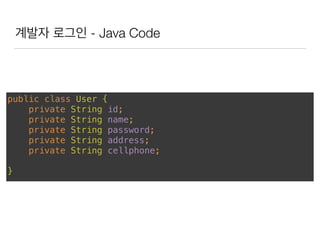
계발자 로그인 - Java Code
public class User {

private String id;

private String name;

private String password;

private String address;

private String cellphone;


}
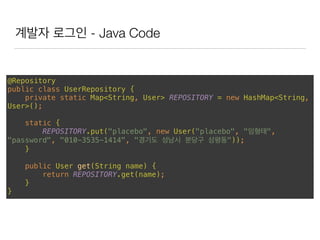
계발자 로그인 - Java Code
@Repository

public class UserRepository {

private static Map<String, User> REPOSITORY = new HashMap<String,
User>();


static {

REPOSITORY.put("placebo", new User("placebo", "임형태",
"password", "010-3535-1414", "경기도 성남시 분당구 삼평동"));

}


public User get(String name) {

return REPOSITORY.get(name);

}

}
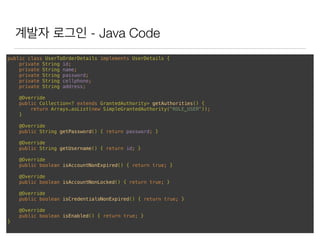
계발자 로그인 - Java Code
public class UserToOrderDetails implements UserDetails {

private String id;

private String name;

private String password;

private String cellphone;

private String address;


@Override

public Collection<? extends GrantedAuthority> getAuthorities() {

return Arrays.asList(new SimpleGrantedAuthority("ROLE_USER"));

}


@Override

public String getPassword() { return password; }


@Override

public String getUsername() { return id; }


@Override

public boolean isAccountNonExpired() { return true; }


@Override

public boolean isAccountNonLocked() { return true; }


@Override

public boolean isCredentialsNonExpired() { return true; }


@Override

public boolean isEnabled() { return true; }

}
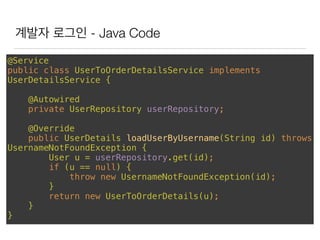
계발자 로그인 - Java Code
@Service

public class UserToOrderDetailsService implements
UserDetailsService {


@Autowired

private UserRepository userRepository;


@Override

public UserDetails loadUserByUsername(String id) throws
UsernameNotFoundException {

User u = userRepository.get(id);

if (u == null) {

throw new UsernameNotFoundException(id);

}

return new UserToOrderDetails(u);

}

}
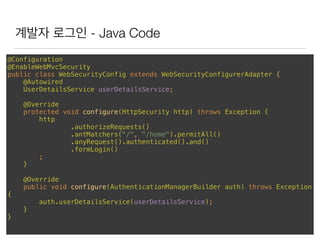
계발자 로그인 - Java Code
@Configuration

@EnableWebMvcSecurity

public class WebSecurityConfig extends WebSecurityConfigurerAdapter {

@Autowired

UserDetailsService userDetailsService;


@Override

protected void configure(HttpSecurity http) throws Exception {

http

.authorizeRequests()

.antMatchers("/", "/home").permitAll()

.anyRequest().authenticated().and()

.formLogin()

;

}


@Override

public void configure(AuthenticationManagerBuilder auth) throws Exception
{

auth.userDetailsService(userDetailsService);

}

}
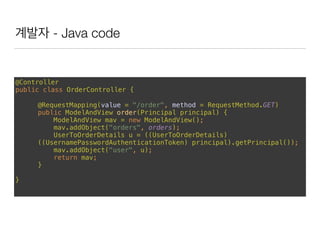
계발자 - Java code
@Controller

public class OrderController {

@RequestMapping(value = "/order", method = RequestMethod.GET)

public ModelAndView order(Principal principal) {

ModelAndView mav = new ModelAndView();

mav.addObject("orders", orders);

UserToOrderDetails u = ((UserToOrderDetails)
((UsernamePasswordAuthenticationToken) principal).getPrincipal());

mav.addObject("user", u);

return mav;

}
}
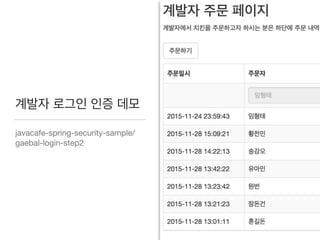
계발자 로그인 인증 데모
javacafe-spring-security-sample/
gaebal-login-step2
누군가 패스워드를
훔쳐보고 있다!
그래서 우리는
https://www.flickr.com/photos/ralph-thompson/8558694387
암호화 해시 함수
Cryptographic hash function
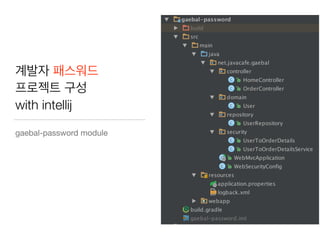
계발자 패스워드
프로젝트 구성
with intellij
gaebal-password module
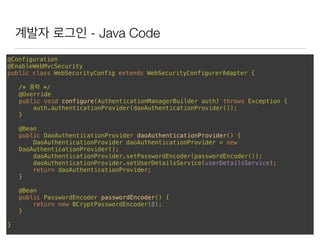
계발자 로그인 - Java Code
@Configuration

@EnableWebMvcSecurity

public class WebSecurityConfig extends WebSecurityConfigurerAdapter {

/* 중략 */

@Override

public void configure(AuthenticationManagerBuilder auth) throws Exception {

auth.authenticationProvider(daoAuthenticationProvider());

}


@Bean

public DaoAuthenticationProvider daoAuthenticationProvider() {

DaoAuthenticationProvider daoAuthenticationProvider = new
DaoAuthenticationProvider();

daoAuthenticationProvider.setPasswordEncoder(passwordEncoder());

daoAuthenticationProvider.setUserDetailsService(userDetailsService);

return daoAuthenticationProvider;

}


@Bean

public PasswordEncoder passwordEncoder() {

return new BCryptPasswordEncoder(8);

}
}
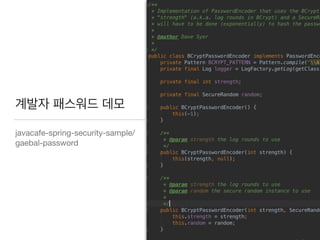
계발자 패스워드 데모
javacafe-spring-security-sample/
gaebal-password
그런데 패스워드는
왜 해시 암호화 해서
저장해야 할까요?
이게 먼 또라이 같은 소리 일까요?
https://www.flickr.com/photos/andrew_mc_d/452713618
해시 함수로의 특징
• 동일한 입력 = 동일한 출력

• 빠른 처리 속도
https://www.flickr.com/photos/27190564@N02/21030267623/i
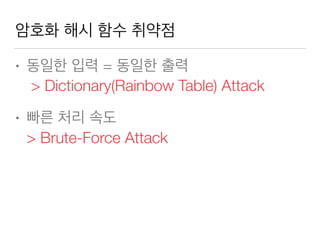
암호화 해시 함수 취약점
• 동일한 입력 = 동일한 출력 

> Dictionary(Rainbow Table) Attack
• 빠른 처리 속도

> Brute-Force Attack
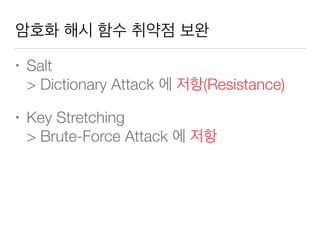
암호화 해시 함수 취약점 보완
• Salt

> Dictionary Attack 에 저항(Resistance)
• Key Stretching

> Brute-Force Attack 에 저항
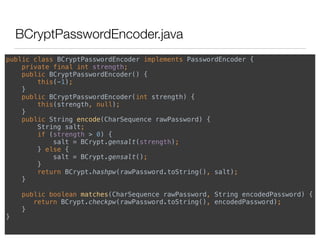
BCryptPasswordEncoder.java
public class BCryptPasswordEncoder implements PasswordEncoder {

private final int strength;

public BCryptPasswordEncoder() {

this(-1);

}

public BCryptPasswordEncoder(int strength) {

this(strength, null);

}

public String encode(CharSequence rawPassword) {

String salt;

if (strength > 0) {

salt = BCrypt.gensalt(strength);

} else {

salt = BCrypt.gensalt();

}

return BCrypt.hashpw(rawPassword.toString(), salt);

}


public boolean matches(CharSequence rawPassword, String encodedPassword) {

return BCrypt.checkpw(rawPassword.toString(), encodedPassword);

}

}
그러면
저는 어떤 해시 알고리즘으로
패스워드를 암호화해서 저장할까요?
현업에서!!!!!!!!!!!!!!!!!!!!!!!!!!!!!!!!
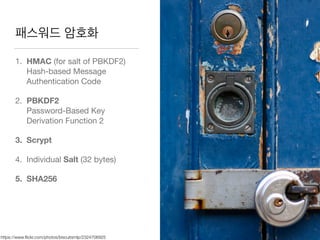
패스워드 암호화
1. HMAC (for salt of PBKDF2)

Hash-based Message
Authentication Code

2. PBKDF2

Password-Based Key
Derivation Function 2

3. Scrypt
4. Individual Salt (32 bytes)

5. SHA256
https://www.flickr.com/photos/biscuitsmlp/2324706925
마치며 이제 첫 걸음(!!!!) 입니다. ^^;;
https://www.flickr.com/photos/10213764@N02/1485773850/
– Thomas Reid's Essays on the Intellectual Powers of Man, 1786
‘A chain is only as strong as its weakest link.’
감사합니다. And Q&A
https://www.flickr.com/photos/orinrobertjohn/239595034

스프링 시큐리티로 시작하는 웹 어플리케이션 보안

  • 1.
    스프링 시큐리티로 시작하는 웹어플리케이션 보안 자바카페 임형태
  • 2.
    임형태 2013 ~ SKPLANET Payment Dev. Team 2006 ~ 2013 ESTsoft 알약 서버 Dev. Team Leader 2015 Tech Planet 세션 참여 2014 ~ Javacafe 운영진
  • 3.
    2014. 3. 6 홈페이지 해킹사건 Paros를 이용하여 고객 센터 홈페이지 취약점을 분석, 이를 이용한 고객 정보 무작위 조회로 대량 의 고객정보 유출
  • 4.
    2015.09.11 유명 커뮤니티 해킹 사건 취약한웹페이지에 SQL Injection이라는 해킹 기법 을 이용하여 악의적인 SQL 을 실행 후 사용자 데이터를 탈취
  • 5.
    – Wikipedia ‘정보 시스템안에 존재하는 하드웨어와 소프트웨어 그리고 정보들을 탈취와 훼손으로부터 보호’
  • 6.
    스프링 시큐리티 사용법 &웹 어플리케이션 보안 우리가 가져갈 두 녀석 https://www.flickr.com/photos/11325321
  • 7.
    앞으로 우리는… • 스프링,스프링 부트 그리고 스프링 시큐리티 • 샘플 프로젝트 들여다보기- ‘계’발자 창업하기 • 로그인 기능 추가하기 - 착한 놈, 이상한 놈, 나쁜 놈 구분하기 • 비밀번호 암호화 강도 높이기 - 도둑놈 대비하기
  • 8.
    • 스프링, 스프링그리고 스프링 스프링 부트와 스프링 시큐리티
  • 9.
  • 10.
    스프링 부트 -build.grade buildscript { repositories { mavenCentral() } dependencies { classpath "org.springframework.boot:spring-boot-gradle-plugin:1.2.5.RELEASE" } } apply plugin: 'java'
 apply plugin: 'idea'
 apply plugin: 'spring-boot'
 
 version = '1.0.0'
 
 repositories {
 mavenCentral()
 }
 
 dependencies {
 compile("org.springframework.boot:spring-boot-starter-web")
 }
 
 springBoot {
 mainClass = 'net.javacafe.hello.example.SampleController'
 }
  • 11.
    스프링 부트 -Java code import org.springframework.boot.SpringApplication;
 import org.springframework.boot.autoconfigure.EnableAutoConfiguration;
 import org.springframework.stereotype.Controller;
 import org.springframework.web.bind.annotation.RequestMapping;
 import org.springframework.web.bind.annotation.ResponseBody;
 
 @Controller
 @EnableAutoConfiguration
 public class SampleController {
 
 @RequestMapping("/")
 @ResponseBody
 String home() {
 return "<h1>Hello World!<br/>Hello Java Cafe!!</h1>";
 }
 
 public static void main(String[] args) throws Exception {
 SpringApplication.run(SampleController.class, args);
 }
 }
  • 12.
    스프링 부트 샘플데모 javacafe-spring-security-sample/hello-spring-boot http://projects.spring.io/spring-boot/
  • 13.
    – Spring Security “Comprehensiveand extensible support for both Authentication and Authorization”
  • 14.
    스프링 시큐리티 -build.grade apply plugin: 'java'
 apply plugin: 'idea'
 
 version = '1.0.0'
 
 repositories {
 mavenCentral()
 }
 
 dependencies {
 compile 'org.springframework.security:spring-security-web:3.2.7.RELEASE'
 compile 'org.springframework.security:spring-security-config:3.2.7.RELEASE'
 }
  • 15.
    스프링 시큐리티 -Java code import org.springframework.security.authentication.AuthenticationManager;
 import org.springframework.security.authentication.BadCredentialsException;
 import org.springframework.security.authentication.UsernamePasswordAuthenticationToken;
 import org.springframework.security.core.Authentication;
 import org.springframework.security.core.AuthenticationException;
 import org.springframework.security.core.GrantedAuthority;
 import org.springframework.security.core.authority.SimpleGrantedAuthority;
 
 import java.util.ArrayList;
 import java.util.List;
 
 public class SampleAuthenticationManager implements AuthenticationManager {
 static final List<GrantedAuthority> AUTHORITIES = new ArrayList<GrantedAuthority>();
 
 static {
 AUTHORITIES.add(new SimpleGrantedAuthority("ROLE_USER"));
 }
 
 public Authentication authenticate(Authentication auth) throws AuthenticationException {
 if (auth.getName().equals(auth.getCredentials())) {
 return new UsernamePasswordAuthenticationToken(auth.getName(), auth.getCredentials(), AUTHORITIES);
 }
 throw new BadCredentialsException("Bad Credentials");
 }
 }
  • 16.
    스프링 시큐리티 -Java code import org.springframework.security.authentication.AuthenticationManager;
 import org.springframework.security.authentication.UsernamePasswordAuthenticationToken;
 import org.springframework.security.core.Authentication;
 import org.springframework.security.core.AuthenticationException;
 import org.springframework.security.core.context.SecurityContextHolder;
 
 public class AuthenticationExample {
 static AuthenticationManager authenticationManager = new SampleAuthenticationManager();
 
 public static void main(String[] args) throws Exception {
 BufferedReader in = new BufferedReader(new InputStreamReader(System.in));
 while (true) {
 String name = in.readLine();
 String password = in.readLine();
 try {
 Authentication req = new UsernamePasswordAuthenticationToken(name, password);
 Authentication result = authenticationManager.authenticate(req);
 SecurityContextHolder.getContext().setAuthentication(result);
 break;
 } catch (AuthenticationException e) {
 System.out.println("Authentication failed: " + e.getMessage());
 }
 }
 System.out.println(SecurityContextHolder.getContext().getAuthentication());
 }
 }
  • 17.
    스프링 시큐리티 샘플데모 javacafe-spring-security-sample/hello-spring-security http://projects.spring.io/spring-security/
  • 18.
    The Acegi SecuritySystem for Spring without Authentication Process http://sourceforge.net/projects/acegisecurity/
  • 19.
    개발자, 제2의 커널 샌더스를꿈꾸다 ‘계’발자 프로젝트 시작 https://www.flickr.com/photos/128927323
  • 20.
  • 21.
    鷄 : 닭계, 發 : 쏘다 발, 者 : 놈 자
  • 22.
  • 23.
    계발자 - build.grade 
 dependencies{
 compile 'org.slf4j:slf4j-api'
 compile 'org.springframework.boot:spring-boot-starter-web'
 
 providedRuntime 'javax.servlet:jstl'
 providedRuntime 'org.springframework.boot:spring-boot-starter-tomcat'
 providedRuntime 'org.apache.tomcat.embed:tomcat-embed-jasper'
 }
  • 24.
    계발자 - Javacode import org.springframework.boot.autoconfigure.EnableAutoConfiguration;
 import org.springframework.boot.builder.SpringApplicationBuilder;
 import org.springframework.boot.context.embedded.EmbeddedServletContainerCustomizer;
 import org.springframework.boot.context.web.SpringBootServletInitializer;
 import org.springframework.context.annotation.Bean;
 import org.springframework.context.annotation.ComponentScan;
 import org.springframework.context.annotation.Configuration;
 
 @Configuration
 @ComponentScan
 @EnableAutoConfiguration
 public class WebMvcApplication extends SpringBootServletInitializer {
 @Override
 protected SpringApplicationBuilder configure(SpringApplicationBuilder application) {
 return application.sources(WebMvcApplication.class);
 }
 public static void main(String[] args) {
 SpringApplicationBuilder builder = new SpringApplicationBuilder();
 
 WebMvcApplication application = new WebMvcApplication();
 application.configure(builder);
 
 builder.run(args);
 }
 @Bean
 public EmbeddedServletContainerCustomizer embeddedServletContainerCustomizer() {
 return factory -> factory.setDocumentRoot(new File("gaebal-base/src/main/webapp"));
 }
 }
  • 25.
    계발자 - Javacode @Controller
 public class OrderController {
 
 @RequestMapping(value = "/order", method = RequestMethod.GET)
 public ModelAndView hello() {
 ModelAndView mav = new ModelAndView();
 mav.setViewName("order");
 mav.addObject("orders", orders);
 return mav;
 } 
 }
  • 26.
  • 27.
    계발자 사이트 데모 on스프링 시큐리티 & 스프링 부트 javacafe-spring-security-sample/ gaebal-base
  • 28.
    어느 날, 낚이다.치킨 50마리 주문에… ㅠㅠ https://www.flickr.com/photos/atony/6943946011/
  • 29.
  • 30.
    실제 주문자 !=입력된 정보
  • 31.
    누구냐 넌? 인증,Authentication https://www.flickr.com/photos/marcobellucci/3534516458
  • 32.
  • 33.
    –Wikipedia ‘진짜라고 주장하는 한개체(entity)의 일부분을 나타내 는 데이터가 진실인지 여부를 확인하는 행위(act)’
  • 34.
  • 35.
  • 36.
    계발자 로그인 -build.gradle buildscript {
 dependencies {
 classpath "org.springframework.boot:spring-boot-gradle-plugin: 1.2.5.RELEASE"
 }
 }
 
 apply plugin: 'java'
 apply plugin: 'idea'
 apply plugin: 'war'
 apply plugin: 'spring-boot' 
 dependencies {
 compile 'org.slf4j:slf4j-api'
 compile 'org.springframework.boot:spring-boot-starter-web'
 compile 'org.springframework.boot:spring-boot-starter-security'
 
 compile 'javax.servlet:jstl'
 providedRuntime 'org.springframework.boot:spring-boot-starter-tomcat'
 providedRuntime 'org.apache.tomcat.embed:tomcat-embed-jasper'
 }
  • 37.
    계발자 로그인 -Java Code import org.springframework.beans.factory.annotation.Autowired;
 import org.springframework.context.annotation.Configuration;
 import org.springframework.security.config.annotation.authentication.builders.AuthenticationManagerBuilder;
 import org.springframework.security.config.annotation.web.builders.HttpSecurity;
 import org.springframework.security.config.annotation.web.configuration.WebSecurityConfigurerAdapter;
 import org.springframework.security.config.annotation.web.servlet.configuration.EnableWebMvcSecurity;
 
 @Configuration
 @EnableWebMvcSecurity
 public class WebSecurityConfig extends WebSecurityConfigurerAdapter {
 @Override
 protected void configure(HttpSecurity http) throws Exception {
 http
 .authorizeRequests()
 .antMatchers("/", "/home").permitAll()
 .anyRequest().authenticated().and()
 .formLogin()
 ;
 }
 
 @Autowired
 public void configureGlobal(AuthenticationManagerBuilder auth) throws Exception {
 auth
 .inMemoryAuthentication()
 .withUser("user").password("password").roles("USER");
 }
 }
  • 38.
    계발자 - Javacode @Controller
 public class OrderController {
 @RequestMapping(value = "/order", method = RequestMethod.GET)
 public ModelAndView order(Principal principal) {
 ModelAndView mav = new ModelAndView();
 mav.addObject("orders", orders);
 mav.addObject("name", principal.getName());
 return mav;
 } }
  • 39.
  • 40.
  • 41.
  • 42.
    Filter Chain viaDelegatingFilterProxy
  • 43.
    Filters in Spring Security •DelegatingFilterProxy • FilterChainProxy • SecurityContextPersistenceFilter • LogoutFilter • AbstractAuthenticationProcessingFilter • RequestCacheAwareFilter • SecurityContextHolderAwareRequestFilter • AnonymousAuthenticationFilter • SessionManagementFilter • ExceptionTranslationFilter • FilterSecurityInterceptor
  • 44.
    계발자 로그인 인증 프로젝트구성 with intellij gaebal-login-step2 module
  • 45.
    계발자 로그인 -Java Code public class User {
 private String id;
 private String name;
 private String password;
 private String address;
 private String cellphone;
 
 }
  • 46.
    계발자 로그인 -Java Code @Repository
 public class UserRepository {
 private static Map<String, User> REPOSITORY = new HashMap<String, User>();
 
 static {
 REPOSITORY.put("placebo", new User("placebo", "임형태", "password", "010-3535-1414", "경기도 성남시 분당구 삼평동"));
 }
 
 public User get(String name) {
 return REPOSITORY.get(name);
 }
 }
  • 47.
    계발자 로그인 -Java Code public class UserToOrderDetails implements UserDetails {
 private String id;
 private String name;
 private String password;
 private String cellphone;
 private String address;
 
 @Override
 public Collection<? extends GrantedAuthority> getAuthorities() {
 return Arrays.asList(new SimpleGrantedAuthority("ROLE_USER"));
 }
 
 @Override
 public String getPassword() { return password; }
 
 @Override
 public String getUsername() { return id; }
 
 @Override
 public boolean isAccountNonExpired() { return true; }
 
 @Override
 public boolean isAccountNonLocked() { return true; }
 
 @Override
 public boolean isCredentialsNonExpired() { return true; }
 
 @Override
 public boolean isEnabled() { return true; }
 }
  • 48.
    계발자 로그인 -Java Code @Service
 public class UserToOrderDetailsService implements UserDetailsService {
 
 @Autowired
 private UserRepository userRepository;
 
 @Override
 public UserDetails loadUserByUsername(String id) throws UsernameNotFoundException {
 User u = userRepository.get(id);
 if (u == null) {
 throw new UsernameNotFoundException(id);
 }
 return new UserToOrderDetails(u);
 }
 }
  • 49.
    계발자 로그인 -Java Code @Configuration
 @EnableWebMvcSecurity
 public class WebSecurityConfig extends WebSecurityConfigurerAdapter {
 @Autowired
 UserDetailsService userDetailsService;
 
 @Override
 protected void configure(HttpSecurity http) throws Exception {
 http
 .authorizeRequests()
 .antMatchers("/", "/home").permitAll()
 .anyRequest().authenticated().and()
 .formLogin()
 ;
 }
 
 @Override
 public void configure(AuthenticationManagerBuilder auth) throws Exception {
 auth.userDetailsService(userDetailsService);
 }
 }
  • 50.
    계발자 - Javacode @Controller
 public class OrderController {
 @RequestMapping(value = "/order", method = RequestMethod.GET)
 public ModelAndView order(Principal principal) {
 ModelAndView mav = new ModelAndView();
 mav.addObject("orders", orders);
 UserToOrderDetails u = ((UserToOrderDetails) ((UsernamePasswordAuthenticationToken) principal).getPrincipal());
 mav.addObject("user", u);
 return mav;
 } }
  • 51.
    계발자 로그인 인증데모 javacafe-spring-security-sample/ gaebal-login-step2
  • 53.
    누군가 패스워드를 훔쳐보고 있다! 그래서우리는 https://www.flickr.com/photos/ralph-thompson/8558694387
  • 54.
  • 55.
    계발자 패스워드 프로젝트 구성 withintellij gaebal-password module
  • 56.
    계발자 로그인 -Java Code @Configuration
 @EnableWebMvcSecurity
 public class WebSecurityConfig extends WebSecurityConfigurerAdapter {
 /* 중략 */
 @Override
 public void configure(AuthenticationManagerBuilder auth) throws Exception {
 auth.authenticationProvider(daoAuthenticationProvider());
 }
 
 @Bean
 public DaoAuthenticationProvider daoAuthenticationProvider() {
 DaoAuthenticationProvider daoAuthenticationProvider = new DaoAuthenticationProvider();
 daoAuthenticationProvider.setPasswordEncoder(passwordEncoder());
 daoAuthenticationProvider.setUserDetailsService(userDetailsService);
 return daoAuthenticationProvider;
 }
 
 @Bean
 public PasswordEncoder passwordEncoder() {
 return new BCryptPasswordEncoder(8);
 } }
  • 57.
  • 58.
    그런데 패스워드는 왜 해시암호화 해서 저장해야 할까요? 이게 먼 또라이 같은 소리 일까요? https://www.flickr.com/photos/andrew_mc_d/452713618
  • 59.
    해시 함수로의 특징 •동일한 입력 = 동일한 출력 • 빠른 처리 속도 https://www.flickr.com/photos/27190564@N02/21030267623/i
  • 60.
    암호화 해시 함수취약점 • 동일한 입력 = 동일한 출력 
 > Dictionary(Rainbow Table) Attack • 빠른 처리 속도
 > Brute-Force Attack
  • 61.
    암호화 해시 함수취약점 보완 • Salt
 > Dictionary Attack 에 저항(Resistance) • Key Stretching
 > Brute-Force Attack 에 저항
  • 62.
    BCryptPasswordEncoder.java public class BCryptPasswordEncoderimplements PasswordEncoder {
 private final int strength;
 public BCryptPasswordEncoder() {
 this(-1);
 }
 public BCryptPasswordEncoder(int strength) {
 this(strength, null);
 }
 public String encode(CharSequence rawPassword) {
 String salt;
 if (strength > 0) {
 salt = BCrypt.gensalt(strength);
 } else {
 salt = BCrypt.gensalt();
 }
 return BCrypt.hashpw(rawPassword.toString(), salt);
 }
 
 public boolean matches(CharSequence rawPassword, String encodedPassword) {
 return BCrypt.checkpw(rawPassword.toString(), encodedPassword);
 }
 }
  • 63.
    그러면 저는 어떤 해시알고리즘으로 패스워드를 암호화해서 저장할까요? 현업에서!!!!!!!!!!!!!!!!!!!!!!!!!!!!!!!!
  • 64.
    패스워드 암호화 1. HMAC(for salt of PBKDF2)
 Hash-based Message Authentication Code 2. PBKDF2
 Password-Based Key Derivation Function 2 3. Scrypt 4. Individual Salt (32 bytes) 5. SHA256 https://www.flickr.com/photos/biscuitsmlp/2324706925
  • 65.
    마치며 이제 첫걸음(!!!!) 입니다. ^^;; https://www.flickr.com/photos/10213764@N02/1485773850/
  • 66.
    – Thomas Reid'sEssays on the Intellectual Powers of Man, 1786 ‘A chain is only as strong as its weakest link.’
  • 67.