Download free for 30 days
Sign in
Upload
Language (EN)
Support
Business
Mobile
Social Media
Marketing
Technology
Art & Photos
Career
Design
Education
Presentations & Public Speaking
Government & Nonprofit
Healthcare
Internet
Law
Leadership & Management
Automotive
Engineering
Software
Recruiting & HR
Retail
Sales
Services
Science
Small Business & Entrepreneurship
Food
Environment
Economy & Finance
Data & Analytics
Investor Relations
Sports
Spiritual
News & Politics
Travel
Self Improvement
Real Estate
Entertainment & Humor
Health & Medicine
Devices & Hardware
Lifestyle
Change Language
Language
English
Español
Português
Français
Deutsche
Cancel
Save
Submit search
EN
Uploaded by
yiditushe
377 views
由一个简单的程序谈起--之四
AI-enhanced description
本文主要讨论一个学生管理系统的实现,包括控制器、视图以及主程序的功能。视图部分简单实现了数据收集和展示;控制器负责处理用户的输入和与持久层的交互。整体系统采用了MVC模式,以实现良好的模块化和维护性。
Technology
◦
Education
◦
Read more
0
Save
Share
Embed
Embed presentation
Download
Download to read offline
1
/ 11
2
/ 11
3
/ 11
4
/ 11
5
/ 11
6
/ 11
7
/ 11
8
/ 11
9
/ 11
10
/ 11
11
/ 11
More Related Content
PDF
Spring 2.x 中文
by
Guo Albert
PDF
PHPUnit 入門介紹
by
Jace Ju
PDF
常見設計模式介紹
by
Jace Ju
PDF
由一个简单的程序谈起――之三(精华)
by
yiditushe
PPT
jQuery介绍@disandu.com
by
Think hy
PDF
所谓闭包
by
youzitang
PDF
Inside.java.concurrency 35.thread pool.part8_future.scheduledthreadpoolexecutor
by
Ady Liu
PDF
第一次用 PHPUnit 寫測試就上手
by
Yi-Ming Huang
Spring 2.x 中文
by
Guo Albert
PHPUnit 入門介紹
by
Jace Ju
常見設計模式介紹
by
Jace Ju
由一个简单的程序谈起――之三(精华)
by
yiditushe
jQuery介绍@disandu.com
by
Think hy
所谓闭包
by
youzitang
Inside.java.concurrency 35.thread pool.part8_future.scheduledthreadpoolexecutor
by
Ady Liu
第一次用 PHPUnit 寫測試就上手
by
Yi-Ming Huang
What's hot
PPTX
异步编程与浏览器执行模型
by
keelii
PDF
cppcheck源码分析
by
Wu Liang
PPTX
Cppcheck分析
by
Wu Liang
PDF
由一个简单的程序谈起――之二
by
yiditushe
PPT
Javascript之昨是今非
by
Tony Deng
PDF
行動平台上利用Facebook API開發社群應用程式
by
Mu Chun Wang
PDF
Ejb工作原理学习笔记
by
yiditushe
PPT
沈阳师范大学课程实践 Java语言部分
by
ArBing Xie
PPTX
所谓闭包
by
ilovey4
DOC
Java华为面试题
by
yiditushe
PDF
Java Collections中的Fail Fast机制
by
yiditushe
PPT
千呼萬喚始出來的Java SE 7
by
javatwo2011
PPT
Phpunit入门 r2
by
Baohua Cai
DOC
Java 面试32问
by
yiditushe
DOC
Jsp面试知识
by
yiditushe
DOC
Erlang jiacheng
by
Air-Smile
DOC
Java面试知识
by
yiditushe
DOC
泛型总结
by
wang hongjiang
DOC
深入剖析Concurrent hashmap中的同步机制(下)
by
wang hongjiang
PDF
高性能Javascript
by
fangdeng
异步编程与浏览器执行模型
by
keelii
cppcheck源码分析
by
Wu Liang
Cppcheck分析
by
Wu Liang
由一个简单的程序谈起――之二
by
yiditushe
Javascript之昨是今非
by
Tony Deng
行動平台上利用Facebook API開發社群應用程式
by
Mu Chun Wang
Ejb工作原理学习笔记
by
yiditushe
沈阳师范大学课程实践 Java语言部分
by
ArBing Xie
所谓闭包
by
ilovey4
Java华为面试题
by
yiditushe
Java Collections中的Fail Fast机制
by
yiditushe
千呼萬喚始出來的Java SE 7
by
javatwo2011
Phpunit入门 r2
by
Baohua Cai
Java 面试32问
by
yiditushe
Jsp面试知识
by
yiditushe
Erlang jiacheng
by
Air-Smile
Java面试知识
by
yiditushe
泛型总结
by
wang hongjiang
深入剖析Concurrent hashmap中的同步机制(下)
by
wang hongjiang
高性能Javascript
by
fangdeng
Viewers also liked
PDF
Potencialidades Turisticas em Alcochete
by
Cláudia Samouqueiro e Vasconcellos
PDF
Sport and health policies
by
Sport Countries Xarxa de Països Esportius
PDF
gtk2-perl
by
tutorialsruby
DOC
Proyecto 0004 contribucion china y los alfabetos
by
JOHN SU
PDF
dr_4
by
tutorialsruby
PDF
extending-php
by
tutorialsruby
PDF
T11_effects_of_peripheral_stim
by
tutorialsruby
PDF
Fall_2008_CS601_W1_Tyngsboro
by
tutorialsruby
PDF
spraa64
by
tutorialsruby
PDF
Devfest09 App Engine Java
by
Chris Schalk
PDF
eureka09
by
tutorialsruby
PDF
perl-pocket
by
tutorialsruby
PDF
IJTC%202009%20JRuby
by
tutorialsruby
PDF
DojoAjaxExperience2008
by
tutorialsruby
PDF
Intro
by
tutorialsruby
PDF
69-kauri
by
tutorialsruby
PDF
PhotoshopCS3
by
tutorialsruby
PPTX
Viral Marketing v praxi by ZARAGUZA .Com
by
ZARAGUZA DIGITAL
PPT
20 Factsand34 Examples About Social Media Oct09 Christian Palau
by
fotocasa
PDF
The_Perl_Review_0_6
by
tutorialsruby
Potencialidades Turisticas em Alcochete
by
Cláudia Samouqueiro e Vasconcellos
Sport and health policies
by
Sport Countries Xarxa de Països Esportius
gtk2-perl
by
tutorialsruby
Proyecto 0004 contribucion china y los alfabetos
by
JOHN SU
dr_4
by
tutorialsruby
extending-php
by
tutorialsruby
T11_effects_of_peripheral_stim
by
tutorialsruby
Fall_2008_CS601_W1_Tyngsboro
by
tutorialsruby
spraa64
by
tutorialsruby
Devfest09 App Engine Java
by
Chris Schalk
eureka09
by
tutorialsruby
perl-pocket
by
tutorialsruby
IJTC%202009%20JRuby
by
tutorialsruby
DojoAjaxExperience2008
by
tutorialsruby
Intro
by
tutorialsruby
69-kauri
by
tutorialsruby
PhotoshopCS3
by
tutorialsruby
Viral Marketing v praxi by ZARAGUZA .Com
by
ZARAGUZA DIGITAL
20 Factsand34 Examples About Social Media Oct09 Christian Palau
by
fotocasa
The_Perl_Review_0_6
by
tutorialsruby
Similar to 由一个简单的程序谈起--之四
PDF
由一个简单的程序谈起――之五(精华)
by
yiditushe
DOC
J2ee面试知识
by
yiditushe
PDF
由一个简单的程序谈起--之一
by
yiditushe
KEY
Flex 4.5 action custom component development
by
jexchan
DOC
2006年招聘试题
by
yiditushe
DOC
Java程序员面试之葵花宝典
by
yiditushe
PDF
[圣思园][Java SE]Swing
by
ArBing Xie
DOC
Java相关基础知识
by
yiditushe
DOC
Java面试笔试题大汇总
by
yiditushe
PDF
由一个简单的程序谈起――之六(精华)
by
yiditushe
由一个简单的程序谈起――之五(精华)
by
yiditushe
J2ee面试知识
by
yiditushe
由一个简单的程序谈起--之一
by
yiditushe
Flex 4.5 action custom component development
by
jexchan
2006年招聘试题
by
yiditushe
Java程序员面试之葵花宝典
by
yiditushe
[圣思园][Java SE]Swing
by
ArBing Xie
Java相关基础知识
by
yiditushe
Java面试笔试题大汇总
by
yiditushe
由一个简单的程序谈起――之六(精华)
by
yiditushe
More from yiditushe
PDF
Flex3中文教程
by
yiditushe
PPT
性能测试技术
by
yiditushe
DOC
Spring入门纲要
by
yiditushe
PDF
Lucene 全文检索实践
by
yiditushe
DOC
Lucene2 4 Demo
by
yiditushe
DOC
Lucene2 4学习笔记1
by
yiditushe
PDF
Lucene In Action
by
yiditushe
PPT
性能测试实践1
by
yiditushe
PPT
面向对象的Js培训
by
yiditushe
PPT
Load runner测试技术
by
yiditushe
PDF
开放源代码的全文检索Lucene
by
yiditushe
PPT
性能测试实践2
by
yiditushe
PDF
Lucene 3[1] 0 原理与代码分析
by
yiditushe
PPT
8 Uml构架建模
by
yiditushe
PPT
7 面向对象设计原则
by
yiditushe
PDF
基于分词索引的全文检索技术介绍
by
yiditushe
PPT
J2 ee性能测试
by
yiditushe
PDF
J Bpm4 1中文用户手册
by
yiditushe
PPT
10 团队开发
by
yiditushe
PPT
9 对象持久化与数据建模
by
yiditushe
Flex3中文教程
by
yiditushe
性能测试技术
by
yiditushe
Spring入门纲要
by
yiditushe
Lucene 全文检索实践
by
yiditushe
Lucene2 4 Demo
by
yiditushe
Lucene2 4学习笔记1
by
yiditushe
Lucene In Action
by
yiditushe
性能测试实践1
by
yiditushe
面向对象的Js培训
by
yiditushe
Load runner测试技术
by
yiditushe
开放源代码的全文检索Lucene
by
yiditushe
性能测试实践2
by
yiditushe
Lucene 3[1] 0 原理与代码分析
by
yiditushe
8 Uml构架建模
by
yiditushe
7 面向对象设计原则
by
yiditushe
基于分词索引的全文检索技术介绍
by
yiditushe
J2 ee性能测试
by
yiditushe
J Bpm4 1中文用户手册
by
yiditushe
10 团队开发
by
yiditushe
9 对象持久化与数据建模
by
yiditushe
由一个简单的程序谈起--之四
1.
由一个简单的程序谈起――之四(精华)
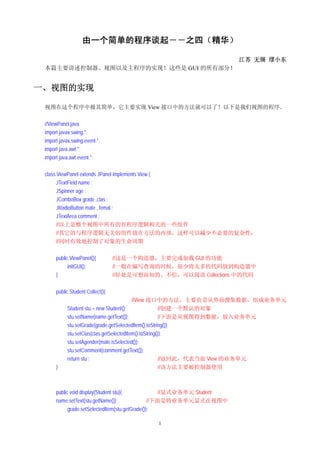
江苏 无锡 缪小东 本篇主要讲述控制器、视图以及主程序的实现!这些是 GUI 的所有部分! 一、视图的实现 视图在这个程序中极其简单,它主要实现 View 接口中的方法就可以了!以下是我们视图的程序。 //ViewPanel.java import javax.swing.*; import javax.swing.event.*; import java.awt.*; import java.awt.event.*; class ViewPanel extends JPanel implements View { JTextField name ; JSpinner age ; JComboBox grade ,clas ; JRadioButton male , femal ; JTextArea comment ; //以上是整个视图中所有的有程序逻辑相关的一些组件 //其它的与程序逻辑无关的组件放在方法的内部,这样可以减少不必要的复杂性, //同时有效地控制了对象的生命周期 public ViewPanel(){ //这是一个构造器,主要完成加载 GUI 的功能 initGUI(); //一般在编写查询的时候,很少将太多的代码放到构造器中 } //好处是可想而知的。不信,可以阅读 Collections 中的代码 public Student Collect(){ //View 接口中的方法,主要负责从界面搜集数据,组成业务单元 Student stu = new Student(); //创建一个默认的对象 stu.setName(name.getText()); //下面是从视图得到数据,放入业务单元 stu.setGrade(grade.getSelectedItem().toString()); stu.setClas(clas.getSelectedItem().toString()); stu.setAgender(male.isSelected()); stu.setComment(comment.getText()); return stu ; //返回此,代表当前 View 的业务单元 } //该方法主要被控制器使用 public void display(Student stu){ //显式业务单元 Student name.setText(stu.getName()); //下面是将业务单元显式在视图中 grade.setSelectedItem(stu.getGrade()); 1
2.
clas.setSelectedItem(stu.getClas());
age.setValue(stu.getAge()); male.setSelected(stu.isMale()); comment.setText(stu.getComment()); setAllEnable(false); } //该方法主要被控制器调用 //显示所有显式元件是否可编辑的方法 //该方法应该被抽象出来组成一个整体,以避免同样的代码散落在程序的其它角落 public void setAllEnable(boolean b){ name.setEnabled(b); grade.setEnabled(b); clas.setEnabled(b); age.setEnabled(b); male.setEnabled(b); femal.setEnabled(b); comment.setEnabled(b); // Component[] comps = this.getComponents(); // for(int i = 0 ; i < comps.length;i++){ // comps[i].setEnabled(b); // System.out.println(comps[i]); // } //博客其它地方讲过,Swing 组件中使用一个重要的模式“组合模式” //以上就是一个得到当前组件中所有子元素的方法,然后再设置其属性 //简单明了吧!这个方法和上面那么多句是等效的! //细心的读者可能发现多了一个向系统 Console 打印各个元件的语句 //主要是由于前两天有个家伙说他向数据库写入数据时数据就是某个 //TextField,对吗??我在看了其 API 后说不可能!你说可能吗? //结果不是 TextField 中的内容。 //你看看 TextField 有没有覆盖父类的 toString 方法。没有吧! //那就是绝对不可能返回 TextField 中的内容。 } private JPanel createRightPanel(){ //创建右边的面板,好像名字反了吧! JPanel p = new JPanel(new GridLayout(0,2)); p.add(createLabel("姓名")); name = new JTextField(20); p.add(name); p.add(createLabel("年龄")); //这里将所有创建 Label 的方法放到一起了 age = new JSpinner(new SpinnerNumberModel(20, 0, 100, 1)); // SpinnerNumberModel model = new SpinnerNumberModel(50, 0, 100, 1); //创建一个 JSpinner 对象!看看给的参数是什么啊! ! //一个典型的 MVC 的模型 model,这是一个以数字为内容的模型 //详细的关于 MVC 以及 Swing 请关注博客的其它文章 p.add(age); p.add(createLabel("年级")); 2
3.
String[] grds =
{ "初一", "初二", "初三", "高一", "高二" ,"高三"}; grade = new JComboBox(grds); grade.setEditable(false); grade.setSelectedIndex(4); p.add(grade); p.add(createLabel("班级")); String[] clss= { "01 班", "02 班", "03 班", "04 班", "05 班" ,"06 班"}; clas = new JComboBox(clss); clas.setEditable(false); clas.setSelectedIndex(1); p.add(clas); p.add(createLabel("性别")); male = new JRadioButton("男"); femal = new JRadioButton("女"); //final ButtonGroup sex = new ButtonGroup(); from object JPanel.add---> Component //p.add(male); //p.add(femal); //上面这段代码也非常有意思! //我们创建多个 JRadioButton,然后放入 ButtonGroup 中统一管理, //然后将其放入当前 JPanel 中,很理所当然吧!可惜就是错误了! //为什么啊??看看 API 手册:ButtonGroup 继承至 Object, //而当前 JPanel 可以添加到其上的是 Component 组件,当然不行了! //下面是一个将其放入 JPanel 中,然后协调这两个 JRadioButton 就可以了! male.setSelected(true); JPanel sexPanel = new JPanel(new GridLayout(1,2)); sexPanel.add(male); sexPanel.add(femal); p.add(sexPanel); male.addActionListener( new ActionListener(){ public void actionPerformed(ActionEvent e) { male.setSelected(true); femal.setSelected(false); } } ); femal.addActionListener( new ActionListener(){ public void actionPerformed(ActionEvent e) { male.setSelected(false); femal.setSelected(true); } } ); //上面的代码相当的笨拙! 3
4.
//你也可以扩展一下,可以放入 n 个
JRadioButton,然后协调他们。 //使用前面的组合模式,然后加上一个事件处理不就行了吗! return p ; } private JPanel createLeftPanel(){ //创建右边面板,名字不对哦! JPanel p = new JPanel(new BorderLayout(0,1)); p.add(createLabel("备注:"),BorderLayout.NORTH); comment = new JTextArea(20,35); p.add(comment,BorderLayout.CENTER); return p ; } private void initGUI(){ //初始化整个 GUI,先创建一个 JSplitPane JSplitPane splitPane = new JSplitPane(JSplitPane.HORIZONTAL_SPLIT, createRightPanel(), createLeftPanel()); //看到了吧!面板 JSplitPane 中包含左右两个 JPanel splitPane.setOneTouchExpandable(true); splitPane.setDividerLocation(250); add(splitPane ); //在当前面板加入此 JSplitPane } //下面是我在写完这个视图的时候,测试的主程序! //先测试没有错误,可以显式也是可以的! //在软件测试里,有什么单元测试等等的方法,即先一个模块一个模块的测试 public static void main(String[] args){ JFrame.setDefaultLookAndFeelDecorated(true); JFrame frame = new JFrame("学生管理系统"); frame.setDefaultCloseOperation(JFrame.EXIT_ON_CLOSE); Container contentPane = frame.getContentPane(); contentPane.setLayout(new FlowLayout()); ViewPanel vp = new ViewPanel(); vp.setAllEnable(false); frame.add(vp,BorderLayout.CENTER); frame.setSize(400,600); frame.pack(); frame.show(true); } private static JLabel createLabel(String label){ //根据显式字符串创建 Label JLabel l = new JLabel(label); l.setHorizontalAlignment(JLabel.CENTER); l.setFont(new Font("Serif", Font.PLAIN, 22)); l.setForeground(Color.BLUE); return l; } 4
5.
} 二、控制器的实现 控制器的实现是比较复杂的!他不仅仅要控制视图(View)和持续层(Persistence
Layer)的交互, 还控制自身的一些状态协调!下面是其源代码: import javax.swing.*; import javax.swing.event.*; import java.awt.*; import java.awt.event.*; import java.io.IOException; public class ControllerPanel extends JPanel/** implements Controller**/{ JButton prev ,next , insert , del , update ; //控制器面板的几个元素 ControllerTemplate template ; //控制器面板使用的抽象业务逻辑 //这就是通过组合得到的功能 public ControllerPanel(){ //这是一个我程序刚开始时候的构造器 super(new FlowLayout()); initGUI(); //同样一个初始化的方法 } private void initGUI(){ prev = new JButton("上一个"); add(prev); next = new JButton("下一个"); add(next); insert = new JButton("插入"); add(insert); del = new JButton("删除"); add(del); update = new JButton("更新"); add(update); ActionListener listener = new ControllerListener(); //事件监听器对象,java 中观察者模式最著名的应用――事件处理 prev.addActionListener(listener); next.addActionListener(listener); insert.addActionListener(listener); del.addActionListener(listener); update.addActionListener(listener); //所有的按钮都关注此事件,也可以分开写各自的事件处理 } 5
6.
public ControllerPanel(View view
, DOA model){ //最终的构造器 this(); this.template = new ControllerTemplate(model,view);; //主要创建一个 ControllerTemplate //同时传入实现的 DOA 和 View } public class ControllerListener implements ActionListener { //整个 Controller 的事件处理器 boolean flag = true ; //很有意义的标记,主要用于判定当前 insert 或 update 的状态以及显示 public void actionPerformed(ActionEvent e) { if(e.getSource()==next){ //用户单击“下一个”按钮的事件处理 try{ template.next(); //System.out.println("您正在单击 下一个 按钮!"); //测试界面是否工作用的 }catch(Exception ee){ //以下就是异常处理部分!比较累赘! ! if(ee instanceof NoRecordAvailabeException){ JOptionPane.showMessageDialog(null,ee.getMessage()/**"您的的数据库中没有 记录!"*/); }else if(ee instanceof IOException){ JOptionPane.showMessageDialog(null, ee.getMessage()/**"您的 IO 出现异常!"*/); }else{ JOptionPane.showMessageDialog(null, ee.getMessage()/**"您的操作出现严重 异常!"*/); } //关于 JOptionPane 的各种方法以及参数请查 API 相当简单 } }else if(e.getSource()==prev){ //同上 try{ template.previous(); System.out.println("您正在单击 上一个 按钮!"); }catch(Exception ee){ if(ee instanceof NoRecordAvailabeException){ //unableButton(prev); JOptionPane.showMessageDialog(null, ee.getMessage()/**"您的的数据库中没 有记录!"*/); }else if(ee instanceof IOException){ JOptionPane.showMessageDialog(null, ee.getMessage()/**"您的 IO 出现异常!"*/); }else{ JOptionPane.showMessageDialog(null, ee.getMessage()/**"您的操作出现严重 异常!"*/); } } }else if(e.getSource()==del){ try{ template.delete(); System.out.println("您正在单击 删除 按钮!"); }catch(Exception ee){ 6
7.
if(ee instanceof NoRecordAvailabeException){
JOptionPane.showMessageDialog(null, ee.getMessage()); }else if(ee instanceof IOException){ JOptionPane.showMessageDialog(null, ee.getMessage()/**"您的 IO 出现异常!"*/); }else{ JOptionPane.showMessageDialog(null, ee.getMessage()/**"您的操作出现严重 异常!"*/); } } }else if(e.getSource()==insert){ //很有趣的处理,和 update 类似 if(flag){ //起始时标记为 true,表示首次要求插入 try{ template.insert(); //调用面板的插入逻辑,模板当然调用视图和 DOA unableOthersAndShowAck(insert); //表示要插入,界面处于可编辑 //此时并且插入按钮变为“确认”按钮 System.out.println("您正在单击 插入 按钮!"); }catch(Exception ee){ if(ee instanceof IOException){ JOptionPane.showMessageDialog(null, ee.getMessage()/**"您的 IO 出现异 常!"*/); }else{ JOptionPane.showMessageDialog(null, ee.getMessage()/**" 您的操 作出 现 严重异常!"*/); } } }else{ //在已经单击插入,需要向持久层插入数据的操作 try{ template.ack(); //插入数据的真实操作 enableAllAndSetLabel();//// System.out.println("您正在单击 确认 按钮!"); }catch(Exception ee){ if(ee instanceof IOException){ JOptionPane.showMessageDialog(null, ee.getMessage()/**"您的 IO 出现异 常!"*/); }else{ JOptionPane.showMessageDialog(null, ee.getMessage()/**" 您的操 作出 现 严重异常!"*/); } } } flag=!flag; //反转此标记的状态,每次单击由 true 变为 false! //界面只可以点击“确认” ,确认后插入数据,标记恢复。 //界面的所有状态也恢复。仔细理解上面几个红色的代码! }else if (e.getSource()==update){ //同上 if(flag){ try{ template.update(); 7
8.
unableOthersAndShowAck(update);
System.out.println("您正在单击 更新 按钮!"); }catch(Exception ee){ if(ee instanceof NoRecordAvailabeException){ JOptionPane.showMessageDialog(null, ee.getMessage()); }else if(ee instanceof IOException){ JOptionPane.showMessageDialog(null, ee.getMessage()/**"您的 IO 出现异 常!"*/); }else{ JOptionPane.showMessageDialog(null, ee.getMessage()); } }finally{ flag=!flag; } }else{ try{ template.ack(); enableAllAndSetLabel(); System.out.println("您正在单击 确认 按钮!"); }catch(Exception ee){ if(ee instanceof IOException){ JOptionPane.showMessageDialog(null, ee.getMessage()); }else{ JOptionPane.showMessageDialog(null, ee.getMessage()); } }finally{ flag=!flag; } } } } } //以下是一些界面协调的方法,他们是程序流程需要且多次使用的,因此放入一个方法中 private void setAllComponentEditable(boolean b){ //组合模式,设置所有组件的可编辑状态 Component[] c = this.getComponents(); for(int i = 0 ;i < c.length ; i++){ if(c[i] instanceof JButton){ c[i].setEnabled(b); } //冗余方法,提示你可以有选择的设置 } } private void unableButton(JButton b){ //仅仅设置某个 JButton 对象不可点击,其它可以使用 setAllComponentEditable(true); b.setEnabled(false); } private void unableOthersAndShowAck(JButton b){ //用在点击“插入”和“更新”后 8
9.
//其它的都不可以点击,同时某个 Jbutton 显式为“确认”
setAllComponentEditable(false); b.setEnabled(true); b.setText("确认"); } private void enableAllAndSetLabel(){ //用在点击“确认”后,界面恢复原有的状态 setAllComponentEditable(true); insert.setText("插入"); update.setText("更新"); } } 三、主程序的实现 主程序比较简单!主要是在窗口中加入上面的视图和控制器!同时在主窗口关闭后将内存 Cache 中 的数据保存至 Persistence Layer 中。 import javax.swing.*; import java.awt.*; import java.awt.event.*; public class StudentManagerSystem { private static void initGUI() { JFrame.setDefaultLookAndFeelDecorated(true); JFrame frame = new JFrame("master24 学生管理系统"); frame.setDefaultCloseOperation(JFrame.EXIT_ON_CLOSE); //以上是设置窗口的一般步骤 Container contentPane = frame.getContentPane(); //得到内容面板 contentPane.setLayout(new BorderLayout()); //设置布局管理器 DisplayPanel dp = new DisplayPanel(); contentPane.add(dp, BorderLayout.NORTH); //将显示面板放到界面的上方 ViewPanel vp = new ViewPanel(); vp.setAllEnable(false); contentPane.add(vp, BorderLayout.CENTER); //将视图面板放到界面的中间 final DLinkedStuCollection model = new DLinkedStuCollection(); //创建持久层 //持久层一般在窗口启动中创建,本程序省略了,默认加载 ControllerPanel p = new ControllerPanel(vp ,model); //创建控制器面板 contentPane.add(p,BorderLayout.SOUTH); //将控制器面板加入界面的最下方 frame.addWindowListener( //为当前窗口添加事件监听器 new WindowAdapter(){ //一个极其简单的匿名内部类 9
10.
public void windowClosing(WindowEvent
e) { //Invoked when a window is in the process of being closed. try{ model.save(); //由于我们采用特殊的持久层, //因此必须在窗口关闭时保存 Cache 中的记录 }catch(Exception ee){ } //System.out.println("窗口关闭 "); } public void windowOpened(WindowEvent e) { //Invoked when a window has been opened. //System.out.println(" 窗口打开 "); //调试窗口的状态是否可以使用 } } ); //以下是窗口显示的一般步骤 frame.setSize(300,500); frame.pack(); frame.setVisible(true); } public static void main(String[] args) { //主程序的 main 方法,启动整个程序 javax.swing.SwingUtilities.invokeLater(new Runnable() { //启动 GUI public void run() { initGUI(); } }); //启动 GUI 的方法放入一个单独的线程中执行。 //至于为什么,建议大家研究一下 Swing 的事件队列相关的知识! } } class DisplayPanel extends JPanel{ //一个很无聊的方法,创建最上面的那个 Label public DisplayPanel(){ super(new FlowLayout()); JLabel label = new JLabel("请输入学生信息"); label.setHorizontalAlignment(JLabel.CENTER); label.setFont(new Font("Serif", Font.PLAIN, 22)); label.setForeground(Color.BLUE); //ViewPanel.createLabel("请输入学生信息"); add(label); } } 10
11.
四、一个简单的异常类 异常类,表示持续层没有记录了!
public class NoRecordAvailabeException extends Exception { public NoRecordAvailabeException(){ super(); } public NoRecordAvailabeException(String reason){ super(reason); } } 五、其它 关于内部类的作用以及如何去写将在本博客的其它文章中详细归纳!请关注吧! OK!看到这里 GUI 的实现都完成了!简单吧!下面是我们本程序的主体部分―― Persistence Layer 的设计!即底层数据结构的设计!主要向大家演示如何设计一个数据结构、 如何操作文件…… 更多精彩请关注: http://blog.163.com/miaoxiaodong78/ 11
Download
![clas.setSelectedItem(stu.getClas());
age.setValue(stu.getAge());
male.setSelected(stu.isMale());
comment.setText(stu.getComment());
setAllEnable(false);
} //该方法主要被控制器调用
//显示所有显式元件是否可编辑的方法
//该方法应该被抽象出来组成一个整体,以避免同样的代码散落在程序的其它角落
public void setAllEnable(boolean b){
name.setEnabled(b);
grade.setEnabled(b);
clas.setEnabled(b);
age.setEnabled(b);
male.setEnabled(b);
femal.setEnabled(b);
comment.setEnabled(b);
// Component[] comps = this.getComponents();
// for(int i = 0 ; i < comps.length;i++){
// comps[i].setEnabled(b);
// System.out.println(comps[i]);
// } //博客其它地方讲过,Swing 组件中使用一个重要的模式“组合模式”
//以上就是一个得到当前组件中所有子元素的方法,然后再设置其属性
//简单明了吧!这个方法和上面那么多句是等效的!
//细心的读者可能发现多了一个向系统 Console 打印各个元件的语句
//主要是由于前两天有个家伙说他向数据库写入数据时数据就是某个
//TextField,对吗??我在看了其 API 后说不可能!你说可能吗?
//结果不是 TextField 中的内容。
//你看看 TextField 有没有覆盖父类的 toString 方法。没有吧!
//那就是绝对不可能返回 TextField 中的内容。
}
private JPanel createRightPanel(){ //创建右边的面板,好像名字反了吧!
JPanel p = new JPanel(new GridLayout(0,2));
p.add(createLabel("姓名"));
name = new JTextField(20);
p.add(name);
p.add(createLabel("年龄")); //这里将所有创建 Label 的方法放到一起了
age = new JSpinner(new SpinnerNumberModel(20, 0, 100, 1));
// SpinnerNumberModel model = new SpinnerNumberModel(50, 0, 100, 1);
//创建一个 JSpinner 对象!看看给的参数是什么啊! !
//一个典型的 MVC 的模型 model,这是一个以数字为内容的模型
//详细的关于 MVC 以及 Swing 请关注博客的其它文章
p.add(age);
p.add(createLabel("年级"));
2](https://image.slidesharecdn.com/random-091113225853-phpapp01/85/slide-2-320.jpg)
![String[] grds = { "初一", "初二", "初三", "高一", "高二" ,"高三"};
grade = new JComboBox(grds);
grade.setEditable(false);
grade.setSelectedIndex(4);
p.add(grade);
p.add(createLabel("班级"));
String[] clss= { "01 班", "02 班", "03 班", "04 班", "05 班" ,"06 班"};
clas = new JComboBox(clss);
clas.setEditable(false);
clas.setSelectedIndex(1);
p.add(clas);
p.add(createLabel("性别"));
male = new JRadioButton("男");
femal = new JRadioButton("女");
//final ButtonGroup sex = new ButtonGroup(); from object JPanel.add---> Component
//p.add(male);
//p.add(femal);
//上面这段代码也非常有意思!
//我们创建多个 JRadioButton,然后放入 ButtonGroup 中统一管理,
//然后将其放入当前 JPanel 中,很理所当然吧!可惜就是错误了!
//为什么啊??看看 API 手册:ButtonGroup 继承至 Object,
//而当前 JPanel 可以添加到其上的是 Component 组件,当然不行了!
//下面是一个将其放入 JPanel 中,然后协调这两个 JRadioButton 就可以了!
male.setSelected(true);
JPanel sexPanel = new JPanel(new GridLayout(1,2));
sexPanel.add(male);
sexPanel.add(femal);
p.add(sexPanel);
male.addActionListener(
new ActionListener(){
public void actionPerformed(ActionEvent e) {
male.setSelected(true);
femal.setSelected(false);
}
}
);
femal.addActionListener(
new ActionListener(){
public void actionPerformed(ActionEvent e) {
male.setSelected(false);
femal.setSelected(true);
}
}
);
//上面的代码相当的笨拙!
3](https://image.slidesharecdn.com/random-091113225853-phpapp01/85/slide-3-320.jpg)
![//你也可以扩展一下,可以放入 n 个 JRadioButton,然后协调他们。
//使用前面的组合模式,然后加上一个事件处理不就行了吗!
return p ;
}
private JPanel createLeftPanel(){ //创建右边面板,名字不对哦!
JPanel p = new JPanel(new BorderLayout(0,1));
p.add(createLabel("备注:"),BorderLayout.NORTH);
comment = new JTextArea(20,35);
p.add(comment,BorderLayout.CENTER);
return p ;
}
private void initGUI(){ //初始化整个 GUI,先创建一个 JSplitPane
JSplitPane splitPane = new JSplitPane(JSplitPane.HORIZONTAL_SPLIT, createRightPanel(),
createLeftPanel());
//看到了吧!面板 JSplitPane 中包含左右两个 JPanel
splitPane.setOneTouchExpandable(true);
splitPane.setDividerLocation(250);
add(splitPane ); //在当前面板加入此 JSplitPane
}
//下面是我在写完这个视图的时候,测试的主程序!
//先测试没有错误,可以显式也是可以的!
//在软件测试里,有什么单元测试等等的方法,即先一个模块一个模块的测试
public static void main(String[] args){
JFrame.setDefaultLookAndFeelDecorated(true);
JFrame frame = new JFrame("学生管理系统");
frame.setDefaultCloseOperation(JFrame.EXIT_ON_CLOSE);
Container contentPane = frame.getContentPane();
contentPane.setLayout(new FlowLayout());
ViewPanel vp = new ViewPanel();
vp.setAllEnable(false);
frame.add(vp,BorderLayout.CENTER);
frame.setSize(400,600);
frame.pack();
frame.show(true);
}
private static JLabel createLabel(String label){ //根据显式字符串创建 Label
JLabel l = new JLabel(label);
l.setHorizontalAlignment(JLabel.CENTER);
l.setFont(new Font("Serif", Font.PLAIN, 22));
l.setForeground(Color.BLUE);
return l;
}
4](https://image.slidesharecdn.com/random-091113225853-phpapp01/85/slide-4-320.jpg)


![unableOthersAndShowAck(update);
System.out.println("您正在单击 更新 按钮!");
}catch(Exception ee){
if(ee instanceof NoRecordAvailabeException){
JOptionPane.showMessageDialog(null, ee.getMessage());
}else if(ee instanceof IOException){
JOptionPane.showMessageDialog(null, ee.getMessage()/**"您的 IO 出现异
常!"*/);
}else{
JOptionPane.showMessageDialog(null, ee.getMessage());
}
}finally{
flag=!flag;
}
}else{
try{
template.ack();
enableAllAndSetLabel();
System.out.println("您正在单击 确认 按钮!");
}catch(Exception ee){
if(ee instanceof IOException){
JOptionPane.showMessageDialog(null, ee.getMessage());
}else{
JOptionPane.showMessageDialog(null, ee.getMessage());
}
}finally{
flag=!flag;
}
}
}
}
}
//以下是一些界面协调的方法,他们是程序流程需要且多次使用的,因此放入一个方法中
private void setAllComponentEditable(boolean b){ //组合模式,设置所有组件的可编辑状态
Component[] c = this.getComponents();
for(int i = 0 ;i < c.length ; i++){
if(c[i] instanceof JButton){ c[i].setEnabled(b); } //冗余方法,提示你可以有选择的设置
}
}
private void unableButton(JButton b){ //仅仅设置某个 JButton 对象不可点击,其它可以使用
setAllComponentEditable(true);
b.setEnabled(false);
}
private void unableOthersAndShowAck(JButton b){ //用在点击“插入”和“更新”后
8](https://image.slidesharecdn.com/random-091113225853-phpapp01/85/slide-8-320.jpg)

![public void windowClosing(WindowEvent e) {
//Invoked when a window is in the process of being closed.
try{
model.save(); //由于我们采用特殊的持久层,
//因此必须在窗口关闭时保存 Cache 中的记录
}catch(Exception ee){ }
//System.out.println("窗口关闭 ");
}
public void windowOpened(WindowEvent e) {
//Invoked when a window has been opened.
//System.out.println(" 窗口打开 "); //调试窗口的状态是否可以使用
}
}
);
//以下是窗口显示的一般步骤
frame.setSize(300,500);
frame.pack();
frame.setVisible(true);
}
public static void main(String[] args) { //主程序的 main 方法,启动整个程序
javax.swing.SwingUtilities.invokeLater(new Runnable() { //启动 GUI
public void run() {
initGUI();
}
}); //启动 GUI 的方法放入一个单独的线程中执行。
//至于为什么,建议大家研究一下 Swing 的事件队列相关的知识!
}
}
class DisplayPanel extends JPanel{ //一个很无聊的方法,创建最上面的那个 Label
public DisplayPanel(){
super(new FlowLayout());
JLabel label = new JLabel("请输入学生信息");
label.setHorizontalAlignment(JLabel.CENTER);
label.setFont(new Font("Serif", Font.PLAIN, 22));
label.setForeground(Color.BLUE);
//ViewPanel.createLabel("请输入学生信息");
add(label);
}
}
10](https://image.slidesharecdn.com/random-091113225853-phpapp01/85/slide-10-320.jpg)


![[圣思园][Java SE]Swing](https://cdn.slidesharecdn.com/ss_thumbnails/swing-110811072348-phpapp02-thumbnail.jpg?width=640&height=640&fit=bounds)


![Lucene 3[1] 0 原理与代码分析](https://cdn.slidesharecdn.com/ss_thumbnails/lucene31-0-100225194736-phpapp02-thumbnail.jpg?width=640&height=640&fit=bounds)


