SQLITE 3 IN PYTHON
SQLITE 3
• SQL is a query language and is very popular in databases.
• Many websites use MySQL. SQLite is a “light” version that works over syntax
very much similar to SQL.
• SQLite is a self-contained, high-reliability, embedded, full-featured, public-
domain, SQL database engine.
• It is the most used database engine on the world wide web.
• Python has a library to access SQLite databases, called sqlite3, intended for
working with this database which has been included with Python package
since version 2.5.
DIFFERENT METHODS IN SQLITE3
• Connect - Connecting to the SQLite Database can be established using
the connect() method, passing the name of the database to be accessed as a
parameter. If that database does not exist, then it’ll be created.
• Cursor - If you want to execute some queries after the connection is being made. For
that, a cursor has to be created using the cursor() method on the connection
instance, which will execute our SQL queries.
• Execute - The SQL query to be executed can be written in form of a string, and then
executed by calling the execute() method on the cursor object. Then, the result can
be fetched from the server by using the fetchall() method, which in this case, is the
SQLite Version Number.
• Close – This method will used to close the connection between the application and
database using close().
CONNECTING, CURSOR, EXECUTE AND CLOSE
STORAGE CLASSES AND DATATYPES IN SQLITE3
CREATE TABLE
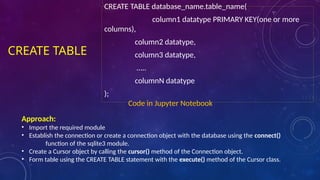
CREATE TABLE database_name.table_name(
column1 datatype PRIMARY KEY(one or more
columns),
column2 datatype,
column3 datatype,
…..
columnN datatype
);
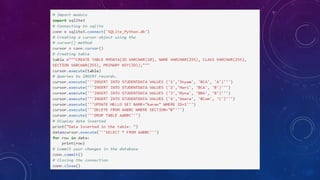
Code in Jupyter Notebook
Approach:
• Import the required module
• Establish the connection or create a connection object with the database using the connect()
function of the sqlite3 module.
• Create a Cursor object by calling the cursor() method of the Connection object.
• Form table using the CREATE TABLE statement with the execute() method of the Cursor class.
INSTERTING DATA
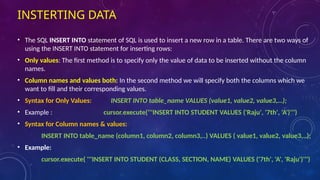
• The SQL INSERT INTO statement of SQL is used to insert a new row in a table. There are two ways of
using the INSERT INTO statement for inserting rows:
• Only values: The first method is to specify only the value of data to be inserted without the column
names.
• Column names and values both: In the second method we will specify both the columns which we
want to fill and their corresponding values.
• Syntax for Only Values: INSERT INTO table_name VALUES (value1, value2, value3,…);
• Example : cursor.execute('''INSERT INTO STUDENT VALUES ('Raju', '7th', 'A')''')
• Syntax for Column names & values:
INSERT INTO table_name (column1, column2, column3,..) VALUES ( value1, value2, value3,..);
• Example:
cursor.execute( '''INSERT INTO STUDENT (CLASS, SECTION, NAME) VALUES ('7th', 'A', 'Raju')''')
SELECTING DATA
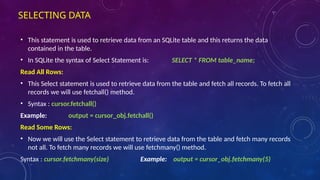
• This statement is used to retrieve data from an SQLite table and this returns the data
contained in the table.
• In SQLite the syntax of Select Statement is: SELECT * FROM table_name;
Read All Rows:
• This Select statement is used to retrieve data from the table and fetch all records. To fetch all
records we will use fetchall() method.
• Syntax : cursor.fetchall()
Example: output = cursor_obj.fetchall()
Read Some Rows:
• Now we will use the Select statement to retrieve data from the table and fetch many records
not all. To fetch many records we will use fetchmany() method.
Syntax : cursor.fetchmany(size) Example: output = cursor_obj.fetchmany(5)
DELETING DATA
Deleting specific data
• Syntax : DELETE FROM table_name [WHERE Clause]
Approach:
• Import the required module.
• Establish the connection or create a connection object with the database using to connect()
function of the sqlite3 module.
• Create a Cursor object by calling the cursor() method of the Connection object.
• Finally, trigger to execute() method on the cursor object, bypassing a DELETE statement as a
parameter to it.
Example: cursor_obj.execute("DELETE FROM GEEK WHERE Score < 15“)
Deleting All data
Example: cursor_obj.execute("DELETE FROM GEEK")
UPDATING DATA
• The UPDATE statement in SQL is used to update the data of an existing table in the
database. We can update single columns as well as multiple columns using UPDATE
statement as per our requirement.
• Syntax:
UPDATE table_name SET column1 = value1, column2 = value2,… WHERE
condition;
• In the above syntax, the SET statement is used to set new values to the particular
column, and the WHERE clause is used to select the rows for which the columns are
needed to be updated.
• Example:
cursor.execute('''UPDATE EMPLOYEE SET INCOME = 5000 WHERE Age<25;''')
DROP TABLE
• DROP is used to delete the entire database or a table. It deleted both records in the
table along with the table structure.
• Syntax: DROP TABLE TABLE_NAME;
• Example: connection.execute("DROP TABLE customers_address")
SQLite 3 chapter 4 BCA Notes Python NEP syllabus

SQLite 3 chapter 4 BCA Notes Python NEP syllabus

  • 1.
  • 2.
    SQLITE 3 • SQLis a query language and is very popular in databases. • Many websites use MySQL. SQLite is a “light” version that works over syntax very much similar to SQL. • SQLite is a self-contained, high-reliability, embedded, full-featured, public- domain, SQL database engine. • It is the most used database engine on the world wide web. • Python has a library to access SQLite databases, called sqlite3, intended for working with this database which has been included with Python package since version 2.5.
  • 3.
    DIFFERENT METHODS INSQLITE3 • Connect - Connecting to the SQLite Database can be established using the connect() method, passing the name of the database to be accessed as a parameter. If that database does not exist, then it’ll be created. • Cursor - If you want to execute some queries after the connection is being made. For that, a cursor has to be created using the cursor() method on the connection instance, which will execute our SQL queries. • Execute - The SQL query to be executed can be written in form of a string, and then executed by calling the execute() method on the cursor object. Then, the result can be fetched from the server by using the fetchall() method, which in this case, is the SQLite Version Number. • Close – This method will used to close the connection between the application and database using close().
  • 4.
  • 5.
    STORAGE CLASSES ANDDATATYPES IN SQLITE3
  • 6.
    CREATE TABLE CREATE TABLEdatabase_name.table_name( column1 datatype PRIMARY KEY(one or more columns), column2 datatype, column3 datatype, ….. columnN datatype ); Code in Jupyter Notebook Approach: • Import the required module • Establish the connection or create a connection object with the database using the connect() function of the sqlite3 module. • Create a Cursor object by calling the cursor() method of the Connection object. • Form table using the CREATE TABLE statement with the execute() method of the Cursor class.
  • 7.
    INSTERTING DATA • TheSQL INSERT INTO statement of SQL is used to insert a new row in a table. There are two ways of using the INSERT INTO statement for inserting rows: • Only values: The first method is to specify only the value of data to be inserted without the column names. • Column names and values both: In the second method we will specify both the columns which we want to fill and their corresponding values. • Syntax for Only Values: INSERT INTO table_name VALUES (value1, value2, value3,…); • Example : cursor.execute('''INSERT INTO STUDENT VALUES ('Raju', '7th', 'A')''') • Syntax for Column names & values: INSERT INTO table_name (column1, column2, column3,..) VALUES ( value1, value2, value3,..); • Example: cursor.execute( '''INSERT INTO STUDENT (CLASS, SECTION, NAME) VALUES ('7th', 'A', 'Raju')''')
  • 8.
    SELECTING DATA • Thisstatement is used to retrieve data from an SQLite table and this returns the data contained in the table. • In SQLite the syntax of Select Statement is: SELECT * FROM table_name; Read All Rows: • This Select statement is used to retrieve data from the table and fetch all records. To fetch all records we will use fetchall() method. • Syntax : cursor.fetchall() Example: output = cursor_obj.fetchall() Read Some Rows: • Now we will use the Select statement to retrieve data from the table and fetch many records not all. To fetch many records we will use fetchmany() method. Syntax : cursor.fetchmany(size) Example: output = cursor_obj.fetchmany(5)
  • 9.
    DELETING DATA Deleting specificdata • Syntax : DELETE FROM table_name [WHERE Clause] Approach: • Import the required module. • Establish the connection or create a connection object with the database using to connect() function of the sqlite3 module. • Create a Cursor object by calling the cursor() method of the Connection object. • Finally, trigger to execute() method on the cursor object, bypassing a DELETE statement as a parameter to it. Example: cursor_obj.execute("DELETE FROM GEEK WHERE Score < 15“) Deleting All data Example: cursor_obj.execute("DELETE FROM GEEK")
  • 10.
    UPDATING DATA • TheUPDATE statement in SQL is used to update the data of an existing table in the database. We can update single columns as well as multiple columns using UPDATE statement as per our requirement. • Syntax: UPDATE table_name SET column1 = value1, column2 = value2,… WHERE condition; • In the above syntax, the SET statement is used to set new values to the particular column, and the WHERE clause is used to select the rows for which the columns are needed to be updated. • Example: cursor.execute('''UPDATE EMPLOYEE SET INCOME = 5000 WHERE Age<25;''')
  • 11.
    DROP TABLE • DROPis used to delete the entire database or a table. It deleted both records in the table along with the table structure. • Syntax: DROP TABLE TABLE_NAME; • Example: connection.execute("DROP TABLE customers_address")