SQL 

Cheat Sheet
Mosh Hamedani
Code with Mosh (codewithmosh.com)
1st Edition
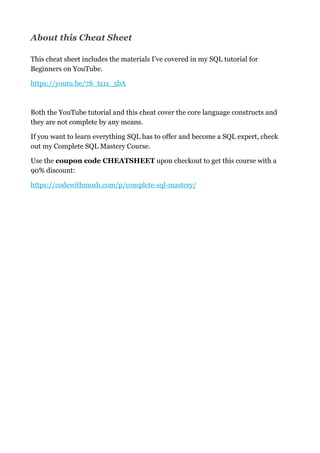
About this Cheat Sheet
This cheat sheet includes the materials I’ve covered in my SQL tutorial for
Beginners on YouTube.
https://youtu.be/7S_tz1z_5bA
Both the YouTube tutorial and this cheat cover the core language constructs and
they are not complete by any means.
If you want to learn everything SQL has to offer and become a SQL expert, check
out my Complete SQL Mastery Course.
Use the coupon code CHEATSHEET upon checkout to get this course with a
90% discount:
https://codewithmosh.com/p/complete-sql-mastery/
About the Author


Hi! My name is Mosh Hamedani. I’m a software engineer
with two decades of experience and I’ve taught over three
million how to code or how to become a professional
software engineer. It’s my mission to make software 

engineering simple and accessible to everyone.
https://codewithmosh.com
https://youtube.com/user/programmingwithmosh
https://twitter.com/moshhamedani
https://facebook.com/programmingwithmosh/
Basics 5........................................................................................................
Comments 5.................................................................................................
SELECT Clause 5........................................................................................
WHERE Clause 6........................................................................................
Logical Operators 6....................................................................................
IN Operator 7..............................................................................................
BETWEEN Operator 7................................................................................
LIKE Operator 7..........................................................................................
REGEXP Operator 7....................................................................................
IS NULL Operator 8...................................................................................
ORDER BY Clause 8...................................................................................
LIMIT Clause 8............................................................................................
Inner Joins 9...............................................................................................
Outer Joins 9...............................................................................................
USING Clause 9...........................................................................................
Cross Joins 9................................................................................................
Unions 10.....................................................................................................
Inserting Data 10........................................................................................
Want to Become a SQL Expert? 10............................................................
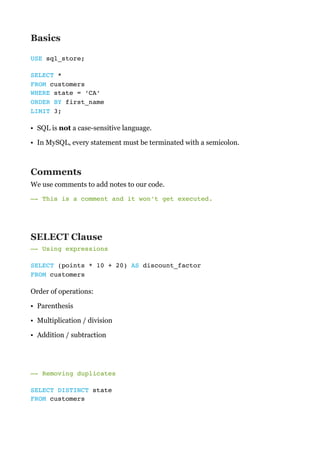
Basics
USE sql_store;
SELECT *

FROM customers 

WHERE state = ‘CA’

ORDER BY first_name

LIMIT 3;
• SQL is not a case-sensitive language.
• In MySQL, every statement must be terminated with a semicolon.
Comments
We use comments to add notes to our code.
—- This is a comment and it won’t get executed.

SELECT Clause
—- Using expressions
SELECT (points * 10 + 20) AS discount_factor

FROM customers
Order of operations:
• Parenthesis
• Multiplication / division
• Addition / subtraction


—- Removing duplicates
SELECT DISTINCT state

FROM customers 

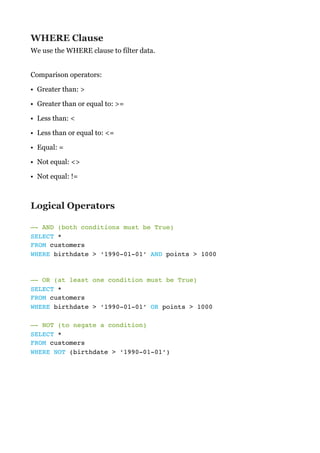
WHERE Clause
We use the WHERE clause to filter data.


Comparison operators:
• Greater than: >
• Greater than or equal to: >=
• Less than: <
• Less than or equal to: <=
• Equal: =
• Not equal: <>
• Not equal: !=
Logical Operators


—- AND (both conditions must be True) 

SELECT *

FROM customers 

WHERE birthdate > ‘1990-01-01’ AND points > 1000 

—- OR (at least one condition must be True) 

SELECT *

FROM customers 

WHERE birthdate > ‘1990-01-01’ OR points > 1000 


—- NOT (to negate a condition) 

SELECT *

FROM customers 

WHERE NOT (birthdate > ‘1990-01-01’)
IN Operator
—- Returns customers in any of these states: VA, NY, CA

SELECT *

FROM customers 

WHERE state IN (‘VA’, ‘NY’, ‘CA’)
BETWEEN Operator
SELECT *

FROM customers 

WHERE points BETWEEN 100 AND 200
LIKE Operator
—- Returns customers whose first name starts with b 

SELECT *

FROM customers 

WHERE first_name LIKE ‘b%’
• %: any number of characters
• _: exactly one character
REGEXP Operator
—- Returns customers whose first name starts with a 

SELECT *

FROM customers 

WHERE first_name REGEXP ‘^a’
• ^: beginning of a string
• $: end of a string
• |: logical OR
• [abc]: match any single characters
• [a-d]: any characters from a to d
More Examples 

—- Returns customers whose first name ends with EY or ON 

WHERE first_name REGEXP ‘ey$|on$’
—- Returns customers whose first name starts with MY 

—- or contains SE

WHERE first_name REGEXP ‘^my|se’
—- Returns customers whose first name contains B followed by 

—- R or U

WHERE first_name REGEXP ‘b[ru]’
IS NULL Operator
—- Returns customers who don’t have a phone number 

SELECT *

FROM customers 

WHERE phone IS NULL
ORDER BY Clause
—- Sort customers by state (in ascending order), and then 

—- by their first name (in descending order) 

SELECT *

FROM customers 

ORDER BY state, first_name DESC
LIMIT Clause
—- Return only 3 customers 

SELECT *

FROM customers 

LIMIT 3
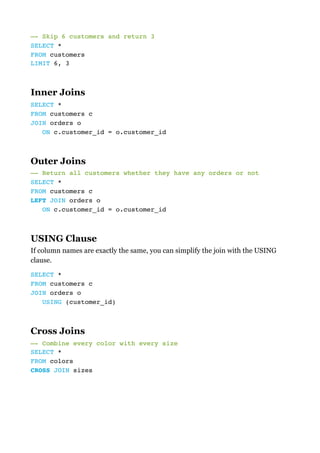
—- Skip 6 customers and return 3

SELECT *

FROM customers 

LIMIT 6, 3
Inner Joins
SELECT *

FROM customers c

JOIN orders o 

ON c.customer_id = o.customer_id
Outer Joins
—- Return all customers whether they have any orders or not

SELECT *

FROM customers c

LEFT JOIN orders o 

ON c.customer_id = o.customer_id
USING Clause
If column names are exactly the same, you can simplify the join with the USING
clause.
SELECT *

FROM customers c

JOIN orders o 

USING (customer_id)
Cross Joins
—- Combine every color with every size

SELECT *

FROM colors 

CROSS JOIN sizes
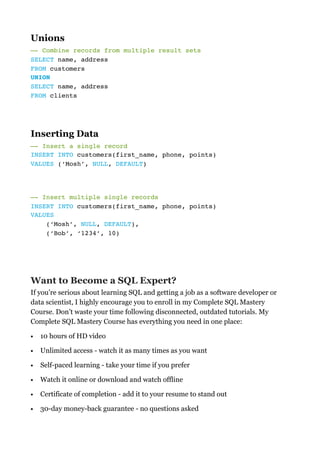
Unions
—- Combine records from multiple result sets

SELECT name, address

FROM customers 

UNION

SELECT name, address

FROM clients 

Inserting Data
—- Insert a single record

INSERT INTO customers(first_name, phone, points)

VALUES (‘Mosh’, NULL, DEFAULT)
—- Insert multiple single records

INSERT INTO customers(first_name, phone, points)

VALUES 

(‘Mosh’, NULL, DEFAULT),

(‘Bob’, ‘1234’, 10)


Want to Become a SQL Expert?
If you’re serious about learning SQL and getting a job as a software developer or
data scientist, I highly encourage you to enroll in my Complete SQL Mastery
Course. Don’t waste your time following disconnected, outdated tutorials. My
Complete SQL Mastery Course has everything you need in one place:
• 10 hours of HD video
• Unlimited access - watch it as many times as you want
• Self-paced learning - take your time if you prefer
• Watch it online or download and watch offline
• Certificate of completion - add it to your resume to stand out
• 30-day money-back guarantee - no questions asked
The price for this course is $149 but the first 200 people who have downloaded this
cheat sheet can get it for $12.99 using the coupon code CHEATSHEET:
https://codewithmosh.com/p/complete-sql-mastery/

SQL sheet

  • 1.
    SQL 
 Cheat Sheet MoshHamedani Code with Mosh (codewithmosh.com) 1st Edition
  • 2.
    About this CheatSheet This cheat sheet includes the materials I’ve covered in my SQL tutorial for Beginners on YouTube. https://youtu.be/7S_tz1z_5bA Both the YouTube tutorial and this cheat cover the core language constructs and they are not complete by any means. If you want to learn everything SQL has to offer and become a SQL expert, check out my Complete SQL Mastery Course. Use the coupon code CHEATSHEET upon checkout to get this course with a 90% discount: https://codewithmosh.com/p/complete-sql-mastery/
  • 3.
    About the Author 
 Hi!My name is Mosh Hamedani. I’m a software engineer with two decades of experience and I’ve taught over three million how to code or how to become a professional software engineer. It’s my mission to make software 
 engineering simple and accessible to everyone. https://codewithmosh.com https://youtube.com/user/programmingwithmosh https://twitter.com/moshhamedani https://facebook.com/programmingwithmosh/
  • 4.
    Basics 5........................................................................................................ Comments 5................................................................................................. SELECTClause 5........................................................................................ WHERE Clause 6........................................................................................ Logical Operators 6.................................................................................... IN Operator 7.............................................................................................. BETWEEN Operator 7................................................................................ LIKE Operator 7.......................................................................................... REGEXP Operator 7.................................................................................... IS NULL Operator 8................................................................................... ORDER BY Clause 8................................................................................... LIMIT Clause 8............................................................................................ Inner Joins 9............................................................................................... Outer Joins 9............................................................................................... USING Clause 9........................................................................................... Cross Joins 9................................................................................................ Unions 10..................................................................................................... Inserting Data 10........................................................................................ Want to Become a SQL Expert? 10............................................................
  • 5.
    Basics USE sql_store; SELECT *
 FROMcustomers 
 WHERE state = ‘CA’
 ORDER BY first_name
 LIMIT 3; • SQL is not a case-sensitive language. • In MySQL, every statement must be terminated with a semicolon. Comments We use comments to add notes to our code. —- This is a comment and it won’t get executed.
 SELECT Clause —- Using expressions SELECT (points * 10 + 20) AS discount_factor
 FROM customers Order of operations: • Parenthesis • Multiplication / division • Addition / subtraction 
 —- Removing duplicates SELECT DISTINCT state
 FROM customers 

  • 6.
    WHERE Clause We usethe WHERE clause to filter data. 
 Comparison operators: • Greater than: > • Greater than or equal to: >= • Less than: < • Less than or equal to: <= • Equal: = • Not equal: <> • Not equal: != Logical Operators 
 —- AND (both conditions must be True) 
 SELECT *
 FROM customers 
 WHERE birthdate > ‘1990-01-01’ AND points > 1000 
 —- OR (at least one condition must be True) 
 SELECT *
 FROM customers 
 WHERE birthdate > ‘1990-01-01’ OR points > 1000 
 
 —- NOT (to negate a condition) 
 SELECT *
 FROM customers 
 WHERE NOT (birthdate > ‘1990-01-01’)
  • 7.
    IN Operator —- Returnscustomers in any of these states: VA, NY, CA
 SELECT *
 FROM customers 
 WHERE state IN (‘VA’, ‘NY’, ‘CA’) BETWEEN Operator SELECT *
 FROM customers 
 WHERE points BETWEEN 100 AND 200 LIKE Operator —- Returns customers whose first name starts with b 
 SELECT *
 FROM customers 
 WHERE first_name LIKE ‘b%’ • %: any number of characters • _: exactly one character REGEXP Operator —- Returns customers whose first name starts with a 
 SELECT *
 FROM customers 
 WHERE first_name REGEXP ‘^a’ • ^: beginning of a string • $: end of a string • |: logical OR • [abc]: match any single characters • [a-d]: any characters from a to d
  • 8.
    More Examples 
 —-Returns customers whose first name ends with EY or ON 
 WHERE first_name REGEXP ‘ey$|on$’ —- Returns customers whose first name starts with MY 
 —- or contains SE
 WHERE first_name REGEXP ‘^my|se’ —- Returns customers whose first name contains B followed by 
 —- R or U
 WHERE first_name REGEXP ‘b[ru]’ IS NULL Operator —- Returns customers who don’t have a phone number 
 SELECT *
 FROM customers 
 WHERE phone IS NULL ORDER BY Clause —- Sort customers by state (in ascending order), and then 
 —- by their first name (in descending order) 
 SELECT *
 FROM customers 
 ORDER BY state, first_name DESC LIMIT Clause —- Return only 3 customers 
 SELECT *
 FROM customers 
 LIMIT 3
  • 9.
    —- Skip 6customers and return 3
 SELECT *
 FROM customers 
 LIMIT 6, 3 Inner Joins SELECT *
 FROM customers c
 JOIN orders o 
 ON c.customer_id = o.customer_id Outer Joins —- Return all customers whether they have any orders or not
 SELECT *
 FROM customers c
 LEFT JOIN orders o 
 ON c.customer_id = o.customer_id USING Clause If column names are exactly the same, you can simplify the join with the USING clause. SELECT *
 FROM customers c
 JOIN orders o 
 USING (customer_id) Cross Joins —- Combine every color with every size
 SELECT *
 FROM colors 
 CROSS JOIN sizes
  • 10.
    Unions —- Combine recordsfrom multiple result sets
 SELECT name, address
 FROM customers 
 UNION
 SELECT name, address
 FROM clients 
 Inserting Data —- Insert a single record
 INSERT INTO customers(first_name, phone, points)
 VALUES (‘Mosh’, NULL, DEFAULT) —- Insert multiple single records
 INSERT INTO customers(first_name, phone, points)
 VALUES 
 (‘Mosh’, NULL, DEFAULT),
 (‘Bob’, ‘1234’, 10)
 
 Want to Become a SQL Expert? If you’re serious about learning SQL and getting a job as a software developer or data scientist, I highly encourage you to enroll in my Complete SQL Mastery Course. Don’t waste your time following disconnected, outdated tutorials. My Complete SQL Mastery Course has everything you need in one place: • 10 hours of HD video • Unlimited access - watch it as many times as you want • Self-paced learning - take your time if you prefer • Watch it online or download and watch offline • Certificate of completion - add it to your resume to stand out • 30-day money-back guarantee - no questions asked
  • 11.
    The price forthis course is $149 but the first 200 people who have downloaded this cheat sheet can get it for $12.99 using the coupon code CHEATSHEET: https://codewithmosh.com/p/complete-sql-mastery/