SQL Tutorial
pt.1
 SQL is a standard language for storing, manipulating and
retrieving data in databases.
 Our SQL tutorial will teach you how to use SQL in: MySQL, SQL
Server, MS Access, Oracle, Sybase, Informix, Postgres, and
other database systems.
What is SQL?
 SQL stands for Structured Query Language
 SQL lets you access and manipulate databases
 SQL became a standard of the American National Standards
Institute (ANSI) in 1986, and of the International Organization
for Standardization (ISO) in 1987
What Can SQL do?
 SQL can execute queries against a database
 SQL can retrieve data from a database
 SQL can insert records in a database
 SQL can update records in a database
 SQL can delete records from a database
 SQL can create new databases
 SQL can create new tables in a database
 SQL can create stored procedures in a database
 SQL can create views in a database
 SQL can set permissions on tables, procedures, and views
RDBMS
 RDBMS stands for Relational Database Management
System.
 RDBMS is the basis for SQL, and for all modern database
systems such as MS SQL Server, IBM DB2, Oracle,
MySQL, and Microsoft Access.
 The data in RDBMS is stored in database objects called
tables. A table is a collection of related data entries and
it consists of columns and rows.
 Look at the "Customers" table:
Database Tables
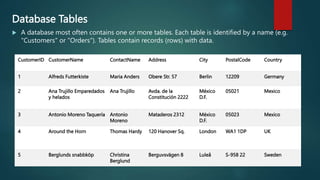
 A database most often contains one or more tables. Each table is identified by a name (e.g.
"Customers" or "Orders"). Tables contain records (rows) with data.
CustomerID CustomerName ContactName Address City PostalCode Country
1 Alfreds Futterkiste Maria Anders Obere Str. 57 Berlin 12209 Germany
2 Ana Trujillo Emparedados
y helados
Ana Trujillo Avda. de la
Constitución 2222
México
D.F.
05021 Mexico
3 Antonio Moreno Taquería Antonio
Moreno
Mataderos 2312 México
D.F.
05023 Mexico
4 Around the Horn Thomas Hardy 120 Hanover Sq. London WA1 1DP UK
5 Berglunds snabbköp Christina
Berglund
Berguvsvägen 8 Luleå S-958 22 Sweden
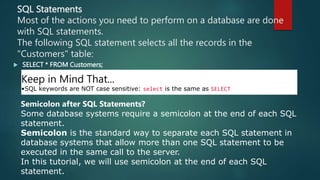
SQL Statements
Most of the actions you need to perform on a database are done
with SQL statements.
The following SQL statement selects all the records in the
"Customers" table:
 SELECT * FROM Customers;
Keep in Mind That...
•SQL keywords are NOT case sensitive: select is the same as SELECT
Semicolon after SQL Statements?
Some database systems require a semicolon at the end of each SQL
statement.
Semicolon is the standard way to separate each SQL statement in
database systems that allow more than one SQL statement to be
executed in the same call to the server.
In this tutorial, we will use semicolon at the end of each SQL
statement.
Some of The Most Important SQL
Commands
•SELECT - extracts data from a database
•UPDATE - updates data in a database
•DELETE - deletes data from a database
•INSERT INTO - inserts new data into a database
•CREATE DATABASE - creates a new database
•ALTER DATABASE - modifies a database
•CREATE TABLE - creates a new table
•ALTER TABLE - modifies a table
•DROP TABLE - deletes a table
•CREATE INDEX - creates an index (search key)
•DROP INDEX - deletes an index
The SQL SELECT Statement
The SELECT statement is used to select data from a database.
The data returned is stored in a result table, called the result-set.
SELECT Syntax
SELECT column1, column2, ...
FROM table_name;
Demo Database
 Below is a selection from the "Customers" table in the Northwind sample database:
CustomerID CustomerName ContactName Address City PostalCode Country
1 Alfreds Futterkiste Maria Anders Obere Str. 57 Berlin 12209 Germany
2 Ana Trujillo
Emparedados y
helados
Ana Trujillo Avda. de la
Constitución
2222
México D.F. 05021 Mexico
3 Antonio Moreno
Taquería
Antonio Moreno Mataderos 2312 México D.F. 05023 Mexico
4 Around the Horn Thomas Hardy 120 Hanover Sq. London WA1 1DP UK
5 Berglunds snabbköp Christina
Berglund
Berguvsvägen 8 Luleå S-958 22 Sweden
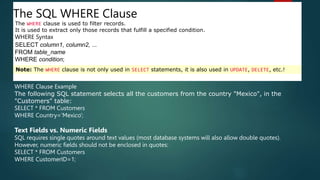
The SQL WHERE Clause
The WHERE clause is used to filter records.
It is used to extract only those records that fulfill a specified condition.
WHERE Syntax
SELECT column1, column2, ...
FROM table_name
WHERE condition;
Note: The WHERE clause is not only used in SELECT statements, it is also used in UPDATE, DELETE, etc.!
WHERE Clause Example
The following SQL statement selects all the customers from the country "Mexico", in the
"Customers" table:
SELECT * FROM Customers
WHERE Country='Mexico';
Text Fields vs. Numeric Fields
SQL requires single quotes around text values (most database systems will also allow double quotes).
However, numeric fields should not be enclosed in quotes:
SELECT * FROM Customers
WHERE CustomerID=1;
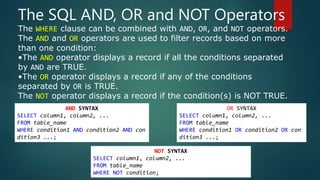
The SQL AND, OR and NOT Operators
The WHERE clause can be combined with AND, OR, and NOT operators.
The AND and OR operators are used to filter records based on more
than one condition:
•The AND operator displays a record if all the conditions separated
by AND are TRUE.
•The OR operator displays a record if any of the conditions
separated by OR is TRUE.
The NOT operator displays a record if the condition(s) is NOT TRUE.
AND SYNTAX
SELECT column1, column2, ...
FROM table_name
WHERE condition1 AND condition2 AND con
dition3 ...;
OR SYNTAX
SELECT column1, column2, ...
FROM table_name
WHERE condition1 OR condition2 OR con
dition3 ...;
NOT SYNTAX
SELECT column1, column2, ...
FROM table_name
WHERE NOT condition;
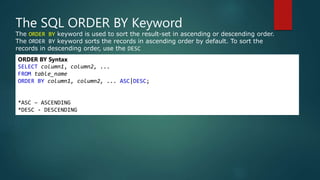
The SQL ORDER BY Keyword
The ORDER BY keyword is used to sort the result-set in ascending or descending order.
The ORDER BY keyword sorts the records in ascending order by default. To sort the
records in descending order, use the DESC
ORDER BY Syntax
SELECT column1, column2, ...
FROM table_name
ORDER BY column1, column2, ... ASC|DESC;
*ASC – ASCENDING
*DESC - DESCENDING
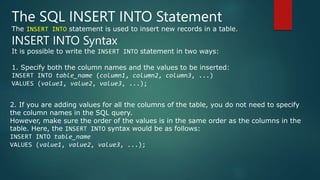
The SQL INSERT INTO Statement
The INSERT INTO statement is used to insert new records in a table.
INSERT INTO Syntax
It is possible to write the INSERT INTO statement in two ways:
1. Specify both the column names and the values to be inserted:
INSERT INTO table_name (column1, column2, column3, ...)
VALUES (value1, value2, value3, ...);
2. If you are adding values for all the columns of the table, you do not need to specify
the column names in the SQL query.
However, make sure the order of the values is in the same order as the columns in the
table. Here, the INSERT INTO syntax would be as follows:
INSERT INTO table_name
VALUES (value1, value2, value3, ...);
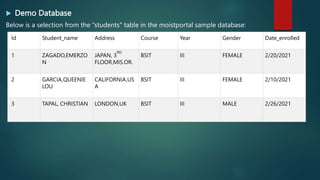
 Demo Database
Below is a selection from the “students" table in the moistportal sample database:
Id Student_name Address Course Year Gender Date_enrolled
1 ZAGADO,EMERZO
N
JAPAN, 3
RD
FLOOR,MIS.OR.
BSIT III FEMALE 2/20/2021
2 GARCIA,QUEENIE
LOU
CALIFORNIA,US
A
BSIT III FEMALE 2/10/2021
3 TAPAL, CHRISTIAN LONDON,UK BSIT III MALE 2/26/2021
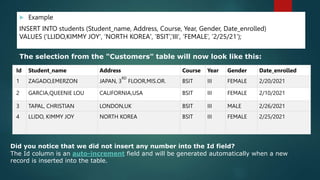
 Example
INSERT INTO students (Student_name, Address, Course, Year, Gender, Date_enrolled)
VALUES (‘LLIDO,KIMMY JOY', ‘NORTH KOREA', ‘BSIT’,’III‘, ‘FEMALE’, ’2/25/21’);
The selection from the "Customers" table will now look like this:
Id Student_name Address Course Year Gender Date_enrolled
1 ZAGADO,EMERZON JAPAN, 3
RD
FLOOR,MIS.OR. BSIT III FEMALE 2/20/2021
2 GARCIA,QUEENIE LOU CALIFORNIA,USA BSIT III FEMALE 2/10/2021
3 TAPAL, CHRISTIAN LONDON,UK BSIT III MALE 2/26/2021
4 LLIDO, KIMMY JOY NORTH KOREA BSIT III FEMALE 2/25/2021
Did you notice that we did not insert any number into the Id field?
The Id column is an auto-increment field and will be generated automatically when a new
record is inserted into the table.
The SQL UPDATE Statement
The UPDATE statement is used to modify the existing records in a table.
UPDATE Syntax
UPDATE table_name
SET column1 = value1, column2 = value2, ...
WHERE condition;
Note: Be careful when updating records in a table! Notice the WHERE clause in
the UPDATE statement.
The WHERE clause specifies which record(s) that should be updated. If you omit
the WHERE clause, all records in the table will be updated!
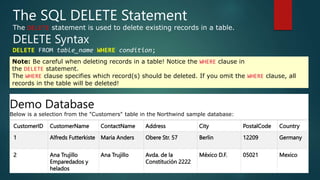
The SQL DELETE Statement
The DELETE statement is used to delete existing records in a table.
DELETE Syntax
DELETE FROM table_name WHERE condition;
Note: Be careful when deleting records in a table! Notice the WHERE clause in
the DELETE statement.
The WHERE clause specifies which record(s) should be deleted. If you omit the WHERE clause, all
records in the table will be deleted!
CustomerID CustomerName ContactName Address City PostalCode Country
1 Alfreds Futterkiste Maria Anders Obere Str. 57 Berlin 12209 Germany
2 Ana Trujillo
Emparedados y
helados
Ana Trujillo Avda. de la
Constitución 2222
México D.F. 05021 Mexico
Demo Database
Below is a selection from the "Customers" table in the Northwind sample database:
SQL DELETE Example
 The following SQL statement deletes the customer "Alfreds
Futterkiste" from the "Customers" table:
 Example
 DELETE FROM Customers WHERE CustomerName='Alfreds
Futterkiste';
CustomerID CustomerName ContactName Address City PostalCode Country
2 Ana Trujillo
Emparedados y
helados
Ana Trujillo Avda. de la
Constitución
2222
México D.F. 05021 Mexico
 To be continue…

about-SQL AND ETC.pptx

  • 1.
  • 2.
     SQL isa standard language for storing, manipulating and retrieving data in databases.  Our SQL tutorial will teach you how to use SQL in: MySQL, SQL Server, MS Access, Oracle, Sybase, Informix, Postgres, and other database systems. What is SQL?  SQL stands for Structured Query Language  SQL lets you access and manipulate databases  SQL became a standard of the American National Standards Institute (ANSI) in 1986, and of the International Organization for Standardization (ISO) in 1987
  • 3.
    What Can SQLdo?  SQL can execute queries against a database  SQL can retrieve data from a database  SQL can insert records in a database  SQL can update records in a database  SQL can delete records from a database  SQL can create new databases  SQL can create new tables in a database  SQL can create stored procedures in a database  SQL can create views in a database  SQL can set permissions on tables, procedures, and views
  • 4.
    RDBMS  RDBMS standsfor Relational Database Management System.  RDBMS is the basis for SQL, and for all modern database systems such as MS SQL Server, IBM DB2, Oracle, MySQL, and Microsoft Access.  The data in RDBMS is stored in database objects called tables. A table is a collection of related data entries and it consists of columns and rows.  Look at the "Customers" table:
  • 5.
    Database Tables  Adatabase most often contains one or more tables. Each table is identified by a name (e.g. "Customers" or "Orders"). Tables contain records (rows) with data. CustomerID CustomerName ContactName Address City PostalCode Country 1 Alfreds Futterkiste Maria Anders Obere Str. 57 Berlin 12209 Germany 2 Ana Trujillo Emparedados y helados Ana Trujillo Avda. de la Constitución 2222 México D.F. 05021 Mexico 3 Antonio Moreno Taquería Antonio Moreno Mataderos 2312 México D.F. 05023 Mexico 4 Around the Horn Thomas Hardy 120 Hanover Sq. London WA1 1DP UK 5 Berglunds snabbköp Christina Berglund Berguvsvägen 8 Luleå S-958 22 Sweden
  • 6.
    SQL Statements Most ofthe actions you need to perform on a database are done with SQL statements. The following SQL statement selects all the records in the "Customers" table:  SELECT * FROM Customers; Keep in Mind That... •SQL keywords are NOT case sensitive: select is the same as SELECT Semicolon after SQL Statements? Some database systems require a semicolon at the end of each SQL statement. Semicolon is the standard way to separate each SQL statement in database systems that allow more than one SQL statement to be executed in the same call to the server. In this tutorial, we will use semicolon at the end of each SQL statement.
  • 7.
    Some of TheMost Important SQL Commands •SELECT - extracts data from a database •UPDATE - updates data in a database •DELETE - deletes data from a database •INSERT INTO - inserts new data into a database •CREATE DATABASE - creates a new database •ALTER DATABASE - modifies a database •CREATE TABLE - creates a new table •ALTER TABLE - modifies a table •DROP TABLE - deletes a table •CREATE INDEX - creates an index (search key) •DROP INDEX - deletes an index
  • 8.
    The SQL SELECTStatement The SELECT statement is used to select data from a database. The data returned is stored in a result table, called the result-set. SELECT Syntax SELECT column1, column2, ... FROM table_name; Demo Database  Below is a selection from the "Customers" table in the Northwind sample database: CustomerID CustomerName ContactName Address City PostalCode Country 1 Alfreds Futterkiste Maria Anders Obere Str. 57 Berlin 12209 Germany 2 Ana Trujillo Emparedados y helados Ana Trujillo Avda. de la Constitución 2222 México D.F. 05021 Mexico 3 Antonio Moreno Taquería Antonio Moreno Mataderos 2312 México D.F. 05023 Mexico 4 Around the Horn Thomas Hardy 120 Hanover Sq. London WA1 1DP UK 5 Berglunds snabbköp Christina Berglund Berguvsvägen 8 Luleå S-958 22 Sweden
  • 9.
    The SQL WHEREClause The WHERE clause is used to filter records. It is used to extract only those records that fulfill a specified condition. WHERE Syntax SELECT column1, column2, ... FROM table_name WHERE condition; Note: The WHERE clause is not only used in SELECT statements, it is also used in UPDATE, DELETE, etc.! WHERE Clause Example The following SQL statement selects all the customers from the country "Mexico", in the "Customers" table: SELECT * FROM Customers WHERE Country='Mexico'; Text Fields vs. Numeric Fields SQL requires single quotes around text values (most database systems will also allow double quotes). However, numeric fields should not be enclosed in quotes: SELECT * FROM Customers WHERE CustomerID=1;
  • 10.
    The SQL AND,OR and NOT Operators The WHERE clause can be combined with AND, OR, and NOT operators. The AND and OR operators are used to filter records based on more than one condition: •The AND operator displays a record if all the conditions separated by AND are TRUE. •The OR operator displays a record if any of the conditions separated by OR is TRUE. The NOT operator displays a record if the condition(s) is NOT TRUE. AND SYNTAX SELECT column1, column2, ... FROM table_name WHERE condition1 AND condition2 AND con dition3 ...; OR SYNTAX SELECT column1, column2, ... FROM table_name WHERE condition1 OR condition2 OR con dition3 ...; NOT SYNTAX SELECT column1, column2, ... FROM table_name WHERE NOT condition;
  • 11.
    The SQL ORDERBY Keyword The ORDER BY keyword is used to sort the result-set in ascending or descending order. The ORDER BY keyword sorts the records in ascending order by default. To sort the records in descending order, use the DESC ORDER BY Syntax SELECT column1, column2, ... FROM table_name ORDER BY column1, column2, ... ASC|DESC; *ASC – ASCENDING *DESC - DESCENDING
  • 12.
    The SQL INSERTINTO Statement The INSERT INTO statement is used to insert new records in a table. INSERT INTO Syntax It is possible to write the INSERT INTO statement in two ways: 1. Specify both the column names and the values to be inserted: INSERT INTO table_name (column1, column2, column3, ...) VALUES (value1, value2, value3, ...); 2. If you are adding values for all the columns of the table, you do not need to specify the column names in the SQL query. However, make sure the order of the values is in the same order as the columns in the table. Here, the INSERT INTO syntax would be as follows: INSERT INTO table_name VALUES (value1, value2, value3, ...);
  • 13.
     Demo Database Belowis a selection from the “students" table in the moistportal sample database: Id Student_name Address Course Year Gender Date_enrolled 1 ZAGADO,EMERZO N JAPAN, 3 RD FLOOR,MIS.OR. BSIT III FEMALE 2/20/2021 2 GARCIA,QUEENIE LOU CALIFORNIA,US A BSIT III FEMALE 2/10/2021 3 TAPAL, CHRISTIAN LONDON,UK BSIT III MALE 2/26/2021
  • 14.
     Example INSERT INTOstudents (Student_name, Address, Course, Year, Gender, Date_enrolled) VALUES (‘LLIDO,KIMMY JOY', ‘NORTH KOREA', ‘BSIT’,’III‘, ‘FEMALE’, ’2/25/21’); The selection from the "Customers" table will now look like this: Id Student_name Address Course Year Gender Date_enrolled 1 ZAGADO,EMERZON JAPAN, 3 RD FLOOR,MIS.OR. BSIT III FEMALE 2/20/2021 2 GARCIA,QUEENIE LOU CALIFORNIA,USA BSIT III FEMALE 2/10/2021 3 TAPAL, CHRISTIAN LONDON,UK BSIT III MALE 2/26/2021 4 LLIDO, KIMMY JOY NORTH KOREA BSIT III FEMALE 2/25/2021 Did you notice that we did not insert any number into the Id field? The Id column is an auto-increment field and will be generated automatically when a new record is inserted into the table.
  • 15.
    The SQL UPDATEStatement The UPDATE statement is used to modify the existing records in a table. UPDATE Syntax UPDATE table_name SET column1 = value1, column2 = value2, ... WHERE condition; Note: Be careful when updating records in a table! Notice the WHERE clause in the UPDATE statement. The WHERE clause specifies which record(s) that should be updated. If you omit the WHERE clause, all records in the table will be updated!
  • 16.
    The SQL DELETEStatement The DELETE statement is used to delete existing records in a table. DELETE Syntax DELETE FROM table_name WHERE condition; Note: Be careful when deleting records in a table! Notice the WHERE clause in the DELETE statement. The WHERE clause specifies which record(s) should be deleted. If you omit the WHERE clause, all records in the table will be deleted! CustomerID CustomerName ContactName Address City PostalCode Country 1 Alfreds Futterkiste Maria Anders Obere Str. 57 Berlin 12209 Germany 2 Ana Trujillo Emparedados y helados Ana Trujillo Avda. de la Constitución 2222 México D.F. 05021 Mexico Demo Database Below is a selection from the "Customers" table in the Northwind sample database:
  • 17.
    SQL DELETE Example The following SQL statement deletes the customer "Alfreds Futterkiste" from the "Customers" table:  Example  DELETE FROM Customers WHERE CustomerName='Alfreds Futterkiste'; CustomerID CustomerName ContactName Address City PostalCode Country 2 Ana Trujillo Emparedados y helados Ana Trujillo Avda. de la Constitución 2222 México D.F. 05021 Mexico
  • 18.
     To becontinue…