Presented By:
Zeeshan Afzal
Janzaib Sheikh
Asad Raza
Introduction
 SQL-Ledger is a double entry accounting system
 Accounting data is stored in a SQL database
server, for the display any text or GUI browser can
be used.
 SQL-Ledger is platform independent Software.
 SQL-Ledger can handle multiple companies, each
of which is held in a separate database
 Usitable for Very Small Business (Less than 50
employees)
Small Business (50 to 99 employees)
 It contain more than 30 languages
 Data in an SQL-Ledger system is stored in a
structured query language (SQL) database
and linked through a chart of accounts
(COA).
 SQL-Ledger is written in Perl.
 As it is an open source software so it has
General Public License (GPL).
how to use
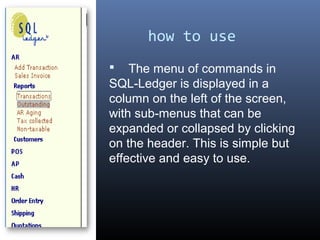
 The menu of commands in
SQL-Ledger is displayed in a
column on the left of the screen,
with sub-menus that can be
expanded or collapsed by clicking
on the header. This is simple but
effective and easy to use.
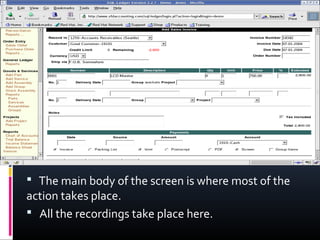
 The main body of the screen is where most of the
action takes place.
 All the recordings take place here.
User Interference:
 SQL-Ledger is a user friendly Software.
 It is simple to understand because it contains
only two parts the menu column and the main
body screen.
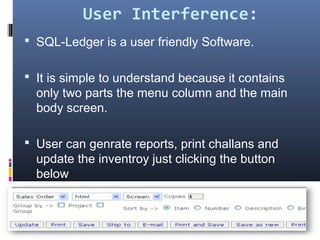
 User can genrate reports, print challans and
update the inventroy just clicking the button
below
Version Date of
Publish
Version Date of
Publish
Version Date of
Publish
2.8.0 Mar 29, 2007 2.8.14 Mar 19, 2008 2.8.28 Jan 15, 2010
2.8.1 Apr 14, 2007 2.8.15 June 12, 2008 2.8.29 Mar 1, 2010
2.8.2 Apr 27, 2007 2.8.16 July 1,2008 2.8.30 Apr 2, 2010
2.8.3 May 1, 2007 2.8.17 July 29, 2008 2.8.31 Oct 4, 2010
2.8.4 May 9, 2007 2.8.18 Oct 29, 2008 2.8.32 Nov 22, 2010
2.8.5 May 22, 2007 2.8.19 Dec 27, 2008 2.8.33 Dec 12, 2010
2.8.6 June 29, 2007 2.8.20 Jan 12,2009 2.8.34 Aug 23, 2011
2.8.7 Aug 2, 2007 2.8.21 Feb 8, 2009 2.8.35 Sept 6, 2011
2.8.8 Sept 12, 2007 2.8.22 Feb 11, 2009 2.8.36 Dec 1, 2011
2.8.9 Dec 10, 2007 2.8.23 Feb 12, 2009 2.8.37 Feb 10, 2012
2.8.10 Dec 18, 2007 2.8.24 Apr 2, 2009 3.0.0 Apr 1, 2012
2.8.11 Jan 5, 2008 2.8.25 Oct 5, 2009 3.0.1 Apr 11, 2012
2.8.12 Jan 30, 2008 2.8.26 Oct 20, 2009 3.0.2 Apr 17, 2012
2.8.13 Feb 20, 2008 2.8.27 Nov $, 2009 3.0.3 June 5, 2012
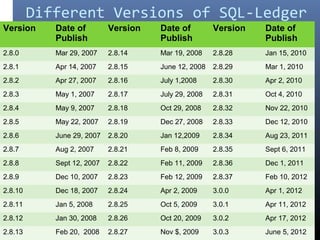
Different Versions of SQL-Ledger
Organizatios using SQL-Ledger
SQL-Ledger is used by organizations having
manufacturing concern & retail sector.
 Automotive Industry
 Healthcare and Pharmaceutical
 Retail Industry
 Travel & Transportation Industry
 Wholesale Distribution & Services Industry
 Industrial Products Industry
Benefits to the organizations
  Point of Sale 
 Self- Service solutions 
 Easy maintanance of inventory records
  Enterprise Resource Planning 
 Separate accounts for each consumer
 Balances are updated according to the 
transactions
 Financial statements are  prepaid easily at the 
end of the year.
Features of SQL-Ledger
 Accounts Receivable
 Track sales by customer
 Issue Invoices, Statements, Receipts, and more
 Job costing and time entry for customer projects.
 Manage sales orders and quotations
 Ship items from sales orders
 Accounts Payable
 Track purchases and debts by vendor.
 Issue RFQ's Purchase Orders, etc.
 Track items received from purchase orders.
 Inventory Management
 Track sales and orders of parts
 Track cost of goods sold using First In/First Out 
method
 List all parts below reorder point.
 Track ordering requirements.
 Track, ship, receive, and transfer parts to and from 
multiple warehouses.
 Localization
 Provide Localized Translations for Part 
Descriptions
 Provide Localized Templates for Invoices, Orders, 
Checks, and more.
 Select language per customer, invoice, order, etc.
Multi-company/Multiuser
 One isolated database per company
 Users can have localized systems
independent of company data set.
 Point of Sale
 Run multiple cash registers against main
SQL-Ledger installation.
 Suitable for retail stores and more.
 Supports some POS hardware out of the
box.
 Third party add-ons available for more
functionality.
 Manufacturing
 Track cost of goods sold for manufactured
goods (assemblies)
 Create assemblies and stock assemblies,
tracking materials on hand.
 Price Matrix
 Track different prices for vendors and
customers across the board.
 Provide discounts to groups of customers per
item or across the board.
 Store vendors` prices independent of the other
last cost in the parts record.
Features different from
accounting softwares quick
books premier industry
edition
 Supply Chain Management
 Inventory Management
 Double-Entry Accounting
 Business Intelligence
January February March April
Blue Balls 20.4 27.4 90 20.4
Red Balls 30.6 38.6 34.6 31.6

SQL ledger

  • 1.
  • 2.
    Introduction  SQL-Ledger isa double entry accounting system  Accounting data is stored in a SQL database server, for the display any text or GUI browser can be used.  SQL-Ledger is platform independent Software.  SQL-Ledger can handle multiple companies, each of which is held in a separate database  Usitable for Very Small Business (Less than 50 employees) Small Business (50 to 99 employees)
  • 3.
     It containmore than 30 languages  Data in an SQL-Ledger system is stored in a structured query language (SQL) database and linked through a chart of accounts (COA).  SQL-Ledger is written in Perl.  As it is an open source software so it has General Public License (GPL).
  • 4.
    how to use The menu of commands in SQL-Ledger is displayed in a column on the left of the screen, with sub-menus that can be expanded or collapsed by clicking on the header. This is simple but effective and easy to use.
  • 5.
     The mainbody of the screen is where most of the action takes place.  All the recordings take place here.
  • 6.
    User Interference:  SQL-Ledgeris a user friendly Software.  It is simple to understand because it contains only two parts the menu column and the main body screen.  User can genrate reports, print challans and update the inventroy just clicking the button below
  • 7.
    Version Date of Publish VersionDate of Publish Version Date of Publish 2.8.0 Mar 29, 2007 2.8.14 Mar 19, 2008 2.8.28 Jan 15, 2010 2.8.1 Apr 14, 2007 2.8.15 June 12, 2008 2.8.29 Mar 1, 2010 2.8.2 Apr 27, 2007 2.8.16 July 1,2008 2.8.30 Apr 2, 2010 2.8.3 May 1, 2007 2.8.17 July 29, 2008 2.8.31 Oct 4, 2010 2.8.4 May 9, 2007 2.8.18 Oct 29, 2008 2.8.32 Nov 22, 2010 2.8.5 May 22, 2007 2.8.19 Dec 27, 2008 2.8.33 Dec 12, 2010 2.8.6 June 29, 2007 2.8.20 Jan 12,2009 2.8.34 Aug 23, 2011 2.8.7 Aug 2, 2007 2.8.21 Feb 8, 2009 2.8.35 Sept 6, 2011 2.8.8 Sept 12, 2007 2.8.22 Feb 11, 2009 2.8.36 Dec 1, 2011 2.8.9 Dec 10, 2007 2.8.23 Feb 12, 2009 2.8.37 Feb 10, 2012 2.8.10 Dec 18, 2007 2.8.24 Apr 2, 2009 3.0.0 Apr 1, 2012 2.8.11 Jan 5, 2008 2.8.25 Oct 5, 2009 3.0.1 Apr 11, 2012 2.8.12 Jan 30, 2008 2.8.26 Oct 20, 2009 3.0.2 Apr 17, 2012 2.8.13 Feb 20, 2008 2.8.27 Nov $, 2009 3.0.3 June 5, 2012 Different Versions of SQL-Ledger
  • 8.
    Organizatios using SQL-Ledger SQL-Ledgeris used by organizations having manufacturing concern & retail sector.  Automotive Industry  Healthcare and Pharmaceutical  Retail Industry  Travel & Transportation Industry  Wholesale Distribution & Services Industry  Industrial Products Industry
  • 9.
    Benefits to theorganizations   Point of Sale   Self- Service solutions   Easy maintanance of inventory records   Enterprise Resource Planning   Separate accounts for each consumer  Balances are updated according to the  transactions  Financial statements are  prepaid easily at the  end of the year.
  • 10.
    Features of SQL-Ledger Accounts Receivable  Track sales by customer  Issue Invoices, Statements, Receipts, and more  Job costing and time entry for customer projects.  Manage sales orders and quotations  Ship items from sales orders  Accounts Payable  Track purchases and debts by vendor.  Issue RFQ's Purchase Orders, etc.  Track items received from purchase orders.
  • 11.
     Inventory Management  Track sales and orders of parts Track cost of goods sold using First In/First Out  method  List all parts below reorder point.  Track ordering requirements.  Track, ship, receive, and transfer parts to and from  multiple warehouses.  Localization  Provide Localized Translations for Part  Descriptions  Provide Localized Templates for Invoices, Orders,  Checks, and more.  Select language per customer, invoice, order, etc.
  • 12.
    Multi-company/Multiuser  One isolateddatabase per company  Users can have localized systems independent of company data set.  Point of Sale  Run multiple cash registers against main SQL-Ledger installation.  Suitable for retail stores and more.  Supports some POS hardware out of the box.  Third party add-ons available for more functionality.
  • 13.
     Manufacturing  Trackcost of goods sold for manufactured goods (assemblies)  Create assemblies and stock assemblies, tracking materials on hand.  Price Matrix  Track different prices for vendors and customers across the board.  Provide discounts to groups of customers per item or across the board.  Store vendors` prices independent of the other last cost in the parts record.
  • 14.
    Features different from accountingsoftwares quick books premier industry edition  Supply Chain Management  Inventory Management  Double-Entry Accounting  Business Intelligence
  • 15.
    January February MarchApril Blue Balls 20.4 27.4 90 20.4 Red Balls 30.6 38.6 34.6 31.6