Structured Query Language
DML
MIS 520 – Database Theory
Fall 2001 (Day)
Lecture 10/11
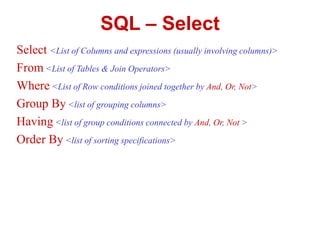
SQL – Select
Select <List of Columns and expressions (usually involving columns)>
From <List of Tables & Join Operators>
Where <List of Row conditions joined together by And, Or, Not>
Group By <list of grouping columns>
Having <list of group conditions connected by And, Or, Not >
Order By <list of sorting specifications>
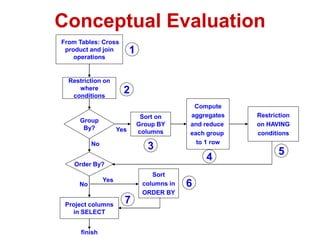
Conceptual Evaluation
From Tables: Cross
product and join
operations
1
Restriction on
where
conditions
2
Group
By?
Order By?
Project columns
in SELECT
finish
Sort on
Group BY
columns
Yes
Compute
aggregates
and reduce
each group
to 1 row
3
4
Restriction
on HAVING
conditions
5
Sort
columns in
ORDER BY
No
No
Yes
6
7
SQL – DISTINCT
• Eliminates all the duplicate entries in the table resulting from the query.
Syntax:
Select [DISTINCT] select_list
From table[, table, …]
[Where expression]
[Order By expression]
Example:
Select DISTINCT studio_id, director_id
From Movies
studio_id director_id
1 1
2 2
2 10
3 1
3 9
SQL – Order By
• Used to sort the results based on contents of a column
• Multiple levels of sort can be done by specifying
multiple columns
• An expression can be used in Order By clause
Syntax:
Select function(column)
From table1 [, table2 …]
[Where condition]
[Order By {Column | alias | position} [ASC | DESC]]
SQL – Order By
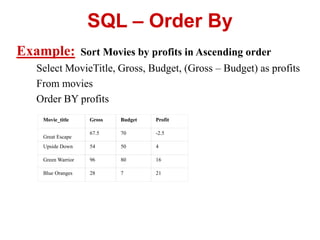
Example: Sort Movies by profits in Ascending order
Select MovieTitle, Gross, Budget, (Gross – Budget) as profits
From movies
Order BY profits
Great Escape
67.5 70 -2.5
Upside Down 54 50 4
Green Warrior 96 80 16
Blue Oranges 28 7 21
Movie_title Gross Budget Profit
Aggregate Queries – Group
By
• Categorizes the query results according to the contents of a
column in the database
• Multiple levels of subgroups can be created by specifying
multiple columns
Syntax:
Select column1, [column2, …]
From table [, table …]
[Where condition]
Group By column1, [column2, ….]
Having [Condition]
Aggregate Queries – Group
By
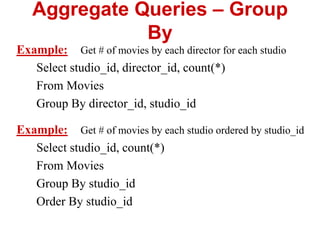
Example: Get # of movies by each director for each studio
Select studio_id, director_id, count(*)
From Movies
Group By director_id, studio_id
Example: Get # of movies by each studio ordered by studio_id
Select studio_id, count(*)
From Movies
Group By studio_id
Order By studio_id
Aggregate Queries – Group
By
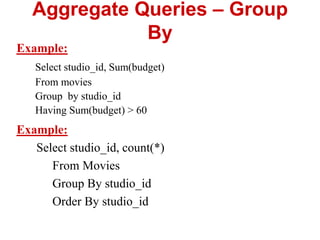
Example:
Select studio_id, Sum(budget)
From movies
Group by studio_id
Having Sum(budget) > 60
Example:
Select studio_id, count(*)
From Movies
Group By studio_id
Order By studio_id
Aggregate Queries
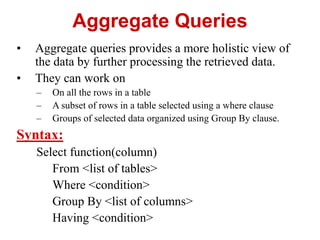
• Aggregate queries provides a more holistic view of
the data by further processing the retrieved data.
• They can work on
– On all the rows in a table
– A subset of rows in a table selected using a where clause
– Groups of selected data organized using Group By clause.
Syntax:
Select function(column)
From <list of tables>
Where <condition>
Group By <list of columns>
Having <condition>
Aggregate Queries
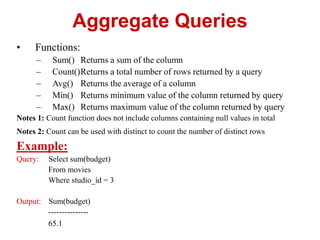
• Functions:
– Sum() Returns a sum of the column
– Count()Returns a total number of rows returned by a query
– Avg() Returns the average of a column
– Min() Returns minimum value of the column returned by query
– Max() Returns maximum value of the column returned by query
Notes 1: Count function does not include columns containing null values in total
Notes 2: Count can be used with distinct to count the number of distinct rows
Example:
Query: Select sum(budget)
From movies
Where studio_id = 3
Output: Sum(budget)
---------------
65.1
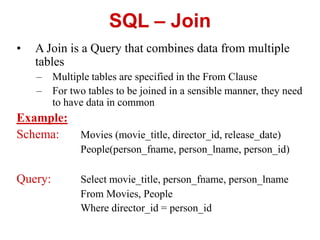
SQL – Join
• A Join is a Query that combines data from multiple
tables
– Multiple tables are specified in the From Clause
– For two tables to be joined in a sensible manner, they need
to have data in common
Example:
Schema: Movies (movie_title, director_id, release_date)
People(person_fname, person_lname, person_id)
Query: Select movie_title, person_fname, person_lname
From Movies, People
Where director_id = person_id
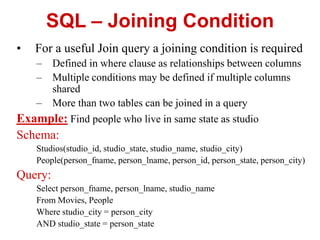
SQL – Joining Condition
• For a useful Join query a joining condition is required
– Defined in where clause as relationships between columns
– Multiple conditions may be defined if multiple columns
shared
– More than two tables can be joined in a query
Example: Find people who live in same state as studio
Schema:
Studios(studio_id, studio_state, studio_name, studio_city)
People(person_fname, person_lname, person_id, person_state, person_city)
Query:
Select person_fname, person_lname, studio_name
From Movies, People
Where studio_city = person_city
AND studio_state = person_state
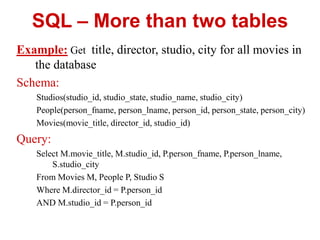
SQL – More than two tables
Example: Get title, director, studio, city for all movies in
the database
Schema:
Studios(studio_id, studio_state, studio_name, studio_city)
People(person_fname, person_lname, person_id, person_state, person_city)
Movies(movie_title, director_id, studio_id)
Query:
Select M.movie_title, M.studio_id, P.person_fname, P.person_lname,
S.studio_city
From Movies M, People P, Studio S
Where M.director_id = P.person_id
AND M.studio_id = P.person_id
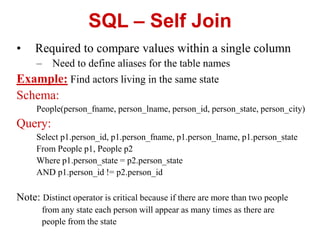
SQL – Self Join
• Required to compare values within a single column
– Need to define aliases for the table names
Example: Find actors living in the same state
Schema:
People(person_fname, person_lname, person_id, person_state, person_city)
Query:
Select p1.person_id, p1.person_fname, p1.person_lname, p1.person_state
From People p1, People p2
Where p1.person_state = p2.person_state
AND p1.person_id != p2.person_id
Note: Distinct operator is critical because if there are more than two people
from any state each person will appear as many times as there are
people from the state
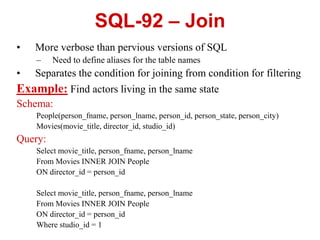
SQL-92 – Join
• More verbose than pervious versions of SQL
– Need to define aliases for the table names
• Separates the condition for joining from condition for filtering
Example: Find actors living in the same state
Schema:
People(person_fname, person_lname, person_id, person_state, person_city)
Movies(movie_title, director_id, studio_id)
Query:
Select movie_title, person_fname, person_lname
From Movies INNER JOIN People
ON director_id = person_id
Select movie_title, person_fname, person_lname
From Movies INNER JOIN People
ON director_id = person_id
Where studio_id = 1
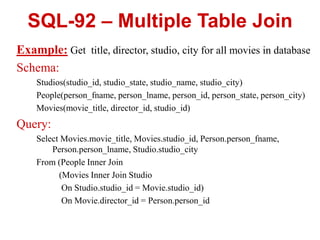
SQL-92 – Multiple Table Join
Example: Get title, director, studio, city for all movies in database
Schema:
Studios(studio_id, studio_state, studio_name, studio_city)
People(person_fname, person_lname, person_id, person_state, person_city)
Movies(movie_title, director_id, studio_id)
Query:
Select Movies.movie_title, Movies.studio_id, Person.person_fname,
Person.person_lname, Studio.studio_city
From (People Inner Join
(Movies Inner Join Studio
On Studio.studio_id = Movie.studio_id)
On Movie.director_id = Person.person_id
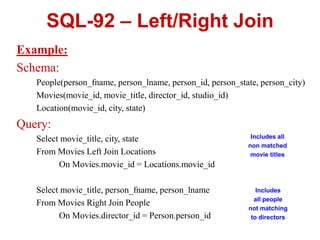
SQL-92 – Left/Right Join
Example:
Schema:
People(person_fname, person_lname, person_id, person_state, person_city)
Movies(movie_id, movie_title, director_id, studio_id)
Location(movie_id, city, state)
Query:
Select movie_title, city, state
From Movies Left Join Locations
On Movies.movie_id = Locations.movie_id
Select movie_title, person_fname, person_lname
From Movies Right Join People
On Movies.director_id = Person.person_id
Includes all
non matched
movie titles
Includes
all people
not matching
to directors
Nested Queries
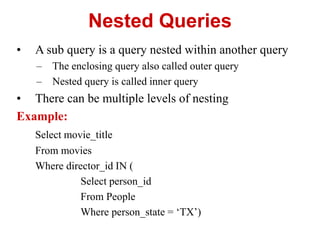
• A sub query is a query nested within another query
– The enclosing query also called outer query
– Nested query is called inner query
• There can be multiple levels of nesting
Example:
Select movie_title
From movies
Where director_id IN (
Select person_id
From People
Where person_state = ‘TX’)
Nested Queries - Types
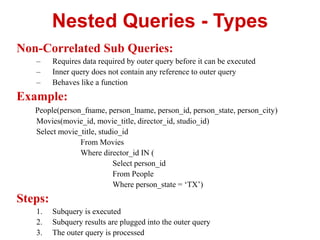
Non-Correlated Sub Queries:
– Requires data required by outer query before it can be executed
– Inner query does not contain any reference to outer query
– Behaves like a function
Example:
People(person_fname, person_lname, person_id, person_state, person_city)
Movies(movie_id, movie_title, director_id, studio_id)
Select movie_title, studio_id
From Movies
Where director_id IN (
Select person_id
From People
Where person_state = ‘TX’)
Steps:
1. Subquery is executed
2. Subquery results are plugged into the outer query
3. The outer query is processed
Nested Queries - Types
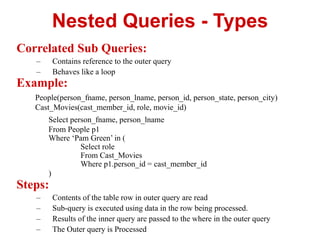
Correlated Sub Queries:
– Contains reference to the outer query
– Behaves like a loop
Example:
People(person_fname, person_lname, person_id, person_state, person_city)
Cast_Movies(cast_member_id, role, movie_id)
Select person_fname, person_lname
From People p1
Where ‘Pam Green’ in (
Select role
From Cast_Movies
Where p1.person_id = cast_member_id
)
Steps:
– Contents of the table row in outer query are read
– Sub-query is executed using data in the row being processed.
– Results of the inner query are passed to the where in the outer query
– The Outer query is Processed
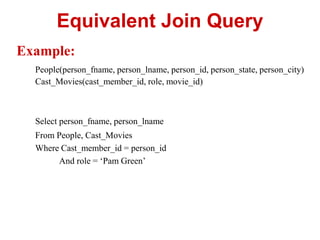
Equivalent Join Query
Example:
People(person_fname, person_lname, person_id, person_state, person_city)
Cast_Movies(cast_member_id, role, movie_id)
Select person_fname, person_lname
From People, Cast_Movies
Where Cast_member_id = person_id
And role = ‘Pam Green’

SQL Data Manipulation Language presentation

  • 1.
    Structured Query Language DML MIS520 – Database Theory Fall 2001 (Day) Lecture 10/11
  • 2.
    SQL – Select Select<List of Columns and expressions (usually involving columns)> From <List of Tables & Join Operators> Where <List of Row conditions joined together by And, Or, Not> Group By <list of grouping columns> Having <list of group conditions connected by And, Or, Not > Order By <list of sorting specifications>
  • 3.
    Conceptual Evaluation From Tables:Cross product and join operations 1 Restriction on where conditions 2 Group By? Order By? Project columns in SELECT finish Sort on Group BY columns Yes Compute aggregates and reduce each group to 1 row 3 4 Restriction on HAVING conditions 5 Sort columns in ORDER BY No No Yes 6 7
  • 4.
    SQL – DISTINCT •Eliminates all the duplicate entries in the table resulting from the query. Syntax: Select [DISTINCT] select_list From table[, table, …] [Where expression] [Order By expression] Example: Select DISTINCT studio_id, director_id From Movies studio_id director_id 1 1 2 2 2 10 3 1 3 9
  • 5.
    SQL – OrderBy • Used to sort the results based on contents of a column • Multiple levels of sort can be done by specifying multiple columns • An expression can be used in Order By clause Syntax: Select function(column) From table1 [, table2 …] [Where condition] [Order By {Column | alias | position} [ASC | DESC]]
  • 6.
    SQL – OrderBy Example: Sort Movies by profits in Ascending order Select MovieTitle, Gross, Budget, (Gross – Budget) as profits From movies Order BY profits Great Escape 67.5 70 -2.5 Upside Down 54 50 4 Green Warrior 96 80 16 Blue Oranges 28 7 21 Movie_title Gross Budget Profit
  • 7.
    Aggregate Queries –Group By • Categorizes the query results according to the contents of a column in the database • Multiple levels of subgroups can be created by specifying multiple columns Syntax: Select column1, [column2, …] From table [, table …] [Where condition] Group By column1, [column2, ….] Having [Condition]
  • 8.
    Aggregate Queries –Group By Example: Get # of movies by each director for each studio Select studio_id, director_id, count(*) From Movies Group By director_id, studio_id Example: Get # of movies by each studio ordered by studio_id Select studio_id, count(*) From Movies Group By studio_id Order By studio_id
  • 9.
    Aggregate Queries –Group By Example: Select studio_id, Sum(budget) From movies Group by studio_id Having Sum(budget) > 60 Example: Select studio_id, count(*) From Movies Group By studio_id Order By studio_id
  • 10.
    Aggregate Queries • Aggregatequeries provides a more holistic view of the data by further processing the retrieved data. • They can work on – On all the rows in a table – A subset of rows in a table selected using a where clause – Groups of selected data organized using Group By clause. Syntax: Select function(column) From <list of tables> Where <condition> Group By <list of columns> Having <condition>
  • 11.
    Aggregate Queries • Functions: –Sum() Returns a sum of the column – Count()Returns a total number of rows returned by a query – Avg() Returns the average of a column – Min() Returns minimum value of the column returned by query – Max() Returns maximum value of the column returned by query Notes 1: Count function does not include columns containing null values in total Notes 2: Count can be used with distinct to count the number of distinct rows Example: Query: Select sum(budget) From movies Where studio_id = 3 Output: Sum(budget) --------------- 65.1
  • 12.
    SQL – Join •A Join is a Query that combines data from multiple tables – Multiple tables are specified in the From Clause – For two tables to be joined in a sensible manner, they need to have data in common Example: Schema: Movies (movie_title, director_id, release_date) People(person_fname, person_lname, person_id) Query: Select movie_title, person_fname, person_lname From Movies, People Where director_id = person_id
  • 13.
    SQL – JoiningCondition • For a useful Join query a joining condition is required – Defined in where clause as relationships between columns – Multiple conditions may be defined if multiple columns shared – More than two tables can be joined in a query Example: Find people who live in same state as studio Schema: Studios(studio_id, studio_state, studio_name, studio_city) People(person_fname, person_lname, person_id, person_state, person_city) Query: Select person_fname, person_lname, studio_name From Movies, People Where studio_city = person_city AND studio_state = person_state
  • 14.
    SQL – Morethan two tables Example: Get title, director, studio, city for all movies in the database Schema: Studios(studio_id, studio_state, studio_name, studio_city) People(person_fname, person_lname, person_id, person_state, person_city) Movies(movie_title, director_id, studio_id) Query: Select M.movie_title, M.studio_id, P.person_fname, P.person_lname, S.studio_city From Movies M, People P, Studio S Where M.director_id = P.person_id AND M.studio_id = P.person_id
  • 15.
    SQL – SelfJoin • Required to compare values within a single column – Need to define aliases for the table names Example: Find actors living in the same state Schema: People(person_fname, person_lname, person_id, person_state, person_city) Query: Select p1.person_id, p1.person_fname, p1.person_lname, p1.person_state From People p1, People p2 Where p1.person_state = p2.person_state AND p1.person_id != p2.person_id Note: Distinct operator is critical because if there are more than two people from any state each person will appear as many times as there are people from the state
  • 16.
    SQL-92 – Join •More verbose than pervious versions of SQL – Need to define aliases for the table names • Separates the condition for joining from condition for filtering Example: Find actors living in the same state Schema: People(person_fname, person_lname, person_id, person_state, person_city) Movies(movie_title, director_id, studio_id) Query: Select movie_title, person_fname, person_lname From Movies INNER JOIN People ON director_id = person_id Select movie_title, person_fname, person_lname From Movies INNER JOIN People ON director_id = person_id Where studio_id = 1
  • 17.
    SQL-92 – MultipleTable Join Example: Get title, director, studio, city for all movies in database Schema: Studios(studio_id, studio_state, studio_name, studio_city) People(person_fname, person_lname, person_id, person_state, person_city) Movies(movie_title, director_id, studio_id) Query: Select Movies.movie_title, Movies.studio_id, Person.person_fname, Person.person_lname, Studio.studio_city From (People Inner Join (Movies Inner Join Studio On Studio.studio_id = Movie.studio_id) On Movie.director_id = Person.person_id
  • 18.
    SQL-92 – Left/RightJoin Example: Schema: People(person_fname, person_lname, person_id, person_state, person_city) Movies(movie_id, movie_title, director_id, studio_id) Location(movie_id, city, state) Query: Select movie_title, city, state From Movies Left Join Locations On Movies.movie_id = Locations.movie_id Select movie_title, person_fname, person_lname From Movies Right Join People On Movies.director_id = Person.person_id Includes all non matched movie titles Includes all people not matching to directors
  • 19.
    Nested Queries • Asub query is a query nested within another query – The enclosing query also called outer query – Nested query is called inner query • There can be multiple levels of nesting Example: Select movie_title From movies Where director_id IN ( Select person_id From People Where person_state = ‘TX’)
  • 20.
    Nested Queries -Types Non-Correlated Sub Queries: – Requires data required by outer query before it can be executed – Inner query does not contain any reference to outer query – Behaves like a function Example: People(person_fname, person_lname, person_id, person_state, person_city) Movies(movie_id, movie_title, director_id, studio_id) Select movie_title, studio_id From Movies Where director_id IN ( Select person_id From People Where person_state = ‘TX’) Steps: 1. Subquery is executed 2. Subquery results are plugged into the outer query 3. The outer query is processed
  • 21.
    Nested Queries -Types Correlated Sub Queries: – Contains reference to the outer query – Behaves like a loop Example: People(person_fname, person_lname, person_id, person_state, person_city) Cast_Movies(cast_member_id, role, movie_id) Select person_fname, person_lname From People p1 Where ‘Pam Green’ in ( Select role From Cast_Movies Where p1.person_id = cast_member_id ) Steps: – Contents of the table row in outer query are read – Sub-query is executed using data in the row being processed. – Results of the inner query are passed to the where in the outer query – The Outer query is Processed
  • 22.
    Equivalent Join Query Example: People(person_fname,person_lname, person_id, person_state, person_city) Cast_Movies(cast_member_id, role, movie_id) Select person_fname, person_lname From People, Cast_Movies Where Cast_member_id = person_id And role = ‘Pam Green’