SQL 쿼리를
AWS DynamoDB 에서
사용해 볼까요?
윤평호 @20190305
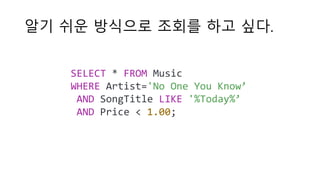
알기 쉬운 방식으로 조회를 하고 싶다.
SELECT * FROM Music
WHERE Artist='No One You Know’
AND SongTitle LIKE '%Today%’
AND Price < 1.00;
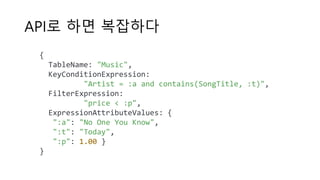
API로 하면 복잡하다
{
TableName: "Music",
KeyConditionExpression:
"Artist = :a and contains(SongTitle, :t)",
FilterExpression:
"price < :p",
ExpressionAttributeValues: {
":a": "No One You Know",
":t": "Today",
":p": 1.00 }
}
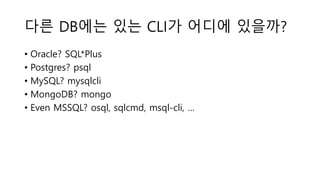
다른 DB에는 있는 CLI가 어디에 있을까?
• Oracle? SQL*Plus
• Postgres? psql
• MySQL? mysqlcli
• MongoDB? mongo
• Even MSSQL? osql, sqlcmd, msql-cli, …
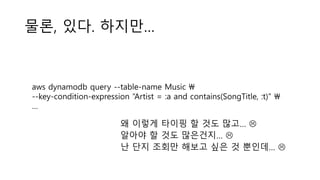
물론, 있다. 하지만…
aws dynamodb query --table-name Music 
--key-condition-expression “Artist = :a and contains(SongTitle, :t)" 
…
왜 이렇게 타이핑 할 것도 많고… 
알아야 할 것도 많은건지… 
난 단지 조회만 해보고 싶은 것 뿐인데… 
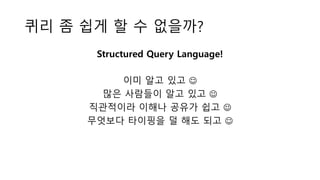
퀴리 좀 쉽게 할 수 없을까?
Structured Query Language!
이미 알고 있고 
많은 사람들이 알고 있고 
직관적이라 이해나 공유가 쉽고 
무엇보다 타이핑을 덜 해도 되고 
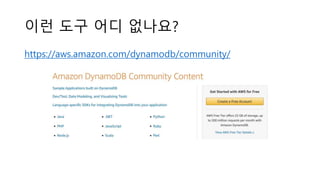
이런 도구 어디 없나요?
https://aws.amazon.com/dynamodb/community/
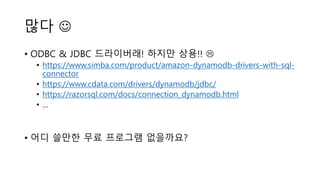
많다 
• ODBC & JDBC 드라이버래! 하지만 상용!! 
• https://www.simba.com/product/amazon-dynamodb-drivers-with-sql-
connector
• https://www.cdata.com/drivers/dynamodb/jdbc/
• https://razorsql.com/docs/connection_dynamodb.html
• …
• 어디 쓸만한 무료 프로그램 없을까요?
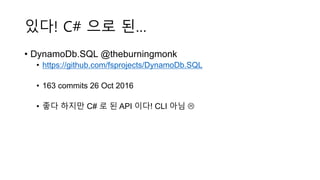
있다! C# 으로 된…
• DynamoDb.SQL @theburningmonk
• https://github.com/fsprojects/DynamoDb.SQL
• 163 commits 26 Oct 2016
• 좋다 하지만 C# 로 된 API 이다! CLI 아님 
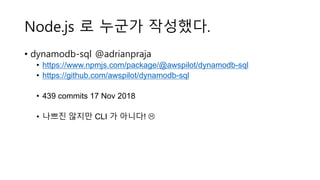
Node.js 로 누군가 작성했다.
• dynamodb-sql @adrianpraja
• https://www.npmjs.com/package/@awspilot/dynamodb-sql
• https://github.com/awspilot/dynamodb-sql
• 439 commits 17 Nov 2018
• 나쁘진 않지만 CLI 가 아니다! 
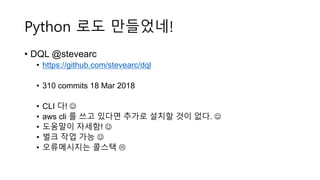
Python 로도 만들었네!
• DQL @stevearc
• https://github.com/stevearc/dql
• 310 commits 18 Mar 2018
• CLI 다! 
• aws cli 를 쓰고 있다면 추가로 설치할 것이 없다. 
• 도움말이 자세함! 
• 벌크 작업 가능 
• 오류메시지는 콜스택 
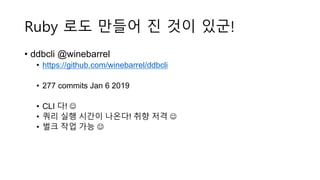
Ruby 로도 만들어 진 것이 있군!
• ddbcli @winebarrel
• https://github.com/winebarrel/ddbcli
• 277 commits Jan 6 2019
• CLI 다! 
• 쿼리 실행 시간이 나온다! 취향 저격 
• 벌크 작업 가능 
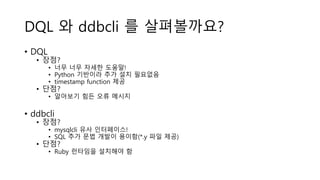
DQL 와 ddbcli 를 살펴볼까요?
• DQL
• 장점?
• 너무 너무 자세한 도움말!
• Python 기반이라 추가 설치 필요없음
• timestamp function 제공
• 단점?
• 알아보기 힘든 오류 메시지
• ddbcli
• 장점?
• mysqlcli 유사 인터페이스!
• SQL 추가 문법 개발이 용이함(*.y 파일 제공)
• 단점?
• Ruby 런타임을 설치해야 함
$ aws configure
AWS Access Key ID [****************EHNA]:
AWS Secret Access Key [****************IQ5L]:
Default region name [ap-northeast-2]:
Default output format [json]:
먼저 계정 설정부터!
$ export AWS_ACCESS_KEY_ID=... EHNA
$ export AWS_SECRET_ACCESS_KEY=... IQ5L
$ export AWS_REGION=ap-northeast-2
or
aws configure
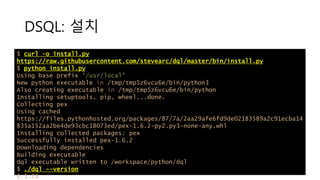
DSQL: 설치
$ curl -o install.py
https://raw.githubusercontent.com/stevearc/dql/master/bin/install.py
$ python install.py
Using base prefix '/usr/local'
New python executable in /tmp/tmp5z6vcu6e/bin/python3
Also creating executable in /tmp/tmp5z6vcu6e/bin/python
Installing setuptools, pip, wheel...done.
Collecting pex
Using cached
https://files.pythonhosted.org/packages/87/7a/2aa29afe6fd9de02183589a2c91ecba14
835a152aa2be4de93cbc18073ed/pex-1.6.2-py2.py3-none-any.whl
Installing collected packages: pex
Successfully installed pex-1.6.2
Downloading dependencies
Building executable
dql executable written to /workspace/python/dql
$ ./dql --version
0.5.26
DSQL: 사용법
$ ./dql --help
usage: dql [-h] [-c COMMAND] [-r REGION] [-H HOST] [-p PORT] [--version]
Start the DQL client.
optional arguments:
-h, --help show this help message and exit
-c COMMAND, --command COMMAND
Run this command and exit
-r REGION, --region REGION
AWS region to connect to (default us-west-1)
-H HOST, --host HOST Host to connect to if using a local instance (default
None)
-p PORT, --port PORT Port to connect to (default 8000)
--version Print the version and exit
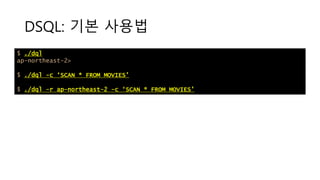
DSQL: 기본 사용법
$ ./dql
ap-northeast-2>
$ ./dql -c ‘SCAN * FROM MOVIES’
$ ./dql -r ap-northeast-2 -c ‘SCAN * FROM MOVIES’
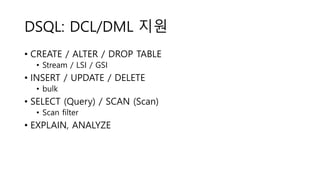
DSQL: DCL/DML 지원
• CREATE / ALTER / DROP TABLE
• Stream / LSI / GSI
• INSERT / UPDATE / DELETE
• bulk
• SELECT (Query) / SCAN (Scan)
• Scan filter
• EXPLAIN, ANALYZE
DSQL: 자료형
type value
NUMBER 1234
STRING ‘asdf’ | “asdf”
BINARY B’1234abcd’
NUMBER SET (1, 2, 3)
STRING SET (‘a’, ‘b’, ‘c’)
BINARY SET (b’a’, ‘b’c’)
BOOL TRUE | FALSE
LIST [1, 2, 3]
MAP {‘a’: 1}
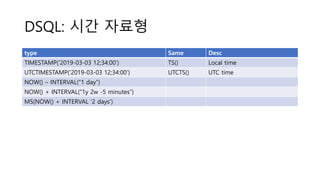
DSQL: 시간 자료형
type Same Desc
TIMESTAMP(‘2019-03-03 12;34:00’) TS() Local time
UTCTIMESTAMP(‘2019-03-03 12;34:00’) UTCTS() UTC time
NOW() – INTERVAL(“1 day”)
NOW() + INTERVAL(“1y 2w -5 minutes”)
MS(NOW() + INTERVAL ‘2 days’)
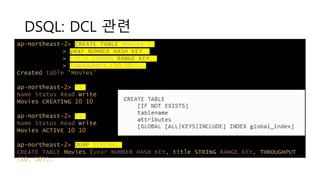
DSQL: DCL 관련
ap-northeast-2> CREATE TABLE Movies (
> year NUMBER HASH KEY,
> title STRING RANGE KEY,
> THROUGHPUT (10,10));
Created table 'Movies’
ap-northeast-2> ls
Name Status Read Write
Movies CREATING 10 10
ap-northeast-2> ls
Name Status Read Write
Movies ACTIVE 10 10
ap-northeast-2> DUMP SCHEMA;
CREATE TABLE Movies (year NUMBER HASH KEY, title STRING RANGE KEY, THROUGHPUT
(10, 10));
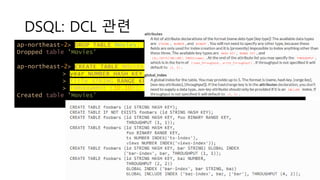
DSQL: DCL 관련
ap-northeast-2> DROP TABLE Movies;
Dropped table 'Movies'
ap-northeast-2> CREATE TABLE Movies (
> year NUMBER HASH KEY,
> title STRING RANGE KEY,
> THROUGHPUT (10,10));
Created table 'Movies’
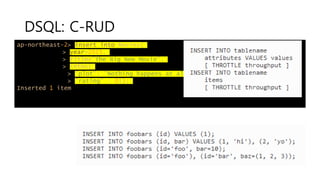
DSQL: C-RUD
ap-northeast-2> insert into Movies(
> year=2015,
> title="The Big New Movie",
> info={
> "plot": "Nothing happens at all.",
> "rating" : 0});
Inserted 1 item
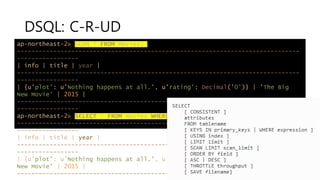
DSQL: C-R-UD
ap-northeast-2> SCAN * FROM Movies;
------------------------------------------------------------------------------
-----------------
| info | title | year |
------------------------------------------------------------------------------
-----------------
| {u'plot': u'Nothing happens at all.', u'rating': Decimal('0')} | 'The Big
New Movie' | 2015 |
------------------------------------------------------------------------------
-----------------
ap-northeast-2> SELECT * FROM Movies WHERE year=2015;
------------------------------------------------------------------------------
-----------------
| info | title | year |
------------------------------------------------------------------------------
-----------------
| {u'plot': u'Nothing happens at all.', u'rating': Decimal('0')} | 'The Big
New Movie' | 2015 |
------------------------------------------------------------------------------
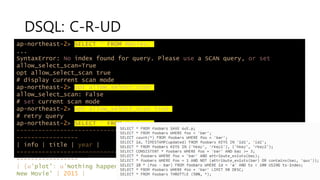
DSQL: C-R-UD
ap-northeast-2> SELECT * FROM Movies;
...
SyntaxError: No index found for query. Please use a SCAN query, or set
allow_select_scan=True
opt allow_select_scan true
# display current scan mode
ap-northeast-2> opt allow_select_scan
allow_select_scan: False
# set current scan mode
ap-northeast-2> opt allow_select_scan true
# retry query
ap-northeast-2> SELECT * FROM Movies;
------------------------------------------------------------------------------
-----------------
| info | title | year |
------------------------------------------------------------------------------
-----------------
| {u'plot': u'Nothing happens at all.', u'rating': Decimal('0')} | 'The Big
New Movie' | 2015 |
DSQL: C-R-UD
ap-northeast-2> SELECT * FROM Movies SAVE Movies.json;
Saved 1 record to Movies.json
$ cat Movies.json
{"info":{"plot":"Everything happens all at
once.","actors":["Larry","Moe","Curly"],"rating":5.5},"title":"The Big New
Movie","year":2015}
ap-northeast-2> LOAD Movies.json INTO Movies;
Loaded 1 item
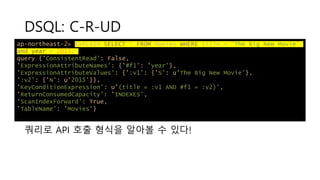
DSQL: C-R-UD
ap-northeast-2> EXPLAIN SELECT * FROM Movies WHERE title = "The Big New Movie"
and year = 2015;
query {'ConsistentRead': False,
'ExpressionAttributeNames': {'#f1': 'year'},
'ExpressionAttributeValues': {':v1': {'S': u'The Big New Movie'},
':v2': {'N': u'2015'}},
'KeyConditionExpression': u'(title = :v1 AND #f1 = :v2)',
'ReturnConsumedCapacity': 'INDEXES',
'ScanIndexForward': True,
'TableName': 'Movies'}
쿼리로 API 호출 형식을 알아볼 수 있다!
DSQL: CR-U-D
ap-northeast-2> UPDATE Movies
> SET info.rating = 5.5, info.plot= "Everything happens all at once.",
info.actors= ["Larry", "Moe", "Curly"]
> WHERE year = 2015 AND title = "The Big New Movie";
Updated 1 item
ap-northeast-2> SCAN * FROM Movies;
------------------------------------------------------------------------------
-----------------
| info | title | year |
------------------------------------------------------------------------------
-----------------
| {u'plot': u'Everything happens all at once.', u'actors': [u'Larry', u'Moe',
u'Curly'], u'rating': Decimal('5.5')} | 'The Big New Movie' | 2015 |
------------------------------------------------------------------------------
-----------------
DSQL: CRU-D
ap-northeast-2> DELETE FROM Movies WHERE year=2015 AND title="The Big New
Movie";
Deleted 1 item
# delete whole table
ap-northeast-2> DELETE FROM Movies;
This will run delete_item on all items in the table! Continue? [y/N] y
Deleted 1 item
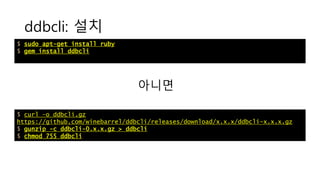
ddbcli: 설치
$ sudo apt-get install ruby
$ gem install ddbcli
$ curl –o ddbcli.gz
https://github.com/winebarrel/ddbcli/releases/download/x.x.x/ddbcli-x.x.x.gz
$ gunzip -c ddbcli-0.x.x.gz > ddbcli
$ chmod 755 ddbcli
아니면
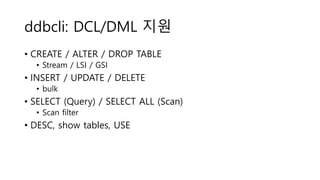
ddbcli: DCL/DML 지원
• CREATE / ALTER / DROP TABLE
• Stream / LSI / GSI
• INSERT / UPDATE / DELETE
• bulk
• SELECT (Query) / SELECT ALL (Scan)
• Scan filter
• DESC, show tables, USE
ddbcli: query
select * from games use index (game-title-index) where title = 'Dragon X' and version = 2;
[
{"author":“Yoon","game_id":101,"game_type_id":2,"title":"Dragon X","version":2}
]
// 1 row in set (0.14 sec)
CREATE TABLE games (
author STRING HASH,
game_id NUMBER RANGE,
INDEX game-type-id-index (game_type_id NUMBER) ALL,
GLOBAL INDEX game-title-index (title STRING, version NUMBER) ALL
) read=4 write=4
간단 데모
나머지는 매뉴얼을 참고하세요!

SQL 쿼리를 AWS DynamoDB에서 (CLI)로 사용해 볼까요?

  • 1.
    SQL 쿼리를 AWS DynamoDB에서 사용해 볼까요? 윤평호 @20190305
  • 2.
    알기 쉬운 방식으로조회를 하고 싶다. SELECT * FROM Music WHERE Artist='No One You Know’ AND SongTitle LIKE '%Today%’ AND Price < 1.00;
  • 3.
    API로 하면 복잡하다 { TableName:"Music", KeyConditionExpression: "Artist = :a and contains(SongTitle, :t)", FilterExpression: "price < :p", ExpressionAttributeValues: { ":a": "No One You Know", ":t": "Today", ":p": 1.00 } }
  • 4.
    다른 DB에는 있는CLI가 어디에 있을까? • Oracle? SQL*Plus • Postgres? psql • MySQL? mysqlcli • MongoDB? mongo • Even MSSQL? osql, sqlcmd, msql-cli, …
  • 5.
    물론, 있다. 하지만… awsdynamodb query --table-name Music --key-condition-expression “Artist = :a and contains(SongTitle, :t)" … 왜 이렇게 타이핑 할 것도 많고…  알아야 할 것도 많은건지…  난 단지 조회만 해보고 싶은 것 뿐인데… 
  • 6.
    퀴리 좀 쉽게할 수 없을까? Structured Query Language! 이미 알고 있고  많은 사람들이 알고 있고  직관적이라 이해나 공유가 쉽고  무엇보다 타이핑을 덜 해도 되고 
  • 7.
    이런 도구 어디없나요? https://aws.amazon.com/dynamodb/community/
  • 8.
    많다  • ODBC& JDBC 드라이버래! 하지만 상용!!  • https://www.simba.com/product/amazon-dynamodb-drivers-with-sql- connector • https://www.cdata.com/drivers/dynamodb/jdbc/ • https://razorsql.com/docs/connection_dynamodb.html • … • 어디 쓸만한 무료 프로그램 없을까요?
  • 9.
    있다! C# 으로된… • DynamoDb.SQL @theburningmonk • https://github.com/fsprojects/DynamoDb.SQL • 163 commits 26 Oct 2016 • 좋다 하지만 C# 로 된 API 이다! CLI 아님 
  • 10.
    Node.js 로 누군가작성했다. • dynamodb-sql @adrianpraja • https://www.npmjs.com/package/@awspilot/dynamodb-sql • https://github.com/awspilot/dynamodb-sql • 439 commits 17 Nov 2018 • 나쁘진 않지만 CLI 가 아니다! 
  • 11.
    Python 로도 만들었네! •DQL @stevearc • https://github.com/stevearc/dql • 310 commits 18 Mar 2018 • CLI 다!  • aws cli 를 쓰고 있다면 추가로 설치할 것이 없다.  • 도움말이 자세함!  • 벌크 작업 가능  • 오류메시지는 콜스택 
  • 12.
    Ruby 로도 만들어진 것이 있군! • ddbcli @winebarrel • https://github.com/winebarrel/ddbcli • 277 commits Jan 6 2019 • CLI 다!  • 쿼리 실행 시간이 나온다! 취향 저격  • 벌크 작업 가능 
  • 13.
    DQL 와 ddbcli를 살펴볼까요? • DQL • 장점? • 너무 너무 자세한 도움말! • Python 기반이라 추가 설치 필요없음 • timestamp function 제공 • 단점? • 알아보기 힘든 오류 메시지 • ddbcli • 장점? • mysqlcli 유사 인터페이스! • SQL 추가 문법 개발이 용이함(*.y 파일 제공) • 단점? • Ruby 런타임을 설치해야 함
  • 14.
    $ aws configure AWSAccess Key ID [****************EHNA]: AWS Secret Access Key [****************IQ5L]: Default region name [ap-northeast-2]: Default output format [json]: 먼저 계정 설정부터! $ export AWS_ACCESS_KEY_ID=... EHNA $ export AWS_SECRET_ACCESS_KEY=... IQ5L $ export AWS_REGION=ap-northeast-2 or aws configure
  • 15.
    DSQL: 설치 $ curl-o install.py https://raw.githubusercontent.com/stevearc/dql/master/bin/install.py $ python install.py Using base prefix '/usr/local' New python executable in /tmp/tmp5z6vcu6e/bin/python3 Also creating executable in /tmp/tmp5z6vcu6e/bin/python Installing setuptools, pip, wheel...done. Collecting pex Using cached https://files.pythonhosted.org/packages/87/7a/2aa29afe6fd9de02183589a2c91ecba14 835a152aa2be4de93cbc18073ed/pex-1.6.2-py2.py3-none-any.whl Installing collected packages: pex Successfully installed pex-1.6.2 Downloading dependencies Building executable dql executable written to /workspace/python/dql $ ./dql --version 0.5.26
  • 16.
    DSQL: 사용법 $ ./dql--help usage: dql [-h] [-c COMMAND] [-r REGION] [-H HOST] [-p PORT] [--version] Start the DQL client. optional arguments: -h, --help show this help message and exit -c COMMAND, --command COMMAND Run this command and exit -r REGION, --region REGION AWS region to connect to (default us-west-1) -H HOST, --host HOST Host to connect to if using a local instance (default None) -p PORT, --port PORT Port to connect to (default 8000) --version Print the version and exit
  • 17.
    DSQL: 기본 사용법 $./dql ap-northeast-2> $ ./dql -c ‘SCAN * FROM MOVIES’ $ ./dql -r ap-northeast-2 -c ‘SCAN * FROM MOVIES’
  • 18.
    DSQL: DCL/DML 지원 •CREATE / ALTER / DROP TABLE • Stream / LSI / GSI • INSERT / UPDATE / DELETE • bulk • SELECT (Query) / SCAN (Scan) • Scan filter • EXPLAIN, ANALYZE
  • 19.
    DSQL: 자료형 type value NUMBER1234 STRING ‘asdf’ | “asdf” BINARY B’1234abcd’ NUMBER SET (1, 2, 3) STRING SET (‘a’, ‘b’, ‘c’) BINARY SET (b’a’, ‘b’c’) BOOL TRUE | FALSE LIST [1, 2, 3] MAP {‘a’: 1}
  • 20.
    DSQL: 시간 자료형 typeSame Desc TIMESTAMP(‘2019-03-03 12;34:00’) TS() Local time UTCTIMESTAMP(‘2019-03-03 12;34:00’) UTCTS() UTC time NOW() – INTERVAL(“1 day”) NOW() + INTERVAL(“1y 2w -5 minutes”) MS(NOW() + INTERVAL ‘2 days’)
  • 21.
    DSQL: DCL 관련 ap-northeast-2>CREATE TABLE Movies ( > year NUMBER HASH KEY, > title STRING RANGE KEY, > THROUGHPUT (10,10)); Created table 'Movies’ ap-northeast-2> ls Name Status Read Write Movies CREATING 10 10 ap-northeast-2> ls Name Status Read Write Movies ACTIVE 10 10 ap-northeast-2> DUMP SCHEMA; CREATE TABLE Movies (year NUMBER HASH KEY, title STRING RANGE KEY, THROUGHPUT (10, 10));
  • 22.
    DSQL: DCL 관련 ap-northeast-2>DROP TABLE Movies; Dropped table 'Movies' ap-northeast-2> CREATE TABLE Movies ( > year NUMBER HASH KEY, > title STRING RANGE KEY, > THROUGHPUT (10,10)); Created table 'Movies’
  • 23.
    DSQL: C-RUD ap-northeast-2> insertinto Movies( > year=2015, > title="The Big New Movie", > info={ > "plot": "Nothing happens at all.", > "rating" : 0}); Inserted 1 item
  • 24.
    DSQL: C-R-UD ap-northeast-2> SCAN* FROM Movies; ------------------------------------------------------------------------------ ----------------- | info | title | year | ------------------------------------------------------------------------------ ----------------- | {u'plot': u'Nothing happens at all.', u'rating': Decimal('0')} | 'The Big New Movie' | 2015 | ------------------------------------------------------------------------------ ----------------- ap-northeast-2> SELECT * FROM Movies WHERE year=2015; ------------------------------------------------------------------------------ ----------------- | info | title | year | ------------------------------------------------------------------------------ ----------------- | {u'plot': u'Nothing happens at all.', u'rating': Decimal('0')} | 'The Big New Movie' | 2015 | ------------------------------------------------------------------------------
  • 25.
    DSQL: C-R-UD ap-northeast-2> SELECT* FROM Movies; ... SyntaxError: No index found for query. Please use a SCAN query, or set allow_select_scan=True opt allow_select_scan true # display current scan mode ap-northeast-2> opt allow_select_scan allow_select_scan: False # set current scan mode ap-northeast-2> opt allow_select_scan true # retry query ap-northeast-2> SELECT * FROM Movies; ------------------------------------------------------------------------------ ----------------- | info | title | year | ------------------------------------------------------------------------------ ----------------- | {u'plot': u'Nothing happens at all.', u'rating': Decimal('0')} | 'The Big New Movie' | 2015 |
  • 26.
    DSQL: C-R-UD ap-northeast-2> SELECT* FROM Movies SAVE Movies.json; Saved 1 record to Movies.json $ cat Movies.json {"info":{"plot":"Everything happens all at once.","actors":["Larry","Moe","Curly"],"rating":5.5},"title":"The Big New Movie","year":2015} ap-northeast-2> LOAD Movies.json INTO Movies; Loaded 1 item
  • 27.
    DSQL: C-R-UD ap-northeast-2> EXPLAINSELECT * FROM Movies WHERE title = "The Big New Movie" and year = 2015; query {'ConsistentRead': False, 'ExpressionAttributeNames': {'#f1': 'year'}, 'ExpressionAttributeValues': {':v1': {'S': u'The Big New Movie'}, ':v2': {'N': u'2015'}}, 'KeyConditionExpression': u'(title = :v1 AND #f1 = :v2)', 'ReturnConsumedCapacity': 'INDEXES', 'ScanIndexForward': True, 'TableName': 'Movies'} 쿼리로 API 호출 형식을 알아볼 수 있다!
  • 28.
    DSQL: CR-U-D ap-northeast-2> UPDATEMovies > SET info.rating = 5.5, info.plot= "Everything happens all at once.", info.actors= ["Larry", "Moe", "Curly"] > WHERE year = 2015 AND title = "The Big New Movie"; Updated 1 item ap-northeast-2> SCAN * FROM Movies; ------------------------------------------------------------------------------ ----------------- | info | title | year | ------------------------------------------------------------------------------ ----------------- | {u'plot': u'Everything happens all at once.', u'actors': [u'Larry', u'Moe', u'Curly'], u'rating': Decimal('5.5')} | 'The Big New Movie' | 2015 | ------------------------------------------------------------------------------ -----------------
  • 29.
    DSQL: CRU-D ap-northeast-2> DELETEFROM Movies WHERE year=2015 AND title="The Big New Movie"; Deleted 1 item # delete whole table ap-northeast-2> DELETE FROM Movies; This will run delete_item on all items in the table! Continue? [y/N] y Deleted 1 item
  • 30.
    ddbcli: 설치 $ sudoapt-get install ruby $ gem install ddbcli $ curl –o ddbcli.gz https://github.com/winebarrel/ddbcli/releases/download/x.x.x/ddbcli-x.x.x.gz $ gunzip -c ddbcli-0.x.x.gz > ddbcli $ chmod 755 ddbcli 아니면
  • 31.
    ddbcli: DCL/DML 지원 •CREATE / ALTER / DROP TABLE • Stream / LSI / GSI • INSERT / UPDATE / DELETE • bulk • SELECT (Query) / SELECT ALL (Scan) • Scan filter • DESC, show tables, USE
  • 32.
    ddbcli: query select *from games use index (game-title-index) where title = 'Dragon X' and version = 2; [ {"author":“Yoon","game_id":101,"game_type_id":2,"title":"Dragon X","version":2} ] // 1 row in set (0.14 sec) CREATE TABLE games ( author STRING HASH, game_id NUMBER RANGE, INDEX game-type-id-index (game_type_id NUMBER) ALL, GLOBAL INDEX game-title-index (title STRING, version NUMBER) ALL ) read=4 write=4
  • 33.