Topics:
1. Cloud computingat Amazon
2. Cloud computing the Google perspective
3. Microsoft Windows Azure and online services
4. Edge Computing
5.Basic characteristics and attributes
6.Edge and real time
7.Benefits of Edge computing
8.Fog computing
9.Basic characteristics
10.Difference between Edge and Fog computing
3.
o 1.Cloud computingat Amazon
• AWS is the largest cloud service provider in the world. offering a broad set of
tools and services to help organizations innovate and scale rapidly.
• The overview of how cloud computing operates at Amazon, both internally for
its own operations and externally through AWS:
4.
• 1. AmazonWeb Services (AWS) Overview
Launch Year: AWS was launched in 2006.
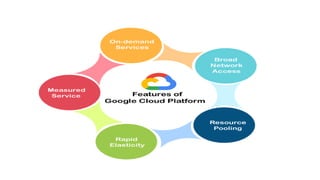
Services Provided:
o Infrastructure as a Service (IaaS): Compute power, storage, and networking.
o Platform as a Service (PaaS): Tools for developing, running, and managing
applications.
o Software as a Service (SaaS): Software applications provided over the
internet.
5.
Popular AWSServices:
o Amazon EC2: Elastic Compute Cloud provides scalable compute
capacity.
o Amazon S3: Simple Storage Service for scalable object storage.
o Amazon RDS: Relational Database Service.
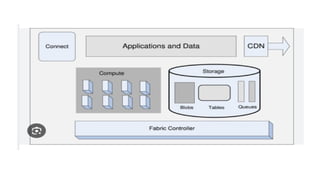
o Amazon Lambda: Serverless computing that runs code in response to
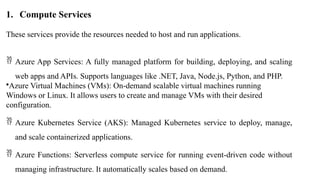
events.
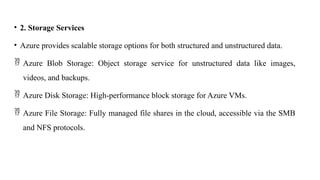
o Amazon DynamoDB: Fully managed NoSQL database.
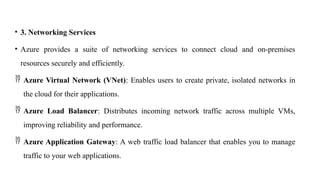
6.
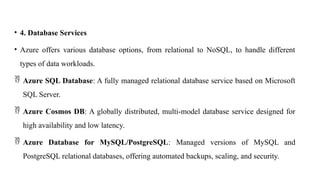
• 2. HowAmazon Uses Cloud Computing Internally
E-Commerce Operations:
o Scalability and Efficiency: Amazon's e-commerce platform is powered by cloud
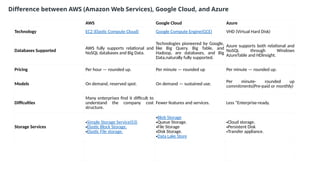
computing, which helps handle fluctuating traffic during peak shopping seasons
(e.g., Prime Day, Friday).
o Inventory Management: Amazon uses cloud services for real-time tracking and
optimization of inventory across its warehouses worldwide.
o Personalization: AWS powers the recommendation algorithms that suggest products
to users based on their browsing and purchasing history.
7.
Logistics andDelivery:
o AWS IoT: Amazon leverages IoT (Internet of Things) solutions on AWS to
monitor and optimize its delivery systems. For instance, it tracks packages in
real time using AWS services.
Alexa and Echo Devices:
o Voice-activated Services: Amazon’s smart assistants, like Alexa, rely on cloud
services for natural language processing and quick responses to user queries.
8.
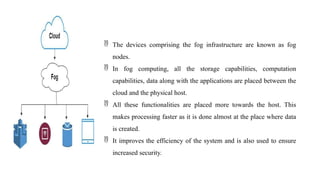
• 3. Advantagesof AWS for External Clients
• AWS provides solutions across a range of industries, including finance, healthcare,
entertainment, and government. Here are some of the key benefits for businesses using AWS:
1. Scalability:
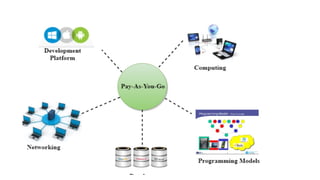
o AWS allows businesses to scale their infrastructure as needed without upfront capital
expenses. For instance, startups like Airbnb and Dropbox could grow rapidly using AWS's
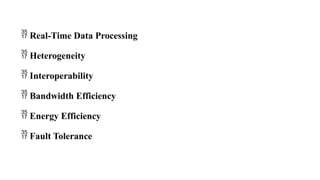
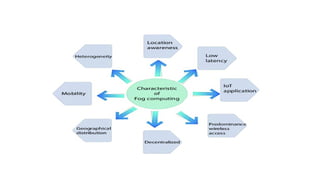
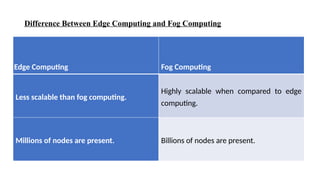
pay-as-you-go model.
o Through AWS, autoscaling and elastic load balancing techniques are automatically scaled up
or down, when demand increases or decreases respectively.
o AWS techniques are ideal for handling unpredictable or very high loads. Due to this reason,
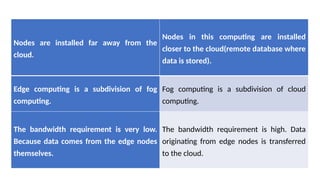
organizations enjoy the benefits of reduced cost and increased user satisfaction.
9.
2. GlobalInfrastructure:
o AWS has data centers in multiple regions across the globe, ensuring low
latency and fast data access for users anywhere.
3. Security and Compliance:
o AWS offers built-in security features like encryption, compliance
certifications, and governance tools that help enterprises maintain a secure
cloud environment.
o Services like AWS Shield and AWS WAF (Web Application Firewall) protect
against cyber threats.
10.
4. Flexibility:
oAWS provides a wide range of services, from compute power to storage, AI, and machine
learning tools. This flexibility allows businesses to use the right tools for their unique
needs.
5. Cost Efficiency:
o Businesses can reduce their IT costs by moving to AWS, as they pay only for what they
use, instead of managing expensive physical servers.
6. Innovation:
o AWS provides services for emerging technologies, such as artificial intelligence (AI),
machine learning (ML), and the Internet of Things (IoT). Companies like Netflix and
NASA use AWS to run their most advanced workloads.
11.
• Uses ofAWS
o A small manufacturing organization uses their expertise to expand their business by leaving their IT
management to the AWS.
o A large enterprise spread across the globe can utilize the AWS to deliver the training to the distributed
workforce.
o An architecture consulting company can use AWS to get the high-compute rendering of construction
prototype.
o A media company can use the AWS to provide different types of content such as ebox or audio files to
the worldwide files.
13.
• Advantages ofAWS
• 1) Flexibility
• We can get more time for core business tasks due to the
instant availability of new features and services in AWS.
• It provides effortless hosting of legacy applications. AWS does
not require learning new technologies and migration of
applications to the AWS provides the advanced computing and
efficient storage.
• AWS also offers a choice that whether we want to run the
applications and services together or not. We can also choose
to run a part of the IT infrastructure in AWS and the remaining
part in data centres.
14.
• 2) Cost-effectiveness
•AWS requires no upfront investment, long-term commitment,
and minimum expense when compared to traditional IT
infrastructure that requires a huge investment.
• 3) Scalability/Elasticity
• Through AWS, autoscaling and elastic load balancing
techniques are automatically scaled up or down, when
demand increases or decreases respectively. AWS techniques
are ideal for handling unpredictable or very high loads. Due
to this reason, organizations enjoy the benefits of reduced
cost and increased user satisfaction.
15.
• 4) Security
•AWS provides end-to-end security and privacy to customers.
• AWS has a virtual infrastructure that offers optimum
availability while managing full privacy and isolation of their
operations.
• Customers can expect high-level of physical security because
of Amazon's several years of experience in designing,
developing and maintaining large-scale IT operation centers.
• AWS ensures the three aspects of security, i.e., Confidentiality,
integrity, and availability of user's data.
16.
• Disadvantages ofAmazon Web Services
• AWS can be complex, with a wide range of services and features
that may be difficult to understand and use, especially for new
users.
• AWS can be expensive, especially if you have a high-traffic
application or need to run multiple services. Additionally, the cost of
services can increase over time, so you need to regularly monitor
your spending.
• While AWS provides many security features and tools, securing your
resources on AWS can still be challenging, and you may need to
implement additional security measures to meet your specific
requirements.
• AWS manages many aspects of the infrastructure, which can limit
your control over certain parts of your application and environment.
17.
2.Cloud computing theGoogle perspective
• It is a public cloud computing platform consisting of a variety of
services like compute, storage, networking, application development,
Big Data, and more, which run on the same cloud infrastructure that
Google uses internally for its end-user products, such as Google
Search, Photos, Gmail and YouTube, etc.
• The services of GCP(Google Cloud Platform) can be accessed by
software developers, cloud administrators and IT professionals over the
Internet or through a dedicated network connection.
18.
• Why GoogleCloud Platform?
• Google Cloud Platform is known as one of the leading cloud providers
in the IT field.
• The services and features can be easily accessed and used by the
software developers and users with little technical knowledge.
• Google has been on top amongst its competitors, offering the highly
scalable and most reliable platform for building, testing and deploying
the applications in the real-time environment.
19.
• Features ofGoogle Cloud Platform
o Capacity: Sufficient resources for easy scaling whenever required. Also, effective
management of those resources for optimum performance.
o Security: Multi-level security options to protect resources, such as assets, network
and OS -components.
o Network Infrastructure: Number of physical, logistical, and human-resource-
related components, such as wiring, routers, switches, firewalls, load balancers, etc.
o Support: Skilled professionals for installation, maintenance, and support.
o Bandwidth: Suitable amount of bandwidth for peak load.
o Facilities: Other infrastructure components, including physical equipment and
power resources.
20.
o On-demand services:Automated environment with web-based tools. Therefore, no human
intervention is required to access the resources.
o Broad network access: The resources and the information can be accessed from anywhere.
o Resource pooling: On-demand availability of a shared pool of computing resources are
available to the users.
o Rapid elasticity: The availability of more resources whenever required.
o Measured service: Easy-to-pay feature enables users to pay only for consumed services.
21.
• Benefits ofGoogle Cloud Platform
• Some of the main benefits of Google Cloud Platform are explained below:
• Best Pricing: Google enables users to get Google Cloud hosting at the cheapest rates.
• The hosting plans are not only cheaper than other hosting platforms but also offer better features
than others.
• GCP provides a pay-as-you-go option to the users where users can pay separately only for the
services and resources they want to use.
• Work from Anywhere: Once the account is configured on GCP, it can be accessed from anywhere.
That means that the user can use GCP across different devices from different places.
• It is possible because Google provides web-based applications that allow users to have complete
access to GCP.
• Private Network: Google has its own network that enables users to have more control over GCP
functions. Due to this, users achieve smooth performance and increased efficiency over the
network.
22.
• Scalable: Usersare getting a more scalable platform over the private network.
Because Google uses fiber-optic cables to extend its network range, it is likely
to have more scalability.
• Google is always working to scale its network because there can be any
amount of traffic at any time.
• users that their data is completely safe and secure from unauthorized sources.
• Redundant Backup: Google always keeps backup of user's data with built-in
redundant backup integration. In case a user has lost the stored data, it's not a
big problem.
• Google always has a copy of the users' data unless the data is deleted
forcefully. This adds data integrity, reliability and durability with GCP.
24.
• Working ofGoogle Cloud Platform
• When a file is uploaded on the Google cloud, the unique metadata is inserted
into a file.
• It helps identify the different files and track the changes made across all the
copies of any particular file.
• All the changes made by individuals get synchronized automatically to the
main file, also called a master file.
• GCP further updates all the downloaded files using metadata to maintain the
correct records.
25.
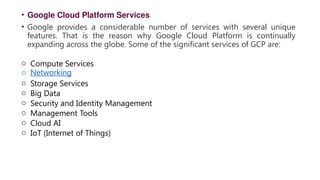
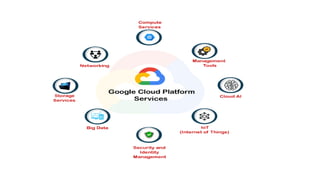
• Google CloudPlatform Services
• Google provides a considerable number of services with several unique
features. That is the reason why Google Cloud Platform is continually
expanding across the globe. Some of the significant services of GCP are:
o Compute Services
o Networking
o Storage Services
o Big Data
o Security and Identity Management
o Management Tools
o Cloud AI
o IoT (Internet of Things)
27.
• Advantages ofGoogle Cloud Platform
• There are several advantages of using Google Cloud Platform, such as:
o Google Cloud Offers Quick and Easy Collaboration: Multiple users can access the data
and
simultaneously contribute their information.
o This is possible because the data is stored on the cloud servers, not on the user's personal
computers.
o Higher Productivity with Continuous Development: Google is always working on adding
new features and functionalities to provide higher productivity to the customers.
o Therefore, Google delivers frequent updates to its products and services.
o Less Disruption with Adopting New Features: Instead of pushing huge disruptive updates
of changes, Google provides small updates weekly.
o This helps users to understand and adopt new features easily.
28.
o Least orMinimal Data is stored on Vulnerable Devices:
o Google does not store data on local devices unless a user explicitly tries to do it.
o This is because the data stored on local devices may get compromised compared to
the cloud's data.
o Users can access Google Cloud from Anywhere: The best thing is that a user can
easily access the information stored on Google cloud from anywhere because it is
operated through web-based applications.
o Google provides Maximum Security with its Robust Structure: Google hires
leading security professionals to protect user's data.
o Users get process-based and physical security features made by Google.
29.
o Users haveFull Control over their Data: Users gain full control over services and
the data stored in Google Cloud.
o If a user does not want to use Google services any longer and wants to delete the
cloud data, it can be easily performed.
o Google provides Higher Uptime and Reliability: Google uses several resources to
provide higher and reliable up-time servers.
If a data center is not working for technical issues, the system will automatically
communicate with the secondary center without interruption visible to users.
30.
2.3.Microsoft WindowsAzure and online services
• Microsoft Azure is one of the widely used cloud computing platforms.
• Azure provides a wide variety of services such as cloud storage, compute services,
network services, cognitive services, databases, analytics, and IoT.
• It makes building, deploying, and managing applications very easy.
32.
• Azure components:
•Compute—runs cloud applications.
• Storage—uses blobs, tables, and queues to store data.
• Fabric Controller—deploys, manages, and monitors applications; CDN—maintains
cache copies of data
• Connect—allows IP connections between the user systems and applications running
on Windows Azure.
33.
1. Compute Services
Theseservices provide the resources needed to host and run applications.
Azure App Services: A fully managed platform for building, deploying, and scaling
web apps and APIs. Supports languages like .NET, Java, Node.js, Python, and PHP.
•Azure Virtual Machines (VMs): On-demand scalable virtual machines running
Windows or Linux. It allows users to create and manage VMs with their desired
configuration.
Azure Kubernetes Service (AKS): Managed Kubernetes service to deploy, manage,
and scale containerized applications.
Azure Functions: Serverless compute service for running event-driven code without
managing infrastructure. It automatically scales based on demand.
34.
• 2. StorageServices
• Azure provides scalable storage options for both structured and unstructured data.
Azure Blob Storage: Object storage service for unstructured data like images,
videos, and backups.
Azure Disk Storage: High-performance block storage for Azure VMs.
Azure File Storage: Fully managed file shares in the cloud, accessible via the SMB
and NFS protocols.
35.
• 3. NetworkingServices
• Azure provides a suite of networking services to connect cloud and on-premises
resources securely and efficiently.
Azure Virtual Network (VNet): Enables users to create private, isolated networks in
the cloud for their applications.
Azure Load Balancer: Distributes incoming network traffic across multiple VMs,
improving reliability and performance.
Azure Application Gateway: A web traffic load balancer that enables you to manage
traffic to your web applications.
36.
• 4. DatabaseServices
• Azure offers various database options, from relational to NoSQL, to handle different
types of data workloads.
Azure SQL Database: A fully managed relational database service based on Microsoft
SQL Server.
Azure Cosmos DB: A globally distributed, multi-model database service designed for
high availability and low latency.
Azure Database for MySQL/PostgreSQL: Managed versions of MySQL and
PostgreSQL relational databases, offering automated backups, scaling, and security.
37.
• 5. AIand Machine Learning Services
• Azure provides a variety of tools to build, train, and deploy machine learning and AI
models.
Azure Machine Learning: A service for building, training, and deploying machine
learning models at scale using Python SDKs and automated tools.
Azure Cognitive Services: A set of pre-built APIs for adding AI capabilities like
vision, speech, language, and decision-making to your applications.
38.
• 6. DevOpsand Management Tools
• Azure provides a suite of tools to help streamline the development lifecycle and
manage cloud environments.
Azure DevOps: A suite of tools for continuous integration and delivery (CI/CD),
including Azure Pipelines, Azure Repos, Azure Boards, Azure Artifacts, and Azure
Test Plans.
Azure Monitor: A service for monitoring the performance and health of Azure
resources and applications.
39.
AWS Google CloudAzure
Technology EC2 (Elastic Compute Cloud) Google Compute Engine(GCE) VHD (Virtual Hard Disk)
Databases Supported
AWS fully supports relational and
NoSQL databases and Big Data.
Technologies pioneered by Google,
like Big Query, Big Table, and
Hadoop, are databases, and Big
Data,naturally fully supported.
Azure supports both relational and
NoSQL through Windows
AzureTable and HDInsight.
Pricing Per hour — rounded up. Per minute — rounded up Per minute — rounded up.
Models On demand, reserved spot. On demand — sustained use.
Per minute- rounded up
commitments(Pre-paid or monthly)
Difficulties
Many enterprises find it difficult to
understand the company cost
structure.
Fewer features and services. Less “Enterprise-ready.
Storage Services
•Simple Storage Service(S3)
•Elastic Block Storage.
•Elastic File storage.
•Blob Storage
•Queue Storage.
•File Storage
•Disk Storage.
•Data Lake Store
•Cloud storage.
•Persistent Disk
•Transfer appliance.
Difference between AWS (Amazon Web Services), Google Cloud, and Azure
40.
• 4.Edge Computing
•Edge computing is the process of bringing information storage and computing abilities
closer to the devices that produce that information and the users who consume it.
• Traditionally, applications have transmitted data from smart devices like sensors and
smartphones to a central data center for processing.
• However, the unprecedented complexity and scale of data have outpaced network
capabilities.
• By shifting processing capabilities closer to users and devices, edge computing systems
significantly improve application performance, reduce bandwidth requirements, and give
faster real-time insights.
41.
• Why isedge computing important?
• Edge computing is becoming more popular because it allows enterprises to collect
and analyze their raw data more efficiently.
• More than ever, organizations need instant access to their data to make informed
decisions about their operational efficiency and business functions.
• When appropriately used, edge computing has the potential to help organizations
improve safety and performance, automate processes, and improve user experience.
42.
• 5.Basic characteristicsand attributes
• The characteristics and attributes of edge computing allows to handle complex, real-time applications and
efficiently support a wide range of industries like IoT, autonomous systems, healthcare, and industrial
automation.
• Characteristics: Proximity to data sources, low latency, distributed architecture, real-time processing, local
data processing, bandwidth optimization, privacy, and security.
Proximity to Data Sources:
Data is processed near the devices or systems that generate it, such as IoT devices, sensors, or smart cameras.
This allows for faster response times and reduced data transmission to distant cloud servers.
Low Latency:
Since computation occurs close to the data source, edge computing significantly reduces latency. This is
critical for real-time applications such as autonomous driving, smart manufacturing, and healthcare
monitoring.
43.
Bandwidth Optimization:
By processing data locally or at the edge, only relevant or aggregated data is sent to
the central cloud or data center. This reduces the amount of data transferred across the
network, saving bandwidth and cutting costs.
Distributed Architecture:
By processing data locally or at the edge, only relevant or aggregated data is sent to
the central cloud or data center. This reduces the amount of data transferred across the
network, saving bandwidth and cutting costs.
44.
Local DataProcessing:
Edge computing enables devices or edge servers to process data locally, without relying on a
centralized data center. This is particularly important in remote locations or for applications that need
immediate responses.
Enhanced Privacy and Security:
Since sensitive data can be processed locally, fewer data transmissions to the cloud or third-party
servers are required, reducing potential exposure and improving privacy and security controls.
Real-Time Processing:
Edge computing supports real-time analytics, decision-making, and response by processing data at or
near the source. This is essential for applications like industrial automation, gaming, or real-time
video analytics.
45.
• Attributes: Scalability,resilience, heterogeneity, autonomy, energy efficiency, geographic distribution,
mobility support, and contextual awareness.
• Edge computing has several key attributes that define its functionality and distinguish it from traditional
cloud-based systems:
• Scalability:
o Edge computing enables the deployment of computing resources at a massive scale, supporting a large
number of devices in different locations. It offers flexibility to scale horizontally by adding more edge
devices or nodes.
• Resilience:
o Edge devices can function independently of the cloud, which enhances system resilience, especially in
areas with intermittent or unreliable internet connectivity. Edge nodes can continue operating even if
they are temporarily disconnected from the central cloud.
46.
• Heterogeneity:
o Edgecomputing environments often involve a diverse set of hardware (IoT devices, sensors,
gateways, etc.) and software components. This heterogeneous nature requires compatibility across
different devices and platforms.
• Intermittent Connectivity:
o Edge computing systems can operate efficiently even when there is limited or intermittent
connectivity to the cloud. They can store and process data locally and sync with the cloud when the
connection is restored.
• Autonomy:
o Edge computing provides a degree of autonomy for devices or edge nodes. Local decision-making
reduces the need for constant cloud communication, enabling operations to continue even in isolated
environments.
47.
• Energy Efficiency:
oBy performing computation closer to the data source, edge devices can optimize energy usage, reducing the need to
constantly transmit large amounts of data to the cloud, which is energy-intensive.
• Mobility Support:
o Edge computing is often deployed in scenarios that require mobile support, such as autonomous vehicles, drones, or
mobile IoT devices, where processing needs to occur on the move without continuous cloud dependence.
• Geographic Distribution:
o Unlike centralized cloud models, edge computing involves geographically distributed nodes or resources located in
various physical locations, such as remote factories, offices, or mobile endpoints.
• Contextual Awareness:
o Edge devices can be aware of their local environment and context, enabling them to make more accurate, context-
specific decisions. This is critical for applications that require localization, such as smart cities or location-based
services.
48.
• Edge andReal time:
• Edge computing is a key enabler of real-time computing by providing local processing, reducing latency, and
enabling faster, autonomous decision-making.
• By distributing computing resources closer to data sources, edge computing ensures real-time systems can meet the
demands of applications like autonomous vehicles, smart cities, and healthcare monitoring.
• Edge Computing in Real-Time Systems
• Reduced Latency:
o Real-time computing involves processing data with minimal delays, often in milliseconds or microseconds.
o By processing data closer to its source (at the "edge"), edge computing dramatically reduces latency
compared to centralized cloud systems.
o This is critical for real-time applications like autonomous vehicles, video surveillance, and industrial
automation.
49.
• Instant Decision-Making:
oIn real-time systems, decisions need to be made immediately based on data analysis.
o With edge computing, decisions can be made at the device or edge node itself, without
sending data to a remote cloud server. This ability to handle data locally enables faster
decision-making.
• High Data Volumes:
o Many real-time applications generate massive amounts of data (e.g., video streaming,
IoT sensors in manufacturing).
o Edge computing handles this data locally, reducing the amount of information sent to
the cloud, optimizing bandwidth usage, and ensuring real-time responsiveness.
50.
• Autonomous Operations:
oIn environments where real-time decisions are critical (like drones or smart
manufacturing systems), edge computing allows these systems to operate
autonomously, processing data on-site even if the network connection to the
cloud is intermittent or unavailable.
• Resource Efficiency:
o Edge computing optimizes the usage of computational resources for real-time
applications by filtering and processing only necessary data locally. This reduces
the load on centralized cloud resources, allowing the system to efficiently
manage time-sensitive tasks.
51.
• 7.Benefits ofEdge computing
• Edge Computing enables data to be analysed, processed, and
transferred at the edge of a network.
• Meaning, the data is analysed locally, closer to where it is stored,
in real-time without latency.
• Edge computing allow data from Internet of things device to be
analysed edge of network before being send to a data center or
cloud.
52.
Faster ResponseTimes: Localized processing means quicker decisions and reduced
latency.
Reduced Bandwidth Usage: Minimizing the need to send raw data to the cloud reduces
network load.
Improved Security: Local data processing can reduce risks associated with transmitting
sensitive information.
Cost Savings: Reducing the volume of data transferred to the cloud can lower cloud storage
and processing costs.
Scalability: Edge computing helps in scaling IoT and other data-heavy systems without
overwhelming centralized resources.
53.
• 8.Fog computing
•Fog computing also known as fog networking or fogging, is a decentralized
computing architecture that brings cloud computing capabilities to the network’s
edge.
• What is Fog Computing?
• Fog Computing is the term introduced by Cisco that refers to extending
cloud computing to an edge of the enterprise’s network.
• Thus, it is also known as Edge Computing or Fogging.
• It facilitates the operation of computing, storage, and networking services between
end devices and computing data centers.
54.
The devicescomprising the fog infrastructure are known as fog
nodes.
In fog computing, all the storage capabilities, computation
capabilities, data along with the applications are placed between the
cloud and the physical host.
All these functionalities are placed more towards the host. This
makes processing faster as it is done almost at the place where data
is created.
It improves the efficiency of the system and is also used to ensure
increased security.
55.
• Types ofFog Computing
Device-level Fog Computing: Device-level fog computing utilizes low-power technology,
including sensors, switches, and routers. It can be used to collect data from these devices and upload
it to the cloud for analysis.
Edge-level Fog Computing: Edge-level fog computing utilizes network-connected servers or
appliances. These devices can be used to process data before it is uploaded to the cloud.
Gateway-level Fog Computing: Fog computing at the gateway level uses devices to connect the
edge to the cloud. These devices can be used to control traffic and send only relevant data to the
cloud.
Cloud-level Fog Computing: Cloud-level fog computing uses cloud-based servers or appliances.
These devices can be used to process data before it is sent to end users.
56.
• Components ofFog Computing
Edge devices: Edge devices are the network devices nearest to the data source. Edge
devices consist of sensors, PLCs (programmable logic controllers), and gateway routers.
Data Processing: Data processing occurs locally on edge devices rather than being
routed to a central location for processing. The end effect is greater performance and
lower latency.
Data Storage: in Data storage,Instead of transferring data to a central place, edge devices
can keep information locally. This increases security and privacy while lowering latency.
Connectivity: For fog computing to work, edge devices must be connected to the rest of
the network at high speeds. This can be done using wired or wireless methods.
57.
• Advantages ofFog Computing
This approach reduces the amount of data that needs to be sent to the cloud.
Since the distance to be traveled by the data is reduced, it results in saving network bandwidth.
Reduces the response time of the system.
It improves the overall security of the system as the data resides close to the host.
• Disadvantages of Fog Computing
Congestion may occur between the host and the fog node due to increased traffic (heavy data
flow).
Power consumption increases when another layer is placed between the host and the cloud.
Scheduling tasks between host and fog nodes along with fog nodes and the cloud is difficult.
58.
• Applications ofFog Computing
It can be used to monitor and analyze the patients’ condition. In case of emergency,
doctors can be alerted.
It can be used for real-time rail monitoring as for high-speed trains we want as little
latency as possible.
It can be used for gas and oils pipeline optimization. It generates a huge amount of
data and it is inefficient to store all data into the cloud for analysis.
60.
• 9.Basic characteristics
Decentralized Processing
Low Latency
Edge-to-Cloud Connectivity
Support for Mobility
Scalability
Location Awareness
Enhanced Security and Privacy
Difference Between EdgeComputing and Fog Computing
Edge Computing Fog Computing
Less scalable than fog computing.
Highly scalable when compared to edge
computing.
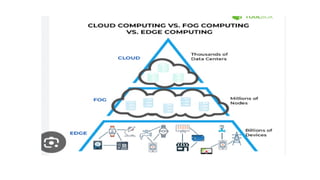
Millions of nodes are present. Billions of nodes are present.
64.
Nodes are installedfar away from the
cloud.
Nodes in this computing are installed
closer to the cloud(remote database where
data is stored).
Edge computing is a subdivision of fog
computing.
Fog computing is a subdivision of cloud
computing.
The bandwidth requirement is very low.
Because data comes from the edge nodes
themselves.
The bandwidth requirement is high. Data
originating from edge nodes is transferred
to the cloud.
65.
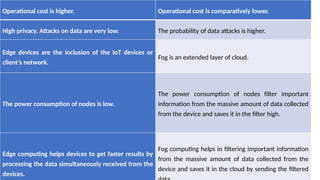
Operational cost ishigher. Operational cost is comparatively lower.
High privacy. Attacks on data are very low. The probability of data attacks is higher.
Edge devices are the inclusion of the IoT devices or
client’s network.
Fog is an extended layer of cloud.
The power consumption of nodes is low.
The power consumption of nodes filter important
information from the massive amount of data collected
from the device and saves it in the filter high.
Edge computing helps devices to get faster results by
processing the data simultaneously received from the
devices.
Fog computing helps in filtering important information
from the massive amount of data collected from the
device and saves it in the cloud by sending the filtered



![[Deck] What's New in Spark-Iceberg Integration via DSV2.pptx](https://cdn.slidesharecdn.com/ss_thumbnails/deckwhatsnewinspark-icebergintegrationviadsv2-260210005337-25955b12-thumbnail.jpg?width=640&height=640&fit=bounds)


