



Copyright © 2013 Splunk Inc.
Tyler Rutschman
Linux Systems Administrator
Garmin International
Tyler Rutschman
About Me
Linux System Administrator, “Splunk Guy” at Garmin
Team AIS (Advanced Infrastructure Solutions):
– Managing Garmin IT systems with Puppet
– System and Application Monitoring
– Load Balancing
– Splunk
– Ruby Scripting and Application Development
RHCE
Education - BS, Business Information Systems - Kansas University
2
3
4
5
6
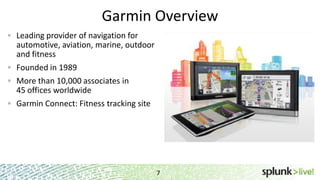
Garmin Overview
Leading provider of navigation for
automotive, aviation, marine, outdoor
and fitness
Founded in 1989
More than 10,000 associates in
45 offices worldwide
Garmin Connect: Fitness tracking site
7
How We Started?
Started using Splunk in 2009
Needed a solution for Sarbanes-Oxley(SOX) compliance
Evaluated Spiceworks, Logwatch among others
Splunk chosen because:
– Real time access to data
– Speed
– Ease of use
– Ability to centralize our machine data
8
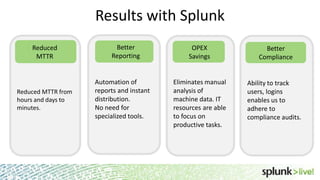
Eliminates manual
analysis of
machine data. IT
resources are able
to focus on
productive tasks.
Automation of
reports and instant
distribution.
No need for
specialized tools.
Reduced MTTR from
hours and days to
minutes.
Results with Splunk
9
Reduced
MTTR
Better
Reporting
OPEX
Savings
Ability to track
users, logins
enables us to
adhere to
compliance audits.
Better
Compliance
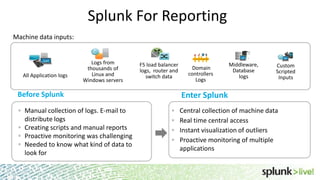
Splunk For Reporting
Manual collection of logs. E-mail to
distribute logs
Creating scripts and manual reports
Proactive monitoring was challenging
Needed to know what kind of data to
look for
Logs from
thousands of
Linux and
Windows servers
All Application logs
Domain
controllers
Logs
Custom
Scripted
Inputs
Machine data inputs:
10
Enter SplunkBefore Splunk
F5 load balancer
logs, router and
switch data
Central collection of machine data
Real time central access
Instant visualization of outliers
Proactive monitoring of multiple
applications
Middleware,
Database
logs
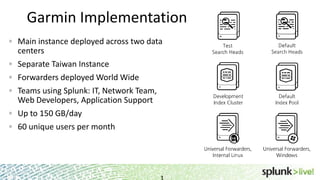
Garmin Implementation
Main instance deployed across two data
centers
Separate Taiwan Instance
Forwarders deployed World Wide
Teams using Splunk: IT, Network Team,
Web Developers, Application Support
Up to 150 GB/day
60 unique users per month
1
Recent Splunk Happenings
• Deployment Server & Monitor Implemented
• Splunk on Splunk Installed
• Inaugural Garmin Splunk Meetup
• Additional Indexers and Search Heads
• Connect Development in Splunk
• Global Domain Controller Logs
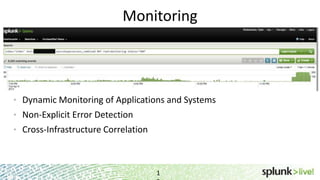
Monitoring
1
• Dynamic Monitoring of Applications and Systems
• Non-Explicit Error Detection
• Cross-Infrastructure Correlation
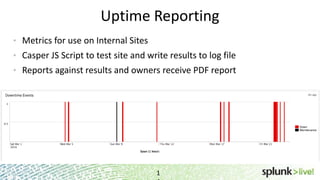
Uptime Reporting
1
• Metrics for use on Internal Sites
• Casper JS Script to test site and write results to log file
• Reports against results and owners receive PDF report
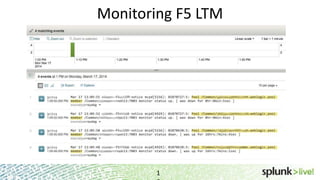
Monitoring F5 LTM
1
We are having an issue with where users end up with multiple sessions and the
originating session is abandoned. From the logs we sent to support, they were able to
see that one sessionid that originated on 13 eventually was sent to another server.
Requests are seen in access log on 13 until 13:09:50
10.0.0.13 - - [17/Mar/2014:13:09:50 -0500]
"POST /myendpoint?sessionID=0000 HTTP/1.1" 200 6606
Then on 01
Request is received for the same session as above
10.0.0.9 - - [17/Mar/2014:13:09:50 -0500]
"POST /myendpoint?sessionID=0000 HTTP/1.1" 200 345
Monitoring F5 LTM
1
F5 LTM Reporting
1
Every month, there is a spreadsheet that gets prepared for
listing a number of infrastructure metrics. One of the stats
being tracked is the number of F5 virtual IPs. Can you tell me
how to obtain this number?
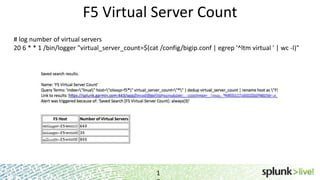
F5 Virtual Server Count
1
# log number of virtual servers
20 6 * * 1 /bin/logger "virtual_server_count=$(cat /config/bigip.conf | egrep '^ltm virtual ' | wc -l)"
Splunk: Universal Solution
1
• Many new issues easily analyzed in Splunk
• Correlate data across different sources at search time
• Quick reports from system data (CPU, memory, disc metrics)
• Helps to avoid deployment of complex specialized monitoring
infrastructure
Best Practice Recommendations
Put your machine data in Splunk.
Generate your own data!
Demonstrate the value to internal enterprise teams by creating quick searches
and reports. Spreads like wildfire!
Use Splunk Answers (http://answers.splunk.com/)
Use Splunk Install guides and support documents
Attend Splunk training sessions
2
Splunk at Garmin: Future
21
• Indexer Upgrade
• Additional Garmin applications data to Splunk
• Internal Application Integration
• Connect Expansion
Summary
Splunk allows us to centralize all our machine data, data is now easily
usable by all operations teams
Splunk makes it easy for us to adhere to compliance audits
Splunk helps us resolve our issues in real time
2
Thank You!

SplunkLive! Customer Presentation - Garmin International

  • 1.
    Copyright © 2013Splunk Inc. Tyler Rutschman Linux Systems Administrator Garmin International Tyler Rutschman
  • 2.
    About Me Linux SystemAdministrator, “Splunk Guy” at Garmin Team AIS (Advanced Infrastructure Solutions): – Managing Garmin IT systems with Puppet – System and Application Monitoring – Load Balancing – Splunk – Ruby Scripting and Application Development RHCE Education - BS, Business Information Systems - Kansas University 2
  • 3.
  • 4.
  • 5.
  • 6.
  • 7.
    Garmin Overview Leading providerof navigation for automotive, aviation, marine, outdoor and fitness Founded in 1989 More than 10,000 associates in 45 offices worldwide Garmin Connect: Fitness tracking site 7
  • 8.
    How We Started? Startedusing Splunk in 2009 Needed a solution for Sarbanes-Oxley(SOX) compliance Evaluated Spiceworks, Logwatch among others Splunk chosen because: – Real time access to data – Speed – Ease of use – Ability to centralize our machine data 8
  • 9.
    Eliminates manual analysis of machinedata. IT resources are able to focus on productive tasks. Automation of reports and instant distribution. No need for specialized tools. Reduced MTTR from hours and days to minutes. Results with Splunk 9 Reduced MTTR Better Reporting OPEX Savings Ability to track users, logins enables us to adhere to compliance audits. Better Compliance
  • 10.
    Splunk For Reporting Manualcollection of logs. E-mail to distribute logs Creating scripts and manual reports Proactive monitoring was challenging Needed to know what kind of data to look for Logs from thousands of Linux and Windows servers All Application logs Domain controllers Logs Custom Scripted Inputs Machine data inputs: 10 Enter SplunkBefore Splunk F5 load balancer logs, router and switch data Central collection of machine data Real time central access Instant visualization of outliers Proactive monitoring of multiple applications Middleware, Database logs
  • 11.
    Garmin Implementation Main instancedeployed across two data centers Separate Taiwan Instance Forwarders deployed World Wide Teams using Splunk: IT, Network Team, Web Developers, Application Support Up to 150 GB/day 60 unique users per month
  • 12.
    1 Recent Splunk Happenings •Deployment Server & Monitor Implemented • Splunk on Splunk Installed • Inaugural Garmin Splunk Meetup • Additional Indexers and Search Heads • Connect Development in Splunk • Global Domain Controller Logs
  • 13.
    Monitoring 1 • Dynamic Monitoringof Applications and Systems • Non-Explicit Error Detection • Cross-Infrastructure Correlation
  • 14.
    Uptime Reporting 1 • Metricsfor use on Internal Sites • Casper JS Script to test site and write results to log file • Reports against results and owners receive PDF report
  • 15.
    Monitoring F5 LTM 1 Weare having an issue with where users end up with multiple sessions and the originating session is abandoned. From the logs we sent to support, they were able to see that one sessionid that originated on 13 eventually was sent to another server. Requests are seen in access log on 13 until 13:09:50 10.0.0.13 - - [17/Mar/2014:13:09:50 -0500] "POST /myendpoint?sessionID=0000 HTTP/1.1" 200 6606 Then on 01 Request is received for the same session as above 10.0.0.9 - - [17/Mar/2014:13:09:50 -0500] "POST /myendpoint?sessionID=0000 HTTP/1.1" 200 345
  • 16.
  • 17.
    F5 LTM Reporting 1 Everymonth, there is a spreadsheet that gets prepared for listing a number of infrastructure metrics. One of the stats being tracked is the number of F5 virtual IPs. Can you tell me how to obtain this number?
  • 18.
    F5 Virtual ServerCount 1 # log number of virtual servers 20 6 * * 1 /bin/logger "virtual_server_count=$(cat /config/bigip.conf | egrep '^ltm virtual ' | wc -l)"
  • 19.
    Splunk: Universal Solution 1 •Many new issues easily analyzed in Splunk • Correlate data across different sources at search time • Quick reports from system data (CPU, memory, disc metrics) • Helps to avoid deployment of complex specialized monitoring infrastructure
  • 20.
    Best Practice Recommendations Putyour machine data in Splunk. Generate your own data! Demonstrate the value to internal enterprise teams by creating quick searches and reports. Spreads like wildfire! Use Splunk Answers (http://answers.splunk.com/) Use Splunk Install guides and support documents Attend Splunk training sessions 2
  • 21.
    Splunk at Garmin:Future 21 • Indexer Upgrade • Additional Garmin applications data to Splunk • Internal Application Integration • Connect Expansion
  • 22.
    Summary Splunk allows usto centralize all our machine data, data is now easily usable by all operations teams Splunk makes it easy for us to adhere to compliance audits Splunk helps us resolve our issues in real time 2
  • 23.

Editor's Notes

  • #2 Engineer for Quest Diagnostics.
  • #4 Some of my Favorite ToolsLeatherman Wave
  • #5 S4
  • #6 TMUX + Ruby + Vi
  • #8 Elaborate on company backgroundFounded by Gary Burrell and Min Kao
  • #14 Growth driven by Garmin Connect team – they were impressed with the near real time access to application logsOther IT teams created searches and actively mining for data. Started adding me to their alerts. LDAP login issues detected first in Splunk before any other monitoring systems
  • #22 Improving our architecture to support more users with longer data retention requirementsAdd additional applications data to Splunk