Karvy Computershare Pvt. Ltd.
Page 1 of 69
Karvy Computershare Pvt. Ltd. – Central Recordkeeping Agency
PFRDA
Standard Operating Procedure (SOP) for Redressal of Grievances
Version 2.0
Contents
1. Overview .......................................................................................................................................................
3
2. Process Chart – Grievance Redressal .............................................................................................................
7
3. Central Grievance Management System – Overview ...................................................................................
8
3.1 Grievance Types:
......................................................................................................................................... 8
3.2 Modes to raise Grievance
........................................................................................................................... 9
Call Centre: .................................................................................................................................................... 9
Online: ........................................................................................................................................................... 9
Offline: ........................................................................................................................................................ 10
Karvy Computershare Pvt. Ltd.
Page 2 of 69
3.3 Escalation Mechanism:
............................................................................................................................. 10
3.4 Grievance Diagram Entity Wise
................................................................................................................ 11
4. Subscribers’ Grievances: .............................................................................................................................
12
4.1 Subscribers’ Grievances against CRA:
....................................................................................................... 12
4.2 Subscribers’ grievances against POP/ASP:
................................................................................................ 24
5. Nodal Offices’ Grievances: ..........................................................................................................................
34
5.1 Nodal Offices’ Grievances against CRA
..................................................................................................... 34
5.2 Nodal offices’ Grievances against Trustee Bank
....................................................................................... 43
5.3 Nodal Offices’ Grievances against POP
..................................................................................................... 48
6. PFM/ASP/TB’s Grievances: .........................................................................................................................
49
6.1 PFM/ASP/TB’s Grievances against CRA ..............................................................................................
49
6.2 PFM/ASP’s Grievances against TB ......................................................................................................
54
6.3 TB’s Grievances against ASP/PFM ......................................................................................................
62
1. Overview
The National Pension System (NPS) was introduced by the Government of India to enable its citizens (in the
Government/All-citizen/Corporate sector) to effectively plan for their retirement through reasonably safe and
market based returns. Periodic contributions from the subscribers (and their employers – for
Government/Corporate sector), are invested in Pension Funds chosen by the subscriber from the approved list.
On attaining superannuation, part of the accumulated wealth can be withdrawn lump-sum and the balance
can be invested in an “Annuity” with a registered ASP (Annuity Service Provider), so that the subscriber gets
Karvy Computershare Pvt. Ltd.
Page 3 of 69
regular monthly pension from the Annuity purchase. There are other regulations regarding withdrawal, under
various circumstances. Each subscriber is registered with the CRA and is allotted a PRAN (Permanent
Retirement Account Number). This ID is used to track all his/her transactions, contributions, change of details,
scheme preferences etc.
NPS is operated through various intermediaries at various stages, as given below:
1. Registration of subscribers – Application is submitted by the Subscriber and routed through Nodal
Offices – to CRA. Permanent Retirement Account is created in the CRA system and PRAN is allotted to
the subscribers by the CRA.
2. Deposit of contribution is made by Subscribers to the Nodal Offices (Contribution is deducted from the
salary by the Nodal Offices, for Government employees). The funds are remitted by Nodal Offices to
the Trustee Bank, with details being uploaded in the CRA system by the Nodal Offices.
3. Transfer of funds from Trustee Bank to PFM (as selected) – On reconciliation & as per settlement
instructions from CRA
4. Changes in subscriber details (address, scheme preference etc.) - are intimated by Subscribers – routed
through Nodal Offices – to CRA system. In case of changes in scheme preference etc., new instructions
are accordingly implemented in the daily settlement run by CRA.
5. On Exit/ withdrawal Application s submitted by Subscribers and routed through Nodal Offices – to CRA.
On processing, CRA gives instructions to the PFM to transfer the funds to the Trustee Bank. The Trustee
Bank would transfer the lump-sum withdrawal to the Subscriber’s Bank account and the ‘Annuity’
amount to the ASP. The subscriber would thereafter receive monthly payouts from the ASP.
Hence, the various intermediaries in the functioning of the NPS system are:
1. Nodal Offices – They are the main interface for subscribers. Their functions include:
a. Receiving applications for registration / changes in details / withdrawals from subscribers,
verification and forwarding of the same to CRA for processing
b. Receiving contributions from subscribers and upload of contribution details in the CRA
system
c. Deposit of funds (contributions) with Trustee Bank and reconciliation thereof with the details
uploaded
The Nodal Offices- for various models/sectors – are as given below:
Model/Sector Registration/change
requests/withdrawals
& receipt of
contributions
Transfer & uploading of
contributions
Over-seeing
Nodal
Offices
Karvy Computershare Pvt. Ltd.
Page 4 of 69
For Central
Government
employees:
DDO, PAO PAO Pr.AO
For State Government
employees:
DDO, DTO DTA (Centralised mode)
DTO (De-centralised mode)
DTA & DTO (Quasi centralized
mode)
DTA
For ‘All Citizen’ model: POP-SP & POP POP (Centralised mode)
POP-SP (De-centralised mode)
POP & POP-SP (Quasi
centralized mode)
POP
For ‘Corporate’ model: CHO & CBO POP (CHO – for Direct model) POP
2. Trustee Bank – Their functions include:
a. Receipt of funds from Nodal Offices for contribution deposit and reconciliation thereof with
the details uploaded in the CRA system
b. Transfer of funds to PFMs as per settlement instructions from CRA
c. On withdrawal, transfer of funds to Subscriber’s bank account (lump-sum portion of
withdrawal)
d. On withdrawal, transfer of funds to ASP (the annuitized portion)
3. Pension Fund Manager (PFM) – Their functions include:
a. Receipt of funds from Trustee Bank and investment thereof as per subscribers’ preference
b. Updation of NAV etc.
c. On withdrawal, transfer of accumulated wealth to the Trustee Bank, as per instructions from
CRA.
4. Annuity Service Provider (ASP) – Their functions include:
a. Receipt of funds from Trustee Bank and instructions from CRA, for investment in annuity for
subscribers, on withdrawal
b. Maintaining annuity scheme with the subscribers thereafter (monthly payouts, queries etc.)
5. Central Record-keeping Agency (CRA) – Their functions include registration and interface with all
intermediaries and recording all transactions i.e.:
a. Registration of Nodal Offices
b. Registration of Subscribers
c. Running settlement on upload of contribution details by Nodal Offices and funds receipt
confirmation by Trustee Banks
Karvy Computershare Pvt. Ltd.
Page 5 of 69
d. Settlement instructions to Trustee Banks to transfer funds to PFMs
e. Processing change requests / withdrawals
f. Instructions to Trustee Banks/PFMs/ASPs on withdrawal
g. Providing interface to subscribers for checking status of applications/grievances etc. and
providing SoT to the subscribers.
It is imperative to have a mechanism for recording and resolving any grievances that any party might have, with
respect to another party/intermediary in the NPS system, to ensure that the objectives of the system are met
and to ensure justice and transparency. The PFRDA (Redressal of Subscriber Grievance) Regulations 2015
states that “Every intermediary under the National Pension System and any other pension scheme regulated
by the Authority shall follow the grievance redressal policy as laid down under these regulations. In case of
National Pension System, the National Pension System Trust shall lay down detailed guidelines and procedures
for a two level grievance redressal policy for intermediaries and other entities with minimum conditions as
referred to in regulation 4 and shall be responsible for the overall grievance management system. The two
levels for the grievance redressal shall comprise a senior management level officer to be designated as
Grievance Redressal Officer for compliance of the requirements laid down in such policy. In addition, every
branch or authorized office or centre other than the central office, head office, corporate office or principal
office of the intermediary dealing with National Pension System shall also have an officer nominated as the
Grievance Redressal Officer for that office or centre.”
The CRA system provides an online mechanism for automated recording and tracking of the status of resolution
of grievances raised by various parties. This document deals with the procedure for registering and resolution
of grievances.
ACRONYMS USED:
Acronym Description
ASP Annuity Service Provider
CBO Corporate Branch Office
CDDO Cheque Drawing & Disbursing Officer
CHO Corporate Head Office
CRA Central Record-keeping Agency
CRA-FC Central Record-keeping Agency – Facilitation Centre
DDO Drawing & Disbursing Officer
Karvy Computershare Pvt. Ltd.
Page 6 of 69
DTA Directorate of Treasuries & Accounts
DTO District Treasury Office
I-PIN Internet Personal Identification Number
NPS National Pension System
PAO Pay & Accounts Office
PFM Pension Fund Manager
POP Point of Presence
POP-SP POP Service Provider
Pr.AO Principal Accounts Office
PRAN Permanent Retirement Account Number
TB Trustee Bank
T-PIN Tele-query Personal Identification Number
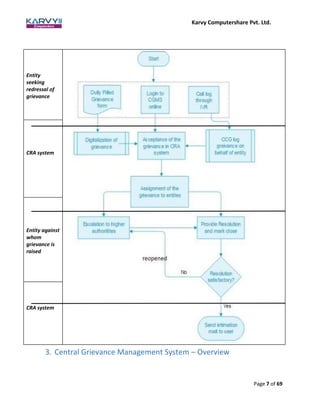
2. Process Chart – Grievance Redressal
Karvy Computershare Pvt. Ltd.
Page 7 of 69
3. Central Grievance Management System – Overview
Entity
seeking
redressal of
grievance
CRA system
Entity against
whom
grievance is
raised
CRA system
Karvy Computershare Pvt. Ltd.
Page 8 of 69
“Grievances or complaint” includes any communication that expresses dissatisfaction, in respect of the conduct
or any act of omission or commission or deficiency of service on the part of an intermediary under NPS.
Grievance is different from enquiry as enquiry is any communication from a subscriber/entity for the primary
purpose of requesting information about the National Pension System.
CRA has developed a Central Grievance Management System (CGMS) in which grievances by multiple
stakeholders will be logged at the CRA. A Central Grievance Management System is required to gather, resolve
and record various types of grievances raised by different entities/stakeholders of the CRA system. In order to
raise any grievance, an entity needs to be registered and be in an ‘active’ state in the CRA system. CGMS aims
to provide a timely and seamless framework for handling grievances to protect the interests of the stakeholders
of the National Pension System and for ensuring effective resolution of grievances.
As per the PFRDA (Redressal of Subscriber Grievance) Regulations 2015, every intermediary should have a two
level Grievance Redressal policy. The two levels for the grievance redressal shall comprise a senior
management level officer to be designated as Grievance Redressal Officer for compliance of the requirements
laid down in the grievance redressal policy as explained in these regulations. In addition, every branch or
authorized office or centre other than the central office, head office, corporate office or principal office of the
intermediary dealing with National Pension System shall also have an officer nominated as the Grievance
Redressal Officer for that office or centre.
CRA will provide a web interface to all the entities for registering a grievance against other permitted entities.
Once a grievance is registered, a unique fifteen digit token number will be generated by the CRA system for
reference by the entities concerned. Also an email will be sent to the entity for confirmation of successful
registration of the grievance. The same platform will be used to view and update the resolution details of the
grievances. The concerned entity will login into the interface and take up the grievance for resolution. After
updating the resolution remarks, CGMS system will be updated and CRA will send details of the resolution by
email to the complainant. The status will be marked as closed in the CGMS system after providing the resolution
of the grievance to the entity through email. After a grievance is closed, if the concerned entity or subscriber
is not satisfied with the resolution provided, they will have an option to reopen the issue.
3.1 Grievance Types:
Grievances may be of the following types:
1. Grievances against Nodal Office - Any grievance against a Nodal Office will be logged under this
category. A subscriber can raise a grievance against Nodal Office for the services rendered by them.
Also a Nodal Office can raise a grievance against other entities with which it is related for services. CRA
will provide a platform to raise such grievances through CGMS against the concerned entities.
2. Grievances against the CRA system - The grievances raised against the CRA by any entity which is in
relation to the services provided by CRA will be recorded under this category. These grievances will be
assigned to the CRA for redressal and will be a part of expected service parameter for delivery services
of the CRA.
Karvy Computershare Pvt. Ltd.
Page 9 of 69
3. Grievances against Pension Fund Manager - The grievances raised against a PFM will be recorded under
this category. The concerned PFM will be responsible to resolve the grievances against them. CRA will
provide a platform to raise such grievance through CGMS and will act as a channel to assign them to
the concerned entities.
4. Grievances against Trustee Bank - The grievances raised on TB will be recorded in this category. The TB
will be responsible to provide resolution to the grievances raised against them. CRA will provide a
platform to raise such grievance through CGMS and will act as a channel to assign them to the
concerned entities.
5. Grievances against Annuity Service Provider - The grievances raised on ASP will be recorded in this
category. The ASP against which the grievance has been raised will be responsible for providing the
resolution. CRA system will provide a central system to raise such grievances and will act as a channel
to assign them to concerned entities to get the grievance resolved. It will also keep a log of the
grievances raised.
3.2 Modes to raise Grievance
There are 3 modes in which a grievance can be raised: IVR (Call Centre), Online (Web interface) and Offline
(Physical form). The grievances cannot be raised through any other mode like email etc.
Call Centre:
An entity can dial the Interactive Voice Response -IVR to raise a grievance after authentication using T-PIN
allotted at the time of entity registration in the CRA system. The grievance will be registered by the Call centre
executive and a token number will be given to the entity for reference. An entity cannot raise grievance on
behalf of other entity through call centre. It can be used only to log their grievance.
Online:
An entity can register a grievance through a web based interface provided by the CRA with the use of I-PIN
allotted at the time of registration in the CRA system. The entity will have to provide the necessary details as
Karvy Computershare Pvt. Ltd.
Page 10 of 69
required in the web based format. On successful registration, a token number will be displayed on the screen
for the purpose of reference. Subscriber can also raise the grievance without login into the CRA system by
providing the relevant details.
Offline:
A subscriber can log a grievance by submitting details in a physical form to the Central Grievance Management
Cell at CRA. On receiving such a grievance, the CRA-FC user will digitize the same and lodge a request in the
CRA system, with SMS/email intimation to the subscriber. Other entities like PAO, PFM etc. will not have an
option of logging grievance through physical format. The grievances will be logged into the CGMS by the
Grievance Management Cell of CRA. Subscribers will have a particular format which will be included in the
PRAN kit.
3.3 Escalation Mechanism:
There will three (3) levels of resolution, namely L1, L2 and L3 for Grievances raised against CRA.
• L1 will be the initial level for grievance received.
• L2 will be the second level of resolution with 1st level of escalation.
• L3 will be the specialized and unified grievance resolving team and with 2nd level of
escalation.
** L2 and L3 are escalation levels. System will have two escalation levels (from L1 to L2 and
from L2 to L3).
The system will have provision to manually escalate the grievance by the user or automatically
escalate after a stipulated period. The escalation will be based on criteria like the nature of
grievance, age of grievance, entity who raised the grievance, entity against which grievance is
raised. The criteria for grievance escalation from one level to another are given below:
Grievances logged by Subscriber against CRA
• Grievances pending for more than 2 days at a level will be escalated to next level.
• Grievances related to scheme set up details will be directly escalated to L2 level
when raised
Grievances logged by Nodal Offices (PAO/DDO/DTO etc.) against CRA
• All grievances raised on behalf of subscriber will be escalated based only on the
criteria mentioned above under “Grievances logged by Subscriber”.
• All grievances that PAO has raised against CRA will be considered as an escalated
grievance (directly escalated to L2 level when raised).
Karvy Computershare Pvt. Ltd.
Page 11 of 69
Grievances logged by Trustee Bank, PFM and Annuity Service Providers against CRA
All grievances related to these entities themselves will be considered as an escalated
grievance (directly escalated to L2 level when raised).
There will be no grievance escalation mechanism for grievances raised against other entities.
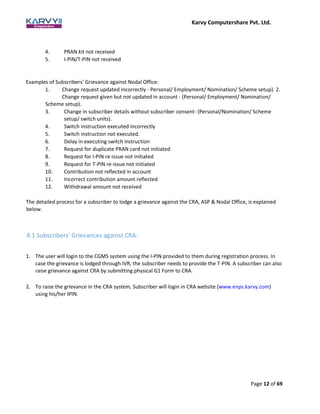
3.4 Grievance Diagram Entity Wise
4. Subscribers’ Grievances:
Protection of subscribers’ interests is of paramount importance. A subscriber may have grievances against
the CRA or POP or ASP.
Examples of Subscribers’ Grievance against CRA:
1. Incorrect PRAN account details (on registration) – (Personal/ Employment/ Nomination/
Scheme setup)
2. Statement of Transaction not received.
3. Change in signature/photograph request not updated
Karvy Computershare Pvt. Ltd.
Page 12 of 69
4. PRAN kit not received
5. I-PIN/T-PIN not received
Examples of Subscribers’ Grievance against Nodal Office:
1. Change request updated incorrectly - Personal/ Employment/ Nomination/ Scheme setup). 2.
Change request given but not updated in account - (Personal/ Employment/ Nomination/
Scheme setup).
3. Change in subscriber details without subscriber consent- (Personal/Nomination/ Scheme
setup/ switch units).
4. Switch instruction executed incorrectly
5. Switch instruction not executed.
6. Delay in executing switch instruction
7. Request for duplicate PRAN card not initiated
8. Request for I-PIN re-issue not initiated
9. Request for T-PIN re-issue not initiated
10. Contribution not reflected in account
11. Incorrect contribution amount reflected
12. Withdrawal amount not received
The detailed process for a subscriber to lodge a grievance against the CRA, ASP & Nodal Office, is explained
below.
4.1 Subscribers’ Grievances against CRA:
1. The user will login to the CGMS system using the I-PIN provided to them during registration process. In
case the grievance is lodged through IVR, the subscriber needs to provide the T-PIN. A subscriber can also
raise grievance against CRA by submitting physical G1 Form to CRA.
2. To raise the grievance in the CRA system, Subscriber will login in CRA website (www.enps.karvy.com)
using his/her IPIN.
Karvy Computershare Pvt. Ltd.
Page 13 of 69
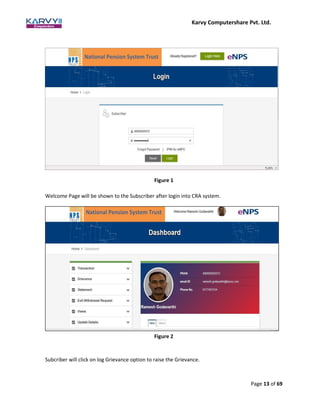
Welcome Page will be shown to the Subscriber after login into CRA system.
Subcriber will click on log Grievance option to raise the Grievance.
Figure 1
Figure 2
Karvy Computershare Pvt. Ltd.
Page 14 of 69
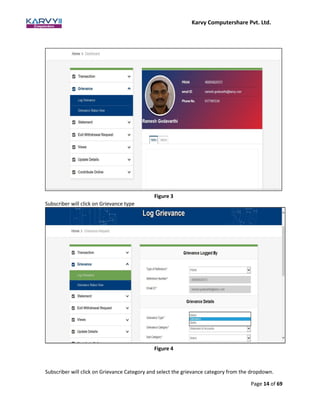
Subscriber will click on Grievance Category and select the grievance category from the dropdown.
Figure 3
Subscriber will click on Grievance type
Figure 4
Karvy Computershare Pvt. Ltd.
Page 15 of 69
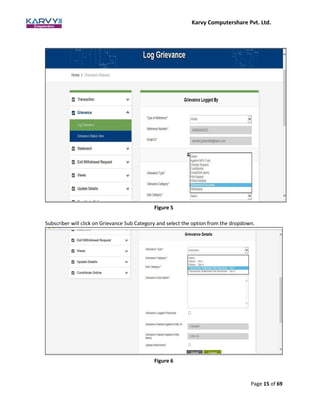
Subscriber will click on Grievance Sub Category and select the option from the dropdown.
Figure 6
Figure 5
Karvy Computershare Pvt. Ltd.
Page 16 of 69
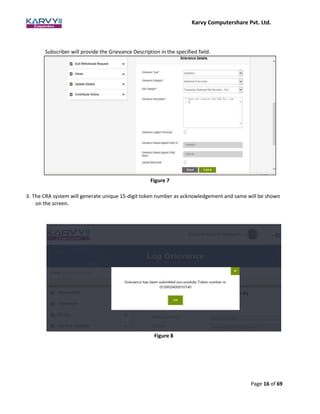
Subscriber will provide the Grievance Description in the specified field.
3. The CRA system will generate unique 15-digit token number as acknowledgement and same will be shown
on the screen.
Figure 8
Figure 7
Karvy Computershare Pvt. Ltd.
Page 17 of 69
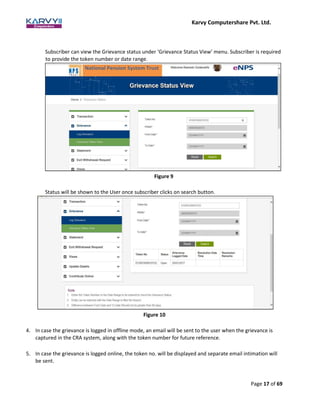
Subscriber can view the Grievance status under ‘Grievance Status View’ menu. Subscriber is required
to provide the token number or date range.
Status will be shown to the User once subscriber clicks on search button.
4. In case the grievance is logged in offline mode, an email will be sent to the user when the grievance is
captured in the CRA system, along with the token number for future reference.
5. In case the grievance is logged online, the token no. will be displayed and separate email intimation will
be sent.
Figure 9
Figure 10
Karvy Computershare Pvt. Ltd.
Page 18 of 69
6. In case the grievance is raised through a call centre executive, the details of the token number would be
sent to the user on whose behalf the grievance was raised.
7. A customer care team will be set-up at CRA to resolve the grievances raised by various entities.
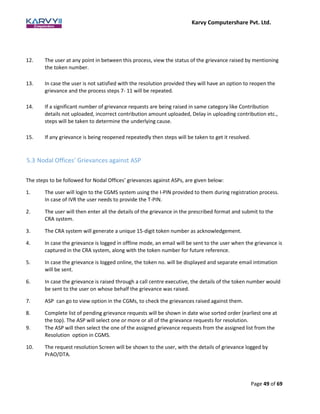
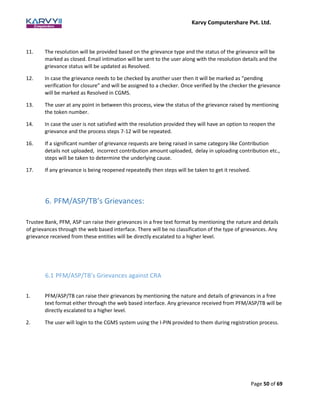
8. This team will be grouped into pre-defined customer care groups (CCG). Each group will be assigned
to handle one or more type of grievance requests.
9. The CCG user will login to the system after due authentication and see all the unassigned grievances at
that point of time under view and assign option.
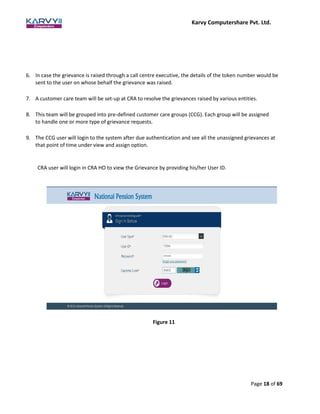
CRA user will login in CRA HO to view the Grievance by providing his/her User ID.
Figure 11
Karvy Computershare Pvt. Ltd.
Page 19 of 69
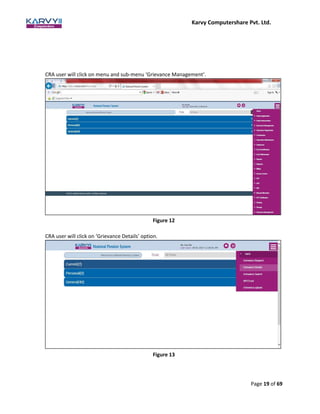
CRA user will click on menu and sub-menu ‘Grievance Management’.
CRA user will click on ‘Grievance Details’ option.
Figure 13
Figure 12
Karvy Computershare Pvt. Ltd.
Page 20 of 69
10. Complete list of pending grievance requests will be shown in date wise sorted order (earliest one at the
top). The CRA user will select one or more or all of the grievance requests for resolution.
CRA user will be able to see the list of pending Grievance
Figure 14
11. The CRA user will then select one of the assigned grievance requests from the assigned list from the
Resolution and Escalation option in CGMS. Once a request has been assigned to a user it will not be
available for assignment to other users in the group.
Karvy Computershare Pvt. Ltd.
Page 21 of 69
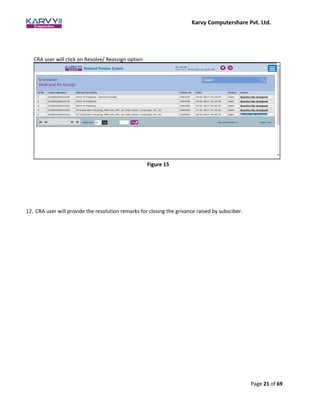
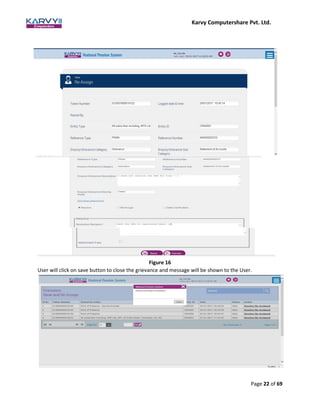
12. CRA user will provide the resolution remarks for closing the grivance raised by subsciber.
CRA user will click on Resolve/ Reassign option
Figure 15
Karvy Computershare Pvt. Ltd.
Page 22 of 69
Figure 16
User will click on save button to close the grievance and message will be shown to the User.
Karvy Computershare Pvt. Ltd.
Page 23 of 69
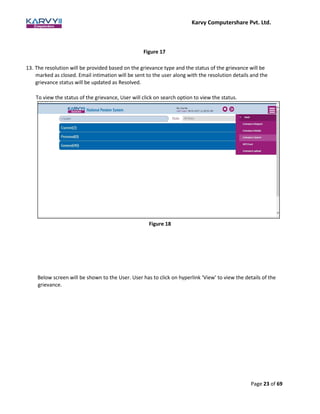
Figure 17
13. The resolution will be provided based on the grievance type and the status of the grievance will be
marked as closed. Email intimation will be sent to the user along with the resolution details and the
grievance status will be updated as Resolved.
To view the status of the grievance, User will click on search option to view the status.
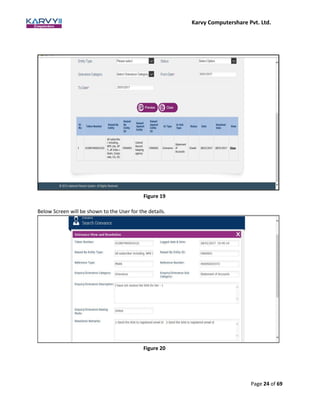
Below screen will be shown to the User. User has to click on hyperlink ‘View’ to view the details of the
grievance.
Figure 18
Karvy Computershare Pvt. Ltd.
Page 24 of 69
Figure 19
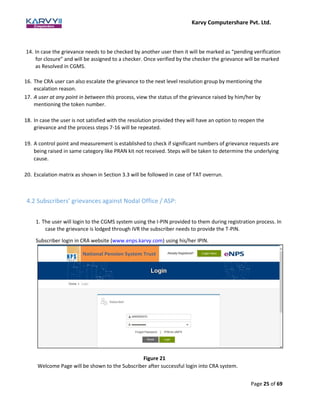
Below Screen will be shown to the User for the details.
Figure 20
Karvy Computershare Pvt. Ltd.
Page 25 of 69
14. In case the grievance needs to be checked by another user then it will be marked as “pending verification
for closure” and will be assigned to a checker. Once verified by the checker the grievance will be marked
as Resolved in CGMS.
16. The CRA user can also escalate the grievance to the next level resolution group by mentioning the
escalation reason.
17. A user at any point in between this process, view the status of the grievance raised by him/her by
mentioning the token number.
18. In case the user is not satisfied with the resolution provided they will have an option to reopen the
grievance and the process steps 7-16 will be repeated.
19. A control point and measurement is established to check if significant numbers of grievance requests are
being raised in same category like PRAN kit not received. Steps will be taken to determine the underlying
cause.
20. Escalation matrix as shown in Section 3.3 will be followed in case of TAT overrun.
4.2 Subscribers’ grievances against Nodal Office / ASP:
1. The user will login to the CGMS system using the I-PIN provided to them during registration process. In
case the grievance is lodged through IVR the subscriber needs to provide the T-PIN.
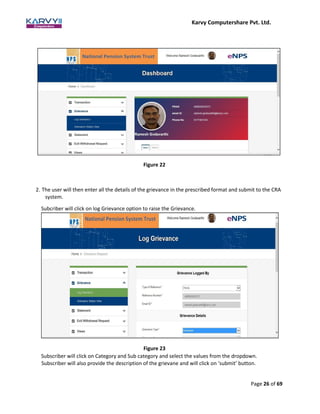
Subscriber login in CRA website (www.enps.karvy.com) using his/her IPIN.
Figure 21
Welcome Page will be shown to the Subscriber after successful login into CRA system.
Karvy Computershare Pvt. Ltd.
Page 26 of 69
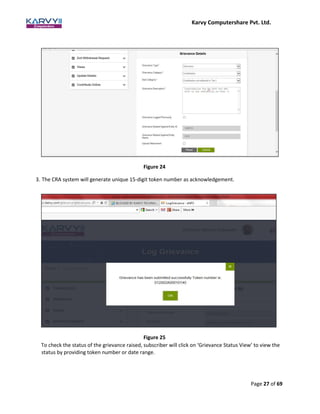
2. The user will then enter all the details of the grievance in the prescribed format and submit to the CRA
system.
Subcriber will click on log Grievance option to raise the Grievance.
Figure 23
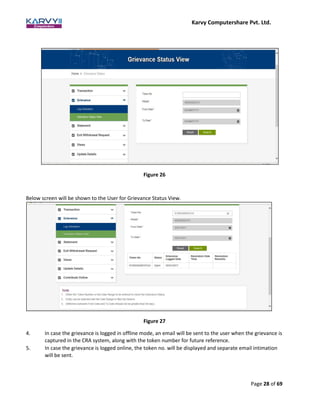
Subscriber will click on Category and Sub category and select the values from the dropdown.
Subscriber will also provide the description of the grievane and will click on ‘submit’ button.
Figure 22
Karvy Computershare Pvt. Ltd.
Page 27 of 69
Figure 24
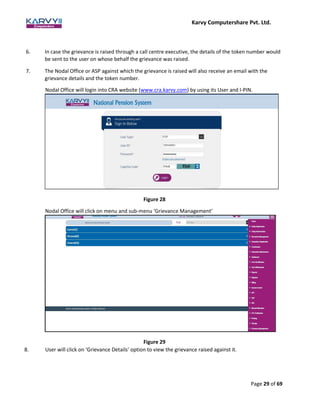
3. The CRA system will generate unique 15-digit token number as acknowledgement.
Figure 25
To check the status of the grievance raised, subscriber will click on ‘Grievance Status View’ to view the
status by providing token number or date range.
Karvy Computershare Pvt. Ltd.
Page 28 of 69
Figure 26
Below screen will be shown to the User for Grievance Status View.
Figure 27
4. In case the grievance is logged in offline mode, an email will be sent to the user when the grievance is
captured in the CRA system, along with the token number for future reference.
5. In case the grievance is logged online, the token no. will be displayed and separate email intimation
will be sent.
Karvy Computershare Pvt. Ltd.
Page 29 of 69
6. In case the grievance is raised through a call centre executive, the details of the token number would
be sent to the user on whose behalf the grievance was raised.
7. The Nodal Office or ASP against which the grievance is raised will also receive an email with the
grievance details and the token number.
Nodal Office will login into CRA website (www.cra.karvy.com) by using its User and I-PIN.
Figure 28
Nodal Office will click on menu and sub-menu ‘Grievance Management’
Figure 29
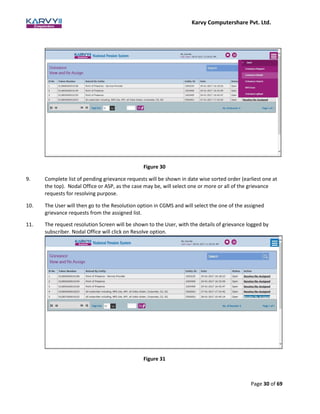
8. User will click on ‘Grievance Details’ option to view the grievance raised against it.
Karvy Computershare Pvt. Ltd.
Page 30 of 69
Figure 30
9. Complete list of pending grievance requests will be shown in date wise sorted order (earliest one at
the top). Nodal Office or ASP, as the case may be, will select one or more or all of the grievance
requests for resolving purpose.
10. The User will then go to the Resolution option in CGMS and will select the one of the assigned
grievance requests from the assigned list.
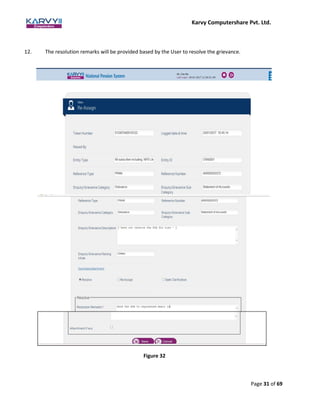
11. The request resolution Screen will be shown to the User, with the details of grievance logged by
subscriber. Nodal Office will click on Resolve option.
Figure 31
Karvy Computershare Pvt. Ltd.
Page 31 of 69
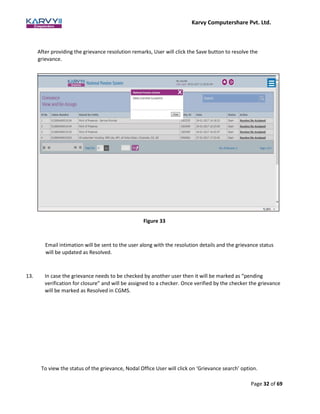
12. The resolution remarks will be provided based by the User to resolve the grievance.
Figure 32
Karvy Computershare Pvt. Ltd.
Page 32 of 69
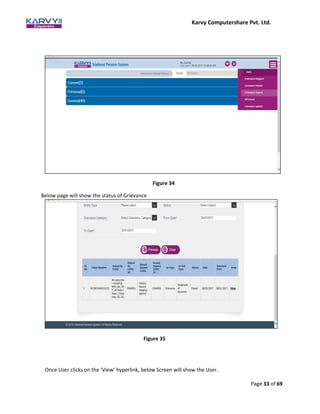
After providing the grievance resolution remarks, User will click the Save button to resolve the
grievance.
Email intimation will be sent to the user along with the resolution details and the grievance status
will be updated as Resolved.
13. In case the grievance needs to be checked by another user then it will be marked as “pending
verification for closure” and will be assigned to a checker. Once verified by the checker the grievance
will be marked as Resolved in CGMS.
To view the status of the grievance, Nodal Office User will click on ‘Grievance search’ option.
Figure 33
Karvy Computershare Pvt. Ltd.
Page 33 of 69
Below page will show the status of Grievance
Figure 35
Once User clicks on the ‘View’ hyperlink, below Screen will show the User.
Figure 34
Karvy Computershare Pvt. Ltd.
Page 34 of 69
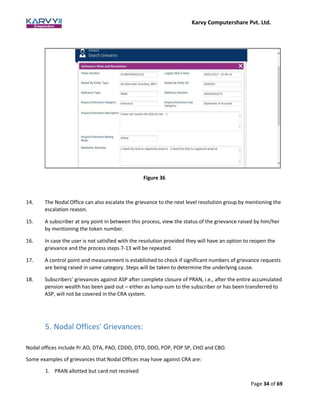
14. The Nodal Office can also escalate the grievance to the next level resolution group by mentioning the
escalation reason.
15. A subscriber at any point in between this process, view the status of the grievance raised by him/her
by mentioning the token number.
16. In case the user is not satisfied with the resolution provided they will have an option to reopen the
grievance and the process steps 7-13 will be repeated.
17. A control point and measurement is established to check if significant numbers of grievance requests
are being raised in same category. Steps will be taken to determine the underlying cause.
18. Subscribers’ grievances against ASP after complete closure of PRAN, i.e., after the entire accumulated
pension wealth has been paid out – either as lump-sum to the subscriber or has been transferred to
ASP, will not be covered in the CRA system.
5. Nodal Offices’ Grievances:
Nodal offices include Pr.AO, DTA, PAO, CDDO, DTO, DDO, POP, POP SP, CHO and CBO.
Some examples of grievances that Nodal Offices may have against CRA are:
1. PRAN allotted but card not received
Figure 36
Karvy Computershare Pvt. Ltd.
Page 35 of 69
2. T-PIN/I-PIN not received
3. PRAN not allotted
4. Withdrawal amount not received
Some examples of grievances that Nodal Offices may have against TB are:
1. FRC not uploaded
2. Incorrect amount in FRC uploaded
3. Delay in uploading FRC
Some examples of grievances that Nodal Offices may have against ASP are:
1. Annuity not received
2. Incorrect annuity amount
The procedure to be followed for registering and resolution of Nodal Offices’ grievances against CRA or other
parties is given below in detail.
5.1 Nodal Offices’ Grievances against CRA
1. The Pr.AO/DTA/PAO/CDDO/DTO/DDO/POP/POP SP/CHO/CBO user will login to the CGMS system
using the I-PIN provided to them during registration process. In case the grievance is lodged through
IVR the user needs to provide the T-PIN.
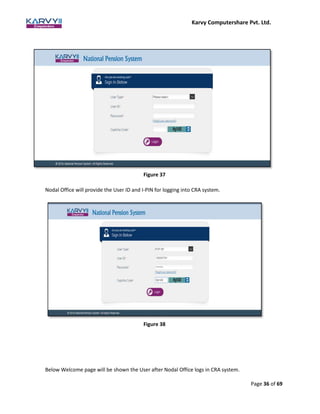
Nodal Office will visit the CRA website (www.cra.karvy.com) to login into CRA system.
Karvy Computershare Pvt. Ltd.
Page 36 of 69
Figure 37
Nodal Office will provide the User ID and I-PIN for logging into CRA system.
Figure 38
Below Welcome page will be shown the User after Nodal Office logs in CRA system.
Karvy Computershare Pvt. Ltd.
Page 37 of 69
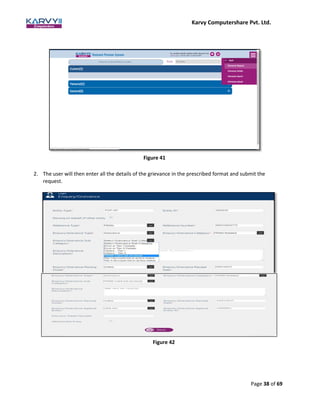
Figure 39
Nodal Office will click on menu and sub-menu ‘Grievance Management’ option.
User will click on ‘Grievance request’ option to raise the grievance in CRA system.
Figure 40
Karvy Computershare Pvt. Ltd.
Page 38 of 69
Figure 41
2. The user will then enter all the details of the grievance in the prescribed format and submit the
request.
Figure 42
Karvy Computershare Pvt. Ltd.
Page 39 of 69
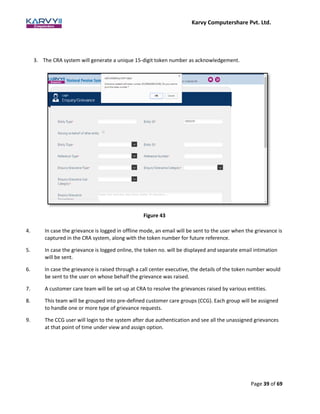
3. The CRA system will generate a unique 15-digit token number as acknowledgement.
Figure 43
4. In case the grievance is logged in offline mode, an email will be sent to the user when the grievance is
captured in the CRA system, along with the token number for future reference.
5. In case the grievance is logged online, the token no. will be displayed and separate email intimation
will be sent.
6. In case the grievance is raised through a call center executive, the details of the token number would
be sent to the user on whose behalf the grievance was raised.
7. A customer care team will be set-up at CRA to resolve the grievances raised by various entities.
8. This team will be grouped into pre-defined customer care groups (CCG). Each group will be assigned
to handle one or more type of grievance requests.
9. The CCG user will login to the system after due authentication and see all the unassigned grievances
at that point of time under view and assign option.
Karvy Computershare Pvt. Ltd.
Page 40 of 69
To view the Grievance raised against CRA, CRA User will click on ‘Grievance Search’ option.
Figure 44
Below screen will open to search the grievance.
Figure 45
10. On providing the details, Complete list of pending grievance requests will be shown in date wise
sorted order (earliest one at the top). The CRA user will select one or more or all of the grievance
requests for resolution.
Karvy Computershare Pvt. Ltd.
Page 41 of 69
Figure 46
11. The CRA user will then select the one of the assigned grievance requests from the assigned list from
the Resolution and Escalation option in CGMS. Once request has been assigned to a user, it will not
be available for assignment to other users in the group. Below Screen will be shown to the User for
resolution.
Figure 47
12. There’ll be option for a supervisor to assign the unassigned grievances to any active user of the group
after certain interval.
Karvy Computershare Pvt. Ltd.
Page 42 of 69
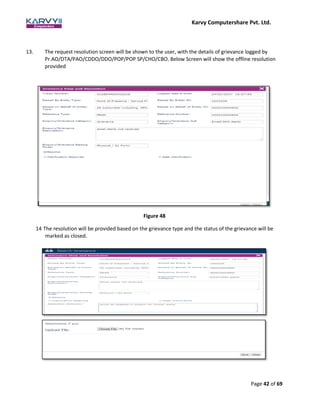
13. The request resolution screen will be shown to the user, with the details of grievance logged by
Pr.AO/DTA/PAO/CDDO/DDO/POP/POP SP/CHO/CBO. Below Screen will show the offline resolution
provided
Figure 48
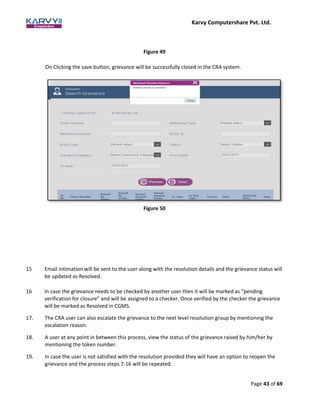
14 The resolution will be provided based on the grievance type and the status of the grievance will be
marked as closed.
Karvy Computershare Pvt. Ltd.
Page 43 of 69
Figure 49
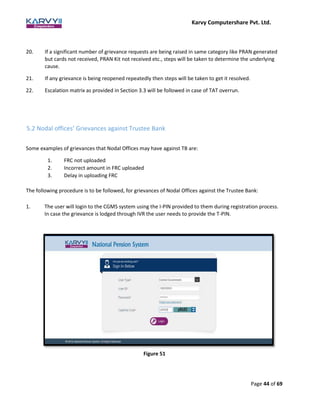
On Clicking the save button, grievance will be successfully closed in the CRA system.
Figure 50
15 Email intimation will be sent to the user along with the resolution details and the grievance status will
be updated as Resolved.
16 In case the grievance needs to be checked by another user then it will be marked as “pending
verification for closure” and will be assigned to a checker. Once verified by the checker the grievance
will be marked as Resolved in CGMS.
17. The CRA user can also escalate the grievance to the next level resolution group by mentioning the
escalation reason.
18. A user at any point in between this process, view the status of the grievance raised by him/her by
mentioning the token number.
19. In case the user is not satisfied with the resolution provided they will have an option to reopen the
grievance and the process steps 7-16 will be repeated.
Karvy Computershare Pvt. Ltd.
Page 44 of 69
20. If a significant number of grievance requests are being raised in same category like PRAN generated
but cards not received, PRAN Kit not received etc., steps will be taken to determine the underlying
cause.
21. If any grievance is being reopened repeatedly then steps will be taken to get it resolved.
22. Escalation matrix as provided in Section 3.3 will be followed in case of TAT overrun.
5.2 Nodal offices’ Grievances against Trustee Bank
Some examples of grievances that Nodal Offices may have against TB are:
1. FRC not uploaded
2. Incorrect amount in FRC uploaded
3. Delay in uploading FRC
The following procedure is to be followed, for grievances of Nodal Offices against the Trustee Bank:
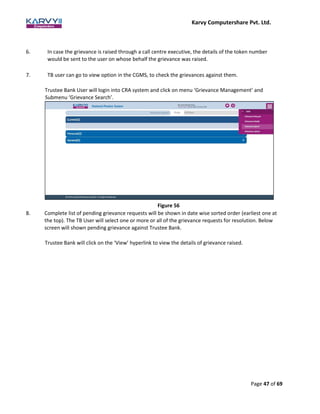
1. The user will login to the CGMS system using the I-PIN provided to them during registration process.
In case the grievance is lodged through IVR the user needs to provide the T-PIN.
Figure 51
Karvy Computershare Pvt. Ltd.
Page 45 of 69
Welcome page will be shown to the User after he/she successfully logs into CRA system.
Figure 52
Nodal Office will raise the grievance by clicking on the menu ‘Grievance Request’.
Figure 53
Karvy Computershare Pvt. Ltd.
Page 46 of 69
2. The user will then enter all the details of the grievance in the prescribed format and submit in the
CRA system.
Figure 54
3. The CRA system will generate a unique 15-digit token number as acknowledgement.
Figure 55
4. In case the grievance is logged in offline mode, an email will be sent to the user when the grievance
is captured in the CRA system, along with the token number for future reference.
5. In case the grievance is logged online, the token no. will be displayed and separate an email
intimation will be sent.
Karvy Computershare Pvt. Ltd.
Page 47 of 69
6. In case the grievance is raised through a call centre executive, the details of the token number
would be sent to the user on whose behalf the grievance was raised.
7. TB user can go to view option in the CGMS, to check the grievances against them.
Trustee Bank User will login into CRA system and click on menu ‘Grievance Management’ and
Submenu ‘Grievance Search’.
Figure 56
8. Complete list of pending grievance requests will be shown in date wise sorted order (earliest one at
the top). The TB User will select one or more or all of the grievance requests for resolution. Below
screen will shown pending grievance against Trustee Bank.
Trustee Bank will click on the ‘View’ hyperlink to view the details of grievance raised.
Karvy Computershare Pvt. Ltd.
Page 48 of 69
Figure 57
9. Trustee Bank will provide the resolution remarks in CRA system and click on save button to close the
grievance.
Figure 58
10. The resolution will be provided based on the grievance type and the status of the grievance will be
marked as closed. Email intimation will be sent to the user along with the resolution details and the
grievance status will be updated as ‘Resolved’.
11. In case the grievance needs to be checked by another user then it will be marked as “pending
verification for closure” and will be assigned to a checker. Once verified by the checker the grievance
will be marked as Resolved in CGMS.
Karvy Computershare Pvt. Ltd.
Page 49 of 69
12. The user at any point in between this process, view the status of the grievance raised by mentioning
the token number.
13. In case the user is not satisfied with the resolution provided they will have an option to reopen the
grievance and the process steps 7- 11 will be repeated.
14. If a significant number of grievance requests are being raised in same category like Contribution
details not uploaded, incorrect contribution amount uploaded, Delay in uploading contribution etc.,
steps will be taken to determine the underlying cause.
15. If any grievance is being reopened repeatedly then steps will be taken to get it resolved.
5.3 Nodal Offices’ Grievances against ASP
The steps to be followed for Nodal Offices’ grievances against ASPs, are given below:
1. The user will login to the CGMS system using the I-PIN provided to them during registration process.
In case of IVR the user needs to provide the T-PIN.
2. The user will then enter all the details of the grievance in the prescribed format and submit to the
CRA system.
3. The CRA system will generate a unique 15-digit token number as acknowledgement.
4. In case the grievance is logged in offline mode, an email will be sent to the user when the grievance is
captured in the CRA system, along with the token number for future reference.
5. In case the grievance is logged online, the token no. will be displayed and separate email intimation
will be sent.
6. In case the grievance is raised through a call centre executive, the details of the token number would
be sent to the user on whose behalf the grievance was raised.
7. ASP can go to view option in the CGMs, to check the grievances raised against them.
8. Complete list of pending grievance requests will be shown in date wise sorted order (earliest one at
the top). The ASP will select one or more or all of the grievance requests for resolution.
9. The ASP will then select the one of the assigned grievance requests from the assigned list from the
Resolution option in CGMS.
10. The request resolution Screen will be shown to the user, with the details of grievance logged by
PrAO/DTA.
Karvy Computershare Pvt. Ltd.
Page 50 of 69
11. The resolution will be provided based on the grievance type and the status of the grievance will be
marked as closed. Email intimation will be sent to the user along with the resolution details and the
grievance status will be updated as Resolved.
12. In case the grievance needs to be checked by another user then it will be marked as “pending
verification for closure” and will be assigned to a checker. Once verified by the checker the grievance
will be marked as Resolved in CGMS.
13. The user at any point in between this process, view the status of the grievance raised by mentioning
the token number.
14. In case the user is not satisfied with the resolution provided they will have an option to reopen the
grievance and the process steps 7-12 will be repeated.
16. If a significant number of grievance requests are being raised in same category like Contribution
details not uploaded, incorrect contribution amount uploaded, delay in uploading contribution etc.,
steps will be taken to determine the underlying cause.
17. If any grievance is being reopened repeatedly then steps will be taken to get it resolved.
6. PFM/ASP/TB’s Grievances:
Trustee Bank, PFM, ASP can raise their grievances in a free text format by mentioning the nature and details
of grievances through the web based interface. There will be no classification of the type of grievances. Any
grievance received from these entities will be directly escalated to a higher level.
6.1 PFM/ASP/TB’s Grievances against CRA
1. PFM/ASP/TB can raise their grievances by mentioning the nature and details of grievances in a free
text format either through the web based interface. Any grievance received from PFM/ASP/TB will be
directly escalated to a higher level.
2. The user will login to the CGMS system using the I-PIN provided to them during registration process.
Karvy Computershare Pvt. Ltd.
Page 51 of 69
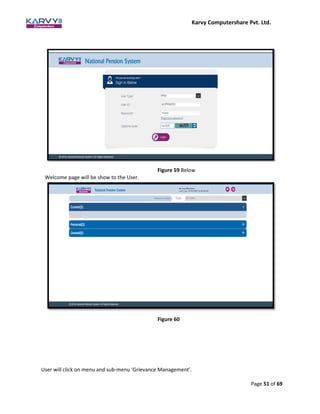
Figure 59 Below
Welcome page will be show to the User.
Figure 60
User will click on menu and sub-menu ‘Grievance Management’.
Karvy Computershare Pvt. Ltd.
Page 52 of 69
Figure 61
User will click on sub-menu ‘Grievance Request’ option.
Figure 62
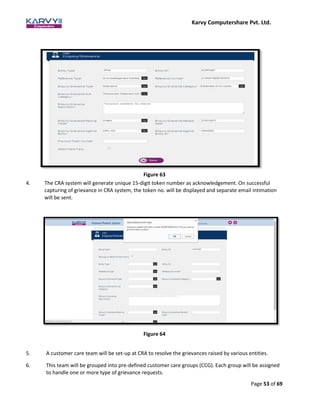
3. The user will then enter all the details of the grievance in the prescribed format and ‘submit’ to the
CRA system.
Karvy Computershare Pvt. Ltd.
Page 53 of 69
Figure 63
4. The CRA system will generate unique 15-digit token number as acknowledgement. On successful
capturing of grievance in CRA system, the token no. will be displayed and separate email intimation
will be sent.
Figure 64
5. A customer care team will be set-up at CRA to resolve the grievances raised by various entities.
6. This team will be grouped into pre-defined customer care groups (CCG). Each group will be assigned
to handle one or more type of grievance requests.
Karvy Computershare Pvt. Ltd.
Page 54 of 69
7. The CCG user will login to the system after due authentication and see all the unassigned grievances
at that point of time under view and assign option.
8. Complete list of pending grievance requests will be shown in date wise sorted order (earliest one at
the top). The CRA user will select one or more or all of the grievance requests for resolution.
9. The CRA user will then select the one of the assigned grievance requests from the assigned list from
the Resolution and Escalation option in CGMS. Once request has been assigned to a user, it will not
be available for assignment to other users in the group.
10. There will be option for a supervisor to assign the unassigned grievances to any active user of the
group after certain interval.
11. The request resolution screen will be shown to the user, with the details of grievance logged by
PFM/ASP/TB. Once CRA User provide the resolution and close the grievance below screen will be
shown the CRA User:
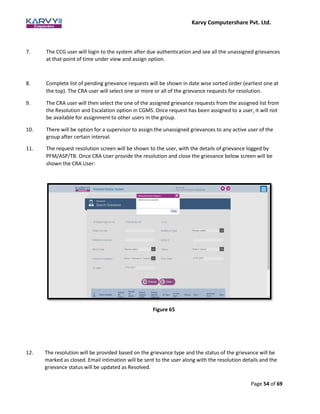
Figure 65
12. The resolution will be provided based on the grievance type and the status of the grievance will be
marked as closed. Email intimation will be sent to the user along with the resolution details and the
grievance status will be updated as Resolved.
Karvy Computershare Pvt. Ltd.
Page 55 of 69
13. In case the grievance needs to be checked by another user then it will be marked as “pending
verification for closure” and will be assigned to a checker. Once verified by the checker the grievance
will be marked as Resolved in CGMS.
14. The CRA user can also escalate the grievance to the next level resolution group by mentioning the
escalation reason.
15. A user at any point in between this process, view the status of the grievance raised by him/her by
mentioning the token number.
16. In case the user is not satisfied with the resolution provided they will have an option to reopen the
grievance and the process steps 5-14 will be repeated.
17. If a significant number of grievance requests are being raised in same category, steps will be taken to
determine the underlying cause.
18. If any grievance is being reopened repeatedly then steps will be taken to get it resolved.
19. Escalation matrix as provided in Section 3.3 will be followed in case of TAT overrun
6.2 PFM/ASP’s Grievances against TB
1. PFM/ASP can raise their grievances by mentioning the nature and details of grievances in a free text
format either through the web based interface or call centre. Any grievance received from PFM/ASP
will be directly escalated to a higher level.
2. The user will login to the CRA system (www.cra.karvy.com) using the I-PIN provided to them during
registration process.
Karvy Computershare Pvt. Ltd.
Page 56 of 69
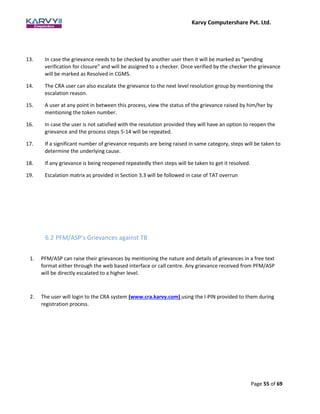
Figure 66
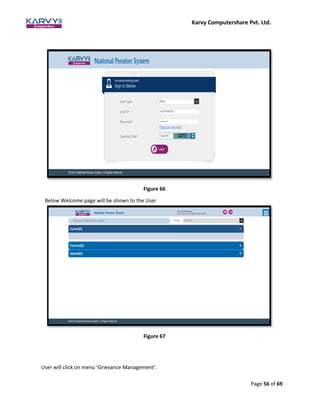
Below Welcome page will be shown to the User
Figure 67
User will click on menu ‘Grievance Management’.
Karvy Computershare Pvt. Ltd.
Page 57 of 69
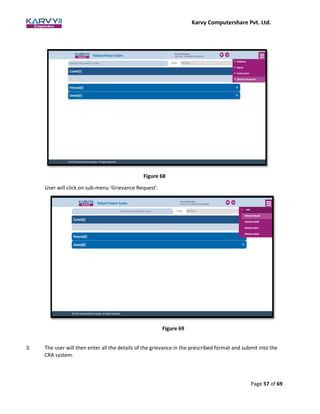
Figure 68
User will click on sub-menu ‘Grievance Request’.
Figure 69
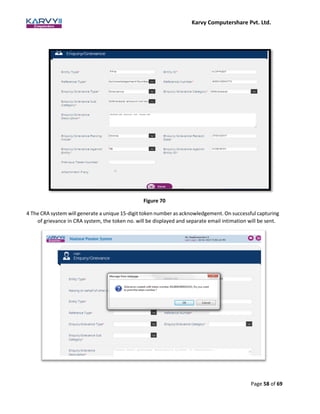
3. The user will then enter all the details of the grievance in the prescribed format and submit into the
CRA system.
Karvy Computershare Pvt. Ltd.
Page 58 of 69
Figure 70
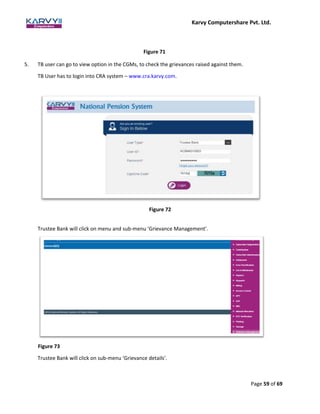
4 The CRA system will generate a unique 15-digit token number as acknowledgement. On successful capturing
of grievance in CRA system, the token no. will be displayed and separate email intimation will be sent.
Karvy Computershare Pvt. Ltd.
Page 59 of 69
Figure 71
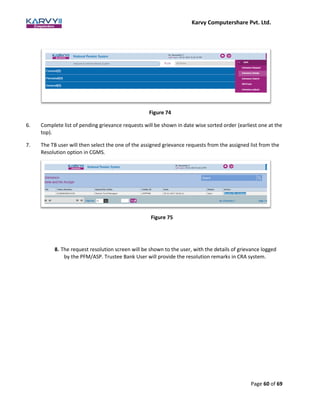
5. TB user can go to view option in the CGMs, to check the grievances raised against them.
TB User has to login into CRA system – www.cra.karvy.com.
Figure 72
Trustee Bank will click on menu and sub-menu ‘Grievance Management’.
Figure 73
Trustee Bank will click on sub-menu ‘Grievance details’.
Karvy Computershare Pvt. Ltd.
Page 60 of 69
Figure 74
6. Complete list of pending grievance requests will be shown in date wise sorted order (earliest one at the
top).
7. The TB user will then select the one of the assigned grievance requests from the assigned list from the
Resolution option in CGMS.
Figure 75
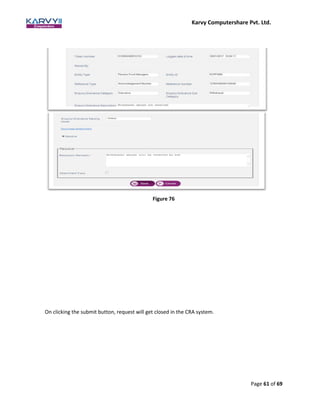
8. The request resolution screen will be shown to the user, with the details of grievance logged
by the PFM/ASP. Trustee Bank User will provide the resolution remarks in CRA system.
Karvy Computershare Pvt. Ltd.
Page 61 of 69
Figure 76
On clicking the submit button, request will get closed in the CRA system.
Karvy Computershare Pvt. Ltd.
Page 62 of 69
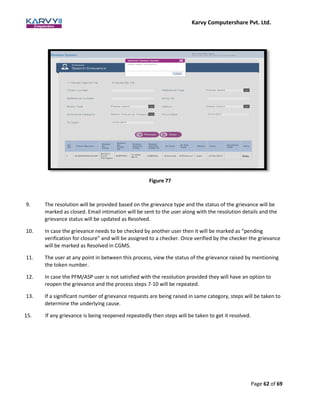
Figure 77
9. The resolution will be provided based on the grievance type and the status of the grievance will be
marked as closed. Email intimation will be sent to the user along with the resolution details and the
grievance status will be updated as Resolved.
10. In case the grievance needs to be checked by another user then it will be marked as “pending
verification for closure” and will be assigned to a checker. Once verified by the checker the grievance
will be marked as Resolved in CGMS.
11. The user at any point in between this process, view the status of the grievance raised by mentioning
the token number.
12. In case the PFM/ASP user is not satisfied with the resolution provided they will have an option to
reopen the grievance and the process steps 7-10 will be repeated.
13. If a significant number of grievance requests are being raised in same category, steps will be taken to
determine the underlying cause.
15. If any grievance is being reopened repeatedly then steps will be taken to get it resolved.
Karvy Computershare Pvt. Ltd.
Page 63 of 69
6.3 TB’s Grievances against ASP/PFM
TB can raise their grievances by mentioning the nature and details of grievances in a free text format either
through the web based interface or call centre. Any grievance received from TB will be directly escalated to a
higher level. The steps to be followed for lodging the TB’s grievances against ASP/PFM are given below:
1. The user will login to the CRA system (www.cra.karvy.com) using the I-PIN provided to them during
registration process.
Figure 78 Below
welcome page will be shown to the TB User.
Figure 79
User will click on ‘Grievance Management’ menu.
Karvy Computershare Pvt. Ltd.
Page 64 of 69
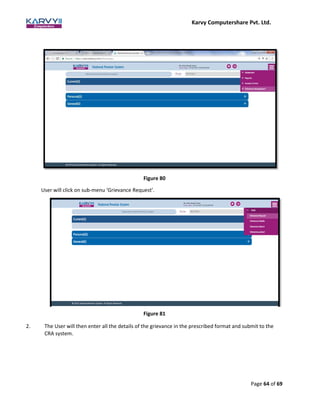
Figure 80
User will click on sub-menu ‘Grievance Request’.
Figure 81
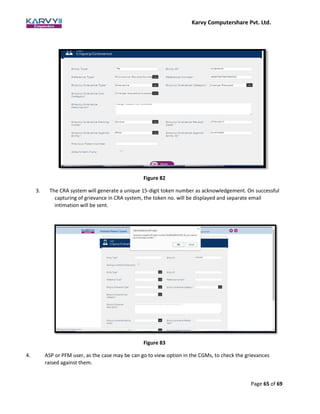
2. The User will then enter all the details of the grievance in the prescribed format and submit to the
CRA system.
Karvy Computershare Pvt. Ltd.
Page 65 of 69
Figure 82
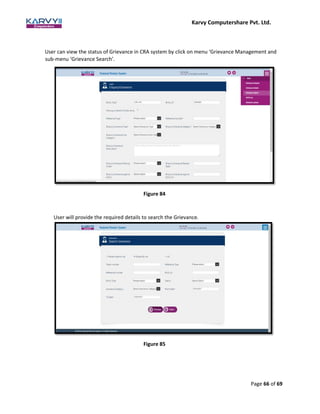
3. The CRA system will generate a unique 15-digit token number as acknowledgement. On successful
capturing of grievance in CRA system, the token no. will be displayed and separate email
intimation will be sent.
Figure 83
4. ASP or PFM user, as the case may be can go to view option in the CGMs, to check the grievances
raised against them.
Karvy Computershare Pvt. Ltd.
Page 66 of 69
User can view the status of Grievance in CRA system by click on menu ‘Grievance Management and
sub-menu ‘Grievance Search’.
Figure 84
User will provide the required details to search the Grievance.
Figure 85
Karvy Computershare Pvt. Ltd.
Page 67 of 69
5. Complete list of pending grievance requests will be shown in date wise sorted order (earliest one at
the top). The PFM/ASP user will click on ‘View’ hyperlink to select one or more or all of the grievance
requests for resolution.
Figure 86
6. Grievance details will be shown the User.
Figure 87
7. User will provide the resolution in the ‘resolution remarks’ field.
Karvy Computershare Pvt. Ltd.
Page 68 of 69
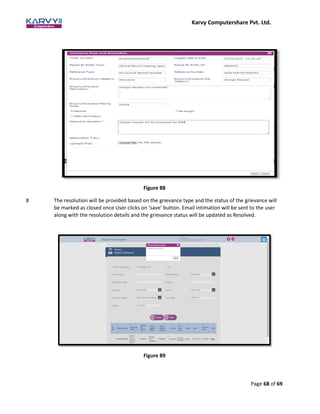
Figure 88
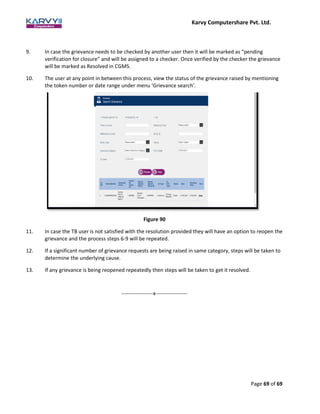
8 The resolution will be provided based on the grievance type and the status of the grievance will
be marked as closed once User clicks on ‘save’ button. Email intimation will be sent to the user
along with the resolution details and the grievance status will be updated as Resolved.
Figure 89
Karvy Computershare Pvt. Ltd.
Page 69 of 69
9. In case the grievance needs to be checked by another user then it will be marked as “pending
verification for closure” and will be assigned to a checker. Once verified by the checker the grievance
will be marked as Resolved in CGMS.
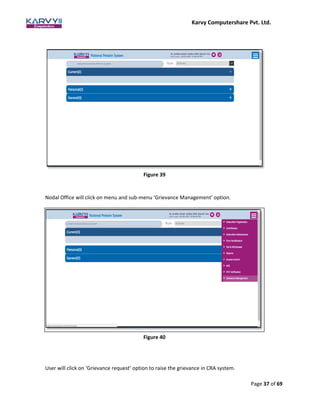
10. The user at any point in between this process, view the status of the grievance raised by mentioning
the token number or date range under menu ‘Grievance search’.
Figure 90
11. In case the TB user is not satisfied with the resolution provided they will have an option to reopen the
grievance and the process steps 6-9 will be repeated.
12. If a significant number of grievance requests are being raised in same category, steps will be taken to
determine the underlying cause.
13. If any grievance is being reopened repeatedly then steps will be taken to get it resolved.
------------------x------------------

SOP - Grievance Redressal

  • 1.
    Karvy Computershare Pvt.Ltd. Page 1 of 69 Karvy Computershare Pvt. Ltd. – Central Recordkeeping Agency PFRDA Standard Operating Procedure (SOP) for Redressal of Grievances Version 2.0 Contents 1. Overview ....................................................................................................................................................... 3 2. Process Chart – Grievance Redressal ............................................................................................................. 7 3. Central Grievance Management System – Overview ................................................................................... 8 3.1 Grievance Types: ......................................................................................................................................... 8 3.2 Modes to raise Grievance ........................................................................................................................... 9 Call Centre: .................................................................................................................................................... 9 Online: ........................................................................................................................................................... 9 Offline: ........................................................................................................................................................ 10
  • 2.
    Karvy Computershare Pvt.Ltd. Page 2 of 69 3.3 Escalation Mechanism: ............................................................................................................................. 10 3.4 Grievance Diagram Entity Wise ................................................................................................................ 11 4. Subscribers’ Grievances: ............................................................................................................................. 12 4.1 Subscribers’ Grievances against CRA: ....................................................................................................... 12 4.2 Subscribers’ grievances against POP/ASP: ................................................................................................ 24 5. Nodal Offices’ Grievances: .......................................................................................................................... 34 5.1 Nodal Offices’ Grievances against CRA ..................................................................................................... 34 5.2 Nodal offices’ Grievances against Trustee Bank ....................................................................................... 43 5.3 Nodal Offices’ Grievances against POP ..................................................................................................... 48 6. PFM/ASP/TB’s Grievances: ......................................................................................................................... 49 6.1 PFM/ASP/TB’s Grievances against CRA .............................................................................................. 49 6.2 PFM/ASP’s Grievances against TB ...................................................................................................... 54 6.3 TB’s Grievances against ASP/PFM ...................................................................................................... 62 1. Overview The National Pension System (NPS) was introduced by the Government of India to enable its citizens (in the Government/All-citizen/Corporate sector) to effectively plan for their retirement through reasonably safe and market based returns. Periodic contributions from the subscribers (and their employers – for Government/Corporate sector), are invested in Pension Funds chosen by the subscriber from the approved list. On attaining superannuation, part of the accumulated wealth can be withdrawn lump-sum and the balance can be invested in an “Annuity” with a registered ASP (Annuity Service Provider), so that the subscriber gets
  • 3.
    Karvy Computershare Pvt.Ltd. Page 3 of 69 regular monthly pension from the Annuity purchase. There are other regulations regarding withdrawal, under various circumstances. Each subscriber is registered with the CRA and is allotted a PRAN (Permanent Retirement Account Number). This ID is used to track all his/her transactions, contributions, change of details, scheme preferences etc. NPS is operated through various intermediaries at various stages, as given below: 1. Registration of subscribers – Application is submitted by the Subscriber and routed through Nodal Offices – to CRA. Permanent Retirement Account is created in the CRA system and PRAN is allotted to the subscribers by the CRA. 2. Deposit of contribution is made by Subscribers to the Nodal Offices (Contribution is deducted from the salary by the Nodal Offices, for Government employees). The funds are remitted by Nodal Offices to the Trustee Bank, with details being uploaded in the CRA system by the Nodal Offices. 3. Transfer of funds from Trustee Bank to PFM (as selected) – On reconciliation & as per settlement instructions from CRA 4. Changes in subscriber details (address, scheme preference etc.) - are intimated by Subscribers – routed through Nodal Offices – to CRA system. In case of changes in scheme preference etc., new instructions are accordingly implemented in the daily settlement run by CRA. 5. On Exit/ withdrawal Application s submitted by Subscribers and routed through Nodal Offices – to CRA. On processing, CRA gives instructions to the PFM to transfer the funds to the Trustee Bank. The Trustee Bank would transfer the lump-sum withdrawal to the Subscriber’s Bank account and the ‘Annuity’ amount to the ASP. The subscriber would thereafter receive monthly payouts from the ASP. Hence, the various intermediaries in the functioning of the NPS system are: 1. Nodal Offices – They are the main interface for subscribers. Their functions include: a. Receiving applications for registration / changes in details / withdrawals from subscribers, verification and forwarding of the same to CRA for processing b. Receiving contributions from subscribers and upload of contribution details in the CRA system c. Deposit of funds (contributions) with Trustee Bank and reconciliation thereof with the details uploaded The Nodal Offices- for various models/sectors – are as given below: Model/Sector Registration/change requests/withdrawals & receipt of contributions Transfer & uploading of contributions Over-seeing Nodal Offices
  • 4.
    Karvy Computershare Pvt.Ltd. Page 4 of 69 For Central Government employees: DDO, PAO PAO Pr.AO For State Government employees: DDO, DTO DTA (Centralised mode) DTO (De-centralised mode) DTA & DTO (Quasi centralized mode) DTA For ‘All Citizen’ model: POP-SP & POP POP (Centralised mode) POP-SP (De-centralised mode) POP & POP-SP (Quasi centralized mode) POP For ‘Corporate’ model: CHO & CBO POP (CHO – for Direct model) POP 2. Trustee Bank – Their functions include: a. Receipt of funds from Nodal Offices for contribution deposit and reconciliation thereof with the details uploaded in the CRA system b. Transfer of funds to PFMs as per settlement instructions from CRA c. On withdrawal, transfer of funds to Subscriber’s bank account (lump-sum portion of withdrawal) d. On withdrawal, transfer of funds to ASP (the annuitized portion) 3. Pension Fund Manager (PFM) – Their functions include: a. Receipt of funds from Trustee Bank and investment thereof as per subscribers’ preference b. Updation of NAV etc. c. On withdrawal, transfer of accumulated wealth to the Trustee Bank, as per instructions from CRA. 4. Annuity Service Provider (ASP) – Their functions include: a. Receipt of funds from Trustee Bank and instructions from CRA, for investment in annuity for subscribers, on withdrawal b. Maintaining annuity scheme with the subscribers thereafter (monthly payouts, queries etc.) 5. Central Record-keeping Agency (CRA) – Their functions include registration and interface with all intermediaries and recording all transactions i.e.: a. Registration of Nodal Offices b. Registration of Subscribers c. Running settlement on upload of contribution details by Nodal Offices and funds receipt confirmation by Trustee Banks
  • 5.
    Karvy Computershare Pvt.Ltd. Page 5 of 69 d. Settlement instructions to Trustee Banks to transfer funds to PFMs e. Processing change requests / withdrawals f. Instructions to Trustee Banks/PFMs/ASPs on withdrawal g. Providing interface to subscribers for checking status of applications/grievances etc. and providing SoT to the subscribers. It is imperative to have a mechanism for recording and resolving any grievances that any party might have, with respect to another party/intermediary in the NPS system, to ensure that the objectives of the system are met and to ensure justice and transparency. The PFRDA (Redressal of Subscriber Grievance) Regulations 2015 states that “Every intermediary under the National Pension System and any other pension scheme regulated by the Authority shall follow the grievance redressal policy as laid down under these regulations. In case of National Pension System, the National Pension System Trust shall lay down detailed guidelines and procedures for a two level grievance redressal policy for intermediaries and other entities with minimum conditions as referred to in regulation 4 and shall be responsible for the overall grievance management system. The two levels for the grievance redressal shall comprise a senior management level officer to be designated as Grievance Redressal Officer for compliance of the requirements laid down in such policy. In addition, every branch or authorized office or centre other than the central office, head office, corporate office or principal office of the intermediary dealing with National Pension System shall also have an officer nominated as the Grievance Redressal Officer for that office or centre.” The CRA system provides an online mechanism for automated recording and tracking of the status of resolution of grievances raised by various parties. This document deals with the procedure for registering and resolution of grievances. ACRONYMS USED: Acronym Description ASP Annuity Service Provider CBO Corporate Branch Office CDDO Cheque Drawing & Disbursing Officer CHO Corporate Head Office CRA Central Record-keeping Agency CRA-FC Central Record-keeping Agency – Facilitation Centre DDO Drawing & Disbursing Officer
  • 6.
    Karvy Computershare Pvt.Ltd. Page 6 of 69 DTA Directorate of Treasuries & Accounts DTO District Treasury Office I-PIN Internet Personal Identification Number NPS National Pension System PAO Pay & Accounts Office PFM Pension Fund Manager POP Point of Presence POP-SP POP Service Provider Pr.AO Principal Accounts Office PRAN Permanent Retirement Account Number TB Trustee Bank T-PIN Tele-query Personal Identification Number 2. Process Chart – Grievance Redressal
  • 7.
    Karvy Computershare Pvt.Ltd. Page 7 of 69 3. Central Grievance Management System – Overview Entity seeking redressal of grievance CRA system Entity against whom grievance is raised CRA system
  • 8.
    Karvy Computershare Pvt.Ltd. Page 8 of 69 “Grievances or complaint” includes any communication that expresses dissatisfaction, in respect of the conduct or any act of omission or commission or deficiency of service on the part of an intermediary under NPS. Grievance is different from enquiry as enquiry is any communication from a subscriber/entity for the primary purpose of requesting information about the National Pension System. CRA has developed a Central Grievance Management System (CGMS) in which grievances by multiple stakeholders will be logged at the CRA. A Central Grievance Management System is required to gather, resolve and record various types of grievances raised by different entities/stakeholders of the CRA system. In order to raise any grievance, an entity needs to be registered and be in an ‘active’ state in the CRA system. CGMS aims to provide a timely and seamless framework for handling grievances to protect the interests of the stakeholders of the National Pension System and for ensuring effective resolution of grievances. As per the PFRDA (Redressal of Subscriber Grievance) Regulations 2015, every intermediary should have a two level Grievance Redressal policy. The two levels for the grievance redressal shall comprise a senior management level officer to be designated as Grievance Redressal Officer for compliance of the requirements laid down in the grievance redressal policy as explained in these regulations. In addition, every branch or authorized office or centre other than the central office, head office, corporate office or principal office of the intermediary dealing with National Pension System shall also have an officer nominated as the Grievance Redressal Officer for that office or centre. CRA will provide a web interface to all the entities for registering a grievance against other permitted entities. Once a grievance is registered, a unique fifteen digit token number will be generated by the CRA system for reference by the entities concerned. Also an email will be sent to the entity for confirmation of successful registration of the grievance. The same platform will be used to view and update the resolution details of the grievances. The concerned entity will login into the interface and take up the grievance for resolution. After updating the resolution remarks, CGMS system will be updated and CRA will send details of the resolution by email to the complainant. The status will be marked as closed in the CGMS system after providing the resolution of the grievance to the entity through email. After a grievance is closed, if the concerned entity or subscriber is not satisfied with the resolution provided, they will have an option to reopen the issue. 3.1 Grievance Types: Grievances may be of the following types: 1. Grievances against Nodal Office - Any grievance against a Nodal Office will be logged under this category. A subscriber can raise a grievance against Nodal Office for the services rendered by them. Also a Nodal Office can raise a grievance against other entities with which it is related for services. CRA will provide a platform to raise such grievances through CGMS against the concerned entities. 2. Grievances against the CRA system - The grievances raised against the CRA by any entity which is in relation to the services provided by CRA will be recorded under this category. These grievances will be assigned to the CRA for redressal and will be a part of expected service parameter for delivery services of the CRA.
  • 9.
    Karvy Computershare Pvt.Ltd. Page 9 of 69 3. Grievances against Pension Fund Manager - The grievances raised against a PFM will be recorded under this category. The concerned PFM will be responsible to resolve the grievances against them. CRA will provide a platform to raise such grievance through CGMS and will act as a channel to assign them to the concerned entities. 4. Grievances against Trustee Bank - The grievances raised on TB will be recorded in this category. The TB will be responsible to provide resolution to the grievances raised against them. CRA will provide a platform to raise such grievance through CGMS and will act as a channel to assign them to the concerned entities. 5. Grievances against Annuity Service Provider - The grievances raised on ASP will be recorded in this category. The ASP against which the grievance has been raised will be responsible for providing the resolution. CRA system will provide a central system to raise such grievances and will act as a channel to assign them to concerned entities to get the grievance resolved. It will also keep a log of the grievances raised. 3.2 Modes to raise Grievance There are 3 modes in which a grievance can be raised: IVR (Call Centre), Online (Web interface) and Offline (Physical form). The grievances cannot be raised through any other mode like email etc. Call Centre: An entity can dial the Interactive Voice Response -IVR to raise a grievance after authentication using T-PIN allotted at the time of entity registration in the CRA system. The grievance will be registered by the Call centre executive and a token number will be given to the entity for reference. An entity cannot raise grievance on behalf of other entity through call centre. It can be used only to log their grievance. Online: An entity can register a grievance through a web based interface provided by the CRA with the use of I-PIN allotted at the time of registration in the CRA system. The entity will have to provide the necessary details as
  • 10.
    Karvy Computershare Pvt.Ltd. Page 10 of 69 required in the web based format. On successful registration, a token number will be displayed on the screen for the purpose of reference. Subscriber can also raise the grievance without login into the CRA system by providing the relevant details. Offline: A subscriber can log a grievance by submitting details in a physical form to the Central Grievance Management Cell at CRA. On receiving such a grievance, the CRA-FC user will digitize the same and lodge a request in the CRA system, with SMS/email intimation to the subscriber. Other entities like PAO, PFM etc. will not have an option of logging grievance through physical format. The grievances will be logged into the CGMS by the Grievance Management Cell of CRA. Subscribers will have a particular format which will be included in the PRAN kit. 3.3 Escalation Mechanism: There will three (3) levels of resolution, namely L1, L2 and L3 for Grievances raised against CRA. • L1 will be the initial level for grievance received. • L2 will be the second level of resolution with 1st level of escalation. • L3 will be the specialized and unified grievance resolving team and with 2nd level of escalation. ** L2 and L3 are escalation levels. System will have two escalation levels (from L1 to L2 and from L2 to L3). The system will have provision to manually escalate the grievance by the user or automatically escalate after a stipulated period. The escalation will be based on criteria like the nature of grievance, age of grievance, entity who raised the grievance, entity against which grievance is raised. The criteria for grievance escalation from one level to another are given below: Grievances logged by Subscriber against CRA • Grievances pending for more than 2 days at a level will be escalated to next level. • Grievances related to scheme set up details will be directly escalated to L2 level when raised Grievances logged by Nodal Offices (PAO/DDO/DTO etc.) against CRA • All grievances raised on behalf of subscriber will be escalated based only on the criteria mentioned above under “Grievances logged by Subscriber”. • All grievances that PAO has raised against CRA will be considered as an escalated grievance (directly escalated to L2 level when raised).
  • 11.
    Karvy Computershare Pvt.Ltd. Page 11 of 69 Grievances logged by Trustee Bank, PFM and Annuity Service Providers against CRA All grievances related to these entities themselves will be considered as an escalated grievance (directly escalated to L2 level when raised). There will be no grievance escalation mechanism for grievances raised against other entities. 3.4 Grievance Diagram Entity Wise 4. Subscribers’ Grievances: Protection of subscribers’ interests is of paramount importance. A subscriber may have grievances against the CRA or POP or ASP. Examples of Subscribers’ Grievance against CRA: 1. Incorrect PRAN account details (on registration) – (Personal/ Employment/ Nomination/ Scheme setup) 2. Statement of Transaction not received. 3. Change in signature/photograph request not updated
  • 12.
    Karvy Computershare Pvt.Ltd. Page 12 of 69 4. PRAN kit not received 5. I-PIN/T-PIN not received Examples of Subscribers’ Grievance against Nodal Office: 1. Change request updated incorrectly - Personal/ Employment/ Nomination/ Scheme setup). 2. Change request given but not updated in account - (Personal/ Employment/ Nomination/ Scheme setup). 3. Change in subscriber details without subscriber consent- (Personal/Nomination/ Scheme setup/ switch units). 4. Switch instruction executed incorrectly 5. Switch instruction not executed. 6. Delay in executing switch instruction 7. Request for duplicate PRAN card not initiated 8. Request for I-PIN re-issue not initiated 9. Request for T-PIN re-issue not initiated 10. Contribution not reflected in account 11. Incorrect contribution amount reflected 12. Withdrawal amount not received The detailed process for a subscriber to lodge a grievance against the CRA, ASP & Nodal Office, is explained below. 4.1 Subscribers’ Grievances against CRA: 1. The user will login to the CGMS system using the I-PIN provided to them during registration process. In case the grievance is lodged through IVR, the subscriber needs to provide the T-PIN. A subscriber can also raise grievance against CRA by submitting physical G1 Form to CRA. 2. To raise the grievance in the CRA system, Subscriber will login in CRA website (www.enps.karvy.com) using his/her IPIN.
  • 13.
    Karvy Computershare Pvt.Ltd. Page 13 of 69 Welcome Page will be shown to the Subscriber after login into CRA system. Subcriber will click on log Grievance option to raise the Grievance. Figure 1 Figure 2
  • 14.
    Karvy Computershare Pvt.Ltd. Page 14 of 69 Subscriber will click on Grievance Category and select the grievance category from the dropdown. Figure 3 Subscriber will click on Grievance type Figure 4
  • 15.
    Karvy Computershare Pvt.Ltd. Page 15 of 69 Subscriber will click on Grievance Sub Category and select the option from the dropdown. Figure 6 Figure 5
  • 16.
    Karvy Computershare Pvt.Ltd. Page 16 of 69 Subscriber will provide the Grievance Description in the specified field. 3. The CRA system will generate unique 15-digit token number as acknowledgement and same will be shown on the screen. Figure 8 Figure 7
  • 17.
    Karvy Computershare Pvt.Ltd. Page 17 of 69 Subscriber can view the Grievance status under ‘Grievance Status View’ menu. Subscriber is required to provide the token number or date range. Status will be shown to the User once subscriber clicks on search button. 4. In case the grievance is logged in offline mode, an email will be sent to the user when the grievance is captured in the CRA system, along with the token number for future reference. 5. In case the grievance is logged online, the token no. will be displayed and separate email intimation will be sent. Figure 9 Figure 10
  • 18.
    Karvy Computershare Pvt.Ltd. Page 18 of 69 6. In case the grievance is raised through a call centre executive, the details of the token number would be sent to the user on whose behalf the grievance was raised. 7. A customer care team will be set-up at CRA to resolve the grievances raised by various entities. 8. This team will be grouped into pre-defined customer care groups (CCG). Each group will be assigned to handle one or more type of grievance requests. 9. The CCG user will login to the system after due authentication and see all the unassigned grievances at that point of time under view and assign option. CRA user will login in CRA HO to view the Grievance by providing his/her User ID. Figure 11
  • 19.
    Karvy Computershare Pvt.Ltd. Page 19 of 69 CRA user will click on menu and sub-menu ‘Grievance Management’. CRA user will click on ‘Grievance Details’ option. Figure 13 Figure 12
  • 20.
    Karvy Computershare Pvt.Ltd. Page 20 of 69 10. Complete list of pending grievance requests will be shown in date wise sorted order (earliest one at the top). The CRA user will select one or more or all of the grievance requests for resolution. CRA user will be able to see the list of pending Grievance Figure 14 11. The CRA user will then select one of the assigned grievance requests from the assigned list from the Resolution and Escalation option in CGMS. Once a request has been assigned to a user it will not be available for assignment to other users in the group.
  • 21.
    Karvy Computershare Pvt.Ltd. Page 21 of 69 12. CRA user will provide the resolution remarks for closing the grivance raised by subsciber. CRA user will click on Resolve/ Reassign option Figure 15
  • 22.
    Karvy Computershare Pvt.Ltd. Page 22 of 69 Figure 16 User will click on save button to close the grievance and message will be shown to the User.
  • 23.
    Karvy Computershare Pvt.Ltd. Page 23 of 69 Figure 17 13. The resolution will be provided based on the grievance type and the status of the grievance will be marked as closed. Email intimation will be sent to the user along with the resolution details and the grievance status will be updated as Resolved. To view the status of the grievance, User will click on search option to view the status. Below screen will be shown to the User. User has to click on hyperlink ‘View’ to view the details of the grievance. Figure 18
  • 24.
    Karvy Computershare Pvt.Ltd. Page 24 of 69 Figure 19 Below Screen will be shown to the User for the details. Figure 20
  • 25.
    Karvy Computershare Pvt.Ltd. Page 25 of 69 14. In case the grievance needs to be checked by another user then it will be marked as “pending verification for closure” and will be assigned to a checker. Once verified by the checker the grievance will be marked as Resolved in CGMS. 16. The CRA user can also escalate the grievance to the next level resolution group by mentioning the escalation reason. 17. A user at any point in between this process, view the status of the grievance raised by him/her by mentioning the token number. 18. In case the user is not satisfied with the resolution provided they will have an option to reopen the grievance and the process steps 7-16 will be repeated. 19. A control point and measurement is established to check if significant numbers of grievance requests are being raised in same category like PRAN kit not received. Steps will be taken to determine the underlying cause. 20. Escalation matrix as shown in Section 3.3 will be followed in case of TAT overrun. 4.2 Subscribers’ grievances against Nodal Office / ASP: 1. The user will login to the CGMS system using the I-PIN provided to them during registration process. In case the grievance is lodged through IVR the subscriber needs to provide the T-PIN. Subscriber login in CRA website (www.enps.karvy.com) using his/her IPIN. Figure 21 Welcome Page will be shown to the Subscriber after successful login into CRA system.
  • 26.
    Karvy Computershare Pvt.Ltd. Page 26 of 69 2. The user will then enter all the details of the grievance in the prescribed format and submit to the CRA system. Subcriber will click on log Grievance option to raise the Grievance. Figure 23 Subscriber will click on Category and Sub category and select the values from the dropdown. Subscriber will also provide the description of the grievane and will click on ‘submit’ button. Figure 22
  • 27.
    Karvy Computershare Pvt.Ltd. Page 27 of 69 Figure 24 3. The CRA system will generate unique 15-digit token number as acknowledgement. Figure 25 To check the status of the grievance raised, subscriber will click on ‘Grievance Status View’ to view the status by providing token number or date range.
  • 28.
    Karvy Computershare Pvt.Ltd. Page 28 of 69 Figure 26 Below screen will be shown to the User for Grievance Status View. Figure 27 4. In case the grievance is logged in offline mode, an email will be sent to the user when the grievance is captured in the CRA system, along with the token number for future reference. 5. In case the grievance is logged online, the token no. will be displayed and separate email intimation will be sent.
  • 29.
    Karvy Computershare Pvt.Ltd. Page 29 of 69 6. In case the grievance is raised through a call centre executive, the details of the token number would be sent to the user on whose behalf the grievance was raised. 7. The Nodal Office or ASP against which the grievance is raised will also receive an email with the grievance details and the token number. Nodal Office will login into CRA website (www.cra.karvy.com) by using its User and I-PIN. Figure 28 Nodal Office will click on menu and sub-menu ‘Grievance Management’ Figure 29 8. User will click on ‘Grievance Details’ option to view the grievance raised against it.
  • 30.
    Karvy Computershare Pvt.Ltd. Page 30 of 69 Figure 30 9. Complete list of pending grievance requests will be shown in date wise sorted order (earliest one at the top). Nodal Office or ASP, as the case may be, will select one or more or all of the grievance requests for resolving purpose. 10. The User will then go to the Resolution option in CGMS and will select the one of the assigned grievance requests from the assigned list. 11. The request resolution Screen will be shown to the User, with the details of grievance logged by subscriber. Nodal Office will click on Resolve option. Figure 31
  • 31.
    Karvy Computershare Pvt.Ltd. Page 31 of 69 12. The resolution remarks will be provided based by the User to resolve the grievance. Figure 32
  • 32.
    Karvy Computershare Pvt.Ltd. Page 32 of 69 After providing the grievance resolution remarks, User will click the Save button to resolve the grievance. Email intimation will be sent to the user along with the resolution details and the grievance status will be updated as Resolved. 13. In case the grievance needs to be checked by another user then it will be marked as “pending verification for closure” and will be assigned to a checker. Once verified by the checker the grievance will be marked as Resolved in CGMS. To view the status of the grievance, Nodal Office User will click on ‘Grievance search’ option. Figure 33
  • 33.
    Karvy Computershare Pvt.Ltd. Page 33 of 69 Below page will show the status of Grievance Figure 35 Once User clicks on the ‘View’ hyperlink, below Screen will show the User. Figure 34
  • 34.
    Karvy Computershare Pvt.Ltd. Page 34 of 69 14. The Nodal Office can also escalate the grievance to the next level resolution group by mentioning the escalation reason. 15. A subscriber at any point in between this process, view the status of the grievance raised by him/her by mentioning the token number. 16. In case the user is not satisfied with the resolution provided they will have an option to reopen the grievance and the process steps 7-13 will be repeated. 17. A control point and measurement is established to check if significant numbers of grievance requests are being raised in same category. Steps will be taken to determine the underlying cause. 18. Subscribers’ grievances against ASP after complete closure of PRAN, i.e., after the entire accumulated pension wealth has been paid out – either as lump-sum to the subscriber or has been transferred to ASP, will not be covered in the CRA system. 5. Nodal Offices’ Grievances: Nodal offices include Pr.AO, DTA, PAO, CDDO, DTO, DDO, POP, POP SP, CHO and CBO. Some examples of grievances that Nodal Offices may have against CRA are: 1. PRAN allotted but card not received Figure 36
  • 35.
    Karvy Computershare Pvt.Ltd. Page 35 of 69 2. T-PIN/I-PIN not received 3. PRAN not allotted 4. Withdrawal amount not received Some examples of grievances that Nodal Offices may have against TB are: 1. FRC not uploaded 2. Incorrect amount in FRC uploaded 3. Delay in uploading FRC Some examples of grievances that Nodal Offices may have against ASP are: 1. Annuity not received 2. Incorrect annuity amount The procedure to be followed for registering and resolution of Nodal Offices’ grievances against CRA or other parties is given below in detail. 5.1 Nodal Offices’ Grievances against CRA 1. The Pr.AO/DTA/PAO/CDDO/DTO/DDO/POP/POP SP/CHO/CBO user will login to the CGMS system using the I-PIN provided to them during registration process. In case the grievance is lodged through IVR the user needs to provide the T-PIN. Nodal Office will visit the CRA website (www.cra.karvy.com) to login into CRA system.
  • 36.
    Karvy Computershare Pvt.Ltd. Page 36 of 69 Figure 37 Nodal Office will provide the User ID and I-PIN for logging into CRA system. Figure 38 Below Welcome page will be shown the User after Nodal Office logs in CRA system.
  • 37.
    Karvy Computershare Pvt.Ltd. Page 37 of 69 Figure 39 Nodal Office will click on menu and sub-menu ‘Grievance Management’ option. User will click on ‘Grievance request’ option to raise the grievance in CRA system. Figure 40
  • 38.
    Karvy Computershare Pvt.Ltd. Page 38 of 69 Figure 41 2. The user will then enter all the details of the grievance in the prescribed format and submit the request. Figure 42
  • 39.
    Karvy Computershare Pvt.Ltd. Page 39 of 69 3. The CRA system will generate a unique 15-digit token number as acknowledgement. Figure 43 4. In case the grievance is logged in offline mode, an email will be sent to the user when the grievance is captured in the CRA system, along with the token number for future reference. 5. In case the grievance is logged online, the token no. will be displayed and separate email intimation will be sent. 6. In case the grievance is raised through a call center executive, the details of the token number would be sent to the user on whose behalf the grievance was raised. 7. A customer care team will be set-up at CRA to resolve the grievances raised by various entities. 8. This team will be grouped into pre-defined customer care groups (CCG). Each group will be assigned to handle one or more type of grievance requests. 9. The CCG user will login to the system after due authentication and see all the unassigned grievances at that point of time under view and assign option.
  • 40.
    Karvy Computershare Pvt.Ltd. Page 40 of 69 To view the Grievance raised against CRA, CRA User will click on ‘Grievance Search’ option. Figure 44 Below screen will open to search the grievance. Figure 45 10. On providing the details, Complete list of pending grievance requests will be shown in date wise sorted order (earliest one at the top). The CRA user will select one or more or all of the grievance requests for resolution.
  • 41.
    Karvy Computershare Pvt.Ltd. Page 41 of 69 Figure 46 11. The CRA user will then select the one of the assigned grievance requests from the assigned list from the Resolution and Escalation option in CGMS. Once request has been assigned to a user, it will not be available for assignment to other users in the group. Below Screen will be shown to the User for resolution. Figure 47 12. There’ll be option for a supervisor to assign the unassigned grievances to any active user of the group after certain interval.
  • 42.
    Karvy Computershare Pvt.Ltd. Page 42 of 69 13. The request resolution screen will be shown to the user, with the details of grievance logged by Pr.AO/DTA/PAO/CDDO/DDO/POP/POP SP/CHO/CBO. Below Screen will show the offline resolution provided Figure 48 14 The resolution will be provided based on the grievance type and the status of the grievance will be marked as closed.
  • 43.
    Karvy Computershare Pvt.Ltd. Page 43 of 69 Figure 49 On Clicking the save button, grievance will be successfully closed in the CRA system. Figure 50 15 Email intimation will be sent to the user along with the resolution details and the grievance status will be updated as Resolved. 16 In case the grievance needs to be checked by another user then it will be marked as “pending verification for closure” and will be assigned to a checker. Once verified by the checker the grievance will be marked as Resolved in CGMS. 17. The CRA user can also escalate the grievance to the next level resolution group by mentioning the escalation reason. 18. A user at any point in between this process, view the status of the grievance raised by him/her by mentioning the token number. 19. In case the user is not satisfied with the resolution provided they will have an option to reopen the grievance and the process steps 7-16 will be repeated.
  • 44.
    Karvy Computershare Pvt.Ltd. Page 44 of 69 20. If a significant number of grievance requests are being raised in same category like PRAN generated but cards not received, PRAN Kit not received etc., steps will be taken to determine the underlying cause. 21. If any grievance is being reopened repeatedly then steps will be taken to get it resolved. 22. Escalation matrix as provided in Section 3.3 will be followed in case of TAT overrun. 5.2 Nodal offices’ Grievances against Trustee Bank Some examples of grievances that Nodal Offices may have against TB are: 1. FRC not uploaded 2. Incorrect amount in FRC uploaded 3. Delay in uploading FRC The following procedure is to be followed, for grievances of Nodal Offices against the Trustee Bank: 1. The user will login to the CGMS system using the I-PIN provided to them during registration process. In case the grievance is lodged through IVR the user needs to provide the T-PIN. Figure 51
  • 45.
    Karvy Computershare Pvt.Ltd. Page 45 of 69 Welcome page will be shown to the User after he/she successfully logs into CRA system. Figure 52 Nodal Office will raise the grievance by clicking on the menu ‘Grievance Request’. Figure 53
  • 46.
    Karvy Computershare Pvt.Ltd. Page 46 of 69 2. The user will then enter all the details of the grievance in the prescribed format and submit in the CRA system. Figure 54 3. The CRA system will generate a unique 15-digit token number as acknowledgement. Figure 55 4. In case the grievance is logged in offline mode, an email will be sent to the user when the grievance is captured in the CRA system, along with the token number for future reference. 5. In case the grievance is logged online, the token no. will be displayed and separate an email intimation will be sent.
  • 47.
    Karvy Computershare Pvt.Ltd. Page 47 of 69 6. In case the grievance is raised through a call centre executive, the details of the token number would be sent to the user on whose behalf the grievance was raised. 7. TB user can go to view option in the CGMS, to check the grievances against them. Trustee Bank User will login into CRA system and click on menu ‘Grievance Management’ and Submenu ‘Grievance Search’. Figure 56 8. Complete list of pending grievance requests will be shown in date wise sorted order (earliest one at the top). The TB User will select one or more or all of the grievance requests for resolution. Below screen will shown pending grievance against Trustee Bank. Trustee Bank will click on the ‘View’ hyperlink to view the details of grievance raised.
  • 48.
    Karvy Computershare Pvt.Ltd. Page 48 of 69 Figure 57 9. Trustee Bank will provide the resolution remarks in CRA system and click on save button to close the grievance. Figure 58 10. The resolution will be provided based on the grievance type and the status of the grievance will be marked as closed. Email intimation will be sent to the user along with the resolution details and the grievance status will be updated as ‘Resolved’. 11. In case the grievance needs to be checked by another user then it will be marked as “pending verification for closure” and will be assigned to a checker. Once verified by the checker the grievance will be marked as Resolved in CGMS.
  • 49.
    Karvy Computershare Pvt.Ltd. Page 49 of 69 12. The user at any point in between this process, view the status of the grievance raised by mentioning the token number. 13. In case the user is not satisfied with the resolution provided they will have an option to reopen the grievance and the process steps 7- 11 will be repeated. 14. If a significant number of grievance requests are being raised in same category like Contribution details not uploaded, incorrect contribution amount uploaded, Delay in uploading contribution etc., steps will be taken to determine the underlying cause. 15. If any grievance is being reopened repeatedly then steps will be taken to get it resolved. 5.3 Nodal Offices’ Grievances against ASP The steps to be followed for Nodal Offices’ grievances against ASPs, are given below: 1. The user will login to the CGMS system using the I-PIN provided to them during registration process. In case of IVR the user needs to provide the T-PIN. 2. The user will then enter all the details of the grievance in the prescribed format and submit to the CRA system. 3. The CRA system will generate a unique 15-digit token number as acknowledgement. 4. In case the grievance is logged in offline mode, an email will be sent to the user when the grievance is captured in the CRA system, along with the token number for future reference. 5. In case the grievance is logged online, the token no. will be displayed and separate email intimation will be sent. 6. In case the grievance is raised through a call centre executive, the details of the token number would be sent to the user on whose behalf the grievance was raised. 7. ASP can go to view option in the CGMs, to check the grievances raised against them. 8. Complete list of pending grievance requests will be shown in date wise sorted order (earliest one at the top). The ASP will select one or more or all of the grievance requests for resolution. 9. The ASP will then select the one of the assigned grievance requests from the assigned list from the Resolution option in CGMS. 10. The request resolution Screen will be shown to the user, with the details of grievance logged by PrAO/DTA.
  • 50.
    Karvy Computershare Pvt.Ltd. Page 50 of 69 11. The resolution will be provided based on the grievance type and the status of the grievance will be marked as closed. Email intimation will be sent to the user along with the resolution details and the grievance status will be updated as Resolved. 12. In case the grievance needs to be checked by another user then it will be marked as “pending verification for closure” and will be assigned to a checker. Once verified by the checker the grievance will be marked as Resolved in CGMS. 13. The user at any point in between this process, view the status of the grievance raised by mentioning the token number. 14. In case the user is not satisfied with the resolution provided they will have an option to reopen the grievance and the process steps 7-12 will be repeated. 16. If a significant number of grievance requests are being raised in same category like Contribution details not uploaded, incorrect contribution amount uploaded, delay in uploading contribution etc., steps will be taken to determine the underlying cause. 17. If any grievance is being reopened repeatedly then steps will be taken to get it resolved. 6. PFM/ASP/TB’s Grievances: Trustee Bank, PFM, ASP can raise their grievances in a free text format by mentioning the nature and details of grievances through the web based interface. There will be no classification of the type of grievances. Any grievance received from these entities will be directly escalated to a higher level. 6.1 PFM/ASP/TB’s Grievances against CRA 1. PFM/ASP/TB can raise their grievances by mentioning the nature and details of grievances in a free text format either through the web based interface. Any grievance received from PFM/ASP/TB will be directly escalated to a higher level. 2. The user will login to the CGMS system using the I-PIN provided to them during registration process.
  • 51.
    Karvy Computershare Pvt.Ltd. Page 51 of 69 Figure 59 Below Welcome page will be show to the User. Figure 60 User will click on menu and sub-menu ‘Grievance Management’.
  • 52.
    Karvy Computershare Pvt.Ltd. Page 52 of 69 Figure 61 User will click on sub-menu ‘Grievance Request’ option. Figure 62 3. The user will then enter all the details of the grievance in the prescribed format and ‘submit’ to the CRA system.
  • 53.
    Karvy Computershare Pvt.Ltd. Page 53 of 69 Figure 63 4. The CRA system will generate unique 15-digit token number as acknowledgement. On successful capturing of grievance in CRA system, the token no. will be displayed and separate email intimation will be sent. Figure 64 5. A customer care team will be set-up at CRA to resolve the grievances raised by various entities. 6. This team will be grouped into pre-defined customer care groups (CCG). Each group will be assigned to handle one or more type of grievance requests.
  • 54.
    Karvy Computershare Pvt.Ltd. Page 54 of 69 7. The CCG user will login to the system after due authentication and see all the unassigned grievances at that point of time under view and assign option. 8. Complete list of pending grievance requests will be shown in date wise sorted order (earliest one at the top). The CRA user will select one or more or all of the grievance requests for resolution. 9. The CRA user will then select the one of the assigned grievance requests from the assigned list from the Resolution and Escalation option in CGMS. Once request has been assigned to a user, it will not be available for assignment to other users in the group. 10. There will be option for a supervisor to assign the unassigned grievances to any active user of the group after certain interval. 11. The request resolution screen will be shown to the user, with the details of grievance logged by PFM/ASP/TB. Once CRA User provide the resolution and close the grievance below screen will be shown the CRA User: Figure 65 12. The resolution will be provided based on the grievance type and the status of the grievance will be marked as closed. Email intimation will be sent to the user along with the resolution details and the grievance status will be updated as Resolved.
  • 55.
    Karvy Computershare Pvt.Ltd. Page 55 of 69 13. In case the grievance needs to be checked by another user then it will be marked as “pending verification for closure” and will be assigned to a checker. Once verified by the checker the grievance will be marked as Resolved in CGMS. 14. The CRA user can also escalate the grievance to the next level resolution group by mentioning the escalation reason. 15. A user at any point in between this process, view the status of the grievance raised by him/her by mentioning the token number. 16. In case the user is not satisfied with the resolution provided they will have an option to reopen the grievance and the process steps 5-14 will be repeated. 17. If a significant number of grievance requests are being raised in same category, steps will be taken to determine the underlying cause. 18. If any grievance is being reopened repeatedly then steps will be taken to get it resolved. 19. Escalation matrix as provided in Section 3.3 will be followed in case of TAT overrun 6.2 PFM/ASP’s Grievances against TB 1. PFM/ASP can raise their grievances by mentioning the nature and details of grievances in a free text format either through the web based interface or call centre. Any grievance received from PFM/ASP will be directly escalated to a higher level. 2. The user will login to the CRA system (www.cra.karvy.com) using the I-PIN provided to them during registration process.
  • 56.
    Karvy Computershare Pvt.Ltd. Page 56 of 69 Figure 66 Below Welcome page will be shown to the User Figure 67 User will click on menu ‘Grievance Management’.
  • 57.
    Karvy Computershare Pvt.Ltd. Page 57 of 69 Figure 68 User will click on sub-menu ‘Grievance Request’. Figure 69 3. The user will then enter all the details of the grievance in the prescribed format and submit into the CRA system.
  • 58.
    Karvy Computershare Pvt.Ltd. Page 58 of 69 Figure 70 4 The CRA system will generate a unique 15-digit token number as acknowledgement. On successful capturing of grievance in CRA system, the token no. will be displayed and separate email intimation will be sent.
  • 59.
    Karvy Computershare Pvt.Ltd. Page 59 of 69 Figure 71 5. TB user can go to view option in the CGMs, to check the grievances raised against them. TB User has to login into CRA system – www.cra.karvy.com. Figure 72 Trustee Bank will click on menu and sub-menu ‘Grievance Management’. Figure 73 Trustee Bank will click on sub-menu ‘Grievance details’.
  • 60.
    Karvy Computershare Pvt.Ltd. Page 60 of 69 Figure 74 6. Complete list of pending grievance requests will be shown in date wise sorted order (earliest one at the top). 7. The TB user will then select the one of the assigned grievance requests from the assigned list from the Resolution option in CGMS. Figure 75 8. The request resolution screen will be shown to the user, with the details of grievance logged by the PFM/ASP. Trustee Bank User will provide the resolution remarks in CRA system.
  • 61.
    Karvy Computershare Pvt.Ltd. Page 61 of 69 Figure 76 On clicking the submit button, request will get closed in the CRA system.
  • 62.
    Karvy Computershare Pvt.Ltd. Page 62 of 69 Figure 77 9. The resolution will be provided based on the grievance type and the status of the grievance will be marked as closed. Email intimation will be sent to the user along with the resolution details and the grievance status will be updated as Resolved. 10. In case the grievance needs to be checked by another user then it will be marked as “pending verification for closure” and will be assigned to a checker. Once verified by the checker the grievance will be marked as Resolved in CGMS. 11. The user at any point in between this process, view the status of the grievance raised by mentioning the token number. 12. In case the PFM/ASP user is not satisfied with the resolution provided they will have an option to reopen the grievance and the process steps 7-10 will be repeated. 13. If a significant number of grievance requests are being raised in same category, steps will be taken to determine the underlying cause. 15. If any grievance is being reopened repeatedly then steps will be taken to get it resolved.
  • 63.
    Karvy Computershare Pvt.Ltd. Page 63 of 69 6.3 TB’s Grievances against ASP/PFM TB can raise their grievances by mentioning the nature and details of grievances in a free text format either through the web based interface or call centre. Any grievance received from TB will be directly escalated to a higher level. The steps to be followed for lodging the TB’s grievances against ASP/PFM are given below: 1. The user will login to the CRA system (www.cra.karvy.com) using the I-PIN provided to them during registration process. Figure 78 Below welcome page will be shown to the TB User. Figure 79 User will click on ‘Grievance Management’ menu.
  • 64.
    Karvy Computershare Pvt.Ltd. Page 64 of 69 Figure 80 User will click on sub-menu ‘Grievance Request’. Figure 81 2. The User will then enter all the details of the grievance in the prescribed format and submit to the CRA system.
  • 65.
    Karvy Computershare Pvt.Ltd. Page 65 of 69 Figure 82 3. The CRA system will generate a unique 15-digit token number as acknowledgement. On successful capturing of grievance in CRA system, the token no. will be displayed and separate email intimation will be sent. Figure 83 4. ASP or PFM user, as the case may be can go to view option in the CGMs, to check the grievances raised against them.
  • 66.
    Karvy Computershare Pvt.Ltd. Page 66 of 69 User can view the status of Grievance in CRA system by click on menu ‘Grievance Management and sub-menu ‘Grievance Search’. Figure 84 User will provide the required details to search the Grievance. Figure 85
  • 67.
    Karvy Computershare Pvt.Ltd. Page 67 of 69 5. Complete list of pending grievance requests will be shown in date wise sorted order (earliest one at the top). The PFM/ASP user will click on ‘View’ hyperlink to select one or more or all of the grievance requests for resolution. Figure 86 6. Grievance details will be shown the User. Figure 87 7. User will provide the resolution in the ‘resolution remarks’ field.
  • 68.
    Karvy Computershare Pvt.Ltd. Page 68 of 69 Figure 88 8 The resolution will be provided based on the grievance type and the status of the grievance will be marked as closed once User clicks on ‘save’ button. Email intimation will be sent to the user along with the resolution details and the grievance status will be updated as Resolved. Figure 89
  • 69.
    Karvy Computershare Pvt.Ltd. Page 69 of 69 9. In case the grievance needs to be checked by another user then it will be marked as “pending verification for closure” and will be assigned to a checker. Once verified by the checker the grievance will be marked as Resolved in CGMS. 10. The user at any point in between this process, view the status of the grievance raised by mentioning the token number or date range under menu ‘Grievance search’. Figure 90 11. In case the TB user is not satisfied with the resolution provided they will have an option to reopen the grievance and the process steps 6-9 will be repeated. 12. If a significant number of grievance requests are being raised in same category, steps will be taken to determine the underlying cause. 13. If any grievance is being reopened repeatedly then steps will be taken to get it resolved. ------------------x------------------