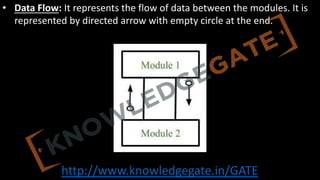
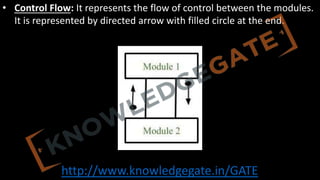
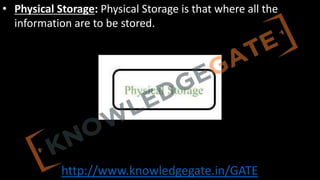
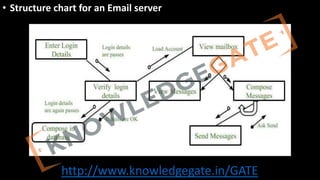
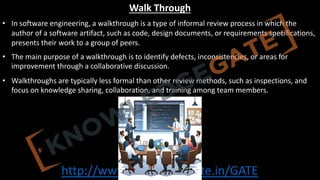
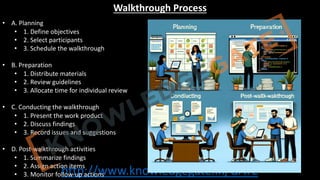
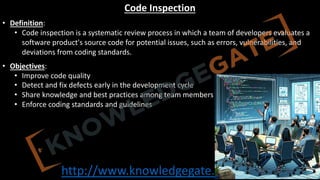
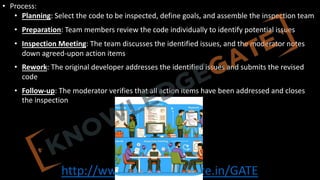
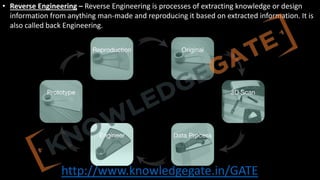
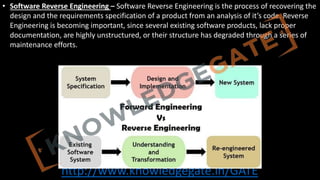
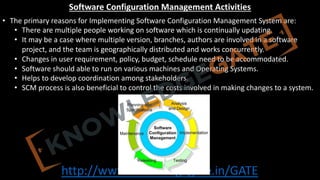
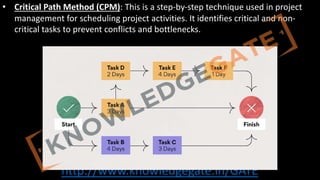
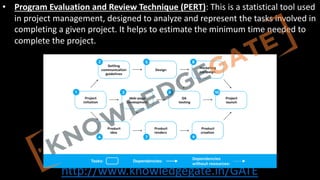
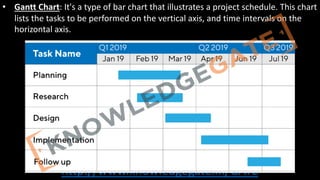
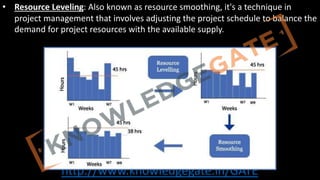
http://www.knowledgegate.in/GATE
Unit-1(Introduction)
• Introduction toSoftware Engineering,
• Software Components,
• Software Characteristics,
• Software Crisis,
• Software Engineering Processes,
• Similarity and Differences from Conventional Engineering Processes,
Software Quality Attributes,
• Software Development Life Cycle (SDLC)
• Models:
• Water Fall Model,
• Prototype Model,
• Spiral Model,
• Evolutionary Development Models,
• Iterative Enhancement Models.
3.
http://www.knowledgegate.in/GATE
Unit-2(Software Requirement Specifications(SRS))
• Requirement Engineering Process:
• Elicitation,
• Analysis,
• Documentation,
• Review and Management of User Needs,
• Feasibility Study,
• Information Modeling,
• Data Flow Diagrams,
• Entity Relationship Diagrams,
• Decision Tables,
• SRS Document,
• IEEE Standards for SRS.
• Software Quality Assurance (SQA): Verification and Validation,
• SQA Plans, Software Quality Frameworks, ISO 9000 Models, SEI-CMM Model
4.
http://www.knowledgegate.in/GATE
Unit-3(Software Design)
• BasicConcept of Software Design,
• Architectural Design,
• Low Level Design: Modularization, Design Structure Charts, Pseudo Codes, Flow Charts,
• Coupling and Cohesion Measures,
• Design Strategies
• Function Oriented Design,
• Object Oriented Design,
• Top-Down and Bottom-Up Design.
• Software Measurement and Metrics:
• Various Size Oriented Measures: Halestead's Software Science,
• Function Point (FP) Based Measures,
• Cyclomatic Complexity Measures: Control Flow Graphs.
5.
http://www.knowledgegate.in/GATE
Unit-4(Software Testing)
• TestingObjectives,
• Unit Testing,
• Integration Testing,
• Acceptance Testing,
• Regression Testing,
• Testing for Functionality and Testing for Performance,
• Top-Down and Bottom-Up
• Testing Strategies:
• Test Drivers and Test Stubs,
• Structural Testing (White Box Testing),
• Functional Testing (Black Box Testing),
• Test Data Suit Preparation,
• Alpha and Beta Testing of Products.
• Static Testing Strategies: Formal Technical Reviews (Peer Reviews), Walk Through, Code Inspection,
Compliance with Design and Coding Standards.
6.
http://www.knowledgegate.in/GATE
Unit-5(Software Maintenance)
• Softwareas an Evolutionary Entity,
• Need for Maintenance,
• Categories of Maintenance: Preventive, Corrective and Perfective Maintenance,
• Cost of Maintenance,
• Software Re-Engineering,
• Reverse Engineering.
• Software Configuration Management Activities,
• Change Control Process,
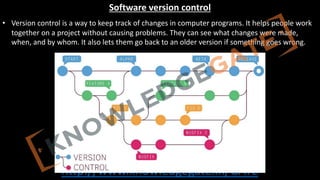
• Software Version Control,
• Resource Allocation Models,
• Software Risk Analysis and Management.
7.
http://www.knowledgegate.in/GATE
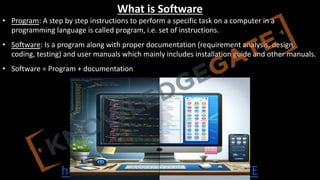
What is Software
•Program: A step by step instructions to perform a specific task on a computer in a
programming language is called program, i.e. set of instructions.
• Software: Is a program along with proper documentation (requirement analysis, design,
coding, testing) and user manuals which mainly includes installation guide and other manuals.
• Software = Program + documentation
8.
http://www.knowledgegate.in/GATE
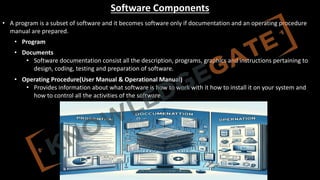
Software Components
• Aprogram is a subset of software and it becomes software only if documentation and an operating procedure
manual are prepared.
• Program
• Documents
• Software documentation consist all the description, programs, graphics and instructions pertaining to
design, coding, testing and preparation of software.
• Operating Procedure(User Manual & Operational Manual)
• Provides information about what software is how to work with it how to install it on your system and
how to control all the activities of the software.
9.
http://www.knowledgegate.in/GATE
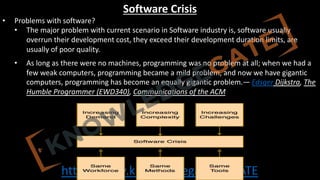
Software Crisis
• Problemswith software?
• The major problem with current scenario in Software industry is, software usually
overrun their development cost, they exceed their development duration limits, are
usually of poor quality.
• As long as there were no machines, programming was no problem at all; when we had a
few weak computers, programming became a mild problem, and now we have gigantic
computers, programming has become an equally gigantic problem.— Edsger Dijkstra, The
Humble Programmer (EWD340), Communications of the ACM
10.
http://www.knowledgegate.in/GATE
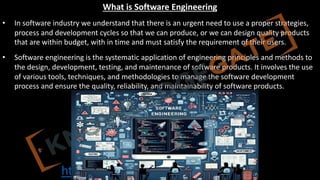
What is SoftwareEngineering
• In software industry we understand that there is an urgent need to use a proper strategies,
process and development cycles so that we can produce, or we can design quality products
that are within budget, with in time and must satisfy the requirement of their users.
• Software engineering is the systematic application of engineering principles and methods to
the design, development, testing, and maintenance of software products. It involves the use
of various tools, techniques, and methodologies to manage the software development
process and ensure the quality, reliability, and maintainability of software products.
11.
http://www.knowledgegate.in/GATE
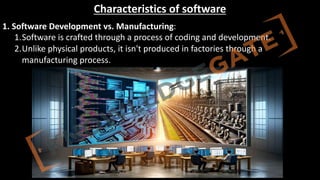
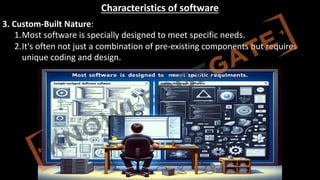
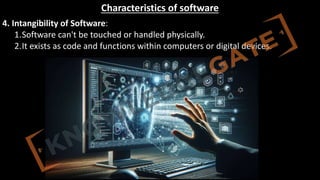
Characteristics of software
1.Software Development vs. Manufacturing:
1.Software is crafted through a process of coding and development.
2.Unlike physical products, it isn't produced in factories through a
manufacturing process.
http://www.knowledgegate.in/GATE
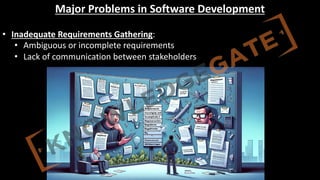
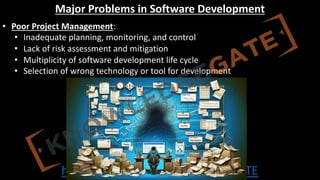
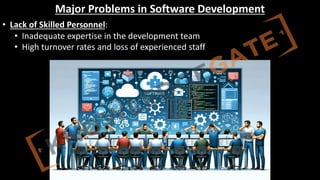
Major Problems inSoftware Development
• Poor Project Management:
• Inadequate planning, monitoring, and control
• Lack of risk assessment and mitigation
• Multiplicity of software development life cycle
• Selection of wrong technology or tool for development
17.
http://www.knowledgegate.in/GATE
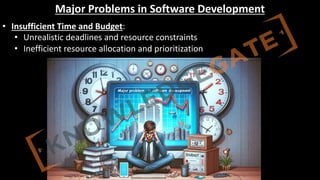
Major Problems inSoftware Development
• Insufficient Time and Budget:
• Unrealistic deadlines and resource constraints
• Inefficient resource allocation and prioritization
http://www.knowledgegate.in/GATE
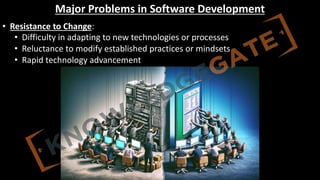
Major Problems inSoftware Development
• Resistance to Change:
• Difficulty in adapting to new technologies or processes
• Reluctance to modify established practices or mindsets
• Rapid technology advancement
20.
http://www.knowledgegate.in/GATE
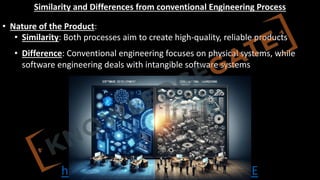
Similarity and Differencesfrom conventional Engineering Process
• Nature of the Product:
• Similarity: Both processes aim to create high-quality, reliable products
• Difference: Conventional engineering focuses on physical systems, while
software engineering deals with intangible software systems
21.
http://www.knowledgegate.in/GATE
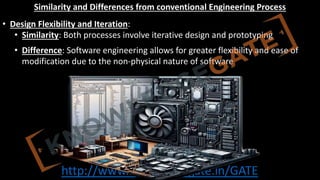
Similarity and Differencesfrom conventional Engineering Process
• Design Flexibility and Iteration:
• Similarity: Both processes involve iterative design and prototyping
• Difference: Software engineering allows for greater flexibility and ease of
modification due to the non-physical nature of software
22.
http://www.knowledgegate.in/GATE
Similarity and Differencesfrom conventional Engineering Process
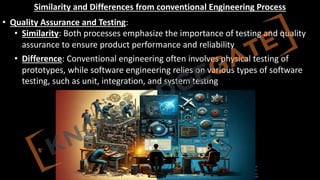
• Quality Assurance and Testing:
• Similarity: Both processes emphasize the importance of testing and quality
assurance to ensure product performance and reliability
• Difference: Conventional engineering often involves physical testing of
prototypes, while software engineering relies on various types of software
testing, such as unit, integration, and system testing
23.
http://www.knowledgegate.in/GATE
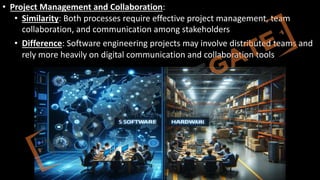
• Project Managementand Collaboration:
• Similarity: Both processes require effective project management, team
collaboration, and communication among stakeholders
• Difference: Software engineering projects may involve distributed teams and
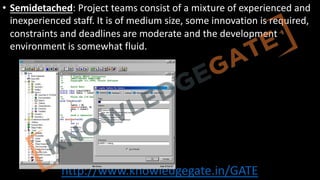
rely more heavily on digital communication and collaboration tools
24.
http://www.knowledgegate.in/GATE
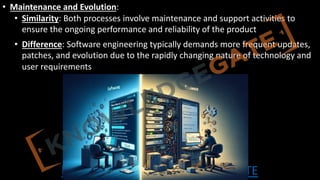
• Maintenance andEvolution:
• Similarity: Both processes involve maintenance and support activities to
ensure the ongoing performance and reliability of the product
• Difference: Software engineering typically demands more frequent updates,
patches, and evolution due to the rapidly changing nature of technology and
user requirements
25.
http://www.knowledgegate.in/GATE
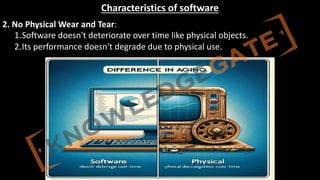
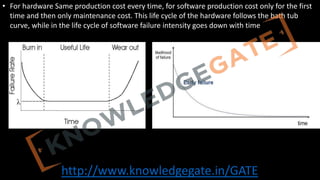
• For hardwareSame production cost every time, for software production cost only for the first
time and then only maintenance cost. This life cycle of the hardware follows the bath tub
curve, while in the life cycle of software failure intensity goes down with time
http://www.knowledgegate.in/GATE
Software Quality Attributes
•Correctness: The ability of the software to perform its intended tasks effectively and meet
user requirements.
• Usability: The ease with which users can learn, operate, and navigate the software.
• Reliability: The software's consistency in producing accurate results and maintaining
performance over time.
• Efficiency: The optimal use of system resources, such as memory and processing power, to
achieve desired outcomes.
28.
http://www.knowledgegate.in/GATE
• Maintainability: Theease of updating, modifying, and fixing the software to accommodate
changing requirements or fix issues.
• Portability: The ability of the software to operate on different platforms or environments
without significant modifications.
• Scalability: The software's capacity to handle increased workloads or user demands without
compromising performance.
• Security: The software's ability to protect against unauthorized access, data breaches, and
other potential threats.
29.
http://www.knowledgegate.in/GATE
• Modularity: Thedegree to which the software's components are organized into separate,
manageable units that can be independently developed or updated.
• Reusability: The potential for the software's components to be used in other applications or
contexts, reducing development time and costs.
• Testability: The ease with which the software can be tested to ensure it meets its
requirements and performs as expected.
30.
http://www.knowledgegate.in/GATE
Software Process
• Asoftware process (also known as software methodology) is a set of related
activities that leads to the production of the software. These activities may
involve the development of the software from the scratch, or, modifying an
existing system.
31.
http://www.knowledgegate.in/GATE
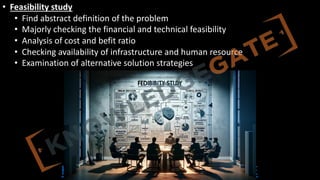
• Feasibility study
•Find abstract definition of the problem
• Majorly checking the financial and technical feasibility
• Analysis of cost and befit ratio
• Checking availability of infrastructure and human resource
• Examination of alternative solution strategies
32.
http://www.knowledgegate.in/GATE
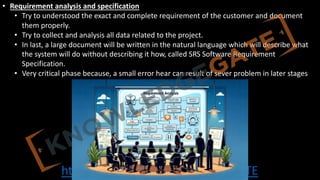
• Requirement analysisand specification
• Try to understood the exact and complete requirement of the customer and document
them properly.
• Try to collect and analysis all data related to the project.
• In last, a large document will be written in the natural language which will describe what
the system will do without describing it how, called SRS Software Requirement
Specification.
• Very critical phase because, a small error hear can result of sever problem in later stages
33.
http://www.knowledgegate.in/GATE
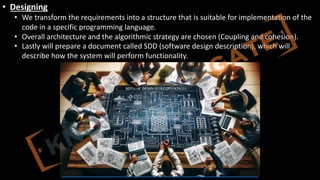
• Designing
• Wetransform the requirements into a structure that is suitable for implementation of the
code in a specific programming language.
• Overall architecture and the algorithmic strategy are chosen (Coupling and cohesion).
• Lastly will prepare a document called SDD (software design description), which will
describe how the system will perform functionality.
34.
http://www.knowledgegate.in/GATE
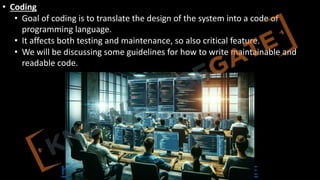
• Coding
• Goalof coding is to translate the design of the system into a code of
programming language.
• It affects both testing and maintenance, so also critical feature.
• We will be discussing some guidelines for how to write maintainable and
readable code.
35.
http://www.knowledgegate.in/GATE
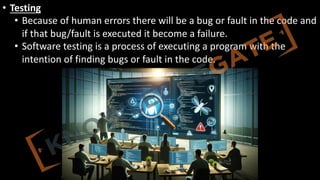
• Testing
• Becauseof human errors there will be a bug or fault in the code and
if that bug/fault is executed it become a failure.
• Software testing is a process of executing a program with the
intention of finding bugs or fault in the code.
http://www.knowledgegate.in/GATE
SOFTWARE DEVELOPMENT LIFECYCLE
• Software development organization follows some process when developing a s/w product, in
mature organization this is well defined and managed.
• In SDLC we development s/w in a systematic and disciplined manner. SDLC will define entry
and exit for every stage. It makes assessment possible, time prediction, cost prediction,
scheduling, to identify faults early possible.
• Selection of a correct development model play an important role in cost, quality, overall
success of the project.
http://www.knowledgegate.in/GATE
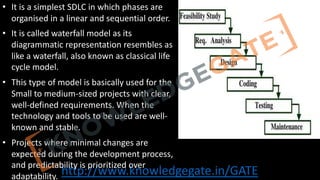
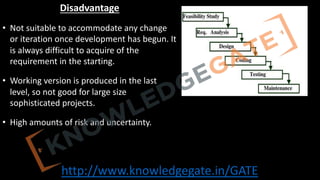
• It isa simplest SDLC in which phases are
organised in a linear and sequential order.
• It is called waterfall model as its
diagrammatic representation resembles as
like a waterfall, also known as classical life
cycle model.
• This type of model is basically used for the
Small to medium-sized projects with clear,
well-defined requirements. When the
technology and tools to be used are well-
known and stable.
• Projects where minimal changes are
expected during the development process,
and predictability is prioritized over
adaptability.
41.
http://www.knowledgegate.in/GATE
Advantage
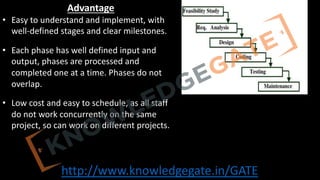
• Easy tounderstand and implement, with
well-defined stages and clear milestones.
• Each phase has well defined input and
output, phases are processed and
completed one at a time. Phases do not
overlap.
• Low cost and easy to schedule, as all staff
do not work concurrently on the same
project, so can work on different projects.
42.
http://www.knowledgegate.in/GATE
Disadvantage
• Not suitableto accommodate any change
or iteration once development has begun. It
is always difficult to acquire of the
requirement in the starting.
• Working version is produced in the last
level, so not good for large size
sophisticated projects.
• High amounts of risk and uncertainty.
43.
http://www.knowledgegate.in/GATE
PROTOTYPE MODEL
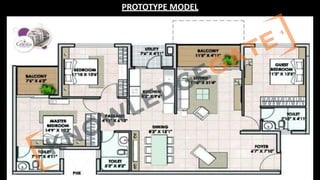
• keydesign details to consider when designing a 3bhk flat in brief:
• Living Room: Sofa set, coffee table, entertainment center, lighting, natural light, TV unit,
indoor plant/art piece, coordinated color scheme.
• Dining Area: Space for 4-6 seater dining table, lighting fixture, storage space, mirror/artwork.
• Kitchen: Storage cabinets, refrigerator, stove, oven, ventilation, lighting, durable countertops
and backsplash.
• Master Bedroom: Space for queen/king-sized bed, wardrobe, dressing table, natural light,
coordinated color scheme.
• Other Bedrooms: Space for single/double bed, wardrobe, natural light, coordinated color
scheme.
• Bathrooms: Space for shower, sink, toilet, ventilation, storage space, water-resistant
materials.
• Balcony: Space for seating/table, natural light, outdoor view, coordinated color scheme.
http://www.knowledgegate.in/GATE
PROTOTYPE MODEL
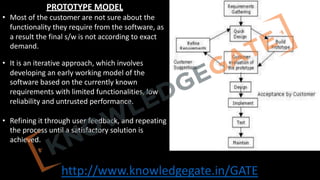
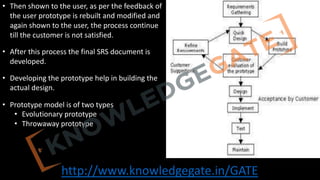
• Mostof the customer are not sure about the
functionality they require from the software, as
a result the final s/w is not according to exact
demand.
• It is an iterative approach, which involves
developing an early working model of the
software based on the currently known
requirements with limited functionalities, low
reliability and untrusted performance.
• Refining it through user feedback, and repeating
the process until a satisfactory solution is
achieved.
47.
http://www.knowledgegate.in/GATE
• Then shownto the user, as per the feedback of
the user prototype is rebuilt and modified and
again shown to the user, the process continue
till the customer is not satisfied.
• After this process the final SRS document is
developed.
• Developing the prototype help in building the
actual design.
• Prototype model is of two types
• Evolutionary prototype
• Throwaway prototype
48.
http://www.knowledgegate.in/GATE
Evolutionary prototype
• Alsoknown as incremental or iterative prototyping, develops a working
prototype, gradually improving and refining it based on user feedback.
• Prototype evolves into the final product over time with feature additions and
modifications. Accommodates changing requirements during the development
process.
49.
http://www.knowledgegate.in/GATE
Throwaway prototype
• Throwawayprototyping, also known as rapid or exploratory prototyping, involves
creating a temporary, simplified version of the software to validate the feasibility of
specific features, test ideas, or gain user feedback on the initial design. The
throwaway prototype is not intended to be used in the final product; instead, it is
discarded once it has served its purpose.
• Once the developers have gathered the necessary information, they can then start
developing the actual software product from scratch, using the lessons learned from
the prototype. This approach is particularly useful for testing complex or risky
features, as it helps to minimize the potential impact of these features on the overall
project.
50.
http://www.knowledgegate.in/GATE
• Advantage
• Customerget a chance to see the product early in the life cycle, and give
important feedback.
• There is a scope to accommodate new requirements.
• Developer and more confident, and hence risk is reduced.
• Disadvantage
• After seeing the early prototype use demand the actual system soon.
• If not managed properly the iterative process can run for a long time.
• If user is not satisfied, he may lose its interest in the project.
http://www.knowledgegate.in/GATE
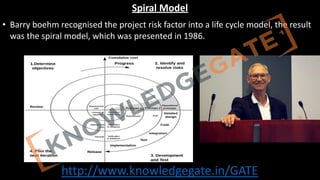
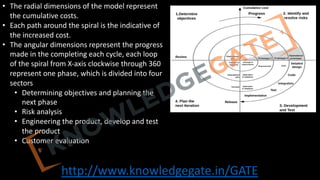
• The radialdimensions of the model represent
the cumulative costs.
• Each path around the spiral is the indicative of
the increased cost.
• The angular dimensions represent the progress
made in the completing each cycle, each loop
of the spiral from X-axis clockwise through 360
represent one phase, which is divided into four
sectors
• Determining objectives and planning the
next phase
• Risk analysis
• Engineering the product, develop and test
the product
• Customer evaluation
53.
http://www.knowledgegate.in/GATE
• Advantages
• Provideearly and frequent feedback of the customer, Additional Functionality
can be added at a later date.
• Management control of quality, correctness, cost, schedule is improved
through review at the conclusion of each iteration.
• Resolve all the possible risk involved in the product early in the life cycle.
• Allows for incremental releases and testing.
54.
http://www.knowledgegate.in/GATE
• Disadvantages
• Notsuitable for small size project as the cost of risk analysis may exceed the
actual cost of the project, High administrative overhead.
• It is complex and time-consuming to use.
• Risk analysis requires highly specific expertise.
55.
http://www.knowledgegate.in/GATE
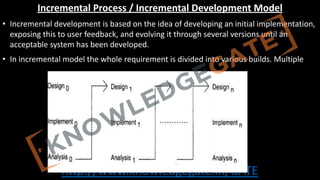
Incremental Process /Incremental Development Model
• Incremental development is based on the idea of developing an initial implementation,
exposing this to user feedback, and evolving it through several versions until an
acceptable system has been developed.
• In incremental model the whole requirement is divided into various builds. Multiple
56.
http://www.knowledgegate.in/GATE
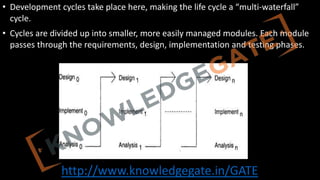
• Development cyclestake place here, making the life cycle a “multi-waterfall”
cycle.
• Cycles are divided up into smaller, more easily managed modules. Each module
passes through the requirements, design, implementation and testing phases.
57.
http://www.knowledgegate.in/GATE
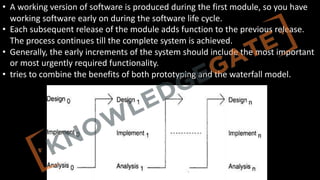
• A workingversion of software is produced during the first module, so you have
working software early on during the software life cycle.
• Each subsequent release of the module adds function to the previous release.
The process continues till the complete system is achieved.
• Generally, the early increments of the system should include the most important
or most urgently required functionality.
• tries to combine the benefits of both prototyping and the waterfall model.
58.
http://www.knowledgegate.in/GATE
Advantages of Incrementalmodel:
• Generates working software quickly and early during the software life
cycle.
• This model is more flexible – less costly to change scope and
requirements.
• It is easier to test and debug during a smaller iteration.
• In this model customer can respond to each built.
• Easier to manage risk because risky pieces are identified and handled
during it’d iteration.
59.
http://www.knowledgegate.in/GATE
Disadvantages of Incrementalmodel
• Needs good planning and design.
• Needs a clear and complete definition of the whole system before it
can be broken down and built incrementally.
• Total cost is higher than waterfall.
60.
http://www.knowledgegate.in/GATE
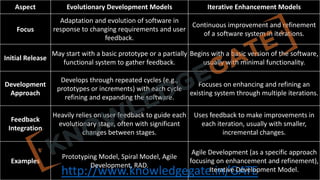
Aspect Evolutionary DevelopmentModels Iterative Enhancement Models
Focus
Adaptation and evolution of software in
response to changing requirements and user
feedback.
Continuous improvement and refinement
of a software system in iterations.
Initial Release
May start with a basic prototype or a partially
functional system to gather feedback.
Begins with a basic version of the software,
usually with minimal functionality.
Development
Approach
Develops through repeated cycles (e.g.,
prototypes or increments) with each cycle
refining and expanding the software.
Focuses on enhancing and refining an
existing system through multiple iterations.
Feedback
Integration
Heavily relies on user feedback to guide each
evolutionary stage, often with significant
changes between stages.
Uses feedback to make improvements in
each iteration, usually with smaller,
incremental changes.
Examples
Prototyping Model, Spiral Model, Agile
Development, RAD.
Agile Development (as a specific approach
focusing on enhancement and refinement),
Iterative Development Model.
61.
http://www.knowledgegate.in/GATE
Unit-2(Software Requirement Specifications(SRS))
• Requirement Engineering Process:
• Elicitation,
• Analysis,
• Documentation,
• Review and Management of User Needs,
• Feasibility Study,
• Information Modeling,
• Data Flow Diagrams,
• Entity Relationship Diagrams,
• Decision Tables,
• SRS Document,
• IEEE Standards for SRS.
• Software Quality Assurance (SQA): Verification and Validation,
• SQA Plans, Software Quality Frameworks, ISO 9000 Models, SEI-CMM Model
62.
http://www.knowledgegate.in/GATE
Requirement Analysis
• Thehardest part of building a software is deciding precisely what is to be built.
Requirement engineering is the disciplined application of proven principle,
methods, tools and notations to describe a proposed system’s intended
behaviour and its associated constraints.
http://www.knowledgegate.in/GATE
• Types ofrequirement
• Known requirement: Which is already known to the stake holder
• Unknown Requirement: Forgotten by stake holder because that are not
needed right now
• Undreamt Requirement: Stakeholder is unable to think of new requirement
due to limited domain knowledge
http://www.knowledgegate.in/GATE
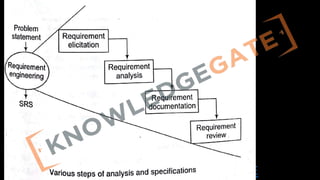
• There aremajorly four steps in requirement analysis
• Requirement Elicitation: Gathering of Requirement
• Requirement Analysis: Requirements are analysed to identify
inconsistences, defects etc and to resolve conflicts
• Requirement documentation: Here we document all the refined
requirement properly
• Requirement Review: Review is carried out to improve the quality of the SRS
72.
http://www.knowledgegate.in/GATE
Methods of requirementelicitation
• Is the most difficult, most critical, most error-prone and communication
intensive aspect of the s/w development. It can only succeed only through an
effective customer developer partnership.
73.
http://www.knowledgegate.in/GATE
• Interview
• Bothparties would like to understand each other
• Interview can be of two types open-ended or structured
• In open ended, there is no present agenda, context free questions can be
asked to understand the problem, to have an over view over the situation
• In structured interview, agenda is pre-set.
74.
http://www.knowledgegate.in/GATE
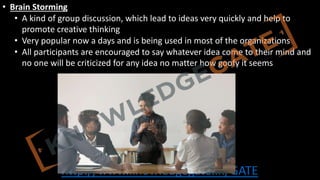
• Brain Storming
•A kind of group discussion, which lead to ideas very quickly and help to
promote creative thinking
• Very popular now a days and is being used in most of the organizations
• All participants are encouraged to say whatever idea come to their mind and
no one will be criticized for any idea no matter how goofy it seems
75.
http://www.knowledgegate.in/GATE
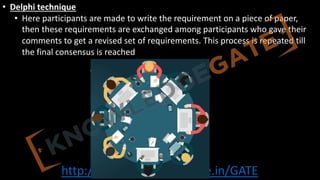
• Delphi technique
•Here participants are made to write the requirement on a piece of paper,
then these requirements are exchanged among participants who gave their
comments to get a revised set of requirements. This process is repeated till
the final consensus is reached
76.
http://www.knowledgegate.in/GATE
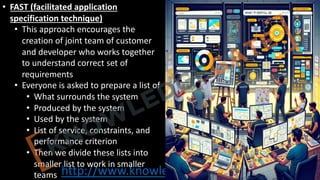
• FAST (facilitatedapplication
specification technique)
• This approach encourages the
creation of joint team of customer
and developer who works together
to understand correct set of
requirements
• Everyone is asked to prepare a list of
• What surrounds the system
• Produced by the system
• Used by the system
• List of service, constraints, and
performance criterion
• Then we divide these lists into
smaller list to work in smaller
teams
77.
http://www.knowledgegate.in/GATE
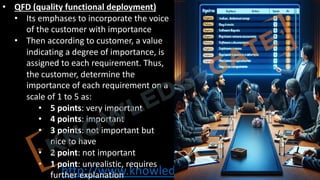
• QFD (qualityfunctional deployment)
• Its emphases to incorporate the voice
of the customer with importance
• Then according to customer, a value
indicating a degree of importance, is
assigned to each requirement. Thus,
the customer, determine the
importance of each requirement on a
scale of 1 to 5 as:
• 5 points: very important
• 4 points: important
• 3 points: not important but
nice to have
• 2 point: not important
• 1 point: unrealistic, requires
further explanation
78.
http://www.knowledgegate.in/GATE
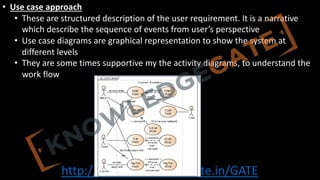
• Use caseapproach
• These are structured description of the user requirement. It is a narrative
which describe the sequence of events from user’s perspective
• Use case diagrams are graphical representation to show the system at
different levels
• They are some times supportive my the activity diagrams, to understand the
work flow
79.
http://www.knowledgegate.in/GATE
Requirement analysis
• Inthis phase we analysis all the set of requirements to find any inconsistency or
conflicts.
• In requirement gathering phase our all concentration was on getting all the set
of requirements but now, we see how many requirements are contradictory to
each other or requires further exploration to be considered further.
• Different tools can be used Data flow diagram, Control flow diagram, ER diagram
etc
80.
http://www.knowledgegate.in/GATE
Data Flow Diagram
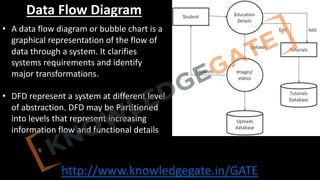
•A data flow diagram or bubble chart is a
graphical representation of the flow of
data through a system. It clarifies
systems requirements and identify
major transformations.
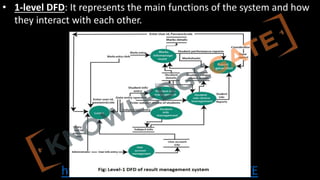
• DFD represent a system at different level
of abstraction. DFD may be Partitioned
into levels that represent increasing
information flow and functional details
http://www.knowledgegate.in/GATE
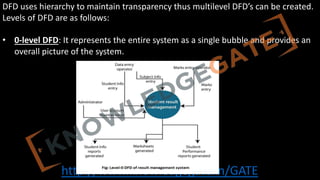
DFD uses hierarchyto maintain transparency thus multilevel DFD’s can be created.
Levels of DFD are as follows:
• 0-level DFD: It represents the entire system as a single bubble and provides an
overall picture of the system.
http://www.knowledgegate.in/GATE
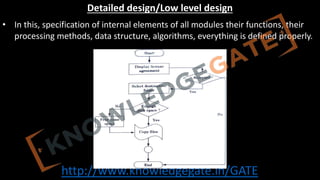
Control Flow Diagram/Controlflow chart/Flow Chart
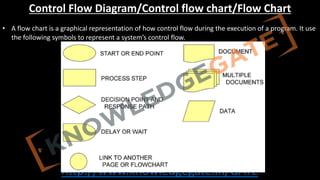
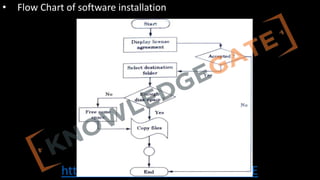
• A flow chart is a graphical representation of how control flow during the execution of a program. It use
the following symbols to represent a system’s control flow.
http://www.knowledgegate.in/GATE
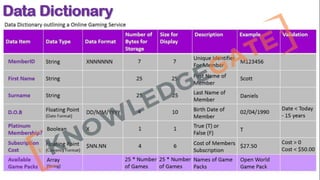
Data Dictionary
• Purpose:Serves as a repository for data item details in Data Flow Diagrams,
ensuring consistent definitions between customers and developers.
• Content: Includes data item name, aliases, and purpose, promoting clear
understanding.
• Relationships & Range: Records data item relationships and value ranges (e.g.,
marks between 0-100).
• Data Flows & Structures: Tracks process interactions with data items and
documents their structure or composition.
• Role in Requirements: Essential in initial stages for defining customer data
items, aligning developer and customer understanding.
http://www.knowledgegate.in/GATE
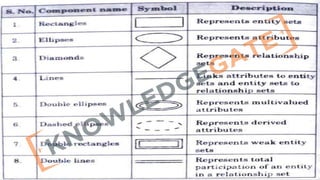
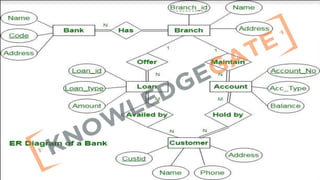
Entity Relationship Diagram
•ER Diagram a non-technical design method works on conceptual level based on
the perception of the real world.
• E-R data model was developed to facilitate software designers by allowing
specification of an enterprise schema that represents the overall logical structure
of a database.
• Three main constructs are data entities, their relationships and their associated
attributes
http://www.knowledgegate.in/GATE
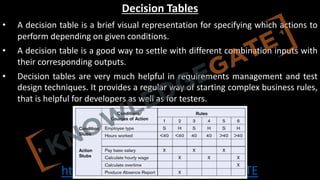
Decision Tables
• Adecision table is a brief visual representation for specifying which actions to
perform depending on given conditions.
• A decision table is a good way to settle with different combination inputs with
their corresponding outputs.
• Decision tables are very much helpful in requirements management and test
design techniques. It provides a regular way of starting complex business rules,
that is helpful for developers as well as for testers.
94.
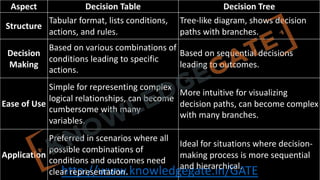
http://www.knowledgegate.in/GATE
Aspect Decision TableDecision Tree
Structure
Tabular format, lists conditions,
actions, and rules.
Tree-like diagram, shows decision
paths with branches.
Decision
Making
Based on various combinations of
conditions leading to specific
actions.
Based on sequential decisions
leading to outcomes.
Ease of Use
Simple for representing complex
logical relationships, can become
cumbersome with many
variables.
More intuitive for visualizing
decision paths, can become complex
with many branches.
Application
Preferred in scenarios where all
possible combinations of
conditions and outcomes need
clear representation.
Ideal for situations where decision-
making process is more sequential
and hierarchical.
95.
http://www.knowledgegate.in/GATE
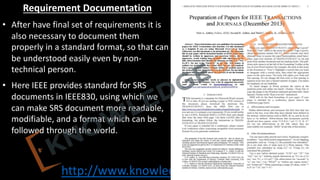
Requirement Documentation
• Afterhave final set of requirements it is
also necessary to document them
properly in a standard format, so that can
be understood easily even by non-
technical person.
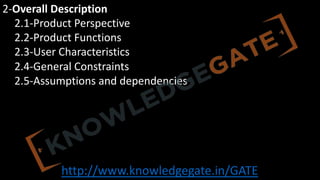
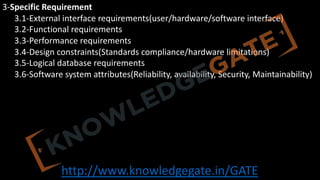
• Here IEEE provides standard for SRS
documents in IEEE830, using which we
can make SRS document more readable,
modifiable, and a format which can be
followed through the world.
96.
http://www.knowledgegate.in/GATE
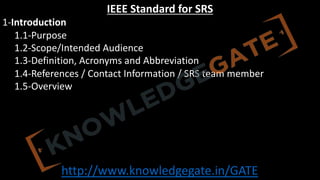
IEEE Standard forSRS
1-Introduction
1.1-Purpose
1.2-Scope/Intended Audience
1.3-Definition, Acronyms and Abbreviation
1.4-References / Contact Information / SRS team member
1.5-Overview
http://www.knowledgegate.in/GATE
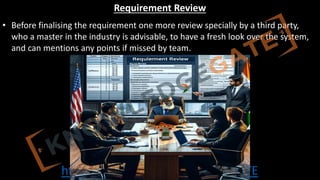
Requirement Review
• Beforefinalising the requirement one more review specially by a third party,
who a master in the industry is advisable, to have a fresh look over the system,
and can mentions any points if missed by team.
101.
http://www.knowledgegate.in/GATE
Software Quality Assurance(SQA)
• Definition: SQA is a process ensuring software products meet quality standards
and requirements.
• Objective: Prevent defects, improve quality, and ensure customer satisfaction.
• Process: Implements quality control and management activities throughout
development.
• Techniques: Uses code reviews, inspections, audits, and testing to evaluate
software quality.
102.
http://www.knowledgegate.in/GATE
• Standards: Adheresto international standards like ISO 9001, IEEE 730, and
CMMI.
• Quality Attributes: Focuses on reliability, maintainability, usability, efficiency,
and functionality.
• Continuous Improvement: Monitors processes and products to identify and
implement improvements.
• Metrics: Employs metrics like defect density and code coverage to evaluate
quality.
http://www.knowledgegate.in/GATE
Verification/White Box
• Verificationensures that the software product is designed and developed
according to the specified requirements and standards. “Are we building the
product right”
• Process of Ensuring that the product meets its design specifications
• Focuses on static analysis techniques. Checks for consistency, completeness, and
correctness
• Code reviews
• Static analysis tools
• Inspection of requirements, design, and code documentation
105.
http://www.knowledgegate.in/GATE
Validation/Black Box
• Validationensures that the software product meets the end-user requirements
and is fit for its intended purpose, “Are we Building the right product”. Ensures
that the product meets its design specifications
• Focuses on static analysis techniques. Checks for consistency, completeness, and
correctness
• Code reviews
• Static analysis tools
• Inspection of requirements, design, and code documentation
106.
http://www.knowledgegate.in/GATE
Software Quality Factors
•The various factors, which influence the software, are termed as software factors. They can be
broadly divided into two categories.
• The first category of the factors is of those that can be measured directly such as the
number of logical errors.
• Second category clubs those factors which can be measured only indirectly. For example,
maintainability but each of the factors is to be measured to check for the content and the
quality control.
107.
http://www.knowledgegate.in/GATE
• Several modelsof software quality factors and their categorization have been
suggested over the years. The classic model of software quality factors,
suggested by McCall in 1977). The 11 factors are grouped into three categories .
• Product operation factors − Correctness, Reliability, Efficiency, Integrity,
Usability.
• Product revision factors − Maintainability, Flexibility, Testability.
• Product transition factors − Portability, Reusability, Interoperability.
108.
http://www.knowledgegate.in/GATE
ISO 9000 Modelsin Software Engineering
• ISO 9000 is a series of international standards related to quality management
and assurance. In the context of software engineering, these standards provide
guidelines for implementing effective processes and ensuring high-quality
software products.
109.
http://www.knowledgegate.in/GATE
• Key Componentsof ISO 9000
• Quality Management System (QMS):
• Defines policies and objectives for quality, Documentation of procedures and
processes, Monitoring, measurement, and analysis of processes, Improvement
opportunities and corrective actions.
• Management Responsibility:
• Top management commitment to quality Establishment of a quality policy Ensuring
adequate resources for QMS implementation Reviewing QMS performance regularly
• Resource Management:
• Provision of necessary resources (human, infrastructure, work environment)
Competence and training of personnel Infrastructure maintenance and improvement
• Product Realization:
• Requirements determination and communication Product design and development
Verification, validation, and testing Release, delivery, and post-delivery support
• Measurement, Analysis, and Improvement:
• Monitoring and measurement of processes and products Internal audits to ensure
compliance Corrective and preventive actions Continual improvement of the QMS
110.
http://www.knowledgegate.in/GATE
1. ISO 9000Principles
1. Customer focus
2. Leadership
3. Process approach
4. Continual improvement
2. ISO 9001:2015 - Quality Management Systems
1. Applicable to any organization size and industry
2. Focus on customer satisfaction, regulatory compliance, and improvement
3. Requirements cover context, leadership, planning, support, operation, evaluation, and improvement
3. ISO/IEC/IEEE 90003:2018 - Software Engineering
1. Guidance for applying ISO 9001:2015 to software engineering
2. Covers software development, supply, acquisition, operation, and maintenance
3. Addresses both product and process quality aspects
4. Applicable to various software development methodologies
111.
http://www.knowledgegate.in/GATE
Benefits of ISO9000 in Software Engineering
• Improved customer satisfaction
• Enhanced process efficiency and effectiveness
• Reduced risk of software failures and defects
• Increased marketability and competitiveness
112.
http://www.knowledgegate.in/GATE
Implementation Steps forISO 9000 in Software Engineering
• Obtain top management commitment
• Establish a quality management system
• Train and educate employees
• Document processes, procedures, and policies
• Monitor, measure, and analyze processes
• Implement improvements and corrective actions
• Conduct internal audits
• Seek third-party certification (ISO 9001)
113.
http://www.knowledgegate.in/GATE
CAPABILITY MATURATY MODEL
•CMM is a strategy for improving the software process, to generate quality software.
• The Capability Maturity Model (CMM) is a development model created after a study of data
collected from organizations that contracted with the U.S. Department of Defence, who
funded the research. The term "maturity" relates to the degree of formality and optimization
of processes, from ad hoc practices, to formally defined steps, to managed result metrics, to
active optimization of the processes.
• It is use to judge the maturity of s/w process an organization and to identify the key practise
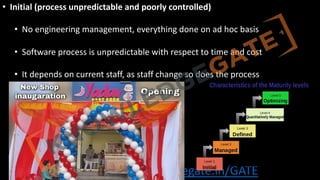
that are required to increase the maturity of theses process. There are five levels of the CMM
114.
http://www.knowledgegate.in/GATE
• Initial (processunpredictable and poorly controlled)
• No engineering management, everything done on ad hoc basis
• Software process is unpredictable with respect to time and cost
• It depends on current staff, as staff change so does the process
115.
http://www.knowledgegate.in/GATE
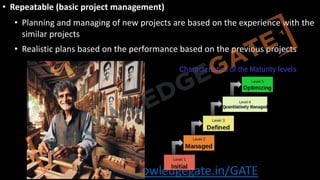
• Repeatable (basicproject management)
• Planning and managing of new projects are based on the experience with the
similar projects
• Realistic plans based on the performance based on the previous projects
116.
http://www.knowledgegate.in/GATE
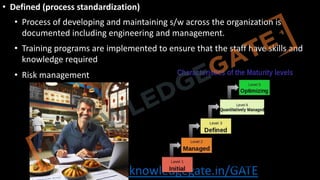
• Defined (processstandardization)
• Process of developing and maintaining s/w across the organization is
documented including engineering and management.
• Training programs are implemented to ensure that the staff have skills and
knowledge required
• Risk management
http://www.knowledgegate.in/GATE
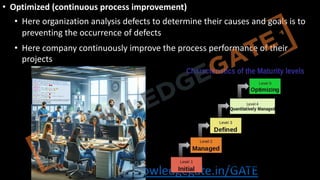
• Optimized (continuousprocess improvement)
• Here organization analysis defects to determine their causes and goals is to
preventing the occurrence of defects
• Here company continuously improve the process performance of their
projects
119.
http://www.knowledgegate.in/GATE
Unit-3(Software Design)
• BasicConcept of Software Design,
• Architectural Design,
• Low Level Design: Modularization, Design Structure Charts, Pseudo Codes, Flow Charts,
• Coupling and Cohesion Measures,
• Design Strategies
• Function Oriented Design,
• Object Oriented Design,
• Top-Down and Bottom-Up Design.
• Software Measurement and Metrics:
• Various Size Oriented Measures: Halestead's Software Science,
• Function Point (FP) Based Measures,
• Cyclomatic Complexity Measures: Control Flow Graphs.
120.
http://www.knowledgegate.in/GATE
Design
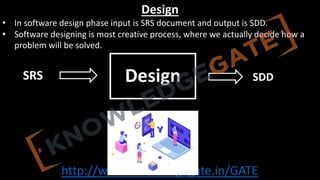
• In softwaredesign phase input is SRS document and output is SDD.
• Software designing is most creative process, where we actually decide how a
problem will be solved.
Design
SRS SDD
121.
http://www.knowledgegate.in/GATE
Characteristics of aGood SDD
• The SDD must contain all the requirement which were given in SRS.
• The design document must be readable, easy to understand and maintainable.
• It must describe a complete picture of data, functional and behavioural domain.
http://www.knowledgegate.in/GATE
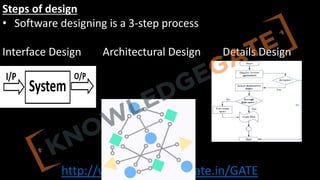
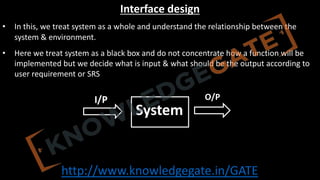
Interface design
• Inthis, we treat system as a whole and understand the relationship between the
system & environment.
• Here we treat system as a black box and do not concentrate how a function will be
implemented but we decide what is input & what should be the output according to
user requirement or SRS
System
I/P O/P
124.
http://www.knowledgegate.in/GATE
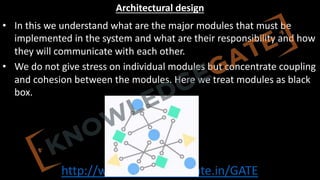
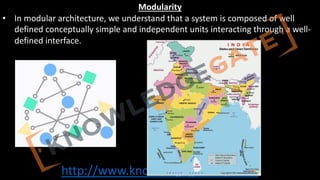
Architectural design
• Inthis we understand what are the major modules that must be
implemented in the system and what are their responsibility and how
they will communicate with each other.
• We do not give stress on individual modules but concentrate coupling
and cohesion between the modules. Here we treat modules as black
box.
http://www.knowledgegate.in/GATE
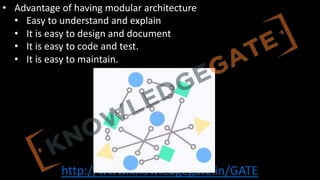
• Advantage ofhaving modular architecture
• Easy to understand and explain
• It is easy to design and document
• It is easy to code and test.
• It is easy to maintain.
128.
http://www.knowledgegate.in/GATE
Design Structure Charts
•Structure Chart represent hierarchical structure of modules. It breaks down the entire
system into lowest functional modules, describe functions and sub-functions of each
module of a system to a greater detail.
• Structure Chart partitions the system into black boxes (functionality of the system is
known to the users but inner details are unknown). Inputs are given to the black boxes
and appropriate outputs are generated.
129.
http://www.knowledgegate.in/GATE
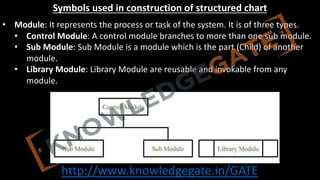
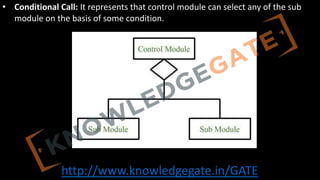
Symbols used inconstruction of structured chart
• Module: It represents the process or task of the system. It is of three types.
• Control Module: A control module branches to more than one sub module.
• Sub Module: Sub Module is a module which is the part (Child) of another
module.
• Library Module: Library Module are reusable and invokable from any
module.
http://www.knowledgegate.in/GATE
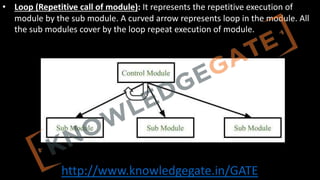
• Loop (Repetitivecall of module): It represents the repetitive execution of
module by the sub module. A curved arrow represents loop in the module. All
the sub modules cover by the loop repeat execution of module.
http://www.knowledgegate.in/GATE
Benefits of DesignStructure Charts in Software Engineering
• Improved understanding of system architecture
• Simplified communication between team members
• Easier identification of potential issues and dependencies
• Support for modular and maintainable software design
137.
http://www.knowledgegate.in/GATE
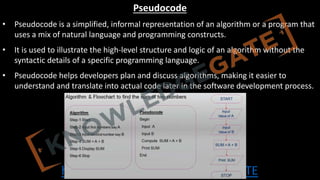
Pseudocode
• Pseudocode isa simplified, informal representation of an algorithm or a program that
uses a mix of natural language and programming constructs.
• It is used to illustrate the high-level structure and logic of an algorithm without the
syntactic details of a specific programming language.
• Pseudocode helps developers plan and discuss algorithms, making it easier to
understand and translate into actual code later in the software development process.
138.
http://www.knowledgegate.in/GATE
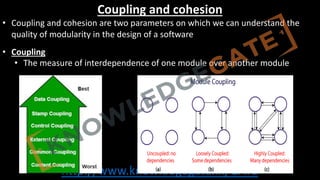
Coupling and cohesion
•Coupling and cohesion are two parameters on which we can understand the
quality of modularity in the design of a software
• Coupling
• The measure of interdependence of one module over another module
139.
http://www.knowledgegate.in/GATE
• Types ofcoupling
• Data Coupling: Here two modules communicate with each other
only by-passing data. it is most desired type of coupling. e.g.
addition by using call by value is an example of data coupling.
140.
http://www.knowledgegate.in/GATE
• Stamp Coupling:When two modules communicate with each other by
passing of data structure is called stamp coupling. e.g. addition of two
value but by call by reference.
141.
http://www.knowledgegate.in/GATE
• Control Coupling:The module is set to be controlled coupled if they
communicate using control information with each other. e.g.
dependence of two modules on each other because of flag.
142.
http://www.knowledgegate.in/GATE
• External Coupling:in case of external coupling two modules on each
other external to the logic of software (mostly because of hardware
issue). e.g. data bus, CPU, main memory etc.
http://www.knowledgegate.in/GATE
• Types ofcohesion
• Coincidental Cohesion: as the name suggest is the worst kind of
cohesion where the only relationship between the functions which
are present in a module is random or coincidental.
http://www.knowledgegate.in/GATE
• Temporal Cohesion:In case of temporal cohesion functions are related by a fact
that all the task must be executed in the same time span. so, there is a flow
control between the functions. for e.g. two functions first which catch the
exception and second which flash an error message.
149.
http://www.knowledgegate.in/GATE
• Procedural Cohesion:Here functions of a module are related to each
other through a flow control i.e. they are part of an algorithm or
procedure. for e.g. two functional first which check the file access
permission and second which opens the file.
http://www.knowledgegate.in/GATE
• Sequential Cohesion:here sequence is very important and the
functions are the part of sequence along with data dependency for
e.g. function1 which provides the data and function2 which process
the data.
152.
http://www.knowledgegate.in/GATE
• Functional Cohesion:in functional cohesion, different functions of a
module cooperate with each other. perform a single function. for e.g. a
module which control mouse must have different functions like accessing
the location of the track ball, then decoding it on the screen and give an
appropriate cursor movement
http://www.knowledgegate.in/GATE
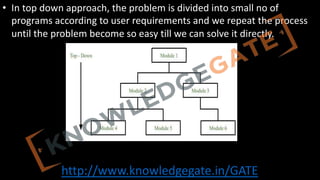
• In topdown approach, the problem is divided into small no of
programs according to user requirements and we repeat the process
until the problem become so easy till we can solve it directly.
155.
http://www.knowledgegate.in/GATE
• Advantage
• MoreSystematic.
• Easy to understand and provide a modular architecture.
• In correspondence with user requirement cost and time prediction is
possible.
• Should be used with small and medium size products.
• Used mostly.
• Disadvantage
• When a problem is very complex and very large then we can not understand
the entire problem as a whole.
156.
http://www.knowledgegate.in/GATE
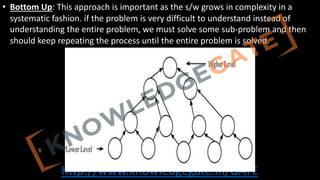
• Bottom Up:This approach is important as the s/w grows in complexity in a
systematic fashion. if the problem is very difficult to understand instead of
understanding the entire problem, we must solve some sub-problem and then
should keep repeating the process until the entire problem is solved.
157.
http://www.knowledgegate.in/GATE
• Advantage
• Shouldbe used on large size projects.
• Easy to use by designers as we work in incremental fashion.
• Disadvantage
• it has complex architecture very difficult to understand and manage.
158.
http://www.knowledgegate.in/GATE
Estimation model
• Herewe try to estimate about two things time and cost of
development
• Majorly estimation can be divided into four types
• Post estimation
• Base estimation
• Decomposition
• Empirical model
159.
http://www.knowledgegate.in/GATE
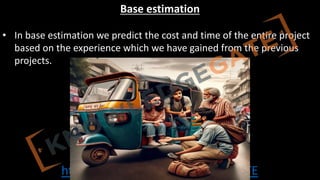
Post / Delayedestimation
• In case of a friendly partly and known technology, we do not estimate
either the time or the cost, because we know that cost will support as
in every situation.
http://www.knowledgegate.in/GATE
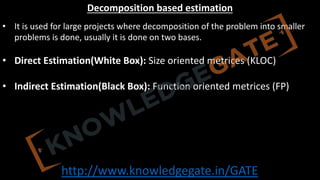
Decomposition based estimation
•It is used for large projects where decomposition of the problem into smaller
problems is done, usually it is done on two bases.
• Direct Estimation(White Box): Size oriented metrices (KLOC)
• Indirect Estimation(Black Box): Function oriented metrices (FP)
162.
http://www.knowledgegate.in/GATE
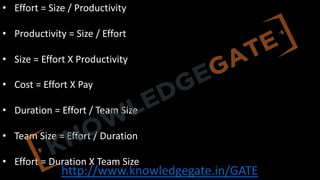
• Effort =Size / Productivity
• Productivity = Size / Effort
• Size = Effort X Productivity
• Cost = Effort X Pay
• Duration = Effort / Team Size
• Team Size = Effort / Duration
• Effort = Duration X Team Size
163.
http://www.knowledgegate.in/GATE
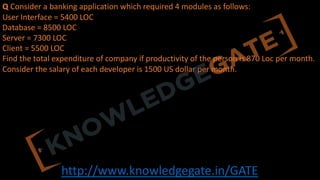
Q Consider abanking application which required 4 modules as follows:
User Interface = 5400 LOC
Database = 8500 LOC
Server = 7300 LOC
Client = 5500 LOC
Find the total expenditure of company if productivity of the person is 870 Loc per month.
Consider the salary of each developer is 1500 US dollar per month.
164.
http://www.knowledgegate.in/GATE
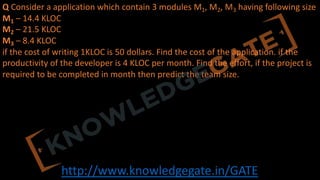
Q Consider aapplication which contain 3 modules M1, M2, M3 having following size
M1 – 14.4 KLOC
M2 – 21.5 KLOC
M3 – 8.4 KLOC
if the cost of writing 1KLOC is 50 dollars. Find the cost of the application. if the
productivity of the developer is 4 KLOC per month. Find the effort, if the project is
required to be completed in month then predict the team size.
165.
http://www.knowledgegate.in/GATE
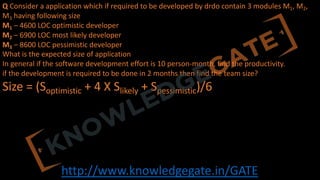
Q Consider aapplication which if required to be developed by drdo contain 3 modules M1, M2,
M3 having following size
M1 – 4600 LOC optimistic developer
M2 – 6900 LOC most likely developer
M3 – 8600 LOC pessimistic developer
What is the expected size of application
In general if the software development effort is 10 person-month, find the productivity.
if the development is required to be done in 2 months then find the team size?
Size = (Soptimistic + 4 X Slikely + Spessimistic)/6
166.
http://www.knowledgegate.in/GATE
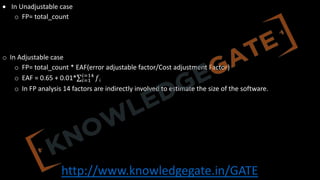
Indirect Estimation
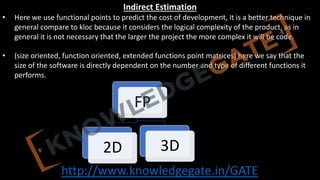
• Herewe use functional points to predict the cost of development, it is a better technique in
general compare to kloc because it considers the logical complexity of the product, as in
general it is not necessary that the larger the project the more complex it will be code.
• (size oriented, function oriented, extended functions point matrices) here we say that the
size of the software is directly dependent on the number and type of different functions it
performs.
FP
2D 3D
167.
http://www.knowledgegate.in/GATE
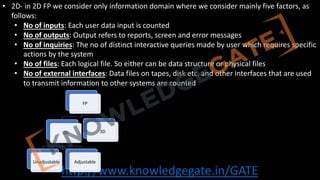
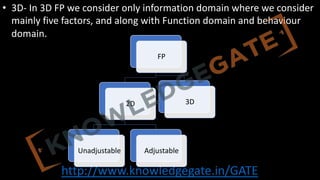
• 2D- in2D FP we consider only information domain where we consider mainly five factors, as
follows:
• No of inputs: Each user data input is counted
• No of outputs: Output refers to reports, screen and error messages
• No of inquiries: The no of distinct interactive queries made by user which requires specific
actions by the system
• No of files: Each logical file. So either can be data structure or physical files
• No of external interfaces: Data files on tapes, disk etc. and other interfaces that are used
to transmit information to other systems are counted
FP
2D
Unadjustable Adjustable
3D
http://www.knowledgegate.in/GATE
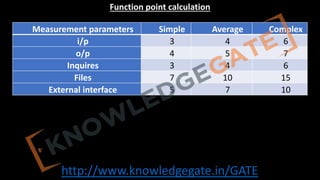
• In Unadjustablecase
o FP= total_count
o In Adjustable case
o FP= total_count * EAF(error adjustable factor/Cost adjustment Factor)
o EAF = 0.65 + 0.01*∑!"#
!"#$
𝑓i
o In FP analysis 14 factors are indirectly involved to estimate the size of the software.
170.
http://www.knowledgegate.in/GATE
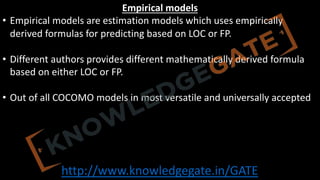
• 3D- In3D FP we consider only information domain where we consider
mainly five factors, and along with Function domain and behaviour
domain.
FP
2D
Unadjustable Adjustable
3D
171.
http://www.knowledgegate.in/GATE
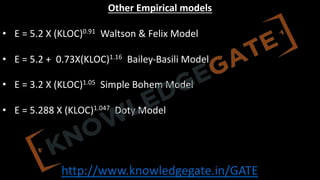
Empirical models
• Empiricalmodels are estimation models which uses empirically
derived formulas for predicting based on LOC or FP.
• Different authors provides different mathematically derived formula
based on either LOC or FP.
• Out of all COCOMO models in most versatile and universally accepted
172.
http://www.knowledgegate.in/GATE
COCOMO(1981)
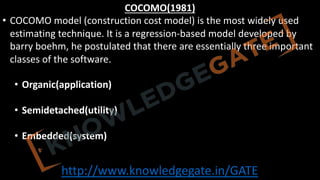
• COCOMO model(construction cost model) is the most widely used
estimating technique. It is a regression-based model developed by
barry boehm, he postulated that there are essentially three important
classes of the software.
• Organic(application)
• Semidetached(utility)
• Embedded(system)
173.
http://www.knowledgegate.in/GATE
• In orderto classify a product into any of the three proposed classes, we take
into consideration the characteristics of the product as well as those of the
development team.
• Data processing and scientific program are considered to be application
programs. Complier, linkers etc are utility programs. Operating system and real
time system programs are system programs.
• According to the brooks the relative level of the product complexity for the
three categories of product are in the ratio 1:3:9 for application, utility and
system programs relatively
174.
http://www.knowledgegate.in/GATE
• Organic: Relativelysmall group work in a familiar environment to
develop well understood application program, here little innovation is
required, constraints and deadlines are few and the development
environment is stable.
175.
http://www.knowledgegate.in/GATE
• Semidetached: Projectteams consist of a mixture of experienced and
inexperienced staff. It is of medium size, some innovation is required,
constraints and deadlines are moderate and the development
environment is somewhat fluid.
176.
http://www.knowledgegate.in/GATE
• Embedded: thes/w is strongly coupled to complex h/w, such as air traffic
control, ATM’s or weapon systems. The project team is large, a great deal of
innovation is required, constraints and deadlines are tight and the development
environment consist of many complex interfaces, including those with h/w and
with customer.
177.
http://www.knowledgegate.in/GATE
Basic COCOMO
• Asimple and static cost estimation model that calculates project effort and duration based
on the size of the software, measured in thousands of lines of code (KLOC)
• Provides a rough order-of-magnitude estimate of project effort and duration
• Uses three modes: Organic, Semi-Detached, and Embedded
http://www.knowledgegate.in/GATE
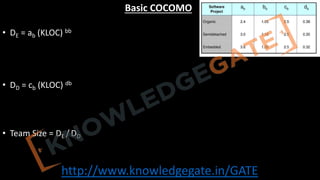
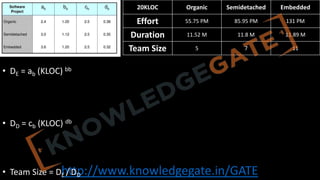
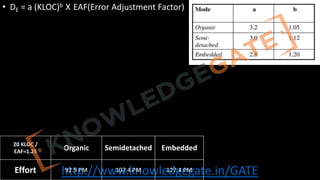
• DE =ab (KLOC) bb
• DD = cb (KLOC) db
• Team Size = DE / DD
20KLOC Organic Semidetached Embedded
Effort 55.75 PM 85.95 PM 131 PM
Duration 11.52 M 11.8 M 11.89 M
Team Size 5 7 11
180.
http://www.knowledgegate.in/GATE
Intermediate COCOMO
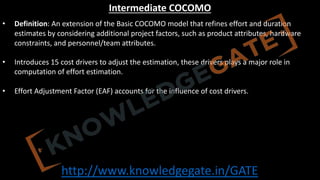
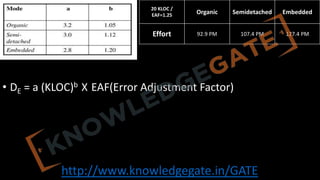
• Definition:An extension of the Basic COCOMO model that refines effort and duration
estimates by considering additional project factors, such as product attributes, hardware
constraints, and personnel/team attributes.
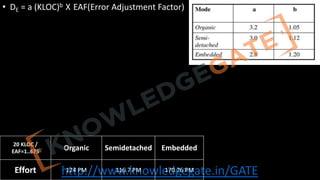
• Introduces 15 cost drivers to adjust the estimation, these drivers plays a major role in
computation of effort estimation.
• Effort Adjustment Factor (EAF) accounts for the influence of cost drivers.
http://www.knowledgegate.in/GATE
Detailed COCOMO
• Definition:The most comprehensive and accurate COCOMO model that divides
a software project into multiple components or modules, and accounts for
interactions between cost drivers and project phases.
• Estimates effort and duration for each component using the Intermediate
COCOMO model, then sums them up.
• Considers software reuse, hardware constraints, and personnel/team attributes
in estimation.
http://www.knowledgegate.in/GATE
Need:
• Assess codemaintainability and readability
• Identify potential errors and areas of high risk
• Determine testing effort required
• Aid in refactoring efforts to simplify code
http://www.knowledgegate.in/GATE
Process:
• Identify theprogram's decision points (such as if, while, and for
statements)
• Calculate the number of linearly independent paths by counting the
decision points and adding one
• Interpret the resulting value:
• Low value: lower complexity, easier to maintain and test
• High value: higher complexity, harder to maintain and test, may
require refactoring
http://www.knowledgegate.in/GATE
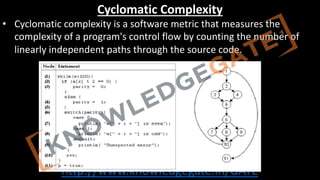
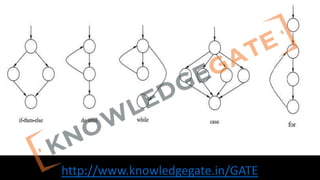
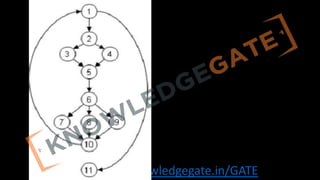
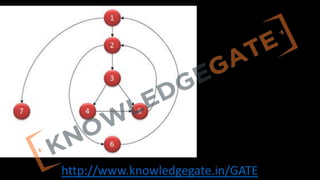
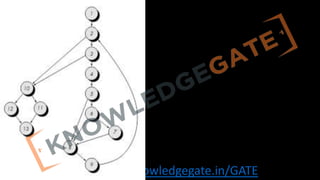
• Given acontrol flow graph G of a program, the cyclomatic complexity V(G) can
be computed as:
• V(G) = E – N + 2, where E is the number of edges and N is the total number of
nodes
• V(G) = V(G) = Total number of bounded areas + 1
• Any region enclosed by nodes and edges can be called as a bounded area.
• The cyclomatic complexity of a program can also be easily computed by
computing the number of decision statements of the program.
http://www.knowledgegate.in/GATE
Unit-4(Software Testing)
• TestingObjectives,
• Unit Testing,
• Integration Testing,
• Acceptance Testing,
• Regression Testing,
• Testing for Functionality and Testing for Performance,
• Top-Down and Bottom-Up
• Testing Strategies:
• Test Drivers and Test Stubs,
• Structural Testing (White Box Testing),
• Functional Testing (Black Box Testing),
• Test Data Suit Preparation,
• Alpha and Beta Testing of Products.
• Static Testing Strategies: Formal Technical Reviews (Peer Reviews), Walk Through, Code Inspection,
Compliance with Design and Coding Standards.
197.
http://www.knowledgegate.in/GATE
Coding
• It isa phase where we translate a design or algorithm into a code of a particular
programming language.
• It is a technical phase so there is not much in software engineering to given guideline in this
phase, still we can give characteristics of good code.
• Characteristics of Good Coding
• It must be simple, easy to understand (unconditional jumps must be avoided)
• It must be readable, i.e. we must use proper space and comments lines and write code in
hierarchical fashion
• Usability try to code in modular fashion so that we can reuse the previous code.
198.
http://www.knowledgegate.in/GATE
Compliance with Designand Coding Standards
• Definition:
• Compliance with design and coding standards refers to adhering to a set of rules,
guidelines, and best practices that govern the process of designing and writing software
code, ensuring consistent, high-quality, and maintainable software products.
• Importance:
• Improves code readability and maintainability
• Facilitates collaboration and communication among team members
• Minimizes the introduction of defects and vulnerabilities
• Reduces development time and costs
199.
http://www.knowledgegate.in/GATE
• Design Standards:
•Architectural consistency: Ensuring that the overall structure of the software adheres to
established patterns and principles
• Component modularity: Encouraging a modular design that promotes separation of
concerns and code reusability
• Interface design: Defining clear, consistent, and easy-to-understand interfaces for
components or modules
• Scalability and performance: Designing software to handle future growth and changing
requirements without negatively impacting performance
200.
http://www.knowledgegate.in/GATE
• Coding Standards:
•Naming conventions: Establishing consistent rules for naming variables, functions, classes,
and other code elements
• Formatting: Defining guidelines for indentation, whitespace, and code layout to improve
readability
• Comments and documentation: Providing clear, concise, and accurate inline comments
and external documentation
• Error handling: Implementing proper error handling and reporting mechanisms to improve
software robustness and reliability
201.
http://www.knowledgegate.in/GATE
• Compliance Enforcement:
•Code reviews: Conducting regular peer reviews to ensure adherence to design and coding
standards
• Automated tools: Using static code analysis and linter tools to identify deviations from
established standards
• Continuous integration: Integrating and testing code changes frequently to catch issues
early in the development process
• Training and education: Providing team members with training and resources to stay up-
to-date on best practices and standards
202.
http://www.knowledgegate.in/GATE
• Challenges:
• Balancingstrict adherence to standards with development speed and flexibility
• Ensuring that standards evolve as new technologies and best practices emerge
• Obtaining buy-in from all team members and fostering a culture of compliance
203.
http://www.knowledgegate.in/GATE
Testing
• Because ofhuman error there will be a bug or fault in the code and if that
bug/fault is executed it become a failure.
• Software testing is a process of executing a program with the intention of
finding bugs or fault in the code.
• It is generally very difficult to test a software exhaustibility or completely
because the i/p space is very large. So, we have to write test cases wisely so
that in minimum test we can provide the maximum reliability.
204.
http://www.knowledgegate.in/GATE
Preparation for Testing
•Before we start test, we must have written, complete & approved copy of SRS.
• The budget, time & schedule for the testing must be written and document with proper
timeliness & milestones which are to be achieved.
• We must have a proper assembled team with we understood responsibilities.
• We must have a written document of limitation property and scope of testing.
205.
http://www.knowledgegate.in/GATE
• There aretwo methods of arranging testing
• Skilled based approach: In this, a person works on a specific technology for a long time.
here the person has a chance to become a true specialist in that particular area or
technology
• Project based approach: Here we assign test team to a project so that they can have a
much deeper and better understand of that particular project which increases the chance
of success.
206.
http://www.knowledgegate.in/GATE
Objective of testing
•To check weather software is build accordance with the requirement or not.
• It guarantees to give a more reliable or better-quality product to the customer which
will ensure its satisfaction.
• It also helps in software quality assurance where we understood what are the frequent
or normal mistakes we do.
207.
http://www.knowledgegate.in/GATE
Principle of softwaretesting/guidelines
1. Testing must be based on user requirement
2. Test time, resource cost is limited.
3. It is impossible to check entire i/p space.
4. Testing must start after a proper test plan.
5. The possibility of existence of more error in a module id directly proportional to error
already being found.
6. Testing must be done by a third party (at least not developer)
7. Assign best person of the company during testing.
8. Tester must have a destructive attitude towards the code.
9. We must perform both functional and non-functional testing
10. We must give emphasize on automated test tools but the final testing must be done by the
humans
208.
http://www.knowledgegate.in/GATE
Unit Testing
• Definition:It is the first level of testing that involves testing individual components or units of
code to ensure they work correctly in isolation. It is concerned for the testing only a specific
module.
• Purpose: To verify that each unit of code performs its intended function and to catch bugs
early in the development process. Will check internal logic of module and Functionality and
interface with the other module
• Test Cases: Writing small, specific test cases that cover different input scenarios and edge
cases for each unit of code.
209.
http://www.knowledgegate.in/GATE
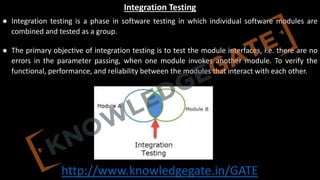
Integration Testing
● Integrationtesting is a phase in software testing in which individual software modules are
combined and tested as a group.
● The primary objective of integration testing is to test the module interfaces, i.e. there are no
errors in the parameter passing, when one module invokes another module. To verify the
functional, performance, and reliability between the modules that interact with each other.
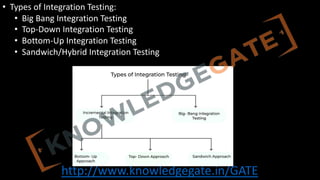
● Integration testing is of four types: (i) Top down (ii) Bottom up (iii) Sandwich (iv) Big-Bang
210.
http://www.knowledgegate.in/GATE
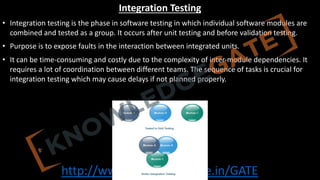
Integration Testing
• Integrationtesting is the phase in software testing in which individual software modules are
combined and tested as a group. It occurs after unit testing and before validation testing.
• Purpose is to expose faults in the interaction between integrated units.
• It can be time-consuming and costly due to the complexity of inter-module dependencies. It
requires a lot of coordination between different teams. The sequence of tasks is crucial for
integration testing which may cause delays if not planned properly.
http://www.knowledgegate.in/GATE
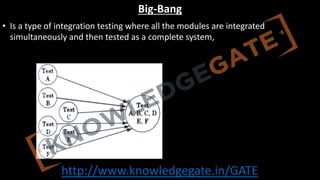
Big-Bang
• Is atype of integration testing where all the modules are integrated
simultaneously and then tested as a complete system, it is a non incremental
integration approach.
213.
http://www.knowledgegate.in/GATE
• Simplicity: Itis easier to set up because testing starts only after all the modules have
been integrated.
• Suitability: It is better suited for smaller systems where the modules are heavily
interlinked.
• Efficiency: It can potentially save time, as testing is conducted after the entire software
has been developed and integrated.
214.
http://www.knowledgegate.in/GATE
• Issue Detectionand Resolution: It can be challenging to isolate and fix bugs because of the high level
of integration.
• High Risk: There's a high risk involved as any significant issues are only found late in the development
process, which can lead to project delays.
• Resource Consumption: It can be resource-intensive, requiring a significant amount of time and effort
to find and fix bugs.
• Inefficiency in Large Systems: It's inefficient for larger systems where problems can become
increasingly complex and hard to identify when all modules are integrated at once.
215.
http://www.knowledgegate.in/GATE
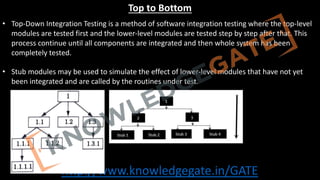
Top to Bottom
•Top-Down Integration Testing is a method of software integration testing where the top-level
modules are tested first and the lower-level modules are tested step by step after that. This
process continue until all components are integrated and then whole system has been
completely tested.
• Stub modules may be used to simulate the effect of lower-level modules that have not yet
been integrated and are called by the routines under test.
216.
http://www.knowledgegate.in/GATE
Advantages of Top-DownIntegration Testing
• Early Defect Identification: Critical high-level design and control flow issues can be detected
at an early stage.
• Facilitates Progressive Testing: Testing is easier and more systematic, progressing from top-
level modules to lower-level modules.
• Supports Early Demonstration: The basic functionality of the system can be demonstrated
early in the testing process, even if lower-level modules are not yet developed or tested.
217.
http://www.knowledgegate.in/GATE
Disadvantages of Top-DownIntegration Testing
• Stub Development: Stubs need to be created for simulating lower-level modules, which may
require additional time and resources.
• Late Detection of Lower-Level Bugs: Bugs in lower-level modules may not be found until the
later stages of testing, which can lead to delays.
• Incomplete Testing: Due to reliance on stubs, some types of errors can be difficult to detect
until full functionality is integrated.
• Difficulty in Test Management: The complexity and dependencies between different modules
can make test management challenging.
218.
http://www.knowledgegate.in/GATE
Bottom to Top
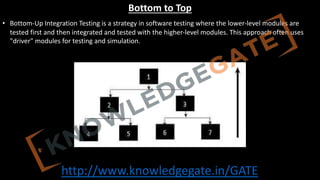
•Bottom-Up Integration Testing is a strategy in software testing where the lower-level modules are
tested first and then integrated and tested with the higher-level modules. This approach often uses
"driver" modules for testing and simulation.
• Modules at the lower level of system hierarchy is tested individually first, then the next component
who calls the previously tested once to be tested, this approaches followed repeatedly until all
components are included in the testing.
219.
http://www.knowledgegate.in/GATE
Advantages of Bottom-UpIntegration Testing
• Early Problem Detection: It allows early detection of faults and failures in the lower-level
modules of the software.
• No Need for Stubs: Unlike top-down testing, bottom-up testing doesn't require the use of
stubs as testing begins from the lower-level modules.
• Simultaneous Development and Testing: Different modules can be tested in parallel,
potentially speeding up the testing process.
220.
http://www.knowledgegate.in/GATE
Disadvantages of Bottom-UpIntegration Testing
• Delay in Higher-Level Module Testing: Testing of higher-level modules is delayed as lower-level
modules need to be tested first.
• Need for Drivers: Drivers need to be created to simulate higher-level modules, which can require
additional time and resources.
• Late Detection of Higher-Level Bugs: Issues in the integration of high-level modules may not become
apparent until late in the testing process.
• Incomplete System Overview: Early stages of testing do not provide a complete view of the system,
which may make it harder to assess overall functionality and performance.
221.
http://www.knowledgegate.in/GATE
Sandwich/Hybrid integration testing
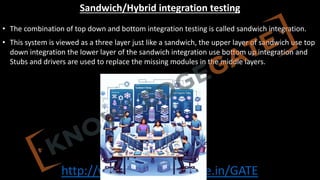
•The combination of top down and bottom integration testing is called sandwich integration.
• This system is viewed as a three layer just like a sandwich, the upper layer of sandwich use top
down integration the lower layer of the sandwich integration use bottom up integration and
Stubs and drivers are used to replace the missing modules in the middle layers.
222.
http://www.knowledgegate.in/GATE
• Combines Strengths:It combines the advantages of both Top-Down and Bottom-Up testing
approaches to achieve more comprehensive testing coverage.
• Time-Efficiency: The simultaneous testing at both ends can help to reduce the overall testing
time.
• Variety of Scenarios: This approach allows for a wide range of testing scenarios and can lead
to more thorough verification of the system's functionality.
• Flexibility: It offers flexibility in the testing process, as it can be adjusted according to the
nature of the software and the resources available.
223.
http://www.knowledgegate.in/GATE
System Testing
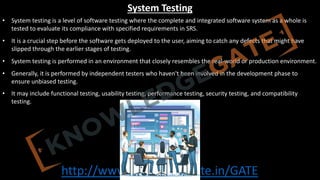
• Systemtesting is a level of software testing where the complete and integrated software system as a whole is
tested to evaluate its compliance with specified requirements in SRS.
• It is a crucial step before the software gets deployed to the user, aiming to catch any defects that might have
slipped through the earlier stages of testing.
• System testing is performed in an environment that closely resembles the real-world or production environment.
• Generally, it is performed by independent testers who haven't been involved in the development phase to
ensure unbiased testing.
• It may include functional testing, usability testing, performance testing, security testing, and compatibility
testing.
224.
http://www.knowledgegate.in/GATE
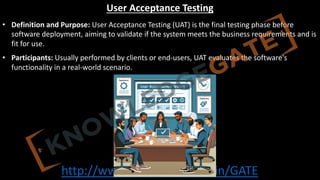
User Acceptance Testing
•Definition and Purpose: User Acceptance Testing (UAT) is the final testing phase before
software deployment, aiming to validate if the system meets the business requirements and is
fit for use.
• Participants: Usually performed by clients or end-users, UAT evaluates the software's
functionality in a real-world scenario.
225.
http://www.knowledgegate.in/GATE
• Focus: Emphasizingthe software's user-friendliness, efficiency, and effectiveness, UAT goes
beyond purely technical aspects to assess overall user experience.
• Documentation: During UAT, all scenarios, outcomes, and user feedback are recorded to
inform potential changes and improvements.
• Outcome: Successful UAT culminates in user sign-off, signifying the system meets the set
acceptance criteria and is ready for release.
226.
http://www.knowledgegate.in/GATE
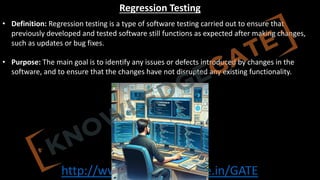
Regression Testing
• Definition:Regression testing is a type of software testing carried out to ensure that
previously developed and tested software still functions as expected after making changes,
such as updates or bug fixes.
• Purpose: The main goal is to identify any issues or defects introduced by changes in the
software, and to ensure that the changes have not disrupted any existing functionality.
227.
http://www.knowledgegate.in/GATE
• Types: Typesof regression testing include unit regression, partial regression, and complete
regression testing.
• Test Cases: Regression testing generally involves re-running previously completed tests and
verifying that program behavior has not changed as a result of the newly introduced changes.
• Automation: Due to the repetitive nature of these tests, regression testing is often automated
to improve efficiency and accuracy.
228.
http://www.knowledgegate.in/GATE
Black box Testing/White box Testing
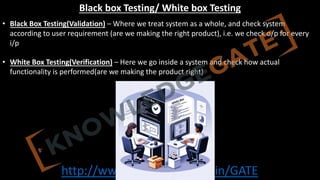
• Black Box Testing(Validation) – Where we treat system as a whole, and check system
according to user requirement (are we making the right product), i.e. we check o/p for every
i/p
• White Box Testing(Verification) – Here we go inside a system and check how actual
functionality is performed(are we making the product right)
229.
http://www.knowledgegate.in/GATE
Alpha Testing/ BetaTesting
• Any type of testing which is done on developer side is called alpha testing, usually performed
with artificial test cases.
• Any type of testing which is done at customer side is called beta testing, usually performed
with real time data.
230.
http://www.knowledgegate.in/GATE
Stress Testing
• Stresstesting is also known as endurance testing.
• Stress testing evaluates system performance when it is stressed for short periods of time.
• Stress tests are black box tests which are designed to impose a range of abnormal and even
illegal input conditions so as to stress the capabilities of the software.
231.
http://www.knowledgegate.in/GATE
Boundary value analysis
•Boundary Value Analysis is a software testing technique that focuses on the values at the
boundaries of the input domain.
• The theory behind BVA is that errors are more likely to occur at the extremes of an input
domain rather than in the center. Hence, it's generally more useful to focus on testing the
boundary values.
• BVA is used for testing ranges and data array elements in a software application.
232.
http://www.knowledgegate.in/GATE
• In practice,BVA can be applied by identifying all the boundaries and then creating test cases
for the boundary values and just above and below the boundary values.
• Example: Let's consider a simple application that accepts an integer input from 1 to 100.
• The boundary values here would be 0 (just below the valid range), 1 (lower limit), 100 (upper
limit), and 101 (just above the valid range).
• You would then create test cases to input these values and verify the system's behavior.
233.
http://www.knowledgegate.in/GATE
Equivalence partitioning
• EquivalencePartitioning is a black box testing technique that divides the input data of a
software unit into partitions of equivalent data.
• The logic behind EP is that the system should handle all the equivalent data in the same way,
thus you can save testing effort by testing only one value from each partition.
• It helps to reduce the total number of test cases from an infinite pool to a more manageable
number.
• This technique can be used for both valid and invalid data input.
234.
http://www.knowledgegate.in/GATE
• Example: Let'sconsider the same application that accepts an integer input from 1 to
100.
• The equivalence classes here would be: less than 1 (invalid), between 1 and 100 (valid),
and greater than 100 (invalid).
• You would then create test cases to input a value from each of these classes (for
example, 0, 50, and 101) and verify the system's behavior.
235.
http://www.knowledgegate.in/GATE
Graph-Based Testing Methods
•Uses graphical representation for software testing.
• Nodes represent states; edges represent transitions.
• Example: For a web app with Login, Dashboard, and Logout screens, draw
nodes for each and edges for transitions. Test paths like Login -> Dashboard ->
Logout.
236.
http://www.knowledgegate.in/GATE
Formal Technical Review(Peer Reviews)
• A Formal Technical Review (FTR) is a structured, systematic, and disciplined approach to
examining and evaluating software artifacts, such as code, design documents, or
requirements specifications, with the primary goal of identifying and addressing defects,
inconsistencies, or areas for improvement.
• FTRs are conducted by a team of peers, consisting of the artifact's author and other software
professionals, who analyze the work product and provide constructive feedback to ensure
high-quality software development.
• Formal Technical Reviews play a crucial role in improving software quality, detecting issues
early in the development lifecycle, promoting knowledge sharing, and fostering collaboration
within software engineering teams.
http://www.knowledgegate.in/GATE
• The FormalTechnical Review Process
• A. Planning
• 1. Establish objectives
• 2. Select participants
• 3. Set schedule
• B. Preparation
• 1. Distribute materials
• 2. Review guidelines
• 3. Allocate time for individual review
• C. Conducting the review
• 1. Discuss objectives
• 2. Review findings
• 3. Make decisions on action items
• D. Post-review activities
• 1. Document review results
• 2. Implement action items
• 3. Monitor follow-up actions
239.
http://www.knowledgegate.in/GATE
• Roles inFormal Technical Reviews
• A. Review leader
• B. Author
• C. Reviewers
• D. Recorder
• Benefits of Formal Technical Reviews
• A. Improved code quality
• B. Early defect detection
• C. Knowledge sharing
• D. Increased team collaboration
• Challenges and Best Practices in Formal Technical Reviews
• A. Time management
• B. Maintaining a constructive environment
• C. Addressing bias
• D. Ensuring consistency in review standards
240.
http://www.knowledgegate.in/GATE
Walk Through
• Insoftware engineering, a walkthrough is a type of informal review process in which the
author of a software artifact, such as code, design documents, or requirements specifications,
presents their work to a group of peers.
• The main purpose of a walkthrough is to identify defects, inconsistencies, or areas for
improvement through a collaborative discussion.
• Walkthroughs are typically less formal than other review methods, such as inspections, and
focus on knowledge sharing, collaboration, and training among team members.
241.
http://www.knowledgegate.in/GATE
Walkthrough Process
• A.Planning
• 1. Define objectives
• 2. Select participants
• 3. Schedule the walkthrough
• B. Preparation
• 1. Distribute materials
• 2. Review guidelines
• 3. Allocate time for individual review
• C. Conducting the walkthrough
• 1. Present the work product
• 2. Discuss findings
• 3. Record issues and suggestions
• D. Post-walkthrough activities
• 1. Summarize findings
• 2. Assign action items
• 3. Monitor follow-up actions
242.
http://www.knowledgegate.in/GATE
• Roles inWalkthroughs
• A. Presenter
• B. Reviewers
• C. Recorder
• Benefits of Walkthroughs
• A. Early defect detection
• B. Knowledge sharing
• C. Team collaboration
• D. Training and mentoring
243.
http://www.knowledgegate.in/GATE
Code Inspection
• Definition:
•Code inspection is a systematic review process in which a team of developers evaluates a
software product's source code for potential issues, such as errors, vulnerabilities, and
deviations from coding standards.
• Objectives:
• Improve code quality
• Detect and fix defects early in the development cycle
• Share knowledge and best practices among team members
• Enforce coding standards and guidelines
244.
http://www.knowledgegate.in/GATE
• Process:
• Planning:Select the code to be inspected, define goals, and assemble the inspection team
• Preparation: Team members review the code individually to identify potential issues
• Inspection Meeting: The team discusses the identified issues, and the moderator notes
down agreed-upon action items
• Rework: The original developer addresses the identified issues and submits the revised
code
• Follow-up: The moderator verifies that all action items have been addressed and closes
the inspection
245.
http://www.knowledgegate.in/GATE
• Inspection TeamRoles:
• Author: The developer who wrote the code being inspected
• Moderator: The person who leads the inspection process and ensures it runs smoothly
• Reviewers: Other developers who provide insights and suggestions for improvements
• Recorder: The person responsible for documenting the issues found and decisions made
during the inspection
246.
http://www.knowledgegate.in/GATE
• Benefits:
• Enhancedcode quality and maintainability
• Reduced development costs and project risks
• Faster time-to-market due to early detection of defects
• Improved team collaboration and learning
• Limitations:
• Time-consuming process
• Possibility of human errors or oversights
• Potential for conflict among team members
• May not catch all types of defects, such as performance or concurrency issues
247.
http://www.knowledgegate.in/GATE
Unit-5(Software Maintenance)
• Softwareas an Evolutionary Entity,
• Need for Maintenance,
• Categories of Maintenance: Preventive, Corrective and Perfective Maintenance,
• Cost of Maintenance,
• Software Re-Engineering,
• Reverse Engineering.
• Software Configuration Management Activities,
• Change Control Process,
• Software Version Control,
• Resource Allocation Models,
• Software Risk Analysis and Management.
248.
http://www.knowledgegate.in/GATE
Why Software Maintenance
•Always Changing: Software keeps changing to work better for people who use it. This is like
how animals and plants change to survive in the world.
• Getting More Complex: Software used to be simple, but now it can do many things and
connects people all over the world. This is like how nature has many different animals and
plants living together.
• Survival of the Fittest: Good software will keep being used, while bad software will go away.
This is like how strong animals and plants in nature can live longer and make more babies.
249.
http://www.knowledgegate.in/GATE
• Categories ofSoftware Maintenance – Maintenance can be divided into the following:
• Corrective maintenance: Corrective maintenance of a software product may be essential either to rectify
some bugs observed while the system is in use, or to enhance the performance of the system.
• Adaptive maintenance: This includes modifications and updation when the customers need the product to
run on new platforms, on new operating systems, or when they need the product to interface with new
hardware and software.
• Perfective maintenance: A software product needs maintenance to support the new features that the users
want or to change different types of functionalities of the system according to the customer demands.
250.
http://www.knowledgegate.in/GATE
• The keysoftware maintenance issues are both managerial and technical. e.g. alignment with
customer priorities, staffing, which organization does maintenance, estimating costs.
• Key technical issues are: limited understanding, impact analysis, testing, maintainability
measurement.
251.
http://www.knowledgegate.in/GATE
Software Re-Engineering
• Softwarere-engineering is the process of examining and modifying an existing software
system to improve its functionality, performance, or adaptability without changing its core
function.
• It's often undertaken to restructure a legacy system to enhance understandability,
maintainability, and to upgrade to newer technologies or software practices.
http://www.knowledgegate.in/GATE
• Restructuring: Thisinvolves transforming the existing source code into a more
maintainable form, often while preserving its functionality. This can include
activities such as code refactoring, where the code is reorganized to be more
understandable or efficient.
254.
http://www.knowledgegate.in/GATE
• Forward Engineering:After understanding and possibly restructuring the
system, changes are made to the system to improve it or adapt it to new
requirements or technologies. This can include implementing new features,
improving performance, or changing the system to use a new technology stack.
255.
http://www.knowledgegate.in/GATE
• Re-documentation: Thisinvolves updating or creating new documentation for
the system. This can be especially important if the original documentation was
lost, out of date, or if the system has been significantly changed during the re-
engineering process.
256.
http://www.knowledgegate.in/GATE
• Benefits ofre-engineering phases:
• Cost: Re-engineering of an existing software system costs significantly less than new
system development.
• Lower Risks: Software re-engineering is based on incremental improvement of systems,
rather than racial system replacement. The risk of losing critical software knowledge is
drastically reduced.
• Better use of existing Staff: The skill of existing staff can be better utilized by re-
engineering.
• Incremental Development: The development is not carried out as a whole. It is in stages.
257.
http://www.knowledgegate.in/GATE
• Reverse Engineering– Reverse Engineering is processes of extracting knowledge or design
information from anything man-made and reproducing it based on extracted information. It is
also called back Engineering.
258.
http://www.knowledgegate.in/GATE
• Software ReverseEngineering – Software Reverse Engineering is the process of recovering the
design and the requirements specification of a product from an analysis of it’s code. Reverse
Engineering is becoming important, since several existing software products, lack proper
documentation, are highly unstructured, or their structure has degraded through a series of
maintenance efforts.
259.
http://www.knowledgegate.in/GATE
• Steps ofSoftware Reverse Engineering
1. Collecting Information
2. Examining the Information
3. Extracting the Structure
4. Recording the Functionality
5. Recording Data Flow
6. Recording Control Flow
7. Review extracted Design
8. Generate Documentation
260.
http://www.knowledgegate.in/GATE
• Why ReverseEngineering?
1. Providing proper system documentation.
2. Recovery of lost information.
3. Assisting with maintenance.
4. Facility of software reuse.
5. Discovering unexpected flaws or faults.
261.
http://www.knowledgegate.in/GATE
Software Configuration ManagementActivities
• The primary reasons for Implementing Software Configuration Management System are:
• There are multiple people working on software which is continually updating.
• It may be a case where multiple version, branches, authors are involved in a software
project, and the team is geographically distributed and works concurrently.
• Changes in user requirement, policy, budget, schedule need to be accommodated.
• Software should able to run on various machines and Operating Systems.
• Helps to develop coordination among stakeholders.
• SCM process is also beneficial to control the costs involved in making changes to a system.
262.
http://www.knowledgegate.in/GATE
Software Configuration Management
•Can be defined as a process of defining and implementing a standard configuration, which
results into the primary benefits such as easier setup and maintenance, less down-time, better
integration with enterprise management, and more efficient and reliable backups and also
maximize productivity by minimizing mistakes.
• SCM is used to track and manage the emerging product and its versions.
• SCM ensures that all people involved in the software process know what is being designed,
developed, built, tested and delivered.
• Through SCM, the design requirements can be traced to the final software product.
http://www.knowledgegate.in/GATE
• Tasks inSCM process
• Configuration Identification:
• Configuration identification is a method of determining the scope of the software
system.
• With the help of this step, you can manage or control something even if you don't
know what it is.
• Baseline:
• A baseline is a formally accepted version of a software configuration item.
• It is designated and fixed at a specific time while conducting the SCM process. It can
only be changed through formal change control procedures.
265.
http://www.knowledgegate.in/GATE
• Change Control:
•Change control is a procedural method which ensures quality and consistency when
changes are made in the configuration object.
• In this step, the change request is submitted to software configuration manager.
• Configuration Status Accounting:
• Configuration status accounting tracks each release during the SCM process.
• This stage involves tracking what each version has and the changes that lead to this
version.
• Configuration Audits and Reviews:
• Software Configuration audits verify that all the software product satisfies the baseline
needs.
• It ensures that what is built is what is delivered.
266.
http://www.knowledgegate.in/GATE
Software version control
•Version control is a way to keep track of changes in computer programs. It helps people work
together on a project without causing problems. They can see what changes were made,
when, and by whom. It also lets them go back to an older version if something goes wrong.
267.
http://www.knowledgegate.in/GATE
• Identifying NewVersions: Each time changes are made and saved, the version control system
creates a new, unique version of the software. This helps developers track the software's
evolution and easily manage multiple versions.
• Numbering Scheme: Version control systems assign a specific numbering or naming scheme
to each version (e.g., 1.0, 1.1, 1.2, or 2.0). This helps developers and users identify the
software's progression and understand the scope of changes between versions.
• Visibility: Version control makes the entire history of the software project visible to all team
members. This enhances collaboration and helps developers understand the context and
impact of past changes on the current codebase.
• Tracking: Version control systems keep detailed records of who made each change, when it
was made, and the specific modifications. This level of tracking helps maintain accountability
and facilitates communication among team members.
268.
http://www.knowledgegate.in/GATE
Resource Allocation Models
•Resource allocation models in software engineering refer to strategies or
methods used to distribute various types of resources effectively across
different aspects of a software project. These resources could include things like
personnel, time, budget, computing resources, etc.
• These models help project managers in decision-making processes to ensure
the efficient use of resources, meet project deadlines, maintain the quality of
the software product, and stay within the budget.
269.
http://www.knowledgegate.in/GATE
• Critical PathMethod (CPM): This is a step-by-step technique used in project
management for scheduling project activities. It identifies critical and non-
critical tasks to prevent conflicts and bottlenecks.
270.
http://www.knowledgegate.in/GATE
• Program Evaluationand Review Technique (PERT): This is a statistical tool used
in project management, designed to analyze and represent the tasks involved in
completing a given project. It helps to estimate the minimum time needed to
complete the project.
271.
http://www.knowledgegate.in/GATE
• Gantt Chart:It's a type of bar chart that illustrates a project schedule. This chart
lists the tasks to be performed on the vertical axis, and time intervals on the
horizontal axis.
272.
http://www.knowledgegate.in/GATE
• Resource Leveling:Also known as resource smoothing, it's a technique in
project management that involves adjusting the project schedule to balance the
demand for project resources with the available supply.
273.
http://www.knowledgegate.in/GATE
• Allocation Modelsin Agile Methodology: In agile teams, resources might be
allocated based on different factors such as team velocity, priority of user
stories, and size of tasks.
274.
http://www.knowledgegate.in/GATE
Software Risk Analysisand Management
• Risk management is the process of identifying risk, assessing risk hat could
negatively impact a software project's success and taking steps to reduce this to
acceptable level.
275.
http://www.knowledgegate.in/GATE
• Here arethe key components:
• Risk Identification: This is the initial process of determining risks that could
potentially prevent the program, enterprise, or investment from achieving its
objectives. It includes documenting and communicating the concern.
276.
http://www.knowledgegate.in/GATE
• Risk Analysis:Once risks are identified, they are analyzed to identify the
qualities of the risk such as its likelihood of occurrence, severity of impact, what
precipitates the risk, and other characteristics. This can be done quantitatively or
qualitatively.
277.
http://www.knowledgegate.in/GATE
• Risk Assessment/Evaluation:This involves comparing the identified and
analyzed risk against predefined criteria such as acceptable risk levels and
priorities. It's used to make decisions about the impact of the risk and whether
it's acceptable or if it needs to be treated.
278.
http://www.knowledgegate.in/GATE
• Risk Mitigation:This is the process of prioritizing, evaluating, and
implementing actions that reduce or control the risks. It can involve
risk avoidance, risk transfer, risk acceptance, or risk limitation.
279.
http://www.knowledgegate.in/GATE
• Risk Monitoring:This is the process of monitoring identified and mitigated risks,
as well as identifying new risks. This is an ongoing process throughout the
lifecycle of the project.
• In a nutshell, Software Risk Analysis and Management aims to anticipate what
might not go as planned and prepare a response to those scenarios, so that
action can be taken to resolve risk events that do occur or to minimize their
impact.