1
©The McGraw-Hill Companies, 2005
Software Project
Management
4th Edition
Resource allocation
Chapter 8
2
©The McGraw-Hill Companies, 2005
Schedules
• Activity schedule - indicating start and
completion dates for each activity
• Resource schedule - indicating dates
when resources needed + level of
resources
• Cost schedule showing accumulative
expenditure
3
©The McGraw-Hill Companies, 2005
Resources
• These include
– labour
– equipment (e.g. workstations)
– materials
– space
– services
• Time: elapsed time can often be
reduced by adding more staff
• Money: used to buy the other resources
4
©The McGraw-Hill Companies, 2005
Resource allocation
• Identify the resources needed for each
activity
• Identify resource types - individuals are
interchangeable within the group (e.g.
‘VB programmers’ as opposed to
‘software developers’)
• Allocate resource types to activities
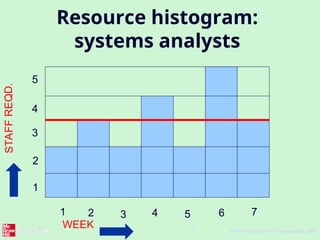
and examine the resource histogram
5
©The McGraw-Hill Companies, 2005
Resource histogram:
systems analysts
WEEK
1 2 3 4 5 6 7
1
2
3
4
5
STAF
F
REQ
D.
6
©The McGraw-Hill Companies, 2005
Resource clashes
can be resolved by:
– delaying one of the activities
• taking advantage of float to change start date
• delaying start of one activity until finish of the
other activity that resource is being used on -
puts back project completion
– moving resource from a non-critical activity
– bringing in additional resource - increases
costs
7
©The McGraw-Hill Companies, 2005
Prioritizing activities
There are two main ways of doing this:
• Total float priority – those with the
smallest float have the highest priority
• Ordered list priority – this takes account
of the duration of the activity as well
as the float – see next overhead
8
©The McGraw-Hill Companies, 2005
Burman’s priority list
Give priority to:
• Shortest critical activities
• Other critical activities
• Shortest non-critical activities
• Non-critical activities with least float
• Non-critical activities
9
©The McGraw-Hill Companies, 2005
Resource usage
• Need to maximise %usage of
resources i.e. reduce idle periods
between tasks
• Need to balance costs against early
completion date
• Need to allow for contingency
10
©The McGraw-Hill Companies, 2005
Critical path
• Scheduling resources can create new
dependencies between activities – recall critical
chains
• It is best not to add dependencies to the
activity network to reflect resource constraints
– Makes network very messy
– A resource constraint may disappear during the
project, but link remains on network
• Amend dates on schedule to reflect resource
constraints
11
©The McGraw-Hill Companies, 2005
Allocating individuals to
activities
The initial ‘resource types’ for a task have
to be replaced by actual individuals.
Factors to be considered:
• Availability
• Criticality
• Risk
• Training
• Team building – and motivation
12
©The McGraw-Hill Companies, 2005
Cost schedules
Cost schedules can now be produced:
Costs include:
• Staff costs
• Overheads
• Usage charges
13
©The McGraw-Hill Companies, 2005
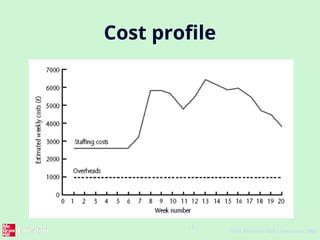
Cost profile
14
©The McGraw-Hill Companies, 2005
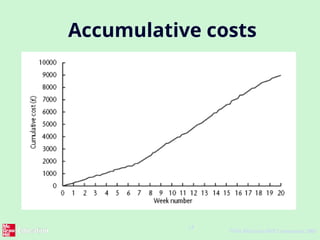
Accumulative costs
15
©The McGraw-Hill Companies, 2005
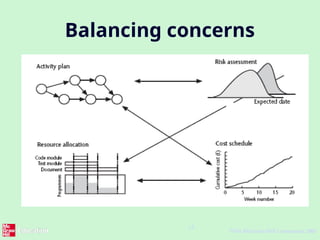
Balancing concerns

software management project: resource allocation

  • 1.
    1 ©The McGraw-Hill Companies,2005 Software Project Management 4th Edition Resource allocation Chapter 8
  • 2.
    2 ©The McGraw-Hill Companies,2005 Schedules • Activity schedule - indicating start and completion dates for each activity • Resource schedule - indicating dates when resources needed + level of resources • Cost schedule showing accumulative expenditure
  • 3.
    3 ©The McGraw-Hill Companies,2005 Resources • These include – labour – equipment (e.g. workstations) – materials – space – services • Time: elapsed time can often be reduced by adding more staff • Money: used to buy the other resources
  • 4.
    4 ©The McGraw-Hill Companies,2005 Resource allocation • Identify the resources needed for each activity • Identify resource types - individuals are interchangeable within the group (e.g. ‘VB programmers’ as opposed to ‘software developers’) • Allocate resource types to activities and examine the resource histogram
  • 5.
    5 ©The McGraw-Hill Companies,2005 Resource histogram: systems analysts WEEK 1 2 3 4 5 6 7 1 2 3 4 5 STAF F REQ D.
  • 6.
    6 ©The McGraw-Hill Companies,2005 Resource clashes can be resolved by: – delaying one of the activities • taking advantage of float to change start date • delaying start of one activity until finish of the other activity that resource is being used on - puts back project completion – moving resource from a non-critical activity – bringing in additional resource - increases costs
  • 7.
    7 ©The McGraw-Hill Companies,2005 Prioritizing activities There are two main ways of doing this: • Total float priority – those with the smallest float have the highest priority • Ordered list priority – this takes account of the duration of the activity as well as the float – see next overhead
  • 8.
    8 ©The McGraw-Hill Companies,2005 Burman’s priority list Give priority to: • Shortest critical activities • Other critical activities • Shortest non-critical activities • Non-critical activities with least float • Non-critical activities
  • 9.
    9 ©The McGraw-Hill Companies,2005 Resource usage • Need to maximise %usage of resources i.e. reduce idle periods between tasks • Need to balance costs against early completion date • Need to allow for contingency
  • 10.
    10 ©The McGraw-Hill Companies,2005 Critical path • Scheduling resources can create new dependencies between activities – recall critical chains • It is best not to add dependencies to the activity network to reflect resource constraints – Makes network very messy – A resource constraint may disappear during the project, but link remains on network • Amend dates on schedule to reflect resource constraints
  • 11.
    11 ©The McGraw-Hill Companies,2005 Allocating individuals to activities The initial ‘resource types’ for a task have to be replaced by actual individuals. Factors to be considered: • Availability • Criticality • Risk • Training • Team building – and motivation
  • 12.
    12 ©The McGraw-Hill Companies,2005 Cost schedules Cost schedules can now be produced: Costs include: • Staff costs • Overheads • Usage charges
  • 13.
  • 14.
    14 ©The McGraw-Hill Companies,2005 Accumulative costs
  • 15.
    15 ©The McGraw-Hill Companies,2005 Balancing concerns

Editor's Notes

  • #1 This talk provides an overview of the basic steps needed to produce a project plan. The framework provided should allow students to identify where some of the particular issues discussed in other chapters are applied to the planning process. As the focus is on project planning, techniques to do with project control are not explicitly described. However, in practice, one element of project planning will be to decide what project control procedures need to be in place.
  • #2 We have already described the creation of the activity schedule in Lecture/activity 6.
  • #3 Section 8.2 in the main text discusses this in a little more detail. A key point is that money (by definition) is the means by which one resource can be converted to another. However in practice this may be problematic because of resource constraints e.g. staff need time to become expert in a new technology regardless of the amount of money that might be available to buy expertise.
  • #4 This is covered in Section 8.3 of the text. Note that at this point we have to assume that we are dealing with, for example, ‘standard’ software developers who have an average productivity. When we allocate actual people we may find that we have a trainee or a super-expert and this will affect productivity. A short-coming in productivity in an individual might be compensated for by a lower cost (as would be expected with trainees). In the example in the text we start by scheduling every activity to start at the earliest possible date. However in Lecture/Chapter 7, in the section on the critical chain technique it was suggested that we plan to start activities as late as possible. Whatever the starting procedure, we then need to deal with resource clashes.
  • #5 The resource histogram helps us identify where the demand for a resource exceeds the supply. If we use a tool such as MS Project, the tool will generate the resource histograms for us.
  • #6 Exercise 8.1 in the text gives some practice in the resolution of resource clashes.
  • #7 Where more than one activity is competing for the same limited resource at the same time then those activities need to be prioritized.
  • #10 In Lecture/chapter 7 the concept of critical chains was introduced which took account of resource constraints. The point about not adding links to the network to deal with resource constraints is not in the text, but is based on practical experience. The notation for activity networks does not tell you why one activity might be dependent on the completion of another.
  • #11 Availability – who is free? Note that this will change during the course of the project as some tasks are completed earlier or later than planned Criticality – You would want to put your more experienced, ‘safer’, staff on the critical activities Risk – this is similar to the point above, but some activities could be off the critical path but still have risks e.g. to the quality of subsequent products Training – despite concerns about minimizing risk, it is healthy to take some risks in order to develop staff capabilities by allocating challenging tasks to relatively inexperienced stafff Team-building – identifying people who work well together can pay dividends; chopping and changing plans all the time may in theory optimize project performance, but can in practice be demotivating for staff
  • #12 Section 8.9 covers this in more depth. Staff costs – includes not just salary, but also social security contributions by the employer, holiday pay etc. Timesheets are often used to record actual hours spent on each project by an individual. One issue can be how time when a staff member is allocated and available to the project, but is not actually working on the project, is dealt with. Overheads e.g. space rental, service charges etc. Some overheads might be directly attributable to the project; in other cases a percentage of departmental overheads may be allocated to project costs. Usage charges – some charges can be on a ‘pay as you go’ basis e.g. telephone charges, postage, car mileage – at the planning stage an estimate of these may have to be made
  • #13 This shows how much is going to be spent in each week. This could be important where an organization allocates project budgets by financial year or quarter and the project straddles more than one of these financial periods
  • #14 The project manager will also be concerned about planned accumulative costs. This chart can be compared to the actual accumulative costs when controlling the project to assess whether the project is likely to meet its cost targets.
  • #15 Successful project scheduling is not a simple sequence. Because of the inter-linking of different concerns project planning will need to be iterative. The consequences of decisions will need to carefully assessed and plans adjusted accordingly.