Software Engineering Principles
Ajit K Nayak, Ph.D.
ajitnayak@soauniversity.ac.in
Behavioural Modelling - II
Acknowledgements
• Slides of Prof. Rajib Mall, IIT, KGP
State Diagram
• A state diagram describes the behaviour of a system,
some part of a system, or an individual object.
– At any given point in time, the system or object is in
a certain state.
• Being in a state means that it is will behave in a specific way in
response to any events that occur.
• Some events will cause the system to change state.
– In the new state, the system will behave in a
different way to events.
• A state diagram is a directed graph where the nodes
are states and the arcs are transitions.
Event, Condition
• Event: something that happens at a point in time
– Operator presses self-test button
– The alarm goes off
• Condition: something that has a duration
– The fuel level is high
– The alarm is on
• State : an abstraction of the attributes and links of an
object (or entire system)
– The controller is in the state self-test after the self-test
button has been pressed and the rest button is not yet
pressed.
– The tank is in the state too low when the fuel level has
been below Ievel-low for alarm-threshold seconds
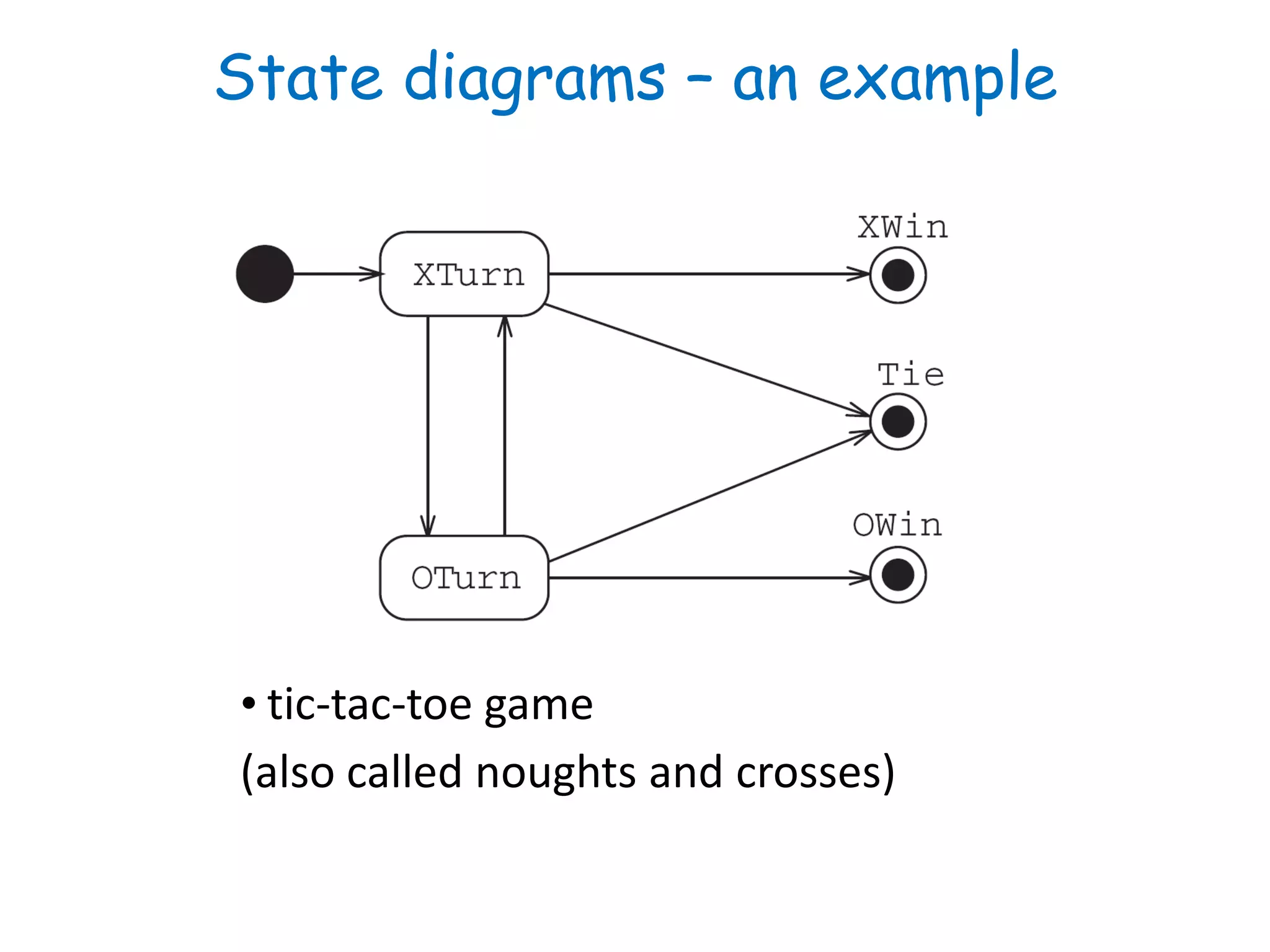
State diagrams – an example
• tic-tac-toe game
(also called noughts and crosses)
State & Transition
• At any given point in time, the system is in one state.
• It will remain in this state until an event occurs that causes
it to change state.
• A state is represented by a rounded rectangle containing
the name of the state.
• Special states:
– A black circle represents the start state
– A circle with a ring around it represents an end state
• A transition represents a change of state in response to an
event.
– It is considered to occur instantaneously.
• The label on each transition is the event that causes the
change of state.
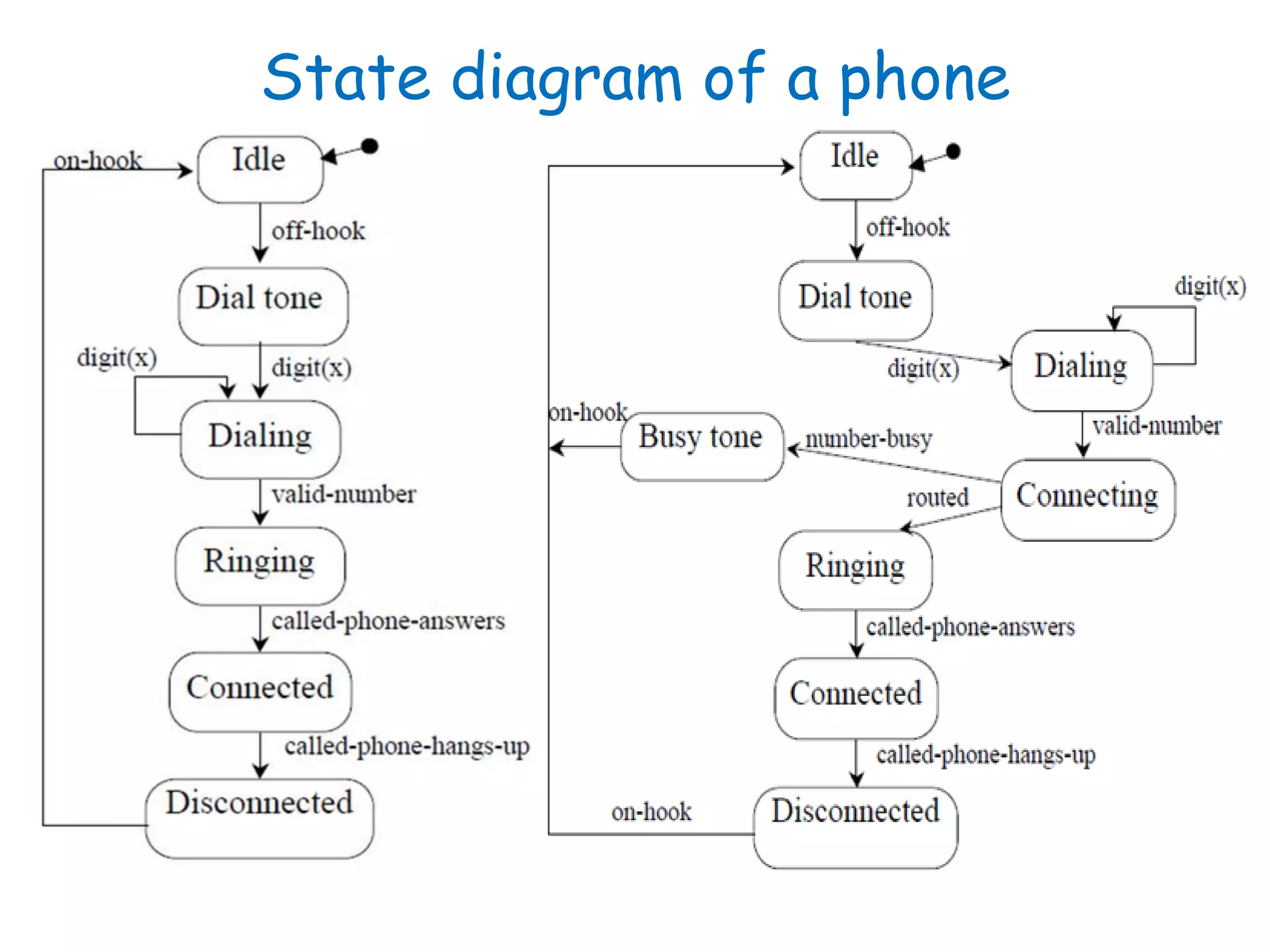
State diagram of a phone
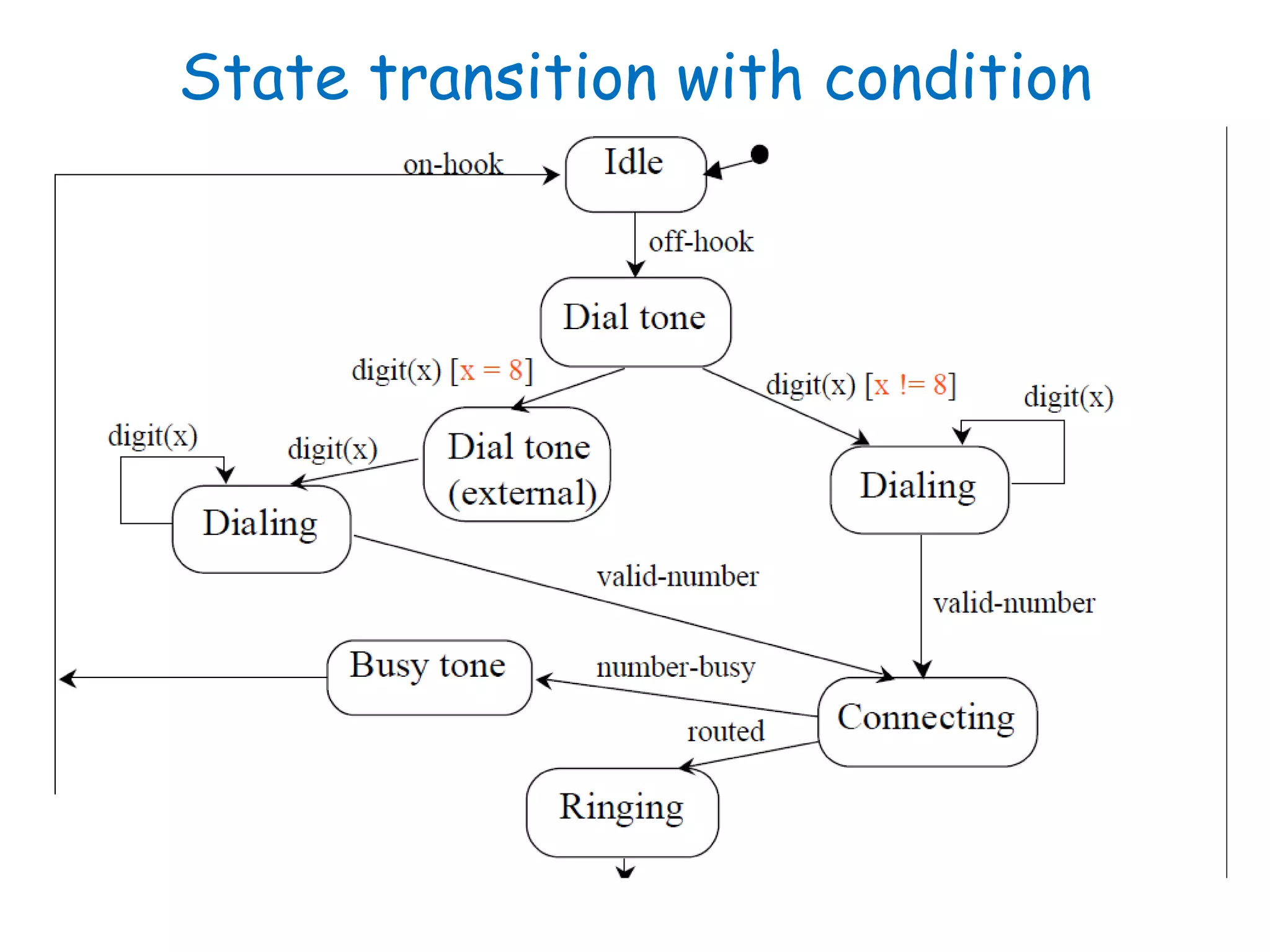
State transition with condition
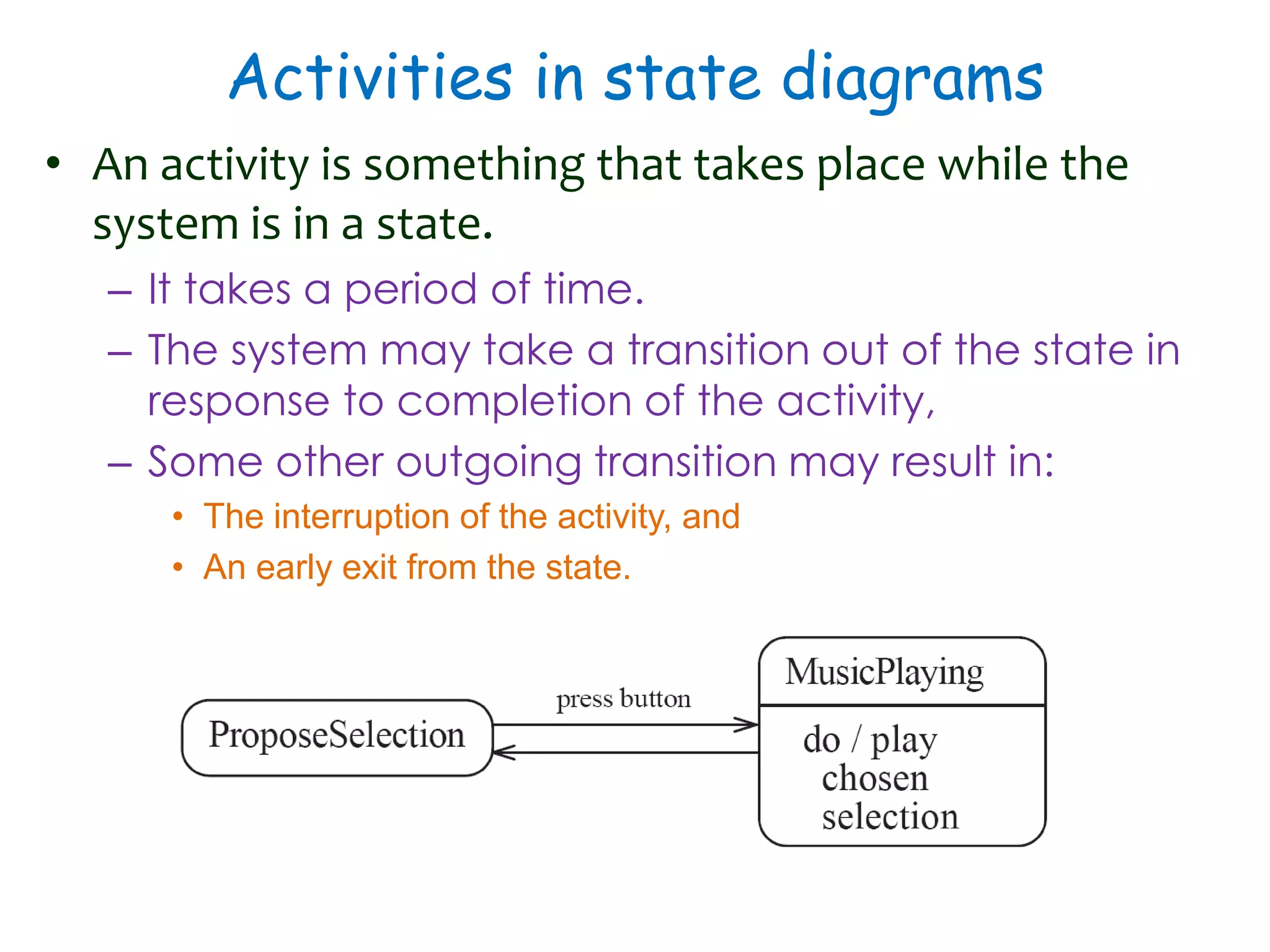
Activities in state diagrams
• An activity is something that takes place while the
system is in a state.
– It takes a period of time.
– The system may take a transition out of the state in
response to completion of the activity,
– Some other outgoing transition may result in:
• The interruption of the activity, and
• An early exit from the state.
Actions in state diagrams
• An action is something that takes place effectively
instantaneously
– When a particular transition is taken,
– Upon entry into a particular state, or
– Upon exit from a particular state
• An action should consume no noticeable amount of time
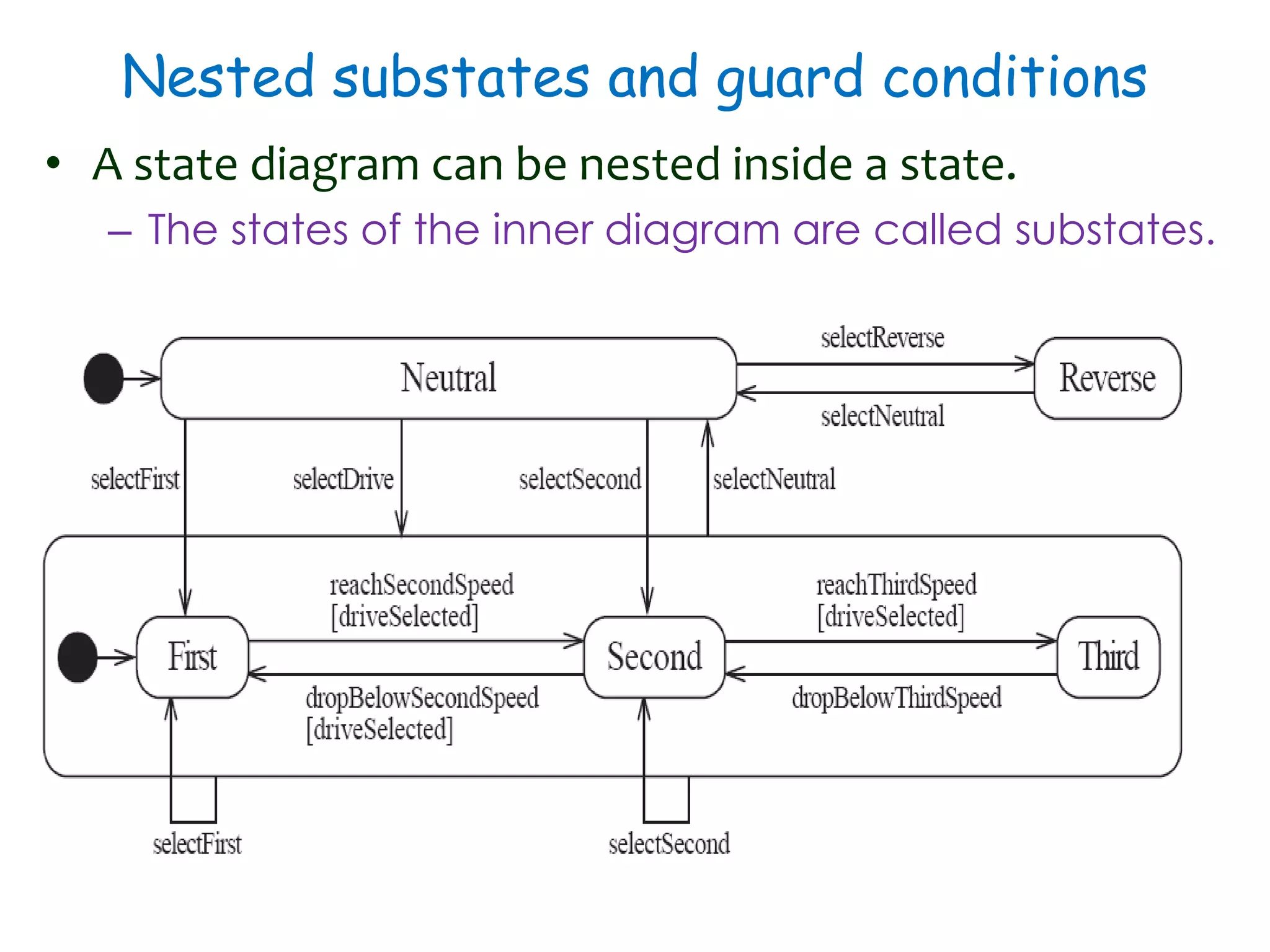
Nested substates and guard conditions
• A state diagram can be nested inside a state.
– The states of the inner diagram are called substates.
Activity Diagrams
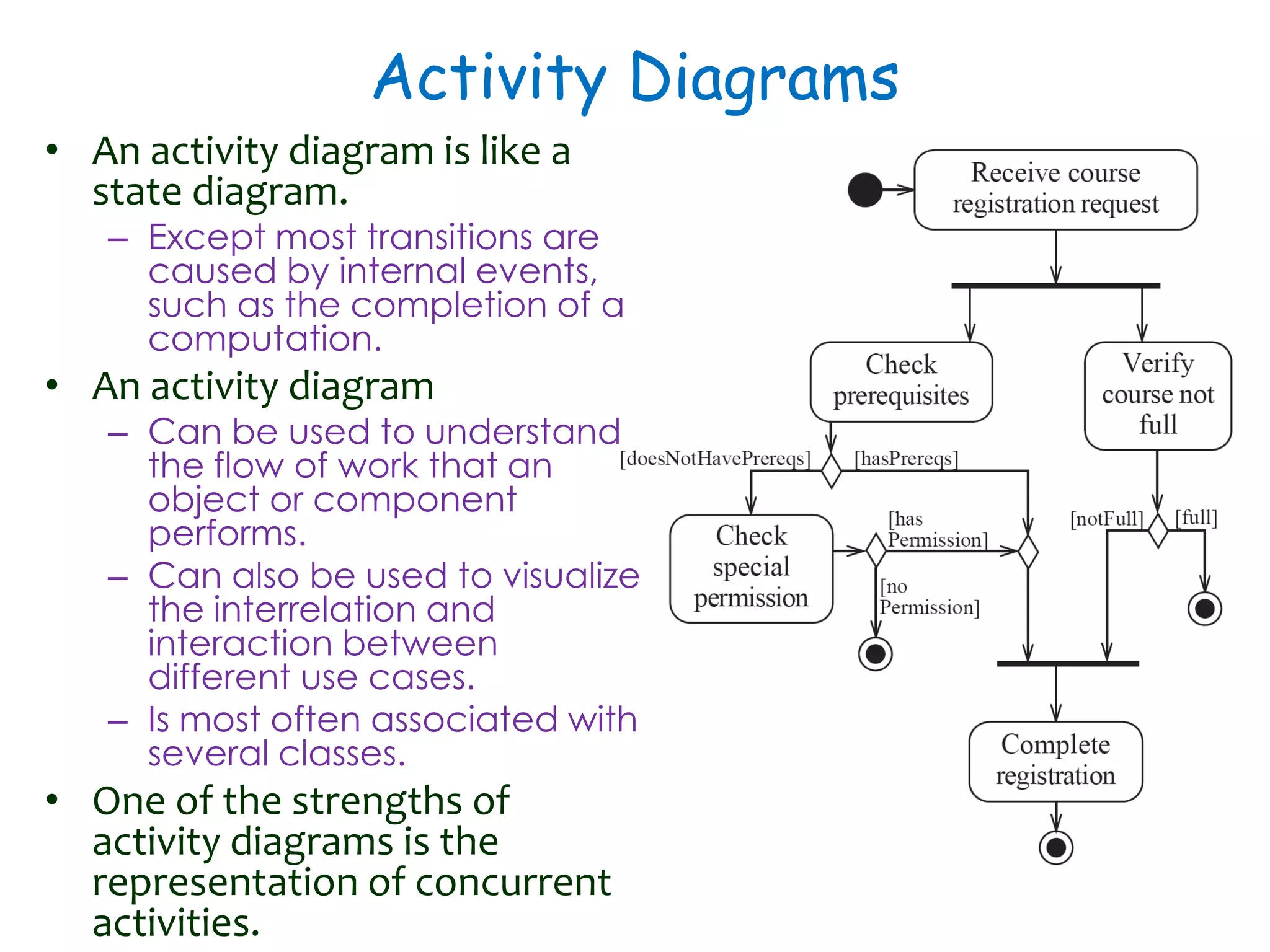
• An activity diagram is like a
state diagram.
– Except most transitions are
caused by internal events,
such as the completion of a
computation.
• An activity diagram
– Can be used to understand
the flow of work that an
object or component
performs.
– Can also be used to visualize
the interrelation and
interaction between
different use cases.
– Is most often associated with
several classes.
• One of the strengths of
activity diagrams is the
representation of concurrent
activities.
Representing concurrency
• Concurrency is shown using forks, joins and
rendezvous.
– A fork has one incoming transition and multiple
outgoing transitions.
• The execution splits into two concurrent threads.
• A rendezvous has multiple incoming and multiple outgoing
transitions.
• Once all the incoming transitions occur all the outgoing
transitions may occur.
– A join has multiple incoming transitions and one
outgoing transition.
• The outgoing transition will be taken when all incoming
transitions have occurred.
• The incoming transitions must be triggered in separate threads.
• If one incoming transition occurs, a wait condition occurs at the
join until the other transitions occur.
Swimlanes
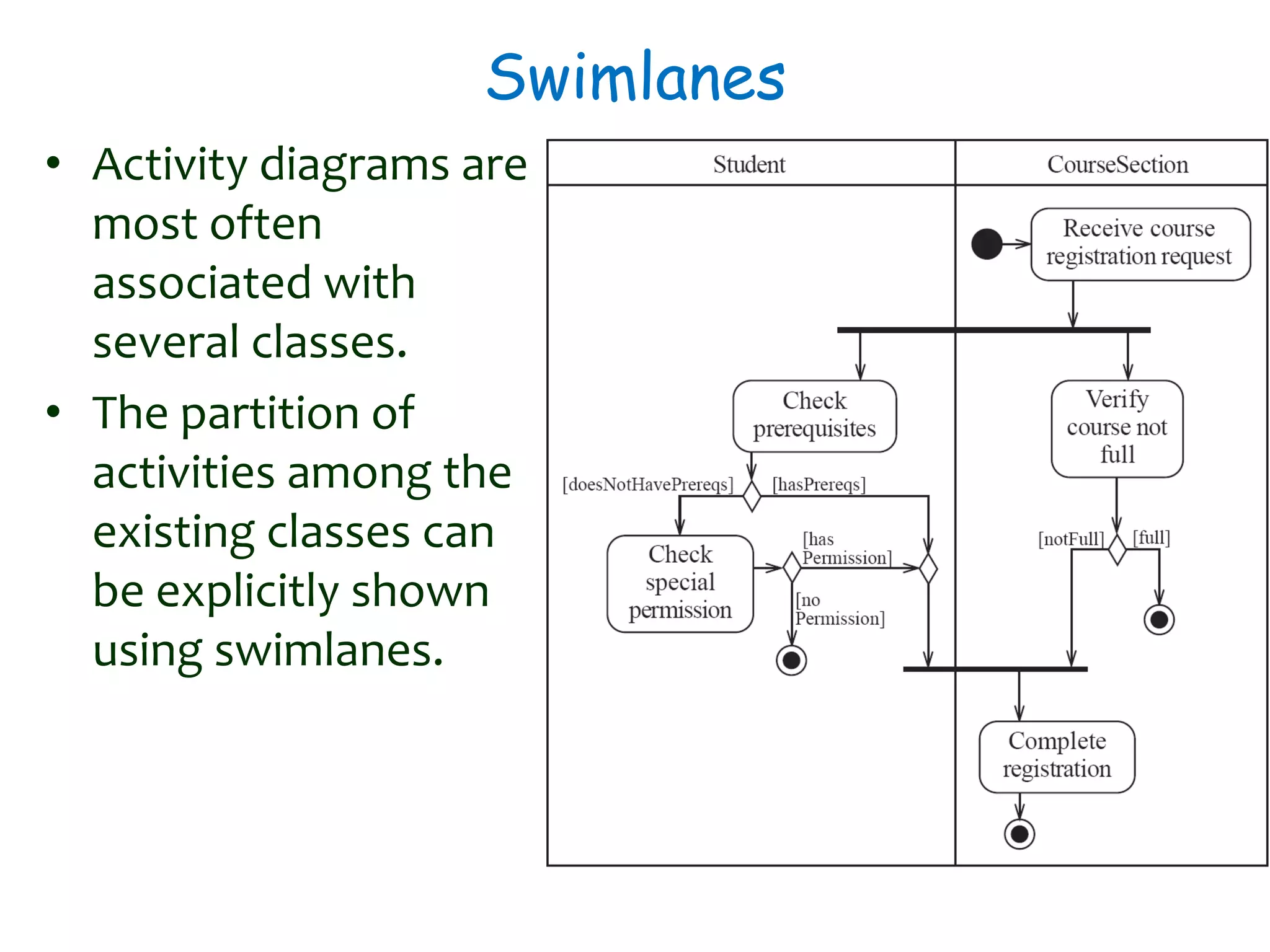
• Activity diagrams are
most often
associated with
several classes.
• The partition of
activities among the
existing classes can
be explicitly shown
using swimlanes.
Implementing Classes Based on
Interaction and State Diagrams
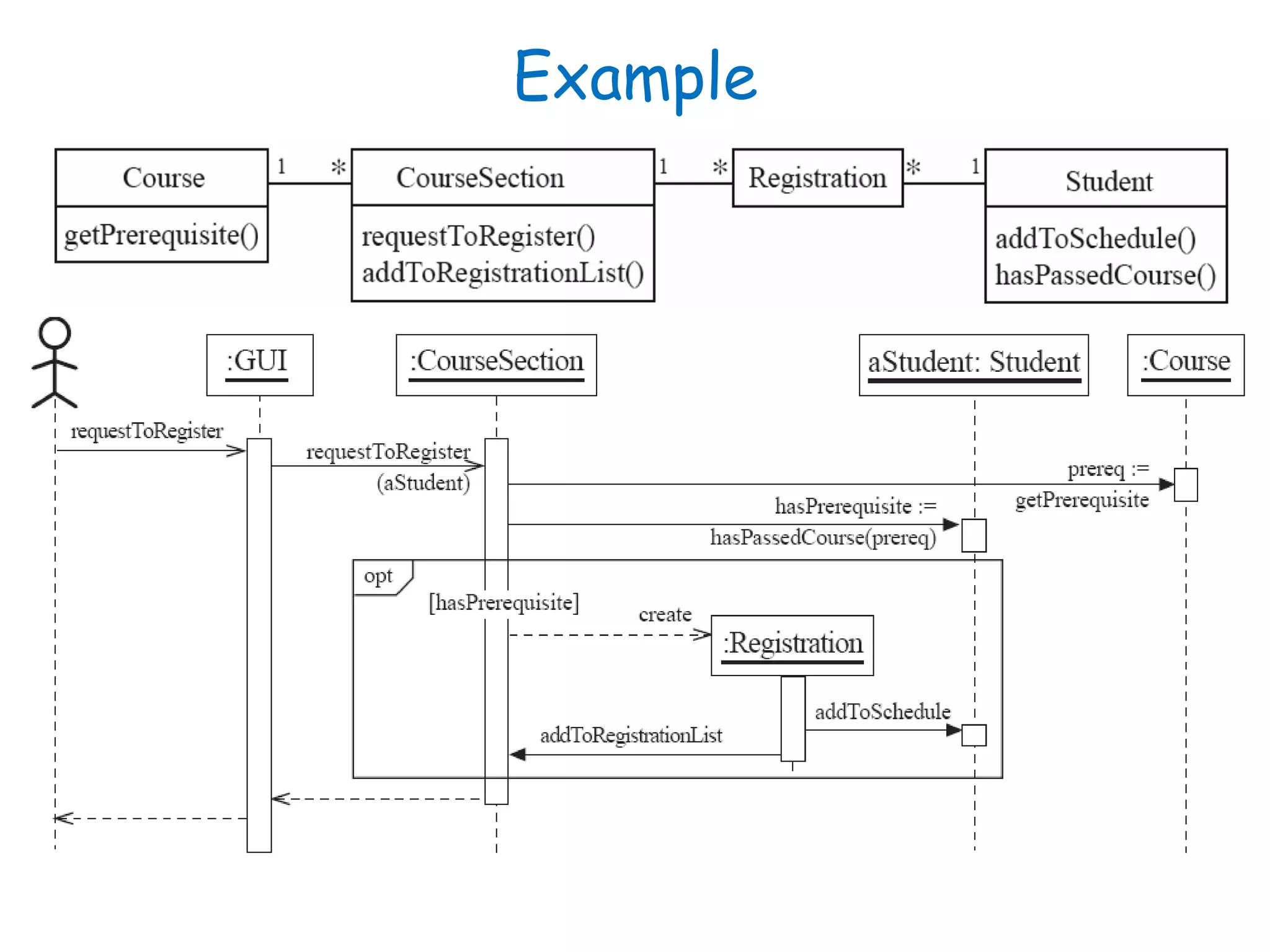
• You should use these diagrams for the parts of your
system that you find most complex.
– i.e. not for every class
• Interaction, activity and state diagrams help you
create a correct implementation.
• This is particularly true when behaviour is distributed
across several use cases.
– E.g. a state diagram is useful when different
conditions cause instances to respond differently to
the same event.
Example
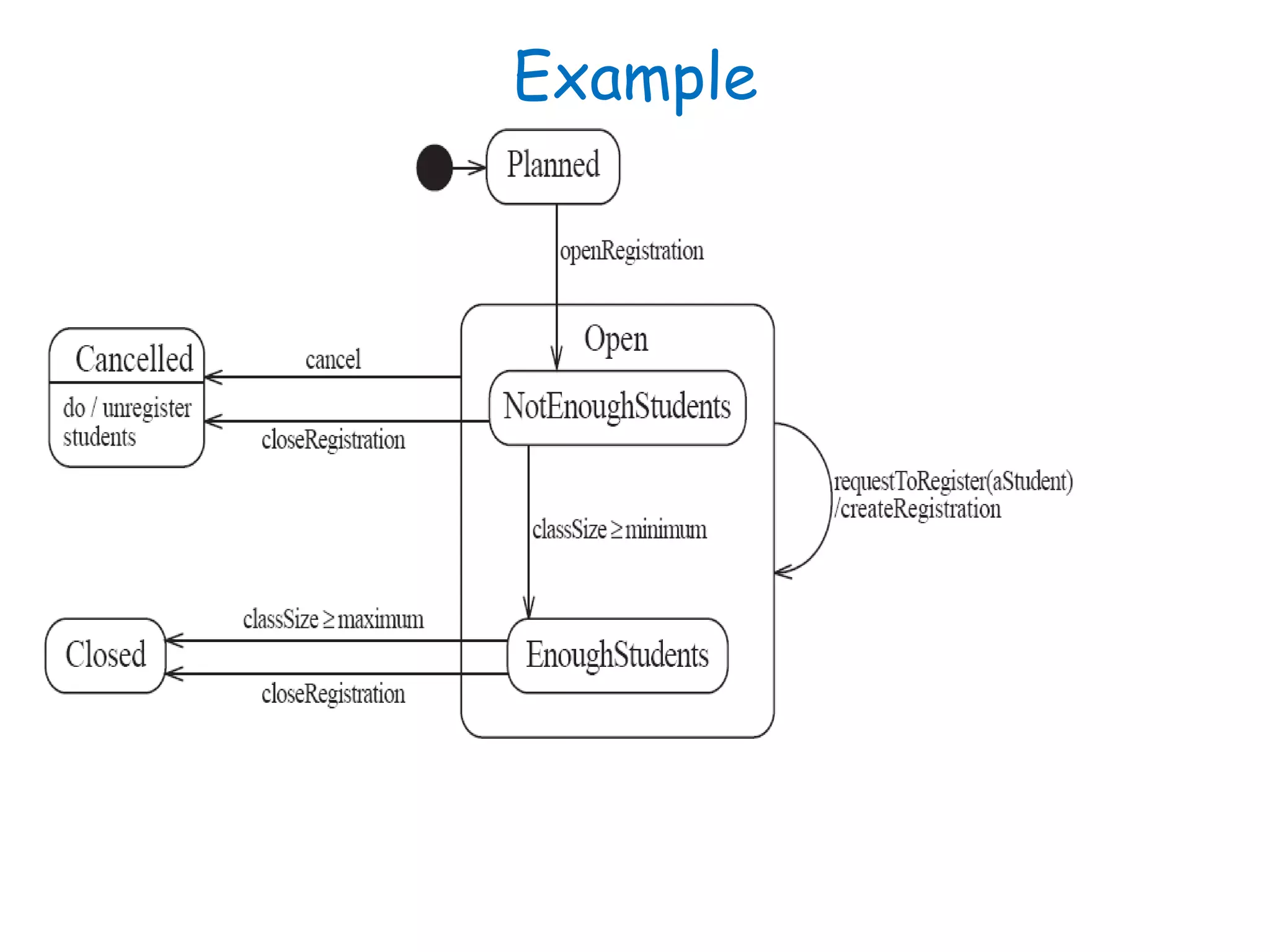
Example
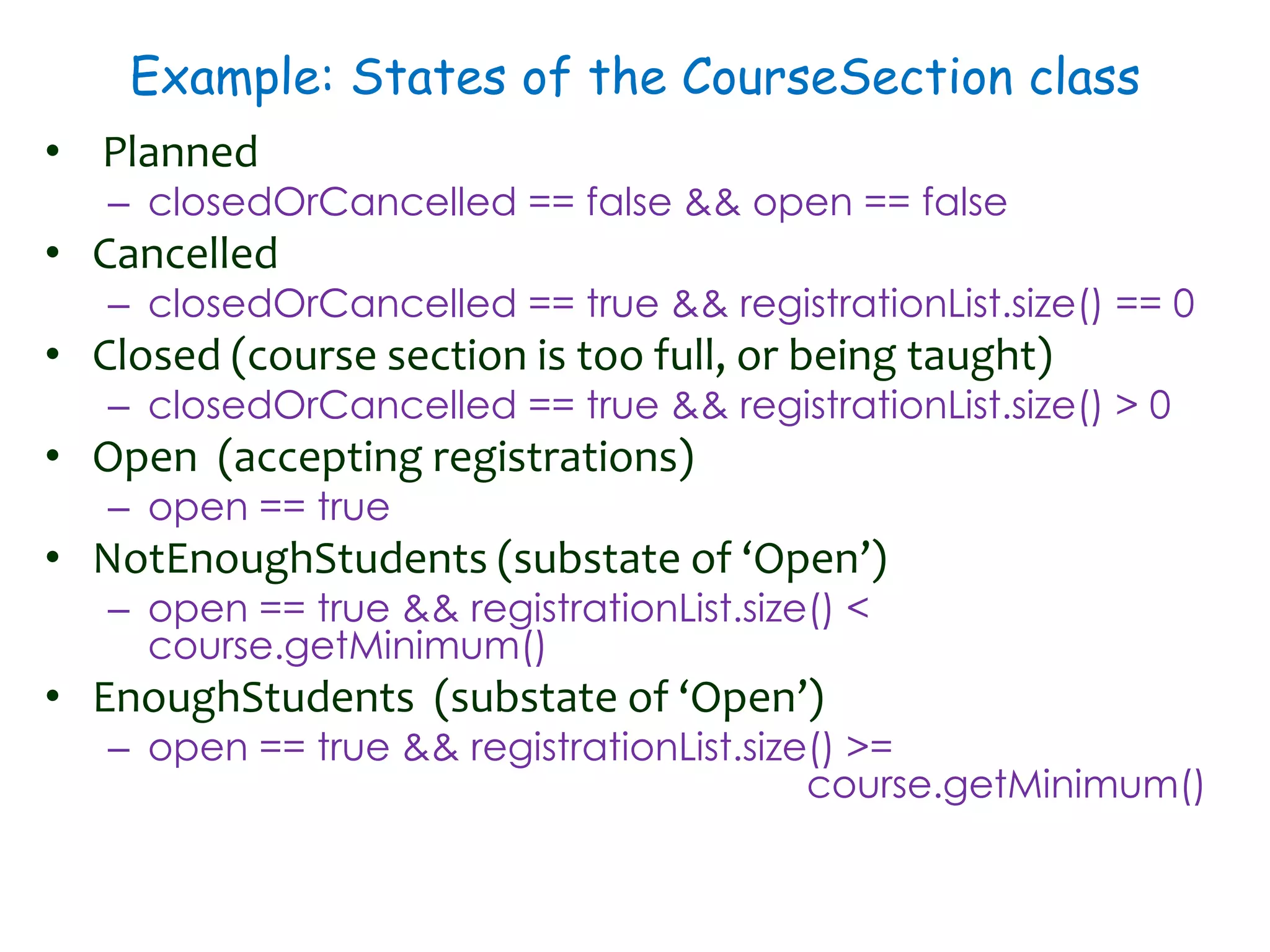
Example: States of the CourseSection class
• Planned
– closedOrCancelled == false && open == false
• Cancelled
– closedOrCancelled == true && registrationList.size() == 0
• Closed (course section is too full, or being taught)
– closedOrCancelled == true && registrationList.size() > 0
• Open (accepting registrations)
– open == true
• NotEnoughStudents (substate of ‘Open’)
– open == true && registrationList.size() <
course.getMinimum()
• EnoughStudents (substate of ‘Open’)
– open == true && registrationList.size() >=
course.getMinimum()
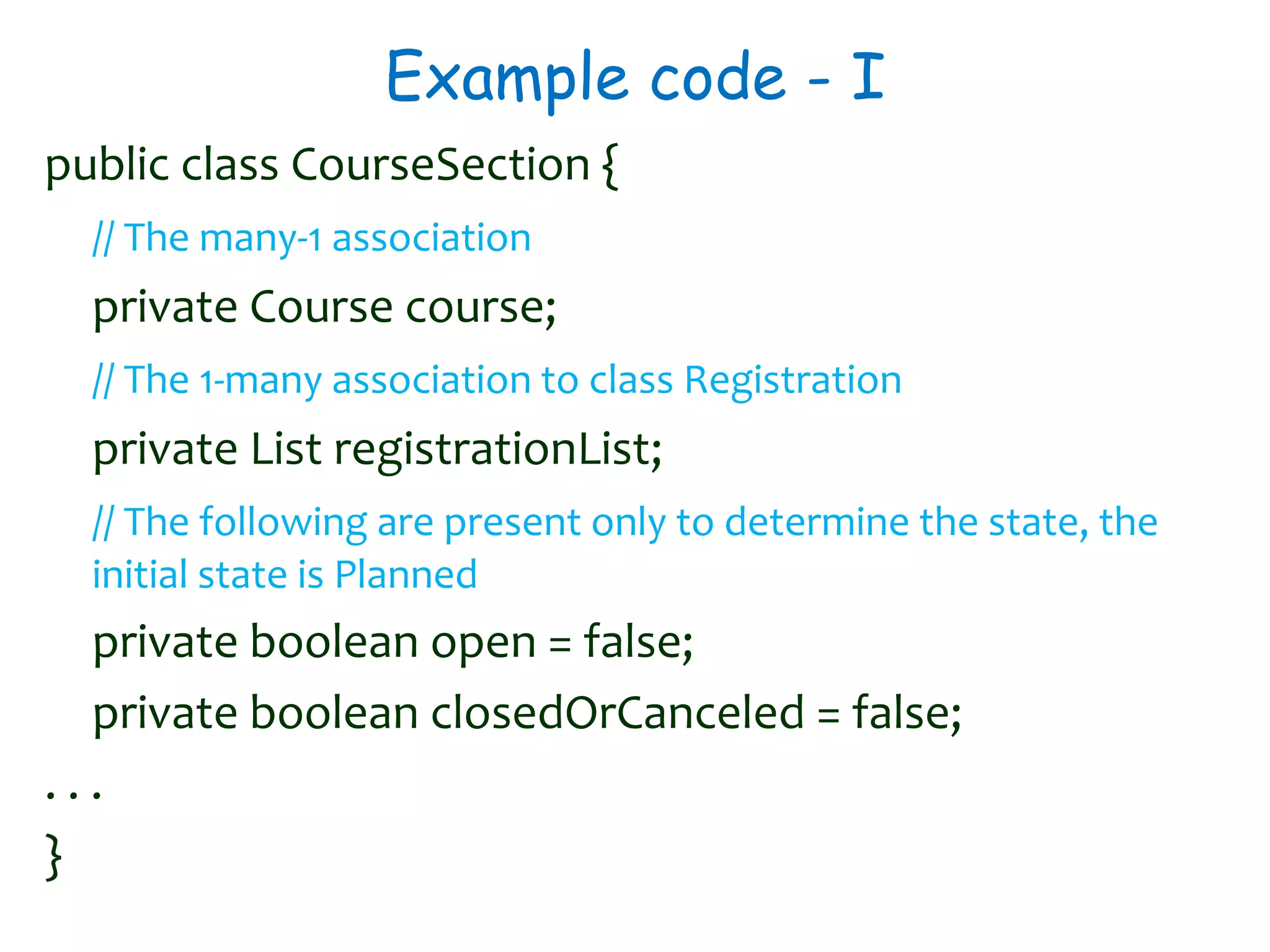
Example code - I
public class CourseSection {
// The many-1 association
private Course course;
// The 1-many association to class Registration
private List registrationList;
// The following are present only to determine the state, the
initial state is Planned
private boolean open = false;
private boolean closedOrCanceled = false;
. . .
}
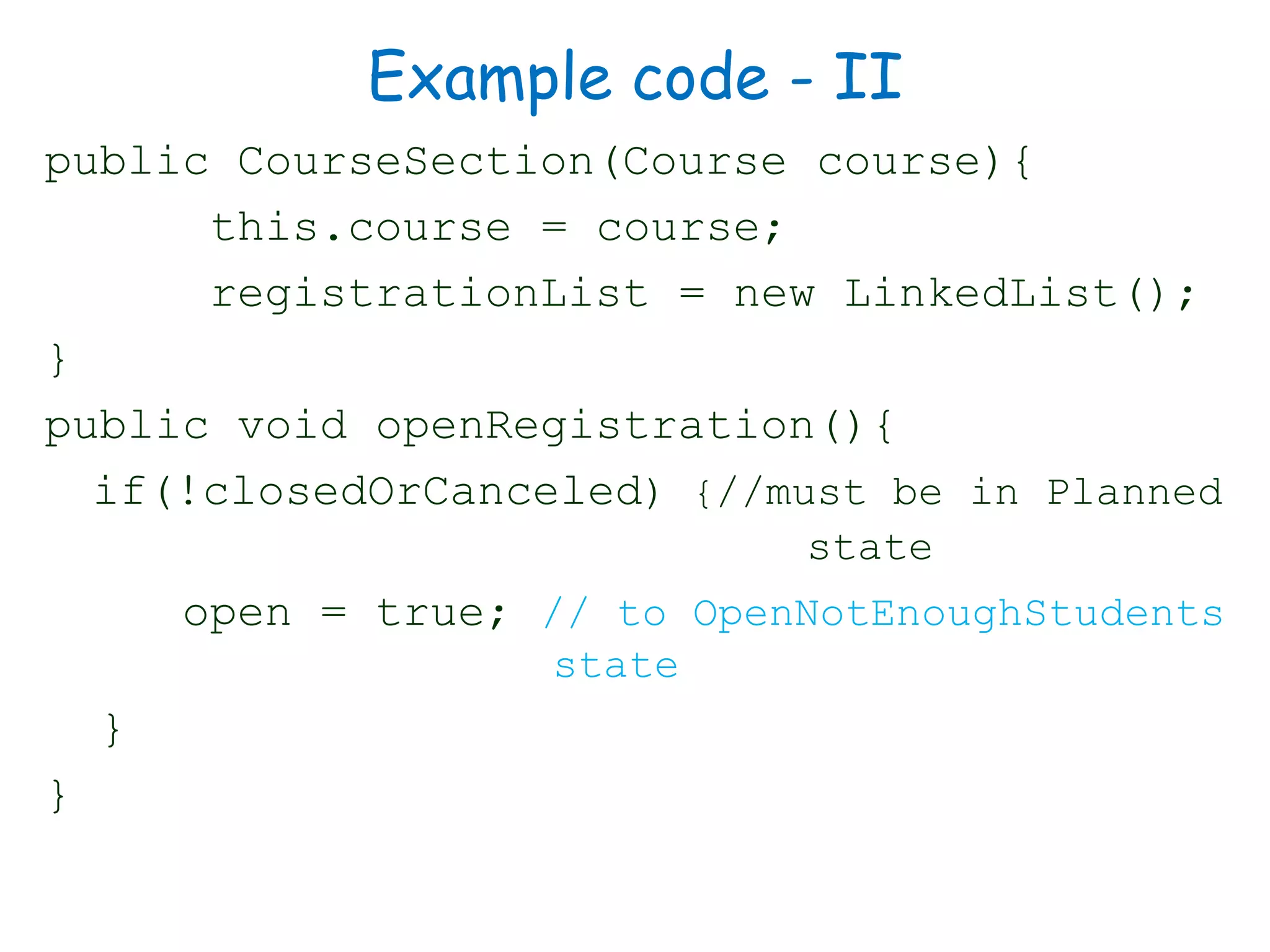
Example code - II
public CourseSection(Course course){
this.course = course;
registrationList = new LinkedList();
}
public void openRegistration(){
if(!closedOrCanceled) {//must be in Planned
state
open = true; // to OpenNotEnoughStudents
state
}
}
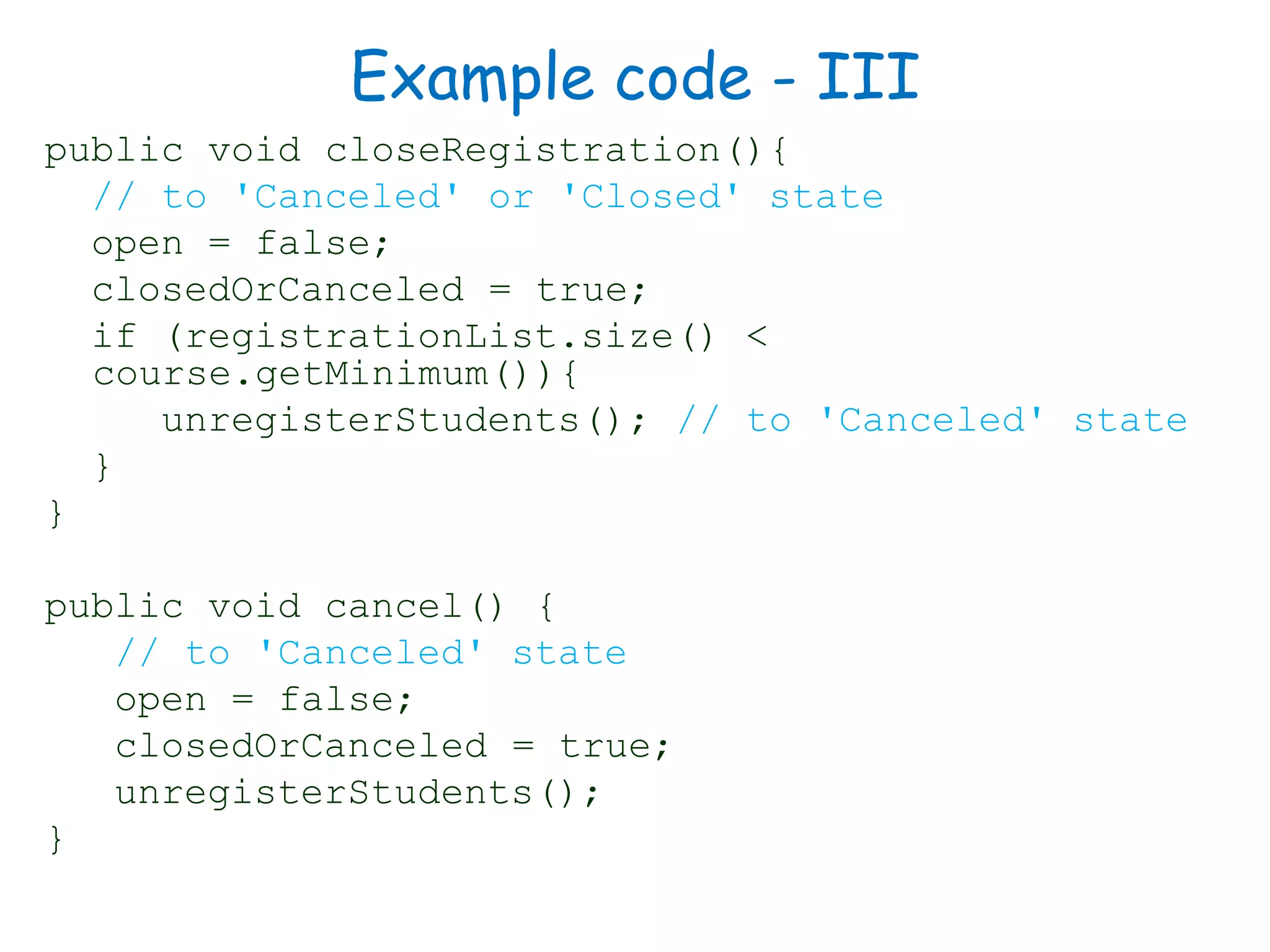
Example code - III
public void closeRegistration(){
// to 'Canceled' or 'Closed' state
open = false;
closedOrCanceled = true;
if (registrationList.size() <
course.getMinimum()){
unregisterStudents(); // to 'Canceled' state
}
}
public void cancel() {
// to 'Canceled' state
open = false;
closedOrCanceled = true;
unregisterStudents();
}
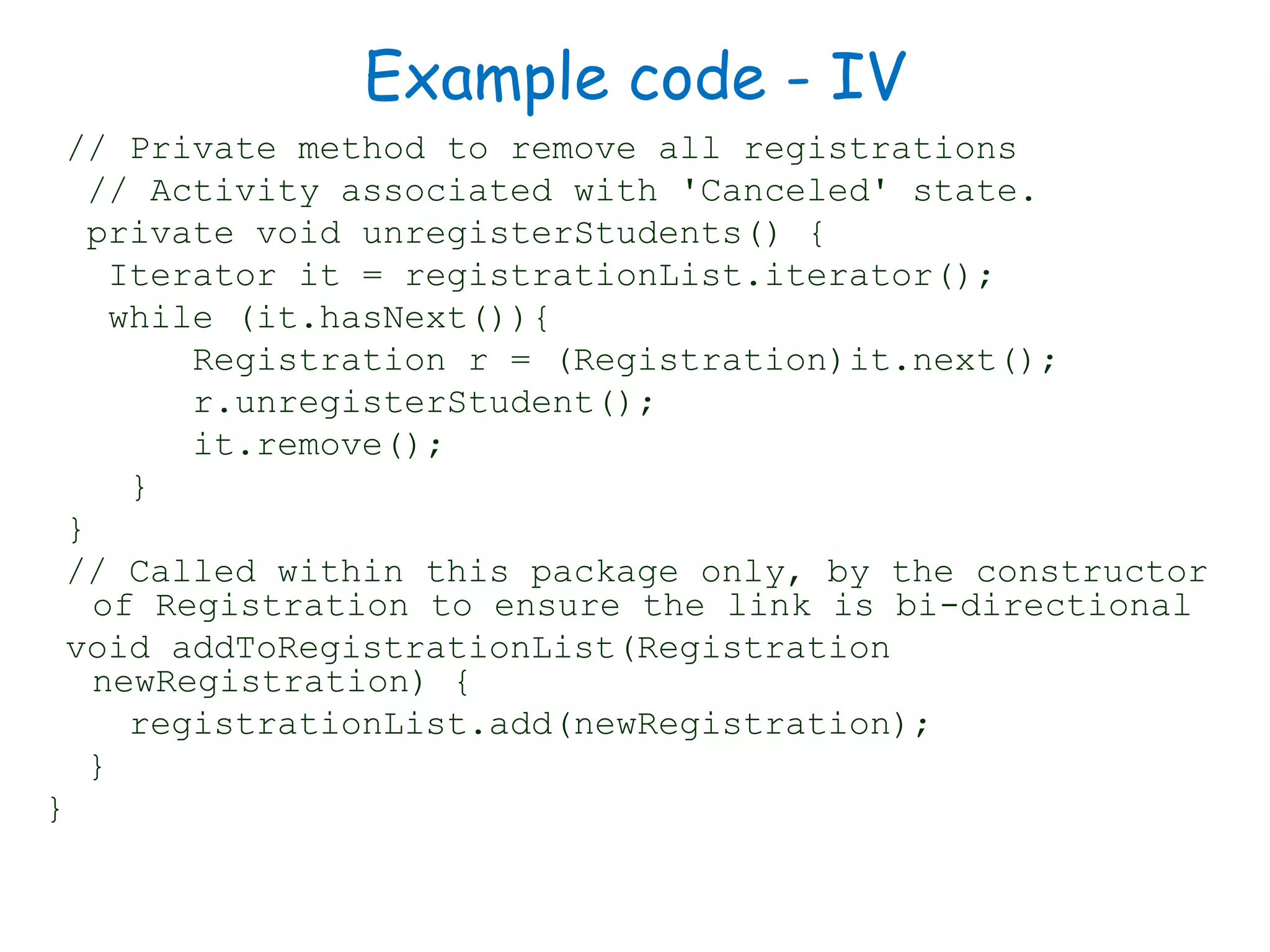
Example code - IV
// Private method to remove all registrations
// Activity associated with 'Canceled' state.
private void unregisterStudents() {
Iterator it = registrationList.iterator();
while (it.hasNext()){
Registration r = (Registration)it.next();
r.unregisterStudent();
it.remove();
}
}
// Called within this package only, by the constructor
of Registration to ensure the link is bi-directional
void addToRegistrationList(Registration
newRegistration) {
registrationList.add(newRegistration);
}
}
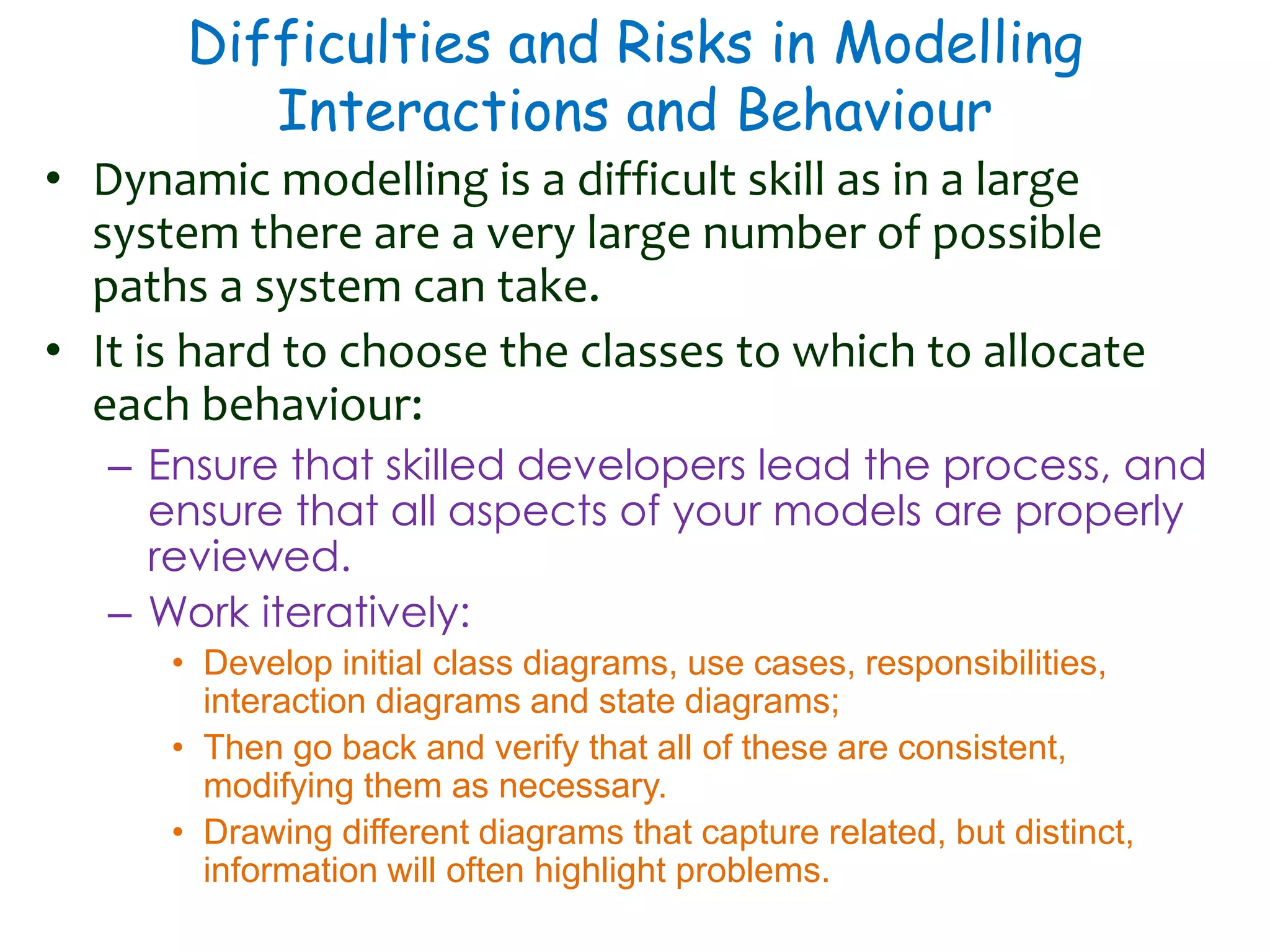
Difficulties and Risks in Modelling
Interactions and Behaviour
• Dynamic modelling is a difficult skill as in a large
system there are a very large number of possible
paths a system can take.
• It is hard to choose the classes to which to allocate
each behaviour:
– Ensure that skilled developers lead the process, and
ensure that all aspects of your models are properly
reviewed.
– Work iteratively:
• Develop initial class diagrams, use cases, responsibilities,
interaction diagrams and state diagrams;
• Then go back and verify that all of these are consistent,
modifying them as necessary.
• Drawing different diagrams that capture related, but distinct,
information will often highlight problems.
Thank You

Software Engineering :Behavioral Modelling - II State diagram

  • 1.
    Software Engineering Principles AjitK Nayak, Ph.D. ajitnayak@soauniversity.ac.in Behavioural Modelling - II
  • 2.
    Acknowledgements • Slides ofProf. Rajib Mall, IIT, KGP
  • 3.
    State Diagram • Astate diagram describes the behaviour of a system, some part of a system, or an individual object. – At any given point in time, the system or object is in a certain state. • Being in a state means that it is will behave in a specific way in response to any events that occur. • Some events will cause the system to change state. – In the new state, the system will behave in a different way to events. • A state diagram is a directed graph where the nodes are states and the arcs are transitions.
  • 4.
    Event, Condition • Event:something that happens at a point in time – Operator presses self-test button – The alarm goes off • Condition: something that has a duration – The fuel level is high – The alarm is on • State : an abstraction of the attributes and links of an object (or entire system) – The controller is in the state self-test after the self-test button has been pressed and the rest button is not yet pressed. – The tank is in the state too low when the fuel level has been below Ievel-low for alarm-threshold seconds
  • 5.
    State diagrams –an example • tic-tac-toe game (also called noughts and crosses)
  • 6.
    State & Transition •At any given point in time, the system is in one state. • It will remain in this state until an event occurs that causes it to change state. • A state is represented by a rounded rectangle containing the name of the state. • Special states: – A black circle represents the start state – A circle with a ring around it represents an end state • A transition represents a change of state in response to an event. – It is considered to occur instantaneously. • The label on each transition is the event that causes the change of state.
  • 7.
  • 8.
  • 9.
    Activities in statediagrams • An activity is something that takes place while the system is in a state. – It takes a period of time. – The system may take a transition out of the state in response to completion of the activity, – Some other outgoing transition may result in: • The interruption of the activity, and • An early exit from the state.
  • 10.
    Actions in statediagrams • An action is something that takes place effectively instantaneously – When a particular transition is taken, – Upon entry into a particular state, or – Upon exit from a particular state • An action should consume no noticeable amount of time
  • 11.
    Nested substates andguard conditions • A state diagram can be nested inside a state. – The states of the inner diagram are called substates.
  • 12.
    Activity Diagrams • Anactivity diagram is like a state diagram. – Except most transitions are caused by internal events, such as the completion of a computation. • An activity diagram – Can be used to understand the flow of work that an object or component performs. – Can also be used to visualize the interrelation and interaction between different use cases. – Is most often associated with several classes. • One of the strengths of activity diagrams is the representation of concurrent activities.
  • 13.
    Representing concurrency • Concurrencyis shown using forks, joins and rendezvous. – A fork has one incoming transition and multiple outgoing transitions. • The execution splits into two concurrent threads. • A rendezvous has multiple incoming and multiple outgoing transitions. • Once all the incoming transitions occur all the outgoing transitions may occur. – A join has multiple incoming transitions and one outgoing transition. • The outgoing transition will be taken when all incoming transitions have occurred. • The incoming transitions must be triggered in separate threads. • If one incoming transition occurs, a wait condition occurs at the join until the other transitions occur.
  • 14.
    Swimlanes • Activity diagramsare most often associated with several classes. • The partition of activities among the existing classes can be explicitly shown using swimlanes.
  • 15.
    Implementing Classes Basedon Interaction and State Diagrams • You should use these diagrams for the parts of your system that you find most complex. – i.e. not for every class • Interaction, activity and state diagrams help you create a correct implementation. • This is particularly true when behaviour is distributed across several use cases. – E.g. a state diagram is useful when different conditions cause instances to respond differently to the same event.
  • 16.
  • 17.
  • 18.
    Example: States ofthe CourseSection class • Planned – closedOrCancelled == false && open == false • Cancelled – closedOrCancelled == true && registrationList.size() == 0 • Closed (course section is too full, or being taught) – closedOrCancelled == true && registrationList.size() > 0 • Open (accepting registrations) – open == true • NotEnoughStudents (substate of ‘Open’) – open == true && registrationList.size() < course.getMinimum() • EnoughStudents (substate of ‘Open’) – open == true && registrationList.size() >= course.getMinimum()
  • 19.
    Example code -I public class CourseSection { // The many-1 association private Course course; // The 1-many association to class Registration private List registrationList; // The following are present only to determine the state, the initial state is Planned private boolean open = false; private boolean closedOrCanceled = false; . . . }
  • 20.
    Example code -II public CourseSection(Course course){ this.course = course; registrationList = new LinkedList(); } public void openRegistration(){ if(!closedOrCanceled) {//must be in Planned state open = true; // to OpenNotEnoughStudents state } }
  • 21.
    Example code -III public void closeRegistration(){ // to 'Canceled' or 'Closed' state open = false; closedOrCanceled = true; if (registrationList.size() < course.getMinimum()){ unregisterStudents(); // to 'Canceled' state } } public void cancel() { // to 'Canceled' state open = false; closedOrCanceled = true; unregisterStudents(); }
  • 22.
    Example code -IV // Private method to remove all registrations // Activity associated with 'Canceled' state. private void unregisterStudents() { Iterator it = registrationList.iterator(); while (it.hasNext()){ Registration r = (Registration)it.next(); r.unregisterStudent(); it.remove(); } } // Called within this package only, by the constructor of Registration to ensure the link is bi-directional void addToRegistrationList(Registration newRegistration) { registrationList.add(newRegistration); } }
  • 23.
    Difficulties and Risksin Modelling Interactions and Behaviour • Dynamic modelling is a difficult skill as in a large system there are a very large number of possible paths a system can take. • It is hard to choose the classes to which to allocate each behaviour: – Ensure that skilled developers lead the process, and ensure that all aspects of your models are properly reviewed. – Work iteratively: • Develop initial class diagrams, use cases, responsibilities, interaction diagrams and state diagrams; • Then go back and verify that all of these are consistent, modifying them as necessary. • Drawing different diagrams that capture related, but distinct, information will often highlight problems.
  • 24.