Introduction to Databases
Relational Database Design
Formal Relational Query Language and
Relational Calculus
Ajit K Nayak, Ph.D.
Siksha O Anusandhan University
AKN/IDBIII.2Introduction to databases
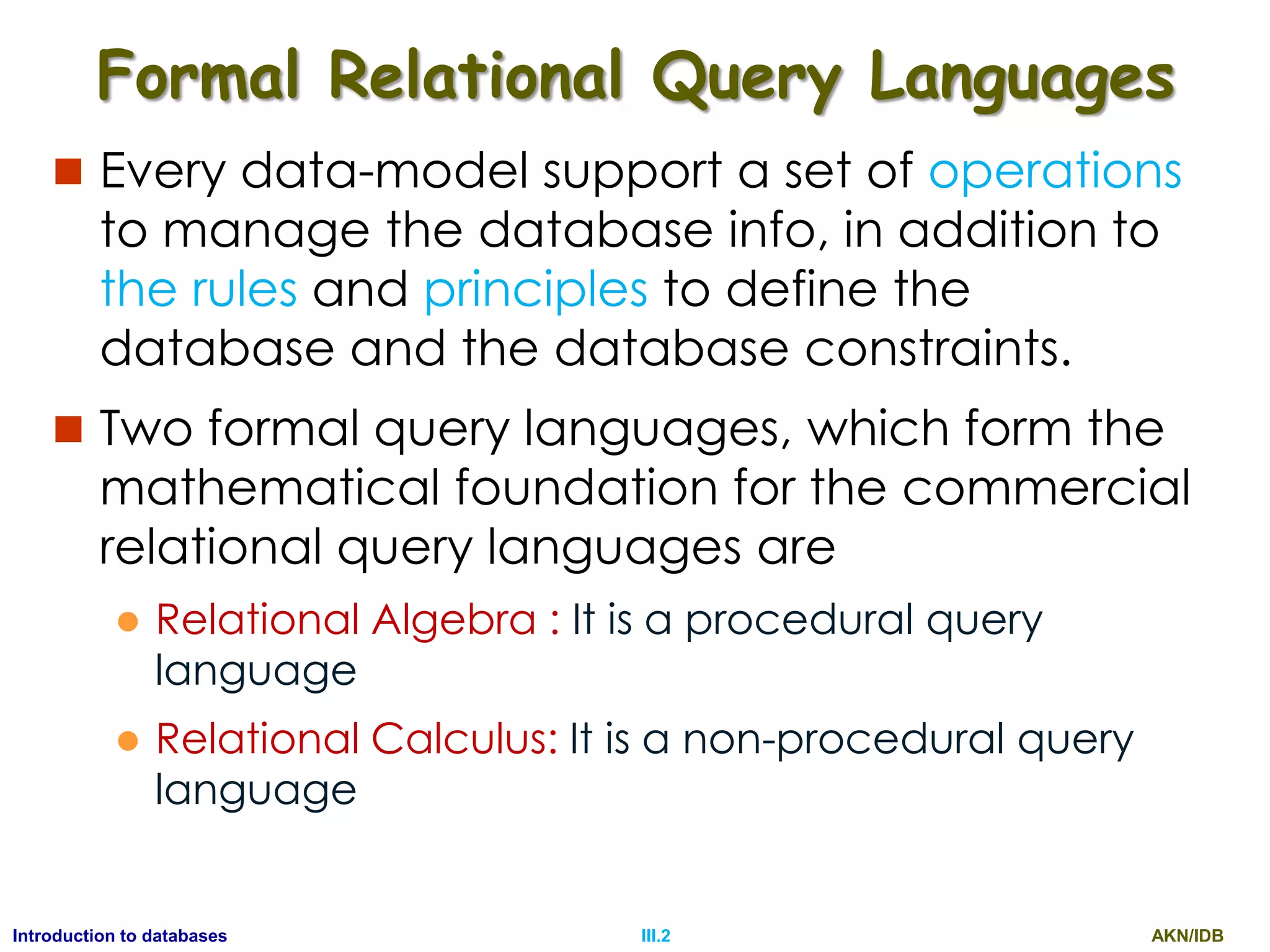
Formal Relational Query Languages
 Every data-model support a set of operations
to manage the database info, in addition to
the rules and principles to define the
database and the database constraints.
 Two formal query languages, which form the
mathematical foundation for the commercial
relational query languages are
 Relational Algebra : It is a procedural query
language
 Relational Calculus: It is a non-procedural query
language
AKN/IDBIII.3Introduction to databases
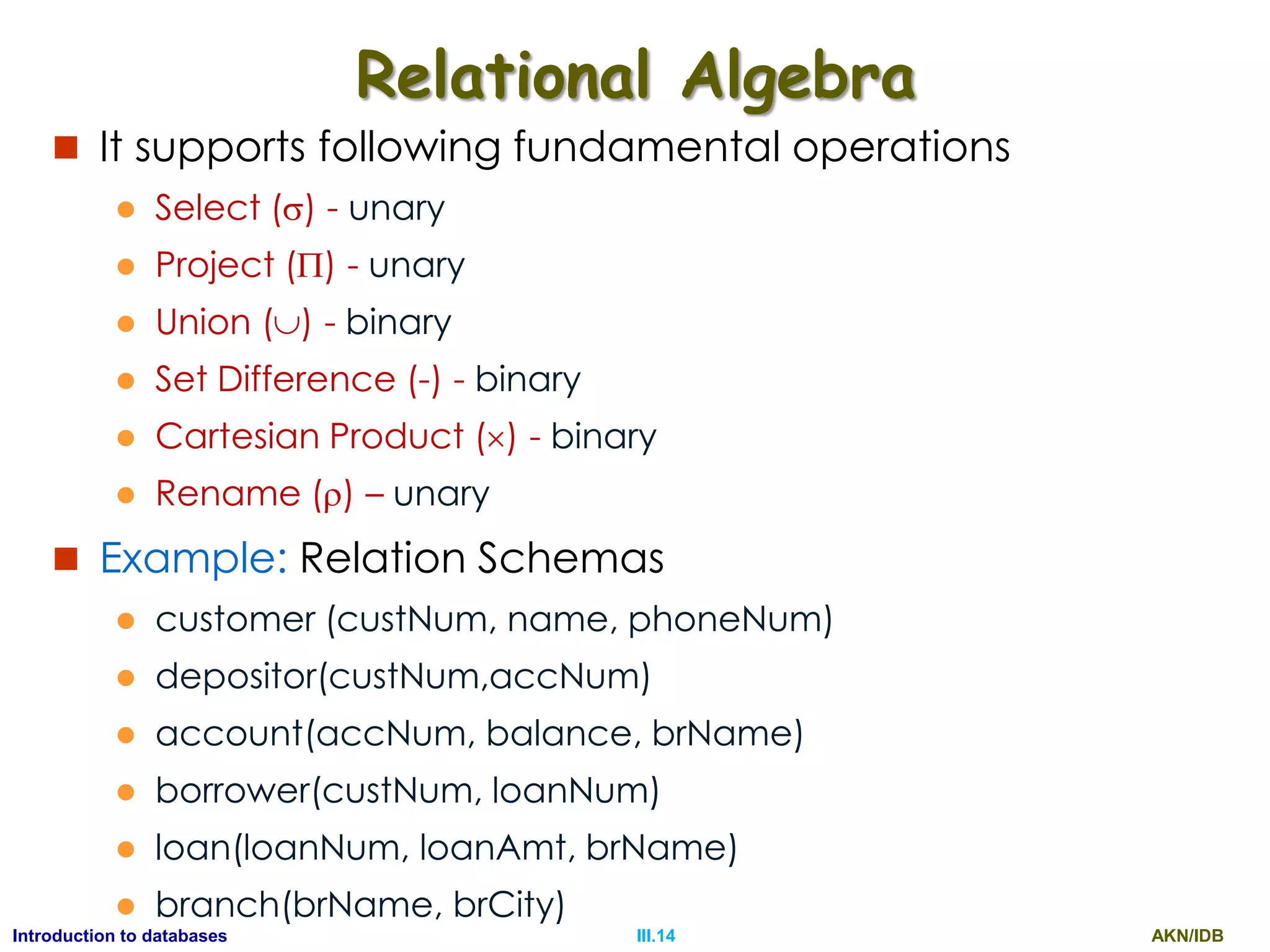
Relational Algebra
 It supports following fundamental operations
 Select () - unary
 Project () - unary
 Union () - binary
 Set Difference (-) - binary
 Cartesian Product () - binary
 Rename () - unary
AKN/IDBIII.4Introduction to databases
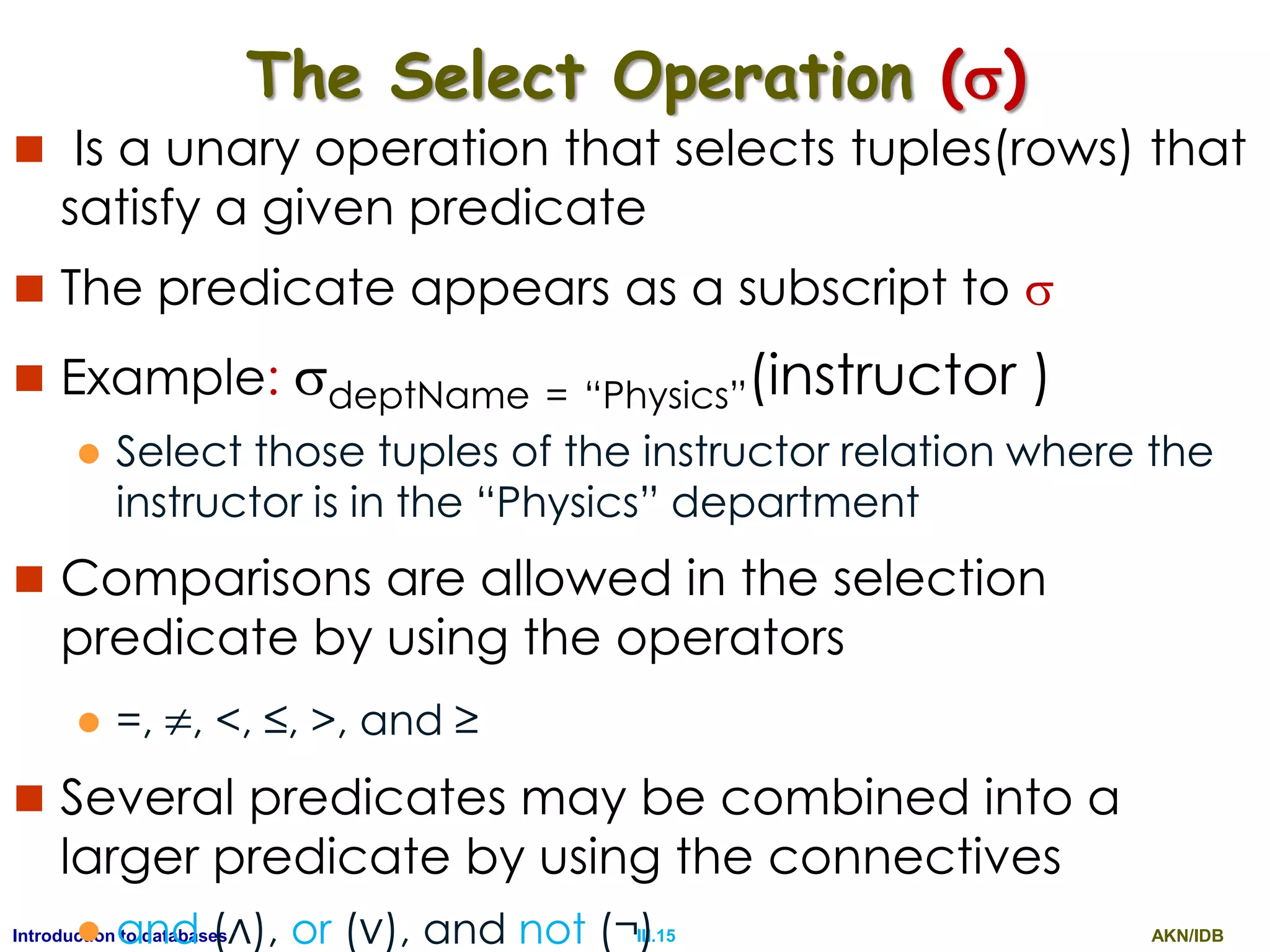
The Select Operation ()
 Is a unary operation that selects tuples(rows) that
satisfy a given predicate
 The predicate appears as a subscript to 
 Example: deptName = “Physics”(instructor )
 Select those tuples of the instructor relation where the
instructor is in the “Physics” department
 Comparisons are allowed in the selection
predicate by using the operators
 =, , <, ≤, >, and ≥
 Several predicates may be combined into a
larger predicate by using the connectives
 and (∧), or (∨), and not (¬)
AKN/IDBIII.5Introduction to databases
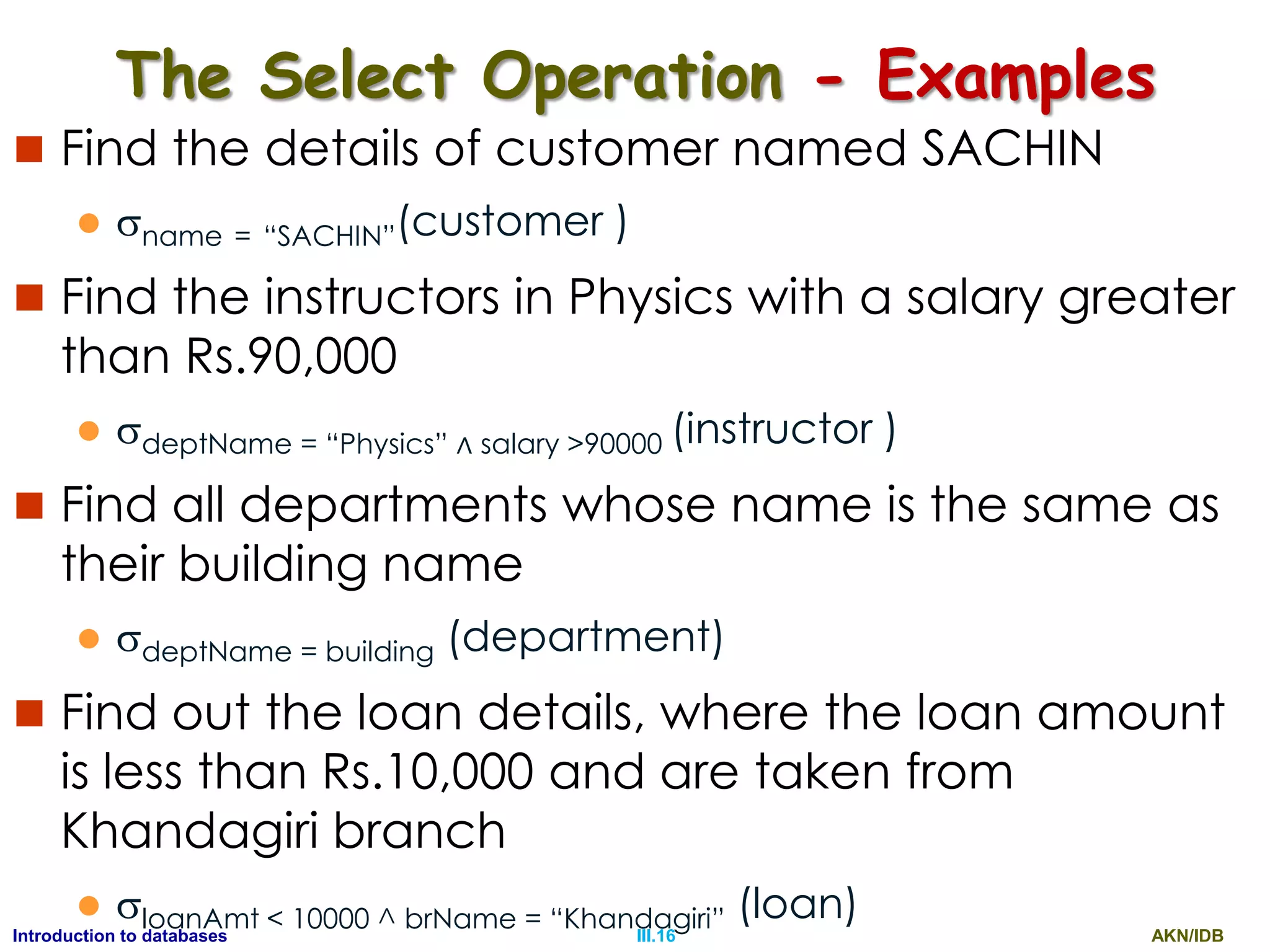
The Select Operation - Examples
 Find the details of customer named SACHIN
 name = “SACHIN”(customer )
 Find the instructors in Physics with a salary greater
than Rs.90,000
 deptName = “Physics” ∧ salary >90000 (instructor )
 Find all departments whose name is the same as
their building name
 deptName = building (department)
 Find out the loan details, where the loan amount
is less than Rs.10,000 and are taken from
Khandagiri branch
 loanAmt < 10000 ^ brName = “Khandagiri” (loan)
AKN/IDBIII.6Introduction to databases
The Project Operation ()
 Is a unary operation that selects one or more
distinct attributes (cols) from a relation
 The predicate appears as a subscript to 
 Example: id, name, salary(instructor )
 finds three (id, name, salary) columns from all the
tuples of the instructor relation.
 Find out the loan number and their loan
amount from all loans
 loanNum, loanAmt(loan)
AKN/IDBIII.7Introduction to databases
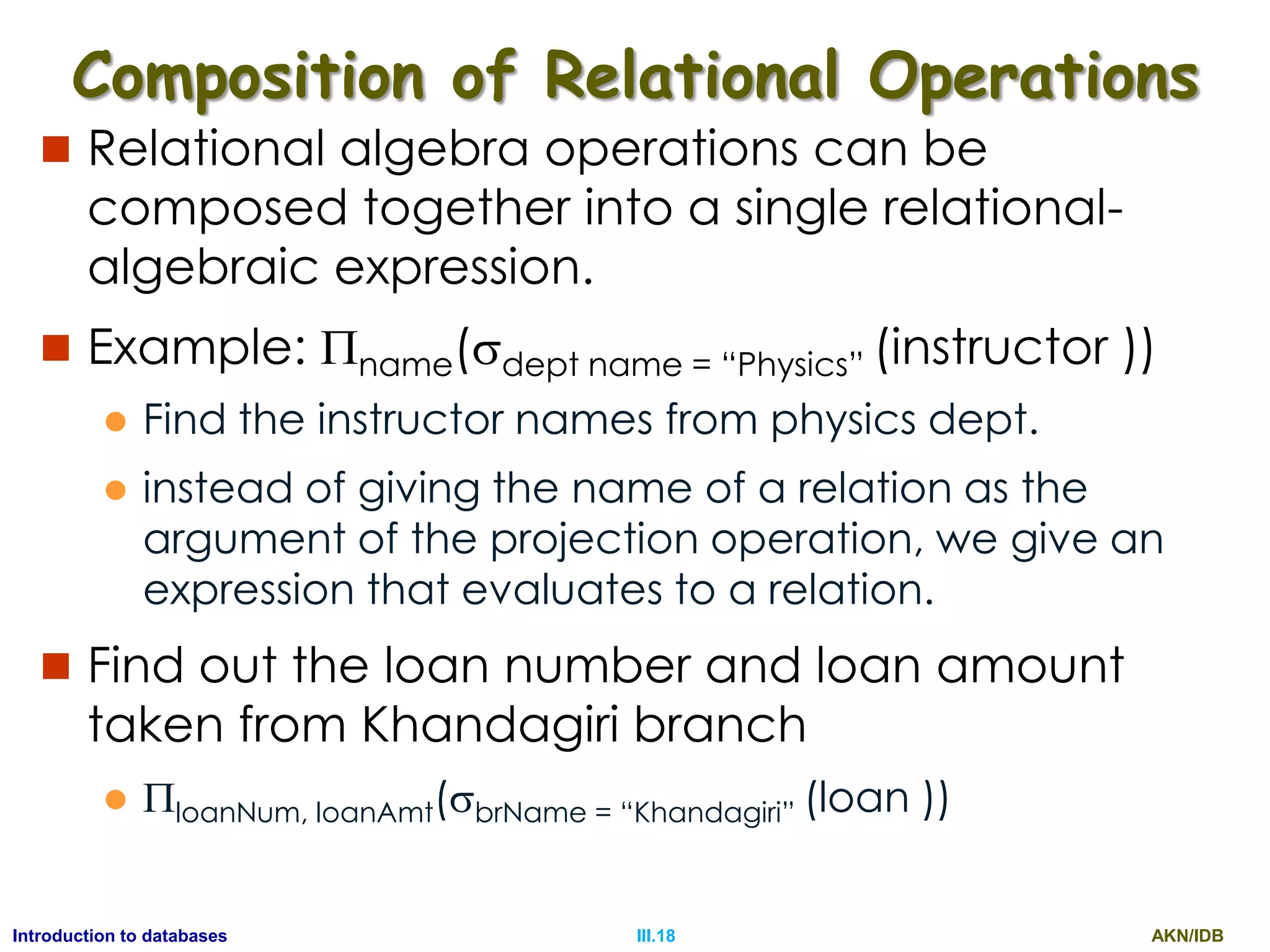
Composition of Relational Operations
 Relational algebra operations can be
composed together into a single relational-
algebraic expression.
 Example: name(dept name = “Physics” (instructor ))
 Find the instructor names from physics dept.
 instead of giving the name of a relation as the
argument of the projection operation, we give an
expression that evaluates to a relation.
 Find out the loan number and loan amount
taken from Khandagiri branch
 phoneNum(brName = “Khandagiri” (loan ))
AKN/IDBIII.8Introduction to databases
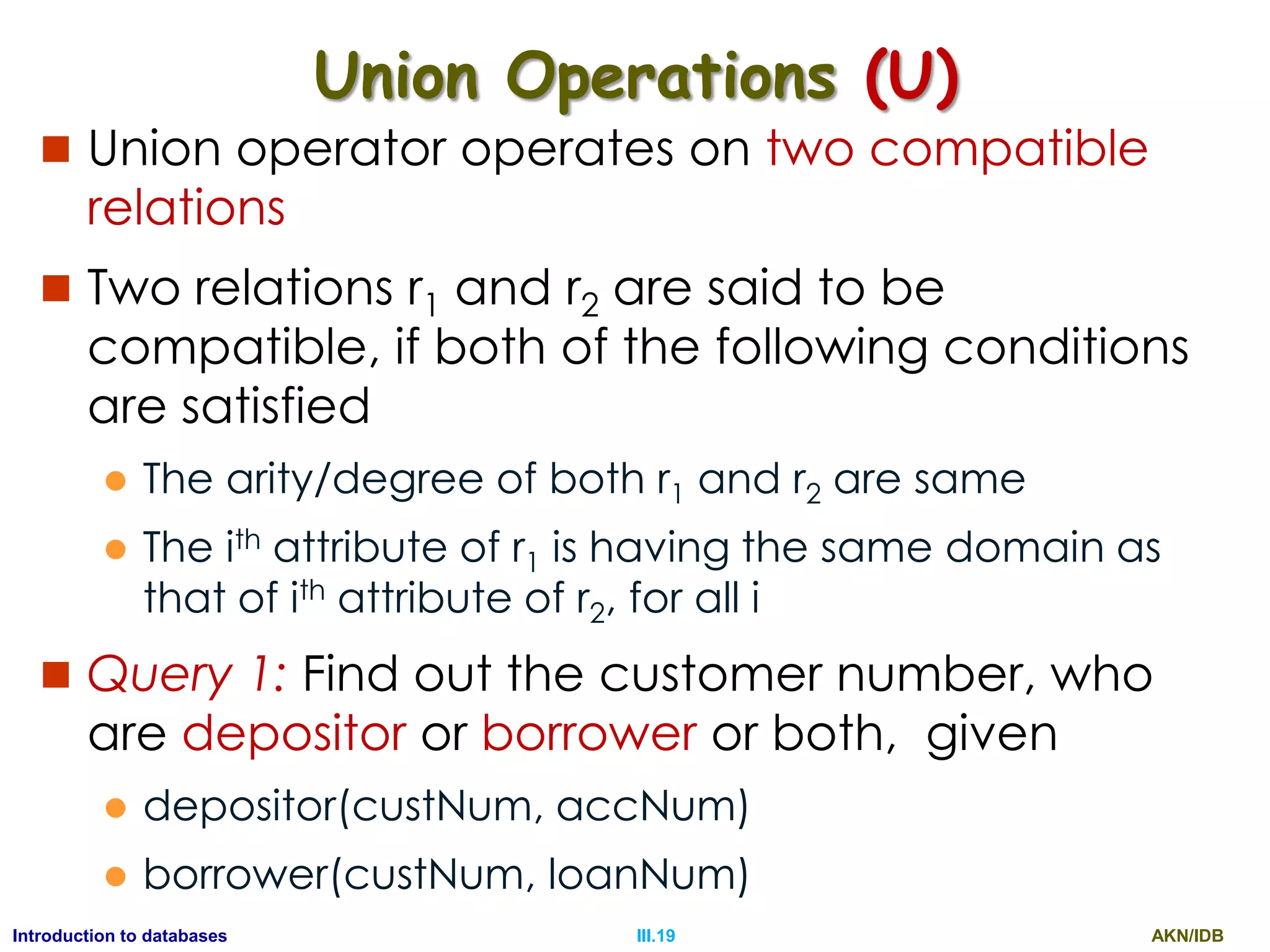
Union Operations (U)
 Union operator operates on two compatible
relations
 Two relations r1 and r2 are said to be
compatible, if both of the following conditions
are satisfied
 The arity/degree of both r1 and r2 are same
 The ith attribute of r1 is having the same domain as
that of ith attribute of r2, for all I
 Query 1: Find out the customer number, who
are depositor or borrower or both, given
 depositor(custNum, accNum)
 borrower(custNum, loanNum)
AKN/IDBIII.9Introduction to databases
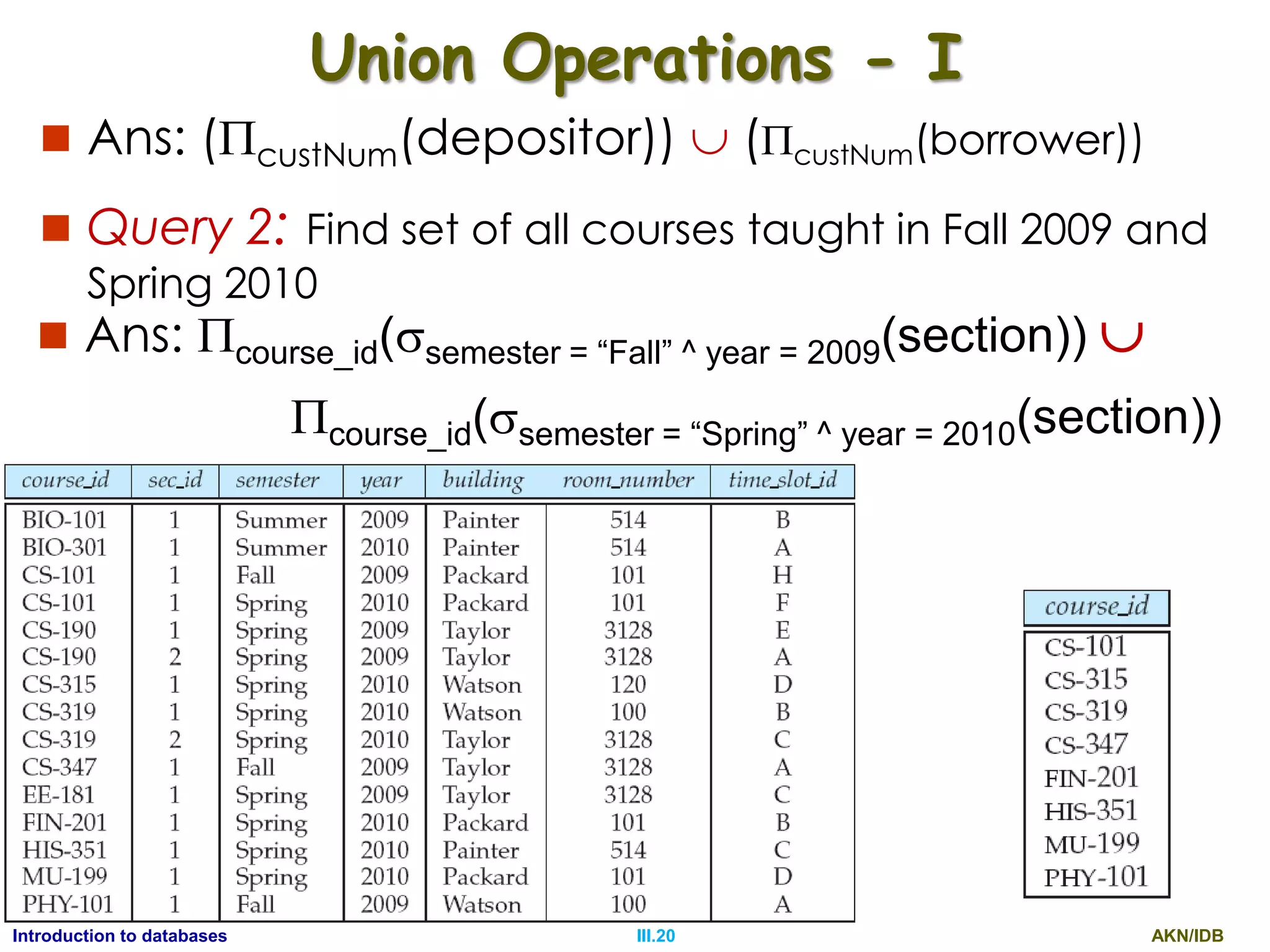
Union Operations - I
 Ans: (custNum(depositor))  (custNum(borrower))
 Query 2: Find set of all courses taught in Fall 2009 and
Spring 2010
 Ans: course_id(semester = “Fall” ^ year = 2009(section)) 
course_id(semester = “Spring” ^ year = 2010(section))
AKN/IDBIII.10Introduction to databases
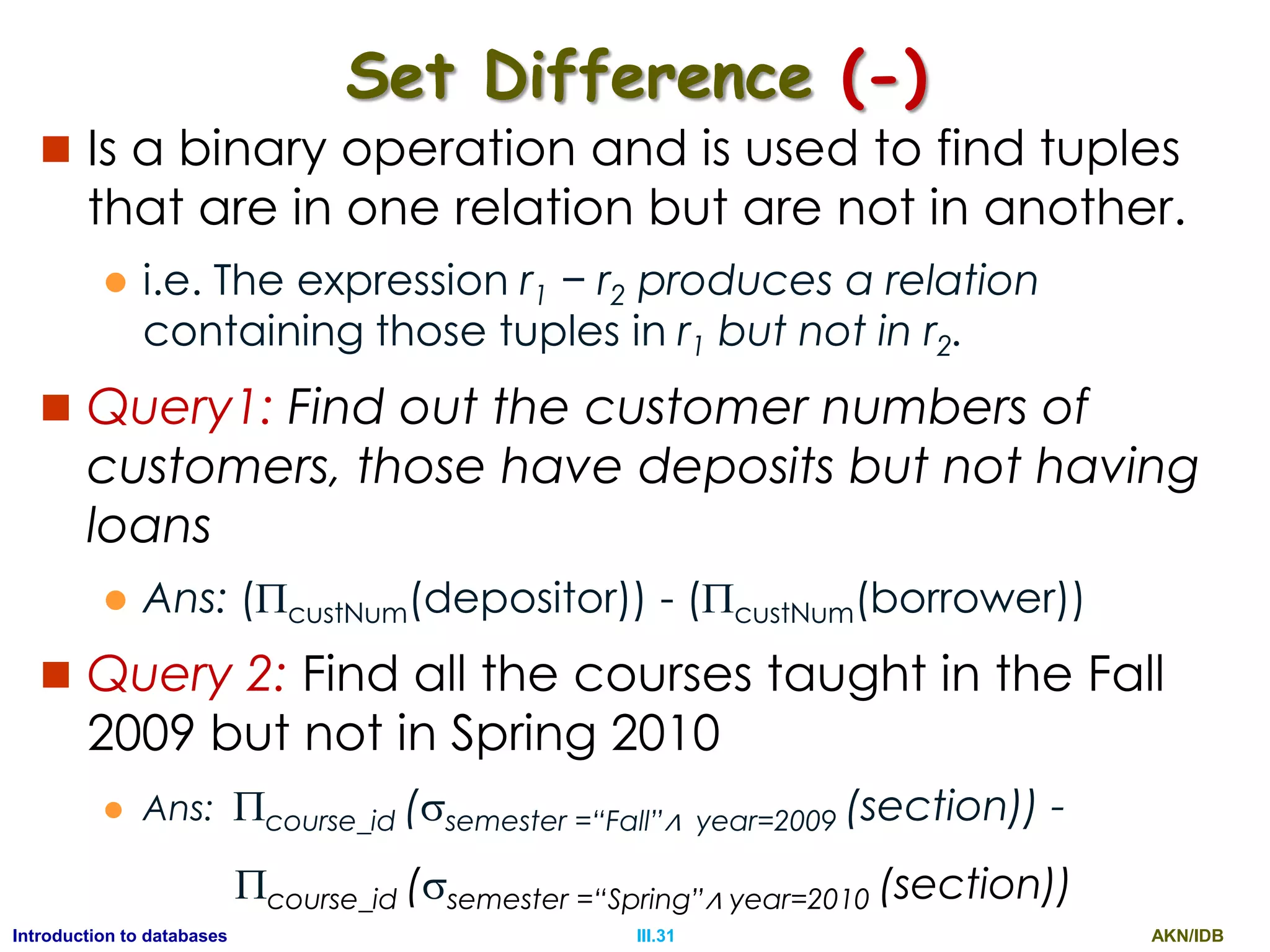
Set Difference (-)
 Is a binary operation and is used to find tuples
that are in one relation but are not in another.
 i.e. The expression r1 − r2 produces a relation
containing those tuples in r1 but not in r2.
 Query1: Find out the customer numbers of
customers, those have deposits but not having
loans
 Ans: (custNum(depositor)) - (custNum(borrower))
 Query 2: Find all the courses taught in the Fall
2009 but not in Spring 2010
 Ans: course_id (semester =“Fall”∧ year=2009 (section)) -
course_id (semester =“Spring”∧ year=2010 (section))
AKN/IDBIII.11Introduction to databases
Cartesian Product ()
 Allows us to combine information from any two
relations. Cartesian product of relations r1 and r2
are represented as r1× r2.
r1
A B
a1 b1
a2 b2
r2
B C D
b1 c1 d1
b2 c2 d2
b3 c3 d3
r
A r1.B r2.B C D
a1 b1 b1 c1 d1
a1 b1 b2 c2 d2
a1 b1 b3 c3 d3
a2 b2 b1 c1 d1
a2 b2 b2 c2 d2
a2 b2 b3 c3 d3
 =
AKN/IDBIII.12Introduction to databases
Cartesian Product () -I
 r1.B = r2.B(r1r2)) R(A, r1.B,r2.B,C,D)
A r1.B r2.B C D
a1 b1 b1 c1 d1
a2 b2 b2 c2 d2
 Query1: Find the customers
having balance > Rs. 5000
 Ans: depositor.accNum = account.accNum (balance>5000
(depositoraccount)))
 Query2: Find the loan amount of the loans,
which are taken from different branches
located in the city Bhubaneswar
 Ans:  loanNum,loanAmt(loan.brName=branch.brName
( brCity = “Bhubaneswar” (loanbranch)))
AKN/IDBIII.13Introduction to databases
Formal Relational Query Languages
 Every data-model support a set of operations
to manage the database info, in addition to
the rules and principles to define the
database and the database constraints.
 Two formal query languages, which form the
mathematical foundation for the commercial
relational query languages are
 Relational Algebra : It is a procedural query
language
 Relational Calculus: It is a non-procedural query
language
AKN/IDBIII.14Introduction to databases
Relational Algebra
 It supports following fundamental operations
 Select () - unary
 Project () - unary
 Union () - binary
 Set Difference (-) - binary
 Cartesian Product () - binary
 Rename () – unary
 Example: Relation Schemas
 customer (custNum, name, phoneNum)
 depositor(custNum,accNum)
 account(accNum, balance, brName)
 borrower(custNum, loanNum)
 loan(loanNum, loanAmt, brName)
 branch(brName, brCity)
AKN/IDBIII.15Introduction to databases
The Select Operation ()
 Is a unary operation that selects tuples(rows) that
satisfy a given predicate
 The predicate appears as a subscript to 
 Example: deptName = “Physics”(instructor )
 Select those tuples of the instructor relation where the
instructor is in the “Physics” department
 Comparisons are allowed in the selection
predicate by using the operators
 =, , <, ≤, >, and ≥
 Several predicates may be combined into a
larger predicate by using the connectives
 and (∧), or (∨), and not (¬)
AKN/IDBIII.16Introduction to databases
The Select Operation - Examples
 Find the details of customer named SACHIN
 name = “SACHIN”(customer )
 Find the instructors in Physics with a salary greater
than Rs.90,000
 deptName = “Physics” ∧ salary >90000 (instructor )
 Find all departments whose name is the same as
their building name
 deptName = building (department)
 Find out the loan details, where the loan amount
is less than Rs.10,000 and are taken from
Khandagiri branch
 loanAmt < 10000 ^ brName = “Khandagiri” (loan)
AKN/IDBIII.17Introduction to databases
The Project Operation ()
 Is a unary operation that selects one or more
distinct attributes (cols) from a relation
 The predicate appears as a subscript to 
 Example: id, name, salary(instructor )
 finds three (id, name, salary) columns from all the
tuples of the instructor relation.
 Find out the loan number and their loan
amount from all loans
 loanNum, loanAmt(loan)
AKN/IDBIII.18Introduction to databases
Composition of Relational Operations
 Relational algebra operations can be
composed together into a single relational-
algebraic expression.
 Example: name(dept name = “Physics” (instructor ))
 Find the instructor names from physics dept.
 instead of giving the name of a relation as the
argument of the projection operation, we give an
expression that evaluates to a relation.
 Find out the loan number and loan amount
taken from Khandagiri branch
 loanNum, loanAmt(brName = “Khandagiri” (loan ))
AKN/IDBIII.19Introduction to databases
Union Operations (U)
 Union operator operates on two compatible
relations
 Two relations r1 and r2 are said to be
compatible, if both of the following conditions
are satisfied
 The arity/degree of both r1 and r2 are same
 The ith attribute of r1 is having the same domain as
that of ith attribute of r2, for all i
 Query 1: Find out the customer number, who
are depositor or borrower or both, given
 depositor(custNum, accNum)
 borrower(custNum, loanNum)
AKN/IDBIII.20Introduction to databases
Union Operations - I
 Ans: (custNum(depositor))  (custNum(borrower))
 Query 2: Find set of all courses taught in Fall 2009 and
Spring 2010
 Ans: course_id(semester = “Fall” ^ year = 2009(section)) 
course_id(semester = “Spring” ^ year = 2010(section))
AKN/IDBIII.21Introduction to databases
SELECT
 Query 1: Find the customer details having
name „SACHIN‟
 ANS: {t|t customer ^ t[name] = “SACHIN”}
 Query 2: Find account details with
balance > Rs. 50,000 of Khandagiri branch
 Ans: {t|t account ^ t[balance] > 50000 ^
t[brName]=“Khandagiri”}
AKN/IDBIII.22Introduction to databases
PROJECT
 Example: Find the instructors IDs of all instructors
having salary greater than Rs.80,000
 {t |∃ s ∈ instructor (t[ID] = s[ID] ∧ s[salary] > 80000)}
 The set of all tuples t such that there exists a tuple s in relation
instructor for which the values of t and s for the ID attribute are
equal, and the value of s for the salary attribute is greater than
80,000.”
 Query 1: Find out the name & phoneNum of customers.
 Ans: {t |∃ s ∈ customer (t[name] = s[name]
∧ t[phoneNum] = s[phoneNum] }
 Query 2: Find out Sachin‟s customer no & phoneNum.
 Ans: {t |∃ s ∈ customer (t[custNum] = s[custNum]
∧ t[phoneNum] = s[phoneNum]
∧ s[name] = “Sachin” }
AKN/IDBIII.23Introduction to databases
PROJECTION
 Example: Find the instructors IDs of all instructors
having salary greater than Rs.80,000:
 {t |∃ s ∈ instructor (t[ID] = s[ID] ∧ s[salary] > 80000)}
 The set of all tuples t such that there exists a tuple s in relation
instructor for which the values of t and s for the ID attribute are
equal, and the value of s for the salary attribute is greater than
80,000.”
 Query 1: Find out the name & phoneNum of customers.
 Ans: {t |∃ s ∈ customer (t[name] = s[name]
∧ t[phoneNum] = s[phoneNum] }
 Query 2: Find out Sachin‟s customer no & phoneNum.
 Ans: {t |∃ s ∈ customer (t[custNum] = s[custNum]
∧ t[phoneNum] = s[phoneNum]
∧ s[name] = “Sachin” }
AKN/IDBIII.24Introduction to databases
Join
 Query 4: Find out the account number of Sachin
 Ans: {t |∃ s ∈ depositor (t[accNum] = s[accNum]
∧ ∃ u ∈ customer (s[custNum] = u[custNum]
∧ u[name] = “Sachin” }
 Query 5: Find out the customer number of all customer
taken loans from different branches of Bhubaneswar city
 Ans: {t |∃ s ∈ borrower (t[custNum] = s[custNum]
∧ ∃ u ∈ loan (s[loanNum] = u[loanNum]
∧ ∃ v ∈ branch (s[brName] = v[brName]
∧ v[brCity] = “Bhubaneswar” }
 Query 6: Find the names of all instructors whose
department is in the Watson building.
 Query 7: find the set of all courses taught in the Fall 2009
semester, the Spring 2010 semester, or both.
AKN/IDBIII.25Introduction to databases
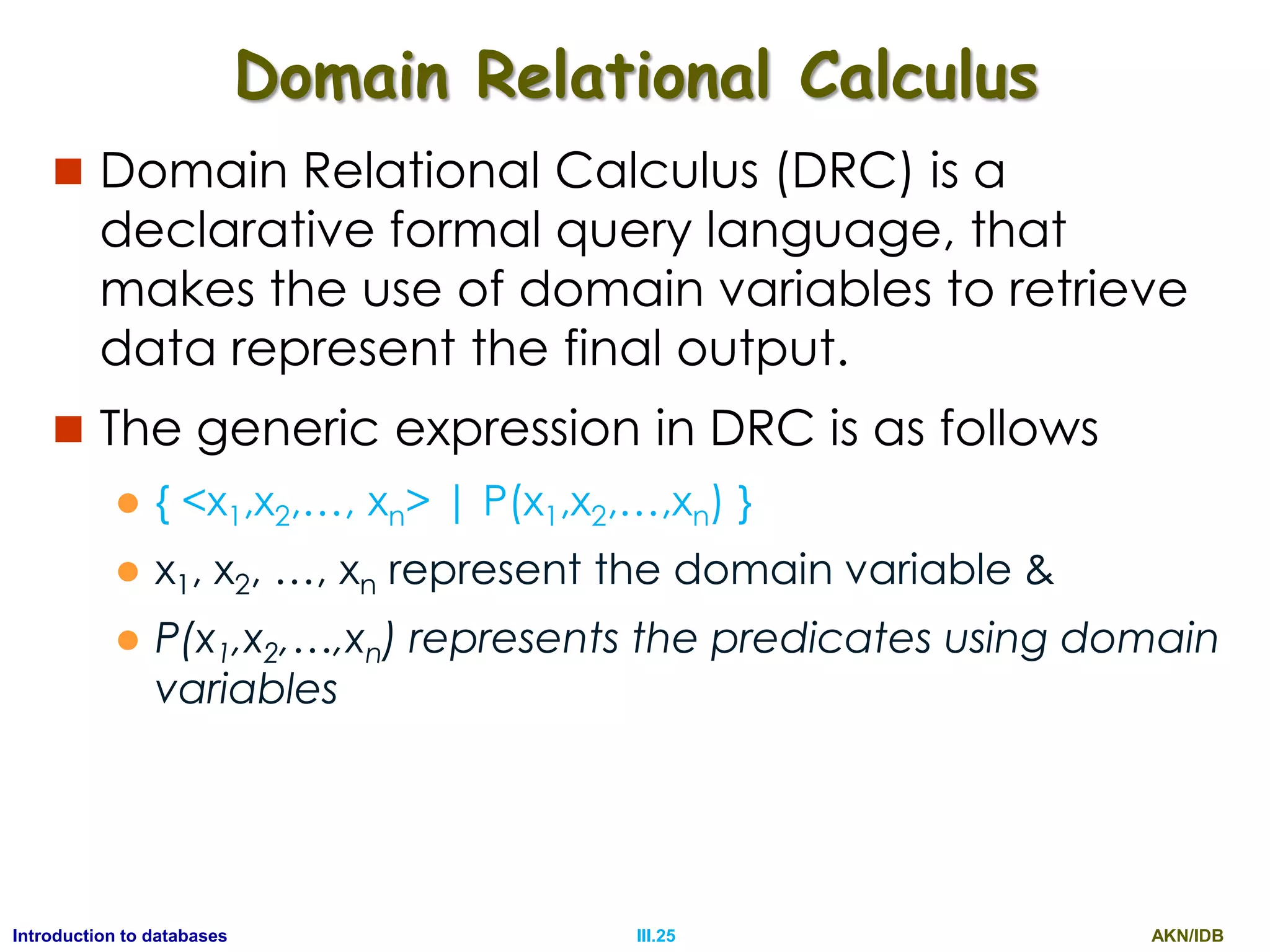
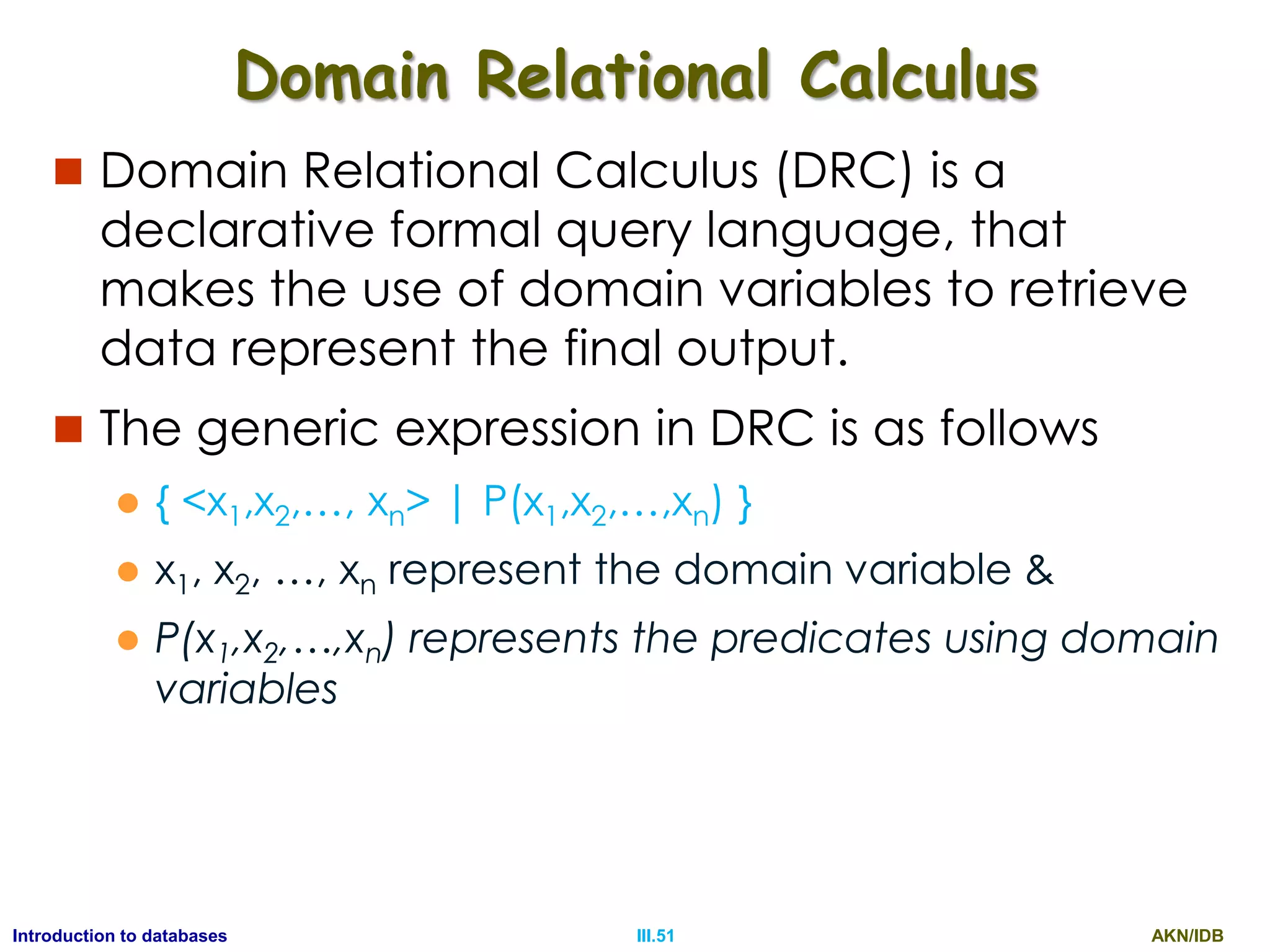
Domain Relational Calculus
 Domain Relational Calculus (DRC) is a
declarative formal query language, that
makes the use of domain variables to retrieve
data represent the final output.
 The generic expression in DRC is as follows
 { <x1,x2,…, xn> | P(x1,x2,…,xn) }
 x1, x2, …, xn represent the domain variable &
 P(x1,x2,…,xn) represents the predicates using domain
variables
AKN/IDBIII.26Introduction to databases
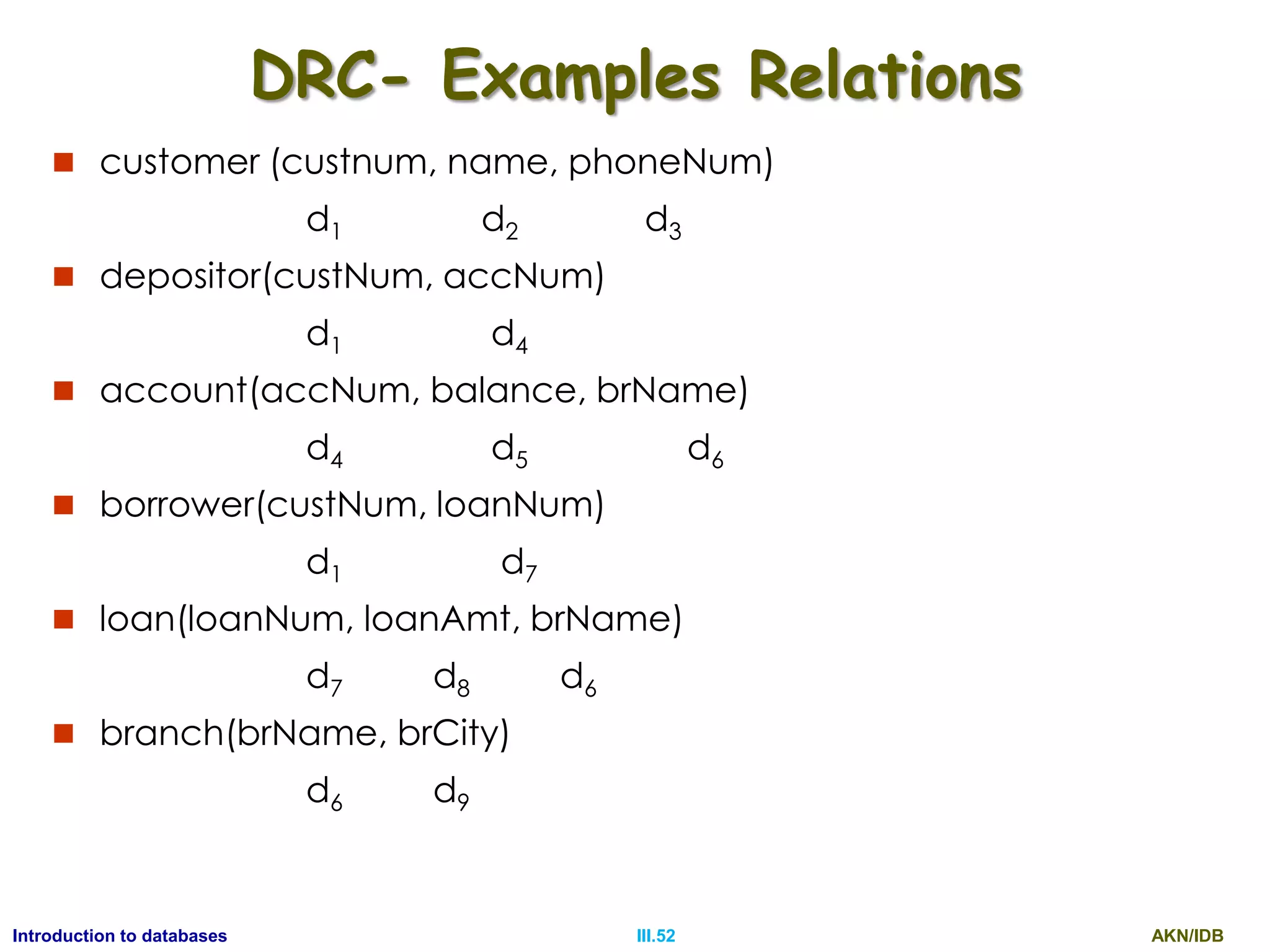
DRC- Examples Relations
 customer (custnum, name, phoneNum)
d1 d2 d3
 depositor(custNum, accNum)
d1 d4
 account(accNum, balance, brName)
d4 d5 d6
 borrower(custNum, loanNum)
d1 d7
 loan(loanNum, loanAmt, brName)
d7 d8 d6
 branch(brName, brCity)
d6 d9
AKN/IDBIII.27Introduction to databases
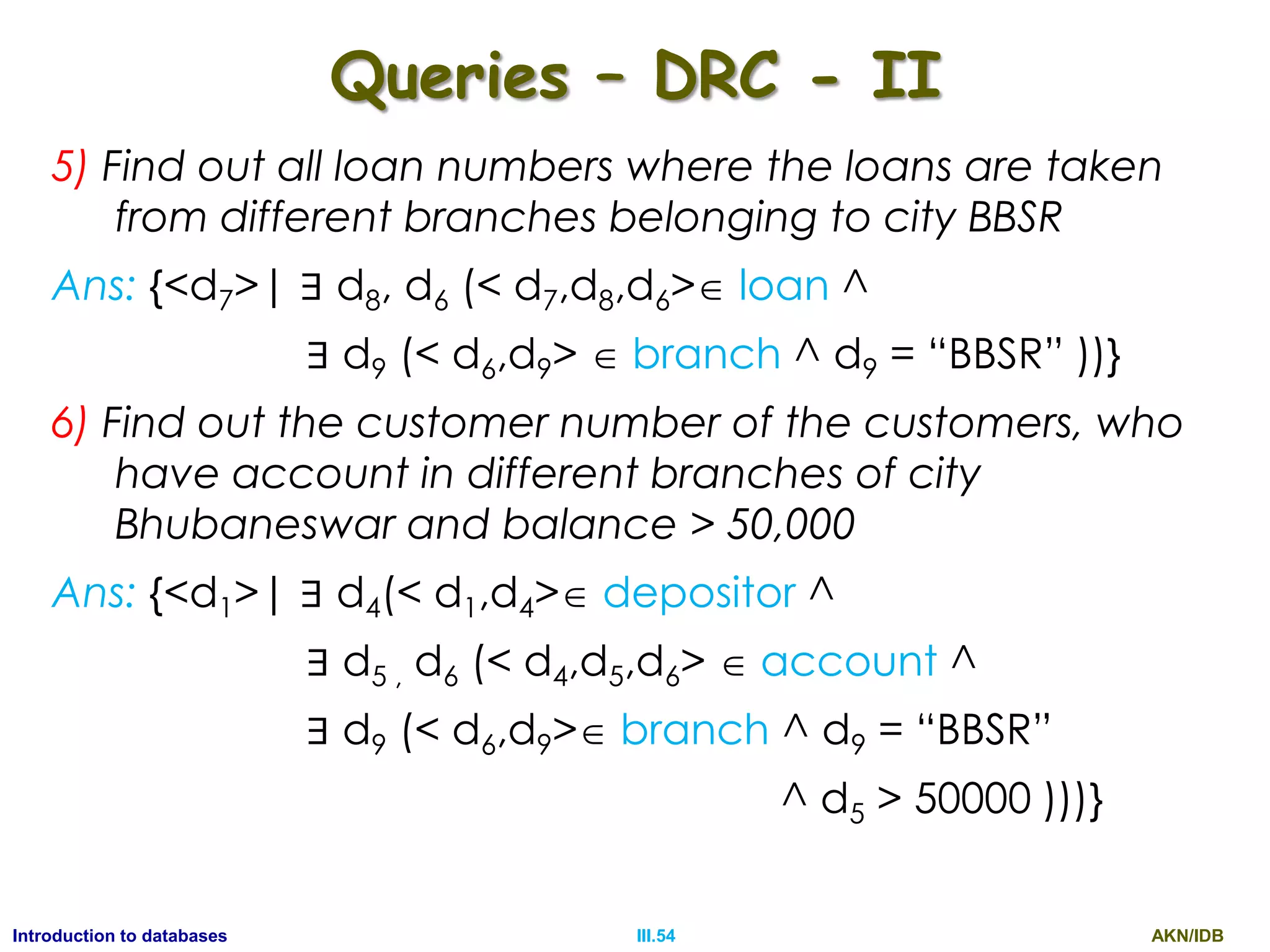
Queries – DRC - I
1) Find out the details of all customers from bank
Ans: {<d1, d2, d3>|<d1,d2,d3> customer}
2) Find out the details of a customer named Sachin
Ans: {<d1, d2, d3>|<d1,d2,d3> customer ^ d2 = “Sachin”}
3) Find out the phone Number of customer named
Sachin
Ans: {<d3>| ∃ d1, d2 (< d1,d2,d3> customer d2 =
“Sachin”)}
4) Find out the account number and branch name for
the accounts having balance more than 50000 and
less than 1,00,000
Ans: {<d4 , d6 >| ∃ d5, d2 (< d4,d5,d6> account
^ d5 > 50000 ^ d5 < 100000 )}
AKN/IDBIII.28Introduction to databases
Queries – DRC - II
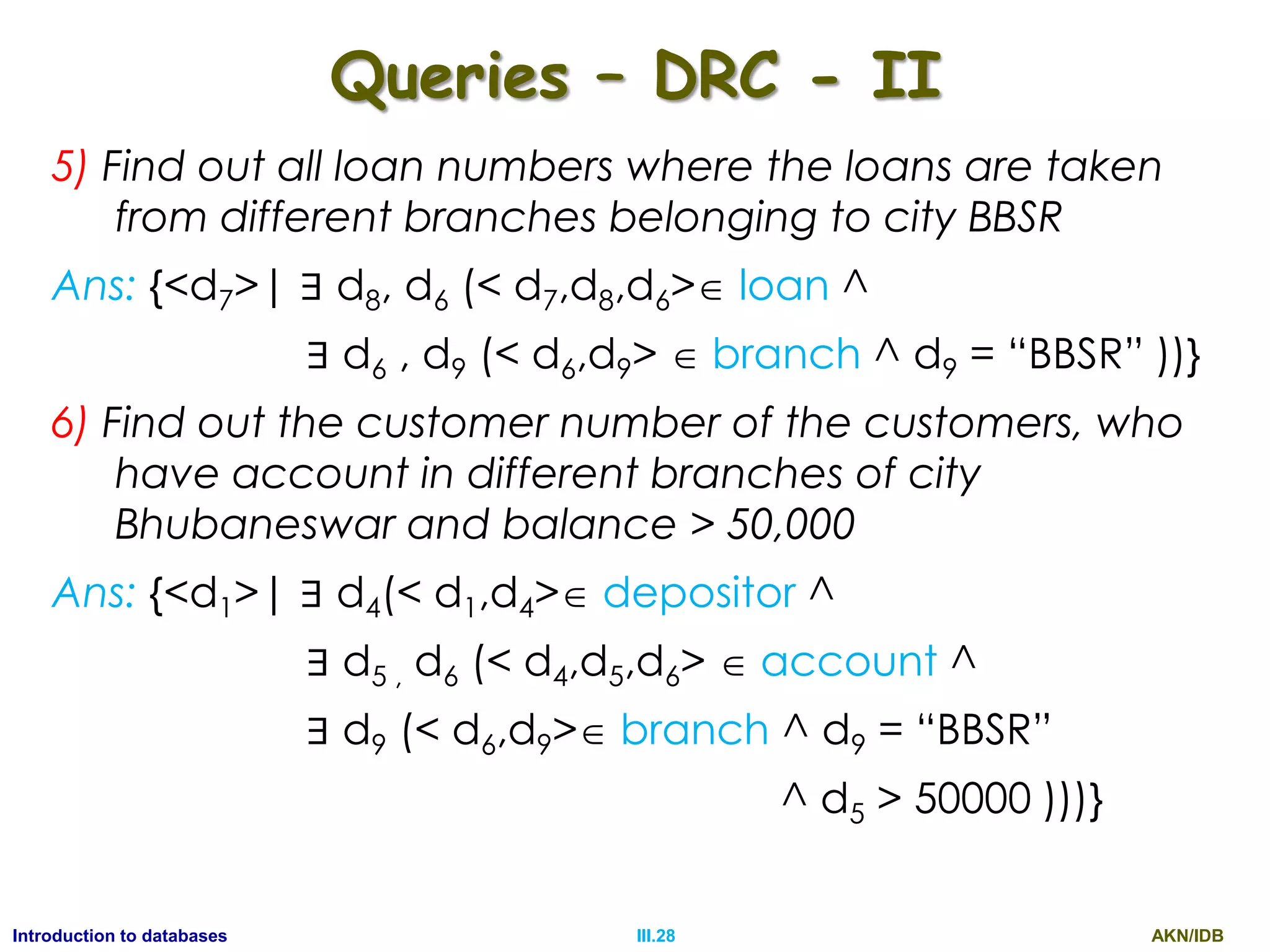
5) Find out all loan numbers where the loans are taken
from different branches belonging to city BBSR
Ans: {<d7>| ∃ d8, d6 (< d7,d8,d6> loan ^
∃ d6 , d9 (< d6,d9>  branch ^ d9 = “BBSR” ))}
6) Find out the customer number of the customers, who
have account in different branches of city
Bhubaneswar and balance > 50,000
Ans: {<d1>| ∃ d4(< d1,d4> depositor ^
∃ d5 , d6 (< d4,d5,d6>  account ^
∃ d9 (< d6,d9> branch ^ d9 = “BBSR”
^ d5 > 50000 )))}
AKN/IDBIII.29Introduction to databases
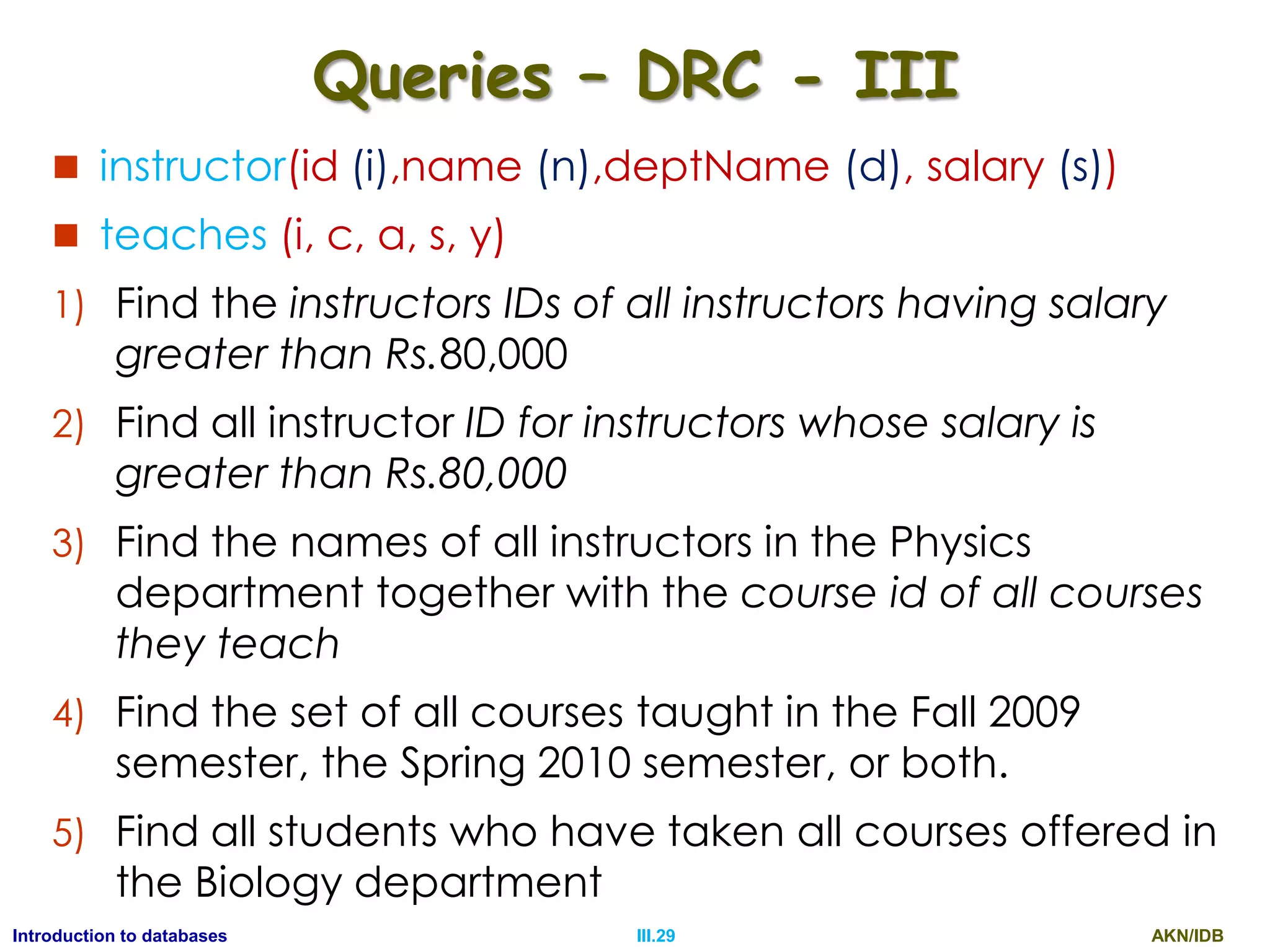
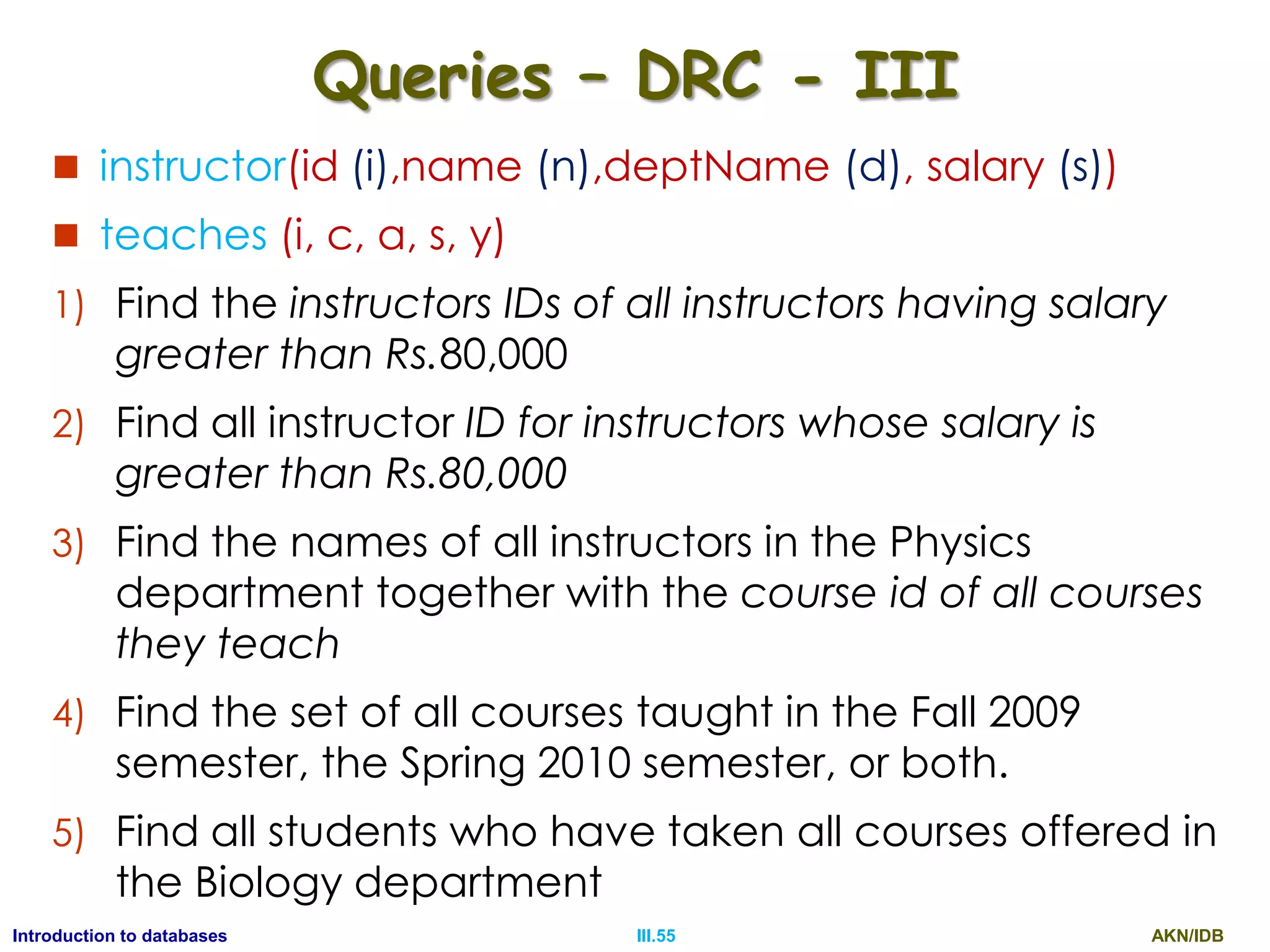
Queries – DRC - III
 instructor(id (i),name (n),deptName (d), salary (s))
 teaches (i, c, a, s, y)
1) Find the instructors IDs of all instructors having salary
greater than Rs.80,000
2) Find all instructor ID for instructors whose salary is
greater than Rs.80,000
3) Find the names of all instructors in the Physics
department together with the course id of all courses
they teach
4) Find the set of all courses taught in the Fall 2009
semester, the Spring 2010 semester, or both.
5) Find all students who have taken all courses offered in
the Biology department
AKN/IDBIII.30Introduction to databases
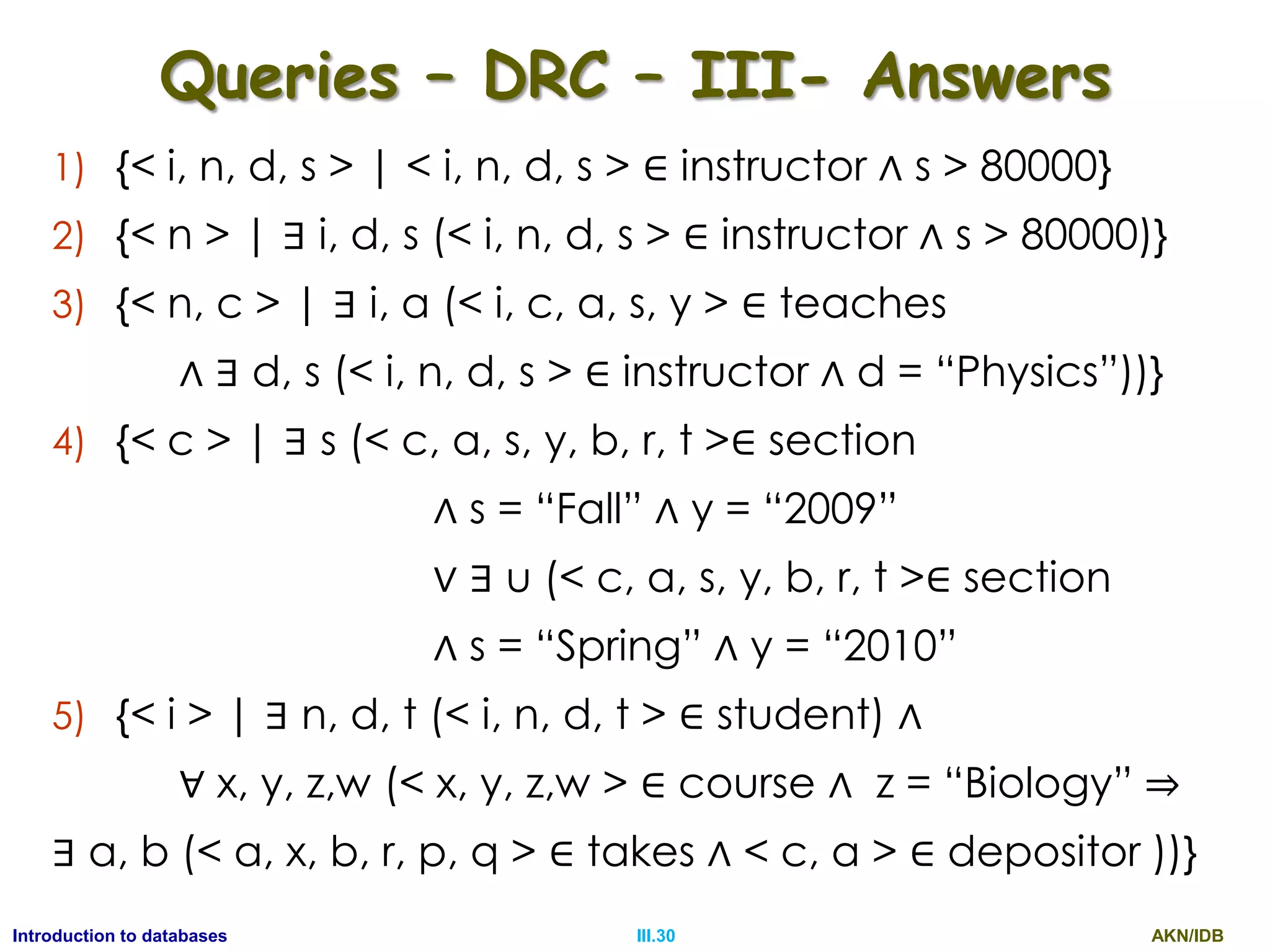
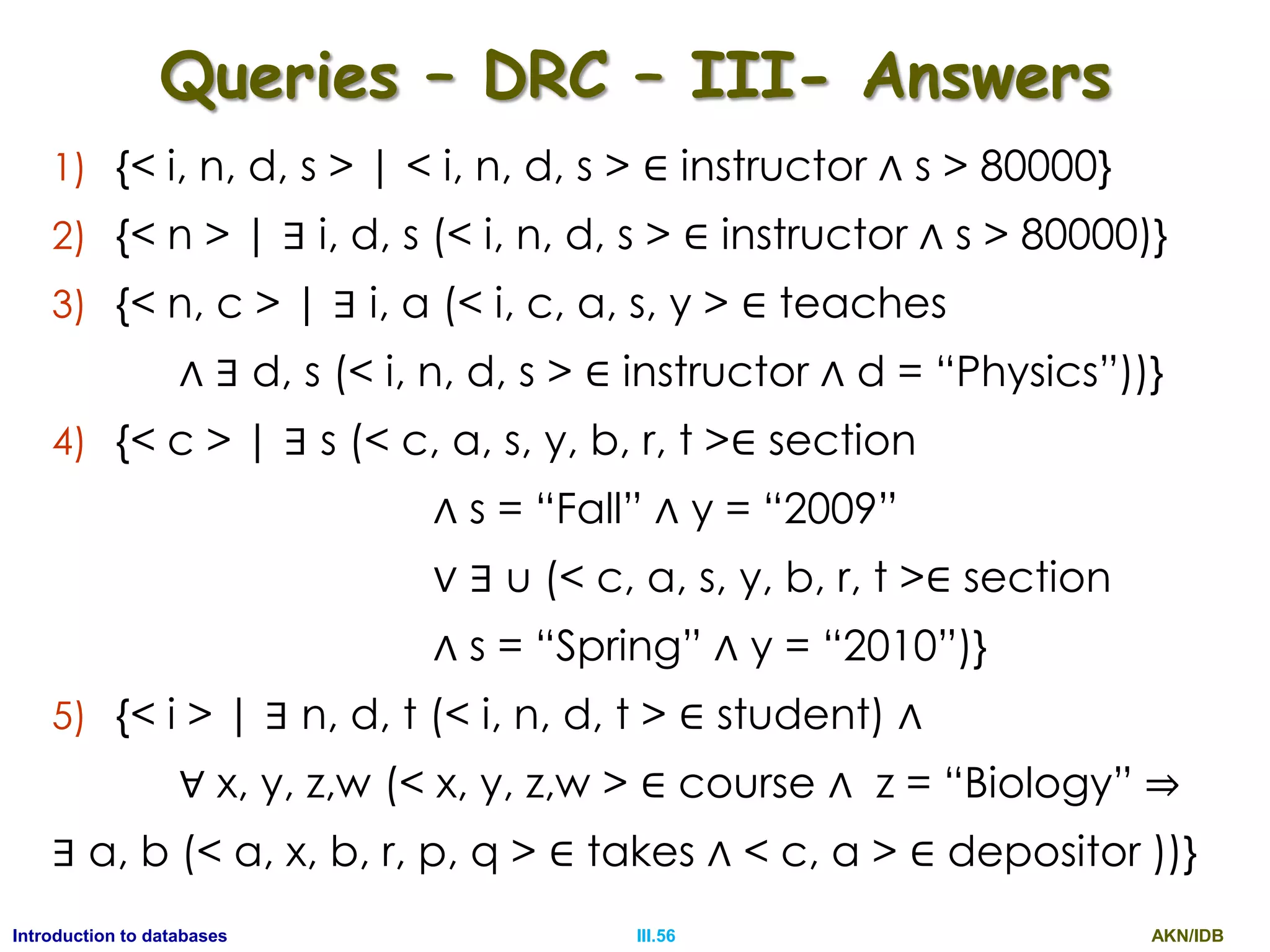
Queries – DRC – III- Answers
1) {< i, n, d, s > | < i, n, d, s > ∈ instructor ∧ s > 80000}
2) {< n > | ∃ i, d, s (< i, n, d, s > ∈ instructor ∧ s > 80000)}
3) {< n, c > | ∃ i, a (< i, c, a, s, y > ∈ teaches
∧ ∃ d, s (< i, n, d, s > ∈ instructor ∧ d = “Physics”))}
4) {< c > | ∃ s (< c, a, s, y, b, r, t >∈ section
∧ s = “Fall” ∧ y = “2009”
∨ ∃ u (< c, a, s, y, b, r, t >∈ section
∧ s = “Spring” ∧ y = “2010”
5) {< i > | ∃ n, d, t (< i, n, d, t > ∈ student) ∧
∀ x, y, z,w (< x, y, z,w > ∈ course ∧ z = “Biology” ⇒
∃ a, b (< a, x, b, r, p, q > ∈ takes ∧ < c, a > ∈ depositor ))}
AKN/IDBIII.31Introduction to databases
Set Difference (-)
 Is a binary operation and is used to find tuples
that are in one relation but are not in another.
 i.e. The expression r1 − r2 produces a relation
containing those tuples in r1 but not in r2.
 Query1: Find out the customer numbers of
customers, those have deposits but not having
loans
 Ans: (custNum(depositor)) - (custNum(borrower))
 Query 2: Find all the courses taught in the Fall
2009 but not in Spring 2010
 Ans: course_id (semester =“Fall”∧ year=2009 (section)) -
course_id (semester =“Spring”∧ year=2010 (section))
AKN/IDBIII.32Introduction to databases
Cartesian Product ()
 Allows us to combine information from any two
relations. Cartesian product of relations r1 and r2
are represented as r1× r2.
r1
A B
a1 b1
a2 b2
r2
B C D
b1 c1 d1
b2 c2 d2
b3 c3 d3
r=r1r2
A r1.B r2.B C D
a1 b1 b1 c1 d1
a1 b1 b2 c2 d2
a1 b1 b3 c3 d3
a2 b2 b1 c1 d1
a2 b2 b2 c2 d2
a2 b2 b3 c3 d3
 =
AKN/IDBIII.33Introduction to databases
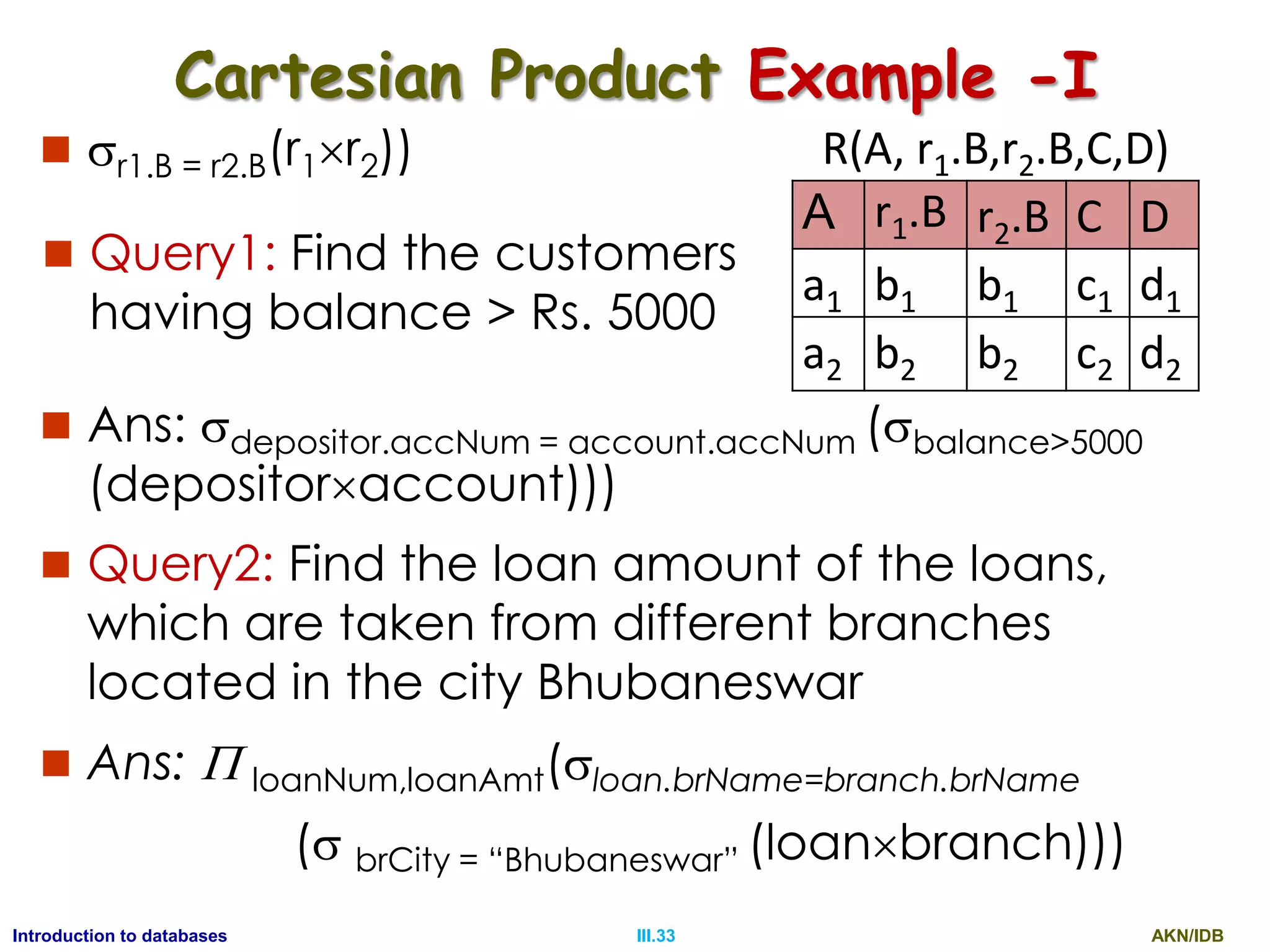
Cartesian Product Example -I
 r1.B = r2.B(r1r2)) R(A, r1.B,r2.B,C,D)
A r1.B r2.B C D
a1 b1 b1 c1 d1
a2 b2 b2 c2 d2
 Query1: Find the customers
having balance > Rs. 5000
 Ans: depositor.accNum = account.accNum (balance>5000
(depositoraccount)))
 Query2: Find the loan amount of the loans,
which are taken from different branches
located in the city Bhubaneswar
 Ans:  loanNum,loanAmt(loan.brName=branch.brName
( brCity = “Bhubaneswar” (loanbranch)))
AKN/IDBIII.34Introduction to databases
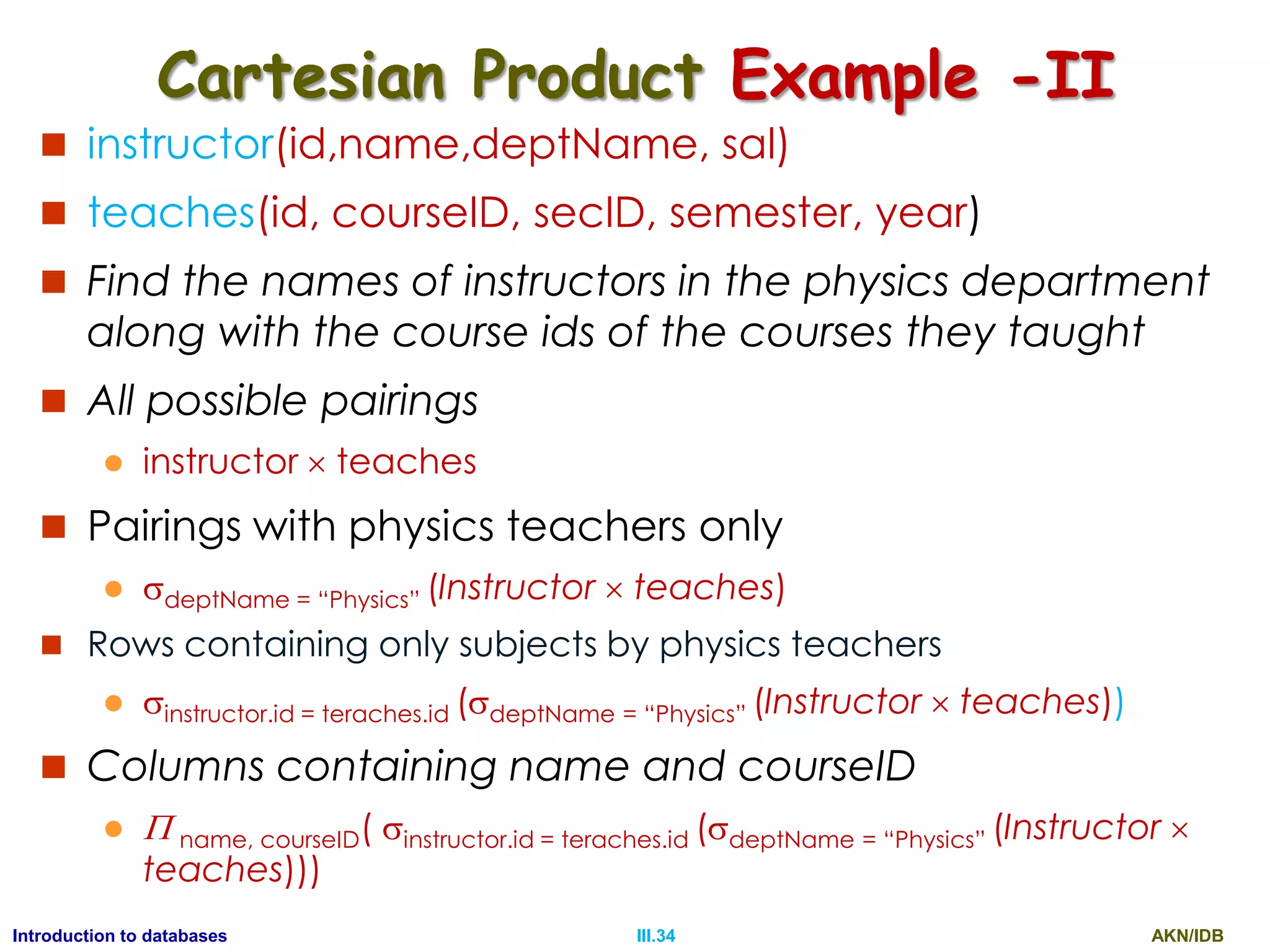
Cartesian Product Example -II
 instructor(id,name,deptName, sal)
 teaches(id, courseID, secID, semester, year)
 Find the names of instructors in the physics department
along with the course ids of the courses they taught
 All possible pairings
 instructor  teaches
 Pairings with physics teachers only
 deptName = “Physics” (Instructor  teaches)
 Rows containing only subjects by physics teachers
 instructor.id = teraches.id (deptName = “Physics” (Instructor  teaches))
 Columns containing name and courseID
  name, courseID( instructor.id = teraches.id (deptName = “Physics” (Instructor 
teaches)))
AKN/IDBIII.35Introduction to databases
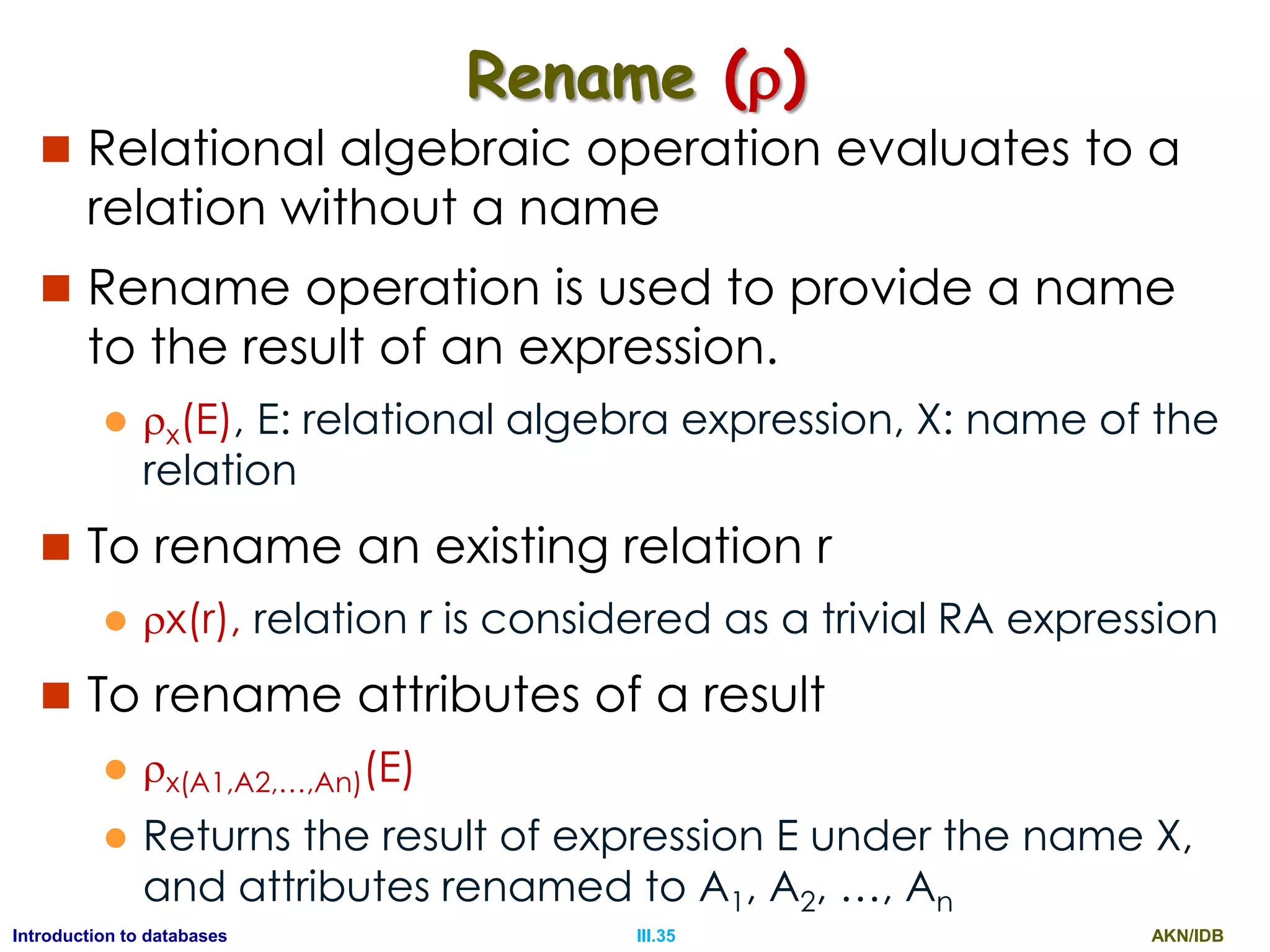
Rename ()
 Relational algebraic operation evaluates to a
relation without a name
 Rename operation is used to provide a name
to the result of an expression.
 x(E), E: relational algebra expression, X: name of the
relation
 To rename an existing relation r
 x(r), relation r is considered as a trivial RA expression
 To rename attributes of a result
 x(A1,A2,…,An)(E)
 Returns the result of expression E under the name X,
and attributes renamed to A1, A2, …, An
AKN/IDBIII.36Introduction to databases
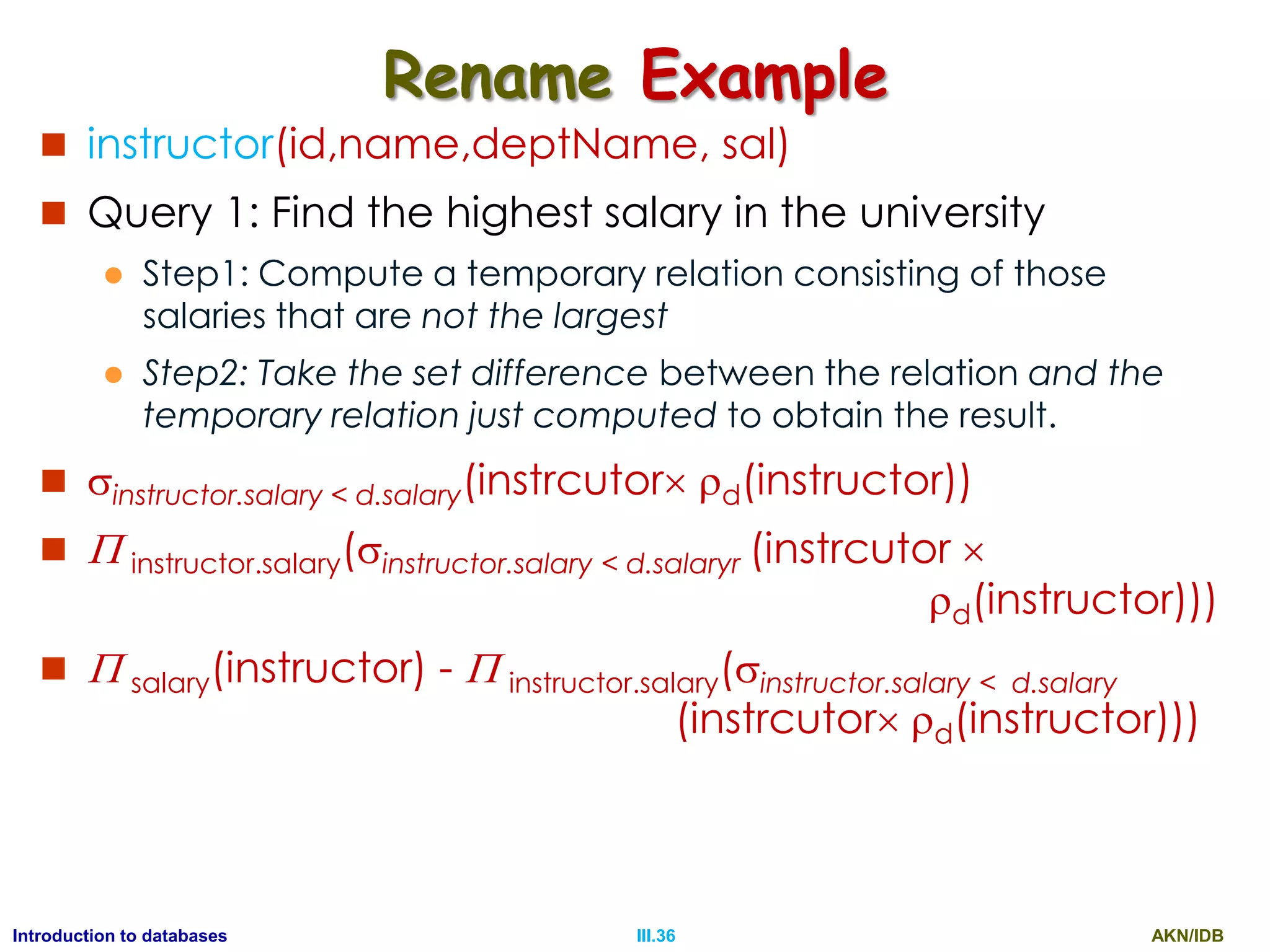
Rename Example
 instructor(id,name,deptName, sal)
 Query 1: Find the highest salary in the university
 Step1: Compute a temporary relation consisting of those
salaries that are not the largest
 Step2: Take the set difference between the relation and the
temporary relation just computed to obtain the result.
 instructor.salary < d.salary(instrcutor d(instructor))
  instructor.salary(instructor.salary < d.salaryr (instrcutor 
d(instructor)))
  salary(instructor) -  instructor.salary(instructor.salary < d.salary
(instrcutor d(instructor)))
AKN/IDBIII.37Introduction to databases
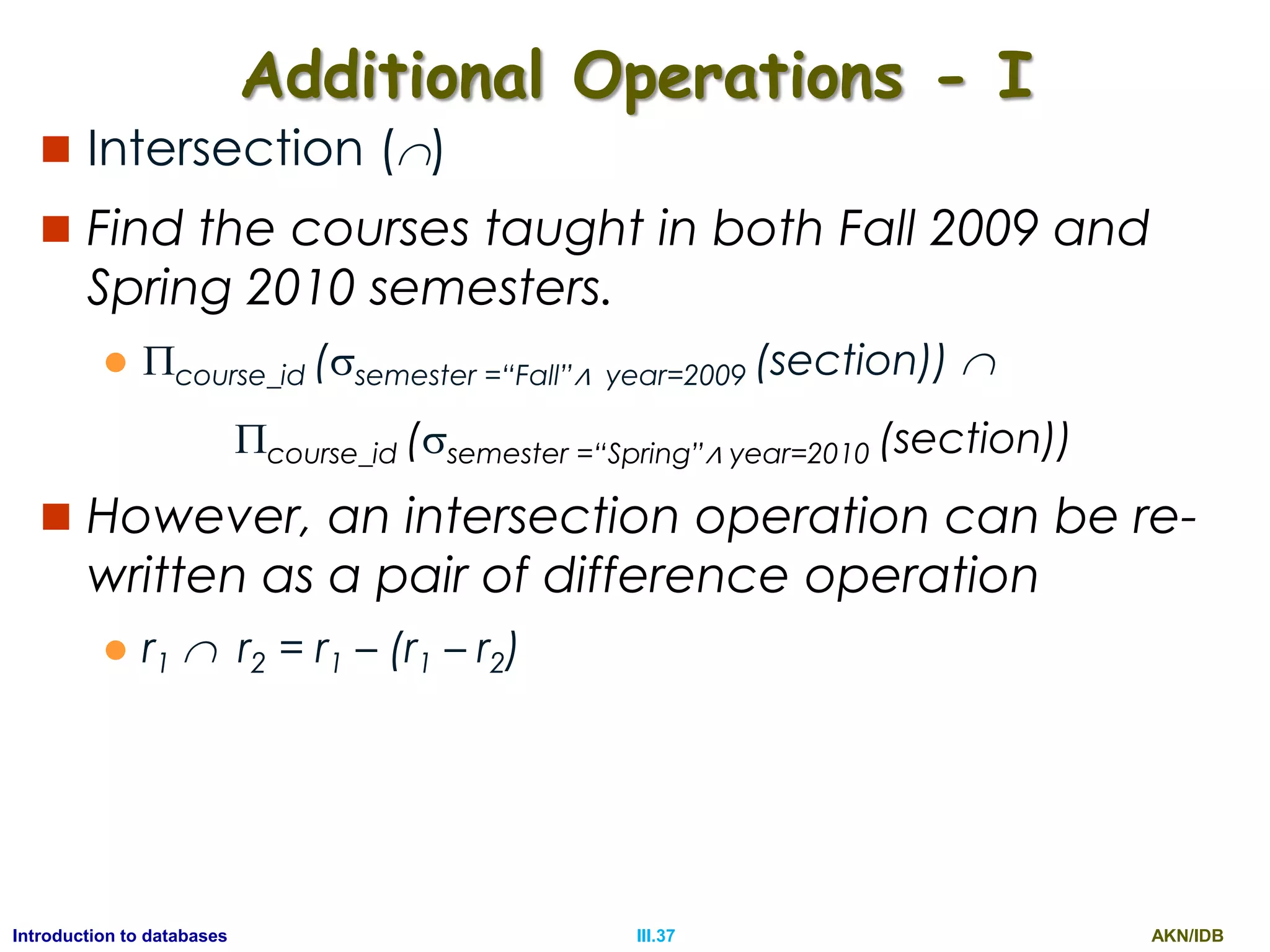
Additional Operations - I
 Intersection ()
 Find the courses taught in both Fall 2009 and
Spring 2010 semesters.
 course_id (semester =“Fall”∧ year=2009 (section)) 
course_id (semester =“Spring”∧ year=2010 (section))
 However, an intersection operation can be re-
written as a pair of difference operation
 r1  r2 = r1 – (r1 – r2)
AKN/IDBIII.38Introduction to databases
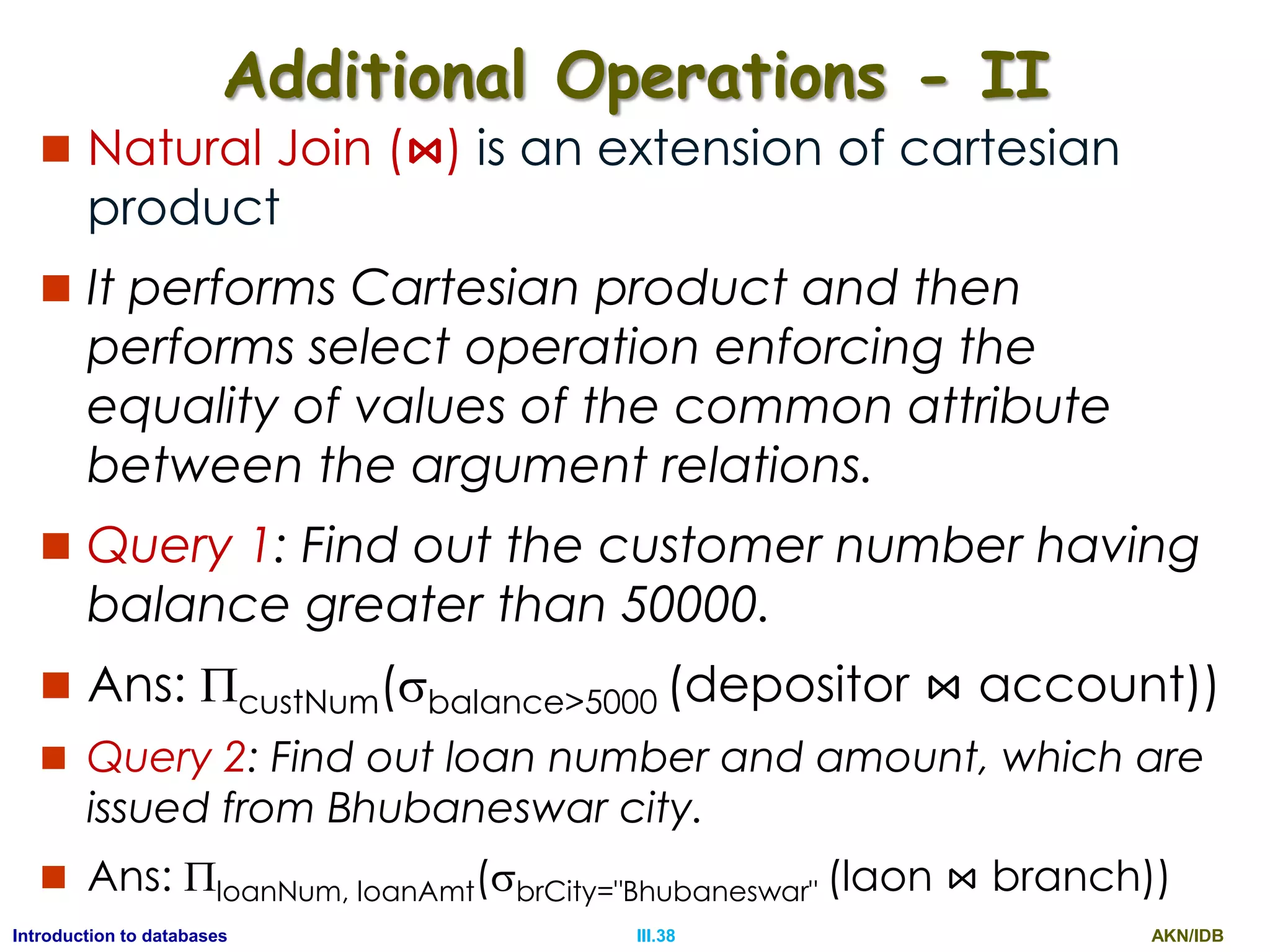
Additional Operations - II
 Natural Join (⋈) is an extension of cartesian
product
 It performs Cartesian product and then
performs select operation enforcing the
equality of values of the common attribute
between the argument relations.
 Query 1: Find out the customer number having
balance greater than 50000.
 Ans: custNum(balance>5000 (depositor ⋈ account))
 Query 2: Find out loan number and amount, which are
issued from Bhubaneswar city.
 Ans: loanNum, loanAmt(brCity="Bhubaneswar" (laon ⋈ branch))
AKN/IDBIII.39Introduction to databases
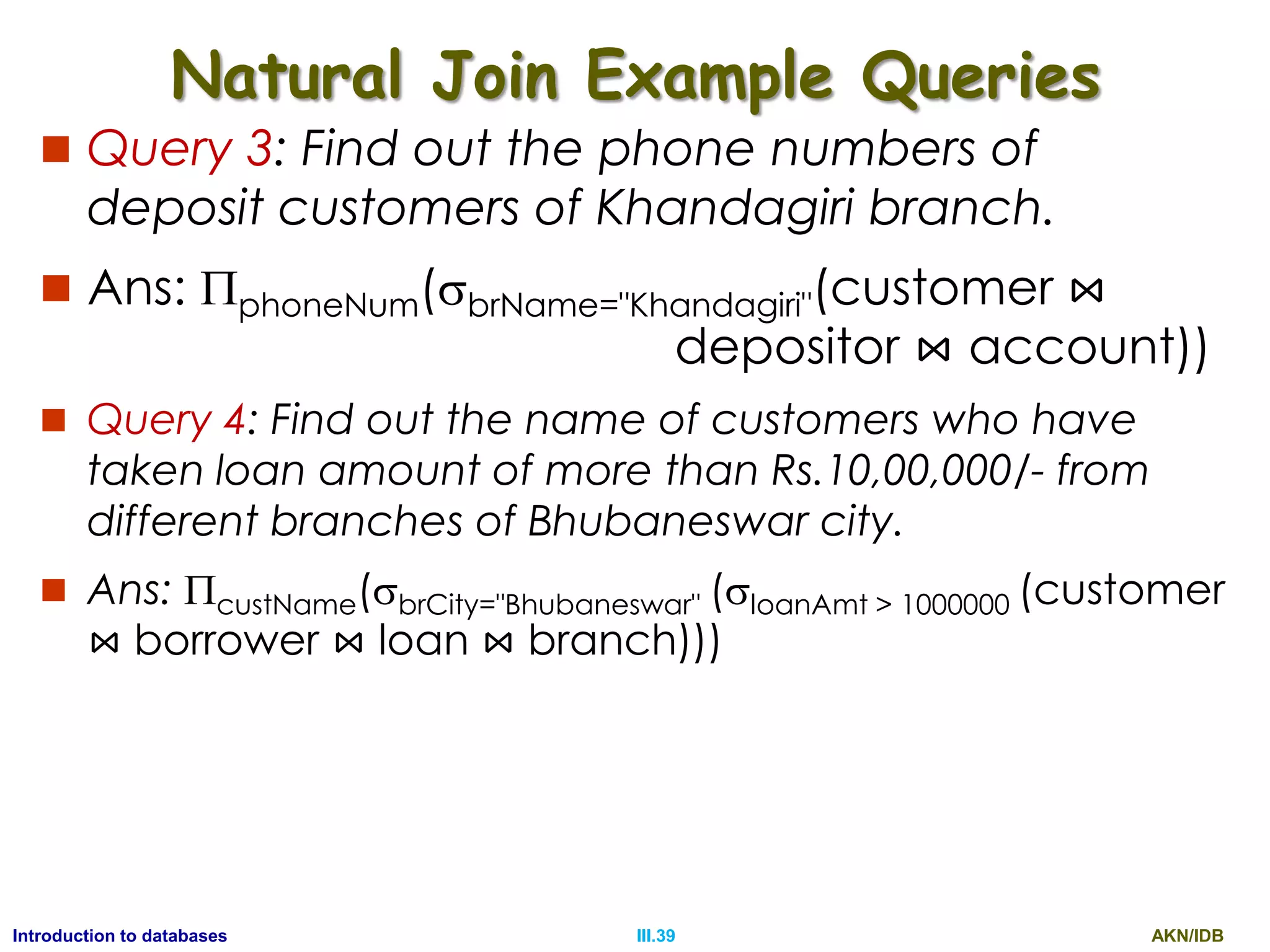
Natural Join Example Queries
 Query 3: Find out the phone numbers of
deposit customers of Khandagiri branch.
 Ans: phoneNum(brName="Khandagiri"(customer ⋈
depositor ⋈ account))
 Query 4: Find out the name of customers who have
taken loan amount of more than Rs.10,00,000/- from
different branches of Bhubaneswar city.
 Ans: custName(brCity="Bhubaneswar" (loanAmt > 1000000 (customer
⋈ borrower ⋈ loan ⋈ branch)))
AKN/IDBIII.40Introduction to databases
Outer Join
 The outer-join operation is an extension of the
join operation to deal with missing information
(NULL).
 It includes the additional tuples with NULL
values in the result of a join operation.
 There are three types of outer joins
 Left outer join (⟕)
 Right outer join (⟖)
 Full outer join (⟗)
AKN/IDBIII.41Introduction to databases
Left Outer Join (⟕)
 takes all tuples in the left relation that did not match
with any tuple in the right relation
 pads the tuples with null values for all other attributes
from the right relation, and
 adds them to the result of the natural join.
r1
A B
a1 b1
a2 b2
a3 b3
r2
B C D
b1 c1 d1
b2 c2 d2
b4 c4 d4
r=r1⟕r2
A r1.B r2.B C D
a1 b1 b1 c1 d1
a2 b2 b2 c2 d2
a3 b3
NULL NULL NULL
⟕ =
AKN/IDBIII.42Introduction to databases
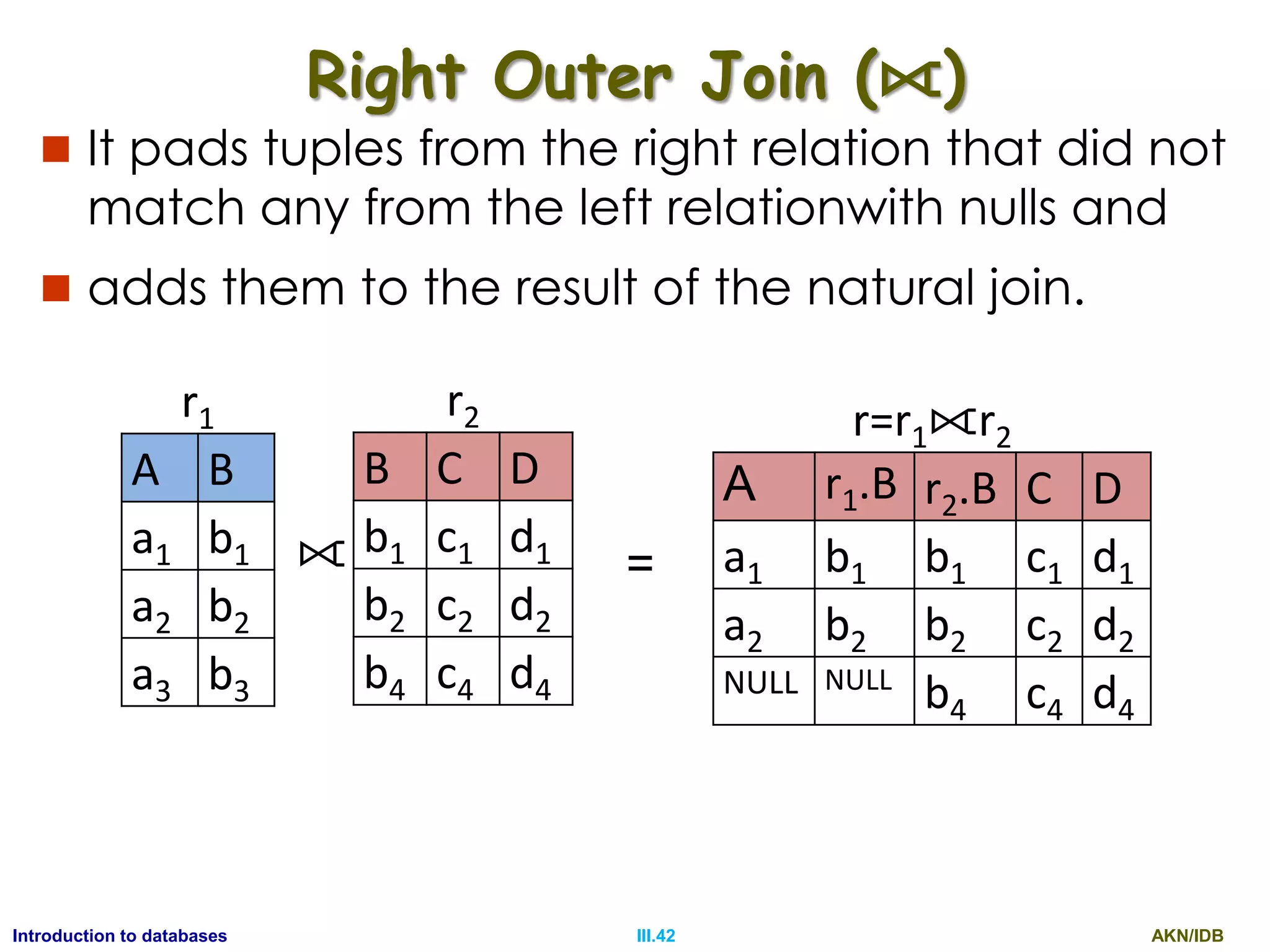
Right Outer Join (⟖)
 It pads tuples from the right relation that did not
match any from the left relationwith nulls and
 adds them to the result of the natural join.
r1
A B
a1 b1
a2 b2
a3 b3
r2
B C D
b1 c1 d1
b2 c2 d2
b4 c4 d4
r=r1⟖r2
A r1.B r2.B C D
a1 b1 b1 c1 d1
a2 b2 b2 c2 d2
NULL NULL
b4 c4 d4
⟖ =
AKN/IDBIII.43Introduction to databases
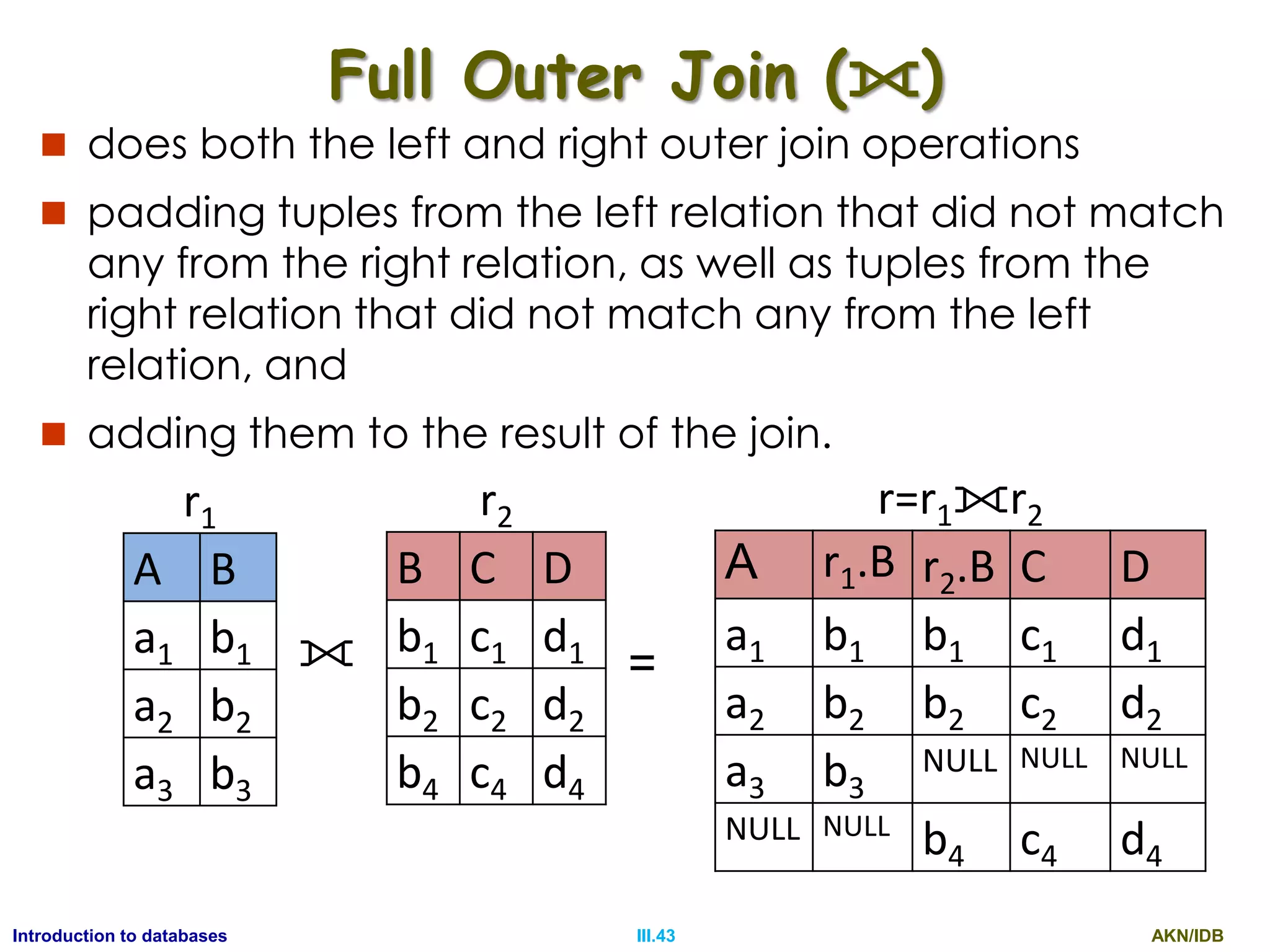
Full Outer Join (⟗)
 does both the left and right outer join operations
 padding tuples from the left relation that did not match
any from the right relation, as well as tuples from the
right relation that did not match any from the left
relation, and
 adding them to the result of the join.
r1
A B
a1 b1
a2 b2
a3 b3
r2
B C D
b1 c1 d1
b2 c2 d2
b4 c4 d4
r=r1⟗r2
A r1.B r2.B C D
a1 b1 b1 c1 d1
a2 b2 b2 c2 d2
a3 b3
NULL NULL NULL
NULL NULL
b4 c4 d4
⟗ =
AKN/IDBIII.44Introduction to databases
Relational Calculus
 Tuple Relational Calculus (TRC) is a declarative
formal query language, where the query
expression describes only the desired output
 The generic expression in TRC is as follows
 { t|P(t) }
 Where t: tuple variable and P(t): The predicate
(condition) applied on the tuple variable
 Query 1: Find the customer details having
name „SACHIN‟
 ANS: {t|t customer ^ t[name] = “SACHIN”}
AKN/IDBIII.45Introduction to databases
SELECT
 Query 1: Find the customer details having
name „SACHIN‟
 ANS: {t|t customer ^ t[name] = “SACHIN”}
 Query 2: Find account details with
balance > Rs. 50,000 of Khandagiri branch
 Ans: {t|t account ^ t[balance] > 50000 ^
t[brName]=“Khandagiri”}
AKN/IDBIII.46Introduction to databases
PROJECTION
 Example: Find the instructors IDs of all instructors
having salary greater than Rs.80,000
 {t |∃ s ∈ instructor (t[ID] = s[ID] ∧ s[salary] > 80000)}
 The set of all tuples t such that there exists a tuple s in relation
instructor for which the values of t and s for the ID attribute are
equal, and the value of s for the salary attribute is greater than
80,000.”
 Query 1: Find out the name & phoneNum of customers.
 Ans: {t |∃ s ∈ customer (t[name] = s[name]
∧ t[phoneNum] = s[phoneNum] }
 Query 2: Find out Sachin‟s customer no & phoneNum.
 Ans: {t |∃ s ∈ customer (t[custNum] = s[custNum]
∧ t[phoneNum] = s[phoneNum]
∧ s[name] = “Sachin” }
AKN/IDBIII.47Introduction to databases
Relational Calculus
 Tuple Relational Calculus (TRC) is a declarative
formal query language, where the query
expression describes only the desired output
 The generic expression in TRC is as follows
 { t|P(t) }
 Where t: tuple variable and P(t): The predicate
(condition) applied on the tuple variable
 Query 1: Find the customer details having
name „SACHIN‟
 ANS: {t|t customer ^ t[name] = “SACHIN”}
AKN/IDBIII.48Introduction to databases
SELECT
 Query 1: Find the customer details having
name „SACHIN‟
 ANS: {t|t customer ^ t[name] = “SACHIN”}
 Query 2: Find account details with
balance > Rs. 50,000 of Khandagiri branch
 Ans: {t|t account ^ t[balance] > 50000 ^
t[brName]=“Khandagiri”}
AKN/IDBIII.49Introduction to databases
PROJECTION
 Example: Find the instructors IDs of all instructors
having salary greater than Rs.80,000
 {t |∃ s ∈ instructor (t[ID] = s[ID] ∧ s[salary] > 80000)}
 The set of all tuples t such that there exists a tuple s in relation
instructor for which the values of t and s for the ID attribute are
equal, and the value of s for the salary attribute is greater than
80,000.”
 Query 1: Find out the name & phoneNum of customers.
 Ans: {t |∃ s ∈ customer (t[name] = s[name]
∧ t[phoneNum] = s[phoneNum] }
 Query 2: Find out Sachin‟s customer no & phoneNum.
 Ans: {t |∃ s ∈ customer (t[custNum] = s[custNum]
∧ t[phoneNum] = s[phoneNum]
∧ s[name] = “Sachin” }
AKN/IDBIII.50Introduction to databases
Join
 Query 4: Find out the account number of Sachin
 Ans: {t |∃ s ∈ depositor (t[accNum] = s[accNum]
∧ ∃ u ∈ customer (s[custNum] = u[custNum]
∧ u[name] = “Sachin” }
 Query 5: Find out the customer number of all customer
taken loans from different branches of Bhubaneswar city
 Ans: {t |∃ s ∈ borrower (t[custNum] = s[custNum]
∧ ∃ u ∈ loan (s[loanNum] = u[loanNum]
∧ ∃ v ∈ branch (u[brName] = v[brName]
∧ v[brCity] = “Bhubaneswar” }
 Query 6: Find the names of all instructors whose
department is in the Watson building.
 Query 7: find the set of all courses taught in the Fall 2009
semester, the Spring 2010 semester, or both.
AKN/IDBIII.51Introduction to databases
Domain Relational Calculus
 Domain Relational Calculus (DRC) is a
declarative formal query language, that
makes the use of domain variables to retrieve
data represent the final output.
 The generic expression in DRC is as follows
 { <x1,x2,…, xn> | P(x1,x2,…,xn) }
 x1, x2, …, xn represent the domain variable &
 P(x1,x2,…,xn) represents the predicates using domain
variables
AKN/IDBIII.52Introduction to databases
DRC- Examples Relations
 customer (custnum, name, phoneNum)
d1 d2 d3
 depositor(custNum, accNum)
d1 d4
 account(accNum, balance, brName)
d4 d5 d6
 borrower(custNum, loanNum)
d1 d7
 loan(loanNum, loanAmt, brName)
d7 d8 d6
 branch(brName, brCity)
d6 d9
AKN/IDBIII.53Introduction to databases
Queries – DRC - I
1) Find out the details of all customers from bank
Ans: {<d1, d2, d3>|<d1,d2,d3> customer}
2) Find out the details of a customer named Sachin
Ans: {<d1, d2, d3>|<d1,d2,d3> customer ^ d2 = “Sachin”}
3) Find out the phone Number of customer named
Sachin
Ans: {<d3>| ∃ d1, d2 (< d1,d2,d3> customer d2 =
“Sachin”)}
4) Find out the account number and branch name for
the accounts having balance more than 50000 and
less than 1,00,000
Ans: {<d4 , d6 >| ∃ d5 (< d4,d5,d6> account
^ d5 > 50000 ^ d5 < 100000 )}
AKN/IDBIII.54Introduction to databases
Queries – DRC - II
5) Find out all loan numbers where the loans are taken
from different branches belonging to city BBSR
Ans: {<d7>| ∃ d8, d6 (< d7,d8,d6> loan ^
∃ d9 (< d6,d9>  branch ^ d9 = “BBSR” ))}
6) Find out the customer number of the customers, who
have account in different branches of city
Bhubaneswar and balance > 50,000
Ans: {<d1>| ∃ d4(< d1,d4> depositor ^
∃ d5 , d6 (< d4,d5,d6>  account ^
∃ d9 (< d6,d9> branch ^ d9 = “BBSR”
^ d5 > 50000 )))}
AKN/IDBIII.55Introduction to databases
Queries – DRC - III
 instructor(id (i),name (n),deptName (d), salary (s))
 teaches (i, c, a, s, y)
1) Find the instructors IDs of all instructors having salary
greater than Rs.80,000
2) Find all instructor ID for instructors whose salary is
greater than Rs.80,000
3) Find the names of all instructors in the Physics
department together with the course id of all courses
they teach
4) Find the set of all courses taught in the Fall 2009
semester, the Spring 2010 semester, or both.
5) Find all students who have taken all courses offered in
the Biology department
AKN/IDBIII.56Introduction to databases
Queries – DRC – III- Answers
1) {< i, n, d, s > | < i, n, d, s > ∈ instructor ∧ s > 80000}
2) {< n > | ∃ i, d, s (< i, n, d, s > ∈ instructor ∧ s > 80000)}
3) {< n, c > | ∃ i, a (< i, c, a, s, y > ∈ teaches
∧ ∃ d, s (< i, n, d, s > ∈ instructor ∧ d = “Physics”))}
4) {< c > | ∃ s (< c, a, s, y, b, r, t >∈ section
∧ s = “Fall” ∧ y = “2009”
∨ ∃ u (< c, a, s, y, b, r, t >∈ section
∧ s = “Spring” ∧ y = “2010”)}
5) {< i > | ∃ n, d, t (< i, n, d, t > ∈ student) ∧
∀ x, y, z,w (< x, y, z,w > ∈ course ∧ z = “Biology” ⇒
∃ a, b (< a, x, b, r, p, q > ∈ takes ∧ < c, a > ∈ depositor ))}
AKN/IDBIII.57Introduction to databases
Thank You

Introduction to database-Formal Query language and Relational calculus

  • 1.
    Introduction to Databases RelationalDatabase Design Formal Relational Query Language and Relational Calculus Ajit K Nayak, Ph.D. Siksha O Anusandhan University
  • 2.
    AKN/IDBIII.2Introduction to databases FormalRelational Query Languages  Every data-model support a set of operations to manage the database info, in addition to the rules and principles to define the database and the database constraints.  Two formal query languages, which form the mathematical foundation for the commercial relational query languages are  Relational Algebra : It is a procedural query language  Relational Calculus: It is a non-procedural query language
  • 3.
    AKN/IDBIII.3Introduction to databases RelationalAlgebra  It supports following fundamental operations  Select () - unary  Project () - unary  Union () - binary  Set Difference (-) - binary  Cartesian Product () - binary  Rename () - unary
  • 4.
    AKN/IDBIII.4Introduction to databases TheSelect Operation ()  Is a unary operation that selects tuples(rows) that satisfy a given predicate  The predicate appears as a subscript to   Example: deptName = “Physics”(instructor )  Select those tuples of the instructor relation where the instructor is in the “Physics” department  Comparisons are allowed in the selection predicate by using the operators  =, , <, ≤, >, and ≥  Several predicates may be combined into a larger predicate by using the connectives  and (∧), or (∨), and not (¬)
  • 5.
    AKN/IDBIII.5Introduction to databases TheSelect Operation - Examples  Find the details of customer named SACHIN  name = “SACHIN”(customer )  Find the instructors in Physics with a salary greater than Rs.90,000  deptName = “Physics” ∧ salary >90000 (instructor )  Find all departments whose name is the same as their building name  deptName = building (department)  Find out the loan details, where the loan amount is less than Rs.10,000 and are taken from Khandagiri branch  loanAmt < 10000 ^ brName = “Khandagiri” (loan)
  • 6.
    AKN/IDBIII.6Introduction to databases TheProject Operation ()  Is a unary operation that selects one or more distinct attributes (cols) from a relation  The predicate appears as a subscript to   Example: id, name, salary(instructor )  finds three (id, name, salary) columns from all the tuples of the instructor relation.  Find out the loan number and their loan amount from all loans  loanNum, loanAmt(loan)
  • 7.
    AKN/IDBIII.7Introduction to databases Compositionof Relational Operations  Relational algebra operations can be composed together into a single relational- algebraic expression.  Example: name(dept name = “Physics” (instructor ))  Find the instructor names from physics dept.  instead of giving the name of a relation as the argument of the projection operation, we give an expression that evaluates to a relation.  Find out the loan number and loan amount taken from Khandagiri branch  phoneNum(brName = “Khandagiri” (loan ))
  • 8.
    AKN/IDBIII.8Introduction to databases UnionOperations (U)  Union operator operates on two compatible relations  Two relations r1 and r2 are said to be compatible, if both of the following conditions are satisfied  The arity/degree of both r1 and r2 are same  The ith attribute of r1 is having the same domain as that of ith attribute of r2, for all I  Query 1: Find out the customer number, who are depositor or borrower or both, given  depositor(custNum, accNum)  borrower(custNum, loanNum)
  • 9.
    AKN/IDBIII.9Introduction to databases UnionOperations - I  Ans: (custNum(depositor))  (custNum(borrower))  Query 2: Find set of all courses taught in Fall 2009 and Spring 2010  Ans: course_id(semester = “Fall” ^ year = 2009(section))  course_id(semester = “Spring” ^ year = 2010(section))
  • 10.
    AKN/IDBIII.10Introduction to databases SetDifference (-)  Is a binary operation and is used to find tuples that are in one relation but are not in another.  i.e. The expression r1 − r2 produces a relation containing those tuples in r1 but not in r2.  Query1: Find out the customer numbers of customers, those have deposits but not having loans  Ans: (custNum(depositor)) - (custNum(borrower))  Query 2: Find all the courses taught in the Fall 2009 but not in Spring 2010  Ans: course_id (semester =“Fall”∧ year=2009 (section)) - course_id (semester =“Spring”∧ year=2010 (section))
  • 11.
    AKN/IDBIII.11Introduction to databases CartesianProduct ()  Allows us to combine information from any two relations. Cartesian product of relations r1 and r2 are represented as r1× r2. r1 A B a1 b1 a2 b2 r2 B C D b1 c1 d1 b2 c2 d2 b3 c3 d3 r A r1.B r2.B C D a1 b1 b1 c1 d1 a1 b1 b2 c2 d2 a1 b1 b3 c3 d3 a2 b2 b1 c1 d1 a2 b2 b2 c2 d2 a2 b2 b3 c3 d3  =
  • 12.
    AKN/IDBIII.12Introduction to databases CartesianProduct () -I  r1.B = r2.B(r1r2)) R(A, r1.B,r2.B,C,D) A r1.B r2.B C D a1 b1 b1 c1 d1 a2 b2 b2 c2 d2  Query1: Find the customers having balance > Rs. 5000  Ans: depositor.accNum = account.accNum (balance>5000 (depositoraccount)))  Query2: Find the loan amount of the loans, which are taken from different branches located in the city Bhubaneswar  Ans:  loanNum,loanAmt(loan.brName=branch.brName ( brCity = “Bhubaneswar” (loanbranch)))
  • 13.
    AKN/IDBIII.13Introduction to databases FormalRelational Query Languages  Every data-model support a set of operations to manage the database info, in addition to the rules and principles to define the database and the database constraints.  Two formal query languages, which form the mathematical foundation for the commercial relational query languages are  Relational Algebra : It is a procedural query language  Relational Calculus: It is a non-procedural query language
  • 14.
    AKN/IDBIII.14Introduction to databases RelationalAlgebra  It supports following fundamental operations  Select () - unary  Project () - unary  Union () - binary  Set Difference (-) - binary  Cartesian Product () - binary  Rename () – unary  Example: Relation Schemas  customer (custNum, name, phoneNum)  depositor(custNum,accNum)  account(accNum, balance, brName)  borrower(custNum, loanNum)  loan(loanNum, loanAmt, brName)  branch(brName, brCity)
  • 15.
    AKN/IDBIII.15Introduction to databases TheSelect Operation ()  Is a unary operation that selects tuples(rows) that satisfy a given predicate  The predicate appears as a subscript to   Example: deptName = “Physics”(instructor )  Select those tuples of the instructor relation where the instructor is in the “Physics” department  Comparisons are allowed in the selection predicate by using the operators  =, , <, ≤, >, and ≥  Several predicates may be combined into a larger predicate by using the connectives  and (∧), or (∨), and not (¬)
  • 16.
    AKN/IDBIII.16Introduction to databases TheSelect Operation - Examples  Find the details of customer named SACHIN  name = “SACHIN”(customer )  Find the instructors in Physics with a salary greater than Rs.90,000  deptName = “Physics” ∧ salary >90000 (instructor )  Find all departments whose name is the same as their building name  deptName = building (department)  Find out the loan details, where the loan amount is less than Rs.10,000 and are taken from Khandagiri branch  loanAmt < 10000 ^ brName = “Khandagiri” (loan)
  • 17.
    AKN/IDBIII.17Introduction to databases TheProject Operation ()  Is a unary operation that selects one or more distinct attributes (cols) from a relation  The predicate appears as a subscript to   Example: id, name, salary(instructor )  finds three (id, name, salary) columns from all the tuples of the instructor relation.  Find out the loan number and their loan amount from all loans  loanNum, loanAmt(loan)
  • 18.
    AKN/IDBIII.18Introduction to databases Compositionof Relational Operations  Relational algebra operations can be composed together into a single relational- algebraic expression.  Example: name(dept name = “Physics” (instructor ))  Find the instructor names from physics dept.  instead of giving the name of a relation as the argument of the projection operation, we give an expression that evaluates to a relation.  Find out the loan number and loan amount taken from Khandagiri branch  loanNum, loanAmt(brName = “Khandagiri” (loan ))
  • 19.
    AKN/IDBIII.19Introduction to databases UnionOperations (U)  Union operator operates on two compatible relations  Two relations r1 and r2 are said to be compatible, if both of the following conditions are satisfied  The arity/degree of both r1 and r2 are same  The ith attribute of r1 is having the same domain as that of ith attribute of r2, for all i  Query 1: Find out the customer number, who are depositor or borrower or both, given  depositor(custNum, accNum)  borrower(custNum, loanNum)
  • 20.
    AKN/IDBIII.20Introduction to databases UnionOperations - I  Ans: (custNum(depositor))  (custNum(borrower))  Query 2: Find set of all courses taught in Fall 2009 and Spring 2010  Ans: course_id(semester = “Fall” ^ year = 2009(section))  course_id(semester = “Spring” ^ year = 2010(section))
  • 21.
    AKN/IDBIII.21Introduction to databases SELECT Query 1: Find the customer details having name „SACHIN‟  ANS: {t|t customer ^ t[name] = “SACHIN”}  Query 2: Find account details with balance > Rs. 50,000 of Khandagiri branch  Ans: {t|t account ^ t[balance] > 50000 ^ t[brName]=“Khandagiri”}
  • 22.
    AKN/IDBIII.22Introduction to databases PROJECT Example: Find the instructors IDs of all instructors having salary greater than Rs.80,000  {t |∃ s ∈ instructor (t[ID] = s[ID] ∧ s[salary] > 80000)}  The set of all tuples t such that there exists a tuple s in relation instructor for which the values of t and s for the ID attribute are equal, and the value of s for the salary attribute is greater than 80,000.”  Query 1: Find out the name & phoneNum of customers.  Ans: {t |∃ s ∈ customer (t[name] = s[name] ∧ t[phoneNum] = s[phoneNum] }  Query 2: Find out Sachin‟s customer no & phoneNum.  Ans: {t |∃ s ∈ customer (t[custNum] = s[custNum] ∧ t[phoneNum] = s[phoneNum] ∧ s[name] = “Sachin” }
  • 23.
    AKN/IDBIII.23Introduction to databases PROJECTION Example: Find the instructors IDs of all instructors having salary greater than Rs.80,000:  {t |∃ s ∈ instructor (t[ID] = s[ID] ∧ s[salary] > 80000)}  The set of all tuples t such that there exists a tuple s in relation instructor for which the values of t and s for the ID attribute are equal, and the value of s for the salary attribute is greater than 80,000.”  Query 1: Find out the name & phoneNum of customers.  Ans: {t |∃ s ∈ customer (t[name] = s[name] ∧ t[phoneNum] = s[phoneNum] }  Query 2: Find out Sachin‟s customer no & phoneNum.  Ans: {t |∃ s ∈ customer (t[custNum] = s[custNum] ∧ t[phoneNum] = s[phoneNum] ∧ s[name] = “Sachin” }
  • 24.
    AKN/IDBIII.24Introduction to databases Join Query 4: Find out the account number of Sachin  Ans: {t |∃ s ∈ depositor (t[accNum] = s[accNum] ∧ ∃ u ∈ customer (s[custNum] = u[custNum] ∧ u[name] = “Sachin” }  Query 5: Find out the customer number of all customer taken loans from different branches of Bhubaneswar city  Ans: {t |∃ s ∈ borrower (t[custNum] = s[custNum] ∧ ∃ u ∈ loan (s[loanNum] = u[loanNum] ∧ ∃ v ∈ branch (s[brName] = v[brName] ∧ v[brCity] = “Bhubaneswar” }  Query 6: Find the names of all instructors whose department is in the Watson building.  Query 7: find the set of all courses taught in the Fall 2009 semester, the Spring 2010 semester, or both.
  • 25.
    AKN/IDBIII.25Introduction to databases DomainRelational Calculus  Domain Relational Calculus (DRC) is a declarative formal query language, that makes the use of domain variables to retrieve data represent the final output.  The generic expression in DRC is as follows  { <x1,x2,…, xn> | P(x1,x2,…,xn) }  x1, x2, …, xn represent the domain variable &  P(x1,x2,…,xn) represents the predicates using domain variables
  • 26.
    AKN/IDBIII.26Introduction to databases DRC-Examples Relations  customer (custnum, name, phoneNum) d1 d2 d3  depositor(custNum, accNum) d1 d4  account(accNum, balance, brName) d4 d5 d6  borrower(custNum, loanNum) d1 d7  loan(loanNum, loanAmt, brName) d7 d8 d6  branch(brName, brCity) d6 d9
  • 27.
    AKN/IDBIII.27Introduction to databases Queries– DRC - I 1) Find out the details of all customers from bank Ans: {<d1, d2, d3>|<d1,d2,d3> customer} 2) Find out the details of a customer named Sachin Ans: {<d1, d2, d3>|<d1,d2,d3> customer ^ d2 = “Sachin”} 3) Find out the phone Number of customer named Sachin Ans: {<d3>| ∃ d1, d2 (< d1,d2,d3> customer d2 = “Sachin”)} 4) Find out the account number and branch name for the accounts having balance more than 50000 and less than 1,00,000 Ans: {<d4 , d6 >| ∃ d5, d2 (< d4,d5,d6> account ^ d5 > 50000 ^ d5 < 100000 )}
  • 28.
    AKN/IDBIII.28Introduction to databases Queries– DRC - II 5) Find out all loan numbers where the loans are taken from different branches belonging to city BBSR Ans: {<d7>| ∃ d8, d6 (< d7,d8,d6> loan ^ ∃ d6 , d9 (< d6,d9>  branch ^ d9 = “BBSR” ))} 6) Find out the customer number of the customers, who have account in different branches of city Bhubaneswar and balance > 50,000 Ans: {<d1>| ∃ d4(< d1,d4> depositor ^ ∃ d5 , d6 (< d4,d5,d6>  account ^ ∃ d9 (< d6,d9> branch ^ d9 = “BBSR” ^ d5 > 50000 )))}
  • 29.
    AKN/IDBIII.29Introduction to databases Queries– DRC - III  instructor(id (i),name (n),deptName (d), salary (s))  teaches (i, c, a, s, y) 1) Find the instructors IDs of all instructors having salary greater than Rs.80,000 2) Find all instructor ID for instructors whose salary is greater than Rs.80,000 3) Find the names of all instructors in the Physics department together with the course id of all courses they teach 4) Find the set of all courses taught in the Fall 2009 semester, the Spring 2010 semester, or both. 5) Find all students who have taken all courses offered in the Biology department
  • 30.
    AKN/IDBIII.30Introduction to databases Queries– DRC – III- Answers 1) {< i, n, d, s > | < i, n, d, s > ∈ instructor ∧ s > 80000} 2) {< n > | ∃ i, d, s (< i, n, d, s > ∈ instructor ∧ s > 80000)} 3) {< n, c > | ∃ i, a (< i, c, a, s, y > ∈ teaches ∧ ∃ d, s (< i, n, d, s > ∈ instructor ∧ d = “Physics”))} 4) {< c > | ∃ s (< c, a, s, y, b, r, t >∈ section ∧ s = “Fall” ∧ y = “2009” ∨ ∃ u (< c, a, s, y, b, r, t >∈ section ∧ s = “Spring” ∧ y = “2010” 5) {< i > | ∃ n, d, t (< i, n, d, t > ∈ student) ∧ ∀ x, y, z,w (< x, y, z,w > ∈ course ∧ z = “Biology” ⇒ ∃ a, b (< a, x, b, r, p, q > ∈ takes ∧ < c, a > ∈ depositor ))}
  • 31.
    AKN/IDBIII.31Introduction to databases SetDifference (-)  Is a binary operation and is used to find tuples that are in one relation but are not in another.  i.e. The expression r1 − r2 produces a relation containing those tuples in r1 but not in r2.  Query1: Find out the customer numbers of customers, those have deposits but not having loans  Ans: (custNum(depositor)) - (custNum(borrower))  Query 2: Find all the courses taught in the Fall 2009 but not in Spring 2010  Ans: course_id (semester =“Fall”∧ year=2009 (section)) - course_id (semester =“Spring”∧ year=2010 (section))
  • 32.
    AKN/IDBIII.32Introduction to databases CartesianProduct ()  Allows us to combine information from any two relations. Cartesian product of relations r1 and r2 are represented as r1× r2. r1 A B a1 b1 a2 b2 r2 B C D b1 c1 d1 b2 c2 d2 b3 c3 d3 r=r1r2 A r1.B r2.B C D a1 b1 b1 c1 d1 a1 b1 b2 c2 d2 a1 b1 b3 c3 d3 a2 b2 b1 c1 d1 a2 b2 b2 c2 d2 a2 b2 b3 c3 d3  =
  • 33.
    AKN/IDBIII.33Introduction to databases CartesianProduct Example -I  r1.B = r2.B(r1r2)) R(A, r1.B,r2.B,C,D) A r1.B r2.B C D a1 b1 b1 c1 d1 a2 b2 b2 c2 d2  Query1: Find the customers having balance > Rs. 5000  Ans: depositor.accNum = account.accNum (balance>5000 (depositoraccount)))  Query2: Find the loan amount of the loans, which are taken from different branches located in the city Bhubaneswar  Ans:  loanNum,loanAmt(loan.brName=branch.brName ( brCity = “Bhubaneswar” (loanbranch)))
  • 34.
    AKN/IDBIII.34Introduction to databases CartesianProduct Example -II  instructor(id,name,deptName, sal)  teaches(id, courseID, secID, semester, year)  Find the names of instructors in the physics department along with the course ids of the courses they taught  All possible pairings  instructor  teaches  Pairings with physics teachers only  deptName = “Physics” (Instructor  teaches)  Rows containing only subjects by physics teachers  instructor.id = teraches.id (deptName = “Physics” (Instructor  teaches))  Columns containing name and courseID   name, courseID( instructor.id = teraches.id (deptName = “Physics” (Instructor  teaches)))
  • 35.
    AKN/IDBIII.35Introduction to databases Rename()  Relational algebraic operation evaluates to a relation without a name  Rename operation is used to provide a name to the result of an expression.  x(E), E: relational algebra expression, X: name of the relation  To rename an existing relation r  x(r), relation r is considered as a trivial RA expression  To rename attributes of a result  x(A1,A2,…,An)(E)  Returns the result of expression E under the name X, and attributes renamed to A1, A2, …, An
  • 36.
    AKN/IDBIII.36Introduction to databases RenameExample  instructor(id,name,deptName, sal)  Query 1: Find the highest salary in the university  Step1: Compute a temporary relation consisting of those salaries that are not the largest  Step2: Take the set difference between the relation and the temporary relation just computed to obtain the result.  instructor.salary < d.salary(instrcutor d(instructor))   instructor.salary(instructor.salary < d.salaryr (instrcutor  d(instructor)))   salary(instructor) -  instructor.salary(instructor.salary < d.salary (instrcutor d(instructor)))
  • 37.
    AKN/IDBIII.37Introduction to databases AdditionalOperations - I  Intersection ()  Find the courses taught in both Fall 2009 and Spring 2010 semesters.  course_id (semester =“Fall”∧ year=2009 (section))  course_id (semester =“Spring”∧ year=2010 (section))  However, an intersection operation can be re- written as a pair of difference operation  r1  r2 = r1 – (r1 – r2)
  • 38.
    AKN/IDBIII.38Introduction to databases AdditionalOperations - II  Natural Join (⋈) is an extension of cartesian product  It performs Cartesian product and then performs select operation enforcing the equality of values of the common attribute between the argument relations.  Query 1: Find out the customer number having balance greater than 50000.  Ans: custNum(balance>5000 (depositor ⋈ account))  Query 2: Find out loan number and amount, which are issued from Bhubaneswar city.  Ans: loanNum, loanAmt(brCity="Bhubaneswar" (laon ⋈ branch))
  • 39.
    AKN/IDBIII.39Introduction to databases NaturalJoin Example Queries  Query 3: Find out the phone numbers of deposit customers of Khandagiri branch.  Ans: phoneNum(brName="Khandagiri"(customer ⋈ depositor ⋈ account))  Query 4: Find out the name of customers who have taken loan amount of more than Rs.10,00,000/- from different branches of Bhubaneswar city.  Ans: custName(brCity="Bhubaneswar" (loanAmt > 1000000 (customer ⋈ borrower ⋈ loan ⋈ branch)))
  • 40.
    AKN/IDBIII.40Introduction to databases OuterJoin  The outer-join operation is an extension of the join operation to deal with missing information (NULL).  It includes the additional tuples with NULL values in the result of a join operation.  There are three types of outer joins  Left outer join (⟕)  Right outer join (⟖)  Full outer join (⟗)
  • 41.
    AKN/IDBIII.41Introduction to databases LeftOuter Join (⟕)  takes all tuples in the left relation that did not match with any tuple in the right relation  pads the tuples with null values for all other attributes from the right relation, and  adds them to the result of the natural join. r1 A B a1 b1 a2 b2 a3 b3 r2 B C D b1 c1 d1 b2 c2 d2 b4 c4 d4 r=r1⟕r2 A r1.B r2.B C D a1 b1 b1 c1 d1 a2 b2 b2 c2 d2 a3 b3 NULL NULL NULL ⟕ =
  • 42.
    AKN/IDBIII.42Introduction to databases RightOuter Join (⟖)  It pads tuples from the right relation that did not match any from the left relationwith nulls and  adds them to the result of the natural join. r1 A B a1 b1 a2 b2 a3 b3 r2 B C D b1 c1 d1 b2 c2 d2 b4 c4 d4 r=r1⟖r2 A r1.B r2.B C D a1 b1 b1 c1 d1 a2 b2 b2 c2 d2 NULL NULL b4 c4 d4 ⟖ =
  • 43.
    AKN/IDBIII.43Introduction to databases FullOuter Join (⟗)  does both the left and right outer join operations  padding tuples from the left relation that did not match any from the right relation, as well as tuples from the right relation that did not match any from the left relation, and  adding them to the result of the join. r1 A B a1 b1 a2 b2 a3 b3 r2 B C D b1 c1 d1 b2 c2 d2 b4 c4 d4 r=r1⟗r2 A r1.B r2.B C D a1 b1 b1 c1 d1 a2 b2 b2 c2 d2 a3 b3 NULL NULL NULL NULL NULL b4 c4 d4 ⟗ =
  • 44.
    AKN/IDBIII.44Introduction to databases RelationalCalculus  Tuple Relational Calculus (TRC) is a declarative formal query language, where the query expression describes only the desired output  The generic expression in TRC is as follows  { t|P(t) }  Where t: tuple variable and P(t): The predicate (condition) applied on the tuple variable  Query 1: Find the customer details having name „SACHIN‟  ANS: {t|t customer ^ t[name] = “SACHIN”}
  • 45.
    AKN/IDBIII.45Introduction to databases SELECT Query 1: Find the customer details having name „SACHIN‟  ANS: {t|t customer ^ t[name] = “SACHIN”}  Query 2: Find account details with balance > Rs. 50,000 of Khandagiri branch  Ans: {t|t account ^ t[balance] > 50000 ^ t[brName]=“Khandagiri”}
  • 46.
    AKN/IDBIII.46Introduction to databases PROJECTION Example: Find the instructors IDs of all instructors having salary greater than Rs.80,000  {t |∃ s ∈ instructor (t[ID] = s[ID] ∧ s[salary] > 80000)}  The set of all tuples t such that there exists a tuple s in relation instructor for which the values of t and s for the ID attribute are equal, and the value of s for the salary attribute is greater than 80,000.”  Query 1: Find out the name & phoneNum of customers.  Ans: {t |∃ s ∈ customer (t[name] = s[name] ∧ t[phoneNum] = s[phoneNum] }  Query 2: Find out Sachin‟s customer no & phoneNum.  Ans: {t |∃ s ∈ customer (t[custNum] = s[custNum] ∧ t[phoneNum] = s[phoneNum] ∧ s[name] = “Sachin” }
  • 47.
    AKN/IDBIII.47Introduction to databases RelationalCalculus  Tuple Relational Calculus (TRC) is a declarative formal query language, where the query expression describes only the desired output  The generic expression in TRC is as follows  { t|P(t) }  Where t: tuple variable and P(t): The predicate (condition) applied on the tuple variable  Query 1: Find the customer details having name „SACHIN‟  ANS: {t|t customer ^ t[name] = “SACHIN”}
  • 48.
    AKN/IDBIII.48Introduction to databases SELECT Query 1: Find the customer details having name „SACHIN‟  ANS: {t|t customer ^ t[name] = “SACHIN”}  Query 2: Find account details with balance > Rs. 50,000 of Khandagiri branch  Ans: {t|t account ^ t[balance] > 50000 ^ t[brName]=“Khandagiri”}
  • 49.
    AKN/IDBIII.49Introduction to databases PROJECTION Example: Find the instructors IDs of all instructors having salary greater than Rs.80,000  {t |∃ s ∈ instructor (t[ID] = s[ID] ∧ s[salary] > 80000)}  The set of all tuples t such that there exists a tuple s in relation instructor for which the values of t and s for the ID attribute are equal, and the value of s for the salary attribute is greater than 80,000.”  Query 1: Find out the name & phoneNum of customers.  Ans: {t |∃ s ∈ customer (t[name] = s[name] ∧ t[phoneNum] = s[phoneNum] }  Query 2: Find out Sachin‟s customer no & phoneNum.  Ans: {t |∃ s ∈ customer (t[custNum] = s[custNum] ∧ t[phoneNum] = s[phoneNum] ∧ s[name] = “Sachin” }
  • 50.
    AKN/IDBIII.50Introduction to databases Join Query 4: Find out the account number of Sachin  Ans: {t |∃ s ∈ depositor (t[accNum] = s[accNum] ∧ ∃ u ∈ customer (s[custNum] = u[custNum] ∧ u[name] = “Sachin” }  Query 5: Find out the customer number of all customer taken loans from different branches of Bhubaneswar city  Ans: {t |∃ s ∈ borrower (t[custNum] = s[custNum] ∧ ∃ u ∈ loan (s[loanNum] = u[loanNum] ∧ ∃ v ∈ branch (u[brName] = v[brName] ∧ v[brCity] = “Bhubaneswar” }  Query 6: Find the names of all instructors whose department is in the Watson building.  Query 7: find the set of all courses taught in the Fall 2009 semester, the Spring 2010 semester, or both.
  • 51.
    AKN/IDBIII.51Introduction to databases DomainRelational Calculus  Domain Relational Calculus (DRC) is a declarative formal query language, that makes the use of domain variables to retrieve data represent the final output.  The generic expression in DRC is as follows  { <x1,x2,…, xn> | P(x1,x2,…,xn) }  x1, x2, …, xn represent the domain variable &  P(x1,x2,…,xn) represents the predicates using domain variables
  • 52.
    AKN/IDBIII.52Introduction to databases DRC-Examples Relations  customer (custnum, name, phoneNum) d1 d2 d3  depositor(custNum, accNum) d1 d4  account(accNum, balance, brName) d4 d5 d6  borrower(custNum, loanNum) d1 d7  loan(loanNum, loanAmt, brName) d7 d8 d6  branch(brName, brCity) d6 d9
  • 53.
    AKN/IDBIII.53Introduction to databases Queries– DRC - I 1) Find out the details of all customers from bank Ans: {<d1, d2, d3>|<d1,d2,d3> customer} 2) Find out the details of a customer named Sachin Ans: {<d1, d2, d3>|<d1,d2,d3> customer ^ d2 = “Sachin”} 3) Find out the phone Number of customer named Sachin Ans: {<d3>| ∃ d1, d2 (< d1,d2,d3> customer d2 = “Sachin”)} 4) Find out the account number and branch name for the accounts having balance more than 50000 and less than 1,00,000 Ans: {<d4 , d6 >| ∃ d5 (< d4,d5,d6> account ^ d5 > 50000 ^ d5 < 100000 )}
  • 54.
    AKN/IDBIII.54Introduction to databases Queries– DRC - II 5) Find out all loan numbers where the loans are taken from different branches belonging to city BBSR Ans: {<d7>| ∃ d8, d6 (< d7,d8,d6> loan ^ ∃ d9 (< d6,d9>  branch ^ d9 = “BBSR” ))} 6) Find out the customer number of the customers, who have account in different branches of city Bhubaneswar and balance > 50,000 Ans: {<d1>| ∃ d4(< d1,d4> depositor ^ ∃ d5 , d6 (< d4,d5,d6>  account ^ ∃ d9 (< d6,d9> branch ^ d9 = “BBSR” ^ d5 > 50000 )))}
  • 55.
    AKN/IDBIII.55Introduction to databases Queries– DRC - III  instructor(id (i),name (n),deptName (d), salary (s))  teaches (i, c, a, s, y) 1) Find the instructors IDs of all instructors having salary greater than Rs.80,000 2) Find all instructor ID for instructors whose salary is greater than Rs.80,000 3) Find the names of all instructors in the Physics department together with the course id of all courses they teach 4) Find the set of all courses taught in the Fall 2009 semester, the Spring 2010 semester, or both. 5) Find all students who have taken all courses offered in the Biology department
  • 56.
    AKN/IDBIII.56Introduction to databases Queries– DRC – III- Answers 1) {< i, n, d, s > | < i, n, d, s > ∈ instructor ∧ s > 80000} 2) {< n > | ∃ i, d, s (< i, n, d, s > ∈ instructor ∧ s > 80000)} 3) {< n, c > | ∃ i, a (< i, c, a, s, y > ∈ teaches ∧ ∃ d, s (< i, n, d, s > ∈ instructor ∧ d = “Physics”))} 4) {< c > | ∃ s (< c, a, s, y, b, r, t >∈ section ∧ s = “Fall” ∧ y = “2009” ∨ ∃ u (< c, a, s, y, b, r, t >∈ section ∧ s = “Spring” ∧ y = “2010”)} 5) {< i > | ∃ n, d, t (< i, n, d, t > ∈ student) ∧ ∀ x, y, z,w (< x, y, z,w > ∈ course ∧ z = “Biology” ⇒ ∃ a, b (< a, x, b, r, p, q > ∈ takes ∧ < c, a > ∈ depositor ))}
  • 57.