Social Media: A
Practical Approach
Wasim Ahmed (BA, MSc)
@was3210
wahmed1@sheffield.ac.uk
Tuesday 30th of May 2017
Researching Social Media: A Theoretical and Practical
Overview - University of Sheffield
About me
• Third Year PhD student in the Health Informatics Research
Group, Information School, University of Sheffield. (Faculty
Scholarship).
• Worked on a number of projects teaching and researching
social media.
• Run an analytics blog with readership in over 136 countries.
Read across media, government, and academia.
30/05/2017 © The University of Sheffield
3
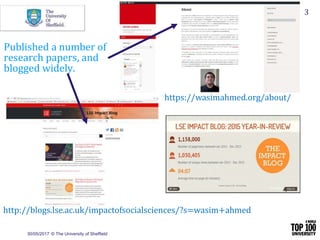
https://wasimahmed.org/about/
http://blogs.lse.ac.uk/impactofsocialsciences/?s=wasim+ahmed
Published a number of
research papers, and
blogged widely.
30/05/2017 © The University of Sheffield
4
• Twitter has over 313 million monthly active users1 –
citizens can use this channel to express their views.
• Research on Twitter has the potential to cut across many
disciplines.
• Questions arise over how to obtain and analyse social
media data.
1 https://about.twitter.com/company
Twitter for Academic Research
Twitter as a Consumer Panel
• According to one statistic there are on average 6
thousand tweets a second!
• So around 350,000 tweets are sent every
minute.
• Which makes it around 500 million tweets per
day.
30/05/2017 © The University of Sheffield
5
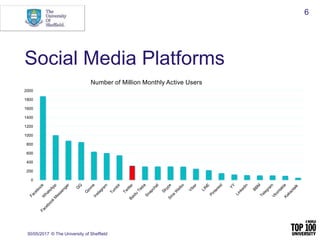
Social Media Platforms
30/05/2017 © The University of Sheffield
6
0
200
400
600
800
1000
1200
1400
1600
1800
2000
Number of Million Monthly Active Users
30/05/2017 © The University of Sheffield
7
• Open API so anyone with an Internet connection can
retrieve data.
• Open platform where anyone can follow anyone and can
request to follow other users.
• A lot of meta-data fields available to developers to
create analytics apps.
Why is Twitter so popular?
Social Media Platforms
30/05/2017 © The University of Sheffield
8
• Facebook (1.871 billion monthly active users)
• YouTube (1 billion monthly active users)
• Instagram (600 million monthly active users)
• Twitter (317 million monthly active users)
• Pinterest (150 million monthly active users)
Twitter API
• Twitter’s Search API (free)– is a sample of
tweets so some tweets and users may be
missing from results. This is free, but limited to 7
days back in time.
• Firehose API (paid) – in theory, 100% of Twitter
data. This can be costly.
30/05/2017 © The University of Sheffield
How do you retrieve data?
• Use a keyword e.g., Ebola
• Use a hashtag e.g., #EbolaOutbreak
• Use a Twitter handle e.g., @was3210
• Combine search queries using AND or OR
operators.
30/05/2017 © The University of Sheffield
Types of Analysis
• Content Analysis
• Thematic Analysis
• Network Analysis
• Machine Learning
• Sentiment Analysis
30/05/2017 © The University of Sheffield
11
30/05/2017 © The University of Sheffield
Tools Covered in this Presentation
• DiscoverText
• NodeXL
• Chorus
• Mozdeh
• TAGS
• COSMOS
DiscoverText
30/05/2017 © The University of Sheffield
13
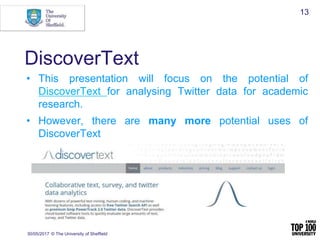
• This presentation will focus on the potential of
DiscoverText for analysing Twitter data for academic
research.
• However, there are many more potential uses of
DiscoverText
DiscoverText used in…
• Consumer industries
• Education
• Human Resources
• Legal
• Medical & Pharma
• Government
• Military
30/05/2017 © The University of Sheffield
14
DiscoverText as Data Science
• DiscoverText has a number of very powerful text
mining, human coding, and machine learning
features
• Access to the free Twitter Search API data
• Access to premium Gnip PowerTrack 2.0
Twitter data
30/05/2017 © The University of Sheffield
15
Fiver Pillars of Text Analytics
• Search
• Filtering
• De-duplication and Clustering
• Human Coding
• Machine-Learning
30/05/2017 © The University of Sheffield
16
For a topic overview you could
• Retrieve Twitter data on a topic of interest
search and filter out non-relevant data.
• Generate duplicates and near-duplicate
clusters.
• This would allow you to more easily code
the data.
30/05/2017 © The University of Sheffield
17
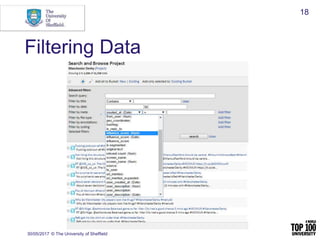
Filtering Data
30/05/2017 © The University of Sheffield
18
DiscoverText has Active Learning
• You can manually code a sub-set of data
in DiscoverText then allow a machine to
code the next iteration
• You can check for quality (adjust coding
parameters) and run the cycle again
• So humans and machines work together
30/05/2017 © The University of Sheffield
19
An example: Manchester Derby
• During a football game users were tweeting
about a buzzing sound, and some were not
happy with Sky’s camera angles
• You could use DiscoverText to filter the
data
30/05/2017 © The University of Sheffield
20
30/05/2017 © The University of Sheffield
21
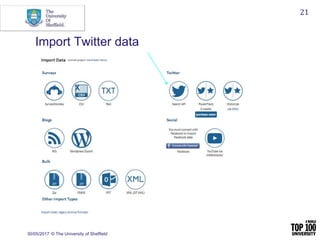
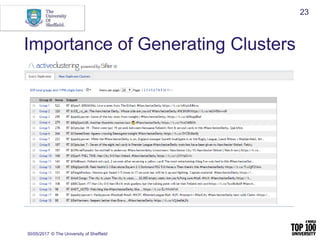
Import Twitter data
Applying Text Analytics
• Search for ‘buzzing’, ‘noise’, and ‘camera’
• Find positive instances (‘what’s that buzzing
noise from Sky?) and also negative e.g., people
‘buzzing’ from the game, or which team is
making the most ‘noise’
• Generating clusters and coding the data
30/05/2017 © The University of Sheffield
22
Importance of Generating Clusters
30/05/2017 © The University of Sheffield
23
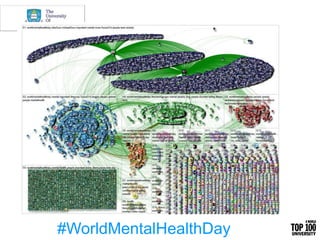
#WorldMentalHealthDay
• Most frequently shared URLs, Domains, Hashtags,
Words, Word Pairs, Replied-To, Mentioned Users, and
most Frequent Tweeters.
• Produces analytics overall and by group of users (users
are grouped by tweet content).
• By looking at different metrics associated with different
groups (G1, G2, G3 etc) you can see the different topics
that users may be talking about.
NodeXL Produces a Number of Analytics
[Divided]
Polarized Crowds
[Unified]
Tight Crowd
[Fragmented]
Brand Clusters
[Clustered]
Community Clusters
[In-Hub & Spoke]
Broadcast Network
[Out-Hub & Spoke]
Support Network
6 kinds of Twitter networks
[Divided]
Polarized Crowds
[Unified]
Tight Crowd
[Fragmented]
Brand Clusters
[Clustered]
Community Clusters
[In-Hub & Spoke]
Broadcast Network
[Out-Hub & Spoke]
Support Network
6 kinds of Twitter networks
30/05/2017 © The University of Sheffield
28
How Can You Use This?
• You can use social network analysis to
identify influencers and people who are
interested in a particular topic and you can
examine the content they share.
• You can identify clusters of users interested in
a particular topic and use automated methods
to target them.
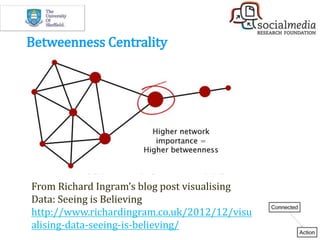
Betweenness Centrality
From Richard Ingram’s blog post visualising
Data: Seeing is Believing
http://www.richardingram.co.uk/2012/12/visu
alising-data-seeing-is-believing/
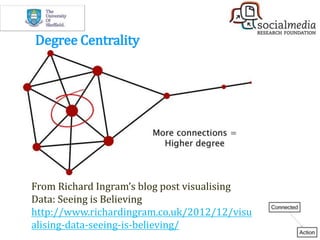
Degree Centrality
From Richard Ingram’s blog post visualising
Data: Seeing is Believing
http://www.richardingram.co.uk/2012/12/visu
alising-data-seeing-is-believing/
30/05/2017 © The University of Sheffield
31
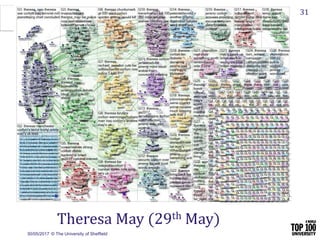
Theresa May (29th May)
30/05/2017 © The University of Sheffield
Chorus Analytics Tweetcatcher
Desktop Edition
• Chorus-TCD is a product of Brunel University
which allows you to retrieve and analyse data.
• Uses Twitter’s Search API.
• Great video introduction here.
30/05/2017 © The University of Sheffield
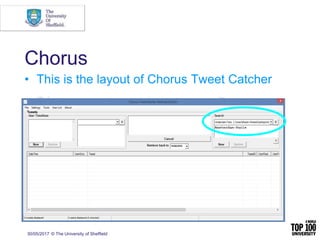
Chorus
• This is the layout of Chorus Tweet Catcher
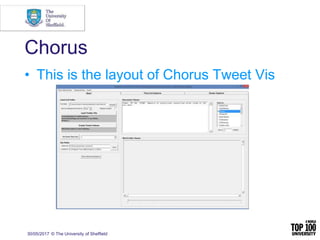
Chorus
• This is the layout of Chorus Tweet Vis
30/05/2017 © The University of Sheffield
Chorus Tutorials
• Chorus manual here
• Great video overview of Chorus here
30/05/2017 © The University of Sheffield
Mozdeh
• Mozdeh is a product of the ‘Statistical
Cybermetrics Research Group’ at the University
of Wolverhampton.
• Mozdeh is a Windows desktop program that can
gather tweets by automatically searching for
keywords associated with a topic.
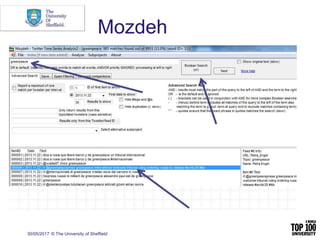
Mozdeh
30/05/2017 © The University of Sheffield
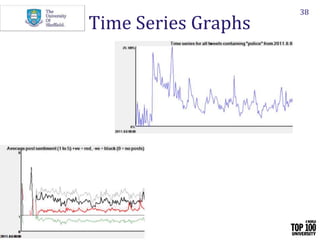
• An example time series graph of 5,055,299
tweets related to norovirus
30/05/2017 © The University of Sheffield
38
Time Series Graphs
Mozdeh Tutorials
• Great user guide here
• Great theoretical overview here
30/05/2017 © The University of Sheffield
TAGS – Twitter Archiving
Google Sheets
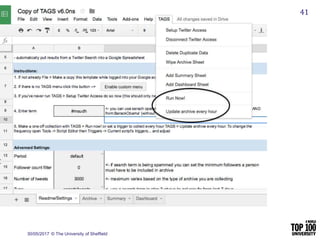
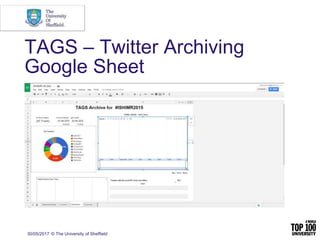
• TAGS is a free Google Sheet template which
lets you setup and run automated collection
of search results from Twitter.
• Set up TAGS here https://tags.hawksey.info/get-
tags/
30/05/2017 © The University of Sheffield
41
30/05/2017 © The University of Sheffield
TAGS – Twitter Archiving
Google Sheet
30/05/2017 © The University of Sheffield
COSMOS Project
• The Collaborative Online Social Media
Observatory (COSMOS): Social Media and Data
Mining is an ESRC project a part of the strategic
Big Data investment.
• The COSMOS Project (Burnap et al, 2014) uses
the Streaming API
30/05/2017 © The University of Sheffield
COSMOS Project
• Some of the features include generating:
• Word Clouds
• Frequency Charts
• Network Graphs
• Geographical Maps of Tweets
30/05/2017 © The University of Sheffield
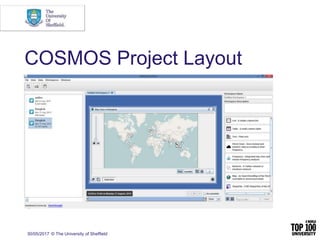
COSMOS Project Layout
30/05/2017 © The University of Sheffield
COSMOS Tutorials
• Great video tutorial(s) here
NVivo
• You can import social media data captured
elsewhere into NVivo
• Or you can use Ncapture within NVivo to
pull in data
• Useful for content analysis and thematic
analysis
30/05/2017 © The University of Sheffield
47
Summary
• This presentation has provided an
overview of some free and paid tools that
can be used to capture and analyse
Twitter data
• Different tools allow you to perform
different types of analysis
30/05/2017 © The University of Sheffield
48
30/05/2017 © The University of Sheffield
49
Prices
• Mozdeh, TAGS, COSMOS, and Chorus
are FREE
• DiscoverText (Professional) $49 a month
for academics and $24 a month for
students
• NodeXL Pro $199 a year for academics
and $29 a year for students
30/05/2017 © The University of Sheffield
50
Summer School
• 3-day intensive Summer School on social
media analytics taking place in Sibenik,
Croatia .June 28th to June 30th 2017
• More information here:
https://event.gg/5776/
iConference 2018 in Sheffield
• The theme of iConference 2018, Transforming
Digital Worlds, will be the importance of the
information field in transforming the increasingly
data-driven world.
• Run by a consortium of Information Schools
dedicated to advancing the information field
30/05/2017 © The University of Sheffield
51
Questions?
• Tweet me! @was3210
• Questions related to the tools?
• TAGS = @mhawksey
• NodeXL = @marc_smith
• COSMOS = @pbFeed
• Mozdeh = @mikethelwall
• DiscoverText = @StuartWShulman
30/05/2017 © The University of Sheffield
To
Discover
And
Understand.

Social Media: A Practical Approach

  • 1.
    Social Media: A PracticalApproach Wasim Ahmed (BA, MSc) @was3210 wahmed1@sheffield.ac.uk Tuesday 30th of May 2017 Researching Social Media: A Theoretical and Practical Overview - University of Sheffield
  • 2.
    About me • ThirdYear PhD student in the Health Informatics Research Group, Information School, University of Sheffield. (Faculty Scholarship). • Worked on a number of projects teaching and researching social media. • Run an analytics blog with readership in over 136 countries. Read across media, government, and academia.
  • 3.
    30/05/2017 © TheUniversity of Sheffield 3 https://wasimahmed.org/about/ http://blogs.lse.ac.uk/impactofsocialsciences/?s=wasim+ahmed Published a number of research papers, and blogged widely.
  • 4.
    30/05/2017 © TheUniversity of Sheffield 4 • Twitter has over 313 million monthly active users1 – citizens can use this channel to express their views. • Research on Twitter has the potential to cut across many disciplines. • Questions arise over how to obtain and analyse social media data. 1 https://about.twitter.com/company Twitter for Academic Research
  • 5.
    Twitter as aConsumer Panel • According to one statistic there are on average 6 thousand tweets a second! • So around 350,000 tweets are sent every minute. • Which makes it around 500 million tweets per day. 30/05/2017 © The University of Sheffield 5
  • 6.
    Social Media Platforms 30/05/2017© The University of Sheffield 6 0 200 400 600 800 1000 1200 1400 1600 1800 2000 Number of Million Monthly Active Users
  • 7.
    30/05/2017 © TheUniversity of Sheffield 7 • Open API so anyone with an Internet connection can retrieve data. • Open platform where anyone can follow anyone and can request to follow other users. • A lot of meta-data fields available to developers to create analytics apps. Why is Twitter so popular?
  • 8.
    Social Media Platforms 30/05/2017© The University of Sheffield 8 • Facebook (1.871 billion monthly active users) • YouTube (1 billion monthly active users) • Instagram (600 million monthly active users) • Twitter (317 million monthly active users) • Pinterest (150 million monthly active users)
  • 9.
    Twitter API • Twitter’sSearch API (free)– is a sample of tweets so some tweets and users may be missing from results. This is free, but limited to 7 days back in time. • Firehose API (paid) – in theory, 100% of Twitter data. This can be costly. 30/05/2017 © The University of Sheffield
  • 10.
    How do youretrieve data? • Use a keyword e.g., Ebola • Use a hashtag e.g., #EbolaOutbreak • Use a Twitter handle e.g., @was3210 • Combine search queries using AND or OR operators. 30/05/2017 © The University of Sheffield
  • 11.
    Types of Analysis •Content Analysis • Thematic Analysis • Network Analysis • Machine Learning • Sentiment Analysis 30/05/2017 © The University of Sheffield 11
  • 12.
    30/05/2017 © TheUniversity of Sheffield Tools Covered in this Presentation • DiscoverText • NodeXL • Chorus • Mozdeh • TAGS • COSMOS
  • 13.
    DiscoverText 30/05/2017 © TheUniversity of Sheffield 13 • This presentation will focus on the potential of DiscoverText for analysing Twitter data for academic research. • However, there are many more potential uses of DiscoverText
  • 14.
    DiscoverText used in… •Consumer industries • Education • Human Resources • Legal • Medical & Pharma • Government • Military 30/05/2017 © The University of Sheffield 14
  • 15.
    DiscoverText as DataScience • DiscoverText has a number of very powerful text mining, human coding, and machine learning features • Access to the free Twitter Search API data • Access to premium Gnip PowerTrack 2.0 Twitter data 30/05/2017 © The University of Sheffield 15
  • 16.
    Fiver Pillars ofText Analytics • Search • Filtering • De-duplication and Clustering • Human Coding • Machine-Learning 30/05/2017 © The University of Sheffield 16
  • 17.
    For a topicoverview you could • Retrieve Twitter data on a topic of interest search and filter out non-relevant data. • Generate duplicates and near-duplicate clusters. • This would allow you to more easily code the data. 30/05/2017 © The University of Sheffield 17
  • 18.
    Filtering Data 30/05/2017 ©The University of Sheffield 18
  • 19.
    DiscoverText has ActiveLearning • You can manually code a sub-set of data in DiscoverText then allow a machine to code the next iteration • You can check for quality (adjust coding parameters) and run the cycle again • So humans and machines work together 30/05/2017 © The University of Sheffield 19
  • 20.
    An example: ManchesterDerby • During a football game users were tweeting about a buzzing sound, and some were not happy with Sky’s camera angles • You could use DiscoverText to filter the data 30/05/2017 © The University of Sheffield 20
  • 21.
    30/05/2017 © TheUniversity of Sheffield 21 Import Twitter data
  • 22.
    Applying Text Analytics •Search for ‘buzzing’, ‘noise’, and ‘camera’ • Find positive instances (‘what’s that buzzing noise from Sky?) and also negative e.g., people ‘buzzing’ from the game, or which team is making the most ‘noise’ • Generating clusters and coding the data 30/05/2017 © The University of Sheffield 22
  • 23.
    Importance of GeneratingClusters 30/05/2017 © The University of Sheffield 23
  • 24.
  • 25.
    • Most frequentlyshared URLs, Domains, Hashtags, Words, Word Pairs, Replied-To, Mentioned Users, and most Frequent Tweeters. • Produces analytics overall and by group of users (users are grouped by tweet content). • By looking at different metrics associated with different groups (G1, G2, G3 etc) you can see the different topics that users may be talking about. NodeXL Produces a Number of Analytics
  • 26.
    [Divided] Polarized Crowds [Unified] Tight Crowd [Fragmented] BrandClusters [Clustered] Community Clusters [In-Hub & Spoke] Broadcast Network [Out-Hub & Spoke] Support Network 6 kinds of Twitter networks
  • 27.
    [Divided] Polarized Crowds [Unified] Tight Crowd [Fragmented] BrandClusters [Clustered] Community Clusters [In-Hub & Spoke] Broadcast Network [Out-Hub & Spoke] Support Network 6 kinds of Twitter networks
  • 28.
    30/05/2017 © TheUniversity of Sheffield 28 How Can You Use This? • You can use social network analysis to identify influencers and people who are interested in a particular topic and you can examine the content they share. • You can identify clusters of users interested in a particular topic and use automated methods to target them.
  • 29.
    Betweenness Centrality From RichardIngram’s blog post visualising Data: Seeing is Believing http://www.richardingram.co.uk/2012/12/visu alising-data-seeing-is-believing/
  • 30.
    Degree Centrality From RichardIngram’s blog post visualising Data: Seeing is Believing http://www.richardingram.co.uk/2012/12/visu alising-data-seeing-is-believing/
  • 31.
    30/05/2017 © TheUniversity of Sheffield 31 Theresa May (29th May)
  • 32.
    30/05/2017 © TheUniversity of Sheffield Chorus Analytics Tweetcatcher Desktop Edition • Chorus-TCD is a product of Brunel University which allows you to retrieve and analyse data. • Uses Twitter’s Search API. • Great video introduction here.
  • 33.
    30/05/2017 © TheUniversity of Sheffield Chorus • This is the layout of Chorus Tweet Catcher
  • 34.
    Chorus • This isthe layout of Chorus Tweet Vis 30/05/2017 © The University of Sheffield
  • 35.
    Chorus Tutorials • Chorusmanual here • Great video overview of Chorus here 30/05/2017 © The University of Sheffield
  • 36.
    30/05/2017 © TheUniversity of Sheffield Mozdeh • Mozdeh is a product of the ‘Statistical Cybermetrics Research Group’ at the University of Wolverhampton. • Mozdeh is a Windows desktop program that can gather tweets by automatically searching for keywords associated with a topic.
  • 37.
    Mozdeh 30/05/2017 © TheUniversity of Sheffield • An example time series graph of 5,055,299 tweets related to norovirus
  • 38.
    30/05/2017 © TheUniversity of Sheffield 38 Time Series Graphs
  • 39.
    Mozdeh Tutorials • Greatuser guide here • Great theoretical overview here 30/05/2017 © The University of Sheffield
  • 40.
    30/05/2017 © TheUniversity of Sheffield TAGS – Twitter Archiving Google Sheets • TAGS is a free Google Sheet template which lets you setup and run automated collection of search results from Twitter. • Set up TAGS here https://tags.hawksey.info/get- tags/
  • 41.
    30/05/2017 © TheUniversity of Sheffield 41
  • 42.
    30/05/2017 © TheUniversity of Sheffield TAGS – Twitter Archiving Google Sheet
  • 43.
    30/05/2017 © TheUniversity of Sheffield COSMOS Project • The Collaborative Online Social Media Observatory (COSMOS): Social Media and Data Mining is an ESRC project a part of the strategic Big Data investment. • The COSMOS Project (Burnap et al, 2014) uses the Streaming API
  • 44.
    30/05/2017 © TheUniversity of Sheffield COSMOS Project • Some of the features include generating: • Word Clouds • Frequency Charts • Network Graphs • Geographical Maps of Tweets
  • 45.
    30/05/2017 © TheUniversity of Sheffield COSMOS Project Layout
  • 46.
    30/05/2017 © TheUniversity of Sheffield COSMOS Tutorials • Great video tutorial(s) here
  • 47.
    NVivo • You canimport social media data captured elsewhere into NVivo • Or you can use Ncapture within NVivo to pull in data • Useful for content analysis and thematic analysis 30/05/2017 © The University of Sheffield 47
  • 48.
    Summary • This presentationhas provided an overview of some free and paid tools that can be used to capture and analyse Twitter data • Different tools allow you to perform different types of analysis 30/05/2017 © The University of Sheffield 48
  • 49.
    30/05/2017 © TheUniversity of Sheffield 49 Prices • Mozdeh, TAGS, COSMOS, and Chorus are FREE • DiscoverText (Professional) $49 a month for academics and $24 a month for students • NodeXL Pro $199 a year for academics and $29 a year for students
  • 50.
    30/05/2017 © TheUniversity of Sheffield 50 Summer School • 3-day intensive Summer School on social media analytics taking place in Sibenik, Croatia .June 28th to June 30th 2017 • More information here: https://event.gg/5776/
  • 51.
    iConference 2018 inSheffield • The theme of iConference 2018, Transforming Digital Worlds, will be the importance of the information field in transforming the increasingly data-driven world. • Run by a consortium of Information Schools dedicated to advancing the information field 30/05/2017 © The University of Sheffield 51
  • 52.
    Questions? • Tweet me!@was3210 • Questions related to the tools? • TAGS = @mhawksey • NodeXL = @marc_smith • COSMOS = @pbFeed • Mozdeh = @mikethelwall • DiscoverText = @StuartWShulman 30/05/2017 © The University of Sheffield
  • 53.