Topic 5

  SOA Tooling Using NetBeans

     Dr.Thanachart Numnonda
  Sun Microsystems (Thailand)
Asst.Prof.Thanisa Kruawaisayawan
             KMITL
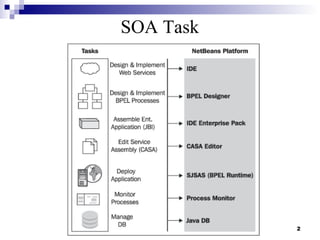
SOA Task


           2
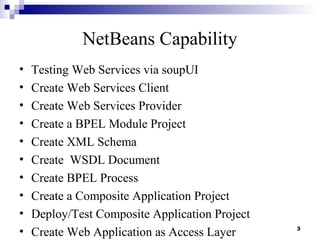
NetBeans Capability
•   Testing Web Services via soupUI
•   Create Web Services Client
•   Create Web Services Provider
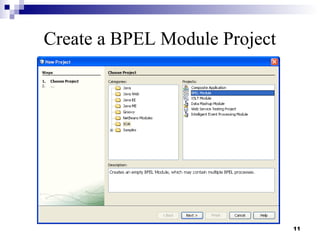
•   Create a BPEL Module Project
•   Create XML Schema
•   Create WSDL Document
•   Create BPEL Process
•   Create a Composite Application Project
•   Deploy/Test Composite Application Project
•   Create Web Application as Access Layer      3
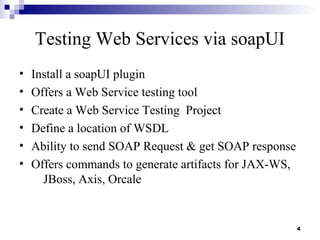
Testing Web Services via soapUI
•   Install a soapUI plugin
•   Offers a Web Service testing tool
•   Create a Web Service Testing Project
•   Define a location of WSDL
•   Ability to send SOAP Request & get SOAP response
•   Offers commands to generate artifacts for JAX-WS,
      JBoss, Axis, Orcale


                                                        4
5
Example : SOAP Request/Response


                                  6
Create a Web Service Client
• Create a Web / JavaEE /Java Application project
• Create a New Web Services Client
• Use either JAX-WS or JAX-RPC style


                                                    7
Create a Web Service Provide
• Create a Web /Java EE Project
      – Servlet Container
      – EJB Container
• Support Java EE 5 Web Service annotation
• Create a New Web Service
• Can deploy on GlassFish or Tomcat 6.0


                                             8
9
BPEL Module Project
• BPEL Module project is a group of source files which
  includes
   – XML Schema (*.xsd) files
   – WSDL files
   – BPEL files
• Within a BPEL Module project, you can author a
  business process compliant with the WS-BPEL 2.0
  language specification.
• Will be added to a Composite application as a JBI
  module

                                                      10
Create a BPEL Module Project


                               11
Create XML Schema
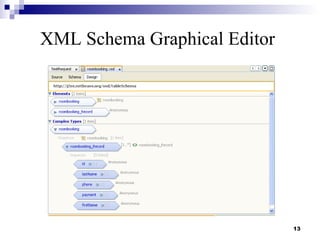
• Use XML Schema designer (of NetBeans)
•   Visually analyze and edit XML Schema
•   Apply Design Patterns to XML Schema
•   Author complex XML Schema
•   Support for cross project XML file references
•   Schema based code completion for XML instances


                                                     12
XML Schema Graphical Editor


                              13
Create WSDL Document
• Use WSDL Designer (of NetBeans)
• Create WSDL files using graphical editor
     – Refactor across WSDL, XML and BPEL
     – Support different Binding type


                                             14
15
Graphical WSDL Editor


                        16
Create BPEL Process
• Use BPEL Designer (of NetBeans)
• Visually author BPEL 2.0 business processes
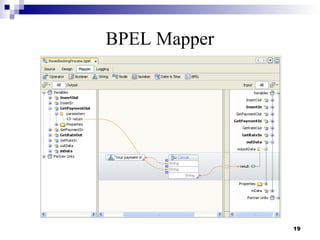
• Easily Create XPath expressions in the BPEL
    Mapper


                                                17
BPEL Designer


                18
BPEL Mapper


              19
Composite Application Project
• Composite Application project is a project whose
  primary purpose is to assemble a deployment unit for
  the Java Business Integration (JBI) server
   – BPEL Module projects must be added to a Composite
     Application project in order to be deployed to the BPEL
     runtime.
• The Composite Application Project can also be used to
  create and execute test cases that can then be run, in
  JUnit fashion, against the deployed BPEL processes.


                                                               20
Composite Application Project
• With a Composite Application project, you can:
   – Assemble an application that uses multiple project types
     (BPEL, XSLT, IEP, SQL, etc.)
   – Configure external/edge access protocols (SOAP, JMS,
     SMTP, and others)
   – Build JBI deployment packages
   – Deploy the application image to the target JBI server
   – Monitor the status of JBI server components and
     applications


                                                                21
Create Composite Application Project


                                   22
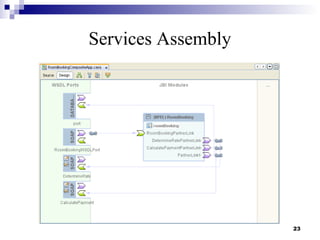
Services Assembly


                    23
Deploy/Test Composite Application
• The Deploy action compiles the files in the
    Composite Application project, packages the
    compiled BPEL and related web service artifacts
    (.wsdl and .xsd files), and deploys them to the
    BPEL Service Engine
• Verify that the project has been successfully deployed
    to the BPEL service engine
• Create /Run Test Case


                                                      24
Run TestCase


               25
Develop an Access Layer

• Composite Application Project can deploy a BPEL
    Module which in turn a Web Services
• Create a Web Service Client
• Using Servlet /JSP
• Support JSF / Struts Framework


                                                    26
Visual JSF Designer


                      27
Resources
 Some contents are borrowed from the presentation
  slides of Sang Shin, Java™ Technology Evangelist,
  Sun Microsystems, Inc.
 Building SOA-Based Composite Applications Using
  NetBeans IDE 6, David Salter


                                                      28
Thank you
thanachart.numnonda@sun.com
     twitter.com/thanachart
 www.facebook.com/thanachart
     www.thaijavadev.com


                               29

SOA Tooling Using NetBeans

  • 1.
    Topic 5 SOA Tooling Using NetBeans Dr.Thanachart Numnonda Sun Microsystems (Thailand) Asst.Prof.Thanisa Kruawaisayawan KMITL
  • 2.
  • 3.
    NetBeans Capability • Testing Web Services via soupUI • Create Web Services Client • Create Web Services Provider • Create a BPEL Module Project • Create XML Schema • Create WSDL Document • Create BPEL Process • Create a Composite Application Project • Deploy/Test Composite Application Project • Create Web Application as Access Layer 3
  • 4.
    Testing Web Servicesvia soapUI • Install a soapUI plugin • Offers a Web Service testing tool • Create a Web Service Testing Project • Define a location of WSDL • Ability to send SOAP Request & get SOAP response • Offers commands to generate artifacts for JAX-WS, JBoss, Axis, Orcale 4
  • 5.
  • 6.
    Example : SOAPRequest/Response 6
  • 7.
    Create a WebService Client • Create a Web / JavaEE /Java Application project • Create a New Web Services Client • Use either JAX-WS or JAX-RPC style 7
  • 8.
    Create a WebService Provide • Create a Web /Java EE Project – Servlet Container – EJB Container • Support Java EE 5 Web Service annotation • Create a New Web Service • Can deploy on GlassFish or Tomcat 6.0 8
  • 9.
  • 10.
    BPEL Module Project •BPEL Module project is a group of source files which includes – XML Schema (*.xsd) files – WSDL files – BPEL files • Within a BPEL Module project, you can author a business process compliant with the WS-BPEL 2.0 language specification. • Will be added to a Composite application as a JBI module 10
  • 11.
    Create a BPELModule Project 11
  • 12.
    Create XML Schema •Use XML Schema designer (of NetBeans) • Visually analyze and edit XML Schema • Apply Design Patterns to XML Schema • Author complex XML Schema • Support for cross project XML file references • Schema based code completion for XML instances 12
  • 13.
  • 14.
    Create WSDL Document •Use WSDL Designer (of NetBeans) • Create WSDL files using graphical editor – Refactor across WSDL, XML and BPEL – Support different Binding type 14
  • 15.
  • 16.
  • 17.
    Create BPEL Process •Use BPEL Designer (of NetBeans) • Visually author BPEL 2.0 business processes • Easily Create XPath expressions in the BPEL Mapper 17
  • 18.
  • 19.
  • 20.
    Composite Application Project •Composite Application project is a project whose primary purpose is to assemble a deployment unit for the Java Business Integration (JBI) server – BPEL Module projects must be added to a Composite Application project in order to be deployed to the BPEL runtime. • The Composite Application Project can also be used to create and execute test cases that can then be run, in JUnit fashion, against the deployed BPEL processes. 20
  • 21.
    Composite Application Project •With a Composite Application project, you can: – Assemble an application that uses multiple project types (BPEL, XSLT, IEP, SQL, etc.) – Configure external/edge access protocols (SOAP, JMS, SMTP, and others) – Build JBI deployment packages – Deploy the application image to the target JBI server – Monitor the status of JBI server components and applications 21
  • 22.
  • 23.
  • 24.
    Deploy/Test Composite Application •The Deploy action compiles the files in the Composite Application project, packages the compiled BPEL and related web service artifacts (.wsdl and .xsd files), and deploys them to the BPEL Service Engine • Verify that the project has been successfully deployed to the BPEL service engine • Create /Run Test Case 24
  • 25.
  • 26.
    Develop an AccessLayer • Composite Application Project can deploy a BPEL Module which in turn a Web Services • Create a Web Service Client • Using Servlet /JSP • Support JSF / Struts Framework 26
  • 27.
  • 28.
    Resources  Some contentsare borrowed from the presentation slides of Sang Shin, Java™ Technology Evangelist, Sun Microsystems, Inc.  Building SOA-Based Composite Applications Using NetBeans IDE 6, David Salter 28
  • 29.
    Thank you thanachart.numnonda@sun.com twitter.com/thanachart www.facebook.com/thanachart www.thaijavadev.com 29