Introduction to Java Web Application
Objectives
 Introduction to java web application
+ The core and basic of Java web server technologies
+ Java web application technologies
 Setup Environment :
JDK: 1.7 or higher
Servlet container: Tomcat 8, Glassfish 4.1, etc.
Intergrate Netbeans 8. with the web container.
 File – Directory structure
 Deployment Descriptor
 Package web application
 Deploy the web application
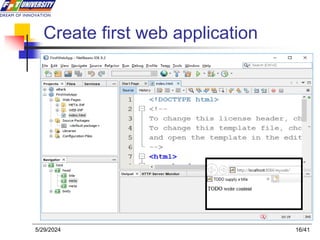
 Creating/Building the first application
2/41
5/29/2024
Java web application
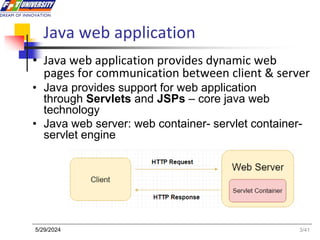
• Java web application provides dynamic web
pages for communication between client & server
• Java provides support for web application
through Servlets and JSPs – core java web
technology
• Java web server: web container- servlet container-
servlet engine
3/41
5/29/2024
Java web application
4/41
5/29/2024
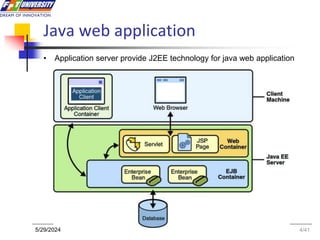
• Application server provide J2EE technology for java web application
File and Directory Structure
• A Place for Everything and Everything in Its Place.
• Construct the file and directory structure of a Web
Application that may contain:
 static content,
 JSP pages,
 servlet classes,
 the deployment descriptor,
 tag libraries,
 JAR files and Java class files;
 and describe how to protect
resource files from HTTP access.
5/41
5/29/2024
Special Directories Beneath the Context Root
• /WEB-INF/classes—for classes that exist as separate
Java classes (not packaged within JAR files).
• /WEB-INF/ lib—for JAR files, supporting classes that
connect to databases—whatever library.
• web.xml, the deployment descriptor file.
6/41
5/29/2024
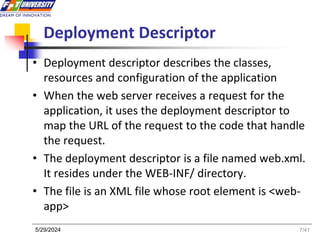
Deployment Descriptor
• Deployment descriptor describes the classes,
resources and configuration of the application
• When the web server receives a request for the
application, it uses the deployment descriptor to
map the URL of the request to the code that handle
the request.
• The deployment descriptor is a file named web.xml.
It resides under the WEB-INF/ directory.
• The file is an XML file whose root element is <web-
app>
7/41
5/29/2024
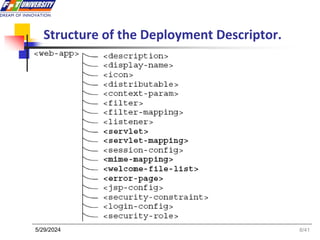
Structure of the Deployment Descriptor.
8/41
5/29/2024
Deployment Descriptor simple web.xml
<?xml version="1.0" encoding="ISO-8859-1"?>
<web-app xmlns="http://java.sun.com/xml/ns/j2ee"
xmlns:xsi="http://www.w3.org/2001/XMLSchema-instance"
xsi:schemaLocation=http://java.sun.com/xml/ns/j2ee http://java.sun.com/xml/ns/j2ee/web-app_2_4.xsd
version="2.4">
<display-name>Servlet 2.4 Examples</display-name>
<description>
Servlet 2.4 Examples.
</description>
<!-- Define servlets that are included in the example application -->
<servlet>
<servlet-name>FirstServlet</servlet-name>
<servlet-class>FirstServlet</servlet-class>
</servlet>
<servlet-mapping>
<servlet-name>FirstServlet</servlet-name>
<url-pattern>/FirstServlet</url-pattern>
</servlet-mapping>
</web-app>
9/41
5/29/2024
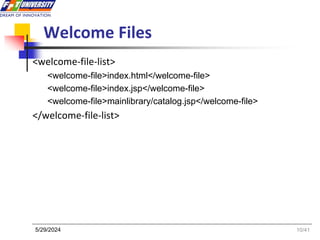
Welcome Files
<welcome-file-list>
<welcome-file>index.html</welcome-file>
<welcome-file>index.jsp</welcome-file>
<welcome-file>mainlibrary/catalog.jsp</welcome-file>
</welcome-file-list>
10/41
5/29/2024
Packaging Your Web Application
 Web modules are packaged as JAR files with
a .war (web archive) extension
 WARs are packaged for a different purpose:
to make it as easy as possible for a web
container to deploy an application.
 Web modules contain servlet class files, web
files, supporting class files, image and HTML
files, and web application deployment
descriptor.
 NetBean: Project name-> Build
11/41
5/29/2024
Deploy web application
• Several web containers have automatic deployment
mechanisms.
• The server recommended for this course—Tomcat
7.x or Glassfish 4.x—has a “webapps” directory.
• Place a WAR file in this directory, and Tomcat (by
default) will un-jar the contents into the file system
under the webapps directory.
• a context root directory is the same name as the
WAR file (but without the .war extension)— then
makes the application available for use.
12/41
5/29/2024
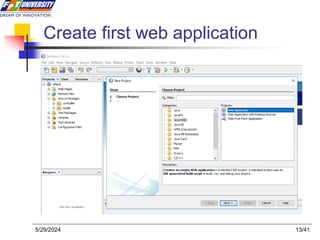
Create first web application
5/29/2024 13/41
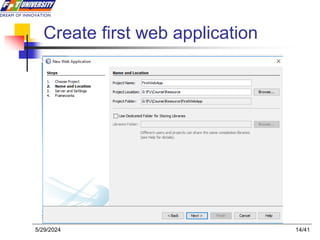
Create first web application
5/29/2024 14/41
Create first web application
5/29/2024 15/41
Create first web application
5/29/2024 16/41
Summary
Java Web application
• Core technology of Java web
• Java web server – Application server
• Web container – Servlet container
• File and Directory Structure
• Deployment Descriptor
• Package WAR Files
• Deploy web application
17/41
5/29/2024
Constructive question
 Compare general web server and Java web
server
 When a user enter username and password
to login a java web application, what does the
server do? List the tasks in order of
execution.
 When a user accesses a java web application
from a browser, what does the web server
do?
 As a developer, how do you deploy web app?
5/29/2024 18/41

Slide 3- Java Web Application-PRJ301.ppt

  • 1.
    Introduction to JavaWeb Application
  • 2.
    Objectives  Introduction tojava web application + The core and basic of Java web server technologies + Java web application technologies  Setup Environment : JDK: 1.7 or higher Servlet container: Tomcat 8, Glassfish 4.1, etc. Intergrate Netbeans 8. with the web container.  File – Directory structure  Deployment Descriptor  Package web application  Deploy the web application  Creating/Building the first application 2/41 5/29/2024
  • 3.
    Java web application •Java web application provides dynamic web pages for communication between client & server • Java provides support for web application through Servlets and JSPs – core java web technology • Java web server: web container- servlet container- servlet engine 3/41 5/29/2024
  • 4.
    Java web application 4/41 5/29/2024 •Application server provide J2EE technology for java web application
  • 5.
    File and DirectoryStructure • A Place for Everything and Everything in Its Place. • Construct the file and directory structure of a Web Application that may contain:  static content,  JSP pages,  servlet classes,  the deployment descriptor,  tag libraries,  JAR files and Java class files;  and describe how to protect resource files from HTTP access. 5/41 5/29/2024
  • 6.
    Special Directories Beneaththe Context Root • /WEB-INF/classes—for classes that exist as separate Java classes (not packaged within JAR files). • /WEB-INF/ lib—for JAR files, supporting classes that connect to databases—whatever library. • web.xml, the deployment descriptor file. 6/41 5/29/2024
  • 7.
    Deployment Descriptor • Deploymentdescriptor describes the classes, resources and configuration of the application • When the web server receives a request for the application, it uses the deployment descriptor to map the URL of the request to the code that handle the request. • The deployment descriptor is a file named web.xml. It resides under the WEB-INF/ directory. • The file is an XML file whose root element is <web- app> 7/41 5/29/2024
  • 8.
    Structure of theDeployment Descriptor. 8/41 5/29/2024
  • 9.
    Deployment Descriptor simpleweb.xml <?xml version="1.0" encoding="ISO-8859-1"?> <web-app xmlns="http://java.sun.com/xml/ns/j2ee" xmlns:xsi="http://www.w3.org/2001/XMLSchema-instance" xsi:schemaLocation=http://java.sun.com/xml/ns/j2ee http://java.sun.com/xml/ns/j2ee/web-app_2_4.xsd version="2.4"> <display-name>Servlet 2.4 Examples</display-name> <description> Servlet 2.4 Examples. </description> <!-- Define servlets that are included in the example application --> <servlet> <servlet-name>FirstServlet</servlet-name> <servlet-class>FirstServlet</servlet-class> </servlet> <servlet-mapping> <servlet-name>FirstServlet</servlet-name> <url-pattern>/FirstServlet</url-pattern> </servlet-mapping> </web-app> 9/41 5/29/2024
  • 10.
  • 11.
    Packaging Your WebApplication  Web modules are packaged as JAR files with a .war (web archive) extension  WARs are packaged for a different purpose: to make it as easy as possible for a web container to deploy an application.  Web modules contain servlet class files, web files, supporting class files, image and HTML files, and web application deployment descriptor.  NetBean: Project name-> Build 11/41 5/29/2024
  • 12.
    Deploy web application •Several web containers have automatic deployment mechanisms. • The server recommended for this course—Tomcat 7.x or Glassfish 4.x—has a “webapps” directory. • Place a WAR file in this directory, and Tomcat (by default) will un-jar the contents into the file system under the webapps directory. • a context root directory is the same name as the WAR file (but without the .war extension)— then makes the application available for use. 12/41 5/29/2024
  • 13.
    Create first webapplication 5/29/2024 13/41
  • 14.
    Create first webapplication 5/29/2024 14/41
  • 15.
    Create first webapplication 5/29/2024 15/41
  • 16.
    Create first webapplication 5/29/2024 16/41
  • 17.
    Summary Java Web application •Core technology of Java web • Java web server – Application server • Web container – Servlet container • File and Directory Structure • Deployment Descriptor • Package WAR Files • Deploy web application 17/41 5/29/2024
  • 18.
    Constructive question  Comparegeneral web server and Java web server  When a user enter username and password to login a java web application, what does the server do? List the tasks in order of execution.  When a user accesses a java web application from a browser, what does the web server do?  As a developer, how do you deploy web app? 5/29/2024 18/41

Editor's Notes

  • #9 MINE-Multi-purpose Internet Mail Extensions
  • #12 oject