SLF4J Explained
Why need logging?
• Format of java logs
• Format of messages
• what to log in java
• which logging level to use for which kind
of messages
Why SLF4J?
• Jakarta Commons Logging (JCL)
• java.util.logging.
-Same problem domain
-Well-established library
So why do we re-invent the wheel?
Because details of implementation
matter.
A simpler implementation is preferable to more complex variant even if
the latter offers other advantages.
What is SLF4J
Sl4j-Simple Logging Façade for Java
slf4j is a facade, not an implementation.
• Log4J was initially created by Ceki Gülcü. After Log4J Ceki created
SLF4J, so I guess he put everything he learned from Log4J into
SLF4J.
• SLF4J provides a nice way of creating short and easy to read
logging statements in the code, that have only minor resource
consumption if logging is turned off.
• String message = "Could not find our DataSource in
WAT Database.";
logger .error("*** " , message);
logger.debug("{}", complexObject);
logger.debug("Info : x = {}, y = {}, str = {}", new Object[]{info.getX(),
info.getY(), infos.getStr()});
• competitors.
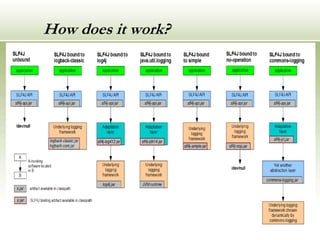
How does it work?
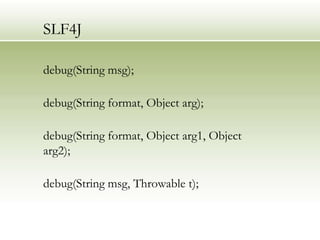
SLF4J
debug(String msg);
debug(String format, Object arg);
debug(String format, Object arg1, Object
arg2);
debug(String msg, Throwable t);
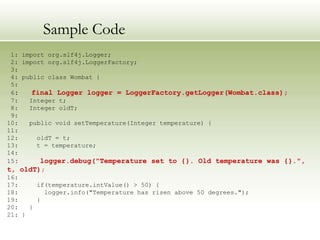
Sample Code
1: import org.slf4j.Logger;
2: import org.slf4j.LoggerFactory;
3:
4: public class Wombat {
5:
6: final Logger logger = LoggerFactory.getLogger(Wombat.class);
7: Integer t;
8: Integer oldT;
9:
10: public void setTemperature(Integer temperature) {
11:
12: oldT = t;
13: t = temperature;
14:
15: logger.debug("Temperature set to {}. Old temperature was {}.",
t, oldT);
16:
17: if(temperature.intValue() > 50) {
18: logger.info("Temperature has risen above 50 degrees.");
19: }
20: }
21: }
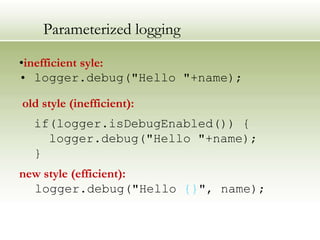
Parameterized logging
•inefficient syle:
• logger.debug("Hello "+name);
old style (inefficient):
if(logger.isDebugEnabled()) {
logger.debug("Hello "+name);
}
new style (efficient):
logger.debug("Hello {}", name);
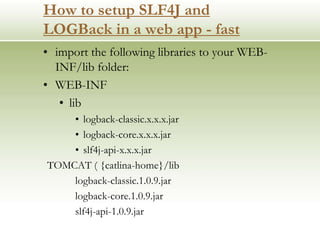
How to setup SLF4J and
LOGBack in a web app - fast
• import the following libraries to your WEB-
INF/lib folder:
• WEB-INF
• lib
• logback-classic.x.x.x.jar
• logback-core.x.x.x.jar
• slf4j-api-x.x.x.jar
TOMCAT ( {catlina-home}/lib
logback-classic.1.0.9.jar
logback-core.1.0.9.jar
slf4j-api-1.0.9.jar
SLF4J explained..
• Object entry = new SomeObject();
if(logger.isDebugEnabled()) {
logger.debug("Entry number: " + i + " is " +
String.valueOf(entry[i]));
}
logger.debug("The entry is {}.", entry);
Logback.xml
<?xml version="1.0" encoding="UTF-8"?>
<configuration>
<appender name="FILE" class="ch.qos.logback.core.FileAppender">
<file>c:testlog1.log</file>
<layout class="ch.qos.logback.classic.PatternLayout">
<Pattern>%date %level [%thread] %logger{10} [%file:%line]
%msg%n</Pattern>
</layout>
</appender>
<root>
<level value="debug" />
<appender-ref ref="FILE" />
</root>
</configuration>
Other Supported Features
• MDC
• Markers
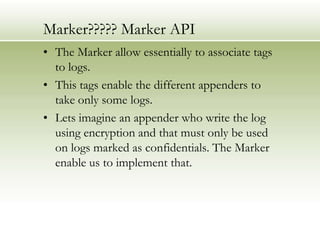
Marker????? Marker API
• The Marker allow essentially to associate tags
to logs.
• This tags enable the different appenders to
take only some logs.
• Lets imagine an appender who write the log
using encryption and that must only be used
on logs marked as confidentials. The Marker
enable us to implement that.
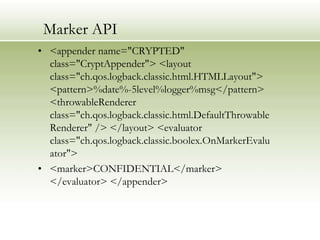
Marker API
• <appender name="CRYPTED"
class="CryptAppender"> <layout
class="ch.qos.logback.classic.html.HTMLLayout">
<pattern>%date%-5level%logger%msg</pattern>
<throwableRenderer
class="ch.qos.logback.classic.html.DefaultThrowable
Renderer" /> </layout> <evaluator
class="ch.qos.logback.classic.boolex.OnMarkerEvalu
ator">
• <marker>CONFIDENTIAL</marker>
</evaluator> </appender>
Marker API
• Marker confidentialMarker =
MarkerFactory.getMarker("CONFIDENTIL");
• logger.error(confidentialMarker, “ very vconfidentiel !");
MDC
• A simple map (key-value set) maintained by
the logging framework.
• In that map, the application can put some
key-value couple that could be used to add
some informations in the logs.
MDC --Explained
• MDC.put(“user", „Marriot Hotel");
• MDC.put(“” Location", “status");
• %X{user} %X{ device id} - %m%n
• logger.info(“logDate {}", logdate);
logger.info(“deviceID {}", status);
• Marriot Hotel- Log Date
• Location - Atlanta
Conclusion
• It‟s really powerful, but remains really simple
to use and the style is the same as the other
existing logging systems.
Simplicity is powerful.
-- Evan Williams
References
• http://www.slf4j.org/
• http://parleys.com/play/514892260364bc17
fc56be83/chapter0/about

SLF4J Explained........

  • 1.
  • 2.
    Why need logging? •Format of java logs • Format of messages • what to log in java • which logging level to use for which kind of messages
  • 3.
    Why SLF4J? • JakartaCommons Logging (JCL) • java.util.logging. -Same problem domain -Well-established library So why do we re-invent the wheel? Because details of implementation matter. A simpler implementation is preferable to more complex variant even if the latter offers other advantages.
  • 4.
    What is SLF4J Sl4j-SimpleLogging Façade for Java slf4j is a facade, not an implementation. • Log4J was initially created by Ceki Gülcü. After Log4J Ceki created SLF4J, so I guess he put everything he learned from Log4J into SLF4J. • SLF4J provides a nice way of creating short and easy to read logging statements in the code, that have only minor resource consumption if logging is turned off. • String message = "Could not find our DataSource in WAT Database."; logger .error("*** " , message); logger.debug("{}", complexObject); logger.debug("Info : x = {}, y = {}, str = {}", new Object[]{info.getX(), info.getY(), infos.getStr()});
  • 5.
  • 6.
    SLF4J debug(String msg); debug(String format,Object arg); debug(String format, Object arg1, Object arg2); debug(String msg, Throwable t);
  • 7.
    Sample Code 1: importorg.slf4j.Logger; 2: import org.slf4j.LoggerFactory; 3: 4: public class Wombat { 5: 6: final Logger logger = LoggerFactory.getLogger(Wombat.class); 7: Integer t; 8: Integer oldT; 9: 10: public void setTemperature(Integer temperature) { 11: 12: oldT = t; 13: t = temperature; 14: 15: logger.debug("Temperature set to {}. Old temperature was {}.", t, oldT); 16: 17: if(temperature.intValue() > 50) { 18: logger.info("Temperature has risen above 50 degrees."); 19: } 20: } 21: }
  • 8.
    Parameterized logging •inefficient syle: •logger.debug("Hello "+name); old style (inefficient): if(logger.isDebugEnabled()) { logger.debug("Hello "+name); } new style (efficient): logger.debug("Hello {}", name);
  • 9.
    How to setupSLF4J and LOGBack in a web app - fast • import the following libraries to your WEB- INF/lib folder: • WEB-INF • lib • logback-classic.x.x.x.jar • logback-core.x.x.x.jar • slf4j-api-x.x.x.jar TOMCAT ( {catlina-home}/lib logback-classic.1.0.9.jar logback-core.1.0.9.jar slf4j-api-1.0.9.jar
  • 10.
    SLF4J explained.. • Objectentry = new SomeObject(); if(logger.isDebugEnabled()) { logger.debug("Entry number: " + i + " is " + String.valueOf(entry[i])); } logger.debug("The entry is {}.", entry);
  • 11.
    Logback.xml <?xml version="1.0" encoding="UTF-8"?> <configuration> <appendername="FILE" class="ch.qos.logback.core.FileAppender"> <file>c:testlog1.log</file> <layout class="ch.qos.logback.classic.PatternLayout"> <Pattern>%date %level [%thread] %logger{10} [%file:%line] %msg%n</Pattern> </layout> </appender> <root> <level value="debug" /> <appender-ref ref="FILE" /> </root> </configuration>
  • 12.
  • 13.
    Marker????? Marker API •The Marker allow essentially to associate tags to logs. • This tags enable the different appenders to take only some logs. • Lets imagine an appender who write the log using encryption and that must only be used on logs marked as confidentials. The Marker enable us to implement that.
  • 14.
    Marker API • <appendername="CRYPTED" class="CryptAppender"> <layout class="ch.qos.logback.classic.html.HTMLLayout"> <pattern>%date%-5level%logger%msg</pattern> <throwableRenderer class="ch.qos.logback.classic.html.DefaultThrowable Renderer" /> </layout> <evaluator class="ch.qos.logback.classic.boolex.OnMarkerEvalu ator"> • <marker>CONFIDENTIAL</marker> </evaluator> </appender>
  • 15.
    Marker API • MarkerconfidentialMarker = MarkerFactory.getMarker("CONFIDENTIL"); • logger.error(confidentialMarker, “ very vconfidentiel !");
  • 16.
    MDC • A simplemap (key-value set) maintained by the logging framework. • In that map, the application can put some key-value couple that could be used to add some informations in the logs.
  • 17.
    MDC --Explained • MDC.put(“user",„Marriot Hotel"); • MDC.put(“” Location", “status"); • %X{user} %X{ device id} - %m%n • logger.info(“logDate {}", logdate); logger.info(“deviceID {}", status); • Marriot Hotel- Log Date • Location - Atlanta
  • 18.
    Conclusion • It‟s reallypowerful, but remains really simple to use and the style is the same as the other existing logging systems. Simplicity is powerful. -- Evan Williams
  • 19.

Editor's Notes

  • #9 In Java, any string parameter passed to a method is constructed before the method is called. While it make take 2 nanoseconds to evaluate that a logger is disabled for the DEBUG level when logger.debug() is invoked, it may take on “average” over 100 nanosecond to build the string “Hello”+ name. Thus, if you are concerned about performance, you might want to use conditional logging, or the much more convenient new style called parameterized logging introduced in SLF4J.