An introduction to Sketch
2017.09.08
Sachiko Suzuki
@sachikokop
sachikokop.com
My name is
What is ?
You might have never used Sketch.
I recommended you try Sketch.
Sketch is a proprietary vector graphics editor
for Apple's macOS, developed
by the Dutch company Bohemian Coding.
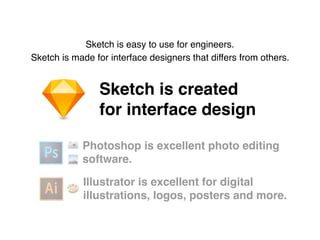
Sketch is created
for interface design
Photoshop is excellent photo editing
software.
Illustrator is excellent for digital
illustrations, logos, posters and more.
📷
🗻
🎨
Sketch is easy to use for engineers.
Sketch is made for interface designers that differs from others.
You will love Sketch because
😘
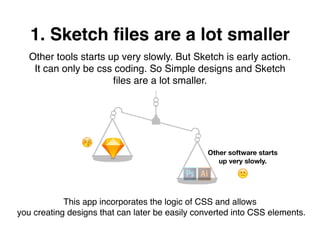
1. Sketch files are a lot smaller
Other tools starts up very slowly. But Sketch is early action.
It can only be css coding. So Simple designs and Sketch
files are a lot smaller.
🙁
😚
Other software starts
up very slowly.
This app incorporates the logic of CSS and allows
you creating designs that can later be easily converted into CSS elements.
😇💻
Anyone with little or no training
can learn Sketch.
2. Sketch is made for prototyping
Let's try this!
Other tools are bloated to do prototyping alone.

Sketch is only used for prototyping and it does the job really well.
3.Lots of tools to help you
build UI
There are tons of app building
programs that can help you
make your vision a reality.
It’s able to increase the efficiency of work.
Five more reasons
to love Sketch
Style & Symbol are just a
based on component-based system
1. Style & Symbol
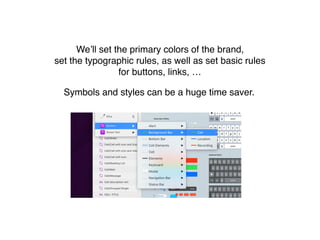
We’ll set the primary colors of the brand,
set the typographic rules, as well as set basic rules
for buttons, links, …
Symbols and styles can be a huge time saver.
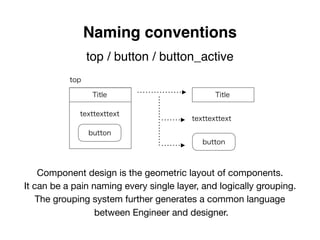
top / button / button_active
Naming conventions
Title
button
Title
texttexttext
texttexttext
button
top
Component design is the geometric layout of components.

It can be a pain naming every single layer, and logically grouping.

The grouping system further generates a common language

between Engineer and designer.
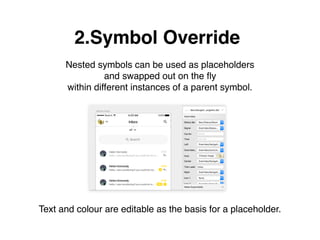
2.Symbol Override
Nested symbols can be used as placeholders
and swapped out on the fly
within different instances of a parent symbol.
Text and colour are editable as the basis for a placeholder.
3.Export
Sketch helps us to export content
in so many different ways.
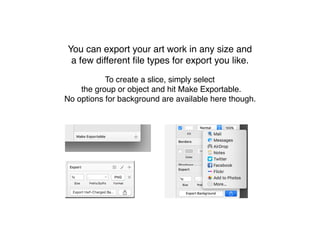
To create a slice, simply select
the group or object and hit Make Exportable.
No options for background are available here though.
You can export your art work in any size and
a few different file types for export you like.
4.Plugins
Plugins are an important part of
Sketch’s ecosystem and
they can be installed to extend
Sketch’s functionality.
The Sketch community is wildly supportive
and you can find tons of amazing plugins
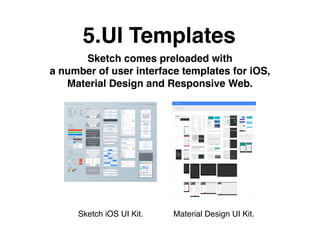
5.UI Templates
Sketch comes preloaded with
a number of user interface templates for iOS,
Material Design and Responsive Web.
Material Design UI Kit.Sketch iOS UI Kit.
AppSocially is also using!
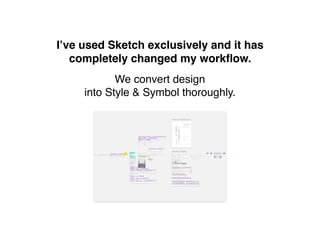
I’ve used Sketch exclusively
and it has completely changed
my workflow.
We convert design
into Style & Symbol thoroughly.
I use this a lot for repeatable elements.
It’s great timesaver.
I don't need to care
about blurring of the pixel. 😌
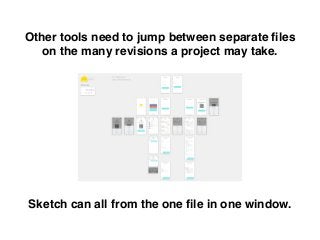
Other tools need to jump between separate files
on the many revisions a project may take.
Sketch can all from the one file in one window.
Team’s collaboration between
designers and developers is
essential to the success of a project.
👬👬👭👭
Thank you.
Sketch is updates often, and a new plugin is always born.
I intend to continue learning forever.

An introduction to Sketch

  • 1.
    An introduction toSketch 2017.09.08
  • 2.
  • 3.
    What is ? Youmight have never used Sketch. I recommended you try Sketch.
  • 4.
    Sketch is aproprietary vector graphics editor for Apple's macOS, developed by the Dutch company Bohemian Coding.
  • 5.
    Sketch is created forinterface design Photoshop is excellent photo editing software. Illustrator is excellent for digital illustrations, logos, posters and more. 📷 🗻 🎨 Sketch is easy to use for engineers. Sketch is made for interface designers that differs from others.
  • 6.
    You will loveSketch because 😘
  • 7.
    1. Sketch filesare a lot smaller Other tools starts up very slowly. But Sketch is early action. It can only be css coding. So Simple designs and Sketch files are a lot smaller. 🙁 😚 Other software starts up very slowly. This app incorporates the logic of CSS and allows you creating designs that can later be easily converted into CSS elements.
  • 8.
    😇💻 Anyone with littleor no training can learn Sketch. 2. Sketch is made for prototyping Let's try this! Other tools are bloated to do prototyping alone. Sketch is only used for prototyping and it does the job really well.
  • 9.
    3.Lots of toolsto help you build UI There are tons of app building programs that can help you make your vision a reality. It’s able to increase the efficiency of work.
  • 10.
  • 11.
    Style & Symbolare just a based on component-based system 1. Style & Symbol
  • 12.
    We’ll set theprimary colors of the brand, set the typographic rules, as well as set basic rules for buttons, links, … Symbols and styles can be a huge time saver.
  • 13.
    top / button/ button_active Naming conventions Title button Title texttexttext texttexttext button top Component design is the geometric layout of components. It can be a pain naming every single layer, and logically grouping. The grouping system further generates a common language between Engineer and designer.
  • 14.
    2.Symbol Override Nested symbolscan be used as placeholders and swapped out on the fly within different instances of a parent symbol. Text and colour are editable as the basis for a placeholder.
  • 15.
    3.Export Sketch helps usto export content in so many different ways.
  • 16.
    To create aslice, simply select the group or object and hit Make Exportable. No options for background are available here though. You can export your art work in any size and a few different file types for export you like.
  • 17.
    4.Plugins Plugins are animportant part of Sketch’s ecosystem and they can be installed to extend Sketch’s functionality.
  • 18.
    The Sketch communityis wildly supportive and you can find tons of amazing plugins
  • 19.
    5.UI Templates Sketch comespreloaded with a number of user interface templates for iOS, Material Design and Responsive Web. Material Design UI Kit.Sketch iOS UI Kit.
  • 20.
  • 21.
    I’ve used Sketchexclusively and it has completely changed my workflow.
  • 22.
    We convert design intoStyle & Symbol thoroughly. I use this a lot for repeatable elements. It’s great timesaver.
  • 23.
    I don't needto care about blurring of the pixel. 😌
  • 24.
    Other tools needto jump between separate files on the many revisions a project may take. Sketch can all from the one file in one window.
  • 25.
    Team’s collaboration between designersand developers is essential to the success of a project. 👬👬👭👭
  • 26.
    Thank you. Sketch isupdates often, and a new plugin is always born. I intend to continue learning forever.