S I M P L E RU L E S F O R B E T T E R
P O W E R P O I N T
P R E S E N TAT I O N S
Empowerment Technology
PowerPoint Lecture
DON'T READ YOUR PRESENTATION
STRAIGHT FROM THE SLIDES
1
FOLLOW THE
5/5/5 RULE
2
DON'T FORGET YOUR AUDIENCE
3
CHOOSE READABLE COLORS AND
FONTS
4
DON'T OVERLOAD YOUR
PRESENTATION WITH
ANIMATIONS
5
USE ANIMATIONS SPARINGLY TO
ENHANCE YOUR PRESENTATION
6
PERFORMANCE
TASK
IT IS TIME FOR YOUR
This PowerPoint project is a
presentation that describes you, your
family, and anything else you want to
tell about yourself. Your grade will be
determined by the neatness of your
presentation, correct spelling and
grammar, and by meeting all the
requirements for the presentation.
This project may be presented to the
class.
REQUIREMENTS FOR THE
PRESENTATION:
1) You must have a title slide and a
conclusion slide. There must be at least
5 body slides. This means your
presentation must have a minimum of 7
slides in total. You may use more if you
want. Do not exceed a maximum of 10
slides.
 You should customize your slide.
 Use several different slide layouts
throughout your presentation.
 Add clip art and/or pictures to some of
your slides. Be conservative with this
because too much can make the
presentation look bad.
 Transitions and Animations should be
used to compliment your work.
 Font – change from standard/default.
Font Size – 25 pt or Larger
 File Name: all_about_me_your-name
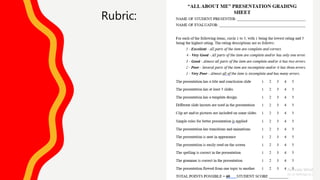
Rubric:

Simple rules for better PowerPoint presentations_and PeTa.pptx

  • 1.
    S I MP L E RU L E S F O R B E T T E R P O W E R P O I N T P R E S E N TAT I O N S Empowerment Technology PowerPoint Lecture
  • 2.
    DON'T READ YOURPRESENTATION STRAIGHT FROM THE SLIDES 1
  • 3.
  • 4.
  • 5.
  • 6.
  • 7.
    USE ANIMATIONS SPARINGLYTO ENHANCE YOUR PRESENTATION 6
  • 8.
  • 9.
    This PowerPoint projectis a presentation that describes you, your family, and anything else you want to tell about yourself. Your grade will be determined by the neatness of your presentation, correct spelling and grammar, and by meeting all the requirements for the presentation. This project may be presented to the class.
  • 10.
    REQUIREMENTS FOR THE PRESENTATION: 1)You must have a title slide and a conclusion slide. There must be at least 5 body slides. This means your presentation must have a minimum of 7 slides in total. You may use more if you want. Do not exceed a maximum of 10 slides.
  • 11.
     You shouldcustomize your slide.  Use several different slide layouts throughout your presentation.  Add clip art and/or pictures to some of your slides. Be conservative with this because too much can make the presentation look bad.  Transitions and Animations should be used to compliment your work.  Font – change from standard/default. Font Size – 25 pt or Larger  File Name: all_about_me_your-name
  • 12.

Editor's Notes

  • #3 If your audience can both read and hear, it’s a waste of time for you to simply read your slides aloud. Your audience will zone out and stop listening to what you’re saying, which means they won’t hear any extra information you include. Instead of typing out your entire presentation, include only main ideas, keywords, and talking points in your slide show text. Engage your audience by sharing the details out loud.
  • #4 To keep your audience from feeling overwhelmed, you should keep the text on each slide short and to the point. Some experts suggest using the 5/5/5 rule: no more than five words per line of text, five lines of text per slide, or five text-heavy slides in a row.
  • #5  Know your audience, and tailor your presentation to their tastes and expectations.
  • #6 Your text should be easy to read and pleasant to look at. Large, simple fonts and theme colors are always your best bet. The best fonts and colors can vary depending on your presentation setting.
  • #7 As anyone who’s sat through a presentation while every letter of every paragraph zoomed across the screen can tell you, being inundated with complicated animations and exciting slide transitions can become irritating. 
  • #8 When used sparingly, subtle effects and animations can add to your presentation. For example, having bullet points appear as you address them rather than before can help keep your audience’s attention.