16.04.2014 1
Secutest - safety test for electrical devices
Farhaan Ahmed
Arabcal
GMC-I Gossen Metrawatt
16.04.2014 2
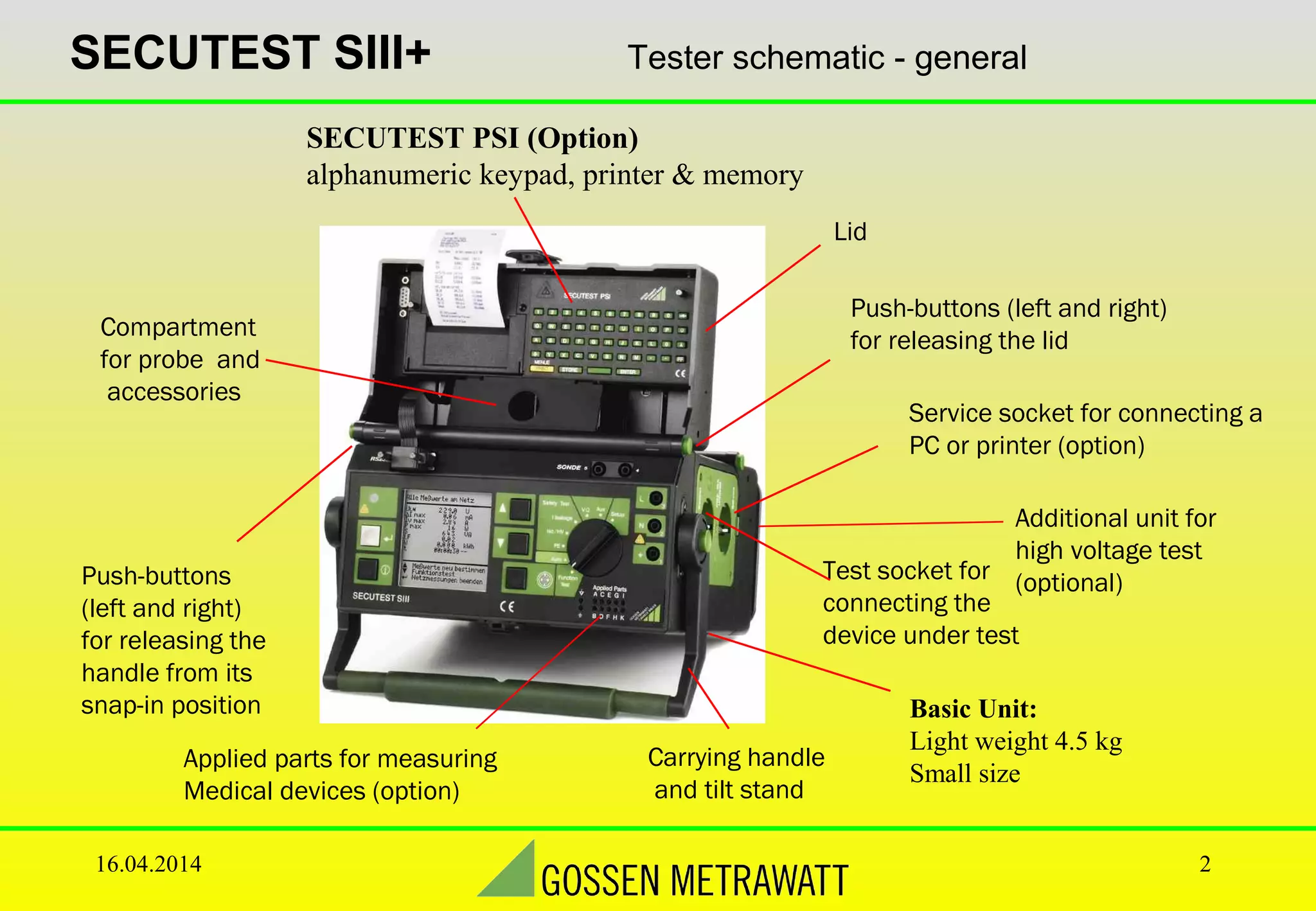
SECUTEST SIII+ Tester schematic - general
Push-buttons
(left and right)
for releasing the
handle from its
snap-in position
Test socket for
connecting the
device under test
Push-buttons (left and right)
for releasing the lid
Lid
Compartment
for probe and
accessories
Carrying handle
and tilt stand
SECUTEST PSI (Option)
alphanumeric keypad, printer & memory
Basic Unit:
Light weight 4.5 kg
Small size
Service socket for connecting a
PC or printer (option)
Additional unit for
high voltage test
(optional)
Applied parts for measuring
Medical devices (option)
16.04.2014 3
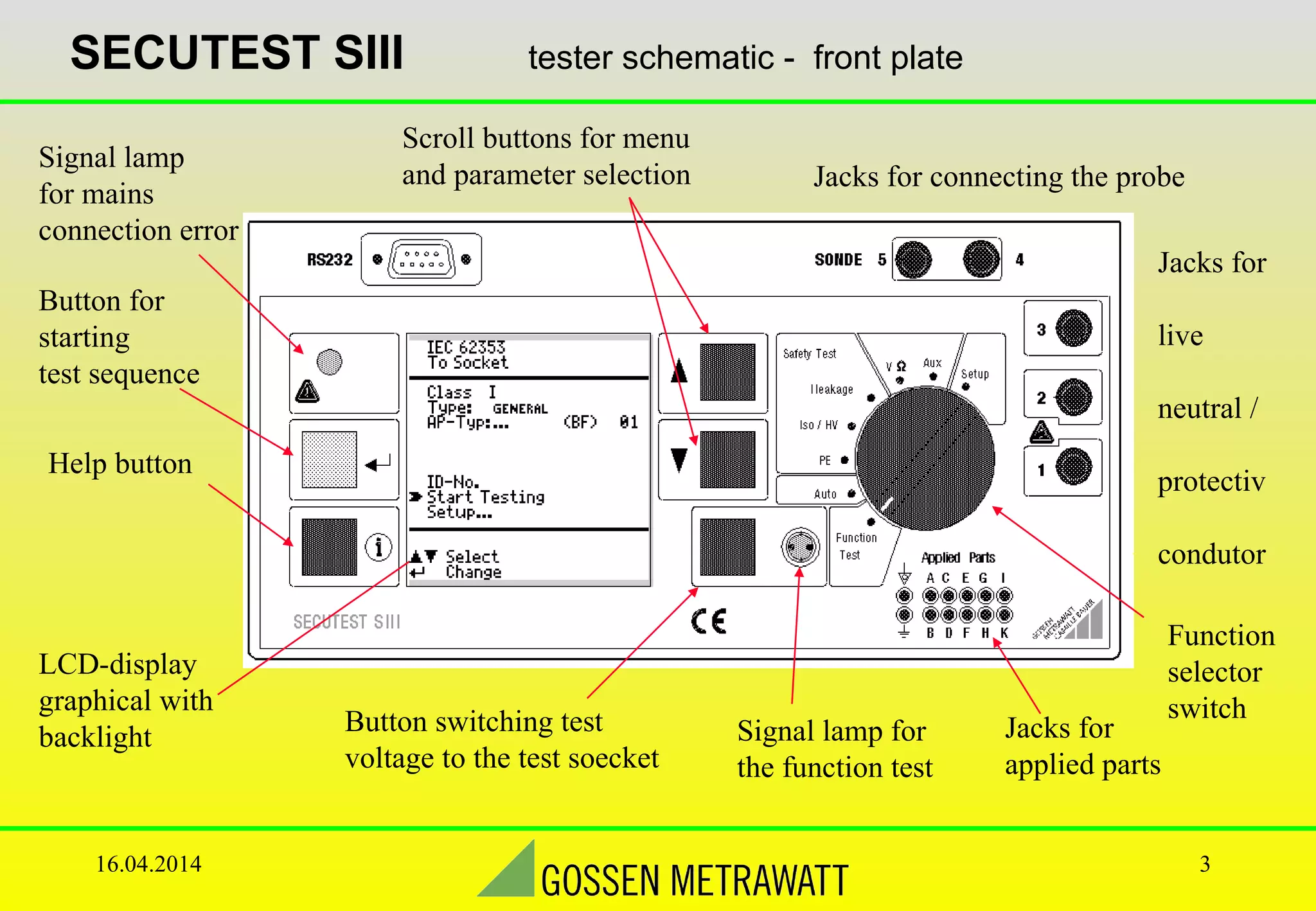
SECUTEST SIII tester schematic - front plate
Jacks for
live
neutral /
protectiv
condutor
Jacks for connecting the probe
Function
selector
switch
Scroll buttons for menu
and parameter selection
LCD-display
graphical with
backlight
Signal lamp
for mains
connection error
Button for
starting
test sequence
Help button
Button switching test
voltage to the test soecket
Signal lamp for
the function test
Jacks for
applied parts
16.04.2014 4
SECUTEST SIII Auto Test
Start testing
Function
Test
16.04.2014 5
SECUTEST SIII Auto Test
16.04.2014 6
SECUTEST SIII Measurements with Accessories
16.04.2014 7
SECUTEST SIII Multimeter Functions
Probe Voltage Uprobe – Max. 300V
16.04.2014 8
SECUTEST SIII visible test
•Fuses
•Labels ok?
•Mechanical condition
•soiling
•accessories
•instruction manual
16.04.2014 9
Screen-shots from Secutest
16.04.2014 10
SECUTEST SIII Testing of 3-phase devices
For three-phase devices
use the AT3-III:
•fully automatic test sequence
•high voltage test (optional)
•residual current measurement
16.04.2014 11
SECUTEST SIII SECUTEST PSI
Enter customer
information. Enter repair informationenter further informaton
of the appliance.
PRINT STOREor
Activates the „PSI-menue“
16.04.2014 12
internal Test Report using free software Z853
16.04.2014 13
internal Test Report using free software Z853
16.04.2014 14
Print direct
End of Presentation
16.04.2014 15
Thanks

GMC SECUTEST SIII+ Safety Tester

  • 1.
    16.04.2014 1 Secutest -safety test for electrical devices Farhaan Ahmed Arabcal GMC-I Gossen Metrawatt
  • 2.
    16.04.2014 2 SECUTEST SIII+Tester schematic - general Push-buttons (left and right) for releasing the handle from its snap-in position Test socket for connecting the device under test Push-buttons (left and right) for releasing the lid Lid Compartment for probe and accessories Carrying handle and tilt stand SECUTEST PSI (Option) alphanumeric keypad, printer & memory Basic Unit: Light weight 4.5 kg Small size Service socket for connecting a PC or printer (option) Additional unit for high voltage test (optional) Applied parts for measuring Medical devices (option)
  • 3.
    16.04.2014 3 SECUTEST SIIItester schematic - front plate Jacks for live neutral / protectiv condutor Jacks for connecting the probe Function selector switch Scroll buttons for menu and parameter selection LCD-display graphical with backlight Signal lamp for mains connection error Button for starting test sequence Help button Button switching test voltage to the test soecket Signal lamp for the function test Jacks for applied parts
  • 4.
    16.04.2014 4 SECUTEST SIIIAuto Test Start testing Function Test
  • 5.
  • 6.
    16.04.2014 6 SECUTEST SIIIMeasurements with Accessories
  • 7.
    16.04.2014 7 SECUTEST SIIIMultimeter Functions Probe Voltage Uprobe – Max. 300V
  • 8.
    16.04.2014 8 SECUTEST SIIIvisible test •Fuses •Labels ok? •Mechanical condition •soiling •accessories •instruction manual
  • 9.
  • 10.
    16.04.2014 10 SECUTEST SIIITesting of 3-phase devices For three-phase devices use the AT3-III: •fully automatic test sequence •high voltage test (optional) •residual current measurement
  • 11.
    16.04.2014 11 SECUTEST SIIISECUTEST PSI Enter customer information. Enter repair informationenter further informaton of the appliance. PRINT STOREor Activates the „PSI-menue“
  • 12.
    16.04.2014 12 internal TestReport using free software Z853
  • 13.
    16.04.2014 13 internal TestReport using free software Z853
  • 14.
  • 15.

Editor's Notes

  • #2 Introduce your self, your company and agenda of presentation
  • #3 Inform about various parts of secutest
  • #4 Front Panel of secutest
  • #6 Various auto test screen shots