
This slide has HeadingDisplays
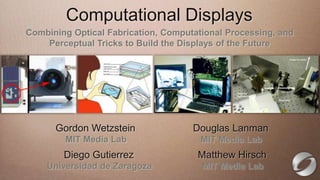
           Computational
Edit this text to create aa 16:9 media window
 Combining Optical Fabrication, Computational Processing, and
ThisPerceptual Tricks to Build the Displays of the Future
     subtitle is 20 points
 Bullets are blue
 They have 110% line spacing, 2 points before & after
 Longer bullets in the form of a paragraph are harder to
  read if there is insufficient line spacing. This is the
  maximum recommended number Douglas per slide
        Gordon Wetzstein                of lines Lanman
  (seven). Media Lab
           MIT                           MIT Media Lab
    Sub bullets look like this
         Diego Gutierrez               Matthew Hirsch
      Universidad de Zaragoza           MIT Media Lab
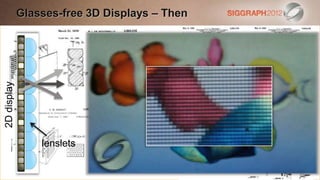
Glasses-free 3D Displays – Then
             Edit this text to create a Heading

                This subtitle is 20 points
                Bullets are blue
                They have 110% line spacing, 2 points before & after
2D display


                Longer bullets in the form of a paragraph are harder to
                 read if there is insufficient line spacing. This is the
                 maximum recommended number of lines per slide
                 (seven).
                    lenslets
                  Sub bullets look like this
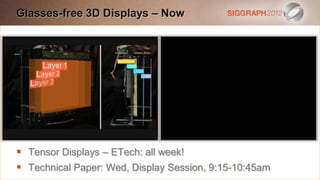
Glasses-free 3D Displays – Now
Edit this text to create a Heading

   This subtitle is 20 points
   Bullets are blue
   They have 110% line spacing, 2 points before & after
   Longer bullets in the form of a paragraph are harder to
    read if there is insufficient line spacing. This is the
    maximum recommended number of lines per slide
    (seven).
 Tensor bullets look ETech: all week!
    Sub Displays – like this
 Technical Paper: Wed, Display Session, 9:15-10:45am
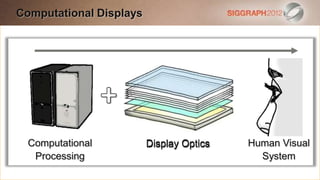
Computational Displays
Edit this text to create a Heading

   This subtitle is 20 points
   Bullets are blue
   They have 110% line spacing, 2 points before & after
   Longer bullets in the form of a paragraph are harder to
    read if there is insufficient line spacing. This is the
    maximum recommended number of lines per slide
    (seven).
    Computational              Display Optics         Human Visual
                                 Display Optics
    Processing look like this
      Sub bullets                                      System
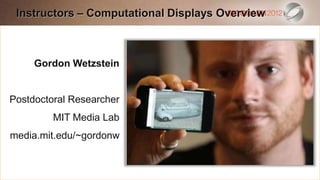
Instructors – Computational Displays Overview
 Edit this text to create a Heading

  This subtitle is 20 points
  Bullets are blue
     Gordon Wetzstein
  They have 110% line spacing, 2 points before & after
  Longer bullets in the form of a paragraph are harder to
Postdoctoral Researcher
   read if there is insufficient line spacing. This is the
         MIT Media Lab
   maximum recommended number of lines per slide
media.mit.edu/~gordonw
   (seven).
     Sub bullets look like this
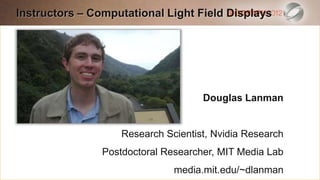
Instructors – Computational Light Field Displays
Edit this text to create a Heading

   This subtitle is 20 points
   Bullets are blue
   They have 110% line spacing, 2 points before & after
   Longer bullets in the form of a paragraph are harder to
                                            Douglas Lanman
    read if there is insufficient line spacing. This is the
    maximum recommended number of lines per slide
    (seven).             Research Scientist, Nvidia Research
                     Postdoctoral Researcher, MIT Media Lab
     Sub bullets look like this
                                    media.mit.edu/~dlanman
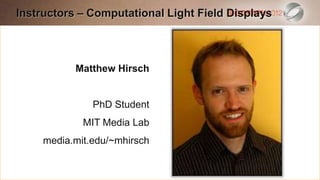
Instructors – Computational Light Field Displays
Edit this text to create a Heading

   This subtitle is 20 points
   Bullets are blue
              Matthew Hirsch
   They have 110% line spacing, 2 points before & after
   Longer bullets in the form of a paragraph are harder to
                   PhD Student
    read if there is insufficient line spacing. This is the
    maximum recommended number of lines per slide
                MIT Media Lab
    (seven).
       media.mit.edu/~mhirsch
     Sub bullets look like this
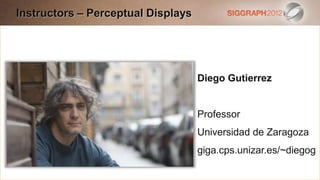
Instructors – Perceptual Displays
Edit this text to create a Heading

   This subtitle is 20 points
   Bullets are blue
   They have 110% line spacing, 2 points before & after
                                     Diego Gutierrez
   Longer bullets in the form of a paragraph are harder to
    read if there is insufficient line spacing. This is the
                                          Professor
    maximum recommended number of lines per slide
                                          Universidad de Zaragoza
    (seven).
     Sub bullets look like this        giga.cps.unizar.es/~diegog
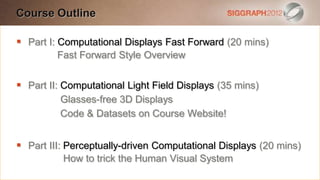
Course Outline
Edit this text to create a Heading

 ThisI: Computational Displays Fast Forward (20 mins)
  Part subtitle is 20 points
   Bullets areForward Style Overview
          Fast blue

   They have 110% line spacing, 2 points before & after
   Part II: Computational Light Field Displays (35 mins)
   Longer bullets in the form of a paragraph are harder to
             Glasses-free 3D Displays
    read if Code & Datasets on Course Website!
             there is insufficient line spacing. This is the
    maximum recommended number of lines per slide
    (seven).
 Part III: Perceptually-driven Computational Displays (20 mins)
     Sub bullets look like this
          How to trick the Human Visual System
Edit this text to create a Heading

   This subtitle is 20 points
   Bullets are blue
   They have 110% line spacing, 2 points before & after
   Longer bullets in the form of a paragraph are harder to
    read if there is insufficient line spacing. This is the
    maximum recommended number of lines per slide
    (seven).
     Sub bullets look like this
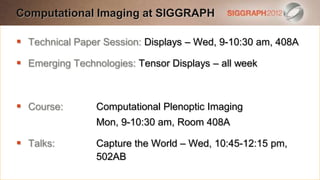
Computational Imaging at SIGGRAPH
Edit this text to create a Heading

 This subtitle is 20 pointsDisplays – Wed, 9-10:30 am, 408A
  Technical Paper Session:

   Bullets are blue
    Emerging Technologies: Tensor Displays – all week
   They have 110% line spacing, 2 points before & after
 Longer bullets in the form of a paragraph are harder to
 Course:there isComputational Plenoptic Imaging is the
  read if         insufficient line spacing. This
                 Mon, 9-10:30 am, Room 408A
  maximum recommended number of lines per slide
  (seven).
 Talks:         Capture the World – Wed, 10:45-12:15 pm,
     Sub bullets look like this
                   502AB

SIGGRAPH 2012 Computational Display Course - 1 introduction

  • 1.
    This slide hasHeadingDisplays Computational Edit this text to create aa 16:9 media window Combining Optical Fabrication, Computational Processing, and ThisPerceptual Tricks to Build the Displays of the Future subtitle is 20 points  Bullets are blue  They have 110% line spacing, 2 points before & after  Longer bullets in the form of a paragraph are harder to read if there is insufficient line spacing. This is the maximum recommended number Douglas per slide Gordon Wetzstein of lines Lanman (seven). Media Lab MIT MIT Media Lab  Sub bullets look like this Diego Gutierrez Matthew Hirsch Universidad de Zaragoza MIT Media Lab
  • 2.
    Glasses-free 3D Displays– Then Edit this text to create a Heading  This subtitle is 20 points  Bullets are blue  They have 110% line spacing, 2 points before & after 2D display  Longer bullets in the form of a paragraph are harder to read if there is insufficient line spacing. This is the maximum recommended number of lines per slide (seven). lenslets  Sub bullets look like this
  • 3.
    Glasses-free 3D Displays– Now Edit this text to create a Heading  This subtitle is 20 points  Bullets are blue  They have 110% line spacing, 2 points before & after  Longer bullets in the form of a paragraph are harder to read if there is insufficient line spacing. This is the maximum recommended number of lines per slide (seven).  Tensor bullets look ETech: all week!  Sub Displays – like this  Technical Paper: Wed, Display Session, 9:15-10:45am
  • 4.
    Computational Displays Edit thistext to create a Heading  This subtitle is 20 points  Bullets are blue  They have 110% line spacing, 2 points before & after  Longer bullets in the form of a paragraph are harder to read if there is insufficient line spacing. This is the maximum recommended number of lines per slide (seven). Computational Display Optics Human Visual Display Optics Processing look like this Sub bullets System
  • 5.
    Instructors – ComputationalDisplays Overview Edit this text to create a Heading  This subtitle is 20 points  Bullets are blue Gordon Wetzstein  They have 110% line spacing, 2 points before & after  Longer bullets in the form of a paragraph are harder to Postdoctoral Researcher read if there is insufficient line spacing. This is the MIT Media Lab maximum recommended number of lines per slide media.mit.edu/~gordonw (seven).  Sub bullets look like this
  • 6.
    Instructors – ComputationalLight Field Displays Edit this text to create a Heading  This subtitle is 20 points  Bullets are blue  They have 110% line spacing, 2 points before & after  Longer bullets in the form of a paragraph are harder to Douglas Lanman read if there is insufficient line spacing. This is the maximum recommended number of lines per slide (seven). Research Scientist, Nvidia Research Postdoctoral Researcher, MIT Media Lab  Sub bullets look like this media.mit.edu/~dlanman
  • 7.
    Instructors – ComputationalLight Field Displays Edit this text to create a Heading  This subtitle is 20 points  Bullets are blue Matthew Hirsch  They have 110% line spacing, 2 points before & after  Longer bullets in the form of a paragraph are harder to PhD Student read if there is insufficient line spacing. This is the maximum recommended number of lines per slide MIT Media Lab (seven). media.mit.edu/~mhirsch  Sub bullets look like this
  • 8.
    Instructors – PerceptualDisplays Edit this text to create a Heading  This subtitle is 20 points  Bullets are blue  They have 110% line spacing, 2 points before & after Diego Gutierrez  Longer bullets in the form of a paragraph are harder to read if there is insufficient line spacing. This is the Professor maximum recommended number of lines per slide Universidad de Zaragoza (seven).  Sub bullets look like this giga.cps.unizar.es/~diegog
  • 9.
    Course Outline Edit thistext to create a Heading  ThisI: Computational Displays Fast Forward (20 mins) Part subtitle is 20 points  Bullets areForward Style Overview Fast blue  They have 110% line spacing, 2 points before & after  Part II: Computational Light Field Displays (35 mins)  Longer bullets in the form of a paragraph are harder to Glasses-free 3D Displays read if Code & Datasets on Course Website! there is insufficient line spacing. This is the maximum recommended number of lines per slide (seven).  Part III: Perceptually-driven Computational Displays (20 mins)  Sub bullets look like this How to trick the Human Visual System
  • 10.
    Edit this textto create a Heading  This subtitle is 20 points  Bullets are blue  They have 110% line spacing, 2 points before & after  Longer bullets in the form of a paragraph are harder to read if there is insufficient line spacing. This is the maximum recommended number of lines per slide (seven).  Sub bullets look like this
  • 11.
    Computational Imaging atSIGGRAPH Edit this text to create a Heading  This subtitle is 20 pointsDisplays – Wed, 9-10:30 am, 408A Technical Paper Session:   Bullets are blue Emerging Technologies: Tensor Displays – all week  They have 110% line spacing, 2 points before & after  Longer bullets in the form of a paragraph are harder to  Course:there isComputational Plenoptic Imaging is the read if insufficient line spacing. This Mon, 9-10:30 am, Room 408A maximum recommended number of lines per slide (seven).  Talks: Capture the World – Wed, 10:45-12:15 pm,  Sub bullets look like this 502AB