HAYDON MEDIA
Shot List
Producer: Amy Shields Production: Mess is mine music video-
A2.
Shot
No.
Shot Type Details of Shot Timing
1 Close up
This is the first shot to be shown,it is a close up of my
models foot, I used this as a establishing shot to introduce
my actor.
00:02
2 Close up
This is a close up of both my models feet, I used this as a
establishing shot to introduce my actor.
00:02
3 Close up
This is a close up of my models side, I used this as a
establishing shot to introduce my actor.
00:02
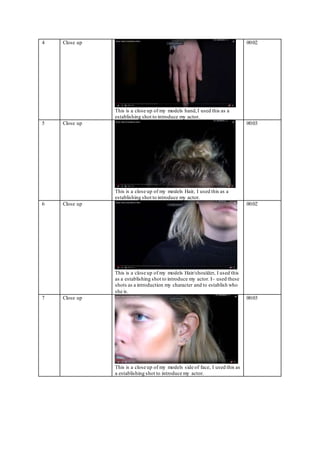
4 Close up
This is a close up of my models hand,I used this as a
establishing shot to introduce my actor.
00:02
5 Close up
This is a close up of my models Hair, I used this as a
establishing shot to introduce my actor.
00:03
6 Close up
This is a close up of my models Hair/shoulder, I used this
as a establishing shot to introduce my actor. I~ used these
shots as a introduction my character and to establish who
she is.
00:02
7 Close up
This is a close up of my models side of face, I used this as
a establishing shot to introduce my actor.
00:03
8 Close up
This is a close up of my models top of head, including her
hair and slight eyes,I used this as a establishing shot to
introduce my actor.
00:03
9 Pan up
This is a pan up of my character, displaying the whole of
her. This then goes into a fade out.
00:03
10 Pan across
This is a pan from right to left, with a pull focus
00:05
11 Mid Shot
I liked this shot because the light is behind my actor
which creates a sense ofdarkness and shadow.It also
pulls the attention from her actions of fiddling with her
hair as the light shines though.
00:04
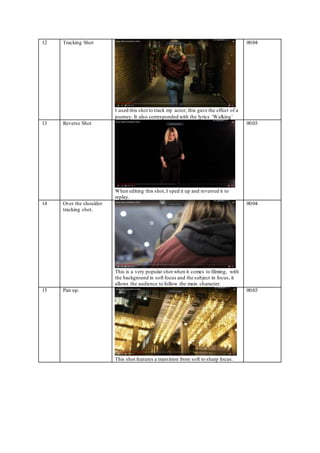
12 Tracking Shot
I used this shot to track my actor, this gave the effect of a
journey. It also corresponded with the lyrics ‘Walking’
00:04
13 Reverse Shot
When editing this shot,I sped it up and reversed it to
replay.
00:03
14 Over the shoulder
tracking shot.
This is a very popular shot when it comes to filming, with
the background in soft focus and the subject in focus, it
allows the audience to follow the main character.
00:04
15 Pan up.
This shot features a transition from soft to sharp focus.
00:03
16 Tracking Shot
Tracking shot of my actor walking under a tunnel
00:30
17 Mid shot.
This is a mid-shot of my artist in the studio lip syncing.
00:04
18 Panoramic View
This is a panoramic shot of the bridge in London.
00:07

Shot list

  • 1.
    HAYDON MEDIA Shot List Producer:Amy Shields Production: Mess is mine music video- A2. Shot No. Shot Type Details of Shot Timing 1 Close up This is the first shot to be shown,it is a close up of my models foot, I used this as a establishing shot to introduce my actor. 00:02 2 Close up This is a close up of both my models feet, I used this as a establishing shot to introduce my actor. 00:02 3 Close up This is a close up of my models side, I used this as a establishing shot to introduce my actor. 00:02
  • 2.
    4 Close up Thisis a close up of my models hand,I used this as a establishing shot to introduce my actor. 00:02 5 Close up This is a close up of my models Hair, I used this as a establishing shot to introduce my actor. 00:03 6 Close up This is a close up of my models Hair/shoulder, I used this as a establishing shot to introduce my actor. I~ used these shots as a introduction my character and to establish who she is. 00:02 7 Close up This is a close up of my models side of face, I used this as a establishing shot to introduce my actor. 00:03
  • 3.
    8 Close up Thisis a close up of my models top of head, including her hair and slight eyes,I used this as a establishing shot to introduce my actor. 00:03 9 Pan up This is a pan up of my character, displaying the whole of her. This then goes into a fade out. 00:03 10 Pan across This is a pan from right to left, with a pull focus 00:05 11 Mid Shot I liked this shot because the light is behind my actor which creates a sense ofdarkness and shadow.It also pulls the attention from her actions of fiddling with her hair as the light shines though. 00:04
  • 4.
    12 Tracking Shot Iused this shot to track my actor, this gave the effect of a journey. It also corresponded with the lyrics ‘Walking’ 00:04 13 Reverse Shot When editing this shot,I sped it up and reversed it to replay. 00:03 14 Over the shoulder tracking shot. This is a very popular shot when it comes to filming, with the background in soft focus and the subject in focus, it allows the audience to follow the main character. 00:04 15 Pan up. This shot features a transition from soft to sharp focus. 00:03
  • 5.
    16 Tracking Shot Trackingshot of my actor walking under a tunnel 00:30 17 Mid shot. This is a mid-shot of my artist in the studio lip syncing. 00:04 18 Panoramic View This is a panoramic shot of the bridge in London. 00:07