SSR
What is SSR ?
Main steps to implement SSR
Server side:
1. Receive request from client
2. Request parsing on server
3. Rendering client application on server
4. Inserts the serialized state of the application into rendered HTML (if there is a state)
5. Setting Headers
6. Submitting rendered HTML code
Client side:
1. Sending a request to the server
2. Getting rendered HTML code.
3. Request to download the rest of the statics and js bundles.
4. Deserealization of saved application state.
5. Creating a local state based on what we spars.
6. Application work as usual.
Additional info
1. The state of the application is saved to the global JS variable
window.__ STATE__, which will be read on the client.
2. When developing SSR it is convenient to use cookies instead of localStorage.
3. Routing on the client and server must match.
4. On the server, as well as on the client, you can perform asynchronous data
loading and substitute them into HTML or application state.
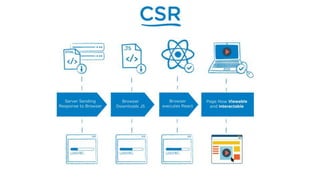
CSR
SSR
SSR pros:
1. SEO support for SPA.
2. Fast data rendering on the client.
3. Excellent work on weak devices.
4. Less data transfer costs, faster work on a slow
connection.
SSR cons:
1. Decreased performance on weak servers.
2. High resource costs on the server side.
3. Difficulty to develop.
4. Long development time.
Prerendering
Rendering using HTML parsers.
Prerenderers
● Use NodeJS as the main platform (in the following
examples).
● Use headless browsers such as: Puppeteer, JSDOM,
Selenium, WebdriverIO, PhantomJS, etc.
● Render the page in a headless browser and send the
result to the client.
● Do not need duplicate client routing.
Prerendering implementations
● prerender.io is an open source service that allows you to organize the
redirection of traffic from crawlers to a special browser that executes
javascript code and returns a static html page.
● PhantomJS is used as a browser.
● Price from $ 15 to $ 65
RenderjS.io
● renderjs.io is a cloud based service that works similarly to prerender.io, but
works fast.
● Does not use cache.
● Uses the latest version of Chromium.
● Price from $ 10 to $ 40
prerender-node
● express.js middleware for pre-rendering.
● Free.
● There is a customization of processing routes.
● All on your shoulders.
prerender-spa-plugin
● Webpack plugin for pre-rendering.
● Requires custom configuration routes.
● Free.
● Based on Puppeteer.
prerender-spa-plugin config example
Prerendering cons:
● Good pre-rendering is paid.
● Slow on large projects.
● The complexity of managing caching.
● The difficulty in debugging errors on the server.
● Less flexibility and scalability than with SSR.
When to use prerendering
● Small projects.
● Small amount of time / resources for project development.
● No complex common logic between the client and the
server.
● Small amount of changeable data
SSR
for popular SPA frameworks
● Based on the use of the @nguniversal/express-engine library.
● Works with @angular/platform-server, which provides server
implementation of DOM, Ajax, and many other browser features.
● Official example: https://github.com/angular/universal-starter.
Angular Universal
SSR Vue Tools
SSR + Vue Tools
1. Install vue-server-renderer.
2. Create a renderer:
const renderer = require ('vue-server-renderer').createRenderer().
3. Render the vue application with renderToString:
renderer.renderToString(app, err, html).
4. Sending content to the client.
More on: ssr.vuejs.org
On October 25, 2016, the zeit.co team announced Next.js,
a React application framework with server rendering.
A few hours after this announcement Nuxt.js was born.
Nuxt setup
1. npx create-nuxt-app app-name
2. Choose UI framework
3. Select eslint, prettier, npm / yarn, etc.
4. The rest of the development and configuration is similar to
Next.js
ReactDOMServer
SSR + React Tools (v16)
● Improved server rendering performance
● Streaming support
● Support for custom attribute elements with SSR
● Instead of render () client added hydrate ()
● While at SSR, the Error boundaries and portals are not fully
supported.
ReactDOMServer methods
● renderToString - renders the react component in an html string.
● renderToStaticMarkup is the same, but does not add the react attributes for internal
use.
● renderToNodeStream - returns a stream in binary format in utf-8 coding, with
rendered HTML. This method is supported only on the server side.
● renderToStaticNodeStream is the same difference as renderToStaticMarkup from
renderToString.
Custom Node.js server
+
React Tools
1. Create a Node.js server on Express or Koa (whatever you
like).
2. We create a static server that gives static.
3. At the root endpoint we hang the listener, which calls
renderToString (app) and gives HTML to the client.
Custom SSR: server
On the client, we render our application using the hydrate()
method
Custom SSR: client
1. We add react-router, on client side (browser-router).
2. On the server side, we need to use StaticRouter, in which
we wrap our root component and pass req.url to this
router in the location parameter.
Custom SSR: router
1. Initialize redux store.
2. Get store snapshot.
3. Serialize it into a variable and pass it to a
window.__ REDUX_DATA__ field.
4. Send content to the client.
Custom SSR: Redux on server
1. Check whether we are on the client.
2. Retrieve and deserialize a snapshot of a window from
window .__ REDUX_DATA__.
3. Pass the received state to createStore (initialState)
4. Transfer created store to provider.
Custom SSR: Redux on client
1. We use mobx and mobx-state-tree
2. Previously, mobx could not be used with SSR.
3. MST handles data trees.
4. Data is serialized using snapshots.
Custom SSR: Mobx
1. We check the server or client.
2. Create a store.
3. We receive snapshot through getSnapshot ().
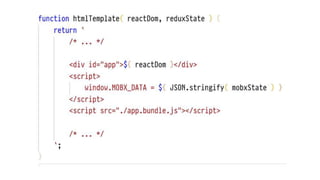
4. Save the snapshot in window.__ MOBX_STATE__.
5. We send data to the client.
Custom SSR: Mobx server
Custom SSR: Mobx client
1. We check the server or client.
2. Get snapshot from window.__ MOBX_STATE__.
3. We transfer snapshot to function-generator.
4. In the generator, apply to the snapshot via
applySnapshot().
5. We transfer stor to provider.
MST with custom Node.js server
1. We use the fetch-component-data package.
2. We mark in each component what data should be
provided before rendering.
3. On the server we get all the data for the components
and in the callback we render the application.
Custom SSR: Async data fetch on server
1. helmet helps to quickly set up a head for pages.
2. On the client we use the component Helmet.
3. On the server, use the renderStatic() function.
Custom SSR: Helmet
Next.js
React framework for server side rendering
1. SSR works from the default configuration.
2. Automatic code splitting for each page.
3. Simple and clear routing.
4. Webpack with HMR out of the box.
5. Ability to add your ExpressJS server.
6. Ability to expand webpack and babel config.
Next.js intro
1. mkdir hello-next
2. cd hello-next
3. npm init -y
4. npm install --save react react-dom next
5. mkdir pages
Next.js installation
Next.js simple folder structure
Next.js pages
1. <Link />
2. Router from next/router
3. href
Next.js routes transitions approaches
Next.js components
1. Next.js by default works with query (page? Id = 100)
2. For routes with parameters, the next option is to use a
custom node.js server.
3. We can also use next-routes
Next.js dynamic routing
next-routes routes
next-routes server
Next.js scripts with custom server
Further project configuration is up to you
Next.js: changing babel config
1. We could change web pack config in next.config.js.
2. Setting loaders and palins is different from the usual
settings in webpack.config.js.
3. To add loaders and plugins, it is convenient to use
custom packages like @zeit/next-stylus, @zeit/next-css,
etc.
Next.js: changing web pack config
Next.js webpack custom packages
Next.js webpack plugins
Next.js webpack configuration
1. Getting server-side asynchronous data is performed using
the getInitialProps function.
2. This is a static page function in which we can prepare a
page component before rendering and provide all the
necessary resources for its operation.
Next.js async data fetch
1. Rendered on the server.
2. Used to change the DOM on the server.
3. Often used to implement server-side css-in-js.
4. Support styled-components, emotion, glamorous,
styled-jsx comes next.js out of the box.
Next.js custom document
1. Preserving the layout between page transitions.
2. Save the application state.
3. To handle errors using componentDidCatch.
4. Adding data to pages (for example, useful when used
with graphql).
Next.js custom App
1. We check on the server or on the client.
2. If on the server, then we initialize the store.
3. If on the client, then we check window.__ NEXT_REDUX_STORE__, if it exists,
then we initialize the stop with this snapshot, if not, from scratch.
4. This all happens in the PHOK, with which we wrap our root component of the page,
check and initialize everything in the familiar getInitialProps.
5. Then we transfer the store to the provider.
Next.js + Redux
1. Configuration is similar to adding mobx and mst to
custom node.js ssr.
2. Init stores.
3. Serialize stores from snapshots.
4. Deserialize snapshots on the client.
5. Create stores from snapshots on the client.
Next.js + Mobx & MST
After.js
If NextJS and React Router had a baby ...
After.js: what can be changed in Next.js?
1. Routes are just components and have no relation to the
folder structure. Static configs are better.
2. GetInitialProps from Next.js is a great idea.
3. Dividing code based on routes should be easy.
4. Route based transitions and data preloading should be
easier.
After.js: we can use RR4
After.js: current state
1. It was quite ambitious, but did not achieve the same
popularity as Next.js.
2. Now a small amount of PR and issues.
3. The community is much smaller than Next.js’s community.
4. The problems that After.js tried to solve are already solved
(or being solved) by Next.js.
5. Next.js ⭐️33860 VS After.js ⭐️2864
1. Carefully with launch scripts for selling, be sure to NODE_ENV = production,
otherwise 500 on-demand-entries-ping
2. It is better to run via /usr/bin/node server (with custom server and supervisor).
3. User react-routes for convenient configuration of dynamic routes
4. Use universal-cookie-express, compression with your custom server.
5. For environment variables it is better to use dotenv-webpack, there are some
problems with webpack.DefinePlugin and Next.js.
6. For graphql there is an example with Apollo in the official repository.
Next.js: additional
RESUME
What should you choose?
1. Minimum effort - prerendering.
2. Maximum setting “for yourself” - custom nodejs
server + SSR.
3. Convenience, support and community - NextJS.
What should you choose?
Q&A
morzhanov

Server side rendering review

  • 1.
  • 2.
  • 5.
    Main steps toimplement SSR
  • 6.
    Server side: 1. Receiverequest from client 2. Request parsing on server 3. Rendering client application on server 4. Inserts the serialized state of the application into rendered HTML (if there is a state) 5. Setting Headers 6. Submitting rendered HTML code
  • 7.
    Client side: 1. Sendinga request to the server 2. Getting rendered HTML code. 3. Request to download the rest of the statics and js bundles. 4. Deserealization of saved application state. 5. Creating a local state based on what we spars. 6. Application work as usual.
  • 8.
    Additional info 1. Thestate of the application is saved to the global JS variable window.__ STATE__, which will be read on the client. 2. When developing SSR it is convenient to use cookies instead of localStorage. 3. Routing on the client and server must match. 4. On the server, as well as on the client, you can perform asynchronous data loading and substitute them into HTML or application state.
  • 9.
  • 10.
  • 11.
    SSR pros: 1. SEOsupport for SPA. 2. Fast data rendering on the client. 3. Excellent work on weak devices. 4. Less data transfer costs, faster work on a slow connection.
  • 12.
    SSR cons: 1. Decreasedperformance on weak servers. 2. High resource costs on the server side. 3. Difficulty to develop. 4. Long development time.
  • 13.
  • 14.
    Prerenderers ● Use NodeJSas the main platform (in the following examples). ● Use headless browsers such as: Puppeteer, JSDOM, Selenium, WebdriverIO, PhantomJS, etc. ● Render the page in a headless browser and send the result to the client. ● Do not need duplicate client routing.
  • 15.
  • 16.
    ● prerender.io isan open source service that allows you to organize the redirection of traffic from crawlers to a special browser that executes javascript code and returns a static html page. ● PhantomJS is used as a browser. ● Price from $ 15 to $ 65
  • 17.
    RenderjS.io ● renderjs.io isa cloud based service that works similarly to prerender.io, but works fast. ● Does not use cache. ● Uses the latest version of Chromium. ● Price from $ 10 to $ 40
  • 18.
    prerender-node ● express.js middlewarefor pre-rendering. ● Free. ● There is a customization of processing routes. ● All on your shoulders.
  • 19.
    prerender-spa-plugin ● Webpack pluginfor pre-rendering. ● Requires custom configuration routes. ● Free. ● Based on Puppeteer.
  • 20.
  • 21.
    Prerendering cons: ● Goodpre-rendering is paid. ● Slow on large projects. ● The complexity of managing caching. ● The difficulty in debugging errors on the server. ● Less flexibility and scalability than with SSR.
  • 22.
    When to useprerendering ● Small projects. ● Small amount of time / resources for project development. ● No complex common logic between the client and the server. ● Small amount of changeable data
  • 23.
  • 24.
    ● Based onthe use of the @nguniversal/express-engine library. ● Works with @angular/platform-server, which provides server implementation of DOM, Ajax, and many other browser features. ● Official example: https://github.com/angular/universal-starter. Angular Universal
  • 25.
  • 26.
    SSR + VueTools 1. Install vue-server-renderer. 2. Create a renderer: const renderer = require ('vue-server-renderer').createRenderer(). 3. Render the vue application with renderToString: renderer.renderToString(app, err, html). 4. Sending content to the client. More on: ssr.vuejs.org
  • 27.
    On October 25,2016, the zeit.co team announced Next.js, a React application framework with server rendering. A few hours after this announcement Nuxt.js was born.
  • 28.
    Nuxt setup 1. npxcreate-nuxt-app app-name 2. Choose UI framework 3. Select eslint, prettier, npm / yarn, etc. 4. The rest of the development and configuration is similar to Next.js
  • 29.
  • 30.
    SSR + ReactTools (v16) ● Improved server rendering performance ● Streaming support ● Support for custom attribute elements with SSR ● Instead of render () client added hydrate () ● While at SSR, the Error boundaries and portals are not fully supported.
  • 31.
    ReactDOMServer methods ● renderToString- renders the react component in an html string. ● renderToStaticMarkup is the same, but does not add the react attributes for internal use. ● renderToNodeStream - returns a stream in binary format in utf-8 coding, with rendered HTML. This method is supported only on the server side. ● renderToStaticNodeStream is the same difference as renderToStaticMarkup from renderToString.
  • 32.
  • 34.
    1. Create aNode.js server on Express or Koa (whatever you like). 2. We create a static server that gives static. 3. At the root endpoint we hang the listener, which calls renderToString (app) and gives HTML to the client. Custom SSR: server
  • 35.
    On the client,we render our application using the hydrate() method Custom SSR: client
  • 36.
    1. We addreact-router, on client side (browser-router). 2. On the server side, we need to use StaticRouter, in which we wrap our root component and pass req.url to this router in the location parameter. Custom SSR: router
  • 39.
    1. Initialize reduxstore. 2. Get store snapshot. 3. Serialize it into a variable and pass it to a window.__ REDUX_DATA__ field. 4. Send content to the client. Custom SSR: Redux on server
  • 42.
    1. Check whetherwe are on the client. 2. Retrieve and deserialize a snapshot of a window from window .__ REDUX_DATA__. 3. Pass the received state to createStore (initialState) 4. Transfer created store to provider. Custom SSR: Redux on client
  • 44.
    1. We usemobx and mobx-state-tree 2. Previously, mobx could not be used with SSR. 3. MST handles data trees. 4. Data is serialized using snapshots. Custom SSR: Mobx
  • 45.
    1. We checkthe server or client. 2. Create a store. 3. We receive snapshot through getSnapshot (). 4. Save the snapshot in window.__ MOBX_STATE__. 5. We send data to the client. Custom SSR: Mobx server
  • 46.
    Custom SSR: Mobxclient 1. We check the server or client. 2. Get snapshot from window.__ MOBX_STATE__. 3. We transfer snapshot to function-generator. 4. In the generator, apply to the snapshot via applySnapshot(). 5. We transfer stor to provider.
  • 50.
    MST with customNode.js server
  • 53.
    1. We usethe fetch-component-data package. 2. We mark in each component what data should be provided before rendering. 3. On the server we get all the data for the components and in the callback we render the application. Custom SSR: Async data fetch on server
  • 56.
    1. helmet helpsto quickly set up a head for pages. 2. On the client we use the component Helmet. 3. On the server, use the renderStatic() function. Custom SSR: Helmet
  • 59.
    Next.js React framework forserver side rendering
  • 60.
    1. SSR worksfrom the default configuration. 2. Automatic code splitting for each page. 3. Simple and clear routing. 4. Webpack with HMR out of the box. 5. Ability to add your ExpressJS server. 6. Ability to expand webpack and babel config. Next.js intro
  • 61.
    1. mkdir hello-next 2.cd hello-next 3. npm init -y 4. npm install --save react react-dom next 5. mkdir pages Next.js installation
  • 62.
  • 63.
  • 64.
    1. <Link /> 2.Router from next/router 3. href Next.js routes transitions approaches
  • 65.
  • 66.
    1. Next.js bydefault works with query (page? Id = 100) 2. For routes with parameters, the next option is to use a custom node.js server. 3. We can also use next-routes Next.js dynamic routing
  • 68.
  • 69.
  • 70.
    Next.js scripts withcustom server
  • 71.
  • 72.
  • 73.
    1. We couldchange web pack config in next.config.js. 2. Setting loaders and palins is different from the usual settings in webpack.config.js. 3. To add loaders and plugins, it is convenient to use custom packages like @zeit/next-stylus, @zeit/next-css, etc. Next.js: changing web pack config
  • 74.
  • 75.
  • 76.
  • 77.
    1. Getting server-sideasynchronous data is performed using the getInitialProps function. 2. This is a static page function in which we can prepare a page component before rendering and provide all the necessary resources for its operation. Next.js async data fetch
  • 79.
    1. Rendered onthe server. 2. Used to change the DOM on the server. 3. Often used to implement server-side css-in-js. 4. Support styled-components, emotion, glamorous, styled-jsx comes next.js out of the box. Next.js custom document
  • 81.
    1. Preserving thelayout between page transitions. 2. Save the application state. 3. To handle errors using componentDidCatch. 4. Adding data to pages (for example, useful when used with graphql). Next.js custom App
  • 83.
    1. We checkon the server or on the client. 2. If on the server, then we initialize the store. 3. If on the client, then we check window.__ NEXT_REDUX_STORE__, if it exists, then we initialize the stop with this snapshot, if not, from scratch. 4. This all happens in the PHOK, with which we wrap our root component of the page, check and initialize everything in the familiar getInitialProps. 5. Then we transfer the store to the provider. Next.js + Redux
  • 86.
    1. Configuration issimilar to adding mobx and mst to custom node.js ssr. 2. Init stores. 3. Serialize stores from snapshots. 4. Deserialize snapshots on the client. 5. Create stores from snapshots on the client. Next.js + Mobx & MST
  • 87.
    After.js If NextJS andReact Router had a baby ...
  • 88.
    After.js: what canbe changed in Next.js? 1. Routes are just components and have no relation to the folder structure. Static configs are better. 2. GetInitialProps from Next.js is a great idea. 3. Dividing code based on routes should be easy. 4. Route based transitions and data preloading should be easier.
  • 89.
  • 90.
    After.js: current state 1.It was quite ambitious, but did not achieve the same popularity as Next.js. 2. Now a small amount of PR and issues. 3. The community is much smaller than Next.js’s community. 4. The problems that After.js tried to solve are already solved (or being solved) by Next.js. 5. Next.js ⭐️33860 VS After.js ⭐️2864
  • 91.
    1. Carefully withlaunch scripts for selling, be sure to NODE_ENV = production, otherwise 500 on-demand-entries-ping 2. It is better to run via /usr/bin/node server (with custom server and supervisor). 3. User react-routes for convenient configuration of dynamic routes 4. Use universal-cookie-express, compression with your custom server. 5. For environment variables it is better to use dotenv-webpack, there are some problems with webpack.DefinePlugin and Next.js. 6. For graphql there is an example with Apollo in the official repository. Next.js: additional
  • 92.
  • 93.
    1. Minimum effort- prerendering. 2. Maximum setting “for yourself” - custom nodejs server + SSR. 3. Convenience, support and community - NextJS. What should you choose?
  • 94.