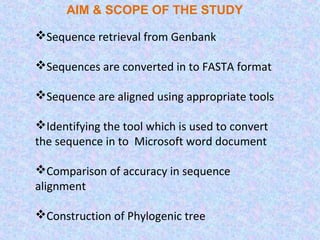
AIM & SCOPE OF THE STUDY

Sequence retrieval from Genbank

Sequences are converted in to FASTA format

Sequence are aligned using appropriate tools

Identifying the tool which is used to convert
the sequence in to Microsoft word document

Comparison of accuracy in sequence
alignment

Construction of Phylogenic tree
Microsoft Word

CEDIT

SNUFER
CEDIT: a C interface and macro facility for protein
sequence alignment editing in colour with Microsoft
Word
CEDIT uses the ability of MS-Word 5.0 to display letters with
the desired color to easily identify conservative homologies
across the sequences.


A glossary file with useful macros for the sequence editing is
provided, along with several utilities programs for error
checking, estimating sequence similarities and homology
significance.


CEDIT has a menu interface and a context sensitive help.
SNUFER
It is software for the automatic localization and generation of tables used for
the presentation of single nucleotide polymorphisms (SNPs).

 A multiple sequence alignment is generated using ClustalW ran inside
SNUFER using an input of a FASTA file containing the sequences to be
analyzed. The ClustalW output file is then used to generate a table which
displays the SNPs detected in the aligned sequences and their degree of
similarity. This table can be exported to Microsoft Word, Microsoft Excel or as
a single text file, permitting further editing for publication.

The software was written using Delphi 7 for programming and FireBird 2.0
for sequence database management.

It is freely available for non-commercial use and can be downloaded from the

             http://www.heranza.com.br/bioinformatica2.htm.
ORGANISM 1:   Channa orientalis

ORGANISM 2:   Garra barreimiae
ORGANISM 3:   Neolissochilus hexagonolepis
ORGANISM 4:   Puntius denisonii
ORGANISM 5:   Puntius filamentosus
ORGANISM 6:   Rasbora daniconius
Open Snufer and load the selected sequence
The aligned sequence us shown below in another window
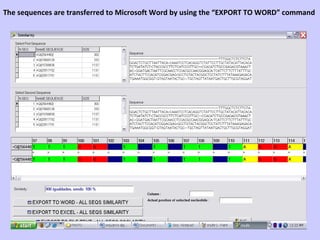
The sequences are transferred to Microsoft Word by using the “EXPORT TO WORD” command
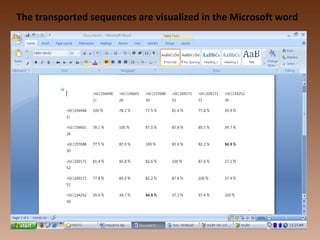
The transported sequences are visualized in the Microsoft word
CONCLUSI
             ON

Thus it extremely deliberately confers that, the
sequence alignment using Microsoft word is possible
by using SNUFER. It is software for the automatic
localization, generation of tables used for the
presentation of single nucleotide polymorphisms
(SNPs) and exporting the sequence alignment to
MICROSOFT WORD, EXEL..
Sequece alignment using ms word

Sequece alignment using ms word

  • 6.
    AIM & SCOPEOF THE STUDY Sequence retrieval from Genbank Sequences are converted in to FASTA format Sequence are aligned using appropriate tools Identifying the tool which is used to convert the sequence in to Microsoft word document Comparison of accuracy in sequence alignment Construction of Phylogenic tree
  • 7.
  • 8.
    CEDIT: a Cinterface and macro facility for protein sequence alignment editing in colour with Microsoft Word CEDIT uses the ability of MS-Word 5.0 to display letters with the desired color to easily identify conservative homologies across the sequences. A glossary file with useful macros for the sequence editing is provided, along with several utilities programs for error checking, estimating sequence similarities and homology significance. CEDIT has a menu interface and a context sensitive help.
  • 9.
    SNUFER It is softwarefor the automatic localization and generation of tables used for the presentation of single nucleotide polymorphisms (SNPs).  A multiple sequence alignment is generated using ClustalW ran inside SNUFER using an input of a FASTA file containing the sequences to be analyzed. The ClustalW output file is then used to generate a table which displays the SNPs detected in the aligned sequences and their degree of similarity. This table can be exported to Microsoft Word, Microsoft Excel or as a single text file, permitting further editing for publication. The software was written using Delphi 7 for programming and FireBird 2.0 for sequence database management. It is freely available for non-commercial use and can be downloaded from the http://www.heranza.com.br/bioinformatica2.htm.
  • 10.
    ORGANISM 1: Channa orientalis ORGANISM 2: Garra barreimiae ORGANISM 3: Neolissochilus hexagonolepis ORGANISM 4: Puntius denisonii ORGANISM 5: Puntius filamentosus ORGANISM 6: Rasbora daniconius
  • 12.
    Open Snufer andload the selected sequence
  • 13.
    The aligned sequenceus shown below in another window
  • 14.
    The sequences aretransferred to Microsoft Word by using the “EXPORT TO WORD” command
  • 15.
    The transported sequencesare visualized in the Microsoft word
  • 16.
    CONCLUSI ON Thus it extremely deliberately confers that, the sequence alignment using Microsoft word is possible by using SNUFER. It is software for the automatic localization, generation of tables used for the presentation of single nucleotide polymorphisms (SNPs) and exporting the sequence alignment to MICROSOFT WORD, EXEL..