



SharePoint Logging & Debugging
  The Troubleshooter’s Best Friend

             Jason Himmelstein
      SharePoint Practice Director, Sentri, Inc.
            jhimmelstein@sentri.com
                @sharepointlhorn
http://spflogger.codeplex.com
     www.sentri.com
     www.sharepointlonghorn.com
        @sharepointlhorn
         www.linkedin.com/in/jasonhimmelstein


               Copyright 2012 Š Sentri, Inc. All rights reserved.
Israel - Development &
                                                                                             Engineering
   Business since 1999


      Partner of the Year
Microsoft 2010/2011 Northeast

      Partner of the Year
Microsoft 2011 Northeast VOICE


                                 Copyright 2012 Š Sentri, Inc. All rights reserved.
Copyright 2012 Š Sentri, Inc. All rights reserved.
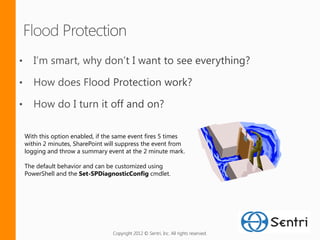
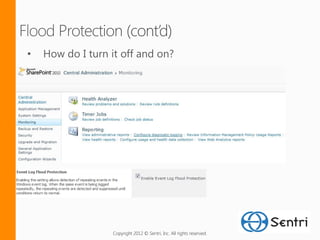
With this option enabled, if the same event fires 5 times
within 2 minutes, SharePoint will suppress the event from
logging and throw a summary event at the 2 minute mark.

The default behavior and can be customized using
PowerShell and the Set-SPDiagnosticConfig cmdlet.


                               Copyright 2012 Š Sentri, Inc. All rights reserved.
Copyright 2012 Š Sentri, Inc. All rights reserved.
•   How do I turn it off and on?


                  Copyright 2012 Š Sentri, Inc. All rights reserved.
Copyright 2012 Š Sentri, Inc. All rights reserved.
$j = [Microsoft.SharePoint.Administration.SPWebService]::ContentService.DeveloperDashboardSettings;
$j.DisplayLevel = 'OnDemand';
$j.Update()
Optional parameters
$j.TraceEnabled = $true;
$j.RequiredPermissions = '%MaskSetting%';


                             Copyright 2012 Š Sentri, Inc. All rights reserved.
Copyright 2012 Š Sentri, Inc. All rights reserved.
   Configurable ULS Logs
   Flood Protection
   Developer Dashboard
Copyright 2012 Š Sentri, Inc. All rights reserved.
   SQL Views
   CodePlex Projects
       http://SPFLogger.codeplex.com
Copyright 2012 Š Sentri, Inc. All rights reserved.
http://www.sharepointlonghorn.com
      jase@sharepointlonghorn.com


      http://www.cjvandyk.com/blog
      c@crayveon.com


      http://www.todd-carter.com/

      http://blogs.msdn.com/b/russmax


http://msdn.microsoft.com/en-us/library/microsoft.sharepoint.utilities.spmonitoredscope(office.14).aspx

http://msdn.microsoft.com/en-us/library/ff512758.aspx


http://spflogger.codeplex.com
Microsoft SharePoint 2010 Administration Toolkit v2.0


                             Copyright 2012 Š Sentri, Inc. All rights reserved.
Copyright 2012 Š Sentri, Inc. All rights reserved.

Sentri deck share point logging and debugging