Selenium in .NET   1
Selenium:

            Automates browsers [1]

            • Used mostly as a test automation tool
            • Has more “undiscovered” power

            [1] http://www.seleniumhq.org/


Se IDE          Se RC       Se WebDriver


         Selenium in .NET                             2
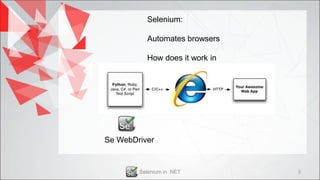
Selenium:

           Automates browsers

           How does it work in
           .NET?


Se WebDriver


        Selenium in .NET         3
Write the first tests – Heuristic approach

            “Don’t worry just write the first pieces of code”

                             How to test?

                           • Intent – Action
           • Map your manual testcases to the automated ones
• It’s ok to mess up code at first, but don’t mess up the business logic


                           Selenium in .NET                                4
What do you mean?


Selenium in .NET    5
Given the simple testcase: (We will call this the “intention”)

Steps:
        1. Open IE
        2. Navigate to http://google.ro
        3. Search for the “The Automated Tester” string
Expected Result:
        1. After step 3, verify the search title matches your
           search word.


              Selenium in .NET                                   6
The automated test: (We will call this “the action”)

• Open IE and navigate to http://google.ro
• Wait and confirm proper page loading
• Select the search field (DOM name = “q”)
• Type in the search word
• Make sure the search title matches the search word


              Selenium in .NET                         7
Dude, your automated test
                   does not really have a
                   structure


             That’s because …
             We haven’t decided
             an architecture
             just yet… We’ll do it soonish!


Selenium in .NET                               8
Teh codez…
[…]
namespace mySeleniumNETDemoInitial
{
    class Program
    {
        static void Main(string[] args)
        {
            // Start writing some code, no matter what
            IWebDriver driver = new InternetExplorerDriver(@"C:SeleniumDrivers");
            driver.Navigate().GoToUrl("http://google.ro");
            IWebElement myField = driver.FindElement(By.Name("q"));
            myField.SendKeys("The Automated Tester");
            myField.Submit();
            Assert.True(driver.Title.IndexOf("The Automated Tester") > -1);
            Console.WriteLine("Success in entering Google RO page");
            driver.Close();
        }
    }
}


                         Selenium in .NET                                             9
Heuristic part now officially over! Stop all coding! Start thinking!

Where are we?

• Have the automated test functioning [done]
• Make your manager happy [done]
• Map your testcases to the automated ones [not started]
• Style guide and code best practices [not started]
• Test API and architecture [no way]


                 Selenium in .NET                              10
Let’s take care of these tasks step by step now…
• Map your testcases to the automated ones [done]
namespace mySeleniumNETDemoInitial
{
    [TestFixture]
    class Test_Google
    {
        IWebDriver driver;

        [SetUp]
        public void Setup()
        {
            driver = new InternetExplorerDriver(@"C:SeleniumDrivers");
        }

        [TearDown]
        public void Teardown()
        {
            driver.Close();
        }

        [Test]
        public void TestSearchGoogle()
        {   […]
            // Not so pretty code from iteration 1 goes here
        }
    }
}


                                 Selenium in .NET                          11
Let’s take care of these tasks step by step now…
 • Style guide and code best practices[done]

 Remember our initial test method?
static void Main(string[] new InternetExplorerDriver(Constants.IE_DRIVER_PATH);
         IWebDriver driver = args)
    {
        // Start writing some code, no matter what
         driver.Navigate().GoToUrl(Constants.TEST_PAGE_URL);
         // I want to fail if the page loads in more than 10 seconds
        IWebDriver driver = new InternetExplorerDriver(@"C:SeleniumDrivers");
         driver.Manage().Timeouts().SetPageLoadTimeout(new TimeSpan(0, 0, 0, 10));
        driver.Navigate().GoToUrl("http://google.ro");
        IWebElement myField = driver.FindElement(By.Name("q"));
         IWebElement myField = driver.FindElement(By.Name("q"));
        myField.SendKeys("The Automated Tester");
         myField.SendKeys(Constants.SEARCH_TERM);
        myField.Submit();
         myField.Submit();
        Assert.True(driver.Title.IndexOf("The Automated Tester") > -1);
         Assert.True(driver.Title.IndexOf(Constants.SEARCH_TERM) > -1);
        Console.WriteLine("Success in entering Google RO page");
         Console.WriteLine(Constants.LOAD_SUCCESSFUL_MSG);
        driver.Close();
    }    driver.Close();
         Console.Out.Close();


                                Selenium in .NET                                     12
Let’s take care of these tasks step by step now…
• Test API and architecture [done]

• We want to move all the constants to a separate class
  // XXX: Lets decouple this by moving constants into a separate class file
  static class Constants
  {
      […]
      public const string LOAD_SUCCESSFUL_MSG = "Success in entering Google RO page";
      public const string TEST_PAGE_URL = "http://google.ro";
      public const string IE_DRIVER_PATH = @"C:SeleniumDrivers";
      […]
  }


    •   We now got rid of the ugly hardcoded strings, and we
        have a clear location for all of them


                        Selenium in .NET                                                13
Let’s take care of these tasks step by step now…
• Test API and architecture [done]

• We want to create a helper method for searching any strings in
  any fields
        public void Search(aField, aTerm) {
             […] // Paste search code here
        }

    • What a cool piece of re-usable code we just
      wrote


                      Selenium in .NET                        14
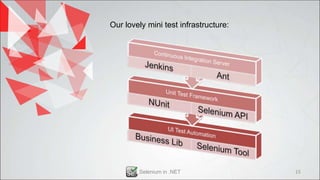
Our lovely mini test infrastructure:


        Selenium in .NET               15
Our lovely mini test infrastructure:

Pro’s:
• Keeping things modular generates a great deal of re-usable code
• Tests are easy to write, read, debug and parallelize
• Can generate proper test reports
• Decorator pattern friendly
• Scalable

Con’s:
• Not very easy to maintain, because its action oriented
• Not very sustainable


                    Selenium in .NET                         16
So after all this work…we are still not done?


         Selenium in .NET                  17
So after all this work…we are still not done?

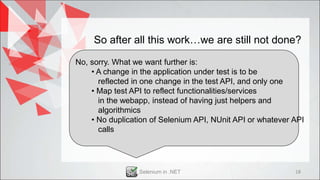
No, sorry. What we want further is:
    • A change in the application under test is to be
      reflected in one change in the test API, and only one
    • Map test API to reflect functionalities/services
      in the webapp, instead of having just helpers and
      algorithmics
    • No duplication of Selenium API, NUnit API or whatever API
      calls


                 Selenium in .NET                           18
So after all this work…we are still not done?

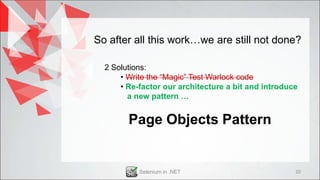
  2 Solutions:
      • Write the “Magic” Test Warlock code
      • Re-factor our architecture a bit and introduce
        a new pattern …


            Selenium in .NET                             19
So after all this work…we are still not done?

  2 Solutions:
      • Write the “Magic” Test Warlock code
      • Re-factor our architecture a bit and introduce
        a new pattern …


        Page Objects Pattern


           Selenium in .NET                          20
So after all this work…we are still not done?


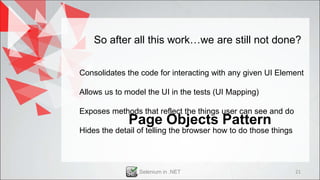
Consolidates the code for interacting with any given UI Element

Allows us to model the UI in the tests (UI Mapping)

Exposes methods that reflect the things user can see and do
              Page Objects Pattern
Hides the detail of telling the browser how to do those things


                 Selenium in .NET                                21
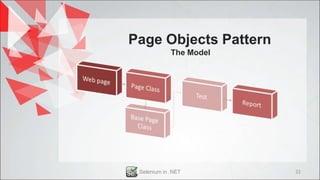
Page Objects Pattern
             The Model


 Selenium in .NET        22
Page Objects Pattern
                                      The API
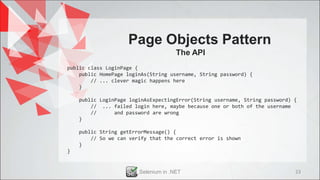
public class LoginPage {
    public HomePage loginAs(String username, String password) {
        // ... clever magic happens here
    }

    public LoginPage loginAsExpectingError(String username, String password) {
        // ... failed login here, maybe because one or both of the username
        //      and password are wrong
    }

    public String getErrorMessage() {
        // So we can verify that the correct error is shown
    }
}


                        Selenium in .NET                                     23
Page Objects
                   Pattern
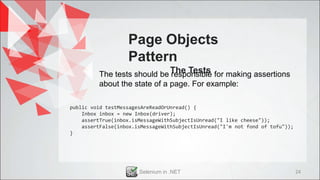
         The tests should be The Tests for making assertions
                              responsible
         about the state of a page. For example:

public void testMessagesAreReadOrUnread() {
    Inbox inbox = new Inbox(driver);
    assertTrue(inbox.isMessageWithSubjectIsUnread("I like cheese"));
    assertFalse(inbox.isMessageWithSubjectIsUnread("I'm not fond of tofu"));
}


                       Selenium in .NET                                        24
Page Objects
                  Pattern
                                 Summary
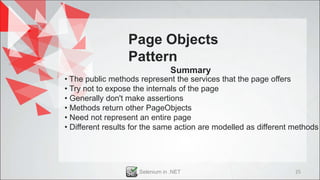
• The public methods represent the services that the page offers
• Try not to expose the internals of the page
• Generally don't make assertions
• Methods return other PageObjects
• Need not represent an entire page
• Different results for the same action are modelled as different methods


                     Selenium in .NET                             25
Let’s take 2 minutes and talk about
 our accomplishments so far…


     Selenium in .NET                 26
YES, things get eventually bigger


Let’s talk about Scalability


       Selenium in .NET             27
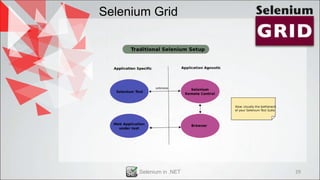
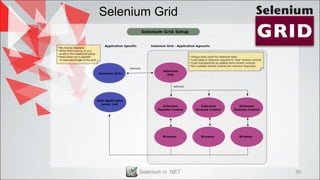
Selenium Grid


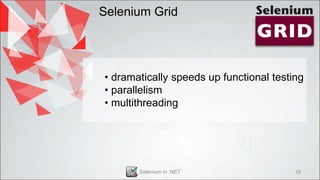
• dramatically speeds up functional testing
• parallelism
• multithreading


       Selenium in .NET                  28
Selenium Grid


      Selenium in .NET   29
Selenium Grid


      Selenium in .NET   30
Selenium Grid


                 Java remains on the remote
                 control server only


      Selenium in .NET                    31
Q&A
Thank you!
        (vlad.maniac@ebs.ro)
       (maniacvld@gmail.com)


Selenium in .NET               32

Selenium withnet

  • 1.
  • 2.
    Selenium: Automates browsers [1] • Used mostly as a test automation tool • Has more “undiscovered” power [1] http://www.seleniumhq.org/ Se IDE Se RC Se WebDriver Selenium in .NET 2
  • 3.
    Selenium: Automates browsers How does it work in .NET? Se WebDriver Selenium in .NET 3
  • 4.
    Write the firsttests – Heuristic approach “Don’t worry just write the first pieces of code” How to test? • Intent – Action • Map your manual testcases to the automated ones • It’s ok to mess up code at first, but don’t mess up the business logic Selenium in .NET 4
  • 5.
    What do youmean? Selenium in .NET 5
  • 6.
    Given the simpletestcase: (We will call this the “intention”) Steps: 1. Open IE 2. Navigate to http://google.ro 3. Search for the “The Automated Tester” string Expected Result: 1. After step 3, verify the search title matches your search word. Selenium in .NET 6
  • 7.
    The automated test:(We will call this “the action”) • Open IE and navigate to http://google.ro • Wait and confirm proper page loading • Select the search field (DOM name = “q”) • Type in the search word • Make sure the search title matches the search word Selenium in .NET 7
  • 8.
    Dude, your automatedtest does not really have a structure That’s because … We haven’t decided an architecture just yet… We’ll do it soonish! Selenium in .NET 8
  • 9.
    Teh codez… […] namespace mySeleniumNETDemoInitial { class Program { static void Main(string[] args) { // Start writing some code, no matter what IWebDriver driver = new InternetExplorerDriver(@"C:SeleniumDrivers"); driver.Navigate().GoToUrl("http://google.ro"); IWebElement myField = driver.FindElement(By.Name("q")); myField.SendKeys("The Automated Tester"); myField.Submit(); Assert.True(driver.Title.IndexOf("The Automated Tester") > -1); Console.WriteLine("Success in entering Google RO page"); driver.Close(); } } } Selenium in .NET 9
  • 10.
    Heuristic part nowofficially over! Stop all coding! Start thinking! Where are we? • Have the automated test functioning [done] • Make your manager happy [done] • Map your testcases to the automated ones [not started] • Style guide and code best practices [not started] • Test API and architecture [no way] Selenium in .NET 10
  • 11.
    Let’s take careof these tasks step by step now… • Map your testcases to the automated ones [done] namespace mySeleniumNETDemoInitial { [TestFixture] class Test_Google { IWebDriver driver; [SetUp] public void Setup() { driver = new InternetExplorerDriver(@"C:SeleniumDrivers"); } [TearDown] public void Teardown() { driver.Close(); } [Test] public void TestSearchGoogle() { […] // Not so pretty code from iteration 1 goes here } } } Selenium in .NET 11
  • 12.
    Let’s take careof these tasks step by step now… • Style guide and code best practices[done] Remember our initial test method? static void Main(string[] new InternetExplorerDriver(Constants.IE_DRIVER_PATH); IWebDriver driver = args) { // Start writing some code, no matter what driver.Navigate().GoToUrl(Constants.TEST_PAGE_URL); // I want to fail if the page loads in more than 10 seconds IWebDriver driver = new InternetExplorerDriver(@"C:SeleniumDrivers"); driver.Manage().Timeouts().SetPageLoadTimeout(new TimeSpan(0, 0, 0, 10)); driver.Navigate().GoToUrl("http://google.ro"); IWebElement myField = driver.FindElement(By.Name("q")); IWebElement myField = driver.FindElement(By.Name("q")); myField.SendKeys("The Automated Tester"); myField.SendKeys(Constants.SEARCH_TERM); myField.Submit(); myField.Submit(); Assert.True(driver.Title.IndexOf("The Automated Tester") > -1); Assert.True(driver.Title.IndexOf(Constants.SEARCH_TERM) > -1); Console.WriteLine("Success in entering Google RO page"); Console.WriteLine(Constants.LOAD_SUCCESSFUL_MSG); driver.Close(); } driver.Close(); Console.Out.Close(); Selenium in .NET 12
  • 13.
    Let’s take careof these tasks step by step now… • Test API and architecture [done] • We want to move all the constants to a separate class // XXX: Lets decouple this by moving constants into a separate class file static class Constants { […] public const string LOAD_SUCCESSFUL_MSG = "Success in entering Google RO page"; public const string TEST_PAGE_URL = "http://google.ro"; public const string IE_DRIVER_PATH = @"C:SeleniumDrivers"; […] } • We now got rid of the ugly hardcoded strings, and we have a clear location for all of them Selenium in .NET 13
  • 14.
    Let’s take careof these tasks step by step now… • Test API and architecture [done] • We want to create a helper method for searching any strings in any fields public void Search(aField, aTerm) { […] // Paste search code here } • What a cool piece of re-usable code we just wrote Selenium in .NET 14
  • 15.
    Our lovely minitest infrastructure: Selenium in .NET 15
  • 16.
    Our lovely minitest infrastructure: Pro’s: • Keeping things modular generates a great deal of re-usable code • Tests are easy to write, read, debug and parallelize • Can generate proper test reports • Decorator pattern friendly • Scalable Con’s: • Not very easy to maintain, because its action oriented • Not very sustainable Selenium in .NET 16
  • 17.
    So after allthis work…we are still not done? Selenium in .NET 17
  • 18.
    So after allthis work…we are still not done? No, sorry. What we want further is: • A change in the application under test is to be reflected in one change in the test API, and only one • Map test API to reflect functionalities/services in the webapp, instead of having just helpers and algorithmics • No duplication of Selenium API, NUnit API or whatever API calls Selenium in .NET 18
  • 19.
    So after allthis work…we are still not done? 2 Solutions: • Write the “Magic” Test Warlock code • Re-factor our architecture a bit and introduce a new pattern … Selenium in .NET 19
  • 20.
    So after allthis work…we are still not done? 2 Solutions: • Write the “Magic” Test Warlock code • Re-factor our architecture a bit and introduce a new pattern … Page Objects Pattern Selenium in .NET 20
  • 21.
    So after allthis work…we are still not done? Consolidates the code for interacting with any given UI Element Allows us to model the UI in the tests (UI Mapping) Exposes methods that reflect the things user can see and do Page Objects Pattern Hides the detail of telling the browser how to do those things Selenium in .NET 21
  • 22.
    Page Objects Pattern The Model Selenium in .NET 22
  • 23.
    Page Objects Pattern The API public class LoginPage { public HomePage loginAs(String username, String password) { // ... clever magic happens here } public LoginPage loginAsExpectingError(String username, String password) { // ... failed login here, maybe because one or both of the username // and password are wrong } public String getErrorMessage() { // So we can verify that the correct error is shown } } Selenium in .NET 23
  • 24.
    Page Objects Pattern The tests should be The Tests for making assertions responsible about the state of a page. For example: public void testMessagesAreReadOrUnread() { Inbox inbox = new Inbox(driver); assertTrue(inbox.isMessageWithSubjectIsUnread("I like cheese")); assertFalse(inbox.isMessageWithSubjectIsUnread("I'm not fond of tofu")); } Selenium in .NET 24
  • 25.
    Page Objects Pattern Summary • The public methods represent the services that the page offers • Try not to expose the internals of the page • Generally don't make assertions • Methods return other PageObjects • Need not represent an entire page • Different results for the same action are modelled as different methods Selenium in .NET 25
  • 26.
    Let’s take 2minutes and talk about our accomplishments so far… Selenium in .NET 26
  • 27.
    YES, things geteventually bigger Let’s talk about Scalability Selenium in .NET 27
  • 28.
    Selenium Grid • dramaticallyspeeds up functional testing • parallelism • multithreading Selenium in .NET 28
  • 29.
    Selenium Grid Selenium in .NET 29
  • 30.
    Selenium Grid Selenium in .NET 30
  • 31.
    Selenium Grid Java remains on the remote control server only Selenium in .NET 31
  • 32.
    Q&A Thank you! (vlad.maniac@ebs.ro) (maniacvld@gmail.com) Selenium in .NET 32