@yashaka 01.2017
KISS PageObjects
Plan
Intro
Classic examples
KISS PageObjects Demo
Retrospective
Q&A
Afterwords
There are good practices in context,
but there are no best practices.
(c) Cem Kaner, James Bach
Afterwords Preface
There are good practices in context,
but there are no best practices.
(c) Cem Kaner, James Bach
Intro
KISS?
Keep It Simple Stupid!
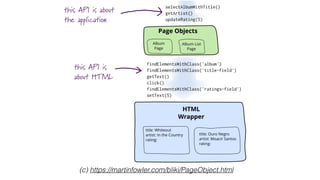
PageObjects?
–Martin Fowler
Page objects are a classic example of encapsulation - they hide
the details of the UI structure and widgetry from other
components (the tests)
(c) https://martinfowler.com/bliki/PageObject.html
The boring part :p
Classic “Horror” Examples
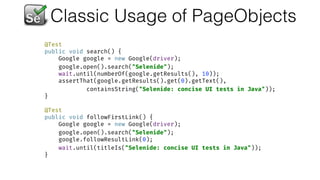
Classic Usage of PageObjects
@Test

public void search() {

Google google = new Google(driver);

google.open().search("Selenide");

wait.until(numberOf(google.getResults(), 10));

assertThat(google.getResults().get(0).getText(), 

containsString("Selenide: concise UI tests in Java"));

}


@Test

public void followFirstLink() {

Google google = new Google(driver);

google.open().search("Selenide");

google.followResultLink(0);

wait.until(titleIs("Selenide: concise UI tests in Java"));

}
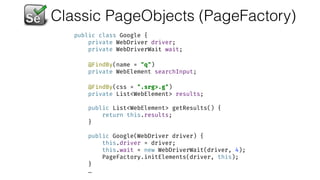
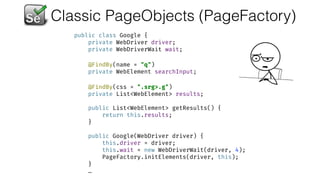
Classic PageObjects (PageFactory)
public class Google {

private WebDriver driver;

private WebDriverWait wait;


@FindBy(name = "q")

private WebElement searchInput;


@FindBy(css = ".srg>.g")

private List<WebElement> results;


public List<WebElement> getResults() {

return this.results;

}


public Google(WebDriver driver) {

this.driver = driver;

this.wait = new WebDriverWait(driver, 4);

PageFactory.initElements(driver, this);

}
…
Classic PageObjects (PageFactory)
public class Google {

private WebDriver driver;

private WebDriverWait wait;


@FindBy(name = "q")

private WebElement searchInput;


@FindBy(css = ".srg>.g")

private List<WebElement> results;


public List<WebElement> getResults() {

return this.results;

}


public Google(WebDriver driver) {

this.driver = driver;

this.wait = new WebDriverWait(driver, 4);

PageFactory.initElements(driver, this);

}
…
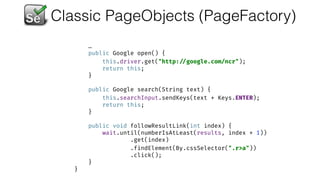
Classic PageObjects (PageFactory)
…
public Google open() {

this.driver.get("http: //google.com/ncr");

return this;

}


public Google search(String text) {

this.searchInput.sendKeys(text + Keys.ENTER);

return this;

}


public void followResultLink(int index) {

wait.until(numberIsAtLeast(results, index + 1))

.get(index)

.findElement(By.cssSelector(".r>a"))

.click();

}

}
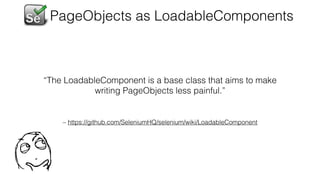
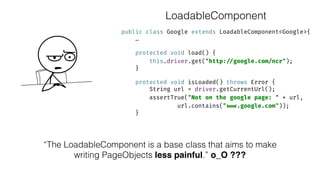
– https://github.com/SeleniumHQ/selenium/wiki/LoadableComponent
“The LoadableComponent is a base class that aims to make
writing PageObjects less painful.”
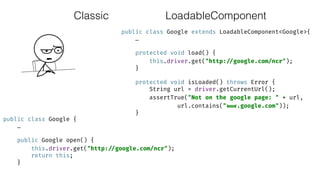
PageObjects as LoadableComponents
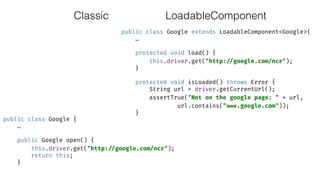
Classic
public class Google extends LoadableComponent<Google>{

…


protected void load() {

this.driver.get("http: //google.com/ncr");

}


protected void isLoaded() throws Error {

String url = driver.getCurrentUrl();

assertTrue("Not on the google page: " + url,
url.contains(" www.google.com"));

}
public class Google {

…


public Google open() {

this.driver.get("http: //google.com/ncr");

return this;

}
LoadableComponent
Classic
public class Google extends LoadableComponent<Google>{

…


protected void load() {

this.driver.get("http: //google.com/ncr");

}


protected void isLoaded() throws Error {

String url = driver.getCurrentUrl();

assertTrue("Not on the google page: " + url,
url.contains(" www.google.com"));

}
public class Google {

…


public Google open() {

this.driver.get("http: //google.com/ncr");

return this;

}
LoadableComponent
public class Google extends LoadableComponent<Google>{

…


protected void load() {

this.driver.get("http: //google.com/ncr");

}


protected void isLoaded() throws Error {

String url = driver.getCurrentUrl();

assertTrue("Not on the google page: " + url,
url.contains(" www.google.com"));

}
“The LoadableComponent is a base class that aims to make
writing PageObjects less painful.” o_O ???
LoadableComponent
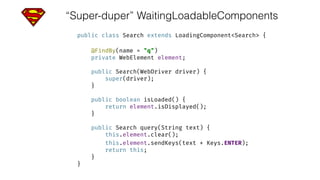
“Super-duper” WaitingLoadableComponents
public class Search extends LoadingComponent<Search> {


@FindBy(name = "q")

private WebElement element;


public Search(WebDriver driver) {

super(driver);

}


public boolean isLoaded() {

return element.isDisplayed();

}


public Search query(String text) {

this.element.clear();

this.element.sendKeys(text + Keys.ENTER);

return this;

}

}
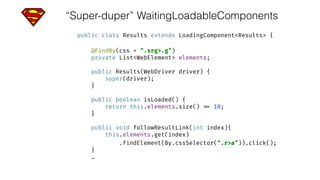
“Super-duper” WaitingLoadableComponents
public class Results extends LoadingComponent<Results> {


@FindBy(css = ".srg>.g")

private List<WebElement> elements;


public Results(WebDriver driver) {

super(driver);

}


public boolean isLoaded() {

return this.elements.size() == 10;

}


public void followResultLink(int index){

this.elements.get(index)
.findElement(By.cssSelector(".r>a")).click();

}
…
“Super-duper” WaitingLoadableComponents
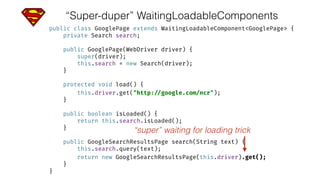
public class GooglePage extends WaitingLoadableComponent<GooglePage> {

private Search search;


public GooglePage(WebDriver driver) {

super(driver);

this.search = new Search(driver);

}


protected void load() {

this.driver.get("http: //google.com/ncr");

}


public boolean isLoaded() {

return this.search.isLoaded();

}


public GoogleSearchResultsPage search(String text) {

this.search.query(text);

return new GoogleSearchResultsPage(this.driver).get();

}

}
“super” waiting for loading trick
“Super-duper” WaitingLoadableComponents
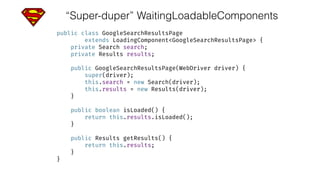
public class GoogleSearchResultsPage 

extends LoadingComponent<GoogleSearchResultsPage> {

private Search search;

private Results results;


public GoogleSearchResultsPage(WebDriver driver) {

super(driver);

this.search = new Search(driver);

this.results = new Results(driver);

}


public boolean isLoaded() {

return this.results.isLoaded();

}


public Results getResults() {

return this.results;

}

}

“Super-duper” WaitingLoadableComponents
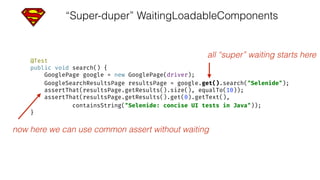
@Test

public void search() {

GooglePage google = new GooglePage(driver);

GoogleSearchResultsPage resultsPage = google.get().search("Selenide");

assertThat(resultsPage.getResults().size(), equalTo(10));

assertThat(resultsPage.getResults().get(0).getText(),

containsString("Selenide: concise UI tests in Java"));

}
all “super” waiting starts here
now here we can use common assert without waiting
“The LoadableComponent is a base class that aims to make
writing PageObjects less painful.” o_O ???
WTF?
PageObjects Demo
Demo src log
PageObjects Usage
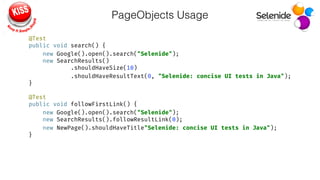
@Test

public void search() {

new Google().open().search("Selenide");

new SearchResults()

.shouldHaveSize(10)

.shouldHaveResultText(0, "Selenide: concise UI tests in Java");

}


@Test

public void followFirstLink() {

new Google().open().search("Selenide");

new SearchResults().followResultLink(0);

new NewPage().shouldHaveTitle"Selenide: concise UI tests in Java");

}
PageObjects Implementation
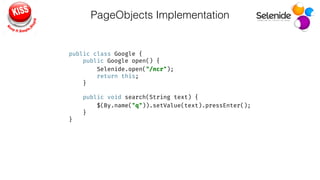
public class Google {

public Google open() {

Selenide.open("/ncr");

return this;

}


public void search(String text) {

$(By.name("q")).setValue(text).pressEnter();

}

}
PageObjects Implementation
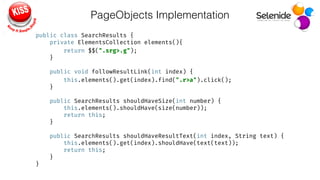
public class SearchResults {

private ElementsCollection elements(){

return $$(".srg>.g");

}


public void followResultLink(int index) {

this.elements().get(index).find(".r>a").click();

}


public SearchResults shouldHaveSize(int number) {

this.elements().shouldHave(size(number));

return this;

}


public SearchResults shouldHaveResultText(int index, String text) {

this.elements().get(index).shouldHave(text(text));

return this;

}

}
PageObjects Implementation
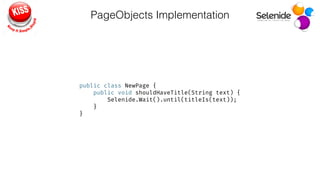
public class NewPage {

public void shouldHaveTitle(String text) {

Selenide.Wait().until(titleIs(text));

}

}
Retrospective
So why do we need
PageObjects?
Despite of DRYing the code…
So why do we need PageObjects?
Despite of DRYing the code…
–Martin Fowler
Page objects are a classic example of encapsulation - they hide
the details of the UI structure and widgetry from other
components (the tests)
Why may we need Encapsulation?
• Encapsulate for cohesion?
• that’s ok… pretty reasonable to keep related things together
(locators and actions on their elements)
Why may we need Encapsulation?
• Encapsulate to hide something internal to be not broken by client
(tests code)?
• but what may be broken? o_O Have you ever had any thought on
resetting some page field from outside? ;)
Why may we need Encapsulation?
• Encapsulate to hide something internal so on change it will not
broke the client (tests code)? i.e. to provide stable API
• ok… but then next question to think on:
• where is that line which frame the “stable API”?
• maybe it’s less abstract than you got used to…
Why may we need Encapsulation?
• Encapsulate to narrow User Oriented behavioural API to be
readable enough and convenient in usage?
• :)
A point to think about…
“Encapsulate to narrow User Oriented behavioural API to be readable
enough and convenient in usage”
• developers?
• Sr. Automation engineers?
• Jr. Automation engineers?
• Manual Testers?
Readable and convenient for whom?
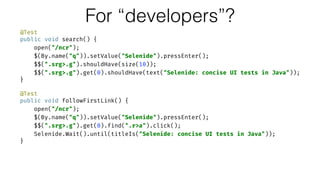
@Test

public void search() {

open("/ncr");

$(By.name("q")).setValue("Selenide").pressEnter();

$$(".srg>.g").shouldHave(size(10));

$$(".srg>.g").get(0).shouldHave(text("Selenide: concise UI tests in Java"));

}


@Test

public void followFirstLink() {

open("/ncr");

$(By.name("q")).setValue("Selenide").pressEnter();

$$(".srg>.g").get(0).find(".r>a").click();

Selenide.Wait().until(titleIs("Selenide: concise UI tests in Java"));

}
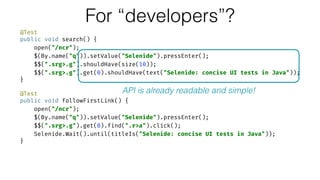
For “developers”?
@Test

public void search() {

open("/ncr");

$(By.name("q")).setValue("Selenide").pressEnter();

$$(".srg>.g").shouldHave(size(10));

$$(".srg>.g").get(0).shouldHave(text("Selenide: concise UI tests in Java"));

}


@Test

public void followFirstLink() {

open("/ncr");

$(By.name("q")).setValue("Selenide").pressEnter();

$$(".srg>.g").get(0).find(".r>a").click();

Selenide.Wait().until(titleIs("Selenide: concise UI tests in Java"));

}
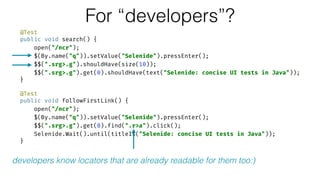
For “developers”?
API is already readable and simple!
@Test

public void search() {

open("/ncr");

$(By.name("q")).setValue("Selenide").pressEnter();

$$(".srg>.g").shouldHave(size(10));

$$(".srg>.g").get(0).shouldHave(text("Selenide: concise UI tests in Java"));

}


@Test

public void followFirstLink() {

open("/ncr");

$(By.name("q")).setValue("Selenide").pressEnter();

$$(".srg>.g").get(0).find(".r>a").click();

Selenide.Wait().until(titleIs("Selenide: concise UI tests in Java"));

}
For “developers”?
developers know locators that are already readable for them too:)
@Test

public void search() {

open("/ncr");

$(By.name("query")).setValue("Selenide").pressEnter();

$$(".result").shouldHave(size(10));

$$(".result").get(0).shouldHave(text("Selenide: concise UI tests in Java"));

}


@Test

public void followFirstLink() {

open("/ncr");

$(By.name("query")).setValue("Selenide").pressEnter();

$$(“.result").get(0).find(".result-link").click();

Selenide.Wait().until(titleIs("Selenide: concise UI tests in Java"));

}
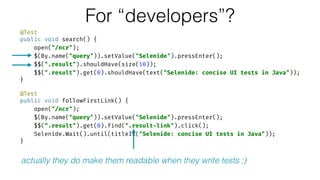
For “developers”?
actually they do make them readable when they write tests ;)
@Test

public void search() {

open("/ncr");

$(By.name("q")).setValue("Selenide").pressEnter();

$$(".srg>.g").shouldHave(size(10));

$$(".srg>.g").get(0).shouldHave(text("Selenide: concise UI tests in Java"));

}


@Test

public void followFirstLink() {

open("/ncr");

$(By.name("q")).setValue("Selenide").pressEnter();

$$(".srg>.g").get(0).find(".r>a").click();

Selenide.Wait().until(titleIs("Selenide: concise UI tests in Java"));

}
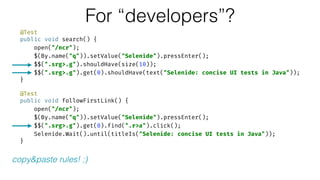
For “developers”?
copy&paste rules! ;)
@Test

public void search() {

open("/ncr");

$(By.name("q")).setValue("Selenide").pressEnter();

$$(".srg>.g").shouldHave(size(10));

$$(".srg>.g").get(0).shouldHave(text("Selenide: concise UI tests in Java"));

}


@Test

public void followFirstLink() {

open("/ncr");

$(By.name("q")).setValue("Selenide").pressEnter();

$$(".srg>.g").get(0).find(".r>a").click();

Selenide.Wait().until(titleIs("Selenide: concise UI tests in Java"));

}
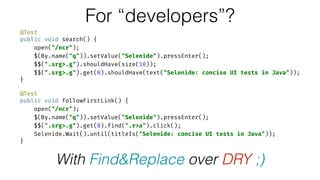
For “developers”?
With Find&Replace over DRY ;)
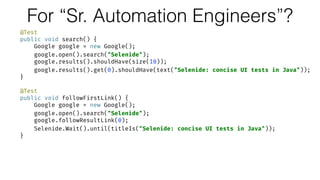
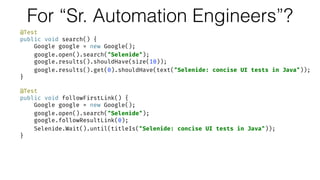
For “Sr. Automation Engineers”?
@Test

public void search() {

Google google = new Google();

google.open().search("Selenide");

google.results().shouldHave(size(10));

google.results().get(0).shouldHave(text("Selenide: concise UI tests in Java"));

}


@Test

public void followFirstLink() {

Google google = new Google();

google.open().search("Selenide");

google.followResultLink(0);

Selenide.Wait().until(titleIs("Selenide: concise UI tests in Java"));

}
For “Sr. Automation Engineers”?
@Test

public void search() {

Google google = new Google();

google.open().search("Selenide");

google.results().shouldHave(size(10));

google.results().get(0).shouldHave(text("Selenide: concise UI tests in Java"));

}


@Test

public void followFirstLink() {

Google google = new Google();

google.open().search("Selenide");

google.followResultLink(0);

Selenide.Wait().until(titleIs("Selenide: concise UI tests in Java"));

}
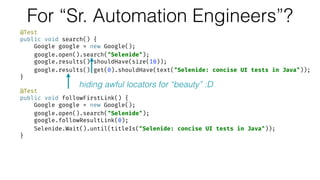
hiding awful locators for “beauty” :D
For “Sr. Automation Engineers”?
@Test

public void search() {

Google google = new Google();

google.open().search("Selenide");

google.results().shouldHave(size(10));

google.results().get(0).shouldHave(text("Selenide: concise UI tests in Java"));

}


@Test

public void followFirstLink() {

Google google = new Google();

google.open().search("Selenide");

google.followResultLink(0);

Selenide.Wait().until(titleIs("Selenide: concise UI tests in Java"));

}
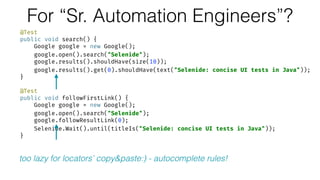
too lazy for locators’ copy&paste:) - autocomplete rules!
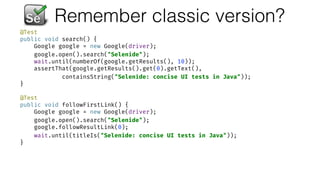
Remember classic version?
@Test

public void search() {

Google google = new Google(driver);

google.open().search("Selenide");

wait.until(numberOf(google.getResults(), 10));

assertThat(google.getResults().get(0).getText(), 

containsString("Selenide: concise UI tests in Java"));

}


@Test

public void followFirstLink() {

Google google = new Google(driver);

google.open().search("Selenide");

google.followResultLink(0);

wait.until(titleIs("Selenide: concise UI tests in Java"));

}
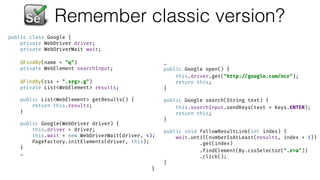
Remember classic version?
public class Google {

private WebDriver driver;

private WebDriverWait wait;


@FindBy(name = "q")

private WebElement searchInput;


@FindBy(css = ".srg>.g")

private List<WebElement> results;


public List<WebElement> getResults() {

return this.results;

}


public Google(WebDriver driver) {

this.driver = driver;

this.wait = new WebDriverWait(driver, 4);

PageFactory.initElements(driver, this);

}
…
…
public Google open() {

this.driver.get("http: //google.com/ncr");

return this;

}


public Google search(String text) {

this.searchInput.sendKeys(text + Keys.ENTER);

return this;

}


public void followResultLink(int index) {

wait.until(numberIsAtLeast(results, index + 1))

.get(index)

.findElement(By.cssSelector(".r>a"))

.click();

}

}
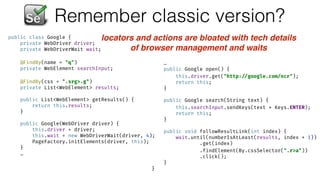
Remember classic version?
public class Google {

private WebDriver driver;

private WebDriverWait wait;


@FindBy(name = "q")

private WebElement searchInput;


@FindBy(css = ".srg>.g")

private List<WebElement> results;


public List<WebElement> getResults() {

return this.results;

}


public Google(WebDriver driver) {

this.driver = driver;

this.wait = new WebDriverWait(driver, 4);

PageFactory.initElements(driver, this);

}
…
…
public Google open() {

this.driver.get("http: //google.com/ncr");

return this;

}


public Google search(String text) {

this.searchInput.sendKeys(text + Keys.ENTER);

return this;

}


public void followResultLink(int index) {

wait.until(numberIsAtLeast(results, index + 1))

.get(index)

.findElement(By.cssSelector(".r>a"))

.click();

}

}
locators and actions are bloated with tech details
of browser management and waits
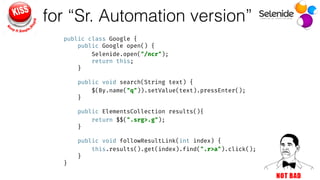
for “Sr. Automation version”
public class Google {

public Google open() {

Selenide.open("/ncr");

return this;

}


public void search(String text) {

$(By.name("q")).setValue(text).pressEnter();

}


public ElementsCollection results(){

return $$(".srg>.g");

}


public void followResultLink(int index) {

this.results().get(index).find(".r>a").click();

}

}
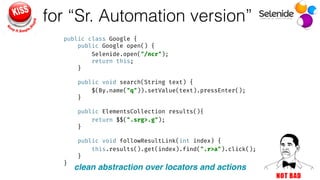
for “Sr. Automation version”
public class Google {

public Google open() {

Selenide.open("/ncr");

return this;

}


public void search(String text) {

$(By.name("q")).setValue(text).pressEnter();

}


public ElementsCollection results(){

return $$(".srg>.g");

}


public void followResultLink(int index) {

this.results().get(index).find(".r>a").click();

}

}
clean abstraction over locators and actions
For “Sr. Automation Engineers”?
@Test

public void search() {

Google google = new Google();

google.open().search("Selenide");

google.results().shouldHave(size(10));

google.results().get(0).shouldHave(text("Selenide: concise UI tests in Java"));

}


@Test

public void followFirstLink() {

Google google = new Google();

google.open().search("Selenide");

google.followResultLink(0);

Selenide.Wait().until(titleIs("Selenide: concise UI tests in Java"));

}
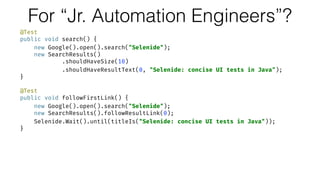
For “Jr. Automation Engineers”?
@Test

public void search() {

new Google().open().search("Selenide");

new SearchResults()

.shouldHaveSize(10)

.shouldHaveResultText(0, "Selenide: concise UI tests in Java");

}


@Test

public void followFirstLink() {

new Google().open().search("Selenide");

new SearchResults().followResultLink(0);

Selenide.Wait().until(titleIs("Selenide: concise UI tests in Java"));

}
For “Jr. Automation Engineers”?
@Test

public void search() {

new Google().open().search("Selenide");

new SearchResults()

.shouldHaveSize(10)

.shouldHaveResultText(0, "Selenide: concise UI tests in Java");

}


@Test

public void followFirstLink() {

new Google().open().search("Selenide");

new SearchResults().followResultLink(0);

Selenide.Wait().until(titleIs("Selenide: concise UI tests in Java"));

}
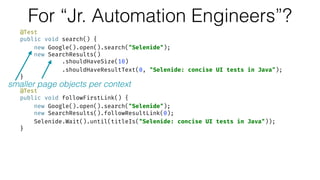
smaller page objects per context
For “Jr. Automation Engineers”?
@Test

public void search() {

new Google().open().search("Selenide");

new SearchResults()

.shouldHaveSize(10)

.shouldHaveResultText(0, "Selenide: concise UI tests in Java");

}


@Test

public void followFirstLink() {

new Google().open().search("Selenide");

new SearchResults().followResultLink(0);

Selenide.Wait().until(titleIs("Selenide: concise UI tests in Java"));

}
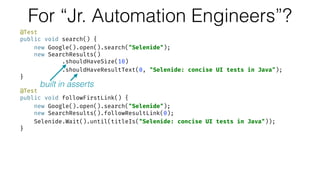
built in asserts
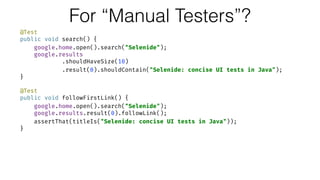
For “Manual Testers”?
@Test

public void search() {

google.home.open().search("Selenide");

google.results

.shouldHaveSize(10)

.result(0).shouldContain("Selenide: concise UI tests in Java");

}


@Test

public void followFirstLink() {

google.home.open().search("Selenide");

google.results.result(0).followLink();

assertThat(titleIs("Selenide: concise UI tests in Java"));

}
For “Manual Testers”?
@Test

public void search() {

google.home.open().search("Selenide");

google.results

.shouldHaveSize(10)

.result(0).shouldContain("Selenide: concise UI tests in Java");

}


@Test

public void followFirstLink() {

google.home.open().search("Selenide");

google.results.result(0).followLink();

assertThat(titleIs("Selenide: concise UI tests in Java"));

}
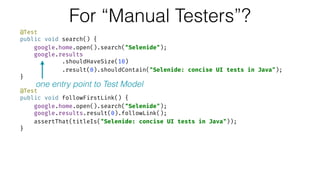
one entry point to Test Model
For “Manual Testers”?
@Test

public void search() {

google.home.open().search("Selenide");

google.results

.shouldHaveSize(10)

.result(0).shouldContain("Selenide: concise UI tests in Java");

}


@Test

public void followFirstLink() {

google.home.open().search("Selenide");

google.results.result(0).followLink();

assertThat(titleIs("Selenide: concise UI tests in Java"));

}
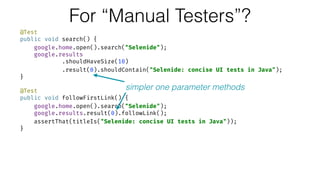
simpler one parameter methods
For “Manual Testers”?
@Test

public void search() {

google.home.open().search("Selenide");

google.results

.shouldHaveSize(10)

.result(0).shouldContain("Selenide: concise UI tests in Java");

}


@Test

public void followFirstLink() {

google.home.open().search("Selenide");

google.results.result(0).followLink();

assertThat(titleIs("Selenide: concise UI tests in Java"));

}
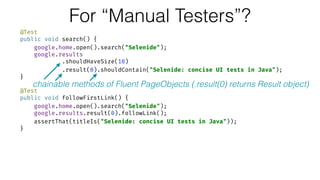
chainable methods of Fluent PageObjects (.result(0) returns Result object)
Why should we care?
To be efficient!
Ok, Where is KISS here?
It is exactly about leveraging
convenient techniques
in concrete context
to make it simpler and efficient!
Reviewing some techniques of
PageObjects design
from KISS point of view
–Martin Fowler
I favor having no assertions in page objects. I think you can avoid
duplication by providing assertion libraries for common assertions
- which can also make it easier to provide good diagnostics.
Page objects are commonly used for testing, but should not make
assertions themselves. Their responsibility is to provide access to
the state of the underlying page. It's up to test clients to carry out
the assertion logic.
https://martinfowler.com/bliki/PageObject.html
Assertions-free PageObjects?
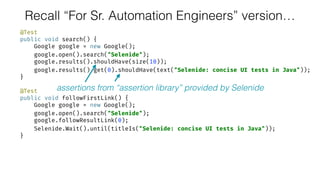
Recall “For Sr. Automation Engineers” version…
@Test

public void search() {

Google google = new Google();

google.open().search("Selenide");

google.results().shouldHave(size(10));

google.results().get(0).shouldHave(text("Selenide: concise UI tests in Java"));

}


@Test

public void followFirstLink() {

Google google = new Google();

google.open().search("Selenide");

google.followResultLink(0);

Selenide.Wait().until(titleIs("Selenide: concise UI tests in Java"));

}
assertions from “assertion library” provided by Selenide
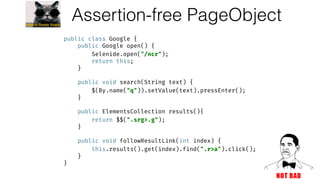
Assertion-free PageObject
public class Google {

public Google open() {

Selenide.open("/ncr");

return this;

}


public void search(String text) {

$(By.name("q")).setValue(text).pressEnter();

}


public ElementsCollection results(){

return $$(".srg>.g");

}


public void followResultLink(int index) {

this.results().get(index).find(".r>a").click();

}

}
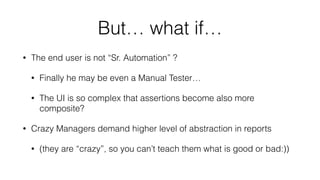
But… what if…
• The end user is not “Sr. Automation” ?
• Finally he may be even a Manual Tester…
• The UI is so complex that assertions become also more
composite?
• Crazy Managers demand higher level of abstraction in reports
• (they are “crazy”, so you can’t teach them what is good or bad:))
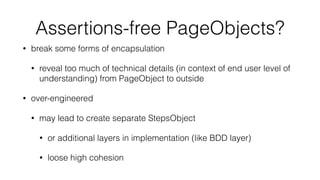
Assertions-free PageObjects?
• break some forms of encapsulation
• reveal too much of technical details (in context of end user level of
understanding) from PageObject to outside
• over-engineered
• may lead to create separate StepsObject
• or additional layers in implementation (like BDD layer)
• loose high cohesion
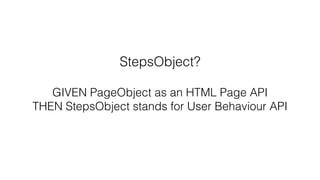
StepsObject?
GIVEN PageObject as an HTML Page API
THEN StepsObject stands for User Behaviour API
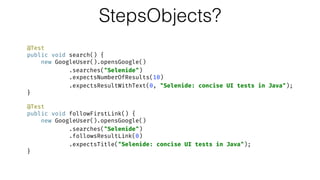
StepsObjects?
@Test

public void search() {

new GoogleUser().opensGoogle()

.searches("Selenide")

.expectsNumberOfResults(10)

.expectsResultWithText(0, "Selenide: concise UI tests in Java");

}


@Test

public void followFirstLink() {

new GoogleUser().opensGoogle()

.searches("Selenide")

.followsResultLink(0)

.expectsTitle("Selenide: concise UI tests in Java");

}
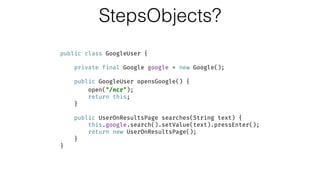
StepsObjects?
public class GoogleUser {


private final Google google = new Google();


public GoogleUser opensGoogle() {

open("/ncr");

return this;

}


public UserOnResultsPage searches(String text) {

this.google.search().setValue(text).pressEnter();

return new UserOnResultsPage();

}

}
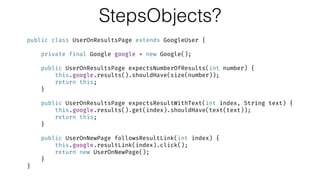
StepsObjects?
public class UserOnResultsPage extends GoogleUser {


private final Google google = new Google();


public UserOnResultsPage expectsNumberOfResults(int number) {

this.google.results().shouldHave(size(number));

return this;

}


public UserOnResultsPage expectsResultWithText(int index, String text) {

this.google.results().get(index).shouldHave(text(text));

return this;

}


public UserOnNewPage followsResultLink(int index) {

this.google.resultLink(index).click();

return new UserOnNewPage();

}

}
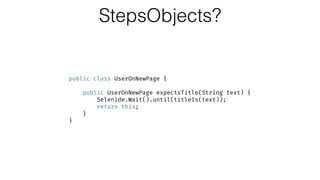
StepsObjects?
public class UserOnNewPage {


public UserOnNewPage expectsTitle(String text) {

Selenide.Wait().until(titleIs(text));

return this;

}

}
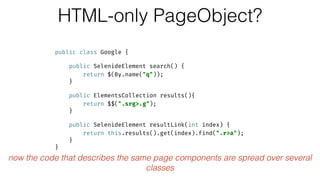
HTML-only PageObject?
public class Google {


public SelenideElement search() {

return $(By.name("q"));

}


public ElementsCollection results(){

return $$(".srg>.g");

}


public SelenideElement resultLink(int index) {

return this.results().get(index).find(".r>a");

}

}
now the code that describes the same page components are spread over several
classes
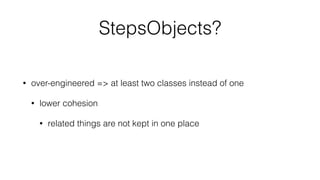
StepsObjects?
• over-engineered => at least two classes instead of one
• lower cohesion
• related things are not kept in one place
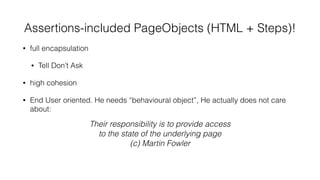
Assertions-included PageObjects (HTML + Steps)!
• full encapsulation
• Tell Don’t Ask
• high cohesion
• End User oriented. He needs “behavioural object”, He actually does not care
about:
• Bloated with code?
• KISS answer: break down into smaller PageObjects
• you will have still two or even more classes but for exactly one thing from
the User point of view
Their responsibility is to provide access
to the state of the underlying page
(c) Martin Fowler
Assertions-included PageObjects!
• full encapsulation
• Tell Don’t Ask
• high cohesion
• KISS: one class instead of two ones for the same thing from the User point of
view
• Bloated with code?
• KISS answer: break down into smaller PageObjects
• you will have still two or even more classes but for exactly one thing from
the User point of view
Assertions-included PageObjects!
• full encapsulation
• Tell Don’t Ask
• high cohesion
• KISS: one class instead of two ones for the same thing from the User point of
view
• Bloated with code?
• KISS answer: break down into smaller PageObjects
• you will have still two or even more classes but for exactly one thing from
the User point of view
Advocates of assertion-free page objects say that including assertions mixes the responsibilities
of providing access to page data with assertion logic, and leads to a bloated page object.
(c) Martin Fowler
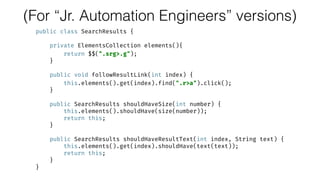
(For “Jr. Automation Engineers” versions)
public class SearchResults {


private ElementsCollection elements(){

return $$(".srg>.g");

}


public void followResultLink(int index) {

this.elements().get(index).find(".r>a").click();

}


public SearchResults shouldHaveSize(int number) {

this.elements().shouldHave(size(number));

return this;

}


public SearchResults shouldHaveResultText(int index, String text) {

this.elements().get(index).shouldHave(text(text));

return this;

}

}
Assertions-included PageObjects!
• full encapsulation
• Tell Don’t Ask
• high cohesion
• KISS: one class instead of two ones for the same thing from the User point of
view
• Bloated with code?
• KISS answer: break down into smaller PageObjects aka Widgets
• you will have still two or even more classes but for exactly one thing from
the User point of view
• full encapsulation
• Tell Don’t Ask
• high cohesion
• KISS: one class instead of two ones for the same thing from the User point of
view
• Bloated with code?
• KISS answer: break down into smaller PageObjects aka Widgets
• you will have still two or even more classes but for exactly one thing from
the User point of view
Despite the term "page" object, these objects shouldn't usually be built for each page,
but rather for the significant elements on a page
(c) Martin Fowler
(For “Manual Testers” version)
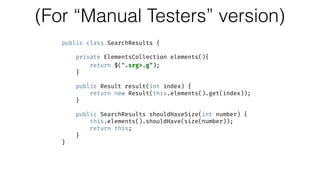
public class SearchResults {


private ElementsCollection elements(){

return $(".srg>.g");

}


public Result result(int index) {

return new Result(this.elements().get(index));

}


public SearchResults shouldHaveSize(int number) {

this.elements().shouldHave(size(number));

return this;

}

}
(For “Manual Testers” version)
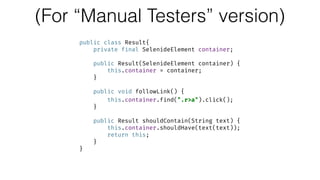
public class Result{

private final SelenideElement container;


public Result(SelenideElement container) {

this.container = container;

}


public void followLink() {

this.container.find(".r>a").click();

}


public Result shouldContain(String text) {

this.container.shouldHave(text(text));

return this;

}

}
(For “Manual Testers” version)
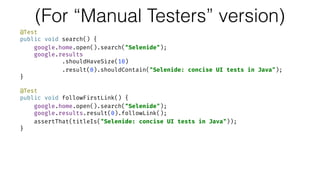
@Test

public void search() {

google.home.open().search("Selenide");

google.results

.shouldHaveSize(10)

.result(0).shouldContain("Selenide: concise UI tests in Java");

}


@Test

public void followFirstLink() {

google.home.open().search("Selenide");

google.results.result(0).followLink();

assertThat(titleIs("Selenide: concise UI tests in Java"));

}
KISS Pageobjects for Jr. and Manual Testers, where
extra reporting is needed
=
2 in 1:
HTML PageObjects
+
StepsObjects with Asserts
(being broken down to “Widgets” if needed)
KISS
*=
simplicity instead of over-engineering
=
YAGNI = You Ain’t Gonna Need It
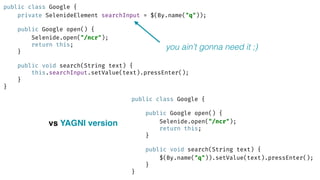
public class Google {

private SelenideElement searchInput = $(By.name("q"));


public Google open() {

Selenide.open("/ncr");

return this;

}


public void search(String text) {

this.searchInput.setValue(text).pressEnter();

}

}
public class Google {


public Google open() {

Selenide.open("/ncr");

return this;

}


public void search(String text) {

$(By.name("q")).setValue(text).pressEnter();

}

}
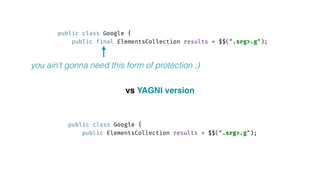
vs YAGNI version
you ain’t gonna need it ;)
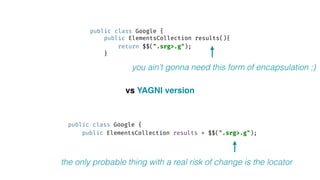
public class Google {

public ElementsCollection results(){

return $$(".srg>.g");

}
public class Google {

public ElementsCollection results = $$(".srg>.g");

vs YAGNI version
you ain’t gonna need this form of encapsulation ;)
the only probable thing with a real risk of change is the locator
public class Google {

public final ElementsCollection results = $$(".srg>.g");

public class Google {

public ElementsCollection results = $$(".srg>.g");

vs YAGNI version
you ain’t gonna need this form of protection ;)
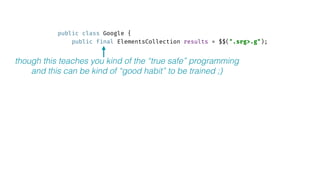
public class Google {

public final ElementsCollection results = $$(".srg>.g");

though this teaches you kind of the “true safe” programming
and this can be kind of “good habit” to be trained ;)
Driver management?
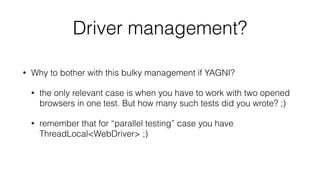
Driver management?
• Why to bother with this bulky management if YAGNI?
• the only relevant case is when you have to work with two opened
browsers in one test. But how many such tests did you wrote? ;)
• remember that for “parallel testing” case you have
ThreadLocal<WebDriver> ;)
But sometimes that’s the case…
• Why to bother with this bulky management if YAGNI?
• the only relevant case is when you have to work with two opened
browsers in one test. But how many such tests did you wrote? ;)
• remember that for “parallel testing” case you have
ThreadLocal<WebDriver> ;)
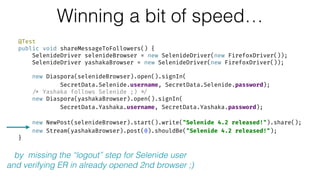
Winning a bit of speed…
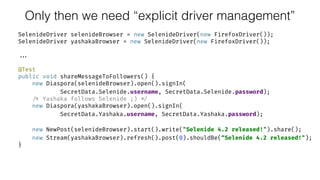
@Test

public void shareMessageToFollowers() {

SelenideDriver selenideBrowser = new SelenideDriver(new FirefoxDriver());

SelenideDriver yashakaBrowser = new SelenideDriver(new FirefoxDriver());


new Diaspora(selenideBrowser).open().signIn(

SecretData.Selenide.username, SecretData.Selenide.password);

/* Yashaka follows Selenide ;) */

new Diaspora(yashakaBrowser).open().signIn(

SecretData.Yashaka.username, SecretData.Yashaka.password);


new NewPost(selenideBrowser).start().write("Selenide 4.2 released!").share();

new Stream(yashakaBrowser).post(0).shouldBe("Selenide 4.2 released!");

}
by missing the “logout” step for Selenide user
and verifying ER in already opened 2nd browser ;)
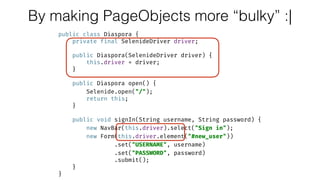
By making PageObjects more “bulky” :|
public class Diaspora {

private final SelenideDriver driver;


public Diaspora(SelenideDriver driver) {

this.driver = driver;

}


public Diaspora open() {

Selenide.open("/");

return this;

}


public void signIn(String username, String password) {

new NavBar(this.driver).select("Sign in");

new Form(this.driver.element("#new_user"))

.set("USERNAME", username)

.set("PASSWORD", password)

.submit();

}

}
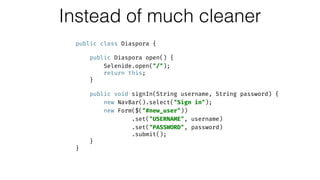
Instead of much cleaner
public class Diaspora {


public Diaspora open() {

Selenide.open("/");

return this;

}


public void signIn(String username, String password) {

new NavBar().select("Sign in");

new Form($("#new_user"))

.set("USERNAME", username)

.set("PASSWORD", password)

.submit();

}

}
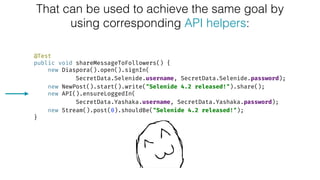
That can be used to achieve the same goal by
using corresponding API helpers:
@Test

public void shareMessageToFollowers() {

new Diaspora().open().signIn(
SecretData.Selenide.username, SecretData.Selenide.password);

new NewPost().start().write("Selenide 4.2 released!").share();

new API().ensureLoggedIn(
SecretData.Yashaka.username, SecretData.Yashaka.password);

new Stream().post(0).shouldBe("Selenide 4.2 released!");

}
Still enough open points to take into account…
• Will API calls simulate the same real behaviour?
• Like Logged in user does nothing but his stream is updated…
Still enough open points to take into account…
• Like Logged in user does nothing but his stream is updated…
• Do we actually need the simulation to be “like real”?
• We still can use API calls to check that “new post” from an author
gets the storage
• And in separate test “the follower can do nothing” and after
populating the storage by API call with a “new author’s post” -
we will verify (via Selenium) that follower sees the post
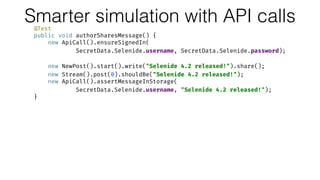
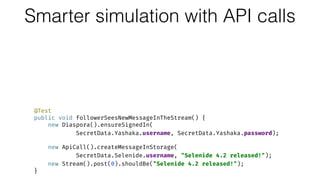
Smarter simulation with API calls@Test

public void authorSharesMessage() {

new ApiCall().ensureSignedIn(

SecretData.Selenide.username, SecretData.Selenide.password);


new NewPost().start().write("Selenide 4.2 released!").share();

new Stream().post(0).shouldBe("Selenide 4.2 released!");

new ApiCall().assertMessageInStorage(
SecretData.Selenide.username, "Selenide 4.2 released!");

}


@Test

public void followerSeesNewMessageInTheStream() {

new Diaspora().ensureSignedIn(

SecretData.Yashaka.username, SecretData.Yashaka.password);


new ApiCall().createMessageInStorage(
SecretData.Selenide.username, "Selenide 4.2 released!");

new Stream().post(0).shouldBe("Selenide 4.2 released!");

}
Still enough open points to take into account…
• Like Logged in user does nothing but his stream is updated…
• Do we actually need the simulation to be “like real”?
• We still can use API calls to check that “new post” from an author
gets the storage
• And in separate test “the follower can do nothing” and after
populating the storage by API call with a “new author’s post” -
we will verify (via Selenium) that follower sees the post
Smarter simulation with API calls@Test

public void authorSharesMessage() {

new ApiCall().ensureSignedIn(

SecretData.Selenide.username, SecretData.Selenide.password);


new NewPost().start().write("Selenide 4.2 released!").share();

new Stream().post(0).shouldBe("Selenide 4.2 released!");

new ApiCall().assertMessageInStorage(
SecretData.Selenide.username, "Selenide 4.2 released!");

}


@Test

public void followerSeesNewMessageInTheStream() {

new Diaspora().ensureSignedIn(

SecretData.Yashaka.username, SecretData.Yashaka.password);


new ApiCall().createMessageInStorage(
SecretData.Selenide.username, "Selenide 4.2 released!");

new Stream().post(0).shouldBe("Selenide 4.2 released!");

}
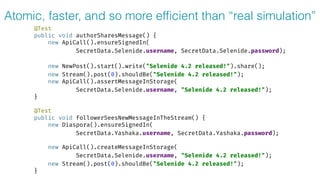
Atomic, faster, and so more efficient than “real simulation”
@Test

public void authorSharesMessage() {

new ApiCall().ensureSignedIn(

SecretData.Selenide.username, SecretData.Selenide.password);


new NewPost().start().write("Selenide 4.2 released!").share();

new Stream().post(0).shouldBe("Selenide 4.2 released!");

new ApiCall().assertMessageInStorage(
SecretData.Selenide.username, "Selenide 4.2 released!");

}


@Test

public void followerSeesNewMessageInTheStream() {

new Diaspora().ensureSignedIn(

SecretData.Yashaka.username, SecretData.Yashaka.password);


new ApiCall().createMessageInStorage(
SecretData.Selenide.username, "Selenide 4.2 released!");

new Stream().post(0).shouldBe("Selenide 4.2 released!");

}
Still enough open points to take into account…
• But sometimes… Life is complicated:) And for some mystic reason
we “can’t” use API calls…
Only then we need “explicit driver management”
SelenideDriver selenideBrowser = new SelenideDriver(new FirefoxDriver());

SelenideDriver yashakaBrowser = new SelenideDriver(new FirefoxDriver());
...
@Test

public void shareMessageToFollowers() {

new Diaspora(selenideBrowser).open().signIn(

SecretData.Selenide.username, SecretData.Selenide.password);

/* Yashaka follows Selenide ;) */

new Diaspora(yashakaBrowser).open().signIn(

SecretData.Yashaka.username, SecretData.Yashaka.password);


new NewPost(selenideBrowser).start().write("Selenide 4.2 released!").share();

new Stream(yashakaBrowser).refresh().post(0).shouldBe(“Selenide 4.2 released!");

}
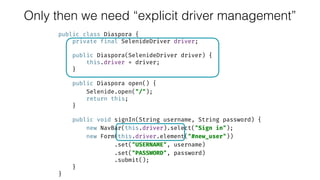
public class Diaspora {

private final SelenideDriver driver;


public Diaspora(SelenideDriver driver) {

this.driver = driver;

}


public Diaspora open() {

Selenide.open("/");

return this;

}


public void signIn(String username, String password) {

new NavBar(this.driver).select("Sign in");

new Form(this.driver.element("#new_user"))

.set("USERNAME", username)

.set("PASSWORD", password)

.submit();

}

}
Only then we need “explicit driver management”
KISS
=
not necessarily Easiness
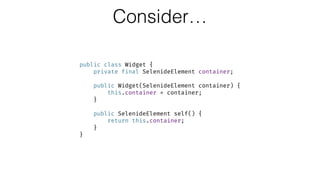
Consider…
public class Widget {

private final SelenideElement container;


public Widget(SelenideElement container) {

this.container = container;

}


public SelenideElement self() {

return this.container;

}

}
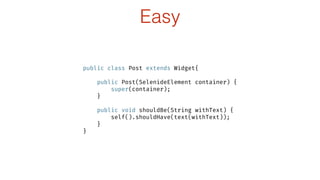
Easy
public class Post extends Widget{


public Post(SelenideElement container) {

super(container);

}


public void shouldBe(String withText) {

self().shouldHave(text(withText));

}

}
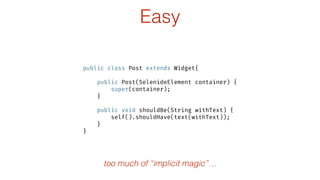
Easy
public class Post extends Widget{


public Post(SelenideElement container) {

super(container);

}


public void shouldBe(String withText) {

self().shouldHave(text(withText));

}

}
too much of “implicit magic”…
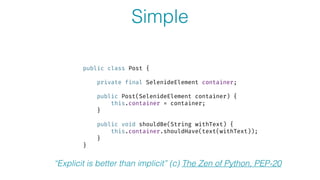
Simple
public class Post {


private final SelenideElement container;


public Post(SelenideElement container) {

this.container = container;

}


public void shouldBe(String withText) {

this.container.shouldHave(text(withText));

}

}
“Explicit is better than implicit” (c) The Zen of Python, PEP-20
Simple is not Easy
–Rich Hickey
“Simple Made Easy”
assert KISS != magic
assert KISS == explicit
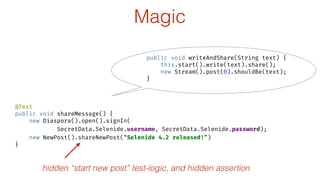
@Test

public void shareMessage() {

new Diaspora().open().signIn(

SecretData.Selenide.username, SecretData.Selenide.password);

new NewPost().shareNewPost("Selenide 4.2 released!”)

}
hidden “start new post” test-logic, and hidden assertion
Magic
public void writeAndShare(String text) {

this.start().write(text).share();

new Stream().post(0).shouldBe(text);

}
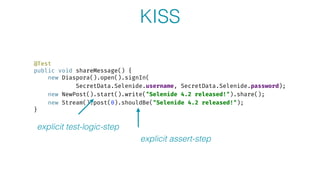
@Test

public void shareMessage() {

new Diaspora().open().signIn(

SecretData.Selenide.username, SecretData.Selenide.password);

new NewPost().start().write("Selenide 4.2 released!").share();

new Stream().post(0).shouldBe("Selenide 4.2 released!");

}
explicit test-logic-step
explicit assert-step
KISS
WaitingLoadable?
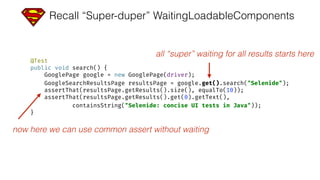
Recall “Super-duper” WaitingLoadableComponents
@Test

public void search() {

GooglePage google = new GooglePage(driver);

GoogleSearchResultsPage resultsPage = google.get().search("Selenide");

assertThat(resultsPage.getResults().size(), equalTo(10));

assertThat(resultsPage.getResults().get(0).getText(),

containsString("Selenide: concise UI tests in Java"));

}
all “super” waiting for all results starts here
now here we can use common assert without waiting
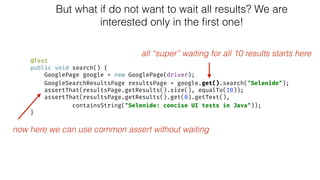
But what if do not want to wait all results? We are
interested only in the first one!
@Test

public void search() {

GooglePage google = new GooglePage(driver);

GoogleSearchResultsPage resultsPage = google.get().search("Selenide");

assertThat(resultsPage.getResults().size(), equalTo(10));

assertThat(resultsPage.getResults().get(0).getText(),

containsString("Selenide: concise UI tests in Java"));

}
all “super” waiting for all 10 results starts here
now here we can use common assert without waiting
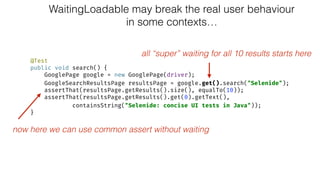
WaitingLoadable may break the real user behaviour
in some contexts…
@Test

public void search() {

GooglePage google = new GooglePage(driver);

GoogleSearchResultsPage resultsPage = google.get().search("Selenide");

assertThat(resultsPage.getResults().size(), equalTo(10));

assertThat(resultsPage.getResults().get(0).getText(),

containsString("Selenide: concise UI tests in Java"));

}
all “super” waiting for all 10 results starts here
now here we can use common assert without waiting
KISS Answer
• User oriented automation based on waiting loadable elements over
loadable pages waiting their components
Diaspora Demo
How often do you open Facebook, and proceed to profile or messages,
while the stream is not loaded yet? ;)
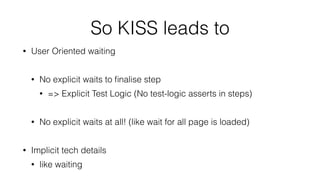
So KISS leads to
• User Oriented waiting
• No explicit waits to finalise step
• => Explicit Test Logic (No test-logic asserts in steps)
• No explicit waits at all! (like wait for all page is loaded)
• Implicit tech details
• like waiting
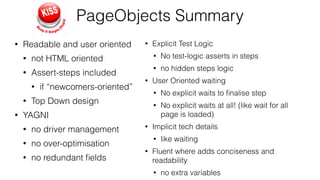
PageObjects Summary
• Readable and user oriented
• not HTML oriented
• Assert-steps included
• if “newcomers-oriented”
• Top Down design
• YAGNI
• no driver management
• no over-optimisation
• no redundant fields
• Explicit Test Logic
• No test-logic asserts in steps
• no hidden steps logic
• User Oriented waiting
• No explicit waits to finalise step
• No explicit waits at all! (like wait for all
page is loaded)
• Implicit tech details
• like waiting
• Fluent where adds conciseness and
readability
• no extra variables
PageObjects Secret ;)
NO Selenium Webdriver,
use more concise wrappers!
PageObjects Secret ;)
Prefer
test automation tools
over
browser automation tools
Afterwords
There are good practices in context,
but there are no best practices.
(c) Cem Kaner, James Bach
Q&A
Thank you!
@yashaka 01.2017
github.com/automician
automician.com
seleniumcourses.com
yashaka @

Kiss PageObjects [01-2017]

  • 1.
  • 2.
  • 3.
    Afterwords There are goodpractices in context, but there are no best practices. (c) Cem Kaner, James Bach
  • 4.
    Afterwords Preface There aregood practices in context, but there are no best practices. (c) Cem Kaner, James Bach
  • 5.
  • 6.
  • 7.
  • 8.
  • 9.
    –Martin Fowler Page objectsare a classic example of encapsulation - they hide the details of the UI structure and widgetry from other components (the tests)
  • 10.
  • 11.
    The boring part:p Classic “Horror” Examples
  • 12.
    Classic Usage ofPageObjects @Test
 public void search() {
 Google google = new Google(driver);
 google.open().search("Selenide");
 wait.until(numberOf(google.getResults(), 10));
 assertThat(google.getResults().get(0).getText(), 
 containsString("Selenide: concise UI tests in Java"));
 }
 
 @Test
 public void followFirstLink() {
 Google google = new Google(driver);
 google.open().search("Selenide");
 google.followResultLink(0);
 wait.until(titleIs("Selenide: concise UI tests in Java"));
 }
  • 13.
    Classic PageObjects (PageFactory) publicclass Google {
 private WebDriver driver;
 private WebDriverWait wait;
 
 @FindBy(name = "q")
 private WebElement searchInput;
 
 @FindBy(css = ".srg>.g")
 private List<WebElement> results;
 
 public List<WebElement> getResults() {
 return this.results;
 }
 
 public Google(WebDriver driver) {
 this.driver = driver;
 this.wait = new WebDriverWait(driver, 4);
 PageFactory.initElements(driver, this);
 } …
  • 14.
    Classic PageObjects (PageFactory) publicclass Google {
 private WebDriver driver;
 private WebDriverWait wait;
 
 @FindBy(name = "q")
 private WebElement searchInput;
 
 @FindBy(css = ".srg>.g")
 private List<WebElement> results;
 
 public List<WebElement> getResults() {
 return this.results;
 }
 
 public Google(WebDriver driver) {
 this.driver = driver;
 this.wait = new WebDriverWait(driver, 4);
 PageFactory.initElements(driver, this);
 } …
  • 15.
    Classic PageObjects (PageFactory) … publicGoogle open() {
 this.driver.get("http: //google.com/ncr");
 return this;
 }
 
 public Google search(String text) {
 this.searchInput.sendKeys(text + Keys.ENTER);
 return this;
 }
 
 public void followResultLink(int index) {
 wait.until(numberIsAtLeast(results, index + 1))
 .get(index)
 .findElement(By.cssSelector(".r>a"))
 .click();
 }
 }
  • 16.
    – https://github.com/SeleniumHQ/selenium/wiki/LoadableComponent “The LoadableComponentis a base class that aims to make writing PageObjects less painful.” PageObjects as LoadableComponents
  • 17.
    Classic public class Googleextends LoadableComponent<Google>{
 …
 
 protected void load() {
 this.driver.get("http: //google.com/ncr");
 }
 
 protected void isLoaded() throws Error {
 String url = driver.getCurrentUrl();
 assertTrue("Not on the google page: " + url, url.contains(" www.google.com"));
 } public class Google {
 …
 
 public Google open() {
 this.driver.get("http: //google.com/ncr");
 return this;
 } LoadableComponent
  • 18.
    Classic public class Googleextends LoadableComponent<Google>{
 …
 
 protected void load() {
 this.driver.get("http: //google.com/ncr");
 }
 
 protected void isLoaded() throws Error {
 String url = driver.getCurrentUrl();
 assertTrue("Not on the google page: " + url, url.contains(" www.google.com"));
 } public class Google {
 …
 
 public Google open() {
 this.driver.get("http: //google.com/ncr");
 return this;
 } LoadableComponent
  • 19.
    public class Googleextends LoadableComponent<Google>{
 …
 
 protected void load() {
 this.driver.get("http: //google.com/ncr");
 }
 
 protected void isLoaded() throws Error {
 String url = driver.getCurrentUrl();
 assertTrue("Not on the google page: " + url, url.contains(" www.google.com"));
 } “The LoadableComponent is a base class that aims to make writing PageObjects less painful.” o_O ??? LoadableComponent
  • 20.
    “Super-duper” WaitingLoadableComponents public classSearch extends LoadingComponent<Search> {
 
 @FindBy(name = "q")
 private WebElement element;
 
 public Search(WebDriver driver) {
 super(driver);
 }
 
 public boolean isLoaded() {
 return element.isDisplayed();
 }
 
 public Search query(String text) {
 this.element.clear();
 this.element.sendKeys(text + Keys.ENTER);
 return this;
 }
 }
  • 21.
    “Super-duper” WaitingLoadableComponents public classResults extends LoadingComponent<Results> {
 
 @FindBy(css = ".srg>.g")
 private List<WebElement> elements;
 
 public Results(WebDriver driver) {
 super(driver);
 }
 
 public boolean isLoaded() {
 return this.elements.size() == 10;
 }
 
 public void followResultLink(int index){
 this.elements.get(index) .findElement(By.cssSelector(".r>a")).click();
 } …
  • 22.
    “Super-duper” WaitingLoadableComponents public classGooglePage extends WaitingLoadableComponent<GooglePage> {
 private Search search;
 
 public GooglePage(WebDriver driver) {
 super(driver);
 this.search = new Search(driver);
 }
 
 protected void load() {
 this.driver.get("http: //google.com/ncr");
 }
 
 public boolean isLoaded() {
 return this.search.isLoaded();
 }
 
 public GoogleSearchResultsPage search(String text) {
 this.search.query(text);
 return new GoogleSearchResultsPage(this.driver).get();
 }
 } “super” waiting for loading trick
  • 23.
    “Super-duper” WaitingLoadableComponents public classGoogleSearchResultsPage 
 extends LoadingComponent<GoogleSearchResultsPage> {
 private Search search;
 private Results results;
 
 public GoogleSearchResultsPage(WebDriver driver) {
 super(driver);
 this.search = new Search(driver);
 this.results = new Results(driver);
 }
 
 public boolean isLoaded() {
 return this.results.isLoaded();
 }
 
 public Results getResults() {
 return this.results;
 }
 }

  • 24.
    “Super-duper” WaitingLoadableComponents @Test
 public voidsearch() {
 GooglePage google = new GooglePage(driver);
 GoogleSearchResultsPage resultsPage = google.get().search("Selenide");
 assertThat(resultsPage.getResults().size(), equalTo(10));
 assertThat(resultsPage.getResults().get(0).getText(),
 containsString("Selenide: concise UI tests in Java"));
 } all “super” waiting starts here now here we can use common assert without waiting
  • 25.
    “The LoadableComponent isa base class that aims to make writing PageObjects less painful.” o_O ???
  • 26.
  • 27.
  • 28.
  • 29.
    PageObjects Usage @Test
 public voidsearch() {
 new Google().open().search("Selenide");
 new SearchResults()
 .shouldHaveSize(10)
 .shouldHaveResultText(0, "Selenide: concise UI tests in Java");
 }
 
 @Test
 public void followFirstLink() {
 new Google().open().search("Selenide");
 new SearchResults().followResultLink(0);
 new NewPage().shouldHaveTitle"Selenide: concise UI tests in Java");
 }
  • 30.
    PageObjects Implementation public classGoogle {
 public Google open() {
 Selenide.open("/ncr");
 return this;
 }
 
 public void search(String text) {
 $(By.name("q")).setValue(text).pressEnter();
 }
 }
  • 31.
    PageObjects Implementation public classSearchResults {
 private ElementsCollection elements(){
 return $$(".srg>.g");
 }
 
 public void followResultLink(int index) {
 this.elements().get(index).find(".r>a").click();
 }
 
 public SearchResults shouldHaveSize(int number) {
 this.elements().shouldHave(size(number));
 return this;
 }
 
 public SearchResults shouldHaveResultText(int index, String text) {
 this.elements().get(index).shouldHave(text(text));
 return this;
 }
 }
  • 32.
    PageObjects Implementation public classNewPage {
 public void shouldHaveTitle(String text) {
 Selenide.Wait().until(titleIs(text));
 }
 }
  • 33.
  • 34.
    So why dowe need PageObjects? Despite of DRYing the code…
  • 35.
    So why dowe need PageObjects? Despite of DRYing the code…
  • 36.
    –Martin Fowler Page objectsare a classic example of encapsulation - they hide the details of the UI structure and widgetry from other components (the tests)
  • 37.
    Why may weneed Encapsulation? • Encapsulate for cohesion? • that’s ok… pretty reasonable to keep related things together (locators and actions on their elements)
  • 38.
    Why may weneed Encapsulation? • Encapsulate to hide something internal to be not broken by client (tests code)? • but what may be broken? o_O Have you ever had any thought on resetting some page field from outside? ;)
  • 39.
    Why may weneed Encapsulation? • Encapsulate to hide something internal so on change it will not broke the client (tests code)? i.e. to provide stable API • ok… but then next question to think on: • where is that line which frame the “stable API”? • maybe it’s less abstract than you got used to…
  • 40.
    Why may weneed Encapsulation? • Encapsulate to narrow User Oriented behavioural API to be readable enough and convenient in usage? • :)
  • 41.
    A point tothink about… “Encapsulate to narrow User Oriented behavioural API to be readable enough and convenient in usage” • developers? • Sr. Automation engineers? • Jr. Automation engineers? • Manual Testers? Readable and convenient for whom?
  • 42.
    @Test
 public void search(){
 open("/ncr");
 $(By.name("q")).setValue("Selenide").pressEnter();
 $$(".srg>.g").shouldHave(size(10));
 $$(".srg>.g").get(0).shouldHave(text("Selenide: concise UI tests in Java"));
 }
 
 @Test
 public void followFirstLink() {
 open("/ncr");
 $(By.name("q")).setValue("Selenide").pressEnter();
 $$(".srg>.g").get(0).find(".r>a").click();
 Selenide.Wait().until(titleIs("Selenide: concise UI tests in Java"));
 } For “developers”?
  • 43.
    @Test
 public void search(){
 open("/ncr");
 $(By.name("q")).setValue("Selenide").pressEnter();
 $$(".srg>.g").shouldHave(size(10));
 $$(".srg>.g").get(0).shouldHave(text("Selenide: concise UI tests in Java"));
 }
 
 @Test
 public void followFirstLink() {
 open("/ncr");
 $(By.name("q")).setValue("Selenide").pressEnter();
 $$(".srg>.g").get(0).find(".r>a").click();
 Selenide.Wait().until(titleIs("Selenide: concise UI tests in Java"));
 } For “developers”? API is already readable and simple!
  • 44.
    @Test
 public void search(){
 open("/ncr");
 $(By.name("q")).setValue("Selenide").pressEnter();
 $$(".srg>.g").shouldHave(size(10));
 $$(".srg>.g").get(0).shouldHave(text("Selenide: concise UI tests in Java"));
 }
 
 @Test
 public void followFirstLink() {
 open("/ncr");
 $(By.name("q")).setValue("Selenide").pressEnter();
 $$(".srg>.g").get(0).find(".r>a").click();
 Selenide.Wait().until(titleIs("Selenide: concise UI tests in Java"));
 } For “developers”? developers know locators that are already readable for them too:)
  • 45.
    @Test
 public void search(){
 open("/ncr");
 $(By.name("query")).setValue("Selenide").pressEnter();
 $$(".result").shouldHave(size(10));
 $$(".result").get(0).shouldHave(text("Selenide: concise UI tests in Java"));
 }
 
 @Test
 public void followFirstLink() {
 open("/ncr");
 $(By.name("query")).setValue("Selenide").pressEnter();
 $$(“.result").get(0).find(".result-link").click();
 Selenide.Wait().until(titleIs("Selenide: concise UI tests in Java"));
 } For “developers”? actually they do make them readable when they write tests ;)
  • 46.
    @Test
 public void search(){
 open("/ncr");
 $(By.name("q")).setValue("Selenide").pressEnter();
 $$(".srg>.g").shouldHave(size(10));
 $$(".srg>.g").get(0).shouldHave(text("Selenide: concise UI tests in Java"));
 }
 
 @Test
 public void followFirstLink() {
 open("/ncr");
 $(By.name("q")).setValue("Selenide").pressEnter();
 $$(".srg>.g").get(0).find(".r>a").click();
 Selenide.Wait().until(titleIs("Selenide: concise UI tests in Java"));
 } For “developers”? copy&paste rules! ;)
  • 47.
    @Test
 public void search(){
 open("/ncr");
 $(By.name("q")).setValue("Selenide").pressEnter();
 $$(".srg>.g").shouldHave(size(10));
 $$(".srg>.g").get(0).shouldHave(text("Selenide: concise UI tests in Java"));
 }
 
 @Test
 public void followFirstLink() {
 open("/ncr");
 $(By.name("q")).setValue("Selenide").pressEnter();
 $$(".srg>.g").get(0).find(".r>a").click();
 Selenide.Wait().until(titleIs("Selenide: concise UI tests in Java"));
 } For “developers”? With Find&Replace over DRY ;)
  • 48.
    For “Sr. AutomationEngineers”? @Test
 public void search() {
 Google google = new Google();
 google.open().search("Selenide");
 google.results().shouldHave(size(10));
 google.results().get(0).shouldHave(text("Selenide: concise UI tests in Java"));
 }
 
 @Test
 public void followFirstLink() {
 Google google = new Google();
 google.open().search("Selenide");
 google.followResultLink(0);
 Selenide.Wait().until(titleIs("Selenide: concise UI tests in Java"));
 }
  • 49.
    For “Sr. AutomationEngineers”? @Test
 public void search() {
 Google google = new Google();
 google.open().search("Selenide");
 google.results().shouldHave(size(10));
 google.results().get(0).shouldHave(text("Selenide: concise UI tests in Java"));
 }
 
 @Test
 public void followFirstLink() {
 Google google = new Google();
 google.open().search("Selenide");
 google.followResultLink(0);
 Selenide.Wait().until(titleIs("Selenide: concise UI tests in Java"));
 } hiding awful locators for “beauty” :D
  • 50.
    For “Sr. AutomationEngineers”? @Test
 public void search() {
 Google google = new Google();
 google.open().search("Selenide");
 google.results().shouldHave(size(10));
 google.results().get(0).shouldHave(text("Selenide: concise UI tests in Java"));
 }
 
 @Test
 public void followFirstLink() {
 Google google = new Google();
 google.open().search("Selenide");
 google.followResultLink(0);
 Selenide.Wait().until(titleIs("Selenide: concise UI tests in Java"));
 } too lazy for locators’ copy&paste:) - autocomplete rules!
  • 51.
    Remember classic version? @Test
 publicvoid search() {
 Google google = new Google(driver);
 google.open().search("Selenide");
 wait.until(numberOf(google.getResults(), 10));
 assertThat(google.getResults().get(0).getText(), 
 containsString("Selenide: concise UI tests in Java"));
 }
 
 @Test
 public void followFirstLink() {
 Google google = new Google(driver);
 google.open().search("Selenide");
 google.followResultLink(0);
 wait.until(titleIs("Selenide: concise UI tests in Java"));
 }
  • 52.
    Remember classic version? publicclass Google {
 private WebDriver driver;
 private WebDriverWait wait;
 
 @FindBy(name = "q")
 private WebElement searchInput;
 
 @FindBy(css = ".srg>.g")
 private List<WebElement> results;
 
 public List<WebElement> getResults() {
 return this.results;
 }
 
 public Google(WebDriver driver) {
 this.driver = driver;
 this.wait = new WebDriverWait(driver, 4);
 PageFactory.initElements(driver, this);
 } … … public Google open() {
 this.driver.get("http: //google.com/ncr");
 return this;
 }
 
 public Google search(String text) {
 this.searchInput.sendKeys(text + Keys.ENTER);
 return this;
 }
 
 public void followResultLink(int index) {
 wait.until(numberIsAtLeast(results, index + 1))
 .get(index)
 .findElement(By.cssSelector(".r>a"))
 .click();
 }
 }
  • 53.
    Remember classic version? publicclass Google {
 private WebDriver driver;
 private WebDriverWait wait;
 
 @FindBy(name = "q")
 private WebElement searchInput;
 
 @FindBy(css = ".srg>.g")
 private List<WebElement> results;
 
 public List<WebElement> getResults() {
 return this.results;
 }
 
 public Google(WebDriver driver) {
 this.driver = driver;
 this.wait = new WebDriverWait(driver, 4);
 PageFactory.initElements(driver, this);
 } … … public Google open() {
 this.driver.get("http: //google.com/ncr");
 return this;
 }
 
 public Google search(String text) {
 this.searchInput.sendKeys(text + Keys.ENTER);
 return this;
 }
 
 public void followResultLink(int index) {
 wait.until(numberIsAtLeast(results, index + 1))
 .get(index)
 .findElement(By.cssSelector(".r>a"))
 .click();
 }
 } locators and actions are bloated with tech details of browser management and waits
  • 54.
    for “Sr. Automationversion” public class Google {
 public Google open() {
 Selenide.open("/ncr");
 return this;
 }
 
 public void search(String text) {
 $(By.name("q")).setValue(text).pressEnter();
 }
 
 public ElementsCollection results(){
 return $$(".srg>.g");
 }
 
 public void followResultLink(int index) {
 this.results().get(index).find(".r>a").click();
 }
 }
  • 55.
    for “Sr. Automationversion” public class Google {
 public Google open() {
 Selenide.open("/ncr");
 return this;
 }
 
 public void search(String text) {
 $(By.name("q")).setValue(text).pressEnter();
 }
 
 public ElementsCollection results(){
 return $$(".srg>.g");
 }
 
 public void followResultLink(int index) {
 this.results().get(index).find(".r>a").click();
 }
 } clean abstraction over locators and actions
  • 56.
    For “Sr. AutomationEngineers”? @Test
 public void search() {
 Google google = new Google();
 google.open().search("Selenide");
 google.results().shouldHave(size(10));
 google.results().get(0).shouldHave(text("Selenide: concise UI tests in Java"));
 }
 
 @Test
 public void followFirstLink() {
 Google google = new Google();
 google.open().search("Selenide");
 google.followResultLink(0);
 Selenide.Wait().until(titleIs("Selenide: concise UI tests in Java"));
 }
  • 57.
    For “Jr. AutomationEngineers”? @Test
 public void search() {
 new Google().open().search("Selenide");
 new SearchResults()
 .shouldHaveSize(10)
 .shouldHaveResultText(0, "Selenide: concise UI tests in Java");
 }
 
 @Test
 public void followFirstLink() {
 new Google().open().search("Selenide");
 new SearchResults().followResultLink(0);
 Selenide.Wait().until(titleIs("Selenide: concise UI tests in Java"));
 }
  • 58.
    For “Jr. AutomationEngineers”? @Test
 public void search() {
 new Google().open().search("Selenide");
 new SearchResults()
 .shouldHaveSize(10)
 .shouldHaveResultText(0, "Selenide: concise UI tests in Java");
 }
 
 @Test
 public void followFirstLink() {
 new Google().open().search("Selenide");
 new SearchResults().followResultLink(0);
 Selenide.Wait().until(titleIs("Selenide: concise UI tests in Java"));
 } smaller page objects per context
  • 59.
    For “Jr. AutomationEngineers”? @Test
 public void search() {
 new Google().open().search("Selenide");
 new SearchResults()
 .shouldHaveSize(10)
 .shouldHaveResultText(0, "Selenide: concise UI tests in Java");
 }
 
 @Test
 public void followFirstLink() {
 new Google().open().search("Selenide");
 new SearchResults().followResultLink(0);
 Selenide.Wait().until(titleIs("Selenide: concise UI tests in Java"));
 } built in asserts
  • 60.
    For “Manual Testers”? @Test
 publicvoid search() {
 google.home.open().search("Selenide");
 google.results
 .shouldHaveSize(10)
 .result(0).shouldContain("Selenide: concise UI tests in Java");
 }
 
 @Test
 public void followFirstLink() {
 google.home.open().search("Selenide");
 google.results.result(0).followLink();
 assertThat(titleIs("Selenide: concise UI tests in Java"));
 }
  • 61.
    For “Manual Testers”? @Test
 publicvoid search() {
 google.home.open().search("Selenide");
 google.results
 .shouldHaveSize(10)
 .result(0).shouldContain("Selenide: concise UI tests in Java");
 }
 
 @Test
 public void followFirstLink() {
 google.home.open().search("Selenide");
 google.results.result(0).followLink();
 assertThat(titleIs("Selenide: concise UI tests in Java"));
 } one entry point to Test Model
  • 62.
    For “Manual Testers”? @Test
 publicvoid search() {
 google.home.open().search("Selenide");
 google.results
 .shouldHaveSize(10)
 .result(0).shouldContain("Selenide: concise UI tests in Java");
 }
 
 @Test
 public void followFirstLink() {
 google.home.open().search("Selenide");
 google.results.result(0).followLink();
 assertThat(titleIs("Selenide: concise UI tests in Java"));
 } simpler one parameter methods
  • 63.
    For “Manual Testers”? @Test
 publicvoid search() {
 google.home.open().search("Selenide");
 google.results
 .shouldHaveSize(10)
 .result(0).shouldContain("Selenide: concise UI tests in Java");
 }
 
 @Test
 public void followFirstLink() {
 google.home.open().search("Selenide");
 google.results.result(0).followLink();
 assertThat(titleIs("Selenide: concise UI tests in Java"));
 } chainable methods of Fluent PageObjects (.result(0) returns Result object)
  • 64.
    Why should wecare? To be efficient!
  • 65.
    Ok, Where isKISS here? It is exactly about leveraging convenient techniques in concrete context to make it simpler and efficient!
  • 66.
    Reviewing some techniquesof PageObjects design from KISS point of view
  • 67.
    –Martin Fowler I favorhaving no assertions in page objects. I think you can avoid duplication by providing assertion libraries for common assertions - which can also make it easier to provide good diagnostics. Page objects are commonly used for testing, but should not make assertions themselves. Their responsibility is to provide access to the state of the underlying page. It's up to test clients to carry out the assertion logic. https://martinfowler.com/bliki/PageObject.html Assertions-free PageObjects?
  • 68.
    Recall “For Sr.Automation Engineers” version… @Test
 public void search() {
 Google google = new Google();
 google.open().search("Selenide");
 google.results().shouldHave(size(10));
 google.results().get(0).shouldHave(text("Selenide: concise UI tests in Java"));
 }
 
 @Test
 public void followFirstLink() {
 Google google = new Google();
 google.open().search("Selenide");
 google.followResultLink(0);
 Selenide.Wait().until(titleIs("Selenide: concise UI tests in Java"));
 } assertions from “assertion library” provided by Selenide
  • 69.
    Assertion-free PageObject public classGoogle {
 public Google open() {
 Selenide.open("/ncr");
 return this;
 }
 
 public void search(String text) {
 $(By.name("q")).setValue(text).pressEnter();
 }
 
 public ElementsCollection results(){
 return $$(".srg>.g");
 }
 
 public void followResultLink(int index) {
 this.results().get(index).find(".r>a").click();
 }
 }
  • 70.
    But… what if… •The end user is not “Sr. Automation” ? • Finally he may be even a Manual Tester… • The UI is so complex that assertions become also more composite? • Crazy Managers demand higher level of abstraction in reports • (they are “crazy”, so you can’t teach them what is good or bad:))
  • 71.
    Assertions-free PageObjects? • breaksome forms of encapsulation • reveal too much of technical details (in context of end user level of understanding) from PageObject to outside • over-engineered • may lead to create separate StepsObject • or additional layers in implementation (like BDD layer) • loose high cohesion
  • 72.
    StepsObject? GIVEN PageObject asan HTML Page API THEN StepsObject stands for User Behaviour API
  • 73.
    StepsObjects? @Test
 public void search(){
 new GoogleUser().opensGoogle()
 .searches("Selenide")
 .expectsNumberOfResults(10)
 .expectsResultWithText(0, "Selenide: concise UI tests in Java");
 }
 
 @Test
 public void followFirstLink() {
 new GoogleUser().opensGoogle()
 .searches("Selenide")
 .followsResultLink(0)
 .expectsTitle("Selenide: concise UI tests in Java");
 }
  • 74.
    StepsObjects? public class GoogleUser{
 
 private final Google google = new Google();
 
 public GoogleUser opensGoogle() {
 open("/ncr");
 return this;
 }
 
 public UserOnResultsPage searches(String text) {
 this.google.search().setValue(text).pressEnter();
 return new UserOnResultsPage();
 }
 }
  • 75.
    StepsObjects? public class UserOnResultsPageextends GoogleUser {
 
 private final Google google = new Google();
 
 public UserOnResultsPage expectsNumberOfResults(int number) {
 this.google.results().shouldHave(size(number));
 return this;
 }
 
 public UserOnResultsPage expectsResultWithText(int index, String text) {
 this.google.results().get(index).shouldHave(text(text));
 return this;
 }
 
 public UserOnNewPage followsResultLink(int index) {
 this.google.resultLink(index).click();
 return new UserOnNewPage();
 }
 }
  • 76.
    StepsObjects? public class UserOnNewPage{
 
 public UserOnNewPage expectsTitle(String text) {
 Selenide.Wait().until(titleIs(text));
 return this;
 }
 }
  • 77.
    HTML-only PageObject? public classGoogle {
 
 public SelenideElement search() {
 return $(By.name("q"));
 }
 
 public ElementsCollection results(){
 return $$(".srg>.g");
 }
 
 public SelenideElement resultLink(int index) {
 return this.results().get(index).find(".r>a");
 }
 } now the code that describes the same page components are spread over several classes
  • 78.
    StepsObjects? • over-engineered =>at least two classes instead of one • lower cohesion • related things are not kept in one place
  • 79.
    Assertions-included PageObjects (HTML+ Steps)! • full encapsulation • Tell Don’t Ask • high cohesion • End User oriented. He needs “behavioural object”, He actually does not care about: • Bloated with code? • KISS answer: break down into smaller PageObjects • you will have still two or even more classes but for exactly one thing from the User point of view Their responsibility is to provide access to the state of the underlying page (c) Martin Fowler
  • 80.
    Assertions-included PageObjects! • fullencapsulation • Tell Don’t Ask • high cohesion • KISS: one class instead of two ones for the same thing from the User point of view • Bloated with code? • KISS answer: break down into smaller PageObjects • you will have still two or even more classes but for exactly one thing from the User point of view
  • 81.
    Assertions-included PageObjects! • fullencapsulation • Tell Don’t Ask • high cohesion • KISS: one class instead of two ones for the same thing from the User point of view • Bloated with code? • KISS answer: break down into smaller PageObjects • you will have still two or even more classes but for exactly one thing from the User point of view Advocates of assertion-free page objects say that including assertions mixes the responsibilities of providing access to page data with assertion logic, and leads to a bloated page object. (c) Martin Fowler
  • 82.
    (For “Jr. AutomationEngineers” versions) public class SearchResults { 
 private ElementsCollection elements(){
 return $$(".srg>.g");
 }
 
 public void followResultLink(int index) {
 this.elements().get(index).find(".r>a").click();
 }
 
 public SearchResults shouldHaveSize(int number) {
 this.elements().shouldHave(size(number));
 return this;
 }
 
 public SearchResults shouldHaveResultText(int index, String text) {
 this.elements().get(index).shouldHave(text(text));
 return this;
 }
 }
  • 83.
    Assertions-included PageObjects! • fullencapsulation • Tell Don’t Ask • high cohesion • KISS: one class instead of two ones for the same thing from the User point of view • Bloated with code? • KISS answer: break down into smaller PageObjects aka Widgets • you will have still two or even more classes but for exactly one thing from the User point of view
  • 84.
    • full encapsulation •Tell Don’t Ask • high cohesion • KISS: one class instead of two ones for the same thing from the User point of view • Bloated with code? • KISS answer: break down into smaller PageObjects aka Widgets • you will have still two or even more classes but for exactly one thing from the User point of view Despite the term "page" object, these objects shouldn't usually be built for each page, but rather for the significant elements on a page (c) Martin Fowler
  • 85.
    (For “Manual Testers”version) public class SearchResults {
 
 private ElementsCollection elements(){
 return $(".srg>.g");
 }
 
 public Result result(int index) {
 return new Result(this.elements().get(index));
 }
 
 public SearchResults shouldHaveSize(int number) {
 this.elements().shouldHave(size(number));
 return this;
 }
 }
  • 86.
    (For “Manual Testers”version) public class Result{
 private final SelenideElement container;
 
 public Result(SelenideElement container) {
 this.container = container;
 }
 
 public void followLink() {
 this.container.find(".r>a").click();
 }
 
 public Result shouldContain(String text) {
 this.container.shouldHave(text(text));
 return this;
 }
 }
  • 87.
    (For “Manual Testers”version) @Test
 public void search() {
 google.home.open().search("Selenide");
 google.results
 .shouldHaveSize(10)
 .result(0).shouldContain("Selenide: concise UI tests in Java");
 }
 
 @Test
 public void followFirstLink() {
 google.home.open().search("Selenide");
 google.results.result(0).followLink();
 assertThat(titleIs("Selenide: concise UI tests in Java"));
 }
  • 88.
    KISS Pageobjects forJr. and Manual Testers, where extra reporting is needed = 2 in 1: HTML PageObjects + StepsObjects with Asserts (being broken down to “Widgets” if needed)
  • 89.
    KISS *= simplicity instead ofover-engineering = YAGNI = You Ain’t Gonna Need It
  • 90.
    public class Google{
 private SelenideElement searchInput = $(By.name("q"));
 
 public Google open() {
 Selenide.open("/ncr");
 return this;
 }
 
 public void search(String text) {
 this.searchInput.setValue(text).pressEnter();
 }
 } public class Google {
 
 public Google open() {
 Selenide.open("/ncr");
 return this;
 }
 
 public void search(String text) {
 $(By.name("q")).setValue(text).pressEnter();
 }
 } vs YAGNI version you ain’t gonna need it ;)
  • 91.
    public class Google{
 public ElementsCollection results(){
 return $$(".srg>.g");
 } public class Google {
 public ElementsCollection results = $$(".srg>.g");
 vs YAGNI version you ain’t gonna need this form of encapsulation ;) the only probable thing with a real risk of change is the locator
  • 92.
    public class Google{
 public final ElementsCollection results = $$(".srg>.g");
 public class Google {
 public ElementsCollection results = $$(".srg>.g");
 vs YAGNI version you ain’t gonna need this form of protection ;)
  • 93.
    public class Google{
 public final ElementsCollection results = $$(".srg>.g");
 though this teaches you kind of the “true safe” programming and this can be kind of “good habit” to be trained ;)
  • 94.
  • 95.
    Driver management? • Whyto bother with this bulky management if YAGNI? • the only relevant case is when you have to work with two opened browsers in one test. But how many such tests did you wrote? ;) • remember that for “parallel testing” case you have ThreadLocal<WebDriver> ;)
  • 96.
    But sometimes that’sthe case… • Why to bother with this bulky management if YAGNI? • the only relevant case is when you have to work with two opened browsers in one test. But how many such tests did you wrote? ;) • remember that for “parallel testing” case you have ThreadLocal<WebDriver> ;)
  • 97.
    Winning a bitof speed… @Test
 public void shareMessageToFollowers() {
 SelenideDriver selenideBrowser = new SelenideDriver(new FirefoxDriver());
 SelenideDriver yashakaBrowser = new SelenideDriver(new FirefoxDriver());
 
 new Diaspora(selenideBrowser).open().signIn(
 SecretData.Selenide.username, SecretData.Selenide.password);
 /* Yashaka follows Selenide ;) */
 new Diaspora(yashakaBrowser).open().signIn(
 SecretData.Yashaka.username, SecretData.Yashaka.password);
 
 new NewPost(selenideBrowser).start().write("Selenide 4.2 released!").share();
 new Stream(yashakaBrowser).post(0).shouldBe("Selenide 4.2 released!");
 } by missing the “logout” step for Selenide user and verifying ER in already opened 2nd browser ;)
  • 98.
    By making PageObjectsmore “bulky” :| public class Diaspora {
 private final SelenideDriver driver;
 
 public Diaspora(SelenideDriver driver) {
 this.driver = driver;
 }
 
 public Diaspora open() {
 Selenide.open("/");
 return this;
 }
 
 public void signIn(String username, String password) {
 new NavBar(this.driver).select("Sign in");
 new Form(this.driver.element("#new_user"))
 .set("USERNAME", username)
 .set("PASSWORD", password)
 .submit();
 }
 }
  • 99.
    Instead of muchcleaner public class Diaspora {
 
 public Diaspora open() {
 Selenide.open("/");
 return this;
 }
 
 public void signIn(String username, String password) {
 new NavBar().select("Sign in");
 new Form($("#new_user"))
 .set("USERNAME", username)
 .set("PASSWORD", password)
 .submit();
 }
 }
  • 100.
    That can beused to achieve the same goal by using corresponding API helpers: @Test
 public void shareMessageToFollowers() {
 new Diaspora().open().signIn( SecretData.Selenide.username, SecretData.Selenide.password);
 new NewPost().start().write("Selenide 4.2 released!").share();
 new API().ensureLoggedIn( SecretData.Yashaka.username, SecretData.Yashaka.password);
 new Stream().post(0).shouldBe("Selenide 4.2 released!");
 }
  • 101.
    Still enough openpoints to take into account… • Will API calls simulate the same real behaviour? • Like Logged in user does nothing but his stream is updated…
  • 102.
    Still enough openpoints to take into account… • Like Logged in user does nothing but his stream is updated… • Do we actually need the simulation to be “like real”? • We still can use API calls to check that “new post” from an author gets the storage • And in separate test “the follower can do nothing” and after populating the storage by API call with a “new author’s post” - we will verify (via Selenium) that follower sees the post
  • 103.
    Smarter simulation withAPI calls@Test
 public void authorSharesMessage() {
 new ApiCall().ensureSignedIn(
 SecretData.Selenide.username, SecretData.Selenide.password);
 
 new NewPost().start().write("Selenide 4.2 released!").share();
 new Stream().post(0).shouldBe("Selenide 4.2 released!");
 new ApiCall().assertMessageInStorage( SecretData.Selenide.username, "Selenide 4.2 released!");
 }
 
 @Test
 public void followerSeesNewMessageInTheStream() {
 new Diaspora().ensureSignedIn(
 SecretData.Yashaka.username, SecretData.Yashaka.password);
 
 new ApiCall().createMessageInStorage( SecretData.Selenide.username, "Selenide 4.2 released!");
 new Stream().post(0).shouldBe("Selenide 4.2 released!");
 }
  • 104.
    Still enough openpoints to take into account… • Like Logged in user does nothing but his stream is updated… • Do we actually need the simulation to be “like real”? • We still can use API calls to check that “new post” from an author gets the storage • And in separate test “the follower can do nothing” and after populating the storage by API call with a “new author’s post” - we will verify (via Selenium) that follower sees the post
  • 105.
    Smarter simulation withAPI calls@Test
 public void authorSharesMessage() {
 new ApiCall().ensureSignedIn(
 SecretData.Selenide.username, SecretData.Selenide.password);
 
 new NewPost().start().write("Selenide 4.2 released!").share();
 new Stream().post(0).shouldBe("Selenide 4.2 released!");
 new ApiCall().assertMessageInStorage( SecretData.Selenide.username, "Selenide 4.2 released!");
 }
 
 @Test
 public void followerSeesNewMessageInTheStream() {
 new Diaspora().ensureSignedIn(
 SecretData.Yashaka.username, SecretData.Yashaka.password);
 
 new ApiCall().createMessageInStorage( SecretData.Selenide.username, "Selenide 4.2 released!");
 new Stream().post(0).shouldBe("Selenide 4.2 released!");
 }
  • 106.
    Atomic, faster, andso more efficient than “real simulation” @Test
 public void authorSharesMessage() {
 new ApiCall().ensureSignedIn(
 SecretData.Selenide.username, SecretData.Selenide.password);
 
 new NewPost().start().write("Selenide 4.2 released!").share();
 new Stream().post(0).shouldBe("Selenide 4.2 released!");
 new ApiCall().assertMessageInStorage( SecretData.Selenide.username, "Selenide 4.2 released!");
 }
 
 @Test
 public void followerSeesNewMessageInTheStream() {
 new Diaspora().ensureSignedIn(
 SecretData.Yashaka.username, SecretData.Yashaka.password);
 
 new ApiCall().createMessageInStorage( SecretData.Selenide.username, "Selenide 4.2 released!");
 new Stream().post(0).shouldBe("Selenide 4.2 released!");
 }
  • 107.
    Still enough openpoints to take into account… • But sometimes… Life is complicated:) And for some mystic reason we “can’t” use API calls…
  • 108.
    Only then weneed “explicit driver management” SelenideDriver selenideBrowser = new SelenideDriver(new FirefoxDriver());
 SelenideDriver yashakaBrowser = new SelenideDriver(new FirefoxDriver()); ... @Test
 public void shareMessageToFollowers() {
 new Diaspora(selenideBrowser).open().signIn(
 SecretData.Selenide.username, SecretData.Selenide.password);
 /* Yashaka follows Selenide ;) */
 new Diaspora(yashakaBrowser).open().signIn(
 SecretData.Yashaka.username, SecretData.Yashaka.password);
 
 new NewPost(selenideBrowser).start().write("Selenide 4.2 released!").share();
 new Stream(yashakaBrowser).refresh().post(0).shouldBe(“Selenide 4.2 released!");
 }
  • 109.
    public class Diaspora{
 private final SelenideDriver driver;
 
 public Diaspora(SelenideDriver driver) {
 this.driver = driver;
 }
 
 public Diaspora open() {
 Selenide.open("/");
 return this;
 }
 
 public void signIn(String username, String password) {
 new NavBar(this.driver).select("Sign in");
 new Form(this.driver.element("#new_user"))
 .set("USERNAME", username)
 .set("PASSWORD", password)
 .submit();
 }
 } Only then we need “explicit driver management”
  • 110.
  • 111.
    Consider… public class Widget{
 private final SelenideElement container;
 
 public Widget(SelenideElement container) {
 this.container = container;
 }
 
 public SelenideElement self() {
 return this.container;
 }
 }
  • 112.
    Easy public class Postextends Widget{ 
 public Post(SelenideElement container) {
 super(container);
 }
 
 public void shouldBe(String withText) {
 self().shouldHave(text(withText));
 }
 }
  • 113.
    Easy public class Postextends Widget{ 
 public Post(SelenideElement container) {
 super(container);
 }
 
 public void shouldBe(String withText) {
 self().shouldHave(text(withText));
 }
 } too much of “implicit magic”…
  • 114.
    Simple public class Post{ 
 private final SelenideElement container;
 
 public Post(SelenideElement container) {
 this.container = container;
 }
 
 public void shouldBe(String withText) {
 this.container.shouldHave(text(withText));
 }
 } “Explicit is better than implicit” (c) The Zen of Python, PEP-20
  • 115.
  • 116.
  • 117.
    assert KISS !=magic assert KISS == explicit
  • 118.
    @Test
 public void shareMessage(){
 new Diaspora().open().signIn(
 SecretData.Selenide.username, SecretData.Selenide.password);
 new NewPost().shareNewPost("Selenide 4.2 released!”)
 } hidden “start new post” test-logic, and hidden assertion Magic public void writeAndShare(String text) {
 this.start().write(text).share();
 new Stream().post(0).shouldBe(text);
 }
  • 119.
    @Test
 public void shareMessage(){
 new Diaspora().open().signIn(
 SecretData.Selenide.username, SecretData.Selenide.password);
 new NewPost().start().write("Selenide 4.2 released!").share();
 new Stream().post(0).shouldBe("Selenide 4.2 released!");
 } explicit test-logic-step explicit assert-step KISS
  • 120.
  • 121.
    Recall “Super-duper” WaitingLoadableComponents @Test
 publicvoid search() {
 GooglePage google = new GooglePage(driver);
 GoogleSearchResultsPage resultsPage = google.get().search("Selenide");
 assertThat(resultsPage.getResults().size(), equalTo(10));
 assertThat(resultsPage.getResults().get(0).getText(),
 containsString("Selenide: concise UI tests in Java"));
 } all “super” waiting for all results starts here now here we can use common assert without waiting
  • 122.
    But what ifdo not want to wait all results? We are interested only in the first one! @Test
 public void search() {
 GooglePage google = new GooglePage(driver);
 GoogleSearchResultsPage resultsPage = google.get().search("Selenide");
 assertThat(resultsPage.getResults().size(), equalTo(10));
 assertThat(resultsPage.getResults().get(0).getText(),
 containsString("Selenide: concise UI tests in Java"));
 } all “super” waiting for all 10 results starts here now here we can use common assert without waiting
  • 123.
    WaitingLoadable may breakthe real user behaviour in some contexts… @Test
 public void search() {
 GooglePage google = new GooglePage(driver);
 GoogleSearchResultsPage resultsPage = google.get().search("Selenide");
 assertThat(resultsPage.getResults().size(), equalTo(10));
 assertThat(resultsPage.getResults().get(0).getText(),
 containsString("Selenide: concise UI tests in Java"));
 } all “super” waiting for all 10 results starts here now here we can use common assert without waiting
  • 124.
    KISS Answer • Useroriented automation based on waiting loadable elements over loadable pages waiting their components
  • 125.
    Diaspora Demo How oftendo you open Facebook, and proceed to profile or messages, while the stream is not loaded yet? ;)
  • 126.
    So KISS leadsto • User Oriented waiting • No explicit waits to finalise step • => Explicit Test Logic (No test-logic asserts in steps) • No explicit waits at all! (like wait for all page is loaded) • Implicit tech details • like waiting
  • 127.
    PageObjects Summary • Readableand user oriented • not HTML oriented • Assert-steps included • if “newcomers-oriented” • Top Down design • YAGNI • no driver management • no over-optimisation • no redundant fields • Explicit Test Logic • No test-logic asserts in steps • no hidden steps logic • User Oriented waiting • No explicit waits to finalise step • No explicit waits at all! (like wait for all page is loaded) • Implicit tech details • like waiting • Fluent where adds conciseness and readability • no extra variables
  • 128.
    PageObjects Secret ;) NOSelenium Webdriver, use more concise wrappers!
  • 129.
    PageObjects Secret ;) Prefer testautomation tools over browser automation tools
  • 130.
    Afterwords There are goodpractices in context, but there are no best practices. (c) Cem Kaner, James Bach
  • 131.
  • 132.