SELENIUM
101
• Marc A Myers
• Lead QA Analyst for EFSS
WHAT IS “SELENIUM”? - THE BASICS
• Selenium
• A suite of tools to automate web browsers across many platforms.
• Those tools are the Selenium IDE for Firefox and the Selenium WebDriver.
• Can be controlled by several programming languages and testing frameworks.
• Many GUI based browser automation tools, APIs, and frameworks are built on top of
Selenium.
SELENIUM IDE
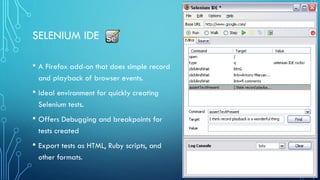
• A Firefox add-on that does simple record
and playback of browser events.
• Ideal environment for quickly creating
Selenium tests.
• Offers Debugging and breakpoints for
tests created
• Export tests as HTML, Ruby scripts, and
other formats.
SELENIUM WEBDRIVER
• Selenium 1.0 + WebDriver = Selenium 2.xx
• A collection of language specific bindings to drive a browser.
• It makes direct calls to the browser using each browser’s native support for
automation.
• The key interface against which tests are to be written in Java.
BASIC TEST ENVIRONMENT CONFIGURATION
• Maven Project > TestNG (Assertions) > Selenium WebDriver > Browser
• Testing one local browser at a time on the same machine as the IDE/test runner that is
executing/running the test.
• Advantages of this configuration:
• Easy to troubleshoot your tests
• Watch as the tests run locally, observe potential defects as they occur
• Quick and easy to set up
DISADVANTAGES OF A BASIC CONFIGURATION
• Restricted to the browsers available to your OS version/local machine.
• In the case of IE, generally only the highest supported IE can be installed.
• Assuming you’re on Windows, you’re not able to test against other OS and browser
versions such as Safari or OSX and Linux versions of Chrome and Firefox.
• It’s not scalable
• Running a system or performance test can be taxing on your local machine and it holds
your resources hostage until the tests have completed.
SELENIUM GRID
• Supports distributed test execution.
• This means running tests in a “distributed test execution” environment.
• This allows you to scale test coverage by distributing your tests to several
machines, with the option of parallel execution.
• Manages multiple environments from a central point.
SELENIUM GRID CONT.
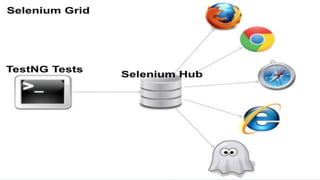
• A grid is made up of a HUB and several NODES.
• The HUB is the central point that will receive all test requests and distribute
them to the NODES.
• The NODES are where your testing will occur.
• One NODE can have several available browsers.
• A NODE can also be a mobile device.
WHY TESTNG?
• Superior Parameter based testing
• With @DataProvider
• Advanced dependency testing
• Tests can rely on each other
• Suite Testing
• Test groups and types
• TestNG can run JUnit tests
WHY MAVEN?
• Dependency Management
• Avoids common client conflicts
• Handles downloading, installing, and
keeping track of different version of
dependencies.
• Streamlined Build Process
• You don’t have to understand how a
project works to clone it and build it.
Selenium StudyGroup
Selenium StudyGroup

Selenium StudyGroup

  • 1.
    SELENIUM 101 • Marc AMyers • Lead QA Analyst for EFSS
  • 3.
    WHAT IS “SELENIUM”?- THE BASICS • Selenium • A suite of tools to automate web browsers across many platforms. • Those tools are the Selenium IDE for Firefox and the Selenium WebDriver. • Can be controlled by several programming languages and testing frameworks. • Many GUI based browser automation tools, APIs, and frameworks are built on top of Selenium.
  • 4.
    SELENIUM IDE • AFirefox add-on that does simple record and playback of browser events. • Ideal environment for quickly creating Selenium tests. • Offers Debugging and breakpoints for tests created • Export tests as HTML, Ruby scripts, and other formats.
  • 5.
    SELENIUM WEBDRIVER • Selenium1.0 + WebDriver = Selenium 2.xx • A collection of language specific bindings to drive a browser. • It makes direct calls to the browser using each browser’s native support for automation. • The key interface against which tests are to be written in Java.
  • 6.
    BASIC TEST ENVIRONMENTCONFIGURATION • Maven Project > TestNG (Assertions) > Selenium WebDriver > Browser • Testing one local browser at a time on the same machine as the IDE/test runner that is executing/running the test. • Advantages of this configuration: • Easy to troubleshoot your tests • Watch as the tests run locally, observe potential defects as they occur • Quick and easy to set up
  • 7.
    DISADVANTAGES OF ABASIC CONFIGURATION • Restricted to the browsers available to your OS version/local machine. • In the case of IE, generally only the highest supported IE can be installed. • Assuming you’re on Windows, you’re not able to test against other OS and browser versions such as Safari or OSX and Linux versions of Chrome and Firefox. • It’s not scalable • Running a system or performance test can be taxing on your local machine and it holds your resources hostage until the tests have completed.
  • 10.
    SELENIUM GRID • Supportsdistributed test execution. • This means running tests in a “distributed test execution” environment. • This allows you to scale test coverage by distributing your tests to several machines, with the option of parallel execution. • Manages multiple environments from a central point.
  • 11.
    SELENIUM GRID CONT. •A grid is made up of a HUB and several NODES. • The HUB is the central point that will receive all test requests and distribute them to the NODES. • The NODES are where your testing will occur. • One NODE can have several available browsers. • A NODE can also be a mobile device.
  • 13.
    WHY TESTNG? • SuperiorParameter based testing • With @DataProvider • Advanced dependency testing • Tests can rely on each other • Suite Testing • Test groups and types • TestNG can run JUnit tests
  • 14.
    WHY MAVEN? • DependencyManagement • Avoids common client conflicts • Handles downloading, installing, and keeping track of different version of dependencies. • Streamlined Build Process • You don’t have to understand how a project works to clone it and build it.