Software Engineering
COMP 201
Lecturer: Sebastian Coope
Ashton Building, Room G.18
E-mail: coopes@liverpool.ac.uk
COMP 201 web-page:
http://www.csc.liv.ac.uk/~coopes/comp201
Lecture 7 – System Models
1
COMP201 - Software Engineering
Lecture Overview
 System models are abstract descriptions of systems
whose requirements are being analysed
 Objectives - To explain why the context of a system should
be modelled as part of the RE process
 To describe
 Behavioural modelling (FSM, Petri-nets),
 Data modelling and
 Object modelling (Unified Modelling Language, UML)
2
COMP201 - Software Engineering
System Models
 User requirements must be written in such a way that
non-technical experts can understand them, e.g., by using
natural language
 Detailed system requirements may be expressed in a
more technical way however
 One widely used technique is to document the system
specification as a set of system models
 These are graphical representations which describe
business processes and the system to be developed
 They are an important bridge between the analysis and
design processes
COMP201 - Software Engineering 3
System Modelling
 System modelling helps the analyst to understand the
functionality of the system and models are used to
communicate with customers
 Different models present the system from different
perspectives:
 External perspective showing the system’s context or
environment
 Behavioural perspective showing the behaviour of the system
 Structural perspective showing the system or data
architecture
4
COMP201 - Software Engineering
5
“A Picture Paints a Thousand Words”
+Person()
+setName() : void
+setSsn() : void
+setDob() : void
+setSpouse() : void
+setChildren() : Set
+getName() : String
+getSsn() : String
+getDob() : Date
+getSpouse() : Person
+getChildren() : Set
+getAge() : int
#name : String
#ssn : String
#dob : Date
#spouse : Person
#children : Set
Person
+setMajor() : void
+setClassStanding() : void
+computeGpa() : void
-major : String
-classStanding : String
-gpa : float
Student
+Professor()
+setRank() : void
+setTenureDate() : void
+setDepartment() : void
+getRank() : String
+getTenureDate() : Date
+getDepartment() : String
-rank : String
-tenureDate : Date
-department : String
Professor
+CourseOffering()
+setSectionNo() : void
+setCourse() : void
+setInstructor() : void
+setSchedule() : void
+setLocation() : void
+setMaxEnrollment() : void
+get...()
+calcAvailable() : int
-sectionNo : int
-course : Course
-instructor : Professor
-schedule : String
-location : String
-maxEnrollment : int
-enrollment : int
-prerequisites : Set
CourseOffering
-teaches
0..*
-is taught by
1..1
-is taken by
0..*
-takes
0..*
«extends»
«extends»
COMP201 - Software Engineering
System Model Advantages
 They can be easier to understand than using a verbose
natural language description
 System models can leave out unnecessary details of the
system so way may focus on what is important
 A system representation should maintain all the
information of a system
 An abstraction deliberately simplifies the system and picks
out its most salient characteristics
 Different models can focus on different approaches to
abstraction
COMP201 - Software Engineering 6
System Model Weaknesses
 They do not model non-functional system requirements
 They do not usually include information about whether a
method is appropriate for a given problem
 They may produce too much documentation
 System models are sometimes too detailed and difficult
for users to understand
7
COMP201 - Software Engineering
Model Types
 Data processing model - showing how the data is processed at
different stages
 Composition model - showing how entities are composed of
other entities
 Architectural model - showing principal sub-systems
 Classification model - showing how entities have common
characteristics
 Stimulus/response model - showing the system’s reaction to
events
8
COMP201 - Software Engineering
Context Models
 Context models are used to illustrate the boundaries of a
system
 Identifying the boundaries of the system to be developed is
not always straightforward
 Social and organisational concerns may affect the
decision on where to position system boundaries
 Architectural models show the system and its
relationship with other systems
9
COMP201 - Software Engineering
Example – Architectural Model of an ATM System
Auto-teller
system
Security
system
Maintenance
system
Account
database
Usage
database
Branch
accounting
system
Branch
counter
system
10
COMP201 - Software Engineering
Process Models
 Process models show the overall process and the
processes that are supported by the system
 Data flow models may be used to show the processes
and the flow of information from one process to another
11
COMP201 - Software Engineering
Example Process Model
Get cost
estimates
Accept
delivery of
equipment
Check
delivered
items
Validate
specification
Specify
equipment
required
Choose
supplier
Place
equipment
order
Install
equipment
Find
suppliers
Supplier
database
Accept
delivered
equipment
Equipment
database
Equipment
spec.
Checked
spec.
Delivery
note
Delivery
note
Order
notification
Installation
instructions
Installation
acceptance
Equipment
details
Checked and
signed order form
Order
details +
Blank order
form
Spec. +
supplier +
estimate
Supplier list
Equipment
spec.
12
COMP201 - Software Engineering
Within system
boundary
Equipment Procurement Process
Behavioural Models
 Behavioural models are used to describe the overall
behaviour of a system
 Two types of behavioural model
 Data processing models that show how data is processed as
it moves through the system
 State machine models that show the systems response to
events
 Both of these models are required for a description of the
system’s behaviour
13
COMP201 - Software Engineering
Data-Processing Models
 Data flow diagrams are used to model the system’s data
processing
 These show the processing steps as data flows through a
system
 IMPORTANT part of many analysis methods
 Simple and intuitive notation
 Show end-to-end processing of data
14
COMP201 - Software Engineering
Example - Order Processing Data Flow Diagram
Complete
order form
Order
details +
blank
order form
Validate
order
Record
order
Send to
supplier
Adjust
available
budget
Budget
file
Orders
file
Completed
order form
Signed
order form
Signed
order form
Checked and
signed order
+ order
notification
Order
amount
+ account
details
Signed
order form
Order
details
15
COMP201 - Software Engineering
Data Flow Diagrams
 Data Flow Diagrams track and document how the data
associated with a process is helpful to develop an overall
understanding of the system
 Data flow diagrams may also be used in showing the data
exchange between a system and other systems in its
environment
16
COMP201 - Software Engineering
Data Flow Diagrams
 Data Flow Diagrams have an advantage in that they are
simple and intuitive and can thus be shown to users who
can help in validating the analysis
 Developing data flow diagrams is usually a top-down process
 We begin by evaluating the overall process we wish to model
before considering sub-processes
 Data flow diagrams show a functional perspective where
each transformation represents a single function or process
which is particularly useful during requirements analysis
since it shows end-to-end processing.
17
COMP201 - Software Engineering
DFD Context diagram
Drinks machine
controller
Dried
ingredients
hoppers
Holding
vessel
Coin sense
mechanism
Alphanumeric
display
Stirrer
Paper
cup
mechanism
cup solenoid
on/off
cup in place
Hopper
on/off
Hopper
low signal
Electric
element on/off
Hot water
tem
perature
Hot water system
Holding
vessel valve
open/close
Coin codes
Stirrer on/off
Pricing information
Availability information
Service inforation
Hot water valve
open/close
Numeric key
pad
Key codes
Drink choice
Modem
Service
request
slide 19
3SFE519 S Coope 2004
Level 0 DFD
Operation
control
Alpha
display
price and
availability
information
key codes
Hoppers
Hopper low?
Coin
mechanism
Coin codes
Temperature
control
Key
Pad
service door open/closed
Maintenance
mode
control
engineering
codes
ON/OFF
Control
service
request
Hopper low?
Modem
Service data
drink
code
Sales log
Sales
data
Sales
data
D
r
i
n
k
s
a
l
e
s
d
a
t
a
h
o
ld
in
g
ve
s
se
l
co
n
tr
o
l
h
o
t
w
a
t
e
r
v
a
l
v
e
o
n
/
o
f
f
cup solenoid
on/off
cup in place?
hopper motors
on/off
Make
drinks
control
drink
m
ade
status
Hot water
temperature
hot water element on/off
Drink
recipes
R
e
c
i
p
e
d
a
t
a
COMP201 - Software Engineering 20
slide 20
3SFE519 S Coope 2004
Level 1 DFD
Operation control
Process key
codes
Key
Pad
Alpha
display Echo
key codes
key codes
Drink
availability
checker
Drink
code
Hoppers
Hopper low?
Product availability
information
Coin
mechanism
reader
Coin
mechanism
Coin
codes
Credit
Store
Credit
Update
Current
Credit
Available Drink
code
Drink
dispense
control
C
u
r
r
e
n
t
C
r
e
d
i
t
Alpha
display Prom
pt for
paym
ent
P
a
i
d
f
o
r
D
r
i
n
k
c
o
d
e
Drink
queue
P
a
i
d
f
o
r
D
r
i
n
k
c
o
d
e
Control
maintenance
mode
Password
received
service door
closed open
enable disable
maintenance
mode
Engineering
codes
Drink
recipes
D
rink
data
Statechart Diagrams
 Statechart Diagrams (or State machine models ) show the
behaviour of the system in response to external and
internal events
 They show the system’s responses to stimuli (the event-
action paradigm) so are often used for modelling real-time
systems
 Statechart diagrams show system states as nodes and
events as arcs between these nodes. When an event
occurs, the system moves from one state to another
 Statecharts are an integral part of the Unified Modeling
Language (UML)
21
COMP201 - Software Engineering
Statechart Diagrams
 An initial state is denoted by a solid circle and is optional
(sometimes the system will start in different places and
thus the initial state should be omitted).
 If required, a final state can also be used; this is denoted
by a solid circle with a ring around it.
 We use a level of abstraction so that we can observe the
essential behaviour of the system we want to model.
 Rounded rectangles are used for states. Each state
contains two components, the state name and a brief
description of the action performed in that state (see next
slide).
22
COMP201 - Software Engineering
Example - Microwave Oven Model
Full power
Enabled
do: operate
oven
Full
power
Half
power
Half
power
Full
power
Number
Timer
Door
open
Door
closed
Door
closed
Door
open
Start
do: set power
= 600
Half power
do: set power
= 300
Set time
do: get number
exit: set time
Disabled
Operation
Timer
Cancel
Waiting
do: display
time
Waiting
do: display
time
do: display
'Ready'
do: display
'Waiting'
A state machine model
does not show flow of
data within the system
23
COMP201 - Software Engineering
Q: Why is there
no final state?
Microwave Oven Stimuli
Stimulus Description
Half power The user has pressed the half power button
Full power The user has pressed the full power button
Timer The user has pressed one of the timer buttons
Number The user has pressed a numeric key
Door open The oven door switch is not closed
Door closed The oven door switch is closed
Start The user has pressed the start button
Cancel The user has pressed the cancel button
24
COMP201 - Software Engineering
Statecharts
 Statecharts also allow the decomposition of a model
into sub-models (see figure on next slide).
 A brief description of the actions is included following
the ‘do’ in each state (the word “do” is optional).
 Can be complemented by tables describing the states
and the stimuli.
25
COMP201 - Software Engineering
Statechart Diagram
Cook
do: run
generator
Done
do: buzzer on
for 5 secs.
W
aiting
Alarm
do: display
event
do: check
status
Checking
Turntable
fault
Emitter
fault
Disabled
OK
Timeout
Time
Operation
Door
open
Cancel
26
COMP201 - Software Engineering
Statechart Diagrams
 The label on an arc can denote the method called to
move from one state to the next (the event).
 A guard is used to ensure that the system only moves
from one state to the other if the expression is
satisfied.
 A state can contain a subdiagram within it (also called
a composite state). This is useful for example when we
wish to model a subsystem or substates.
 On the next slide, we can see all these elements of a
UML statechart diagram
27
COMP201 - Software Engineering
Statechart Diagrams
28
COMP201 - Software Engineering
Initial state Final state Composite
States
Guard
Actions
Actions
 You can put actions after the event using a /
COMP201 - Software Engineering 29
Out of ink Idle
Ink available/clear display
Ink low/show error message
More hints on state charts
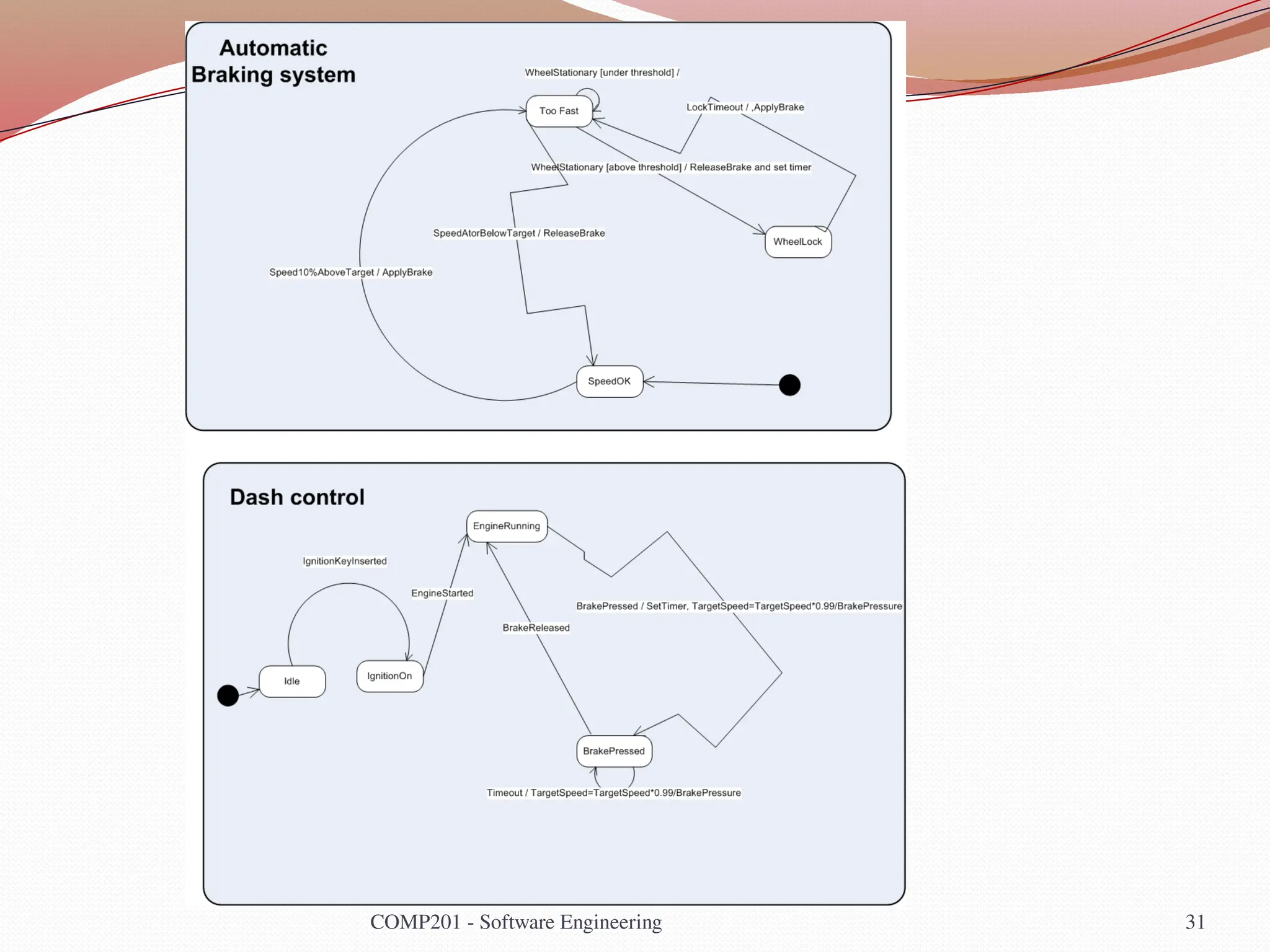
 Often have an Idle state where the process is not active
 All states need some exit (no deadlock, even in error
conditions)
 Use multiple state charts to keep the design simple
 Do NOT need to have a state chart as sub state of other
state chart
 System can be described by multiple state machines
running concurrently
COMP201 - Software Engineering 30
COMP201 - Software Engineering 31
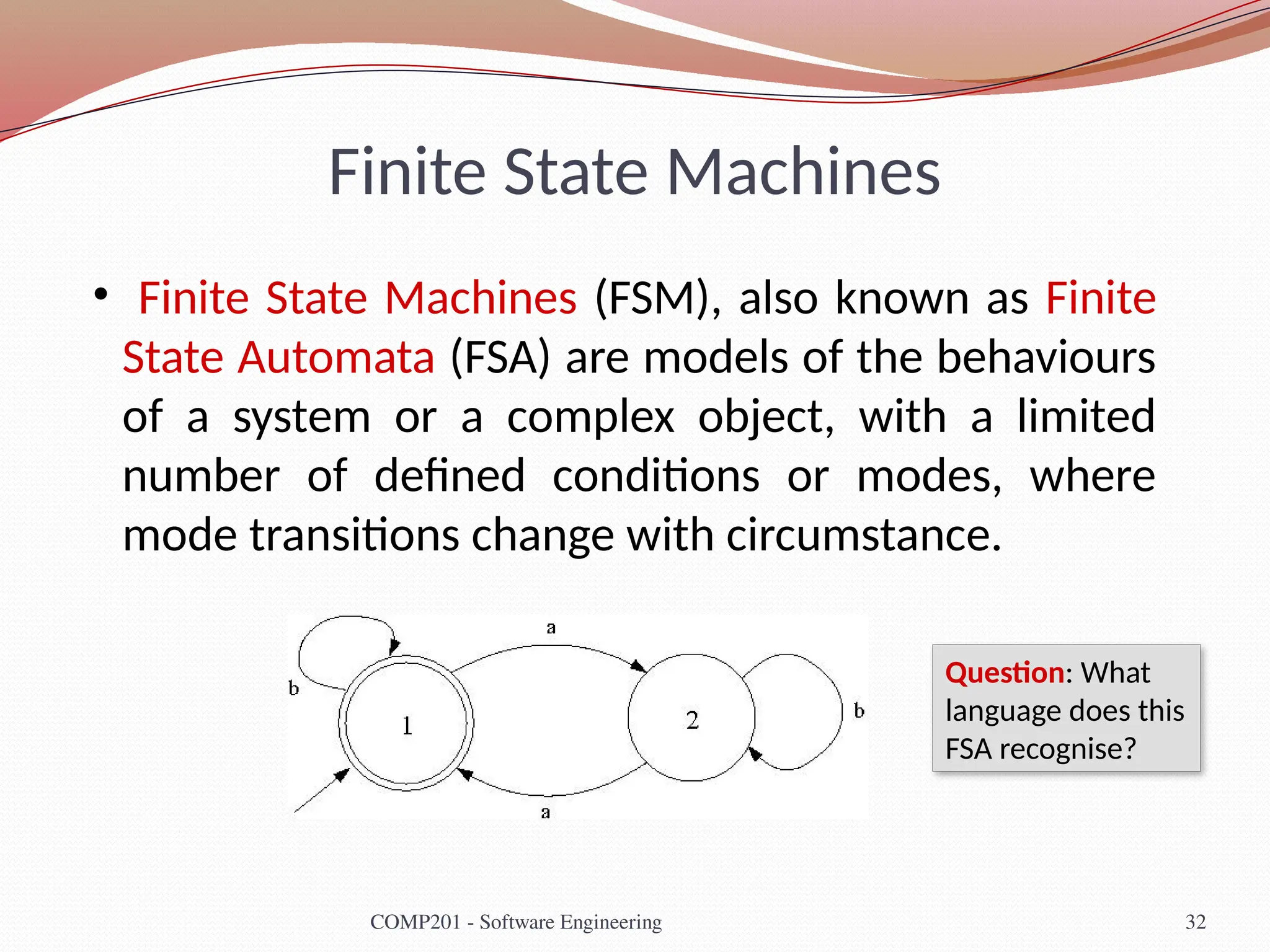
Finite State Machines
• Finite State Machines (FSM), also known as Finite
State Automata (FSA) are models of the behaviours
of a system or a complex object, with a limited
number of defined conditions or modes, where
mode transitions change with circumstance.
32
COMP201 - Software Engineering
Question: What
language does this
FSA recognise?
Finite State Machines - Definition
 A model of computation consisting of
 a set of states,
 a start (initial) state,
 an input alphabet, and
 a transition function that maps input symbols
and current states to a next state
 You may recall finite state
machines (or automata)
from COMP209.
33
COMP201 - Software Engineering
What language
is recognised
by this FSA?
Finite State Machines - Definition
 Computation begins in the start state with an input
string. It changes to new states depending on the
transition function.
 states define behaviour and may produce actions
 state transitions are movement from one state to another
 rules or conditions must be met to allow a state transition
 input events are either externally
or internally generated, which
may possibly trigger rules and
lead to state transitions.
34
COMP201 - Software Engineering
Lecture Key Points
 A model is an abstract system view. Complementary
types of model provide different system information.
 Context models show the position of a system in its
environment with other systems and processes.
 Data flow models may be used to model the data
processing in a system.
 State machine models model the system’s behaviour in
response to internal or external events

SE_L7systemmodel software engineering.pptx

  • 1.
    Software Engineering COMP 201 Lecturer:Sebastian Coope Ashton Building, Room G.18 E-mail: coopes@liverpool.ac.uk COMP 201 web-page: http://www.csc.liv.ac.uk/~coopes/comp201 Lecture 7 – System Models 1 COMP201 - Software Engineering
  • 2.
    Lecture Overview  Systemmodels are abstract descriptions of systems whose requirements are being analysed  Objectives - To explain why the context of a system should be modelled as part of the RE process  To describe  Behavioural modelling (FSM, Petri-nets),  Data modelling and  Object modelling (Unified Modelling Language, UML) 2 COMP201 - Software Engineering
  • 3.
    System Models  Userrequirements must be written in such a way that non-technical experts can understand them, e.g., by using natural language  Detailed system requirements may be expressed in a more technical way however  One widely used technique is to document the system specification as a set of system models  These are graphical representations which describe business processes and the system to be developed  They are an important bridge between the analysis and design processes COMP201 - Software Engineering 3
  • 4.
    System Modelling  Systemmodelling helps the analyst to understand the functionality of the system and models are used to communicate with customers  Different models present the system from different perspectives:  External perspective showing the system’s context or environment  Behavioural perspective showing the behaviour of the system  Structural perspective showing the system or data architecture 4 COMP201 - Software Engineering
  • 5.
    5 “A Picture Paintsa Thousand Words” +Person() +setName() : void +setSsn() : void +setDob() : void +setSpouse() : void +setChildren() : Set +getName() : String +getSsn() : String +getDob() : Date +getSpouse() : Person +getChildren() : Set +getAge() : int #name : String #ssn : String #dob : Date #spouse : Person #children : Set Person +setMajor() : void +setClassStanding() : void +computeGpa() : void -major : String -classStanding : String -gpa : float Student +Professor() +setRank() : void +setTenureDate() : void +setDepartment() : void +getRank() : String +getTenureDate() : Date +getDepartment() : String -rank : String -tenureDate : Date -department : String Professor +CourseOffering() +setSectionNo() : void +setCourse() : void +setInstructor() : void +setSchedule() : void +setLocation() : void +setMaxEnrollment() : void +get...() +calcAvailable() : int -sectionNo : int -course : Course -instructor : Professor -schedule : String -location : String -maxEnrollment : int -enrollment : int -prerequisites : Set CourseOffering -teaches 0..* -is taught by 1..1 -is taken by 0..* -takes 0..* «extends» «extends» COMP201 - Software Engineering
  • 6.
    System Model Advantages They can be easier to understand than using a verbose natural language description  System models can leave out unnecessary details of the system so way may focus on what is important  A system representation should maintain all the information of a system  An abstraction deliberately simplifies the system and picks out its most salient characteristics  Different models can focus on different approaches to abstraction COMP201 - Software Engineering 6
  • 7.
    System Model Weaknesses They do not model non-functional system requirements  They do not usually include information about whether a method is appropriate for a given problem  They may produce too much documentation  System models are sometimes too detailed and difficult for users to understand 7 COMP201 - Software Engineering
  • 8.
    Model Types  Dataprocessing model - showing how the data is processed at different stages  Composition model - showing how entities are composed of other entities  Architectural model - showing principal sub-systems  Classification model - showing how entities have common characteristics  Stimulus/response model - showing the system’s reaction to events 8 COMP201 - Software Engineering
  • 9.
    Context Models  Contextmodels are used to illustrate the boundaries of a system  Identifying the boundaries of the system to be developed is not always straightforward  Social and organisational concerns may affect the decision on where to position system boundaries  Architectural models show the system and its relationship with other systems 9 COMP201 - Software Engineering
  • 10.
    Example – ArchitecturalModel of an ATM System Auto-teller system Security system Maintenance system Account database Usage database Branch accounting system Branch counter system 10 COMP201 - Software Engineering
  • 11.
    Process Models  Processmodels show the overall process and the processes that are supported by the system  Data flow models may be used to show the processes and the flow of information from one process to another 11 COMP201 - Software Engineering
  • 12.
    Example Process Model Getcost estimates Accept delivery of equipment Check delivered items Validate specification Specify equipment required Choose supplier Place equipment order Install equipment Find suppliers Supplier database Accept delivered equipment Equipment database Equipment spec. Checked spec. Delivery note Delivery note Order notification Installation instructions Installation acceptance Equipment details Checked and signed order form Order details + Blank order form Spec. + supplier + estimate Supplier list Equipment spec. 12 COMP201 - Software Engineering Within system boundary Equipment Procurement Process
  • 13.
    Behavioural Models  Behaviouralmodels are used to describe the overall behaviour of a system  Two types of behavioural model  Data processing models that show how data is processed as it moves through the system  State machine models that show the systems response to events  Both of these models are required for a description of the system’s behaviour 13 COMP201 - Software Engineering
  • 14.
    Data-Processing Models  Dataflow diagrams are used to model the system’s data processing  These show the processing steps as data flows through a system  IMPORTANT part of many analysis methods  Simple and intuitive notation  Show end-to-end processing of data 14 COMP201 - Software Engineering
  • 15.
    Example - OrderProcessing Data Flow Diagram Complete order form Order details + blank order form Validate order Record order Send to supplier Adjust available budget Budget file Orders file Completed order form Signed order form Signed order form Checked and signed order + order notification Order amount + account details Signed order form Order details 15 COMP201 - Software Engineering
  • 16.
    Data Flow Diagrams Data Flow Diagrams track and document how the data associated with a process is helpful to develop an overall understanding of the system  Data flow diagrams may also be used in showing the data exchange between a system and other systems in its environment 16 COMP201 - Software Engineering
  • 17.
    Data Flow Diagrams Data Flow Diagrams have an advantage in that they are simple and intuitive and can thus be shown to users who can help in validating the analysis  Developing data flow diagrams is usually a top-down process  We begin by evaluating the overall process we wish to model before considering sub-processes  Data flow diagrams show a functional perspective where each transformation represents a single function or process which is particularly useful during requirements analysis since it shows end-to-end processing. 17 COMP201 - Software Engineering
  • 18.
    DFD Context diagram Drinksmachine controller Dried ingredients hoppers Holding vessel Coin sense mechanism Alphanumeric display Stirrer Paper cup mechanism cup solenoid on/off cup in place Hopper on/off Hopper low signal Electric element on/off Hot water tem perature Hot water system Holding vessel valve open/close Coin codes Stirrer on/off Pricing information Availability information Service inforation Hot water valve open/close Numeric key pad Key codes Drink choice Modem Service request
  • 19.
    slide 19 3SFE519 SCoope 2004 Level 0 DFD Operation control Alpha display price and availability information key codes Hoppers Hopper low? Coin mechanism Coin codes Temperature control Key Pad service door open/closed Maintenance mode control engineering codes ON/OFF Control service request Hopper low? Modem Service data drink code Sales log Sales data Sales data D r i n k s a l e s d a t a h o ld in g ve s se l co n tr o l h o t w a t e r v a l v e o n / o f f cup solenoid on/off cup in place? hopper motors on/off Make drinks control drink m ade status Hot water temperature hot water element on/off Drink recipes R e c i p e d a t a
  • 20.
    COMP201 - SoftwareEngineering 20 slide 20 3SFE519 S Coope 2004 Level 1 DFD Operation control Process key codes Key Pad Alpha display Echo key codes key codes Drink availability checker Drink code Hoppers Hopper low? Product availability information Coin mechanism reader Coin mechanism Coin codes Credit Store Credit Update Current Credit Available Drink code Drink dispense control C u r r e n t C r e d i t Alpha display Prom pt for paym ent P a i d f o r D r i n k c o d e Drink queue P a i d f o r D r i n k c o d e Control maintenance mode Password received service door closed open enable disable maintenance mode Engineering codes Drink recipes D rink data
  • 21.
    Statechart Diagrams  StatechartDiagrams (or State machine models ) show the behaviour of the system in response to external and internal events  They show the system’s responses to stimuli (the event- action paradigm) so are often used for modelling real-time systems  Statechart diagrams show system states as nodes and events as arcs between these nodes. When an event occurs, the system moves from one state to another  Statecharts are an integral part of the Unified Modeling Language (UML) 21 COMP201 - Software Engineering
  • 22.
    Statechart Diagrams  Aninitial state is denoted by a solid circle and is optional (sometimes the system will start in different places and thus the initial state should be omitted).  If required, a final state can also be used; this is denoted by a solid circle with a ring around it.  We use a level of abstraction so that we can observe the essential behaviour of the system we want to model.  Rounded rectangles are used for states. Each state contains two components, the state name and a brief description of the action performed in that state (see next slide). 22 COMP201 - Software Engineering
  • 23.
    Example - MicrowaveOven Model Full power Enabled do: operate oven Full power Half power Half power Full power Number Timer Door open Door closed Door closed Door open Start do: set power = 600 Half power do: set power = 300 Set time do: get number exit: set time Disabled Operation Timer Cancel Waiting do: display time Waiting do: display time do: display 'Ready' do: display 'Waiting' A state machine model does not show flow of data within the system 23 COMP201 - Software Engineering Q: Why is there no final state?
  • 24.
    Microwave Oven Stimuli StimulusDescription Half power The user has pressed the half power button Full power The user has pressed the full power button Timer The user has pressed one of the timer buttons Number The user has pressed a numeric key Door open The oven door switch is not closed Door closed The oven door switch is closed Start The user has pressed the start button Cancel The user has pressed the cancel button 24 COMP201 - Software Engineering
  • 25.
    Statecharts  Statecharts alsoallow the decomposition of a model into sub-models (see figure on next slide).  A brief description of the actions is included following the ‘do’ in each state (the word “do” is optional).  Can be complemented by tables describing the states and the stimuli. 25 COMP201 - Software Engineering
  • 26.
    Statechart Diagram Cook do: run generator Done do:buzzer on for 5 secs. W aiting Alarm do: display event do: check status Checking Turntable fault Emitter fault Disabled OK Timeout Time Operation Door open Cancel 26 COMP201 - Software Engineering
  • 27.
    Statechart Diagrams  Thelabel on an arc can denote the method called to move from one state to the next (the event).  A guard is used to ensure that the system only moves from one state to the other if the expression is satisfied.  A state can contain a subdiagram within it (also called a composite state). This is useful for example when we wish to model a subsystem or substates.  On the next slide, we can see all these elements of a UML statechart diagram 27 COMP201 - Software Engineering
  • 28.
    Statechart Diagrams 28 COMP201 -Software Engineering Initial state Final state Composite States Guard Actions
  • 29.
    Actions  You canput actions after the event using a / COMP201 - Software Engineering 29 Out of ink Idle Ink available/clear display Ink low/show error message
  • 30.
    More hints onstate charts  Often have an Idle state where the process is not active  All states need some exit (no deadlock, even in error conditions)  Use multiple state charts to keep the design simple  Do NOT need to have a state chart as sub state of other state chart  System can be described by multiple state machines running concurrently COMP201 - Software Engineering 30
  • 31.
    COMP201 - SoftwareEngineering 31
  • 32.
    Finite State Machines •Finite State Machines (FSM), also known as Finite State Automata (FSA) are models of the behaviours of a system or a complex object, with a limited number of defined conditions or modes, where mode transitions change with circumstance. 32 COMP201 - Software Engineering Question: What language does this FSA recognise?
  • 33.
    Finite State Machines- Definition  A model of computation consisting of  a set of states,  a start (initial) state,  an input alphabet, and  a transition function that maps input symbols and current states to a next state  You may recall finite state machines (or automata) from COMP209. 33 COMP201 - Software Engineering What language is recognised by this FSA?
  • 34.
    Finite State Machines- Definition  Computation begins in the start state with an input string. It changes to new states depending on the transition function.  states define behaviour and may produce actions  state transitions are movement from one state to another  rules or conditions must be met to allow a state transition  input events are either externally or internally generated, which may possibly trigger rules and lead to state transitions. 34 COMP201 - Software Engineering
  • 35.
    Lecture Key Points A model is an abstract system view. Complementary types of model provide different system information.  Context models show the position of a system in its environment with other systems and processes.  Data flow models may be used to model the data processing in a system.  State machine models model the system’s behaviour in response to internal or external events