IBM Global Technology Services
June 2008


                                 Implementing Softek
                                 zDMF technology.
                                 Supporting simple, effective and nondisruptive data migrations
Implementing Softek zDMF technology.
Page 2


                                       Introduction
                     Contents          In the mainframe industry, there are many data migration products and many
                                       ways to migrate data. Some are controller based or appliance based, while
     2   Introduction                  others are host based. This paper focuses on host-based migration products,
     3   zDMF capabilities             as they provide the most flexibility and the fewest operational restrictions. In
     5   zDMF architecture             most cases, it is helpful to use combinations of products or tools to accomplish
     8   The zDMF migration process    a migration, because no one tool can do everything exactly the way the user
     19 A typical migration
                                       may desire.
     25 Performance considerations
     29 Platform support               For example, the user may want to migrate from older to newer technology
     29 Restrictions                   while, at the same time, moving to larger-capacity devices such as from an
     30 Other Softek migration
                                       3390-3 device to a 3390-9 system. One option in this scenario would be to
         solutions
                                       have IBM’s System Managed Storage (SMS) do the migration with redirection,
     31 Summary
                                       but this would not move files that have not been deleted and reallocated in a
                                       timely manner.

                                       Another option would be to use Hierarchical Storage Management (HSM) to
                                       migrate files after they have been archived and recalled. But again, if the files
                                       are in use, HSM would not archive the files. And, in most cases, it would be
                                       necessary to take manual action to adjust HSM policies and then reset them
                                       after a migration. Other scenarios could include the use of a disk copy utility
                                       such as Data Facility Data Set Services (DFDSS) at the disk and/or file level.
                                       However, as with the above scenarios, there is the issue of files being in use,
                                       not to mention the manual effort of building the control cards and finding an
                                       extended window for conducting the migration.
Implementing Softek zDMF technology.
Page 3


                                             To address some of these issues, Softek developed z/OS® Dataset
                  Highlights                 Mobility Facility (zDMF) technology, host-based software that can move
                                             data at the file/extent level between Direct Access Storage Device (DASD)
                                             volumes without interrupting the applications that read/write to those
     Softek zDMF technology can help         volumes. zDMF software can work with virtually any vendor’s storage that may
     with several different types of local   or may not be under SMS control in a shared or non-shared DASD environment
     data migrations.                        including sysplexes. zDMF software is ideal for the following types of local
                                             data migrations:

                                             •	 Technology	refresh,	especially	in	heterogeneous	or		
                                                high-availability	environments
                                             •	 Migrations	from	smaller	to	larger	volumes
                                             •	 Implementation	of	tiered	storage
                                             •	 Consolidation	of	storage
                                             •	 Dynamic	data	movement	to	fix	performance	problems		
                                                (e.g.,	moving	files	from	storage	hot	spots)

                                             The sections that follow provide a general overview of zDMF software’s
                                             capabilities, architecture and migration process. They also sketch a sample
                                             migration scenario and discuss performance factors.

                                             zDMF capabilities
                                             Simplicity of design
                                             zDMF technology’s distinct value is its simplicity. Built from the ground up as
                                             a fully integrated product, it features components that are designed to execute
                                             flawlessly together. zDMF software is designed to be simple to install, simple
                                             to use and simple to maintain.
Implementing Softek zDMF technology.
Page 4


                                           Nondisruptive switch
                  Highlights               zDMF software’s key differentiator is its ability to nondisruptively switch the
                                           source and target files, which moves the applications dynamically onto new
     Softek zDMF software can dynami-      storage. This switchover feature, which occurs under user control, results in
     cally move applications onto new      redirection of an application’s input/output (I/O) function (e.g., from the origi-
     storage by nondisruptively switch-    nal source to the target). This occurs without any disruption to the application.
     ing the source and target files.
                                           Until the redirection, zDMF software continues to synchronously write to the
                                           source and target volumes, allowing fallback (the ability to fall back to the
                                           original source volume) at any time. Volumes that are no longer in applications’
                                           I/O path can be taken offline without disruption.

                                           For the current release of zDMF technology, a small application bounce may
                                           be required after the migration in order to free up the original disk space.
                                           The bounce would be needed only for applications that have a persistent file
                                           allocation; it can be scheduled to occur when a window is available.

                                           Migration tuning parameters
     The software can control the migra-   In order to adjust the performance impact on applications during a migration,
     tion rate using several parameters.   zDMF software provides the ability to control migration rate using the follow-
                                           ing parameters:

                                           •	 MAXIO	(determines	the	maximum	overall	I/O	concurrency)
                                           •	 MAX_CHANNEL_ IO	(determines	the	maximum	I/O	concurrency	per		
                                              channel	path)
                                           •	 MAX_DEVICE_ IO	(determines	the	maximum	I/O	concurrency	per		
                                              individual	device)
                                           •	 MAXTRK	(specifies	the	size	of	the	I/O	operation	in	tracks	that	zDMF		
                                              software	will	use)
Implementing Softek zDMF technology.
Page 5


                                          Migration groups
                  Highlights              zDMF software supports the definition and concurrent migration of thousands
                                          of files. Because migration projects may involve several hundred files sup-
     zDMF software can migrate thou-      porting a range of application types, zDMF technology provides the ability to
     sands of files concurrently and      logically group files for efficient operational control. Each group’s migration
     enables monitoring of the process.   parameters are independently configured and controlled to best suit the
                                          business applications supported.

                                          Monitoring features
                                          zDMF provides the ability to monitor the migration process from start to
                                          finish. Statistics include details such as elapsed time, copy rate and percent-
                                          age complete.

                                          Shared DASD
                                          zDMF works in a shared DASD environment. The DASD can be shared by
                                          individual LPARs running on multiple physical CPUs, shared within a
                                          sysplex or shared across a multiple sysplex environment.

                                          New Extended Address Volume functionality
     Softek zDMF software’s first two     zDMF can streamline large-scale migrations via new Extended Address
     components are the zDMF TSO          Volume functionality, which exceeds the previous industry-standard storage
     Monitor and zDMF server.             capacity of 65 cylinders.

                                          zDMF architecture
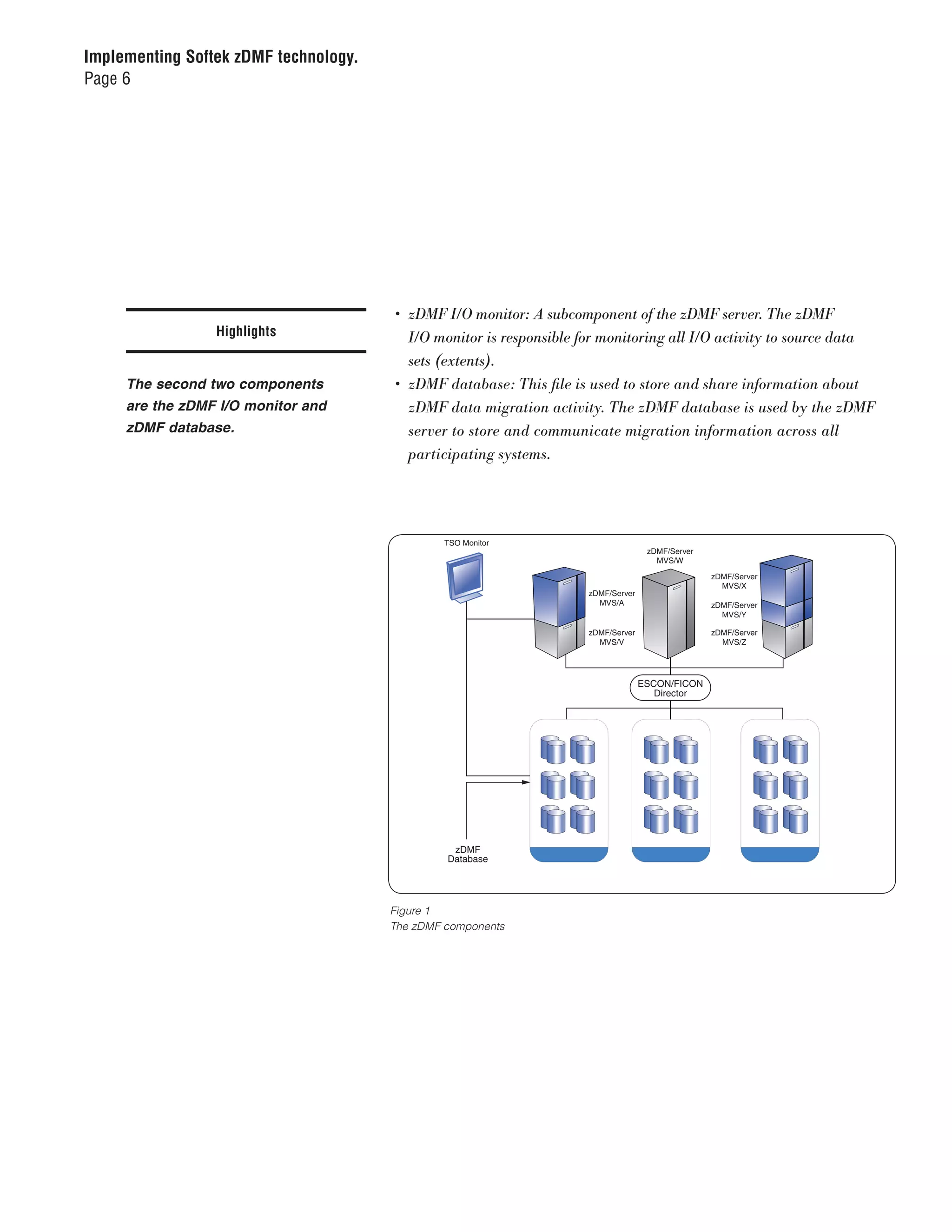
                                          zDMF technology consists of four major components:

                                          •	 zDMF	TSO	Monitor:	This	is	a	user	interface	to	establish	a	migration,	issue	
                                             commands	and	control	migrations.	zDMF	software	also	offers	a	command	
                                             line	interface	(CLI).
                                          •	 zDMF	server:	The	server	is	a	primary	component	of	the	zDMF	product	
                                             framework.	The	zDMF	server	is	a	z/OS	Started	Task	that	must	run	on	each	
                                             system	that	has	access	to	the	data	that	will	be	migrated.
Implementing Softek zDMF technology.
Page 6


                                        •	 zDMF	I/O	monitor:	A	subcomponent	of	the	zDMF	server.	The	zDMF		
                 Highlights                I/O	monitor	is	responsible	for	monitoring	all	I/O	activity	to	source	data		
                                           sets	(extents).
     The second two components          •	 zDMF	database:	This	file	is	used	to	store	and	share	information	about		
     are the zDMF I/O monitor and          zDMF	data	migration	activity.	The	zDMF	database	is	used	by	the	zDMF		
     zDMF database.                        server	to	store	and	communicate	migration	information	across	all		
                                       10708881 zDMF Components
                                       Figure 3
                                           participating	systems.


                                                TSO Monitor
                                                                                     zDMF/Server
                                                                                       MVS/W

                                                                                                   zDMF/Server
                                                                                                     MVS/X
                                                                      zDMF/Server
                                                                        MVS/A                      zDMF/Server
                                                                                                     MVS/Y

                                                                      zDMF/Server                  zDMF/Server
                                                                        MVS/V                        MVS/Z


                                                                                    ESCON/FICON
                                                                                       Director


                                                 zDMF
                                                Database


                                       Figure 1
                                       The zDMF components
Implementing Softek zDMF technology.
Page 7


                                        zDMF migration elements
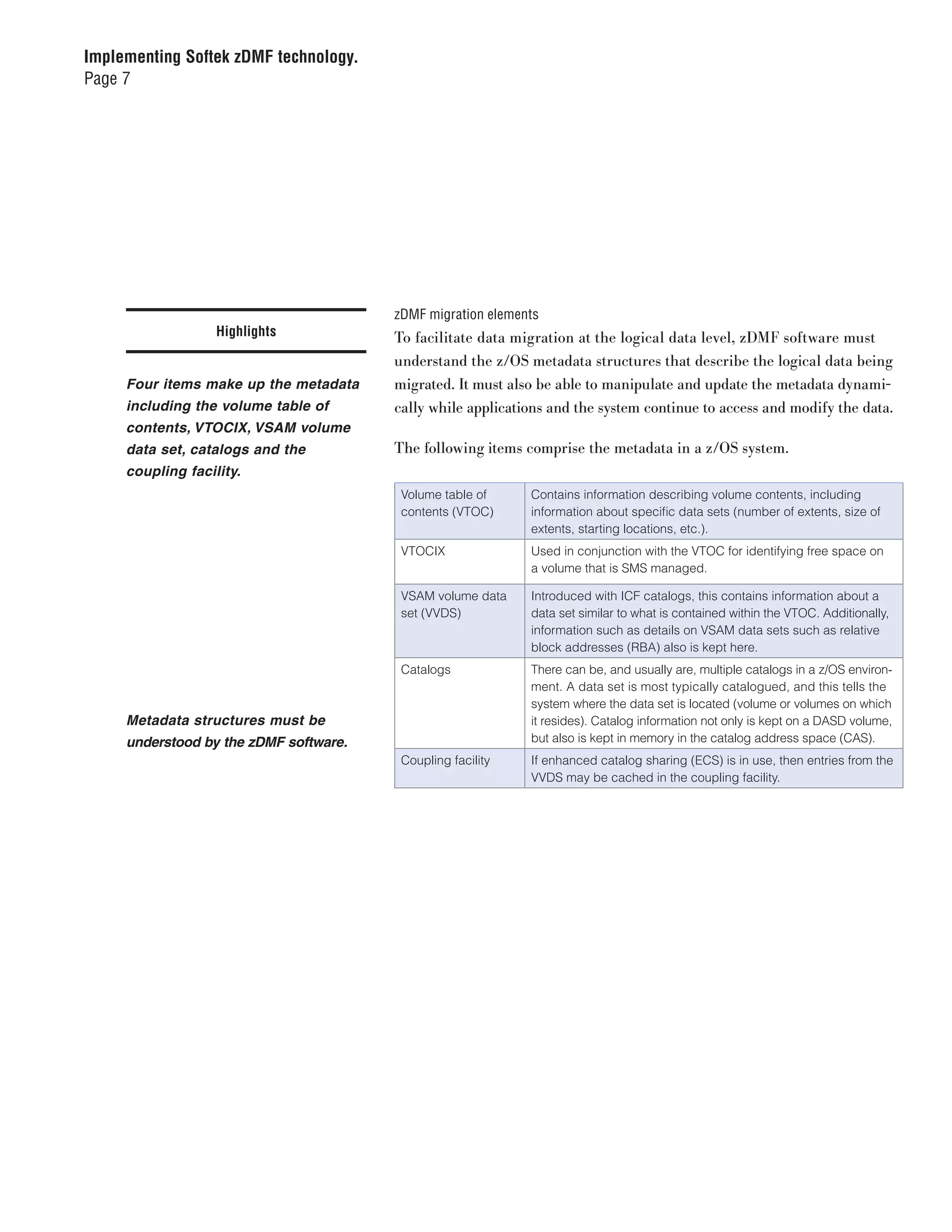
                   Highlights           To facilitate data migration at the logical data level, zDMF software must
                                        understand the z/OS metadata structures that describe the logical data being
     Four items make up the metadata    migrated. It must also be able to manipulate and update the metadata dynami-
     including the volume table of      cally while applications and the system continue to access and modify the data.
     contents, VTOCIX, VSAM volume
     data set, catalogs and the         The following items comprise the metadata in a z/OS system.
     coupling facility.
                                         Volume table of     Contains information describing volume contents, including
                                         contents (VTOC)     information about specific data sets (number of extents, size of
                                                             extents, starting locations, etc.).
                                         VTOCIX              Used in conjunction with the VTOC for identifying free space on
                                                             a volume that is SMS managed.

                                         VSAM volume data    Introduced with ICF catalogs, this contains information about a
                                         set (VVDS)          data set similar to what is contained within the VTOC. Additionally,
                                                             information such as details on VSAM data sets such as relative
                                                             block addresses (RBA) also is kept here.
                                         Catalogs            There can be, and usually are, multiple catalogs in a z/OS environ-
                                                             ment. A data set is most typically catalogued, and this tells the
                                                             system where the data set is located (volume or volumes on which
     Metadata structures must be                             it resides). Catalog information not only is kept on a DASD volume,
     understood by the zDMF software.                        but also is kept in memory in the catalog address space (CAS).
                                         Coupling facility   If enhanced catalog sharing (ECS) is in use, then entries from the
                                                             VVDS may be cached in the coupling facility.
Implementing Softek zDMF technology.
Page 8


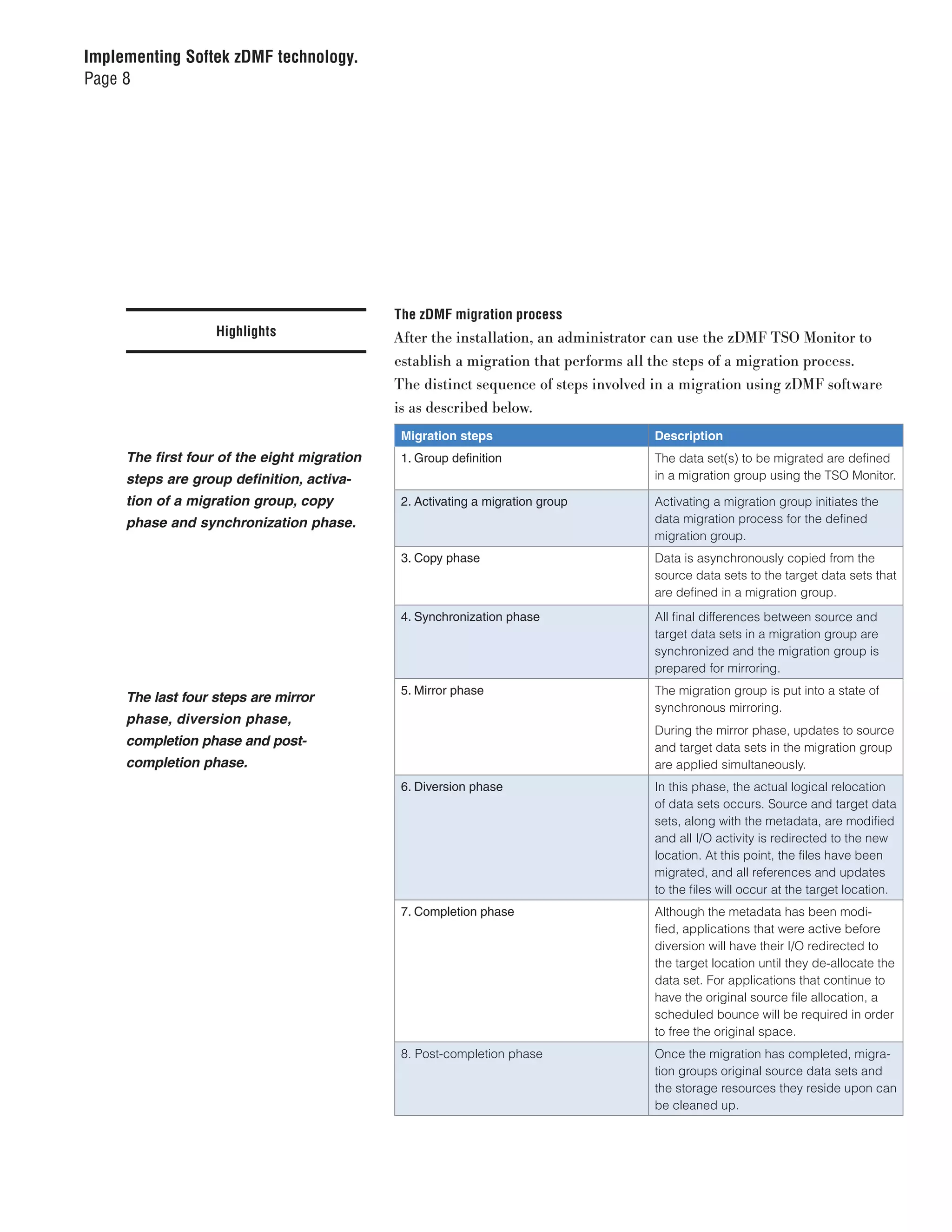
                                             The zDMF migration process
                   Highlights                After the installation, an administrator can use the zDMF TSO Monitor to
                                             establish a migration that performs all the steps of a migration process.
                                             The distinct sequence of steps involved in a migration using zDMF software
                                             is as described below.
                                              Migration steps                       Description
     The first four of the eight migration    1. Group definition                   The data set(s) to be migrated are defined
     steps are group definition, activa-                                            in a migration group using the TSO Monitor.

     tion of a migration group, copy          2. Activating a migration group       Activating a migration group initiates the
     phase and synchronization phase.                                               data migration process for the defined
                                                                                    migration group.
                                              3. Copy phase                         Data is asynchronously copied from the
                                                                                    source data sets to the target data sets that
                                                                                    are defined in a migration group.
                                              4. Synchronization phase              All final differences between source and
                                                                                    target data sets in a migration group are
                                                                                    synchronized and the migration group is
                                                                                    prepared for mirroring.
                                              5. Mirror phase                       The migration group is put into a state of
     The last four steps are mirror
                                                                                    synchronous mirroring.
     phase, diversion phase,
                                                                                    During the mirror phase, updates to source
     completion phase and post-                                                     and target data sets in the migration group
     completion phase.                                                              are applied simultaneously.
                                              6. Diversion phase                    In this phase, the actual logical relocation
                                                                                    of data sets occurs. Source and target data
                                                                                    sets, along with the metadata, are modified
                                                                                    and all I/O activity is redirected to the new
                                                                                    location. At this point, the files have been
                                                                                    migrated, and all references and updates
                                                                                    to the files will occur at the target location.
                                              7. Completion phase                   Although the metadata has been modi-
                                                                                    fied, applications that were active before
                                                                                    diversion will have their I/O redirected to
                                                                                    the target location until they de-allocate the
                                                                                    data set. For applications that continue to
                                                                                    have the original source file allocation, a
                                                                                    scheduled bounce will be required in order
                                                                                    to free the original space.
                                              8. Post-completion phase              Once the migration has completed, migra-
                                                                                    tion groups original source data sets and
                                                                                    the storage resources they reside upon can
                                                                                    be cleaned up.
Implementing Softek zDMF technology.
Page 9


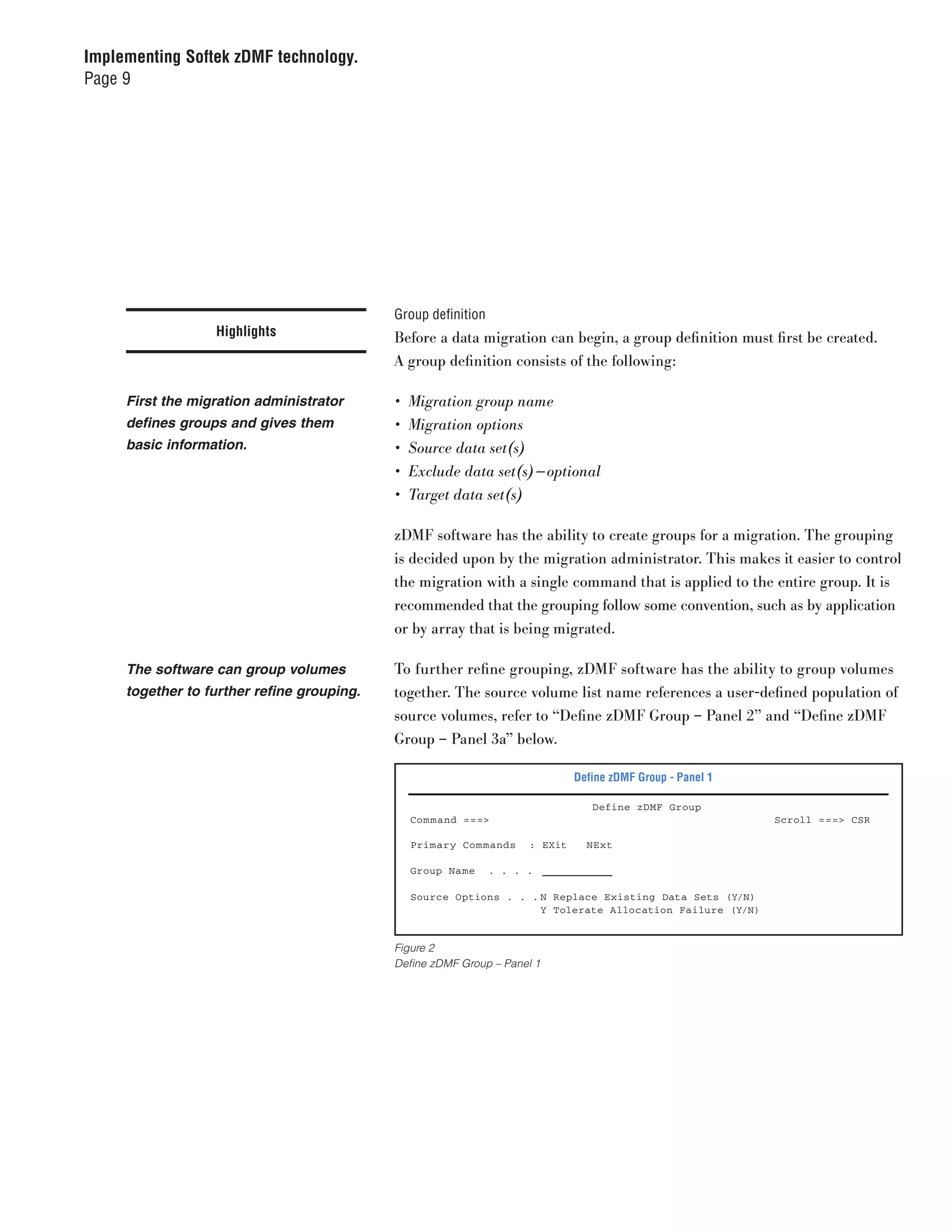
                                            Group definition
                  Highlights                Before a data migration can begin, a group definition must first be created.
                                            A group definition consists of the following:

     First the migration administrator      •	 Migration	group	name
     defines groups and gives them          •	 Migration	options
     basic information.                     •	 Source	data	set(s)
                                            •	 Exclude	data	set(s) — optional
                                            •	 Target	data	set(s)

                                            zDMF software has the ability to create groups for a migration. The grouping
                                            is decided upon by the migration administrator. This makes it easier to control
                                            the migration with a single command that is applied to the entire group. It is
                                            recommended that the grouping follow some convention, such as by application
                                            or by array that is being migrated.

     The software can group volumes         To further refine grouping, zDMF software has the ability to group volumes
     together to further refine grouping.   together. The source volume list name references a user-defined population of
                                            source volumes, refer to “Define zDMF Group – Panel 2” and “Define zDMF
                                            Group – Panel 3a” below.

                                                                              Define zDMF Group - Panel 1

                                                                                 Define zDMF Group
                                              Com mand ===>                                                 Scroll ===> CSR

                                              Primary Com mands      : EXit     NExt

                                              Group Name       . . . .

                                              Source Options . . . N Replace Existing Data Sets (Y/N)
                                                                   Y Tolerate Allocation Failure (Y/N)


                                            Figure 2
                                            Define zDMF Group – Panel 1
Implementing Softek zDMF technology.
Page 10


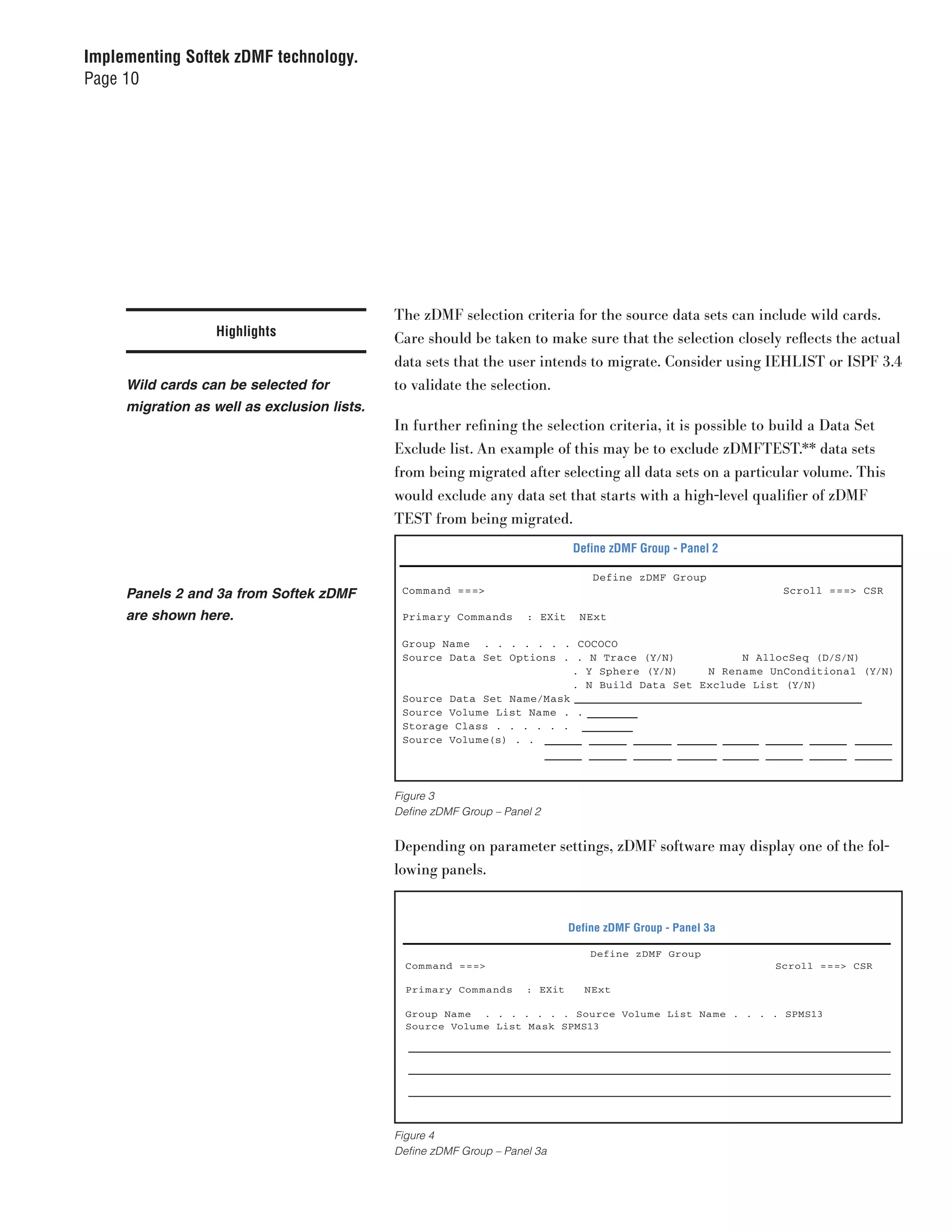
                                             The zDMF selection criteria for the source data sets can include wild cards.
                  Highlights                 Care should be taken to make sure that the selection closely reflects the actual
                                             data sets that the user intends to migrate. Consider using IEHLIST or ISPF 3.4
     Wild cards can be selected for          to validate the selection.
     migration as well as exclusion lists.
                                             In further refining the selection criteria, it is possible to build a Data Set
                                             Exclude list. An example of this may be to exclude zDMFTEST.** data sets
                                             from being migrated after selecting all data sets on a particular volume. This
                                             would exclude any data set that starts with a high-level qualifier of zDMF
                                             TEST from being migrated.
                                                                              Define zDMF Group - Panel 2

                                                                                  Define zDMF Group
     Panels 2 and 3a from Softek zDMF         Com mand ===>                                                   Scroll ===> CSR

     are shown here.                          Primary Com mands      : EXit     NExt

                                              Group Name . . . . . . . COCOCO
                                              Source Data Set Options . . N Trace (Y/N)           N AllocSeq (D/S/N)
                                                                         . Y Sphere (Y/N)    N Rename UnConditional (Y/N)
                                                                         . N Build Data Set Exclude List (Y/N)
                                              Source Data Set Na me/Mask
                                              Source Volume List Na me . .
                                              Storage Class . . . . . .
                                              Source Volume(s) . .


                                             Figure 3
                                             Define zDMF Group – Panel 2


                                             Depending on parameter settings, zDMF software may display one of the fol-
                                             lowing panels.


                                                                              Define zDMF Group - Panel 3a

                                                                                  Define zDMF Group
                                               Com mand ===>                                                 Scroll ===> CSR

                                               Primary Com mands     : EXit      NExt

                                               Group Na me . . . . . . . Source Volu me List Na me . . . . SPMS13
                                               Source Volu me List Mask SPMS13


                                             Figure 4
                                             Define zDMF Group – Panel 3a
Implementing Softek zDMF technology.
Page 11


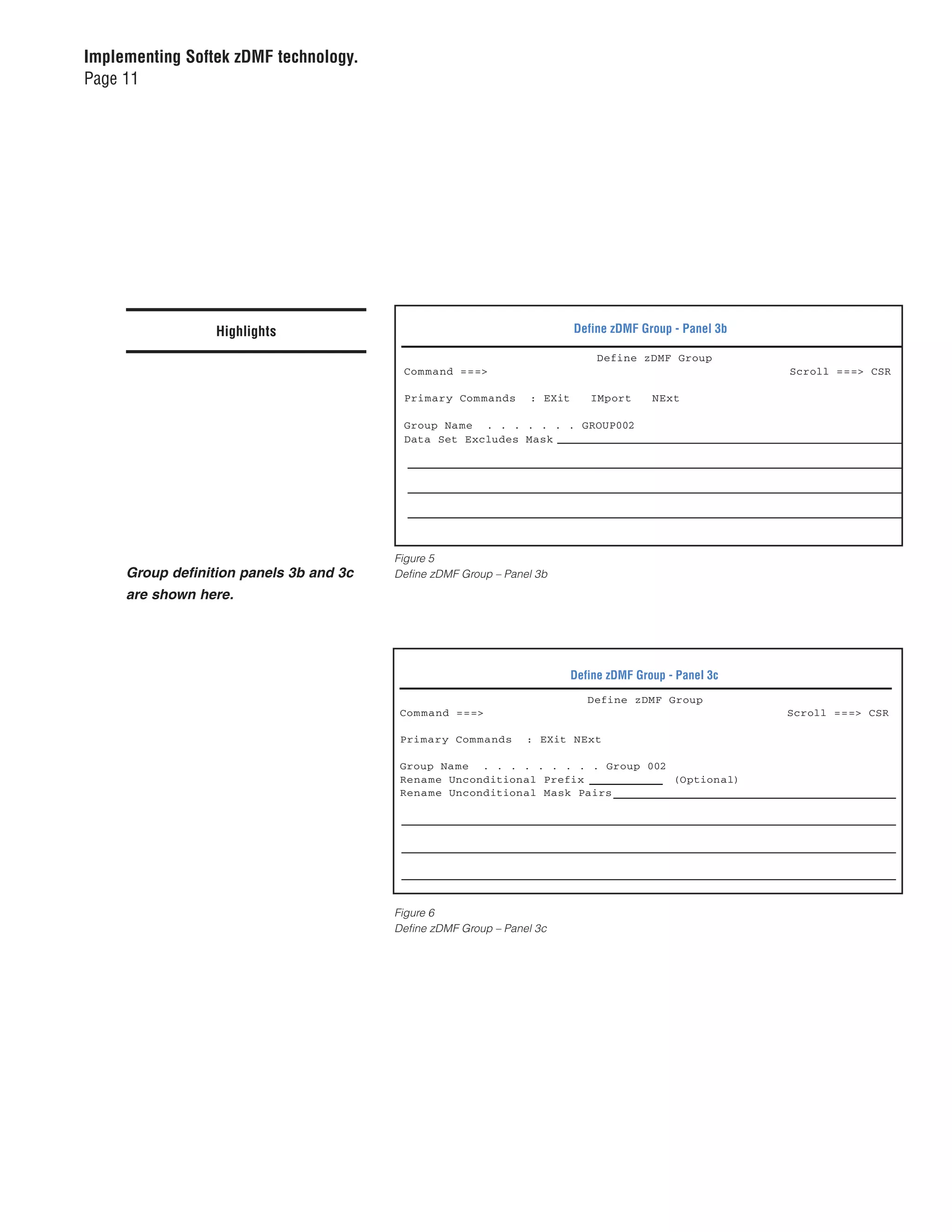
                  Highlights                                              Define zDMF Group - Panel 3b

                                                                               Define zDMF Group
                                          Com mand ===>                                                  Scroll ===> CSR

                                          Primary Com mands      : EXit      IMport      NExt

                                          Group Name . . . . . . . GROUP002
                                          Data Set Excludes Mask


                                         Figure 5
     Group definition panels 3b and 3c   Define zDMF Group – Panel 3b
     are shown here.


                                                                          Define zDMF Group - Panel 3c
                                                                             Define zDMF Group
                                          Com mand ===>                                                  Scroll ===> CSR

                                          Primary Com mands      : EXit NExt

                                          Group Na me . . . . . . . . . Group 002
                                          Rena me Unconditional Prefix            (Optional)
                                          Rena me Unconditional Mask Pairs


                                         Figure 6
                                         Define zDMF Group – Panel 3c
Implementing Softek zDMF technology.
Page 12


                                       . . . . . . .

                                            After specifying the source data set information, specify the target data set
                  Highlights                mask, target volume storage class and/or target volume(s) parameters, as
                                            described in “Define zDMF Group – Panel 4.”

                                                                              Define zDMF Group - Panel 4

     Panels 4 and 5, shown here,                                                 Define zDMF Group
                                              Com mand ===>                                                          Scroll ===> CSR
     require information regarding
     group definition.                        Primary Com mands      : EXit   BUild

                                              Group Name . . . . . . . COCOCO
                                              Target Data Set Na me/Mask . . . . .
                                              Target Volume Storage Class.
                                              Target Volumes(s). . . . . .


                                            Figure 7
                                            Define zDMF Group – Panel 4

                                            Once all the relevant group/pair parameters for the new group definition
                                            have been entered, type the BUILD command (or BU), and then press Enter.
                                            The new group definition’s configuration information is displayed in “Define
                                            zDMF Group – Panel 5.”

                                                                              Define zDMF Group - Panel 5


                                                                                 Define zDMF Group             Row 1 to 19 of 21
                                                Com mand ===>                                                  Scroll ===> CSR

                                                Primary Com mands    : EXit      MOre      EDit      SAve   VErify      PRomote

                                                Group (COCOCO) -
                                                      Mode (LMIGR()) -
                                                      TOLORATE_ALLOCATION_FAILURE(YES) MAXRC(8) -
                                                      REPLACE(NO)
                                                SOURCE_VOLUME_LIST SPMS13 (-
                                                      SPMS13 -
                                                      ]
                                                SET -
                                                      ALLOCSEQ(NONE) -
                                                      TRACE(NO) -
                                                      SPHERE(YES)
                                                      SOURCE ( -
                                                           DSN (SXM90.zDMF.TEST.*) -
                                                      SOURCE_VOLUME_LIST SPMS13 -
                                                      )
                                                TARGET (-
                                                      DSN (SXM90.zDMF.TEST.*)-
                                                           VOLUME (-
                                                           IBM408 -

                                            Figure 8
                                            Define zDMF Group – Panel 5
Implementing Softek zDMF technology.
Page 13


                                        At this point, the primary commands can be used to add more source data sets to
                  Highlights            the group, or the user can edit, save, verify and promote the newly created group.

                                        Activating a migration group
     During the activation phase, the   During the activation phase, zDMF software allocates data sets on the target
     software allocates data sets.      volumes. If any errors occur during allocation, the migration group will either
                                        terminate the entire group or just the data set(s) that are in error, depending
                                        on the Tolerate Allocation Failure option selected when defining the group.

                                        Copy phase tasks
                                        During the copy phase, zDMF software initiates and performs the following tasks:

     The copying phase occurs after a   •	 The	zDMF	server	asynchronously	copies	the	source	data	sets	to	the	target	
     group is activated.                   data	sets.
                                        •	 The	zDMF	I/O	monitor	routines	monitor	all	activity	to	all	source	data	sets	
                                           and	track	all	modifications	to	the	source	data	set.
                                        •	 Once	the	initial	copy	of	source	data	sets	is	completed,	the	zDMF	server	
                                           refreshes	the	changed	data	repeatedly	until	it	reaches	a	point	where	it	can	
                                           quickly	synchronize	the	source	and	target	data	sets	with	minimal	disruption	
                                           to	applications	or	the	system.	Once	this	point	is	achieved,	zDMF	software	
                                           automatically	moves	to	the	synchronization	phase	for	this	migration	group.
Implementing Softek zDMF technology.
Page 14


                                       In some instances, a migration group may take some time to complete the
                 Highlights            copy phase across all data sets in the migration group. The copy phase hap-
                                       pens after the group is activated.

                                       Managing performance during the copy phase
     The zDMF software can dynami-     During the copy phase, depending on the size of a migration group, a good
     cally modify parameters during    deal of I/O could possibly be driven by zDMF software. To control the pacing
     the copy phase.                   of I/O during the zDMF copy phase, the user can modify parameters that the
                                       zDMF server uses. The parameters that can be dynamically modified include
                                       the following:

                                       •	 MAX_CHANNEL_ IO
                                       •	 MAX_DEVICE_ IO

                                       The optional MAXTRK parameter specifies the size of the I/O operation in
                                       tracks that zDMF software should use to transfer data while in copy phase.
                                       The MAXTRK value is used to reduce the impact of zDMF software on the
                                       application response time immediately following activation. The MAXTRK
                                       parameter is defined in the zDMF server startup configuration file for the
                                       system that hosts the zDMF owning server.
Implementing Softek zDMF technology.
Page 15


                                            Synchronization phase
                    Highlights              A migration group enters the synchronization phase when zDMF software
                                            determines that it can quickly synchronize all data between source and target
     The synchronization phase occurs       data sets in the migration group without causing disruption to the systems and
     when the software determines that      applications using this data.
     it can synchronize data without
     causing system and application         During the synchronization phase, zDMF software initiates and performs the
     disruptions.                           following tasks:

                                            •	 The	zDMF	I/O	monitor	routines	dynamically	hold	all	I/O	to	the	source	data	
                                               set	so	final	synchronization	can	be	achieved.
                                            •	 zDMF	software	copies	all	remaining	differences	from	the	source	data	sets	to	
                                               the	target	data	sets.	At	this	point,	there	is	very	little	difference	between	data	
                                               sets,	and	this	operation	occurs	very	quickly.
                                            •	 zDMF	software	allows	normal	I/O	operations	to	continue	once	synchroniza-
                                               tion	has	been	achieved.

     Once the mirror state has been indi-   When the synchronization phase has completed, the migration group indi-
     cated and the synchronization phase    cates that it is in mirror state.
     completed, the mirror phase begins.
                                            Mirror phase
                                            Once the source and target data sets within the migration group have suc-
                                            cessfully synchronized, they enter the mirror phase. During the mirror phase,
                                            updates to source and target data sets in the migration group are applied
                                            simultaneously. If an I/O error occurs at the target volume, the group is sus-
                                            pended. Once the mirror phase has been achieved, mirroring continues until
                                            one of the following occurs:
Implementing Softek zDMF technology.
Page 16


                                            •	 A	Divert	command	is	issued	against	the	migration	group.
                  Highlights                •	 A	Suspend	command	is	issued	against	the	migration	group.

                                            Diversion phase
     Updates to data sets in the            The diversion phase executes in two subphases:
     migration group are applied
     simultaneously.                        •	 Subphase	1:	processing	of	the	divert	command
                                            •	 Subphase	2:	diversion	of	I/O	from	active	applications	to	the	target	data	set

                                            Subphase 1: processing of the divert command
                                            During this subphase, zDMF software modifies all metadata for the source
                                            and target data set pairs within the migration group, effectively swapping the
                                            identities of the source and target. To accomplish this, zDMF software:

     During subphase 1 of the diversion     •	 Serializes	access	to	the	metadata	for	collections	of	data	sets	catalogued	in	a	
     phase, zDMF software swaps the            particular	source/target	catalog	pair
     identities of the source and target.   •	 Updates	all	metadata	to	accomplish	the	identity	swapping	of	the	source		
                                               and	target	data	sets:
                                               -	 Modifies	all	volume-based	metadata	in	the	VTOC,	VTOCIX	and	VVDS
                                               -	 Modifies	the	catalog	entries	for	the	source	and	target	data	set	pairs,	and	
                                                  refreshes	catalog	data	buffers	for	the	catalogs	involved	across	all	z/OS	
                                                  images	in	a	shared	storage	complex.
Implementing Softek zDMF technology.
Page 17


                                          Subphase 2: diversion of I/O from active applications to target data set
                  Highlights              With the source and target data set identities switched, I/O to any of the
                                          source data sets previously allocated by ongoing applications is diverted to the
     During subphase 2, the source        target data set instead. It is at this point that the data set(s) has been migrated
     and target data set identities are   from the source to the target volume. All references and I/Os to the data set will
     switched. All references and I/Os    now be to the target volume.
     are set to the target volume.
                                          The original source data set is renamed, is no longer in use and can not be
                                          accessed for alteration including being deleted until the migration goes into
                                          the completion phase.

                                          Note: Once the divert command processing is completed, any new application
                                          allocations will automatically be directed to the target data set.

                                          Post Migration Completion phase
                                          Migration groups will remain in the diversion phase until all applications have
                                          relinquished their allocation of migrating data sets and zDMF software no
     Group completion occurs when all     longer has to redirect I/O to the targets. Group completion is achieved by logi-
     LPARs reach the same state.          cal partition (LPAR) in the shared storage complex, depending on the data set
                                          usage of the applications on each server.

                                          Each server periodically examines allocation information to see if any active
                                          address space still has any source data set allocated. Once all such allocations
                                          are freed through the normal action or completion of the system or application
                                          processing, then it is no longer necessary for zDMF software to divert any I/O.
                                          Locally, the zDMF processing is complete for the group. However, the group
                                          cannot be marked fully complete until all LPARs reach the same state.
Implementing Softek zDMF technology.
Page 18


                                          Identifying address spaces being diverted
                  Highlights              Identifying the z/OS address spaces that are being diverted is a simple process
                                          with zDMF software. By using the zDMF TSO Monitor Option 2 – Interact
     zDMF software enables easy           With Promoted Groups, the user can display all address spaces that are cur-
     identification of the z/OS address   rently diverted across all z/OS images in a shared storage complex.
     spaces that are being diverted.
                                          Post-completion phase
                                          Data migrations in many cases are undertaken to free up a storage resource.
     Before freed-up resources            Post-migration actions with the freed storage resource may include removing
     can be used, a user must             it from the system to return to a leaseholder, or reusing the storage for other
     initiate post-completion             application data needs. Regardless of the reason, before the resources can be
     storage resource cleanup.            reused, the user must take the following actions.

                                          Initiate post-completion storage resource cleanup
                                          1.	Ensure	that	the	migration	group	has	completed.
                                          2.	Delete	the	migration	groups	target	data	sets	(renamed	original	source	file	on	
                                             original	source	volume).
                                          3.	Delete	the	migration	group	from	the	zDMF	database.

                                          When a migration group is deleted, zDMF software performs the following tasks:

                                          •	 The	zDMF	server	ensures	that	the	migration	group	is	in	a	state	that	will	
                                             allow	it	to	be	deleted.
                                          •	 The	zDMF	server	removes	the	migration	group	from	internal	z/OS	storage	
                                             (memory).	This	results	in	valuable	system	memory	being	freed.
                                          •	 The	zDMF	server	deletes	the	migration	group	from	the	zDMF	database.
Implementing Softek zDMF technology.
Page 19


                                            A typical migration
                   Highlights               It is very important to be aware that the most critical phase of any migration
                                            is establishing a good migration plan. The more time spent in developing a
     Developing a thorough                  plan, the better the odds are of a successful migration. This section details the
     migration plan is key to a             steps of a typical storage migration. As with any complex process, the basic
     successful migration.                  questions of why, what, when and how are key to understanding what kind of
                                            planning process will be needed for this migration.

     Example migration scenario:            •	 Why — A	technology	upgrade	is	being	performed	because	the	current	storage	
     A technology upgrade is taking            subsystem	is	coming	off	lease.
     place because the current storage      •	 What — Data	needed	to	be	migrated	from	old	to	new	storage.	While	perform-
     system is coming off lease.               ing	this	conversion,	it	was	also	decided	to	install	some	new	higher-capacity	
                                               drives.	The	migration	parameters	would	be	as	follows:
                                               -	 800	MOD-3	to	800	MOD-3	2270GB
                                               -	 120	MOD-3	to	40	MOD-9	340GB
                                               -	 200	MOD-9	to	200	MOD-9	1702GB
                                               -	 240	MOD-9	to	80	MOD-27	2043GB
                                               -	 With	1360	volumes	to	1120	volumes,	the	total	is	6355GB.
                                            •	 When — The	new	subsystem	was	to	arrive	and	be	installed	by	the	first	week	
                                               of	March.	The	old	subsystem	would	come	off	lease	on	March	31.	To	avoid	
                                               costly	storage	overlap,	management	wanted	the	migration	to	be	completed	
                                               by	the	end	of	March	so	the	old	subsystem	could	be	released.
                                            •	 How — It	was	quickly	decided	that	conventional	disk-to-disk	copy	was	not	
                                               feasible	due	to	the	long	application	outage	window	that	would	be	required.	
                                               Also,	the	vendor’s	hardware	migration	utility	was	not	usable	due	to	compat-
     The IT organization chose a com-          ibility	issues	going	from	an	Enterprise	Systems	Connection	(ESCON)	to	Fiber	
     bination of host-based utilities and      Connectivity	(FICON)	on	the	new	subsystem.	Ultimately,	a	combination	of	
     products to perform the migration.        host-based	utilities	and	products	was	chosen	to	perform	the	migration.
Implementing Softek zDMF technology.
Page 20


                                           Because the environment consisted of 80 to 90 percent SMS, the operations
                   Highlights              staff believed that they could take advantage of SMS redirection, DFDSS to
                                           copy unallocated files (as explained in the section “Executing the migration”
                                           below, the operations staff eventually decided to use zDMF software in place
                                           of DFDSS), Softek Transparent Data Migration Facility (TDMF™) for volume-
                                           level migrations, and Softek zDMF for allocated files.

                                           Selection logic
                                           The Softek products were selected by the manager of infrastructure stor-
                                           age based on colleagues’ recommendations, as the manager has never used
                                           Softek products before. In addition, the fact that Softek products are designed
                                           to support vendor-neutral, nondisruptive migration and received a strong
                                           endorsement from the storage vendor made for a fairly easy decision.

                                           Executing the migration
     Using Softek software, the team       It was decided to perform the most complex migration first, i.e., migrating the
     decided to perform the most com-      smaller to larger volumes. There were a number of reasons for this, which are
     plex migration first.                 highlighted below.

                                           Step 1: ICKDSF Minimal Init
                                           Rather than initializing the new volumes with VOLID that corresponded to
                                           their naming convention and including them in the proper SMS storage
                                           pool, operations would simply do an ICKDSF Minimal Init with a VOLID of
                                           XXucb#. No SMS updates are done to include these volumes in the SMS pools.

                                           Step 2: Migrating smaller to larger volumes with TDMF
     Migrating the smaller volumes to a    TDMF software was used to migrate the first smaller volume to a larger volume,
     larger volume first eliminated pro-   i.e., one MOD-9 to a MOD-27. This had the advantage of completing one-third
     duction disruption.                   of the migration that required resizing of capacity without any disruption to
                                           production. It took less than one hour to migrate 40 MOD-3 to MOD-9 vol-
                                           umes and about four hours to migrate 80 MOD-9 to MOD-27 volumes.
Implementing Softek zDMF technology.
Page 21


                                       As the source VOLID was being copied to the target volume, no SMS changes
                  Highlights           needed to occur because the volume was already part of their desired SMS
                                       rules. Also, the VOLID naming standards followed to the new volume.


                                          TDMF Dynamic ICKDSF EXTVTOC Function
     The ICKDSF EXTVTOC option            The ICKDSF EXTVTOC option is only invoked if migrating from
     allows the user to specify the       one size device to a different size device (e.g., smaller to larger) or if
     number of tracks for the VTOC.       a volume had been previously migrated and no REFVTOC had been
                                          performed. Only indexed VTOCs are extended. Nonindexed VTOCs,
                                          including volumes with damaged indexes, will be “REFVTOCed.”

                                          The user can specify a specific number of tracks for the VTOC, or
                                          TDMF software can use its own algorithm as follows:

                                          The minimum size of the new VTOC is the greater of the current
                                          VTOC size on the source and target. The VTOC may be extended
                                          further depending on the number of data sets on the volume:

                                          •	 If	the	volume	is	less	than	half	full,	the	VTOC	will	be	extended	to		
                                             contain	the	current	numbers	of	data	sets	multiplied	by	the	ratio	of	
                                             target	to	source	device	size,	plus	25	percent.
                                          •	 If	the	volume	is	more	than	half	full,	the	VTOC	will	be	expanded	to	
                                            handle	the	situation	where	the	target	volume	is	full	of	data	sets	with	
                                            the	same	average	size.

                                          If the index needs to be extended, but the VTOC does not, Softek TDMF
                                          software will attempt to extend the VTOC by one track. If the VTOC
                                          cannot be extended because there is a data set adjacent to it, REFVTOC
                                          will be performed, unless there is insufficient space in the index for the
                                          additional VPSMS.


                                       Softek TDMF migration was set up to dynamically invoke ICKDSF to reformat
                                       and expand a volume’s VTOC. This function is performed when the source
                                       VTOC characteristics do not match those of the target device.
Implementing Softek zDMF technology.
Page 22


                                           Step 3: Migrating using SMS processes
                   Highlights              The remaining two-thirds of the source volumes that had been designated
                                           as part of the consolidation to larger-capacity volumes were placed in SMS
                                           “DISNEW” status. This would automatically migrate files that were deleted
                                           and reallocated during daily and weekly production runs to the new higher-
                                           capacity devices. Also this would prevent SMS from allocating any new
                                           files/extents on the old volumes.

     Next, the IT staff began migration    Operations staff could now go on to their other migration tasks and let normal
     using SMS processes.                  SMS routines manage moving many of the files. At some point, they would need
                                           to revisit this task to determine which files SMS did not migrate.

                                           Step 4: Migrating volumes one for one using TDMF
     The fourth step involved migrating    In this step, operations staff used TDMF software to migrate the remaining
     volumes using Softek TDMF software.   disks that were one for one. This included 800 MOD-3 to MOD-3 and 200
                                           MOD-9 to MOD-9 DASD. Upon completion of the TDMF migration, operations
                                           started the zDMF migration to finalize data migration requirements in step
                                           three above that SMS did not migrate.

                                           Note: The TDMF migration in step four took three days to accomplish, working
                                           only during regular business hours (8 a.m. to 5 p.m., Monday through Friday).
                                           Additional time with no migration activity was allowed so that SMS could
                                           reallocate many files to the higher-capacity devices as described in step three.
Implementing Softek zDMF technology.
Page 23


                                           Step 5: Migrating using zDMF
                  Highlights               The only migration that remained to be performed was of the files that had not
                                           been reallocated by SMS to higher-capacity disks during steps one through four.
     Next, the teams migrated files that   This migration would be completed by zDMF software.
     were not reallocated.
                                           The files that remained were files that had not been through a processing
                                           cycle, such as weekly job run; files that had been created a long time ago and
                                           never got deleted; and files that were constantly in use such as the IBM DB2®
                                           and IBM CICS® files.

                                           Consideration was given to using DFDSS to migrate the remaining files not
                                           in allocation, but it was determined that by using zDMF software, operations
                                           staff could accomplish the same thing and also handle data sets that were in
                                           use at the same time. In addition, zDMF software also provided the flexibility
                                           of allowing data sets to go through allocation during this process, whereas
                                           DFDSS would have had periodic allocation issues as production continued to run.

                                           Step 6: Completion
     The completion of the migration       All files except the ones with persistent allocations were migrated to comple-
     involved files that remained in       tion. The files that remained in zDMF diversion mode were identified using
     diversion mode.                       the zDMF TSO Monitor; those applications were then scheduled to be
                                           bounced over the weekend.

                                           Once zDMF software completed all data set migrations, the storage migration
                                           project to the new technology was complete.
Implementing Softek zDMF technology.
Page 24


                                             Step 7: Verification
                  Highlights                 One additional day was spent to verify that all data had migrated as planned
                                             and that post-migration tasks had been completed.
     The staff spent an additional day
     verifying that all data was migrated.
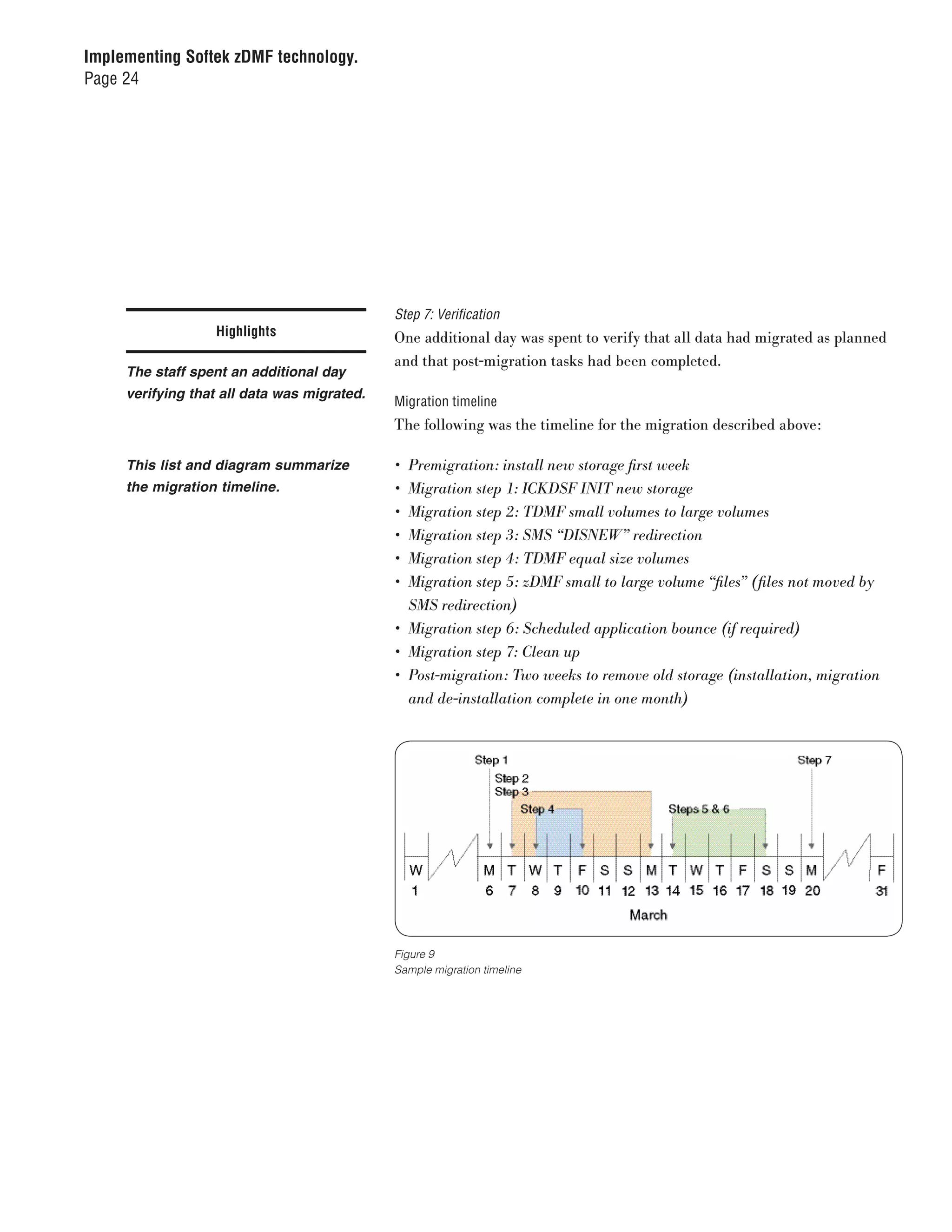
                                             Migration timeline
                                             The following was the timeline for the migration described above:

     This list and diagram summarize         •	 Premigration:	install	new	storage	first	week
     the migration timeline.                 •	 Migration	step	1:	ICKDSF	INIT	new	storage
                                             •	 Migration	step	2:	TDMF	small	volumes	to	large	volumes
                                             •	 Migration	step	3:	SMS	“DISNEW”	redirection
                                             •	 Migration	step	4:	TDMF	equal	size	volumes
                                             •	 Migration	step	5:	zDMF	small	to	large	volume	“files”	(files	not	moved	by	
                                                SMS	redirection)
                                             •	 Migration	step	6:	Scheduled	application	bounce	(if	required)
                                             •	 Migration	step	7:	Clean	up
                                             •	 Post-migration:	Two	weeks	to	remove	old	storage	(installation,	migration	
                                                and	de-installation	complete	in	one	month)


                                             Figure 9
                                             Sample migration timeline
Implementing Softek zDMF technology.
Page 25


                                       Performance considerations
                  Highlights           TDMF performance management options
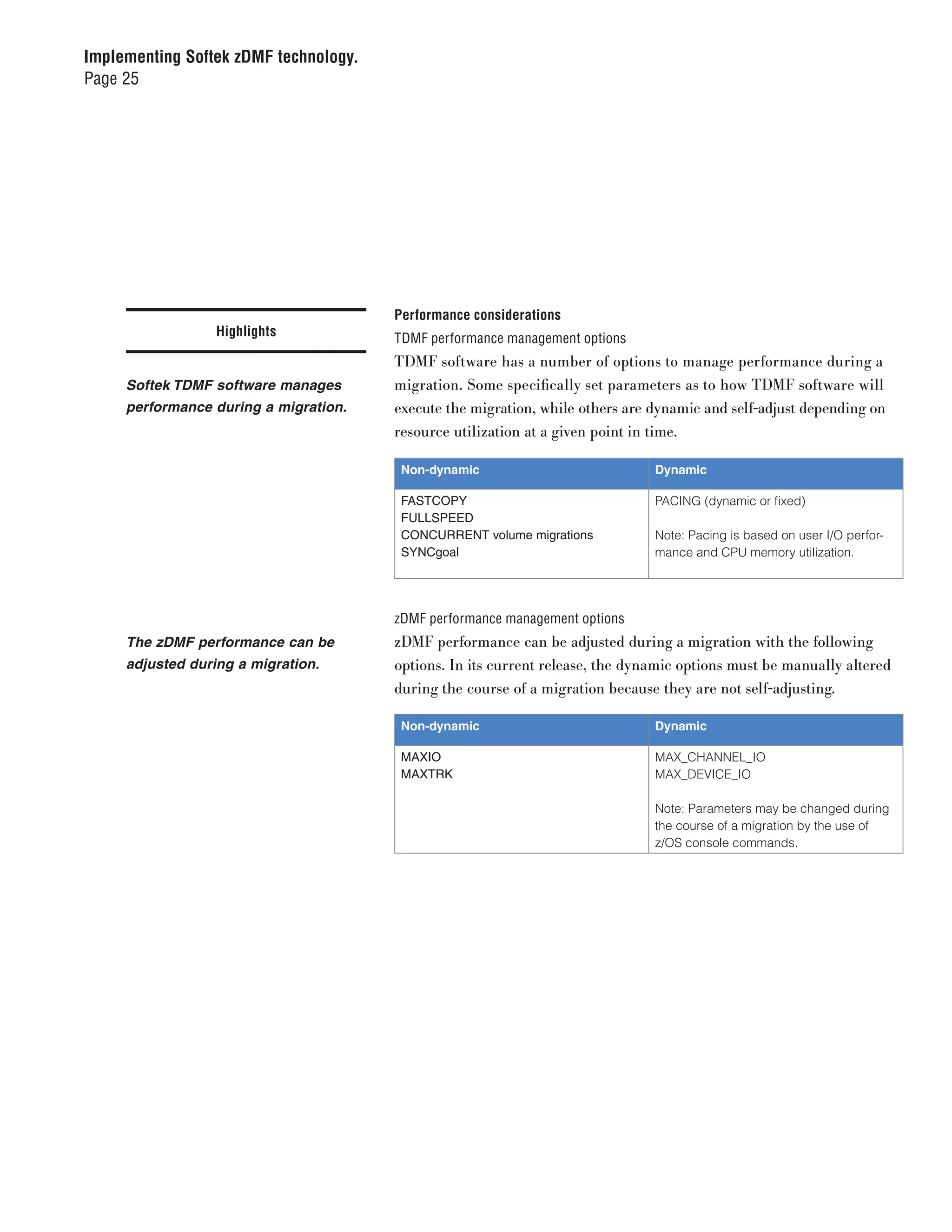
                                       TDMF software has a number of options to manage performance during a
     Softek TDMF software manages      migration. Some specifically set parameters as to how TDMF software will
     performance during a migration.   execute the migration, while others are dynamic and self-adjust depending on
                                       resource utilization at a given point in time.

                                        Non-dynamic                            Dynamic

                                        FASTCOPY                               PACING (dynamic or fixed)
                                        FULLSPEED
                                        CONCURRENT volume migrations           Note: Pacing is based on user I/O perfor-
                                        SYNCgoal                               mance and CPU memory utilization.


                                       zDMF performance management options
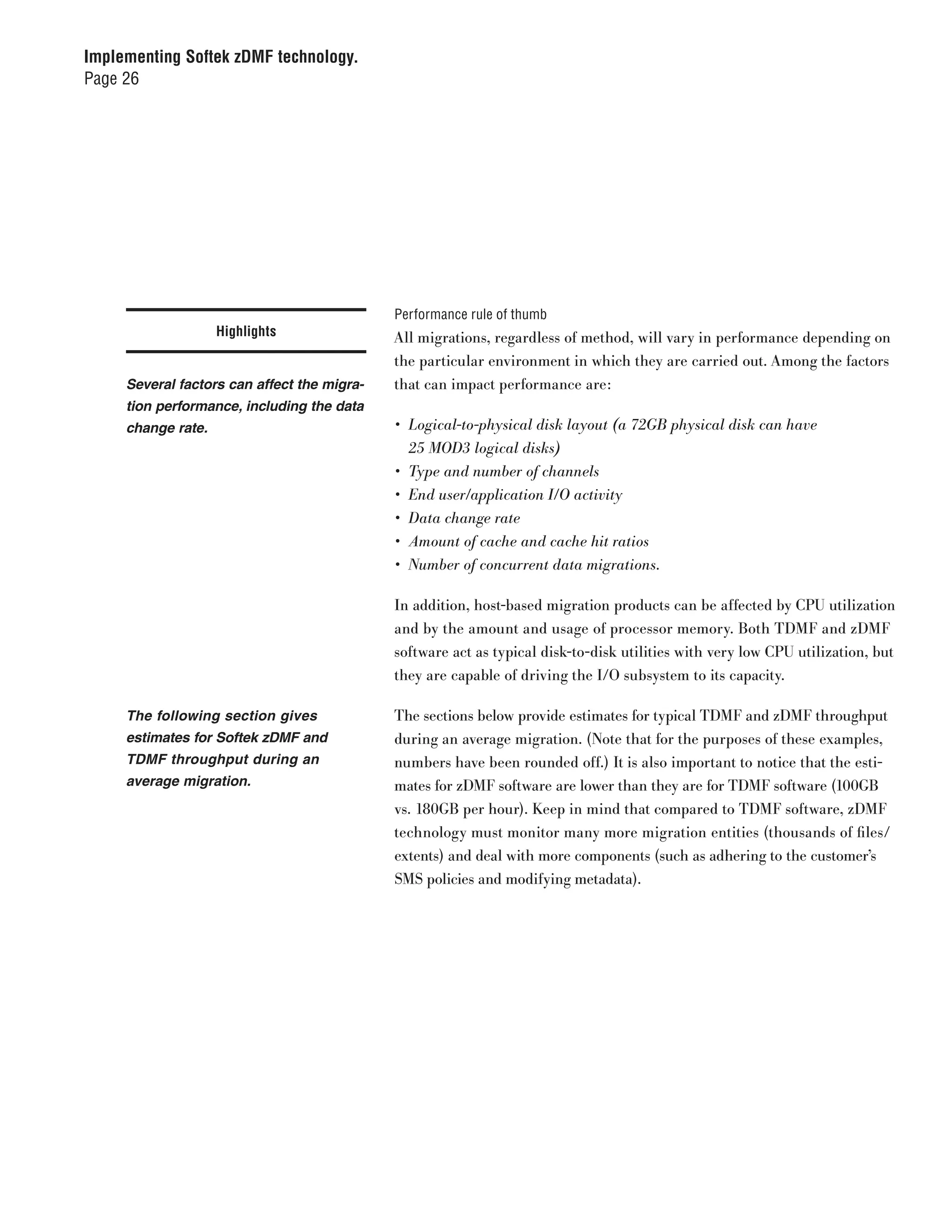
     The zDMF performance can be       zDMF performance can be adjusted during a migration with the following
     adjusted during a migration.      options. In its current release, the dynamic options must be manually altered
                                       during the course of a migration because they are not self-adjusting.

                                        Non-dynamic                            Dynamic

                                        MAXIO                                  MAX_CHANNEL_IO
                                        MAXTRK                                 MAX_DEVICE_IO

                                                                               Note: Parameters may be changed during
                                                                               the course of a migration by the use of
                                                                               z/OS console commands.
Implementing Softek zDMF technology.
Page 26


                                             Performance rule of thumb
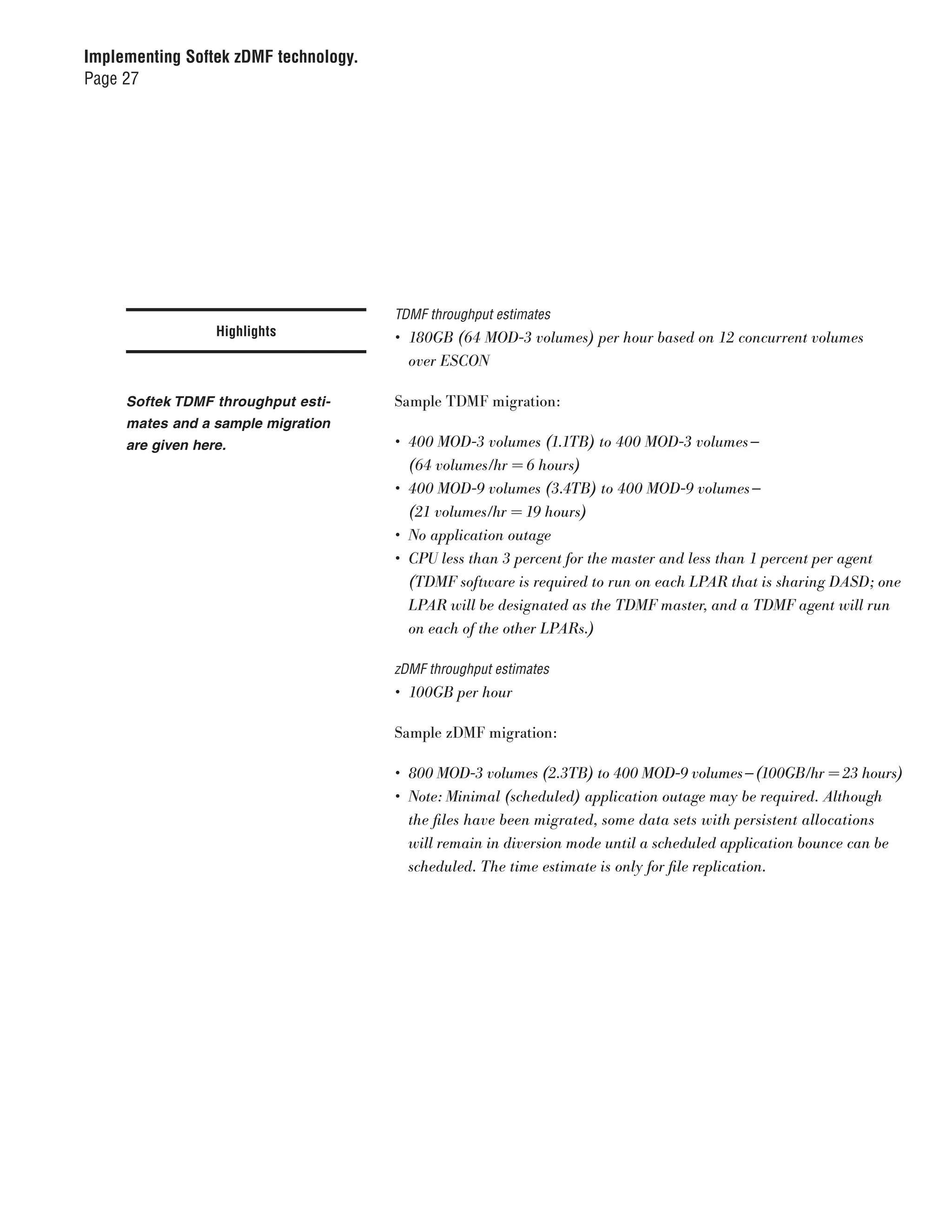
                    Highlights               All migrations, regardless of method, will vary in performance depending on
                                             the particular environment in which they are carried out. Among the factors
     Several factors can affect the migra-   that can impact performance are:
     tion performance, including the data
     change rate.                            •	 Logical-to-physical	disk	layout	(a	72GB	physical	disk	can	have		
                                                25	MOD3	logical	disks)
                                             •	 Type	and	number	of	channels
                                             •	 End	user/application	I/O	activity
                                             •	 Data	change	rate
                                             •	 Amount	of	cache	and	cache	hit	ratios
                                             •	 Number	of	concurrent	data	migrations.

                                             In addition, host-based migration products can be affected by CPU utilization
                                             and by the amount and usage of processor memory. Both TDMF and zDMF
                                             software act as typical disk-to-disk utilities with very low CPU utilization, but
                                             they are capable of driving the I/O subsystem to its capacity.

     The following section gives             The sections below provide estimates for typical TDMF and zDMF throughput
     estimates for Softek zDMF and           during an average migration. (Note that for the purposes of these examples,
     TDMF throughput during an               numbers have been rounded off.) It is also important to notice that the esti-
     average migration.                      mates for zDMF software are lower than they are for TDMF software (100GB
                                             vs. 180GB per hour). Keep in mind that compared to TDMF software, zDMF
                                             technology must monitor many more migration entities (thousands of files/
                                             extents) and deal with more components (such as adhering to the customer’s
                                             SMS policies and modifying metadata).
Implementing Softek zDMF technology.
Page 27


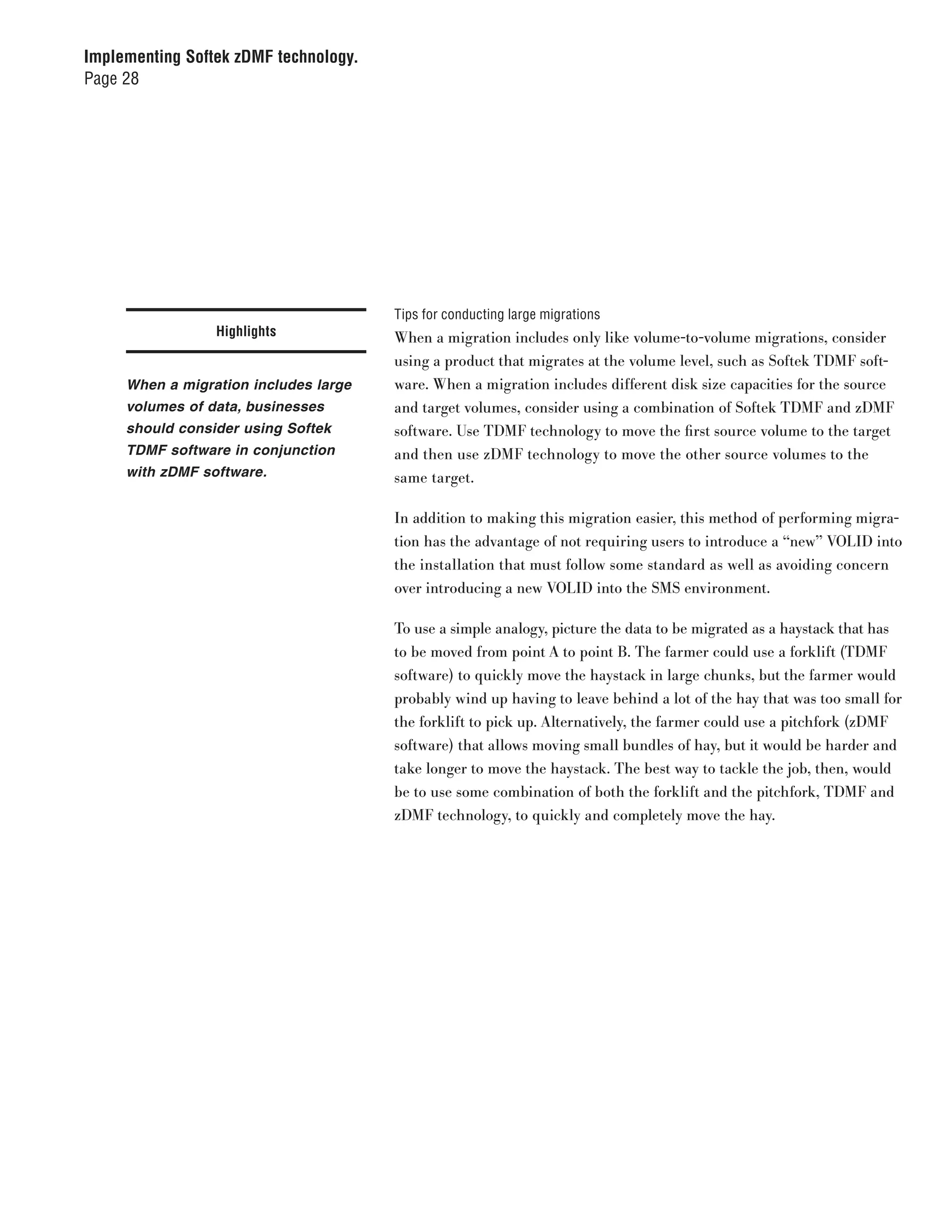
                                       TDMF throughput estimates
                  Highlights           •	 180GB	(64	MOD-3	volumes)	per	hour	based	on	12	concurrent	volumes		
                                          over	ESCON

     Softek TDMF throughput esti-      Sample TDMF migration:
     mates and a sample migration
     are given here.                   •	 400	MOD-3	volumes	(1.1TB)	to	400	MOD-3	volumes —	
                                          (64	volumes/hr	=	6	hours)
                                       •	 400	MOD-9	volumes	(3.4TB)	to	400	MOD-9	volumes —	
                                          (21	volumes/hr	=	19	hours)
                                       •	 No	application	outage
                                       •	 CPU	less	than	3	percent	for	the	master	and	less	than	1	percent	per	agent	
                                          (TDMF	software	is	required	to	run	on	each	LPAR	that	is	sharing	DASD;	one	
                                          LPAR	will	be	designated	as	the	TDMF	master,	and	a	TDMF	agent	will	run	
                                          on	each	of	the	other	LPARs.)

                                       zDMF throughput estimates
                                       •	 100GB	per	hour

                                       Sample zDMF migration:

                                       •	 800	MOD-3	volumes	(2.3TB)	to	400	MOD-9	volumes — (100GB/hr	=	23	hours)
                                       •	 Note:	Minimal	(scheduled)	application	outage	may	be	required.	Although	
                                          the	files	have	been	migrated,	some	data	sets	with	persistent	allocations	
                                          will	remain	in	diversion	mode	until	a	scheduled	application	bounce	can	be	
                                          scheduled.	The	time	estimate	is	only	for	file	replication.
Implementing Softek zDMF technology.
Page 28


                                       Tips for conducting large migrations
                 Highlights            When a migration includes only like volume-to-volume migrations, consider
                                       using a product that migrates at the volume level, such as Softek TDMF soft-
     When a migration includes large   ware. When a migration includes different disk size capacities for the source
     volumes of data, businesses       and target volumes, consider using a combination of Softek TDMF and zDMF
     should consider using Softek      software. Use TDMF technology to move the first source volume to the target
     TDMF software in conjunction      and then use zDMF technology to move the other source volumes to the
     with zDMF software.               same target.

                                       In addition to making this migration easier, this method of performing migra-
                                       tion has the advantage of not requiring users to introduce a “new” VOLID into
                                       the installation that must follow some standard as well as avoiding concern
                                       over introducing a new VOLID into the SMS environment.

                                       To use a simple analogy, picture the data to be migrated as a haystack that has
                                       to be moved from point A to point B. The farmer could use a forklift (TDMF
                                       software) to quickly move the haystack in large chunks, but the farmer would
                                       probably wind up having to leave behind a lot of the hay that was too small for
                                       the forklift to pick up. Alternatively, the farmer could use a pitchfork (zDMF
                                       software) that allows moving small bundles of hay, but it would be harder and
                                       take longer to move the haystack. The best way to tackle the job, then, would
                                       be to use some combination of both the forklift and the pitchfork, TDMF and
                                       zDMF technology, to quickly and completely move the hay.
Implementing Softek zDMF technology.
Page 29


                                         Platform support
                 Highlights              •	 TDMF	software:	IBM	OS/390®	2.10	and	all	levels	of	IBM	z/OS
                                         •	 zDMF	software:	IBM	z/OS	1.4	and	higher

                                         Restrictions
     Platform support and restrictions   TDMF software:
     are included here.
                                         •	 Volumes	with	Active	Page	or	Swap	data	sets
                                         •	 Volume	containing	the	active	TDMF	SYSCOM	data	set	for	the	session

                                         zDMF software:

                                         •	 System	type	data	sets	(e.g.,	data	sets	in	LinkList	or	APF	authorized	to		
                                            a	specific	volume)
                                         •	 VSAM	KSDS	files	with	IMBED,	KEYRANGE	and	REPLICATE	defined
                                         •	 Catalogues
                                         •	 ISAM	data	sets
                                         •	 Individual	members	within	a	partitioned	data	set	(PDS)
                                         •	 UNIX®	System	Services	(USS)	HFS	or	zFS	data	sets
                                         •	 Page	data	sets
                                         •	 Undefined	data	sets	(DSORG=U	or	DSORG=PSU)
                                         •	 VSAM	Volume	data	sets	(VVDS)
                                         •	 VTOCs
                                         •	 Temporary	(&&)	data	sets
Implementing Softek zDMF technology.
Page 30


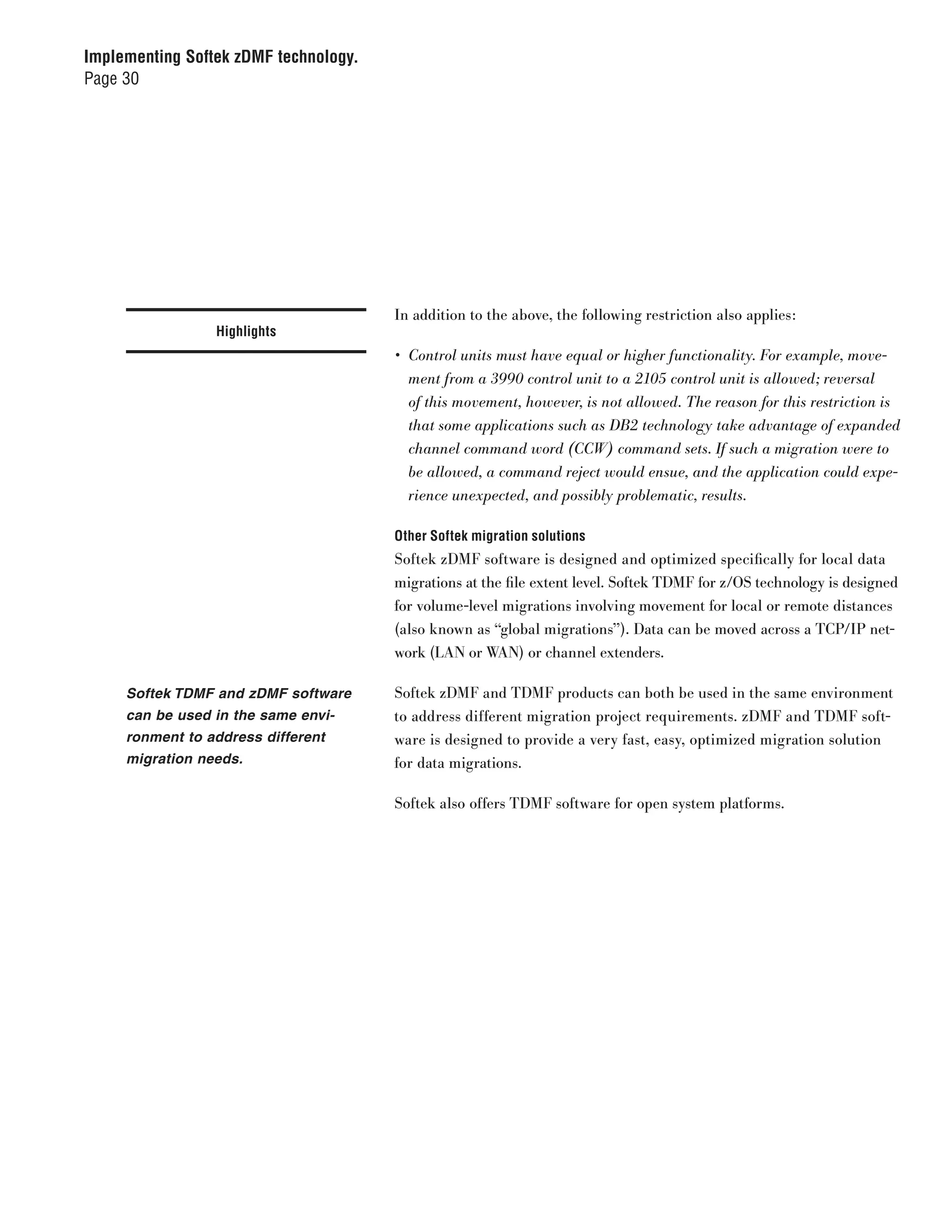
                                       In addition to the above, the following restriction also applies:
                 Highlights
                                       •	 Control	units	must	have	equal	or	higher	functionality.	For	example,	move-
                                          ment	from	a	3990	control	unit	to	a	2105	control	unit	is	allowed;	reversal	
                                          of	this	movement,	however,	is	not	allowed.	The	reason	for	this	restriction	is	
                                          that	some	applications	such	as	DB2	technology	take	advantage	of	expanded	
                                          channel	command	word	(CCW)	command	sets.	If	such	a	migration	were	to	
                                          be	allowed,	a	command	reject	would	ensue,	and	the	application	could	expe-
                                          rience	unexpected,	and	possibly	problematic,	results.

                                       Other Softek migration solutions
                                       Softek zDMF software is designed and optimized specifically for local data
                                       migrations at the file extent level. Softek TDMF for z/OS technology is designed
                                       for volume-level migrations involving movement for local or remote distances
                                       (also known as “global migrations”). Data can be moved across a TCP/IP net-
                                       work (LAN or WAN) or channel extenders.

     Softek TDMF and zDMF software     Softek zDMF and TDMF products can both be used in the same environment
     can be used in the same envi-     to address different migration project requirements. zDMF and TDMF soft-
     ronment to address different      ware is designed to provide a very fast, easy, optimized migration solution
     migration needs.                  for data migrations.

                                       Softek also offers TDMF software for open system platforms.
Implementing Softek zDMF technology.
Page 31


                                       Summary
                 Highlights            IT organizations looking to take advantage of large-capacity volumes on today’s
                                       high-performance storage subsystems are faced with complex and disrup-
     zDMF software is designed to      tive data conversions that can have a negative impact on important business
     support the needs of today’s      applications. zDMF software can give users the power to consolidate data onto
     24x7 business environment.        large-capacity volumes without interruption to the 24x7 business environment.

                                       zDMF software can help ensure that applications maintain maximum availabil-
                                       ity even as the underlying storage infrastructure is phased out and taken offline.
                                       zDMF software was designed specifically to help customers, storage vendors and
                                       integrators successfully and quickly move to new storage technology.

                                       For more information
                                       For more information about implementing Softek zDMF technology, visit:

                                       ibm.com/services/datamobility
© Copyright IBM Corporation 2008

  IBM Global Services
  Route 100
  Somers, NY 10589
  U.S.A.

  Produced in the United States of America
  06-08
  All Rights Reserved

  IBM, the IBM logo, CICS, DB2, zDMF, Nonstop Data
  Mobility, OS/390, Softek, TDMF and z/OS are trade-
  marks or registered trademarks of International
  Business Corporation and other companies in the
  United States, other countries, or both.

  Microsoft is a trademark of Microsoft Corporation
  in the United States, other countries, or both.

  UNIX is a registered trademark of The Open
  Group in the United States and other countries.

  Other company, product and service names may
  be trademarks or service marks of others.

  References in this publication to IBM products or
  services do not imply that IBM intends to make them
  available in all countries in which IBM operates.

  Performance/capacity results or other technical
  statistics appearing in this document are provided
  by the author solely for the purposes of illustrat-
  ing specific technical concepts relating to the
  Softek products discussed herein. The perfor-
  mance/capacity results or other technical statistics
  published herein do not constitute or represent a
  warranty as to merchantability, operation, or fitness
  of any Softek product for any particular purpose.


  SDW03009-USEN-02

Implementing Softek zDMF technology.

  • 1.
    IBM Global TechnologyServices June 2008 Implementing Softek zDMF technology. Supporting simple, effective and nondisruptive data migrations
  • 2.
    Implementing Softek zDMFtechnology. Page 2 Introduction Contents In the mainframe industry, there are many data migration products and many ways to migrate data. Some are controller based or appliance based, while 2 Introduction others are host based. This paper focuses on host-based migration products, 3 zDMF capabilities as they provide the most flexibility and the fewest operational restrictions. In 5 zDMF architecture most cases, it is helpful to use combinations of products or tools to accomplish 8 The zDMF migration process a migration, because no one tool can do everything exactly the way the user 19 A typical migration may desire. 25 Performance considerations 29 Platform support For example, the user may want to migrate from older to newer technology 29 Restrictions while, at the same time, moving to larger-capacity devices such as from an 30 Other Softek migration 3390-3 device to a 3390-9 system. One option in this scenario would be to solutions have IBM’s System Managed Storage (SMS) do the migration with redirection, 31 Summary but this would not move files that have not been deleted and reallocated in a timely manner. Another option would be to use Hierarchical Storage Management (HSM) to migrate files after they have been archived and recalled. But again, if the files are in use, HSM would not archive the files. And, in most cases, it would be necessary to take manual action to adjust HSM policies and then reset them after a migration. Other scenarios could include the use of a disk copy utility such as Data Facility Data Set Services (DFDSS) at the disk and/or file level. However, as with the above scenarios, there is the issue of files being in use, not to mention the manual effort of building the control cards and finding an extended window for conducting the migration.
  • 3.
    Implementing Softek zDMFtechnology. Page 3 To address some of these issues, Softek developed z/OS® Dataset Highlights Mobility Facility (zDMF) technology, host-based software that can move data at the file/extent level between Direct Access Storage Device (DASD) volumes without interrupting the applications that read/write to those Softek zDMF technology can help volumes. zDMF software can work with virtually any vendor’s storage that may with several different types of local or may not be under SMS control in a shared or non-shared DASD environment data migrations. including sysplexes. zDMF software is ideal for the following types of local data migrations: • Technology refresh, especially in heterogeneous or high-availability environments • Migrations from smaller to larger volumes • Implementation of tiered storage • Consolidation of storage • Dynamic data movement to fix performance problems (e.g., moving files from storage hot spots) The sections that follow provide a general overview of zDMF software’s capabilities, architecture and migration process. They also sketch a sample migration scenario and discuss performance factors. zDMF capabilities Simplicity of design zDMF technology’s distinct value is its simplicity. Built from the ground up as a fully integrated product, it features components that are designed to execute flawlessly together. zDMF software is designed to be simple to install, simple to use and simple to maintain.
  • 4.
    Implementing Softek zDMFtechnology. Page 4 Nondisruptive switch Highlights zDMF software’s key differentiator is its ability to nondisruptively switch the source and target files, which moves the applications dynamically onto new Softek zDMF software can dynami- storage. This switchover feature, which occurs under user control, results in cally move applications onto new redirection of an application’s input/output (I/O) function (e.g., from the origi- storage by nondisruptively switch- nal source to the target). This occurs without any disruption to the application. ing the source and target files. Until the redirection, zDMF software continues to synchronously write to the source and target volumes, allowing fallback (the ability to fall back to the original source volume) at any time. Volumes that are no longer in applications’ I/O path can be taken offline without disruption. For the current release of zDMF technology, a small application bounce may be required after the migration in order to free up the original disk space. The bounce would be needed only for applications that have a persistent file allocation; it can be scheduled to occur when a window is available. Migration tuning parameters The software can control the migra- In order to adjust the performance impact on applications during a migration, tion rate using several parameters. zDMF software provides the ability to control migration rate using the follow- ing parameters: • MAXIO (determines the maximum overall I/O concurrency) • MAX_CHANNEL_ IO (determines the maximum I/O concurrency per channel path) • MAX_DEVICE_ IO (determines the maximum I/O concurrency per individual device) • MAXTRK (specifies the size of the I/O operation in tracks that zDMF software will use)
  • 5.
    Implementing Softek zDMFtechnology. Page 5 Migration groups Highlights zDMF software supports the definition and concurrent migration of thousands of files. Because migration projects may involve several hundred files sup- zDMF software can migrate thou- porting a range of application types, zDMF technology provides the ability to sands of files concurrently and logically group files for efficient operational control. Each group’s migration enables monitoring of the process. parameters are independently configured and controlled to best suit the business applications supported. Monitoring features zDMF provides the ability to monitor the migration process from start to finish. Statistics include details such as elapsed time, copy rate and percent- age complete. Shared DASD zDMF works in a shared DASD environment. The DASD can be shared by individual LPARs running on multiple physical CPUs, shared within a sysplex or shared across a multiple sysplex environment. New Extended Address Volume functionality Softek zDMF software’s first two zDMF can streamline large-scale migrations via new Extended Address components are the zDMF TSO Volume functionality, which exceeds the previous industry-standard storage Monitor and zDMF server. capacity of 65 cylinders. zDMF architecture zDMF technology consists of four major components: • zDMF TSO Monitor: This is a user interface to establish a migration, issue commands and control migrations. zDMF software also offers a command line interface (CLI). • zDMF server: The server is a primary component of the zDMF product framework. The zDMF server is a z/OS Started Task that must run on each system that has access to the data that will be migrated.
  • 6.
    Implementing Softek zDMFtechnology. Page 6 • zDMF I/O monitor: A subcomponent of the zDMF server. The zDMF Highlights I/O monitor is responsible for monitoring all I/O activity to source data sets (extents). The second two components • zDMF database: This file is used to store and share information about are the zDMF I/O monitor and zDMF data migration activity. The zDMF database is used by the zDMF zDMF database. server to store and communicate migration information across all 10708881 zDMF Components Figure 3 participating systems. TSO Monitor zDMF/Server MVS/W zDMF/Server MVS/X zDMF/Server MVS/A zDMF/Server MVS/Y zDMF/Server zDMF/Server MVS/V MVS/Z ESCON/FICON Director zDMF Database Figure 1 The zDMF components
  • 7.
    Implementing Softek zDMFtechnology. Page 7 zDMF migration elements Highlights To facilitate data migration at the logical data level, zDMF software must understand the z/OS metadata structures that describe the logical data being Four items make up the metadata migrated. It must also be able to manipulate and update the metadata dynami- including the volume table of cally while applications and the system continue to access and modify the data. contents, VTOCIX, VSAM volume data set, catalogs and the The following items comprise the metadata in a z/OS system. coupling facility. Volume table of Contains information describing volume contents, including contents (VTOC) information about specific data sets (number of extents, size of extents, starting locations, etc.). VTOCIX Used in conjunction with the VTOC for identifying free space on a volume that is SMS managed. VSAM volume data Introduced with ICF catalogs, this contains information about a set (VVDS) data set similar to what is contained within the VTOC. Additionally, information such as details on VSAM data sets such as relative block addresses (RBA) also is kept here. Catalogs There can be, and usually are, multiple catalogs in a z/OS environ- ment. A data set is most typically catalogued, and this tells the system where the data set is located (volume or volumes on which Metadata structures must be it resides). Catalog information not only is kept on a DASD volume, understood by the zDMF software. but also is kept in memory in the catalog address space (CAS). Coupling facility If enhanced catalog sharing (ECS) is in use, then entries from the VVDS may be cached in the coupling facility.
  • 8.
    Implementing Softek zDMFtechnology. Page 8 The zDMF migration process Highlights After the installation, an administrator can use the zDMF TSO Monitor to establish a migration that performs all the steps of a migration process. The distinct sequence of steps involved in a migration using zDMF software is as described below. Migration steps Description The first four of the eight migration 1. Group definition The data set(s) to be migrated are defined steps are group definition, activa- in a migration group using the TSO Monitor. tion of a migration group, copy 2. Activating a migration group Activating a migration group initiates the phase and synchronization phase. data migration process for the defined migration group. 3. Copy phase Data is asynchronously copied from the source data sets to the target data sets that are defined in a migration group. 4. Synchronization phase All final differences between source and target data sets in a migration group are synchronized and the migration group is prepared for mirroring. 5. Mirror phase The migration group is put into a state of The last four steps are mirror synchronous mirroring. phase, diversion phase, During the mirror phase, updates to source completion phase and post- and target data sets in the migration group completion phase. are applied simultaneously. 6. Diversion phase In this phase, the actual logical relocation of data sets occurs. Source and target data sets, along with the metadata, are modified and all I/O activity is redirected to the new location. At this point, the files have been migrated, and all references and updates to the files will occur at the target location. 7. Completion phase Although the metadata has been modi- fied, applications that were active before diversion will have their I/O redirected to the target location until they de-allocate the data set. For applications that continue to have the original source file allocation, a scheduled bounce will be required in order to free the original space. 8. Post-completion phase Once the migration has completed, migra- tion groups original source data sets and the storage resources they reside upon can be cleaned up.
  • 9.
    Implementing Softek zDMFtechnology. Page 9 Group definition Highlights Before a data migration can begin, a group definition must first be created. A group definition consists of the following: First the migration administrator • Migration group name defines groups and gives them • Migration options basic information. • Source data set(s) • Exclude data set(s) — optional • Target data set(s) zDMF software has the ability to create groups for a migration. The grouping is decided upon by the migration administrator. This makes it easier to control the migration with a single command that is applied to the entire group. It is recommended that the grouping follow some convention, such as by application or by array that is being migrated. The software can group volumes To further refine grouping, zDMF software has the ability to group volumes together to further refine grouping. together. The source volume list name references a user-defined population of source volumes, refer to “Define zDMF Group – Panel 2” and “Define zDMF Group – Panel 3a” below. Define zDMF Group - Panel 1 Define zDMF Group Com mand ===> Scroll ===> CSR Primary Com mands : EXit NExt Group Name . . . . Source Options . . . N Replace Existing Data Sets (Y/N) Y Tolerate Allocation Failure (Y/N) Figure 2 Define zDMF Group – Panel 1
  • 10.
    Implementing Softek zDMFtechnology. Page 10 The zDMF selection criteria for the source data sets can include wild cards. Highlights Care should be taken to make sure that the selection closely reflects the actual data sets that the user intends to migrate. Consider using IEHLIST or ISPF 3.4 Wild cards can be selected for to validate the selection. migration as well as exclusion lists. In further refining the selection criteria, it is possible to build a Data Set Exclude list. An example of this may be to exclude zDMFTEST.** data sets from being migrated after selecting all data sets on a particular volume. This would exclude any data set that starts with a high-level qualifier of zDMF TEST from being migrated. Define zDMF Group - Panel 2 Define zDMF Group Panels 2 and 3a from Softek zDMF Com mand ===> Scroll ===> CSR are shown here. Primary Com mands : EXit NExt Group Name . . . . . . . COCOCO Source Data Set Options . . N Trace (Y/N) N AllocSeq (D/S/N) . Y Sphere (Y/N) N Rename UnConditional (Y/N) . N Build Data Set Exclude List (Y/N) Source Data Set Na me/Mask Source Volume List Na me . . Storage Class . . . . . . Source Volume(s) . . Figure 3 Define zDMF Group – Panel 2 Depending on parameter settings, zDMF software may display one of the fol- lowing panels. Define zDMF Group - Panel 3a Define zDMF Group Com mand ===> Scroll ===> CSR Primary Com mands : EXit NExt Group Na me . . . . . . . Source Volu me List Na me . . . . SPMS13 Source Volu me List Mask SPMS13 Figure 4 Define zDMF Group – Panel 3a
  • 11.
    Implementing Softek zDMFtechnology. Page 11 Highlights Define zDMF Group - Panel 3b Define zDMF Group Com mand ===> Scroll ===> CSR Primary Com mands : EXit IMport NExt Group Name . . . . . . . GROUP002 Data Set Excludes Mask Figure 5 Group definition panels 3b and 3c Define zDMF Group – Panel 3b are shown here. Define zDMF Group - Panel 3c Define zDMF Group Com mand ===> Scroll ===> CSR Primary Com mands : EXit NExt Group Na me . . . . . . . . . Group 002 Rena me Unconditional Prefix (Optional) Rena me Unconditional Mask Pairs Figure 6 Define zDMF Group – Panel 3c
  • 12.
    Implementing Softek zDMFtechnology. Page 12 . . . . . . . After specifying the source data set information, specify the target data set Highlights mask, target volume storage class and/or target volume(s) parameters, as described in “Define zDMF Group – Panel 4.” Define zDMF Group - Panel 4 Panels 4 and 5, shown here, Define zDMF Group Com mand ===> Scroll ===> CSR require information regarding group definition. Primary Com mands : EXit BUild Group Name . . . . . . . COCOCO Target Data Set Na me/Mask . . . . . Target Volume Storage Class. Target Volumes(s). . . . . . Figure 7 Define zDMF Group – Panel 4 Once all the relevant group/pair parameters for the new group definition have been entered, type the BUILD command (or BU), and then press Enter. The new group definition’s configuration information is displayed in “Define zDMF Group – Panel 5.” Define zDMF Group - Panel 5 Define zDMF Group Row 1 to 19 of 21 Com mand ===> Scroll ===> CSR Primary Com mands : EXit MOre EDit SAve VErify PRomote Group (COCOCO) - Mode (LMIGR()) - TOLORATE_ALLOCATION_FAILURE(YES) MAXRC(8) - REPLACE(NO) SOURCE_VOLUME_LIST SPMS13 (- SPMS13 - ] SET - ALLOCSEQ(NONE) - TRACE(NO) - SPHERE(YES) SOURCE ( - DSN (SXM90.zDMF.TEST.*) - SOURCE_VOLUME_LIST SPMS13 - ) TARGET (- DSN (SXM90.zDMF.TEST.*)- VOLUME (- IBM408 - Figure 8 Define zDMF Group – Panel 5
  • 13.
    Implementing Softek zDMFtechnology. Page 13 At this point, the primary commands can be used to add more source data sets to Highlights the group, or the user can edit, save, verify and promote the newly created group. Activating a migration group During the activation phase, the During the activation phase, zDMF software allocates data sets on the target software allocates data sets. volumes. If any errors occur during allocation, the migration group will either terminate the entire group or just the data set(s) that are in error, depending on the Tolerate Allocation Failure option selected when defining the group. Copy phase tasks During the copy phase, zDMF software initiates and performs the following tasks: The copying phase occurs after a • The zDMF server asynchronously copies the source data sets to the target group is activated. data sets. • The zDMF I/O monitor routines monitor all activity to all source data sets and track all modifications to the source data set. • Once the initial copy of source data sets is completed, the zDMF server refreshes the changed data repeatedly until it reaches a point where it can quickly synchronize the source and target data sets with minimal disruption to applications or the system. Once this point is achieved, zDMF software automatically moves to the synchronization phase for this migration group.
  • 14.
    Implementing Softek zDMFtechnology. Page 14 In some instances, a migration group may take some time to complete the Highlights copy phase across all data sets in the migration group. The copy phase hap- pens after the group is activated. Managing performance during the copy phase The zDMF software can dynami- During the copy phase, depending on the size of a migration group, a good cally modify parameters during deal of I/O could possibly be driven by zDMF software. To control the pacing the copy phase. of I/O during the zDMF copy phase, the user can modify parameters that the zDMF server uses. The parameters that can be dynamically modified include the following: • MAX_CHANNEL_ IO • MAX_DEVICE_ IO The optional MAXTRK parameter specifies the size of the I/O operation in tracks that zDMF software should use to transfer data while in copy phase. The MAXTRK value is used to reduce the impact of zDMF software on the application response time immediately following activation. The MAXTRK parameter is defined in the zDMF server startup configuration file for the system that hosts the zDMF owning server.
  • 15.
    Implementing Softek zDMFtechnology. Page 15 Synchronization phase Highlights A migration group enters the synchronization phase when zDMF software determines that it can quickly synchronize all data between source and target The synchronization phase occurs data sets in the migration group without causing disruption to the systems and when the software determines that applications using this data. it can synchronize data without causing system and application During the synchronization phase, zDMF software initiates and performs the disruptions. following tasks: • The zDMF I/O monitor routines dynamically hold all I/O to the source data set so final synchronization can be achieved. • zDMF software copies all remaining differences from the source data sets to the target data sets. At this point, there is very little difference between data sets, and this operation occurs very quickly. • zDMF software allows normal I/O operations to continue once synchroniza- tion has been achieved. Once the mirror state has been indi- When the synchronization phase has completed, the migration group indi- cated and the synchronization phase cates that it is in mirror state. completed, the mirror phase begins. Mirror phase Once the source and target data sets within the migration group have suc- cessfully synchronized, they enter the mirror phase. During the mirror phase, updates to source and target data sets in the migration group are applied simultaneously. If an I/O error occurs at the target volume, the group is sus- pended. Once the mirror phase has been achieved, mirroring continues until one of the following occurs:
  • 16.
    Implementing Softek zDMFtechnology. Page 16 • A Divert command is issued against the migration group. Highlights • A Suspend command is issued against the migration group. Diversion phase Updates to data sets in the The diversion phase executes in two subphases: migration group are applied simultaneously. • Subphase 1: processing of the divert command • Subphase 2: diversion of I/O from active applications to the target data set Subphase 1: processing of the divert command During this subphase, zDMF software modifies all metadata for the source and target data set pairs within the migration group, effectively swapping the identities of the source and target. To accomplish this, zDMF software: During subphase 1 of the diversion • Serializes access to the metadata for collections of data sets catalogued in a phase, zDMF software swaps the particular source/target catalog pair identities of the source and target. • Updates all metadata to accomplish the identity swapping of the source and target data sets: - Modifies all volume-based metadata in the VTOC, VTOCIX and VVDS - Modifies the catalog entries for the source and target data set pairs, and refreshes catalog data buffers for the catalogs involved across all z/OS images in a shared storage complex.
  • 17.
    Implementing Softek zDMFtechnology. Page 17 Subphase 2: diversion of I/O from active applications to target data set Highlights With the source and target data set identities switched, I/O to any of the source data sets previously allocated by ongoing applications is diverted to the During subphase 2, the source target data set instead. It is at this point that the data set(s) has been migrated and target data set identities are from the source to the target volume. All references and I/Os to the data set will switched. All references and I/Os now be to the target volume. are set to the target volume. The original source data set is renamed, is no longer in use and can not be accessed for alteration including being deleted until the migration goes into the completion phase. Note: Once the divert command processing is completed, any new application allocations will automatically be directed to the target data set. Post Migration Completion phase Migration groups will remain in the diversion phase until all applications have relinquished their allocation of migrating data sets and zDMF software no Group completion occurs when all longer has to redirect I/O to the targets. Group completion is achieved by logi- LPARs reach the same state. cal partition (LPAR) in the shared storage complex, depending on the data set usage of the applications on each server. Each server periodically examines allocation information to see if any active address space still has any source data set allocated. Once all such allocations are freed through the normal action or completion of the system or application processing, then it is no longer necessary for zDMF software to divert any I/O. Locally, the zDMF processing is complete for the group. However, the group cannot be marked fully complete until all LPARs reach the same state.
  • 18.
    Implementing Softek zDMFtechnology. Page 18 Identifying address spaces being diverted Highlights Identifying the z/OS address spaces that are being diverted is a simple process with zDMF software. By using the zDMF TSO Monitor Option 2 – Interact zDMF software enables easy With Promoted Groups, the user can display all address spaces that are cur- identification of the z/OS address rently diverted across all z/OS images in a shared storage complex. spaces that are being diverted. Post-completion phase Data migrations in many cases are undertaken to free up a storage resource. Before freed-up resources Post-migration actions with the freed storage resource may include removing can be used, a user must it from the system to return to a leaseholder, or reusing the storage for other initiate post-completion application data needs. Regardless of the reason, before the resources can be storage resource cleanup. reused, the user must take the following actions. Initiate post-completion storage resource cleanup 1. Ensure that the migration group has completed. 2. Delete the migration groups target data sets (renamed original source file on original source volume). 3. Delete the migration group from the zDMF database. When a migration group is deleted, zDMF software performs the following tasks: • The zDMF server ensures that the migration group is in a state that will allow it to be deleted. • The zDMF server removes the migration group from internal z/OS storage (memory). This results in valuable system memory being freed. • The zDMF server deletes the migration group from the zDMF database.
  • 19.
    Implementing Softek zDMFtechnology. Page 19 A typical migration Highlights It is very important to be aware that the most critical phase of any migration is establishing a good migration plan. The more time spent in developing a Developing a thorough plan, the better the odds are of a successful migration. This section details the migration plan is key to a steps of a typical storage migration. As with any complex process, the basic successful migration. questions of why, what, when and how are key to understanding what kind of planning process will be needed for this migration. Example migration scenario: • Why — A technology upgrade is being performed because the current storage A technology upgrade is taking subsystem is coming off lease. place because the current storage • What — Data needed to be migrated from old to new storage. While perform- system is coming off lease. ing this conversion, it was also decided to install some new higher-capacity drives. The migration parameters would be as follows: - 800 MOD-3 to 800 MOD-3 2270GB - 120 MOD-3 to 40 MOD-9 340GB - 200 MOD-9 to 200 MOD-9 1702GB - 240 MOD-9 to 80 MOD-27 2043GB - With 1360 volumes to 1120 volumes, the total is 6355GB. • When — The new subsystem was to arrive and be installed by the first week of March. The old subsystem would come off lease on March 31. To avoid costly storage overlap, management wanted the migration to be completed by the end of March so the old subsystem could be released. • How — It was quickly decided that conventional disk-to-disk copy was not feasible due to the long application outage window that would be required. Also, the vendor’s hardware migration utility was not usable due to compat- The IT organization chose a com- ibility issues going from an Enterprise Systems Connection (ESCON) to Fiber bination of host-based utilities and Connectivity (FICON) on the new subsystem. Ultimately, a combination of products to perform the migration. host-based utilities and products was chosen to perform the migration.
  • 20.
    Implementing Softek zDMFtechnology. Page 20 Because the environment consisted of 80 to 90 percent SMS, the operations Highlights staff believed that they could take advantage of SMS redirection, DFDSS to copy unallocated files (as explained in the section “Executing the migration” below, the operations staff eventually decided to use zDMF software in place of DFDSS), Softek Transparent Data Migration Facility (TDMF™) for volume- level migrations, and Softek zDMF for allocated files. Selection logic The Softek products were selected by the manager of infrastructure stor- age based on colleagues’ recommendations, as the manager has never used Softek products before. In addition, the fact that Softek products are designed to support vendor-neutral, nondisruptive migration and received a strong endorsement from the storage vendor made for a fairly easy decision. Executing the migration Using Softek software, the team It was decided to perform the most complex migration first, i.e., migrating the decided to perform the most com- smaller to larger volumes. There were a number of reasons for this, which are plex migration first. highlighted below. Step 1: ICKDSF Minimal Init Rather than initializing the new volumes with VOLID that corresponded to their naming convention and including them in the proper SMS storage pool, operations would simply do an ICKDSF Minimal Init with a VOLID of XXucb#. No SMS updates are done to include these volumes in the SMS pools. Step 2: Migrating smaller to larger volumes with TDMF Migrating the smaller volumes to a TDMF software was used to migrate the first smaller volume to a larger volume, larger volume first eliminated pro- i.e., one MOD-9 to a MOD-27. This had the advantage of completing one-third duction disruption. of the migration that required resizing of capacity without any disruption to production. It took less than one hour to migrate 40 MOD-3 to MOD-9 vol- umes and about four hours to migrate 80 MOD-9 to MOD-27 volumes.
  • 21.
    Implementing Softek zDMFtechnology. Page 21 As the source VOLID was being copied to the target volume, no SMS changes Highlights needed to occur because the volume was already part of their desired SMS rules. Also, the VOLID naming standards followed to the new volume. TDMF Dynamic ICKDSF EXTVTOC Function The ICKDSF EXTVTOC option The ICKDSF EXTVTOC option is only invoked if migrating from allows the user to specify the one size device to a different size device (e.g., smaller to larger) or if number of tracks for the VTOC. a volume had been previously migrated and no REFVTOC had been performed. Only indexed VTOCs are extended. Nonindexed VTOCs, including volumes with damaged indexes, will be “REFVTOCed.” The user can specify a specific number of tracks for the VTOC, or TDMF software can use its own algorithm as follows: The minimum size of the new VTOC is the greater of the current VTOC size on the source and target. The VTOC may be extended further depending on the number of data sets on the volume: • If the volume is less than half full, the VTOC will be extended to contain the current numbers of data sets multiplied by the ratio of target to source device size, plus 25 percent. • If the volume is more than half full, the VTOC will be expanded to handle the situation where the target volume is full of data sets with the same average size. If the index needs to be extended, but the VTOC does not, Softek TDMF software will attempt to extend the VTOC by one track. If the VTOC cannot be extended because there is a data set adjacent to it, REFVTOC will be performed, unless there is insufficient space in the index for the additional VPSMS. Softek TDMF migration was set up to dynamically invoke ICKDSF to reformat and expand a volume’s VTOC. This function is performed when the source VTOC characteristics do not match those of the target device.
  • 22.
    Implementing Softek zDMFtechnology. Page 22 Step 3: Migrating using SMS processes Highlights The remaining two-thirds of the source volumes that had been designated as part of the consolidation to larger-capacity volumes were placed in SMS “DISNEW” status. This would automatically migrate files that were deleted and reallocated during daily and weekly production runs to the new higher- capacity devices. Also this would prevent SMS from allocating any new files/extents on the old volumes. Next, the IT staff began migration Operations staff could now go on to their other migration tasks and let normal using SMS processes. SMS routines manage moving many of the files. At some point, they would need to revisit this task to determine which files SMS did not migrate. Step 4: Migrating volumes one for one using TDMF The fourth step involved migrating In this step, operations staff used TDMF software to migrate the remaining volumes using Softek TDMF software. disks that were one for one. This included 800 MOD-3 to MOD-3 and 200 MOD-9 to MOD-9 DASD. Upon completion of the TDMF migration, operations started the zDMF migration to finalize data migration requirements in step three above that SMS did not migrate. Note: The TDMF migration in step four took three days to accomplish, working only during regular business hours (8 a.m. to 5 p.m., Monday through Friday). Additional time with no migration activity was allowed so that SMS could reallocate many files to the higher-capacity devices as described in step three.
  • 23.
    Implementing Softek zDMFtechnology. Page 23 Step 5: Migrating using zDMF Highlights The only migration that remained to be performed was of the files that had not been reallocated by SMS to higher-capacity disks during steps one through four. Next, the teams migrated files that This migration would be completed by zDMF software. were not reallocated. The files that remained were files that had not been through a processing cycle, such as weekly job run; files that had been created a long time ago and never got deleted; and files that were constantly in use such as the IBM DB2® and IBM CICS® files. Consideration was given to using DFDSS to migrate the remaining files not in allocation, but it was determined that by using zDMF software, operations staff could accomplish the same thing and also handle data sets that were in use at the same time. In addition, zDMF software also provided the flexibility of allowing data sets to go through allocation during this process, whereas DFDSS would have had periodic allocation issues as production continued to run. Step 6: Completion The completion of the migration All files except the ones with persistent allocations were migrated to comple- involved files that remained in tion. The files that remained in zDMF diversion mode were identified using diversion mode. the zDMF TSO Monitor; those applications were then scheduled to be bounced over the weekend. Once zDMF software completed all data set migrations, the storage migration project to the new technology was complete.
  • 24.
    Implementing Softek zDMFtechnology. Page 24 Step 7: Verification Highlights One additional day was spent to verify that all data had migrated as planned and that post-migration tasks had been completed. The staff spent an additional day verifying that all data was migrated. Migration timeline The following was the timeline for the migration described above: This list and diagram summarize • Premigration: install new storage first week the migration timeline. • Migration step 1: ICKDSF INIT new storage • Migration step 2: TDMF small volumes to large volumes • Migration step 3: SMS “DISNEW” redirection • Migration step 4: TDMF equal size volumes • Migration step 5: zDMF small to large volume “files” (files not moved by SMS redirection) • Migration step 6: Scheduled application bounce (if required) • Migration step 7: Clean up • Post-migration: Two weeks to remove old storage (installation, migration and de-installation complete in one month) Figure 9 Sample migration timeline
  • 25.
    Implementing Softek zDMFtechnology. Page 25 Performance considerations Highlights TDMF performance management options TDMF software has a number of options to manage performance during a Softek TDMF software manages migration. Some specifically set parameters as to how TDMF software will performance during a migration. execute the migration, while others are dynamic and self-adjust depending on resource utilization at a given point in time. Non-dynamic Dynamic FASTCOPY PACING (dynamic or fixed) FULLSPEED CONCURRENT volume migrations Note: Pacing is based on user I/O perfor- SYNCgoal mance and CPU memory utilization. zDMF performance management options The zDMF performance can be zDMF performance can be adjusted during a migration with the following adjusted during a migration. options. In its current release, the dynamic options must be manually altered during the course of a migration because they are not self-adjusting. Non-dynamic Dynamic MAXIO MAX_CHANNEL_IO MAXTRK MAX_DEVICE_IO Note: Parameters may be changed during the course of a migration by the use of z/OS console commands.
  • 26.
    Implementing Softek zDMFtechnology. Page 26 Performance rule of thumb Highlights All migrations, regardless of method, will vary in performance depending on the particular environment in which they are carried out. Among the factors Several factors can affect the migra- that can impact performance are: tion performance, including the data change rate. • Logical-to-physical disk layout (a 72GB physical disk can have 25 MOD3 logical disks) • Type and number of channels • End user/application I/O activity • Data change rate • Amount of cache and cache hit ratios • Number of concurrent data migrations. In addition, host-based migration products can be affected by CPU utilization and by the amount and usage of processor memory. Both TDMF and zDMF software act as typical disk-to-disk utilities with very low CPU utilization, but they are capable of driving the I/O subsystem to its capacity. The following section gives The sections below provide estimates for typical TDMF and zDMF throughput estimates for Softek zDMF and during an average migration. (Note that for the purposes of these examples, TDMF throughput during an numbers have been rounded off.) It is also important to notice that the esti- average migration. mates for zDMF software are lower than they are for TDMF software (100GB vs. 180GB per hour). Keep in mind that compared to TDMF software, zDMF technology must monitor many more migration entities (thousands of files/ extents) and deal with more components (such as adhering to the customer’s SMS policies and modifying metadata).
  • 27.
    Implementing Softek zDMFtechnology. Page 27 TDMF throughput estimates Highlights • 180GB (64 MOD-3 volumes) per hour based on 12 concurrent volumes over ESCON Softek TDMF throughput esti- Sample TDMF migration: mates and a sample migration are given here. • 400 MOD-3 volumes (1.1TB) to 400 MOD-3 volumes — (64 volumes/hr = 6 hours) • 400 MOD-9 volumes (3.4TB) to 400 MOD-9 volumes — (21 volumes/hr = 19 hours) • No application outage • CPU less than 3 percent for the master and less than 1 percent per agent (TDMF software is required to run on each LPAR that is sharing DASD; one LPAR will be designated as the TDMF master, and a TDMF agent will run on each of the other LPARs.) zDMF throughput estimates • 100GB per hour Sample zDMF migration: • 800 MOD-3 volumes (2.3TB) to 400 MOD-9 volumes — (100GB/hr = 23 hours) • Note: Minimal (scheduled) application outage may be required. Although the files have been migrated, some data sets with persistent allocations will remain in diversion mode until a scheduled application bounce can be scheduled. The time estimate is only for file replication.
  • 28.
    Implementing Softek zDMFtechnology. Page 28 Tips for conducting large migrations Highlights When a migration includes only like volume-to-volume migrations, consider using a product that migrates at the volume level, such as Softek TDMF soft- When a migration includes large ware. When a migration includes different disk size capacities for the source volumes of data, businesses and target volumes, consider using a combination of Softek TDMF and zDMF should consider using Softek software. Use TDMF technology to move the first source volume to the target TDMF software in conjunction and then use zDMF technology to move the other source volumes to the with zDMF software. same target. In addition to making this migration easier, this method of performing migra- tion has the advantage of not requiring users to introduce a “new” VOLID into the installation that must follow some standard as well as avoiding concern over introducing a new VOLID into the SMS environment. To use a simple analogy, picture the data to be migrated as a haystack that has to be moved from point A to point B. The farmer could use a forklift (TDMF software) to quickly move the haystack in large chunks, but the farmer would probably wind up having to leave behind a lot of the hay that was too small for the forklift to pick up. Alternatively, the farmer could use a pitchfork (zDMF software) that allows moving small bundles of hay, but it would be harder and take longer to move the haystack. The best way to tackle the job, then, would be to use some combination of both the forklift and the pitchfork, TDMF and zDMF technology, to quickly and completely move the hay.
  • 29.
    Implementing Softek zDMFtechnology. Page 29 Platform support Highlights • TDMF software: IBM OS/390® 2.10 and all levels of IBM z/OS • zDMF software: IBM z/OS 1.4 and higher Restrictions Platform support and restrictions TDMF software: are included here. • Volumes with Active Page or Swap data sets • Volume containing the active TDMF SYSCOM data set for the session zDMF software: • System type data sets (e.g., data sets in LinkList or APF authorized to a specific volume) • VSAM KSDS files with IMBED, KEYRANGE and REPLICATE defined • Catalogues • ISAM data sets • Individual members within a partitioned data set (PDS) • UNIX® System Services (USS) HFS or zFS data sets • Page data sets • Undefined data sets (DSORG=U or DSORG=PSU) • VSAM Volume data sets (VVDS) • VTOCs • Temporary (&&) data sets
  • 30.
    Implementing Softek zDMFtechnology. Page 30 In addition to the above, the following restriction also applies: Highlights • Control units must have equal or higher functionality. For example, move- ment from a 3990 control unit to a 2105 control unit is allowed; reversal of this movement, however, is not allowed. The reason for this restriction is that some applications such as DB2 technology take advantage of expanded channel command word (CCW) command sets. If such a migration were to be allowed, a command reject would ensue, and the application could expe- rience unexpected, and possibly problematic, results. Other Softek migration solutions Softek zDMF software is designed and optimized specifically for local data migrations at the file extent level. Softek TDMF for z/OS technology is designed for volume-level migrations involving movement for local or remote distances (also known as “global migrations”). Data can be moved across a TCP/IP net- work (LAN or WAN) or channel extenders. Softek TDMF and zDMF software Softek zDMF and TDMF products can both be used in the same environment can be used in the same envi- to address different migration project requirements. zDMF and TDMF soft- ronment to address different ware is designed to provide a very fast, easy, optimized migration solution migration needs. for data migrations. Softek also offers TDMF software for open system platforms.
  • 31.
    Implementing Softek zDMFtechnology. Page 31 Summary Highlights IT organizations looking to take advantage of large-capacity volumes on today’s high-performance storage subsystems are faced with complex and disrup- zDMF software is designed to tive data conversions that can have a negative impact on important business support the needs of today’s applications. zDMF software can give users the power to consolidate data onto 24x7 business environment. large-capacity volumes without interruption to the 24x7 business environment. zDMF software can help ensure that applications maintain maximum availabil- ity even as the underlying storage infrastructure is phased out and taken offline. zDMF software was designed specifically to help customers, storage vendors and integrators successfully and quickly move to new storage technology. For more information For more information about implementing Softek zDMF technology, visit: ibm.com/services/datamobility
  • 32.
    © Copyright IBMCorporation 2008 IBM Global Services Route 100 Somers, NY 10589 U.S.A. Produced in the United States of America 06-08 All Rights Reserved IBM, the IBM logo, CICS, DB2, zDMF, Nonstop Data Mobility, OS/390, Softek, TDMF and z/OS are trade- marks or registered trademarks of International Business Corporation and other companies in the United States, other countries, or both. Microsoft is a trademark of Microsoft Corporation in the United States, other countries, or both. UNIX is a registered trademark of The Open Group in the United States and other countries. Other company, product and service names may be trademarks or service marks of others. References in this publication to IBM products or services do not imply that IBM intends to make them available in all countries in which IBM operates. Performance/capacity results or other technical statistics appearing in this document are provided by the author solely for the purposes of illustrat- ing specific technical concepts relating to the Softek products discussed herein. The perfor- mance/capacity results or other technical statistics published herein do not constitute or represent a warranty as to merchantability, operation, or fitness of any Softek product for any particular purpose. SDW03009-USEN-02