Chapter 9
Strings
Copyright © 2006 Pearson Addison-Wesley. All rights reserved. 9-2
Learning Objectives
 An Array Type for Strings
C-Strings
 Character Manipulation Tools
Character I/O
get, put member functions
putback, peek, ignore
 Standard Class string
String processing
Copyright © 2006 Pearson Addison-Wesley. All rights reserved. 9-3
Introduction
 Two string types:
 C-strings
Array with base type char
End of string marked with null, "0"
"Older" method inherited from C
 String class
Uses templates
Copyright © 2006 Pearson Addison-Wesley. All rights reserved. 9-4
C-Strings
 Array with base type char
One character per indexed variable
One extra character: "0"
Called "null character"
End marker
 We’ve used c-strings
Literal "Hello" stored as c-string
Copyright © 2006 Pearson Addison-Wesley. All rights reserved. 9-5
C-String Variable
 Array of characters:
char s[10];
 Declares a c-string variable to hold up to
9 characters
 + one null character
 Typically "partially-filled" array
 Declare large enough to hold max-size string
 Indicate end with null
 Only difference from standard array:
 Must contain null character
Copyright © 2006 Pearson Addison-Wesley. All rights reserved. 9-6
C-String Storage
 A standard array:
char s[10];
If s contains string "Hi Mom", stored as:
Display, page 370
Copyright © 2006 Pearson Addison-Wesley. All rights reserved. 9-7
C-String Initialization
 Can initialize c-string:
char myMessage[20] = "Hi there.";
 Needn’t fill entire array
 Initialization places "0" at end
 Can omit array-size:
char shortString[] = "abc";
 Automatically makes size one more than
length of quoted string
 NOT same as:
char shortString[] = {"a", "b", "c"};
Copyright © 2006 Pearson Addison-Wesley. All rights reserved. 9-8
C-String Indexes
 A c-string IS an array
 Can access indexed variables of:
char ourString[5] = "Hi";
ourString[0] is "H"
ourString[1] is "i"
ourString[2] is "0"
ourString[3] is unknown
ourString[4] is unknown
Copyright © 2006 Pearson Addison-Wesley. All rights reserved. 9-9
C-String Index Manipulation
 Can manipulate indexed variables
char happyString[7] = "DoBeDo";
happyString[6] = "Z";
Be careful!
Here, "0" (null) was overwritten by a "Z"!
 If null overwritten, c-string no longer
"acts" like c-string!
Unpredictable results!
Copyright © 2006 Pearson Addison-Wesley. All rights reserved. 9-10
Library
 Declaring c-strings
Requires no C++ library
Built into standard C++
 Manipulations
Require library <cstring>
Typically included when using c-strings
Normally want to do "fun" things with them
Copyright © 2006 Pearson Addison-Wesley. All rights reserved. 9-11
= and == with C-strings
 C-strings not like other variables
 Cannot assign or compare:
char aString[10];
aString = "Hello"; // ILLEGAL!
 Can ONLY use "=" at declaration of c-string!
 Must use library function for assignment:
strcpy(aString, "Hello");
 Built-in function (in <cstring>)
 Sets value of aString equal to "Hello"
 NO checks for size!
 Up to programmer, just like other arrays!
Copyright © 2006 Pearson Addison-Wesley. All rights reserved. 9-12
Comparing C-strings
 Also cannot use operator ==
char aString[10] = "Hello";
char anotherString[10] = "Goodbye";
aString == anotherString; // NOT allowed!
 Must use library function again:
if (strcmp(aString, anotherString))
cout << "Strings NOT same.";
else
cout << "Strings are same.";
Copyright © 2006 Pearson Addison-Wesley. All rights reserved. 9-13
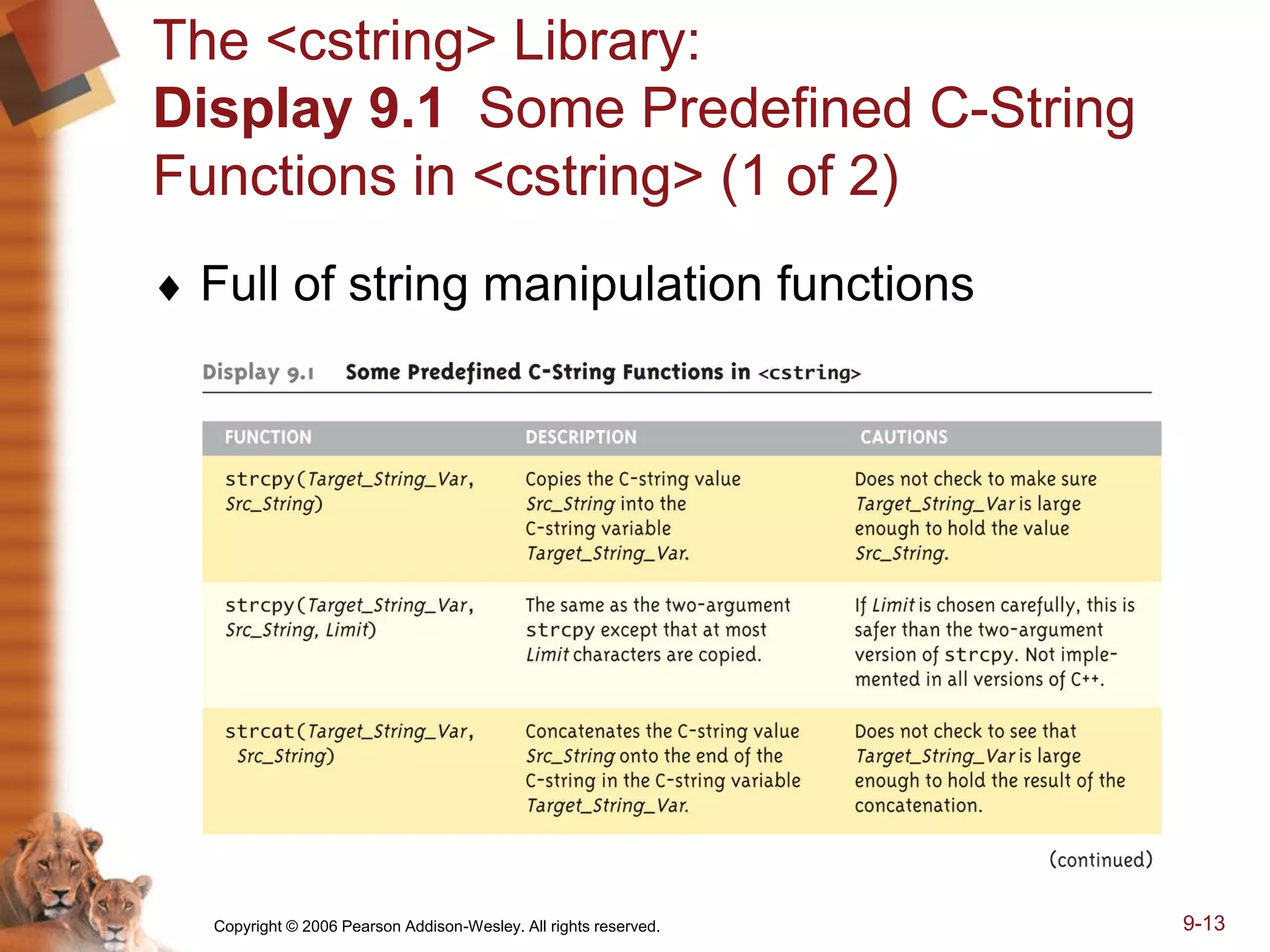
The <cstring> Library:
Display 9.1 Some Predefined C-String
Functions in <cstring> (1 of 2)
 Full of string manipulation functions
Copyright © 2006 Pearson Addison-Wesley. All rights reserved. 9-14
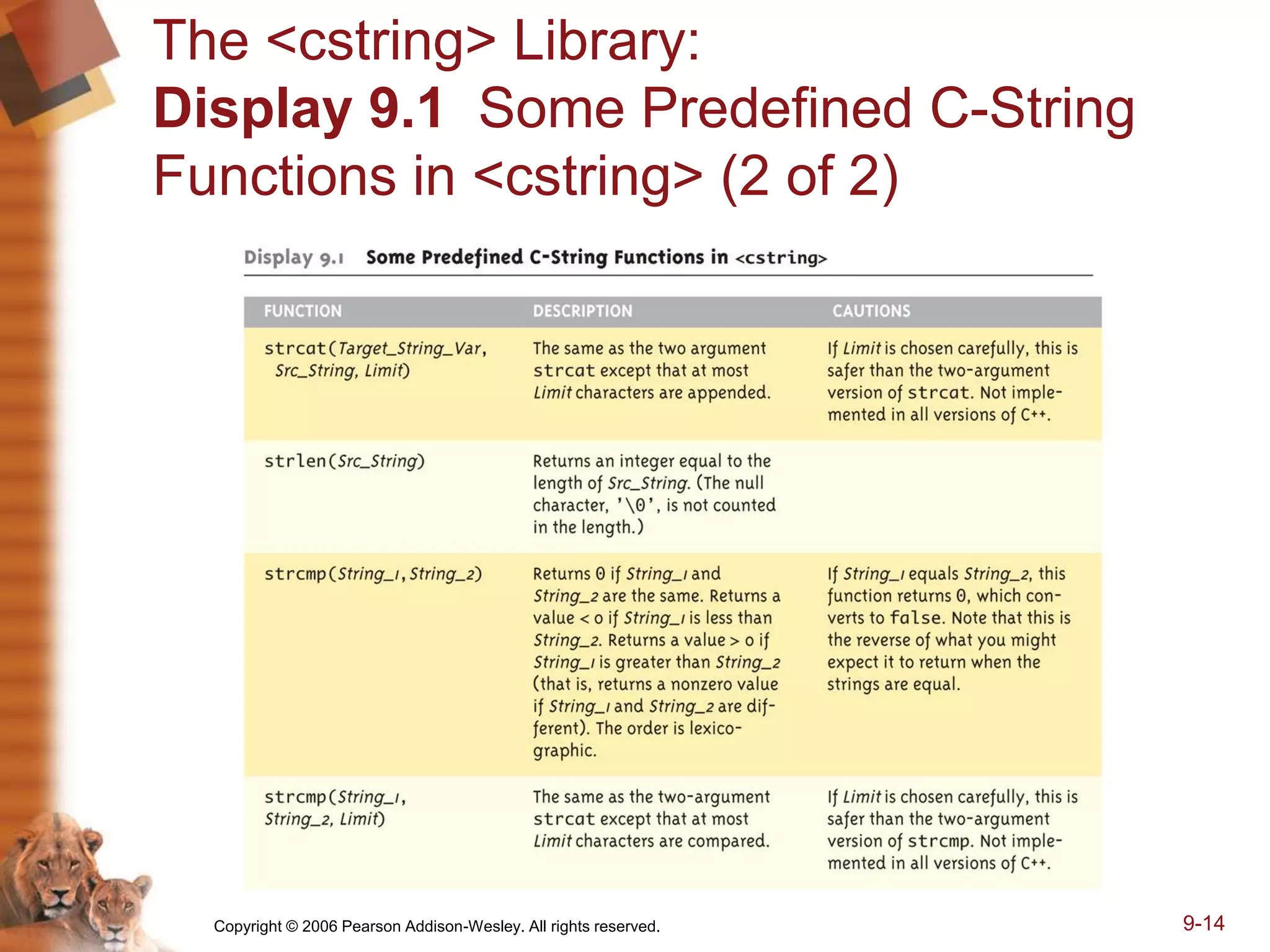
The <cstring> Library:
Display 9.1 Some Predefined C-String
Functions in <cstring> (2 of 2)
Copyright © 2006 Pearson Addison-Wesley. All rights reserved. 9-15
C-string Functions: strlen()
 "String length"
 Often useful to know string length:
char myString[10] = "dobedo";
cout << strlen(myString);
Returns number of characters
Not including null
Result here:
6
Copyright © 2006 Pearson Addison-Wesley. All rights reserved. 9-16
C-string Functions: strcat()
 strcat()
 "String concatenate":
char stringVar[20] = "The rain";
strcat(stringVar, "in Spain");
Note result:
stringVar now contains "The rainin Spain"
Be careful!
Incorporate spaces as needed!
Copyright © 2006 Pearson Addison-Wesley. All rights reserved. 9-17
C-string Arguments and Parameters
 Recall: c-string is array
 So c-string parameter is array parameter
 C-strings passed to functions can be changed
by receiving function!
 Like all arrays, typical to send size as well
 Function "could" also use "0" to find end
 So size not necessary if function won’t change
c-string parameter
 Use "const" modifier to protect c-string arguments
Copyright © 2006 Pearson Addison-Wesley. All rights reserved. 9-18
C-String Output
 Can output with insertion operator, <<
 As we’ve been doing already:
cout << news << " Wow.n";
Where news is a c-string variable
 Possible because << operator is
overloaded for c-strings!
Copyright © 2006 Pearson Addison-Wesley. All rights reserved. 9-19
C-String Input
 Can input with extraction operator, >>
Issues exist, however
 Whitespace is "delimiter"
Tab, space, line breaks are "skipped"
Input reading "stops" at delimiter
 Watch size of c-string
Must be large enough to hold entered string!
C++ gives no warnings of such issues!
Copyright © 2006 Pearson Addison-Wesley. All rights reserved. 9-20
C-String Input Example
 char a[80], b[80];
cout << "Enter input: ";
cin >> a >> b;
cout << a << b << "END OF OUTPUTn";
 Dialogue offered:
Enter input: Do be do to you!
DobeEND OF OUTPUT
 Note: Underlined portion typed at keyboard
 C-string a receives: "do"
 C-string b receives: "be"
Copyright © 2006 Pearson Addison-Wesley. All rights reserved. 9-21
C-String Line Input
 Can receive entire line into c-string
 Use getline(), a predefined member function:
char a[80];
cout << "Enter input: ";
cin.getline(a, 80);
cout << a << "END OF OUTPUTn";
 Dialogue:
Enter input: Do be do to you!
Do be do to you!END OF INPUT
Copyright © 2006 Pearson Addison-Wesley. All rights reserved. 9-22
More getline()
 Can explicitly tell length to receive:
char shortString[5];
cout << "Enter input: ";
cin.getline(shortString, 5);
cout << shortString << "END OF OUTPUTn";
Results:
Enter input: dobedowap
dobeEND OF OUTPUT
Forces FOUR characters only be read
Recall need for null character!
Copyright © 2006 Pearson Addison-Wesley. All rights reserved. 9-23
Character I/O
 Input and output data
ALL treated as character data
e.g., number 10 outputted as "1" and "0"
Conversion done automatically
Uses low-level utilities
 Can use same low-level utilities
ourselves as well
Copyright © 2006 Pearson Addison-Wesley. All rights reserved. 9-24
Member Function get()
 Reads one char at a time
 Member function of cin object:
char nextSymbol;
cin.get(nextSymbol);
Reads next char & puts in variable
nextSymbol
Argument must be char type
Not "string"!
Copyright © 2006 Pearson Addison-Wesley. All rights reserved. 9-25
Member Function put()
 Outputs one character at a time
 Member function of cout object:
 Examples:
cout.put("a");
Outputs letter "a" to screen
char myString[10] = "Hello";
cout.put(myString[1]);
Outputs letter "e" to screen
Copyright © 2006 Pearson Addison-Wesley. All rights reserved. 9-26
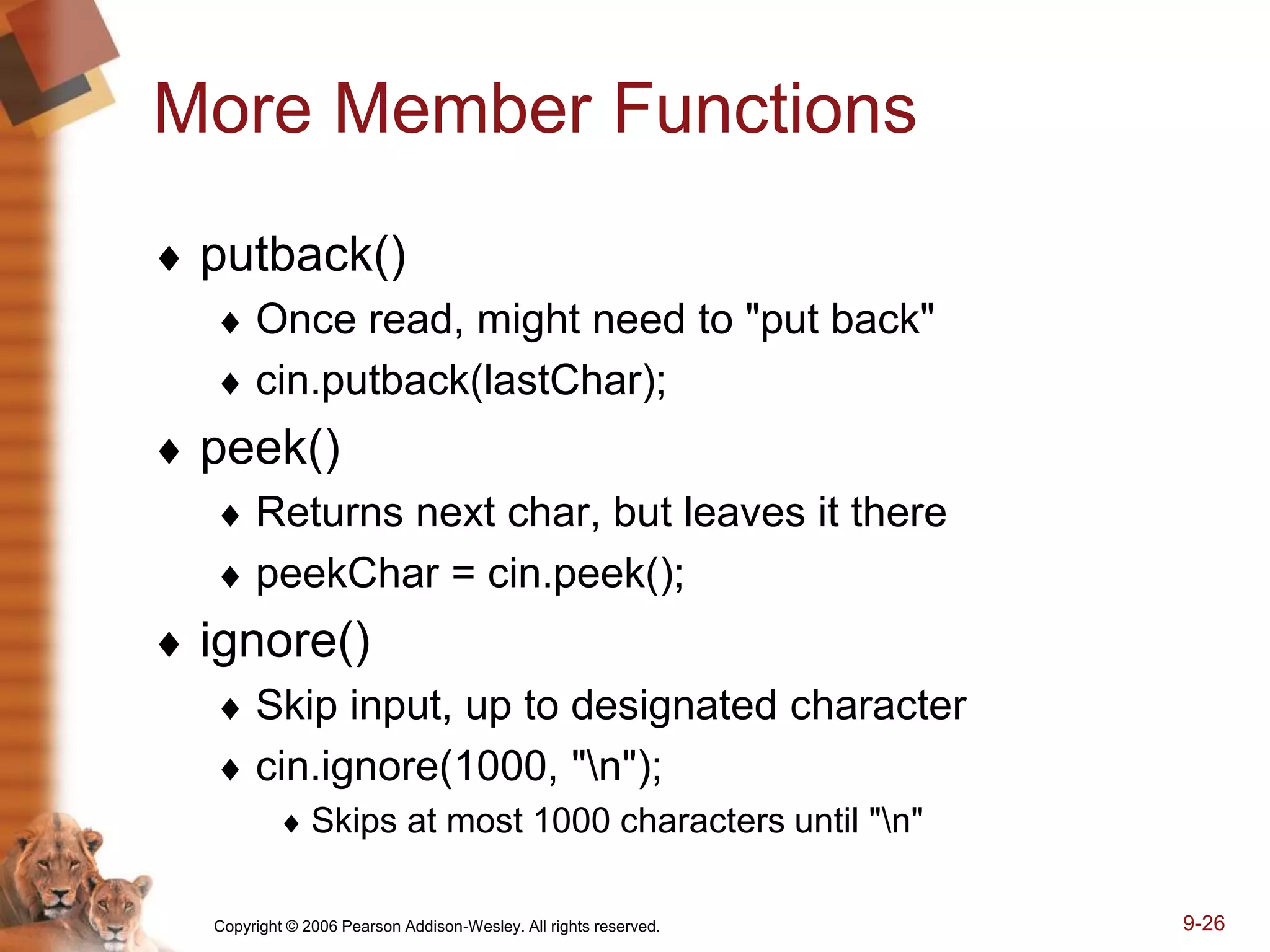
More Member Functions
 putback()
 Once read, might need to "put back"
 cin.putback(lastChar);
 peek()
 Returns next char, but leaves it there
 peekChar = cin.peek();
 ignore()
 Skip input, up to designated character
 cin.ignore(1000, "n");
 Skips at most 1000 characters until "n"
Copyright © 2006 Pearson Addison-Wesley. All rights reserved. 9-27
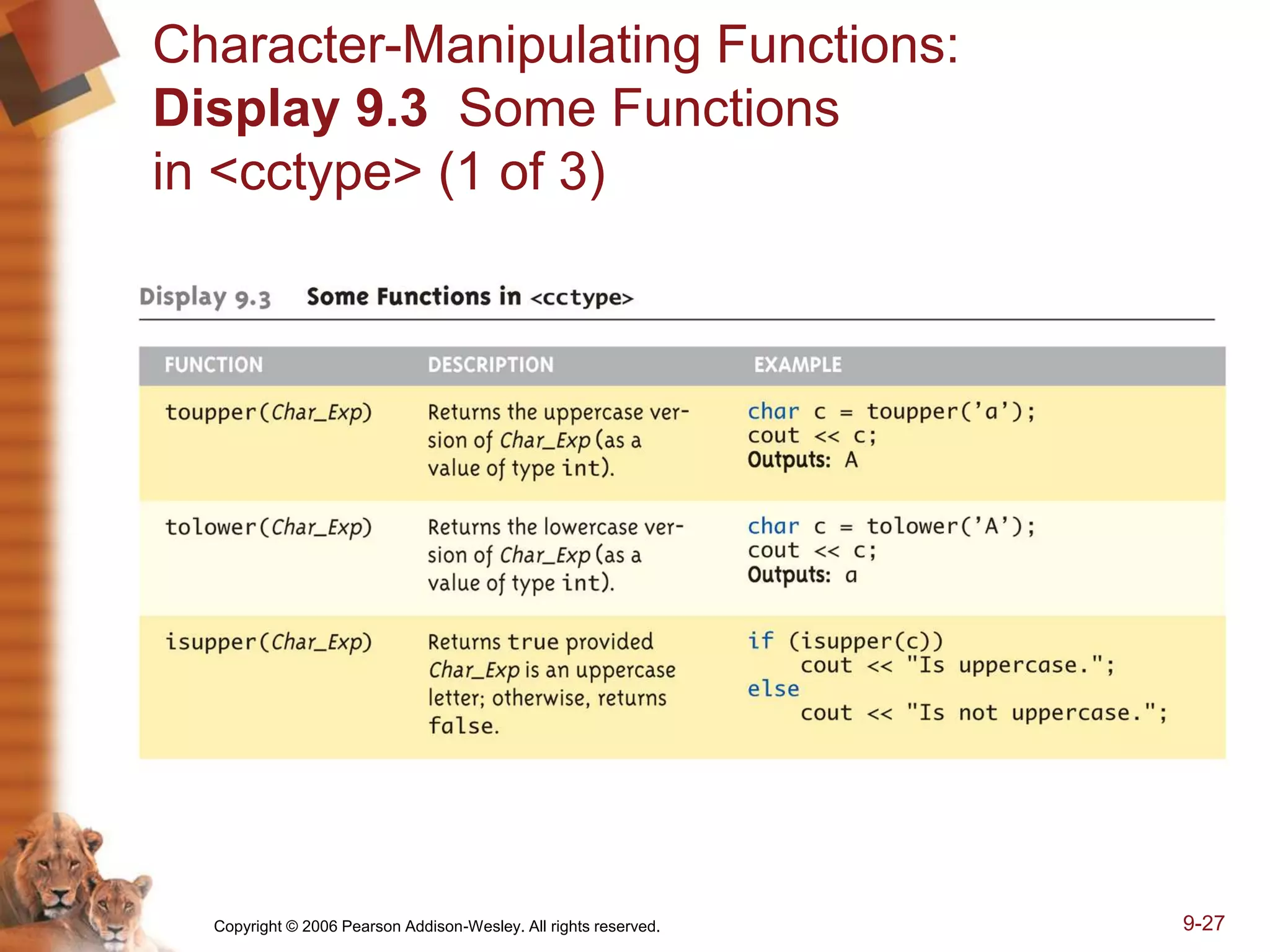
Character-Manipulating Functions:
Display 9.3 Some Functions
in <cctype> (1 of 3)
Copyright © 2006 Pearson Addison-Wesley. All rights reserved. 9-28
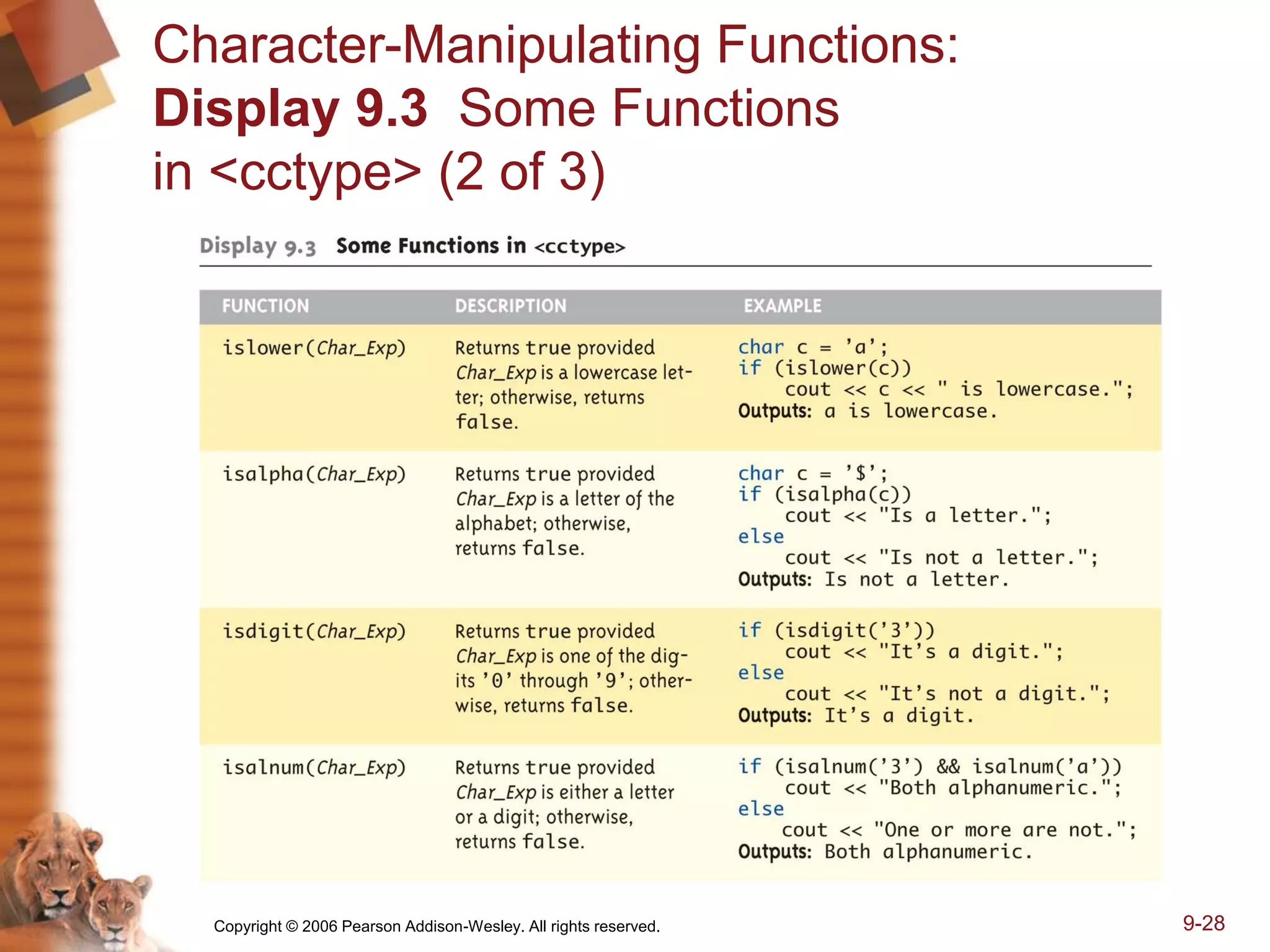
Character-Manipulating Functions:
Display 9.3 Some Functions
in <cctype> (2 of 3)
Copyright © 2006 Pearson Addison-Wesley. All rights reserved. 9-29
Character-Manipulating Functions:
Display 9.3 Some Functions
in <cctype> (3 of 3)
Copyright © 2006 Pearson Addison-Wesley. All rights reserved. 9-30
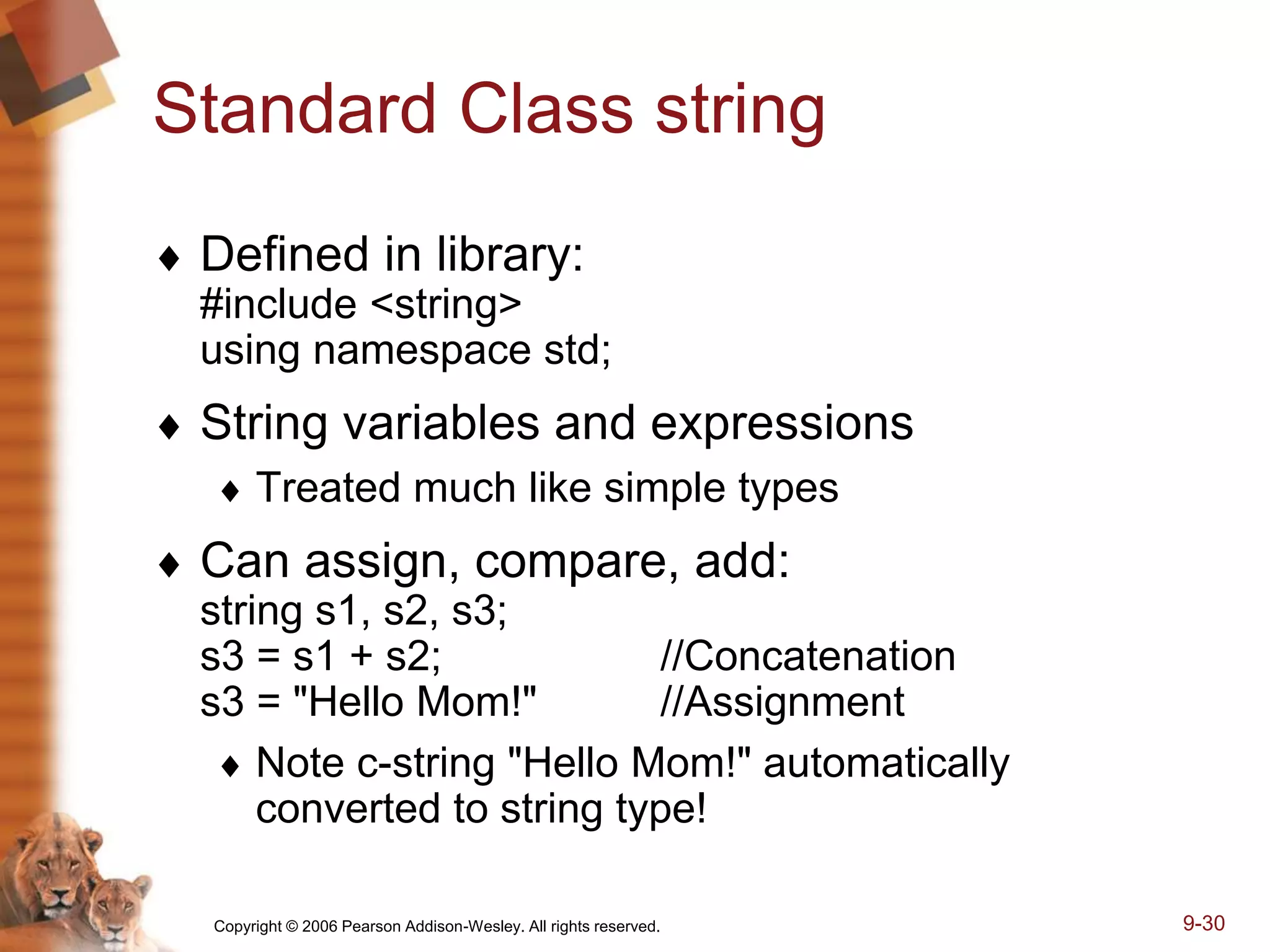
Standard Class string
 Defined in library:
#include <string>
using namespace std;
 String variables and expressions
 Treated much like simple types
 Can assign, compare, add:
string s1, s2, s3;
s3 = s1 + s2; //Concatenation
s3 = "Hello Mom!" //Assignment
 Note c-string "Hello Mom!" automatically
converted to string type!
Copyright © 2006 Pearson Addison-Wesley. All rights reserved. 9-31
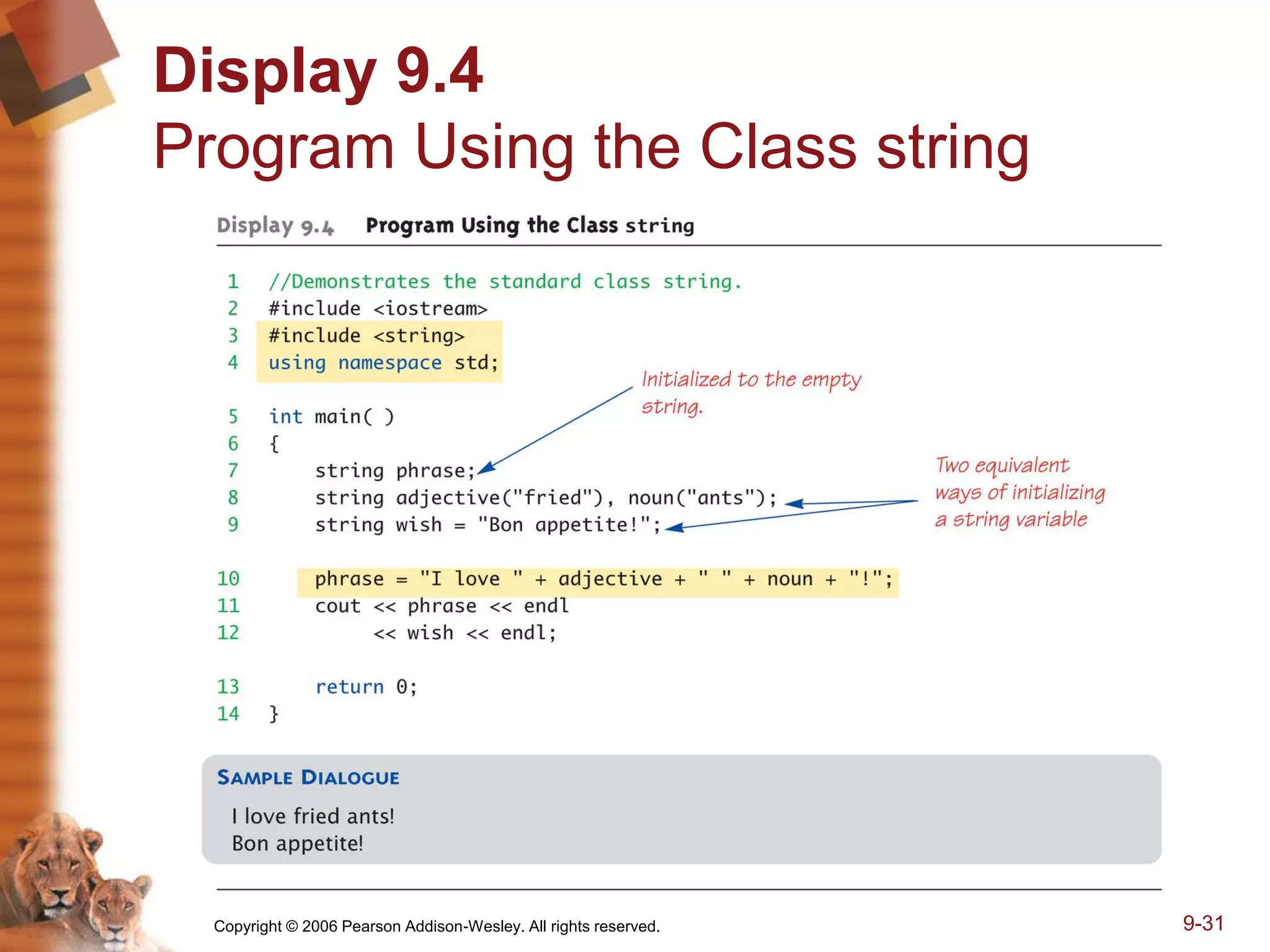
Display 9.4
Program Using the Class string
Copyright © 2006 Pearson Addison-Wesley. All rights reserved. 9-32
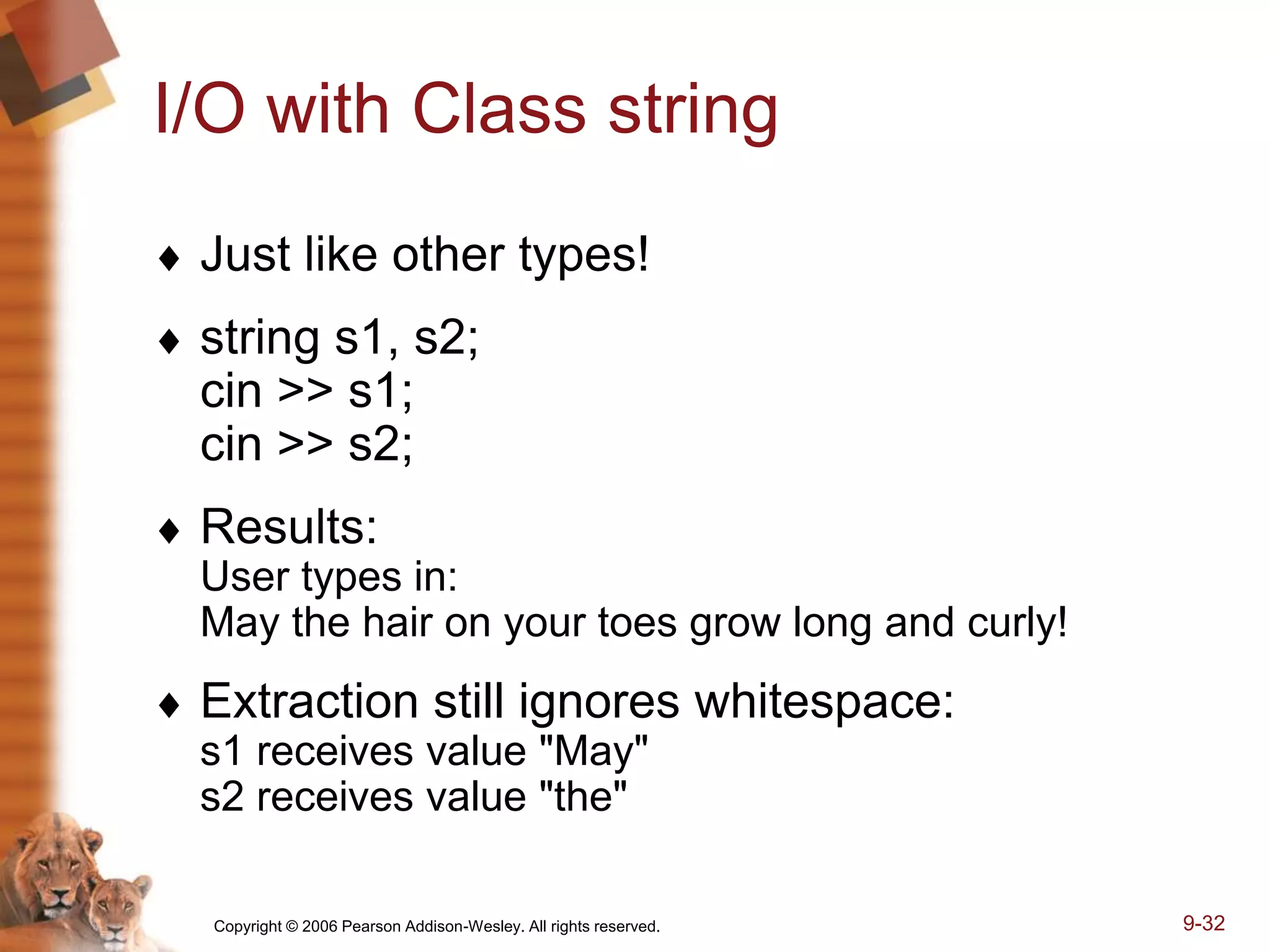
I/O with Class string
 Just like other types!
 string s1, s2;
cin >> s1;
cin >> s2;
 Results:
User types in:
May the hair on your toes grow long and curly!
 Extraction still ignores whitespace:
s1 receives value "May"
s2 receives value "the"
Copyright © 2006 Pearson Addison-Wesley. All rights reserved. 9-33
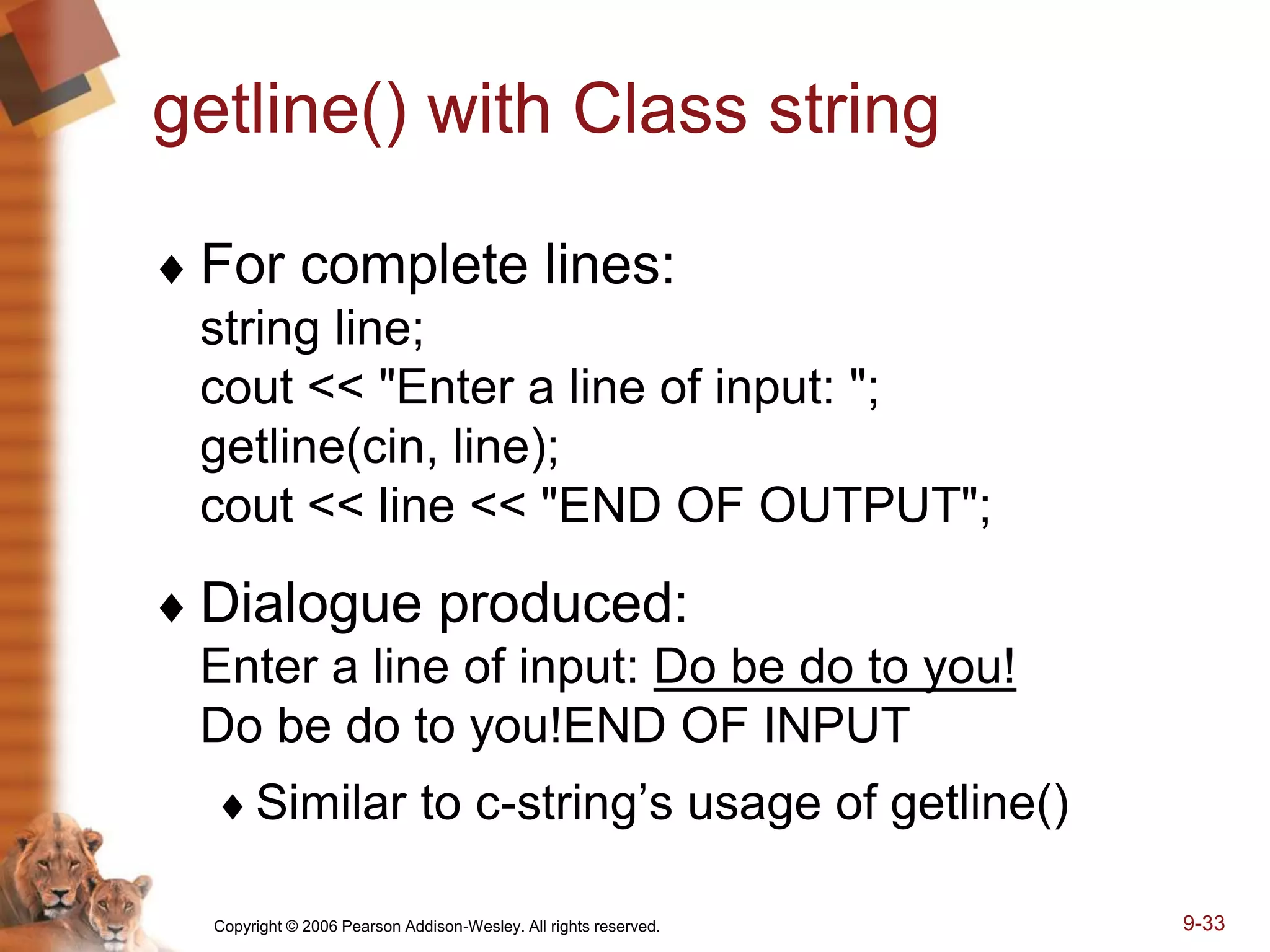
getline() with Class string
 For complete lines:
string line;
cout << "Enter a line of input: ";
getline(cin, line);
cout << line << "END OF OUTPUT";
 Dialogue produced:
Enter a line of input: Do be do to you!
Do be do to you!END OF INPUT
Similar to c-string’s usage of getline()
Copyright © 2006 Pearson Addison-Wesley. All rights reserved. 9-34
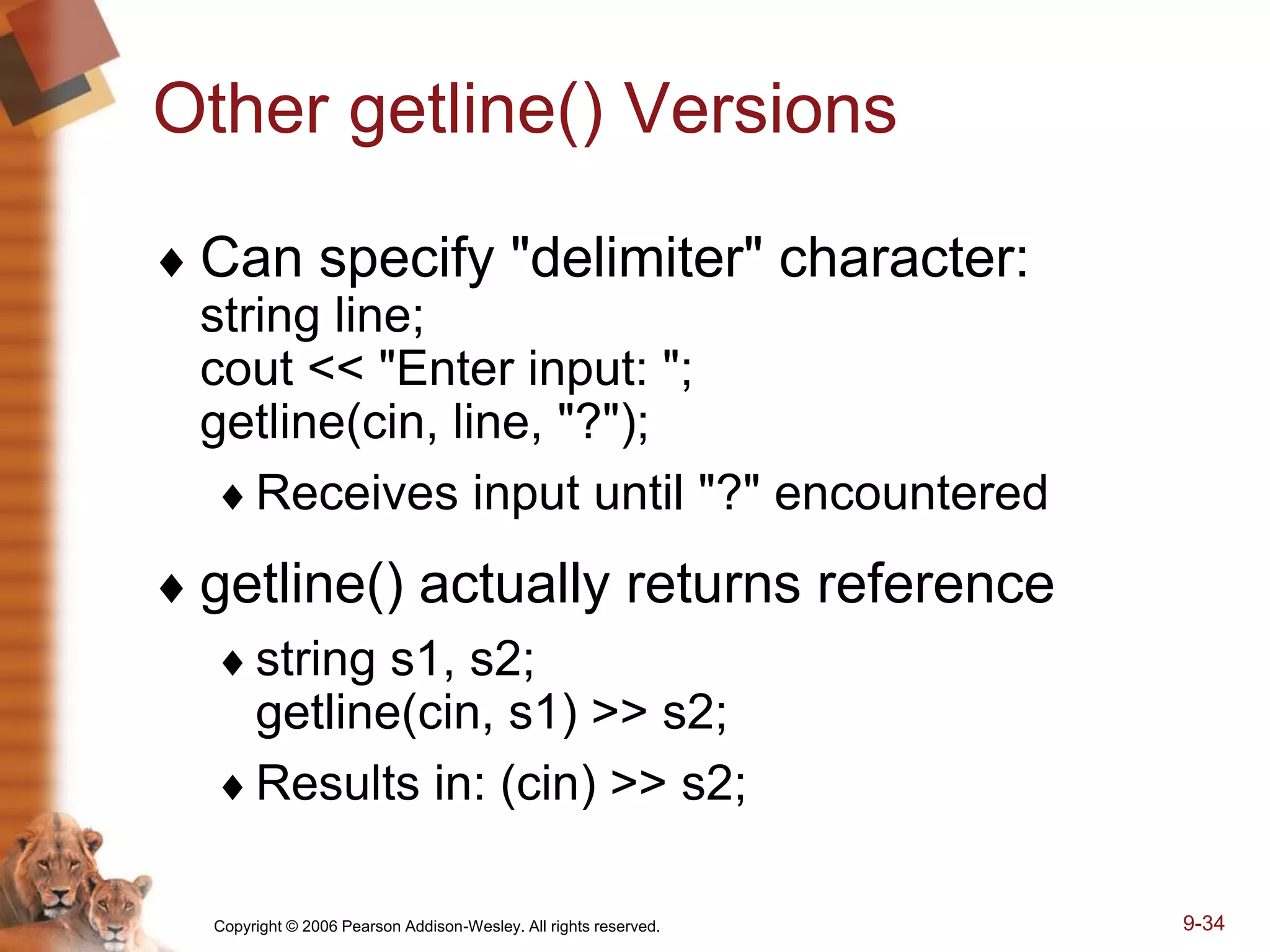
Other getline() Versions
 Can specify "delimiter" character:
string line;
cout << "Enter input: ";
getline(cin, line, "?");
Receives input until "?" encountered
 getline() actually returns reference
string s1, s2;
getline(cin, s1) >> s2;
Results in: (cin) >> s2;
Copyright © 2006 Pearson Addison-Wesley. All rights reserved. 9-35
Pitfall: Mixing Input Methods
 Be careful mixing cin >> var and getline
 int n;
string line;
cin >> n;
getline(cin, line);
 If input is: 42
Hello hitchhiker.
 Variable n set to 42
 line set to empty string!
 cin >> n skipped leading whitespace, leaving
"n" on stream for getline()!
Copyright © 2006 Pearson Addison-Wesley. All rights reserved. 9-36
Class string Processing
 Same operations available as c-strings
 And more!
Over 100 members of standard string class
 Some member functions:
.length()
Returns length of string variable
.at(i)
Returns reference to char at position i
Copyright © 2006 Pearson Addison-Wesley. All rights reserved. 9-37
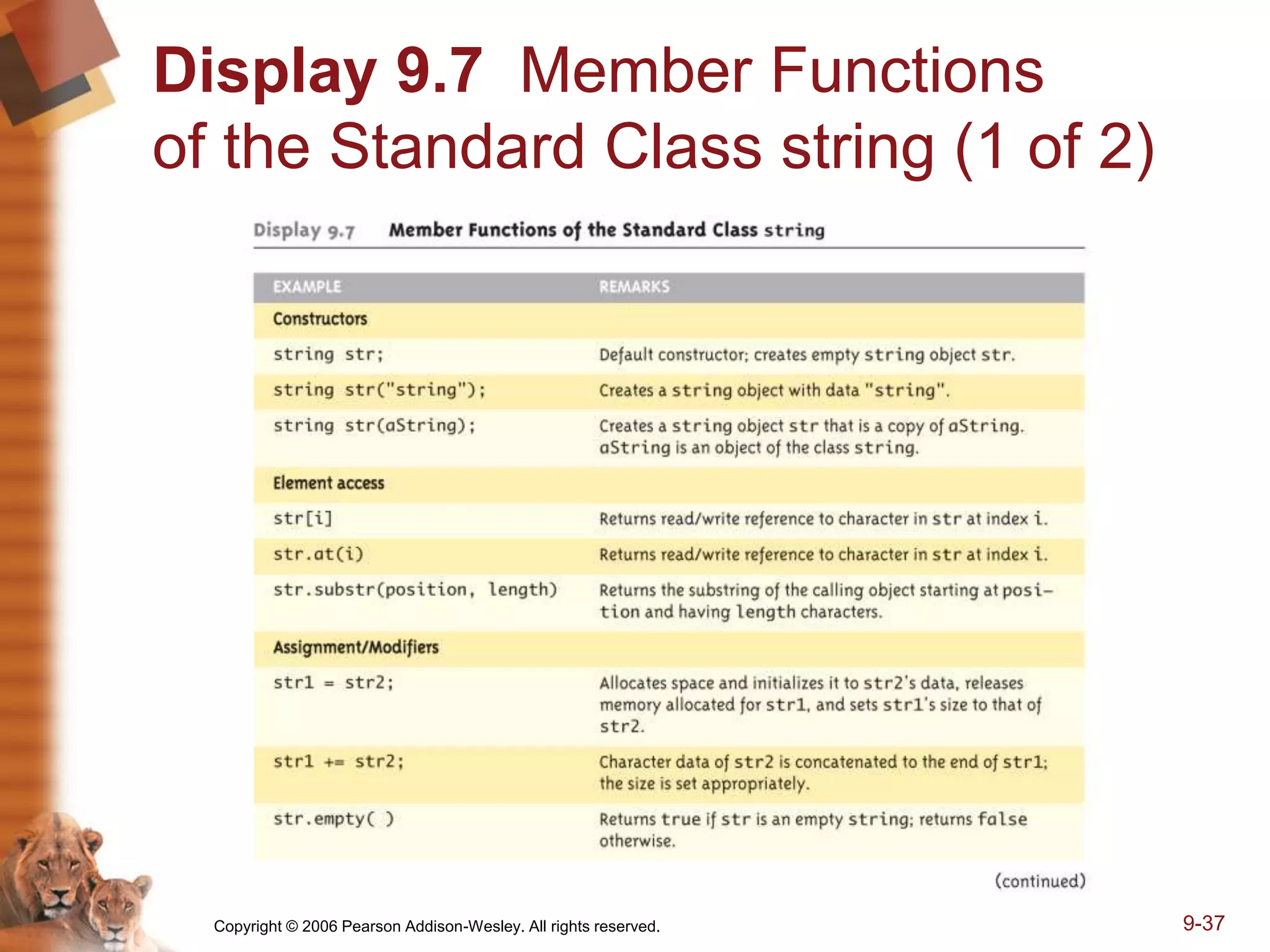
Display 9.7 Member Functions
of the Standard Class string (1 of 2)
Copyright © 2006 Pearson Addison-Wesley. All rights reserved. 9-38
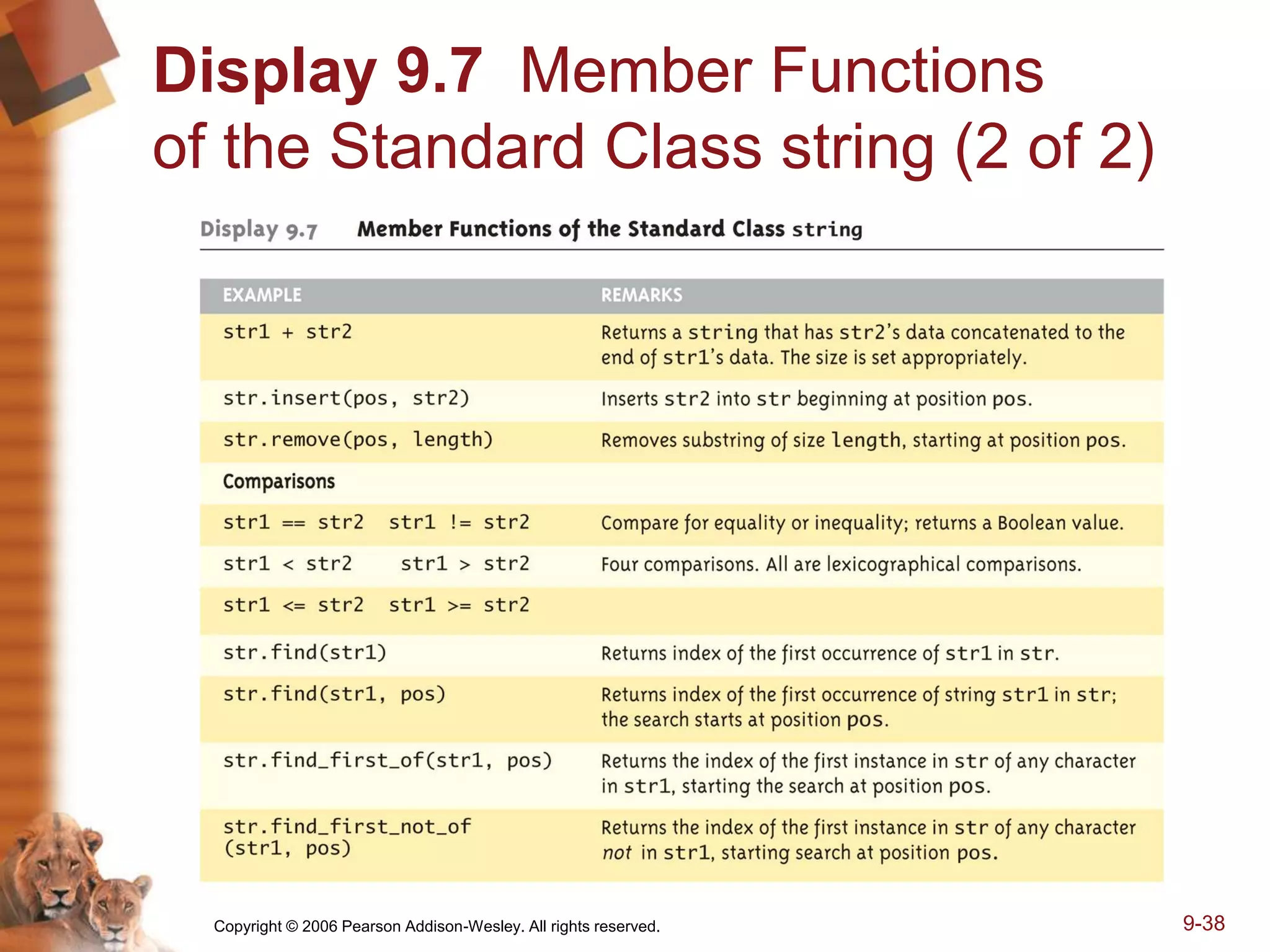
Display 9.7 Member Functions
of the Standard Class string (2 of 2)
Copyright © 2006 Pearson Addison-Wesley. All rights reserved. 9-39
C-string and string
Object Conversions
 Automatic type conversions
 From c-string to string object:
char aCString[] = "My C-string";
string stringVar;
stringVar = aCstring;
 Perfectly legal and appropriate!
 aCString = stringVar;
 ILLEGAL!
 Cannot auto-convert to c-string
 Must use explicit conversion:
strcpy(aCString, stringVar.c_str());
Copyright © 2006 Pearson Addison-Wesley. All rights reserved. 9-40
Summary
 C-string variable is "array of characters"
 With addition of null character, "0"
 C-strings act like arrays
 Cannot assign, compare like simple variables
 Libraries <cctype> & <string> have useful
manipulating functions
 cin.get() reads next single character
 getline() versions allow full line reading
 Class string objects are better-behaved than c-strings

sav_ch09.ppt

  • 1.
  • 2.
    Copyright © 2006Pearson Addison-Wesley. All rights reserved. 9-2 Learning Objectives  An Array Type for Strings C-Strings  Character Manipulation Tools Character I/O get, put member functions putback, peek, ignore  Standard Class string String processing
  • 3.
    Copyright © 2006Pearson Addison-Wesley. All rights reserved. 9-3 Introduction  Two string types:  C-strings Array with base type char End of string marked with null, "0" "Older" method inherited from C  String class Uses templates
  • 4.
    Copyright © 2006Pearson Addison-Wesley. All rights reserved. 9-4 C-Strings  Array with base type char One character per indexed variable One extra character: "0" Called "null character" End marker  We’ve used c-strings Literal "Hello" stored as c-string
  • 5.
    Copyright © 2006Pearson Addison-Wesley. All rights reserved. 9-5 C-String Variable  Array of characters: char s[10];  Declares a c-string variable to hold up to 9 characters  + one null character  Typically "partially-filled" array  Declare large enough to hold max-size string  Indicate end with null  Only difference from standard array:  Must contain null character
  • 6.
    Copyright © 2006Pearson Addison-Wesley. All rights reserved. 9-6 C-String Storage  A standard array: char s[10]; If s contains string "Hi Mom", stored as: Display, page 370
  • 7.
    Copyright © 2006Pearson Addison-Wesley. All rights reserved. 9-7 C-String Initialization  Can initialize c-string: char myMessage[20] = "Hi there.";  Needn’t fill entire array  Initialization places "0" at end  Can omit array-size: char shortString[] = "abc";  Automatically makes size one more than length of quoted string  NOT same as: char shortString[] = {"a", "b", "c"};
  • 8.
    Copyright © 2006Pearson Addison-Wesley. All rights reserved. 9-8 C-String Indexes  A c-string IS an array  Can access indexed variables of: char ourString[5] = "Hi"; ourString[0] is "H" ourString[1] is "i" ourString[2] is "0" ourString[3] is unknown ourString[4] is unknown
  • 9.
    Copyright © 2006Pearson Addison-Wesley. All rights reserved. 9-9 C-String Index Manipulation  Can manipulate indexed variables char happyString[7] = "DoBeDo"; happyString[6] = "Z"; Be careful! Here, "0" (null) was overwritten by a "Z"!  If null overwritten, c-string no longer "acts" like c-string! Unpredictable results!
  • 10.
    Copyright © 2006Pearson Addison-Wesley. All rights reserved. 9-10 Library  Declaring c-strings Requires no C++ library Built into standard C++  Manipulations Require library <cstring> Typically included when using c-strings Normally want to do "fun" things with them
  • 11.
    Copyright © 2006Pearson Addison-Wesley. All rights reserved. 9-11 = and == with C-strings  C-strings not like other variables  Cannot assign or compare: char aString[10]; aString = "Hello"; // ILLEGAL!  Can ONLY use "=" at declaration of c-string!  Must use library function for assignment: strcpy(aString, "Hello");  Built-in function (in <cstring>)  Sets value of aString equal to "Hello"  NO checks for size!  Up to programmer, just like other arrays!
  • 12.
    Copyright © 2006Pearson Addison-Wesley. All rights reserved. 9-12 Comparing C-strings  Also cannot use operator == char aString[10] = "Hello"; char anotherString[10] = "Goodbye"; aString == anotherString; // NOT allowed!  Must use library function again: if (strcmp(aString, anotherString)) cout << "Strings NOT same."; else cout << "Strings are same.";
  • 13.
    Copyright © 2006Pearson Addison-Wesley. All rights reserved. 9-13 The <cstring> Library: Display 9.1 Some Predefined C-String Functions in <cstring> (1 of 2)  Full of string manipulation functions
  • 14.
    Copyright © 2006Pearson Addison-Wesley. All rights reserved. 9-14 The <cstring> Library: Display 9.1 Some Predefined C-String Functions in <cstring> (2 of 2)
  • 15.
    Copyright © 2006Pearson Addison-Wesley. All rights reserved. 9-15 C-string Functions: strlen()  "String length"  Often useful to know string length: char myString[10] = "dobedo"; cout << strlen(myString); Returns number of characters Not including null Result here: 6
  • 16.
    Copyright © 2006Pearson Addison-Wesley. All rights reserved. 9-16 C-string Functions: strcat()  strcat()  "String concatenate": char stringVar[20] = "The rain"; strcat(stringVar, "in Spain"); Note result: stringVar now contains "The rainin Spain" Be careful! Incorporate spaces as needed!
  • 17.
    Copyright © 2006Pearson Addison-Wesley. All rights reserved. 9-17 C-string Arguments and Parameters  Recall: c-string is array  So c-string parameter is array parameter  C-strings passed to functions can be changed by receiving function!  Like all arrays, typical to send size as well  Function "could" also use "0" to find end  So size not necessary if function won’t change c-string parameter  Use "const" modifier to protect c-string arguments
  • 18.
    Copyright © 2006Pearson Addison-Wesley. All rights reserved. 9-18 C-String Output  Can output with insertion operator, <<  As we’ve been doing already: cout << news << " Wow.n"; Where news is a c-string variable  Possible because << operator is overloaded for c-strings!
  • 19.
    Copyright © 2006Pearson Addison-Wesley. All rights reserved. 9-19 C-String Input  Can input with extraction operator, >> Issues exist, however  Whitespace is "delimiter" Tab, space, line breaks are "skipped" Input reading "stops" at delimiter  Watch size of c-string Must be large enough to hold entered string! C++ gives no warnings of such issues!
  • 20.
    Copyright © 2006Pearson Addison-Wesley. All rights reserved. 9-20 C-String Input Example  char a[80], b[80]; cout << "Enter input: "; cin >> a >> b; cout << a << b << "END OF OUTPUTn";  Dialogue offered: Enter input: Do be do to you! DobeEND OF OUTPUT  Note: Underlined portion typed at keyboard  C-string a receives: "do"  C-string b receives: "be"
  • 21.
    Copyright © 2006Pearson Addison-Wesley. All rights reserved. 9-21 C-String Line Input  Can receive entire line into c-string  Use getline(), a predefined member function: char a[80]; cout << "Enter input: "; cin.getline(a, 80); cout << a << "END OF OUTPUTn";  Dialogue: Enter input: Do be do to you! Do be do to you!END OF INPUT
  • 22.
    Copyright © 2006Pearson Addison-Wesley. All rights reserved. 9-22 More getline()  Can explicitly tell length to receive: char shortString[5]; cout << "Enter input: "; cin.getline(shortString, 5); cout << shortString << "END OF OUTPUTn"; Results: Enter input: dobedowap dobeEND OF OUTPUT Forces FOUR characters only be read Recall need for null character!
  • 23.
    Copyright © 2006Pearson Addison-Wesley. All rights reserved. 9-23 Character I/O  Input and output data ALL treated as character data e.g., number 10 outputted as "1" and "0" Conversion done automatically Uses low-level utilities  Can use same low-level utilities ourselves as well
  • 24.
    Copyright © 2006Pearson Addison-Wesley. All rights reserved. 9-24 Member Function get()  Reads one char at a time  Member function of cin object: char nextSymbol; cin.get(nextSymbol); Reads next char & puts in variable nextSymbol Argument must be char type Not "string"!
  • 25.
    Copyright © 2006Pearson Addison-Wesley. All rights reserved. 9-25 Member Function put()  Outputs one character at a time  Member function of cout object:  Examples: cout.put("a"); Outputs letter "a" to screen char myString[10] = "Hello"; cout.put(myString[1]); Outputs letter "e" to screen
  • 26.
    Copyright © 2006Pearson Addison-Wesley. All rights reserved. 9-26 More Member Functions  putback()  Once read, might need to "put back"  cin.putback(lastChar);  peek()  Returns next char, but leaves it there  peekChar = cin.peek();  ignore()  Skip input, up to designated character  cin.ignore(1000, "n");  Skips at most 1000 characters until "n"
  • 27.
    Copyright © 2006Pearson Addison-Wesley. All rights reserved. 9-27 Character-Manipulating Functions: Display 9.3 Some Functions in <cctype> (1 of 3)
  • 28.
    Copyright © 2006Pearson Addison-Wesley. All rights reserved. 9-28 Character-Manipulating Functions: Display 9.3 Some Functions in <cctype> (2 of 3)
  • 29.
    Copyright © 2006Pearson Addison-Wesley. All rights reserved. 9-29 Character-Manipulating Functions: Display 9.3 Some Functions in <cctype> (3 of 3)
  • 30.
    Copyright © 2006Pearson Addison-Wesley. All rights reserved. 9-30 Standard Class string  Defined in library: #include <string> using namespace std;  String variables and expressions  Treated much like simple types  Can assign, compare, add: string s1, s2, s3; s3 = s1 + s2; //Concatenation s3 = "Hello Mom!" //Assignment  Note c-string "Hello Mom!" automatically converted to string type!
  • 31.
    Copyright © 2006Pearson Addison-Wesley. All rights reserved. 9-31 Display 9.4 Program Using the Class string
  • 32.
    Copyright © 2006Pearson Addison-Wesley. All rights reserved. 9-32 I/O with Class string  Just like other types!  string s1, s2; cin >> s1; cin >> s2;  Results: User types in: May the hair on your toes grow long and curly!  Extraction still ignores whitespace: s1 receives value "May" s2 receives value "the"
  • 33.
    Copyright © 2006Pearson Addison-Wesley. All rights reserved. 9-33 getline() with Class string  For complete lines: string line; cout << "Enter a line of input: "; getline(cin, line); cout << line << "END OF OUTPUT";  Dialogue produced: Enter a line of input: Do be do to you! Do be do to you!END OF INPUT Similar to c-string’s usage of getline()
  • 34.
    Copyright © 2006Pearson Addison-Wesley. All rights reserved. 9-34 Other getline() Versions  Can specify "delimiter" character: string line; cout << "Enter input: "; getline(cin, line, "?"); Receives input until "?" encountered  getline() actually returns reference string s1, s2; getline(cin, s1) >> s2; Results in: (cin) >> s2;
  • 35.
    Copyright © 2006Pearson Addison-Wesley. All rights reserved. 9-35 Pitfall: Mixing Input Methods  Be careful mixing cin >> var and getline  int n; string line; cin >> n; getline(cin, line);  If input is: 42 Hello hitchhiker.  Variable n set to 42  line set to empty string!  cin >> n skipped leading whitespace, leaving "n" on stream for getline()!
  • 36.
    Copyright © 2006Pearson Addison-Wesley. All rights reserved. 9-36 Class string Processing  Same operations available as c-strings  And more! Over 100 members of standard string class  Some member functions: .length() Returns length of string variable .at(i) Returns reference to char at position i
  • 37.
    Copyright © 2006Pearson Addison-Wesley. All rights reserved. 9-37 Display 9.7 Member Functions of the Standard Class string (1 of 2)
  • 38.
    Copyright © 2006Pearson Addison-Wesley. All rights reserved. 9-38 Display 9.7 Member Functions of the Standard Class string (2 of 2)
  • 39.
    Copyright © 2006Pearson Addison-Wesley. All rights reserved. 9-39 C-string and string Object Conversions  Automatic type conversions  From c-string to string object: char aCString[] = "My C-string"; string stringVar; stringVar = aCstring;  Perfectly legal and appropriate!  aCString = stringVar;  ILLEGAL!  Cannot auto-convert to c-string  Must use explicit conversion: strcpy(aCString, stringVar.c_str());
  • 40.
    Copyright © 2006Pearson Addison-Wesley. All rights reserved. 9-40 Summary  C-string variable is "array of characters"  With addition of null character, "0"  C-strings act like arrays  Cannot assign, compare like simple variables  Libraries <cctype> & <string> have useful manipulating functions  cin.get() reads next single character  getline() versions allow full line reading  Class string objects are better-behaved than c-strings