SAP BASIS
      Administration

  Course Details


        © UWINPro Inc.
SAP BASIS (Administration)
    At UWINPro, our expert SAP trainers/consultants provide the best SAP
    BASIS training.


•   Course Duration: 60 Hours


•   Course Format: Weekends/Weekdays


•   Mode of Training:
                     - Onsite/Classroom
                     - Online


                                                      © UWINPro Inc.
Course Highlights
   SAP BASIS online access

   Hands on training

   Reference course related videos

   Training through slideshows /notes and exercises

   Case Study - Real time business scenario and a typical SAP BASIS
    implementation case study

   SAP BASIS Quiz

   SAP BASIS Certification material

   Sample of interview Questions for SAP BASIS

   Training Quality Feedback form

   How to use important SAP resources - SAP Service Marketplace, SDN etc


                                                            © UWINPro Inc.
© UWINPro Inc.
Course Details
   Introduction:
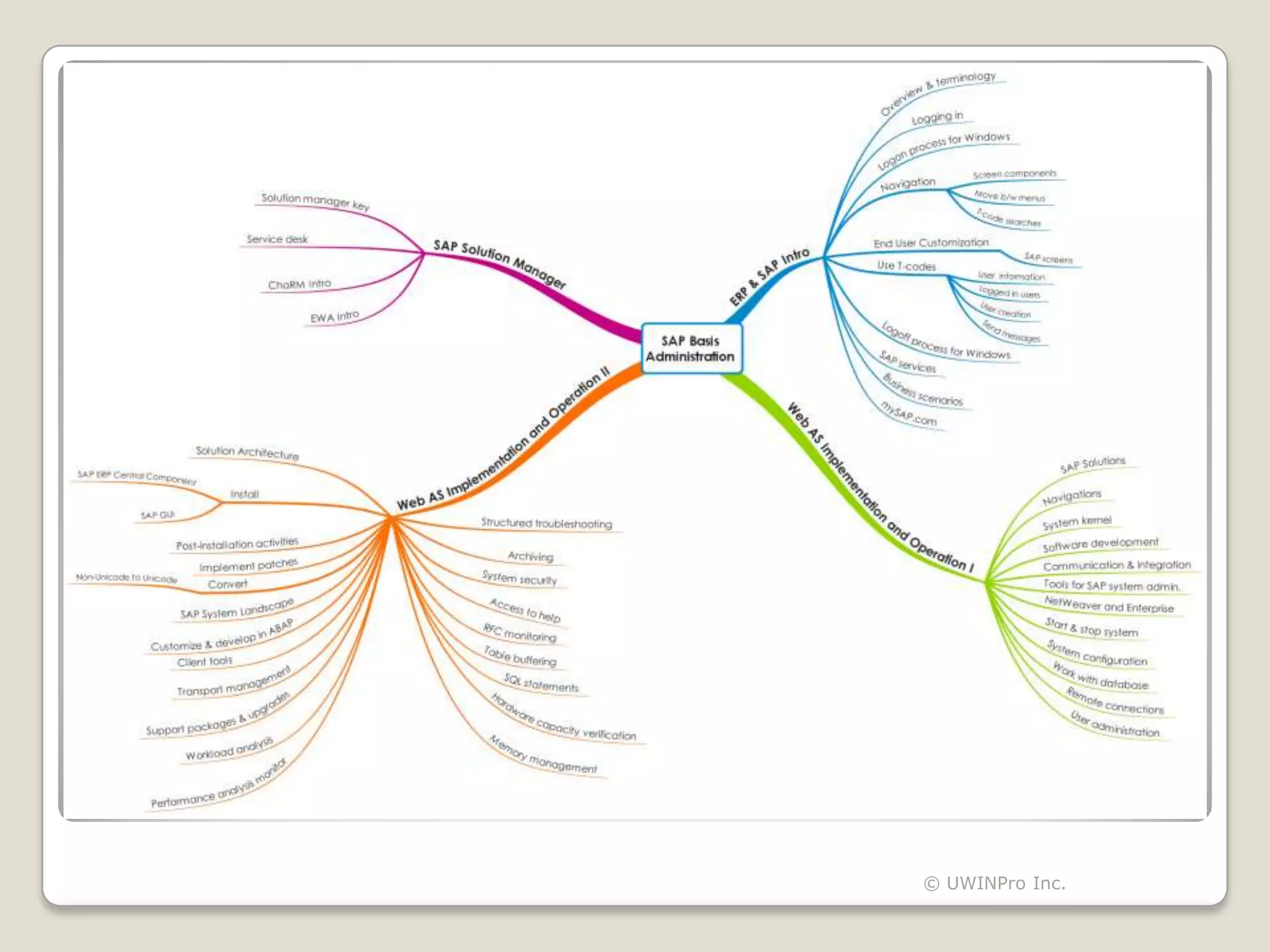
    Introduction to SAP, Overview of ERP and SAP - SAP Terminology, Introducing frequently used SAP
    terminology, Logging in to a SAP system, SAP logon process for Windows, Basic SAP Navigation -
    the basic SAP screen components, moving between menus, T-code searches and other commonly
    used functions, End User Customization - customizing some SAP screens. Using T-codes – View
    user information, logged in users, user creation, sending messages, technical and functional
    modules, Various SAP functional modules, log off from SAP system - SAP logoff process for
    Windows, SAP services, co-operative business scenarios, mySAP.com


    SAP Web AS Implementation and Operation I :
    SAP Solutions, Navigations, System Kernel, Software Development in SAP System, Communication
    and Integration Technologies, Tools for SAP System Administration, SAP NetWeaver and
    Enterprise, Starting and Stopping SAP System, Introduction to System Configuration,
    Fundamentals of working with the Database, Basics of User Administration, Setting-up Remote
    Connections, Working with TMS, Support Packages, Plug-Ins, Add-Ons, Scheduling Background
    Tasks


                                                                          © UWINPro Inc.
Course Details
   SAP Web AS Implementation and Operation II :
    mySAP ERP Solution Architecture, Planning the Installation of SAP ERP Central Component,
    Preparing for the Installation of SAP ERP Central Component, Installing SAP GUI, Installing SAP
    ERP Central Component, Performing Post-Installation Activities, Implementing Patches, Converting
    Non-Unicode to Unicode, Troubleshooting Installation Problems, Introduction to Software Logistics,
    Setting Up an SAP System Landscape, Customizing and Development in ABAP, Transport
    Management in ABAP, Client Tools, Note Assistant, SAP Support Packages and Upgrades,
    Introduction to Workload Analysis, Performance Analysis Monitors, SAP Memory Management,
    Hardware Capacity Verification, Expensive SQL Statements, SAP Table Buffering, RFC Monitoring,
    Access to Help, Introduction to System Security, Archiving, Including Printers in SAP Systems,
    Structured Troubleshooting, Advanced User Administration Topics


   Using SAP Solution Manager :
    Generating Solution Manager Key, Introduction to Service Desk, Introduction to ChaRM,
    Introduction to EWA


                                                                             © UWINPro Inc.
THANK YOU !


To enroll for this course, contact us at: info@uwinpro.com

               For more info: www.uwinpro.com

                  Visit our    Channel


                                                 © UWINPro Inc.

SAP BASIS - Course

  • 1.
    SAP BASIS Administration Course Details © UWINPro Inc.
  • 2.
    SAP BASIS (Administration) At UWINPro, our expert SAP trainers/consultants provide the best SAP BASIS training. • Course Duration: 60 Hours • Course Format: Weekends/Weekdays • Mode of Training: - Onsite/Classroom - Online © UWINPro Inc.
  • 3.
    Course Highlights  SAP BASIS online access  Hands on training  Reference course related videos  Training through slideshows /notes and exercises  Case Study - Real time business scenario and a typical SAP BASIS implementation case study  SAP BASIS Quiz  SAP BASIS Certification material  Sample of interview Questions for SAP BASIS  Training Quality Feedback form  How to use important SAP resources - SAP Service Marketplace, SDN etc © UWINPro Inc.
  • 4.
  • 5.
    Course Details  Introduction: Introduction to SAP, Overview of ERP and SAP - SAP Terminology, Introducing frequently used SAP terminology, Logging in to a SAP system, SAP logon process for Windows, Basic SAP Navigation - the basic SAP screen components, moving between menus, T-code searches and other commonly used functions, End User Customization - customizing some SAP screens. Using T-codes – View user information, logged in users, user creation, sending messages, technical and functional modules, Various SAP functional modules, log off from SAP system - SAP logoff process for Windows, SAP services, co-operative business scenarios, mySAP.com  SAP Web AS Implementation and Operation I : SAP Solutions, Navigations, System Kernel, Software Development in SAP System, Communication and Integration Technologies, Tools for SAP System Administration, SAP NetWeaver and Enterprise, Starting and Stopping SAP System, Introduction to System Configuration, Fundamentals of working with the Database, Basics of User Administration, Setting-up Remote Connections, Working with TMS, Support Packages, Plug-Ins, Add-Ons, Scheduling Background Tasks © UWINPro Inc.
  • 6.
    Course Details  SAP Web AS Implementation and Operation II : mySAP ERP Solution Architecture, Planning the Installation of SAP ERP Central Component, Preparing for the Installation of SAP ERP Central Component, Installing SAP GUI, Installing SAP ERP Central Component, Performing Post-Installation Activities, Implementing Patches, Converting Non-Unicode to Unicode, Troubleshooting Installation Problems, Introduction to Software Logistics, Setting Up an SAP System Landscape, Customizing and Development in ABAP, Transport Management in ABAP, Client Tools, Note Assistant, SAP Support Packages and Upgrades, Introduction to Workload Analysis, Performance Analysis Monitors, SAP Memory Management, Hardware Capacity Verification, Expensive SQL Statements, SAP Table Buffering, RFC Monitoring, Access to Help, Introduction to System Security, Archiving, Including Printers in SAP Systems, Structured Troubleshooting, Advanced User Administration Topics  Using SAP Solution Manager : Generating Solution Manager Key, Introduction to Service Desk, Introduction to ChaRM, Introduction to EWA © UWINPro Inc.
  • 7.
    THANK YOU ! Toenroll for this course, contact us at: info@uwinpro.com For more info: www.uwinpro.com Visit our Channel © UWINPro Inc.